Java Programming: From Problem Analysis to Program Design, 5e Chapter 3 Introduction to Objects and Input/Output
Chapter Objectives Learn about objects and reference variables Explore how to use predefined methods in a program Become familiar with the  class   String Learn how to use input and output dialog boxes in a program Java Programming: From Problem Analysis to Program Design, 5e
Chapter Objectives (continued) Explore how to format the output of decimal numbers with the  String  method  format Become familiar with file input and output Java Programming: From Problem Analysis to Program Design, 5e
Object and Reference Variables Declare a reference variable of a class type Allocate memory space for data Instantiate an object of that class type Store the address of the object in a reference variable Java Programming: From Problem Analysis to Program Design, 5e
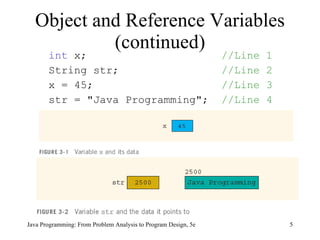
int  x;  //Line 1 String str;  //Line 2   x = 45;  //Line 3 str = "Java Programming";  //Line 4 Object and Reference Variables (continued) Java Programming: From Problem Analysis to Program Design, 5e
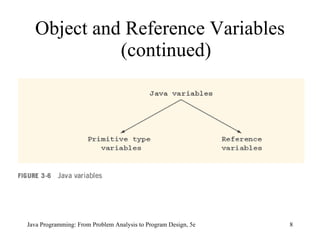
Object and Reference Variables (continued) Java Programming: From Problem Analysis to Program Design, 5e
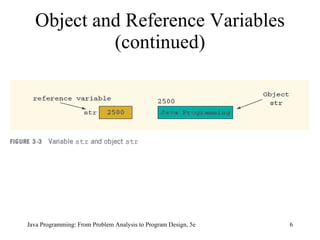
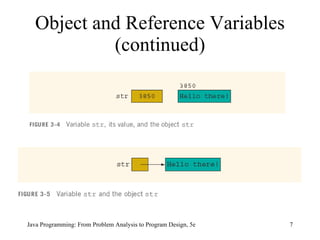
Java Programming: From Problem Analysis to Program Design, 5e Primitive type variables directly store data into their memory space Reference variables store the address of the object containing the data An object is an instance of a  class ,  and the operator  new  is used to instantiate an object  Objects and Reference Variables (continued)
Using Predefined Classes and Methods in a Program There are many predefined packages, classes, and methods in Java  Library: collection of packages Package: contains several classes Class: contains several methods Method: set of instructions Java Programming: From Problem Analysis to Program Design, 5e
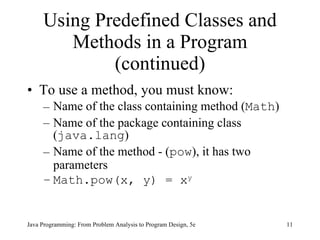
Using Predefined Classes and Methods in a Program (continued) To use a method, you must know: Name of the class containing method ( Math ) Name of the package containing class ( java.lang ) Name of the method - ( pow ), it has two parameters Math.pow(x, y) = x y   Java Programming: From Problem Analysis to Program Design, 5e
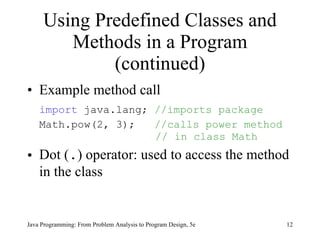
Using Predefined Classes and Methods in a Program (continued) Example method call import  java.lang;  //imports package Math.pow(2, 3);  //calls power method  // in class Math Dot ( . ) operator: used to access the method in the class Java Programming: From Problem Analysis to Program Design, 5e
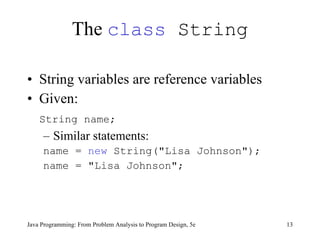
The  class  String String variables are reference variables Given:  String name;   Similar statements: name =  new  String("Lisa Johnson"); name = "Lisa Johnson"; Java Programming: From Problem Analysis to Program Design, 5e
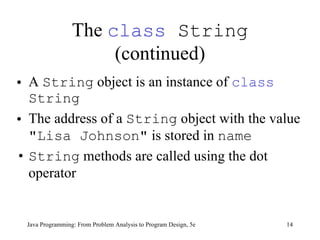
The  class  String  (continued) A  String  object is an instance of  class   String The address of a  String  object with the value  "Lisa Johnson"  is stored in  name String  methods are called using the dot operator Java Programming: From Problem Analysis to Program Design, 5e
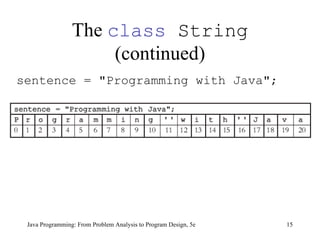
The  class  String  (continued) sentence = "Programming with Java"; Java Programming: From Problem Analysis to Program Design, 5e
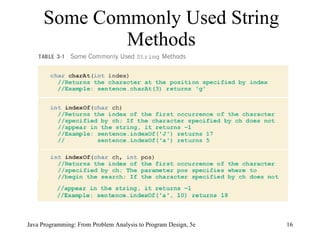
Some Commonly Used String Methods Java Programming: From Problem Analysis to Program Design, 5e
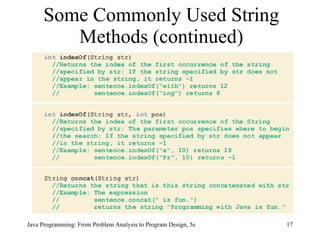
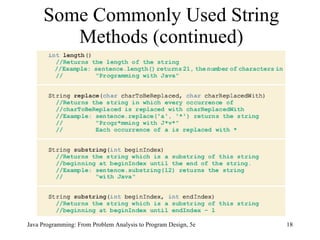
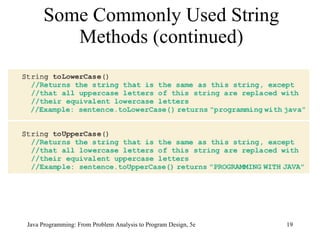
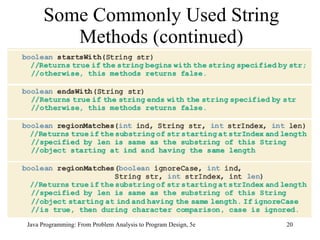
Some Commonly Used String Methods (continued) Java Programming: From Problem Analysis to Program Design, 5e
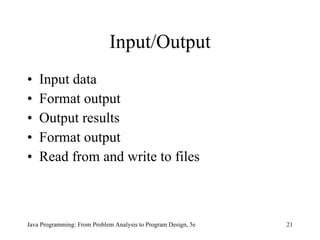
Input/Output Input data  Format output Output results Format output Read from and write to files Java Programming: From Problem Analysis to Program Design, 5e
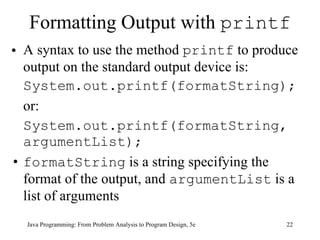
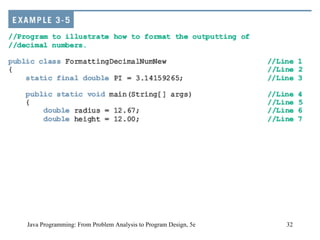
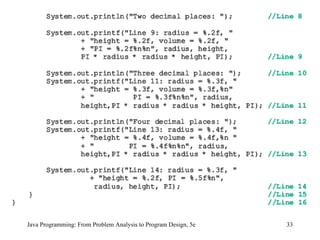
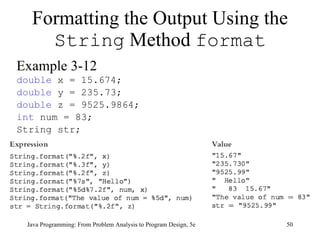
Formatting Output with  printf A syntax to use the method  printf  to produce output on the standard output device is: System.out.printf(formatString); or: System.out.printf(formatString, argumentList); formatString  is a string specifying the format of the output, and  argumentList  is a list of arguments Java Programming: From Problem Analysis to Program Design, 5e
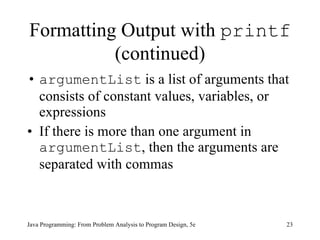
Formatting Output with  printf  (continued) argumentList  is a list of arguments that consists of constant values, variables, or expressions If there is more than one argument in  argumentList , then the arguments are separated with commas Java Programming: From Problem Analysis to Program Design, 5e
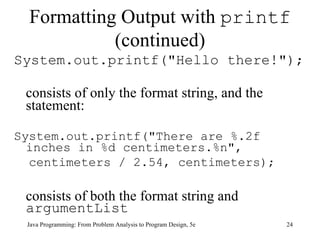
Formatting Output with  printf  (continued) System.out.printf("Hello there!");  consists of only the format string, and the statement: System.out.printf("There are %.2f inches in %d centimeters.%n", centimeters / 2.54, centimeters); consists of both the format string and  argumentList Java Programming: From Problem Analysis to Program Design, 5e
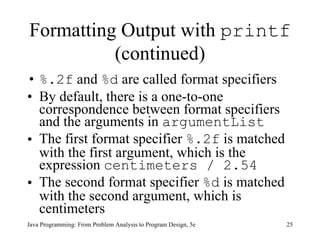
Formatting Output with  printf  (continued) %.2f  and  %d  are called format specifiers  By default, there is a one-to-one correspondence between format specifiers and the arguments in  argumentList   The first format specifier  %.2f  is matched with the first argument, which is the expression  centimeters / 2.54   The second format specifier  %d  is matched with the second argument, which is centimeters Java Programming: From Problem Analysis to Program Design, 5e
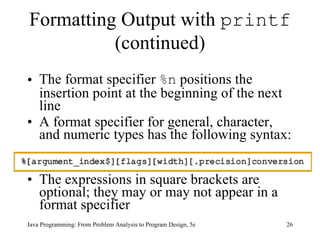
Formatting Output with  printf  (continued) The format specifier  %n  positions the insertion point at the beginning of the next line A format specifier for general, character, and numeric types has the following syntax:  The expressions in square brackets are optional; they may or may not appear in a format specifier Java Programming: From Problem Analysis to Program Design, 5e
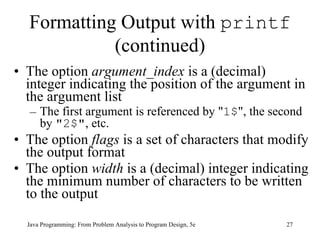
Formatting Output with  printf  (continued) The option  argument_index  is a (decimal) integer indicating the position of the argument in the argument list The first argument is referenced by " 1$ ", the second by  "2$" , etc.  The option  flags  is a set of characters that modify the output format  The option  width  is a (decimal) integer indicating the minimum number of characters to be written to the output  Java Programming: From Problem Analysis to Program Design, 5e
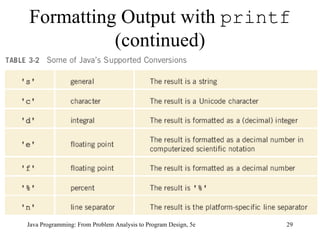
Formatting Output with  printf  (continued) The option  precision  is a (decimal) integer usually used to restrict the number of characters  The required  conversion  is a character indicating how the argument should be formatted  Java Programming: From Problem Analysis to Program Design, 5e
Formatting Output with  printf  (continued) Java Programming: From Problem Analysis to Program Design, 5e
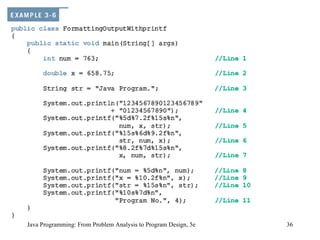
Java Programming: From Problem Analysis to Program Design, 5e
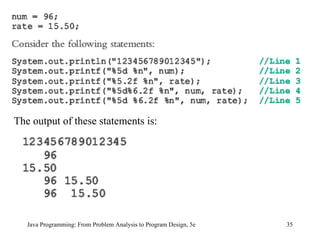
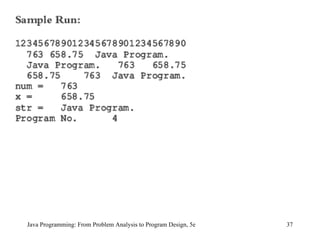
Java Programming: From Problem Analysis to Program Design, 5e The output of these statements is:
Java Programming: From Problem Analysis to Program Design, 5e
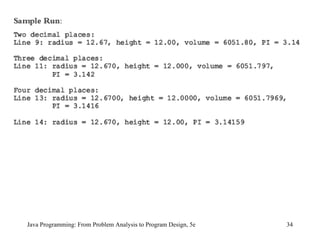
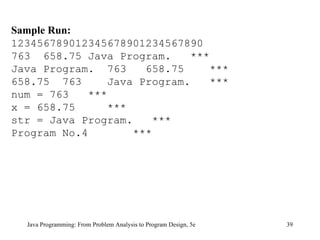
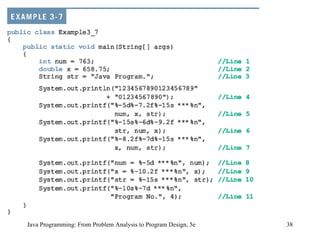
Java Programming: From Problem Analysis to Program Design, 5e Sample Run: 123456789012345678901234567890 763  658.75 Java Program.  *** Java Program.  763  658.75  *** 658.75  763  Java Program.  *** num = 763  *** x = 658.75  *** str = Java Program.  *** Program No.4  ***
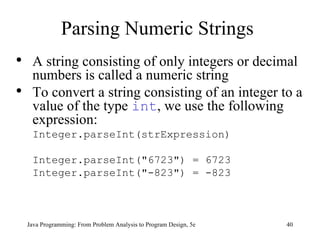
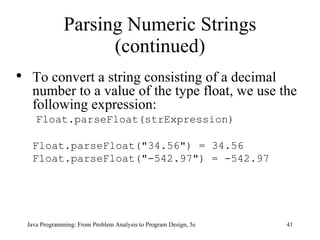
Parsing Numeric Strings Java Programming: From Problem Analysis to Program Design, 5e A string consisting of only integers or decimal numbers is called a numeric string To convert a string consisting of an integer to a value of the type  int , we use the following expression: Integer.parseInt(strExpression) Integer.parseInt("6723") = 6723 Integer.parseInt("-823") = -823
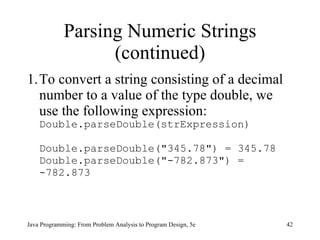
Parsing Numeric Strings (continued) Java Programming: From Problem Analysis to Program Design, 5e To convert a string consisting of a decimal number to a value of the type float, we use the following expression:   Float.parseFloat(strExpression) Float.parseFloat("34.56") = 34.56 Float.parseFloat("-542.97") = -542.97
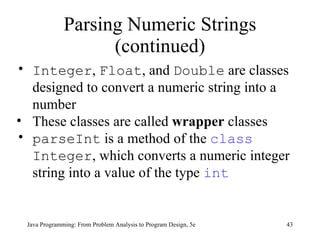
Parsing Numeric Strings (continued) To convert a string consisting of a decimal number to a value of the type double, we use the following expression: Double.parseDouble(strExpression) Double.parseDouble("345.78") = 345.78 Double.parseDouble("-782.873") = -782.873 Java Programming: From Problem Analysis to Program Design, 5e
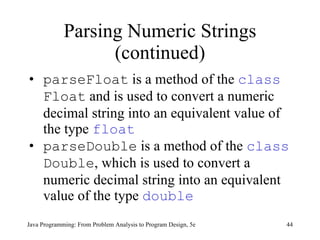
Parsing Numeric Strings (continued) Java Programming: From Problem Analysis to Program Design, 5e Integer ,  Float , and  Double  are classes designed to convert a numeric string into a number These classes are called  wrapper  classes  parseInt  is a method of the  class  Integer , which converts a numeric integer string into a value of the type  int
Parsing Numeric Strings (continued) parseFloat  is a method of the  class   Float  and is used to convert a numeric decimal string into an equivalent value of the type  float parseDouble  is a method of the  class   Double , which is used to convert a numeric decimal string into an equivalent value of the type  double   Java Programming: From Problem Analysis to Program Design, 5e
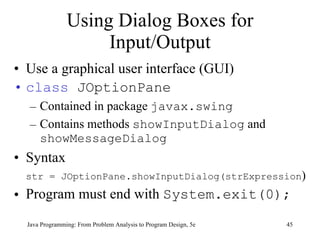
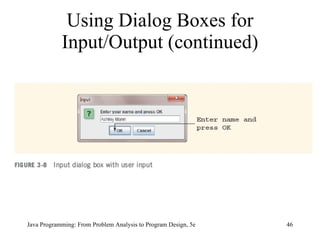
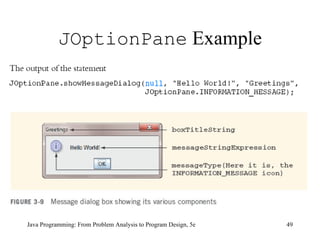
Using Dialog Boxes for Input/Output Use a graphical user interface (GUI) class  JOptionPane Contained in package  javax.swing Contains methods  showInputDialog  and  showMessageDialog Syntax str = JOptionPane.showInputDialog(strExpression ) Program must end with  System.exit(0); Java Programming: From Problem Analysis to Program Design, 5e
Using Dialog Boxes for Input/Output (continued) Java Programming: From Problem Analysis to Program Design, 5e
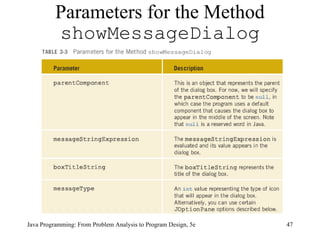
Parameters for the Method  showMessageDialog Java Programming: From Problem Analysis to Program Design, 5e
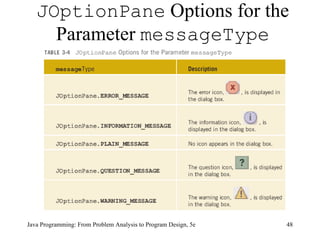
JOptionPane  Options for the Parameter  messageType Java Programming: From Problem Analysis to Program Design, 5e
JOptionPane  Example Java Programming: From Problem Analysis to Program Design, 5e
Formatting the Output Using the  String  Method  format Example 3-12 double  x = 15.674;  double  y = 235.73;  double  z = 9525.9864; int  num = 83; String str; Java Programming: From Problem Analysis to Program Design, 5e
File Input/Output File: area in secondary storage used to hold information You can also initialize a  Scanner  object to input sources other than the standard input device by passing an appropriate argument in place of the object  System.in We make use of the  class  FileReader Java Programming: From Problem Analysis to Program Design, 5e
File Input/Output (continued) Suppose that the input data is stored in a file, say  prog.dat , and this file is on the floppy disk  A The following statement creates the  Scanner  object  inFile  and initializes it to the file  prog.dat Scanner inFile =  new  Scanner ( new  FileReader("prog.dat"));  Java Programming: From Problem Analysis to Program Design, 5e
File Input/Output (continued) Next, you use the object  inFile  to input data from the file  prog.dat  just the way you used the object  console  to input data from the standard input device using the methods  next ,  nextInt ,  nextDouble , and so on Java Programming: From Problem Analysis to Program Design, 5e
File Input/Output (continued) Java Programming: From Problem Analysis to Program Design, 5e
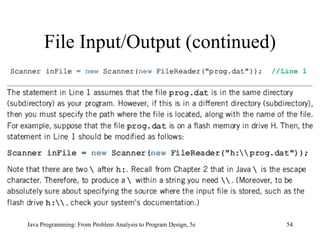
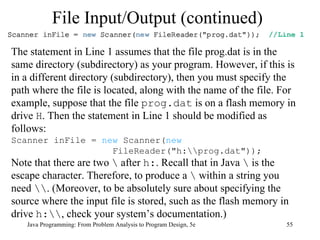
File Input/Output (continued) Java Programming: From Problem Analysis to Program Design, 5e The statement in Line 1 assumes that the file prog.dat is in the same directory (subdirectory) as your program. However, if this is in a different directory (subdirectory), then you must specify the path where the file is located, along with the name of the file. For example, suppose that the file  prog.dat  is on a flash memory in drive  H . Then the statement in Line 1 should be modified as follows: Scanner inFile =  new  Scanner( new   FileReader("h:\\prog.dat")); Note that there are two  \  after  h: . Recall that in Java  \  is the escape character. Therefore, to produce a  \  within a string you need  \\ . (Moreover, to be absolutely sure about specifying the source where the input file is stored, such as the flash memory in drive  h:\\ , check your system’s documentation.)
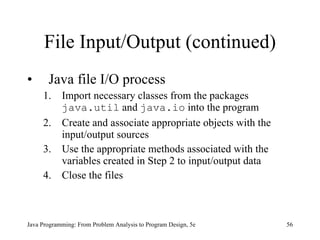
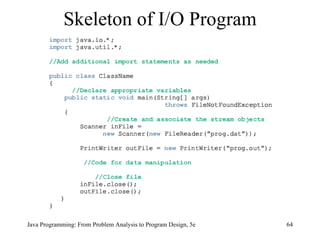
File Input/Output (continued) Java file I/O process 1. Import necessary classes from the packages  java.util  and  java.io  into the program  2. Create and associate appropriate objects with the input/output sources 3. Use the appropriate methods associated with the variables created in Step 2 to input/output data  4. Close the files Java Programming: From Problem Analysis to Program Design, 5e
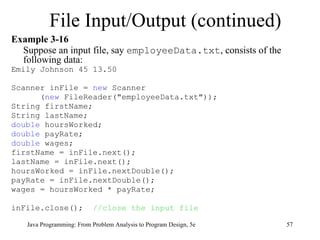
Example 3-16 Suppose an input file, say  employeeData.txt , consists of the following data: Emily Johnson 45 13.50 Scanner inFile =  new  Scanner ( new  FileReader("employeeData.txt")); String firstName;  String lastName;  double  hoursWorked;  double  payRate;  double  wages;  firstName = inFile.next();  lastName = inFile.next();  hoursWorked = inFile.nextDouble();  payRate = inFile.nextDouble();  wages = hoursWorked * payRate; inFile.close();  //close the input file File Input/Output (continued) Java Programming: From Problem Analysis to Program Design, 5e
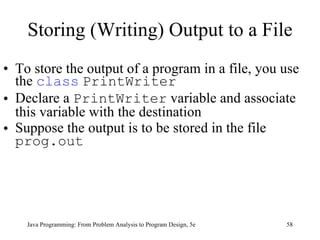
Storing (Writing) Output to a File To store the output of a program in a file, you use the  class   PrintWriter Declare a  PrintWriter  variable and associate this variable with the destination  Suppose the output is to be stored in the file  prog.out Java Programming: From Problem Analysis to Program Design, 5e
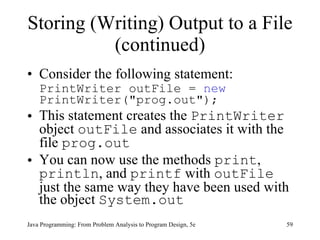
Storing (Writing) Output to a File (continued) Consider the following statement: PrintWriter outFile =  new  PrintWriter("prog.out"); This statement creates the  PrintWriter  object  outFile  and associates it with the file  prog.out You can now use the methods  print ,  println , and  printf  with  outFile  just the same way they have been used with the object  System.out Java Programming: From Problem Analysis to Program Design, 5e
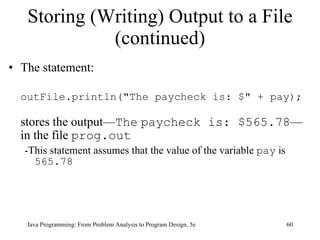
Storing (Writing) Output to a File (continued) The statement: outFile.println("The paycheck is: $" + pay); stores the output— The   paycheck is: $565.78 —in the file  prog.out -This statement assumes that the value of the variable  pay  is  565.78 Java Programming: From Problem Analysis to Program Design, 5e
Storing (Writing) Output to a File (continued) Step 4 requires closing the file; you close the input and output files by using the method close  inFile.close(); outFile.close(); Closing the output file ensures that the buffer holding the output will be emptied; that is, the entire output generated by the program will be sent to the output file Java Programming: From Problem Analysis to Program Design, 5e
throws  Clause Java Programming: From Problem Analysis to Program Design, 5e During program execution, various things can happen; for example, division by zero or inputting a letter for a number  In such cases, we say that an exception has occurred If an exception occurs in a method, the method should either handle the exception or  throw  it for the calling environment to handle If an input file does not exist, the program throws a  FileNotFoundException
throws  Clause (continued) If an output file cannot be created or accessed, the program throws a  FileNotFoundException   For the next few chapters, we will simply throw the exceptions Because we do not need the method  main   to handle the  FileNotFoundException   exception, we will include a command in the heading of the method  main   to throw the  FileNotFoundException   exception Java Programming: From Problem Analysis to Program Design, 5e
Skeleton of I/O Program Java Programming: From Problem Analysis to Program Design, 5e
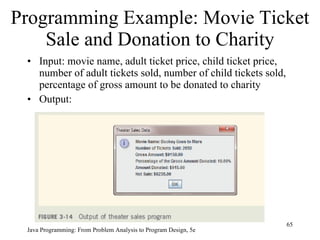
Programming Example: Movie Ticket Sale and Donation to Charity Input: movie name, adult ticket price, child ticket price, number of adult tickets sold, number of child tickets sold, percentage of gross amount to be donated to charity Output:  Java Programming: From Problem Analysis to Program Design, 5e
Programming Example: Movie Ticket Sale and Donation to Charity (continued) Import appropriate packages Get inputs from user using  JOptionPane.showInputDialog Perform appropriate calculations Display output using  JOptionPane.showMessageDialog Java Programming: From Problem Analysis to Program Design, 5e
Programming Example:  Student Grade Input: file containing student’s first name, last name, five test scores Output: file containing student’s first name, last name, five test scores, average of five test scores Java Programming: From Problem Analysis to Program Design, 5e
Programming Example: Student Grade (continued) Import appropriate packages Get input from file using the  class es  Scanner  and  FileReader Read and calculate the average of test scores Write to output file using the  class   PrintWriter Close files Java Programming: From Problem Analysis to Program Design, 5e
Chapter Summary Primitive type variables store data into their memory space Reference variables store the address of the object containing the data An object is an instance of a class  Java Programming: From Problem Analysis to Program Design, 5e
Chapter Summary (continued) Operator  new  is used to instantiate an object Garbage collection is reclaiming memory not being used To use a predefined method, you must know its name and the class and package it belongs to The dot (.) operator is used to access a certain method in a class Java Programming: From Problem Analysis to Program Design, 5e
Chapter Summary (continued) Methods of the  class  String  are used to manipulate input and output data Dialog boxes can be used to input data and output results Data can be read from and written to files Data can be formatted using the  String  method  format Java Programming: From Problem Analysis to Program Design, 5e

9781111530532 ppt ch03

  • 1.
    Java Programming: FromProblem Analysis to Program Design, 5e Chapter 3 Introduction to Objects and Input/Output
  • 2.
    Chapter Objectives Learnabout objects and reference variables Explore how to use predefined methods in a program Become familiar with the class String Learn how to use input and output dialog boxes in a program Java Programming: From Problem Analysis to Program Design, 5e
  • 3.
    Chapter Objectives (continued)Explore how to format the output of decimal numbers with the String method format Become familiar with file input and output Java Programming: From Problem Analysis to Program Design, 5e
  • 4.
    Object and ReferenceVariables Declare a reference variable of a class type Allocate memory space for data Instantiate an object of that class type Store the address of the object in a reference variable Java Programming: From Problem Analysis to Program Design, 5e
  • 5.
    int x; //Line 1 String str; //Line 2 x = 45; //Line 3 str = "Java Programming"; //Line 4 Object and Reference Variables (continued) Java Programming: From Problem Analysis to Program Design, 5e
  • 6.
    Object and ReferenceVariables (continued) Java Programming: From Problem Analysis to Program Design, 5e
  • 7.
    Object and ReferenceVariables (continued) Java Programming: From Problem Analysis to Program Design, 5e
  • 8.
    Object and ReferenceVariables (continued) Java Programming: From Problem Analysis to Program Design, 5e
  • 9.
    Java Programming: FromProblem Analysis to Program Design, 5e Primitive type variables directly store data into their memory space Reference variables store the address of the object containing the data An object is an instance of a class , and the operator new is used to instantiate an object Objects and Reference Variables (continued)
  • 10.
    Using Predefined Classesand Methods in a Program There are many predefined packages, classes, and methods in Java Library: collection of packages Package: contains several classes Class: contains several methods Method: set of instructions Java Programming: From Problem Analysis to Program Design, 5e
  • 11.
    Using Predefined Classesand Methods in a Program (continued) To use a method, you must know: Name of the class containing method ( Math ) Name of the package containing class ( java.lang ) Name of the method - ( pow ), it has two parameters Math.pow(x, y) = x y Java Programming: From Problem Analysis to Program Design, 5e
  • 12.
    Using Predefined Classesand Methods in a Program (continued) Example method call import java.lang; //imports package Math.pow(2, 3); //calls power method // in class Math Dot ( . ) operator: used to access the method in the class Java Programming: From Problem Analysis to Program Design, 5e
  • 13.
    The class String String variables are reference variables Given: String name; Similar statements: name = new String("Lisa Johnson"); name = "Lisa Johnson"; Java Programming: From Problem Analysis to Program Design, 5e
  • 14.
    The class String (continued) A String object is an instance of class String The address of a String object with the value "Lisa Johnson" is stored in name String methods are called using the dot operator Java Programming: From Problem Analysis to Program Design, 5e
  • 15.
    The class String (continued) sentence = "Programming with Java"; Java Programming: From Problem Analysis to Program Design, 5e
  • 16.
    Some Commonly UsedString Methods Java Programming: From Problem Analysis to Program Design, 5e
  • 17.
    Some Commonly UsedString Methods (continued) Java Programming: From Problem Analysis to Program Design, 5e
  • 18.
    Some Commonly UsedString Methods (continued) Java Programming: From Problem Analysis to Program Design, 5e
  • 19.
    Some Commonly UsedString Methods (continued) Java Programming: From Problem Analysis to Program Design, 5e
  • 20.
    Some Commonly UsedString Methods (continued) Java Programming: From Problem Analysis to Program Design, 5e
  • 21.
    Input/Output Input data Format output Output results Format output Read from and write to files Java Programming: From Problem Analysis to Program Design, 5e
  • 22.
    Formatting Output with printf A syntax to use the method printf to produce output on the standard output device is: System.out.printf(formatString); or: System.out.printf(formatString, argumentList); formatString is a string specifying the format of the output, and argumentList is a list of arguments Java Programming: From Problem Analysis to Program Design, 5e
  • 23.
    Formatting Output with printf (continued) argumentList is a list of arguments that consists of constant values, variables, or expressions If there is more than one argument in argumentList , then the arguments are separated with commas Java Programming: From Problem Analysis to Program Design, 5e
  • 24.
    Formatting Output with printf (continued) System.out.printf("Hello there!"); consists of only the format string, and the statement: System.out.printf("There are %.2f inches in %d centimeters.%n", centimeters / 2.54, centimeters); consists of both the format string and argumentList Java Programming: From Problem Analysis to Program Design, 5e
  • 25.
    Formatting Output with printf (continued) %.2f and %d are called format specifiers By default, there is a one-to-one correspondence between format specifiers and the arguments in argumentList The first format specifier %.2f is matched with the first argument, which is the expression centimeters / 2.54 The second format specifier %d is matched with the second argument, which is centimeters Java Programming: From Problem Analysis to Program Design, 5e
  • 26.
    Formatting Output with printf (continued) The format specifier %n positions the insertion point at the beginning of the next line A format specifier for general, character, and numeric types has the following syntax: The expressions in square brackets are optional; they may or may not appear in a format specifier Java Programming: From Problem Analysis to Program Design, 5e
  • 27.
    Formatting Output with printf (continued) The option argument_index is a (decimal) integer indicating the position of the argument in the argument list The first argument is referenced by " 1$ ", the second by "2$" , etc. The option flags is a set of characters that modify the output format The option width is a (decimal) integer indicating the minimum number of characters to be written to the output Java Programming: From Problem Analysis to Program Design, 5e
  • 28.
    Formatting Output with printf (continued) The option precision is a (decimal) integer usually used to restrict the number of characters The required conversion is a character indicating how the argument should be formatted Java Programming: From Problem Analysis to Program Design, 5e
  • 29.
    Formatting Output with printf (continued) Java Programming: From Problem Analysis to Program Design, 5e
  • 30.
    Java Programming: FromProblem Analysis to Program Design, 5e
  • 31.
    Java Programming: FromProblem Analysis to Program Design, 5e
  • 32.
    Java Programming: FromProblem Analysis to Program Design, 5e
  • 33.
    Java Programming: FromProblem Analysis to Program Design, 5e
  • 34.
    Java Programming: FromProblem Analysis to Program Design, 5e
  • 35.
    Java Programming: FromProblem Analysis to Program Design, 5e The output of these statements is:
  • 36.
    Java Programming: FromProblem Analysis to Program Design, 5e
  • 37.
    Java Programming: FromProblem Analysis to Program Design, 5e
  • 38.
    Java Programming: FromProblem Analysis to Program Design, 5e
  • 39.
    Java Programming: FromProblem Analysis to Program Design, 5e Sample Run: 123456789012345678901234567890 763 658.75 Java Program. *** Java Program. 763 658.75 *** 658.75 763 Java Program. *** num = 763 *** x = 658.75 *** str = Java Program. *** Program No.4 ***
  • 40.
    Parsing Numeric StringsJava Programming: From Problem Analysis to Program Design, 5e A string consisting of only integers or decimal numbers is called a numeric string To convert a string consisting of an integer to a value of the type int , we use the following expression: Integer.parseInt(strExpression) Integer.parseInt("6723") = 6723 Integer.parseInt("-823") = -823
  • 41.
    Parsing Numeric Strings(continued) Java Programming: From Problem Analysis to Program Design, 5e To convert a string consisting of a decimal number to a value of the type float, we use the following expression: Float.parseFloat(strExpression) Float.parseFloat("34.56") = 34.56 Float.parseFloat("-542.97") = -542.97
  • 42.
    Parsing Numeric Strings(continued) To convert a string consisting of a decimal number to a value of the type double, we use the following expression: Double.parseDouble(strExpression) Double.parseDouble("345.78") = 345.78 Double.parseDouble("-782.873") = -782.873 Java Programming: From Problem Analysis to Program Design, 5e
  • 43.
    Parsing Numeric Strings(continued) Java Programming: From Problem Analysis to Program Design, 5e Integer , Float , and Double are classes designed to convert a numeric string into a number These classes are called wrapper classes parseInt is a method of the class Integer , which converts a numeric integer string into a value of the type int
  • 44.
    Parsing Numeric Strings(continued) parseFloat is a method of the class Float and is used to convert a numeric decimal string into an equivalent value of the type float parseDouble is a method of the class Double , which is used to convert a numeric decimal string into an equivalent value of the type double Java Programming: From Problem Analysis to Program Design, 5e
  • 45.
    Using Dialog Boxesfor Input/Output Use a graphical user interface (GUI) class JOptionPane Contained in package javax.swing Contains methods showInputDialog and showMessageDialog Syntax str = JOptionPane.showInputDialog(strExpression ) Program must end with System.exit(0); Java Programming: From Problem Analysis to Program Design, 5e
  • 46.
    Using Dialog Boxesfor Input/Output (continued) Java Programming: From Problem Analysis to Program Design, 5e
  • 47.
    Parameters for theMethod showMessageDialog Java Programming: From Problem Analysis to Program Design, 5e
  • 48.
    JOptionPane Optionsfor the Parameter messageType Java Programming: From Problem Analysis to Program Design, 5e
  • 49.
    JOptionPane ExampleJava Programming: From Problem Analysis to Program Design, 5e
  • 50.
    Formatting the OutputUsing the String Method format Example 3-12 double x = 15.674; double y = 235.73; double z = 9525.9864; int num = 83; String str; Java Programming: From Problem Analysis to Program Design, 5e
  • 51.
    File Input/Output File:area in secondary storage used to hold information You can also initialize a Scanner object to input sources other than the standard input device by passing an appropriate argument in place of the object System.in We make use of the class FileReader Java Programming: From Problem Analysis to Program Design, 5e
  • 52.
    File Input/Output (continued)Suppose that the input data is stored in a file, say prog.dat , and this file is on the floppy disk A The following statement creates the Scanner object inFile and initializes it to the file prog.dat Scanner inFile = new Scanner ( new FileReader("prog.dat")); Java Programming: From Problem Analysis to Program Design, 5e
  • 53.
    File Input/Output (continued)Next, you use the object inFile to input data from the file prog.dat just the way you used the object console to input data from the standard input device using the methods next , nextInt , nextDouble , and so on Java Programming: From Problem Analysis to Program Design, 5e
  • 54.
    File Input/Output (continued)Java Programming: From Problem Analysis to Program Design, 5e
  • 55.
    File Input/Output (continued)Java Programming: From Problem Analysis to Program Design, 5e The statement in Line 1 assumes that the file prog.dat is in the same directory (subdirectory) as your program. However, if this is in a different directory (subdirectory), then you must specify the path where the file is located, along with the name of the file. For example, suppose that the file prog.dat is on a flash memory in drive H . Then the statement in Line 1 should be modified as follows: Scanner inFile = new Scanner( new FileReader("h:\\prog.dat")); Note that there are two \ after h: . Recall that in Java \ is the escape character. Therefore, to produce a \ within a string you need \\ . (Moreover, to be absolutely sure about specifying the source where the input file is stored, such as the flash memory in drive h:\\ , check your system’s documentation.)
  • 56.
    File Input/Output (continued)Java file I/O process 1. Import necessary classes from the packages java.util and java.io into the program 2. Create and associate appropriate objects with the input/output sources 3. Use the appropriate methods associated with the variables created in Step 2 to input/output data 4. Close the files Java Programming: From Problem Analysis to Program Design, 5e
  • 57.
    Example 3-16 Supposean input file, say employeeData.txt , consists of the following data: Emily Johnson 45 13.50 Scanner inFile = new Scanner ( new FileReader("employeeData.txt")); String firstName; String lastName; double hoursWorked; double payRate; double wages; firstName = inFile.next(); lastName = inFile.next(); hoursWorked = inFile.nextDouble(); payRate = inFile.nextDouble(); wages = hoursWorked * payRate; inFile.close(); //close the input file File Input/Output (continued) Java Programming: From Problem Analysis to Program Design, 5e
  • 58.
    Storing (Writing) Outputto a File To store the output of a program in a file, you use the class PrintWriter Declare a PrintWriter variable and associate this variable with the destination Suppose the output is to be stored in the file prog.out Java Programming: From Problem Analysis to Program Design, 5e
  • 59.
    Storing (Writing) Outputto a File (continued) Consider the following statement: PrintWriter outFile = new PrintWriter("prog.out"); This statement creates the PrintWriter object outFile and associates it with the file prog.out You can now use the methods print , println , and printf with outFile just the same way they have been used with the object System.out Java Programming: From Problem Analysis to Program Design, 5e
  • 60.
    Storing (Writing) Outputto a File (continued) The statement: outFile.println("The paycheck is: $" + pay); stores the output— The paycheck is: $565.78 —in the file prog.out -This statement assumes that the value of the variable pay is 565.78 Java Programming: From Problem Analysis to Program Design, 5e
  • 61.
    Storing (Writing) Outputto a File (continued) Step 4 requires closing the file; you close the input and output files by using the method close inFile.close(); outFile.close(); Closing the output file ensures that the buffer holding the output will be emptied; that is, the entire output generated by the program will be sent to the output file Java Programming: From Problem Analysis to Program Design, 5e
  • 62.
    throws ClauseJava Programming: From Problem Analysis to Program Design, 5e During program execution, various things can happen; for example, division by zero or inputting a letter for a number In such cases, we say that an exception has occurred If an exception occurs in a method, the method should either handle the exception or throw it for the calling environment to handle If an input file does not exist, the program throws a FileNotFoundException
  • 63.
    throws Clause(continued) If an output file cannot be created or accessed, the program throws a FileNotFoundException For the next few chapters, we will simply throw the exceptions Because we do not need the method main to handle the FileNotFoundException exception, we will include a command in the heading of the method main to throw the FileNotFoundException exception Java Programming: From Problem Analysis to Program Design, 5e
  • 64.
    Skeleton of I/OProgram Java Programming: From Problem Analysis to Program Design, 5e
  • 65.
    Programming Example: MovieTicket Sale and Donation to Charity Input: movie name, adult ticket price, child ticket price, number of adult tickets sold, number of child tickets sold, percentage of gross amount to be donated to charity Output: Java Programming: From Problem Analysis to Program Design, 5e
  • 66.
    Programming Example: MovieTicket Sale and Donation to Charity (continued) Import appropriate packages Get inputs from user using JOptionPane.showInputDialog Perform appropriate calculations Display output using JOptionPane.showMessageDialog Java Programming: From Problem Analysis to Program Design, 5e
  • 67.
    Programming Example: Student Grade Input: file containing student’s first name, last name, five test scores Output: file containing student’s first name, last name, five test scores, average of five test scores Java Programming: From Problem Analysis to Program Design, 5e
  • 68.
    Programming Example: StudentGrade (continued) Import appropriate packages Get input from file using the class es Scanner and FileReader Read and calculate the average of test scores Write to output file using the class PrintWriter Close files Java Programming: From Problem Analysis to Program Design, 5e
  • 69.
    Chapter Summary Primitivetype variables store data into their memory space Reference variables store the address of the object containing the data An object is an instance of a class Java Programming: From Problem Analysis to Program Design, 5e
  • 70.
    Chapter Summary (continued)Operator new is used to instantiate an object Garbage collection is reclaiming memory not being used To use a predefined method, you must know its name and the class and package it belongs to The dot (.) operator is used to access a certain method in a class Java Programming: From Problem Analysis to Program Design, 5e
  • 71.
    Chapter Summary (continued)Methods of the class String are used to manipulate input and output data Dialog boxes can be used to input data and output results Data can be read from and written to files Data can be formatted using the String method format Java Programming: From Problem Analysis to Program Design, 5e