INTERNAL
Fixed Assets – Introduction Course
SAP Business One version 9.0
October 2012
© 2012 SAP AG. All rights reserved. 2RKT
At the end of this course, you will be able to:
• Explain the process of managing fixed asset items.
• Recognize key terms in the Fixed Assets solution.
• Identify the new sub-menu and windows in SAP Business One.
Objectives
© 2012 SAP AG. All rights reserved. 3RKT
Agenda
 Terminology
– Definitions of the main terms in the fixed assets process.
 Solution Overview
– Present the new sub-menu and windows in SAP Business One.
 Fixed Assets – Introduction
– Review the life cycle of a fixed asset item and how it is managed in SAP Business One.
Note!
 You need to make decisions about legal and industry requirements together with the client
accountant.
© 2012 SAP AG. All rights reserved. 4RKT
Business Example
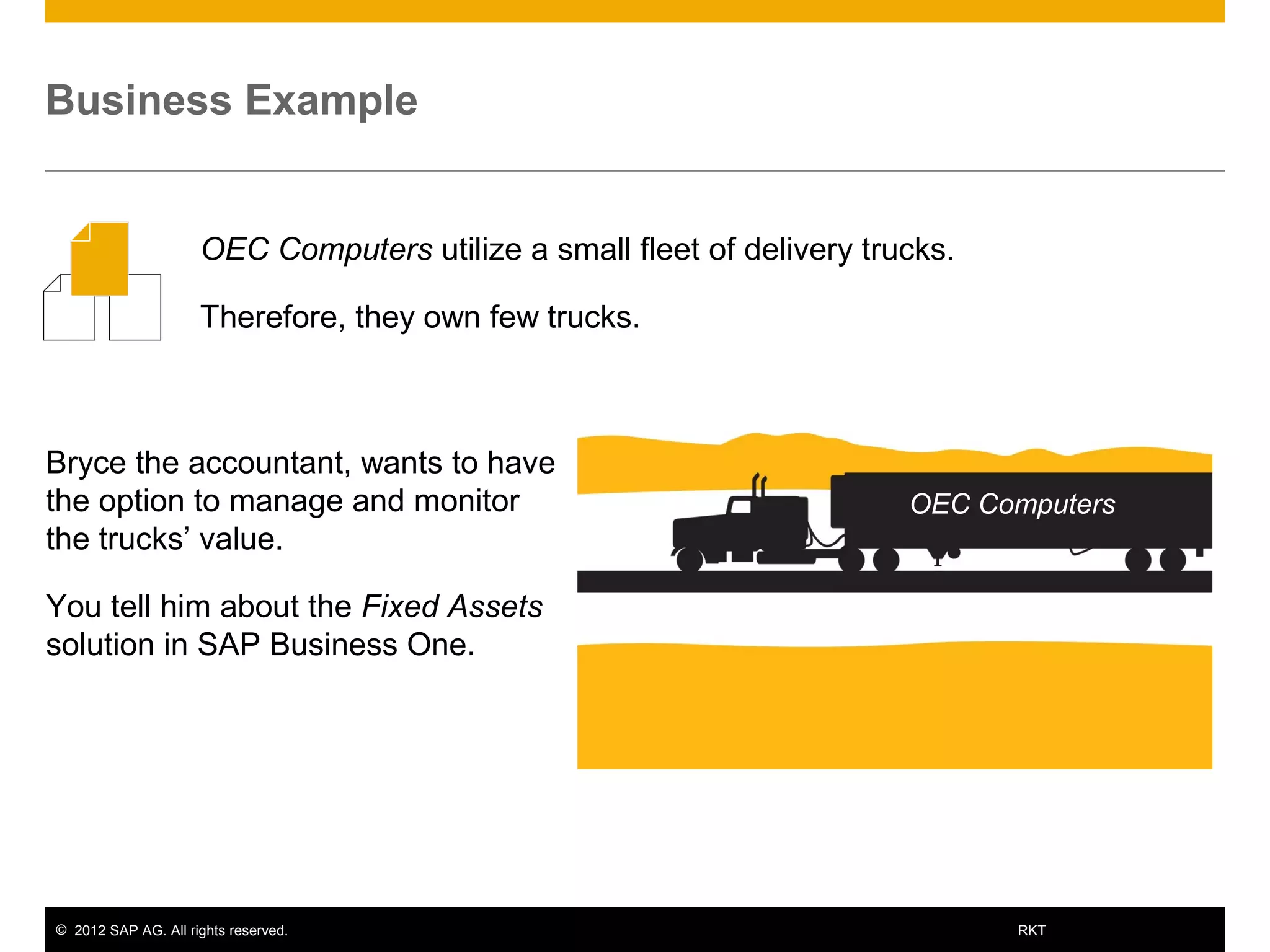
Bryce the accountant, wants to have
the option to manage and monitor
the trucks’ value.
You tell him about the Fixed Assets
solution in SAP Business One.
OEC Computers utilize a small fleet of delivery trucks.
Therefore, they own few trucks.
OEC Computers
© 2012 SAP AG. All rights reserved. 5RKT
Agenda
 Terminology
– Definitions of the main terms in the fixed assets process.
 Solution Overview
– Present the new sub-menu and windows in SAP Business One.
 Fixed Assets – Introduction
– Review the life cycle of a fixed asset item and how it is managed in SAP Business One.
© 2012 SAP AG. All rights reserved. 6RKT
Fixed Assets – Terminology
 Fixed asset - a subsidiary ledger to the general ledger in financial accounting for SAP
Business One. Assets are capitalized and included in the company Balance Sheet as
assets, rather than written off to Profit and Loss account as expenses.
 Net Book Value - the value of an asset in the accounting book which is calculated using
the historical cost of the asset less any accumulated depreciation.
 If the asset has been revalued upwards or downwards, the accumulated write-up or write-
off is also taken into account in the calculation of the net book value.
 Acquisition and Production Costs - the costs involved in obtaining an asset, whether it
is purchased externally, or produced internally.
 Low Value Asset - an asset for which the acquisition and production costs (less included
sales tax) does not exceed a legally predefined amount. Typically, a low value asset can
be completely written off within the period in which it is acquired.
© 2012 SAP AG. All rights reserved. 7RKT
Fixed Assets – Terminology (Cont.1)
 Useful Life - a period during which an asset is expected to be usable for the purpose for
which it was acquired.
 Useful life may, or may not, correspond with the asset's actual physical life, or economic
life. Before the end of an asset’s useful life, the asset should be written off completely.
 Capitalization - the process of recording an acquisition and production cost as a fixed
asset (written off as depreciation over several accounting periods), instead of an expense
(charged against earnings in one accounting period).
 Asset Value Date - the date of an asset transaction from the accounting point of view.
 For example, the date of asset capitalization or retirement. The asset value date can be
different from the posting date and document date, but it must be within the same period
as the posting date.
© 2012 SAP AG. All rights reserved. 8RKT
Fixed Assets – Terminology (Cont.2)
 Depreciation - the reduction in the book value of an asset over its useful life for both tax
and accounting purposes. Depreciation would be included with the company expenses.
 Depreciation Area – a dimension showing the valuation of an asset according to a
particular accounting standard.
 For example, individual financial statements, or balance sheets for tax purposes. You can
set up different depreciation areas to calculate different values in parallel for each asset.
 Depreciation Type - a label for classifying depreciation based on the reason for the
depreciation.
 SAP Business One allows you to set up depreciation types using several depreciation
methods. For example, Straight Line, Straight Line Period Control, Declining Balance and
so on.
 Salvage Value - the estimated value of an asset at the end of its useful life. The
depreciation of an asset cannot cause the asset value to fall below the salvage value.
 Retirement - the removal of an asset or part of an asset from the asset portfolio.
© 2012 SAP AG. All rights reserved. 9RKT
Agenda
 Terminology
– Definitions of the main terms in the fixed assets process.
 Solution Overview
– Present the new sub-menu and windows in SAP Business One.
 Fixed Assets – Introduction
– Review the life cycle of a fixed asset item and how it is managed in SAP Business One.
© 2012 SAP AG. All rights reserved. 10RKT
Enable the Fixed Assets Solution
Administration  System Initialization 
Company Details  Basic Initialization
Check the Enable Fixed Assets box:
New windows and fields will be available for the user:
Administration  Setup  Financials  Fixed
Assets.
Financials  Fixed Assets.
© 2012 SAP AG. All rights reserved. 11RKT
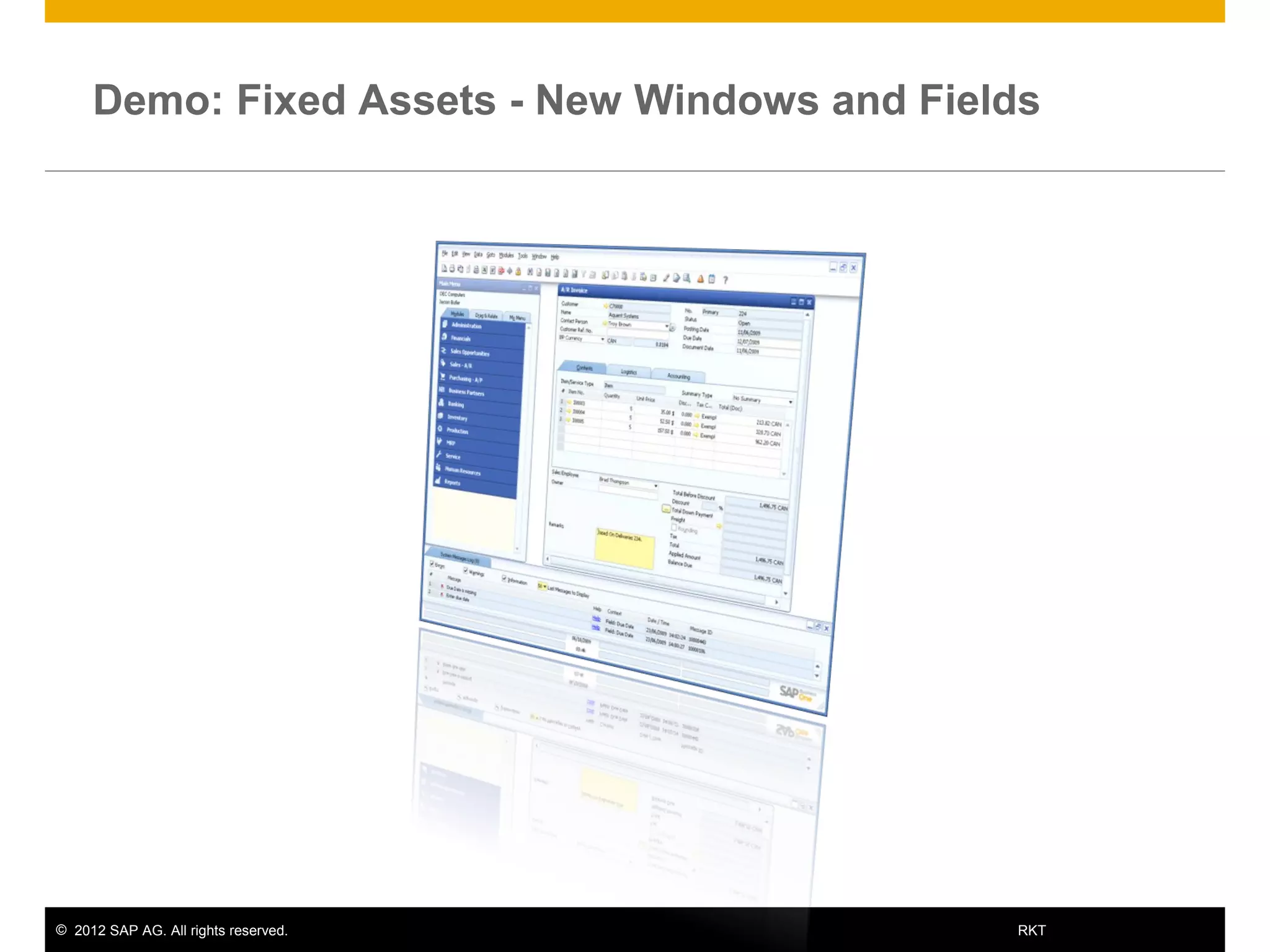
Demo: Fixed Assets - New Windows and Fields
© 2012 SAP AG. All rights reserved. 12RKT
Agenda
 Terminology
– Definitions of the main terms in the fixed assets process.
 Solution Overview
– Present the new sub-menu and windows in SAP Business One.
 Fixed Assets – Introduction
– Review the life cycle of a fixed asset item and how it is managed in SAP Business One.
© 2012 SAP AG. All rights reserved. 13RKT
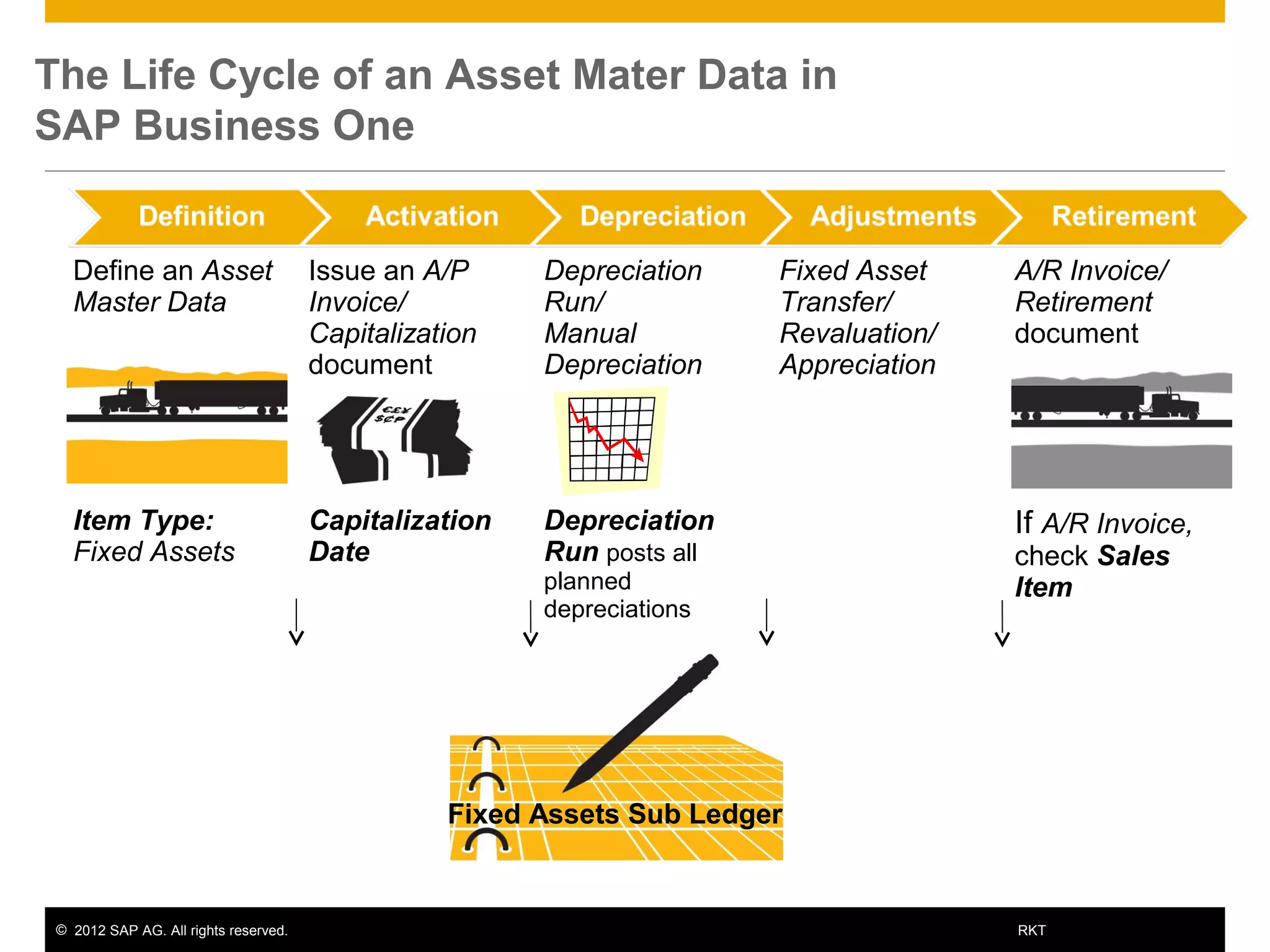
Define an Asset
Master Data
Issue an A/P
Invoice/
Capitalization
document
Depreciation
Run/
Manual
Depreciation
Fixed Asset
Transfer/
Revaluation/
Appreciation
A/R Invoice/
Retirement
document
Item Type:
Fixed Assets
Capitalization
Date
Depreciation
Run posts all
planned
depreciations
If A/R Invoice,
check Sales
Item
The Life Cycle of an Asset Mater Data in
SAP Business One
Fixed Assets Sub Ledger
© 2012 SAP AG. All rights reserved. 14RKT
Define an Asset
Master Data
Issue an A/P
Invoice/
Capitalization
document
Depreciation
Run/
Manual
Depreciation
Fixed Asset
Transfer/
Revaluation/
Appreciation
A/R Invoice/
Retirement
document
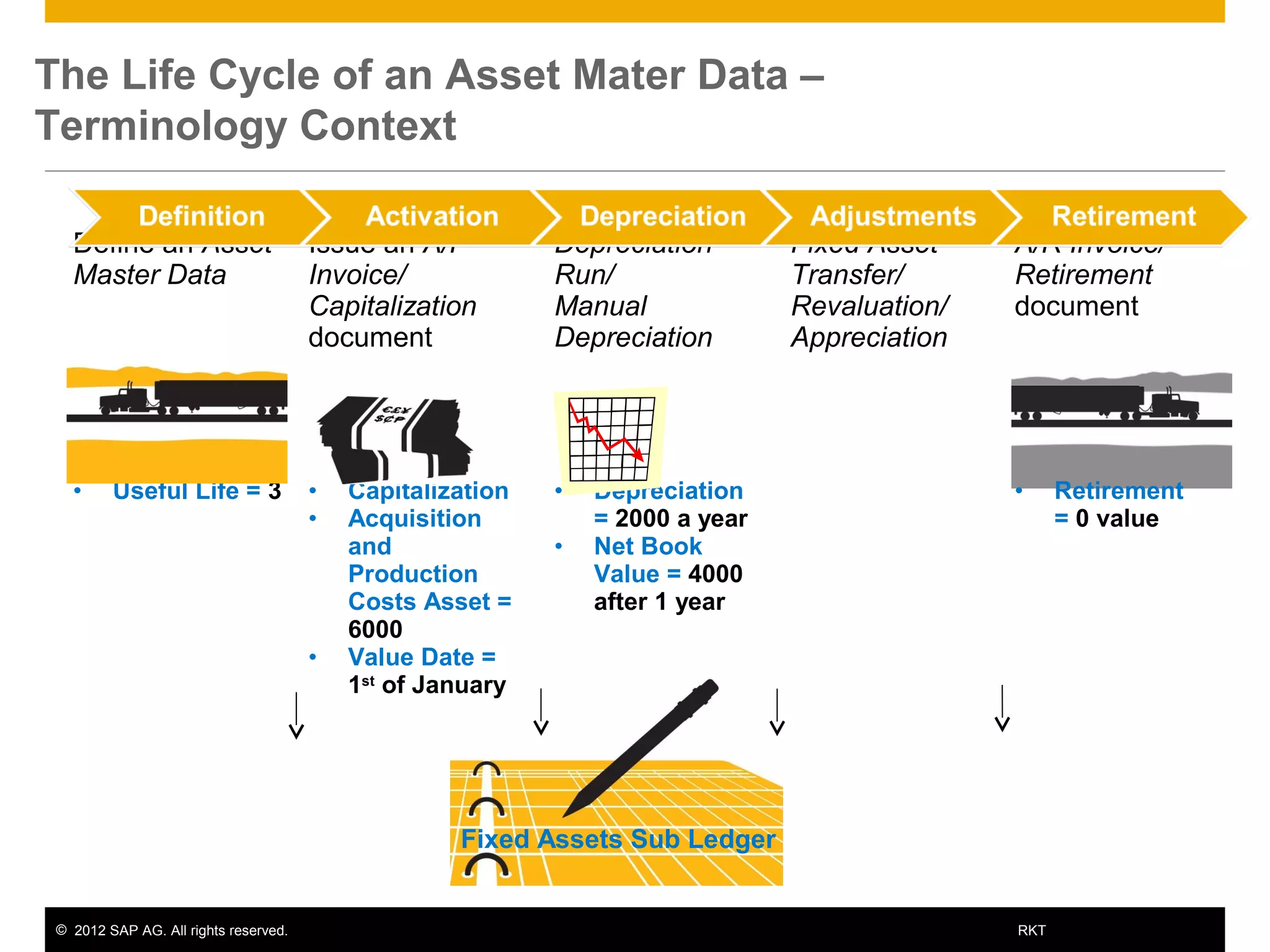
• Useful Life = 3 • Capitalization
• Acquisition
and
Production
Costs Asset =
6000
• Value Date =
1st
of January
• Depreciation
= 2000 a year
• Net Book
Value = 4000
after 1 year
• Retirement
= 0 value
The Life Cycle of an Asset Mater Data –
Terminology Context
Fixed Assets Sub Ledger
© 2012 SAP AG. All rights reserved. 15RKT
Fixed Assets Definition
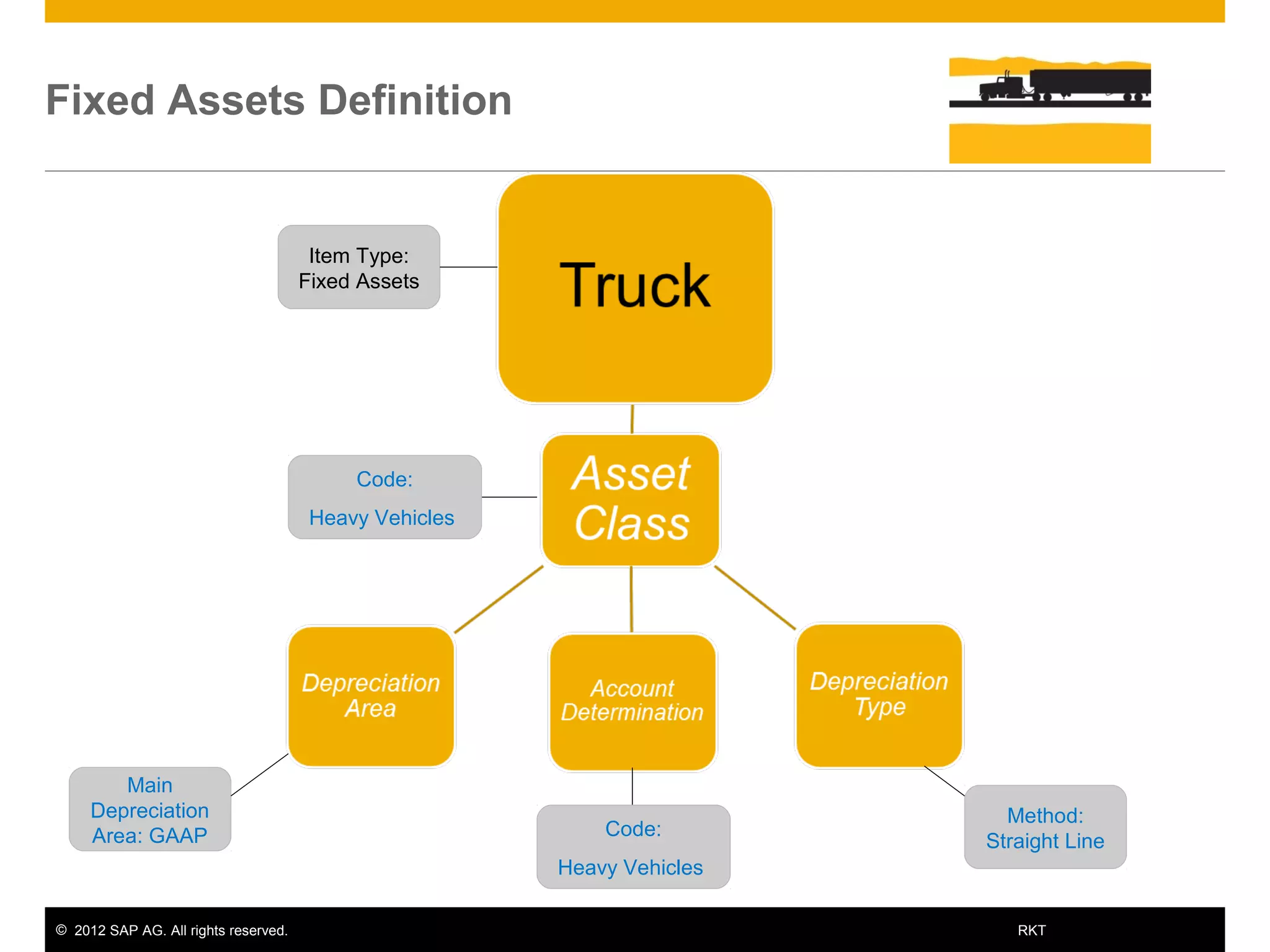
Item Type:
Fixed Assets
Main
Depreciation
Area: GAAP
Method:
Straight Line
Code:
Heavy Vehicles
Code:
Heavy Vehicles
© 2012 SAP AG. All rights reserved. 16RKT
Asset Master Data
© 2012 SAP AG. All rights reserved. 17RKT
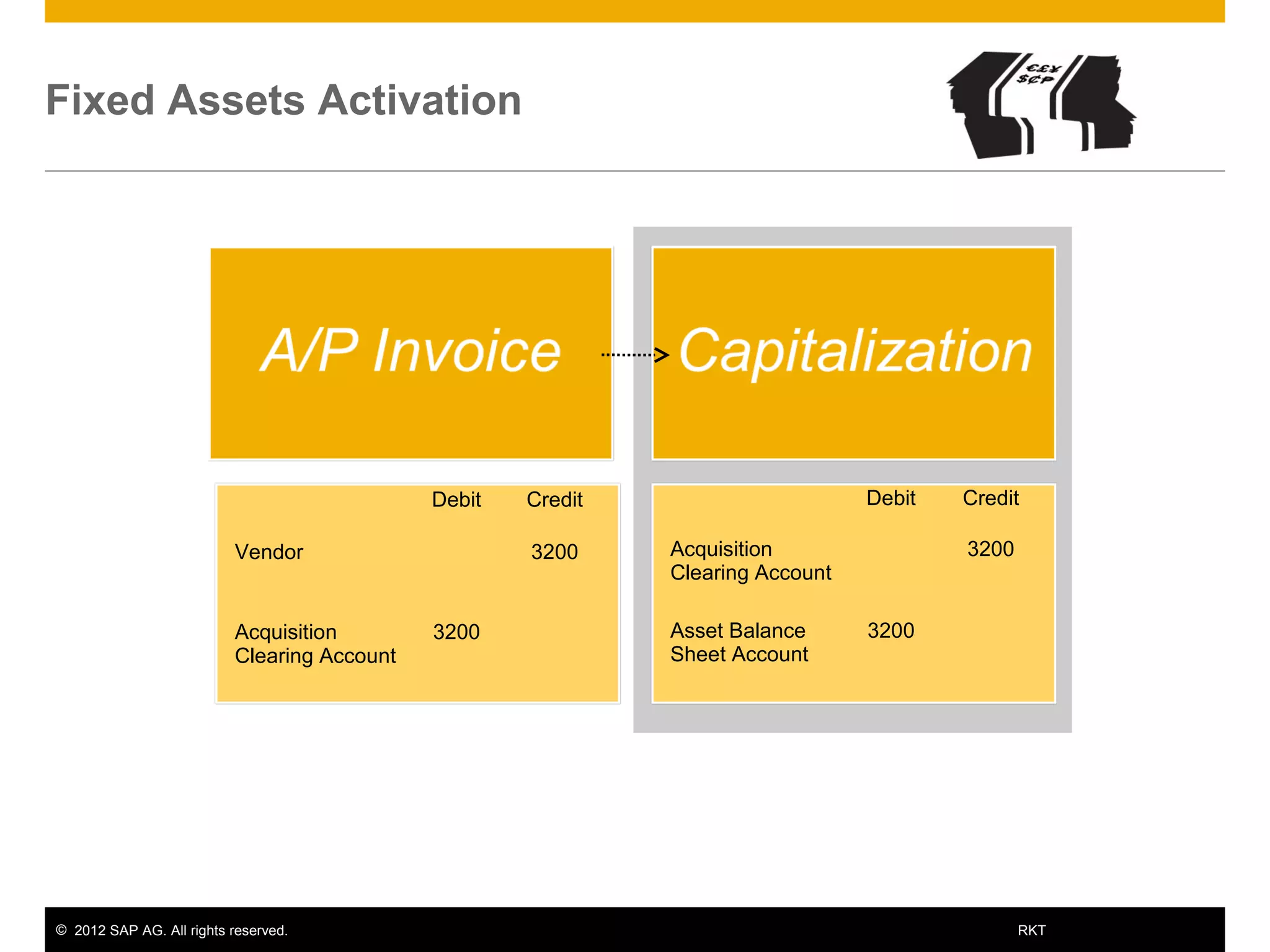
Fixed Assets Activation
Debit Credit
Vendor 3200
Acquisition
Clearing Account
3200
Debit Credit
Acquisition
Clearing Account
3200
Asset Balance
Sheet Account
3200
© 2012 SAP AG. All rights reserved. 18RKT
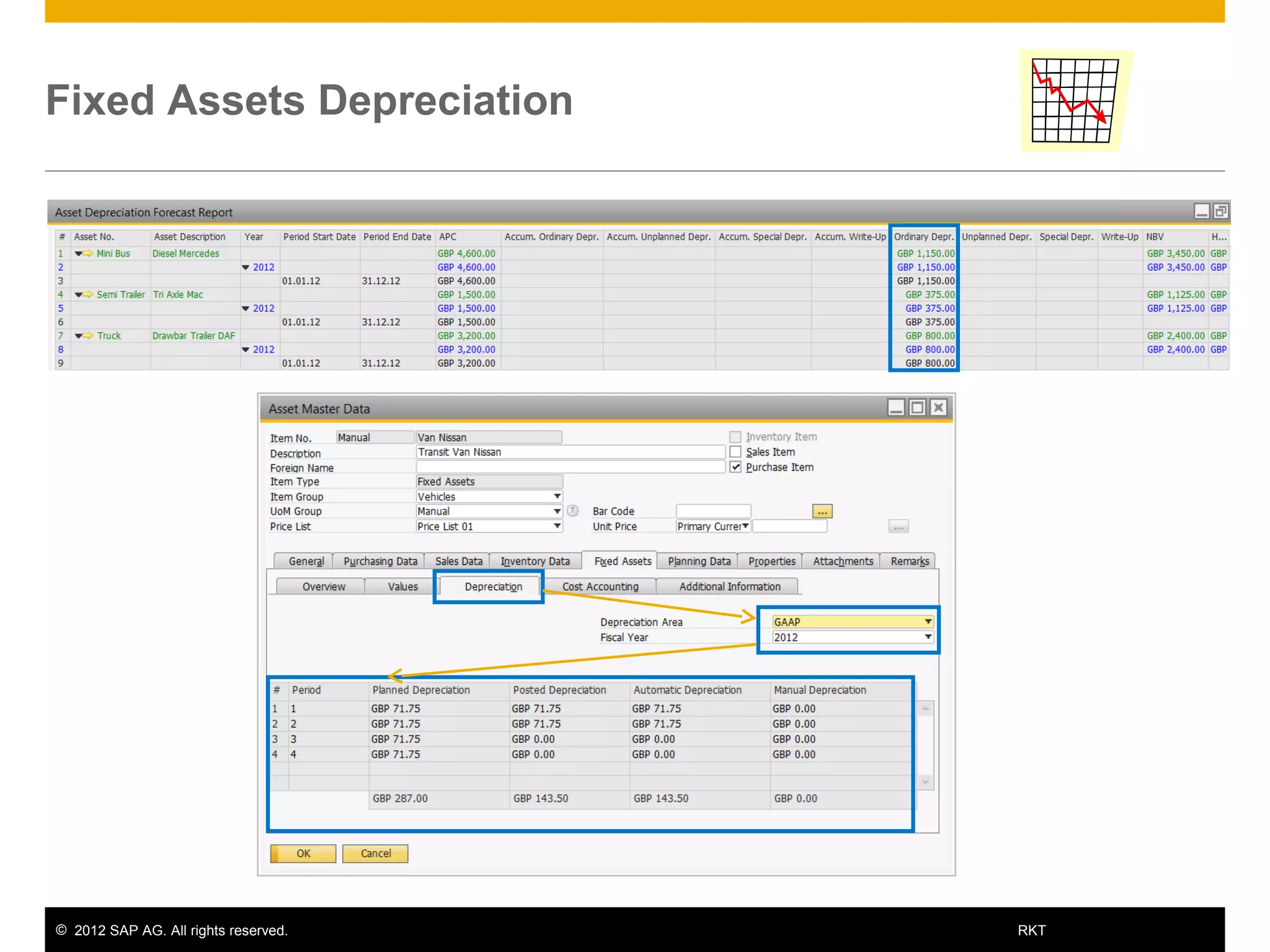
Fixed Assets Depreciation
© 2012 SAP AG. All rights reserved. 19RKT
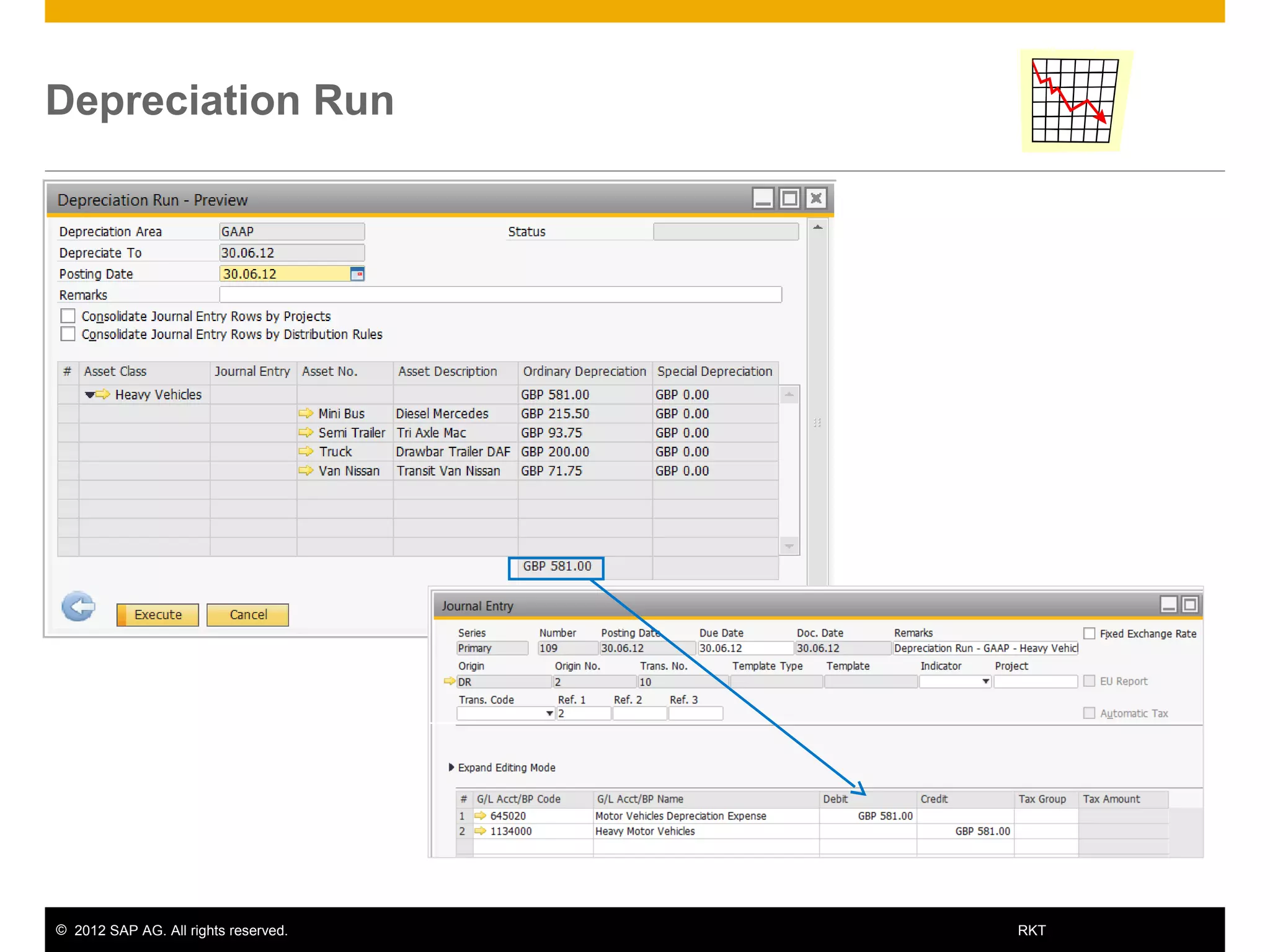
Depreciation Run
© 2012 SAP AG. All rights reserved. 20RKT
Fixed Assets Retirement
Debit Credit
Customer 2000
Revenue
Clearing Account
2000
Debit Credit
Revenue
Clearing Account
2000
Asset Balance
Sheet Account
2000
© 2012 SAP AG. All rights reserved. 21RKT
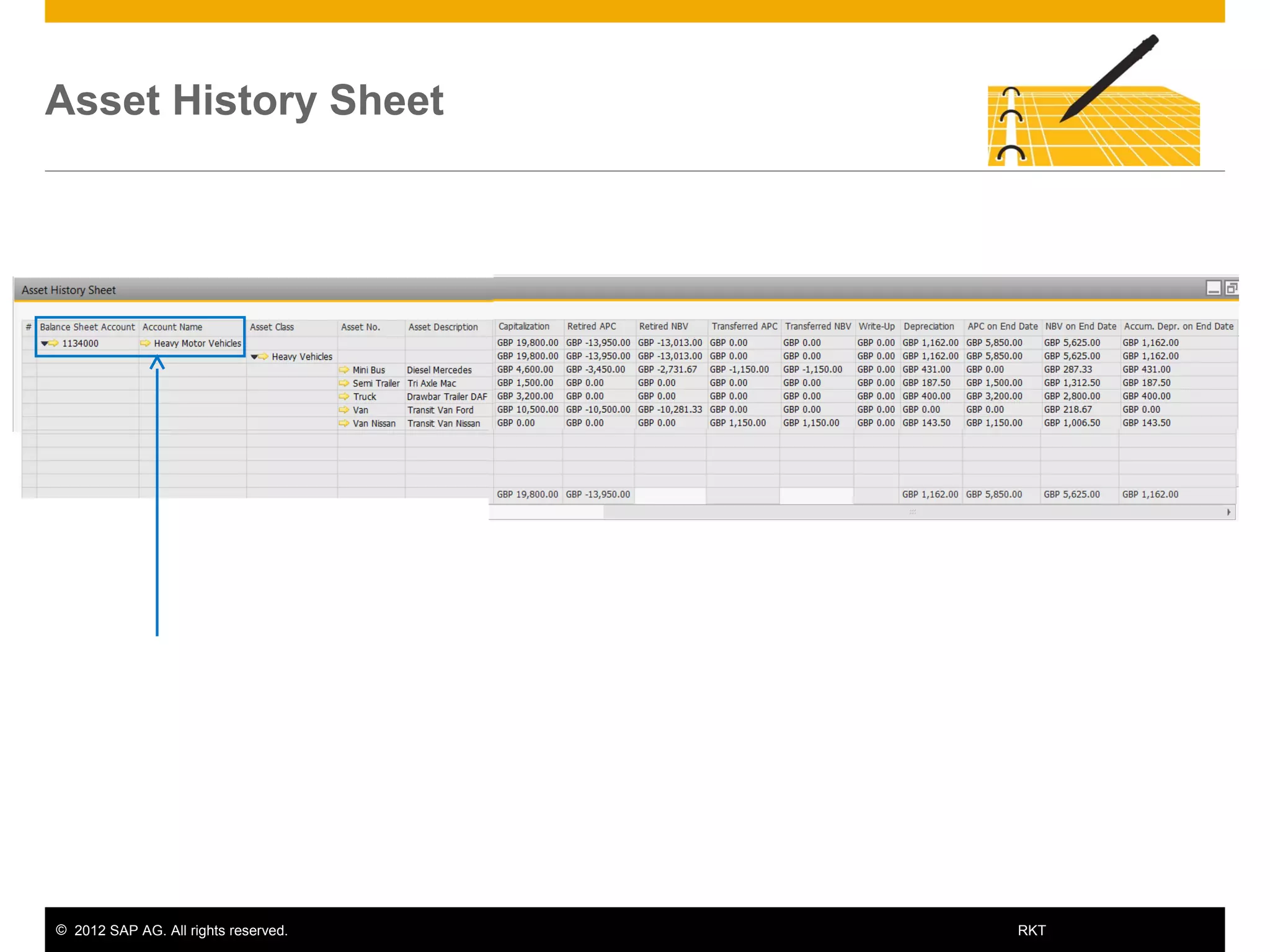
Asset History Sheet
© 2012 SAP AG. All rights reserved. 22RKT
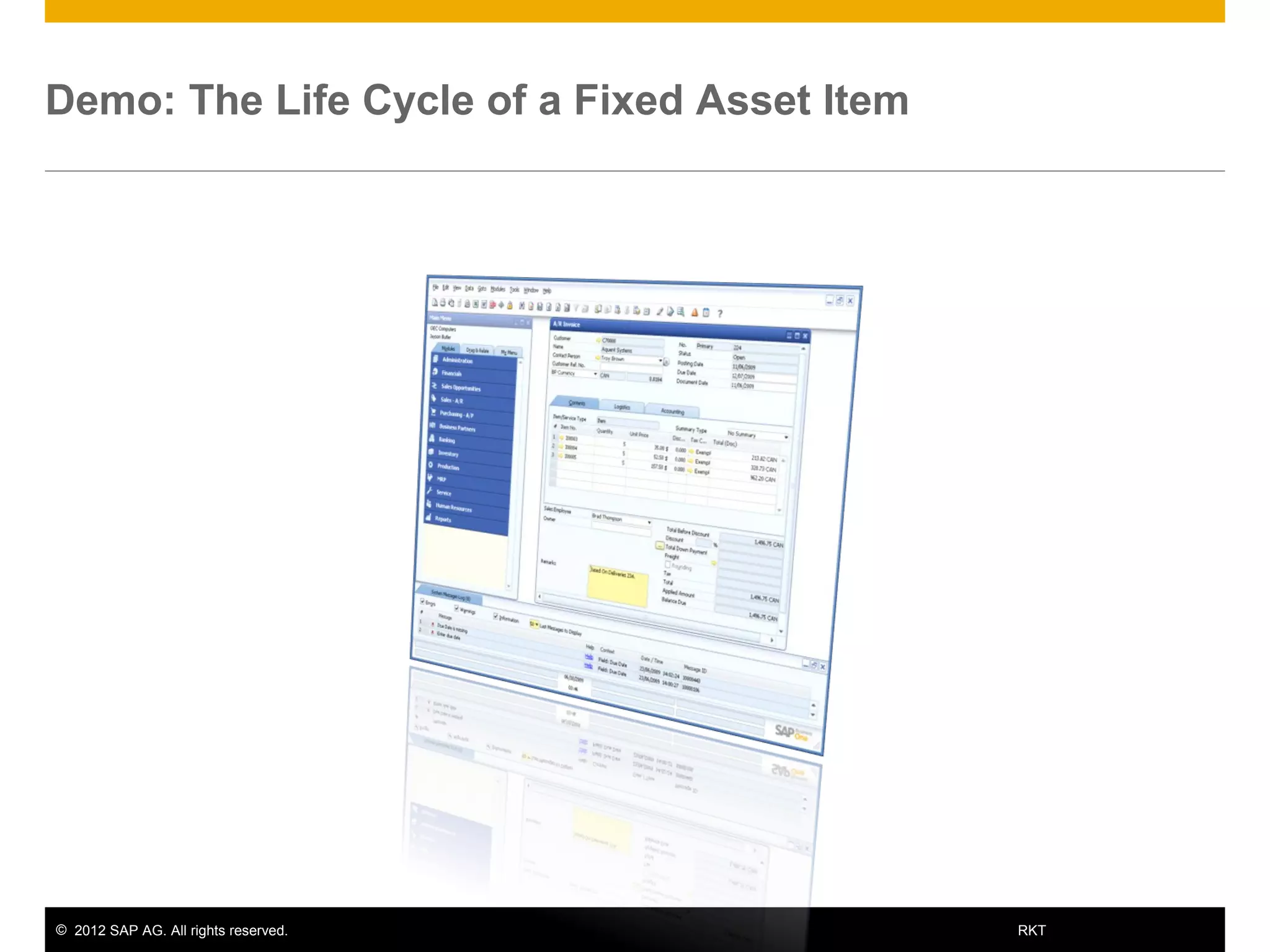
Demo: The Life Cycle of a Fixed Asset Item
© 2012 SAP AG. All rights reserved. 23RKT
You should now be able to
• Explain the process of managing fixed asset items.
• Recognize key terms in the Fixed Assets topic.
• Identify the new sub-menu and windows in SAP Business
One.
Summary

9.0 fixed assets_introduction

  • 1.
    INTERNAL Fixed Assets –Introduction Course SAP Business One version 9.0 October 2012
  • 2.
    © 2012 SAPAG. All rights reserved. 2RKT At the end of this course, you will be able to: • Explain the process of managing fixed asset items. • Recognize key terms in the Fixed Assets solution. • Identify the new sub-menu and windows in SAP Business One. Objectives
  • 3.
    © 2012 SAPAG. All rights reserved. 3RKT Agenda  Terminology – Definitions of the main terms in the fixed assets process.  Solution Overview – Present the new sub-menu and windows in SAP Business One.  Fixed Assets – Introduction – Review the life cycle of a fixed asset item and how it is managed in SAP Business One. Note!  You need to make decisions about legal and industry requirements together with the client accountant.
  • 4.
    © 2012 SAPAG. All rights reserved. 4RKT Business Example Bryce the accountant, wants to have the option to manage and monitor the trucks’ value. You tell him about the Fixed Assets solution in SAP Business One. OEC Computers utilize a small fleet of delivery trucks. Therefore, they own few trucks. OEC Computers
  • 5.
    © 2012 SAPAG. All rights reserved. 5RKT Agenda  Terminology – Definitions of the main terms in the fixed assets process.  Solution Overview – Present the new sub-menu and windows in SAP Business One.  Fixed Assets – Introduction – Review the life cycle of a fixed asset item and how it is managed in SAP Business One.
  • 6.
    © 2012 SAPAG. All rights reserved. 6RKT Fixed Assets – Terminology  Fixed asset - a subsidiary ledger to the general ledger in financial accounting for SAP Business One. Assets are capitalized and included in the company Balance Sheet as assets, rather than written off to Profit and Loss account as expenses.  Net Book Value - the value of an asset in the accounting book which is calculated using the historical cost of the asset less any accumulated depreciation.  If the asset has been revalued upwards or downwards, the accumulated write-up or write- off is also taken into account in the calculation of the net book value.  Acquisition and Production Costs - the costs involved in obtaining an asset, whether it is purchased externally, or produced internally.  Low Value Asset - an asset for which the acquisition and production costs (less included sales tax) does not exceed a legally predefined amount. Typically, a low value asset can be completely written off within the period in which it is acquired.
  • 7.
    © 2012 SAPAG. All rights reserved. 7RKT Fixed Assets – Terminology (Cont.1)  Useful Life - a period during which an asset is expected to be usable for the purpose for which it was acquired.  Useful life may, or may not, correspond with the asset's actual physical life, or economic life. Before the end of an asset’s useful life, the asset should be written off completely.  Capitalization - the process of recording an acquisition and production cost as a fixed asset (written off as depreciation over several accounting periods), instead of an expense (charged against earnings in one accounting period).  Asset Value Date - the date of an asset transaction from the accounting point of view.  For example, the date of asset capitalization or retirement. The asset value date can be different from the posting date and document date, but it must be within the same period as the posting date.
  • 8.
    © 2012 SAPAG. All rights reserved. 8RKT Fixed Assets – Terminology (Cont.2)  Depreciation - the reduction in the book value of an asset over its useful life for both tax and accounting purposes. Depreciation would be included with the company expenses.  Depreciation Area – a dimension showing the valuation of an asset according to a particular accounting standard.  For example, individual financial statements, or balance sheets for tax purposes. You can set up different depreciation areas to calculate different values in parallel for each asset.  Depreciation Type - a label for classifying depreciation based on the reason for the depreciation.  SAP Business One allows you to set up depreciation types using several depreciation methods. For example, Straight Line, Straight Line Period Control, Declining Balance and so on.  Salvage Value - the estimated value of an asset at the end of its useful life. The depreciation of an asset cannot cause the asset value to fall below the salvage value.  Retirement - the removal of an asset or part of an asset from the asset portfolio.
  • 9.
    © 2012 SAPAG. All rights reserved. 9RKT Agenda  Terminology – Definitions of the main terms in the fixed assets process.  Solution Overview – Present the new sub-menu and windows in SAP Business One.  Fixed Assets – Introduction – Review the life cycle of a fixed asset item and how it is managed in SAP Business One.
  • 10.
    © 2012 SAPAG. All rights reserved. 10RKT Enable the Fixed Assets Solution Administration  System Initialization  Company Details  Basic Initialization Check the Enable Fixed Assets box: New windows and fields will be available for the user: Administration  Setup  Financials  Fixed Assets. Financials  Fixed Assets.
  • 11.
    © 2012 SAPAG. All rights reserved. 11RKT Demo: Fixed Assets - New Windows and Fields
  • 12.
    © 2012 SAPAG. All rights reserved. 12RKT Agenda  Terminology – Definitions of the main terms in the fixed assets process.  Solution Overview – Present the new sub-menu and windows in SAP Business One.  Fixed Assets – Introduction – Review the life cycle of a fixed asset item and how it is managed in SAP Business One.
  • 13.
    © 2012 SAPAG. All rights reserved. 13RKT Define an Asset Master Data Issue an A/P Invoice/ Capitalization document Depreciation Run/ Manual Depreciation Fixed Asset Transfer/ Revaluation/ Appreciation A/R Invoice/ Retirement document Item Type: Fixed Assets Capitalization Date Depreciation Run posts all planned depreciations If A/R Invoice, check Sales Item The Life Cycle of an Asset Mater Data in SAP Business One Fixed Assets Sub Ledger
  • 14.
    © 2012 SAPAG. All rights reserved. 14RKT Define an Asset Master Data Issue an A/P Invoice/ Capitalization document Depreciation Run/ Manual Depreciation Fixed Asset Transfer/ Revaluation/ Appreciation A/R Invoice/ Retirement document • Useful Life = 3 • Capitalization • Acquisition and Production Costs Asset = 6000 • Value Date = 1st of January • Depreciation = 2000 a year • Net Book Value = 4000 after 1 year • Retirement = 0 value The Life Cycle of an Asset Mater Data – Terminology Context Fixed Assets Sub Ledger
  • 15.
    © 2012 SAPAG. All rights reserved. 15RKT Fixed Assets Definition Item Type: Fixed Assets Main Depreciation Area: GAAP Method: Straight Line Code: Heavy Vehicles Code: Heavy Vehicles
  • 16.
    © 2012 SAPAG. All rights reserved. 16RKT Asset Master Data
  • 17.
    © 2012 SAPAG. All rights reserved. 17RKT Fixed Assets Activation Debit Credit Vendor 3200 Acquisition Clearing Account 3200 Debit Credit Acquisition Clearing Account 3200 Asset Balance Sheet Account 3200
  • 18.
    © 2012 SAPAG. All rights reserved. 18RKT Fixed Assets Depreciation
  • 19.
    © 2012 SAPAG. All rights reserved. 19RKT Depreciation Run
  • 20.
    © 2012 SAPAG. All rights reserved. 20RKT Fixed Assets Retirement Debit Credit Customer 2000 Revenue Clearing Account 2000 Debit Credit Revenue Clearing Account 2000 Asset Balance Sheet Account 2000
  • 21.
    © 2012 SAPAG. All rights reserved. 21RKT Asset History Sheet
  • 22.
    © 2012 SAPAG. All rights reserved. 22RKT Demo: The Life Cycle of a Fixed Asset Item
  • 23.
    © 2012 SAPAG. All rights reserved. 23RKT You should now be able to • Explain the process of managing fixed asset items. • Recognize key terms in the Fixed Assets topic. • Identify the new sub-menu and windows in SAP Business One. Summary

Editor's Notes

  • #2 Welcome to the introduction course of the fixed assets topic. This course will be followed with two courses about the initial settings and the working process with fixed assets in SAP Business One.
  • #3 At the end of this course, you will be able to: Explain the process of managing fixed asset items. Recognize key terms in the Fixed Assets solution. Identify the new sub-menu and windows in SAP Business One.
  • #4 This is the agenda for the introduction course: During this course we will discuss the following topics: First, we will go briefly go through the terminology of the fixed assets topic to learn some definitions regarding the main terms in the process. Then, We will take a look at the solution in SAP Business One and present the new sub-menu and windows. Finally, we will review the life cycle of a fixed asset item in SAP Business One: from purchasing through capitalization, then depreciation and until zero net book value. Note! This is a product training and we will focus on the solution options in SAP Business One. You need to make decisions about legal and industry requirements together with the client accountant.
  • #5 OEC Computers utilize a small fleet of delivery trucks. Therefore, they own few trucks. Bryce the accountant, wants to have the option to manage and monitor the trucks’ value. You tell him about the Fixed Assets solution in SAP Business One.
  • #6 Before we go on we need to define some business terms that we will be using in this course.
  • #7 Fixed asset - a subsidiary ledger to the general ledger in financial accounting for SAP Business One. Assets are capitalized and included in the company Balance Sheet as assets, rather than written off to Profit and Loss account as expenses. Net Book Value - the value of an asset in the accounting book which is calculated using the historical cost of the asset less any accumulated depreciation. If the asset has been revalued upwards or downwards, the accumulated write-up or write-off is also taken into account in the calculation of the net book value. Acquisition and Production Costs - the costs involved in obtaining an asset, whether it is purchased externally, or produced internally. Low Value Asset - an asset for which the acquisition and production costs (less included sales tax) does not exceed a legally predefined amount. Typically, a low value asset can be completely written off within the period in which it is acquired.
  • #8 Useful Life - a period during which an asset is expected to be usable for the purpose for which it was acquired. Useful life may, or may not, correspond with the asset's actual physical life, or economic life. Before the end of an asset’s useful life, the asset should be written off completely. Capitalization - the process of recording an acquisition and production cost as a fixed asset (written off as depreciation over several accounting periods), instead of an expense (charged against earnings in one accounting period). Asset Value Date - the date of an asset transaction from the accounting point of view. For example, the date of asset capitalization or retirement. The asset value date can be different from the posting date and document date, but it must be within the same period as the posting date.
  • #9 Depreciation - the reduction in the book value of an asset over its useful life for both tax and accounting purposes. Depreciation would be included with the company expenses. Depreciation Area – a dimension showing the valuation of an asset according to a particular accounting standard. For example, individual financial statements, or balance sheets for tax purposes. You can set up different depreciation areas to calculate different values in parallel for each asset. Depreciation Type - a label for classifying depreciation based on the reason for the depreciation. SAP Business One allows you to set up depreciation types using several depreciation methods. For example, Straight Line, Straight Line Period Control, Declining Balance and so on. Salvage Value - the estimated value of an asset at the end of its useful life. The depreciation of an asset cannot cause the asset value to fall below the salvage value. Retirement - the removal of an asset or part of an asset from the asset portfolio.
  • #10 Next, we review the new sub-menu and windows in SAP Business One.
  • #11 To enable the new solution go to: Administration  System Initialization  Company Details  Basic Initialization. Check the Enable Fixed Assets box. Once the user checks the box, the Fixed Assets functionality will be activated and new windows and fields will be available under Administration  Setup  Financials  Fixed Assets. And under Financials  Fixed Assets. In this Fixed Assets sub-menu you can find the Asset Master Data window. This new window is very similar to the Item Master Data window with the addition of the Fixed Assets Item Type and the Fixed Assets tab. Note that the Fixed Asset check box was removed from the Item Master Data. Once the solution is activated, you cannot deactivate it and the Enable Fixed Assets box becomes disabled. Prior to version 9.0 the fixed assets solution was available as an add-on. Starting at 9.0 the solution is merged into the core of SAP Business one. The functionality of the Fixed Assets add-on was enhanced to meet additional requirements. Companies that used the add-on prior to version 9.0 will be able to transfer to the new solution. The transfer will be possible only after a fiscal year change and at the first day of the next period. We will discuss the migration to the new solution in a related course.
  • #13 Let us review the life cycle of a fixed asset item in SAP Business One: from purchasing through capitalization, then depreciation and until zero net book value.
  • #14 This is the process at a glance. In the next slides, we will talk more about the different steps. New window was added under the Financials module  Fixed Assets  Asset Master Data. In this window you define and manage all Fixed Assets item types. In our example it is the new truck that OEC Computers purchased at the beginning of the fiscal year. The Asset Master Data is activated when the user purchases a fixed asset using an A/P Invoice. The A/P Invoice automatically generates a Capitalization document. The Asset Value Date sets the Capitalization Date in the Asset Master Data. When the user executes a depreciation run, the system carries out all depreciations planned up to the specified date. Additional Fixed Assets documents support the need in adjustments, if necessary, during the life cycle of a Fixed Assets item type: Fixed Asset Transfer/ Revaluation/ Appreciation. In order to decide which of the adjustment documents to use, you need to verify, together with the client accountant, what are the legal and industry requirements. We will discuss the adjustment documents in a related course. And finally, the user can retire a fixed asset using an A/R invoice. The A/R Invoice automatically generates a Retirement document. In order to do that, the user should check the Asset Master Data as a Sales Item. All transactions are registered to the Fixed Assets sub ledger and can be followed in the different dedicated reports.
  • #15 Let us look at the life cycle of an asset master data with reference to the terminology we mentioned earlier. The terminology is highlighted in blue in the slide. In our example when we define the new truck that OEC Computers purchased, we define the asset Useful Life - a period during which an asset is expected to be usable for the purpose for which it was acquired. Useful life may, or may not, correspond with the asset's actual physical life, or economic life. Before the end of an asset’s useful life, the asset should be written off completely. We define the truck useful life as 3 years. The Asset Master Data is activated when the user purchases a fixed asset using an A/P Invoice. The A/P Invoice automatically generates a Capitalization document. Remember that the Capitalization is the process of recording an acquisition and production cost as a fixed asset. The acquisition value of the truck is 6000. The Asset Value Date sets the Capitalization Date in the Asset Master Data. The asset value date can be different from the posting date and document date, but it must be within the same period as the posting date. For the truck we enter the 1st of January. Every period the company calculates the Depreciation on the asset - the reduction in the book value of an asset over its useful life for both tax and accounting purposes. Depreciation would be included with the company expenses. The truck is planned to reduce its value by 2000 each year. During the asset’s useful life the system calculates the item Net Book Value - the value of an asset in the accounting book which is calculated using the historical cost of the asset less any accumulated depreciation. So in our case, after the first year the truck value will be 4000. Retirement - the removal of an asset or part of an asset from the asset portfolio. There are two ways to retire a fixed asset: by A/R invoice if you are selling the asset or by a Retirement document if there is no customer involved and you need to write off the fixed asset. After the asset is retired, its value in the asset balance sheet account, in the Fixed Assets Sub Ledger, will be registered as zero. In the next slides we will discuss the steps in the process.
  • #16 Let us look at our example. We have the new truck that OEC Computers purchased at the beginning of the fiscal year. First, we define this truck as an Asset Master Data under Financials  Fixed Assets  Asset Master Data. Then, we attach a set of definitions relevant to this kind of asset to the asset master data. In our example we use the Heavy Vehicles set of definitions. The main definition in the Asset Master Data is the Asset Class which includes the association to the other definitions: Depreciation Area, Account Determination and Depreciation Type. Each fixed asset will be assigned to one asset class. In our example, the Truck belongs to the Heavy vehicles asset class. Each asset class includes the default definition of the other settings. The Depreciation Area is a financial dimension showing the valuation of the asset for a given purpose, for example: book depreciation, tax depreciation, or depreciation for cost accounting. You need to define one depreciation area as the main area. In our example, the main area is GAAP that is, Local Generally Accepted Accounting Principles The user can define an additional area if necessary. In our example, we define the IFRS as the additional area that is, International Financial Reporting Standards. The main depreciation area (GAAP in our example) posts transactions to the system. The additional area (IFRS in our example) can be used for reports. The Account Determination definition enables the system to automatically select the relevant G/L accounts for assets accounting. The Depreciation Type classifies the depreciation based on the reason for the value adjustment. Including the option to define the method for the value calculation. In our example we choose the Straight Line method. In the next slides we will see how the definition in the Asset Master Data influences the automatically created journal entries and the value of the fixed asset item.
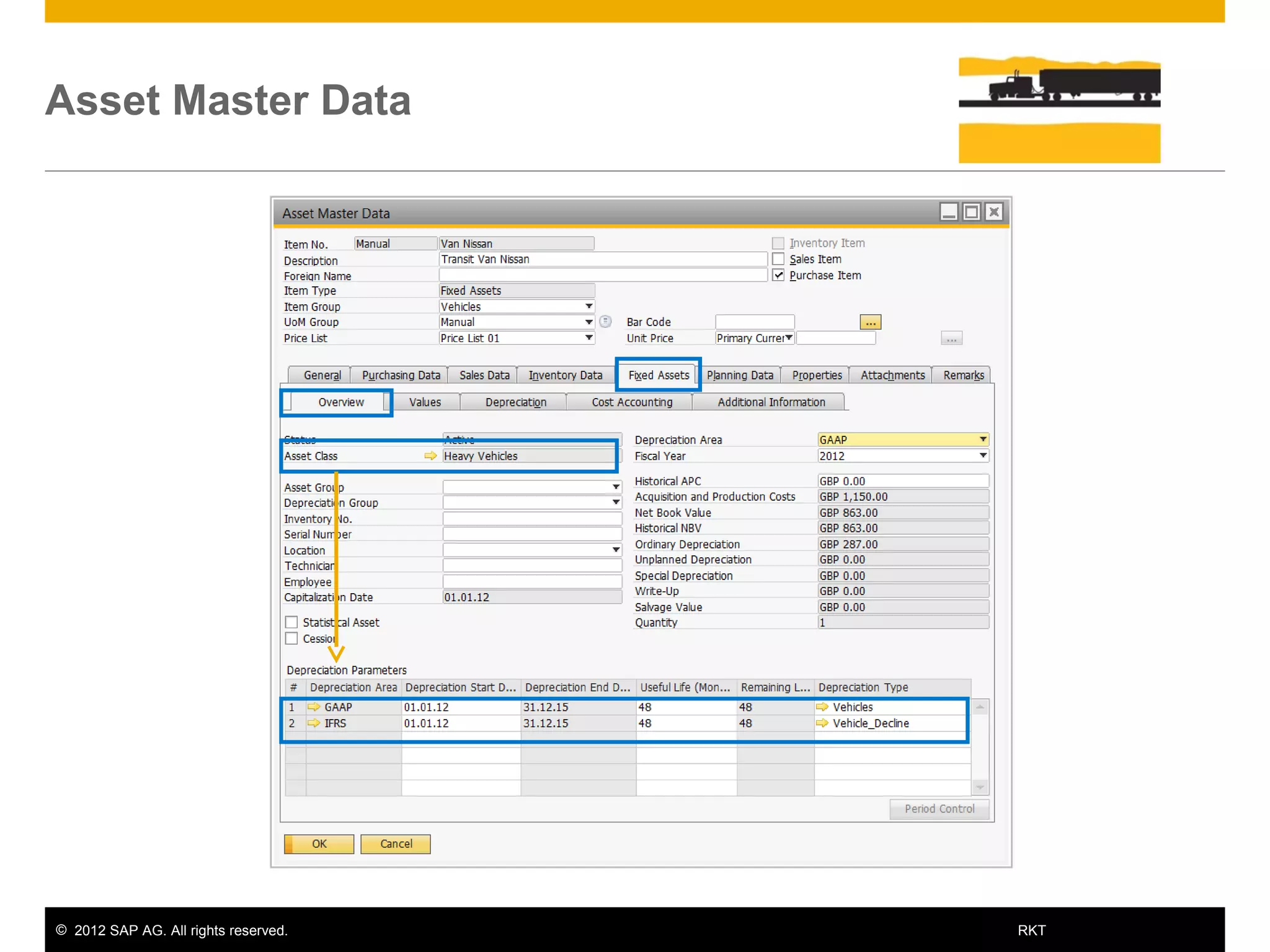
  • #17 Once you attach the Asset Class to the Asset Master Data window all related definitions will apply to the selected asset. In the presented example you can see that the Depreciation Areas and the Depreciation Types defined for the Heavy Vehicles Asser Class apply to the presented Asset Master Data. You can follow the process of managing an asset by using the different sub-tabs in the Asset Master Data: Overview Values Depreciation Cost Accounting And Additional Information
  • #18 The user can purchase a fixed asset using an A/P Invoice. The A/P Invoice automatically generates the Capitalization document. The user can choose whether to generate the Capitalization document directly, or to automatically generate it from the A/P Invoice. In both options the Asset Master Data is activated. The graphic shows the automatic journal entries created during the process including the involved accounts. If a vendor is not involved, then the user can generate a Capitalization document directly. In this case, only the Capitalization journal entry will be created and therefore the clearing account will appear as an obligation in the Balance Sheet. Remember that the accounts are derived from the definition in the Asset Master Data. Note The Asset Value Date is set by default to be the same as the A/P Invoice Posting Date. This date can be changed before adding the A/P Invoice to update the Capitalization Asset Value Date.
  • #19 Depreciation is used to write off the cost of an asset over its useful lifetime. It represents the reduction in the book value of an asset for both tax and accounting purposes. Depreciation would be included within the company expenses. The system predicts the yearly expected depreciation rate according to the Asset Master Data definitions (that is Asset Class, Depreciation Area, Account Determination and Depreciation Type). You can view this information in the Asset Master Data and in the Asset Depreciation Forecast Report.
  • #20 The user can execute the Depreciation Run option to update the value with the actual depreciation. Only when you execute a depreciation run does the system carry out all depreciations planned up to the specified date. In order to trigger the posting of a planned depreciation it is usually sufficient to start one depreciation run for several posting periods. However, it is possible to execute several depreciation runs for the same depreciation period. In depreciation runs, un-posted planned depreciation is posted using the catch-up method. In the catch-up method, the system gathers any planned depreciation that has not been posted yet for the entire depreciation period and then creates a collective posting. Therefore, the resulting posting can also include planned depreciation from several periods. A depreciation run can be repeated as often as necessary, provided no depreciation run has been executed for the following periods. A repeat depreciation run may be necessary, if the asset values have changed once again after posting planned depreciation. When repeating a depreciation run, only the value differences to the postings of the last depreciation run are considered. Again, I remind you that the accounts and the amounts are derived from the Asset Master Data definition. Note! In this example, we use the direct posting method for depreciation. The system posts the depreciation directly to the asset balance sheet account specified for the asset. In indirect depreciation, the system uses the accumulated depreciation account to post the depreciation. The asset balance sheet account is affected only when the asset is purchased or retired.
  • #21 There are two ways to retire a fixed asset: by A/R invoice if you are selling the asset or by a Retirement document if there is no customer involved. In case the company sells the asset at the end of its useful life (or before), the user can retire the item using an A/R invoice. The A/R Invoice automatically generates a Retirement document. A Retirement document can be issued directly in case a customer is not involved and you need to write off the fixed asset. In this case, different accounts will be involved in the journal entry attached to the Retirement document. If you use the A/R Invoice option, make sure you define the Assets Master Data as a Sales Item. Now, the Net Book Value of the Asset Master Data is set to zero.
  • #22 The Asset History Sheet is the most important supplement to the balance sheet from the fixed assets point of view. The report can be issued for all fixed assets. It displays all posted asset transactions in a fiscal year and presents the assets for each Balance Sheet account.
  • #24 You should now be able to Explain the process of managing fixed asset items. Recognize key terms in the Fixed Assets topic. Identify the new sub-menu and windows in SAP Business One.