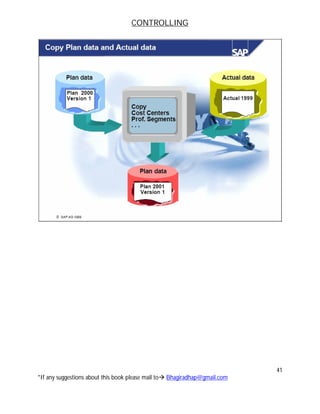
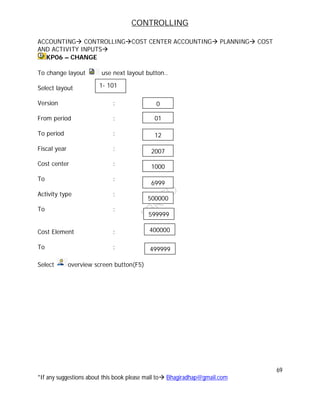
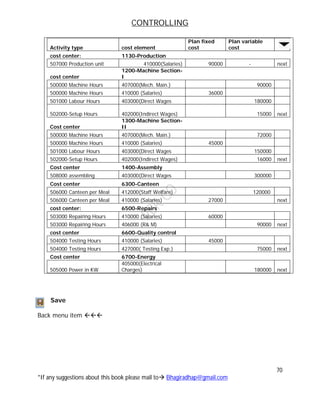
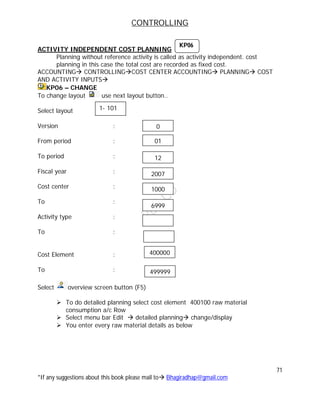
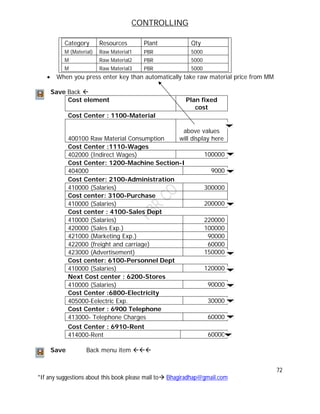
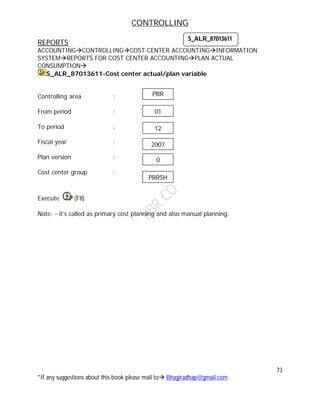
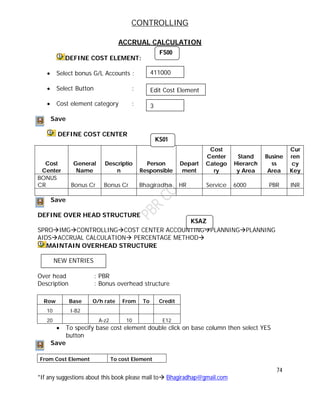
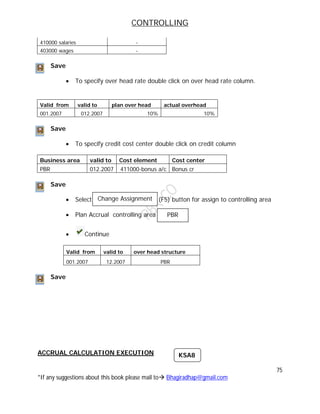
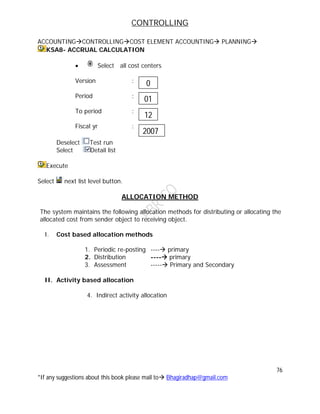
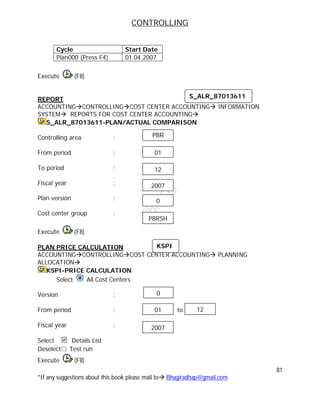
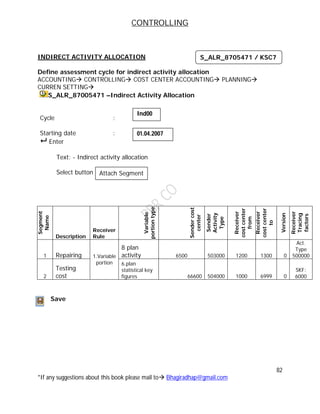
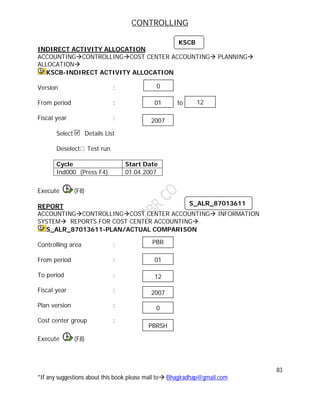
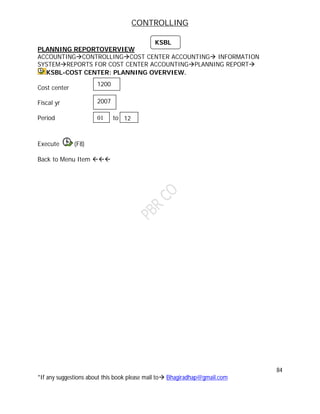
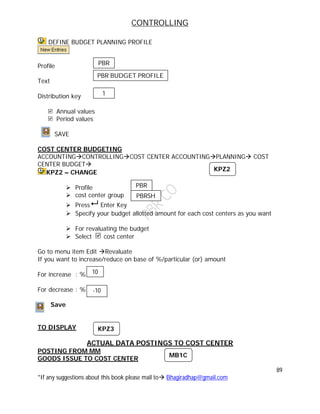
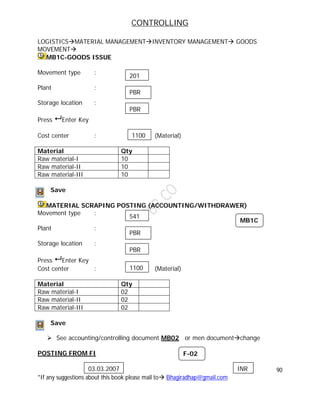
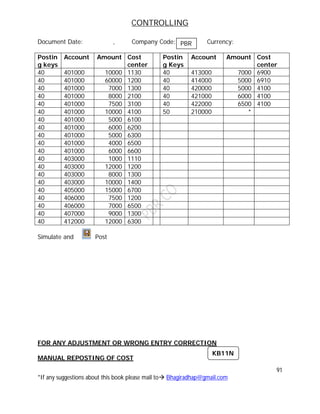
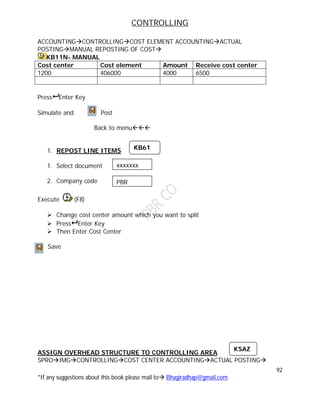
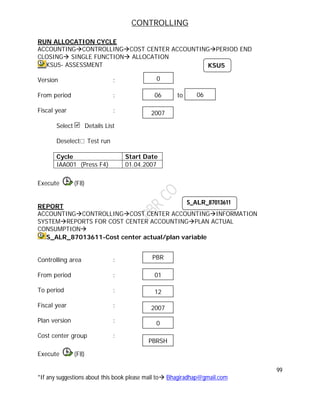
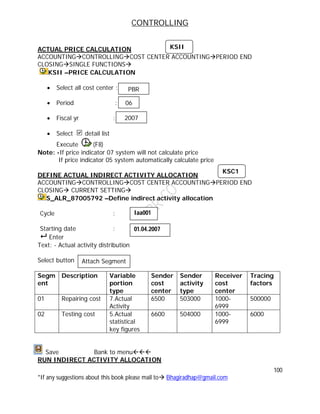
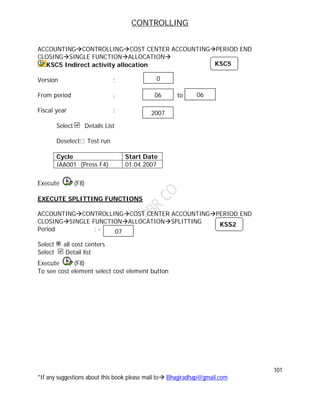
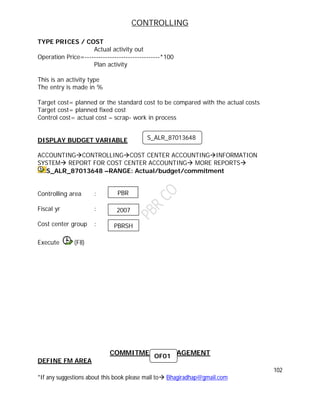
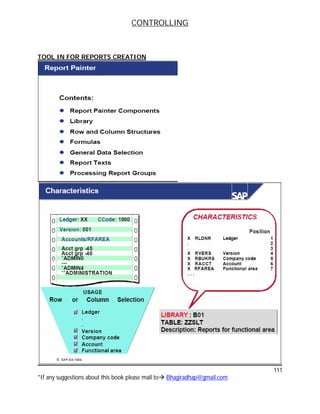
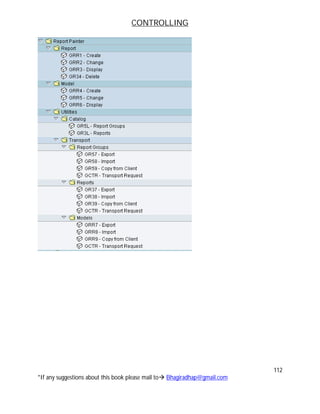
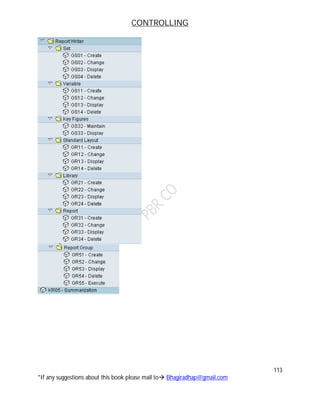
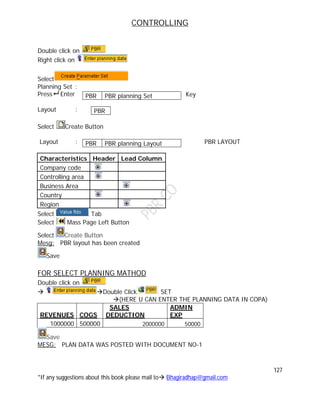
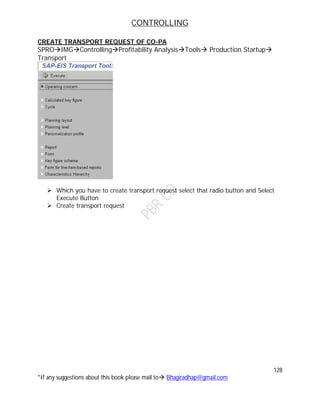
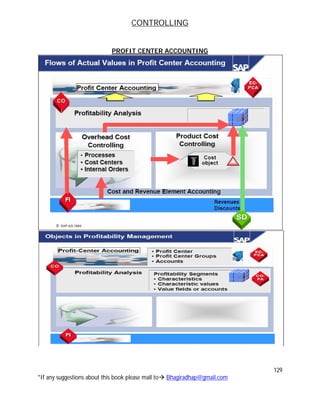
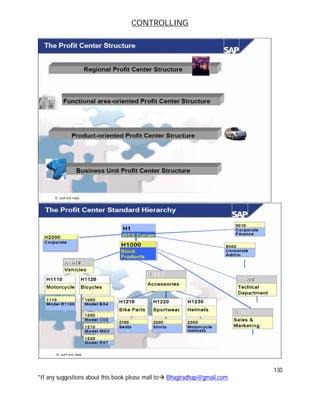
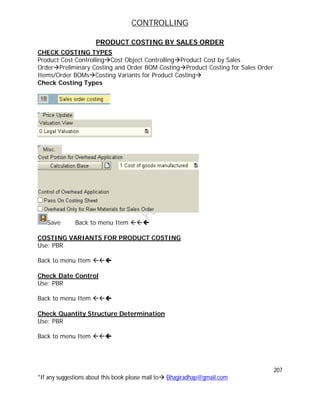
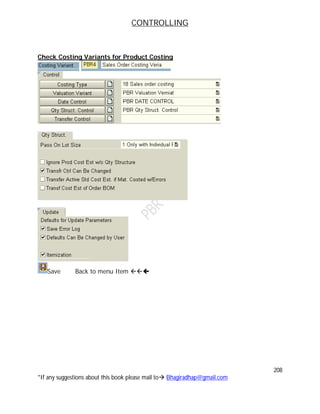
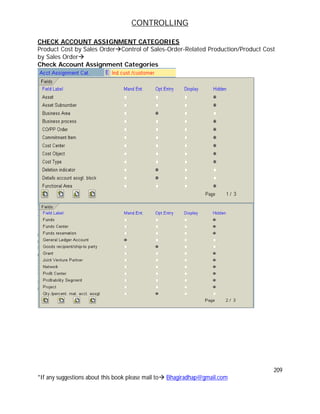
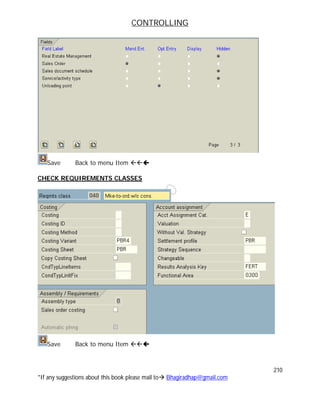
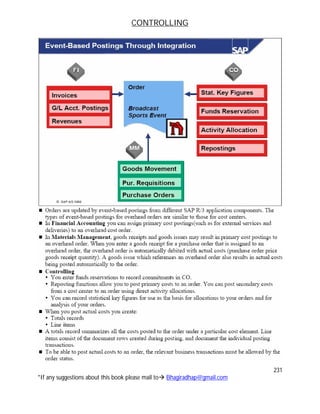
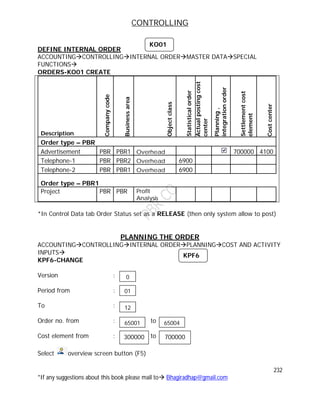
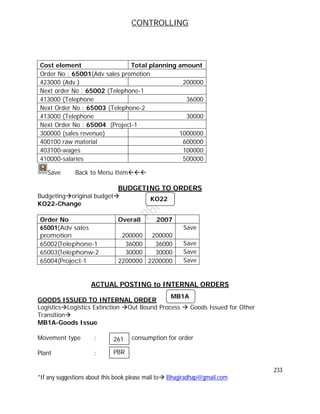
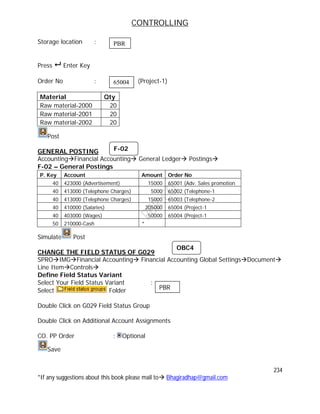
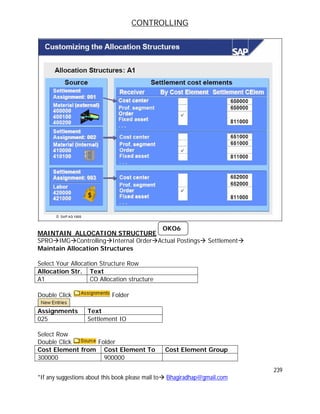
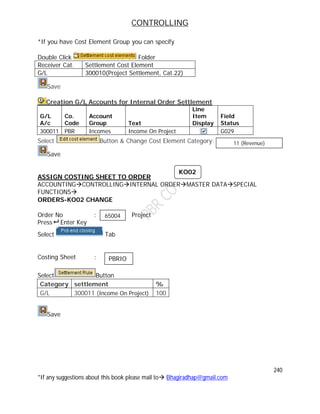
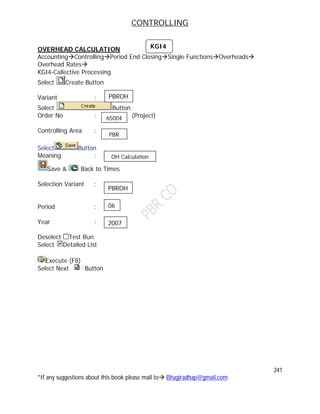
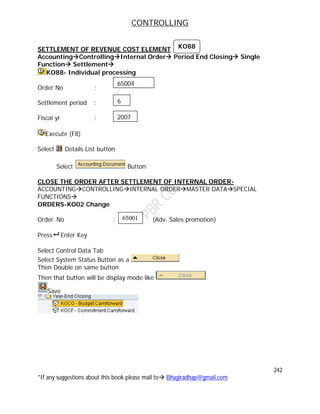
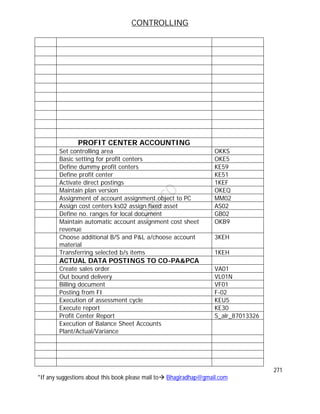
CONTROLLING
1
*If any suggestions about this book please mail to Bhagiradhap@gmail.com
INDEX CONTROLLING
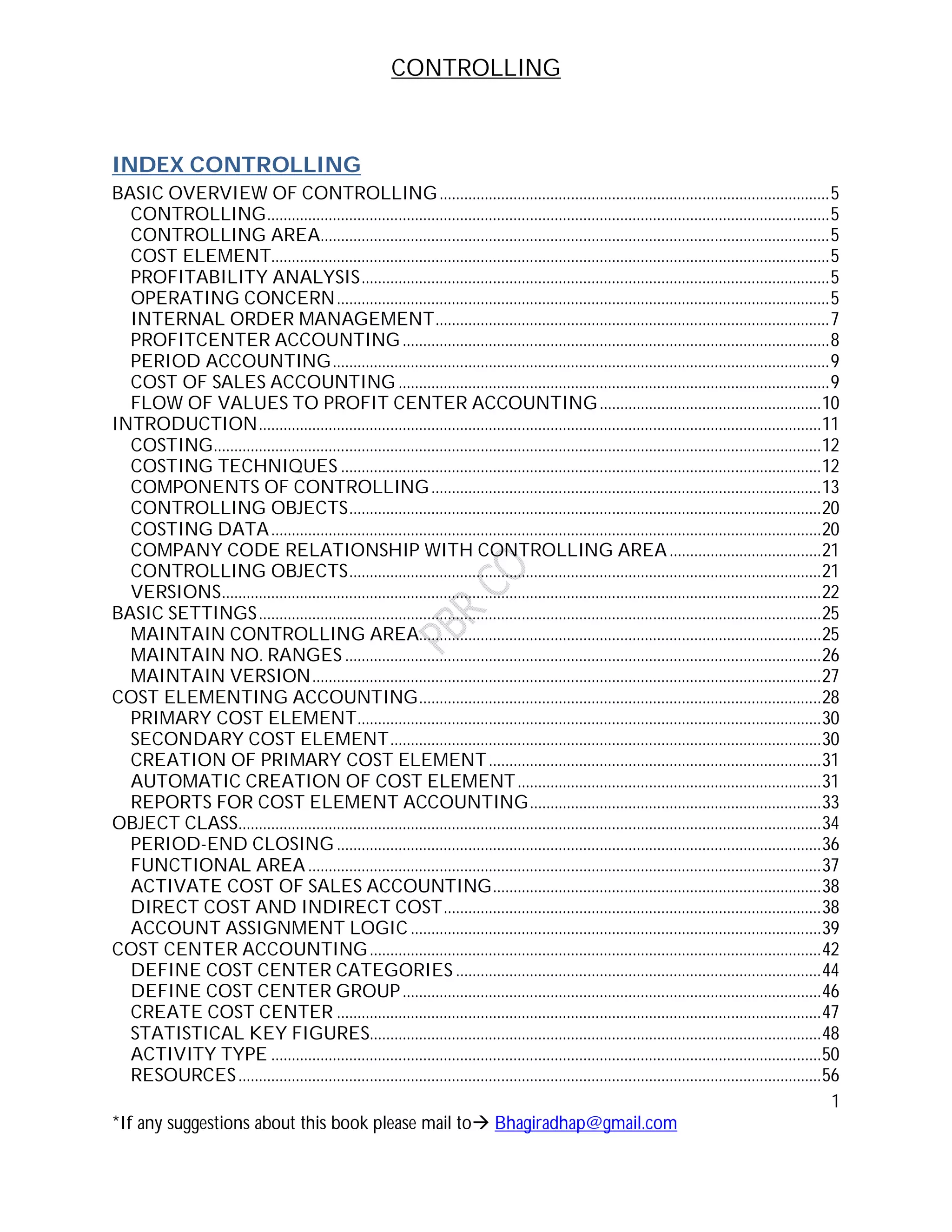
BASIC OVERVIEW OF CONTROLLING...............................................................................................5
CONTROLLING.........................................................................................................................................5
CONTROLLING AREA............................................................................................................................5
COST ELEMENT........................................................................................................................................5
PROFITABILITY ANALYSIS..................................................................................................................5
OPERATING CONCERN........................................................................................................................5
INTERNAL ORDER MANAGEMENT................................................................................................7
PROFITCENTER ACCOUNTING........................................................................................................8
PERIOD ACCOUNTING.........................................................................................................................9
COST OF SALES ACCOUNTING .........................................................................................................9
FLOW OF VALUES TO PROFIT CENTER ACCOUNTING......................................................10
INTRODUCTION.........................................................................................................................................11
COSTING....................................................................................................................................................12
COSTING TECHNIQUES .....................................................................................................................12
COMPONENTS OF CONTROLLING...............................................................................................13
CONTROLLING OBJECTS...................................................................................................................20
COSTING DATA......................................................................................................................................20
COMPANY CODE RELATIONSHIP WITH CONTROLLING AREA.....................................21
CONTROLLING OBJECTS...................................................................................................................21
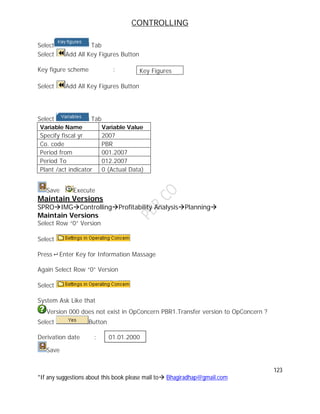
VERSIONS..................................................................................................................................................22
BASIC SETTINGS.........................................................................................................................................25
MAINTAIN CONTROLLING AREA..................................................................................................25
MAINTAIN NO. RANGES ....................................................................................................................26
MAINTAIN VERSION............................................................................................................................27
COST ELEMENTING ACCOUNTING..................................................................................................28
PRIMARY COST ELEMENT.................................................................................................................30
SECONDARY COST ELEMENT.........................................................................................................30
CREATION OF PRIMARY COST ELEMENT.................................................................................31
AUTOMATIC CREATION OF COST ELEMENT..........................................................................31
REPORTS FOR COST ELEMENT ACCOUNTING.......................................................................33
OBJECT CLASS..............................................................................................................................................34
PERIOD-END CLOSING ......................................................................................................................36
FUNCTIONAL AREA.............................................................................................................................37
ACTIVATE COST OF SALES ACCOUNTING................................................................................38
DIRECT COST AND INDIRECT COST............................................................................................38
ACCOUNT ASSIGNMENT LOGIC ....................................................................................................39
COST CENTER ACCOUNTING..............................................................................................................42
DEFINE COST CENTER CATEGORIES .........................................................................................44
DEFINE COST CENTER GROUP......................................................................................................46
CREATE COST CENTER ......................................................................................................................47
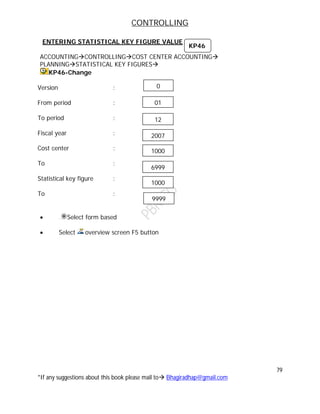
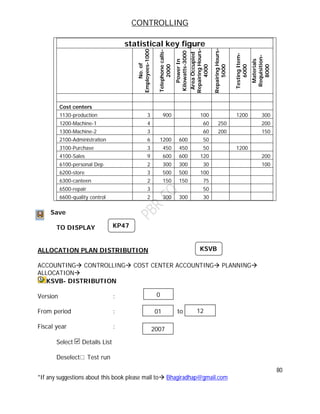
STATISTICAL KEY FIGURES..............................................................................................................48
ACTIVITY TYPE ......................................................................................................................................50
RESOURCES..............................................................................................................................................56
CONTROLLING
2
*If any suggestions about this book please mail to Bhagiradhap@gmail.com
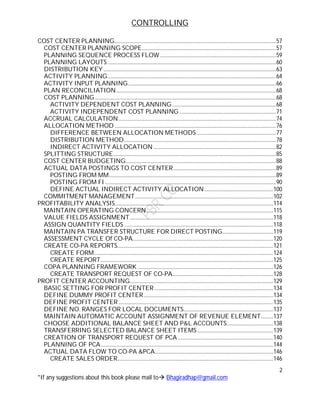
COST CENTER PLANNING.....................................................................................................................57
COST CENTER PLANNING SCOPE.................................................................................................57
PLANNING SEQUENCE PROCESS FLOW ....................................................................................59
PLANNING LAYOUTS ..........................................................................................................................60
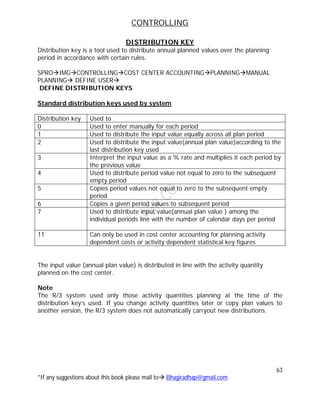
DISTRIBUTION KEY.............................................................................................................................63
ACTIVITY PLANNING..........................................................................................................................64
ACTIVITY INPUT PLANNING...........................................................................................................66
PLAN RECONCILIATION....................................................................................................................68
COST PLANNING ...................................................................................................................................68
ACTIVITY DEPENDENT COST PLANNING ...........................................................................68
ACTIVITY INDEPENDENT COST PLANNING ......................................................................71
ACCRUAL CALCULATION..................................................................................................................74
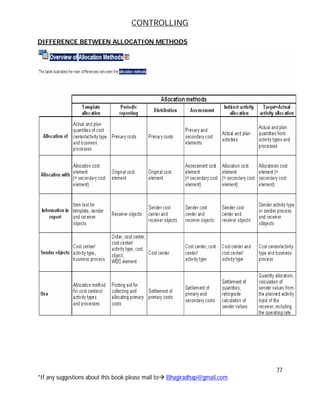
ALLOCATION METHOD .....................................................................................................................76
DIFFERENCE BETWEEN ALLOCATION METHODS..........................................................77
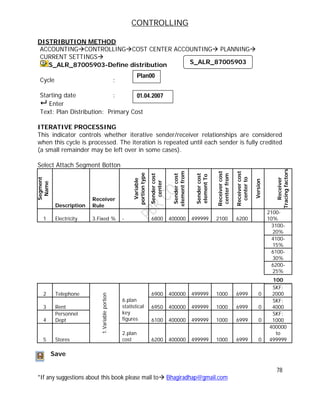
DISTRIBUTION METHOD..............................................................................................................78
INDIRECT ACTIVITY ALLOCATION.........................................................................................82
SPLITTING STRUCTURE......................................................................................................................85
COST CENTER BUDGETING.............................................................................................................88
ACTUAL DATA POSTINGS TO COST CENTER ..........................................................................89
POSTING FROM MM.........................................................................................................................89
POSTING FROM FI............................................................................................................................90
DEFINE ACTUAL INDIRECT ACTIVITY ALLOCATION..................................................100
COMMITMENT MANAGEMENT....................................................................................................102
PROFITABILITY ANALYSIS...................................................................................................................114
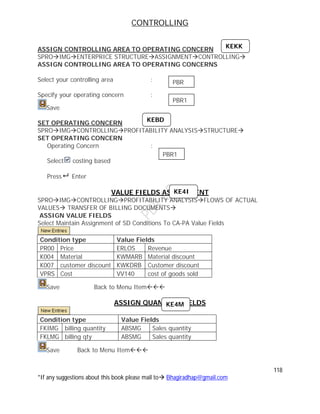
MAINTAIN OPERATING CONCERN............................................................................................115
VALUE FIELDS ASSIGNMENT........................................................................................................118
ASSIGN QUANTITY FIELDS ............................................................................................................118
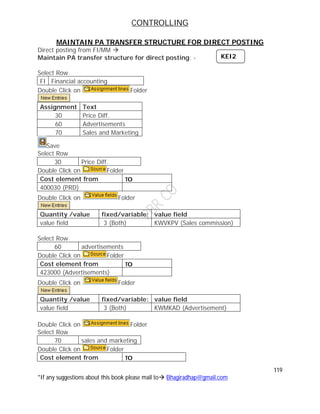
MAINTAIN PA TRANSFER STRUCTURE FOR DIRECT POSTING.....................................119
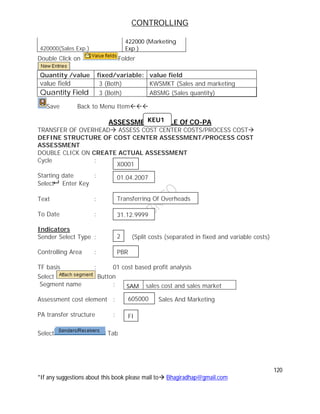
ASSESSMENT CYCLE Of CO-PA......................................................................................................120
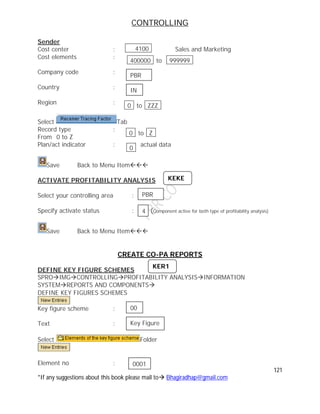
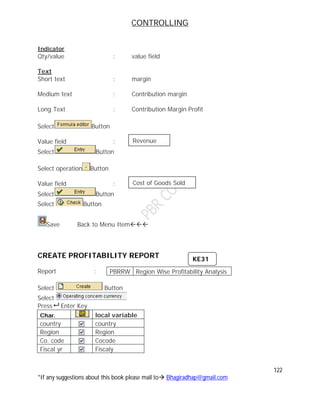
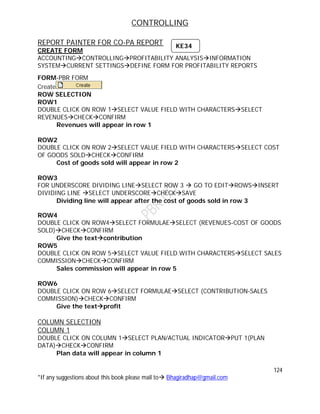
CREATE CO-PA REPORTS.................................................................................................................121
CREATE FORM..................................................................................................................................124
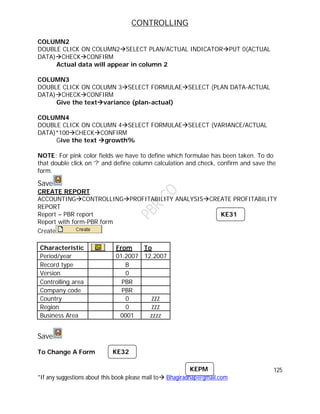
CREATE REPORT.............................................................................................................................125
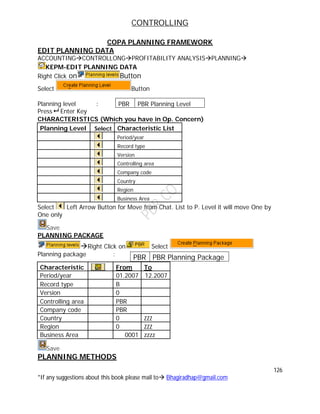
COPA PLANNING FRAMEWORK ..................................................................................................126
CREATE TRANSPORT REQUEST OF CO-PA.........................................................................128
PROFIT CENTER ACCOUNTING........................................................................................................129
BASIC SETTING FOR PROFIT CENTER ......................................................................................134
DEFINE DUMMY PROFIT CENTER..............................................................................................134
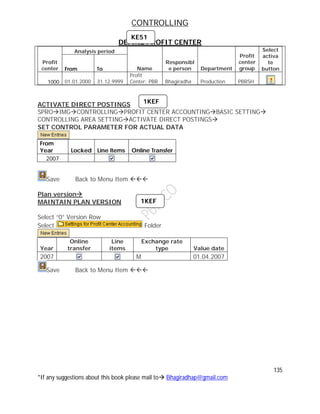
DEFINE PROFIT CENTER ................................................................................................................135
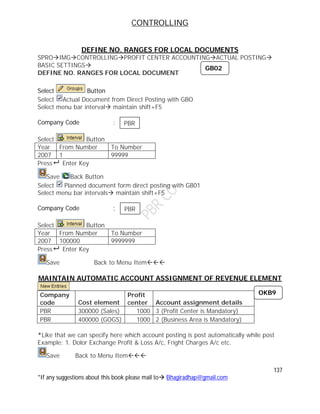
DEFINE NO. RANGES FOR LOCAL DOCUMENTS.................................................................137
MAINTAIN AUTOMATIC ACCOUNT ASSIGNMENT OF REVENUE ELEMENT.........137
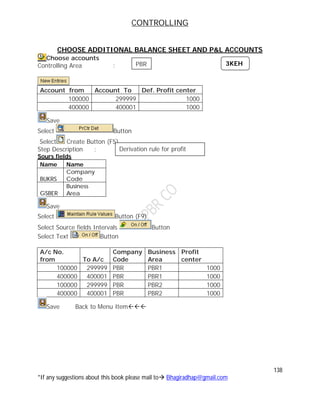
CHOOSE ADDITIONAL BALANCE SHEET AND P&L ACCOUNTS..................................138
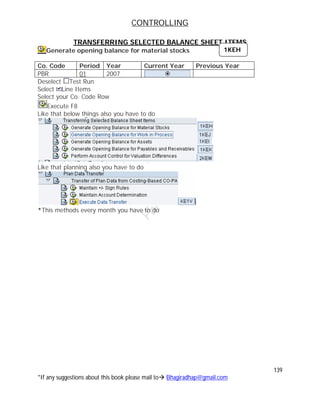
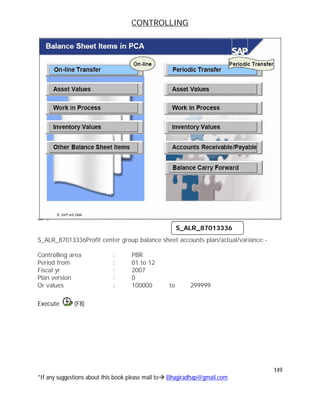
TRANSFERRING SELECTED BALANCE SHEET ITEMS .......................................................139
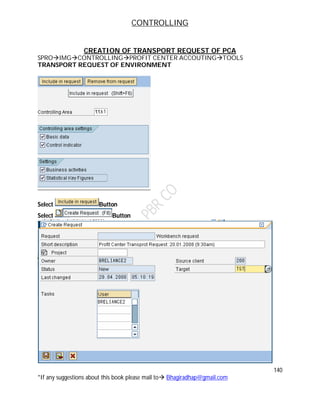
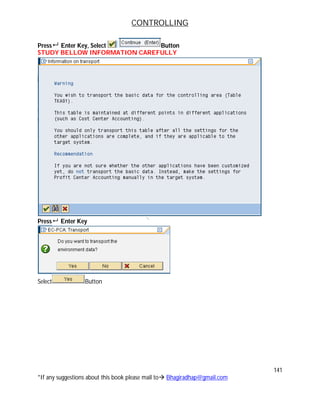
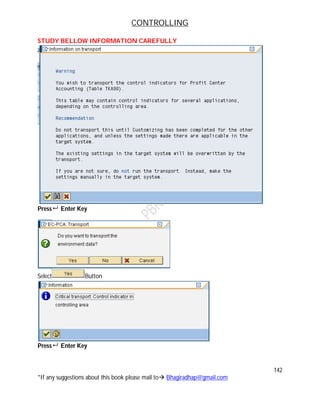
CREATION OF TRANSPORT REQUEST OF PCA .....................................................................140
PLANNING OF PCA.............................................................................................................................144
ACTUAL DATA FLOW TO CO-PA &PCA......................................................................................146
CREATE SALES ORDER.................................................................................................................146
CONTROLLING
3
*If any suggestions about this book please mail to Bhagiradhap@gmail.com
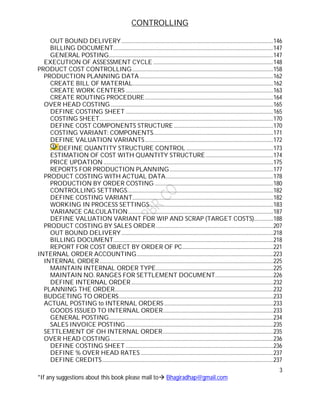
OUT BOUND DELIVERY..............................................................................................................146
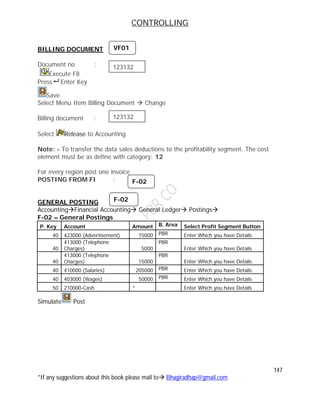
BILLING DOCUMENT....................................................................................................................147
GENERAL POSTING.......................................................................................................................147
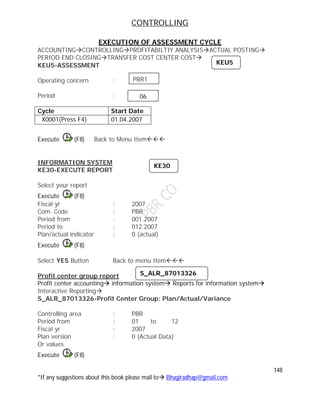
EXECUTION OF ASSESSMENT CYCLE .......................................................................................148
PRODUCT COST CONTROLLING ......................................................................................................158
PRODUCTION PLANNING DATA.................................................................................................162
CREATE BILL OF MATERIAL......................................................................................................162
CREATE WORK CENTERS ...........................................................................................................163
CREATE ROUTING PROCEDURE.............................................................................................164
OVER HEAD COSTING......................................................................................................................165
DEFINE COSTING SHEET ...........................................................................................................165
COSTING SHEET..............................................................................................................................170
DEFINE COST COMPONENTS STRUCTURE........................................................................170
COSTING VARIANT: COMPONENTS.......................................................................................171
DEFINE VALUATION VARIANTS.............................................................................................172
DEFINE QUANTITY STRUCTURE CONTROL ...............................................................173
ESTIMATION OF COST WITH QUANTITY STRUCTURE.................................................174
PRICE UPDATION ...........................................................................................................................175
REPORTS FOR PRODUCTION PLANNING...........................................................................177
PRODUCT COSTING WITH ACTUAL DATA..............................................................................178
PRODUCTION BY ORDER COSTING ......................................................................................180
CONTROLLING SETTINGS..........................................................................................................182
DEFINE COSTING VARIANT......................................................................................................182
WORKING IN PROCESS SETTINGS..........................................................................................183
VARIANCE CALCULATION.........................................................................................................187
DEFINE VALUATION VARIANT FOR WIP AND SCRAP (TARGET COSTS)..............188
PRODUCT COSTING BY SALES ORDER.....................................................................................207
OUT BOUND DELIVERY..............................................................................................................218
BILLING DOCUMENT....................................................................................................................218
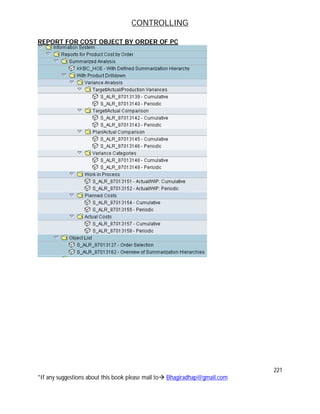
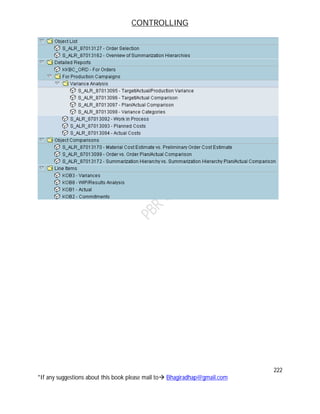
REPORT FOR COST OBJECT BY ORDER OF PC..................................................................221
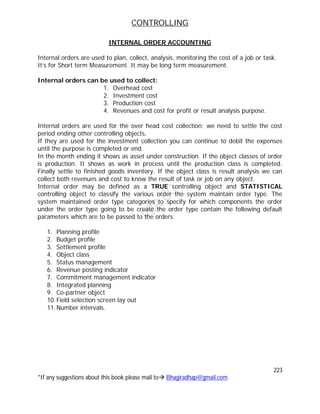
INTERNAL ORDER ACCOUNTING...................................................................................................223
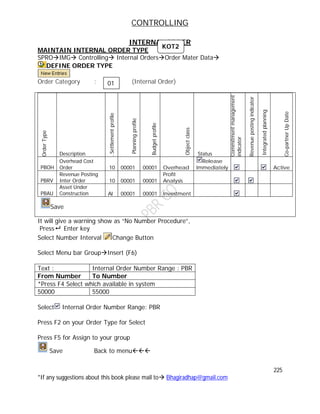
INTERNAL ORDER..............................................................................................................................225
MAINTAIN INTERNAL ORDER TYPE.....................................................................................225
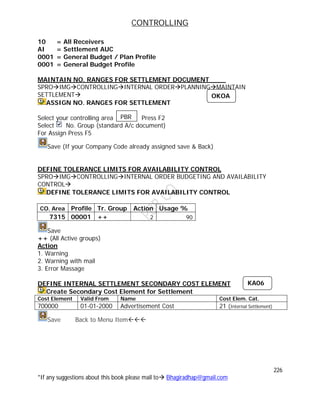
MAINTAIN NO. RANGES FOR SETTLEMENT DOCUMENT..........................................226
DEFINE INTERNAL ORDER.......................................................................................................232
PLANNING THE ORDER...................................................................................................................232
BUDGETING TO ORDERS................................................................................................................233
ACTUAL POSTING to INTERNAL ORDERS ...............................................................................233
GOODS ISSUED TO INTERNAL ORDER................................................................................233
GENERAL POSTING.......................................................................................................................234
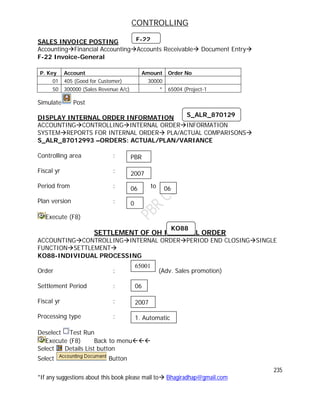
SALES INVOICE POSTING...........................................................................................................235
SETTLEMENT OF OH INTERNAL ORDER................................................................................235
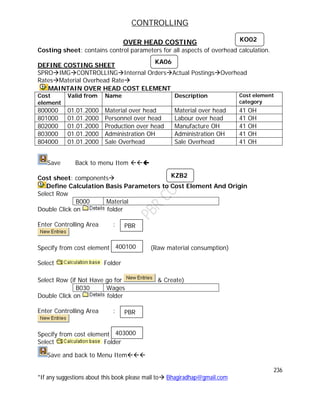
OVER HEAD COSTING......................................................................................................................236
DEFINE COSTING SHEET ...........................................................................................................236
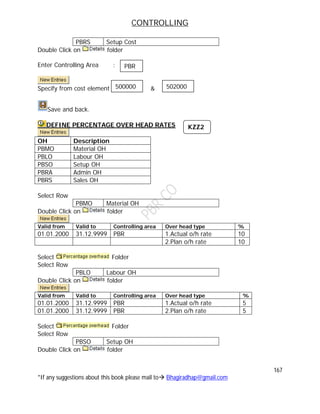
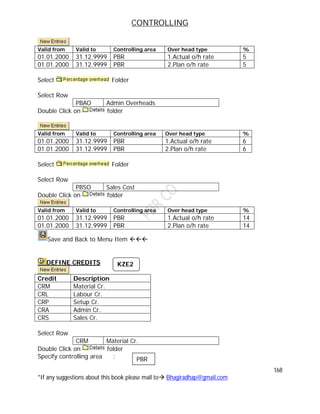
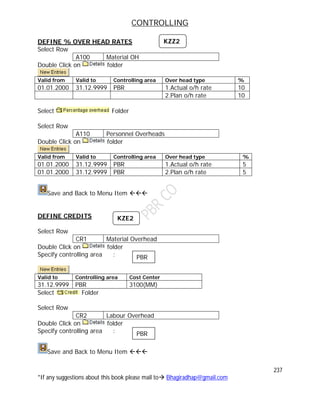
DEFINE % OVER HEAD RATES ................................................................................................237
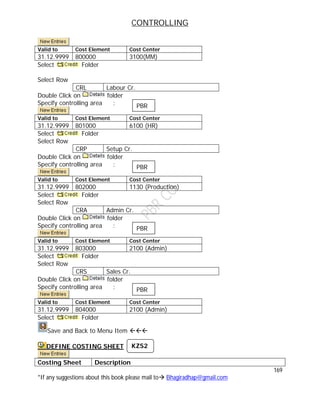
DEFINE CREDITS............................................................................................................................237
CONTROLLING
4
*If any suggestions about this book please mail to Bhagiradhap@gmail.com
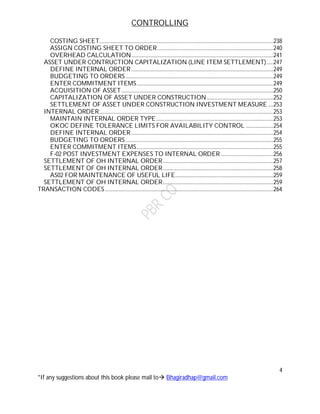
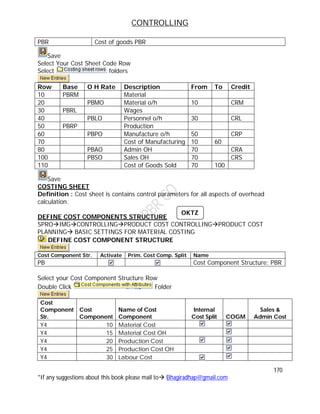
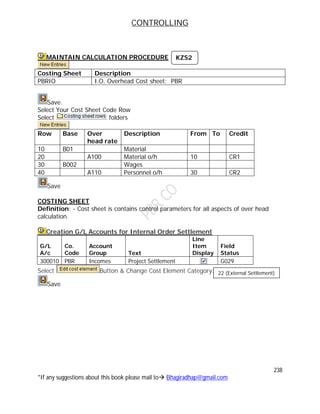
COSTING SHEET..............................................................................................................................238
ASSIGN COSTING SHEET TO ORDER....................................................................................240
OVERHEAD CALCULATION.......................................................................................................241
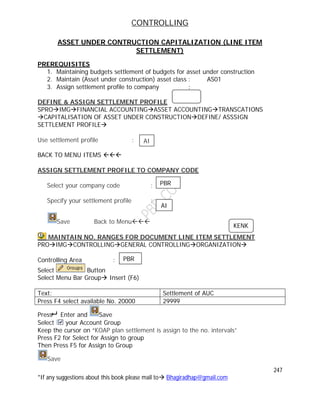
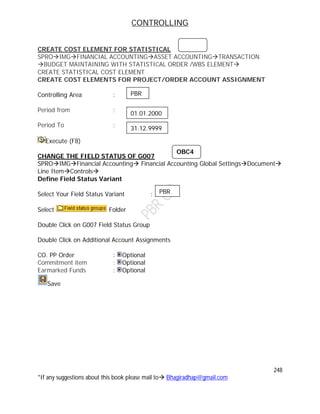
ASSET UNDER CONTRUCTION CAPITALIZATION (LINE ITEM SETTLEMENT).....247
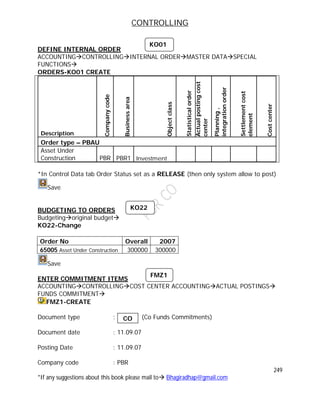
DEFINE INTERNAL ORDER.......................................................................................................249
BUDGETING TO ORDERS...........................................................................................................249
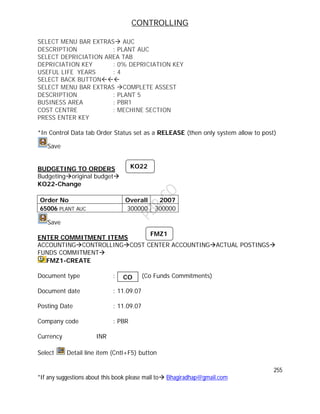
ENTER COMMITMENT ITEMS...................................................................................................249
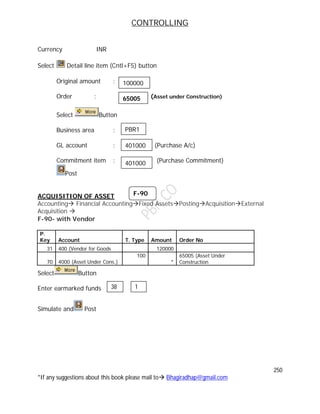
ACQUISITION OF ASSET..............................................................................................................250
CAPITALIZATION OF ASSET UNDER CONSTRUCTION ................................................252
SETTLEMENT OF ASSET UNDER CONSTRUCTION INVESTMENT MEASURE....253
INTERNAL ORDER..............................................................................................................................253
MAINTAIN INTERNAL ORDER TYPE.....................................................................................253
OKOC DEFINE TOLERANCE LIMITS FOR AVAILABILITY CONTROL ....................254
DEFINE INTERNAL ORDER.......................................................................................................254
BUDGETING TO ORDERS...........................................................................................................255
ENTER COMMITMENT ITEMS...................................................................................................255
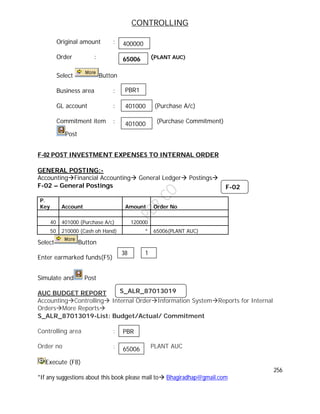
F-02 POST INVESTMENT EXPENSES TO INTERNAL ORDER ......................................256
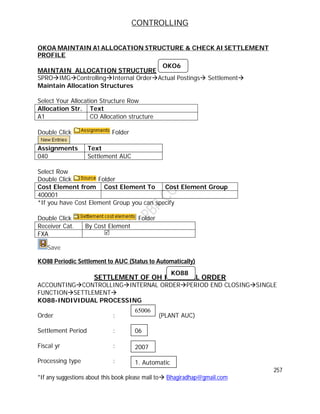
SETTLEMENT OF OH INTERNAL ORDER................................................................................257
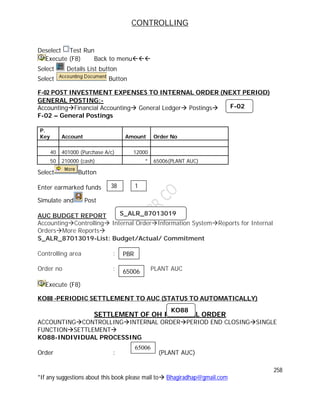
SETTLEMENT OF OH INTERNAL ORDER................................................................................258
AS02 FOR MAINTENANCE OF USEFUL LIFE.......................................................................259
SETTLEMENT OF OH INTERNAL ORDER................................................................................259
TRANSACTION CODES..........................................................................................................................264
CONTROLLING
5
*If any suggestions about this book please mail to Bhagiradhap@gmail.com
BASIC OVERVIEW OF CONTROLLING
CONTROLLING
Controlling, we are using to prepare “INTERNAL REPORTS”, this internal reports.
Information will be helpful for management to take managerial decision in critical
condition. With controlling we can monitor, what are the cost incurring within the
organization. So, that easily identifies the unnecessary expenditure incurring in the
Organization.
CONTROLLING AREA
It is used to monitor cost (Controlling) report. Is the control cost unit within the CO.
module. It is representative of a contained Cost Accounting.
Ex: where Costs & Revenues can be managed
COST ELEMENT
It is an origin of cost & revenue, which is having expenditure & income in nature that is
called Cost Element.
PROFITABILITY ANALYSIS
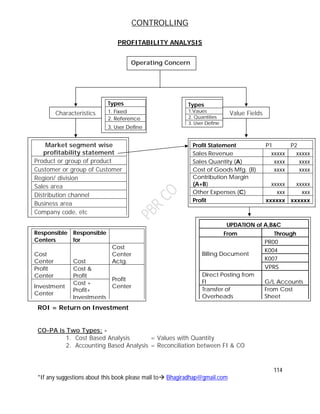
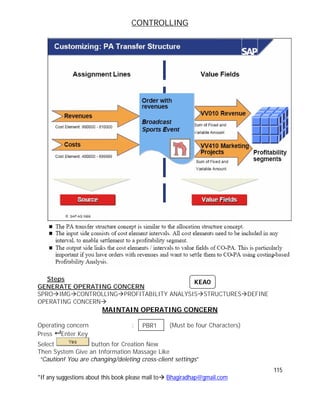
CO-PA is helpful to the management to provide information regarding market segments,
So, that based on this sales segment information. The Management can make decision.
Compare to PCA the profitability analysis can provide more information to the
management. It means in-depth analysis is possible in PA.
OPERATING CONCERN
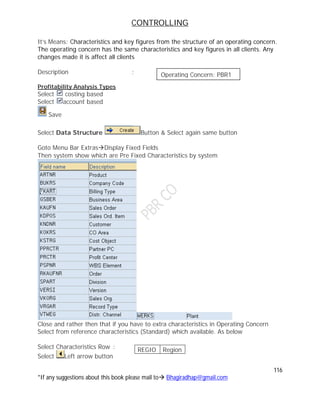
The combination of “Characteristics” and “value fields” are called as operating concern.
It we want to analyze the market at a time is difficult, so that to avoid this
inconvenience that total sales market divided into small segments in parallel. So that
each and every segment wise analysis is possible, so that entire organization market
analysis is also simplify due to this “Operating Concern” .
CHARACTERISTICS
On which basis the organization wants to go for profitability analysis
Ex:- Product wise, Customer wise, Sales Employee wise, sales area, distribution
channel, sales org etc.
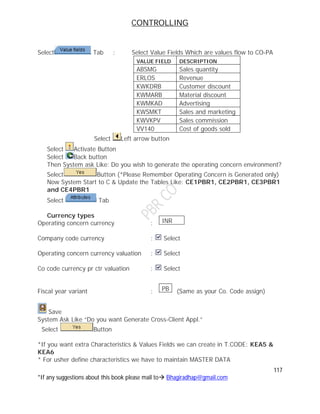
VALUE FIELDS
The values are associated with a characteristics are called Value fields.
Ex:- Sales Quantity, Revenue, Cost of Goods Sold etc.
VALUATION METHODS IN PROFITABILITY ANALYSIS
These are two Methods:-
CONTROLLING
6
*If any suggestions about this book please mail to Bhagiradhap@gmail.com
a) Account Based Method
b) Cost Based Method
S NO Account Based Cost Based
1 It Reconcile between FI & CO
2 Here we considered all Expenditure
A/c & Revenue A/c to calculate
Profitability
Here we considered all cost elements &
revenues elements to calculate
Profitability
3 Here we are not having value field
only we have “Characteristics”
Here we used both Characteristics and
value fields for Profitability Analysis.
4 Here we cannot get “ upto date
report
Here we can get upto date reports
SAP recommended to used cost based
CO-PA
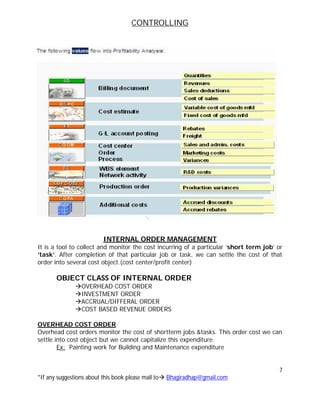
Flow of Values into CO-PA
S No Module Through Closed Values
1 Sales & Marketing (SD) Billing Doc. Quantities, Revenues, Sales,
Deductions & Cost of Sales
2 CO-Product costing (CO-
PC)
Cost
Estimate
Variable Cost of goods Manufacture/
Fixed Cost of goods Manufacture
3 Finance (FI) G/L A/c
Posting
Rebates & Frights
4 CO Overhead (CO-OM) Cost Center,
Order
&Process
Sales, Admin & Marketing Cost &
Variance
5 Project System WBS
Element
Research & Development Cost (Ex.
Tooth Powder to Tooth Paste
6 CO-Production Cost
Object
Production
Order
Production Variances
7 Profitability Analysis
(CO-PA)
Additional
Cost
Accrual Discounts, Accrual Rebates
CONTROLLING
7
*If any suggestions about this book please mail to Bhagiradhap@gmail.com
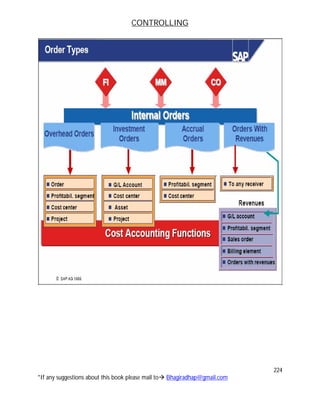
INTERNAL ORDER MANAGEMENT
It is a tool to collect and monitor the cost incurring of a particular ‘short term job’ or
‘task’. After completion of that particular job or task, we can settle the cost of that
order into several cost object.(cost center/profit center)
OBJECT CLASS OF INTERNAL ORDER
OVERHEAD COST ORDER
INVESTMENT ORDER
ACCRUAL/DIFFERAL ORDER
COST BASED REVENUE ORDERS
OVERHEAD COST ORDER
Overhead cost orders monitor the cost of shortterm jobs &tasks. This order cost we can
settle into cost object but we cannot capitalize this expenditure.
Ex: Painting work for Building and Maintenance expenditure
CONTROLLING
8
*If any suggestions about this book please mail to Bhagiradhap@gmail.com
INVESTMENT ORDER
Here we can monitor the cost incurring to Asset Under Construction/Capital Work
In Progress. After finishes that particular Asset Under Construction/Capital Work
In Progress. We can settle into particular asset(capitalized of asset).
ACCRUAL/DIFFERAL ORDER
It is used to monitor the cost incurring of seasonal business(periodic). After finishing
that period we can settle into respective cost object.
Ex: Employee bonus payment
COST BASED REVENUE ORDERS
It is used to monitor the cost of particular Production Order/Maintenance Order.
TYPES OF INTERNAL ORDERS
TRUE ORDERS STATISTICAL ORDER
We can settle the time order cost to
respective cost objective
We cannot settle the statistical order to
respective cost objective
Which define the order we should not
select statistical order
Which defining if we select statistical order
check button
It is not only information and for
settlements aslo
Mainly it is used for information purpose
only
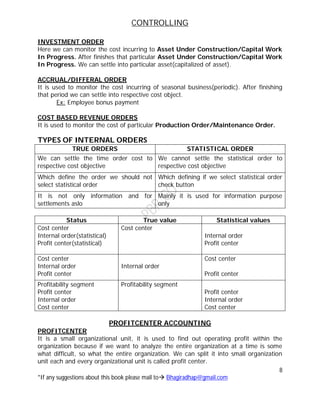
Status True value Statistical values
Cost center
Internal order(statistical)
Profit center(statistical)
Cost center
Internal order
Profit center
Cost center
Internal order
Profit center
Internal order
Cost center
Profit center
Profitability segment
Profit center
Internal order
Cost center
Profitability segment
Profit center
Internal order
Cost center
PROFITCENTER ACCOUNTING
PROFITCENTER
It is a small organizational unit, it is used to find out operating profit within the
organization because if we want to analyze the entire organization at a time is some
what difficult, so what the entire organization. We can split it into small organization
unit each and every organizational unit is called profit center.
CONTROLLING
9
*If any suggestions about this book please mail to Bhagiradhap@gmail.com
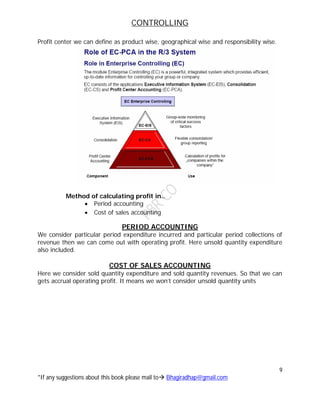
Profit center we can define as product wise, geographical wise and responsibility wise.
Method of calculating profit in..
 Period accounting
 Cost of sales accounting
PERIOD ACCOUNTING
We consider particular period expenditure incurred and particular period collections of
revenue then we can come out with operating profit. Here unsold quantity expenditure
also included.
COST OF SALES ACCOUNTING
Here we consider sold quantity expenditure and sold quantity revenues. So that we can
gets accrual operating profit. It means we won’t consider unsold quantity units
CONTROLLING
10
*If any suggestions about this book please mail to Bhagiradhap@gmail.com
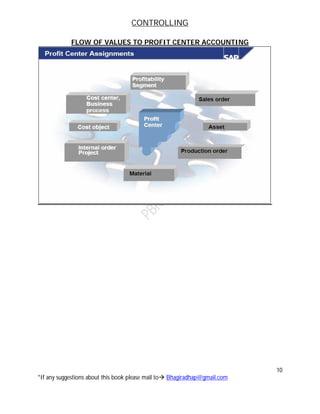
FLOW OF VALUES TO PROFIT CENTER ACCOUNTING
CONTROLLING
11
*If any suggestions about this book please mail to Bhagiradhap@gmail.com
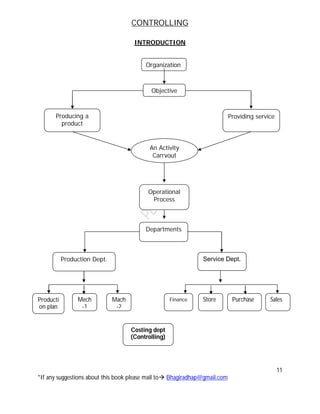
INTRODUCTION
Organization
Objective
Producing a
product
Providing service
An Activity
Carryout
Operational
Process
Departments
Production Dept. Service Dept.
Producti
on plan
Finance Store Purchase SalesMech
-1
Mach
-2
Costing dept
(Controlling)
CONTROLLING
12
*If any suggestions about this book please mail to Bhagiradhap@gmail.com
COSTING
1. It calculates the cost per unit of product/service
 Help in fixing price
 Valuating stock
 Calculating WIP
 To determine cost of Goods manufacture or sold
2. Cost analysis and cost control and management decision making
Cost information
Costing: It refers to the process and technique of ascertainment of cost of particular
thing
Thing =A product / Group of product /process/ operation /contract/ job / order/ any
objects (All Called as Cost Units)
Cost Unit = A unit for which cost is to be ascertained
COSTING TECHNIQUES
1. Classification and collection of expenditure according to cost element.
2. Allocation and apportionment of expenses/ cost to cost centers /cost unit
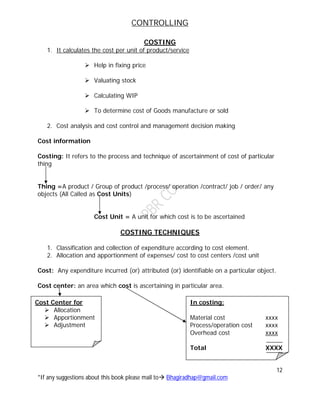
Cost: Any expenditure incurred (or) attributed (or) identifiable on a particular object.
Cost center: an area which cost is ascertaining in particular area.
Cost Center for
 Allocation
 Apportionment
 Adjustment
In costing:
Material cost xxxx
Process/operation cost xxxx
Overhead cost xxxx
Total XXXX
CONTROLLING
13
*If any suggestions about this book please mail to Bhagiradhap@gmail.com
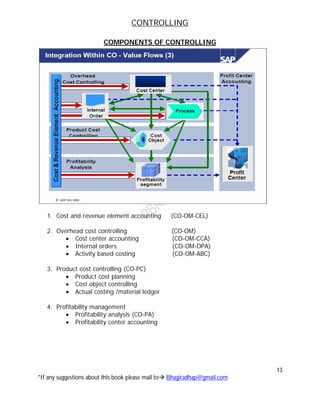
COMPONENTS OF CONTROLLING
1. Cost and revenue element accounting (CO-OM-CEL)
2. Overhead cost controlling (CO-OM)
 Cost center accounting (CO-OM-CCA)
 Internal orders (CO-OM-OPA)
 Activity based costing (CO-OM-ABC)
3. Product cost controlling (CO-PC)
 Product cost planning
 Cost object controlling
 Actual costing /material ledger
4. Profitability management
 Profitability analysis (CO-PA)
 Profitability center accounting
CONTROLLING
14
*If any suggestions about this book please mail to Bhagiradhap@gmail.com
COST AND REVENUE ELEMENT ACCOUNTING
1. Cost Element
A cost element classifies the organization-valuated consumption of production
factors with in a controlling area. A cost element corresponds a cost relevant
item in the chart of accounts.
2. Revenue Element
An object t that records the value of operating sales within one controlling area.
Each revenue element corresponds to a revenue account in chart of accounts.
3. Cost element accounting
A component of controlling that collects and summarizes postings that arise
within co in a reconciliation ledger.
OVERHEAD COST CONTROLLING
1. Cost center
An organization unit within a controlling area that represents a defined location
of cost incurrence the define based on
 Financial requirement
 Allocation criteria
 Physical location
 Responsibility for cost
2. Cost center accounting
Cost center accounting let you analyze the overhead costs according to where
they were incurred within the organization.
3. Internal Orders
Internal orders are normally used to plan, collect and settle the costs of internal
jobs and tasks. Internal orders are categorized as either
 Order used only for monitoring objects in cost accounting (Such as
advertising or Trade fair orders)
 Production: Productive orders that are value added that is order can be
capitalized (Such as in-house construction of an assembly line.
4. Activity based Accounting
Activity based costing analyzed cross departmental business process. The goals
of the whole organization and the optimization of business flours are prioritized.
CONTROLLING
15
*If any suggestions about this book please mail to Bhagiradhap@gmail.com
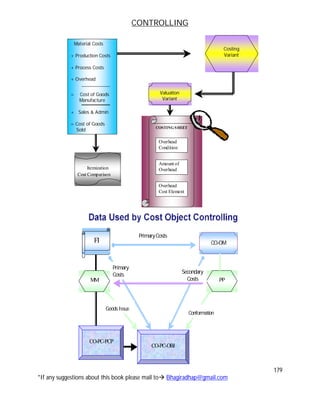
PRODUCT COST CONTROLLING
Product cost controlling calculates the cost that occurs during manufacture of a product
or provision of a service. It enables you to calculate the minimum price at which a
product can be profitability marketed.
Product cost planning
Product cost planning is an area within product cost controlling. Where you can plan
cost for materials without reference to orders and set price for materials and other cost
controlling objects.
You can use production cost planning to analyze the cost of your company’s
product such as
 Manufactured materials
 Service
 Other intangible goods
Cost object controlling
Cost object controlling is an area in cost accounting that assigns the cost incurred in
production of company activities such as internally manufactured materials. To those
activities cost object controlling supports you in
 Reaching make or buy decision
 Determining price floors
 Performing complex cost analysis such as target/actual analysis
 Determining inventory values
Purpose
The cost object controlling components is designed to answer the question , the
components assigns the cost incurred in the company to the company output. The
output of a company can consist of material manufactured in house, individual orders,
or intangible goods.
The cost objects controlling components enables you to determine the cost of goods
manufactured or the cost of goods sold for the manufacturing or service output of the
company.
You can:-
1. Establish planned cost(Budgeted costs)
2. Record actual costs for the cost objects
3. Compare actual cost with target cost and with planned cost and analyze
variances
4. Determine price floors for products or individual orders.
CONTROLLING
16
*If any suggestions about this book please mail to Bhagiradhap@gmail.com
Actual cost /Material cost
The application component actual costing material ledger fulfills two basic objectives.
The ability to carry materials price in multiple currencies/ valuations and actual costing.
PROFITABILITY ANALYSIS (CO-PA)
Profitability Analysis (CO-PA) enables you to evaluate market segments, which can be
classified according to products, customers, orders or any combination of these, or
strategic business units, such as sales organizations or business areas, with respect to
your company's profit or contribution margin.
The aim of the system is to provide your sales, marketing, product management and
corporate planning departments with information to support internal accounting and
decision-making.
The two forms of profitability analysis in CO-PA are:
 Costing-based profitability analysis
 Account-based profitability analysis
Profitability analysis in CO-PA is based on the cost of sales accounting method
Two forms of Profitability Analysis are supported: costing-based and account-based.
 Costing-based Profitability Analysis is the form of profitability analysis that groups
costs and revenues according to value fields and costing-based valuation
approaches, both of which you can define yourself. It guarantees you access at
all times to a complete, short-term profitability report.
 Account-based Profitability Analysis is a form of profitability analysis organized in
accounts and using an account-based valuation approach. The distinguishing
characteristic of this form is its use of cost and revenue elements. It provides
you with a profitability report that is permanently reconciled with financial
accounting.
PROFITABILITY SEGMENT (CO-PA)
An object within Profitability Analysis to which costs and revenues are assigned.
A profitability segment corresponds to a market segment. You can calculate the
profitability of a profitability segment by comparing its sales revenues against its
costs.A profitability segment in an operating concern is defined by a combination of
characteristic values. Characteristics can be concepts already available in the SAP
System (customer, product, sales organization, and so on), or you can define your
own concepts (such as "order size class").
CONTROLLING
17
*If any suggestions about this book please mail to Bhagiradhap@gmail.com
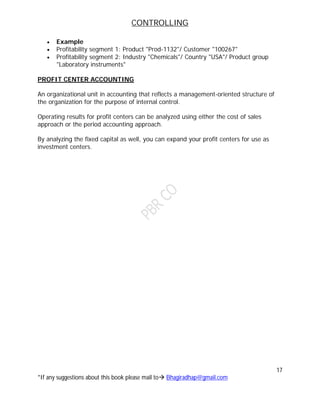
 Example
 Profitability segment 1: Product "Prod-1132"/ Customer "100267"
 Profitability segment 2: Industry "Chemicals"/ Country "USA"/ Product group
"Laboratory instruments"
PROFIT CENTER ACCOUNTING
An organizational unit in accounting that reflects a management-oriented structure of
the organization for the purpose of internal control.
Operating results for profit centers can be analyzed using either the cost of sales
approach or the period accounting approach.
By analyzing the fixed capital as well, you can expand your profit centers for use as
investment centers.
CONTROLLING
18
*If any suggestions about this book please mail to Bhagiradhap@gmail.com
CONTROLLING
19
*If any suggestions about this book please mail to Bhagiradhap@gmail.com
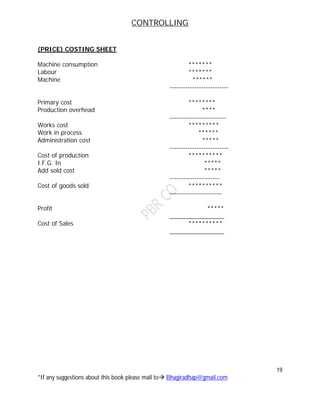
(PRICE) COSTING SHEET
Machine consumption *******
Labour *******
Machine ******
--------------------------
Primary cost ********
Production overhead ****
-------------------------
Works cost *********
Work in process ******
Administration cost *****
--------------------------
Cost of production **********
I.F.G. In *****
Add sold cost *****
----------------------
Cost of goods sold **********
-----------------------
Profit *****
________________
Cost of Sales **********
________________
CONTROLLING
20
*If any suggestions about this book please mail to Bhagiradhap@gmail.com
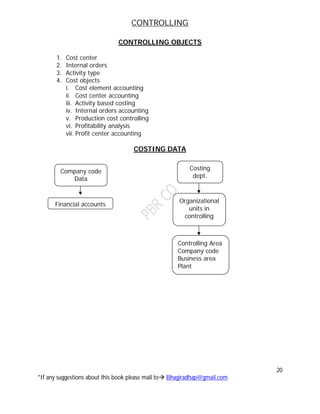
CONTROLLING OBJECTS
1. Cost center
2. Internal orders
3. Activity type
4. Cost objects
i. Cost element accounting
ii. Cost center accounting
iii. Activity based costing
iv. Internal orders accounting
v. Production cost controlling
vi. Profitability analysis
vii. Profit center accounting
COSTING DATA
Company code
Data
Financial accounts
Costing
dept.
Organizational
units in
controlling
Controlling Area
Company code
Business area
Plant
CONTROLLING
21
*If any suggestions about this book please mail to Bhagiradhap@gmail.com
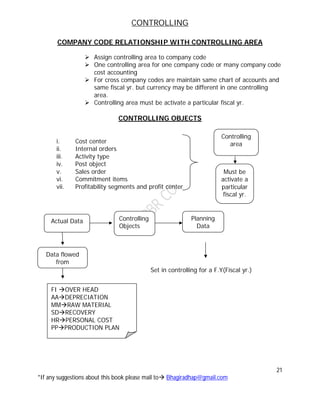
COMPANY CODE RELATIONSHIP WITH CONTROLLING AREA
 Assign controlling area to company code
 One controlling area for one company code or many company code
cost accounting
 For cross company codes are maintain same chart of accounts and
same fiscal yr. but currency may be different in one controlling
area.
 Controlling area must be activate a particular fiscal yr.
CONTROLLING OBJECTS
i. Cost center
ii. Internal orders
iii. Activity type
iv. Post object
v. Sales order
vi. Commitment items
vii. Profitability segments and profit center
Set in controlling for a F.Y(Fiscal yr.)
Controlling
area
Must be
activate a
particular
fiscal yr.
Actual Data Controlling
Objects
Planning
Data
Data flowed
from
FI OVER HEAD
AADEPRECIATION
MMRAW MATERIAL
SDRECOVERY
HRPERSONAL COST
PPPRODUCTION PLAN
CONTROLLING
22
*If any suggestions about this book please mail to Bhagiradhap@gmail.com
NO. RANGES
Controlling document for various business transaction in controlling(Not a Year
Dependent)
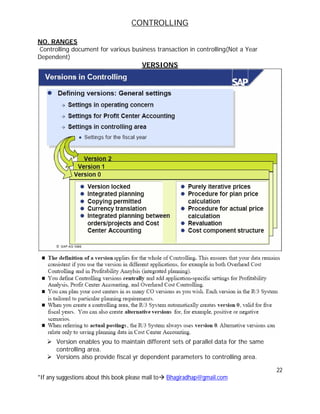
VERSIONS
 Version enables you to maintain different sets of parallel data for the same
controlling area.
 Versions also provide fiscal yr dependent parameters to controlling area.
CONTROLLING
23
*If any suggestions about this book please mail to Bhagiradhap@gmail.com
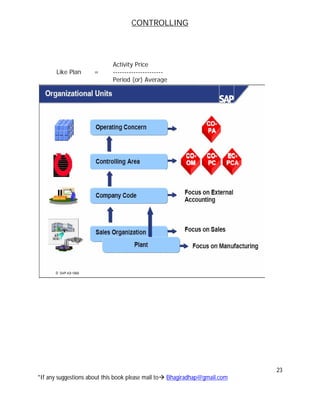
Activity Price
Like Plan = ----------------------
Period (or) Average
CONTROLLING
24
*If any suggestions about this book please mail to Bhagiradhap@gmail.com
CONTROLLING
25
*If any suggestions about this book please mail to Bhagiradhap@gmail.com
BASIC SETTINGS
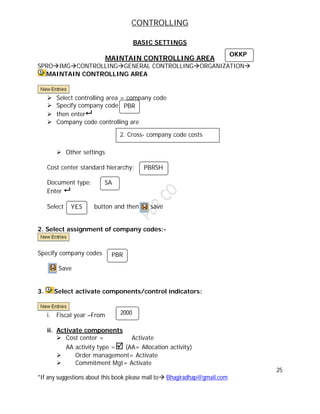
MAINTAIN CONTROLLING AREA
SPROIMGCONTROLLINGGENERAL CONTROLLINGORGANIZATION
MAINTAIN CONTROLLING AREA
 Select controlling area = company code
 Specify company code
 then enter
 Company code controlling are
 Other settings
Cost center standard hierarchy:
Document type:
Enter 
Select button and then save
2. Select assignment of company codes:-
Specify company codes
Save
3. Select activate components/control indicators:
i. Fiscal year –From
ii. Activate components
 Cost center = Activate
AA activity type = (AA= Allocation activity)
 Order management= Activate
 Commitment Mgt= Activate
PBR
2. Cross- company code costs
accounts
PBRSH
SA
YES
PBR
2000
OKKP
CONTROLLING
26
*If any suggestions about this book please mail to Bhagiradhap@gmail.com
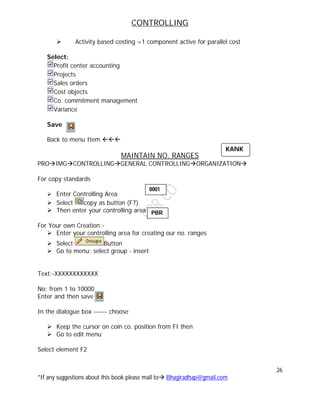
 Activity based costing =1 component active for parallel cost
Select:
Profit center accounting
Projects
Sales orders
Cost objects
Co. commitment management
Variance
Save
Back to menu Item 
MAINTAIN NO. RANGES
PROIMGCONTROLLINGGENERAL CONTROLLINGORGANIZATION
For copy standards
 Enter Controlling Area
 Select copy as button (F7)
 Then enter your controlling area
For Your own Creation:-
 Enter your controlling area for creating our no. ranges
 Select Button
 Go to menu: select group - insert
Text:-XXXXXXXXXXXX
No: from 1 to 10000
Enter and then save
In the dialogue box ------ choose
 Keep the cursor on coin co. position from FI then
 Go to edit menu
Select element F2
KANK
0001
PBR
CONTROLLING
27
*If any suggestions about this book please mail to Bhagiradhap@gmail.com
Select controlling area for your company
Go to edit menu
Select assign element group (F5)
Save.
Back to menu Item 
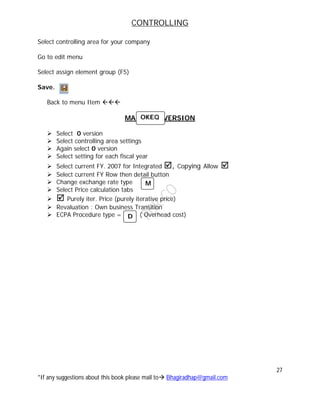
MAINTAIN VERSION
 Select 0 version
 Select controlling area settings
 Again select 0 version
 Select setting for each fiscal year
 Select current FY. 2007 for Integrated , Copying Allow 
 Select current FY Row then detail button
 Change exchange rate type
 Select Price calculation tabs
  Purely iter. Price (purely iterative price)
 Revaluation : Own business Transition
 ECPA Procedure type = ( Overhead cost)
OKEQ
D
M
CONTROLLING
28
*If any suggestions about this book please mail to Bhagiradhap@gmail.com
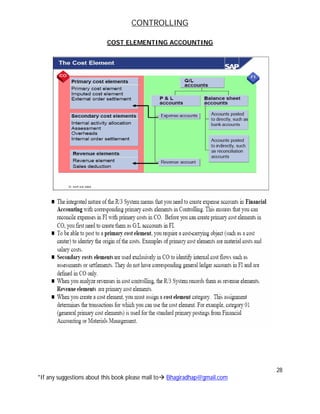
COST ELEMENTING ACCOUNTING
CONTROLLING
29
*If any suggestions about this book please mail to Bhagiradhap@gmail.com
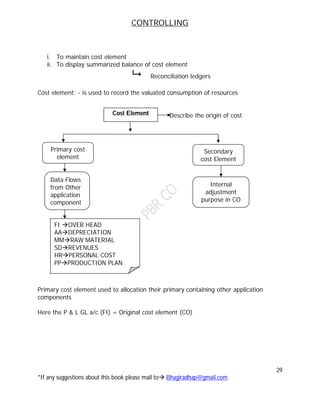
i. To maintain cost element
ii. To display summarized balance of cost element
 Reconciliation ledgers
Cost element: - is used to record the valuated consumption of resources
Describe the origin of cost
Primary cost element used to allocation their primary containing other application
components
Here the P & L GL a/c (FI) = Original cost element (CO)
Cost Element
FI OVER HEAD
AADEPRECIATION
MMRAW MATERIAL
SDREVENUES
HRPERSONAL COST
PPPRODUCTION PLAN
Primary cost
element
Secondary
cost Element
Internal
adjustment
purpose in CO
Data Flows
from Other
application
component
CONTROLLING
30
*If any suggestions about this book please mail to Bhagiradhap@gmail.com
PRIMARY COST ELEMENT
For allocation purpose we have to use primary cost element
For technical purpose system categories primary costs:
11 –Revenue
01 –Primary cost/cost reducing/revenues
03-Accrual calculation- % method
04-Accrual calculation-Debit=Actual
Ex: - Bonus. By forget the data then it will used
12-Sales deductions
Ex:- External settlement- In cost accounting
The cost related to cost object
Sometimes we also maintain monitoring capital expenditure, after
competition of cost within controlling. Internal whatever cost collects for
controlling object for a particular object we finally settlement in external
AA
90- Statistical cost element for balance.
SECONDARY COST ELEMENT
It is used for internal adjustment purpose
Internal adjustment categories:
21- Internal settlement
31-Result/project analysis
41-Overhead rates
42-Assignment Costs
43-Interanal Activity allocation
50-Project incoming order- revenues
51- Project incoming order-Other revenues
52- Project incoming order-Cost
61- Earned Value.
Note: Cost Element Categories for System defined. Usher Creation is not possible
CONTROLLING
31
*If any suggestions about this book please mail to Bhagiradhap@gmail.com
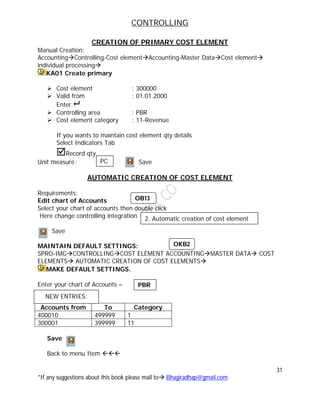
CREATION OF PRIMARY COST ELEMENT
Manual Creation:
AccountingControlling-Cost elementAccounting-Master DataCost element
individual processing
KA01 Create primary
 Cost element : 300000
 Valid from : 01.01.2000
Enter 
 Controlling area : PBR
 Cost element category : 11-Revenue
If you wants to maintain cost element qty details
Select Indicators Tab
Record qty
Unit measure: Save
AUTOMATIC CREATION OF COST ELEMENT
Requirements:
Edit chart of Accounts
Select your chart of accounts then double click
Here change controlling integration
Save
MAINTAIN DEFAULT SETTINGS:
SPRO-IMGCONTROLLINGCOST ELEMENT ACCOUNTINGMASTER DATA COST
ELEMENTS AUTOMATIC CREATION OF COST ELEMENTS
MAKE DEFAULT SETTINGS.
Enter your chart of Accounts –
Accounts from To Category
400010 499999 1
300001 399999 11
Save
Back to menu Item 
PC
2. Automatic creation of cost element
NEW ENTRIES:
OB13
OKB2
PBR
CONTROLLING
32
*If any suggestions about this book please mail to Bhagiradhap@gmail.com
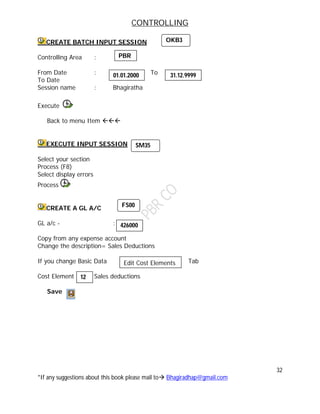
CREATE BATCH INPUT SESSION
Controlling Area :
From Date : To
To Date
Session name : Bhagiratha
Execute
Back to menu Item 
EXECUTE INPUT SESSION
Select your section
Process (F8)
Select display errors
Process
CREATE A GL A/C
GL a/c - :
Copy from any expense account
Change the description= Sales Deductions
If you change Basic Data Tab
Cost Element Sales deductions
Save
12
OKB3
PBR
01.01.2000 31.12.9999
SM35
FS00
426000
Edit Cost Elements
CONTROLLING
33
*If any suggestions about this book please mail to Bhagiradhap@gmail.com
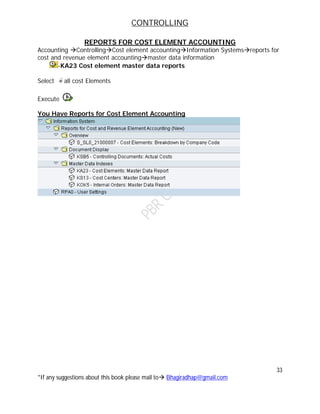
REPORTS FOR COST ELEMENT ACCOUNTING
Accounting ControllingCost element accountingInformation Systemsreports for
cost and revenue element accountingmaster data information
-KA23 Cost element master data reports
Select all cost Elements
Execute
You Have Reports for Cost Element Accounting
CONTROLLING
34
*If any suggestions about this book please mail to Bhagiradhap@gmail.com
OBJECT CLASS
DEFINITION
The object class is used to classify controlling objects such as cost centers, orders, and cost
objects, and to display the cost flows within CO from a business perspective. The classification
is made according to the SAP R/3 function list.
STRUCTURE
The following object classes are defined by SAP:
 Overhead costs (GKOST)
 Investments (INVST)
 Production (FERTG)
 Profit and sales (ERGEB)
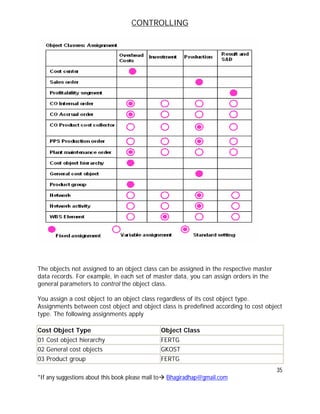
The assignment of the cost center, cost object, sales order, and profitability segment to
an object class is fixed by SAP, but you can assign other objects as you require.
The table below shows an overview of the objects in CO with fixed assignments, and
the objects that can be freely assigned. If you do not assign an object, then the default
setting applies.
CONTROLLING
35
*If any suggestions about this book please mail to Bhagiradhap@gmail.com
The objects not assigned to an object class can be assigned in the respective master
data records. For example, in each set of master data, you can assign orders in the
general parameters to control the object class.
You assign a cost object to an object class regardless of its cost object type.
Assignments between cost object and object class is predefined according to cost object
type. The following assignments apply
Cost Object Type Object Class
01 Cost object hierarchy FERTG
02 General cost objects GKOST
03 Product group FERTG
CONTROLLING
36
*If any suggestions about this book please mail to Bhagiradhap@gmail.com
Note that once you make an assignment, you cannot change it if transaction data
for an object already exists. Subsequent changes to the assignment can cause
inconsistencies in the reconciliation ledger.
PERIOD-END CLOSING
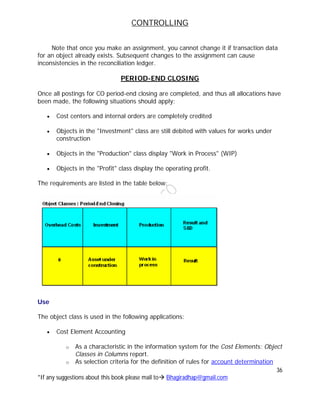
Once all postings for CO period-end closing are completed, and thus all allocations have
been made, the following situations should apply:
 Cost centers and internal orders are completely credited
 Objects in the "Investment" class are still debited with values for works under
construction
 Objects in the "Production" class display "Work in Process" (WIP)
 Objects in the "Profit" class display the operating profit.
The requirements are listed in the table below:
Use
The object class is used in the following applications:
 Cost Element Accounting
o As a characteristic in the information system for the Cost Elements: Object
Classes in Columns report.
o As selection criteria for the definition of rules for account determination
CONTROLLING
37
*If any suggestions about this book please mail to Bhagiradhap@gmail.com
 Profit Center Accounting
In Profit Center Accounting, the SAP R/3 System updates the object class in the
transaction data if the corresponding posting contains the object class. You can use the
object class as a characteristic in the information system.
Object Type
Object type determines which type the posting document belongs to the following
object type maintain by the system.
Object type Object name
CTR Cost center
ORD Order
FXA Fixed Assets
GL GL Accounts
PSG Profitability segments
WBS Work breakdown structure
NTA Network analysis
NTW Network
BE Business Work
RE Real Estate object
COB Cost Object
FUNCTIONAL AREA
Functional are break down corporate expenditure into different functions in line with the
requirements of cost of sales accounting.
These functions are:
 Production
 Administration
 Sales and Distribution
 Marketing
 Research and Development.
For primary and secondary postings the functional area is derived according to fixed
rules and is included in FI or Co documents and in the totals tables of the reconciliation
ledger and profit center accounting.
OKBD
CONTROLLING
38
*If any suggestions about this book please mail to Bhagiradhap@gmail.com
ACTIVATE COST OF SALES ACCOUNTING
SPRO IMG FA (NEW)FA GLOBAL SETTING(NEW) LEDGERLEDGER
ACTIVATE COST OF SALES ACCOUNTING
 Select your company code
Select Activate status
Save.
CHANGE GL ACCOUNTS TO ASSIGN FUNCTIONAL AREA: -
 Enter Exp A/c Purchase of Goods A/c
 Select Change button
 Specify functional area manufacturing
Save.
Note: Like that you can specify functional area for every P&L Accounts as per
requirements.
DIRECT COST AND INDIRECT COST
Cost incurred by the organization may be direct cost or indirect cost.
The direct cost assigns to cost object or cost center.
Indirect cost are assigned to cost center. Indirect cost also called overheads for overall
management purpose the system maintain the over head cost controlling for planning
common monitoring and analyzing.
The following components to planning cost:-
1. Cost element accounting
2. Cost center accounting
3. Activity based costing
4. Internal order accounting acting
For allocation and apportionment of overheads the system uses the above components.
0100
PBR
FS00
40100
0
CONTROLLING
39
*If any suggestions about this book please mail to Bhagiradhap@gmail.com
The system maintains the following cost accounting method. For allocation of
overheads
 Assignment method
 Over head rate
 Static standard costing
 Marginal costing.
ACCOUNT ASSIGNMENT LOGIC
For external posting via GL accounts defined as a cost element . the system require an
account assignment object
For this purpose the system distinguish the controlling object as “True controlling
object” and Statistical controlling object.
True controlling Statistical Controlling
Cost center (Cost) Cost center (revenue)
Internal order(True) Internal Order(Statistical)
Project (True) Project (Statistical)
Profitability segment Profit center
Real estate object Cost element if a true a/c
assignment object already exist.
Sales order
Network
Work break down structure
Business Process
Cost object
Statistical to collect internal order only
Statistical object are used to analyzing true controlling object.
Statistical object are used for assignment for further canalization purpose of true
controlling area object in the line item.
Rules for assignment
1. You need to specify a true controlling object in each posting row
CONTROLLING
40
*If any suggestions about this book please mail to Bhagiradhap@gmail.com
2. In each posting row, you can specify upto three more statistical
controlling objects as well as the true controlling object.
3. You can not assign to more than controlling object of the same type in
one posting row.
4. You can not specify the same controlling object as being true and
statistical in the same posting row.
CONTROLLING
41
*If any suggestions about this book please mail to Bhagiradhap@gmail.com
CONTROLLING
42
*If any suggestions about this book please mail to Bhagiradhap@gmail.com
COST CENTER ACCOUNTING
Every organization is three main centers
i. Cost center
ii. Profit center
iii. Investment center
COST CENTER
We are using this tool we can
1. Plan the cost
2. Collect the cost
3. Analyze and control the cost
In SAP system we can implement standard cost maintaining plan data to cost center.
Cost center is an area used for the assignment of cost for the purpose of analysis and
cost control.
It’s may be a functional area
Ex:- a person or group of persons fiscal year location or any other allocated units.
Cost centers are two types:
1. Production cost center
2. Service cost center
Production cost center
Production cost centers are those directly involved in carrying the activates of the
production process.
Ex: - Any operations are process machine department/section/packing and
assemble section
Service cost center
Service cost centers are those which render service to production cost center in the
process of manufacturing a product or providing a service.
Ex: Administration department, purchasing department, sales dept,
marketing dept, research and development and cost center are service
CONTROLLING
43
*If any suggestions about this book please mail to Bhagiradhap@gmail.com
Utility cost centers
Ex:- light canteen , wellness center, time keeping, watch and ward, repairing and
engineering section, quality control, telephone, power etc.
After allocation of cost which is attributable or identify to that cost centers, we need to
do apportionment or distribution. If such cost center resources are utilized by other cost
center.
The resource may be allocated based on cost or based on activities performed by cost
center used.
Statistical key figures, operating rate, activity based.
The cost based allocation may be made by specifying fixed amount for each receiving
object or % or values posting to the receiving objects are resources or services utilized
(sender object or receive object).
For allocation basing on services is resources utilization. We need to maintain certain
values (Tracing factors) to receiving objects to maintain these values in R/3 system the
system defines or maintain statistical key figures.
SAP system figures represents a cost center which is used for allocation and determine
the operating rate of cost center.
To maintain or specify and classify the activities performed or produced by a cost center
on business process. The system defines activity type which are used for activity
allocation.
RESOURCE
Resources are goods or services provided to an organization to produce a business
activity.
COST CENTERS
To the cost centers we can maintain the following types of data.
1. Quantity details
2. Plan primary cost
3. Plan secondary cost
4. Plan revenues
5. Actual primary cost
6. Actual secondary cost
7. Actual revenues
8. Commitment items
CONTROLLING
44
*If any suggestions about this book please mail to Bhagiradhap@gmail.com
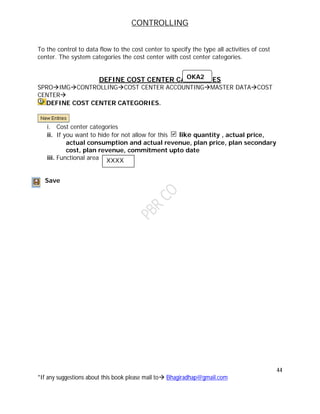
To the control to data flow to the cost center to specify the type all activities of cost
center. The system categories the cost center with cost center categories.
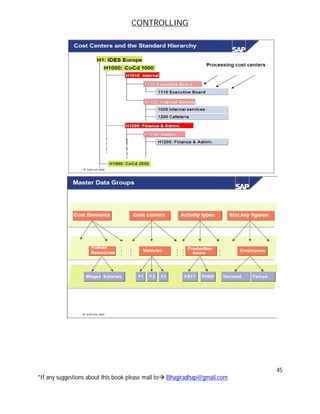
DEFINE COST CENTER CATEGORIES
SPROIMGCONTROLLINGCOST CENTER ACCOUNTINGMASTER DATACOST
CENTER
DEFINE COST CENTER CATEGORIES.
i. Cost center categories
ii. If you want to hide for not allow for this like quantity , actual price,
actual consumption and actual revenue, plan price, plan secondary
cost, plan revenue, commitment upto date
iii. Functional area
Save
OKA2
XXXX
CONTROLLING
45
*If any suggestions about this book please mail to Bhagiradhap@gmail.com
CONTROLLING
46
*If any suggestions about this book please mail to Bhagiradhap@gmail.com
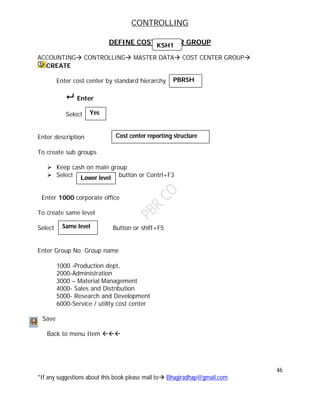
DEFINE COST CENTER GROUP
ACCOUNTING CONTROLLING MASTER DATA COST CENTER GROUP
CREATE
Enter cost center by standard hierarchy
 Enter
Select
Enter description
To create sub groups
 Keep cash on main group
 Select button or Contrl+F3
Enter 1000 corporate office
To create same level
Select Button or shift+F5
Enter Group No. Group name
1000 -Production dept,
2000-Administration
3000 – Material Management
4000- Sales and Distribution
5000- Research and Development
6000-Service / utility cost center
Save
Back to menu Item 
Yes
Cost center reporting structure
Lower level
Same level
KSH1
PBRSH
CONTROLLING
47
*If any suggestions about this book please mail to Bhagiradhap@gmail.com
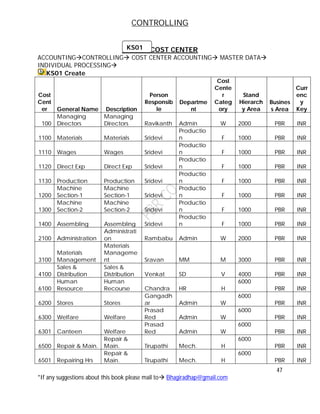
CREATE COST CENTER
ACCOUNTINGCONTROLLING COST CENTER ACCOUNTING MASTER DATA
INDIVIDUAL PROCESSING
KS01 Create
Cost
Cent
er General Name Description
Person
Responsib
le
Departme
nt
Cost
Cente
r
Categ
ory
Stand
Hierarch
y Area
Busines
s Area
Curr
enc
y
Key
100
Managing
Directors
Managing
Directors Ravikanth Admin W 2000 PBR INR
1100 Materials Materials Sridevi
Productio
n F 1000 PBR INR
1110 Wages Wages Sridevi
Productio
n F 1000 PBR INR
1120 Direct Exp Direct Exp Sridevi
Productio
n F 1000 PBR INR
1130 Production Production Sridevi
Productio
n F 1000 PBR INR
1200
Machine
Section-1
Machine
Section-1 Sridevi
Productio
n F 1000 PBR INR
1300
Machine
Section-2
Machine
Section-2 Sridevi
Productio
n F 1000 PBR INR
1400 Assembling Assembling Sridevi
Productio
n F 1000 PBR INR
2100 Administration
Administrati
on Rambabu Admin W 2000 PBR INR
3100
Materials
Management
Materials
Manageme
nt Sravan MM M 3000 PBR INR
4100
Sales &
Distribution
Sales &
Distribution Venkat SD V 4000 PBR INR
6100
Human
Resource
Human
Recourse Chandra HR H
6000
PBR INR
6200 Stores Stores
Gangadh
ar Admin W
6000
PBR INR
6300 Welfare Welfare
Prasad
Red Admin W
6000
PBR INR
6301 Canteen Welfare
Prasad
Red Admin W
6000
PBR INR
6500 Repair & Main.
Repair &
Main. Tirupathi Mech. H
6000
PBR INR
6501 Repairing Hrs
Repair &
Main. Tirupathi Mech. H
6000
PBR INR
KS01
CONTROLLING
48
*If any suggestions about this book please mail to Bhagiradhap@gmail.com
6600
Quality
Control
Quality
Control Benrjee QC H
6000
PBR INR
6700 Energy Energy Srinu Electric H 6000 PBR INR
6800 Electricity Electricity Gouse Electric H 6000 PBR INR
6900 Telephone Telephone Rambabu Admin W 6000 PBR INR
6910 Rent Rent Rambabu Admin W 6000 PBR INR
6920 Projects Projects
Bhagirad
ha Admin W
6000
PBR INR
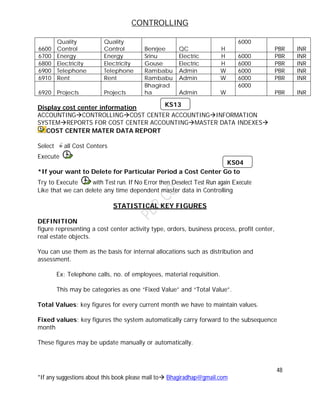
Display cost center information
ACCOUNTINGCONTROLLINGCOST CENTER ACCOUNTINGINFORMATION
SYSTEMREPORTS FOR COST CENTER ACCOUNTINGMASTER DATA INDEXES
COST CENTER MATER DATA REPORT
Select all Cost Centers
Execute
*If your want to Delete for Particular Period a Cost Center Go to
Try to Execute with Test run. If No Error then Deselect Test Run again Execute
Like that we can delete any time dependent master data in Controlling
STATISTICAL KEY FIGURES
DEFINITION
figure representing a cost center activity type, orders, business process, profit center,
real estate objects.
You can use them as the basis for internal allocations such as distribution and
assessment.
Ex: Telephone calls, no. of employees, material requisition.
This may be categories as one “Fixed Value” and “Total Value”.
Total Values: key figures for every current month we have to maintain values.
Fixed values: key figures the system automatically carry forward to the subsequence
month
These figures may be update manually or automatically.
KS13
KS04
CONTROLLING
49
*If any suggestions about this book please mail to Bhagiradhap@gmail.com
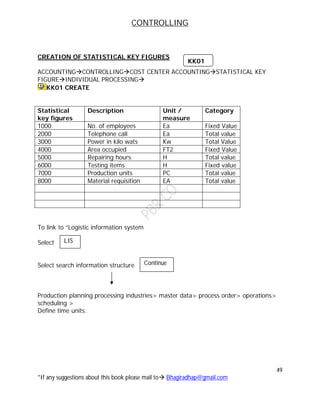
CREATION OF STATISTICAL KEY FIGURES
ACCOUNTINGCONTROLLINGCOST CENTER ACCOUNTINGSTATISTICAL KEY
FIGUREINDIVIDUAL PROCESSING
KK01 CREATE
Statistical
key figures
Description Unit /
measure
Category
1000 No. of employees Ea Fixed Value
2000 Telephone call Ea Total value
3000 Power in kilo wats Kw Total Value
4000 Area occupied FT2 Fixed Value
5000 Repairing hours H Total value
6000 Testing items H Fixed value
7000 Production units PC Total value
8000 Material requisition EA Total value
To link to “Logistic information system
Select
Select search information structure
Production planning processing industries> master data> process order> operations>
scheduling >
Define time units.
LIS
Continue
KK01
CONTROLLING
50
*If any suggestions about this book please mail to Bhagiradhap@gmail.com
ACTIVITY TYPE
DEFINITION
Activity types classify activities produced in cost centers within a controlling area.
YRK: A unit in a controlling area that classifies activities performs in a cost center.
Ex:- Activity type in production cost centers are machine hours or finished goods.
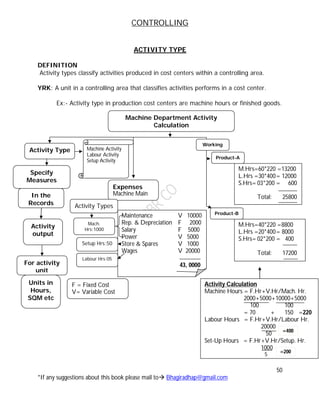
Machine Department Activity
Calculation
Activity Type
Specify
Measures
In the
Records
For activity
unit
Activity
output
Units in
Hours,
SQM etc
Machine Activity
Labour Activity
Setup Activity
Maintenance V 10000
Rep. & Depreciation F 2000
Salary F 5000
Power V 5000
Store & Spares V 1000
Wages V 20000
43, 0000
Expenses
Machine Main
Activity Types
Mach.
Hrs:1000
Setup Hrs:50
Labour Hrs:05
F = Fixed Cost
V= Variable Cost
M.Hrs=60*220 =13200
L.Hrs =30*400= 12000
S.Hrs= 03*200 = 600
Total: 25800
M.Hrs=40*220 =8800
L.Hrs =20*400= 8000
S.Hrs= 02*200 = 400
Total: 17200
Product-A
Product-B
Working
Activity Calculation
Machine Hours = F.Hr+V.Hr/Mach. Hr.
2000+5000+10000+5000
100 100
= 70 + 150 =220
Labour Hours = F.Hr+V.Hr/Labour Hr.
20000
50
Set-Up Hours = F.Hr+V.Hr/Setup. Hr.
1000
5
=400
=200
CONTROLLING
51
*If any suggestions about this book please mail to Bhagiradhap@gmail.com
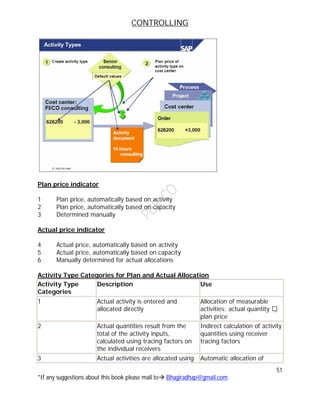
Plan price indicator
1 Plan price, automatically based on activity
2 Plan price, automatically based on capacity
3 Determined manually
Actual price indicator
4 Actual price, automatically based on activity
5 Actual price, automatically based on capacity
6 Manually determined for actual allocations
Activity Type Categories for Plan and Actual Allocation
Activity Type
Categories
Description Use
1 Actual activity is entered and
allocated directly
Allocation of measurable
activities; actual quantity 
plan price
2 Actual quantities result from the
total of the activity inputs,
calculated using tracing factors on
the individual receivers
Indirect calculation of activity
quantities using receiver
tracing factors
3 Actual activities are allocated using Automatic allocation of
CONTROLLING
52
*If any suggestions about this book please mail to Bhagiradhap@gmail.com
indirect activity allocation activity quantities using
receiver tracing factors
4 Activity types are not allocated This activity type can be
used only to record
quantities (no values) on the
sender cost centers
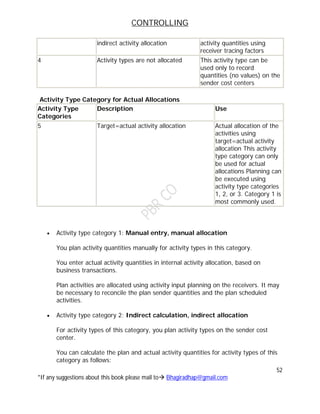
Activity Type Category for Actual Allocations
Activity Type
Categories
Description Use
5 Target=actual activity allocation Actual allocation of the
activities using
target=actual activity
allocation This activity
type category can only
be used for actual
allocations Planning can
be executed using
activity type categories
1, 2, or 3. Category 1 is
most commonly used.
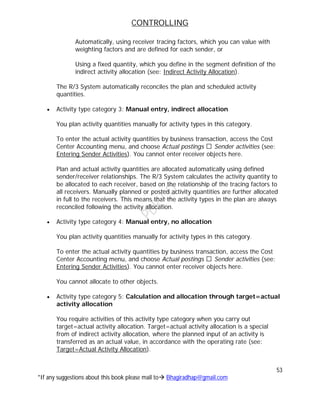
 Activity type category 1: Manual entry, manual allocation
You plan activity quantities manually for activity types in this category.
You enter actual activity quantities in internal activity allocation, based on
business transactions.
Plan activities are allocated using activity input planning on the receivers. It may
be necessary to reconcile the plan sender quantities and the plan scheduled
activities.
 Activity type category 2: Indirect calculation, indirect allocation
For activity types of this category, you plan activity types on the sender cost
center.
You can calculate the plan and actual activity quantities for activity types of this
category as follows:
CONTROLLING
53
*If any suggestions about this book please mail to Bhagiradhap@gmail.com
Automatically, using receiver tracing factors, which you can value with
weighting factors and are defined for each sender, or
Using a fixed quantity, which you define in the segment definition of the
indirect activity allocation (see: Indirect Activity Allocation).
The R/3 System automatically reconciles the plan and scheduled activity
quantities.
 Activity type category 3: Manual entry, indirect allocation
You plan activity quantities manually for activity types in this category.
To enter the actual activity quantities by business transaction, access the Cost
Center Accounting menu, and choose Actual postings Sender activities (see:
Entering Sender Activities). You cannot enter receiver objects here.
Plan and actual activity quantities are allocated automatically using defined
sender/receiver relationships. The R/3 System calculates the activity quantity to
be allocated to each receiver, based on the relationship of the tracing factors to
all receivers. Manually planned or posted activity quantities are further allocated
in full to the receivers. This means that the activity types in the plan are always
reconciled following the activity allocation.
 Activity type category 4: Manual entry, no allocation
You plan activity quantities manually for activity types in this category.
To enter the actual activity quantities by business transaction, access the Cost
Center Accounting menu, and choose Actual postings Sender activities (see:
Entering Sender Activities). You cannot enter receiver objects here.
You cannot allocate to other objects.
 Activity type category 5: Calculation and allocation through target=actual
activity allocation
You require activities of this activity type category when you carry out
target=actual activity allocation. Target=actual activity allocation is a special
from of indirect activity allocation, where the planned input of an activity is
transferred as an actual value, in accordance with the operating rate (see:
Target=Actual Activity Allocation).
CONTROLLING
54
*If any suggestions about this book please mail to Bhagiradhap@gmail.com
Target=actual activity allocation is used only to allocate actual values. Therefore,
activities participating in target=actual allocation must be assigned different
activity type categories for planning and actual allocation.
Actual allocation requires activity type category 5. Planning requires activity type
categories 1, 2, or 3. Category 1 is most commonly used.
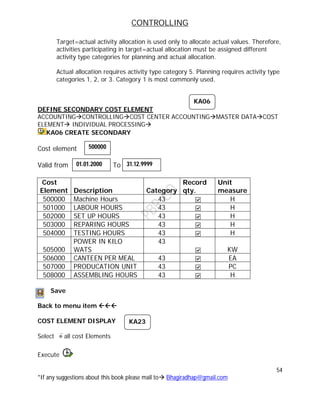
DEFINE SECONDARY COST ELEMENT
ACCOUNTINGCONTROLLINGCOST CENTER ACCOUNTINGMASTER DATACOST
ELEMENT INDIVIDUAL PROCESSING
KA06 CREATE SECONDARY
Cost element
Valid from To
Cost
Element Description Category
Record
qty.
Unit
measure
500000 Machine Hours 43 H
501000 LABOUR HOURS 43 H
502000 SET UP HOURS 43 H
503000 REPARING HOURS 43 H
504000 TESTING HOURS 43 H
505000
POWER IN KILO
WATS
43
KW
506000 CANTEEN PER MEAL 43 EA
507000 PRODUCATION UNIT 43 PC
508000 ASSEMBLING HOURS 43 H
Save
Back to menu item 
COST ELEMENT DISPLAY
Select all cost Elements
Execute
KA06
500000
01.01.2000 31.12.9999
KA23
CONTROLLING
55
*If any suggestions about this book please mail to Bhagiradhap@gmail.com
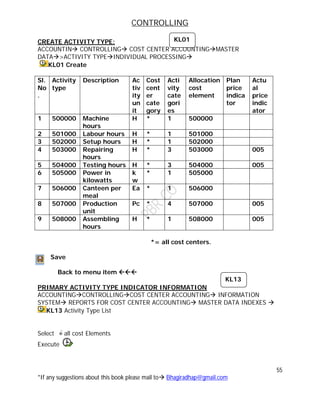
CREATE ACTIVITY TYPE:
ACCOUNTIN CONTROLLING COST CENTER ACCOUNTINGMASTER
DATA>ACTIVITY TYPEINDIVIDUAL PROCESSING
KL01 Create
Sl.
No
.
Activity
type
Description Ac
tiv
ity
un
it
Cost
cent
er
cate
gory
Acti
vity
cate
gori
es
Allocation
cost
element
Plan
price
indica
tor
Actu
al
price
indic
ator
1 500000 Machine
hours
H * 1 500000
2 501000 Labour hours H * 1 501000
3 502000 Setup hours H * 1 502000
4 503000 Repairing
hours
H * 3 503000 005
5 504000 Testing hours H * 3 504000 005
6 505000 Power in
kilowatts
k
w
* 1 505000
7 506000 Canteen per
meal
Ea * 1 506000
8 507000 Production
unit
Pc * 4 507000 005
9 508000 Assembling
hours
H * 1 508000 005
*= all cost centers.
Save
Back to menu item 
PRIMARY ACTIVITY TYPE INDICATOR INFORMATION
ACCOUNTINGCONTROLLINGCOST CENTER ACCOUNTING INFORMATION
SYSTEM REPORTS FOR COST CENTER ACCOUNTING MASTER DATA INDEXES 
KL13 Activity Type List
Select all cost Elements
Execute
KL01
KL13
CONTROLLING
56
*If any suggestions about this book please mail to Bhagiradhap@gmail.com
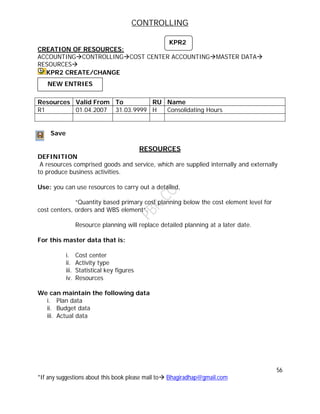
CREATION OF RESOURCES:
ACCOUNTINGCONTROLLINGCOST CENTER ACCOUNTINGMASTER DATA
RESOURCES
KPR2 CREATE/CHANGE
Save
RESOURCES
DEFINITION
A resources comprised goods and service, which are supplied internally and externally
to produce business activities.
Use: you can use resources to carry out a detailed,
“Quantity based primary cost planning below the cost element level for
cost centers, orders and WBS element”.
Resource planning will replace detailed planning at a later date.
For this master data that is:
i. Cost center
ii. Activity type
iii. Statistical key figures
iv. Resources
We can maintain the following data
i. Plan data
ii. Budget data
iii. Actual data
Resources Valid From To RU Name
R1 01.04.2007 31.03.9999 H Consolidating Hours
KPR2
NEW ENTRIES
CONTROLLING
57
*If any suggestions about this book please mail to Bhagiradhap@gmail.com
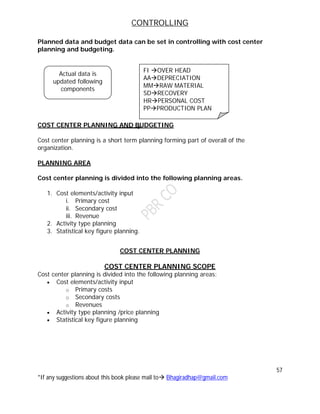
Planned data and budget data can be set in controlling with cost center
planning and budgeting.
COST CENTER PLANNING AND BUDGETING
Cost center planning is a short term planning forming part of overall of the
organization.
PLANNING AREA
Cost center planning is divided into the following planning areas.
1. Cost elements/activity input
i. Primary cost
ii. Secondary cost
iii. Revenue
2. Activity type planning
3. Statistical key figure planning.
COST CENTER PLANNING
COST CENTER PLANNING SCOPE
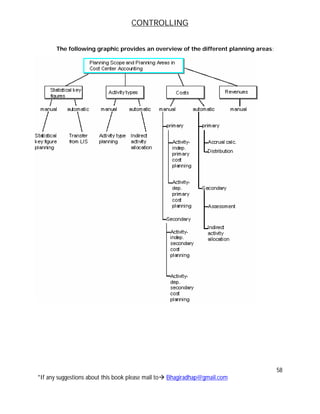
Cost center planning is divided into the following planning areas:
 Cost elements/activity input
o Primary costs
o Secondary costs
o Revenues
 Activity type planning /price planning
 Statistical key figure planning
Actual data is
updated following
components
FI OVER HEAD
AADEPRECIATION
MMRAW MATERIAL
SDRECOVERY
HRPERSONAL COST
PPPRODUCTION PLAN
CONTROLLING
58
*If any suggestions about this book please mail to Bhagiradhap@gmail.com
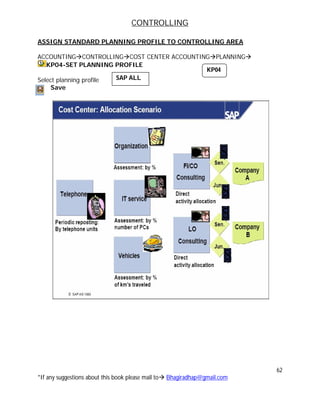
The following graphic provides an overview of the different planning areas:
CONTROLLING
59
*If any suggestions about this book please mail to Bhagiradhap@gmail.com
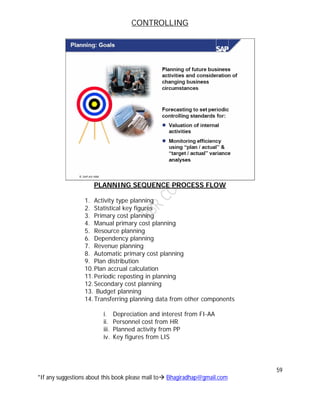
PLANNING SEQUENCE PROCESS FLOW
1. Activity type planning
2. Statistical key figures
3. Primary cost planning
4. Manual primary cost planning
5. Resource planning
6. Dependency planning
7. Revenue planning
8. Automatic primary cost planning
9. Plan distribution
10.Plan accrual calculation
11.Periodic reposting in planning
12.Secondary cost planning
13. Budget planning
14.Transferring planning data from other components
i. Depreciation and interest from FI-AA
ii. Personnel cost from HR
iii. Planned activity from PP
iv. Key figures from LIS
CONTROLLING
60
*If any suggestions about this book please mail to Bhagiradhap@gmail.com
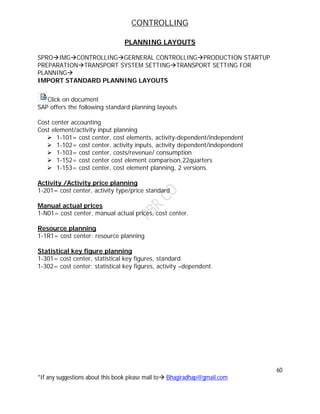
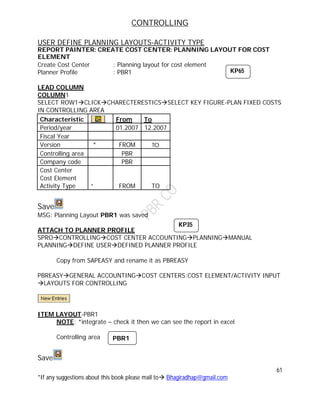
PLANNING LAYOUTS
SPROIMGCONTROLLINGGERNERAL CONTROLLINGPRODUCTION STARTUP
PREPARATIONTRANSPORT SYSTEM SETTINGTRANSPORT SETTING FOR
PLANNING
IMPORT STANDARD PLANNING LAYOUTS
Click on document
SAP offers the following standard planning layouts
Cost center accounting
Cost element/activity input planning
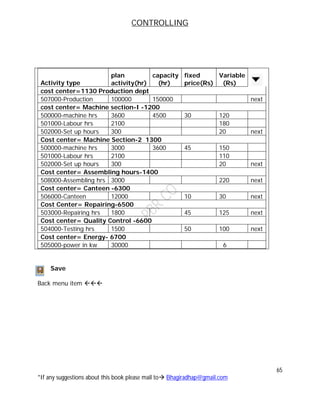
 1-101= cost center, cost elements, activity-dependent/independent
 1-102= cost center, activity inputs, activity dependent/independent
 1-103= cost center, costs/revenue/ consumption
 1-152= cost center cost element comparison,22quarters
 1-153= cost center, cost element planning, 2 versions.
Activity /Activity price planning
1-201= cost center, activity type/price standard
Manual actual prices
1-N01= cost center, manual actual prices, cost center.
Resource planning
1-1R1= cost center: resource planning
Statistical key figure planning
1-301= cost center, statistical key figures, standard
1-302= cost center: statistical key figures, activity –dependent.
CONTROLLING
61
*If any suggestions about this book please mail to Bhagiradhap@gmail.com
USER DEFINE PLANNING LAYOUTS-ACTIVITY TYPE
REPORT PAINTER: CREATE COST CENTER: PLANNING LAYOUT FOR COST
ELEMENT
Create Cost Center : Planning layout for cost element
Planner Profile : PBR1
LEAD COLUMN
COLUMN1
SELECT ROW1CLICKCHARECTERESTICSSELECT KEY FIGURE-PLAN FIXED COSTS
IN CONTROLLING AREA
Characteristic From To
Period/year 01.2007 12.2007
Fiscal Year
Version * FROM TO
Controlling area PBR
Company code PBR
Cost Center
Cost Element
Activity Type * FROM TO
Save
MSG: Planning Layout PBR1 was saved
ATTACH TO PLANNER PROFILE
SPROCONTROLLINGCOST CENTER ACCOUNTINGPLANNINGMANUAL
PLANNINGDEFINE USERDEFINED PLANNER PROFILE
Copy from SAPEASY and rename it as PBREASY
PBREASYGENERAL ACCOUNTINGCOST CENTERS:COST ELEMENT/ACTIVITY INPUT
LAYOUTS FOR CONTROLLING
ITEM LAYOUT-PBR1
NOTE: *integrate – check it then we can see the report in excel
Controlling area PBR1
Save
KP65
KP35
PBR1
CONTROLLING
62
*If any suggestions about this book please mail to Bhagiradhap@gmail.com
ASSIGN STANDARD PLANNING PROFILE TO CONTROLLING AREA
ACCOUNTINGCONTROLLINGCOST CENTER ACCOUNTINGPLANNING
KP04-SET PLANNING PROFILE
Select planning profile
Save
SAP ALL
KP04
CONTROLLING
63
*If any suggestions about this book please mail to Bhagiradhap@gmail.com
DISTRIBUTION KEY
Distribution key is a tool used to distribute annual planned values over the planning
period in accordance with certain rules.
SPROIMGCONTROLLINGCOST CENTER ACCOUNTINGPLANNINGMANUAL
PLANNING DEFINE USER
DEFINE DISTRIBUTION KEYS
Standard distribution keys used by system
Distribution key Used to
0 Used to enter manually for each period
1 Used to distribute the input value equally across all plan period
2 Used to distribute the input value(annual plan value)according to the
last distribution key used
3 Interpret the input value as a % rate and multiplies it each period by
the previous value
4 Used to distribute period value not equal to zero to the subsequent
empty period
5 Copies period values not equal to zero to the subsequent empty
period
6 Copies a given period values to subsequent period
7 Used to distribute input value(annual plan value ) among the
individual periods line with the number of calendar days per period
11 Can only be used in cost center accounting for planning activity
dependent costs or activity dependent statistical key figures
The input value (annual plan value) is distributed in line with the activity quantity
planned on the cost center.
Note
The R/3 system used only those activity quantities planning at the time of the
distribution key’s used. If you change activity quantities later or copy plan values to
another version, the R/3 system does not automatically carryout new distributions.
CONTROLLING
64
*If any suggestions about this book please mail to Bhagiradhap@gmail.com
ACTIVITY PLANNING
ACTIVITY PRICE/OUTPUT
ACCOUNTING CONTROLLINGCOST CENTER ACCOUNTING PLANNING
ACTIVITY OUT PUT /PRICE
KP26- CHANGE
To change layout use next layout button..
Select layout
Version :
From period :
To period :
Fiscal year :
Cost center :
To :
Activity type :
To :
Select overview screen button(F5)
KP26
1- 201
01
12
2007
1130
6999
500000
599999
0
CONTROLLING
65
*If any suggestions about this book please mail to Bhagiradhap@gmail.com
Activity type
plan
activity(hr)
capacity
(hr)
fixed
price(Rs)
Variable
(Rs)
cost center=1130 Production dept
507000-Production 100000 150000 next
cost center= Machine section-I -1200
500000-machine hrs 3600 4500 30 120
501000-Labour hrs 2100 180
502000-Set up hours 300 20 next
Cost center= Machine Section-2 1300
500000-machine hrs 3000 3600 45 150
501000-Labour hrs 2100 110
502000-Set up hours 300 20 next
Cost center= Assembling hours-1400
508000-Assembling hrs 3000 220 next
Cost center= Canteen -6300
506000-Canteen 12000 10 30 next
Cost Center= Repairing-6500
503000-Repairing hrs 1800 45 125 next
Cost center= Quality Control -6600
504000-Testing hrs 1500 50 100 next
Cost center= Energy- 6700
505000-power in kw 30000 6
Save
Back menu item 
CONTROLLING
66
*If any suggestions about this book please mail to Bhagiradhap@gmail.com
ACTIVITY INPUT PLANNING
ACCOUNTING CONTROLLINGCOST CENTER ACCOUNTING PLANNING COST
AND ACTIVITY INPUTS
KP06 – CHANGE
To change layout use next layout button..
Select layout
Version :
From period :
To period :
Fiscal year :
Cost center :
To :
Activity type :
To :
Sender cost center :
To :
Sender activity type :
To :
Select overview screen button(F5)
1- 102
01
12
2007
1130
6999
500000
599999
0
KP06
6300
6700
505000
506000
CONTROLLING
67
*If any suggestions about this book please mail to Bhagiradhap@gmail.com
Receiver
activity cost
sender activity
costcenter
sender activity
type
Plan variable
consumption Next
Cost center : 1130-Production
507000-
Production Unit 6300 506000 1080
507000-
Production Unit 6700 505000 900
Next
Cost center : 1200-Machine Section-I
501000-Labour
Hours 6300 5506000 900
500000-Machine
Hours 6700 5505000 1200 Next
Cost center : 1300-Machine Section-II
501000-Labour
Hours 6700 5505000 1500
500000-Machine
Hours 6300 5506000 600
Save
Back menu item 
CONTROLLING
68
*If any suggestions about this book please mail to Bhagiradhap@gmail.com
PLAN RECONCILIATION
ACCOUNTINGCONTROLLINGCOST CENTER ACCOUNTINGPLANNING
PLANNING AIDS
KPSI –Plan Reconciliation
Select all cost Centers
 Version :
 Period from :
 Fiscal year :
Execute (F8)
COST PLANNING
Cost planning are two types
1. Activity dependent
2. Activity independent
ACTIVITY DEPENDENT COST PLANNING
A type of manual planning in which primary cost or revenues are calculated as
the product of the activity quantity or the quantity of the statistical key figures
and a factor defined by the user.
YRK: Planning with two activities is called activity dependent cost planning in this
case cost can be split into fixed variable.
KPSI
0
01 12
2007
CONTROLLING
69
*If any suggestions about this book please mail to Bhagiradhap@gmail.com
ACCOUNTING CONTROLLINGCOST CENTER ACCOUNTING PLANNING COST
AND ACTIVITY INPUTS
KP06 – CHANGE
To change layout use next layout button..
Select layout
Version :
From period :
To period :
Fiscal year :
Cost center :
To :
Activity type :
To :
Cost Element :
To :
Select overview screen button(F5)
1- 101
01
12
2007
1000
6999
500000
599999
0
400000
499999
CONTROLLING
70
*If any suggestions about this book please mail to Bhagiradhap@gmail.com
Activity type cost element
Plan fixed
cost
Plan variable
cost
cost center: 1130-Production
507000 Production unit 410000(Salaries) 90000 - next
cost center
1200-Machine Section-
I
500000 Machine Hours 407000(Mech. Main.) 90000
500000 Machine Hours 410000 (Salaries) 36000
501000 Labour Hours 403000(Direct Wages 180000
502000-Setup Hours 402000(Indirect Wages) 15000 next
Cost center
1300-Machine Section-
II
500000 Machine Hours 407000(Mech. Main.) 72000
500000 Machine Hours 410000 (Salaries) 45000
501000 Labour Hours 403000(Direct Wages 150000
502000-Setup Hours 402000(Indirect Wages) 16000 next
Cost center 1400-Assembly
508000 assembling 403000(Direct Wages 300000
Cost center 6300-Canteen
506000 Canteen per Meal 412000(Staff Welfare) 120000
506000 Canteen per Meal 410000 (Salaries) 27000 next
cost center: 6500-Repairs
503000 Repairing Hours 410000 (Salaries) 60000
503000 Repairing Hours 406000 (R& M) 90000 next
cost center 6600-Quality control
504000 Testing Hours 410000 (Salaries) 45000
504000 Testing Hours 427000( Testing Exp.) 75000 next
Cost center 6700-Energy
505000 Power in KW
405000(Electrical
Charges) 180000 next
Save
Back menu item 
CONTROLLING
71
*If any suggestions about this book please mail to Bhagiradhap@gmail.com
ACTIVITY INDEPENDENT COST PLANNING
Planning without reference activity is called as activity independent. cost
planning in this case the total cost are recorded as fixed cost.
ACCOUNTING CONTROLLINGCOST CENTER ACCOUNTING PLANNING COST
AND ACTIVITY INPUTS
KP06 – CHANGE
To change layout use next layout button..
Select layout
Version :
From period :
To period :
Fiscal year :
Cost center :
To :
Activity type :
To :
Cost Element :
To :
Select overview screen button (F5)
 To do detailed planning select cost element 400100 raw material
consumption a/c Row
 Select menu bar Edit  detailed planning change/display
 You enter every raw material details as below
1- 101
01
12
2007
1000
6999
0
400000
499999
KP06
CONTROLLING
72
*If any suggestions about this book please mail to Bhagiradhap@gmail.com
Category Resources Plant Qty
M (Material) Raw Material1 PBR 5000
M Raw Material2 PBR 5000
M Raw Material3 PBR 5000
 When you press enter key than automatically take raw material price from MM
Save Back 
Cost element Plan fixed
cost
Cost Center : 1100-Material
400100 Raw Material Consumption
above values
will display here
Cost Center :1110-Wages
402000 (Indirect Wages) 100000
Cost Center: 1200-Machine Section-I
404000 9000
Cost Center: 2100-Administration
410000 (Salaries) 300000
Cost center: 3100-Purchase
410000 (Salaries) 200000
Cost center : 4100-Sales Dept
410000 (Salaries) 220000
420000 (Sales Exp.) 100000
421000 (Marketing Exp.) 90000
422000 (freight and carriage) 60000
423000 (Advertisement) 150000
Cost center: 6100-Personnel Dept
410000 (Salaries) 120000
Next Cost center : 6200-Stores
410000 (Salaries) 90000
Cost Center :6800-Electricity
405000-Eelectric Exp. 30000
Cost Center : 6900 Telephone
413000- Telephone Charges 60000
Cost Center : 6910-Rent
414000-Rent 60000
Save Back menu item 
CONTROLLING
73
*If any suggestions about this book please mail to Bhagiradhap@gmail.com
REPORTS
ACCOUNTINGCONTROLLINGCOST CENTER ACCOUNTINGINFORMATION
SYSTEMREPORTS FOR COST CENTER ACCOUNTINGPLAN ACTUAL
CONSUMPTION
S_ALR_87013611-Cost center actual/plan variable
Controlling area :
From period :
To period :
Fiscal year :
Plan version :
Cost center group :
Execute (F8)
Note: - it’s called as primary cost planning and also manual planning.
S_ALR_87013611
01
12
2007
0
PBR
PBRSH
CONTROLLING
74
*If any suggestions about this book please mail to Bhagiradhap@gmail.com
ACCRUAL CALCULATION
DEFINE COST ELEMENT:
 Select bonus G/L Accounts :
 Select Button :
 Cost element category :
Save
DEFINE COST CENTER
Cost
Center
General
Name
Descriptio
n
Person
Responsible
Depart
ment
Cost
Center
Catego
ry
Stand
Hierarch
y Area
Busine
ss
Area
Cur
ren
cy
Key
BONUS
CR Bonus Cr Bonus Cr Bhagiradha HR Service 6000 PBR INR
Save
DEFINE OVER HEAD STRUCTURE
SPROIMGCONTROLLINGCOST CENTER ACCOUNTINGPLANNINGPLANNING
AIDSACCRUAL CALCULATION PERCENTAGE METHOD
MAINTAIN OVERHEAD STRUCTURE
Over head : PBR
Description : Bonus overhead structure
Row Base O/h rate From To Credit
10 I-B2
20 A-z2 10 E12
 To specify base cost element double click on base column then select YES
button
Save
From Cost Element To cost Element
FS00
411000
Edit Cost Element
3
KS01
KSAZ
NEW ENTRIES
CONTROLLING
75
*If any suggestions about this book please mail to Bhagiradhap@gmail.com
410000 salaries -
403000 wages -
Save
 To specify over head rate double click on over head rate column.
Valid from valid to plan over head actual overhead
001.2007 012.2007 10% 10%
Save
 To specify credit cost center double click on credit column
Business area valid to Cost element Cost center
PBR 012.2007 411000-bonus a/c Bonus cr
Save
 Select (F5) button for assign to controlling area
 Plan Accrual controlling area
 Continue
Valid from valid to over head structure
001.2007 12.2007 PBR
Save
ACCRUAL CALCULATION EXECUTION
Change Assignment
PBR
KSA8
CONTROLLING
76
*If any suggestions about this book please mail to Bhagiradhap@gmail.com
ACCOUNTINGCONTROLLINGCOST ELEMENT ACCOUNTING PLANNING
KSA8- ACCRUAL CALCULATION
 Select all cost centers
Version :
Period :
To period :
Fiscal yr :
Deselect Test run
Select Detail list
Execute
Select next list level button.
ALLOCATION METHOD
The system maintains the following allocation methods for distributing or allocating the
allocated cost from sender object to receiving object.
I. Cost based allocation methods
1. Periodic re-posting ---- primary
2. Distribution ---- primary
3. Assessment ----- Primary and Secondary
II. Activity based allocation
4. Indirect activity allocation
0
01
12
2007
CONTROLLING
77
*If any suggestions about this book please mail to Bhagiradhap@gmail.com
DIFFERENCE BETWEEN ALLOCATION METHODS
CONTROLLING
78
*If any suggestions about this book please mail to Bhagiradhap@gmail.com
DISTRIBUTION METHOD
ACCOUNTINGCONTROLLINGCOST CENTER ACCOUNTING PLANNING
CURRENT SETTINGS
S_ALR_87005903-Define distribution
Cycle :
Starting date :
 Enter
Text: Plan Distribution: Primary Cost
ITERATIVE PROCESSING
This indicator controls whether iterative sender/receiver relationships are considered
when this cycle is processed. The iteration is repeated until each sender is fully credited
(a small remainder may be left over in some cases).
Select Attach Segment Botton
Segment
Name
Description
Receiver
Rule
Variable
portiontype
Sendercost
center
Sendercost
elementfrom
Sendercost
elementTo
Receivercost
centerfrom
Receivercost
centerto
Version
Receiver
Tracingfactors
1 Electricity 3.Fixed % - 6800 400000 499999 2100 6200
2100-
10%
3100-
20%
4100-
15%
6100-
30%
6200-
25%
100
2 Telephone 6900 400000 499999 1000 6999 0
SKF:
2000
3 Rent 6950 400000 499999 1000 6999 0
SKF:
4000
4
Personnel
Dept
6.plan
statistical
key
figures 6100 400000 499999 1000 6999 0
SKF:
1000
5 Stores
1.Variableportion
2.plan
cost 6200 400000 499999 1000 6999 0
400000
to
499999
Save
S_ALR_87005903
Plan00
01.04.2007
CONTROLLING
79
*If any suggestions about this book please mail to Bhagiradhap@gmail.com
ENTERING STATISTICAL KEY FIGURE VALUE
ACCOUNTINGCONTROLLINGCOST CENTER ACCOUNTING
PLANNINGSTATISTICAL KEY FIGURES
KP46-Change
Version :
From period :
To period :
Fiscal year :
Cost center :
To :
Statistical key figure :
To :
 Select form based
 Select overview screen F5 button
01
12
2007
1000
6999
1000
9999
0
KP46
CONTROLLING
80
*If any suggestions about this book please mail to Bhagiradhap@gmail.com
statistical key figure
No.of
Employees-1000
Telephonecalls-
2000
PowerIn
Kilowatts-3000
AreaOccupied
RepairingHours-
4000
RepairingHours-
5000
TestingItem-
6000
Materials
Requisition-
8000
Cost centers
1130-production 3 900 100 1200 300
1200-Machine-1 4 60 250 200
1300-Machine-2 3 60 200 150
2100-Administration 6 1200 600 50
3100-Purchase 3 450 450 50 1200
4100-Sales 9 600 600 120 200
6100-personal Dep 2 300 300 30 100
6200-store 3 500 500 100
6300-canteen 2 150 150 75
6500-repair 3 50
6600-quality control 2 300 300 30
Save
TO DISPLAY
ALLOCATION PLAN DISTRIBUTION
ACCOUNTING CONTROLLING COST CENTER ACCOUNTING PLANNING
ALLOCATION
KSVB- DISTRIBUTION
Version :
From period : to
Fiscal year :
Select Details List
Deselect Test run
KP47
KSVB
01 12
2007
0
CONTROLLING
81
*If any suggestions about this book please mail to Bhagiradhap@gmail.com
Cycle Start Date
Plan000 (Press F4) 01.04.2007
Execute (F8)
REPORT
ACCOUNTINGCONTROLLINGCOST CENTER ACCOUNTING INFORMATION
SYSTEM REPORTS FOR COST CENTER ACCOUNTING
S_ALR_87013611-PLAN/ACTUAL COMPARISON
Controlling area :
From period :
To period :
Fiscal year :
Plan version :
Cost center group :
Execute (F8)
PLAN PRICE CALCULATION
ACCOUNTINGCONTROLLINGCOST CENTER ACCOUNTING PLANNING
ALLOCATION
KSPI-PRICE CALCULATION
Select All Cost Centers
Version :
From period : to
Fiscal year :
Select Details List
Deselect Test run
Execute (F8)
S_ALR_87013611
01
12
2007
0
PBR
PBRSH
01 12
2007
0
KSPI
CONTROLLING
82
*If any suggestions about this book please mail to Bhagiradhap@gmail.com
INDIRECT ACTIVITY ALLOCATION
Define assessment cycle for indirect activity allocation
ACCOUNTING CONTROLLING COST CENTER ACCOUNTING PLANNING
CURREN SETTING
S_ALR_87005471 –Indirect Activity Allocation
Cycle :
Starting date :
 Enter
Text: - Indirect activity allocation
Select button
Segment
Name
Description
Receiver
Rule
Variable
portiontype
Sendercost
center
Sender
Activity
Type
Receiver
costcenter
from
Receiver
costcenter
to
Version
Receiver
Tracing
factors
1 Repairing
8 plan
activity 6500 503000 1200 1300 0
Act.
Type
500000
2
Testing
cost
1.Variable
portion 6.plan
statistical key
figures 66600 504000 1000 6999 0
SKF:
6000
Save
S_ALR_8705471 / KSC7
Ind00
01.04.2007
Attach Segment
CONTROLLING
83
*If any suggestions about this book please mail to Bhagiradhap@gmail.com
INDIRECT ACTIVITY ALLOCATION
ACCOUNTINGCONTROLLINGCOST CENTER ACCOUNTING PLANNING
ALLOCATION
KSCB-INDIRECT ACTIVITY ALLOCATION
Version :
From period : to
Fiscal year :
Select Details List
Deselect Test run
Cycle Start Date
Ind000 (Press F4) 01.04.2007
Execute (F8)
REPORT
ACCOUNTINGCONTROLLINGCOST CENTER ACCOUNTING INFORMATION
SYSTEM REPORTS FOR COST CENTER ACCOUNTING
S_ALR_87013611-PLAN/ACTUAL COMPARISON
Controlling area :
From period :
To period :
Fiscal year :
Plan version :
Cost center group :
Execute (F8)
KSCB
01 12
2007
0
S_ALR_87013611
01
12
2007
0
PBR
PBRSH
CONTROLLING
84
*If any suggestions about this book please mail to Bhagiradhap@gmail.com
PLANNING REPORTOVERVIEW
ACCOUNTINGCONTROLLINGCOST CENTER ACCOUNTING INFORMATION
SYSTEMREPORTS FOR COST CENTER ACCOUNTINGPLANNING REPORT
KSBL-COST CENTER: PLANNING OVERVIEW.
Cost center
Fiscal yr
Period t to
Execute (F8)
Back to Menu Item 
1200
2007
01 12
KSBL
CONTROLLING
85
*If any suggestions about this book please mail to Bhagiradhap@gmail.com
SPLITTING STRUCTURE
PLANNING ALLOCATION SPLITTING
ACCOUNTINGCONTROLLINGCOST CENTER ACCOUNTING
PLANNINGALLOCATION
KSS4-SPLITTING
Cost center
Version
Fiscal yr
Period t to
Execute (F8)
 Keep the curser on 1200 cost center
 Select cost element
Note: - Now System Show Equal Splitting Cost where we have multi activities in one
cost center that purpose now we create “Splitting Structure”.
DEFINE SPLITTING RULES
SPROIMGCONTROLLINGCOST CENTER ACCOUNTING
PLANNINGALLOCATIONACTIVITY ALLOCATIONSPLITTING
DEFINE SPLITTING STRUCTURE
Select Splitting Rules
Rule Text Splitting Method
Y1 Indirect Wages 12 Activity quantity
Y2 Power 21 Equivalence no. planning
Y3 Salaries 12 Activity quantity
Y4 Bonus 12 Activity quantity
Y5 Canteen 12 Activity quantity
Y6 Medical 12 Activity quantity
Y7 Telephone 12 Activity quantity
Y8 Rent 12 Activity quantity
Y9 Repairs 21 Equivalence no. planning
Save
OKES
KSS4
2007
01 12
1200 1300
0
CONTROLLING
86
*If any suggestions about this book please mail to Bhagiradhap@gmail.com
Select Rule :
 Select
Version :
Like that for every rule specify the version as
Save
Select :
Structure Text
Y0 Splitting Structure : PBR
Save
 elect your splitting structure
 Select assignment
Assignments Text Rule Text
Y1 Indirect Wages Y1 Indirect Wages
Y2 Power Y2 Power
Y3 Salaries Y3 Salaries
Y4 Bonus Y4 Bonus
Y5 Canteen Y5 Canteen
Y6 Medical Y6 Medical
Y7 Telephone Y7 Telephone
Y8 Rent Y8 Rent
Y9 Repairs Y9 Repairs
Save
Y1
Selection for Rules
Splitting Structure
0
0
CONTROLLING
87
*If any suggestions about this book please mail to Bhagiradhap@gmail.com
Select Assignment Y1 Row
Select
Select Rule New entries Cost element Activity type
From To
Y1  404000(Ind. Wages) 500000
Y2  405000 (Power) 500000
Y3  410000 (Salaries) 500000 502000
Y4  411000 (Bonus) 500000 502000
Y5  401200 (Welfare) 500000 502000
Y6  401500(Medical exp) 500000 502000
Y7  401300(Telephone) 500000 502000
Y8  401400(Rent) 500000 502000
Y9  506000(Repairs) 500000
Save
Back to menu
ASSIGN SPLITTING STRUCTURE TO COST CENTER
SPROIMGCONROLLINGCOST CENTER ACCOUNTING PLANNING
ALLOCATION ACTIVITY ALLOCATIONSPLITTING
ASSIGN SPLITTING STRUCTURE TO COST CENTER
Cost center :
Version :
Fiscal yr :
Period : to to
Select Change button
Select your cost center (where have multi activities)
Keep curser on splitting structure
Go to menu item Edit > Assign (Shift+F6)
Note: Create new Customizing request then press enter
Save
Selection for assignment
2007
01 12
1200 1300
0
OKEW
CONTROLLING
88
*If any suggestions about this book please mail to Bhagiradhap@gmail.com
Execute splitting structure
ACCOUNTINGCONTROLLINGCOST CENTER ACCOUNTING
PLANNINGALLOCATION
KSS4-SPLITTING
Cost center to
Version
Fiscal yr
Period t to
Select detail list
Execute (F8)
 Keep the curser on 1200 cost center Select cost element
EXECUTE PLAN PRICE CALCULATION
ACCOUNTINGCONTROLLINGCOST CENTER ACCOUNTING PLANNING
ALLOCATION
KSPI-PRICE CALCULATION
Select all cost centers
Version :
Period : to
Fiscal yr
Select detail list
Execute (F8)
COST CENTER BUDGETING
SPROIMGCONTROLLINGCOST CENTER ACCOUNTINGBUDGET MANAGEMENT
KSS4
2007
01 12
1200 1300
0
2007
0
01 12
KSPI
CONTROLLING
89
*If any suggestions about this book please mail to Bhagiradhap@gmail.com
DEFINE BUDGET PLANNING PROFILE
Profile
Text
Distribution key
Annual values
Period values
SAVE
COST CENTER BUDGETING
ACCOUNTINGCONTROLLINGCOST CENTER ACCOUNTINGPLANNING COST
CENTER BUDGET
KPZ2 – CHANGE
 Profile
 cost center group
 Press Enter Key
 Specify your budget allotted amount for each cost centers as you want
 For revaluating the budget
 Select cost center
Go to menu item Edit Revaluate
If you want to increase/reduce on base of %/particular (or) amount
For increase : %
For decrease : %
Save
TO DISPLAY
ACTUAL DATA POSTINGS TO COST CENTER
POSTING FROM MM
GOODS ISSUE TO COST CENTER
10
-10
KPZ2
KPZ3
MB1C
PBR
PBR BUDGET PROFILE
1
PBR
PBRSH
CONTROLLING
90
*If any suggestions about this book please mail to Bhagiradhap@gmail.com
LOGISTICSMATERIAL MANAGEMENTINVENTORY MANAGEMENT GOODS
MOVEMENT
MB1C-GOODS ISSUE
Movement type :
Plant :
Storage location :
Press  Enter Key
Cost center : (Material)
Material Qty
Raw material-I 10
Raw material-II 10
Raw material-III 10
Save
MATERIAL SCRAPING POSTING (ACCOUNTING/WITHDRAWER)
Movement type :
Plant :
Storage location :
Press  Enter Key
Cost center : (Material)
Material Qty
Raw material-I 02
Raw material-II 02
Raw material-III 02
Save
 See accounting/controlling document MB02 or men documentchange
POSTING FROM FI
201
PBR
PBR
1100
MB1C
541
PBR
PBR
1100
F-02
03.03.2007 INR
CONTROLLING
91
*If any suggestions about this book please mail to Bhagiradhap@gmail.com
Document Date: , Company Code: Currency:
Postin
g keys
Account Amount Cost
center
Postin
g Keys
Account Amount Cost
center
40 401000 10000 1130 40 413000 7000 6900
40 401000 60000 1200 40 414000 5000 6910
40 401000 7000 1300 40 420000 5000 4100
40 401000 8000 2100 40 421000 6000 4100
40 401000 7500 3100 40 422000 6500 4100
40 401000 10000 4100 50 210000 *
40 401000 5000 6100
40 401000 6000 6200
40 401000 5000 6300
40 401000 4000 6500
40 401000 6000 6600
40 403000 1000 1110
40 403000 12000 1200
40 403000 8000 1300
40 403000 10000 1400
40 405000 15000 6700
40 406000 7500 1200
40 406000 7000 6500
40 407000 9000 1300
40 412000 12000 6300
Simulate and Post
FOR ANY ADJUSTMENT OR WRONG ENTRY CORRECTION
MANUAL REPOSTING OF COST
PBR
KB11N
CONTROLLING
92
*If any suggestions about this book please mail to Bhagiradhap@gmail.com
ACCOUNTINGCONTROLLINGCOST ELEMENT ACCOUNTINGACTUAL
POSTINGMANUAL REPOSTING OF COST
KB11N- MANUAL
Cost center Cost element Amount Receive cost center
1200 406000 4000 6500
Press Enter Key
Simulate and Post
Back to menu
1. REPOST LINE ITEMS
1. Select document
2. Company code
Execute (F8)
 Change cost center amount which you want to split
 Press Enter Key
 Then Enter Cost Center
Save
ASSIGN OVERHEAD STRUCTURE TO CONTROLLING AREA
SPROIMGCONTROLLINGCOST CENTER ACCOUNTINGACTUAL POSTING
KB61
xxxxxxx
PBR
KSAZ
CONTROLLING
93
*If any suggestions about this book please mail to Bhagiradhap@gmail.com
PERIOD END CLOSINGACCRUAL CALCULATIONPERCENTAGE METHOD
MAINTAIN OVER HEAD STRUCTURE
 Keep the curser on your over head structure
 Select button
 Select actual accrual
 Continue
 Select change button
Valid from Valid to Overhead structure
001.2007 012.2007 PBR
Save.
EXECUTION ACCRUAL CALCULATION
ACCOUNTINGCONTROLLINGCOST CENTER ACCOUNTINGPERIOD END
CLOSINGSINGLE FUNCTION
KSA3-ACCRUAL CALCULATION
Cost Center Group :
Select All Cost Centers
Period :
 Select detail list
Execute (F8)
Next Button
DIRECT ACTIVITY ALLOCATION
Assignment
PBRSH
KSA3
7
KB21N
CONTROLLING
94
*If any suggestions about this book please mail to Bhagiradhap@gmail.com
ACCOUNTINGCONTROLLINGCOST CENTER ACCOUNTINACTUAL POSTING
ACTIVITY ALLOCATION
KB21N –ENTER
Cost
center
Activity
type
Receiver
cost enter
Total
quantity
1200 500000 1120 100
1200 501000 1120 90
1200 502000 1120 3
1300 500000 1120 40
1300 501000 1120 90
1300 502000 1120 04
1400 508000 1120 120
6300 506000 1130 100
6300 506000 1120 60
6300 506000 1300 60
6700 505000 1200 100
6700 505000 1300 120
Save
MANUALLY ENTER ACTIVITY:-
ACCOUNTINGCONTROLLINGCOST CENTER ACCOUNTINACTUAL POSTING
SENDER ACTIVITY
KB51N - Enter
Sender cost center Activity type Qty
6500 503000 40
6600 504000 70
1300 507000 9000
Save
Back to menu
ACTUAL PRICE
KB51N
CONTROLLING
95
*If any suggestions about this book please mail to Bhagiradhap@gmail.com
ACCOUNTINGCONTROLLINGCOST CENTER ACCOUNTINACTUAL POSTING
ACTUAL PRICE
KBK6-ENTER
Select layout
Version :
From period :
To period :
Fiscal year :
Cost center :
To :
Activity type :
To :
Select overview screen button (F5)
Activity type Fixed cost Variable cost
Cost center:1200-Machine-I
500000 45 45
501000 15 115
502000 05 50 Next
Cost Center-1300-Machine-II
500000 46 50
501000 10 92
502000 5 55 Next
Cost center:1400-Assembling Section
508000 120
Save
ENTERING ACTUAL STATISTICAL KEY FIGURES
KBK6
1- N01
06
06
2007
1200
1400
500000
599999
0
KB31N
CONTROLLING
96
*If any suggestions about this book please mail to Bhagiradhap@gmail.com
ACCOUNTINGCONTROLLINGCOST CENTER ACCOUNTINGACTUAL
POSTINGSTATISTICAL KEY FIGURES
KB31N-ENTER
Cost center Statistical Key figure Qty
1130 1000- No. of employee 5
1200 -do- 4
1300 -do- 3
2100 -do- 4
3100 -do- 4
4100 -do- 4
6100 -do- 3
6200 -do- 2
6300 -do- 3
6500 -do- 2
6600 -do- 2
1130 2000- Telephone 50
2100 -do- 75
3100 -do- 60
4100 -do- 50
6100 -do- 40
6200 -do- 30
6500 -do- 40
1130 4000- Area 100
1200 -do- 90
1300 -do- 80
6500 -do- 50
1200 5000-Repairs 15
1300 -do- 12
1130 6000-Quality Control 100
3100 -do- 250
1200 8000- Material Requisition 15
1300 -do- 17
4100 -do- 20
2100 -do- 10
3100 -do- 5
6300 -do- 20
6500 -do- 40
6600 -do- 10
Save
ASSESSMENT METHOD
KA06
CONTROLLING
97
*If any suggestions about this book please mail to Bhagiradhap@gmail.com
DEFINE SECONDARY COST ELEMENT
ACCOUNTINGCONTROLLINGCOST CENTER ACCOUNTINGMASTER DATACOST
ELEMENTINDIVIDUAL PROCESSING
KA06-CREATE SECONDARY
Cost element Description categories
600000 Canteen cost 42
601000 personnel cost 42
602000 store cost 42
603000 telephone cost 42
604000 Rent cost 42
605000 Sales& Mktg 42
606000 Admi cost 42
Save
DEFINE ASSESSMENT CYCLE S_ALR_87005742 /KSU1
CONTROLLING
98
*If any suggestions about this book please mail to Bhagiradhap@gmail.com
ACCOUNTINGCONTROLLINGCOST CENTER ACCOUNTINGPERIOD END
CLOSING CURRENT SETTINGS 
S_ALR_87005742 –DEFINE ASSESSMENT
Cycle :
Starting date :
 Enter
Text: - Actual cost distribution
Select button
Segme
nt
Descriptio
n
Assessme
nt cost
element
Repair
rule
Varia
ble
portio
n
type
Sende
r cost
center
Sender
cost
elemen
t
Receiv
er cost
center
Receiver
tracing
factor
1 Telephon
e cost
603000 6900 40000
0 to
49999
9
1000
to
6999
2000
2 Rent 604000 6910 -do- -do- 4000
3 Personnel
cost
601000 6100 -do- -do- 1000
4 Store cost 602000
1.Variableportion
5.Actualstatistical
figures
6200 -do- -do- 8000
Save
Back to menu
Acc00
01.04.2007
Attach Segment
CONTROLLING
99
*If any suggestions about this book please mail to Bhagiradhap@gmail.com
RUN ALLOCATION CYCLE
ACCOUNTINGCONTROLLINGCOST CENTER ACCOUNTINGPERIOD END
CLOSING SINGLE FUNCTION ALLOCATION
KSU5- ASSESSMENT
Version :
From period : to
Fiscal year :
Select Details List
Deselect Test run
Cycle Start Date
IAA001 (Press F4) 01.04.2007
Execute (F8)
REPORT
ACCOUNTINGCONTROLLINGCOST CENTER ACCOUNTINGINFORMATION
SYSTEMREPORTS FOR COST CENTER ACCOUNTINGPLAN ACTUAL
CONSUMPTION
S_ALR_87013611-Cost center actual/plan variable
Controlling area :
From period :
To period :
Fiscal year :
Plan version :
Cost center group :
Execute (F8)
S_ALR_87013611
01
12
2007
0
PBR
PBRSH
KSU5
06 06
2007
0
CONTROLLING
100
*If any suggestions about this book please mail to Bhagiradhap@gmail.com
ACTUAL PRICE CALCULATION
ACCOUNTINGCONTROLLINGCOST CENTER ACCOUNTINGPERIOD END
CLOSINGSINGLE FUNCTIONS
KSII –PRICE CALCULATION
 Select all cost center :
 Period :
 Fiscal yr :
 Select detail list
Execute (F8)
Note: -If price indicator 07 system will not calculate price
If price indicator 05 system automatically calculate price
DEFINE ACTUAL INDIRECT ACTIVITY ALLOCATION
ACCOUNTINGCONTROLLINGCOST CENTER ACCOUNTINGPERIOD END
CLOSING CURRENT SETTING
S_ALR_87005792 –Define indirect activity allocation
Cycle :
Starting date :
 Enter
Text: - Actual activity distribution
Select button
Segm
ent
Description Variable
portion
type
Sender
cost
center
Sender
activity
type
Receiver
cost
center
Tracing
factors
01 Repairing cost 7.Actual
Activity
6500 503000 1000-
6999
500000
02 Testing cost 5.Actual
statistical
key figures
6600 504000 1000-
6999
6000
Save Bank to menu
RUN INDIRECT ACTIVITY ALLOCATION
PBR
06
2007
KSII
KSC1
Iaa001
01.04.2007
Attach Segment
CONTROLLING
101
*If any suggestions about this book please mail to Bhagiradhap@gmail.com
ACCOUNTINGCONTROLLINGCOST CENTER ACCOUNTINGPERIOD END
CLOSINGSINGLE FUNCTIONALLOCATION
KSC5 Indirect activity allocation
Version :
From period : to
Fiscal year :
Select Details List
Deselect Test run
Cycle Start Date
IAA001 (Press F4) 01.04.2007
Execute (F8)
EXECUTE SPLITTING FUNCTIONS
ACCOUNTINGCONTROLLINGCOST CENTER ACCOUNTINGPERIOD END
CLOSINGSINGLE FUNCTIONALLOCATIONSPLITTING
Period : -
Select all cost centers
Select Detail list
Execute (F8)
To see cost element select cost element button
06 06
2007
0
KSC5
KSS2
07
CONTROLLING
102
*If any suggestions about this book please mail to Bhagiradhap@gmail.com
TYPE PRICES / COST
Actual activity out
Operation Price=---------------------------------*100
Plan activity
This is an activity type
The entry is made in %
Target cost= planned or the standard cost to be compared with the actual costs
Target cost= planned fixed cost
Control cost= actual cost – scrap- work in process
DISPLAY BUDGET VARIABLE
ACCOUNTINGCONTROLLINGCOST CENTER ACCOUNTINGINFORMATION
SYSTEM REPORT FOR COST CENTER ACCOUNTING MORE REPORTS
S_ALR_87013648 –RANGE: Actual/budget/commitment
Controlling area :
Fiscal yr :
Cost center group :
Execute (F8)
COMMITMENT MANAGEMENT
DEFINE FM AREA
S_ALR_87013648
PBR
2007
PBRSH
OF01
CONTROLLING
103
*If any suggestions about this book please mail to Bhagiradhap@gmail.com
SPROIMGDEFINITIONFINANCIALACCOUNTING
MAINTAIN FM AREA
FM Area Text FM Area Currency
PBR FM Area for PBR INR
Save
ASSIGN COMPANY CODE TO FINANCIAL MANAGEMENT AREA
Select your company code :
Specify your FM area :
Save
Note: - Cost center = Funds Center
GL A/c = Commitment Item (and) Funds
ASSIGN FISCAL YR VARIANT TO FM AREA
SPROIMG>PUBLIC SECTOR MANAGEMENTFUNDS MANAGEMENT GOVTBASIC
SETTINGSFISCAL YR VARIENT
ASSIGN FISCAL YEAR VARIENT TO FM AREA
Select your company code :
Specify your FM area :
Save
Note: - In 4.7 the above steps will available in Treasury management.
NEW ENTRIES
OF18
PBR
PBR
OF32
V3
PBR
FMUV
CONTROLLING
104
*If any suggestions about this book please mail to Bhagiradhap@gmail.com
ASSIGN FIELD STATUS VARIANTS TO COMPANY CODE
SPROIMGCONTROLLINGCOST CENTER ACCOUNTINGCOMMITMENTS AND
FUNDS COMMITMENTFIELD CONTROL FOR FUNDS COMMITMENT
ASSIGN FIELD STATUS VARIENT TO COMPANY CODE
Select your company code :
Specify field status :
Save
CREATE COMMITMENT ITEM
ACCOUNTINGPUBLIC SECTOR MANAGEMENTFUNDS MANAGEMENTMASTER
DATAACCOUNT ASSIGNMENT ELEMENTSCOMMITMENT ITEMS
FMCIA- INDIVIDUAL PROCESSING
Commitment item :
FM area :
Click on Create button
Description :
Financial Transactions : (Post Revenue/Exp/Asset/Interest)
Commitment item category: Expenditure
Save.
30
03
PBR
FMCIA
FMCIA
401000
PBR
Purchase Commitments
CONTROLLING
105
*If any suggestions about this book please mail to Bhagiradhap@gmail.com
SPECIFY COMMITMENT ITEM IN G/L ACCOUNT
Enter GL account :
Select Change button
Select Create bank interestTab
Enter commitment item :
Save.
Note: Like that how many commitment items you have specify all in G/L Master
CHANGE FIELD STATUS OF COMMITMENT ASSIGNED GL ACCOUNT
Select your field status variant :
Select GL account field Status Group : G004
Click on Button
Select additional account assignment
Put Optional entry for
a. Commitment items :
b. Earmarked funds :
Save
ENTER COMMITMENT ITEMS
FS00
401000
401000
OBC4
PBR
CONTROLLING
106
*If any suggestions about this book please mail to Bhagiradhap@gmail.com
ACCOUNTINGCONTROLLINGCOST CENTER ACCOUNTINGACTUAL POSTINGS
FUNDS COMMITMENT
FMZ1-CREATE
Document type : (Co Funds Commitments)
Document date : 11.09.07
Posting Date : 11.09.07
Company code : PBR
Currency INR
Select Detail line item (Cntl+F5) button
1. Original amount :
2. Cost center : (Materials)
3. Business area : PBR1
4. GL account : (Purchase A/c)
5. Commitment item : (Purchase Commitment)
Save.
DISPLAY BUDGET VARIABLE
ACCOUNTINGCONTROLLINGCOST CENTER ACCOUNTINGINFORMATION
SYSTEM REPORT FOR COST CENTER ACCOUNTING MORE REPORTS
S_ALR_87013648 –RANGE: Actual/budget/commitment
Controlling area :
Fiscal yr :
Cost center group :
Execute (F8)
CO
FMZ1
200000
1100
PBR1
401000
401000
S_ALR_87013648
PBR
2007
PBRSH
F-43
CONTROLLING
107
*If any suggestions about this book please mail to Bhagiradhap@gmail.com
POST VENDOR INVOICE FOR UTILIZING COMMITMENT ITEMS
Vendor a/c : 400
Amount : 120000
Posting keys : 40
GL a/c : 401000
Cost center : 1100
Select Button
Enter earmarked funds
Simulate and post
DISPLAY BUDGET VARIABLE
ACCOUNTINGCONTROLLINGCOST CENTER ACCOUNTINGINFORMATION
SYSTEM REPORT FOR COST CENTER ACCOUNTING MORE REPORTS
S_ALR_87013648 –RANGE: Actual/budget/commitment
Controlling area :
Fiscal yr :
Cost center group :
Execute (F8)
30 1
S_ALR_87013648
PBR
2007
PBRSH
CONTROLLING
108
*If any suggestions about this book please mail to Bhagiradhap@gmail.com
CONTROLLING
109
*If any suggestions about this book please mail to Bhagiradhap@gmail.com
CONTROLLING
110
*If any suggestions about this book please mail to Bhagiradhap@gmail.com
CONTROLLING
111
*If any suggestions about this book please mail to Bhagiradhap@gmail.com
TOOL IN FOR REPORTS CREATION
CONTROLLING
112
*If any suggestions about this book please mail to Bhagiradhap@gmail.com
CONTROLLING
113
*If any suggestions about this book please mail to Bhagiradhap@gmail.com
CONTROLLING
114
*If any suggestions about this book please mail to Bhagiradhap@gmail.com
PROFITABILITY ANALYSIS
ROI = Return on Investment
CO-PA is Two Types: -
1. Cost Based Analysis = Values with Quantity
2. Accounting Based Analysis = Reconciliation between FI & CO
Operating Concern
Characteristics Value Fields
Market segment wise
profitability statement
Product or group of product
Customer or group of Customer
Region/ division
Sales area
Distribution channel
Business area
Company code, etc
Profit Statement P1 P2
Sales Revenue xxxxx xxxxx
Sales Quantity (A) xxxx xxxx
Cost of Goods Mfg. (B) xxxx xxxx
Contribution Margin
(A+B) xxxxx xxxxx
Other Expenses (C) xxx xxx
Profit xxxxxx xxxxxx
UPDATION of A,B&C
From Through
PR00
K004
K007
Billing Document
VPRS
Direct Posting from
FI G/L Accounts
Transfer of
Overheads
From Cost
Sheet
Responsible
Centers
Responsible
for
Cost
Center Cost
Cost
Center
Actg.
Profit
Center
Cost &
Profit
Investment
Center
Cost +
Profit+
Investments
Profit
Center
Types
1. Fixed
2. Reference
3. User Define
Types
1.Vaues
2. Quantities
3. User Define
CONTROLLING
115
*If any suggestions about this book please mail to Bhagiradhap@gmail.com
Steps
GENERATE OPERATING CONCERN
SPROIMGCONTROLLINGPROFITABILITY ANALYSISSTRUCTURESDEFINE
OPERATING CONCERN
MAINTAIN OPERATING CONCERN
Operating concern : (Must be four Characters)
Press  Enter Key
Select button for Creation New
Then System Give an Information Massage Like
“Caution! You are changing/deleting cross-client settings”
KEA0
PBR1
CONTROLLING
116
*If any suggestions about this book please mail to Bhagiradhap@gmail.com
It’s Means: Characteristics and key figures from the structure of an operating concern.
The operating concern has the same characteristics and key figures in all clients. Any
changes made it is affect all clients
Description :
Profitability Analysis Types
Select costing based
Select account based
Save
Select Data Structure Button & Select again same button
Goto Menu Bar ExtrasDisplay Fixed Fields
Then system show which are Pre Fixed Characteristics by system
Close and rather then that if you have to extra characteristics in Operating Concern
Select from reference characteristics (Standard) which available. As below
Select Characteristics Row :
Select Left arrow button
REGIO Region
Operating Concern: PBR1
CONTROLLING
117
*If any suggestions about this book please mail to Bhagiradhap@gmail.com
Select Tab : Select Value Fields Which are values flow to CO-PA
VALUE FIELD DESCRIPTION
ABSMG Sales quantity
ERLOS Revenue
KWKDRB Customer discount
KWMARB Material discount
KWMKAD Advertising
KWSMKT Sales and marketing
KWVKPV Sales commission
VV140 Cost of goods sold
Select Left arrow button
Select Activate Button
Select Back button
Then System ask Like: Do you wish to generate the operating concern environment?
Select Button (*Please Remember Operating Concern is Generated only)
Now System Start to C & Update the Tables Like: CE1PBR1, CE2PBR1, CE3PBR1
and CE4PBR1
Select Tab
Currency types
Operating concern currency :
Company code currency : Select
Operating concern currency valuation : Select
Co code currency pr ctr valuation : Select
Fiscal year variant : (Same as your Co. Code assign)
Save
System Ask Like “Do you want Generate Cross-Client Appl.”
Select Button
*If you want extra Characteristics & Values Fields we can create in T.CODE: KEA5 &
KEA6
* For usher define characteristics we have to maintain MASTER DATA
INR
PB
CONTROLLING
118
*If any suggestions about this book please mail to Bhagiradhap@gmail.com
ASSIGN CONTROLLING AREA TO OPERATING CONCERN
SPROIMGENTERPRICE STRUCTUREASSIGNMENTCONTROLLING
ASSIGN CONTROLLING AREA TO OPERATING CONCERNS
Select your controlling area :
Specify your operating concern :
Save
SET OPERATING CONCERN
SPROIMGCONTROLLINGPROFITABILITY ANALYSISSTRUCTURE
SET OPERATING CONCERN
Operating Concern :
Select costing based
Press Enter
VALUE FIELDS ASSIGNMENT
SPROIMGCONTROLLINGPROFITABILITY ANALYSISFLOWS OF ACTUAL
VALUES TRANSFER OF BILLING DOCUMENTS
ASSIGN VALUE FIELDS
Select Maintain Assignment of SD Conditions To CA-PA Value Fields
Condition type Value Fields
PR00 Price ERLOS Revenue
K004 Material KWMARB Material discount
K007 customer discount KWKDRB Customer discount
VPRS Cost VV140 cost of goods sold
Save Back to Menu Item
ASSIGN QUANTITY FIELDS
Condition type Value Fields
FKIMG billing quantity ABSMG Sales quantity
FKLMG billing qty ABSMG Sales quantity
Save Back to Menu Item
KEKK
PBR1
PBR
KEBD
PBR1
KE4I
KE4M
CONTROLLING
119
*If any suggestions about this book please mail to Bhagiradhap@gmail.com
MAINTAIN PA TRANSFER STRUCTURE FOR DIRECT POSTING
Direct posting from FI/MM 
Maintain PA transfer structure for direct posting: -
Select Row
FI Financial accounting
Double Click on Folder
Assignment Text
30 Price Diff.
60 Advertisements
70 Sales and Marketing
Save
Select Row
30 Price Diff.
Double Click on Folder
Cost element from TO
400030 (PRD)
Double Click on Folder
Quantity /value fixed/variable: value field
value field 3 (Both) KWVKPV (Sales commission)
Select Row
60 advertisements
Double Click on Folder
Cost element from TO
423000 (Advertisements)
Double Click on Folder
Quantity /value fixed/variable: value field
value field 3 (Both) KWMKAD (Advertisement)
Double Click on Folder
Select Row
70 sales and marketing
Double Click on Folder
Cost element from TO
KEI2
CONTROLLING
120
*If any suggestions about this book please mail to Bhagiradhap@gmail.com
420000(Sales Exp.)
422000 (Marketing
Exp )
Double Click on Folder
Quantity /value fixed/variable: value field
value field 3 (Both) KWSMKT (Sales and marketing
Quantity Field 3 (Both) ABSMG (Sales quantity)
Save Back to Menu Item
ASSESSMENT CYCLE Of CO-PA
TRANSFER OF OVERHEAD ASSESS COST CENTER COSTS/PROCESS COST
DEFINE STRUCTURE OF COST CENTER ASSESSMENT/PROCESS COST
ASSESSMENT
DOUBLE CLICK ON CREATE ACTUAL ASSESSMENT
Cycle :
Starting date :
Select Enter Key
Text :
To Date :
Indicators
Sender Select Type : (Split costs (separated in fixed and variable costs)
Controlling Area :
TF basis : 01 cost based profit analysis
Select Button
Segment name :
Assessment cost element : Sales And Marketing
PA transfer structure :
Select Tab
SAM sales cost and sales market
KEU1
X0001
01.04.2007
Transferring Of Overheads
31.12.9999
2
PBR
605000
FI
CONTROLLING
121
*If any suggestions about this book please mail to Bhagiradhap@gmail.com
Sender
Cost center : Sales and Marketing
Cost elements :
Company code :
Country :
Region :
Select Tab
Record type :
From 0 to Z
Plan/act indicator : actual data
Save Back to Menu Item
ACTIVATE PROFITABILITY ANALYSIS
Select your controlling area :
Specify activate status : (Component active for both type of profitability analysis)
Save Back to Menu Item
CREATE CO-PA REPORTS
DEFINE KEY FIGURE SCHEMES
SPROIMGCONTROLLINGPROFITABILITY ANALYSISINFORMATION
SYSTEMREPORTS AND COMPONENTS
DEFINE KEY FIGURES SCHEMES
Key figure scheme :
Text :
Select Folder
Element no :
4100
400000 to 999999
0 to ZZZ
0 to Z
0
PBR
IN
PBR
KEKE
4
KER1
00
Key Figure
0001
CONTROLLING
122
*If any suggestions about this book please mail to Bhagiradhap@gmail.com
Indicator
Qty/value : value field
Text
Short text : margin
Medium text : Contribution margin
Long Text : Contribution Margin Profit
Select Button
Value field :
Select Button
Select operation Button
Value field :
Select Button
Select Button
Save Back to Menu Item
CREATE PROFITABILITY REPORT
Report :
Select Button
Select
Press Enter Key
Char. local variable
country country
Region Region
Co. code Cocode
Fiscal yr Fiscaly
PBRRW Region Wise Profitability Analysis
Revenue
Cost of Goods Sold
KE31
CONTROLLING
123
*If any suggestions about this book please mail to Bhagiradhap@gmail.com
Select Tab
Select Add All Key Figures Button
Key figure scheme :
Select Add All Key Figures Button
Select Tab
Variable Name Variable Value
Specify fiscal yr 2007
Co. code PBR
Period from 001.2007
Period To 012.2007
Plant /act indicator 0 (Actual Data)
Save Execute
Maintain Versions
SPROIMGControllingProfitability AnalysisPlanning
Maintain Versions
Select Row “0” Version
Select
Press  Enter Key for Information Massage
Again Select Row “0” Version
Select
System Ask Like that
Version 000 does not exist in OpConcern PBR1.Transfer version to OpConcern ?
Select Button
Derivation date :
Save
Key Figures
01.01.2000
CONTROLLING
124
*If any suggestions about this book please mail to Bhagiradhap@gmail.com
REPORT PAINTER FOR CO-PA REPORT
CREATE FORM
ACCOUNTINGCONTROLLINGPROFITABILITY ANALYSISINFORMATION
SYSTEMCURRENT SETTINGSDEFINE FORM FOR PROFITABILITY REPORTS
FORM-PBR FORM
Create
ROW SELECTION
ROW1
DOUBLE CLICK ON ROW 1SELECT VALUE FIELD WITH CHARACTERSSELECT
REVENUESCHECKCONFIRM
Revenues will appear in row 1
ROW2
DOUBLE CLICK ON ROW 2SELECT VALUE FIELD WITH CHARACTERSSELECT COST
OF GOODS SOLDCHECKCONFIRM
Cost of goods sold will appear in row 2
ROW3
FOR UNDERSCORE DIVIDING LINESELECT ROW 3  GO TO EDITROWSINSERT
DIVIDING LINE SELECT UNDERSCORECHECKSAVE
Dividing line will appear after the cost of goods sold in row 3
ROW4
DOUBLE CLICK ON ROW4SELECT FORMULAESELECT (REVENUES-COST OF GOODS
SOLD)CHECKCONFIRM
Give the textcontribution
ROW5
DOUBLE CLICK ON ROW 5SELECT VALUE FIELD WITH CHARACTERSSELECT SALES
COMMISSIONCHECKCONFIRM
Sales commission will appear in row 5
ROW6
DOUBLE CLICK ON ROW 6SELECT FORMULAESELECT (CONTRIBUTION-SALES
COMMISSION)CHECKCONFIRM
Give the textprofit
COLUMN SELECTION
COLUMN 1
DOUBLE CLICK ON COLUMN 1SELECT PLAN/ACTUAL INDICATORPUT 1(PLAN
DATA)CHECKCONFIRM
Plan data will appear in column 1
KE34
CONTROLLING
125
*If any suggestions about this book please mail to Bhagiradhap@gmail.com
COLUMN2
DOUBLE CLICK ON COLUMN2SELECT PLAN/ACTUAL INDICATORPUT 0(ACTUAL
DATA)CHECKCONFIRM
Actual data will appear in column 2
COLUMN3
DOUBLE CLICK ON COLUMN 3SELECT FORMULAESELECT (PLAN DATA-ACTUAL
DATA)CHECKCONFIRM
Give the textvariance (plan-actual)
COLUMN4
DOUBLE CLICK ON COLUMN 4SELECT FORMULAESELECT (VARIANCE/ACTUAL
DATA)*100CHECKCONFIRM
Give the text growth%
NOTE: For pink color fields we have to define which formulae has been taken. To do
that double click on ‘?’ and define column calculation and check, confirm and save the
form.
Save
CREATE REPORT
ACCOUNTINGCONTROLLINGPROFITABILITY ANALYSISCREATE PROFITABILITY
REPORT
Report – PBR report
Report with form-PBR form
Create
Characteristic From To
Period/year 01.2007 12.2007
Record type B
Version 0
Controlling area PBR
Company code PBR
Country 0 ZZZ
Region 0 ZZZ
Business Area 0001 zzzz
Save
To Change A Form K
KEPM
KE31
KE32
CONTROLLING
126
*If any suggestions about this book please mail to Bhagiradhap@gmail.com
COPA PLANNING FRAMEWORK
EDIT PLANNING DATA
ACCOUNTINGCONTROLLONGPROFITABILITY ANALYSISPLANNING
KEPM-EDIT PLANNING DATA
Right Click on Button
Select Button
Planning level :
Press Enter Key
CHARACTERISTICS (Which you have in Op. Concern)
Planning Level Select Characteristic List
Period/year
Record type
Version
Controlling area
Company code
Country
Region
Business Area
Select Left Arrow Button for Move from Chat. List to P. Level it will move One by
One only
Save
PLANNING PACKAGE
Right Click on Select
Planning package :
Characteristic From To
Period/year 01.2007 12.2007
Record type B
Version 0
Controlling area PBR
Company code PBR
Country 0 ZZZ
Region 0 ZZZ
Business Area 0001 zzzz
Save
PLANNING METHODS
PBR PBR Planning Level
PBR PBR Planning Package
CONTROLLING
127
*If any suggestions about this book please mail to Bhagiradhap@gmail.com
Double click on
Right click on
Select
Planning Set :
Press Enter Key
Layout :
Select Create Button
Layout : PBR LAYOUT
Characteristics Header Lead Column
Company code
Controlling area
Business Area
Country
Region
Select Tab
Select Mass Page Left Button
Select Create Button
Mesg: PBR layout has been created
Save
FOR SELECT PLANNING MATHOD
Double click on
 Double Click SET
(HERE U CAN ENTER THE PLANNING DATA IN COPA)
REVENUES COGS
SALES
DEDUCTION
ADMIN
EXP
1000000 500000 2000000 50000
Save
MESG: PLAN DATA WAS POSTED WITH DOCUMENT NO-1
PBR PBR planning Set
PBR
PBR PBR planning Layout
CONTROLLING
128
*If any suggestions about this book please mail to Bhagiradhap@gmail.com
CREATE TRANSPORT REQUEST OF CO-PA
SPROIMGControllingProfitability AnalysisTools Production Startup
Transport
 Which you have to create transport request select that radio button and Select
Execute Button
 Create transport request
CONTROLLING
129
*If any suggestions about this book please mail to Bhagiradhap@gmail.com
PROFIT CENTER ACCOUNTING
CONTROLLING
130
*If any suggestions about this book please mail to Bhagiradhap@gmail.com
CONTROLLING
131
*If any suggestions about this book please mail to Bhagiradhap@gmail.com
CONTROLLING
132
*If any suggestions about this book please mail to Bhagiradhap@gmail.com
CONTROLLING
133
*If any suggestions about this book please mail to Bhagiradhap@gmail.com
CONTROLLING
134
*If any suggestions about this book please mail to Bhagiradhap@gmail.com
SET CONTROLLING AREA
SPROIMGCONTROLLINGPROFIT CENTER ACCOUNTINGBASIC SETTING
CONTROLLING AREA SETTING
SET CONTROLLING AREA
Controlling Area :
Save
BASIC SETTING FOR PROFIT CENTER
SPROIMGCONTROLLINGPROFIT CENTER ACCOUNTINGBASIC SETTING
CONTROLLING AREA SETTING
MAINTAIN CONTROLLING AREA SETTINGS
Controlling area :
Standard hierarchy :
P. center local currency type : (Controlling Area Currency)
Profit center local currency :
Store transaction currency :
Save
DEFINE DUMMY PROFIT CENTER
SPROIMGCONTROLLINGPROFIT CENTER ACCOUNTINGMASTER DATA
PROFIT CENTER
CREATE DUMMY PROFIT CENTER
Dummy profit center :
Select Button (F5)
Name Person responsible Department Profit center group
Dummy profit center: PBR Bhagiradha Admin PBRPSH
Save Back to Menu
PBR
PBR
PBRPCA
20
INR
OKKS
OKE5
KE59
PBRDPC
CONTROLLING
135
*If any suggestions about this book please mail to Bhagiradhap@gmail.com
DEFINE PROFIT CENTER
Analysis period
Profit
center From To Name
Responsibl
e person Department
Profit
center
group
Select
activa
te
button
1000 01.01.2000 31.12.9999
Profit
Center: PBR Bhagiradha Production PBRSH
ACTIVATE DIRECT POSTINGS
SPROIMGCONTROLLINGPROFIT CENTER ACCOUNTINGBASIC SETTING
CONTROLLING AREA SETTINGACTIVATE DIRECT POSTINGS
SET CONTROL PARAMETER FOR ACTUAL DATA
From
Year Locked Line Items Online Transfer
2007
Save Back to Menu Item 
Plan version
MAINTAIN PLAN VERSION
Select “0” Version Row
Select Folder
Year
Online
transfer
Line
items
Exchange rate
type Value date
2007 M 01.04.2007
Save Back to Menu Item 
KE51
1KEF
1KEF
CONTROLLING
136
*If any suggestions about this book please mail to Bhagiradhap@gmail.com
ASSIGNMENT OF ACCOUNT OBJECTS TO PROFIT CENTER
Materials
Assign Material Master
Material :
Select view button
Select sales general /plant data
Costing 1
Select organization level
Plant :
Sales org :
Division :
Press Enter Key
Profit center :
Save Back to Menu Item 
Assign cost centers
Cost center :
Profit center :
Save Back to Menu Item 
*Like that Specify in every cost Center
Assign fixed assets
Asset : (Plan and Machinery)
Company code :
Press Enter
Select Time Dependent Tab
Cost center :
Select Yes button
Save Back to Menu Item 
Note: - Specify the same way to other objects also (which you have Maintained?)
MM02
KS02
AS02
Finished Goods
PBR
PB
PBR
1000
4100
1000
1000
PBR
4100
CONTROLLING
137
*If any suggestions about this book please mail to Bhagiradhap@gmail.com
DEFINE NO. RANGES FOR LOCAL DOCUMENTS
SPROIMGCONTROLLINGPROFIT CENTER ACCOUNTINGACTUAL POSTING
BASIC SETTINGS
DEFINE NO. RANGES FOR LOCAL DOCUMENT
Select Button
Select Actual Document from Direct Posting with GBO
Select menu bar interval maintain shift+F5
Company Code :
Select Button
Year From Number To Number
2007 1 99999
Press Enter Key
Save Back Button
Select Planned document form direct posting with GB01
Select menu bar intervals maintain shift+F5
Company Code :
Select Button
Year From Number To Number
2007 100000 9999999
Press Enter Key
Save Back to Menu Item
MAINTAIN AUTOMATIC ACCOUNT ASSIGNMENT OF REVENUE ELEMENT
Company
code Cost element
Profit
center Account assignment details
PBR 300000 (Sales) 1000 3 (Profit Center is Mandatory)
PBR 400000 (GOGS) 1000 2 (Business Area is Mandatory)
*Like that we can specify here which account posting is post automatically while post
Example: 1. Dolor Exchange Profit & Loss A/c, Fright Charges A/c etc.
Save Back to Menu Item
GB02
PBR
PBR
OKB9
CONTROLLING
138
*If any suggestions about this book please mail to Bhagiradhap@gmail.com
CHOOSE ADDITIONAL BALANCE SHEET AND P&L ACCOUNTS
Choose accounts
Controlling Area :
Account from Account To Def. Profit center
100000 299999 1000
400000 400001 1000
Save
Select Button
Select Create Button (F5)
Step Description :
Sours fields
Name Name
BUKRS
Company
Code
GSBER
Business
Area
Save
Select Button (F9)
Select Source fields Intervals Button
Select Text Button
A/c No.
from To A/c
Company
Code
Business
Area
Profit
center
100000 299999 PBR PBR1 1000
400000 400001 PBR PBR1 1000
100000 299999 PBR PBR2 1000
400000 400001 PBR PBR2 1000
Save Back to Menu Item
3KEH
Derivation rule for profit
center
PBR
CONTROLLING
139
*If any suggestions about this book please mail to Bhagiradhap@gmail.com
TRANSFERRING SELECTED BALANCE SHEET ITEMS
Generate opening balance for material stocks
Co. Code Period Year Current Year Previous Year
PBR 01 2007
Deselect Test Run
Select Line Items
Select your Co. Code Row
Execute F8
Like that below things also you have to do
Like that planning also you have to do
*This methods every month you have to do
1KEH
CONTROLLING
140
*If any suggestions about this book please mail to Bhagiradhap@gmail.com
CREATION OF TRANSPORT REQUEST OF PCA
SPROIMGCONTROLLINGPROFIT CENTER ACCOUTINGTOOLS
TRANSPORT REQUEST OF ENVIRONMENT
Select Button
Select Button
CONTROLLING
141
*If any suggestions about this book please mail to Bhagiradhap@gmail.com
Press Enter Key, Select Button
STUDY BELLOW INFORMATION CAREFULLY
Press Enter Key
Select Button
CONTROLLING
142
*If any suggestions about this book please mail to Bhagiradhap@gmail.com
STUDY BELLOW INFORMATION CAREFULLY
Press Enter Key
Select Button
Press Enter Key
CONTROLLING
143
*If any suggestions about this book please mail to Bhagiradhap@gmail.com
Note that Table and Press Enter Key
*We Have to do this after Complete of PCA Configuration it means there is no request
generate while configure the PCA
LIKE THAT WE CAN DO SAME THING FOR BELOW CONTAINS
SPROIMGControllingProfit Center AccountingTools
CONTROLLING
144
*If any suggestions about this book please mail to Bhagiradhap@gmail.com
PLANNING OF PCA
Accounting Controlling Profit Center AccountingPlanning Balance Sheet
Accounts
Select Overview Button
{*Like that we can plan for PCA, it will be show in Variance Report}
7KE3
CONTROLLING
145
*If any suggestions about this book please mail to Bhagiradhap@gmail.com
Save Back to Menu Item
PLANNING FOR P&L ACCOUNTS
Accounting Controlling Profit Center AccountingPlanning Costs/Revenues
Select Overview Button
Save {*Like that we can plan for PCA, it will be show in Variance Report}
7KE1
CONTROLLING
146
*If any suggestions about this book please mail to Bhagiradhap@gmail.com
ACTUAL DATA FLOW TO CO-PA &PCA
CREATE SALES ORDER
Order type : (Standard Order)
Sales org :
Distribution channel :
Division :
Press Enter
Sold to party : (Customer A/C)
Order no : Date:
Delivery part :
Material Quantity
Finished goods 30
Press Enter Key
Double click on Material
Select Account Assignment Tab
Select profit segment
Order No : Project (Internal Order)
Select Continue Button
Save
OUT BOUND DELIVERY
Shipping Point :
Enter Pick Qty :
Select Button
*if you get any period error execute current period in:
OR
PBR
PB
PB
40
VA01
012212 24.08.2007
PBR
VL01N
PBR
30
MMPV
CONTROLLING
147
*If any suggestions about this book please mail to Bhagiradhap@gmail.com
BILLING DOCUMENT
Document no :
Execute F8
Press Enter Key
Save
Select Menu Item Billing Document  Change
Billing document :
Select Release to Accounting
Note: - To transfer the data sales deductions to the profitability segment. The cost
element must be as define with category: 12
For every region post one invoice
POSTING FROM FI :
GENERAL POSTING
AccountingFinancial Accounting General Ledger Postings
F-02 – General Postings
P. Key Account Amount B. Area Select Profit Segment Button
40 423000 (Advertisement) 15000 PBR Enter Which you have Details
40
413000 (Telephone
Charges) 5000
PBR
Enter Which you have Details
40
413000 (Telephone
Charges) 15000
PBR
Enter Which you have Details
40 410000 (Salaries) 205000 PBR Enter Which you have Details
40 403000 (Wages) 50000 PBR Enter Which you have Details
50 210000-Cash * Enter Which you have Details
Simulate Post
VF01
123132
123132
F-02
F-02
CONTROLLING
148
*If any suggestions about this book please mail to Bhagiradhap@gmail.com
EXECUTION OF ASSESSMENT CYCLE
ACCOUNTINGCONTROLLINGPROFITABILTIY ANALYSISACTUAL POSTING
PERIOD END CLOSINGTRANSFER COST CENTER COST
KEU5-ASSESSMENT
Operating concern :
Period :
Cycle Start Date
X0001(Press F4) 01.04.2007
Execute (F8) Back to Menu Item
INFORMATION SYSTEM
KE30-EXECUTE REPORT
Select your report
Execute (F8)
Fiscal yr : 2007
Com. Code : PBR
Period from : 001.2007
Period to : 012.2007
Plan/actual indicator : 0 (actual)
Execute (F8)
Select YES Button Back to menu Item
Profit center group report
Profit center accounting information system Reports for information system
Interactive Reporting
S_ALR_87013326-Profit Center Group: Plan/Actual/Variance
Controlling area : PBR
Period from : 01 to 12
Fiscal yr : 2007
Plan version : 0 (Actual Data)
Or values
Execute (F8)
KEU5
PBR1
06
KE30
S_ALR_87013326
CONTROLLING
149
*If any suggestions about this book please mail to Bhagiradhap@gmail.com
S_ALR_87013336Profit center group balance sheet accounts plan/actual/variance:-
Controlling area : PBR
Period from : 01 to 12
Fiscal yr : 2007
Plan version : 0
Or values : 100000 to 299999
Execute (F8)
S_ALR_87013336
CONTROLLING
150
*If any suggestions about this book please mail to Bhagiradhap@gmail.com
CONTROLLING
151
*If any suggestions about this book please mail to Bhagiradhap@gmail.com
CONTROLLING
152
*If any suggestions about this book please mail to Bhagiradhap@gmail.com
REPORTS FOR PROFIT CENTER ACCOUNTING
CONTROLLING
153
*If any suggestions about this book please mail to Bhagiradhap@gmail.com
REPORTS FOR PROFITABILITY ANALYSIS
CONTROLLING
154
*If any suggestions about this book please mail to Bhagiradhap@gmail.com
CONTROLLING
155
*If any suggestions about this book please mail to Bhagiradhap@gmail.com
CONTROLLING
156
*If any suggestions about this book please mail to Bhagiradhap@gmail.com
CONTROLLING
157
*If any suggestions about this book please mail to Bhagiradhap@gmail.com
CONTROLLING
158
*If any suggestions about this book please mail to Bhagiradhap@gmail.com
PRODUCT COST CONTROLLING
Finished product cost sheet
1. Raw Material :MVP (Moving Variable Price) from Material Master
Raw Materials Units Price Total
Raw Material-I 1 1005 1005.00
Raw Material-II 1 753.49 753.49
Raw Material-III 1 500.74 500.74
Raw material cost:- 2259.23
Stored in cost element :400100
2. Operational / Process
Shaft Floor / Work Center -1 :S.T. (Stranded Time). MAR (Periodic Price (or) Average
Price
Cost Centers Activity Types
Time (Std.
Time) MAR (Price) Total
A) 1200 (Machine
Sec.1)
500000 (Machine
Hours) 10 90 900
501000 (Labour
Hours) 5 130 650
502000 (Setup
Hours) 1 55 55
Operation -1 Cost :- 1605
B) 1300 (Machine
Sec.2)
500000 (Machine
Hours) 8 96 768
501000 (Labour
Hours) 4 102 408
502000 (Setup
Hours) 1 60 60
Operation -2 Cost :- 1236
C) 1400
(Assembling)
508000 (Assembling
Hr) 5 120 600
Final Operation Cost 600
Overheads
1) Material OH
10% on 400100 Raw Material
Consumption
CONTROLLING
159
*If any suggestions about this book please mail to Bhagiradhap@gmail.com
Raw Material Cost OH Rate in % OH Cost OH Element
2259.23 10 225.923 800000
2) Personnel Overheads
Cost Center Activity Type Amount
A) 1200 (Machine
Sec.1)
501000 (Labour
Hours) 650
B) 1300 (Machine
Sec.2)
501000 (Labour
Hours) 408
C) 1400
(Assembling)
508000 (Assembling
Hr) 600
Total Amount 1658
Personnel Cost OH Rate in % OH Cost OH Element
1658 5 82.9 801000
3) Production Overhead
I) Machine OH
Cost Center Activity Type Amount
A) 1200 (Machine
Sec.1)
501000 (Labour
Hours) 900
B) 1300 (Machine
Sec.2)
501000 (Labour
Hours) 768
Total Amount 1668
II) Setup OH
Cost Center Activity Type Amount
A) 1200 (Machine
Sec.1)
502000 (Setup
Hours) 55
B) 1300 (Machine
Sec.2)
502000 (Setup
Hours) 60
Total Amount 115
I) Machine OH 1668
II) Setup OH 115
Total Production
Cost : 1783
3) Production Cost OH Rate in % OH Cost OH Element
1783 5 89.15 802000
Total Overhead Cost 397.973
CONTROLLING
160
*If any suggestions about this book please mail to Bhagiradhap@gmail.com
Final Cost Sheet
I) Direct Cost :- 1.Mateial Cost 2259.23
2.Production Cost
A)Machine Cost 1668
B)Labour Cost 1658
C)Setup Cost 115
Total Direct Cost :- 5700.23
II)Indirect Cost Overheads (O/H)
Material O/H 225.923
Personnel O/H 82.9
Production O/H 89.15
Total Indirect Cost :- 397.97
I) Direct Cost :- 5700.23
II)Indirect Cost 397.97
Cost of Goods Manufacturing : 6098.20
CONTROLLING
161
*If any suggestions about this book please mail to Bhagiradhap@gmail.com
PRODUCT COST PLANNING
Product cost planning is tool used to determine estimated standard cost of product per
unit and to determine cost of goods manufacture or cost of goods sold.
This data helps organization in fixing the prices, valuating materials and work in
process to determine scraping cost and to determine cost of goods manufacturing or
sold of market segment or responsibility area of the organization.
This tool used the data of following application components:
1. Material management : Material Master and price
2. Cost center : Accounts and Data –plan activity price
3. Production planning Data :
If you are estimating cost with quality structure in that
i. Bill of material
ii. Work center : every work center attached with cost center for specifying
activity and costing the activity
iii. Routing
CONTROLLING
162
*If any suggestions about this book please mail to Bhagiradhap@gmail.com
4. Product cost controlling data:
i. Over head calculation
ii. Cost component structuring definition.
Cost component used to group the cost of similar nature and to specify
which cost are considered while determining cost per unit of product
(fixed and variable cost)
iii. Definition of costing variant
iv. Execution of cost estimation using costing variant
v. Price updating
PRODUCTION PLANNING DATA
BILLS OF MATERIAL CREATION
A bill of material is complete, formally structured list of the components that make up a
product or assembly. The list contains object no. of each component, together with the
quantity and unit of measure.
A bill of material can only refer to a quantity of at least one of an object
BOM only for finished goods
CREATE BILL OF MATERIAL
LOGISTICSPRODUCTIONMASTER DATA BILLS OF MATERIALMATERIAL BOM
CS01 –CREATE
Material :
Plant :
BOM usage : (Production)
Valid from :
Press Enter Key
Component Quantity
Raw Material-I 1
Raw Material-II 1
Raw Material-III 1
Save
CS01
Finished Goods-1
PBR
01
01.01.07
CONTROLLING
163
*If any suggestions about this book please mail to Bhagiradhap@gmail.com
WORK CENTERS/RESOURCE
Work center in an organizational unit that defines where and when an operation should
be carried out. In the R/3 system work centers are business objects that can represent
the following real work center.
Ex: Machines/Machines groups, Production line, Assemble work center, Employees etc
CREATE WORK CENTERS
LOGISTICSPRODUCTIONWORK CENTERS WORK CENTER
CR01-CREATE
PLANT :
Work center : 1000/2000/3000
Work center Category : 0001
BASIC DATA COSTING
Workcenter
Description
W.C.Cat.
Usage
Standard
validkey
Validdate
from
Costcenter
Alternative
activity
description
Activity
type
Unit
formula
1000 0001 1 SAP1 01.04.07 1200 Set up 502000 H SAP01
Machine 500000 h SAP02
Machine
work
center-1
(1200)
Labour 501000 H SAP03
2000 0001 1 SAP1 01.04.07 1300 Set up 502000 H SAP01
Machine 500000 H SAP02
Machine
work
center-2
(1300)
Labour 501000 H SAP03
3000 0001 1 SAP1 01.04.07 1400 Set up - - -
machine - - -
Assembling
work
center
(1400)
Labour 508000 H SAP03
ROUTING
Routing enable you to plan the production of materials products. There for routing are
used as a template for production orders and run schedule as well as a basis for
production costing.
PBR
CR01
CONTROLLING
164
*If any suggestions about this book please mail to Bhagiradhap@gmail.com
CREATE ROUTING PROCEDURE
LOGISTICSPRODUCTIONMASTER DATAROUTINGROUTING STANDARD
ROUTING
CA01–CREATE
Material :
Plant :
Key date :
Press Enter Key
Usage : (Production)
Status : (Released (general))
Select Button
Double click on control key of (first
work center, operation 10)
Standard
Value Unit
Activity
type
Set up 1 h 502000
Machine 10 h 500000
Labour 5 h 501000 Save
Double click on control key of (Operation20 2nd work station)
Set up 1 h 502000
Machine 8 h 500000
Labour 4 h 501000 Save
Work center Control Key.
1) 1000(Machine Sec.-
1 PP01
2) 2000(Machine Sec.-
2 PP01
3)3000(Assembling) PP01
CA01
PBR
01.01.07
Finished Goods-1
01
04
CONTROLLING
165
*If any suggestions about this book please mail to Bhagiradhap@gmail.com
Double click on control key of (Operation 30 ,3rd work center)
Set up - - -
Machine - - -
Labour 5 h 508000 Save
Save
OVER HEAD COSTING
Costing sheet: - contains control parameters for all aspects of overhead calculation.
DEFINE COSTING SHEET
SPROIMGCONTROLLINGPRODUCT COST CONTROLLINGPRODUCT COST
PLANNINGBASIC SETTING FOR MATERIAL COSTINGOVERHEAD
MAINTAIN OVER HEAD COST ELEMENT
KA06
CONTROLLING
166
*If any suggestions about this book please mail to Bhagiradhap@gmail.com
Cost
element
Valid from Name Description Cost element
category
800000 01.01.2000 Material over head Material over head 41 OH
801000 01.01.2000 Personnel over head Labour over head 41 OH
802000 01.01.2000 Production over head Manufacture OH 41 OH
803000 01.01.2000 Administration OH Administration OH 41 OH
804000 01.01.2000 Sale Overhead Sale Overhead 41 OH
Save Back to menu Item 
Cost sheet: components
DEFINE CALCULATION BASIS:
Base Description
PBRM Material Cost
PBRL Labour Cost
PBRS Setup Cost
Press Enter Key
Select Row
PBRM Material Cost
Double Click on folder
Enter Controlling Area :
Specify from cost element (Raw material consumption)
Select Folder
Select Row
PBRL Wages
Double Click on folder
Enter Controlling Area :
Specify from cost element &
Select Folder
Select Row
400100
KZB2
PBR
501000
PBR
508000
CONTROLLING
167
*If any suggestions about this book please mail to Bhagiradhap@gmail.com
PBRS Setup Cost
Double Click on folder
Enter Controlling Area :
Specify from cost element &
Save and back.
DEFINE PERCENTAGE OVER HEAD RATES
OH Description
PBMO Material OH
PBLO Labour OH
PBSO Setup OH
PBRA Admin OH
PBRS Sales OH
Select Row
PBMO Material OH
Double Click on folder
Valid from Valid to Controlling area Over head type %
01.01.2000 31.12.9999 PBR 1.Actual o/h rate 10
2.Plan o/h rate 10
Select Folder
Select Row
PBLO Labour OH
Double Click on folder
Valid from Valid to Controlling area Over head type %
01.01.2000 31.12.9999 PBR 1.Actual o/h rate 5
01.01.2000 31.12.9999 PBR 2.Plan o/h rate 5
Select Folder
Select Row
PBSO Setup OH
Double Click on folder
500000
PBR
502000
KZZ2
CONTROLLING
168
*If any suggestions about this book please mail to Bhagiradhap@gmail.com
Valid from Valid to Controlling area Over head type %
01.01.2000 31.12.9999 PBR 1.Actual o/h rate 5
01.01.2000 31.12.9999 PBR 2.Plan o/h rate 5
Select Folder
Select Row
PBAO Admin Overheads
Double Click on folder
Valid from Valid to Controlling area Over head type %
01.01.2000 31.12.9999 PBR 1.Actual o/h rate 6
01.01.2000 31.12.9999 PBR 2.Plan o/h rate 6
Select Folder
Select Row
PBSO Sales Cost
Double Click on folder
Valid from Valid to Controlling area Over head type %
01.01.2000 31.12.9999 PBR 1.Actual o/h rate 14
01.01.2000 31.12.9999 PBR 2.Plan o/h rate 14
Save and Back to Menu Item 
DEFINE CREDITS
Credit Description
CRM Material Cr.
CRL Labour Cr.
CRP Setup Cr.
CRA Admin Cr.
CRS Sales Cr.
Select Row
CRM Material Cr.
Double Click on folder
Specify controlling area :
KZE2
PBR
CONTROLLING
169
*If any suggestions about this book please mail to Bhagiradhap@gmail.com
Valid to Cost Element Cost Center
31.12.9999 800000 3100(MM)
Select Folder
Select Row
CRL Labour Cr.
Double Click on folder
Specify controlling area :
Valid to Cost Element Cost Center
31.12.9999 801000 6100 (HR)
Select Folder
Select Row
CRP Setup Cr.
Double Click on folder
Specify controlling area :
Valid to Cost Element Cost Center
31.12.9999 802000 1130 (Production)
Select Folder
Select Row
CRA Admin Cr.
Double Click on folder
Specify controlling area :
Valid to Cost Element Cost Center
31.12.9999 803000 2100 (Admin)
Select Folder
Select Row
CRS Sales Cr.
Double Click on folder
Specify controlling area :
Valid to Cost Element Cost Center
31.12.9999 804000 2100 (Admin)
Select Folder
Save and Back to Menu Item 
DEFINE COSTING SHEET
Costing Sheet Description
PBR
PBR
PBR
PBR
KZS2
CONTROLLING
170
*If any suggestions about this book please mail to Bhagiradhap@gmail.com
PBR Cost of goods PBR
Save
Select Your Cost Sheet Code Row
Select folders
Row Base O H Rate Description From To Credit
10 PBRM Material
20 PBMO Material o/h 10 CRM
30 PBRL Wages
40 PBLO Personnel o/h 30 CRL
50 PBRP Production
60 PBPO Manufacture o/h 50 CRP
70 Cost of Manufacturing 10 60
80 PBAO Admin OH 70 CRA
100 PBSO Sales OH 70 CRS
110 Cost of Goods Sold 70 100
Save
COSTING SHEET
Definition : Cost sheet is contains control parameters for all aspects of overhead
calculation.
DEFINE COST COMPONENTS STRUCTURE
SPROIMGCONTROLLINGPRODUCT COST CONTROLLINGPRODUCT COST
PLANNING BASIC SETTINGS FOR MATERIAL COSTING
DEFINE COST COMPONENT STRUCTURE
Cost Component Str. Activate Prim. Cost Comp. Split Name
PB Cost Component Structure: PBR
Select your Cost Component Structure Row
Double Click Folder
Cost
Component
Str.
Cost
Component
Name of Cost
Component
Internal
Cost Split COGM
Sales &
Admin Cost
Y4 10 Material Cost
Y4 15 Material Cost OH
Y4 20 Production Cost
Y4 25 Production Cost OH
Y4 30 Labour Cost
OKTZ
CONTROLLING
171
*If any suggestions about this book please mail to Bhagiradhap@gmail.com
Y4 35 Labour Cost OH
Y4 40 Admin OH
Y4 50 Sales OH
Select 10 Raw Materials Row
Select Folder
Cost
component COA From Cost element To
Cost
components
PB PBR 400100 Raw material 400100 10
PB PBR 400060 Change in Stock 400060 10
PB PBR 800000 Material o/h 800000 15
PB PBR 500000 Machine hours 500000 20
PB PBR 802000 Production o/h 802000 25
PB PBR 501000 Labour hours 501000 30
PB PBR 502000 Set up hrs 502000 30
PB PBR 508000 Assembling 508000 30
PB PBR 801000 Personnel o/h 801000 35
PB PBR 803000 Admin OH 803000 40
PB PBR 804000 Sales OH 804000 50
Save.
Select Folder
Company Code Plant Costing Variant Valid From Cost Com. Stru.
PBR ++++ ++++ 01.01.2000 PB
Save
New component while we create group. We control the variable cost component
structure to group similar nature of cost one group.
To check the group attributes: -
1. Select your cost components with attributes
2. Double click on 01 raw material
3. Select cost component structure
Double Click & Activate your cost component structure PB
Save Back to Menu Item
COSTING VARIANT: COMPONENTS
CONTROLLING
172
*If any suggestions about this book please mail to Bhagiradhap@gmail.com
DEFINE COSTING TYPES
SPROIMGCONTROLLINGPRODUCT COST CONTROLLINGPRODUCT COST
PLANNINGMATERIAL COST ESTIMATE WITH QUANTITY STRUCTURE COSTING
VARIANT: COMPONENTS
DEFINE COSTING TYPES
Use
Costing Type Name
01 Standard cost est. (mat.)
Save Back to Menu Item
DEFINE VALUATION VARIANTS
Valuation Variant / Plant:
Material Valuation Tab
Priority Strategy Sequence
Incl. Additive
Costs
1 Moving average price
2 Planned price
3 Standard price
Select Activity Type/ Processes Tab
Priority Strategy Sequence
1 Plan price for the period
2 Plan price as average of All Fiscal year
Select Over Heads Tab
*Specify your cost sheet Overhead on Finished and Semi-finished Materials
Save Back to Menu Item
DEFINE DATE CONTROL
Date Control:
Date Manual Entry Default Values
Costing Date From Current Date
Costing Date To End of the Month
Quantity Structure Date Current Date
Valuation Date Current Date
PBR Valuation Variant: PBR
PBR Date Control: PBR
OKK6
OKKI
CONTROLLING
173
*If any suggestions about this book please mail to Bhagiradhap@gmail.com
Save Back to Menu Item
DEFINE QUANTITY STRUCTURE CONTROL
Qty Structure Control:
BOM Application : PC01 Costing
Routing Selection : 01 (Production & Released)
Save Back to Menu Item
DEFINE COSTING VARIANT
Costing Variant:
Tab
Costing Type 01 Standard cost est. (mat.)
Valuation Variant PBR Valuation Variant: PBR
Date Control PBR Date Control: PBR
Qty. Structure Control PBRD Qty. Structure Control: PBR
Transfer Control
Reference Variant
Select Tab
Select Tab
PBR Date Control: PBR
PBR Costing Variant: PBR
OKKN
OKKE
CONTROLLING
174
*If any suggestions about this book please mail to Bhagiradhap@gmail.com
Select Tab
Save
Note: - Cost variant control the price and qty and values we can estimation of cost.
ESTIMATION OF COST WITH QUANTITY STRUCTURE
ACCOUNTINGCONTROLLINGPRODUCT COST CONTROLLINGPRODUCT COST
PLANNINGMATERIAL COSTINGCOST ESTIMATE WITH QUANTITY STRUCTURE
CK11N-CREATE
Material :
Plant :
Costing variant :
Press Enter Key
Again Press Enter Key
To display cost component structure select menu item Cost Display Cost Components
Save Cost Estimation Back to menu item
(OR)
MATERIAL COST ESTIMATE WITHOUT QUANTITY STRUCTURE
ACCOUNTINGCONTROLLINGPRODUCT COST CONTROLLINGPRODUCT COST
PLANNINGMATERIAL COSTINGCOST ESTIMATE WITH OUT QUANTITY
STRUCTURE
KKPAN - CREATE
Material :
CK11N
Finished Goods
PBR
PBR
KKPAN
Finished Goods
CONTROLLING
175
*If any suggestions about this book please mail to Bhagiradhap@gmail.com
Plant :
Costing variant :
Press Enter Key
Again Press Enter Key
Enter Cost Component of Material
For Calculating Overhead select menu item Functions Calculate Overhead
Save
To display cost component structure select menu item Cost Display Cost Components
Save Cost Estimation Back to menu item
PRICE UPDATION
Posting Period/Fiscal Yr :
Select Button
Select your company code :
Select your Costing Variant :
Select Issue Allowance for Marking
CK24
07 2007
07
PBR
07
PBR
PBR
PBR
CONTROLLING
176
*If any suggestions about this book please mail to Bhagiradhap@gmail.com
Select Back Button
Company Code :
Plant :
Material :
Deselect Test Run
With List Output
Execute (F8)
Click on material number to Send Further Plan Price
Note:-This process runs of the month closing hours
Select Back button
Select Button
Execute
Note: - this process runs to the month starting hours
PBR
PBR
Finished Goods
CONTROLLING
177
*If any suggestions about this book please mail to Bhagiradhap@gmail.com
REPORTS FOR PRODUCTION PLANNING
CONTROLLING
178
*If any suggestions about this book please mail to Bhagiradhap@gmail.com
COST OBJECT
Estimation the Using Product Cost
Control
Planning Actual
Cost Cost
Material (BOM) . XXXX XXXX
Activation Cost. XXXX XXXX
(Routing)
Overhead (C.S.) . XXXX XXXX
Total : XXXXX . XXXXX
Ex. 1000 Units
Product
PRELIMINARY COSTING
Planning Qty. X Standard Price –
Product Cost Planning
= Planning Cost
Note: We need to Define Costing
Variant (Std. Cost Variant PPP1)
SIMULTANEOUS COSTING
Goods Issued to Order
Posting to Cost Center /
Internal Order
Allocation
Apportionment
Price Calculation
PERIOD END CLOSING
Overhead Calculation
Calculation of Work in Process
Settlement of WIP
Goods Received against
Production Order
Variance Calculation (PLN-ACL)
PRODUCT COSTING WITH ACTUAL DATA
CONTROLLING
179
*If any suggestions about this book please mail to Bhagiradhap@gmail.com
Material Costs
+ Production Costs
+ Process Costs
+ Overhead
= Cost of Goods
Manufacture
+ Sales & Admin
= Cost of Goods
Sold
Costing
Variant
Valuation
Variant
Itemization
Cost Comparison
COSTING SHEET
Overhead
Condition
Amount of
Overhead
Overhead
Cost Element
MM PP
CO-OM
CO-PC-OBJ
CO-PC-PCP
FI
Primary
Costs
FI
Secondary
Costs
PrimaryCosts
Conformation
GoodsIssue
CONTROLLING
180
*If any suggestions about this book please mail to Bhagiradhap@gmail.com
PRODUCTION BY ORDER COSTING
IN PP MODULE SETTINGS
DEFINE ORDER TYPE
SPROIMGPRODUCTIONSHOP FLOOR CONTROLMASTER DATA ORDER
DEFINE ORDER TYPE
Select Row
Type Name
PP01 Standard Production Order (int. number)
Select Copy as Button
Specify your Own Name
Type Name
PBR Standard Production Order (int. number)
Save Back to Menu Item
DEFINE ORDER TYPE/ DEPENDENT PARAMETER:-
Select Row
Plant Name Order Description
1000 Werk Hamburg PP01 Standard Production Order (int.number)
Specify you Plant :
Specify you Order :
Reduction Strategy : (Blank)
MRP Controller : (Blank)
Substitute Scheduler : (Blank)
Save Back to Menu Item 
OPJH
OPL8
PBR
PBR
CONTROLLING
181
*If any suggestions about this book please mail to Bhagiradhap@gmail.com
DEFINE CHECKING CONTROL
SPROIMGPRODUCTIONSHOP FLOOR CONTROLOPERATIONAVAILABILITY
CHECK
DEFINE CHECKING CONTROL
Select Rows
Plant Type Business Function Text
0001 PP01 1 Check availability during orde
0001 PP01 2 Check availability during orde
Select Copy as Button
Specify your plant & Oder
Plant Type Business Function Text
PBR PBR 1 Check availability during orde
PBR PBR 2 Check availability during orde
Save Back to Menu Item 
DEFINE SCHEDULING PARAMETERS FOR PRODUCTION ORDER
SPROIMBPRODUCTIONSHOP FLOOR CONTROLOPERATIONSCHEDULLING
DEFINE SCHEDULING PARAMETERS FOR PRODUCTION ORDERS
Select Row
Plant Order Type Production scheduler
1000 PP01 *
Select Copy as Button & Specify as below your own
Plant Order Type Production scheduler Scheduling type
PBR PBR * Backwards
Save Back to Menu Item 
DEFINE CONFIRMATION PARAMETERS
SPROIMGPRODUCTIONSHOP FLOOR CONTROL OPERATION
CONFIRMATION
DEFINE CONFIRMATION PARAMETERS
Select Row
Plant Order Type
1000 PP01
Select Copy as Button & Specify as below your own
Plant Order Type
PBR PBR
OPJK
OPU3
OPK4
CONTROLLING
182
*If any suggestions about this book please mail to Bhagiradhap@gmail.com
Save Back to Menu Item 
CONTROLLING SETTINGS
DEFINE COSTING VARIANT
SPROIMGCONTROLLINGPRODUCT COST CONTROLLINGCOST OBJECT
CONTROLLING PRODUCT COST BY ORDERMANUFACTURING ORDERS
CHECK COSTING VARIANT FOR MANUFACTURING ORDER
Costing Variant:
Select Tab
Costing Variant:
Select Tab
Enter and Save Back to Menu Item 
Bha1 Production Order – Plan (Preliminary Costing)
Bha2 Production Order – Actual (Simultaneous Costing)
OPL1
CONTROLLING
183
*If any suggestions about this book please mail to Bhagiradhap@gmail.com
DEFINE COST ACCOUNTING-RELEVANT DEFAULT VALUES FOR ORDER TYPE
AND PLANT
SPROIMGCONTROLLINGPRODUCT COST CONTROLLINGCOST OBJECT
CONTROLLING PRODUCT COST BY ORDERMANUFACTURING ORDERS
DEFINE COST-ACCOUNTING-RELEVANT DEFAULT VALUES FOR ORDER TYPES AND
PLANTS
Select Row
Plant Order Type
PBR PBR
Select Detail Button
Change costing Prel./Vers.Cstg: (Production Order – Plan: PBR)
Simul. Costing : (Production Order – Actual: PBR)
Save
DEFINE GOOD RECEIVED VALUATION FOR ORDER DELIVERY
SPROIMGCONTROLLINGPRODUCTION COST CONTROLLING COST OBJECT
CONTROLLING PRODUCTION COST BY ORDER
DEFINE GOOD RECEIVED VALUATION FOR ORDER DELIVERY
Specify your Valuation Area:
Valuation variant : (Production Order-Actual)
Save Back to Menu Item
WORKING IN PROCESS SETTINGS
DEFINE RESULTS ANALYSIS KEYS
SPROIMGCONTROLLINGPRODUCTION COST CONTROLLING COST OBJECT
CONTROLLING PRODUCTION COST BY ORDERPERIOD END CLOSINGWORK IN
PROCESS
CREATE RESULTS ANALYSIS KEY
RA KEY TEXT
PBRA WIP Calculation to Target Cost
PBRT WIP calculation at Actual Cost
Save Back to Menu Item
OKZ3
Bha1
h
Bha2
h
PBR
h
007
OKG1
OPK9
CONTROLLING
184
*If any suggestions about this book please mail to Bhagiradhap@gmail.com
DEFINE COST ELEMENTS FOR RESULT ANALYSIS
Create Cost Element
Cost Element Valid From Name Cost Elem. Cat.
900000 01-01-2000 WIP Actual Cost : Material Cost 31 (Result/ Project Analysis)
901000 01-01-2000 WIP Actual Cost : Labour Cost 31
902000 01-01-2000 WIP Actual Cost : Overhead 31
905000 01-01-2000 WIP Target Cost : Material Cost 31
906000 01-01-2000 WIP Target Cost : Labour Cost 31
907000 01-01-2000 WIP Target Cost : Overhead 31
Save Back to Menu Item
DEFINE RESULTS ANALYSIS VERSIONS
Select Your Controlling Area :
Specify Cost Element on Technical RA Cost Element:
Save Back to Menu Item
Define Valuation method (Actual Costs)
Select Button
Co Area :
RA Version :
RA Key :
Select Continue Button
Again Select
Select Button
Co Area :
RA Version :
RA Key :
KA06
OKG9
PBR
900000
OKGC
/
PBR
0
PBRA
PBR
0
PBRT
CONTROLLING
185
*If any suggestions about this book please mail to Bhagiradhap@gmail.com
Select Continue Button
Save Back to Menu Item
DEFINE LINE ID’S
Controlling Area Line ID Name
PBR M Direct Cost
PBR L Labour Cost
PBR OH Overhead
PBR ST Settlement Cost
Save Back to Menu Item
DEFINE ASSIGNMENT
Masked
CO
Area
RA
Version
Cost
Element Cost Center
Activity
Type
Dr
/Cr V/F
Valid
From
Req To
Cap
PBR 0 ++++400060 ++++++++++ ++++++ + + 001.2000 M
PBR 0 ++++400100 ++++++++++ ++++++ + + 001.2000 M
PBR 0 ++++5+++++ ++++++++++ ++++++ + + 001.2000 L
PBR 0 ++++7+++++ ++++++++++ ++++++ + + 001.2000 ST
PBR 0 ++++8+++++ ++++++++++ ++++++ + + 001.2000 OH
Cost Elements: 400060 (Change in Stock (GBB&AUA/AUF), 400100 (Raw Material Consumption
(GBB/VAX/VAY/VBR)
Save Back to Menu Item
DEFINE UPDATE
CO
Area
RA
Version
RA
Key LID Cat. Creation
PBR 0 PBRA M K WIP 900000
Reverse 900000
PBR 0 PBRA L K WIP 901000
Reverse 901000
PBR 0 PBRA OH K WIP 902000
Reverse 902000
PBR 0 PBRA ST A
OKGB
OKGA
CONTROLLING
186
*If any suggestions about this book please mail to Bhagiradhap@gmail.com
PBR 0 PBRT M K WIP 905000
Reverse 905000
PBR 0 PBRT L K WIP 906000
Reverse 906000
PBR 0 PBRT OH K WIP 907000
Reverse 907000
PBR 0 PBRT ST A
K=Cost & A= Settlement
Save Back to Menu Item
*Create on More Session
CREATION G/L ACCOUNTS FOR WIP
G/L
A/c
Co.
Code
Account
Group Text
Line
Item
Display
Field
Status
223000 PBR Asset
WIP: Balance Sheet
A/c G001
400001 PBR Expenses WIP: Profit & Loss A/c G004
Save
+
*Come to Main Session
DEFINE POSTING RULES FOR SETTLING WORKING PROCESS
Co.
Area
Co.
Code RA Version RA Category Record No. P&L A/c
B/S
A/c
PBR PBR 0 WIPR 0 400001 223000
WIPR= WIP with Requirement to Capitalize
Note: If you select in TC Code. OKG9 it not saves check
once
Save Back to Menu Item
Assign Result Analysis Key to Order Type
SPROIMGCONTROLLINGPRODUCT COST CONTROLLINGCOST OBJECT
CONTROLLING PRODUCT COST BY ORDERMANUFACTURING ORDERS
DEFINE COST-ACCOUNTING-RELEVANT DEFAULT VALUES FOR ORDER TYPES AND
PLANTS
Select Row
FS00
OKG8
OKZ3
CONTROLLING
187
*If any suggestions about this book please mail to Bhagiradhap@gmail.com
Plant Order Type
PBR PBR
Select Detail Button
Change costing RA Key :
Save
VARIANCE CALCULATION
DEFINE VARIANCE KEYS
Variance Calculation  Define Variance Keys
Variance Key Name Variance Calculation
PBR Production order Variance Keys : PBR Scrap
Save Back to Menu Item
DEFINE DEFAULT VARIANCE KEYS FOR PLANTS
Select your Plant :
Assign your Variance Key to your Plant :
Save Back to Menu Item
Check Variance Variants
Use : STD
If it is not there Create as Below your own
OKV1
OKVW
PBR
PBR
OKVG
PBRA
h
CONTROLLING
188
*If any suggestions about this book please mail to Bhagiradhap@gmail.com
Save Back to Menu Item
DEFINE VALUATION VARIANT FOR WIP AND SCRAP (TARGET COSTS)
Save Back to Menu Item
DEFINE TARGET COST VERSION
CO Area :
Tat. Cost. Version :
OKV6
PBR
0 Target costs for total variances
CONTROLLING
189
*If any suggestions about this book please mail to Bhagiradhap@gmail.com
Variance Variant :
Valuation Variant for Scrap :
Select Actual Cost
Select Current Std. Cost Est.
Save Back to Menu Item
TO SPECIFY VARIANCE KEY IN MATERIAL MASTER
In Costing1 Tab
Variance Key :
Save
SETTLEMENT
SPROIMG Controlling Product Cost Controlling Cost Object Controlling
Product by Order  Period End Closing  Settlement 
Create Cost Element for Settlement
Cost Element Valid From Name Cost Elem. Cat.
701000 01-01-2000 Production Oder Settlement 21 (Internal Settlement)
Save Back to Menu Item
CREATE ALLOCATION STRUCTURE
Allocation Str. Text
PB ALLOCATION SRTUTURE : PBR
Select Your Allocation Structure Row
Double Click Folder
Assignments Text
10 Material Cost
20 Material OH
30 Labour Cost
PBR
PBR
MM02
PBR
OKO6
KA06
CONTROLLING
190
*If any suggestions about this book please mail to Bhagiradhap@gmail.com
40 Labour OH
50 Admin OH
60 Sales OH
70 Settlement Cost
80 Revenue
90 SALES DEDUCTION
Select 10 Row
Double Click Folder
Cost Element from Cost Element To Cost Element Group
400100
Double Click Folder
Receiver Cat. By Cost Element Settlement Cost Element
PSG 701000 (Production Order Settlement)
CTR
SDI 701000 (Production Order Settlement)
Double Click Folder
Select 20 Row
Double Click Folder
Cost Element from Cost Element To Cost Element Group
800000
Double Click Folder
Receiver Cat. By Cost Element Settlement Cost Element
PSG 701000 (Production Order Settlement)
CTR
SDI 701000 (Production Order Settlement)
Double Click Folder
Select 30 Row
Double Click Folder
Cost Element from Cost Element To Cost Element Group
500000 599999
Double Click Folder
Receiver Cat. By Cost Element Settlement Cost Element
PSG 701000 (Production Order Settlement)
CTR
SDI 701000 (Production Order Settlement)
CONTROLLING
191
*If any suggestions about this book please mail to Bhagiradhap@gmail.com
Select 40 Row
Double Click Folder
Cost Element from Cost Element To Cost Element Group
801000
Double Click Folder
Receiver Cat. By Cost Element Settlement Cost Element
PSG 701000 (Production Order Settlement)
CTR
SDI 701000 (Production Order Settlement)
Select 50 Row
Double Click Folder
Cost Element from Cost Element To Cost Element Group
802000
Double Click Folder
Receiver Cat. By Cost Element Settlement Cost Element
PSG 701000 (Production Order Settlement)
CTR
SDI 701000 (Production Order Settlement)
Select 60 Row
Double Click Folder
Cost Element from Cost Element To Cost Element Group
803000
Double Click Folder
Receiver Cat. By Cost Element Settlement Cost Element
PSG 701000 (Production Order Settlement)
CTR
SDI 701000 (Production Order Settlement)
Select 70 Row
Double Click Folder
Cost Element from Cost Element To Cost Element Group
700000
Double Click Folder
CONTROLLING
192
*If any suggestions about this book please mail to Bhagiradhap@gmail.com
Receiver Cat. By Cost Element Settlement Cost Element
PSG
SDI
Select 80 Row
Double Click Folder
Cost Element from Cost Element To Cost Element Group
300000
Double Click Folder
Receiver Cat. By Cost Element Settlement Cost Element
PSG
SDI
Select 90 Row
Double Click Folder
Cost Element from Cost Element To Cost Element Group
426000
Double Click Folder
Receiver Cat. By Cost Element Settlement Cost Element
PSG
SDI
Save Back to Menu
Item
CONTROLLING
193
*If any suggestions about this book please mail to Bhagiradhap@gmail.com
CREATE SOURCE STRUCTURE
Structure Text
PB Source Structure : PBR
Select your Source Structure Row
Double Click on Folder
Assignment Text
1 Primary Cost
2 Secondary Cost
3 Work in Process
4 Revenues
OKO6
CONTROLLING
194
*If any suggestions about this book please mail to Bhagiradhap@gmail.com
Select 1. Primary Cost Row
Double Click on Folder
Field Label From Value To Value Group
Acctg Indicator
Cost Element 400000 499999
Double Click on Folder
Assignment Text
1 Primary Cost
2 Secondary Cost
3 Work in Process
4 Revenues
Select 2. Secondary Cost Row
Double Click on Folder
Field Label From Value To Value Group
Acctg Indicator
Cost Element 500000 899999
Double Click on Folder
Assignment Text
1 Primary Cost
2 Secondary Cost
3 Work in Process
4 Revenues
Select 3. Work in Process Row
Double Click on Folder
Field Label From Value To Value Group
CONTROLLING
195
*If any suggestions about this book please mail to Bhagiradhap@gmail.com
Acctg Indicator
Cost Element 900000 999999
Double Click on Folder
Assignment Text
1 Primary Cost
2 Secondary Cost
3 Work in Process
4 Revenues
Select 1. Revenues Row
Double Click on Folder
Field Label From Value To Value Group
Acctg Indicator
Cost Element 300000 399999
Save Back to Menu Item
*Create one more section for creation of Cost Element Group Which are involve in
Product Costing
CREATE COST ELEMENT GROUP
SPROControllingCost Element AccountingMaster DataCost Elements
Create Cost Element Groups
Press  Enter Key
Keep Crusher on that Group & select Button
Then Select Button
Enter Cost Elements which are you assign in Cost component Structure
KAH1
CONTROLLING
196
*If any suggestions about this book please mail to Bhagiradhap@gmail.com
Save back to menu to Main Session
CREATE PA TRANSFER STRUCTURE
P1 PA settlement, production variance
Double Click on Folder
Assignment Text
10 Scrap
20 Price variance
25 Mixed-price variance
30 Quantity variances material
40 Resource usage variance
50 Input variance
60 Lot size variances
65 Output price variance
70 Remaining variance
Select 10 Row
Double Click on Folder
Select & Dropdown (F4)
Select Folder
CONTROLLING
197
*If any suggestions about this book please mail to Bhagiradhap@gmail.com
Double Click on Folder
Select 20 Row
Double Click on Folder
Select & Dropdown (F4)
Select Folder
Double Click on Folder
Select 25 Row
Double Click on Folder
Select & Dropdown (F4)
Select Folder
Double Click on Folder
Select 30 Row
Double Click on Folder
Select& Dropdown (F4)
CONTROLLING
198
*If any suggestions about this book please mail to Bhagiradhap@gmail.com
Select Folder
Double Click on Folder
Select 40 Row
Double Click on Folder
Select & Dropdown (F4)
Select Folder
Double Click on Folder
Select 50 Row
Double Click on Folder
Select & Dropdown (F4)
Select Folder
Double Click on Folder
Select 60 Row
Double Click on Folder
Select & Dropdown (F4)
CONTROLLING
199
*If any suggestions about this book please mail to Bhagiradhap@gmail.com
Select Folder
Double Click on Folder
Select 65 Row
Double Click on Folder
Select & Dropdown (F4)
Select Folder
Double Click on Folder
Select 70 Row
Double Click on Folder
Select & Dropdown (F4)
Select Folder
Save Back to Menu Item
CONTROLLING
200
*If any suggestions about this book please mail to Bhagiradhap@gmail.com
CREATE SETTLEMENT PROFILE
Settlement profile :
Select To Be Settle in Full
Default Values
Allocation structure :
Source structure :
PA transfer str. :
Default objects type :
Other Parameters
Document type :
Max. no. dist.rls :
Residence time : Months
Save
OKO7
PB
PB
FI
ORD
SA
999
12
PBR Settlement Profile: PBR
CONTROLLING
201
*If any suggestions about this book please mail to Bhagiradhap@gmail.com
Change Settlement Profile in Order Type
DEFINE ORDER TYPE:-
SPROIMGPRODUCTIONSHOP FLOOR CONTROLMASTER DATA ORDER
DEFINE ORDER TYPE
Change Settlement profile :
Save
MAINTAIN NO. RANGES FOR SETTLEMENT DOCUMENT
SPROIMGCONTROLLINGINTERNAL ORDERSACTUAL POSTINGS
SETTLEMENTS
MAINTAIN NO. RANGES FOR SETTLEMENT DOCUMENT
Select your controlling area Press F2
Select No. Group (standard A/c document)
For Assign Press F5
Save
Note: before Creation of Production Order Please check your Cost Sheet in:
CREATION OF PRODUCTION ORDER
LogisticsProductionShop Floor ControlOrder Create
CO01-With Material
Material :
Production Plant :
Order Type :
Press  Enter Key
Total Quantity :
Date of Finish : 16.07.07
Short : 16.07.07
Select Menu Bar GotoLogs Overview if errors
For see the Cost
Select Menu Bar GotoCost Cost Component Structure, Itemization, Analysis,
Balance (wise Statement)
Select Control Data Tab
Check your assignments are picked or not
OPJH
PBR
OPL1
Finished Goods
PBR
PBR
10
CO01
KO8N
PBR
CONTROLLING
202
*If any suggestions about this book please mail to Bhagiradhap@gmail.com
Select Release Order (Cntl+F1) Flag & Save
Advice: Keep in mind Production Creation document each and every field as well as
Material Master also.
GOODS ISSUE TO PRODUCTION ORDER
LogisticsLogistics Extinction  Out Bound Process  Goods Issued for Other
Transition
MB1A-Goods Issue
Movement Type :
Plant :
.Storage Location :
Press  Enter Key
Order No :
Material Qty.
Raw Material-I 10
Raw Material-II 10
Raw Material-III 10
Save
CONFIRMATION OF ORDER
LogisticsProduction Order Shop Floor ControlEnter for Operation
CO11N-Time Ticket
Order :
Operation : (F4)
Confirmation Type :
Yield :
Activities
Setup :
Machine :
MB1A
CO11N
10000005
10
Final Confirmation
10 Pc
11 H
92 H
10000005
261
PBR
PBR
CONTROLLING
203
*If any suggestions about this book please mail to Bhagiradhap@gmail.com
Labor :
Save
ACTUAL OVER HEAD CALCULATION
Accounting controlling Product Cost Controlling Cost Object ControllingProduct
Cost by Order Period End-Closing Single Function Overhead
KGI2-INDIVIDUAL PROCESSING
Order :
Period :
Fiscal year :
Execute (F8)
Select Next Button
SPECIFY TRANSFER TO FINANCIAL ACCOUNTING
Define result analysis version: -
Select your controlling area :
RA version :
Press Enter
Select Transfer to Financial Accounting
Save
CALCULATION OF WORK IN PROCESS
ACCOUNTINGCONTROLLINGPRODUCT COST CONTROLLINGCOST OBJECT
CONTROLLINGPRODUCT COST BY ORDERPERIOD END CLOSINGSINGLE
FUNCTIONWORK IN PROCESS INDIVIDUAL PROCESSING
KKAX-CALCULATION
Order No : (Production Order No)
WIP to Period :
RA version :
Fiscal yr :
25 H
10000005
6
2007
KGI2
KKAX
10000005
6
2007
OKG9
PBR
0
0
CONTROLLING
204
*If any suggestions about this book please mail to Bhagiradhap@gmail.com
Deselect Test Run
Execute (F8) Back to menu
SETTLEMENT OF WORKING PROCESS
SETTLEMENT
KO88- Individual processing
Order No :
Settlement period :
Fiscal yr :
Execute (F8)
Select Details List button
Select Button
GOODS RECEIPT FOR PRODUCTION ORDER
Logistics Material ManagementInventory Management Goods Movement Goods
Receipt MB31-For Order
Movement type :
Order No :
Plant :
Storage location :
Press Enter
Save
To see accounting document MB03 (or) menu bar goods receipt change
Press Enter
Select Button
TO MAKE ORDER TECHNICALLY COMPLETE
LogisticsProductionShop Floor ControlOrder
CO02-Change
MB31
101
10000005
PBR
PBR
CO02
10000005
6
2007
KO88
CONTROLLING
205
*If any suggestions about this book please mail to Bhagiradhap@gmail.com
Order No :
Press Enter
Select Menu Bar Functions Restrict Processing Technically Complete
Save
CALCULATION OF WORK IN PROCESS for Next Period
ACCOUNTINGCONTROLLINGPRODUCT COST CONTROLLINGCOST OBJECT
CONTROLLINGPRODUCT COST BY ORDERPERIOD END CLOSINGSINGLE
FUNCTIONWORK IN PROCESS INDIVIDUAL PROCESSING
KKAX-CALCULATION
Order No : (Production Order No)
WIP to Period :
RA version :
Fiscal yr :
Deselect Test Run
Execute (F8) Back to menu
CALCULATION OF VARIANCES
Accounting controlling Product Cost Controlling Cost Object ControllingProduct
Cost by Order Period End-ClosingSingle FunctionsVariances
KSS2-Individual Processing
Order No :
Period :
Fiscal Year :
Deselect Test Run
Execute (F8) Back to menu
10000005
KKS2
10000005
07
2007
KKAX
10000005
7
2007
0
CONTROLLING
206
*If any suggestions about this book please mail to Bhagiradhap@gmail.com
SETTLEMENT OF VARIANCES
SETTLEMENT
KO88- Individual processing
Order No :
Settlement period :
Fiscal yr :
Execute (F8)
Select Details List button
Select Button
FOR COST ANALYSIS
LogisticsProductionShop Floor ControlOrder
CO03-Desplay
Order No :
Press Enter
Select Menu bar Costs Analysis
 Cost center are cost collectors of overheads
10000005
10000005
07
2007
KO88
CO03
CONTROLLING
207
*If any suggestions about this book please mail to Bhagiradhap@gmail.com
PRODUCT COSTING BY SALES ORDER
CHECK COSTING TYPES
Product Cost ControllingCost Object ControllingProduct Cost by Sales
OrderPreliminary Costing and Order BOM CostingProduct Costing for Sales Order
Items/Order BOMsCosting Variants for Product Costing
Check Costing Types
Save Back to menu Item 
COSTING VARIANTS FOR PRODUCT COSTING
Use: PBR
Back to menu Item 
Check Date Control
Use: PBR
Back to menu Item 
Check Quantity Structure Determination
Use: PBR
Back to menu Item 
CONTROLLING
208
*If any suggestions about this book please mail to Bhagiradhap@gmail.com
Check Costing Variants for Product Costing
Save Back to menu Item 
CONTROLLING
209
*If any suggestions about this book please mail to Bhagiradhap@gmail.com
CHECK ACCOUNT ASSIGNMENT CATEGORIES
Product Cost by Sales OrderControl of Sales-Order-Related Production/Product Cost
by Sales Order
Check Account Assignment Categories
CONTROLLING
210
*If any suggestions about this book please mail to Bhagiradhap@gmail.com
Save Back to menu Item 
CHECK REQUIREMENTS CLASSES
Save Back to menu Item 
CONTROLLING
211
*If any suggestions about this book please mail to Bhagiradhap@gmail.com
CHECK REQUIREMENTS TYPES
Save Back to menu Item 
SELECTION OF REQUIREMENTS TYPE THROUGH MRP GROUP
Selection of Requirements Type through MRP Group
Check Planning Strategies
When did you enter Reqmt Type then automatically system copy respective objects.
Check your entry once.
Save Back to menu Item 
CHECK STRATEGY GROUPS
Save Back to menu Item 
CREATE ON ANOTHER SESSION
SPROIMGPRODUCTIONMATERIAL REQUIREMENTS PLANNING MRP GROUPS
CARRY OUT OVERALL MAINTENANCE OF MRP GROUPS
CONTROLLING
212
*If any suggestions about this book please mail to Bhagiradhap@gmail.com
Select Create Button
Select Create Button again
Back to menu Item 
DEFINE MRP GROUP FOR EACH MATERIAL TYPE
Save Back to menu Item 
*Return Back Main Section
CHECK STRATEGY GROUP FOR MRP GROUP
Enter
Save Back to menu Item 
CONTROLLING
213
*If any suggestions about this book please mail to Bhagiradhap@gmail.com
SPECIFY STRATEGY GROUP IN MATERIAL MASTER MM02
Material (Finished Goods)
Select MRP3 from Selection Views
Specify Strategy Group: PB
Save Back to menu Item 
CREATE ALLOCATION STRUCTURE
SPROIMGCONTROLLINGPRODUCT COST CONTROLLING  Product Cost by
Sales OrderPeriod-End ClosingSettlement
Create Allocation Structure
Select Your Allocation Structure: PB
Check Your Revenue Cost Element are assigned to value fields are not
Save Back to menu Item 
CREATE PA TRANSFER STRUCTURE
Double Click on Folder
Assignment Text
10 Sale Order Cost
20 Revenue
Select 10 Row
Double Click on Folder
Select Folder
Value Field 3 VV140 (Cost of Goods Sold)
Select 20 Row
Double Click on Folder
Select Folder
Value Field 3 ERLOS (Revenue)
Save Back to menu Item 
CONTROLLING
214
*If any suggestions about this book please mail to Bhagiradhap@gmail.com
CREATE SETTLEMENT PROFILE
Settlement profile :
Select To Be Settle in Full
Default Values
Allocation structure :
PA transfer str. :
Other Parameters
Document type :
Max. no. dist.rls :
Residence time : Months
Save
ASSIGN SETTLEMENT PROFILE TO Material Equipment Class
Product Cost by Sales OrderControl of Sales-Order-Related Production/Product Cost
by Sales Order Check Requirements Classes
Change
Save
OKO7
PB
PB
SA
999
12
PBRSD Settlement Profile: PBR
CONTROLLING
215
*If any suggestions about this book please mail to Bhagiradhap@gmail.com
ACCOUNTS ASSIGN TO KOFK IN SD ACCOUNT DETERMINATION
CREATE SALES ORDER
Order type : (Standard Order)
Sales org :
Distribution channel :
Division :
Press Enter
Sold to party : (Customer A/C)
P. Order no : Date:
Delivery part :
Material Quantity
Finished goods 30
Press Enter Key
Double click on Material
Select Account Assignment Tab
Select profit segment
Select Continue Button
Save
CREATION OF PRODUCTION ORDER
LogisticsProductionShop Floor ControlOrder Create
CO08-FOR SALES ORDER
OR
PBR
PB
PB
40
VA01
012212
24.08.2007
PBR
CO08
VKOA
CONTROLLING
216
*If any suggestions about this book please mail to Bhagiradhap@gmail.com
Press  Enter Key
Total Quantity :
Date of Finish : 16.07.07
Start : 16.07.07
Select Menu Bar GotoLogs Overview if errors
For see the Cost
Select Menu Bar GotoCost Cost Component Structure, Itemization, Analysis,
Balance (wise Statement)
Select Control Data Tab
Check your assignments are picked or not
Select Release Order (Cntl+F1) Flag & Save
Advice: Keep in mind Production Creation document each and every field as well as
Material Master also.
GOODS ISSUE TO PRODUCTION ORDER
LogisticsLogistics Extinction  out Bound Process  Goods Issued for Other
Transition
MB1A-Goods Issue
Movement Type :
Plant :
Storage Location :
Press  Enter Key
Order No :
Material Qty.
Raw Material-I 10
Raw Material-II 10
Raw Material-III 10
Save
10
MB1A
10000006
261
PBR
PBR
CONTROLLING
217
*If any suggestions about this book please mail to Bhagiradhap@gmail.com
CONFIRMATION OF ORDER
LogisticsProduction Order Shop Floor ControlEnter for Operation
CO11N-Time Ticket
Order :
Operation : (F4)
Confirmation Type :
Yield :
Activities
Setup :
Machine :
Labor :
Save
GOODS RECEIPT FOR PRODUCTION ORDER
Logistics Material ManagementInventory Management Goods Movement Goods
Receipt MB31-For Order
Movement type :
Order No :
Plant :
Storage location :
Press Enter key
Save
To see accounting document MB02 (or) menu bar goods receipt change
Press Enter
Select Button
ACTUAL OVER HEAD CALCULATION
Accounting controlling Product Cost Controlling Cost Object ControllingProduct
Cost by Order Period End-Closing Single Function Overhead
KGI2-INDIVIDUAL PROCESSING
Order :
CO11N
10000006
10
Final Confirmation
10 Pc
11 H
92 H
25 H
MB31
101
10000006
PBR
PBR
10000005
KGI2
CONTROLLING
218
*If any suggestions about this book please mail to Bhagiradhap@gmail.com
Period :
Fiscal year :
Execute (F8)
Select Next Button
Remove Costing Assignments in Sales Order
Enter your Sales Order No. :
Press Enter key
Double Click on Material Row 10
Select Tab
Remove
Save
OUT BOUND DELIVERY
Shipping Point :
Enter Pick Qty :
Select Button
*if you get any period error execute current period in:
BILLING DOCUMENT
Document no :
Execute F8
Press Enter Key
Save
Select Menu Item Billing Document  Change
Billing document :
Select Release to Accounting
VL01N
PBR
30
MMPV
VF01
123132
123132
6
2007
VA02
119
CONTROLLING
219
*If any suggestions about this book please mail to Bhagiradhap@gmail.com
TO MAKE ORDER TECHNICALLY COMPLETE
LogisticsProductionShop Floor ControlOrder
CO02-Change
Order No :
Press Enter
Select Menu Bar Functions Restrict Processing Technically Complete
Save
SETTLEMENT COST TO SALE ORDER
SETTLEMENT
KO88- Individual processing
Order No :
Settlement period :
Fiscal yr :
Execute (F8)
Select Details List button
Select Button
SETTLEMENT SALE ORDER TO CO-PA
Logistics  Customer Service  Service Agreements  Contracts  Contract 
Subsequent Functions 
VA88 - Settlement
Execute (F8)
Select Details List button
Select Button
CO02
10000005
10000006
07
2007
KO88
CO03
CONTROLLING
220
*If any suggestions about this book please mail to Bhagiradhap@gmail.com
FOR COST ANALYSIS
LogisticsProductionShop Floor ControlOrder
CO03-Desplay
Order No :
Press Enter
Select Menu bar Costs Analysis
(VA01, CO08, MB1C, MB1A, CO15, MB31, KGI2, VA02, VL01N, VF01, CO02, KO88, VA88)
10000006
CO03
CONTROLLING
221
*If any suggestions about this book please mail to Bhagiradhap@gmail.com
REPORT FOR COST OBJECT BY ORDER OF PC
CONTROLLING
222
*If any suggestions about this book please mail to Bhagiradhap@gmail.com
CONTROLLING
223
*If any suggestions about this book please mail to Bhagiradhap@gmail.com
INTERNAL ORDER ACCOUNTING
Internal orders are used to plan, collect, analysis, monitoring the cost of a job or task.
It’s for Short term Measurement. It may be long term measurement.
Internal orders can be used to collect:
1. Overhead cost
2. Investment cost
3. Production cost
4. Revenues and cost for profit or result analysis purpose.
Internal orders are used for the over head cost collection; we need to settle the cost
period ending other controlling objects.
If they are used for the investment collection you can continue to debit the expenses
until the purpose is completed or end.
In the month ending it shows as asset under construction. If the object classes of order
is production. It shows as work in process until the production class is completed.
Finally settle to finished goods inventory. If the object class is result analysis we can
collect both revenues and cost to know the result of task or job on any object.
Internal order may be defined as a TRUE controlling object and STATISTICAL
controlling object to classify the various order the system maintain order type. The
system maintained order type categories to specify for which components the order
under the order type going to be create the order type contain the following default
parameters which are to be passed to the orders.
1. Planning profile
2. Budget profile
3. Settlement profile
4. Object class
5. Status management
6. Revenue posting indicator
7. Commitment management indicator
8. Integrated planning
9. Co-partner object
10.Field selection screen lay out
11.Number intervals.
CONTROLLING
224
*If any suggestions about this book please mail to Bhagiradhap@gmail.com
CONTROLLING
225
*If any suggestions about this book please mail to Bhagiradhap@gmail.com
INTERNAL ORDER
MAINTAIN INTERNAL ORDER TYPE
SPROIMG Controlling Internal OrdersOrder Mater Data
DEFINE ORDER TYPE
Order Category : (Internal Order)
OrderType
Description
.Settlementprofile
Planningprofile
Budgetprofile
Objectclass
Status
Commitmentmanagement
indicator
Revenuepostingindicator
Integratedplanning
Co-partnerUpDate
PBOH
Overhead Cost
Order 10 00001 00001 Overhead
Release
Immediately Active
PBRV
Revenue Posting
Inter Order 10 00001 00001
Profit
Analysis
PBAU
Asset Under
Construction AI 00001 00001 Investment
Save
It will give a warning show as “No Number Procedure”,
Press Enter key
Select Number Interval Change Button
Select Menu bar GroupInsert (F6)
Text : Internal Order Number Range : PBR
From Number To Number
*Press F4 Select which available in system
50000 55000
Select Internal Order Number Range: PBR
Press F2 on your Order Type for Select
Press F5 for Assign to your group
Save Back to menu
KOT2
01
CONTROLLING
226
*If any suggestions about this book please mail to Bhagiradhap@gmail.com
10 = All Receivers
AI = Settlement AUC
0001 = General Budget / Plan Profile
0001 = General Budget Profile
MAINTAIN NO. RANGES FOR SETTLEMENT DOCUMENT
SPROIMGCONTROLLINGINTERNAL ORDERPLANNINGMAINTAIN
SETTLEMENT
ASSIGN NO. RANGES FOR SETTLEMENT
Select your controlling area Press F2
Select No. Group (standard A/c document)
For Assign Press F5
Save (If your Company Code already assigned save & Back)
DEFINE TOLERANCE LIMITS FOR AVAILABILITY CONTROL
SPROIMGCONTROLLINGINTERNAL ORDER BUDGETING AND AVAILABILITY
CONTROL
DEFINE TOLERANCE LIMITS FOR AVAILABILITY CONTROL
CO. Area Profile Tr. Group Action Usage %
7315 00001 ++ 2 90
Save
++ (All Active groups)
Action
1. Warning
2. Warning with mail
3. Error Massage
DEFINE INTERNAL SETTLEMENT SECONDARY COST ELEMENT
Create Secondary Cost Element for Settlement
Cost Element Valid From Name Cost Elem. Cat.
700000 01-01-2000 Advertisement Cost 21 (Internal Settlement)
Save Back to Menu Item
PBR
OKOA
KA06
CONTROLLING
227
*If any suggestions about this book please mail to Bhagiradhap@gmail.com
CONTROLLING
228
*If any suggestions about this book please mail to Bhagiradhap@gmail.com
CONTROLLING
229
*If any suggestions about this book please mail to Bhagiradhap@gmail.com
CONTROLLING
230
*If any suggestions about this book please mail to Bhagiradhap@gmail.com
CONTROLLING
231
*If any suggestions about this book please mail to Bhagiradhap@gmail.com
CONTROLLING
232
*If any suggestions about this book please mail to Bhagiradhap@gmail.com
DEFINE INTERNAL ORDER
ACCOUNTINGCONTROLLINGINTERNAL ORDERMASTER DATASPECIAL
FUNCTIONS
ORDERS-KO01 CREATE
Description
Companycode
Businessarea
Objectclass
Statisticalorder
Actualpostingcost
center
Planning,
integrationorder
Settlementcost
element
Costcenter
Order type – PBR
Advertisement PBR PBR1 Overhead 700000 4100
Telephone-1 PBR PBR2 Overhead 6900
Telephone-2 PBR PBR1 Overhead 6900
Order type – PBR1
Project PBR PBR Profit
Analysis
*In Control Data tab Order Status set as a RELEASE (then only system allow to post)
PLANNING THE ORDER
ACCOUNTINGCONTROLLINGINTERNAL ORDERPLANNINGCOST AND ACTIVITY
INPUTS
KPF6-CHANGE
Version :
Period from :
To :
Order no. from : to
Cost element from : to
Select overview screen button (F5)
KO01
KPF6
0
01
12
65001 65004
300000 700000
CONTROLLING
233
*If any suggestions about this book please mail to Bhagiradhap@gmail.com
Cost element Total planning amount
Order No : 65001(Adv sales promotion
423000 (Adv.) 200000
Next order No : 65002 (Telephone-1
413000 (Telephone 36000
Next Order No : 65003 (Telephone-2
413000 (Telephone 30000
Next Order No : 65004 (Project-1
300000 (sales revenue) 1000000
400100 raw material 600000
403100-wages 100000
410000-salaries 500000
Save Back to Menu Item
BUDGETING TO ORDERS
Budgetingoriginal budget
KO22-Change
Order No Overall 2007
65001(Adv sales
promotion 200000 200000
Save
65002(Telephone-1 36000 36000 Save
65003(Telephonw-2 30000 30000 Save
65004(Project-1 2200000 2200000 Save
ACTUAL POSTING to INTERNAL ORDERS
GOODS ISSUED TO INTERNAL ORDER
LogisticsLogistics Extinction Out Bound Process  Goods Issued for Other
Transition
MB1A-Goods Issue
Movement type : consumption for order
Plant :
261
PBR
KO22
MB1A
CONTROLLING
234
*If any suggestions about this book please mail to Bhagiradhap@gmail.com
Storage location :
Press  Enter Key
Order No : (Project-1)
Material Qty
Raw material-2000 20
Raw material-2001 20
Raw material-2002 20
Post
GENERAL POSTING
AccountingFinancial Accounting General Ledger Postings
F-02 – General Postings
P. Key Account Amount Order No
40 423000 (Advertisement) 15000 65001 (Adv. Sales promotion
40 413000 (Telephone Charges) 5000 65002 (Telephone-1
40 413000 (Telephone Charges) 15000 65003 (Telephone-2
40 410000 (Salaries) 205000 65004 (Project-1
40 403000 (Wages) 50000 65004 (Project-1
50 210000-Cash *
Simulate Post
CHANGE THE FIELD STATUS OF G029
SPROIMGFinancial Accounting Financial Accounting Global SettingsDocument
Line ItemControls
Define Field Status Variant
Select Your Field Status Variant :
Select Folder
Double Click on G029 Field Status Group
Double Click on Additional Account Assignments
CO. PP Order : Optional
Save
PBR
65004
F-02
OBC4
PBR
CONTROLLING
235
*If any suggestions about this book please mail to Bhagiradhap@gmail.com
SALES INVOICE POSTING
AccountingFinancial AccountingAccounts Receivable Document Entry
F-22 Invoice-General
P. Key Account Amount Order No
01 405 (Good for Customer) 30000
50 300000 (Sales Revenue A/c) * 65004 (Project-1
Simulate Post
DISPLAY INTERNAL ORDER INFORMATION
ACCOUNTINGCONTROLLINGINTERNAL ORDERINFORMATION
SYSTEMREPORTS FOR INTERNAL ORDER PLA/ACTUAL COMPARISONS
S_ALR_87012993 –ORDERS: ACTUAL/PLAN/VARIANCE
Controlling area :
Fiscal yr :
Period from : to
Plan version :
Execute (F8)
SETTLEMENT OF OH INTERNAL ORDER
ACCOUNTINGCONTROLLINGINTERNAL ORDERPERIOD END CLOSINGSINGLE
FUNCTIONSETTLEMENT
KO88-INDIVIDUAL PROCESSING
Order : (Adv. Sales promotion)
Settlement Period :
Fiscal yr :
Processing type :
Deselect Test Run
Execute (F8) Back to menu
Select Details List button
Select Button
F-22
S_ALR_870129
93
PBR
2007
06 06
0
KO88
65001
06
2007
1. Automatic
CONTROLLING
236
*If any suggestions about this book please mail to Bhagiradhap@gmail.com
OVER HEAD COSTING
Costing sheet: contains control parameters for all aspects of overhead calculation.
DEFINE COSTING SHEET
SPROIMGCONTROLLINGInternal OrdersActual PostingsOverhead
RatesMaterial Overhead Rate
MAINTAIN OVER HEAD COST ELEMENT
Cost
element
Valid from Name Description Cost element
category
800000 01.01.2000 Material over head Material over head 41 OH
801000 01.01.2000 Personnel over head Labour over head 41 OH
802000 01.01.2000 Production over head Manufacture OH 41 OH
803000 01.01.2000 Administration OH Administration OH 41 OH
804000 01.01.2000 Sale Overhead Sale Overhead 41 OH
Save Back to menu Item 
Cost sheet: components
Define Calculation Basis Parameters to Cost Element And Origin
Select Row
B000 Material
Double Click on folder
Enter Controlling Area :
Specify from cost element (Raw material consumption)
Select Folder
Select Row (if Not Have go for & Create)
B030 Wages
Double Click on folder
Enter Controlling Area :
Specify from cost element
Select Folder
Save and back to Menu Item
KO02
400100
KA06
KZB2
PBR
403000
PBR
CONTROLLING
237
*If any suggestions about this book please mail to Bhagiradhap@gmail.com
DEFINE % OVER HEAD RATES
Select Row
A100 Material OH
Double Click on folder
Valid from Valid to Controlling area Over head type %
01.01.2000 31.12.9999 PBR 1.Actual o/h rate 10
2.Plan o/h rate 10
Select Folder
Select Row
A110 Personnel Overheads
Double Click on folder
Valid from Valid to Controlling area Over head type %
01.01.2000 31.12.9999 PBR 1.Actual o/h rate 5
01.01.2000 31.12.9999 PBR 2.Plan o/h rate 5
Save and Back to Menu Item 
DEFINE CREDITS
Select Row
CR1 Material Overhead
Double Click on folder
Specify controlling area :
Valid to Controlling area Cost Center
31.12.9999 PBR 3100(MM)
Select Folder
Select Row
CR2 Labour Overhead
Double Click on folder
Specify controlling area :
Save and Back to Menu Item 
KZZ2
KZE2
PBR
PBR
CONTROLLING
238
*If any suggestions about this book please mail to Bhagiradhap@gmail.com
MAINTAIN CALCULATION PROCEDURE
Costing Sheet Description
PBRIO I.O. Overhead Cost sheet: PBR
Save.
Select Your Cost Sheet Code Row
Select folders
Row Base Over
head rate
Description From To Credit
10 B01 Material
20 A100 Material o/h 10 CR1
30 B002 Wages
40 A110 Personnel o/h 30 CR2
Save
COSTING SHEET
Definition: - Cost sheet is contains control parameters for all aspects of over head
calculation.
Creation G/L Accounts for Internal Order Settlement
G/L
A/c
Co.
Code
Account
Group Text
Line
Item
Display
Field
Status
300010 PBR Incomes Project Settlement G029
Select Button & Change Cost Element Category:
Save
KZS2
22 (External Settlement)
CONTROLLING
239
*If any suggestions about this book please mail to Bhagiradhap@gmail.com
MAINTAIN ALLOCATION STRUCTURE
SPROIMGControllingInternal OrderActual Postings Settlement
Maintain Allocation Structures
Select Your Allocation Structure Row
Allocation Str. Text
A1 CO Allocation structure
Double Click Folder
Assignments Text
025 Settlement IO
Select Row
Double Click Folder
Cost Element from Cost Element To Cost Element Group
300000 900000
OKO6
CONTROLLING
240
*If any suggestions about this book please mail to Bhagiradhap@gmail.com
*If you have Cost Element Group you can specify
Double Click Folder
Receiver Cat. Settlement Cost Element
G/L 300010(Project Settlement, Cat.22)
Save
Creation G/L Accounts for Internal Order Settlement
G/L
A/c
Co.
Code
Account
Group Text
Line
Item
Display
Field
Status
300011 PBR Incomes Income On Project G029
Select Button & Change Cost Element Category:
Save
ASSIGN COSTING SHEET TO ORDER
ACCOUNTINGCONTROLLINGINTERNAL ORDERMASTER DATASPECIAL
FUNCTIONS
ORDERS-KO02 CHANGE
Order No : Project
Press Enter Key
Select Tab
Costing Sheet :
Select Button
Category settlement %
G/L 300011 (Income On Project) 100
Save
KO02
65004
PBRIO
11 (Revenue)
CONTROLLING
241
*If any suggestions about this book please mail to Bhagiradhap@gmail.com
OVERHEAD CALCULATION
AccountingControllingPeriod End ClosingSingle FunctionsOverheads
Overhead Rates
KGI4-Callective Processing
Select Create Button
Variant :
Select Button
Order No : (Project)
Controlling Area :
Select Button
Meaning :
Save & Back to Times
Selection Variant :
Period :
Year :
Deselect Test Run
Select Detailed List
Execute (F8)
Select Next Button
KGI4
PBROH
65004
PBR
OH Calculation
PBROH
06
2007
CONTROLLING
242
*If any suggestions about this book please mail to Bhagiradhap@gmail.com
SETTLEMENT OF REVENUE COST ELEMENT
AccountingControllingInternal Order Period End Closing Single
Function Settlement
KO88- Individual processing
Order No :
Settlement period :
Fiscal yr :
Execute (F8)
Select Details List button
Select Button
CLOSE THE ORDER AFTER SETTLEMENT OF INTERNAL ORDER-
ACCOUNTINGCONTROLLINGINTERNAL ORDERMASTER DATASPECIAL
FUNCTIONS
ORDERS-KO02 Change
Order No : (Adv. Sales promotion)
Press Enter Key
Select Control Data Tab
Select System Status Button as a
Then Double on same button
Then that button will be display mode like
Save
65001
65004
6
2007
KO88
CONTROLLING
243
*If any suggestions about this book please mail to Bhagiradhap@gmail.com
CONTROLLING
244
*If any suggestions about this book please mail to Bhagiradhap@gmail.com
CONTROLLING
245
*If any suggestions about this book please mail to Bhagiradhap@gmail.com
CONTROLLING
246
*If any suggestions about this book please mail to Bhagiradhap@gmail.com
CONTROLLING
247
*If any suggestions about this book please mail to Bhagiradhap@gmail.com
ASSET UNDER CONTRUCTION CAPITALIZATION (LINE ITEM
SETTLEMENT)
PREREQUISITES
1. Maintaining budgets settlement of budgets for asset under construction
2. Maintain (Asset under construction) asset class : AS01
3. Assign settlement profile to company :
DEFINE & ASSIGN SETTLEMENT PROFILE
SPROIMGFINANCIAL ACCOUNTINGASSET ACCOUNTINGTRANSCATIONS
CAPITALISATION OF ASSET UNDER CONSTRUCTIONDEFINE/ ASSSIGN
SETTLEMENT PROFILE
Use settlement profile :
BACK TO MENU ITEMS 
ASSIGN SETTLEMENT PROFILE TO COMPANY CODE
Select your company code :
Specify your settlement profile :
Save Back to Menu
MAINTAIN NO. RANGES FOR DOCUMENT LINE ITEM SETTLEMENT
PROIMGCONTROLLINGGENERAL CONTROLLINGORGANIZATION
Controlling Area :
Select Button
Select Menu Bar Group Insert (F6)
Text: Settlement of AUC
Press F4 select available No. 20000 29999
Press Enter and Save
Select your Account Group
Keep the cursor on “KOAP plan settlement is assign to the no. intervals”
Press F2 for Select for Assign to group
Then Press F5 for Assign to Group
Save
AI
PBR
AI
PBR
KENK
CONTROLLING
248
*If any suggestions about this book please mail to Bhagiradhap@gmail.com
CREATE COST ELEMENT FOR STATISTICAL
SPROIMGFINANCIAL ACCOUNTINGASSET ACCOUNTINGTRANSACTION
BUDGET MAINTAINING WITH STATISTICAL ORDER /WBS ELEMENT
CREATE STATISTICAL COST ELEMENT
CREATE COST ELEMENTS FOR PROJECT/ORDER ACCOUNT ASSIGNMENT
Controlling Area :
Period from :
Period To :
Execute (F8)
CHANGE THE FIELD STATUS OF G007
SPROIMGFinancial Accounting Financial Accounting Global SettingsDocument
Line ItemControls
Define Field Status Variant
Select Your Field Status Variant :
Select Folder
Double Click on G007 Field Status Group
Double Click on Additional Account Assignments
CO. PP Order : Optional
Commitment item : Optional
Earmarked Funds : Optional
Save
PBR
01.01.2000
31.12.9999
OBC4
PBR
CONTROLLING
249
*If any suggestions about this book please mail to Bhagiradhap@gmail.com
DEFINE INTERNAL ORDER
ACCOUNTINGCONTROLLINGINTERNAL ORDERMASTER DATASPECIAL
FUNCTIONS
ORDERS-KO01 CREATE
Description
Companycode
Businessarea
Objectclass
Statisticalorder
Actualpostingcost
center
Planning,
integrationorder
Settlementcost
element
Costcenter
Order type – PBAU
Asset Under
Construction PBR PBR1 Investment
*In Control Data tab Order Status set as a RELEASE (then only system allow to post)
Save
BUDGETING TO ORDERS
Budgetingoriginal budget
KO22-Change
Order No Overall 2007
65005 Asset Under Construction 300000 300000
Save
ENTER COMMITMENT ITEMS
ACCOUNTINGCONTROLLINGCOST CENTER ACCOUNTINGACTUAL POSTINGS
FUNDS COMMITMENT
FMZ1-CREATE
Document type : (Co Funds Commitments)
Document date : 11.09.07
Posting Date : 11.09.07
Company code : PBR
KO01
KO22
CO
FMZ1
CONTROLLING
250
*If any suggestions about this book please mail to Bhagiradhap@gmail.com
Currency INR
Select Detail line item (Cntl+F5) button
Original amount :
Order : (Asset under Construction)
Select Button
Business area :
GL account : (Purchase A/c)
Commitment item : (Purchase Commitment)
Post
ACQUISITION OF ASSET
Accounting Financial AccountingFixed AssetsPostingAcquisitionExternal
Acquisition 
F-90- with Vendor
P.
Key Account T. Type Amount Order No
31 400 (Vendor for Goods 120000
70 4000 (Asset Under Cons.)
100
*
65005 (Asset Under
Construction
Select Button
Enter earmarked funds
Simulate and Post
100000
65005
PBR1
401000
401000
F-90
38 1
CONTROLLING
251
*If any suggestions about this book please mail to Bhagiradhap@gmail.com
GENERAL POSTING:-
AccountingFinancial Accounting General Ledger Postings
F-02 – General Postings
P.
Key Account T. Type Amount Order No
50 401000 (Purchase A/c) 120000
70
4000 (Asset Under
Cons.) 100 *
65005 (Asset Under
Construction
Select Button
Enter earmarked funds
Simulate and Post
AUC BUDGET REPORT
AccountingControlling Internal OrderInformation SystemReports for Internal
OrdersMore Reports
S_ALR_87013019-List: Budget/Actual/ Commitment
Controlling area :
Order no : AUC
Execute (F8)
38 1
F-02
S_ALR_87013019
PBR
65005
CONTROLLING
252
*If any suggestions about this book please mail to Bhagiradhap@gmail.com
CAPITALIZATION OF ASSET UNDER CONSTRUCTION
ACCOUNTING Financial AccountingFIXED ASSETSPOSTINGCAPITALIZATION
OF AUC
AIAB-DISTRIBUTION
Company code :
Asset : (AUC)
Layout :
Execute (F8)
Select each line item Row
Then select enter distribution
Category settlement %
FXA 1003-0 (Plant-4) 100
Save
Select Execute Settlement Button
Document date :
Asset valid date :
Posting date :
AIAB
PBR
4000
ISAP
11.07.07
11.07.07
11.07.07
CONTROLLING
253
*If any suggestions about this book please mail to Bhagiradhap@gmail.com
Period :
Deselect test run
Execute
Select line items for new asset
ASSET EXPLORER:
Accounting Financial AccountingFixed AssetsInformation SystemIndividual
Asset
AW01N-Asset Explorer
Asset No :
SETTLEMENT OF ASSET UNDER CONSTRUCTION INVESTMENT MEASURE
OAOA DEFINE ASSST CLASS WITH INVESTMENT MEASURE
SPROIMG FAASSEST A/CORGANIGATION STRUCTURE ASSEST
CLASSDEFINE ASSEST CLASS
ASSEST CLASS: PBR4 (ASSEST UNDER CONSTRUCTION WITH INVESTMENT
PROFILE)
ACCOUNT DETERMINATION : PBR4
SCREEN LAYOUT : PBR4
NUMBER RANGES : 04
SELECT RADIO BUTTION : INVESTMENT MEASURE
SAVE.
OAYZ DEFINE DEPRECIATION AREA FOR ASSETS CLASS
SPROIMG FAASSEST A/C VALUATION
DEFINE DEPRECIATION AREA FOR ASSEST CLASS
DESELCT BOOK DEPRECIATION
ENTER SCREEN LAYOUT 2000
SAVE
KOT2 DEFINE ORDER TYPES
INTERNAL ORDER
MAINTAIN INTERNAL ORDER TYPE
SPROIMG Controlling Internal OrdersOrder Mater Data
DEFINE ORDER TYPE
04
AW01N
1003-0
KOT2
CONTROLLING
254
*If any suggestions about this book please mail to Bhagiradhap@gmail.com
Order Category : (Internal Order)
PRESS ENTER KEY
SETTLEMENT PROFILE : AI
PLANNING PROFILE : 000001
BUDGET PROFILE : 000001
SAVE
It will give a warning show as “No Number Procedure”,
Press Enter key
Select Number Interval Change Button
Select Menu bar GroupInsert (F6)
Text: Internal Order Number Range: PBR
From Number To Number
*Press F4 Select which available in system
50000 55000
Select Internal Order Number Range: PBR
Press F2 on your Order Type for Select
Press F5 for Assign to your group
Save Back to menu
AI = Settlement AUC
00001 = General Budget / Plan Profile
00001 = General Budget Profile
OKOC DEFINE TOLERANCE LIMITS FOR AVAILABILITY CONTROL
(Note: Already define in Internal Order beginning step 3rd
step please refer)
DEFINE INTERNAL ORDER
ACCOUNTINGCONTROLLINGINTERNAL ORDERMASTER DATASPECIAL
FUNCTIONS
ORDERS-KO01 CREATE
INTERNAL ORDER : PLANT AUC
BUSINESS AREA : PBR1
SELECT INVESTMENT TAP
INVESTMENT PROFILE : 000001
KO01
01
CONTROLLING
255
*If any suggestions about this book please mail to Bhagiradhap@gmail.com
SELECT MENU BAR EXTRAS AUC
DESCRIPTION : PLANT AUC
SELECT DEPRICIATION AREA TAB
DEPRICIATION KEY : 0% DEPRICIATION KEY
USEFUL LIFE YEARS : 4
SELECT BACK BUTTON
SELECT MENU BAR EXTRAS COMPLETE ASSEST
DESCRIPTION : PLANT 5
BUSINESS AREA : PBR1
COST CENTRE : MECHINE SECTION
PRESS ENTER KEY
*In Control Data tab Order Status set as a RELEASE (then only system allow to post)
Save
BUDGETING TO ORDERS
Budgetingoriginal budget
KO22-Change
Order No Overall 2007
65006 PLANT AUC 300000 300000
Save
ENTER COMMITMENT ITEMS
ACCOUNTINGCONTROLLINGCOST CENTER ACCOUNTINGACTUAL POSTINGS
FUNDS COMMITMENT
FMZ1-CREATE
Document type : (Co Funds Commitments)
Document date : 11.09.07
Posting Date : 11.09.07
Company code : PBR
Currency INR
Select Detail line item (Cntl+F5) button
KO22
CO
FMZ1
CONTROLLING
256
*If any suggestions about this book please mail to Bhagiradhap@gmail.com
Original amount :
Order : (PLANT AUC)
Select Button
Business area :
GL account : (Purchase A/c)
Commitment item : (Purchase Commitment)
Post
F-02 POST INVESTMENT EXPENSES TO INTERNAL ORDER
GENERAL POSTING:-
AccountingFinancial Accounting General Ledger Postings
F-02 – General Postings
P.
Key Account Amount Order No
40 401000 (Purchase A/c) 120000
50 210000 (Cash oh Hand) * 65006(PLANT AUC)
Select Button
Enter earmarked funds(F5)
Simulate and Post
AUC BUDGET REPORT
AccountingControlling Internal OrderInformation SystemReports for Internal
OrdersMore Reports
S_ALR_87013019-List: Budget/Actual/ Commitment
Controlling area :
Order no : PLANT AUC
Execute (F8)
38 1
F-02
S_ALR_87013019
PBR
65006
400000
65006
PBR1
401000
401000
CONTROLLING
257
*If any suggestions about this book please mail to Bhagiradhap@gmail.com
OKOA MAINTAIN A1 ALLOCATION STRUCTURE & CHECK AI SETTLEMENT
PROFILE
MAINTAIN ALLOCATION STRUCTURE
SPROIMGControllingInternal OrderActual Postings Settlement
Maintain Allocation Structures
Select Your Allocation Structure Row
Allocation Str. Text
A1 CO Allocation structure
Double Click Folder
Assignments Text
040 Settlement AUC
Select Row
Double Click Folder
Cost Element from Cost Element To Cost Element Group
400001
*If you have Cost Element Group you can specify
Double Click Folder
Receiver Cat. By Cost Element
FXA 
Save
KO88 Periodic Settlement to AUC (Status to Automatically)
SETTLEMENT OF OH INTERNAL ORDER
ACCOUNTINGCONTROLLINGINTERNAL ORDERPERIOD END CLOSINGSINGLE
FUNCTIONSETTLEMENT
KO88-INDIVIDUAL PROCESSING
Order : (PLANT AUC)
Settlement Period :
Fiscal yr :
Processing type :
OKO6
KO88
65006
06
2007
1. Automatic
CONTROLLING
258
*If any suggestions about this book please mail to Bhagiradhap@gmail.com
Deselect Test Run
Execute (F8) Back to menu
Select Details List button
Select Button
F-02 POST INVESTMENT EXPENSES TO INTERNAL ORDER (NEXT PERIOD)
GENERAL POSTING:-
AccountingFinancial Accounting General Ledger Postings
F-02 – General Postings
P.
Key Account Amount Order No
40 401000 (Purchase A/c) 12000
50 210000 (cash) * 65006(PLANT AUC)
Select Button
Enter earmarked funds
Simulate and Post
AUC BUDGET REPORT
AccountingControlling Internal OrderInformation SystemReports for Internal
OrdersMore Reports
S_ALR_87013019-List: Budget/Actual/ Commitment
Controlling area :
Order no : PLANT AUC
Execute (F8)
KO88 -PERIODIC SETTLEMENT TO AUC (STATUS TO AUTOMATICALLY)
SETTLEMENT OF OH INTERNAL ORDER
ACCOUNTINGCONTROLLINGINTERNAL ORDERPERIOD END CLOSINGSINGLE
FUNCTIONSETTLEMENT
KO88-INDIVIDUAL PROCESSING
Order : (PLANT AUC)
38 1
F-02
S_ALR_87013019
PBR
65006
KO88
65006
CONTROLLING
259
*If any suggestions about this book please mail to Bhagiradhap@gmail.com
Settlement Period :
Fiscal yr :
Processing type :
Deselect Test Run
Execute (F8) Back to menu
Select Details List button
AS02 FOR MAINTENANCE OF USEFUL LIFE
Select Depreciation Area Tab
Useful Life: 10
SAVE
KO88 PERIODIC SETTLEMENT TO AUC (STATUS TO FULLY SETTLEMENT)
SETTLEMENT OF OH INTERNAL ORDER
ACCOUNTINGCONTROLLINGINTERNAL ORDERPERIOD END CLOSINGSINGLE
FUNCTIONSETTLEMENT
KO88-INDIVIDUAL PROCESSING
Order : (PLANT AUC)
Settlement Period :
Fiscal yr :
Processing type :
Deselect Test Run
Execute (F8) Back to menu
Select Details List button
Select Button
07
2007
1. Automatic
KO88
65006
07
2007
FULLY SETTLEMENT
CONTROLLING
260
*If any suggestions about this book please mail to Bhagiradhap@gmail.com
Reports for Internal Order
CONTROLLING
261
*If any suggestions about this book please mail to Bhagiradhap@gmail.com
CONTROLLING
262
*If any suggestions about this book please mail to Bhagiradhap@gmail.com
TOOL FOR REPORTS CREATION IN INTERNAL ORDERS
CONTROLLING
263
*If any suggestions about this book please mail to Bhagiradhap@gmail.com
CONTROLLING
264
*If any suggestions about this book please mail to Bhagiradhap@gmail.com
TRANSACTION CODES
S NO Transaction T. Code
CONTROLLING
Define Controlling Area OKKP
Maintain No. ranges for Controlling area KANK
Maintain Version OKEQ/OKEVN
COST ELEMENTING ACCOUNTING
Definition of Primary Cost Element
Manual Creation of cost element KA01
Automatic creation of cost element
Edit chart of account and for automation OB13
Maintain default settings OKB2
Create batch input sessions OKB3
Execute batch input sessions SM35
Create a GL a/c and change cost element FS00
Primary cost element information KA23
Cost Element Group KAH1
Activate cost of sales accounting
Change GL a/c to assign functional area FS00
COST CENTER ACCOUNTING
Cost center accounting Total Reports KSBB
Define cost center categories OKA2
Define cost center group KSH1
Create cost centers KS01/OKEON
Display cost center accounting KS13
Statistical key figures creation KK01
Define secondary cost element KA06
CONTROLLING
265
*If any suggestions about this book please mail to Bhagiradhap@gmail.com
Create activity type KL01
Primary activity type indicator information KL13
Period Lock in CO OKP1
Planning layouts
Assign standard planning profile to controlling area KP04
Distribution keys KP80
Activity output/price KP26
Activity input planning KP06
Plan reconciliation KPSI
Activity dependent cost planning KP06
Independent cost planning KP06
Displaying planning information S_alr_87013611
Define cost center FS00
Define cost center KS01
Define overview structure KSAZ
Actual calculation execution KSA8
Distribution method S_alr_87005903
Define assessment cycle for distribution method KSV7
Enter statistical key figures KP46
Allocation plan distribution KSVB
Display planning information S_alr_87013611
Plan price calculation KSPI
Define assessment cycle for indirect activity allocation KSC7/s_alr_870
15471
Indirect activity allocation KSCB
Display cost center information planning overview KSBL
Planning allocation splitting KSS4
Define splitting rules OKSE
Assign splitting structure to cost center OKEW
Execute splitting structure KSS4
Execute plan price calculation KSPI
Cost center budgeting KPZ2
Goods issues to cost center (M.type-201) MB1A
Materials scraping (M.Type-561) MB1A
Posting from FI General postings F-02
For adjustment Manual R-posting of cost KB11N
CONTROLLING
266
*If any suggestions about this book please mail to Bhagiradhap@gmail.com
Repost line items KB61
Assign overhead structure to controlling
Area for actual accrual KSAZ
Execution accrual calculation KSA3
Direct activity allocation KB21N
Sender activity type KB51N
Actual price KBK6
Entering actual statistical key figures KB31
Define secondary cost element KA06
Define assessment cycle KSU1/s_alr_870
05742
Assessment allocation KSU5
Display actual/plan/variable S_alr_87013611
Actual price calculation KSII
Define actual indirect activity allocation KSC1/s_alr_870
05792
Execute actual indirect activity allocation KSC5
Execute splitting factures KSS2
Display budget variables S_alr_87013648
Maintain financial management areas OF01
Assign company code to FM area OF18
Assign fiscal year to FM area
Assign field status variant to company code FMUV
Create commitment items FMCIA
Change GL account FS00
Check company code OF09
Change GL field status of commitment assigned GL
account
OBC4
Enter commitment item FMZ1
Display budget S_alr_87013648
Reducing commitment items F-43
Display budget information S_alr_87013648
Activate funds management
CONTROLLING
267
*If any suggestions about this book please mail to Bhagiradhap@gmail.com
PRODUCTION COST PLANNING
Bills of material (BOM) creation CS01
Create work center CR01
Create routing procedure CA01
Overhead costing
Maintain overhead cost element KA06
Define Overhead Keys OKOG
Define Overhead Group OKZ2
Define calculations base KZB2
Define % of overhead KZZ2
Define credits KZE2
Define costing sheet KZS2
Define cost components structure OKTZ
Define costing variant OKKN
Estimation of cost allocating structure CK11N
Price up-dation CK24
CONTROLLING
268
*If any suggestions about this book please mail to Bhagiradhap@gmail.com
COST OBJECT CONTROLLING
Define order type OPJH
Define order type dependent parameters OPL8
define checking control OPJK
Define scheduling parameters for production order OPU3
Define confirmation parameters OPK4
Define cost variant OPL1
Relevant default values for order type and plant OK23
Define goods received valuation for order delivery OPK9
Define result analysis keys OKG1
Define cost element for WIP calculation KA06
Define result analysis version OKG9
Define valuation method actual cost OKGC
Define ID line ID’s
Define assignments OKGB
Define up-dation OKGA
Create GL a/c for WIP (WIP: B/S) & (WIP P&L) FS00
Define posting rules for setting WIP OKG8
Define Variance Keys OKV1
Define Default Variance Keys for Plants OKVW
Check Variance Variants OKVG
Define Valuation Variant for WIP and Scrap (Target
Costs)
Define Target Cost Versions OKV6
Change Material Master Data & Assign OH GP & V.
Key
MM02
Create Settlement Cost Elements (21 Cat.) KA06
Create Allocation Structure OKO6
Create Source Structure OKEU
Create PA Transfer Structure KEI1
Create Settlement Profile OKO7
Define Order Types (Assign To Settlement Profile) OPJH
Create production order CO01
Goods issued to orders MB1A
Confirmation for orders CO15/CO11N
Check Costing in Valuation Variant OPN2
Overhead calculation KGI2
Specify transfers to financial accounting OKG9
Maintain no. Ranges for settlement document KO8N
Calculation of work in process KKAY/X
CONTROLLING
269
*If any suggestions about this book please mail to Bhagiradhap@gmail.com
Order settlement of WIP KO88
Goods receipt for production order MB31
Make Order Technically Complete CO02
Variance Calculation KKS2
Check Costing Sheet OKYV (CHECK)
Calculate of WIP KKAX
Settlement of Variance KO88
Maintain internal order types KOT2
Assign no. Ranges for settlement document KO8N
Define tolerance limit for availability control
Define internal settlement secondary cost elements KA06
Define internal orders KO01
Planning the orders KPF6
Original budget maintain KO22
Goods issued to internal orders MB1A
General posting to orders F-02
Display internal order information S_alr_87012993
Change G 29 field status for CO.PP OBC4
Sales invoice to orders F-22
Settlement of internal order KO88
Close the orders of the settlement of internal order KO02
Maintain I.O for AUC and capitalization of AUC
Maintaining budget settlement of budgets for AUC AS01
Maintain Asset under construction Asset class OK07
Define settlement profile or use
Maintain no. Ranges for document line items KANK
Create statistical cost element OAK7
Change the field status of asset GL OBC4
Create internal order KO01
Setup budget data K022
Create commitment item FM21
Acquisition of asset F-90
Post erection charges of AUC F-02
Maintain Budget
Capitalization of Asset under construction AIAB
Asset Explore AW01N
CONTROLLING
270
*If any suggestions about this book please mail to Bhagiradhap@gmail.com
PROFITABILITY ANALYSIS
Define operation concern KEA0
Assign controlling area to operating concern KEKK
Set operating concern KEBD
Value field assignments KE4I
Assign quality fields KE4M
Maintain PA transfer structure for direct posting KEI2
Define structure of cost center KEU1
Activate profitability analysis KEKE
Define key figures schemes KER1
Report Painter for CO-PA KE31N
Create profitability report KE31
Create profitability report Line Item Wise KE91
Create Planning Layout of CO-PA KEPM
Create transport request CO-PA KE3I
CONTROLLING
271
*If any suggestions about this book please mail to Bhagiradhap@gmail.com
PROFIT CENTER ACCOUNTING
Set controlling area OKKS
Basic setting for profit centers OKE5
Define dummy profit centers KE59
Define profit center KE51
Activate direct postings 1KEF
Maintain plan version OKEQ
Assignment of account assignment object to PC MM02
Assign cost centers ks02 assign fixed asset AS02
Define no. ranges for local document GB02
Maintain automatic account assignment cost sheet
revenue
OKB9
Choose additional B/S and P&L a/choose account
material
3KEH
Transferring selected b/s items 1KEH
ACTUAL DATA POSTINGS TO CO-PA&PCA
Create sales order VA01
Out bound delivery VL01N
Billing document VF01
Posting from FI F-02
Execution of assessment cycle KEU5
Execute report KE30
Profit Center Report S_alr_87013326
Execution of Balance Sheet Accounts
Plant/Actual/Variance
CONTROLLING
272
*If any suggestions about this book please mail to Bhagiradhap@gmail.com

SAP Controlling Notes by Bhagirath

  • 1.
    CONTROLLING 1 *If any suggestionsabout this book please mail to Bhagiradhap@gmail.com INDEX CONTROLLING BASIC OVERVIEW OF CONTROLLING...............................................................................................5 CONTROLLING.........................................................................................................................................5 CONTROLLING AREA............................................................................................................................5 COST ELEMENT........................................................................................................................................5 PROFITABILITY ANALYSIS..................................................................................................................5 OPERATING CONCERN........................................................................................................................5 INTERNAL ORDER MANAGEMENT................................................................................................7 PROFITCENTER ACCOUNTING........................................................................................................8 PERIOD ACCOUNTING.........................................................................................................................9 COST OF SALES ACCOUNTING .........................................................................................................9 FLOW OF VALUES TO PROFIT CENTER ACCOUNTING......................................................10 INTRODUCTION.........................................................................................................................................11 COSTING....................................................................................................................................................12 COSTING TECHNIQUES .....................................................................................................................12 COMPONENTS OF CONTROLLING...............................................................................................13 CONTROLLING OBJECTS...................................................................................................................20 COSTING DATA......................................................................................................................................20 COMPANY CODE RELATIONSHIP WITH CONTROLLING AREA.....................................21 CONTROLLING OBJECTS...................................................................................................................21 VERSIONS..................................................................................................................................................22 BASIC SETTINGS.........................................................................................................................................25 MAINTAIN CONTROLLING AREA..................................................................................................25 MAINTAIN NO. RANGES ....................................................................................................................26 MAINTAIN VERSION............................................................................................................................27 COST ELEMENTING ACCOUNTING..................................................................................................28 PRIMARY COST ELEMENT.................................................................................................................30 SECONDARY COST ELEMENT.........................................................................................................30 CREATION OF PRIMARY COST ELEMENT.................................................................................31 AUTOMATIC CREATION OF COST ELEMENT..........................................................................31 REPORTS FOR COST ELEMENT ACCOUNTING.......................................................................33 OBJECT CLASS..............................................................................................................................................34 PERIOD-END CLOSING ......................................................................................................................36 FUNCTIONAL AREA.............................................................................................................................37 ACTIVATE COST OF SALES ACCOUNTING................................................................................38 DIRECT COST AND INDIRECT COST............................................................................................38 ACCOUNT ASSIGNMENT LOGIC ....................................................................................................39 COST CENTER ACCOUNTING..............................................................................................................42 DEFINE COST CENTER CATEGORIES .........................................................................................44 DEFINE COST CENTER GROUP......................................................................................................46 CREATE COST CENTER ......................................................................................................................47 STATISTICAL KEY FIGURES..............................................................................................................48 ACTIVITY TYPE ......................................................................................................................................50 RESOURCES..............................................................................................................................................56
  • 2.
    CONTROLLING 2 *If any suggestionsabout this book please mail to Bhagiradhap@gmail.com COST CENTER PLANNING.....................................................................................................................57 COST CENTER PLANNING SCOPE.................................................................................................57 PLANNING SEQUENCE PROCESS FLOW ....................................................................................59 PLANNING LAYOUTS ..........................................................................................................................60 DISTRIBUTION KEY.............................................................................................................................63 ACTIVITY PLANNING..........................................................................................................................64 ACTIVITY INPUT PLANNING...........................................................................................................66 PLAN RECONCILIATION....................................................................................................................68 COST PLANNING ...................................................................................................................................68 ACTIVITY DEPENDENT COST PLANNING ...........................................................................68 ACTIVITY INDEPENDENT COST PLANNING ......................................................................71 ACCRUAL CALCULATION..................................................................................................................74 ALLOCATION METHOD .....................................................................................................................76 DIFFERENCE BETWEEN ALLOCATION METHODS..........................................................77 DISTRIBUTION METHOD..............................................................................................................78 INDIRECT ACTIVITY ALLOCATION.........................................................................................82 SPLITTING STRUCTURE......................................................................................................................85 COST CENTER BUDGETING.............................................................................................................88 ACTUAL DATA POSTINGS TO COST CENTER ..........................................................................89 POSTING FROM MM.........................................................................................................................89 POSTING FROM FI............................................................................................................................90 DEFINE ACTUAL INDIRECT ACTIVITY ALLOCATION..................................................100 COMMITMENT MANAGEMENT....................................................................................................102 PROFITABILITY ANALYSIS...................................................................................................................114 MAINTAIN OPERATING CONCERN............................................................................................115 VALUE FIELDS ASSIGNMENT........................................................................................................118 ASSIGN QUANTITY FIELDS ............................................................................................................118 MAINTAIN PA TRANSFER STRUCTURE FOR DIRECT POSTING.....................................119 ASSESSMENT CYCLE Of CO-PA......................................................................................................120 CREATE CO-PA REPORTS.................................................................................................................121 CREATE FORM..................................................................................................................................124 CREATE REPORT.............................................................................................................................125 COPA PLANNING FRAMEWORK ..................................................................................................126 CREATE TRANSPORT REQUEST OF CO-PA.........................................................................128 PROFIT CENTER ACCOUNTING........................................................................................................129 BASIC SETTING FOR PROFIT CENTER ......................................................................................134 DEFINE DUMMY PROFIT CENTER..............................................................................................134 DEFINE PROFIT CENTER ................................................................................................................135 DEFINE NO. RANGES FOR LOCAL DOCUMENTS.................................................................137 MAINTAIN AUTOMATIC ACCOUNT ASSIGNMENT OF REVENUE ELEMENT.........137 CHOOSE ADDITIONAL BALANCE SHEET AND P&L ACCOUNTS..................................138 TRANSFERRING SELECTED BALANCE SHEET ITEMS .......................................................139 CREATION OF TRANSPORT REQUEST OF PCA .....................................................................140 PLANNING OF PCA.............................................................................................................................144 ACTUAL DATA FLOW TO CO-PA &PCA......................................................................................146 CREATE SALES ORDER.................................................................................................................146
  • 3.
    CONTROLLING 3 *If any suggestionsabout this book please mail to Bhagiradhap@gmail.com OUT BOUND DELIVERY..............................................................................................................146 BILLING DOCUMENT....................................................................................................................147 GENERAL POSTING.......................................................................................................................147 EXECUTION OF ASSESSMENT CYCLE .......................................................................................148 PRODUCT COST CONTROLLING ......................................................................................................158 PRODUCTION PLANNING DATA.................................................................................................162 CREATE BILL OF MATERIAL......................................................................................................162 CREATE WORK CENTERS ...........................................................................................................163 CREATE ROUTING PROCEDURE.............................................................................................164 OVER HEAD COSTING......................................................................................................................165 DEFINE COSTING SHEET ...........................................................................................................165 COSTING SHEET..............................................................................................................................170 DEFINE COST COMPONENTS STRUCTURE........................................................................170 COSTING VARIANT: COMPONENTS.......................................................................................171 DEFINE VALUATION VARIANTS.............................................................................................172 DEFINE QUANTITY STRUCTURE CONTROL ...............................................................173 ESTIMATION OF COST WITH QUANTITY STRUCTURE.................................................174 PRICE UPDATION ...........................................................................................................................175 REPORTS FOR PRODUCTION PLANNING...........................................................................177 PRODUCT COSTING WITH ACTUAL DATA..............................................................................178 PRODUCTION BY ORDER COSTING ......................................................................................180 CONTROLLING SETTINGS..........................................................................................................182 DEFINE COSTING VARIANT......................................................................................................182 WORKING IN PROCESS SETTINGS..........................................................................................183 VARIANCE CALCULATION.........................................................................................................187 DEFINE VALUATION VARIANT FOR WIP AND SCRAP (TARGET COSTS)..............188 PRODUCT COSTING BY SALES ORDER.....................................................................................207 OUT BOUND DELIVERY..............................................................................................................218 BILLING DOCUMENT....................................................................................................................218 REPORT FOR COST OBJECT BY ORDER OF PC..................................................................221 INTERNAL ORDER ACCOUNTING...................................................................................................223 INTERNAL ORDER..............................................................................................................................225 MAINTAIN INTERNAL ORDER TYPE.....................................................................................225 MAINTAIN NO. RANGES FOR SETTLEMENT DOCUMENT..........................................226 DEFINE INTERNAL ORDER.......................................................................................................232 PLANNING THE ORDER...................................................................................................................232 BUDGETING TO ORDERS................................................................................................................233 ACTUAL POSTING to INTERNAL ORDERS ...............................................................................233 GOODS ISSUED TO INTERNAL ORDER................................................................................233 GENERAL POSTING.......................................................................................................................234 SALES INVOICE POSTING...........................................................................................................235 SETTLEMENT OF OH INTERNAL ORDER................................................................................235 OVER HEAD COSTING......................................................................................................................236 DEFINE COSTING SHEET ...........................................................................................................236 DEFINE % OVER HEAD RATES ................................................................................................237 DEFINE CREDITS............................................................................................................................237
  • 4.
    CONTROLLING 4 *If any suggestionsabout this book please mail to Bhagiradhap@gmail.com COSTING SHEET..............................................................................................................................238 ASSIGN COSTING SHEET TO ORDER....................................................................................240 OVERHEAD CALCULATION.......................................................................................................241 ASSET UNDER CONTRUCTION CAPITALIZATION (LINE ITEM SETTLEMENT).....247 DEFINE INTERNAL ORDER.......................................................................................................249 BUDGETING TO ORDERS...........................................................................................................249 ENTER COMMITMENT ITEMS...................................................................................................249 ACQUISITION OF ASSET..............................................................................................................250 CAPITALIZATION OF ASSET UNDER CONSTRUCTION ................................................252 SETTLEMENT OF ASSET UNDER CONSTRUCTION INVESTMENT MEASURE....253 INTERNAL ORDER..............................................................................................................................253 MAINTAIN INTERNAL ORDER TYPE.....................................................................................253 OKOC DEFINE TOLERANCE LIMITS FOR AVAILABILITY CONTROL ....................254 DEFINE INTERNAL ORDER.......................................................................................................254 BUDGETING TO ORDERS...........................................................................................................255 ENTER COMMITMENT ITEMS...................................................................................................255 F-02 POST INVESTMENT EXPENSES TO INTERNAL ORDER ......................................256 SETTLEMENT OF OH INTERNAL ORDER................................................................................257 SETTLEMENT OF OH INTERNAL ORDER................................................................................258 AS02 FOR MAINTENANCE OF USEFUL LIFE.......................................................................259 SETTLEMENT OF OH INTERNAL ORDER................................................................................259 TRANSACTION CODES..........................................................................................................................264
  • 5.
    CONTROLLING 5 *If any suggestionsabout this book please mail to Bhagiradhap@gmail.com BASIC OVERVIEW OF CONTROLLING CONTROLLING Controlling, we are using to prepare “INTERNAL REPORTS”, this internal reports. Information will be helpful for management to take managerial decision in critical condition. With controlling we can monitor, what are the cost incurring within the organization. So, that easily identifies the unnecessary expenditure incurring in the Organization. CONTROLLING AREA It is used to monitor cost (Controlling) report. Is the control cost unit within the CO. module. It is representative of a contained Cost Accounting. Ex: where Costs & Revenues can be managed COST ELEMENT It is an origin of cost & revenue, which is having expenditure & income in nature that is called Cost Element. PROFITABILITY ANALYSIS CO-PA is helpful to the management to provide information regarding market segments, So, that based on this sales segment information. The Management can make decision. Compare to PCA the profitability analysis can provide more information to the management. It means in-depth analysis is possible in PA. OPERATING CONCERN The combination of “Characteristics” and “value fields” are called as operating concern. It we want to analyze the market at a time is difficult, so that to avoid this inconvenience that total sales market divided into small segments in parallel. So that each and every segment wise analysis is possible, so that entire organization market analysis is also simplify due to this “Operating Concern” . CHARACTERISTICS On which basis the organization wants to go for profitability analysis Ex:- Product wise, Customer wise, Sales Employee wise, sales area, distribution channel, sales org etc. VALUE FIELDS The values are associated with a characteristics are called Value fields. Ex:- Sales Quantity, Revenue, Cost of Goods Sold etc. VALUATION METHODS IN PROFITABILITY ANALYSIS These are two Methods:-
  • 6.
    CONTROLLING 6 *If any suggestionsabout this book please mail to Bhagiradhap@gmail.com a) Account Based Method b) Cost Based Method S NO Account Based Cost Based 1 It Reconcile between FI & CO 2 Here we considered all Expenditure A/c & Revenue A/c to calculate Profitability Here we considered all cost elements & revenues elements to calculate Profitability 3 Here we are not having value field only we have “Characteristics” Here we used both Characteristics and value fields for Profitability Analysis. 4 Here we cannot get “ upto date report Here we can get upto date reports SAP recommended to used cost based CO-PA Flow of Values into CO-PA S No Module Through Closed Values 1 Sales & Marketing (SD) Billing Doc. Quantities, Revenues, Sales, Deductions & Cost of Sales 2 CO-Product costing (CO- PC) Cost Estimate Variable Cost of goods Manufacture/ Fixed Cost of goods Manufacture 3 Finance (FI) G/L A/c Posting Rebates & Frights 4 CO Overhead (CO-OM) Cost Center, Order &Process Sales, Admin & Marketing Cost & Variance 5 Project System WBS Element Research & Development Cost (Ex. Tooth Powder to Tooth Paste 6 CO-Production Cost Object Production Order Production Variances 7 Profitability Analysis (CO-PA) Additional Cost Accrual Discounts, Accrual Rebates
  • 7.
    CONTROLLING 7 *If any suggestionsabout this book please mail to Bhagiradhap@gmail.com INTERNAL ORDER MANAGEMENT It is a tool to collect and monitor the cost incurring of a particular ‘short term job’ or ‘task’. After completion of that particular job or task, we can settle the cost of that order into several cost object.(cost center/profit center) OBJECT CLASS OF INTERNAL ORDER OVERHEAD COST ORDER INVESTMENT ORDER ACCRUAL/DIFFERAL ORDER COST BASED REVENUE ORDERS OVERHEAD COST ORDER Overhead cost orders monitor the cost of shortterm jobs &tasks. This order cost we can settle into cost object but we cannot capitalize this expenditure. Ex: Painting work for Building and Maintenance expenditure
  • 8.
    CONTROLLING 8 *If any suggestionsabout this book please mail to Bhagiradhap@gmail.com INVESTMENT ORDER Here we can monitor the cost incurring to Asset Under Construction/Capital Work In Progress. After finishes that particular Asset Under Construction/Capital Work In Progress. We can settle into particular asset(capitalized of asset). ACCRUAL/DIFFERAL ORDER It is used to monitor the cost incurring of seasonal business(periodic). After finishing that period we can settle into respective cost object. Ex: Employee bonus payment COST BASED REVENUE ORDERS It is used to monitor the cost of particular Production Order/Maintenance Order. TYPES OF INTERNAL ORDERS TRUE ORDERS STATISTICAL ORDER We can settle the time order cost to respective cost objective We cannot settle the statistical order to respective cost objective Which define the order we should not select statistical order Which defining if we select statistical order check button It is not only information and for settlements aslo Mainly it is used for information purpose only Status True value Statistical values Cost center Internal order(statistical) Profit center(statistical) Cost center Internal order Profit center Cost center Internal order Profit center Internal order Cost center Profit center Profitability segment Profit center Internal order Cost center Profitability segment Profit center Internal order Cost center PROFITCENTER ACCOUNTING PROFITCENTER It is a small organizational unit, it is used to find out operating profit within the organization because if we want to analyze the entire organization at a time is some what difficult, so what the entire organization. We can split it into small organization unit each and every organizational unit is called profit center.
  • 9.
    CONTROLLING 9 *If any suggestionsabout this book please mail to Bhagiradhap@gmail.com Profit center we can define as product wise, geographical wise and responsibility wise. Method of calculating profit in..  Period accounting  Cost of sales accounting PERIOD ACCOUNTING We consider particular period expenditure incurred and particular period collections of revenue then we can come out with operating profit. Here unsold quantity expenditure also included. COST OF SALES ACCOUNTING Here we consider sold quantity expenditure and sold quantity revenues. So that we can gets accrual operating profit. It means we won’t consider unsold quantity units
  • 10.
    CONTROLLING 10 *If any suggestionsabout this book please mail to Bhagiradhap@gmail.com FLOW OF VALUES TO PROFIT CENTER ACCOUNTING
  • 11.
    CONTROLLING 11 *If any suggestionsabout this book please mail to Bhagiradhap@gmail.com INTRODUCTION Organization Objective Producing a product Providing service An Activity Carryout Operational Process Departments Production Dept. Service Dept. Producti on plan Finance Store Purchase SalesMech -1 Mach -2 Costing dept (Controlling)
  • 12.
    CONTROLLING 12 *If any suggestionsabout this book please mail to Bhagiradhap@gmail.com COSTING 1. It calculates the cost per unit of product/service  Help in fixing price  Valuating stock  Calculating WIP  To determine cost of Goods manufacture or sold 2. Cost analysis and cost control and management decision making Cost information Costing: It refers to the process and technique of ascertainment of cost of particular thing Thing =A product / Group of product /process/ operation /contract/ job / order/ any objects (All Called as Cost Units) Cost Unit = A unit for which cost is to be ascertained COSTING TECHNIQUES 1. Classification and collection of expenditure according to cost element. 2. Allocation and apportionment of expenses/ cost to cost centers /cost unit Cost: Any expenditure incurred (or) attributed (or) identifiable on a particular object. Cost center: an area which cost is ascertaining in particular area. Cost Center for  Allocation  Apportionment  Adjustment In costing: Material cost xxxx Process/operation cost xxxx Overhead cost xxxx Total XXXX
  • 13.
    CONTROLLING 13 *If any suggestionsabout this book please mail to Bhagiradhap@gmail.com COMPONENTS OF CONTROLLING 1. Cost and revenue element accounting (CO-OM-CEL) 2. Overhead cost controlling (CO-OM)  Cost center accounting (CO-OM-CCA)  Internal orders (CO-OM-OPA)  Activity based costing (CO-OM-ABC) 3. Product cost controlling (CO-PC)  Product cost planning  Cost object controlling  Actual costing /material ledger 4. Profitability management  Profitability analysis (CO-PA)  Profitability center accounting
  • 14.
    CONTROLLING 14 *If any suggestionsabout this book please mail to Bhagiradhap@gmail.com COST AND REVENUE ELEMENT ACCOUNTING 1. Cost Element A cost element classifies the organization-valuated consumption of production factors with in a controlling area. A cost element corresponds a cost relevant item in the chart of accounts. 2. Revenue Element An object t that records the value of operating sales within one controlling area. Each revenue element corresponds to a revenue account in chart of accounts. 3. Cost element accounting A component of controlling that collects and summarizes postings that arise within co in a reconciliation ledger. OVERHEAD COST CONTROLLING 1. Cost center An organization unit within a controlling area that represents a defined location of cost incurrence the define based on  Financial requirement  Allocation criteria  Physical location  Responsibility for cost 2. Cost center accounting Cost center accounting let you analyze the overhead costs according to where they were incurred within the organization. 3. Internal Orders Internal orders are normally used to plan, collect and settle the costs of internal jobs and tasks. Internal orders are categorized as either  Order used only for monitoring objects in cost accounting (Such as advertising or Trade fair orders)  Production: Productive orders that are value added that is order can be capitalized (Such as in-house construction of an assembly line. 4. Activity based Accounting Activity based costing analyzed cross departmental business process. The goals of the whole organization and the optimization of business flours are prioritized.
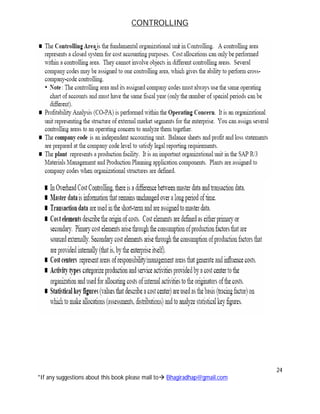
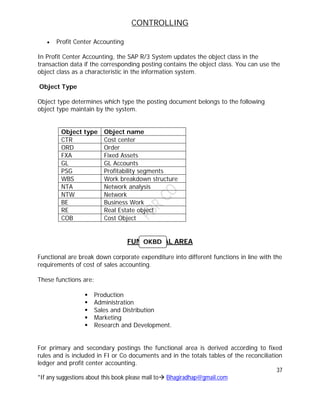
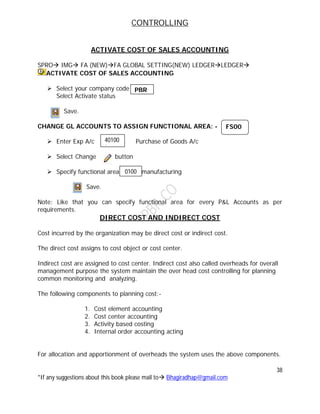
  • 15.
    CONTROLLING 15 *If any suggestionsabout this book please mail to Bhagiradhap@gmail.com PRODUCT COST CONTROLLING Product cost controlling calculates the cost that occurs during manufacture of a product or provision of a service. It enables you to calculate the minimum price at which a product can be profitability marketed. Product cost planning Product cost planning is an area within product cost controlling. Where you can plan cost for materials without reference to orders and set price for materials and other cost controlling objects. You can use production cost planning to analyze the cost of your company’s product such as  Manufactured materials  Service  Other intangible goods Cost object controlling Cost object controlling is an area in cost accounting that assigns the cost incurred in production of company activities such as internally manufactured materials. To those activities cost object controlling supports you in  Reaching make or buy decision  Determining price floors  Performing complex cost analysis such as target/actual analysis  Determining inventory values Purpose The cost object controlling components is designed to answer the question , the components assigns the cost incurred in the company to the company output. The output of a company can consist of material manufactured in house, individual orders, or intangible goods. The cost objects controlling components enables you to determine the cost of goods manufactured or the cost of goods sold for the manufacturing or service output of the company. You can:- 1. Establish planned cost(Budgeted costs) 2. Record actual costs for the cost objects 3. Compare actual cost with target cost and with planned cost and analyze variances 4. Determine price floors for products or individual orders.
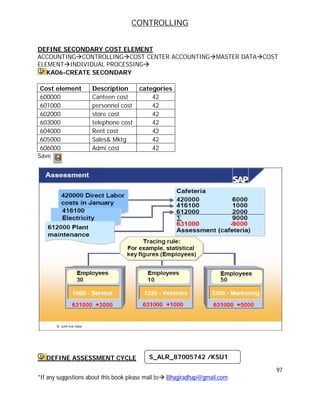
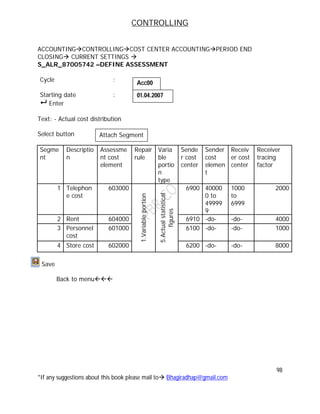
  • 16.
    CONTROLLING 16 *If any suggestionsabout this book please mail to Bhagiradhap@gmail.com Actual cost /Material cost The application component actual costing material ledger fulfills two basic objectives. The ability to carry materials price in multiple currencies/ valuations and actual costing. PROFITABILITY ANALYSIS (CO-PA) Profitability Analysis (CO-PA) enables you to evaluate market segments, which can be classified according to products, customers, orders or any combination of these, or strategic business units, such as sales organizations or business areas, with respect to your company's profit or contribution margin. The aim of the system is to provide your sales, marketing, product management and corporate planning departments with information to support internal accounting and decision-making. The two forms of profitability analysis in CO-PA are:  Costing-based profitability analysis  Account-based profitability analysis Profitability analysis in CO-PA is based on the cost of sales accounting method Two forms of Profitability Analysis are supported: costing-based and account-based.  Costing-based Profitability Analysis is the form of profitability analysis that groups costs and revenues according to value fields and costing-based valuation approaches, both of which you can define yourself. It guarantees you access at all times to a complete, short-term profitability report.  Account-based Profitability Analysis is a form of profitability analysis organized in accounts and using an account-based valuation approach. The distinguishing characteristic of this form is its use of cost and revenue elements. It provides you with a profitability report that is permanently reconciled with financial accounting. PROFITABILITY SEGMENT (CO-PA) An object within Profitability Analysis to which costs and revenues are assigned. A profitability segment corresponds to a market segment. You can calculate the profitability of a profitability segment by comparing its sales revenues against its costs.A profitability segment in an operating concern is defined by a combination of characteristic values. Characteristics can be concepts already available in the SAP System (customer, product, sales organization, and so on), or you can define your own concepts (such as "order size class").
  • 17.
    CONTROLLING 17 *If any suggestionsabout this book please mail to Bhagiradhap@gmail.com  Example  Profitability segment 1: Product "Prod-1132"/ Customer "100267"  Profitability segment 2: Industry "Chemicals"/ Country "USA"/ Product group "Laboratory instruments" PROFIT CENTER ACCOUNTING An organizational unit in accounting that reflects a management-oriented structure of the organization for the purpose of internal control. Operating results for profit centers can be analyzed using either the cost of sales approach or the period accounting approach. By analyzing the fixed capital as well, you can expand your profit centers for use as investment centers.
  • 18.
    CONTROLLING 18 *If any suggestionsabout this book please mail to Bhagiradhap@gmail.com
  • 19.
    CONTROLLING 19 *If any suggestionsabout this book please mail to Bhagiradhap@gmail.com (PRICE) COSTING SHEET Machine consumption ******* Labour ******* Machine ****** -------------------------- Primary cost ******** Production overhead **** ------------------------- Works cost ********* Work in process ****** Administration cost ***** -------------------------- Cost of production ********** I.F.G. In ***** Add sold cost ***** ---------------------- Cost of goods sold ********** ----------------------- Profit ***** ________________ Cost of Sales ********** ________________
  • 20.
    CONTROLLING 20 *If any suggestionsabout this book please mail to Bhagiradhap@gmail.com CONTROLLING OBJECTS 1. Cost center 2. Internal orders 3. Activity type 4. Cost objects i. Cost element accounting ii. Cost center accounting iii. Activity based costing iv. Internal orders accounting v. Production cost controlling vi. Profitability analysis vii. Profit center accounting COSTING DATA Company code Data Financial accounts Costing dept. Organizational units in controlling Controlling Area Company code Business area Plant
  • 21.
    CONTROLLING 21 *If any suggestionsabout this book please mail to Bhagiradhap@gmail.com COMPANY CODE RELATIONSHIP WITH CONTROLLING AREA  Assign controlling area to company code  One controlling area for one company code or many company code cost accounting  For cross company codes are maintain same chart of accounts and same fiscal yr. but currency may be different in one controlling area.  Controlling area must be activate a particular fiscal yr. CONTROLLING OBJECTS i. Cost center ii. Internal orders iii. Activity type iv. Post object v. Sales order vi. Commitment items vii. Profitability segments and profit center Set in controlling for a F.Y(Fiscal yr.) Controlling area Must be activate a particular fiscal yr. Actual Data Controlling Objects Planning Data Data flowed from FI OVER HEAD AADEPRECIATION MMRAW MATERIAL SDRECOVERY HRPERSONAL COST PPPRODUCTION PLAN
  • 22.
    CONTROLLING 22 *If any suggestionsabout this book please mail to Bhagiradhap@gmail.com NO. RANGES Controlling document for various business transaction in controlling(Not a Year Dependent) VERSIONS  Version enables you to maintain different sets of parallel data for the same controlling area.  Versions also provide fiscal yr dependent parameters to controlling area.
  • 23.
    CONTROLLING 23 *If any suggestionsabout this book please mail to Bhagiradhap@gmail.com Activity Price Like Plan = ---------------------- Period (or) Average
  • 24.
    CONTROLLING 24 *If any suggestionsabout this book please mail to Bhagiradhap@gmail.com
  • 25.
    CONTROLLING 25 *If any suggestionsabout this book please mail to Bhagiradhap@gmail.com BASIC SETTINGS MAINTAIN CONTROLLING AREA SPROIMGCONTROLLINGGENERAL CONTROLLINGORGANIZATION MAINTAIN CONTROLLING AREA  Select controlling area = company code  Specify company code  then enter  Company code controlling are  Other settings Cost center standard hierarchy: Document type: Enter  Select button and then save 2. Select assignment of company codes:- Specify company codes Save 3. Select activate components/control indicators: i. Fiscal year –From ii. Activate components  Cost center = Activate AA activity type = (AA= Allocation activity)  Order management= Activate  Commitment Mgt= Activate PBR 2. Cross- company code costs accounts PBRSH SA YES PBR 2000 OKKP
  • 26.
    CONTROLLING 26 *If any suggestionsabout this book please mail to Bhagiradhap@gmail.com  Activity based costing =1 component active for parallel cost Select: Profit center accounting Projects Sales orders Cost objects Co. commitment management Variance Save Back to menu Item  MAINTAIN NO. RANGES PROIMGCONTROLLINGGENERAL CONTROLLINGORGANIZATION For copy standards  Enter Controlling Area  Select copy as button (F7)  Then enter your controlling area For Your own Creation:-  Enter your controlling area for creating our no. ranges  Select Button  Go to menu: select group - insert Text:-XXXXXXXXXXXX No: from 1 to 10000 Enter and then save In the dialogue box ------ choose  Keep the cursor on coin co. position from FI then  Go to edit menu Select element F2 KANK 0001 PBR
  • 27.
    CONTROLLING 27 *If any suggestionsabout this book please mail to Bhagiradhap@gmail.com Select controlling area for your company Go to edit menu Select assign element group (F5) Save. Back to menu Item  MAINTAIN VERSION  Select 0 version  Select controlling area settings  Again select 0 version  Select setting for each fiscal year  Select current FY. 2007 for Integrated , Copying Allow   Select current FY Row then detail button  Change exchange rate type  Select Price calculation tabs   Purely iter. Price (purely iterative price)  Revaluation : Own business Transition  ECPA Procedure type = ( Overhead cost) OKEQ D M
  • 28.
    CONTROLLING 28 *If any suggestionsabout this book please mail to Bhagiradhap@gmail.com COST ELEMENTING ACCOUNTING
  • 29.
    CONTROLLING 29 *If any suggestionsabout this book please mail to Bhagiradhap@gmail.com i. To maintain cost element ii. To display summarized balance of cost element  Reconciliation ledgers Cost element: - is used to record the valuated consumption of resources Describe the origin of cost Primary cost element used to allocation their primary containing other application components Here the P & L GL a/c (FI) = Original cost element (CO) Cost Element FI OVER HEAD AADEPRECIATION MMRAW MATERIAL SDREVENUES HRPERSONAL COST PPPRODUCTION PLAN Primary cost element Secondary cost Element Internal adjustment purpose in CO Data Flows from Other application component
  • 30.
    CONTROLLING 30 *If any suggestionsabout this book please mail to Bhagiradhap@gmail.com PRIMARY COST ELEMENT For allocation purpose we have to use primary cost element For technical purpose system categories primary costs: 11 –Revenue 01 –Primary cost/cost reducing/revenues 03-Accrual calculation- % method 04-Accrual calculation-Debit=Actual Ex: - Bonus. By forget the data then it will used 12-Sales deductions Ex:- External settlement- In cost accounting The cost related to cost object Sometimes we also maintain monitoring capital expenditure, after competition of cost within controlling. Internal whatever cost collects for controlling object for a particular object we finally settlement in external AA 90- Statistical cost element for balance. SECONDARY COST ELEMENT It is used for internal adjustment purpose Internal adjustment categories: 21- Internal settlement 31-Result/project analysis 41-Overhead rates 42-Assignment Costs 43-Interanal Activity allocation 50-Project incoming order- revenues 51- Project incoming order-Other revenues 52- Project incoming order-Cost 61- Earned Value. Note: Cost Element Categories for System defined. Usher Creation is not possible
  • 31.
    CONTROLLING 31 *If any suggestionsabout this book please mail to Bhagiradhap@gmail.com CREATION OF PRIMARY COST ELEMENT Manual Creation: AccountingControlling-Cost elementAccounting-Master DataCost element individual processing KA01 Create primary  Cost element : 300000  Valid from : 01.01.2000 Enter   Controlling area : PBR  Cost element category : 11-Revenue If you wants to maintain cost element qty details Select Indicators Tab Record qty Unit measure: Save AUTOMATIC CREATION OF COST ELEMENT Requirements: Edit chart of Accounts Select your chart of accounts then double click Here change controlling integration Save MAINTAIN DEFAULT SETTINGS: SPRO-IMGCONTROLLINGCOST ELEMENT ACCOUNTINGMASTER DATA COST ELEMENTS AUTOMATIC CREATION OF COST ELEMENTS MAKE DEFAULT SETTINGS. Enter your chart of Accounts – Accounts from To Category 400010 499999 1 300001 399999 11 Save Back to menu Item  PC 2. Automatic creation of cost element NEW ENTRIES: OB13 OKB2 PBR
  • 32.
    CONTROLLING 32 *If any suggestionsabout this book please mail to Bhagiradhap@gmail.com CREATE BATCH INPUT SESSION Controlling Area : From Date : To To Date Session name : Bhagiratha Execute Back to menu Item  EXECUTE INPUT SESSION Select your section Process (F8) Select display errors Process CREATE A GL A/C GL a/c - : Copy from any expense account Change the description= Sales Deductions If you change Basic Data Tab Cost Element Sales deductions Save 12 OKB3 PBR 01.01.2000 31.12.9999 SM35 FS00 426000 Edit Cost Elements
  • 33.
    CONTROLLING 33 *If any suggestionsabout this book please mail to Bhagiradhap@gmail.com REPORTS FOR COST ELEMENT ACCOUNTING Accounting ControllingCost element accountingInformation Systemsreports for cost and revenue element accountingmaster data information -KA23 Cost element master data reports Select all cost Elements Execute You Have Reports for Cost Element Accounting
  • 34.
    CONTROLLING 34 *If any suggestionsabout this book please mail to Bhagiradhap@gmail.com OBJECT CLASS DEFINITION The object class is used to classify controlling objects such as cost centers, orders, and cost objects, and to display the cost flows within CO from a business perspective. The classification is made according to the SAP R/3 function list. STRUCTURE The following object classes are defined by SAP:  Overhead costs (GKOST)  Investments (INVST)  Production (FERTG)  Profit and sales (ERGEB) The assignment of the cost center, cost object, sales order, and profitability segment to an object class is fixed by SAP, but you can assign other objects as you require. The table below shows an overview of the objects in CO with fixed assignments, and the objects that can be freely assigned. If you do not assign an object, then the default setting applies.
  • 35.
    CONTROLLING 35 *If any suggestionsabout this book please mail to Bhagiradhap@gmail.com The objects not assigned to an object class can be assigned in the respective master data records. For example, in each set of master data, you can assign orders in the general parameters to control the object class. You assign a cost object to an object class regardless of its cost object type. Assignments between cost object and object class is predefined according to cost object type. The following assignments apply Cost Object Type Object Class 01 Cost object hierarchy FERTG 02 General cost objects GKOST 03 Product group FERTG
  • 36.
    CONTROLLING 36 *If any suggestionsabout this book please mail to Bhagiradhap@gmail.com Note that once you make an assignment, you cannot change it if transaction data for an object already exists. Subsequent changes to the assignment can cause inconsistencies in the reconciliation ledger. PERIOD-END CLOSING Once all postings for CO period-end closing are completed, and thus all allocations have been made, the following situations should apply:  Cost centers and internal orders are completely credited  Objects in the "Investment" class are still debited with values for works under construction  Objects in the "Production" class display "Work in Process" (WIP)  Objects in the "Profit" class display the operating profit. The requirements are listed in the table below: Use The object class is used in the following applications:  Cost Element Accounting o As a characteristic in the information system for the Cost Elements: Object Classes in Columns report. o As selection criteria for the definition of rules for account determination
  • 37.
    CONTROLLING 37 *If any suggestionsabout this book please mail to Bhagiradhap@gmail.com  Profit Center Accounting In Profit Center Accounting, the SAP R/3 System updates the object class in the transaction data if the corresponding posting contains the object class. You can use the object class as a characteristic in the information system. Object Type Object type determines which type the posting document belongs to the following object type maintain by the system. Object type Object name CTR Cost center ORD Order FXA Fixed Assets GL GL Accounts PSG Profitability segments WBS Work breakdown structure NTA Network analysis NTW Network BE Business Work RE Real Estate object COB Cost Object FUNCTIONAL AREA Functional are break down corporate expenditure into different functions in line with the requirements of cost of sales accounting. These functions are:  Production  Administration  Sales and Distribution  Marketing  Research and Development. For primary and secondary postings the functional area is derived according to fixed rules and is included in FI or Co documents and in the totals tables of the reconciliation ledger and profit center accounting. OKBD
  • 38.
    CONTROLLING 38 *If any suggestionsabout this book please mail to Bhagiradhap@gmail.com ACTIVATE COST OF SALES ACCOUNTING SPRO IMG FA (NEW)FA GLOBAL SETTING(NEW) LEDGERLEDGER ACTIVATE COST OF SALES ACCOUNTING  Select your company code Select Activate status Save. CHANGE GL ACCOUNTS TO ASSIGN FUNCTIONAL AREA: -  Enter Exp A/c Purchase of Goods A/c  Select Change button  Specify functional area manufacturing Save. Note: Like that you can specify functional area for every P&L Accounts as per requirements. DIRECT COST AND INDIRECT COST Cost incurred by the organization may be direct cost or indirect cost. The direct cost assigns to cost object or cost center. Indirect cost are assigned to cost center. Indirect cost also called overheads for overall management purpose the system maintain the over head cost controlling for planning common monitoring and analyzing. The following components to planning cost:- 1. Cost element accounting 2. Cost center accounting 3. Activity based costing 4. Internal order accounting acting For allocation and apportionment of overheads the system uses the above components. 0100 PBR FS00 40100 0
  • 39.
    CONTROLLING 39 *If any suggestionsabout this book please mail to Bhagiradhap@gmail.com The system maintains the following cost accounting method. For allocation of overheads  Assignment method  Over head rate  Static standard costing  Marginal costing. ACCOUNT ASSIGNMENT LOGIC For external posting via GL accounts defined as a cost element . the system require an account assignment object For this purpose the system distinguish the controlling object as “True controlling object” and Statistical controlling object. True controlling Statistical Controlling Cost center (Cost) Cost center (revenue) Internal order(True) Internal Order(Statistical) Project (True) Project (Statistical) Profitability segment Profit center Real estate object Cost element if a true a/c assignment object already exist. Sales order Network Work break down structure Business Process Cost object Statistical to collect internal order only Statistical object are used to analyzing true controlling object. Statistical object are used for assignment for further canalization purpose of true controlling area object in the line item. Rules for assignment 1. You need to specify a true controlling object in each posting row
  • 40.
    CONTROLLING 40 *If any suggestionsabout this book please mail to Bhagiradhap@gmail.com 2. In each posting row, you can specify upto three more statistical controlling objects as well as the true controlling object. 3. You can not assign to more than controlling object of the same type in one posting row. 4. You can not specify the same controlling object as being true and statistical in the same posting row.
  • 41.
    CONTROLLING 41 *If any suggestionsabout this book please mail to Bhagiradhap@gmail.com
  • 42.
    CONTROLLING 42 *If any suggestionsabout this book please mail to Bhagiradhap@gmail.com COST CENTER ACCOUNTING Every organization is three main centers i. Cost center ii. Profit center iii. Investment center COST CENTER We are using this tool we can 1. Plan the cost 2. Collect the cost 3. Analyze and control the cost In SAP system we can implement standard cost maintaining plan data to cost center. Cost center is an area used for the assignment of cost for the purpose of analysis and cost control. It’s may be a functional area Ex:- a person or group of persons fiscal year location or any other allocated units. Cost centers are two types: 1. Production cost center 2. Service cost center Production cost center Production cost centers are those directly involved in carrying the activates of the production process. Ex: - Any operations are process machine department/section/packing and assemble section Service cost center Service cost centers are those which render service to production cost center in the process of manufacturing a product or providing a service. Ex: Administration department, purchasing department, sales dept, marketing dept, research and development and cost center are service
  • 43.
    CONTROLLING 43 *If any suggestionsabout this book please mail to Bhagiradhap@gmail.com Utility cost centers Ex:- light canteen , wellness center, time keeping, watch and ward, repairing and engineering section, quality control, telephone, power etc. After allocation of cost which is attributable or identify to that cost centers, we need to do apportionment or distribution. If such cost center resources are utilized by other cost center. The resource may be allocated based on cost or based on activities performed by cost center used. Statistical key figures, operating rate, activity based. The cost based allocation may be made by specifying fixed amount for each receiving object or % or values posting to the receiving objects are resources or services utilized (sender object or receive object). For allocation basing on services is resources utilization. We need to maintain certain values (Tracing factors) to receiving objects to maintain these values in R/3 system the system defines or maintain statistical key figures. SAP system figures represents a cost center which is used for allocation and determine the operating rate of cost center. To maintain or specify and classify the activities performed or produced by a cost center on business process. The system defines activity type which are used for activity allocation. RESOURCE Resources are goods or services provided to an organization to produce a business activity. COST CENTERS To the cost centers we can maintain the following types of data. 1. Quantity details 2. Plan primary cost 3. Plan secondary cost 4. Plan revenues 5. Actual primary cost 6. Actual secondary cost 7. Actual revenues 8. Commitment items
  • 44.
    CONTROLLING 44 *If any suggestionsabout this book please mail to Bhagiradhap@gmail.com To the control to data flow to the cost center to specify the type all activities of cost center. The system categories the cost center with cost center categories. DEFINE COST CENTER CATEGORIES SPROIMGCONTROLLINGCOST CENTER ACCOUNTINGMASTER DATACOST CENTER DEFINE COST CENTER CATEGORIES. i. Cost center categories ii. If you want to hide for not allow for this like quantity , actual price, actual consumption and actual revenue, plan price, plan secondary cost, plan revenue, commitment upto date iii. Functional area Save OKA2 XXXX
  • 45.
    CONTROLLING 45 *If any suggestionsabout this book please mail to Bhagiradhap@gmail.com
  • 46.
    CONTROLLING 46 *If any suggestionsabout this book please mail to Bhagiradhap@gmail.com DEFINE COST CENTER GROUP ACCOUNTING CONTROLLING MASTER DATA COST CENTER GROUP CREATE Enter cost center by standard hierarchy  Enter Select Enter description To create sub groups  Keep cash on main group  Select button or Contrl+F3 Enter 1000 corporate office To create same level Select Button or shift+F5 Enter Group No. Group name 1000 -Production dept, 2000-Administration 3000 – Material Management 4000- Sales and Distribution 5000- Research and Development 6000-Service / utility cost center Save Back to menu Item  Yes Cost center reporting structure Lower level Same level KSH1 PBRSH
  • 47.
    CONTROLLING 47 *If any suggestionsabout this book please mail to Bhagiradhap@gmail.com CREATE COST CENTER ACCOUNTINGCONTROLLING COST CENTER ACCOUNTING MASTER DATA INDIVIDUAL PROCESSING KS01 Create Cost Cent er General Name Description Person Responsib le Departme nt Cost Cente r Categ ory Stand Hierarch y Area Busines s Area Curr enc y Key 100 Managing Directors Managing Directors Ravikanth Admin W 2000 PBR INR 1100 Materials Materials Sridevi Productio n F 1000 PBR INR 1110 Wages Wages Sridevi Productio n F 1000 PBR INR 1120 Direct Exp Direct Exp Sridevi Productio n F 1000 PBR INR 1130 Production Production Sridevi Productio n F 1000 PBR INR 1200 Machine Section-1 Machine Section-1 Sridevi Productio n F 1000 PBR INR 1300 Machine Section-2 Machine Section-2 Sridevi Productio n F 1000 PBR INR 1400 Assembling Assembling Sridevi Productio n F 1000 PBR INR 2100 Administration Administrati on Rambabu Admin W 2000 PBR INR 3100 Materials Management Materials Manageme nt Sravan MM M 3000 PBR INR 4100 Sales & Distribution Sales & Distribution Venkat SD V 4000 PBR INR 6100 Human Resource Human Recourse Chandra HR H 6000 PBR INR 6200 Stores Stores Gangadh ar Admin W 6000 PBR INR 6300 Welfare Welfare Prasad Red Admin W 6000 PBR INR 6301 Canteen Welfare Prasad Red Admin W 6000 PBR INR 6500 Repair & Main. Repair & Main. Tirupathi Mech. H 6000 PBR INR 6501 Repairing Hrs Repair & Main. Tirupathi Mech. H 6000 PBR INR KS01
  • 48.
    CONTROLLING 48 *If any suggestionsabout this book please mail to Bhagiradhap@gmail.com 6600 Quality Control Quality Control Benrjee QC H 6000 PBR INR 6700 Energy Energy Srinu Electric H 6000 PBR INR 6800 Electricity Electricity Gouse Electric H 6000 PBR INR 6900 Telephone Telephone Rambabu Admin W 6000 PBR INR 6910 Rent Rent Rambabu Admin W 6000 PBR INR 6920 Projects Projects Bhagirad ha Admin W 6000 PBR INR Display cost center information ACCOUNTINGCONTROLLINGCOST CENTER ACCOUNTINGINFORMATION SYSTEMREPORTS FOR COST CENTER ACCOUNTINGMASTER DATA INDEXES COST CENTER MATER DATA REPORT Select all Cost Centers Execute *If your want to Delete for Particular Period a Cost Center Go to Try to Execute with Test run. If No Error then Deselect Test Run again Execute Like that we can delete any time dependent master data in Controlling STATISTICAL KEY FIGURES DEFINITION figure representing a cost center activity type, orders, business process, profit center, real estate objects. You can use them as the basis for internal allocations such as distribution and assessment. Ex: Telephone calls, no. of employees, material requisition. This may be categories as one “Fixed Value” and “Total Value”. Total Values: key figures for every current month we have to maintain values. Fixed values: key figures the system automatically carry forward to the subsequence month These figures may be update manually or automatically. KS13 KS04
  • 49.
    CONTROLLING 49 *If any suggestionsabout this book please mail to Bhagiradhap@gmail.com CREATION OF STATISTICAL KEY FIGURES ACCOUNTINGCONTROLLINGCOST CENTER ACCOUNTINGSTATISTICAL KEY FIGUREINDIVIDUAL PROCESSING KK01 CREATE Statistical key figures Description Unit / measure Category 1000 No. of employees Ea Fixed Value 2000 Telephone call Ea Total value 3000 Power in kilo wats Kw Total Value 4000 Area occupied FT2 Fixed Value 5000 Repairing hours H Total value 6000 Testing items H Fixed value 7000 Production units PC Total value 8000 Material requisition EA Total value To link to “Logistic information system Select Select search information structure Production planning processing industries> master data> process order> operations> scheduling > Define time units. LIS Continue KK01
  • 50.
    CONTROLLING 50 *If any suggestionsabout this book please mail to Bhagiradhap@gmail.com ACTIVITY TYPE DEFINITION Activity types classify activities produced in cost centers within a controlling area. YRK: A unit in a controlling area that classifies activities performs in a cost center. Ex:- Activity type in production cost centers are machine hours or finished goods. Machine Department Activity Calculation Activity Type Specify Measures In the Records For activity unit Activity output Units in Hours, SQM etc Machine Activity Labour Activity Setup Activity Maintenance V 10000 Rep. & Depreciation F 2000 Salary F 5000 Power V 5000 Store & Spares V 1000 Wages V 20000 43, 0000 Expenses Machine Main Activity Types Mach. Hrs:1000 Setup Hrs:50 Labour Hrs:05 F = Fixed Cost V= Variable Cost M.Hrs=60*220 =13200 L.Hrs =30*400= 12000 S.Hrs= 03*200 = 600 Total: 25800 M.Hrs=40*220 =8800 L.Hrs =20*400= 8000 S.Hrs= 02*200 = 400 Total: 17200 Product-A Product-B Working Activity Calculation Machine Hours = F.Hr+V.Hr/Mach. Hr. 2000+5000+10000+5000 100 100 = 70 + 150 =220 Labour Hours = F.Hr+V.Hr/Labour Hr. 20000 50 Set-Up Hours = F.Hr+V.Hr/Setup. Hr. 1000 5 =400 =200
  • 51.
    CONTROLLING 51 *If any suggestionsabout this book please mail to Bhagiradhap@gmail.com Plan price indicator 1 Plan price, automatically based on activity 2 Plan price, automatically based on capacity 3 Determined manually Actual price indicator 4 Actual price, automatically based on activity 5 Actual price, automatically based on capacity 6 Manually determined for actual allocations Activity Type Categories for Plan and Actual Allocation Activity Type Categories Description Use 1 Actual activity is entered and allocated directly Allocation of measurable activities; actual quantity  plan price 2 Actual quantities result from the total of the activity inputs, calculated using tracing factors on the individual receivers Indirect calculation of activity quantities using receiver tracing factors 3 Actual activities are allocated using Automatic allocation of
  • 52.
    CONTROLLING 52 *If any suggestionsabout this book please mail to Bhagiradhap@gmail.com indirect activity allocation activity quantities using receiver tracing factors 4 Activity types are not allocated This activity type can be used only to record quantities (no values) on the sender cost centers Activity Type Category for Actual Allocations Activity Type Categories Description Use 5 Target=actual activity allocation Actual allocation of the activities using target=actual activity allocation This activity type category can only be used for actual allocations Planning can be executed using activity type categories 1, 2, or 3. Category 1 is most commonly used.  Activity type category 1: Manual entry, manual allocation You plan activity quantities manually for activity types in this category. You enter actual activity quantities in internal activity allocation, based on business transactions. Plan activities are allocated using activity input planning on the receivers. It may be necessary to reconcile the plan sender quantities and the plan scheduled activities.  Activity type category 2: Indirect calculation, indirect allocation For activity types of this category, you plan activity types on the sender cost center. You can calculate the plan and actual activity quantities for activity types of this category as follows:
  • 53.
    CONTROLLING 53 *If any suggestionsabout this book please mail to Bhagiradhap@gmail.com Automatically, using receiver tracing factors, which you can value with weighting factors and are defined for each sender, or Using a fixed quantity, which you define in the segment definition of the indirect activity allocation (see: Indirect Activity Allocation). The R/3 System automatically reconciles the plan and scheduled activity quantities.  Activity type category 3: Manual entry, indirect allocation You plan activity quantities manually for activity types in this category. To enter the actual activity quantities by business transaction, access the Cost Center Accounting menu, and choose Actual postings Sender activities (see: Entering Sender Activities). You cannot enter receiver objects here. Plan and actual activity quantities are allocated automatically using defined sender/receiver relationships. The R/3 System calculates the activity quantity to be allocated to each receiver, based on the relationship of the tracing factors to all receivers. Manually planned or posted activity quantities are further allocated in full to the receivers. This means that the activity types in the plan are always reconciled following the activity allocation.  Activity type category 4: Manual entry, no allocation You plan activity quantities manually for activity types in this category. To enter the actual activity quantities by business transaction, access the Cost Center Accounting menu, and choose Actual postings Sender activities (see: Entering Sender Activities). You cannot enter receiver objects here. You cannot allocate to other objects.  Activity type category 5: Calculation and allocation through target=actual activity allocation You require activities of this activity type category when you carry out target=actual activity allocation. Target=actual activity allocation is a special from of indirect activity allocation, where the planned input of an activity is transferred as an actual value, in accordance with the operating rate (see: Target=Actual Activity Allocation).
  • 54.
    CONTROLLING 54 *If any suggestionsabout this book please mail to Bhagiradhap@gmail.com Target=actual activity allocation is used only to allocate actual values. Therefore, activities participating in target=actual allocation must be assigned different activity type categories for planning and actual allocation. Actual allocation requires activity type category 5. Planning requires activity type categories 1, 2, or 3. Category 1 is most commonly used. DEFINE SECONDARY COST ELEMENT ACCOUNTINGCONTROLLINGCOST CENTER ACCOUNTINGMASTER DATACOST ELEMENT INDIVIDUAL PROCESSING KA06 CREATE SECONDARY Cost element Valid from To Cost Element Description Category Record qty. Unit measure 500000 Machine Hours 43 H 501000 LABOUR HOURS 43 H 502000 SET UP HOURS 43 H 503000 REPARING HOURS 43 H 504000 TESTING HOURS 43 H 505000 POWER IN KILO WATS 43 KW 506000 CANTEEN PER MEAL 43 EA 507000 PRODUCATION UNIT 43 PC 508000 ASSEMBLING HOURS 43 H Save Back to menu item  COST ELEMENT DISPLAY Select all cost Elements Execute KA06 500000 01.01.2000 31.12.9999 KA23
  • 55.
    CONTROLLING 55 *If any suggestionsabout this book please mail to Bhagiradhap@gmail.com CREATE ACTIVITY TYPE: ACCOUNTIN CONTROLLING COST CENTER ACCOUNTINGMASTER DATA>ACTIVITY TYPEINDIVIDUAL PROCESSING KL01 Create Sl. No . Activity type Description Ac tiv ity un it Cost cent er cate gory Acti vity cate gori es Allocation cost element Plan price indica tor Actu al price indic ator 1 500000 Machine hours H * 1 500000 2 501000 Labour hours H * 1 501000 3 502000 Setup hours H * 1 502000 4 503000 Repairing hours H * 3 503000 005 5 504000 Testing hours H * 3 504000 005 6 505000 Power in kilowatts k w * 1 505000 7 506000 Canteen per meal Ea * 1 506000 8 507000 Production unit Pc * 4 507000 005 9 508000 Assembling hours H * 1 508000 005 *= all cost centers. Save Back to menu item  PRIMARY ACTIVITY TYPE INDICATOR INFORMATION ACCOUNTINGCONTROLLINGCOST CENTER ACCOUNTING INFORMATION SYSTEM REPORTS FOR COST CENTER ACCOUNTING MASTER DATA INDEXES  KL13 Activity Type List Select all cost Elements Execute KL01 KL13
  • 56.
    CONTROLLING 56 *If any suggestionsabout this book please mail to Bhagiradhap@gmail.com CREATION OF RESOURCES: ACCOUNTINGCONTROLLINGCOST CENTER ACCOUNTINGMASTER DATA RESOURCES KPR2 CREATE/CHANGE Save RESOURCES DEFINITION A resources comprised goods and service, which are supplied internally and externally to produce business activities. Use: you can use resources to carry out a detailed, “Quantity based primary cost planning below the cost element level for cost centers, orders and WBS element”. Resource planning will replace detailed planning at a later date. For this master data that is: i. Cost center ii. Activity type iii. Statistical key figures iv. Resources We can maintain the following data i. Plan data ii. Budget data iii. Actual data Resources Valid From To RU Name R1 01.04.2007 31.03.9999 H Consolidating Hours KPR2 NEW ENTRIES
  • 57.
    CONTROLLING 57 *If any suggestionsabout this book please mail to Bhagiradhap@gmail.com Planned data and budget data can be set in controlling with cost center planning and budgeting. COST CENTER PLANNING AND BUDGETING Cost center planning is a short term planning forming part of overall of the organization. PLANNING AREA Cost center planning is divided into the following planning areas. 1. Cost elements/activity input i. Primary cost ii. Secondary cost iii. Revenue 2. Activity type planning 3. Statistical key figure planning. COST CENTER PLANNING COST CENTER PLANNING SCOPE Cost center planning is divided into the following planning areas:  Cost elements/activity input o Primary costs o Secondary costs o Revenues  Activity type planning /price planning  Statistical key figure planning Actual data is updated following components FI OVER HEAD AADEPRECIATION MMRAW MATERIAL SDRECOVERY HRPERSONAL COST PPPRODUCTION PLAN
  • 58.
    CONTROLLING 58 *If any suggestionsabout this book please mail to Bhagiradhap@gmail.com The following graphic provides an overview of the different planning areas:
  • 59.
    CONTROLLING 59 *If any suggestionsabout this book please mail to Bhagiradhap@gmail.com PLANNING SEQUENCE PROCESS FLOW 1. Activity type planning 2. Statistical key figures 3. Primary cost planning 4. Manual primary cost planning 5. Resource planning 6. Dependency planning 7. Revenue planning 8. Automatic primary cost planning 9. Plan distribution 10.Plan accrual calculation 11.Periodic reposting in planning 12.Secondary cost planning 13. Budget planning 14.Transferring planning data from other components i. Depreciation and interest from FI-AA ii. Personnel cost from HR iii. Planned activity from PP iv. Key figures from LIS
  • 60.
    CONTROLLING 60 *If any suggestionsabout this book please mail to Bhagiradhap@gmail.com PLANNING LAYOUTS SPROIMGCONTROLLINGGERNERAL CONTROLLINGPRODUCTION STARTUP PREPARATIONTRANSPORT SYSTEM SETTINGTRANSPORT SETTING FOR PLANNING IMPORT STANDARD PLANNING LAYOUTS Click on document SAP offers the following standard planning layouts Cost center accounting Cost element/activity input planning  1-101= cost center, cost elements, activity-dependent/independent  1-102= cost center, activity inputs, activity dependent/independent  1-103= cost center, costs/revenue/ consumption  1-152= cost center cost element comparison,22quarters  1-153= cost center, cost element planning, 2 versions. Activity /Activity price planning 1-201= cost center, activity type/price standard Manual actual prices 1-N01= cost center, manual actual prices, cost center. Resource planning 1-1R1= cost center: resource planning Statistical key figure planning 1-301= cost center, statistical key figures, standard 1-302= cost center: statistical key figures, activity –dependent.
  • 61.
    CONTROLLING 61 *If any suggestionsabout this book please mail to Bhagiradhap@gmail.com USER DEFINE PLANNING LAYOUTS-ACTIVITY TYPE REPORT PAINTER: CREATE COST CENTER: PLANNING LAYOUT FOR COST ELEMENT Create Cost Center : Planning layout for cost element Planner Profile : PBR1 LEAD COLUMN COLUMN1 SELECT ROW1CLICKCHARECTERESTICSSELECT KEY FIGURE-PLAN FIXED COSTS IN CONTROLLING AREA Characteristic From To Period/year 01.2007 12.2007 Fiscal Year Version * FROM TO Controlling area PBR Company code PBR Cost Center Cost Element Activity Type * FROM TO Save MSG: Planning Layout PBR1 was saved ATTACH TO PLANNER PROFILE SPROCONTROLLINGCOST CENTER ACCOUNTINGPLANNINGMANUAL PLANNINGDEFINE USERDEFINED PLANNER PROFILE Copy from SAPEASY and rename it as PBREASY PBREASYGENERAL ACCOUNTINGCOST CENTERS:COST ELEMENT/ACTIVITY INPUT LAYOUTS FOR CONTROLLING ITEM LAYOUT-PBR1 NOTE: *integrate – check it then we can see the report in excel Controlling area PBR1 Save KP65 KP35 PBR1
  • 62.
    CONTROLLING 62 *If any suggestionsabout this book please mail to Bhagiradhap@gmail.com ASSIGN STANDARD PLANNING PROFILE TO CONTROLLING AREA ACCOUNTINGCONTROLLINGCOST CENTER ACCOUNTINGPLANNING KP04-SET PLANNING PROFILE Select planning profile Save SAP ALL KP04
  • 63.
    CONTROLLING 63 *If any suggestionsabout this book please mail to Bhagiradhap@gmail.com DISTRIBUTION KEY Distribution key is a tool used to distribute annual planned values over the planning period in accordance with certain rules. SPROIMGCONTROLLINGCOST CENTER ACCOUNTINGPLANNINGMANUAL PLANNING DEFINE USER DEFINE DISTRIBUTION KEYS Standard distribution keys used by system Distribution key Used to 0 Used to enter manually for each period 1 Used to distribute the input value equally across all plan period 2 Used to distribute the input value(annual plan value)according to the last distribution key used 3 Interpret the input value as a % rate and multiplies it each period by the previous value 4 Used to distribute period value not equal to zero to the subsequent empty period 5 Copies period values not equal to zero to the subsequent empty period 6 Copies a given period values to subsequent period 7 Used to distribute input value(annual plan value ) among the individual periods line with the number of calendar days per period 11 Can only be used in cost center accounting for planning activity dependent costs or activity dependent statistical key figures The input value (annual plan value) is distributed in line with the activity quantity planned on the cost center. Note The R/3 system used only those activity quantities planning at the time of the distribution key’s used. If you change activity quantities later or copy plan values to another version, the R/3 system does not automatically carryout new distributions.
  • 64.
    CONTROLLING 64 *If any suggestionsabout this book please mail to Bhagiradhap@gmail.com ACTIVITY PLANNING ACTIVITY PRICE/OUTPUT ACCOUNTING CONTROLLINGCOST CENTER ACCOUNTING PLANNING ACTIVITY OUT PUT /PRICE KP26- CHANGE To change layout use next layout button.. Select layout Version : From period : To period : Fiscal year : Cost center : To : Activity type : To : Select overview screen button(F5) KP26 1- 201 01 12 2007 1130 6999 500000 599999 0
  • 65.
    CONTROLLING 65 *If any suggestionsabout this book please mail to Bhagiradhap@gmail.com Activity type plan activity(hr) capacity (hr) fixed price(Rs) Variable (Rs) cost center=1130 Production dept 507000-Production 100000 150000 next cost center= Machine section-I -1200 500000-machine hrs 3600 4500 30 120 501000-Labour hrs 2100 180 502000-Set up hours 300 20 next Cost center= Machine Section-2 1300 500000-machine hrs 3000 3600 45 150 501000-Labour hrs 2100 110 502000-Set up hours 300 20 next Cost center= Assembling hours-1400 508000-Assembling hrs 3000 220 next Cost center= Canteen -6300 506000-Canteen 12000 10 30 next Cost Center= Repairing-6500 503000-Repairing hrs 1800 45 125 next Cost center= Quality Control -6600 504000-Testing hrs 1500 50 100 next Cost center= Energy- 6700 505000-power in kw 30000 6 Save Back menu item 
  • 66.
    CONTROLLING 66 *If any suggestionsabout this book please mail to Bhagiradhap@gmail.com ACTIVITY INPUT PLANNING ACCOUNTING CONTROLLINGCOST CENTER ACCOUNTING PLANNING COST AND ACTIVITY INPUTS KP06 – CHANGE To change layout use next layout button.. Select layout Version : From period : To period : Fiscal year : Cost center : To : Activity type : To : Sender cost center : To : Sender activity type : To : Select overview screen button(F5) 1- 102 01 12 2007 1130 6999 500000 599999 0 KP06 6300 6700 505000 506000
  • 67.
    CONTROLLING 67 *If any suggestionsabout this book please mail to Bhagiradhap@gmail.com Receiver activity cost sender activity costcenter sender activity type Plan variable consumption Next Cost center : 1130-Production 507000- Production Unit 6300 506000 1080 507000- Production Unit 6700 505000 900 Next Cost center : 1200-Machine Section-I 501000-Labour Hours 6300 5506000 900 500000-Machine Hours 6700 5505000 1200 Next Cost center : 1300-Machine Section-II 501000-Labour Hours 6700 5505000 1500 500000-Machine Hours 6300 5506000 600 Save Back menu item 
  • 68.
    CONTROLLING 68 *If any suggestionsabout this book please mail to Bhagiradhap@gmail.com PLAN RECONCILIATION ACCOUNTINGCONTROLLINGCOST CENTER ACCOUNTINGPLANNING PLANNING AIDS KPSI –Plan Reconciliation Select all cost Centers  Version :  Period from :  Fiscal year : Execute (F8) COST PLANNING Cost planning are two types 1. Activity dependent 2. Activity independent ACTIVITY DEPENDENT COST PLANNING A type of manual planning in which primary cost or revenues are calculated as the product of the activity quantity or the quantity of the statistical key figures and a factor defined by the user. YRK: Planning with two activities is called activity dependent cost planning in this case cost can be split into fixed variable. KPSI 0 01 12 2007
  • 69.
    CONTROLLING 69 *If any suggestionsabout this book please mail to Bhagiradhap@gmail.com ACCOUNTING CONTROLLINGCOST CENTER ACCOUNTING PLANNING COST AND ACTIVITY INPUTS KP06 – CHANGE To change layout use next layout button.. Select layout Version : From period : To period : Fiscal year : Cost center : To : Activity type : To : Cost Element : To : Select overview screen button(F5) 1- 101 01 12 2007 1000 6999 500000 599999 0 400000 499999
  • 70.
    CONTROLLING 70 *If any suggestionsabout this book please mail to Bhagiradhap@gmail.com Activity type cost element Plan fixed cost Plan variable cost cost center: 1130-Production 507000 Production unit 410000(Salaries) 90000 - next cost center 1200-Machine Section- I 500000 Machine Hours 407000(Mech. Main.) 90000 500000 Machine Hours 410000 (Salaries) 36000 501000 Labour Hours 403000(Direct Wages 180000 502000-Setup Hours 402000(Indirect Wages) 15000 next Cost center 1300-Machine Section- II 500000 Machine Hours 407000(Mech. Main.) 72000 500000 Machine Hours 410000 (Salaries) 45000 501000 Labour Hours 403000(Direct Wages 150000 502000-Setup Hours 402000(Indirect Wages) 16000 next Cost center 1400-Assembly 508000 assembling 403000(Direct Wages 300000 Cost center 6300-Canteen 506000 Canteen per Meal 412000(Staff Welfare) 120000 506000 Canteen per Meal 410000 (Salaries) 27000 next cost center: 6500-Repairs 503000 Repairing Hours 410000 (Salaries) 60000 503000 Repairing Hours 406000 (R& M) 90000 next cost center 6600-Quality control 504000 Testing Hours 410000 (Salaries) 45000 504000 Testing Hours 427000( Testing Exp.) 75000 next Cost center 6700-Energy 505000 Power in KW 405000(Electrical Charges) 180000 next Save Back menu item 
  • 71.
    CONTROLLING 71 *If any suggestionsabout this book please mail to Bhagiradhap@gmail.com ACTIVITY INDEPENDENT COST PLANNING Planning without reference activity is called as activity independent. cost planning in this case the total cost are recorded as fixed cost. ACCOUNTING CONTROLLINGCOST CENTER ACCOUNTING PLANNING COST AND ACTIVITY INPUTS KP06 – CHANGE To change layout use next layout button.. Select layout Version : From period : To period : Fiscal year : Cost center : To : Activity type : To : Cost Element : To : Select overview screen button (F5)  To do detailed planning select cost element 400100 raw material consumption a/c Row  Select menu bar Edit  detailed planning change/display  You enter every raw material details as below 1- 101 01 12 2007 1000 6999 0 400000 499999 KP06
  • 72.
    CONTROLLING 72 *If any suggestionsabout this book please mail to Bhagiradhap@gmail.com Category Resources Plant Qty M (Material) Raw Material1 PBR 5000 M Raw Material2 PBR 5000 M Raw Material3 PBR 5000  When you press enter key than automatically take raw material price from MM Save Back  Cost element Plan fixed cost Cost Center : 1100-Material 400100 Raw Material Consumption above values will display here Cost Center :1110-Wages 402000 (Indirect Wages) 100000 Cost Center: 1200-Machine Section-I 404000 9000 Cost Center: 2100-Administration 410000 (Salaries) 300000 Cost center: 3100-Purchase 410000 (Salaries) 200000 Cost center : 4100-Sales Dept 410000 (Salaries) 220000 420000 (Sales Exp.) 100000 421000 (Marketing Exp.) 90000 422000 (freight and carriage) 60000 423000 (Advertisement) 150000 Cost center: 6100-Personnel Dept 410000 (Salaries) 120000 Next Cost center : 6200-Stores 410000 (Salaries) 90000 Cost Center :6800-Electricity 405000-Eelectric Exp. 30000 Cost Center : 6900 Telephone 413000- Telephone Charges 60000 Cost Center : 6910-Rent 414000-Rent 60000 Save Back menu item 
  • 73.
    CONTROLLING 73 *If any suggestionsabout this book please mail to Bhagiradhap@gmail.com REPORTS ACCOUNTINGCONTROLLINGCOST CENTER ACCOUNTINGINFORMATION SYSTEMREPORTS FOR COST CENTER ACCOUNTINGPLAN ACTUAL CONSUMPTION S_ALR_87013611-Cost center actual/plan variable Controlling area : From period : To period : Fiscal year : Plan version : Cost center group : Execute (F8) Note: - it’s called as primary cost planning and also manual planning. S_ALR_87013611 01 12 2007 0 PBR PBRSH
  • 74.
    CONTROLLING 74 *If any suggestionsabout this book please mail to Bhagiradhap@gmail.com ACCRUAL CALCULATION DEFINE COST ELEMENT:  Select bonus G/L Accounts :  Select Button :  Cost element category : Save DEFINE COST CENTER Cost Center General Name Descriptio n Person Responsible Depart ment Cost Center Catego ry Stand Hierarch y Area Busine ss Area Cur ren cy Key BONUS CR Bonus Cr Bonus Cr Bhagiradha HR Service 6000 PBR INR Save DEFINE OVER HEAD STRUCTURE SPROIMGCONTROLLINGCOST CENTER ACCOUNTINGPLANNINGPLANNING AIDSACCRUAL CALCULATION PERCENTAGE METHOD MAINTAIN OVERHEAD STRUCTURE Over head : PBR Description : Bonus overhead structure Row Base O/h rate From To Credit 10 I-B2 20 A-z2 10 E12  To specify base cost element double click on base column then select YES button Save From Cost Element To cost Element FS00 411000 Edit Cost Element 3 KS01 KSAZ NEW ENTRIES
  • 75.
    CONTROLLING 75 *If any suggestionsabout this book please mail to Bhagiradhap@gmail.com 410000 salaries - 403000 wages - Save  To specify over head rate double click on over head rate column. Valid from valid to plan over head actual overhead 001.2007 012.2007 10% 10% Save  To specify credit cost center double click on credit column Business area valid to Cost element Cost center PBR 012.2007 411000-bonus a/c Bonus cr Save  Select (F5) button for assign to controlling area  Plan Accrual controlling area  Continue Valid from valid to over head structure 001.2007 12.2007 PBR Save ACCRUAL CALCULATION EXECUTION Change Assignment PBR KSA8
  • 76.
    CONTROLLING 76 *If any suggestionsabout this book please mail to Bhagiradhap@gmail.com ACCOUNTINGCONTROLLINGCOST ELEMENT ACCOUNTING PLANNING KSA8- ACCRUAL CALCULATION  Select all cost centers Version : Period : To period : Fiscal yr : Deselect Test run Select Detail list Execute Select next list level button. ALLOCATION METHOD The system maintains the following allocation methods for distributing or allocating the allocated cost from sender object to receiving object. I. Cost based allocation methods 1. Periodic re-posting ---- primary 2. Distribution ---- primary 3. Assessment ----- Primary and Secondary II. Activity based allocation 4. Indirect activity allocation 0 01 12 2007
  • 77.
    CONTROLLING 77 *If any suggestionsabout this book please mail to Bhagiradhap@gmail.com DIFFERENCE BETWEEN ALLOCATION METHODS
  • 78.
    CONTROLLING 78 *If any suggestionsabout this book please mail to Bhagiradhap@gmail.com DISTRIBUTION METHOD ACCOUNTINGCONTROLLINGCOST CENTER ACCOUNTING PLANNING CURRENT SETTINGS S_ALR_87005903-Define distribution Cycle : Starting date :  Enter Text: Plan Distribution: Primary Cost ITERATIVE PROCESSING This indicator controls whether iterative sender/receiver relationships are considered when this cycle is processed. The iteration is repeated until each sender is fully credited (a small remainder may be left over in some cases). Select Attach Segment Botton Segment Name Description Receiver Rule Variable portiontype Sendercost center Sendercost elementfrom Sendercost elementTo Receivercost centerfrom Receivercost centerto Version Receiver Tracingfactors 1 Electricity 3.Fixed % - 6800 400000 499999 2100 6200 2100- 10% 3100- 20% 4100- 15% 6100- 30% 6200- 25% 100 2 Telephone 6900 400000 499999 1000 6999 0 SKF: 2000 3 Rent 6950 400000 499999 1000 6999 0 SKF: 4000 4 Personnel Dept 6.plan statistical key figures 6100 400000 499999 1000 6999 0 SKF: 1000 5 Stores 1.Variableportion 2.plan cost 6200 400000 499999 1000 6999 0 400000 to 499999 Save S_ALR_87005903 Plan00 01.04.2007
  • 79.
    CONTROLLING 79 *If any suggestionsabout this book please mail to Bhagiradhap@gmail.com ENTERING STATISTICAL KEY FIGURE VALUE ACCOUNTINGCONTROLLINGCOST CENTER ACCOUNTING PLANNINGSTATISTICAL KEY FIGURES KP46-Change Version : From period : To period : Fiscal year : Cost center : To : Statistical key figure : To :  Select form based  Select overview screen F5 button 01 12 2007 1000 6999 1000 9999 0 KP46
  • 80.
    CONTROLLING 80 *If any suggestionsabout this book please mail to Bhagiradhap@gmail.com statistical key figure No.of Employees-1000 Telephonecalls- 2000 PowerIn Kilowatts-3000 AreaOccupied RepairingHours- 4000 RepairingHours- 5000 TestingItem- 6000 Materials Requisition- 8000 Cost centers 1130-production 3 900 100 1200 300 1200-Machine-1 4 60 250 200 1300-Machine-2 3 60 200 150 2100-Administration 6 1200 600 50 3100-Purchase 3 450 450 50 1200 4100-Sales 9 600 600 120 200 6100-personal Dep 2 300 300 30 100 6200-store 3 500 500 100 6300-canteen 2 150 150 75 6500-repair 3 50 6600-quality control 2 300 300 30 Save TO DISPLAY ALLOCATION PLAN DISTRIBUTION ACCOUNTING CONTROLLING COST CENTER ACCOUNTING PLANNING ALLOCATION KSVB- DISTRIBUTION Version : From period : to Fiscal year : Select Details List Deselect Test run KP47 KSVB 01 12 2007 0
  • 81.
    CONTROLLING 81 *If any suggestionsabout this book please mail to Bhagiradhap@gmail.com Cycle Start Date Plan000 (Press F4) 01.04.2007 Execute (F8) REPORT ACCOUNTINGCONTROLLINGCOST CENTER ACCOUNTING INFORMATION SYSTEM REPORTS FOR COST CENTER ACCOUNTING S_ALR_87013611-PLAN/ACTUAL COMPARISON Controlling area : From period : To period : Fiscal year : Plan version : Cost center group : Execute (F8) PLAN PRICE CALCULATION ACCOUNTINGCONTROLLINGCOST CENTER ACCOUNTING PLANNING ALLOCATION KSPI-PRICE CALCULATION Select All Cost Centers Version : From period : to Fiscal year : Select Details List Deselect Test run Execute (F8) S_ALR_87013611 01 12 2007 0 PBR PBRSH 01 12 2007 0 KSPI
  • 82.
    CONTROLLING 82 *If any suggestionsabout this book please mail to Bhagiradhap@gmail.com INDIRECT ACTIVITY ALLOCATION Define assessment cycle for indirect activity allocation ACCOUNTING CONTROLLING COST CENTER ACCOUNTING PLANNING CURREN SETTING S_ALR_87005471 –Indirect Activity Allocation Cycle : Starting date :  Enter Text: - Indirect activity allocation Select button Segment Name Description Receiver Rule Variable portiontype Sendercost center Sender Activity Type Receiver costcenter from Receiver costcenter to Version Receiver Tracing factors 1 Repairing 8 plan activity 6500 503000 1200 1300 0 Act. Type 500000 2 Testing cost 1.Variable portion 6.plan statistical key figures 66600 504000 1000 6999 0 SKF: 6000 Save S_ALR_8705471 / KSC7 Ind00 01.04.2007 Attach Segment
  • 83.
    CONTROLLING 83 *If any suggestionsabout this book please mail to Bhagiradhap@gmail.com INDIRECT ACTIVITY ALLOCATION ACCOUNTINGCONTROLLINGCOST CENTER ACCOUNTING PLANNING ALLOCATION KSCB-INDIRECT ACTIVITY ALLOCATION Version : From period : to Fiscal year : Select Details List Deselect Test run Cycle Start Date Ind000 (Press F4) 01.04.2007 Execute (F8) REPORT ACCOUNTINGCONTROLLINGCOST CENTER ACCOUNTING INFORMATION SYSTEM REPORTS FOR COST CENTER ACCOUNTING S_ALR_87013611-PLAN/ACTUAL COMPARISON Controlling area : From period : To period : Fiscal year : Plan version : Cost center group : Execute (F8) KSCB 01 12 2007 0 S_ALR_87013611 01 12 2007 0 PBR PBRSH
  • 84.
    CONTROLLING 84 *If any suggestionsabout this book please mail to Bhagiradhap@gmail.com PLANNING REPORTOVERVIEW ACCOUNTINGCONTROLLINGCOST CENTER ACCOUNTING INFORMATION SYSTEMREPORTS FOR COST CENTER ACCOUNTINGPLANNING REPORT KSBL-COST CENTER: PLANNING OVERVIEW. Cost center Fiscal yr Period t to Execute (F8) Back to Menu Item  1200 2007 01 12 KSBL
  • 85.
    CONTROLLING 85 *If any suggestionsabout this book please mail to Bhagiradhap@gmail.com SPLITTING STRUCTURE PLANNING ALLOCATION SPLITTING ACCOUNTINGCONTROLLINGCOST CENTER ACCOUNTING PLANNINGALLOCATION KSS4-SPLITTING Cost center Version Fiscal yr Period t to Execute (F8)  Keep the curser on 1200 cost center  Select cost element Note: - Now System Show Equal Splitting Cost where we have multi activities in one cost center that purpose now we create “Splitting Structure”. DEFINE SPLITTING RULES SPROIMGCONTROLLINGCOST CENTER ACCOUNTING PLANNINGALLOCATIONACTIVITY ALLOCATIONSPLITTING DEFINE SPLITTING STRUCTURE Select Splitting Rules Rule Text Splitting Method Y1 Indirect Wages 12 Activity quantity Y2 Power 21 Equivalence no. planning Y3 Salaries 12 Activity quantity Y4 Bonus 12 Activity quantity Y5 Canteen 12 Activity quantity Y6 Medical 12 Activity quantity Y7 Telephone 12 Activity quantity Y8 Rent 12 Activity quantity Y9 Repairs 21 Equivalence no. planning Save OKES KSS4 2007 01 12 1200 1300 0
  • 86.
    CONTROLLING 86 *If any suggestionsabout this book please mail to Bhagiradhap@gmail.com Select Rule :  Select Version : Like that for every rule specify the version as Save Select : Structure Text Y0 Splitting Structure : PBR Save  elect your splitting structure  Select assignment Assignments Text Rule Text Y1 Indirect Wages Y1 Indirect Wages Y2 Power Y2 Power Y3 Salaries Y3 Salaries Y4 Bonus Y4 Bonus Y5 Canteen Y5 Canteen Y6 Medical Y6 Medical Y7 Telephone Y7 Telephone Y8 Rent Y8 Rent Y9 Repairs Y9 Repairs Save Y1 Selection for Rules Splitting Structure 0 0
  • 87.
    CONTROLLING 87 *If any suggestionsabout this book please mail to Bhagiradhap@gmail.com Select Assignment Y1 Row Select Select Rule New entries Cost element Activity type From To Y1  404000(Ind. Wages) 500000 Y2  405000 (Power) 500000 Y3  410000 (Salaries) 500000 502000 Y4  411000 (Bonus) 500000 502000 Y5  401200 (Welfare) 500000 502000 Y6  401500(Medical exp) 500000 502000 Y7  401300(Telephone) 500000 502000 Y8  401400(Rent) 500000 502000 Y9  506000(Repairs) 500000 Save Back to menu ASSIGN SPLITTING STRUCTURE TO COST CENTER SPROIMGCONROLLINGCOST CENTER ACCOUNTING PLANNING ALLOCATION ACTIVITY ALLOCATIONSPLITTING ASSIGN SPLITTING STRUCTURE TO COST CENTER Cost center : Version : Fiscal yr : Period : to to Select Change button Select your cost center (where have multi activities) Keep curser on splitting structure Go to menu item Edit > Assign (Shift+F6) Note: Create new Customizing request then press enter Save Selection for assignment 2007 01 12 1200 1300 0 OKEW
  • 88.
    CONTROLLING 88 *If any suggestionsabout this book please mail to Bhagiradhap@gmail.com Execute splitting structure ACCOUNTINGCONTROLLINGCOST CENTER ACCOUNTING PLANNINGALLOCATION KSS4-SPLITTING Cost center to Version Fiscal yr Period t to Select detail list Execute (F8)  Keep the curser on 1200 cost center Select cost element EXECUTE PLAN PRICE CALCULATION ACCOUNTINGCONTROLLINGCOST CENTER ACCOUNTING PLANNING ALLOCATION KSPI-PRICE CALCULATION Select all cost centers Version : Period : to Fiscal yr Select detail list Execute (F8) COST CENTER BUDGETING SPROIMGCONTROLLINGCOST CENTER ACCOUNTINGBUDGET MANAGEMENT KSS4 2007 01 12 1200 1300 0 2007 0 01 12 KSPI
  • 89.
    CONTROLLING 89 *If any suggestionsabout this book please mail to Bhagiradhap@gmail.com DEFINE BUDGET PLANNING PROFILE Profile Text Distribution key Annual values Period values SAVE COST CENTER BUDGETING ACCOUNTINGCONTROLLINGCOST CENTER ACCOUNTINGPLANNING COST CENTER BUDGET KPZ2 – CHANGE  Profile  cost center group  Press Enter Key  Specify your budget allotted amount for each cost centers as you want  For revaluating the budget  Select cost center Go to menu item Edit Revaluate If you want to increase/reduce on base of %/particular (or) amount For increase : % For decrease : % Save TO DISPLAY ACTUAL DATA POSTINGS TO COST CENTER POSTING FROM MM GOODS ISSUE TO COST CENTER 10 -10 KPZ2 KPZ3 MB1C PBR PBR BUDGET PROFILE 1 PBR PBRSH
  • 90.
    CONTROLLING 90 *If any suggestionsabout this book please mail to Bhagiradhap@gmail.com LOGISTICSMATERIAL MANAGEMENTINVENTORY MANAGEMENT GOODS MOVEMENT MB1C-GOODS ISSUE Movement type : Plant : Storage location : Press  Enter Key Cost center : (Material) Material Qty Raw material-I 10 Raw material-II 10 Raw material-III 10 Save MATERIAL SCRAPING POSTING (ACCOUNTING/WITHDRAWER) Movement type : Plant : Storage location : Press  Enter Key Cost center : (Material) Material Qty Raw material-I 02 Raw material-II 02 Raw material-III 02 Save  See accounting/controlling document MB02 or men documentchange POSTING FROM FI 201 PBR PBR 1100 MB1C 541 PBR PBR 1100 F-02 03.03.2007 INR
  • 91.
    CONTROLLING 91 *If any suggestionsabout this book please mail to Bhagiradhap@gmail.com Document Date: , Company Code: Currency: Postin g keys Account Amount Cost center Postin g Keys Account Amount Cost center 40 401000 10000 1130 40 413000 7000 6900 40 401000 60000 1200 40 414000 5000 6910 40 401000 7000 1300 40 420000 5000 4100 40 401000 8000 2100 40 421000 6000 4100 40 401000 7500 3100 40 422000 6500 4100 40 401000 10000 4100 50 210000 * 40 401000 5000 6100 40 401000 6000 6200 40 401000 5000 6300 40 401000 4000 6500 40 401000 6000 6600 40 403000 1000 1110 40 403000 12000 1200 40 403000 8000 1300 40 403000 10000 1400 40 405000 15000 6700 40 406000 7500 1200 40 406000 7000 6500 40 407000 9000 1300 40 412000 12000 6300 Simulate and Post FOR ANY ADJUSTMENT OR WRONG ENTRY CORRECTION MANUAL REPOSTING OF COST PBR KB11N
  • 92.
    CONTROLLING 92 *If any suggestionsabout this book please mail to Bhagiradhap@gmail.com ACCOUNTINGCONTROLLINGCOST ELEMENT ACCOUNTINGACTUAL POSTINGMANUAL REPOSTING OF COST KB11N- MANUAL Cost center Cost element Amount Receive cost center 1200 406000 4000 6500 Press Enter Key Simulate and Post Back to menu 1. REPOST LINE ITEMS 1. Select document 2. Company code Execute (F8)  Change cost center amount which you want to split  Press Enter Key  Then Enter Cost Center Save ASSIGN OVERHEAD STRUCTURE TO CONTROLLING AREA SPROIMGCONTROLLINGCOST CENTER ACCOUNTINGACTUAL POSTING KB61 xxxxxxx PBR KSAZ
  • 93.
    CONTROLLING 93 *If any suggestionsabout this book please mail to Bhagiradhap@gmail.com PERIOD END CLOSINGACCRUAL CALCULATIONPERCENTAGE METHOD MAINTAIN OVER HEAD STRUCTURE  Keep the curser on your over head structure  Select button  Select actual accrual  Continue  Select change button Valid from Valid to Overhead structure 001.2007 012.2007 PBR Save. EXECUTION ACCRUAL CALCULATION ACCOUNTINGCONTROLLINGCOST CENTER ACCOUNTINGPERIOD END CLOSINGSINGLE FUNCTION KSA3-ACCRUAL CALCULATION Cost Center Group : Select All Cost Centers Period :  Select detail list Execute (F8) Next Button DIRECT ACTIVITY ALLOCATION Assignment PBRSH KSA3 7 KB21N
  • 94.
    CONTROLLING 94 *If any suggestionsabout this book please mail to Bhagiradhap@gmail.com ACCOUNTINGCONTROLLINGCOST CENTER ACCOUNTINACTUAL POSTING ACTIVITY ALLOCATION KB21N –ENTER Cost center Activity type Receiver cost enter Total quantity 1200 500000 1120 100 1200 501000 1120 90 1200 502000 1120 3 1300 500000 1120 40 1300 501000 1120 90 1300 502000 1120 04 1400 508000 1120 120 6300 506000 1130 100 6300 506000 1120 60 6300 506000 1300 60 6700 505000 1200 100 6700 505000 1300 120 Save MANUALLY ENTER ACTIVITY:- ACCOUNTINGCONTROLLINGCOST CENTER ACCOUNTINACTUAL POSTING SENDER ACTIVITY KB51N - Enter Sender cost center Activity type Qty 6500 503000 40 6600 504000 70 1300 507000 9000 Save Back to menu ACTUAL PRICE KB51N
  • 95.
    CONTROLLING 95 *If any suggestionsabout this book please mail to Bhagiradhap@gmail.com ACCOUNTINGCONTROLLINGCOST CENTER ACCOUNTINACTUAL POSTING ACTUAL PRICE KBK6-ENTER Select layout Version : From period : To period : Fiscal year : Cost center : To : Activity type : To : Select overview screen button (F5) Activity type Fixed cost Variable cost Cost center:1200-Machine-I 500000 45 45 501000 15 115 502000 05 50 Next Cost Center-1300-Machine-II 500000 46 50 501000 10 92 502000 5 55 Next Cost center:1400-Assembling Section 508000 120 Save ENTERING ACTUAL STATISTICAL KEY FIGURES KBK6 1- N01 06 06 2007 1200 1400 500000 599999 0 KB31N
  • 96.
    CONTROLLING 96 *If any suggestionsabout this book please mail to Bhagiradhap@gmail.com ACCOUNTINGCONTROLLINGCOST CENTER ACCOUNTINGACTUAL POSTINGSTATISTICAL KEY FIGURES KB31N-ENTER Cost center Statistical Key figure Qty 1130 1000- No. of employee 5 1200 -do- 4 1300 -do- 3 2100 -do- 4 3100 -do- 4 4100 -do- 4 6100 -do- 3 6200 -do- 2 6300 -do- 3 6500 -do- 2 6600 -do- 2 1130 2000- Telephone 50 2100 -do- 75 3100 -do- 60 4100 -do- 50 6100 -do- 40 6200 -do- 30 6500 -do- 40 1130 4000- Area 100 1200 -do- 90 1300 -do- 80 6500 -do- 50 1200 5000-Repairs 15 1300 -do- 12 1130 6000-Quality Control 100 3100 -do- 250 1200 8000- Material Requisition 15 1300 -do- 17 4100 -do- 20 2100 -do- 10 3100 -do- 5 6300 -do- 20 6500 -do- 40 6600 -do- 10 Save ASSESSMENT METHOD KA06
  • 97.
    CONTROLLING 97 *If any suggestionsabout this book please mail to Bhagiradhap@gmail.com DEFINE SECONDARY COST ELEMENT ACCOUNTINGCONTROLLINGCOST CENTER ACCOUNTINGMASTER DATACOST ELEMENTINDIVIDUAL PROCESSING KA06-CREATE SECONDARY Cost element Description categories 600000 Canteen cost 42 601000 personnel cost 42 602000 store cost 42 603000 telephone cost 42 604000 Rent cost 42 605000 Sales& Mktg 42 606000 Admi cost 42 Save DEFINE ASSESSMENT CYCLE S_ALR_87005742 /KSU1
  • 98.
    CONTROLLING 98 *If any suggestionsabout this book please mail to Bhagiradhap@gmail.com ACCOUNTINGCONTROLLINGCOST CENTER ACCOUNTINGPERIOD END CLOSING CURRENT SETTINGS  S_ALR_87005742 –DEFINE ASSESSMENT Cycle : Starting date :  Enter Text: - Actual cost distribution Select button Segme nt Descriptio n Assessme nt cost element Repair rule Varia ble portio n type Sende r cost center Sender cost elemen t Receiv er cost center Receiver tracing factor 1 Telephon e cost 603000 6900 40000 0 to 49999 9 1000 to 6999 2000 2 Rent 604000 6910 -do- -do- 4000 3 Personnel cost 601000 6100 -do- -do- 1000 4 Store cost 602000 1.Variableportion 5.Actualstatistical figures 6200 -do- -do- 8000 Save Back to menu Acc00 01.04.2007 Attach Segment
  • 99.
    CONTROLLING 99 *If any suggestionsabout this book please mail to Bhagiradhap@gmail.com RUN ALLOCATION CYCLE ACCOUNTINGCONTROLLINGCOST CENTER ACCOUNTINGPERIOD END CLOSING SINGLE FUNCTION ALLOCATION KSU5- ASSESSMENT Version : From period : to Fiscal year : Select Details List Deselect Test run Cycle Start Date IAA001 (Press F4) 01.04.2007 Execute (F8) REPORT ACCOUNTINGCONTROLLINGCOST CENTER ACCOUNTINGINFORMATION SYSTEMREPORTS FOR COST CENTER ACCOUNTINGPLAN ACTUAL CONSUMPTION S_ALR_87013611-Cost center actual/plan variable Controlling area : From period : To period : Fiscal year : Plan version : Cost center group : Execute (F8) S_ALR_87013611 01 12 2007 0 PBR PBRSH KSU5 06 06 2007 0
  • 100.
    CONTROLLING 100 *If any suggestionsabout this book please mail to Bhagiradhap@gmail.com ACTUAL PRICE CALCULATION ACCOUNTINGCONTROLLINGCOST CENTER ACCOUNTINGPERIOD END CLOSINGSINGLE FUNCTIONS KSII –PRICE CALCULATION  Select all cost center :  Period :  Fiscal yr :  Select detail list Execute (F8) Note: -If price indicator 07 system will not calculate price If price indicator 05 system automatically calculate price DEFINE ACTUAL INDIRECT ACTIVITY ALLOCATION ACCOUNTINGCONTROLLINGCOST CENTER ACCOUNTINGPERIOD END CLOSING CURRENT SETTING S_ALR_87005792 –Define indirect activity allocation Cycle : Starting date :  Enter Text: - Actual activity distribution Select button Segm ent Description Variable portion type Sender cost center Sender activity type Receiver cost center Tracing factors 01 Repairing cost 7.Actual Activity 6500 503000 1000- 6999 500000 02 Testing cost 5.Actual statistical key figures 6600 504000 1000- 6999 6000 Save Bank to menu RUN INDIRECT ACTIVITY ALLOCATION PBR 06 2007 KSII KSC1 Iaa001 01.04.2007 Attach Segment
  • 101.
    CONTROLLING 101 *If any suggestionsabout this book please mail to Bhagiradhap@gmail.com ACCOUNTINGCONTROLLINGCOST CENTER ACCOUNTINGPERIOD END CLOSINGSINGLE FUNCTIONALLOCATION KSC5 Indirect activity allocation Version : From period : to Fiscal year : Select Details List Deselect Test run Cycle Start Date IAA001 (Press F4) 01.04.2007 Execute (F8) EXECUTE SPLITTING FUNCTIONS ACCOUNTINGCONTROLLINGCOST CENTER ACCOUNTINGPERIOD END CLOSINGSINGLE FUNCTIONALLOCATIONSPLITTING Period : - Select all cost centers Select Detail list Execute (F8) To see cost element select cost element button 06 06 2007 0 KSC5 KSS2 07
  • 102.
    CONTROLLING 102 *If any suggestionsabout this book please mail to Bhagiradhap@gmail.com TYPE PRICES / COST Actual activity out Operation Price=---------------------------------*100 Plan activity This is an activity type The entry is made in % Target cost= planned or the standard cost to be compared with the actual costs Target cost= planned fixed cost Control cost= actual cost – scrap- work in process DISPLAY BUDGET VARIABLE ACCOUNTINGCONTROLLINGCOST CENTER ACCOUNTINGINFORMATION SYSTEM REPORT FOR COST CENTER ACCOUNTING MORE REPORTS S_ALR_87013648 –RANGE: Actual/budget/commitment Controlling area : Fiscal yr : Cost center group : Execute (F8) COMMITMENT MANAGEMENT DEFINE FM AREA S_ALR_87013648 PBR 2007 PBRSH OF01
  • 103.
    CONTROLLING 103 *If any suggestionsabout this book please mail to Bhagiradhap@gmail.com SPROIMGDEFINITIONFINANCIALACCOUNTING MAINTAIN FM AREA FM Area Text FM Area Currency PBR FM Area for PBR INR Save ASSIGN COMPANY CODE TO FINANCIAL MANAGEMENT AREA Select your company code : Specify your FM area : Save Note: - Cost center = Funds Center GL A/c = Commitment Item (and) Funds ASSIGN FISCAL YR VARIANT TO FM AREA SPROIMG>PUBLIC SECTOR MANAGEMENTFUNDS MANAGEMENT GOVTBASIC SETTINGSFISCAL YR VARIENT ASSIGN FISCAL YEAR VARIENT TO FM AREA Select your company code : Specify your FM area : Save Note: - In 4.7 the above steps will available in Treasury management. NEW ENTRIES OF18 PBR PBR OF32 V3 PBR FMUV
  • 104.
    CONTROLLING 104 *If any suggestionsabout this book please mail to Bhagiradhap@gmail.com ASSIGN FIELD STATUS VARIANTS TO COMPANY CODE SPROIMGCONTROLLINGCOST CENTER ACCOUNTINGCOMMITMENTS AND FUNDS COMMITMENTFIELD CONTROL FOR FUNDS COMMITMENT ASSIGN FIELD STATUS VARIENT TO COMPANY CODE Select your company code : Specify field status : Save CREATE COMMITMENT ITEM ACCOUNTINGPUBLIC SECTOR MANAGEMENTFUNDS MANAGEMENTMASTER DATAACCOUNT ASSIGNMENT ELEMENTSCOMMITMENT ITEMS FMCIA- INDIVIDUAL PROCESSING Commitment item : FM area : Click on Create button Description : Financial Transactions : (Post Revenue/Exp/Asset/Interest) Commitment item category: Expenditure Save. 30 03 PBR FMCIA FMCIA 401000 PBR Purchase Commitments
  • 105.
    CONTROLLING 105 *If any suggestionsabout this book please mail to Bhagiradhap@gmail.com SPECIFY COMMITMENT ITEM IN G/L ACCOUNT Enter GL account : Select Change button Select Create bank interestTab Enter commitment item : Save. Note: Like that how many commitment items you have specify all in G/L Master CHANGE FIELD STATUS OF COMMITMENT ASSIGNED GL ACCOUNT Select your field status variant : Select GL account field Status Group : G004 Click on Button Select additional account assignment Put Optional entry for a. Commitment items : b. Earmarked funds : Save ENTER COMMITMENT ITEMS FS00 401000 401000 OBC4 PBR
  • 106.
    CONTROLLING 106 *If any suggestionsabout this book please mail to Bhagiradhap@gmail.com ACCOUNTINGCONTROLLINGCOST CENTER ACCOUNTINGACTUAL POSTINGS FUNDS COMMITMENT FMZ1-CREATE Document type : (Co Funds Commitments) Document date : 11.09.07 Posting Date : 11.09.07 Company code : PBR Currency INR Select Detail line item (Cntl+F5) button 1. Original amount : 2. Cost center : (Materials) 3. Business area : PBR1 4. GL account : (Purchase A/c) 5. Commitment item : (Purchase Commitment) Save. DISPLAY BUDGET VARIABLE ACCOUNTINGCONTROLLINGCOST CENTER ACCOUNTINGINFORMATION SYSTEM REPORT FOR COST CENTER ACCOUNTING MORE REPORTS S_ALR_87013648 –RANGE: Actual/budget/commitment Controlling area : Fiscal yr : Cost center group : Execute (F8) CO FMZ1 200000 1100 PBR1 401000 401000 S_ALR_87013648 PBR 2007 PBRSH F-43
  • 107.
    CONTROLLING 107 *If any suggestionsabout this book please mail to Bhagiradhap@gmail.com POST VENDOR INVOICE FOR UTILIZING COMMITMENT ITEMS Vendor a/c : 400 Amount : 120000 Posting keys : 40 GL a/c : 401000 Cost center : 1100 Select Button Enter earmarked funds Simulate and post DISPLAY BUDGET VARIABLE ACCOUNTINGCONTROLLINGCOST CENTER ACCOUNTINGINFORMATION SYSTEM REPORT FOR COST CENTER ACCOUNTING MORE REPORTS S_ALR_87013648 –RANGE: Actual/budget/commitment Controlling area : Fiscal yr : Cost center group : Execute (F8) 30 1 S_ALR_87013648 PBR 2007 PBRSH
  • 108.
    CONTROLLING 108 *If any suggestionsabout this book please mail to Bhagiradhap@gmail.com
  • 109.
    CONTROLLING 109 *If any suggestionsabout this book please mail to Bhagiradhap@gmail.com
  • 110.
    CONTROLLING 110 *If any suggestionsabout this book please mail to Bhagiradhap@gmail.com
  • 111.
    CONTROLLING 111 *If any suggestionsabout this book please mail to Bhagiradhap@gmail.com TOOL IN FOR REPORTS CREATION
  • 112.
    CONTROLLING 112 *If any suggestionsabout this book please mail to Bhagiradhap@gmail.com
  • 113.
    CONTROLLING 113 *If any suggestionsabout this book please mail to Bhagiradhap@gmail.com
  • 114.
    CONTROLLING 114 *If any suggestionsabout this book please mail to Bhagiradhap@gmail.com PROFITABILITY ANALYSIS ROI = Return on Investment CO-PA is Two Types: - 1. Cost Based Analysis = Values with Quantity 2. Accounting Based Analysis = Reconciliation between FI & CO Operating Concern Characteristics Value Fields Market segment wise profitability statement Product or group of product Customer or group of Customer Region/ division Sales area Distribution channel Business area Company code, etc Profit Statement P1 P2 Sales Revenue xxxxx xxxxx Sales Quantity (A) xxxx xxxx Cost of Goods Mfg. (B) xxxx xxxx Contribution Margin (A+B) xxxxx xxxxx Other Expenses (C) xxx xxx Profit xxxxxx xxxxxx UPDATION of A,B&C From Through PR00 K004 K007 Billing Document VPRS Direct Posting from FI G/L Accounts Transfer of Overheads From Cost Sheet Responsible Centers Responsible for Cost Center Cost Cost Center Actg. Profit Center Cost & Profit Investment Center Cost + Profit+ Investments Profit Center Types 1. Fixed 2. Reference 3. User Define Types 1.Vaues 2. Quantities 3. User Define
  • 115.
    CONTROLLING 115 *If any suggestionsabout this book please mail to Bhagiradhap@gmail.com Steps GENERATE OPERATING CONCERN SPROIMGCONTROLLINGPROFITABILITY ANALYSISSTRUCTURESDEFINE OPERATING CONCERN MAINTAIN OPERATING CONCERN Operating concern : (Must be four Characters) Press  Enter Key Select button for Creation New Then System Give an Information Massage Like “Caution! You are changing/deleting cross-client settings” KEA0 PBR1
  • 116.
    CONTROLLING 116 *If any suggestionsabout this book please mail to Bhagiradhap@gmail.com It’s Means: Characteristics and key figures from the structure of an operating concern. The operating concern has the same characteristics and key figures in all clients. Any changes made it is affect all clients Description : Profitability Analysis Types Select costing based Select account based Save Select Data Structure Button & Select again same button Goto Menu Bar ExtrasDisplay Fixed Fields Then system show which are Pre Fixed Characteristics by system Close and rather then that if you have to extra characteristics in Operating Concern Select from reference characteristics (Standard) which available. As below Select Characteristics Row : Select Left arrow button REGIO Region Operating Concern: PBR1
  • 117.
    CONTROLLING 117 *If any suggestionsabout this book please mail to Bhagiradhap@gmail.com Select Tab : Select Value Fields Which are values flow to CO-PA VALUE FIELD DESCRIPTION ABSMG Sales quantity ERLOS Revenue KWKDRB Customer discount KWMARB Material discount KWMKAD Advertising KWSMKT Sales and marketing KWVKPV Sales commission VV140 Cost of goods sold Select Left arrow button Select Activate Button Select Back button Then System ask Like: Do you wish to generate the operating concern environment? Select Button (*Please Remember Operating Concern is Generated only) Now System Start to C & Update the Tables Like: CE1PBR1, CE2PBR1, CE3PBR1 and CE4PBR1 Select Tab Currency types Operating concern currency : Company code currency : Select Operating concern currency valuation : Select Co code currency pr ctr valuation : Select Fiscal year variant : (Same as your Co. Code assign) Save System Ask Like “Do you want Generate Cross-Client Appl.” Select Button *If you want extra Characteristics & Values Fields we can create in T.CODE: KEA5 & KEA6 * For usher define characteristics we have to maintain MASTER DATA INR PB
  • 118.
    CONTROLLING 118 *If any suggestionsabout this book please mail to Bhagiradhap@gmail.com ASSIGN CONTROLLING AREA TO OPERATING CONCERN SPROIMGENTERPRICE STRUCTUREASSIGNMENTCONTROLLING ASSIGN CONTROLLING AREA TO OPERATING CONCERNS Select your controlling area : Specify your operating concern : Save SET OPERATING CONCERN SPROIMGCONTROLLINGPROFITABILITY ANALYSISSTRUCTURE SET OPERATING CONCERN Operating Concern : Select costing based Press Enter VALUE FIELDS ASSIGNMENT SPROIMGCONTROLLINGPROFITABILITY ANALYSISFLOWS OF ACTUAL VALUES TRANSFER OF BILLING DOCUMENTS ASSIGN VALUE FIELDS Select Maintain Assignment of SD Conditions To CA-PA Value Fields Condition type Value Fields PR00 Price ERLOS Revenue K004 Material KWMARB Material discount K007 customer discount KWKDRB Customer discount VPRS Cost VV140 cost of goods sold Save Back to Menu Item ASSIGN QUANTITY FIELDS Condition type Value Fields FKIMG billing quantity ABSMG Sales quantity FKLMG billing qty ABSMG Sales quantity Save Back to Menu Item KEKK PBR1 PBR KEBD PBR1 KE4I KE4M
  • 119.
    CONTROLLING 119 *If any suggestionsabout this book please mail to Bhagiradhap@gmail.com MAINTAIN PA TRANSFER STRUCTURE FOR DIRECT POSTING Direct posting from FI/MM  Maintain PA transfer structure for direct posting: - Select Row FI Financial accounting Double Click on Folder Assignment Text 30 Price Diff. 60 Advertisements 70 Sales and Marketing Save Select Row 30 Price Diff. Double Click on Folder Cost element from TO 400030 (PRD) Double Click on Folder Quantity /value fixed/variable: value field value field 3 (Both) KWVKPV (Sales commission) Select Row 60 advertisements Double Click on Folder Cost element from TO 423000 (Advertisements) Double Click on Folder Quantity /value fixed/variable: value field value field 3 (Both) KWMKAD (Advertisement) Double Click on Folder Select Row 70 sales and marketing Double Click on Folder Cost element from TO KEI2
  • 120.
    CONTROLLING 120 *If any suggestionsabout this book please mail to Bhagiradhap@gmail.com 420000(Sales Exp.) 422000 (Marketing Exp ) Double Click on Folder Quantity /value fixed/variable: value field value field 3 (Both) KWSMKT (Sales and marketing Quantity Field 3 (Both) ABSMG (Sales quantity) Save Back to Menu Item ASSESSMENT CYCLE Of CO-PA TRANSFER OF OVERHEAD ASSESS COST CENTER COSTS/PROCESS COST DEFINE STRUCTURE OF COST CENTER ASSESSMENT/PROCESS COST ASSESSMENT DOUBLE CLICK ON CREATE ACTUAL ASSESSMENT Cycle : Starting date : Select Enter Key Text : To Date : Indicators Sender Select Type : (Split costs (separated in fixed and variable costs) Controlling Area : TF basis : 01 cost based profit analysis Select Button Segment name : Assessment cost element : Sales And Marketing PA transfer structure : Select Tab SAM sales cost and sales market KEU1 X0001 01.04.2007 Transferring Of Overheads 31.12.9999 2 PBR 605000 FI
  • 121.
    CONTROLLING 121 *If any suggestionsabout this book please mail to Bhagiradhap@gmail.com Sender Cost center : Sales and Marketing Cost elements : Company code : Country : Region : Select Tab Record type : From 0 to Z Plan/act indicator : actual data Save Back to Menu Item ACTIVATE PROFITABILITY ANALYSIS Select your controlling area : Specify activate status : (Component active for both type of profitability analysis) Save Back to Menu Item CREATE CO-PA REPORTS DEFINE KEY FIGURE SCHEMES SPROIMGCONTROLLINGPROFITABILITY ANALYSISINFORMATION SYSTEMREPORTS AND COMPONENTS DEFINE KEY FIGURES SCHEMES Key figure scheme : Text : Select Folder Element no : 4100 400000 to 999999 0 to ZZZ 0 to Z 0 PBR IN PBR KEKE 4 KER1 00 Key Figure 0001
  • 122.
    CONTROLLING 122 *If any suggestionsabout this book please mail to Bhagiradhap@gmail.com Indicator Qty/value : value field Text Short text : margin Medium text : Contribution margin Long Text : Contribution Margin Profit Select Button Value field : Select Button Select operation Button Value field : Select Button Select Button Save Back to Menu Item CREATE PROFITABILITY REPORT Report : Select Button Select Press Enter Key Char. local variable country country Region Region Co. code Cocode Fiscal yr Fiscaly PBRRW Region Wise Profitability Analysis Revenue Cost of Goods Sold KE31
  • 123.
    CONTROLLING 123 *If any suggestionsabout this book please mail to Bhagiradhap@gmail.com Select Tab Select Add All Key Figures Button Key figure scheme : Select Add All Key Figures Button Select Tab Variable Name Variable Value Specify fiscal yr 2007 Co. code PBR Period from 001.2007 Period To 012.2007 Plant /act indicator 0 (Actual Data) Save Execute Maintain Versions SPROIMGControllingProfitability AnalysisPlanning Maintain Versions Select Row “0” Version Select Press  Enter Key for Information Massage Again Select Row “0” Version Select System Ask Like that Version 000 does not exist in OpConcern PBR1.Transfer version to OpConcern ? Select Button Derivation date : Save Key Figures 01.01.2000
  • 124.
    CONTROLLING 124 *If any suggestionsabout this book please mail to Bhagiradhap@gmail.com REPORT PAINTER FOR CO-PA REPORT CREATE FORM ACCOUNTINGCONTROLLINGPROFITABILITY ANALYSISINFORMATION SYSTEMCURRENT SETTINGSDEFINE FORM FOR PROFITABILITY REPORTS FORM-PBR FORM Create ROW SELECTION ROW1 DOUBLE CLICK ON ROW 1SELECT VALUE FIELD WITH CHARACTERSSELECT REVENUESCHECKCONFIRM Revenues will appear in row 1 ROW2 DOUBLE CLICK ON ROW 2SELECT VALUE FIELD WITH CHARACTERSSELECT COST OF GOODS SOLDCHECKCONFIRM Cost of goods sold will appear in row 2 ROW3 FOR UNDERSCORE DIVIDING LINESELECT ROW 3  GO TO EDITROWSINSERT DIVIDING LINE SELECT UNDERSCORECHECKSAVE Dividing line will appear after the cost of goods sold in row 3 ROW4 DOUBLE CLICK ON ROW4SELECT FORMULAESELECT (REVENUES-COST OF GOODS SOLD)CHECKCONFIRM Give the textcontribution ROW5 DOUBLE CLICK ON ROW 5SELECT VALUE FIELD WITH CHARACTERSSELECT SALES COMMISSIONCHECKCONFIRM Sales commission will appear in row 5 ROW6 DOUBLE CLICK ON ROW 6SELECT FORMULAESELECT (CONTRIBUTION-SALES COMMISSION)CHECKCONFIRM Give the textprofit COLUMN SELECTION COLUMN 1 DOUBLE CLICK ON COLUMN 1SELECT PLAN/ACTUAL INDICATORPUT 1(PLAN DATA)CHECKCONFIRM Plan data will appear in column 1 KE34
  • 125.
    CONTROLLING 125 *If any suggestionsabout this book please mail to Bhagiradhap@gmail.com COLUMN2 DOUBLE CLICK ON COLUMN2SELECT PLAN/ACTUAL INDICATORPUT 0(ACTUAL DATA)CHECKCONFIRM Actual data will appear in column 2 COLUMN3 DOUBLE CLICK ON COLUMN 3SELECT FORMULAESELECT (PLAN DATA-ACTUAL DATA)CHECKCONFIRM Give the textvariance (plan-actual) COLUMN4 DOUBLE CLICK ON COLUMN 4SELECT FORMULAESELECT (VARIANCE/ACTUAL DATA)*100CHECKCONFIRM Give the text growth% NOTE: For pink color fields we have to define which formulae has been taken. To do that double click on ‘?’ and define column calculation and check, confirm and save the form. Save CREATE REPORT ACCOUNTINGCONTROLLINGPROFITABILITY ANALYSISCREATE PROFITABILITY REPORT Report – PBR report Report with form-PBR form Create Characteristic From To Period/year 01.2007 12.2007 Record type B Version 0 Controlling area PBR Company code PBR Country 0 ZZZ Region 0 ZZZ Business Area 0001 zzzz Save To Change A Form K KEPM KE31 KE32
  • 126.
    CONTROLLING 126 *If any suggestionsabout this book please mail to Bhagiradhap@gmail.com COPA PLANNING FRAMEWORK EDIT PLANNING DATA ACCOUNTINGCONTROLLONGPROFITABILITY ANALYSISPLANNING KEPM-EDIT PLANNING DATA Right Click on Button Select Button Planning level : Press Enter Key CHARACTERISTICS (Which you have in Op. Concern) Planning Level Select Characteristic List Period/year Record type Version Controlling area Company code Country Region Business Area Select Left Arrow Button for Move from Chat. List to P. Level it will move One by One only Save PLANNING PACKAGE Right Click on Select Planning package : Characteristic From To Period/year 01.2007 12.2007 Record type B Version 0 Controlling area PBR Company code PBR Country 0 ZZZ Region 0 ZZZ Business Area 0001 zzzz Save PLANNING METHODS PBR PBR Planning Level PBR PBR Planning Package
  • 127.
    CONTROLLING 127 *If any suggestionsabout this book please mail to Bhagiradhap@gmail.com Double click on Right click on Select Planning Set : Press Enter Key Layout : Select Create Button Layout : PBR LAYOUT Characteristics Header Lead Column Company code Controlling area Business Area Country Region Select Tab Select Mass Page Left Button Select Create Button Mesg: PBR layout has been created Save FOR SELECT PLANNING MATHOD Double click on  Double Click SET (HERE U CAN ENTER THE PLANNING DATA IN COPA) REVENUES COGS SALES DEDUCTION ADMIN EXP 1000000 500000 2000000 50000 Save MESG: PLAN DATA WAS POSTED WITH DOCUMENT NO-1 PBR PBR planning Set PBR PBR PBR planning Layout
  • 128.
    CONTROLLING 128 *If any suggestionsabout this book please mail to Bhagiradhap@gmail.com CREATE TRANSPORT REQUEST OF CO-PA SPROIMGControllingProfitability AnalysisTools Production Startup Transport  Which you have to create transport request select that radio button and Select Execute Button  Create transport request
  • 129.
    CONTROLLING 129 *If any suggestionsabout this book please mail to Bhagiradhap@gmail.com PROFIT CENTER ACCOUNTING
  • 130.
    CONTROLLING 130 *If any suggestionsabout this book please mail to Bhagiradhap@gmail.com
  • 131.
    CONTROLLING 131 *If any suggestionsabout this book please mail to Bhagiradhap@gmail.com
  • 132.
    CONTROLLING 132 *If any suggestionsabout this book please mail to Bhagiradhap@gmail.com
  • 133.
    CONTROLLING 133 *If any suggestionsabout this book please mail to Bhagiradhap@gmail.com
  • 134.
    CONTROLLING 134 *If any suggestionsabout this book please mail to Bhagiradhap@gmail.com SET CONTROLLING AREA SPROIMGCONTROLLINGPROFIT CENTER ACCOUNTINGBASIC SETTING CONTROLLING AREA SETTING SET CONTROLLING AREA Controlling Area : Save BASIC SETTING FOR PROFIT CENTER SPROIMGCONTROLLINGPROFIT CENTER ACCOUNTINGBASIC SETTING CONTROLLING AREA SETTING MAINTAIN CONTROLLING AREA SETTINGS Controlling area : Standard hierarchy : P. center local currency type : (Controlling Area Currency) Profit center local currency : Store transaction currency : Save DEFINE DUMMY PROFIT CENTER SPROIMGCONTROLLINGPROFIT CENTER ACCOUNTINGMASTER DATA PROFIT CENTER CREATE DUMMY PROFIT CENTER Dummy profit center : Select Button (F5) Name Person responsible Department Profit center group Dummy profit center: PBR Bhagiradha Admin PBRPSH Save Back to Menu PBR PBR PBRPCA 20 INR OKKS OKE5 KE59 PBRDPC
  • 135.
    CONTROLLING 135 *If any suggestionsabout this book please mail to Bhagiradhap@gmail.com DEFINE PROFIT CENTER Analysis period Profit center From To Name Responsibl e person Department Profit center group Select activa te button 1000 01.01.2000 31.12.9999 Profit Center: PBR Bhagiradha Production PBRSH ACTIVATE DIRECT POSTINGS SPROIMGCONTROLLINGPROFIT CENTER ACCOUNTINGBASIC SETTING CONTROLLING AREA SETTINGACTIVATE DIRECT POSTINGS SET CONTROL PARAMETER FOR ACTUAL DATA From Year Locked Line Items Online Transfer 2007 Save Back to Menu Item  Plan version MAINTAIN PLAN VERSION Select “0” Version Row Select Folder Year Online transfer Line items Exchange rate type Value date 2007 M 01.04.2007 Save Back to Menu Item  KE51 1KEF 1KEF
  • 136.
    CONTROLLING 136 *If any suggestionsabout this book please mail to Bhagiradhap@gmail.com ASSIGNMENT OF ACCOUNT OBJECTS TO PROFIT CENTER Materials Assign Material Master Material : Select view button Select sales general /plant data Costing 1 Select organization level Plant : Sales org : Division : Press Enter Key Profit center : Save Back to Menu Item  Assign cost centers Cost center : Profit center : Save Back to Menu Item  *Like that Specify in every cost Center Assign fixed assets Asset : (Plan and Machinery) Company code : Press Enter Select Time Dependent Tab Cost center : Select Yes button Save Back to Menu Item  Note: - Specify the same way to other objects also (which you have Maintained?) MM02 KS02 AS02 Finished Goods PBR PB PBR 1000 4100 1000 1000 PBR 4100
  • 137.
    CONTROLLING 137 *If any suggestionsabout this book please mail to Bhagiradhap@gmail.com DEFINE NO. RANGES FOR LOCAL DOCUMENTS SPROIMGCONTROLLINGPROFIT CENTER ACCOUNTINGACTUAL POSTING BASIC SETTINGS DEFINE NO. RANGES FOR LOCAL DOCUMENT Select Button Select Actual Document from Direct Posting with GBO Select menu bar interval maintain shift+F5 Company Code : Select Button Year From Number To Number 2007 1 99999 Press Enter Key Save Back Button Select Planned document form direct posting with GB01 Select menu bar intervals maintain shift+F5 Company Code : Select Button Year From Number To Number 2007 100000 9999999 Press Enter Key Save Back to Menu Item MAINTAIN AUTOMATIC ACCOUNT ASSIGNMENT OF REVENUE ELEMENT Company code Cost element Profit center Account assignment details PBR 300000 (Sales) 1000 3 (Profit Center is Mandatory) PBR 400000 (GOGS) 1000 2 (Business Area is Mandatory) *Like that we can specify here which account posting is post automatically while post Example: 1. Dolor Exchange Profit & Loss A/c, Fright Charges A/c etc. Save Back to Menu Item GB02 PBR PBR OKB9
  • 138.
    CONTROLLING 138 *If any suggestionsabout this book please mail to Bhagiradhap@gmail.com CHOOSE ADDITIONAL BALANCE SHEET AND P&L ACCOUNTS Choose accounts Controlling Area : Account from Account To Def. Profit center 100000 299999 1000 400000 400001 1000 Save Select Button Select Create Button (F5) Step Description : Sours fields Name Name BUKRS Company Code GSBER Business Area Save Select Button (F9) Select Source fields Intervals Button Select Text Button A/c No. from To A/c Company Code Business Area Profit center 100000 299999 PBR PBR1 1000 400000 400001 PBR PBR1 1000 100000 299999 PBR PBR2 1000 400000 400001 PBR PBR2 1000 Save Back to Menu Item 3KEH Derivation rule for profit center PBR
  • 139.
    CONTROLLING 139 *If any suggestionsabout this book please mail to Bhagiradhap@gmail.com TRANSFERRING SELECTED BALANCE SHEET ITEMS Generate opening balance for material stocks Co. Code Period Year Current Year Previous Year PBR 01 2007 Deselect Test Run Select Line Items Select your Co. Code Row Execute F8 Like that below things also you have to do Like that planning also you have to do *This methods every month you have to do 1KEH
  • 140.
    CONTROLLING 140 *If any suggestionsabout this book please mail to Bhagiradhap@gmail.com CREATION OF TRANSPORT REQUEST OF PCA SPROIMGCONTROLLINGPROFIT CENTER ACCOUTINGTOOLS TRANSPORT REQUEST OF ENVIRONMENT Select Button Select Button
  • 141.
    CONTROLLING 141 *If any suggestionsabout this book please mail to Bhagiradhap@gmail.com Press Enter Key, Select Button STUDY BELLOW INFORMATION CAREFULLY Press Enter Key Select Button
  • 142.
    CONTROLLING 142 *If any suggestionsabout this book please mail to Bhagiradhap@gmail.com STUDY BELLOW INFORMATION CAREFULLY Press Enter Key Select Button Press Enter Key
  • 143.
    CONTROLLING 143 *If any suggestionsabout this book please mail to Bhagiradhap@gmail.com Note that Table and Press Enter Key *We Have to do this after Complete of PCA Configuration it means there is no request generate while configure the PCA LIKE THAT WE CAN DO SAME THING FOR BELOW CONTAINS SPROIMGControllingProfit Center AccountingTools
  • 144.
    CONTROLLING 144 *If any suggestionsabout this book please mail to Bhagiradhap@gmail.com PLANNING OF PCA Accounting Controlling Profit Center AccountingPlanning Balance Sheet Accounts Select Overview Button {*Like that we can plan for PCA, it will be show in Variance Report} 7KE3
  • 145.
    CONTROLLING 145 *If any suggestionsabout this book please mail to Bhagiradhap@gmail.com Save Back to Menu Item PLANNING FOR P&L ACCOUNTS Accounting Controlling Profit Center AccountingPlanning Costs/Revenues Select Overview Button Save {*Like that we can plan for PCA, it will be show in Variance Report} 7KE1
  • 146.
    CONTROLLING 146 *If any suggestionsabout this book please mail to Bhagiradhap@gmail.com ACTUAL DATA FLOW TO CO-PA &PCA CREATE SALES ORDER Order type : (Standard Order) Sales org : Distribution channel : Division : Press Enter Sold to party : (Customer A/C) Order no : Date: Delivery part : Material Quantity Finished goods 30 Press Enter Key Double click on Material Select Account Assignment Tab Select profit segment Order No : Project (Internal Order) Select Continue Button Save OUT BOUND DELIVERY Shipping Point : Enter Pick Qty : Select Button *if you get any period error execute current period in: OR PBR PB PB 40 VA01 012212 24.08.2007 PBR VL01N PBR 30 MMPV
  • 147.
    CONTROLLING 147 *If any suggestionsabout this book please mail to Bhagiradhap@gmail.com BILLING DOCUMENT Document no : Execute F8 Press Enter Key Save Select Menu Item Billing Document  Change Billing document : Select Release to Accounting Note: - To transfer the data sales deductions to the profitability segment. The cost element must be as define with category: 12 For every region post one invoice POSTING FROM FI : GENERAL POSTING AccountingFinancial Accounting General Ledger Postings F-02 – General Postings P. Key Account Amount B. Area Select Profit Segment Button 40 423000 (Advertisement) 15000 PBR Enter Which you have Details 40 413000 (Telephone Charges) 5000 PBR Enter Which you have Details 40 413000 (Telephone Charges) 15000 PBR Enter Which you have Details 40 410000 (Salaries) 205000 PBR Enter Which you have Details 40 403000 (Wages) 50000 PBR Enter Which you have Details 50 210000-Cash * Enter Which you have Details Simulate Post VF01 123132 123132 F-02 F-02
  • 148.
    CONTROLLING 148 *If any suggestionsabout this book please mail to Bhagiradhap@gmail.com EXECUTION OF ASSESSMENT CYCLE ACCOUNTINGCONTROLLINGPROFITABILTIY ANALYSISACTUAL POSTING PERIOD END CLOSINGTRANSFER COST CENTER COST KEU5-ASSESSMENT Operating concern : Period : Cycle Start Date X0001(Press F4) 01.04.2007 Execute (F8) Back to Menu Item INFORMATION SYSTEM KE30-EXECUTE REPORT Select your report Execute (F8) Fiscal yr : 2007 Com. Code : PBR Period from : 001.2007 Period to : 012.2007 Plan/actual indicator : 0 (actual) Execute (F8) Select YES Button Back to menu Item Profit center group report Profit center accounting information system Reports for information system Interactive Reporting S_ALR_87013326-Profit Center Group: Plan/Actual/Variance Controlling area : PBR Period from : 01 to 12 Fiscal yr : 2007 Plan version : 0 (Actual Data) Or values Execute (F8) KEU5 PBR1 06 KE30 S_ALR_87013326
  • 149.
    CONTROLLING 149 *If any suggestionsabout this book please mail to Bhagiradhap@gmail.com S_ALR_87013336Profit center group balance sheet accounts plan/actual/variance:- Controlling area : PBR Period from : 01 to 12 Fiscal yr : 2007 Plan version : 0 Or values : 100000 to 299999 Execute (F8) S_ALR_87013336
  • 150.
    CONTROLLING 150 *If any suggestionsabout this book please mail to Bhagiradhap@gmail.com
  • 151.
    CONTROLLING 151 *If any suggestionsabout this book please mail to Bhagiradhap@gmail.com
  • 152.
    CONTROLLING 152 *If any suggestionsabout this book please mail to Bhagiradhap@gmail.com REPORTS FOR PROFIT CENTER ACCOUNTING
  • 153.
    CONTROLLING 153 *If any suggestionsabout this book please mail to Bhagiradhap@gmail.com REPORTS FOR PROFITABILITY ANALYSIS
  • 154.
    CONTROLLING 154 *If any suggestionsabout this book please mail to Bhagiradhap@gmail.com
  • 155.
    CONTROLLING 155 *If any suggestionsabout this book please mail to Bhagiradhap@gmail.com
  • 156.
    CONTROLLING 156 *If any suggestionsabout this book please mail to Bhagiradhap@gmail.com
  • 157.
    CONTROLLING 157 *If any suggestionsabout this book please mail to Bhagiradhap@gmail.com
  • 158.
    CONTROLLING 158 *If any suggestionsabout this book please mail to Bhagiradhap@gmail.com PRODUCT COST CONTROLLING Finished product cost sheet 1. Raw Material :MVP (Moving Variable Price) from Material Master Raw Materials Units Price Total Raw Material-I 1 1005 1005.00 Raw Material-II 1 753.49 753.49 Raw Material-III 1 500.74 500.74 Raw material cost:- 2259.23 Stored in cost element :400100 2. Operational / Process Shaft Floor / Work Center -1 :S.T. (Stranded Time). MAR (Periodic Price (or) Average Price Cost Centers Activity Types Time (Std. Time) MAR (Price) Total A) 1200 (Machine Sec.1) 500000 (Machine Hours) 10 90 900 501000 (Labour Hours) 5 130 650 502000 (Setup Hours) 1 55 55 Operation -1 Cost :- 1605 B) 1300 (Machine Sec.2) 500000 (Machine Hours) 8 96 768 501000 (Labour Hours) 4 102 408 502000 (Setup Hours) 1 60 60 Operation -2 Cost :- 1236 C) 1400 (Assembling) 508000 (Assembling Hr) 5 120 600 Final Operation Cost 600 Overheads 1) Material OH 10% on 400100 Raw Material Consumption
  • 159.
    CONTROLLING 159 *If any suggestionsabout this book please mail to Bhagiradhap@gmail.com Raw Material Cost OH Rate in % OH Cost OH Element 2259.23 10 225.923 800000 2) Personnel Overheads Cost Center Activity Type Amount A) 1200 (Machine Sec.1) 501000 (Labour Hours) 650 B) 1300 (Machine Sec.2) 501000 (Labour Hours) 408 C) 1400 (Assembling) 508000 (Assembling Hr) 600 Total Amount 1658 Personnel Cost OH Rate in % OH Cost OH Element 1658 5 82.9 801000 3) Production Overhead I) Machine OH Cost Center Activity Type Amount A) 1200 (Machine Sec.1) 501000 (Labour Hours) 900 B) 1300 (Machine Sec.2) 501000 (Labour Hours) 768 Total Amount 1668 II) Setup OH Cost Center Activity Type Amount A) 1200 (Machine Sec.1) 502000 (Setup Hours) 55 B) 1300 (Machine Sec.2) 502000 (Setup Hours) 60 Total Amount 115 I) Machine OH 1668 II) Setup OH 115 Total Production Cost : 1783 3) Production Cost OH Rate in % OH Cost OH Element 1783 5 89.15 802000 Total Overhead Cost 397.973
  • 160.
    CONTROLLING 160 *If any suggestionsabout this book please mail to Bhagiradhap@gmail.com Final Cost Sheet I) Direct Cost :- 1.Mateial Cost 2259.23 2.Production Cost A)Machine Cost 1668 B)Labour Cost 1658 C)Setup Cost 115 Total Direct Cost :- 5700.23 II)Indirect Cost Overheads (O/H) Material O/H 225.923 Personnel O/H 82.9 Production O/H 89.15 Total Indirect Cost :- 397.97 I) Direct Cost :- 5700.23 II)Indirect Cost 397.97 Cost of Goods Manufacturing : 6098.20
  • 161.
    CONTROLLING 161 *If any suggestionsabout this book please mail to Bhagiradhap@gmail.com PRODUCT COST PLANNING Product cost planning is tool used to determine estimated standard cost of product per unit and to determine cost of goods manufacture or cost of goods sold. This data helps organization in fixing the prices, valuating materials and work in process to determine scraping cost and to determine cost of goods manufacturing or sold of market segment or responsibility area of the organization. This tool used the data of following application components: 1. Material management : Material Master and price 2. Cost center : Accounts and Data –plan activity price 3. Production planning Data : If you are estimating cost with quality structure in that i. Bill of material ii. Work center : every work center attached with cost center for specifying activity and costing the activity iii. Routing
  • 162.
    CONTROLLING 162 *If any suggestionsabout this book please mail to Bhagiradhap@gmail.com 4. Product cost controlling data: i. Over head calculation ii. Cost component structuring definition. Cost component used to group the cost of similar nature and to specify which cost are considered while determining cost per unit of product (fixed and variable cost) iii. Definition of costing variant iv. Execution of cost estimation using costing variant v. Price updating PRODUCTION PLANNING DATA BILLS OF MATERIAL CREATION A bill of material is complete, formally structured list of the components that make up a product or assembly. The list contains object no. of each component, together with the quantity and unit of measure. A bill of material can only refer to a quantity of at least one of an object BOM only for finished goods CREATE BILL OF MATERIAL LOGISTICSPRODUCTIONMASTER DATA BILLS OF MATERIALMATERIAL BOM CS01 –CREATE Material : Plant : BOM usage : (Production) Valid from : Press Enter Key Component Quantity Raw Material-I 1 Raw Material-II 1 Raw Material-III 1 Save CS01 Finished Goods-1 PBR 01 01.01.07
  • 163.
    CONTROLLING 163 *If any suggestionsabout this book please mail to Bhagiradhap@gmail.com WORK CENTERS/RESOURCE Work center in an organizational unit that defines where and when an operation should be carried out. In the R/3 system work centers are business objects that can represent the following real work center. Ex: Machines/Machines groups, Production line, Assemble work center, Employees etc CREATE WORK CENTERS LOGISTICSPRODUCTIONWORK CENTERS WORK CENTER CR01-CREATE PLANT : Work center : 1000/2000/3000 Work center Category : 0001 BASIC DATA COSTING Workcenter Description W.C.Cat. Usage Standard validkey Validdate from Costcenter Alternative activity description Activity type Unit formula 1000 0001 1 SAP1 01.04.07 1200 Set up 502000 H SAP01 Machine 500000 h SAP02 Machine work center-1 (1200) Labour 501000 H SAP03 2000 0001 1 SAP1 01.04.07 1300 Set up 502000 H SAP01 Machine 500000 H SAP02 Machine work center-2 (1300) Labour 501000 H SAP03 3000 0001 1 SAP1 01.04.07 1400 Set up - - - machine - - - Assembling work center (1400) Labour 508000 H SAP03 ROUTING Routing enable you to plan the production of materials products. There for routing are used as a template for production orders and run schedule as well as a basis for production costing. PBR CR01
  • 164.
    CONTROLLING 164 *If any suggestionsabout this book please mail to Bhagiradhap@gmail.com CREATE ROUTING PROCEDURE LOGISTICSPRODUCTIONMASTER DATAROUTINGROUTING STANDARD ROUTING CA01–CREATE Material : Plant : Key date : Press Enter Key Usage : (Production) Status : (Released (general)) Select Button Double click on control key of (first work center, operation 10) Standard Value Unit Activity type Set up 1 h 502000 Machine 10 h 500000 Labour 5 h 501000 Save Double click on control key of (Operation20 2nd work station) Set up 1 h 502000 Machine 8 h 500000 Labour 4 h 501000 Save Work center Control Key. 1) 1000(Machine Sec.- 1 PP01 2) 2000(Machine Sec.- 2 PP01 3)3000(Assembling) PP01 CA01 PBR 01.01.07 Finished Goods-1 01 04
  • 165.
    CONTROLLING 165 *If any suggestionsabout this book please mail to Bhagiradhap@gmail.com Double click on control key of (Operation 30 ,3rd work center) Set up - - - Machine - - - Labour 5 h 508000 Save Save OVER HEAD COSTING Costing sheet: - contains control parameters for all aspects of overhead calculation. DEFINE COSTING SHEET SPROIMGCONTROLLINGPRODUCT COST CONTROLLINGPRODUCT COST PLANNINGBASIC SETTING FOR MATERIAL COSTINGOVERHEAD MAINTAIN OVER HEAD COST ELEMENT KA06
  • 166.
    CONTROLLING 166 *If any suggestionsabout this book please mail to Bhagiradhap@gmail.com Cost element Valid from Name Description Cost element category 800000 01.01.2000 Material over head Material over head 41 OH 801000 01.01.2000 Personnel over head Labour over head 41 OH 802000 01.01.2000 Production over head Manufacture OH 41 OH 803000 01.01.2000 Administration OH Administration OH 41 OH 804000 01.01.2000 Sale Overhead Sale Overhead 41 OH Save Back to menu Item  Cost sheet: components DEFINE CALCULATION BASIS: Base Description PBRM Material Cost PBRL Labour Cost PBRS Setup Cost Press Enter Key Select Row PBRM Material Cost Double Click on folder Enter Controlling Area : Specify from cost element (Raw material consumption) Select Folder Select Row PBRL Wages Double Click on folder Enter Controlling Area : Specify from cost element & Select Folder Select Row 400100 KZB2 PBR 501000 PBR 508000
  • 167.
    CONTROLLING 167 *If any suggestionsabout this book please mail to Bhagiradhap@gmail.com PBRS Setup Cost Double Click on folder Enter Controlling Area : Specify from cost element & Save and back. DEFINE PERCENTAGE OVER HEAD RATES OH Description PBMO Material OH PBLO Labour OH PBSO Setup OH PBRA Admin OH PBRS Sales OH Select Row PBMO Material OH Double Click on folder Valid from Valid to Controlling area Over head type % 01.01.2000 31.12.9999 PBR 1.Actual o/h rate 10 2.Plan o/h rate 10 Select Folder Select Row PBLO Labour OH Double Click on folder Valid from Valid to Controlling area Over head type % 01.01.2000 31.12.9999 PBR 1.Actual o/h rate 5 01.01.2000 31.12.9999 PBR 2.Plan o/h rate 5 Select Folder Select Row PBSO Setup OH Double Click on folder 500000 PBR 502000 KZZ2
  • 168.
    CONTROLLING 168 *If any suggestionsabout this book please mail to Bhagiradhap@gmail.com Valid from Valid to Controlling area Over head type % 01.01.2000 31.12.9999 PBR 1.Actual o/h rate 5 01.01.2000 31.12.9999 PBR 2.Plan o/h rate 5 Select Folder Select Row PBAO Admin Overheads Double Click on folder Valid from Valid to Controlling area Over head type % 01.01.2000 31.12.9999 PBR 1.Actual o/h rate 6 01.01.2000 31.12.9999 PBR 2.Plan o/h rate 6 Select Folder Select Row PBSO Sales Cost Double Click on folder Valid from Valid to Controlling area Over head type % 01.01.2000 31.12.9999 PBR 1.Actual o/h rate 14 01.01.2000 31.12.9999 PBR 2.Plan o/h rate 14 Save and Back to Menu Item  DEFINE CREDITS Credit Description CRM Material Cr. CRL Labour Cr. CRP Setup Cr. CRA Admin Cr. CRS Sales Cr. Select Row CRM Material Cr. Double Click on folder Specify controlling area : KZE2 PBR
  • 169.
    CONTROLLING 169 *If any suggestionsabout this book please mail to Bhagiradhap@gmail.com Valid to Cost Element Cost Center 31.12.9999 800000 3100(MM) Select Folder Select Row CRL Labour Cr. Double Click on folder Specify controlling area : Valid to Cost Element Cost Center 31.12.9999 801000 6100 (HR) Select Folder Select Row CRP Setup Cr. Double Click on folder Specify controlling area : Valid to Cost Element Cost Center 31.12.9999 802000 1130 (Production) Select Folder Select Row CRA Admin Cr. Double Click on folder Specify controlling area : Valid to Cost Element Cost Center 31.12.9999 803000 2100 (Admin) Select Folder Select Row CRS Sales Cr. Double Click on folder Specify controlling area : Valid to Cost Element Cost Center 31.12.9999 804000 2100 (Admin) Select Folder Save and Back to Menu Item  DEFINE COSTING SHEET Costing Sheet Description PBR PBR PBR PBR KZS2
  • 170.
    CONTROLLING 170 *If any suggestionsabout this book please mail to Bhagiradhap@gmail.com PBR Cost of goods PBR Save Select Your Cost Sheet Code Row Select folders Row Base O H Rate Description From To Credit 10 PBRM Material 20 PBMO Material o/h 10 CRM 30 PBRL Wages 40 PBLO Personnel o/h 30 CRL 50 PBRP Production 60 PBPO Manufacture o/h 50 CRP 70 Cost of Manufacturing 10 60 80 PBAO Admin OH 70 CRA 100 PBSO Sales OH 70 CRS 110 Cost of Goods Sold 70 100 Save COSTING SHEET Definition : Cost sheet is contains control parameters for all aspects of overhead calculation. DEFINE COST COMPONENTS STRUCTURE SPROIMGCONTROLLINGPRODUCT COST CONTROLLINGPRODUCT COST PLANNING BASIC SETTINGS FOR MATERIAL COSTING DEFINE COST COMPONENT STRUCTURE Cost Component Str. Activate Prim. Cost Comp. Split Name PB Cost Component Structure: PBR Select your Cost Component Structure Row Double Click Folder Cost Component Str. Cost Component Name of Cost Component Internal Cost Split COGM Sales & Admin Cost Y4 10 Material Cost Y4 15 Material Cost OH Y4 20 Production Cost Y4 25 Production Cost OH Y4 30 Labour Cost OKTZ
  • 171.
    CONTROLLING 171 *If any suggestionsabout this book please mail to Bhagiradhap@gmail.com Y4 35 Labour Cost OH Y4 40 Admin OH Y4 50 Sales OH Select 10 Raw Materials Row Select Folder Cost component COA From Cost element To Cost components PB PBR 400100 Raw material 400100 10 PB PBR 400060 Change in Stock 400060 10 PB PBR 800000 Material o/h 800000 15 PB PBR 500000 Machine hours 500000 20 PB PBR 802000 Production o/h 802000 25 PB PBR 501000 Labour hours 501000 30 PB PBR 502000 Set up hrs 502000 30 PB PBR 508000 Assembling 508000 30 PB PBR 801000 Personnel o/h 801000 35 PB PBR 803000 Admin OH 803000 40 PB PBR 804000 Sales OH 804000 50 Save. Select Folder Company Code Plant Costing Variant Valid From Cost Com. Stru. PBR ++++ ++++ 01.01.2000 PB Save New component while we create group. We control the variable cost component structure to group similar nature of cost one group. To check the group attributes: - 1. Select your cost components with attributes 2. Double click on 01 raw material 3. Select cost component structure Double Click & Activate your cost component structure PB Save Back to Menu Item COSTING VARIANT: COMPONENTS
  • 172.
    CONTROLLING 172 *If any suggestionsabout this book please mail to Bhagiradhap@gmail.com DEFINE COSTING TYPES SPROIMGCONTROLLINGPRODUCT COST CONTROLLINGPRODUCT COST PLANNINGMATERIAL COST ESTIMATE WITH QUANTITY STRUCTURE COSTING VARIANT: COMPONENTS DEFINE COSTING TYPES Use Costing Type Name 01 Standard cost est. (mat.) Save Back to Menu Item DEFINE VALUATION VARIANTS Valuation Variant / Plant: Material Valuation Tab Priority Strategy Sequence Incl. Additive Costs 1 Moving average price 2 Planned price 3 Standard price Select Activity Type/ Processes Tab Priority Strategy Sequence 1 Plan price for the period 2 Plan price as average of All Fiscal year Select Over Heads Tab *Specify your cost sheet Overhead on Finished and Semi-finished Materials Save Back to Menu Item DEFINE DATE CONTROL Date Control: Date Manual Entry Default Values Costing Date From Current Date Costing Date To End of the Month Quantity Structure Date Current Date Valuation Date Current Date PBR Valuation Variant: PBR PBR Date Control: PBR OKK6 OKKI
  • 173.
    CONTROLLING 173 *If any suggestionsabout this book please mail to Bhagiradhap@gmail.com Save Back to Menu Item DEFINE QUANTITY STRUCTURE CONTROL Qty Structure Control: BOM Application : PC01 Costing Routing Selection : 01 (Production & Released) Save Back to Menu Item DEFINE COSTING VARIANT Costing Variant: Tab Costing Type 01 Standard cost est. (mat.) Valuation Variant PBR Valuation Variant: PBR Date Control PBR Date Control: PBR Qty. Structure Control PBRD Qty. Structure Control: PBR Transfer Control Reference Variant Select Tab Select Tab PBR Date Control: PBR PBR Costing Variant: PBR OKKN OKKE
  • 174.
    CONTROLLING 174 *If any suggestionsabout this book please mail to Bhagiradhap@gmail.com Select Tab Save Note: - Cost variant control the price and qty and values we can estimation of cost. ESTIMATION OF COST WITH QUANTITY STRUCTURE ACCOUNTINGCONTROLLINGPRODUCT COST CONTROLLINGPRODUCT COST PLANNINGMATERIAL COSTINGCOST ESTIMATE WITH QUANTITY STRUCTURE CK11N-CREATE Material : Plant : Costing variant : Press Enter Key Again Press Enter Key To display cost component structure select menu item Cost Display Cost Components Save Cost Estimation Back to menu item (OR) MATERIAL COST ESTIMATE WITHOUT QUANTITY STRUCTURE ACCOUNTINGCONTROLLINGPRODUCT COST CONTROLLINGPRODUCT COST PLANNINGMATERIAL COSTINGCOST ESTIMATE WITH OUT QUANTITY STRUCTURE KKPAN - CREATE Material : CK11N Finished Goods PBR PBR KKPAN Finished Goods
  • 175.
    CONTROLLING 175 *If any suggestionsabout this book please mail to Bhagiradhap@gmail.com Plant : Costing variant : Press Enter Key Again Press Enter Key Enter Cost Component of Material For Calculating Overhead select menu item Functions Calculate Overhead Save To display cost component structure select menu item Cost Display Cost Components Save Cost Estimation Back to menu item PRICE UPDATION Posting Period/Fiscal Yr : Select Button Select your company code : Select your Costing Variant : Select Issue Allowance for Marking CK24 07 2007 07 PBR 07 PBR PBR PBR
  • 176.
    CONTROLLING 176 *If any suggestionsabout this book please mail to Bhagiradhap@gmail.com Select Back Button Company Code : Plant : Material : Deselect Test Run With List Output Execute (F8) Click on material number to Send Further Plan Price Note:-This process runs of the month closing hours Select Back button Select Button Execute Note: - this process runs to the month starting hours PBR PBR Finished Goods
  • 177.
    CONTROLLING 177 *If any suggestionsabout this book please mail to Bhagiradhap@gmail.com REPORTS FOR PRODUCTION PLANNING
  • 178.
    CONTROLLING 178 *If any suggestionsabout this book please mail to Bhagiradhap@gmail.com COST OBJECT Estimation the Using Product Cost Control Planning Actual Cost Cost Material (BOM) . XXXX XXXX Activation Cost. XXXX XXXX (Routing) Overhead (C.S.) . XXXX XXXX Total : XXXXX . XXXXX Ex. 1000 Units Product PRELIMINARY COSTING Planning Qty. X Standard Price – Product Cost Planning = Planning Cost Note: We need to Define Costing Variant (Std. Cost Variant PPP1) SIMULTANEOUS COSTING Goods Issued to Order Posting to Cost Center / Internal Order Allocation Apportionment Price Calculation PERIOD END CLOSING Overhead Calculation Calculation of Work in Process Settlement of WIP Goods Received against Production Order Variance Calculation (PLN-ACL) PRODUCT COSTING WITH ACTUAL DATA
  • 179.
    CONTROLLING 179 *If any suggestionsabout this book please mail to Bhagiradhap@gmail.com Material Costs + Production Costs + Process Costs + Overhead = Cost of Goods Manufacture + Sales & Admin = Cost of Goods Sold Costing Variant Valuation Variant Itemization Cost Comparison COSTING SHEET Overhead Condition Amount of Overhead Overhead Cost Element MM PP CO-OM CO-PC-OBJ CO-PC-PCP FI Primary Costs FI Secondary Costs PrimaryCosts Conformation GoodsIssue
  • 180.
    CONTROLLING 180 *If any suggestionsabout this book please mail to Bhagiradhap@gmail.com PRODUCTION BY ORDER COSTING IN PP MODULE SETTINGS DEFINE ORDER TYPE SPROIMGPRODUCTIONSHOP FLOOR CONTROLMASTER DATA ORDER DEFINE ORDER TYPE Select Row Type Name PP01 Standard Production Order (int. number) Select Copy as Button Specify your Own Name Type Name PBR Standard Production Order (int. number) Save Back to Menu Item DEFINE ORDER TYPE/ DEPENDENT PARAMETER:- Select Row Plant Name Order Description 1000 Werk Hamburg PP01 Standard Production Order (int.number) Specify you Plant : Specify you Order : Reduction Strategy : (Blank) MRP Controller : (Blank) Substitute Scheduler : (Blank) Save Back to Menu Item  OPJH OPL8 PBR PBR
  • 181.
    CONTROLLING 181 *If any suggestionsabout this book please mail to Bhagiradhap@gmail.com DEFINE CHECKING CONTROL SPROIMGPRODUCTIONSHOP FLOOR CONTROLOPERATIONAVAILABILITY CHECK DEFINE CHECKING CONTROL Select Rows Plant Type Business Function Text 0001 PP01 1 Check availability during orde 0001 PP01 2 Check availability during orde Select Copy as Button Specify your plant & Oder Plant Type Business Function Text PBR PBR 1 Check availability during orde PBR PBR 2 Check availability during orde Save Back to Menu Item  DEFINE SCHEDULING PARAMETERS FOR PRODUCTION ORDER SPROIMBPRODUCTIONSHOP FLOOR CONTROLOPERATIONSCHEDULLING DEFINE SCHEDULING PARAMETERS FOR PRODUCTION ORDERS Select Row Plant Order Type Production scheduler 1000 PP01 * Select Copy as Button & Specify as below your own Plant Order Type Production scheduler Scheduling type PBR PBR * Backwards Save Back to Menu Item  DEFINE CONFIRMATION PARAMETERS SPROIMGPRODUCTIONSHOP FLOOR CONTROL OPERATION CONFIRMATION DEFINE CONFIRMATION PARAMETERS Select Row Plant Order Type 1000 PP01 Select Copy as Button & Specify as below your own Plant Order Type PBR PBR OPJK OPU3 OPK4
  • 182.
    CONTROLLING 182 *If any suggestionsabout this book please mail to Bhagiradhap@gmail.com Save Back to Menu Item  CONTROLLING SETTINGS DEFINE COSTING VARIANT SPROIMGCONTROLLINGPRODUCT COST CONTROLLINGCOST OBJECT CONTROLLING PRODUCT COST BY ORDERMANUFACTURING ORDERS CHECK COSTING VARIANT FOR MANUFACTURING ORDER Costing Variant: Select Tab Costing Variant: Select Tab Enter and Save Back to Menu Item  Bha1 Production Order – Plan (Preliminary Costing) Bha2 Production Order – Actual (Simultaneous Costing) OPL1
  • 183.
    CONTROLLING 183 *If any suggestionsabout this book please mail to Bhagiradhap@gmail.com DEFINE COST ACCOUNTING-RELEVANT DEFAULT VALUES FOR ORDER TYPE AND PLANT SPROIMGCONTROLLINGPRODUCT COST CONTROLLINGCOST OBJECT CONTROLLING PRODUCT COST BY ORDERMANUFACTURING ORDERS DEFINE COST-ACCOUNTING-RELEVANT DEFAULT VALUES FOR ORDER TYPES AND PLANTS Select Row Plant Order Type PBR PBR Select Detail Button Change costing Prel./Vers.Cstg: (Production Order – Plan: PBR) Simul. Costing : (Production Order – Actual: PBR) Save DEFINE GOOD RECEIVED VALUATION FOR ORDER DELIVERY SPROIMGCONTROLLINGPRODUCTION COST CONTROLLING COST OBJECT CONTROLLING PRODUCTION COST BY ORDER DEFINE GOOD RECEIVED VALUATION FOR ORDER DELIVERY Specify your Valuation Area: Valuation variant : (Production Order-Actual) Save Back to Menu Item WORKING IN PROCESS SETTINGS DEFINE RESULTS ANALYSIS KEYS SPROIMGCONTROLLINGPRODUCTION COST CONTROLLING COST OBJECT CONTROLLING PRODUCTION COST BY ORDERPERIOD END CLOSINGWORK IN PROCESS CREATE RESULTS ANALYSIS KEY RA KEY TEXT PBRA WIP Calculation to Target Cost PBRT WIP calculation at Actual Cost Save Back to Menu Item OKZ3 Bha1 h Bha2 h PBR h 007 OKG1 OPK9
  • 184.
    CONTROLLING 184 *If any suggestionsabout this book please mail to Bhagiradhap@gmail.com DEFINE COST ELEMENTS FOR RESULT ANALYSIS Create Cost Element Cost Element Valid From Name Cost Elem. Cat. 900000 01-01-2000 WIP Actual Cost : Material Cost 31 (Result/ Project Analysis) 901000 01-01-2000 WIP Actual Cost : Labour Cost 31 902000 01-01-2000 WIP Actual Cost : Overhead 31 905000 01-01-2000 WIP Target Cost : Material Cost 31 906000 01-01-2000 WIP Target Cost : Labour Cost 31 907000 01-01-2000 WIP Target Cost : Overhead 31 Save Back to Menu Item DEFINE RESULTS ANALYSIS VERSIONS Select Your Controlling Area : Specify Cost Element on Technical RA Cost Element: Save Back to Menu Item Define Valuation method (Actual Costs) Select Button Co Area : RA Version : RA Key : Select Continue Button Again Select Select Button Co Area : RA Version : RA Key : KA06 OKG9 PBR 900000 OKGC / PBR 0 PBRA PBR 0 PBRT
  • 185.
    CONTROLLING 185 *If any suggestionsabout this book please mail to Bhagiradhap@gmail.com Select Continue Button Save Back to Menu Item DEFINE LINE ID’S Controlling Area Line ID Name PBR M Direct Cost PBR L Labour Cost PBR OH Overhead PBR ST Settlement Cost Save Back to Menu Item DEFINE ASSIGNMENT Masked CO Area RA Version Cost Element Cost Center Activity Type Dr /Cr V/F Valid From Req To Cap PBR 0 ++++400060 ++++++++++ ++++++ + + 001.2000 M PBR 0 ++++400100 ++++++++++ ++++++ + + 001.2000 M PBR 0 ++++5+++++ ++++++++++ ++++++ + + 001.2000 L PBR 0 ++++7+++++ ++++++++++ ++++++ + + 001.2000 ST PBR 0 ++++8+++++ ++++++++++ ++++++ + + 001.2000 OH Cost Elements: 400060 (Change in Stock (GBB&AUA/AUF), 400100 (Raw Material Consumption (GBB/VAX/VAY/VBR) Save Back to Menu Item DEFINE UPDATE CO Area RA Version RA Key LID Cat. Creation PBR 0 PBRA M K WIP 900000 Reverse 900000 PBR 0 PBRA L K WIP 901000 Reverse 901000 PBR 0 PBRA OH K WIP 902000 Reverse 902000 PBR 0 PBRA ST A OKGB OKGA
  • 186.
    CONTROLLING 186 *If any suggestionsabout this book please mail to Bhagiradhap@gmail.com PBR 0 PBRT M K WIP 905000 Reverse 905000 PBR 0 PBRT L K WIP 906000 Reverse 906000 PBR 0 PBRT OH K WIP 907000 Reverse 907000 PBR 0 PBRT ST A K=Cost & A= Settlement Save Back to Menu Item *Create on More Session CREATION G/L ACCOUNTS FOR WIP G/L A/c Co. Code Account Group Text Line Item Display Field Status 223000 PBR Asset WIP: Balance Sheet A/c G001 400001 PBR Expenses WIP: Profit & Loss A/c G004 Save + *Come to Main Session DEFINE POSTING RULES FOR SETTLING WORKING PROCESS Co. Area Co. Code RA Version RA Category Record No. P&L A/c B/S A/c PBR PBR 0 WIPR 0 400001 223000 WIPR= WIP with Requirement to Capitalize Note: If you select in TC Code. OKG9 it not saves check once Save Back to Menu Item Assign Result Analysis Key to Order Type SPROIMGCONTROLLINGPRODUCT COST CONTROLLINGCOST OBJECT CONTROLLING PRODUCT COST BY ORDERMANUFACTURING ORDERS DEFINE COST-ACCOUNTING-RELEVANT DEFAULT VALUES FOR ORDER TYPES AND PLANTS Select Row FS00 OKG8 OKZ3
  • 187.
    CONTROLLING 187 *If any suggestionsabout this book please mail to Bhagiradhap@gmail.com Plant Order Type PBR PBR Select Detail Button Change costing RA Key : Save VARIANCE CALCULATION DEFINE VARIANCE KEYS Variance Calculation  Define Variance Keys Variance Key Name Variance Calculation PBR Production order Variance Keys : PBR Scrap Save Back to Menu Item DEFINE DEFAULT VARIANCE KEYS FOR PLANTS Select your Plant : Assign your Variance Key to your Plant : Save Back to Menu Item Check Variance Variants Use : STD If it is not there Create as Below your own OKV1 OKVW PBR PBR OKVG PBRA h
  • 188.
    CONTROLLING 188 *If any suggestionsabout this book please mail to Bhagiradhap@gmail.com Save Back to Menu Item DEFINE VALUATION VARIANT FOR WIP AND SCRAP (TARGET COSTS) Save Back to Menu Item DEFINE TARGET COST VERSION CO Area : Tat. Cost. Version : OKV6 PBR 0 Target costs for total variances
  • 189.
    CONTROLLING 189 *If any suggestionsabout this book please mail to Bhagiradhap@gmail.com Variance Variant : Valuation Variant for Scrap : Select Actual Cost Select Current Std. Cost Est. Save Back to Menu Item TO SPECIFY VARIANCE KEY IN MATERIAL MASTER In Costing1 Tab Variance Key : Save SETTLEMENT SPROIMG Controlling Product Cost Controlling Cost Object Controlling Product by Order  Period End Closing  Settlement  Create Cost Element for Settlement Cost Element Valid From Name Cost Elem. Cat. 701000 01-01-2000 Production Oder Settlement 21 (Internal Settlement) Save Back to Menu Item CREATE ALLOCATION STRUCTURE Allocation Str. Text PB ALLOCATION SRTUTURE : PBR Select Your Allocation Structure Row Double Click Folder Assignments Text 10 Material Cost 20 Material OH 30 Labour Cost PBR PBR MM02 PBR OKO6 KA06
  • 190.
    CONTROLLING 190 *If any suggestionsabout this book please mail to Bhagiradhap@gmail.com 40 Labour OH 50 Admin OH 60 Sales OH 70 Settlement Cost 80 Revenue 90 SALES DEDUCTION Select 10 Row Double Click Folder Cost Element from Cost Element To Cost Element Group 400100 Double Click Folder Receiver Cat. By Cost Element Settlement Cost Element PSG 701000 (Production Order Settlement) CTR SDI 701000 (Production Order Settlement) Double Click Folder Select 20 Row Double Click Folder Cost Element from Cost Element To Cost Element Group 800000 Double Click Folder Receiver Cat. By Cost Element Settlement Cost Element PSG 701000 (Production Order Settlement) CTR SDI 701000 (Production Order Settlement) Double Click Folder Select 30 Row Double Click Folder Cost Element from Cost Element To Cost Element Group 500000 599999 Double Click Folder Receiver Cat. By Cost Element Settlement Cost Element PSG 701000 (Production Order Settlement) CTR SDI 701000 (Production Order Settlement)
  • 191.
    CONTROLLING 191 *If any suggestionsabout this book please mail to Bhagiradhap@gmail.com Select 40 Row Double Click Folder Cost Element from Cost Element To Cost Element Group 801000 Double Click Folder Receiver Cat. By Cost Element Settlement Cost Element PSG 701000 (Production Order Settlement) CTR SDI 701000 (Production Order Settlement) Select 50 Row Double Click Folder Cost Element from Cost Element To Cost Element Group 802000 Double Click Folder Receiver Cat. By Cost Element Settlement Cost Element PSG 701000 (Production Order Settlement) CTR SDI 701000 (Production Order Settlement) Select 60 Row Double Click Folder Cost Element from Cost Element To Cost Element Group 803000 Double Click Folder Receiver Cat. By Cost Element Settlement Cost Element PSG 701000 (Production Order Settlement) CTR SDI 701000 (Production Order Settlement) Select 70 Row Double Click Folder Cost Element from Cost Element To Cost Element Group 700000 Double Click Folder
  • 192.
    CONTROLLING 192 *If any suggestionsabout this book please mail to Bhagiradhap@gmail.com Receiver Cat. By Cost Element Settlement Cost Element PSG SDI Select 80 Row Double Click Folder Cost Element from Cost Element To Cost Element Group 300000 Double Click Folder Receiver Cat. By Cost Element Settlement Cost Element PSG SDI Select 90 Row Double Click Folder Cost Element from Cost Element To Cost Element Group 426000 Double Click Folder Receiver Cat. By Cost Element Settlement Cost Element PSG SDI Save Back to Menu Item
  • 193.
    CONTROLLING 193 *If any suggestionsabout this book please mail to Bhagiradhap@gmail.com CREATE SOURCE STRUCTURE Structure Text PB Source Structure : PBR Select your Source Structure Row Double Click on Folder Assignment Text 1 Primary Cost 2 Secondary Cost 3 Work in Process 4 Revenues OKO6
  • 194.
    CONTROLLING 194 *If any suggestionsabout this book please mail to Bhagiradhap@gmail.com Select 1. Primary Cost Row Double Click on Folder Field Label From Value To Value Group Acctg Indicator Cost Element 400000 499999 Double Click on Folder Assignment Text 1 Primary Cost 2 Secondary Cost 3 Work in Process 4 Revenues Select 2. Secondary Cost Row Double Click on Folder Field Label From Value To Value Group Acctg Indicator Cost Element 500000 899999 Double Click on Folder Assignment Text 1 Primary Cost 2 Secondary Cost 3 Work in Process 4 Revenues Select 3. Work in Process Row Double Click on Folder Field Label From Value To Value Group
  • 195.
    CONTROLLING 195 *If any suggestionsabout this book please mail to Bhagiradhap@gmail.com Acctg Indicator Cost Element 900000 999999 Double Click on Folder Assignment Text 1 Primary Cost 2 Secondary Cost 3 Work in Process 4 Revenues Select 1. Revenues Row Double Click on Folder Field Label From Value To Value Group Acctg Indicator Cost Element 300000 399999 Save Back to Menu Item *Create one more section for creation of Cost Element Group Which are involve in Product Costing CREATE COST ELEMENT GROUP SPROControllingCost Element AccountingMaster DataCost Elements Create Cost Element Groups Press  Enter Key Keep Crusher on that Group & select Button Then Select Button Enter Cost Elements which are you assign in Cost component Structure KAH1
  • 196.
    CONTROLLING 196 *If any suggestionsabout this book please mail to Bhagiradhap@gmail.com Save back to menu to Main Session CREATE PA TRANSFER STRUCTURE P1 PA settlement, production variance Double Click on Folder Assignment Text 10 Scrap 20 Price variance 25 Mixed-price variance 30 Quantity variances material 40 Resource usage variance 50 Input variance 60 Lot size variances 65 Output price variance 70 Remaining variance Select 10 Row Double Click on Folder Select & Dropdown (F4) Select Folder
  • 197.
    CONTROLLING 197 *If any suggestionsabout this book please mail to Bhagiradhap@gmail.com Double Click on Folder Select 20 Row Double Click on Folder Select & Dropdown (F4) Select Folder Double Click on Folder Select 25 Row Double Click on Folder Select & Dropdown (F4) Select Folder Double Click on Folder Select 30 Row Double Click on Folder Select& Dropdown (F4)
  • 198.
    CONTROLLING 198 *If any suggestionsabout this book please mail to Bhagiradhap@gmail.com Select Folder Double Click on Folder Select 40 Row Double Click on Folder Select & Dropdown (F4) Select Folder Double Click on Folder Select 50 Row Double Click on Folder Select & Dropdown (F4) Select Folder Double Click on Folder Select 60 Row Double Click on Folder Select & Dropdown (F4)
  • 199.
    CONTROLLING 199 *If any suggestionsabout this book please mail to Bhagiradhap@gmail.com Select Folder Double Click on Folder Select 65 Row Double Click on Folder Select & Dropdown (F4) Select Folder Double Click on Folder Select 70 Row Double Click on Folder Select & Dropdown (F4) Select Folder Save Back to Menu Item
  • 200.
    CONTROLLING 200 *If any suggestionsabout this book please mail to Bhagiradhap@gmail.com CREATE SETTLEMENT PROFILE Settlement profile : Select To Be Settle in Full Default Values Allocation structure : Source structure : PA transfer str. : Default objects type : Other Parameters Document type : Max. no. dist.rls : Residence time : Months Save OKO7 PB PB FI ORD SA 999 12 PBR Settlement Profile: PBR
  • 201.
    CONTROLLING 201 *If any suggestionsabout this book please mail to Bhagiradhap@gmail.com Change Settlement Profile in Order Type DEFINE ORDER TYPE:- SPROIMGPRODUCTIONSHOP FLOOR CONTROLMASTER DATA ORDER DEFINE ORDER TYPE Change Settlement profile : Save MAINTAIN NO. RANGES FOR SETTLEMENT DOCUMENT SPROIMGCONTROLLINGINTERNAL ORDERSACTUAL POSTINGS SETTLEMENTS MAINTAIN NO. RANGES FOR SETTLEMENT DOCUMENT Select your controlling area Press F2 Select No. Group (standard A/c document) For Assign Press F5 Save Note: before Creation of Production Order Please check your Cost Sheet in: CREATION OF PRODUCTION ORDER LogisticsProductionShop Floor ControlOrder Create CO01-With Material Material : Production Plant : Order Type : Press  Enter Key Total Quantity : Date of Finish : 16.07.07 Short : 16.07.07 Select Menu Bar GotoLogs Overview if errors For see the Cost Select Menu Bar GotoCost Cost Component Structure, Itemization, Analysis, Balance (wise Statement) Select Control Data Tab Check your assignments are picked or not OPJH PBR OPL1 Finished Goods PBR PBR 10 CO01 KO8N PBR
  • 202.
    CONTROLLING 202 *If any suggestionsabout this book please mail to Bhagiradhap@gmail.com Select Release Order (Cntl+F1) Flag & Save Advice: Keep in mind Production Creation document each and every field as well as Material Master also. GOODS ISSUE TO PRODUCTION ORDER LogisticsLogistics Extinction  Out Bound Process  Goods Issued for Other Transition MB1A-Goods Issue Movement Type : Plant : .Storage Location : Press  Enter Key Order No : Material Qty. Raw Material-I 10 Raw Material-II 10 Raw Material-III 10 Save CONFIRMATION OF ORDER LogisticsProduction Order Shop Floor ControlEnter for Operation CO11N-Time Ticket Order : Operation : (F4) Confirmation Type : Yield : Activities Setup : Machine : MB1A CO11N 10000005 10 Final Confirmation 10 Pc 11 H 92 H 10000005 261 PBR PBR
  • 203.
    CONTROLLING 203 *If any suggestionsabout this book please mail to Bhagiradhap@gmail.com Labor : Save ACTUAL OVER HEAD CALCULATION Accounting controlling Product Cost Controlling Cost Object ControllingProduct Cost by Order Period End-Closing Single Function Overhead KGI2-INDIVIDUAL PROCESSING Order : Period : Fiscal year : Execute (F8) Select Next Button SPECIFY TRANSFER TO FINANCIAL ACCOUNTING Define result analysis version: - Select your controlling area : RA version : Press Enter Select Transfer to Financial Accounting Save CALCULATION OF WORK IN PROCESS ACCOUNTINGCONTROLLINGPRODUCT COST CONTROLLINGCOST OBJECT CONTROLLINGPRODUCT COST BY ORDERPERIOD END CLOSINGSINGLE FUNCTIONWORK IN PROCESS INDIVIDUAL PROCESSING KKAX-CALCULATION Order No : (Production Order No) WIP to Period : RA version : Fiscal yr : 25 H 10000005 6 2007 KGI2 KKAX 10000005 6 2007 OKG9 PBR 0 0
  • 204.
    CONTROLLING 204 *If any suggestionsabout this book please mail to Bhagiradhap@gmail.com Deselect Test Run Execute (F8) Back to menu SETTLEMENT OF WORKING PROCESS SETTLEMENT KO88- Individual processing Order No : Settlement period : Fiscal yr : Execute (F8) Select Details List button Select Button GOODS RECEIPT FOR PRODUCTION ORDER Logistics Material ManagementInventory Management Goods Movement Goods Receipt MB31-For Order Movement type : Order No : Plant : Storage location : Press Enter Save To see accounting document MB03 (or) menu bar goods receipt change Press Enter Select Button TO MAKE ORDER TECHNICALLY COMPLETE LogisticsProductionShop Floor ControlOrder CO02-Change MB31 101 10000005 PBR PBR CO02 10000005 6 2007 KO88
  • 205.
    CONTROLLING 205 *If any suggestionsabout this book please mail to Bhagiradhap@gmail.com Order No : Press Enter Select Menu Bar Functions Restrict Processing Technically Complete Save CALCULATION OF WORK IN PROCESS for Next Period ACCOUNTINGCONTROLLINGPRODUCT COST CONTROLLINGCOST OBJECT CONTROLLINGPRODUCT COST BY ORDERPERIOD END CLOSINGSINGLE FUNCTIONWORK IN PROCESS INDIVIDUAL PROCESSING KKAX-CALCULATION Order No : (Production Order No) WIP to Period : RA version : Fiscal yr : Deselect Test Run Execute (F8) Back to menu CALCULATION OF VARIANCES Accounting controlling Product Cost Controlling Cost Object ControllingProduct Cost by Order Period End-ClosingSingle FunctionsVariances KSS2-Individual Processing Order No : Period : Fiscal Year : Deselect Test Run Execute (F8) Back to menu 10000005 KKS2 10000005 07 2007 KKAX 10000005 7 2007 0
  • 206.
    CONTROLLING 206 *If any suggestionsabout this book please mail to Bhagiradhap@gmail.com SETTLEMENT OF VARIANCES SETTLEMENT KO88- Individual processing Order No : Settlement period : Fiscal yr : Execute (F8) Select Details List button Select Button FOR COST ANALYSIS LogisticsProductionShop Floor ControlOrder CO03-Desplay Order No : Press Enter Select Menu bar Costs Analysis  Cost center are cost collectors of overheads 10000005 10000005 07 2007 KO88 CO03
  • 207.
    CONTROLLING 207 *If any suggestionsabout this book please mail to Bhagiradhap@gmail.com PRODUCT COSTING BY SALES ORDER CHECK COSTING TYPES Product Cost ControllingCost Object ControllingProduct Cost by Sales OrderPreliminary Costing and Order BOM CostingProduct Costing for Sales Order Items/Order BOMsCosting Variants for Product Costing Check Costing Types Save Back to menu Item  COSTING VARIANTS FOR PRODUCT COSTING Use: PBR Back to menu Item  Check Date Control Use: PBR Back to menu Item  Check Quantity Structure Determination Use: PBR Back to menu Item 
  • 208.
    CONTROLLING 208 *If any suggestionsabout this book please mail to Bhagiradhap@gmail.com Check Costing Variants for Product Costing Save Back to menu Item 
  • 209.
    CONTROLLING 209 *If any suggestionsabout this book please mail to Bhagiradhap@gmail.com CHECK ACCOUNT ASSIGNMENT CATEGORIES Product Cost by Sales OrderControl of Sales-Order-Related Production/Product Cost by Sales Order Check Account Assignment Categories
  • 210.
    CONTROLLING 210 *If any suggestionsabout this book please mail to Bhagiradhap@gmail.com Save Back to menu Item  CHECK REQUIREMENTS CLASSES Save Back to menu Item 
  • 211.
    CONTROLLING 211 *If any suggestionsabout this book please mail to Bhagiradhap@gmail.com CHECK REQUIREMENTS TYPES Save Back to menu Item  SELECTION OF REQUIREMENTS TYPE THROUGH MRP GROUP Selection of Requirements Type through MRP Group Check Planning Strategies When did you enter Reqmt Type then automatically system copy respective objects. Check your entry once. Save Back to menu Item  CHECK STRATEGY GROUPS Save Back to menu Item  CREATE ON ANOTHER SESSION SPROIMGPRODUCTIONMATERIAL REQUIREMENTS PLANNING MRP GROUPS CARRY OUT OVERALL MAINTENANCE OF MRP GROUPS
  • 212.
    CONTROLLING 212 *If any suggestionsabout this book please mail to Bhagiradhap@gmail.com Select Create Button Select Create Button again Back to menu Item  DEFINE MRP GROUP FOR EACH MATERIAL TYPE Save Back to menu Item  *Return Back Main Section CHECK STRATEGY GROUP FOR MRP GROUP Enter Save Back to menu Item 
  • 213.
    CONTROLLING 213 *If any suggestionsabout this book please mail to Bhagiradhap@gmail.com SPECIFY STRATEGY GROUP IN MATERIAL MASTER MM02 Material (Finished Goods) Select MRP3 from Selection Views Specify Strategy Group: PB Save Back to menu Item  CREATE ALLOCATION STRUCTURE SPROIMGCONTROLLINGPRODUCT COST CONTROLLING  Product Cost by Sales OrderPeriod-End ClosingSettlement Create Allocation Structure Select Your Allocation Structure: PB Check Your Revenue Cost Element are assigned to value fields are not Save Back to menu Item  CREATE PA TRANSFER STRUCTURE Double Click on Folder Assignment Text 10 Sale Order Cost 20 Revenue Select 10 Row Double Click on Folder Select Folder Value Field 3 VV140 (Cost of Goods Sold) Select 20 Row Double Click on Folder Select Folder Value Field 3 ERLOS (Revenue) Save Back to menu Item 
  • 214.
    CONTROLLING 214 *If any suggestionsabout this book please mail to Bhagiradhap@gmail.com CREATE SETTLEMENT PROFILE Settlement profile : Select To Be Settle in Full Default Values Allocation structure : PA transfer str. : Other Parameters Document type : Max. no. dist.rls : Residence time : Months Save ASSIGN SETTLEMENT PROFILE TO Material Equipment Class Product Cost by Sales OrderControl of Sales-Order-Related Production/Product Cost by Sales Order Check Requirements Classes Change Save OKO7 PB PB SA 999 12 PBRSD Settlement Profile: PBR
  • 215.
    CONTROLLING 215 *If any suggestionsabout this book please mail to Bhagiradhap@gmail.com ACCOUNTS ASSIGN TO KOFK IN SD ACCOUNT DETERMINATION CREATE SALES ORDER Order type : (Standard Order) Sales org : Distribution channel : Division : Press Enter Sold to party : (Customer A/C) P. Order no : Date: Delivery part : Material Quantity Finished goods 30 Press Enter Key Double click on Material Select Account Assignment Tab Select profit segment Select Continue Button Save CREATION OF PRODUCTION ORDER LogisticsProductionShop Floor ControlOrder Create CO08-FOR SALES ORDER OR PBR PB PB 40 VA01 012212 24.08.2007 PBR CO08 VKOA
  • 216.
    CONTROLLING 216 *If any suggestionsabout this book please mail to Bhagiradhap@gmail.com Press  Enter Key Total Quantity : Date of Finish : 16.07.07 Start : 16.07.07 Select Menu Bar GotoLogs Overview if errors For see the Cost Select Menu Bar GotoCost Cost Component Structure, Itemization, Analysis, Balance (wise Statement) Select Control Data Tab Check your assignments are picked or not Select Release Order (Cntl+F1) Flag & Save Advice: Keep in mind Production Creation document each and every field as well as Material Master also. GOODS ISSUE TO PRODUCTION ORDER LogisticsLogistics Extinction  out Bound Process  Goods Issued for Other Transition MB1A-Goods Issue Movement Type : Plant : Storage Location : Press  Enter Key Order No : Material Qty. Raw Material-I 10 Raw Material-II 10 Raw Material-III 10 Save 10 MB1A 10000006 261 PBR PBR
  • 217.
    CONTROLLING 217 *If any suggestionsabout this book please mail to Bhagiradhap@gmail.com CONFIRMATION OF ORDER LogisticsProduction Order Shop Floor ControlEnter for Operation CO11N-Time Ticket Order : Operation : (F4) Confirmation Type : Yield : Activities Setup : Machine : Labor : Save GOODS RECEIPT FOR PRODUCTION ORDER Logistics Material ManagementInventory Management Goods Movement Goods Receipt MB31-For Order Movement type : Order No : Plant : Storage location : Press Enter key Save To see accounting document MB02 (or) menu bar goods receipt change Press Enter Select Button ACTUAL OVER HEAD CALCULATION Accounting controlling Product Cost Controlling Cost Object ControllingProduct Cost by Order Period End-Closing Single Function Overhead KGI2-INDIVIDUAL PROCESSING Order : CO11N 10000006 10 Final Confirmation 10 Pc 11 H 92 H 25 H MB31 101 10000006 PBR PBR 10000005 KGI2
  • 218.
    CONTROLLING 218 *If any suggestionsabout this book please mail to Bhagiradhap@gmail.com Period : Fiscal year : Execute (F8) Select Next Button Remove Costing Assignments in Sales Order Enter your Sales Order No. : Press Enter key Double Click on Material Row 10 Select Tab Remove Save OUT BOUND DELIVERY Shipping Point : Enter Pick Qty : Select Button *if you get any period error execute current period in: BILLING DOCUMENT Document no : Execute F8 Press Enter Key Save Select Menu Item Billing Document  Change Billing document : Select Release to Accounting VL01N PBR 30 MMPV VF01 123132 123132 6 2007 VA02 119
  • 219.
    CONTROLLING 219 *If any suggestionsabout this book please mail to Bhagiradhap@gmail.com TO MAKE ORDER TECHNICALLY COMPLETE LogisticsProductionShop Floor ControlOrder CO02-Change Order No : Press Enter Select Menu Bar Functions Restrict Processing Technically Complete Save SETTLEMENT COST TO SALE ORDER SETTLEMENT KO88- Individual processing Order No : Settlement period : Fiscal yr : Execute (F8) Select Details List button Select Button SETTLEMENT SALE ORDER TO CO-PA Logistics  Customer Service  Service Agreements  Contracts  Contract  Subsequent Functions  VA88 - Settlement Execute (F8) Select Details List button Select Button CO02 10000005 10000006 07 2007 KO88 CO03
  • 220.
    CONTROLLING 220 *If any suggestionsabout this book please mail to Bhagiradhap@gmail.com FOR COST ANALYSIS LogisticsProductionShop Floor ControlOrder CO03-Desplay Order No : Press Enter Select Menu bar Costs Analysis (VA01, CO08, MB1C, MB1A, CO15, MB31, KGI2, VA02, VL01N, VF01, CO02, KO88, VA88) 10000006 CO03
  • 221.
    CONTROLLING 221 *If any suggestionsabout this book please mail to Bhagiradhap@gmail.com REPORT FOR COST OBJECT BY ORDER OF PC
  • 222.
    CONTROLLING 222 *If any suggestionsabout this book please mail to Bhagiradhap@gmail.com
  • 223.
    CONTROLLING 223 *If any suggestionsabout this book please mail to Bhagiradhap@gmail.com INTERNAL ORDER ACCOUNTING Internal orders are used to plan, collect, analysis, monitoring the cost of a job or task. It’s for Short term Measurement. It may be long term measurement. Internal orders can be used to collect: 1. Overhead cost 2. Investment cost 3. Production cost 4. Revenues and cost for profit or result analysis purpose. Internal orders are used for the over head cost collection; we need to settle the cost period ending other controlling objects. If they are used for the investment collection you can continue to debit the expenses until the purpose is completed or end. In the month ending it shows as asset under construction. If the object classes of order is production. It shows as work in process until the production class is completed. Finally settle to finished goods inventory. If the object class is result analysis we can collect both revenues and cost to know the result of task or job on any object. Internal order may be defined as a TRUE controlling object and STATISTICAL controlling object to classify the various order the system maintain order type. The system maintained order type categories to specify for which components the order under the order type going to be create the order type contain the following default parameters which are to be passed to the orders. 1. Planning profile 2. Budget profile 3. Settlement profile 4. Object class 5. Status management 6. Revenue posting indicator 7. Commitment management indicator 8. Integrated planning 9. Co-partner object 10.Field selection screen lay out 11.Number intervals.
  • 224.
    CONTROLLING 224 *If any suggestionsabout this book please mail to Bhagiradhap@gmail.com
  • 225.
    CONTROLLING 225 *If any suggestionsabout this book please mail to Bhagiradhap@gmail.com INTERNAL ORDER MAINTAIN INTERNAL ORDER TYPE SPROIMG Controlling Internal OrdersOrder Mater Data DEFINE ORDER TYPE Order Category : (Internal Order) OrderType Description .Settlementprofile Planningprofile Budgetprofile Objectclass Status Commitmentmanagement indicator Revenuepostingindicator Integratedplanning Co-partnerUpDate PBOH Overhead Cost Order 10 00001 00001 Overhead Release Immediately Active PBRV Revenue Posting Inter Order 10 00001 00001 Profit Analysis PBAU Asset Under Construction AI 00001 00001 Investment Save It will give a warning show as “No Number Procedure”, Press Enter key Select Number Interval Change Button Select Menu bar GroupInsert (F6) Text : Internal Order Number Range : PBR From Number To Number *Press F4 Select which available in system 50000 55000 Select Internal Order Number Range: PBR Press F2 on your Order Type for Select Press F5 for Assign to your group Save Back to menu KOT2 01
  • 226.
    CONTROLLING 226 *If any suggestionsabout this book please mail to Bhagiradhap@gmail.com 10 = All Receivers AI = Settlement AUC 0001 = General Budget / Plan Profile 0001 = General Budget Profile MAINTAIN NO. RANGES FOR SETTLEMENT DOCUMENT SPROIMGCONTROLLINGINTERNAL ORDERPLANNINGMAINTAIN SETTLEMENT ASSIGN NO. RANGES FOR SETTLEMENT Select your controlling area Press F2 Select No. Group (standard A/c document) For Assign Press F5 Save (If your Company Code already assigned save & Back) DEFINE TOLERANCE LIMITS FOR AVAILABILITY CONTROL SPROIMGCONTROLLINGINTERNAL ORDER BUDGETING AND AVAILABILITY CONTROL DEFINE TOLERANCE LIMITS FOR AVAILABILITY CONTROL CO. Area Profile Tr. Group Action Usage % 7315 00001 ++ 2 90 Save ++ (All Active groups) Action 1. Warning 2. Warning with mail 3. Error Massage DEFINE INTERNAL SETTLEMENT SECONDARY COST ELEMENT Create Secondary Cost Element for Settlement Cost Element Valid From Name Cost Elem. Cat. 700000 01-01-2000 Advertisement Cost 21 (Internal Settlement) Save Back to Menu Item PBR OKOA KA06
  • 227.
    CONTROLLING 227 *If any suggestionsabout this book please mail to Bhagiradhap@gmail.com
  • 228.
    CONTROLLING 228 *If any suggestionsabout this book please mail to Bhagiradhap@gmail.com
  • 229.
    CONTROLLING 229 *If any suggestionsabout this book please mail to Bhagiradhap@gmail.com
  • 230.
    CONTROLLING 230 *If any suggestionsabout this book please mail to Bhagiradhap@gmail.com
  • 231.
    CONTROLLING 231 *If any suggestionsabout this book please mail to Bhagiradhap@gmail.com
  • 232.
    CONTROLLING 232 *If any suggestionsabout this book please mail to Bhagiradhap@gmail.com DEFINE INTERNAL ORDER ACCOUNTINGCONTROLLINGINTERNAL ORDERMASTER DATASPECIAL FUNCTIONS ORDERS-KO01 CREATE Description Companycode Businessarea Objectclass Statisticalorder Actualpostingcost center Planning, integrationorder Settlementcost element Costcenter Order type – PBR Advertisement PBR PBR1 Overhead 700000 4100 Telephone-1 PBR PBR2 Overhead 6900 Telephone-2 PBR PBR1 Overhead 6900 Order type – PBR1 Project PBR PBR Profit Analysis *In Control Data tab Order Status set as a RELEASE (then only system allow to post) PLANNING THE ORDER ACCOUNTINGCONTROLLINGINTERNAL ORDERPLANNINGCOST AND ACTIVITY INPUTS KPF6-CHANGE Version : Period from : To : Order no. from : to Cost element from : to Select overview screen button (F5) KO01 KPF6 0 01 12 65001 65004 300000 700000
  • 233.
    CONTROLLING 233 *If any suggestionsabout this book please mail to Bhagiradhap@gmail.com Cost element Total planning amount Order No : 65001(Adv sales promotion 423000 (Adv.) 200000 Next order No : 65002 (Telephone-1 413000 (Telephone 36000 Next Order No : 65003 (Telephone-2 413000 (Telephone 30000 Next Order No : 65004 (Project-1 300000 (sales revenue) 1000000 400100 raw material 600000 403100-wages 100000 410000-salaries 500000 Save Back to Menu Item BUDGETING TO ORDERS Budgetingoriginal budget KO22-Change Order No Overall 2007 65001(Adv sales promotion 200000 200000 Save 65002(Telephone-1 36000 36000 Save 65003(Telephonw-2 30000 30000 Save 65004(Project-1 2200000 2200000 Save ACTUAL POSTING to INTERNAL ORDERS GOODS ISSUED TO INTERNAL ORDER LogisticsLogistics Extinction Out Bound Process  Goods Issued for Other Transition MB1A-Goods Issue Movement type : consumption for order Plant : 261 PBR KO22 MB1A
  • 234.
    CONTROLLING 234 *If any suggestionsabout this book please mail to Bhagiradhap@gmail.com Storage location : Press  Enter Key Order No : (Project-1) Material Qty Raw material-2000 20 Raw material-2001 20 Raw material-2002 20 Post GENERAL POSTING AccountingFinancial Accounting General Ledger Postings F-02 – General Postings P. Key Account Amount Order No 40 423000 (Advertisement) 15000 65001 (Adv. Sales promotion 40 413000 (Telephone Charges) 5000 65002 (Telephone-1 40 413000 (Telephone Charges) 15000 65003 (Telephone-2 40 410000 (Salaries) 205000 65004 (Project-1 40 403000 (Wages) 50000 65004 (Project-1 50 210000-Cash * Simulate Post CHANGE THE FIELD STATUS OF G029 SPROIMGFinancial Accounting Financial Accounting Global SettingsDocument Line ItemControls Define Field Status Variant Select Your Field Status Variant : Select Folder Double Click on G029 Field Status Group Double Click on Additional Account Assignments CO. PP Order : Optional Save PBR 65004 F-02 OBC4 PBR
  • 235.
    CONTROLLING 235 *If any suggestionsabout this book please mail to Bhagiradhap@gmail.com SALES INVOICE POSTING AccountingFinancial AccountingAccounts Receivable Document Entry F-22 Invoice-General P. Key Account Amount Order No 01 405 (Good for Customer) 30000 50 300000 (Sales Revenue A/c) * 65004 (Project-1 Simulate Post DISPLAY INTERNAL ORDER INFORMATION ACCOUNTINGCONTROLLINGINTERNAL ORDERINFORMATION SYSTEMREPORTS FOR INTERNAL ORDER PLA/ACTUAL COMPARISONS S_ALR_87012993 –ORDERS: ACTUAL/PLAN/VARIANCE Controlling area : Fiscal yr : Period from : to Plan version : Execute (F8) SETTLEMENT OF OH INTERNAL ORDER ACCOUNTINGCONTROLLINGINTERNAL ORDERPERIOD END CLOSINGSINGLE FUNCTIONSETTLEMENT KO88-INDIVIDUAL PROCESSING Order : (Adv. Sales promotion) Settlement Period : Fiscal yr : Processing type : Deselect Test Run Execute (F8) Back to menu Select Details List button Select Button F-22 S_ALR_870129 93 PBR 2007 06 06 0 KO88 65001 06 2007 1. Automatic
  • 236.
    CONTROLLING 236 *If any suggestionsabout this book please mail to Bhagiradhap@gmail.com OVER HEAD COSTING Costing sheet: contains control parameters for all aspects of overhead calculation. DEFINE COSTING SHEET SPROIMGCONTROLLINGInternal OrdersActual PostingsOverhead RatesMaterial Overhead Rate MAINTAIN OVER HEAD COST ELEMENT Cost element Valid from Name Description Cost element category 800000 01.01.2000 Material over head Material over head 41 OH 801000 01.01.2000 Personnel over head Labour over head 41 OH 802000 01.01.2000 Production over head Manufacture OH 41 OH 803000 01.01.2000 Administration OH Administration OH 41 OH 804000 01.01.2000 Sale Overhead Sale Overhead 41 OH Save Back to menu Item  Cost sheet: components Define Calculation Basis Parameters to Cost Element And Origin Select Row B000 Material Double Click on folder Enter Controlling Area : Specify from cost element (Raw material consumption) Select Folder Select Row (if Not Have go for & Create) B030 Wages Double Click on folder Enter Controlling Area : Specify from cost element Select Folder Save and back to Menu Item KO02 400100 KA06 KZB2 PBR 403000 PBR
  • 237.
    CONTROLLING 237 *If any suggestionsabout this book please mail to Bhagiradhap@gmail.com DEFINE % OVER HEAD RATES Select Row A100 Material OH Double Click on folder Valid from Valid to Controlling area Over head type % 01.01.2000 31.12.9999 PBR 1.Actual o/h rate 10 2.Plan o/h rate 10 Select Folder Select Row A110 Personnel Overheads Double Click on folder Valid from Valid to Controlling area Over head type % 01.01.2000 31.12.9999 PBR 1.Actual o/h rate 5 01.01.2000 31.12.9999 PBR 2.Plan o/h rate 5 Save and Back to Menu Item  DEFINE CREDITS Select Row CR1 Material Overhead Double Click on folder Specify controlling area : Valid to Controlling area Cost Center 31.12.9999 PBR 3100(MM) Select Folder Select Row CR2 Labour Overhead Double Click on folder Specify controlling area : Save and Back to Menu Item  KZZ2 KZE2 PBR PBR
  • 238.
    CONTROLLING 238 *If any suggestionsabout this book please mail to Bhagiradhap@gmail.com MAINTAIN CALCULATION PROCEDURE Costing Sheet Description PBRIO I.O. Overhead Cost sheet: PBR Save. Select Your Cost Sheet Code Row Select folders Row Base Over head rate Description From To Credit 10 B01 Material 20 A100 Material o/h 10 CR1 30 B002 Wages 40 A110 Personnel o/h 30 CR2 Save COSTING SHEET Definition: - Cost sheet is contains control parameters for all aspects of over head calculation. Creation G/L Accounts for Internal Order Settlement G/L A/c Co. Code Account Group Text Line Item Display Field Status 300010 PBR Incomes Project Settlement G029 Select Button & Change Cost Element Category: Save KZS2 22 (External Settlement)
  • 239.
    CONTROLLING 239 *If any suggestionsabout this book please mail to Bhagiradhap@gmail.com MAINTAIN ALLOCATION STRUCTURE SPROIMGControllingInternal OrderActual Postings Settlement Maintain Allocation Structures Select Your Allocation Structure Row Allocation Str. Text A1 CO Allocation structure Double Click Folder Assignments Text 025 Settlement IO Select Row Double Click Folder Cost Element from Cost Element To Cost Element Group 300000 900000 OKO6
  • 240.
    CONTROLLING 240 *If any suggestionsabout this book please mail to Bhagiradhap@gmail.com *If you have Cost Element Group you can specify Double Click Folder Receiver Cat. Settlement Cost Element G/L 300010(Project Settlement, Cat.22) Save Creation G/L Accounts for Internal Order Settlement G/L A/c Co. Code Account Group Text Line Item Display Field Status 300011 PBR Incomes Income On Project G029 Select Button & Change Cost Element Category: Save ASSIGN COSTING SHEET TO ORDER ACCOUNTINGCONTROLLINGINTERNAL ORDERMASTER DATASPECIAL FUNCTIONS ORDERS-KO02 CHANGE Order No : Project Press Enter Key Select Tab Costing Sheet : Select Button Category settlement % G/L 300011 (Income On Project) 100 Save KO02 65004 PBRIO 11 (Revenue)
  • 241.
    CONTROLLING 241 *If any suggestionsabout this book please mail to Bhagiradhap@gmail.com OVERHEAD CALCULATION AccountingControllingPeriod End ClosingSingle FunctionsOverheads Overhead Rates KGI4-Callective Processing Select Create Button Variant : Select Button Order No : (Project) Controlling Area : Select Button Meaning : Save & Back to Times Selection Variant : Period : Year : Deselect Test Run Select Detailed List Execute (F8) Select Next Button KGI4 PBROH 65004 PBR OH Calculation PBROH 06 2007
  • 242.
    CONTROLLING 242 *If any suggestionsabout this book please mail to Bhagiradhap@gmail.com SETTLEMENT OF REVENUE COST ELEMENT AccountingControllingInternal Order Period End Closing Single Function Settlement KO88- Individual processing Order No : Settlement period : Fiscal yr : Execute (F8) Select Details List button Select Button CLOSE THE ORDER AFTER SETTLEMENT OF INTERNAL ORDER- ACCOUNTINGCONTROLLINGINTERNAL ORDERMASTER DATASPECIAL FUNCTIONS ORDERS-KO02 Change Order No : (Adv. Sales promotion) Press Enter Key Select Control Data Tab Select System Status Button as a Then Double on same button Then that button will be display mode like Save 65001 65004 6 2007 KO88
  • 243.
    CONTROLLING 243 *If any suggestionsabout this book please mail to Bhagiradhap@gmail.com
  • 244.
    CONTROLLING 244 *If any suggestionsabout this book please mail to Bhagiradhap@gmail.com
  • 245.
    CONTROLLING 245 *If any suggestionsabout this book please mail to Bhagiradhap@gmail.com
  • 246.
    CONTROLLING 246 *If any suggestionsabout this book please mail to Bhagiradhap@gmail.com
  • 247.
    CONTROLLING 247 *If any suggestionsabout this book please mail to Bhagiradhap@gmail.com ASSET UNDER CONTRUCTION CAPITALIZATION (LINE ITEM SETTLEMENT) PREREQUISITES 1. Maintaining budgets settlement of budgets for asset under construction 2. Maintain (Asset under construction) asset class : AS01 3. Assign settlement profile to company : DEFINE & ASSIGN SETTLEMENT PROFILE SPROIMGFINANCIAL ACCOUNTINGASSET ACCOUNTINGTRANSCATIONS CAPITALISATION OF ASSET UNDER CONSTRUCTIONDEFINE/ ASSSIGN SETTLEMENT PROFILE Use settlement profile : BACK TO MENU ITEMS  ASSIGN SETTLEMENT PROFILE TO COMPANY CODE Select your company code : Specify your settlement profile : Save Back to Menu MAINTAIN NO. RANGES FOR DOCUMENT LINE ITEM SETTLEMENT PROIMGCONTROLLINGGENERAL CONTROLLINGORGANIZATION Controlling Area : Select Button Select Menu Bar Group Insert (F6) Text: Settlement of AUC Press F4 select available No. 20000 29999 Press Enter and Save Select your Account Group Keep the cursor on “KOAP plan settlement is assign to the no. intervals” Press F2 for Select for Assign to group Then Press F5 for Assign to Group Save AI PBR AI PBR KENK
  • 248.
    CONTROLLING 248 *If any suggestionsabout this book please mail to Bhagiradhap@gmail.com CREATE COST ELEMENT FOR STATISTICAL SPROIMGFINANCIAL ACCOUNTINGASSET ACCOUNTINGTRANSACTION BUDGET MAINTAINING WITH STATISTICAL ORDER /WBS ELEMENT CREATE STATISTICAL COST ELEMENT CREATE COST ELEMENTS FOR PROJECT/ORDER ACCOUNT ASSIGNMENT Controlling Area : Period from : Period To : Execute (F8) CHANGE THE FIELD STATUS OF G007 SPROIMGFinancial Accounting Financial Accounting Global SettingsDocument Line ItemControls Define Field Status Variant Select Your Field Status Variant : Select Folder Double Click on G007 Field Status Group Double Click on Additional Account Assignments CO. PP Order : Optional Commitment item : Optional Earmarked Funds : Optional Save PBR 01.01.2000 31.12.9999 OBC4 PBR
  • 249.
    CONTROLLING 249 *If any suggestionsabout this book please mail to Bhagiradhap@gmail.com DEFINE INTERNAL ORDER ACCOUNTINGCONTROLLINGINTERNAL ORDERMASTER DATASPECIAL FUNCTIONS ORDERS-KO01 CREATE Description Companycode Businessarea Objectclass Statisticalorder Actualpostingcost center Planning, integrationorder Settlementcost element Costcenter Order type – PBAU Asset Under Construction PBR PBR1 Investment *In Control Data tab Order Status set as a RELEASE (then only system allow to post) Save BUDGETING TO ORDERS Budgetingoriginal budget KO22-Change Order No Overall 2007 65005 Asset Under Construction 300000 300000 Save ENTER COMMITMENT ITEMS ACCOUNTINGCONTROLLINGCOST CENTER ACCOUNTINGACTUAL POSTINGS FUNDS COMMITMENT FMZ1-CREATE Document type : (Co Funds Commitments) Document date : 11.09.07 Posting Date : 11.09.07 Company code : PBR KO01 KO22 CO FMZ1
  • 250.
    CONTROLLING 250 *If any suggestionsabout this book please mail to Bhagiradhap@gmail.com Currency INR Select Detail line item (Cntl+F5) button Original amount : Order : (Asset under Construction) Select Button Business area : GL account : (Purchase A/c) Commitment item : (Purchase Commitment) Post ACQUISITION OF ASSET Accounting Financial AccountingFixed AssetsPostingAcquisitionExternal Acquisition  F-90- with Vendor P. Key Account T. Type Amount Order No 31 400 (Vendor for Goods 120000 70 4000 (Asset Under Cons.) 100 * 65005 (Asset Under Construction Select Button Enter earmarked funds Simulate and Post 100000 65005 PBR1 401000 401000 F-90 38 1
  • 251.
    CONTROLLING 251 *If any suggestionsabout this book please mail to Bhagiradhap@gmail.com GENERAL POSTING:- AccountingFinancial Accounting General Ledger Postings F-02 – General Postings P. Key Account T. Type Amount Order No 50 401000 (Purchase A/c) 120000 70 4000 (Asset Under Cons.) 100 * 65005 (Asset Under Construction Select Button Enter earmarked funds Simulate and Post AUC BUDGET REPORT AccountingControlling Internal OrderInformation SystemReports for Internal OrdersMore Reports S_ALR_87013019-List: Budget/Actual/ Commitment Controlling area : Order no : AUC Execute (F8) 38 1 F-02 S_ALR_87013019 PBR 65005
  • 252.
    CONTROLLING 252 *If any suggestionsabout this book please mail to Bhagiradhap@gmail.com CAPITALIZATION OF ASSET UNDER CONSTRUCTION ACCOUNTING Financial AccountingFIXED ASSETSPOSTINGCAPITALIZATION OF AUC AIAB-DISTRIBUTION Company code : Asset : (AUC) Layout : Execute (F8) Select each line item Row Then select enter distribution Category settlement % FXA 1003-0 (Plant-4) 100 Save Select Execute Settlement Button Document date : Asset valid date : Posting date : AIAB PBR 4000 ISAP 11.07.07 11.07.07 11.07.07
  • 253.
    CONTROLLING 253 *If any suggestionsabout this book please mail to Bhagiradhap@gmail.com Period : Deselect test run Execute Select line items for new asset ASSET EXPLORER: Accounting Financial AccountingFixed AssetsInformation SystemIndividual Asset AW01N-Asset Explorer Asset No : SETTLEMENT OF ASSET UNDER CONSTRUCTION INVESTMENT MEASURE OAOA DEFINE ASSST CLASS WITH INVESTMENT MEASURE SPROIMG FAASSEST A/CORGANIGATION STRUCTURE ASSEST CLASSDEFINE ASSEST CLASS ASSEST CLASS: PBR4 (ASSEST UNDER CONSTRUCTION WITH INVESTMENT PROFILE) ACCOUNT DETERMINATION : PBR4 SCREEN LAYOUT : PBR4 NUMBER RANGES : 04 SELECT RADIO BUTTION : INVESTMENT MEASURE SAVE. OAYZ DEFINE DEPRECIATION AREA FOR ASSETS CLASS SPROIMG FAASSEST A/C VALUATION DEFINE DEPRECIATION AREA FOR ASSEST CLASS DESELCT BOOK DEPRECIATION ENTER SCREEN LAYOUT 2000 SAVE KOT2 DEFINE ORDER TYPES INTERNAL ORDER MAINTAIN INTERNAL ORDER TYPE SPROIMG Controlling Internal OrdersOrder Mater Data DEFINE ORDER TYPE 04 AW01N 1003-0 KOT2
  • 254.
    CONTROLLING 254 *If any suggestionsabout this book please mail to Bhagiradhap@gmail.com Order Category : (Internal Order) PRESS ENTER KEY SETTLEMENT PROFILE : AI PLANNING PROFILE : 000001 BUDGET PROFILE : 000001 SAVE It will give a warning show as “No Number Procedure”, Press Enter key Select Number Interval Change Button Select Menu bar GroupInsert (F6) Text: Internal Order Number Range: PBR From Number To Number *Press F4 Select which available in system 50000 55000 Select Internal Order Number Range: PBR Press F2 on your Order Type for Select Press F5 for Assign to your group Save Back to menu AI = Settlement AUC 00001 = General Budget / Plan Profile 00001 = General Budget Profile OKOC DEFINE TOLERANCE LIMITS FOR AVAILABILITY CONTROL (Note: Already define in Internal Order beginning step 3rd step please refer) DEFINE INTERNAL ORDER ACCOUNTINGCONTROLLINGINTERNAL ORDERMASTER DATASPECIAL FUNCTIONS ORDERS-KO01 CREATE INTERNAL ORDER : PLANT AUC BUSINESS AREA : PBR1 SELECT INVESTMENT TAP INVESTMENT PROFILE : 000001 KO01 01
  • 255.
    CONTROLLING 255 *If any suggestionsabout this book please mail to Bhagiradhap@gmail.com SELECT MENU BAR EXTRAS AUC DESCRIPTION : PLANT AUC SELECT DEPRICIATION AREA TAB DEPRICIATION KEY : 0% DEPRICIATION KEY USEFUL LIFE YEARS : 4 SELECT BACK BUTTON SELECT MENU BAR EXTRAS COMPLETE ASSEST DESCRIPTION : PLANT 5 BUSINESS AREA : PBR1 COST CENTRE : MECHINE SECTION PRESS ENTER KEY *In Control Data tab Order Status set as a RELEASE (then only system allow to post) Save BUDGETING TO ORDERS Budgetingoriginal budget KO22-Change Order No Overall 2007 65006 PLANT AUC 300000 300000 Save ENTER COMMITMENT ITEMS ACCOUNTINGCONTROLLINGCOST CENTER ACCOUNTINGACTUAL POSTINGS FUNDS COMMITMENT FMZ1-CREATE Document type : (Co Funds Commitments) Document date : 11.09.07 Posting Date : 11.09.07 Company code : PBR Currency INR Select Detail line item (Cntl+F5) button KO22 CO FMZ1
  • 256.
    CONTROLLING 256 *If any suggestionsabout this book please mail to Bhagiradhap@gmail.com Original amount : Order : (PLANT AUC) Select Button Business area : GL account : (Purchase A/c) Commitment item : (Purchase Commitment) Post F-02 POST INVESTMENT EXPENSES TO INTERNAL ORDER GENERAL POSTING:- AccountingFinancial Accounting General Ledger Postings F-02 – General Postings P. Key Account Amount Order No 40 401000 (Purchase A/c) 120000 50 210000 (Cash oh Hand) * 65006(PLANT AUC) Select Button Enter earmarked funds(F5) Simulate and Post AUC BUDGET REPORT AccountingControlling Internal OrderInformation SystemReports for Internal OrdersMore Reports S_ALR_87013019-List: Budget/Actual/ Commitment Controlling area : Order no : PLANT AUC Execute (F8) 38 1 F-02 S_ALR_87013019 PBR 65006 400000 65006 PBR1 401000 401000
  • 257.
    CONTROLLING 257 *If any suggestionsabout this book please mail to Bhagiradhap@gmail.com OKOA MAINTAIN A1 ALLOCATION STRUCTURE & CHECK AI SETTLEMENT PROFILE MAINTAIN ALLOCATION STRUCTURE SPROIMGControllingInternal OrderActual Postings Settlement Maintain Allocation Structures Select Your Allocation Structure Row Allocation Str. Text A1 CO Allocation structure Double Click Folder Assignments Text 040 Settlement AUC Select Row Double Click Folder Cost Element from Cost Element To Cost Element Group 400001 *If you have Cost Element Group you can specify Double Click Folder Receiver Cat. By Cost Element FXA  Save KO88 Periodic Settlement to AUC (Status to Automatically) SETTLEMENT OF OH INTERNAL ORDER ACCOUNTINGCONTROLLINGINTERNAL ORDERPERIOD END CLOSINGSINGLE FUNCTIONSETTLEMENT KO88-INDIVIDUAL PROCESSING Order : (PLANT AUC) Settlement Period : Fiscal yr : Processing type : OKO6 KO88 65006 06 2007 1. Automatic
  • 258.
    CONTROLLING 258 *If any suggestionsabout this book please mail to Bhagiradhap@gmail.com Deselect Test Run Execute (F8) Back to menu Select Details List button Select Button F-02 POST INVESTMENT EXPENSES TO INTERNAL ORDER (NEXT PERIOD) GENERAL POSTING:- AccountingFinancial Accounting General Ledger Postings F-02 – General Postings P. Key Account Amount Order No 40 401000 (Purchase A/c) 12000 50 210000 (cash) * 65006(PLANT AUC) Select Button Enter earmarked funds Simulate and Post AUC BUDGET REPORT AccountingControlling Internal OrderInformation SystemReports for Internal OrdersMore Reports S_ALR_87013019-List: Budget/Actual/ Commitment Controlling area : Order no : PLANT AUC Execute (F8) KO88 -PERIODIC SETTLEMENT TO AUC (STATUS TO AUTOMATICALLY) SETTLEMENT OF OH INTERNAL ORDER ACCOUNTINGCONTROLLINGINTERNAL ORDERPERIOD END CLOSINGSINGLE FUNCTIONSETTLEMENT KO88-INDIVIDUAL PROCESSING Order : (PLANT AUC) 38 1 F-02 S_ALR_87013019 PBR 65006 KO88 65006
  • 259.
    CONTROLLING 259 *If any suggestionsabout this book please mail to Bhagiradhap@gmail.com Settlement Period : Fiscal yr : Processing type : Deselect Test Run Execute (F8) Back to menu Select Details List button AS02 FOR MAINTENANCE OF USEFUL LIFE Select Depreciation Area Tab Useful Life: 10 SAVE KO88 PERIODIC SETTLEMENT TO AUC (STATUS TO FULLY SETTLEMENT) SETTLEMENT OF OH INTERNAL ORDER ACCOUNTINGCONTROLLINGINTERNAL ORDERPERIOD END CLOSINGSINGLE FUNCTIONSETTLEMENT KO88-INDIVIDUAL PROCESSING Order : (PLANT AUC) Settlement Period : Fiscal yr : Processing type : Deselect Test Run Execute (F8) Back to menu Select Details List button Select Button 07 2007 1. Automatic KO88 65006 07 2007 FULLY SETTLEMENT
  • 260.
    CONTROLLING 260 *If any suggestionsabout this book please mail to Bhagiradhap@gmail.com Reports for Internal Order
  • 261.
    CONTROLLING 261 *If any suggestionsabout this book please mail to Bhagiradhap@gmail.com
  • 262.
    CONTROLLING 262 *If any suggestionsabout this book please mail to Bhagiradhap@gmail.com TOOL FOR REPORTS CREATION IN INTERNAL ORDERS
  • 263.
    CONTROLLING 263 *If any suggestionsabout this book please mail to Bhagiradhap@gmail.com
  • 264.
    CONTROLLING 264 *If any suggestionsabout this book please mail to Bhagiradhap@gmail.com TRANSACTION CODES S NO Transaction T. Code CONTROLLING Define Controlling Area OKKP Maintain No. ranges for Controlling area KANK Maintain Version OKEQ/OKEVN COST ELEMENTING ACCOUNTING Definition of Primary Cost Element Manual Creation of cost element KA01 Automatic creation of cost element Edit chart of account and for automation OB13 Maintain default settings OKB2 Create batch input sessions OKB3 Execute batch input sessions SM35 Create a GL a/c and change cost element FS00 Primary cost element information KA23 Cost Element Group KAH1 Activate cost of sales accounting Change GL a/c to assign functional area FS00 COST CENTER ACCOUNTING Cost center accounting Total Reports KSBB Define cost center categories OKA2 Define cost center group KSH1 Create cost centers KS01/OKEON Display cost center accounting KS13 Statistical key figures creation KK01 Define secondary cost element KA06
  • 265.
    CONTROLLING 265 *If any suggestionsabout this book please mail to Bhagiradhap@gmail.com Create activity type KL01 Primary activity type indicator information KL13 Period Lock in CO OKP1 Planning layouts Assign standard planning profile to controlling area KP04 Distribution keys KP80 Activity output/price KP26 Activity input planning KP06 Plan reconciliation KPSI Activity dependent cost planning KP06 Independent cost planning KP06 Displaying planning information S_alr_87013611 Define cost center FS00 Define cost center KS01 Define overview structure KSAZ Actual calculation execution KSA8 Distribution method S_alr_87005903 Define assessment cycle for distribution method KSV7 Enter statistical key figures KP46 Allocation plan distribution KSVB Display planning information S_alr_87013611 Plan price calculation KSPI Define assessment cycle for indirect activity allocation KSC7/s_alr_870 15471 Indirect activity allocation KSCB Display cost center information planning overview KSBL Planning allocation splitting KSS4 Define splitting rules OKSE Assign splitting structure to cost center OKEW Execute splitting structure KSS4 Execute plan price calculation KSPI Cost center budgeting KPZ2 Goods issues to cost center (M.type-201) MB1A Materials scraping (M.Type-561) MB1A Posting from FI General postings F-02 For adjustment Manual R-posting of cost KB11N
  • 266.
    CONTROLLING 266 *If any suggestionsabout this book please mail to Bhagiradhap@gmail.com Repost line items KB61 Assign overhead structure to controlling Area for actual accrual KSAZ Execution accrual calculation KSA3 Direct activity allocation KB21N Sender activity type KB51N Actual price KBK6 Entering actual statistical key figures KB31 Define secondary cost element KA06 Define assessment cycle KSU1/s_alr_870 05742 Assessment allocation KSU5 Display actual/plan/variable S_alr_87013611 Actual price calculation KSII Define actual indirect activity allocation KSC1/s_alr_870 05792 Execute actual indirect activity allocation KSC5 Execute splitting factures KSS2 Display budget variables S_alr_87013648 Maintain financial management areas OF01 Assign company code to FM area OF18 Assign fiscal year to FM area Assign field status variant to company code FMUV Create commitment items FMCIA Change GL account FS00 Check company code OF09 Change GL field status of commitment assigned GL account OBC4 Enter commitment item FMZ1 Display budget S_alr_87013648 Reducing commitment items F-43 Display budget information S_alr_87013648 Activate funds management
  • 267.
    CONTROLLING 267 *If any suggestionsabout this book please mail to Bhagiradhap@gmail.com PRODUCTION COST PLANNING Bills of material (BOM) creation CS01 Create work center CR01 Create routing procedure CA01 Overhead costing Maintain overhead cost element KA06 Define Overhead Keys OKOG Define Overhead Group OKZ2 Define calculations base KZB2 Define % of overhead KZZ2 Define credits KZE2 Define costing sheet KZS2 Define cost components structure OKTZ Define costing variant OKKN Estimation of cost allocating structure CK11N Price up-dation CK24
  • 268.
    CONTROLLING 268 *If any suggestionsabout this book please mail to Bhagiradhap@gmail.com COST OBJECT CONTROLLING Define order type OPJH Define order type dependent parameters OPL8 define checking control OPJK Define scheduling parameters for production order OPU3 Define confirmation parameters OPK4 Define cost variant OPL1 Relevant default values for order type and plant OK23 Define goods received valuation for order delivery OPK9 Define result analysis keys OKG1 Define cost element for WIP calculation KA06 Define result analysis version OKG9 Define valuation method actual cost OKGC Define ID line ID’s Define assignments OKGB Define up-dation OKGA Create GL a/c for WIP (WIP: B/S) & (WIP P&L) FS00 Define posting rules for setting WIP OKG8 Define Variance Keys OKV1 Define Default Variance Keys for Plants OKVW Check Variance Variants OKVG Define Valuation Variant for WIP and Scrap (Target Costs) Define Target Cost Versions OKV6 Change Material Master Data & Assign OH GP & V. Key MM02 Create Settlement Cost Elements (21 Cat.) KA06 Create Allocation Structure OKO6 Create Source Structure OKEU Create PA Transfer Structure KEI1 Create Settlement Profile OKO7 Define Order Types (Assign To Settlement Profile) OPJH Create production order CO01 Goods issued to orders MB1A Confirmation for orders CO15/CO11N Check Costing in Valuation Variant OPN2 Overhead calculation KGI2 Specify transfers to financial accounting OKG9 Maintain no. Ranges for settlement document KO8N Calculation of work in process KKAY/X
  • 269.
    CONTROLLING 269 *If any suggestionsabout this book please mail to Bhagiradhap@gmail.com Order settlement of WIP KO88 Goods receipt for production order MB31 Make Order Technically Complete CO02 Variance Calculation KKS2 Check Costing Sheet OKYV (CHECK) Calculate of WIP KKAX Settlement of Variance KO88 Maintain internal order types KOT2 Assign no. Ranges for settlement document KO8N Define tolerance limit for availability control Define internal settlement secondary cost elements KA06 Define internal orders KO01 Planning the orders KPF6 Original budget maintain KO22 Goods issued to internal orders MB1A General posting to orders F-02 Display internal order information S_alr_87012993 Change G 29 field status for CO.PP OBC4 Sales invoice to orders F-22 Settlement of internal order KO88 Close the orders of the settlement of internal order KO02 Maintain I.O for AUC and capitalization of AUC Maintaining budget settlement of budgets for AUC AS01 Maintain Asset under construction Asset class OK07 Define settlement profile or use Maintain no. Ranges for document line items KANK Create statistical cost element OAK7 Change the field status of asset GL OBC4 Create internal order KO01 Setup budget data K022 Create commitment item FM21 Acquisition of asset F-90 Post erection charges of AUC F-02 Maintain Budget Capitalization of Asset under construction AIAB Asset Explore AW01N
  • 270.
    CONTROLLING 270 *If any suggestionsabout this book please mail to Bhagiradhap@gmail.com PROFITABILITY ANALYSIS Define operation concern KEA0 Assign controlling area to operating concern KEKK Set operating concern KEBD Value field assignments KE4I Assign quality fields KE4M Maintain PA transfer structure for direct posting KEI2 Define structure of cost center KEU1 Activate profitability analysis KEKE Define key figures schemes KER1 Report Painter for CO-PA KE31N Create profitability report KE31 Create profitability report Line Item Wise KE91 Create Planning Layout of CO-PA KEPM Create transport request CO-PA KE3I
  • 271.
    CONTROLLING 271 *If any suggestionsabout this book please mail to Bhagiradhap@gmail.com PROFIT CENTER ACCOUNTING Set controlling area OKKS Basic setting for profit centers OKE5 Define dummy profit centers KE59 Define profit center KE51 Activate direct postings 1KEF Maintain plan version OKEQ Assignment of account assignment object to PC MM02 Assign cost centers ks02 assign fixed asset AS02 Define no. ranges for local document GB02 Maintain automatic account assignment cost sheet revenue OKB9 Choose additional B/S and P&L a/choose account material 3KEH Transferring selected b/s items 1KEH ACTUAL DATA POSTINGS TO CO-PA&PCA Create sales order VA01 Out bound delivery VL01N Billing document VF01 Posting from FI F-02 Execution of assessment cycle KEU5 Execute report KE30 Profit Center Report S_alr_87013326 Execution of Balance Sheet Accounts Plant/Actual/Variance
  • 272.
    CONTROLLING 272 *If any suggestionsabout this book please mail to Bhagiradhap@gmail.com