Fixed Assets
SAP Business One
Version 9.0
© 2013 SAP AG. All rights reserved. 2
After completing this topic, you will be able to:
 Explain the process of managing fixed asset items.
 Recognize key terms in the Fixed Assets solution.
 Identify the relevant sub-menu and windows in SAP Business One.
Objectives
© 2013 SAP AG. All rights reserved. 3
Business Example
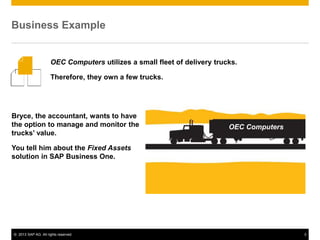
Bryce, the accountant, wants to have
the option to manage and monitor the
trucks’ value.
You tell him about the Fixed Assets
solution in SAP Business One.
OEC Computers utilizes a small fleet of delivery trucks.
Therefore, they own a few trucks.
OEC Computers
© 2013 SAP AG. All rights reserved. 4
Enable the Fixed Assets Solution
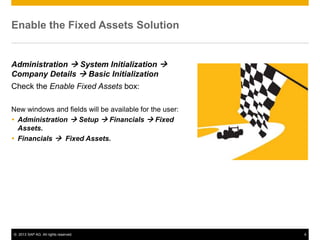
Administration  System Initialization 
Company Details  Basic Initialization
Check the Enable Fixed Assets box:
New windows and fields will be available for the user:
 Administration  Setup  Financials  Fixed
Assets.
 Financials  Fixed Assets.
© 2013 SAP AG. All rights reserved. 5
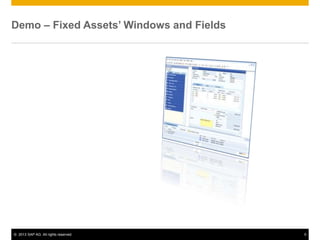
Demo – Fixed Assets’ Windows and Fields
© 2013 SAP AG. All rights reserved. 6
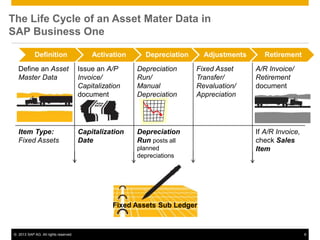
Define an Asset
Master Data
Issue an A/P
Invoice/
Capitalization
document
Depreciation
Run/
Manual
Depreciation
Fixed Asset
Transfer/
Revaluation/
Appreciation
A/R Invoice/
Retirement
document
Item Type:
Fixed Assets
Capitalization
Date
Depreciation
Run posts all
planned
depreciations
If A/R Invoice,
check Sales
Item
The Life Cycle of an Asset Mater Data in
SAP Business One
Fixed Assets Sub Ledger
Definition Activation Depreciation Adjustments Retirement
© 2013 SAP AG. All rights reserved. 7
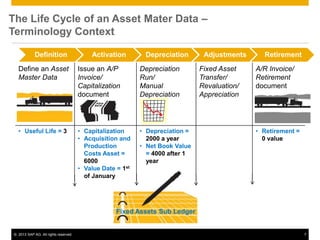
Define an Asset
Master Data
Issue an A/P
Invoice/
Capitalization
document
Depreciation
Run/
Manual
Depreciation
Fixed Asset
Transfer/
Revaluation/
Appreciation
A/R Invoice/
Retirement
document
• Useful Life = 3 • Capitalization
• Acquisition and
Production
Costs Asset =
6000
• Value Date = 1st
of January
• Depreciation =
2000 a year
• Net Book Value
= 4000 after 1
year
• Retirement =
0 value
The Life Cycle of an Asset Mater Data –
Terminology Context
Fixed Assets Sub Ledger
Definition Activation Depreciation Adjustments Retirement
© 2013 SAP AG. All rights reserved. 8
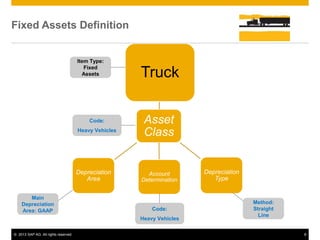
Fixed Assets Definition
Asset
Class
Truck
Depreciation
Type
Account
Determination
Depreciation
Area
Item Type:
Fixed
Assets
Main
Depreciation
Area: GAAP
Method:
Straight
Line
Code:
Heavy Vehicles
Code:
Heavy Vehicles
© 2013 SAP AG. All rights reserved. 9
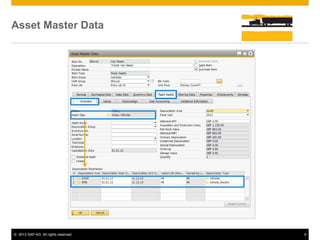
Asset Master Data
© 2013 SAP AG. All rights reserved. 10
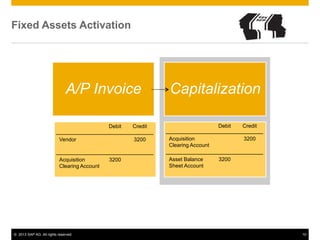
Fixed Assets Activation
A/P Invoice Capitalization
Debit Credit
Vendor 3200
Acquisition
Clearing Account
3200
Debit Credit
Acquisition
Clearing Account
3200
Asset Balance
Sheet Account
3200
© 2013 SAP AG. All rights reserved. 11
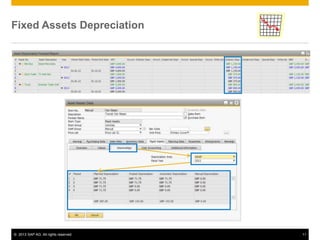
Fixed Assets Depreciation
© 2013 SAP AG. All rights reserved. 12
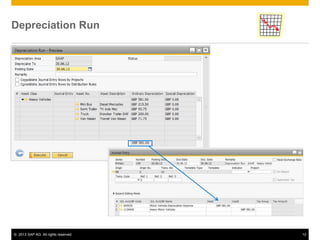
Depreciation Run
© 2013 SAP AG. All rights reserved. 13
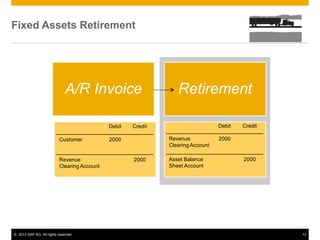
Fixed Assets Retirement
A/R Invoice Retirement
Debit Credit
Customer 2000
Revenue
Clearing Account
2000
Debit Credit
Revenue
Clearing Account
2000
Asset Balance
Sheet Account
2000
© 2013 SAP AG. All rights reserved. 14
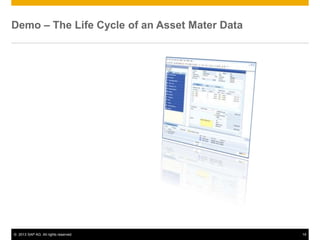
Demo – The Life Cycle of an Asset Mater Data
© 2013 SAP AG. All rights reserved. 15
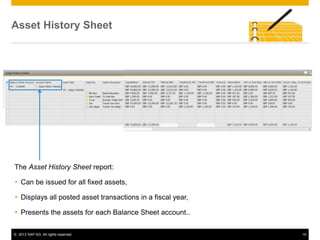
Asset History Sheet
The Asset History Sheet report:
 Can be issued for all fixed assets,
 Displays all posted asset transactions in a fiscal year,
 Presents the assets for each Balance Sheet account..
© 2013 SAP AG. All rights reserved. 16
Summary
The main definition in the Asset Master
Data is:
• The Asset Class which includes the association
to the other definitions: Depreciation Area,
Account Determination and Depreciation Type.
The asset master data is activated when: • The user purchases a fixed asset using an A/P
Invoice.
• The A/P Invoice automatically generates the
Capitalization document.
• The user can generate the Capitalization
document directly.
Depreciation is: • Used to write off the cost of an asset over its
useful lifetime.
• Included within the company expenses.
Here are some key points to take away:
© 2013 SAP AG. All rights reserved. 17
Summary
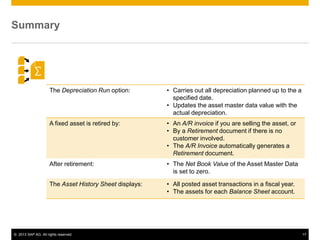
The Depreciation Run option: • Carries out all depreciation planned up to the a
specified date.
• Updates the asset master data value with the
actual depreciation.
A fixed asset is retired by: • An A/R invoice if you are selling the asset, or
• By a Retirement document if there is no
customer involved.
• The A/R Invoice automatically generates a
Retirement document.
After retirement: • The Net Book Value of the Asset Master Data
is set to zero.
The Asset History Sheet displays: • All posted asset transactions in a fiscal year.
• The assets for each Balance Sheet account.
© 2013 SAP AG. All rights reserved. 18
Thanks
You have completed the fixed assets topic
Thank you for your time!

Fixed Assets for SAP Business One Version 9.0

  • 1.
  • 2.
    © 2013 SAPAG. All rights reserved. 2 After completing this topic, you will be able to:  Explain the process of managing fixed asset items.  Recognize key terms in the Fixed Assets solution.  Identify the relevant sub-menu and windows in SAP Business One. Objectives
  • 3.
    © 2013 SAPAG. All rights reserved. 3 Business Example Bryce, the accountant, wants to have the option to manage and monitor the trucks’ value. You tell him about the Fixed Assets solution in SAP Business One. OEC Computers utilizes a small fleet of delivery trucks. Therefore, they own a few trucks. OEC Computers
  • 4.
    © 2013 SAPAG. All rights reserved. 4 Enable the Fixed Assets Solution Administration  System Initialization  Company Details  Basic Initialization Check the Enable Fixed Assets box: New windows and fields will be available for the user:  Administration  Setup  Financials  Fixed Assets.  Financials  Fixed Assets.
  • 5.
    © 2013 SAPAG. All rights reserved. 5 Demo – Fixed Assets’ Windows and Fields
  • 6.
    © 2013 SAPAG. All rights reserved. 6 Define an Asset Master Data Issue an A/P Invoice/ Capitalization document Depreciation Run/ Manual Depreciation Fixed Asset Transfer/ Revaluation/ Appreciation A/R Invoice/ Retirement document Item Type: Fixed Assets Capitalization Date Depreciation Run posts all planned depreciations If A/R Invoice, check Sales Item The Life Cycle of an Asset Mater Data in SAP Business One Fixed Assets Sub Ledger Definition Activation Depreciation Adjustments Retirement
  • 7.
    © 2013 SAPAG. All rights reserved. 7 Define an Asset Master Data Issue an A/P Invoice/ Capitalization document Depreciation Run/ Manual Depreciation Fixed Asset Transfer/ Revaluation/ Appreciation A/R Invoice/ Retirement document • Useful Life = 3 • Capitalization • Acquisition and Production Costs Asset = 6000 • Value Date = 1st of January • Depreciation = 2000 a year • Net Book Value = 4000 after 1 year • Retirement = 0 value The Life Cycle of an Asset Mater Data – Terminology Context Fixed Assets Sub Ledger Definition Activation Depreciation Adjustments Retirement
  • 8.
    © 2013 SAPAG. All rights reserved. 8 Fixed Assets Definition Asset Class Truck Depreciation Type Account Determination Depreciation Area Item Type: Fixed Assets Main Depreciation Area: GAAP Method: Straight Line Code: Heavy Vehicles Code: Heavy Vehicles
  • 9.
    © 2013 SAPAG. All rights reserved. 9 Asset Master Data
  • 10.
    © 2013 SAPAG. All rights reserved. 10 Fixed Assets Activation A/P Invoice Capitalization Debit Credit Vendor 3200 Acquisition Clearing Account 3200 Debit Credit Acquisition Clearing Account 3200 Asset Balance Sheet Account 3200
  • 11.
    © 2013 SAPAG. All rights reserved. 11 Fixed Assets Depreciation
  • 12.
    © 2013 SAPAG. All rights reserved. 12 Depreciation Run
  • 13.
    © 2013 SAPAG. All rights reserved. 13 Fixed Assets Retirement A/R Invoice Retirement Debit Credit Customer 2000 Revenue Clearing Account 2000 Debit Credit Revenue Clearing Account 2000 Asset Balance Sheet Account 2000
  • 14.
    © 2013 SAPAG. All rights reserved. 14 Demo – The Life Cycle of an Asset Mater Data
  • 15.
    © 2013 SAPAG. All rights reserved. 15 Asset History Sheet The Asset History Sheet report:  Can be issued for all fixed assets,  Displays all posted asset transactions in a fiscal year,  Presents the assets for each Balance Sheet account..
  • 16.
    © 2013 SAPAG. All rights reserved. 16 Summary The main definition in the Asset Master Data is: • The Asset Class which includes the association to the other definitions: Depreciation Area, Account Determination and Depreciation Type. The asset master data is activated when: • The user purchases a fixed asset using an A/P Invoice. • The A/P Invoice automatically generates the Capitalization document. • The user can generate the Capitalization document directly. Depreciation is: • Used to write off the cost of an asset over its useful lifetime. • Included within the company expenses. Here are some key points to take away:
  • 17.
    © 2013 SAPAG. All rights reserved. 17 Summary The Depreciation Run option: • Carries out all depreciation planned up to the a specified date. • Updates the asset master data value with the actual depreciation. A fixed asset is retired by: • An A/R invoice if you are selling the asset, or • By a Retirement document if there is no customer involved. • The A/R Invoice automatically generates a Retirement document. After retirement: • The Net Book Value of the Asset Master Data is set to zero. The Asset History Sheet displays: • All posted asset transactions in a fiscal year. • The assets for each Balance Sheet account.
  • 18.
    © 2013 SAPAG. All rights reserved. 18 Thanks You have completed the fixed assets topic Thank you for your time!