



8086 Architecture
Sridari Iyer
St. Francis Inst. of Tech.
Borivali (W), Mumbai.
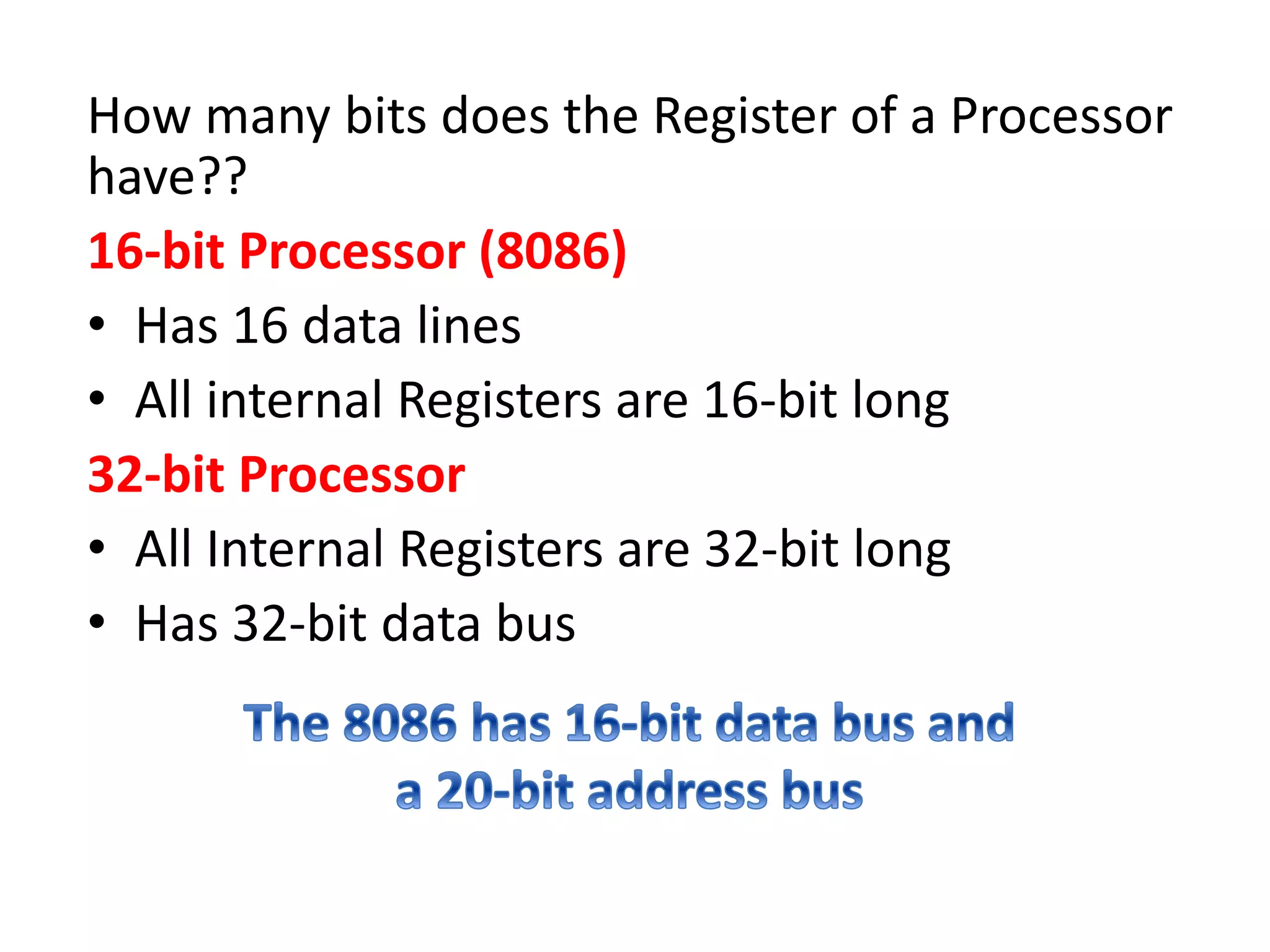
How many bits does the Register of a Processor
have??
16-bit Processor (8086)
• Has 16 data lines
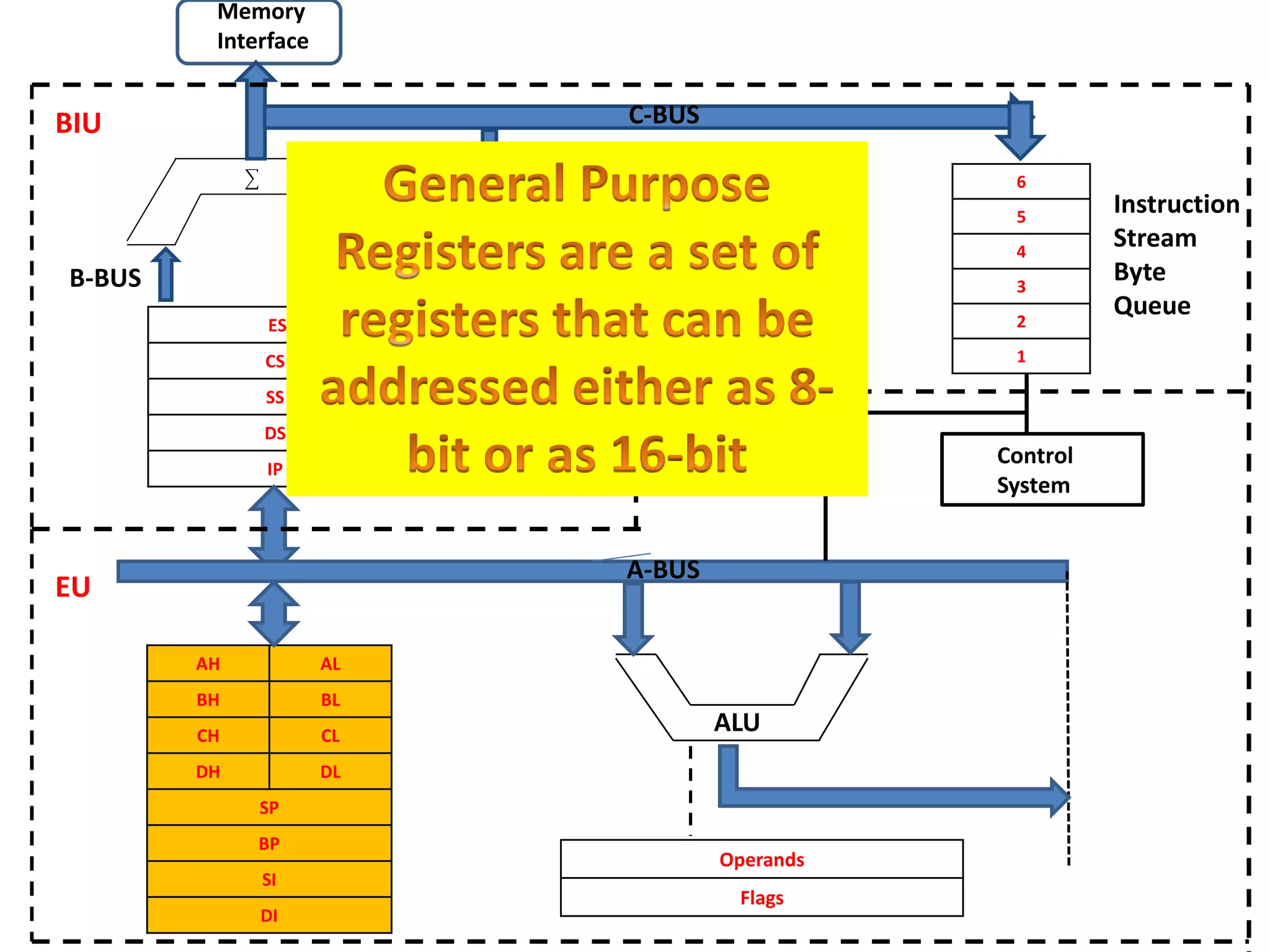
• All internal Registers are 16-bit long
32-bit Processor
• All Internal Registers are 32-bit long
• Has 32-bit data bus
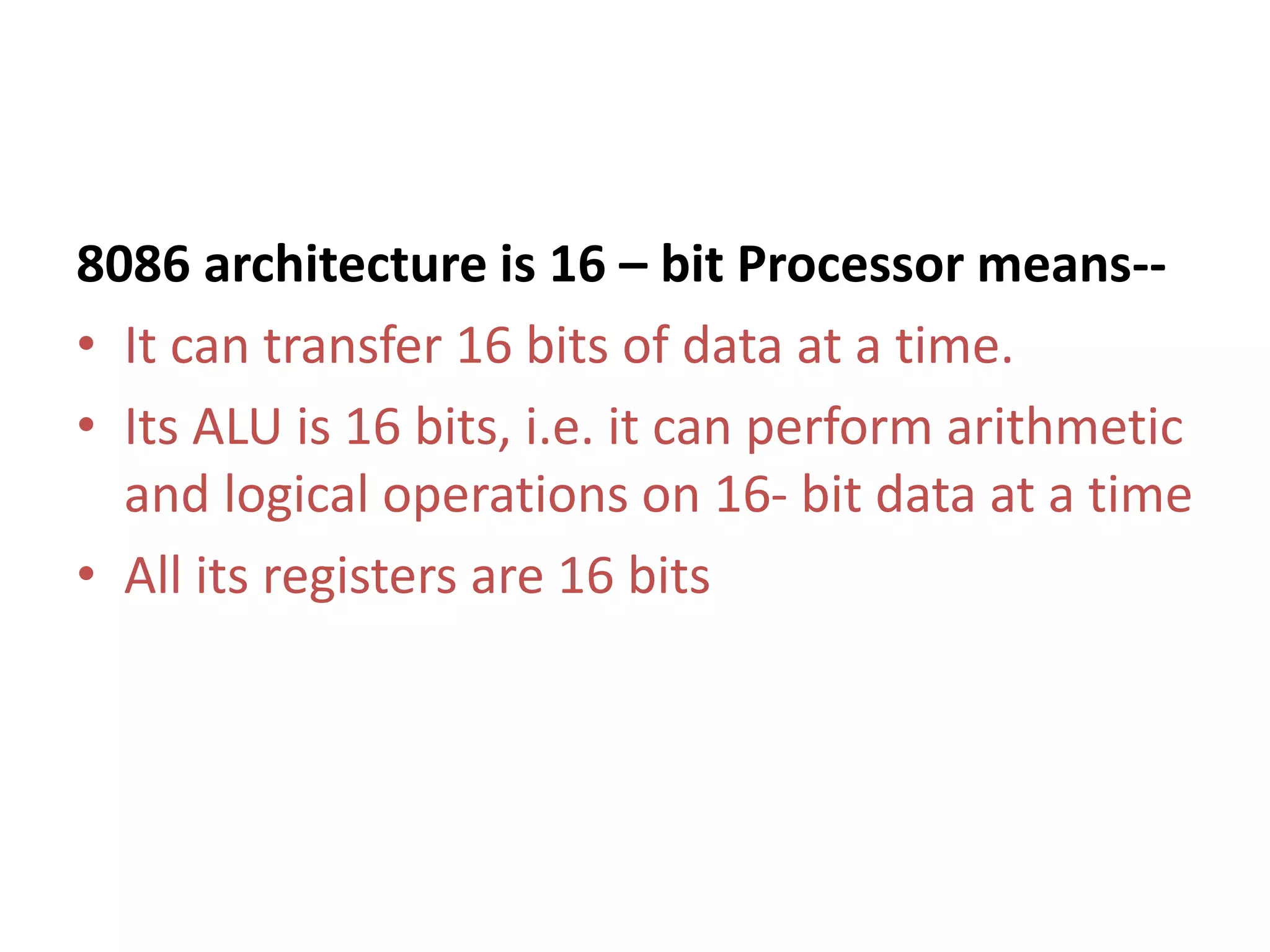
8086 architecture is 16 – bit Processor means--
• It can transfer 16 bits of data at a time.
• Its ALU is 16 bits, i.e. it can perform arithmetic
and logical operations on 16- bit data at a time
• All its registers are 16 bits
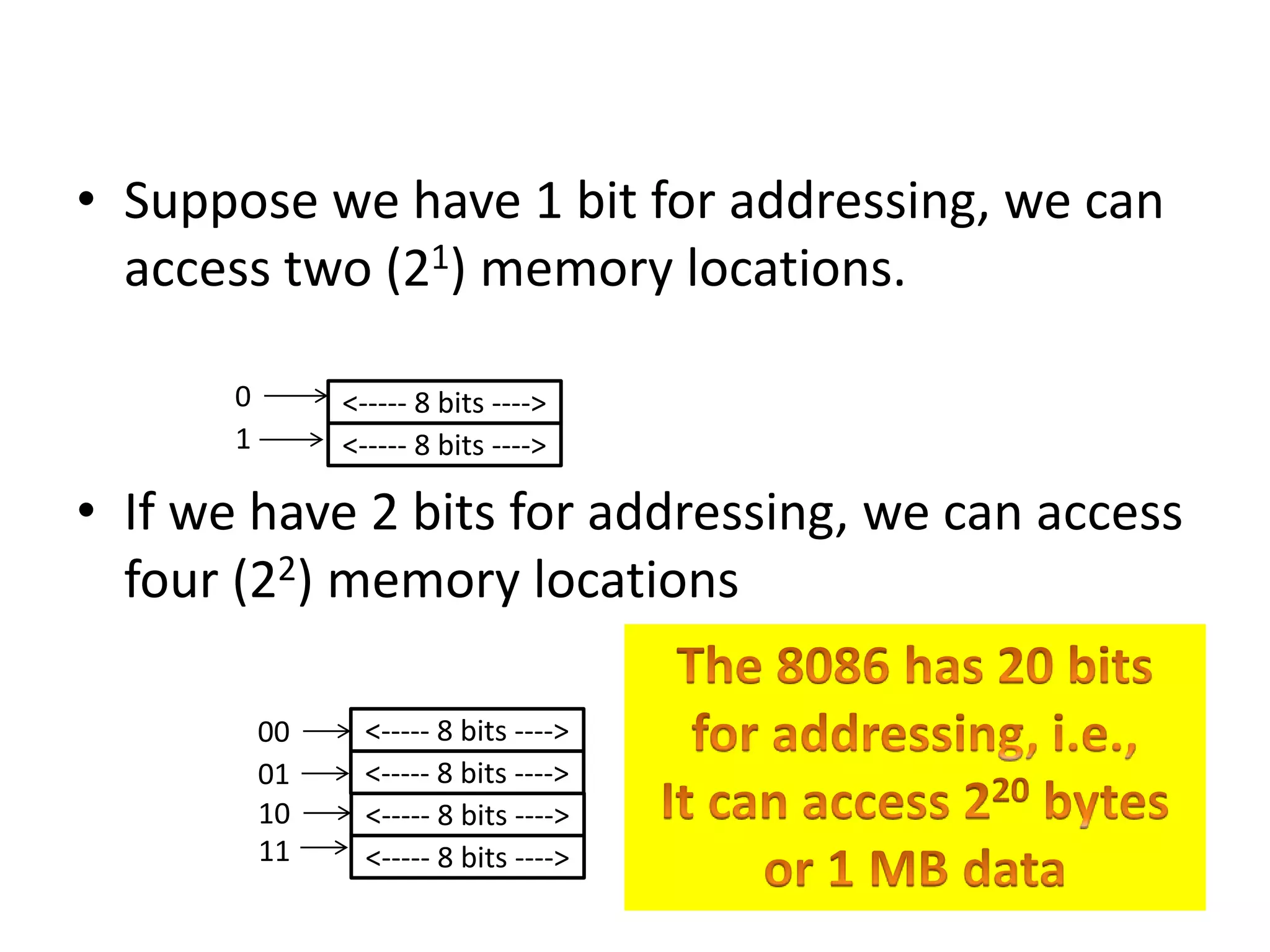
• Suppose we have 1 bit for addressing, we can
access two (21) memory locations.
• If we have 2 bits for addressing, we can access
four (22) memory locations
<----- 8 bits ---->
<----- 8 bits ---->
0
1
<----- 8 bits ---->
<----- 8 bits ---->
10
11
<----- 8 bits ---->
<----- 8 bits ---->
00
01
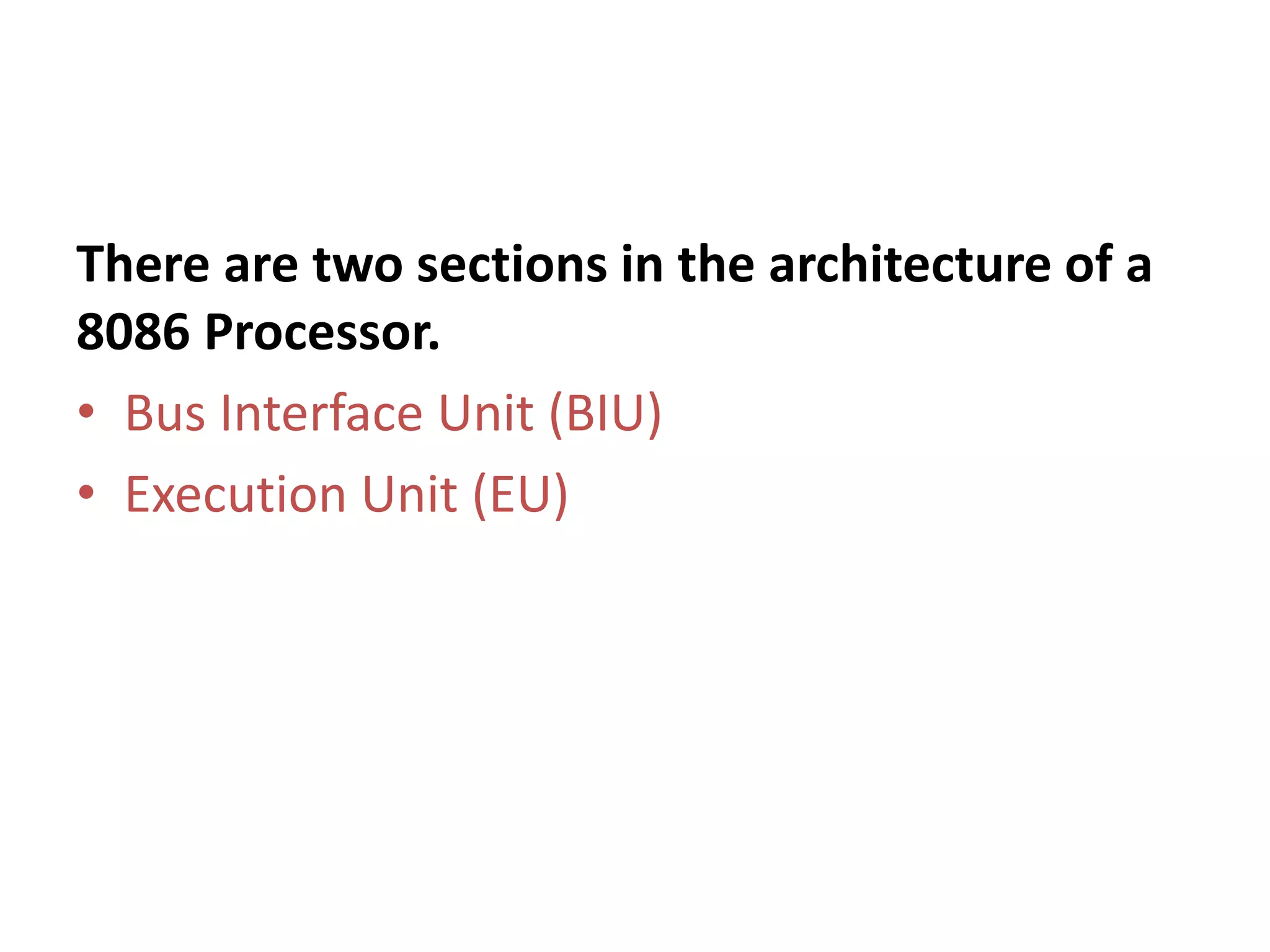
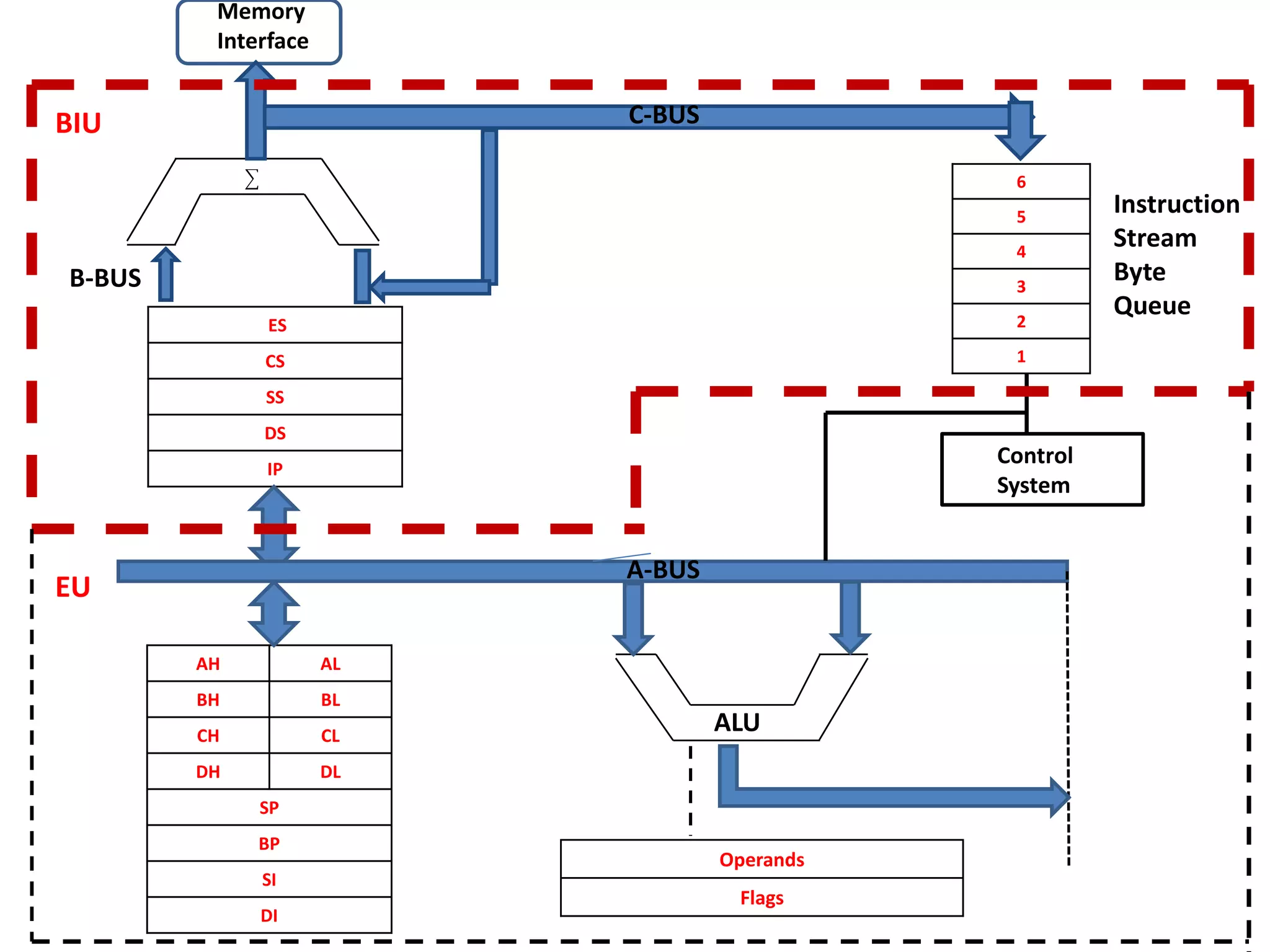
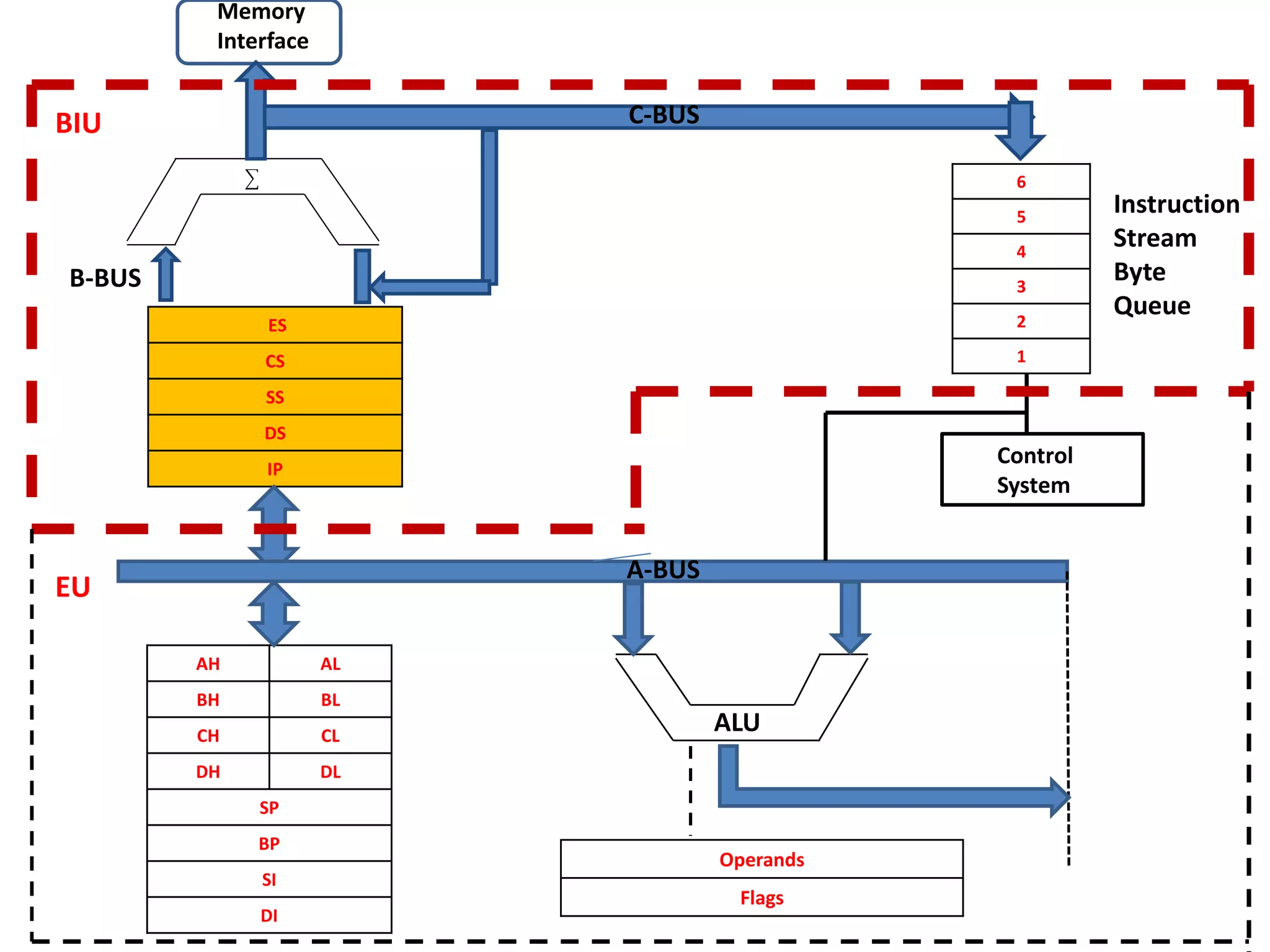
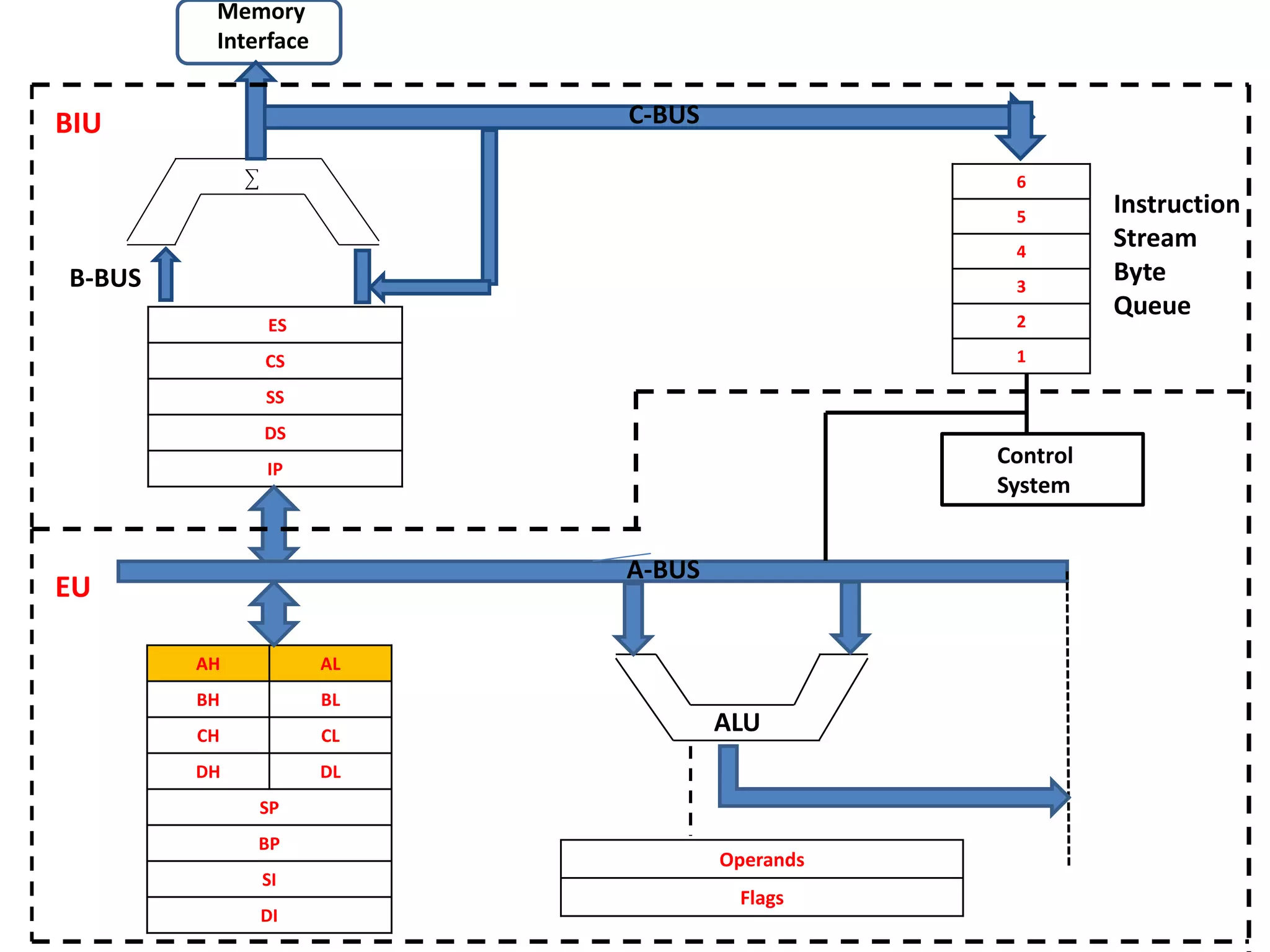
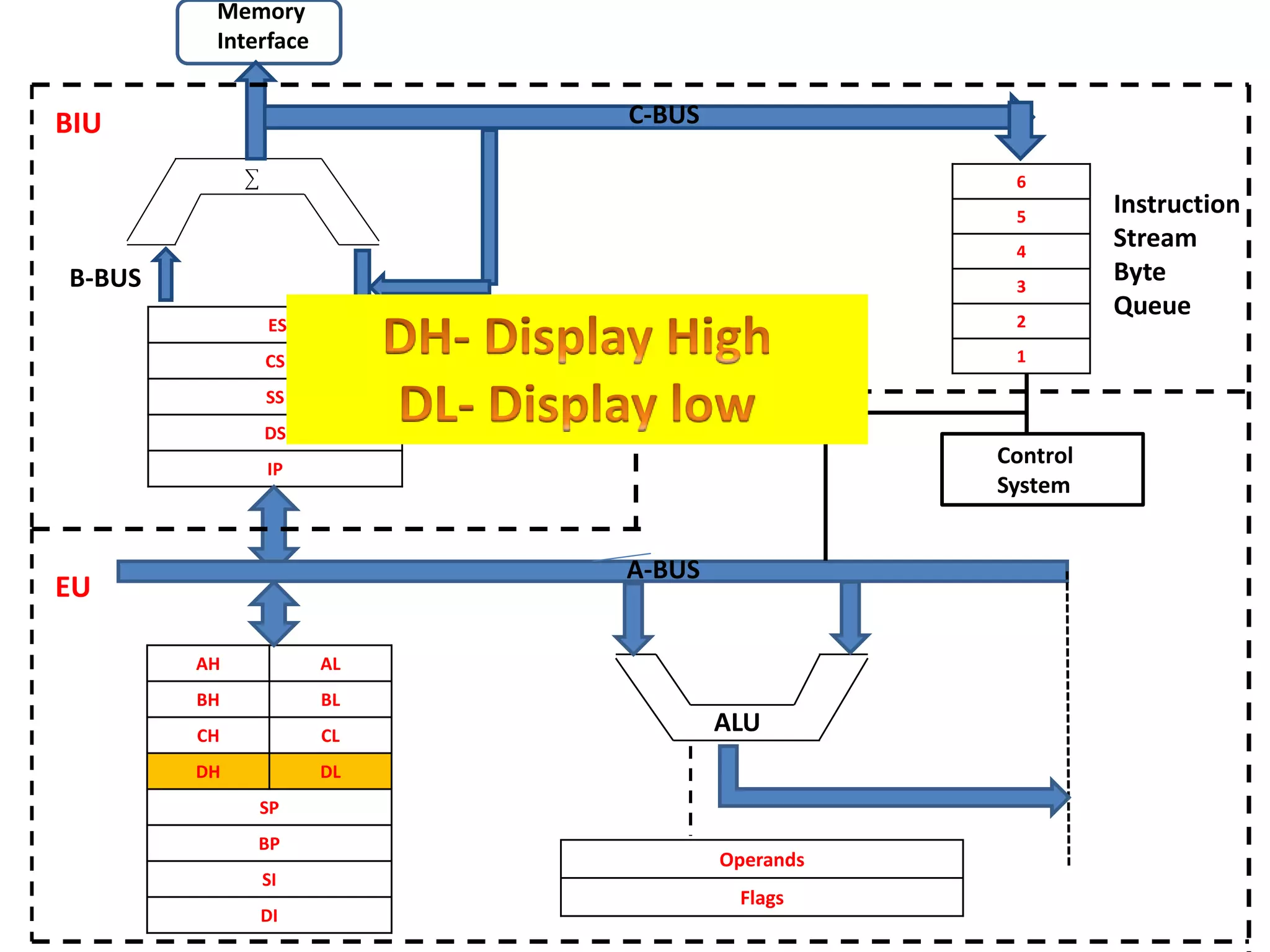
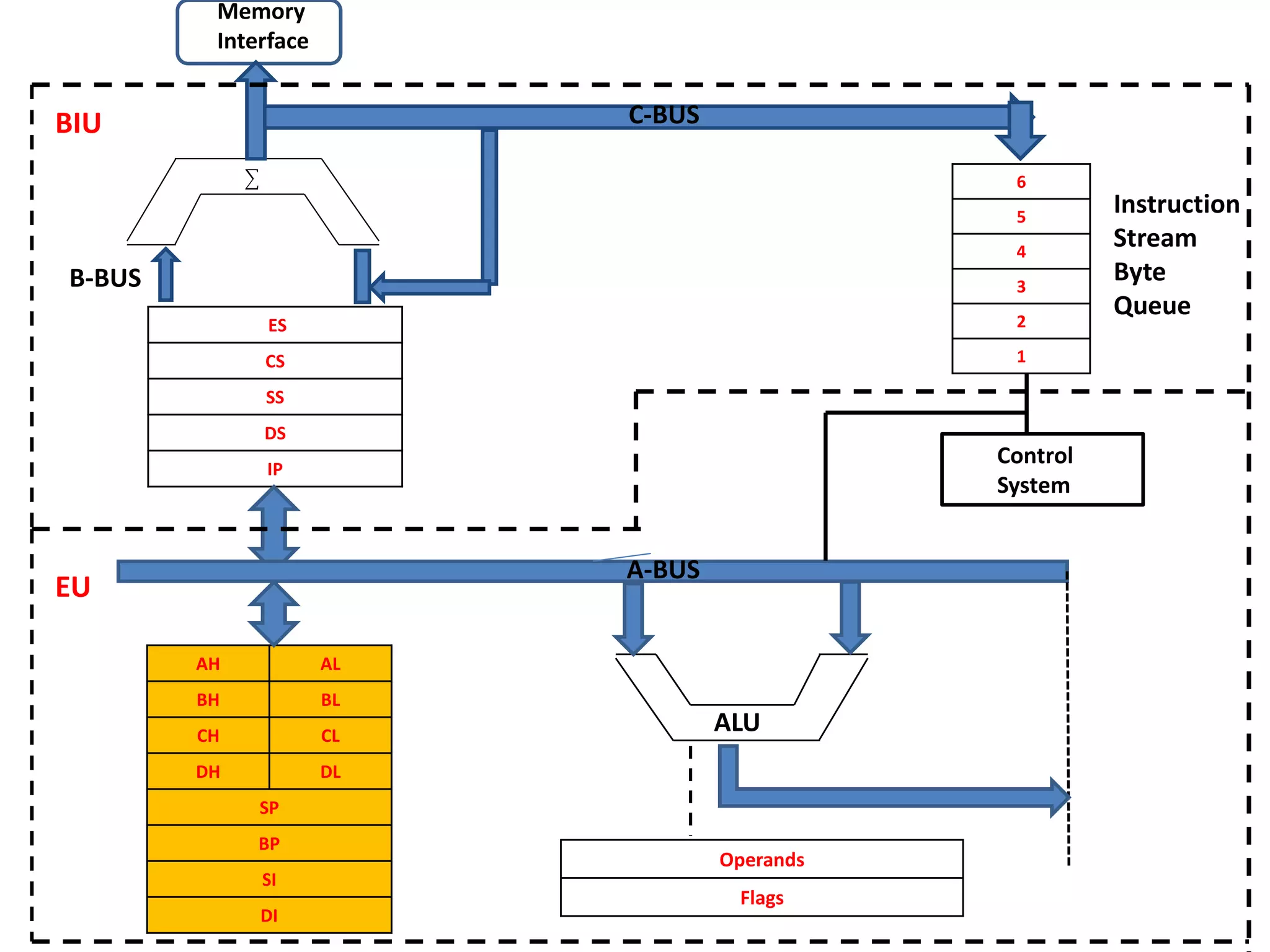
There are two sections in the architecture of a
8086 Processor.
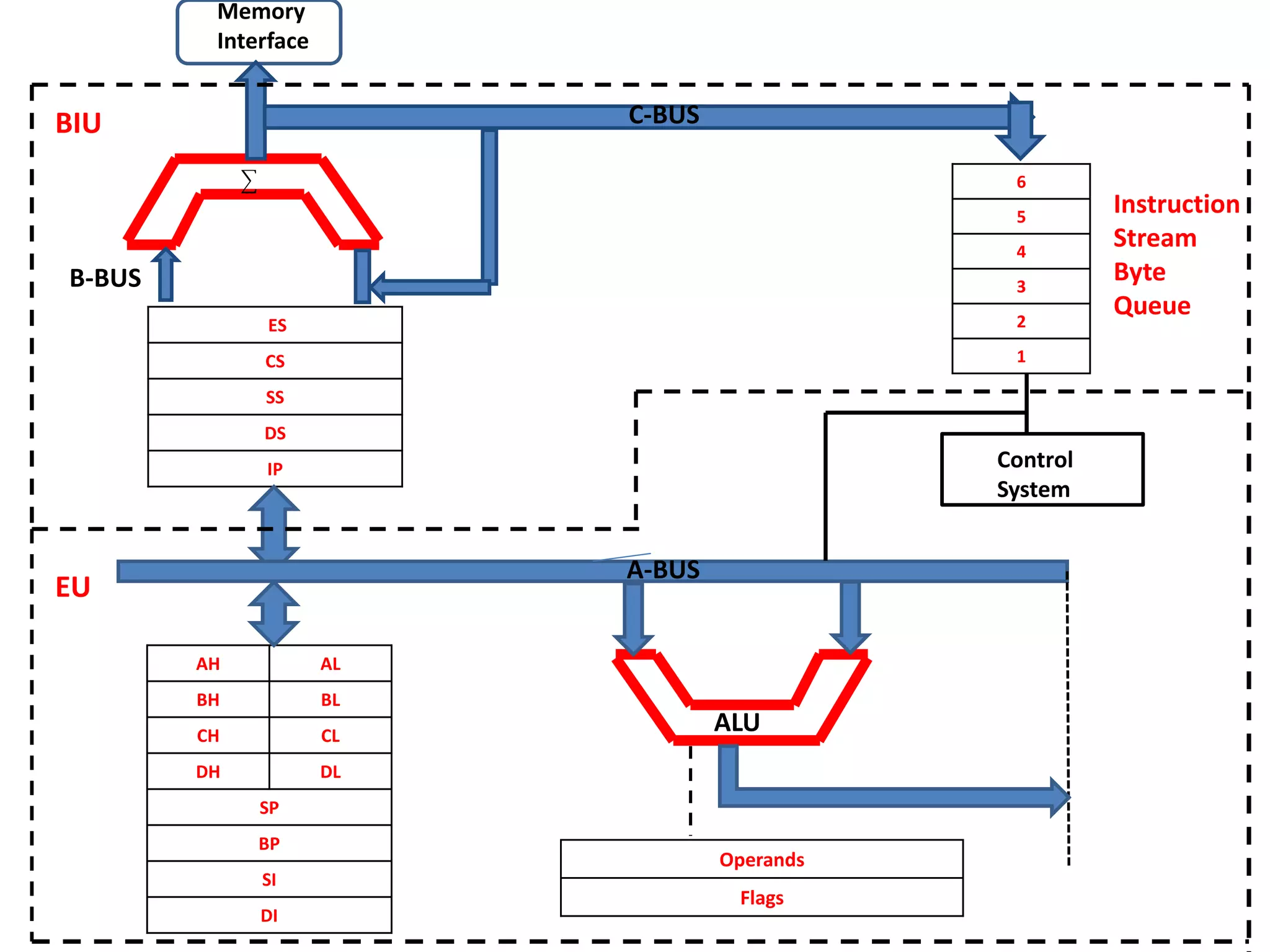
• Bus Interface Unit (BIU)
• Execution Unit (EU)
ES
CS
SS
DS
IP
AH AL
BH BL
CH CL
DH DL
SP
BP
SI
DI
6
5
4
3
2
1
Operands
Flags
CCCControl
System
Memory
Interface
B-BUS
C-BUS
Instruction
Stream
Byte
Queue
BIU
EU
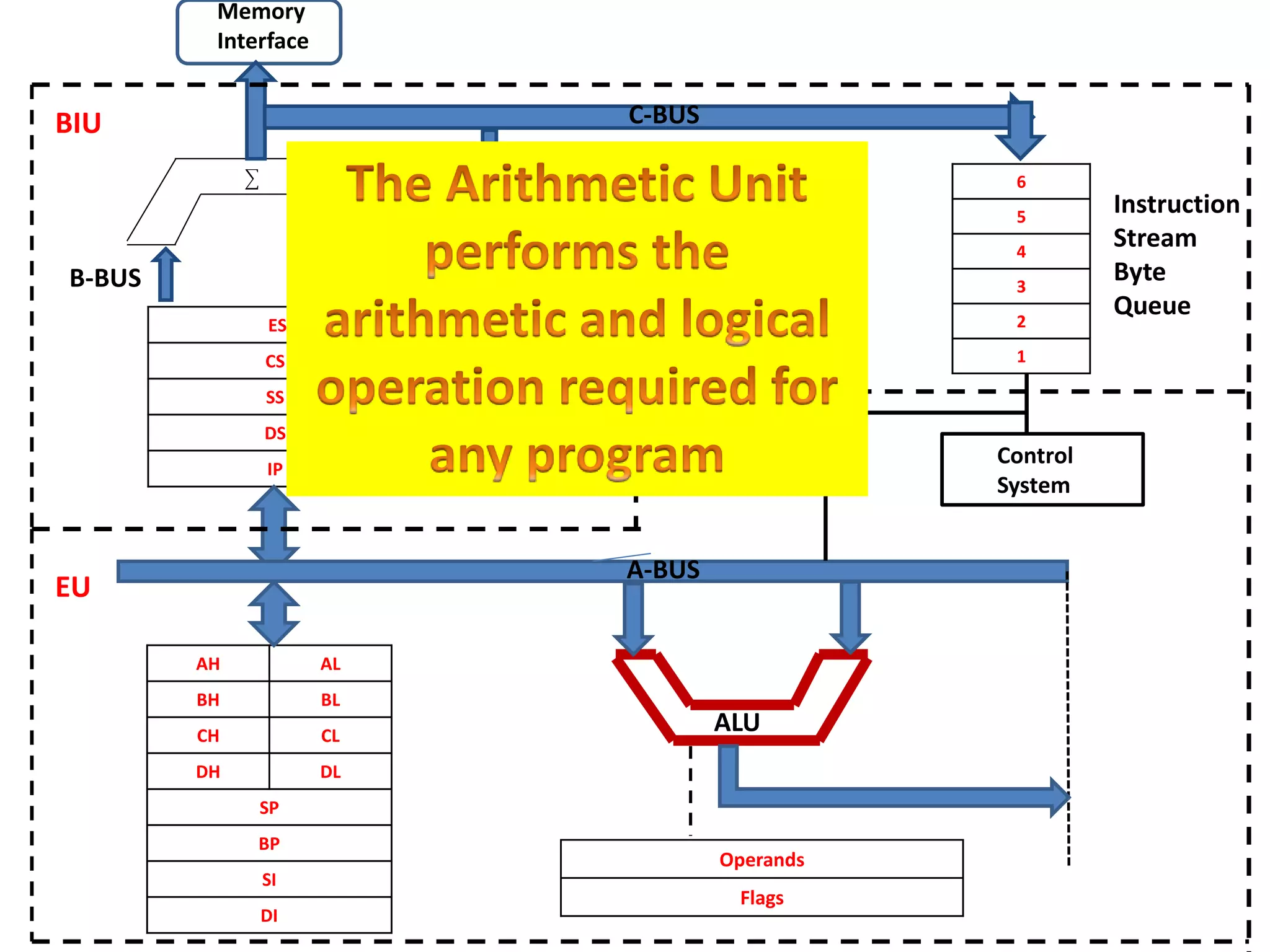
ALU
A-BUS
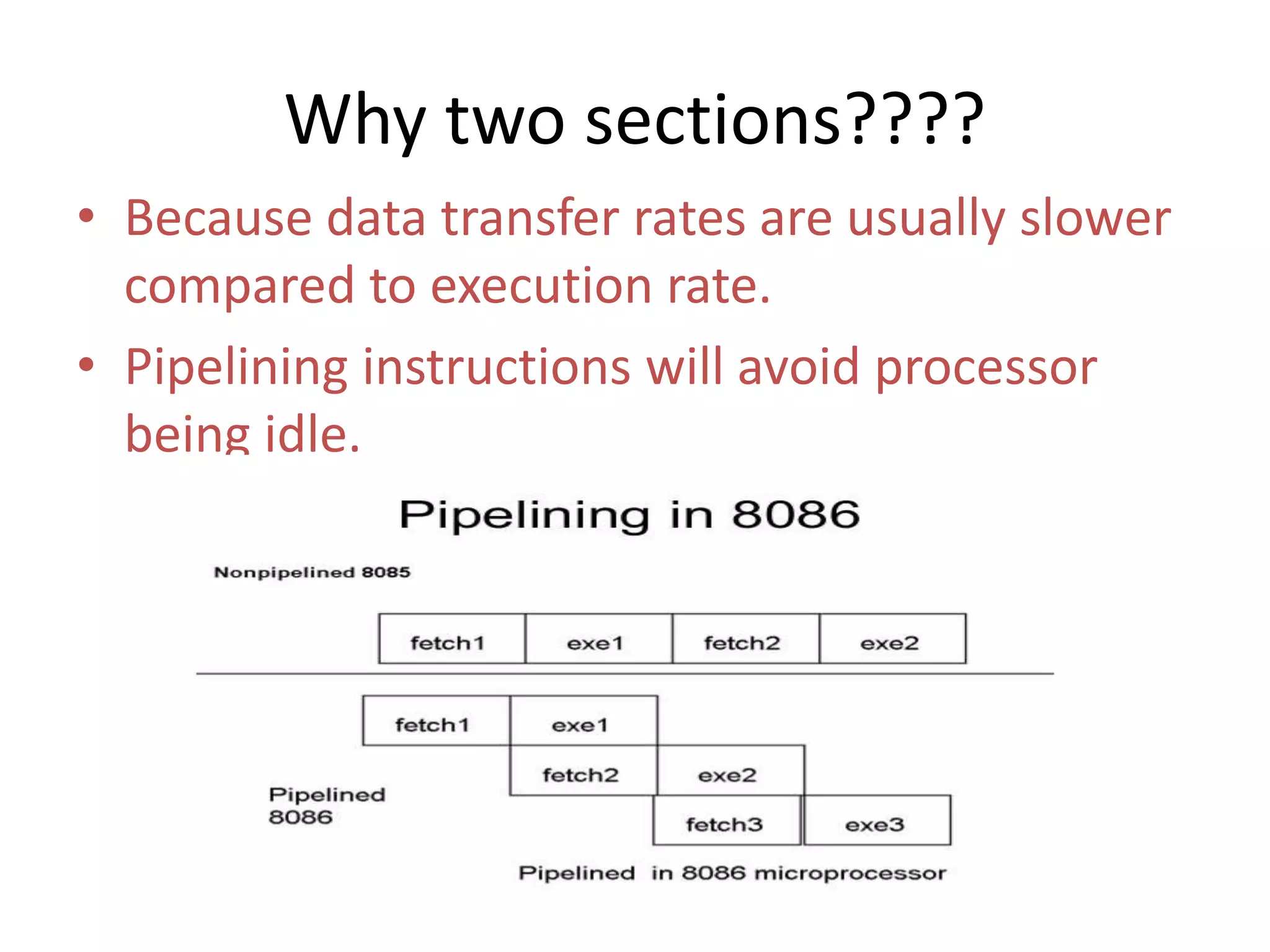
Why two sections????
• Because data transfer rates are usually slower
compared to execution rate.
• Pipelining instructions will avoid processor
being idle.
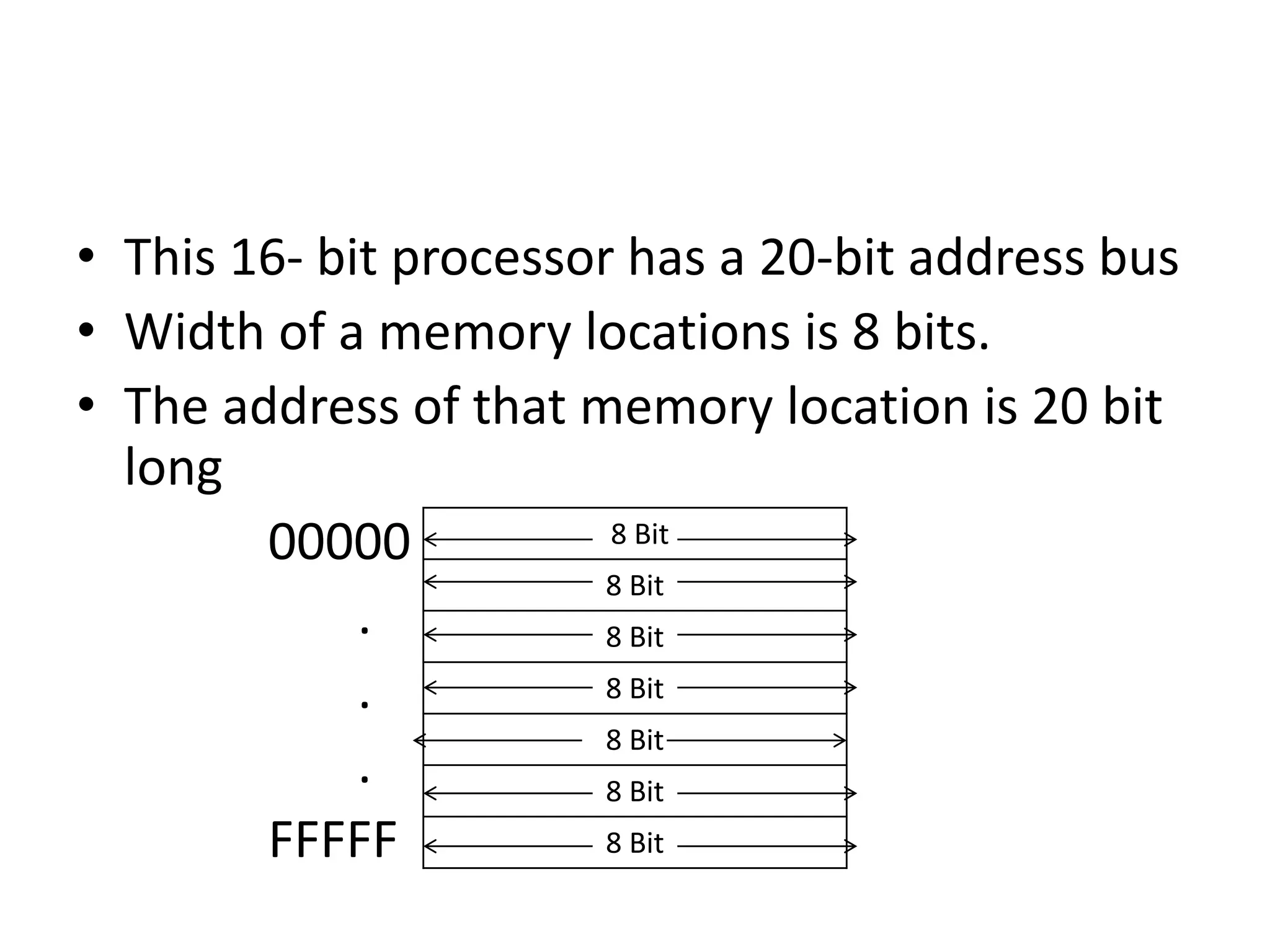
• This 16- bit processor has a 20-bit address bus
• Width of a memory locations is 8 bits.
• The address of that memory location is 20 bit
long
00000
.
.
.
FFFFF
8 Bit
8 Bit
8 Bit
8 Bit
8 Bit
8 Bit
8 Bit
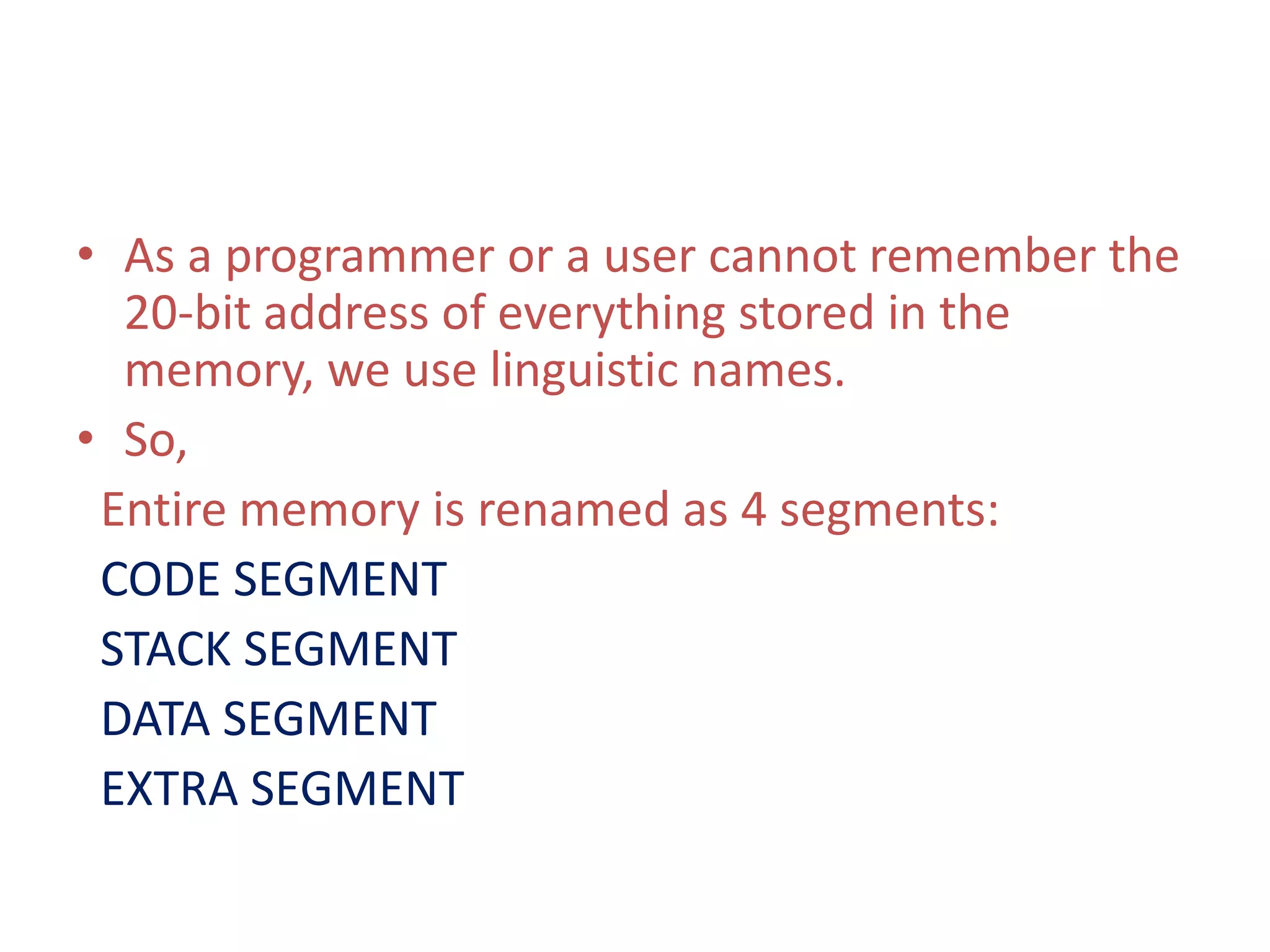
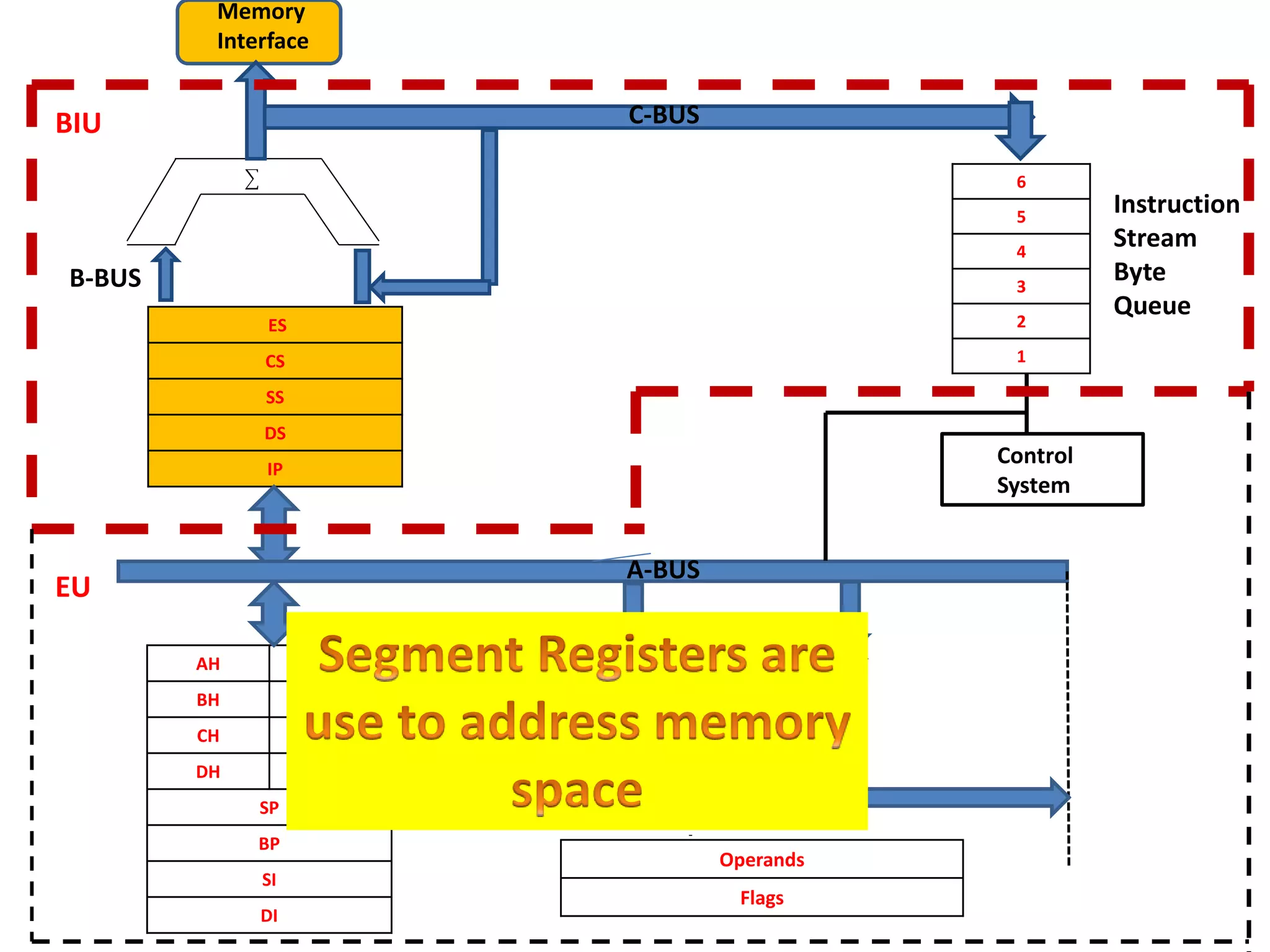
• As a programmer or a user cannot remember the
20-bit address of everything stored in the
memory, we use linguistic names.
• So,
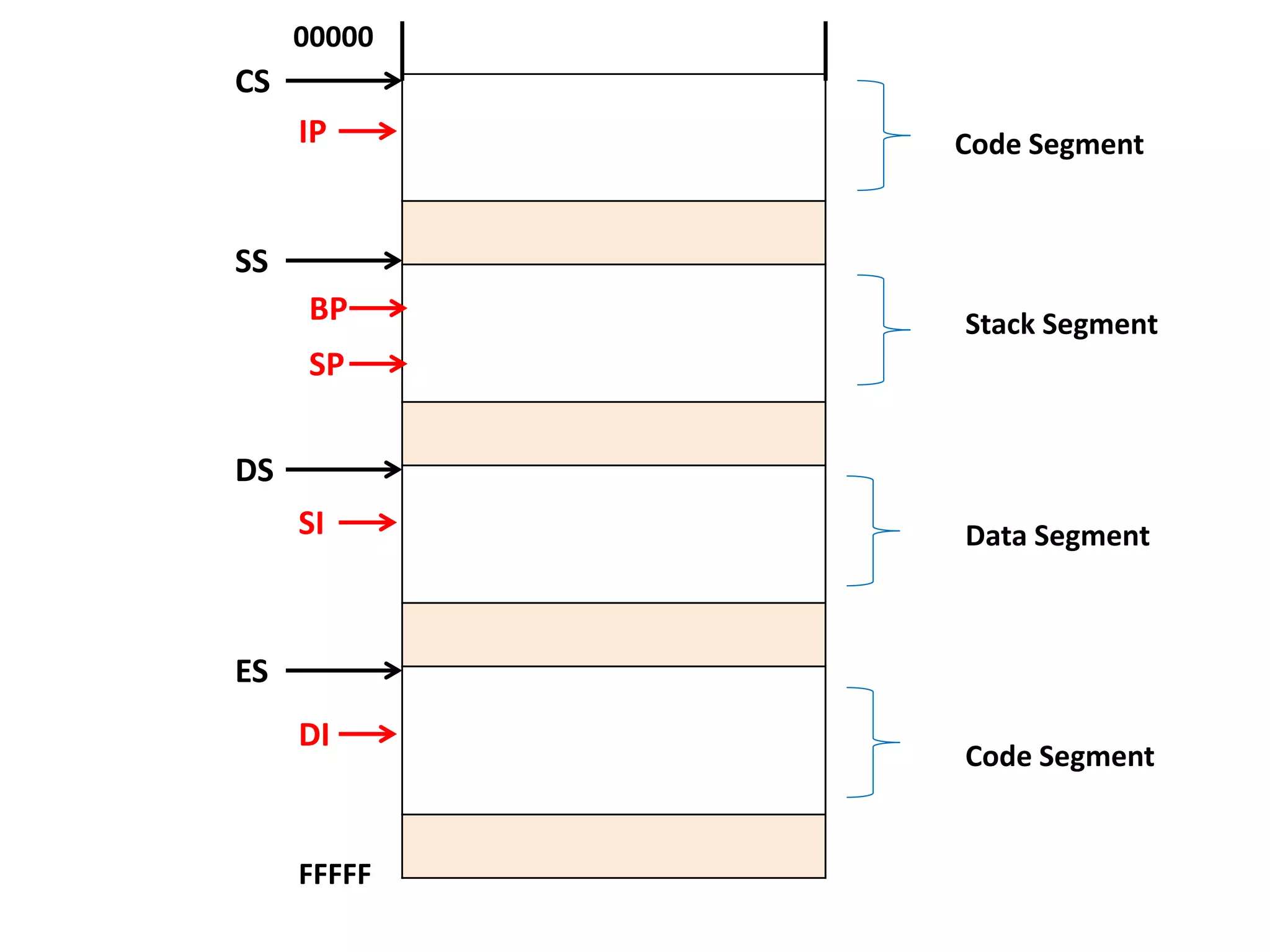
Entire memory is renamed as 4 segments:
CODE SEGMENT
STACK SEGMENT
DATA SEGMENT
EXTRA SEGMENT
CS
SS
DS
ES
Code Segment
Stack Segment
Data Segment
Code Segment
IP
DI
BP
SI
SP
00000
FFFFF
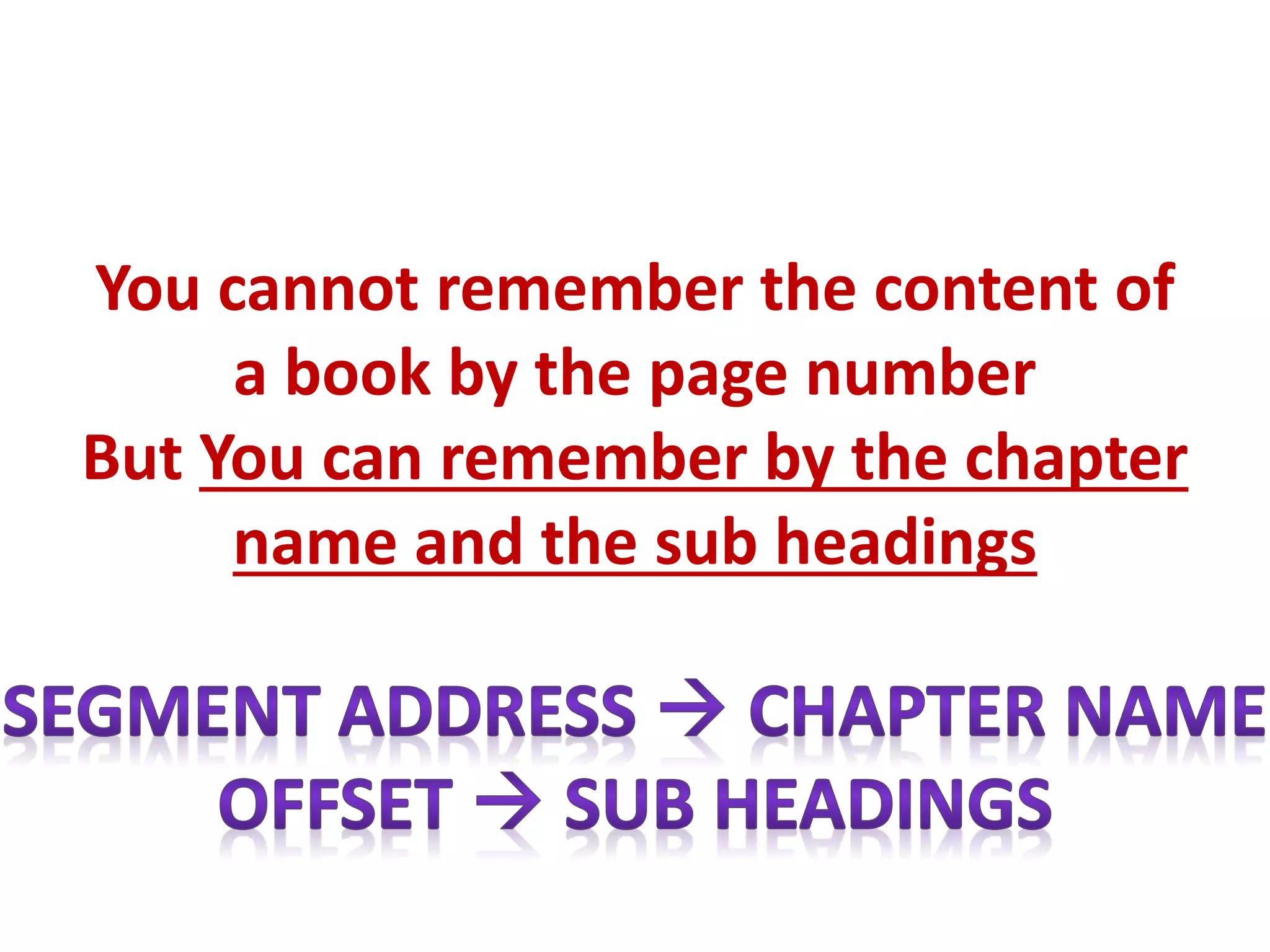
You cannot remember the content of
a book by the page number
But You can remember by the chapter
name and the sub headings
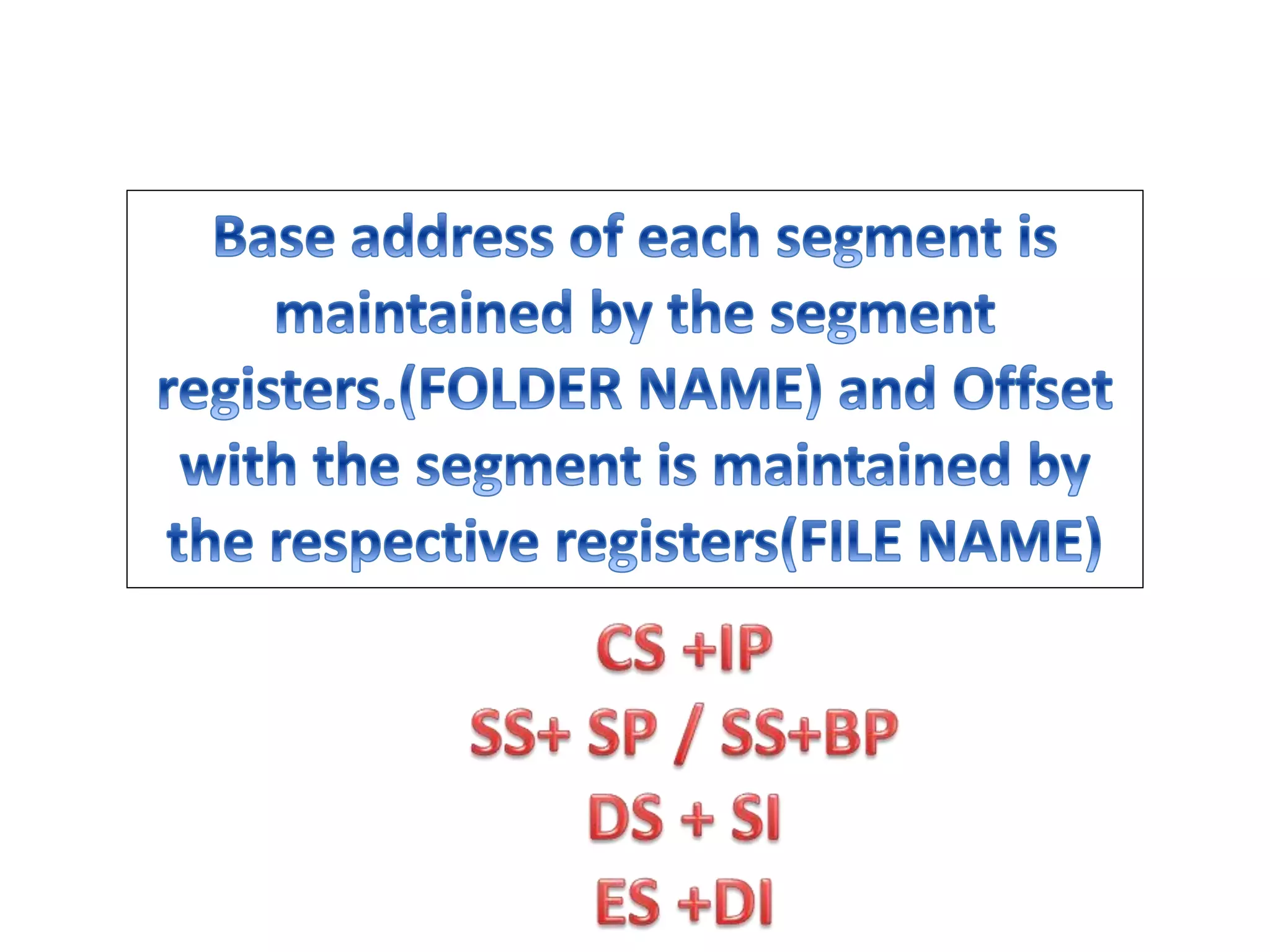
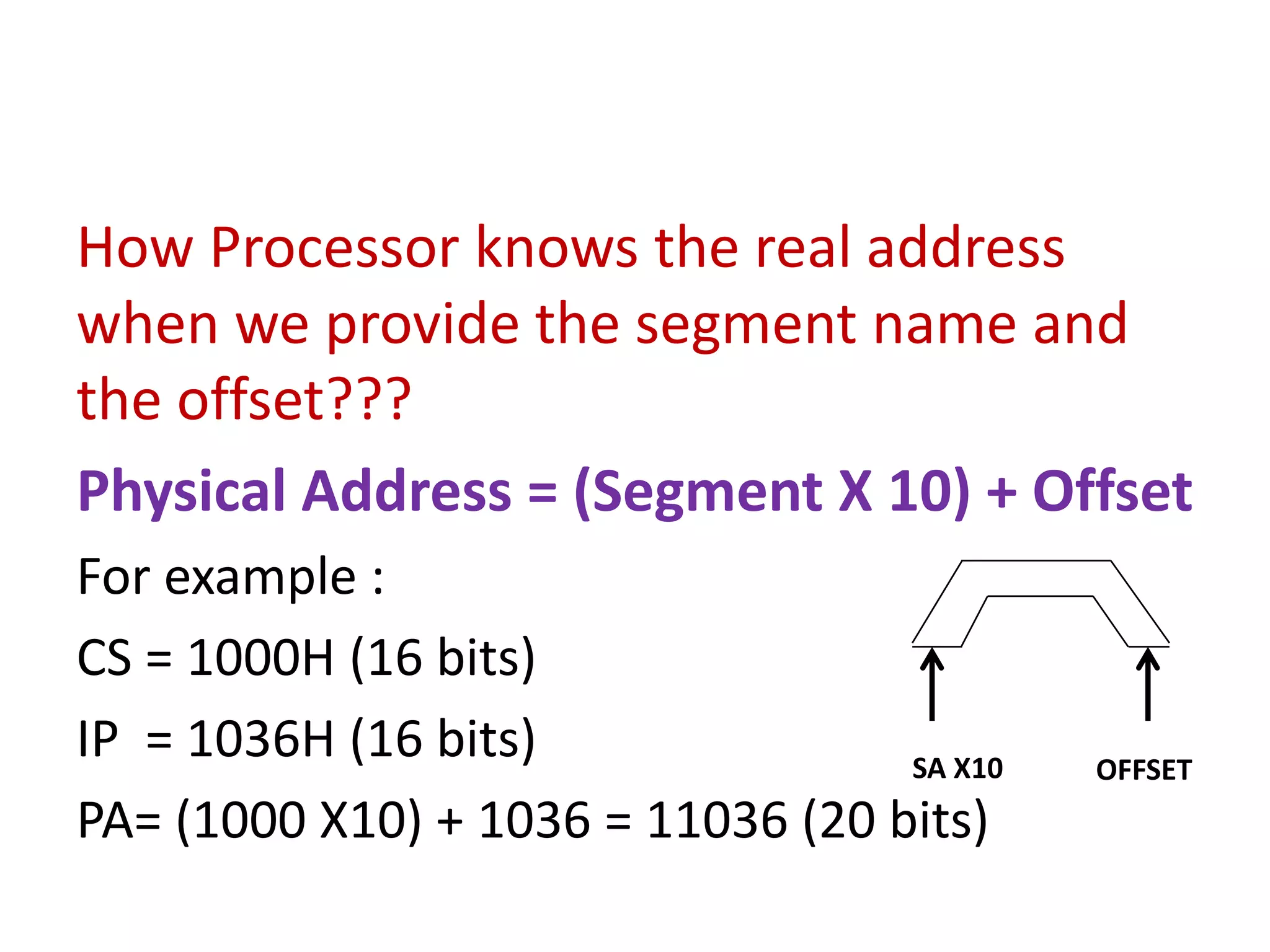
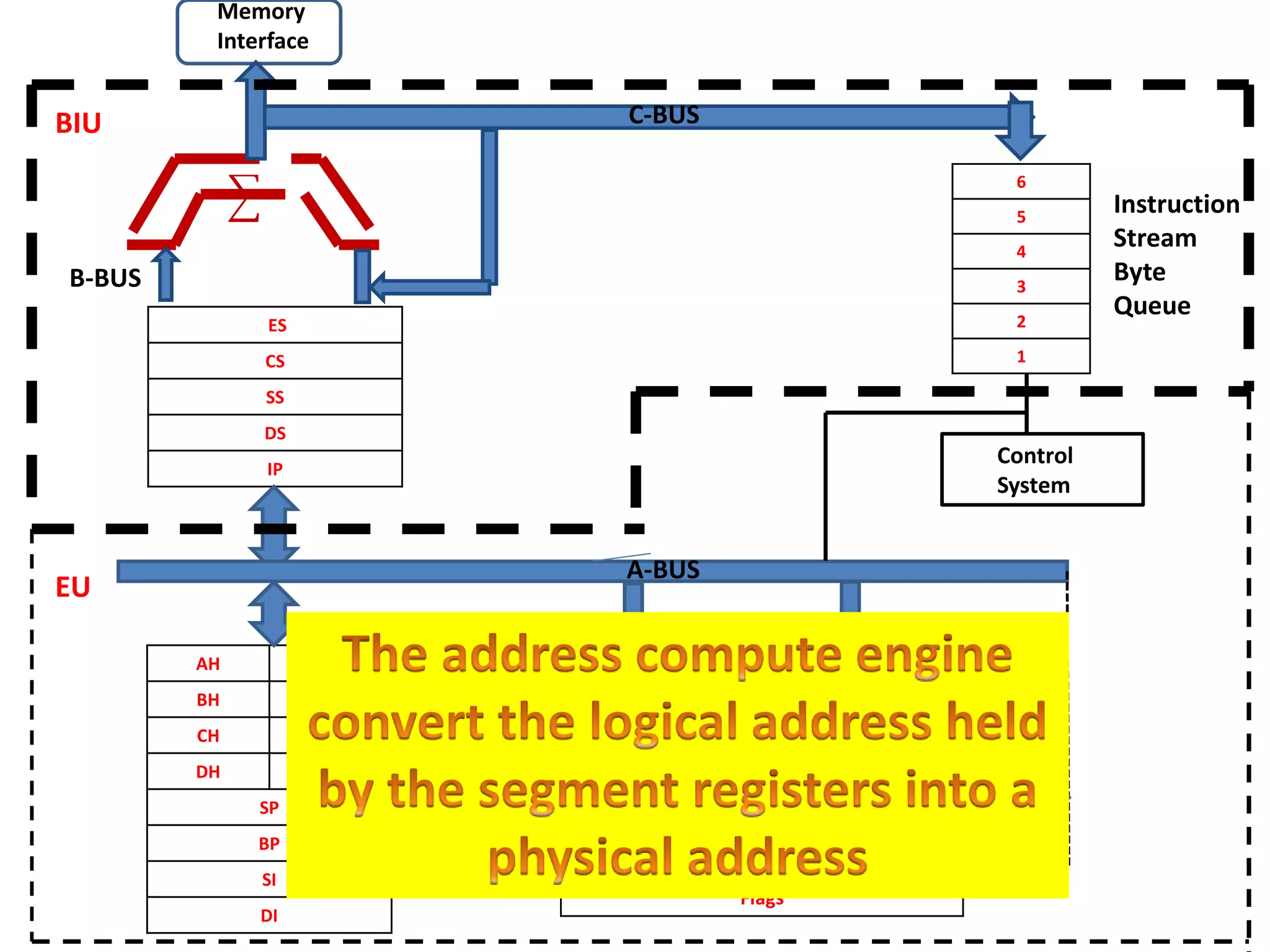
How Processor knows the real address
when we provide the segment name and
the offset???
Physical Address = (Segment X 10) + Offset
For example :
CS = 1000H (16 bits)
IP = 1036H (16 bits)
PA= (1000 X10) + 1036 = 11036 (20 bits)
SA X10 OFFSET
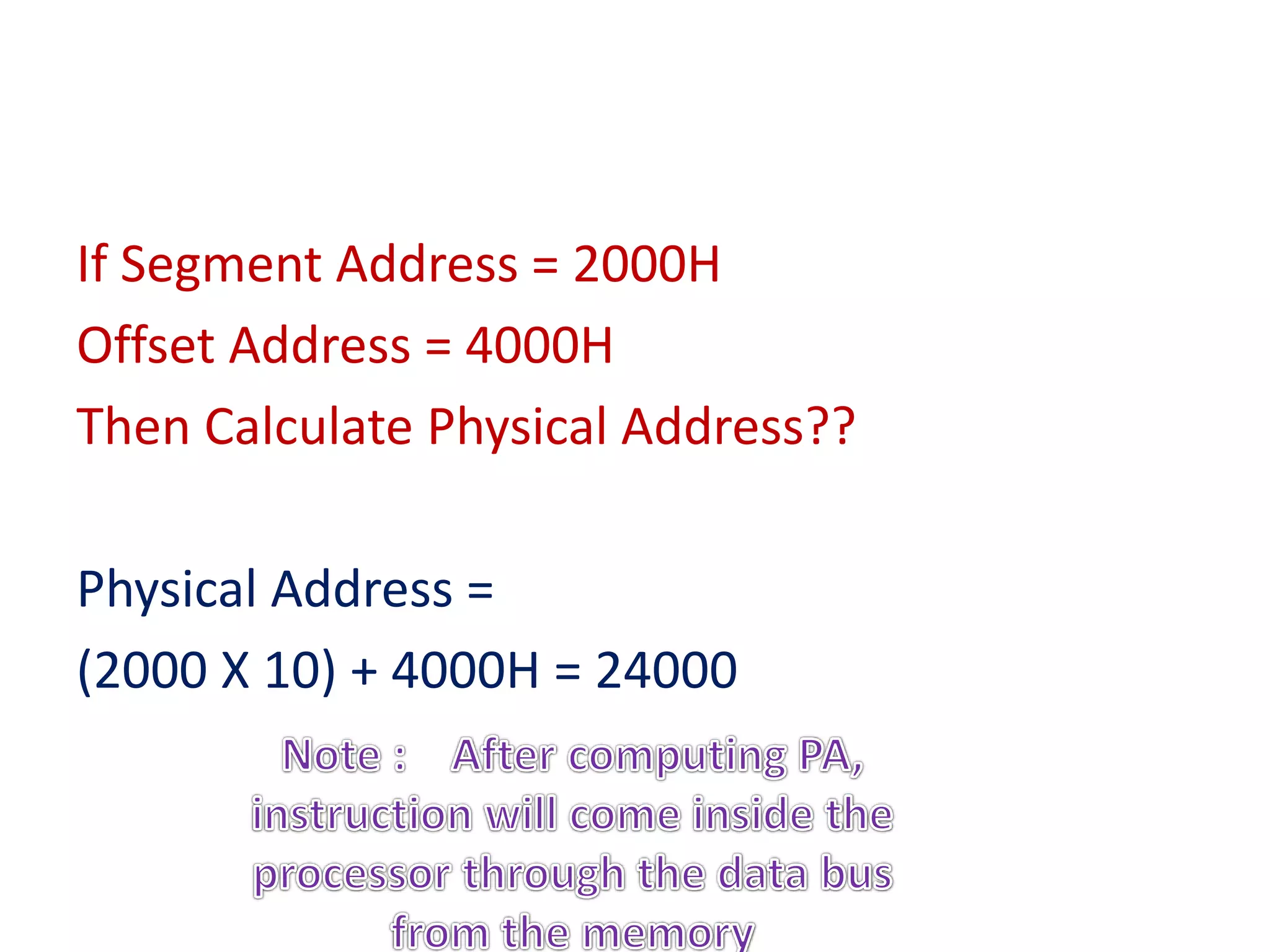
If Segment Address = 2000H
Offset Address = 4000H
Then Calculate Physical Address??
Physical Address =
(2000 X 10) + 4000H = 24000
ES
CS
SS
DS
IP
AH AL
BH BL
CH CL
DH DL
SP
BP
SI
DI
6
5
4
3
2
1
Operands
Flags
CCC
Control
System
Memory
Interface
B-BUS
C-BUS
Instruction
Stream
Byte
Queue
BIU
EU
ALU
A-BUS
ES
CS
SS
DS
IP
AH AL
BH BL
CH CL
DH DL
SP
BP
SI
DI
6
5
4
3
2
1
Operands
Flags
CCC
Control
System
Memory
Interface
B-BUS
C-BUS
Instruction
Stream
Byte
Queue
BIU
EU
ALU
A-BUS
ES
CS
SS
DS
IP
AH AL
BH BL
CH CL
DH DL
SP
BP
SI
DI
6
5
4
3
2
1
Operands
Flags
CCC
Control
System
Memory
Interface
B-BUS
C-BUS
Instruction
Stream
Byte
Queue
BIU
EU
ALU
A-BUS
ES
CS
SS
DS
IP
AH AL
BH BL
CH CL
DH DL
SP
BP
SI
DI
6
5
4
3
2
1
Operands
Flags
CCC
Control
System
Memory
Interface
B-BUS
C-BUS
Instruction
Stream
Byte
Queue
BIU
EU
ALU
A-BUS
ES
CS
SS
DS
IP
AH AL
BH BL
CH CL
DH DL
SP
BP
SI
DI
6
5
4
3
2
1
Operands
Flags
CCC
Control
System
Memory
Interface
B-BUS
C-BUS
Instruction
Stream
Byte
Queue
BIU
EU
ALU
A-BUS
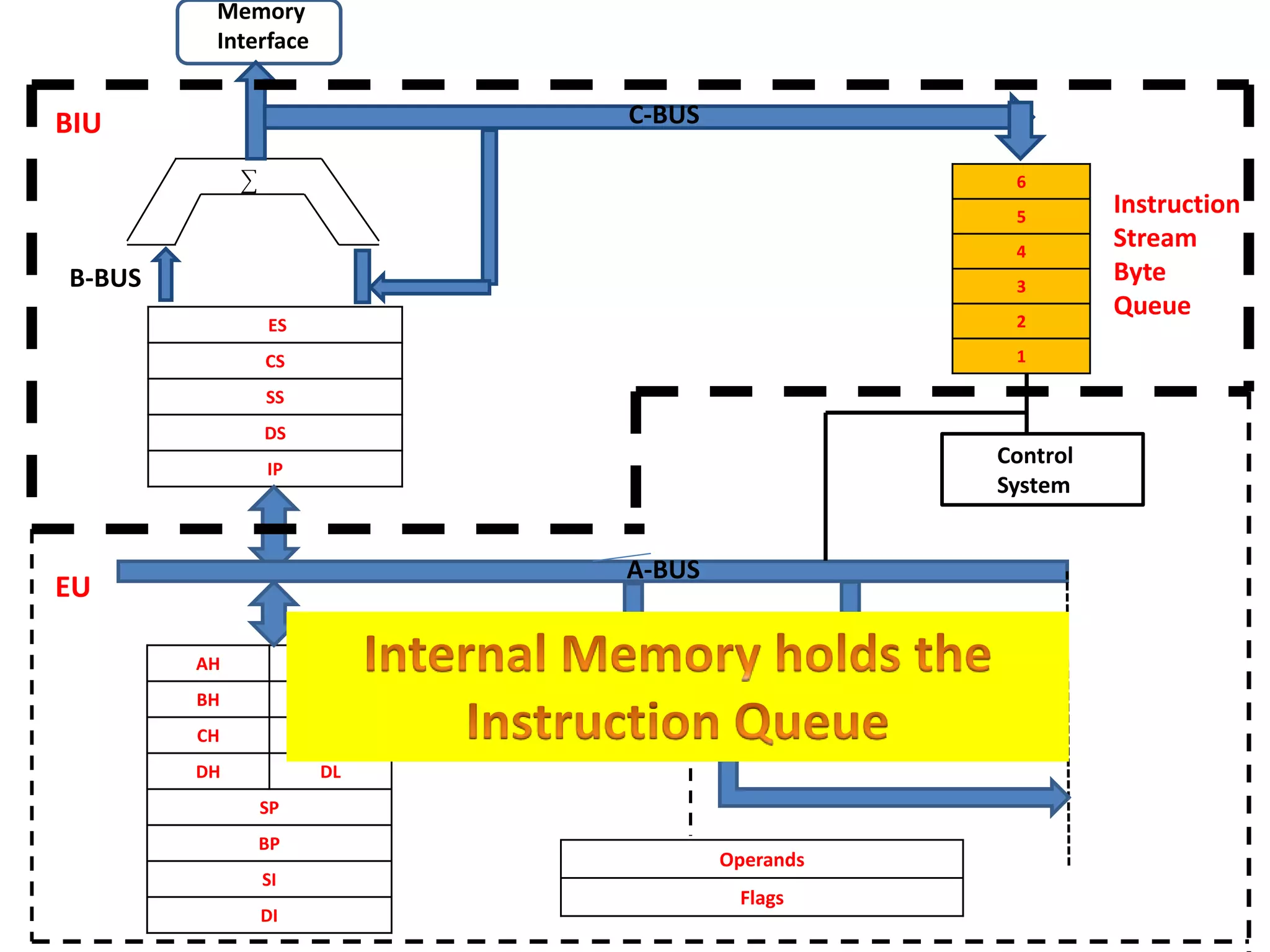
• BIU not only fetch the next instruction but it
fetches 6 byte of the program and stores
them in the queue.
• All instruction are not of same size.
6 instruction != 6 byte
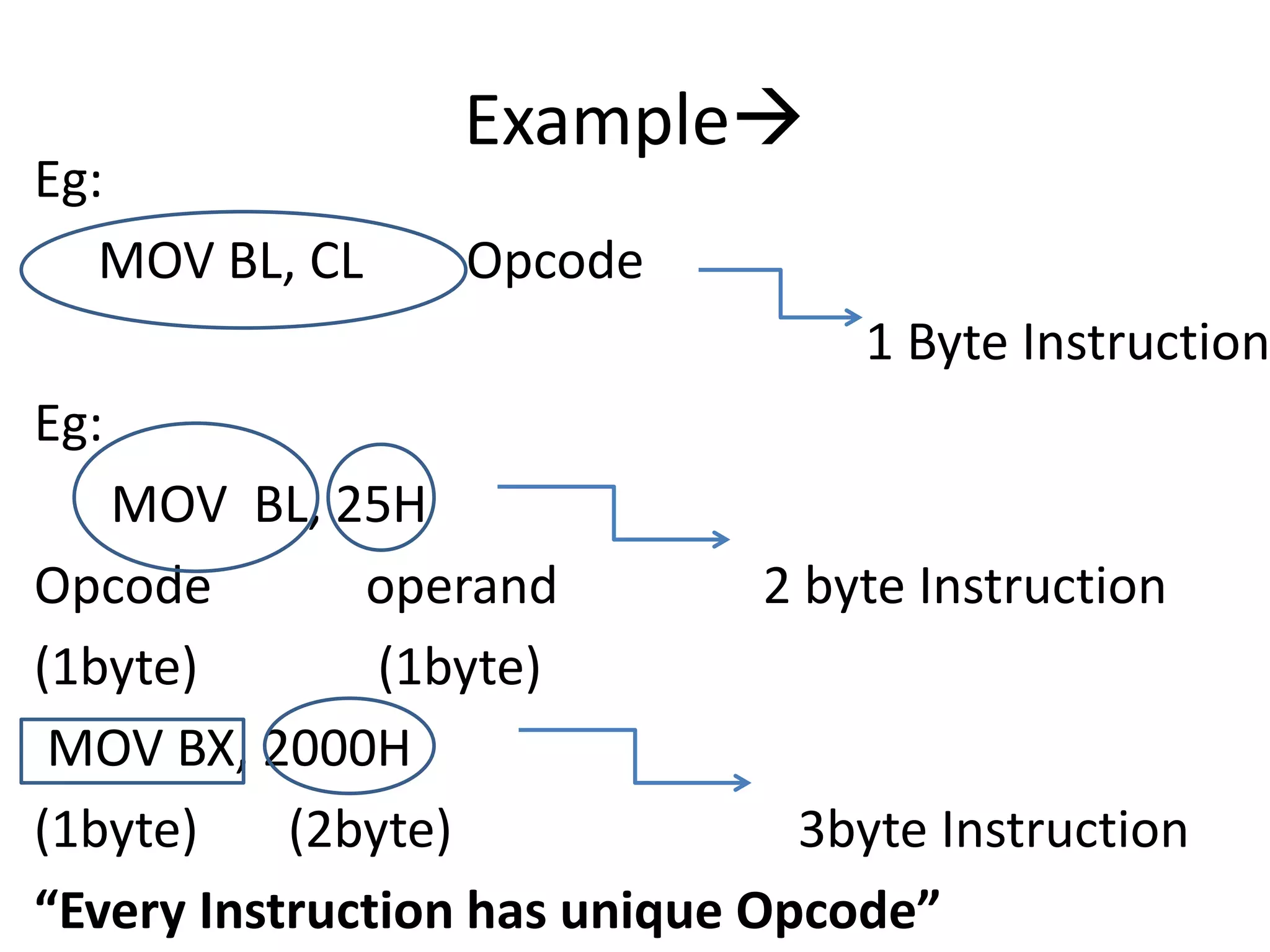
Example
Eg:
MOV BL, CL Opcode
1 Byte Instruction
Eg:
MOV BL, 25H
Opcode operand 2 byte Instruction
(1byte) (1byte)
MOV BX, 2000H
(1byte) (2byte) 3byte Instruction
“Every Instruction has unique Opcode”
• All instruction are not of same size.
• Instruction may vary 1 byte, 2 byte, 3
byte, maximum up to 6 bytes.
When will BIU fill the instruction Queue????
1. Wait for the whole queue to become empty.
2. If 1 byte is empty then refill the queue
3. If 2 byte is empty then refill the queue.
Ans:
If 2 byte is empty then refill the queue.
Because 2byte= 16bit and 8086 is 16 bit
procesor
So,
Architect of Processor builds a queue inside the
processor, which permitted you to store in
advance, specific instruction that would be
executed in the future.
Whole concept is called PIPELINING.
Pipelining is a technique wherein the Bus
Interface Unit pre-fetches the instruction for the
Execution Unit to use
In case of 8086, up to six byte of instructions are
fetched.
Note: if there is any JUMP instruction PIPE has
to refreshed.
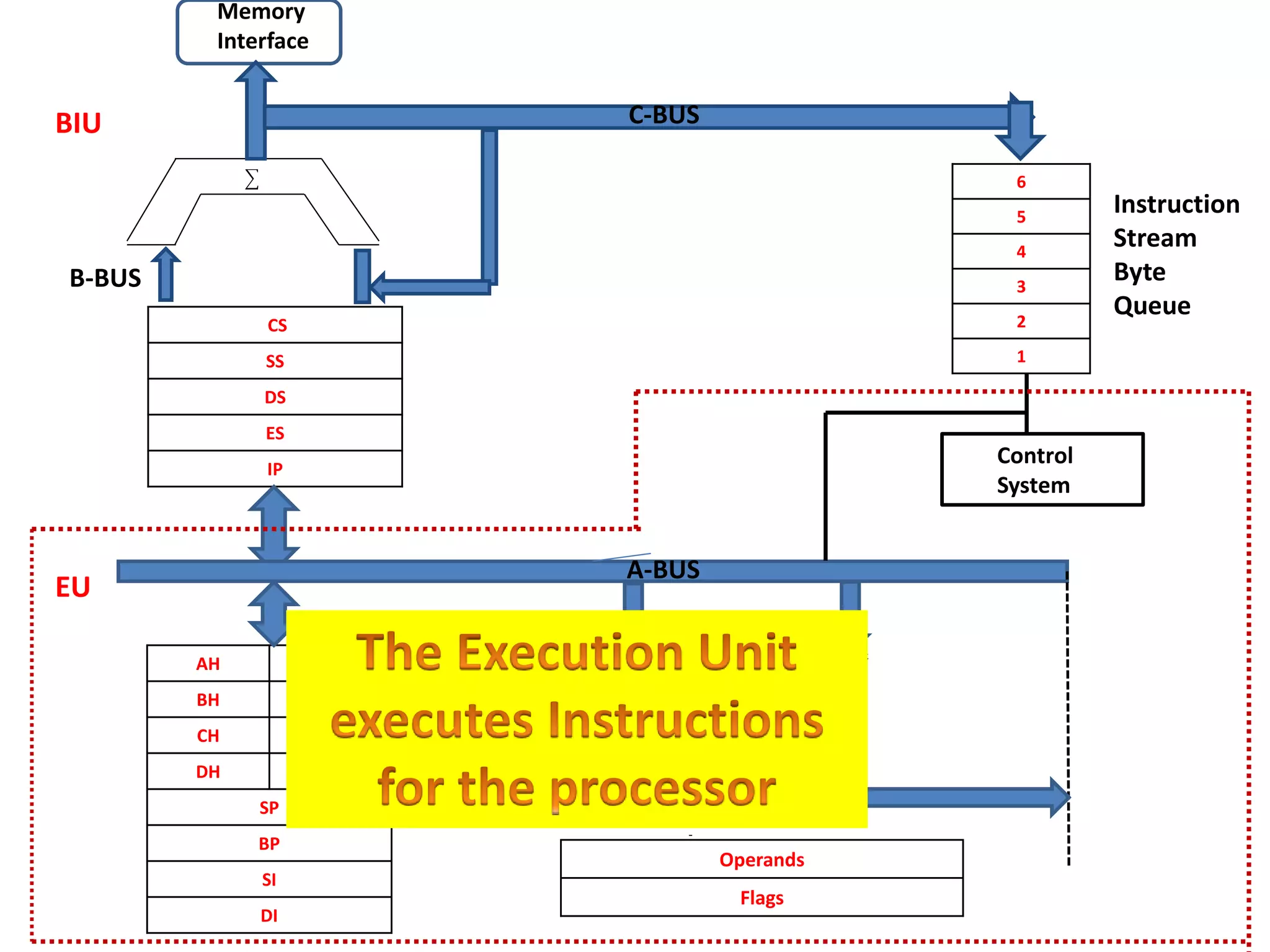
Bus Interface Unit
• Handles all the data and the addresses on the
buses for the execution unit.
• Bus operations include instruction fetching,
reading and writing operations for memory
and calculating the addresses of the memory
operands.
• The instructions are transferred to the
instruction queue
CS
SS
DS
ES
IP
AH AL
BH BL
CH CL
DH DL
SP
BP
SI
DI
6
5
4
3
2
1
Operands
Flags
CCC
Control
System
Memory
Interface
B-BUS
C-BUS
Instruction
Stream
Byte
Queue
BIU
EU
ALU
A-BUS
Execution Unit
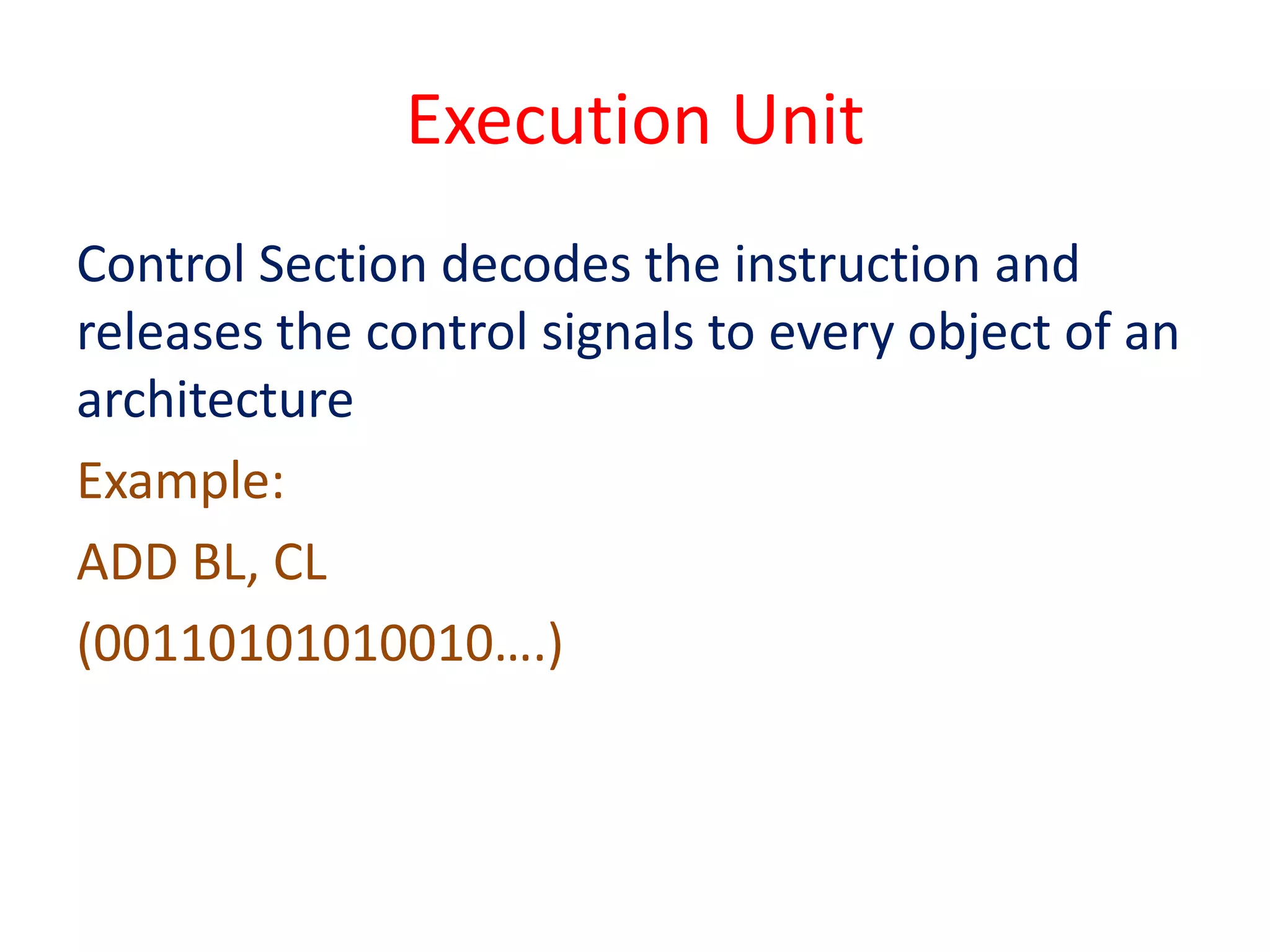
Control Section decodes the instruction and
releases the control signals to every object of an
architecture
Example:
ADD BL, CL
(00110101010010….)
ES
CS
SS
DS
IP
AH AL
BH BL
CH CL
DH DL
SP
BP
SI
DI
6
5
4
3
2
1
Operands
Flags
CCC
Control
System
Memory
Interface
B-BUS
C-BUS
Instruction
Stream
Byte
Queue
BIU
EU
ALU
A-BUS
ES
CS
SS
DS
IP
AH AL
BH BL
CH CL
DH DL
SP
BP
SI
DI
6
5
4
3
2
1
Operands
Flags
CCC
Control
System
Memory
Interface
B-BUS
C-BUS
Instruction
Stream
Byte
Queue
BIU
EU
ALU
A-BUS
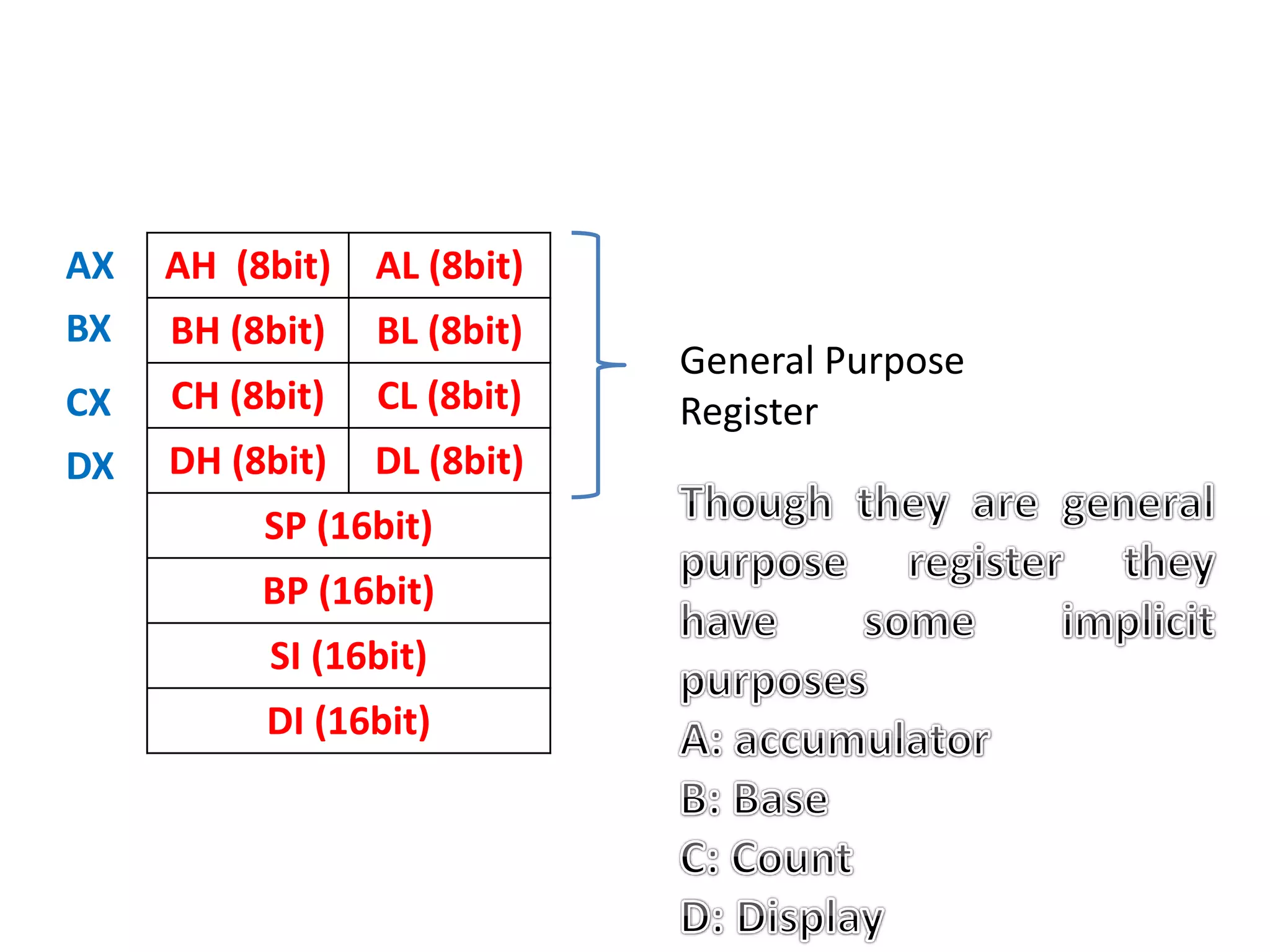
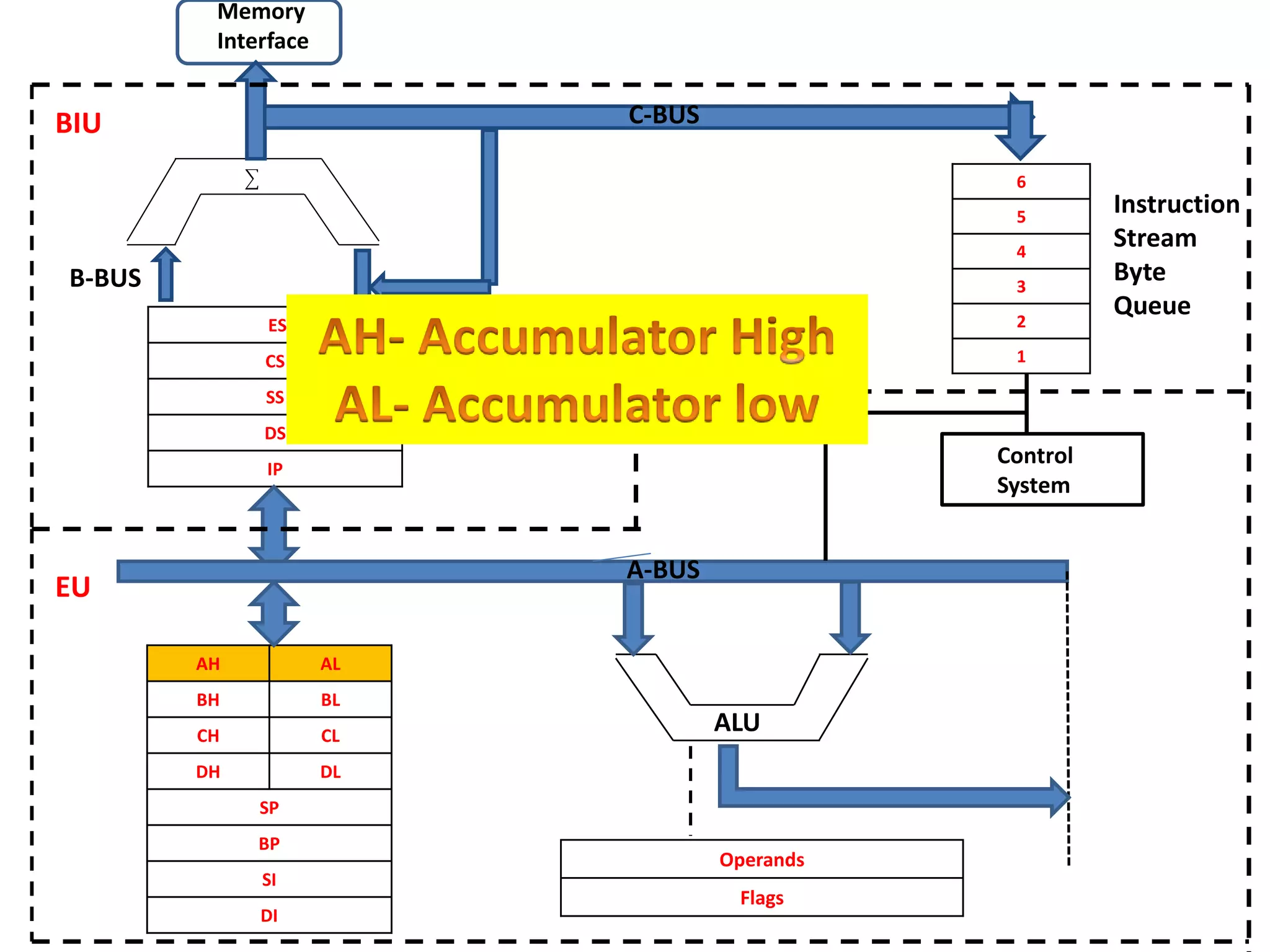
AH (8bit) AL (8bit)
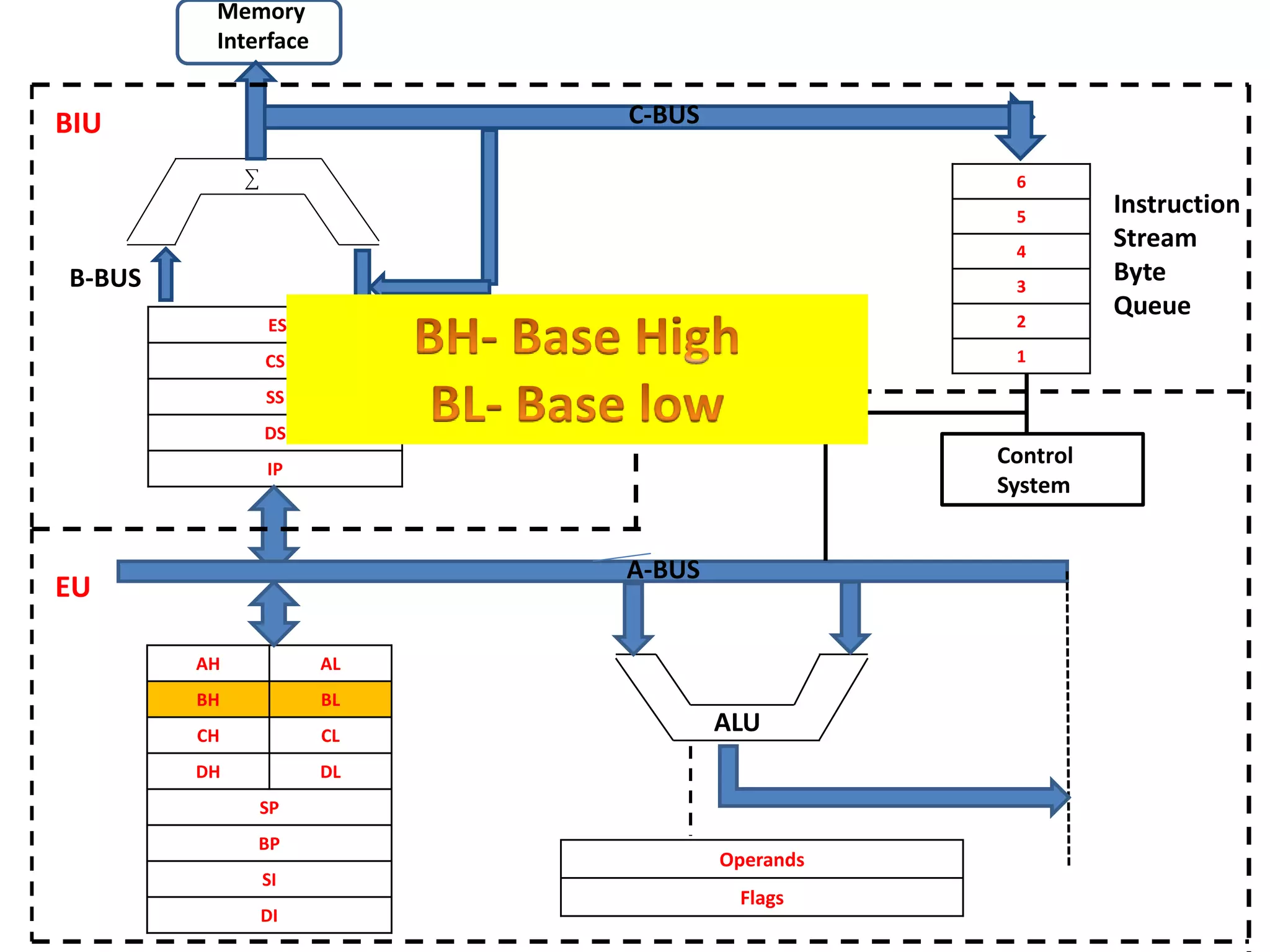
BH (8bit) BL (8bit)
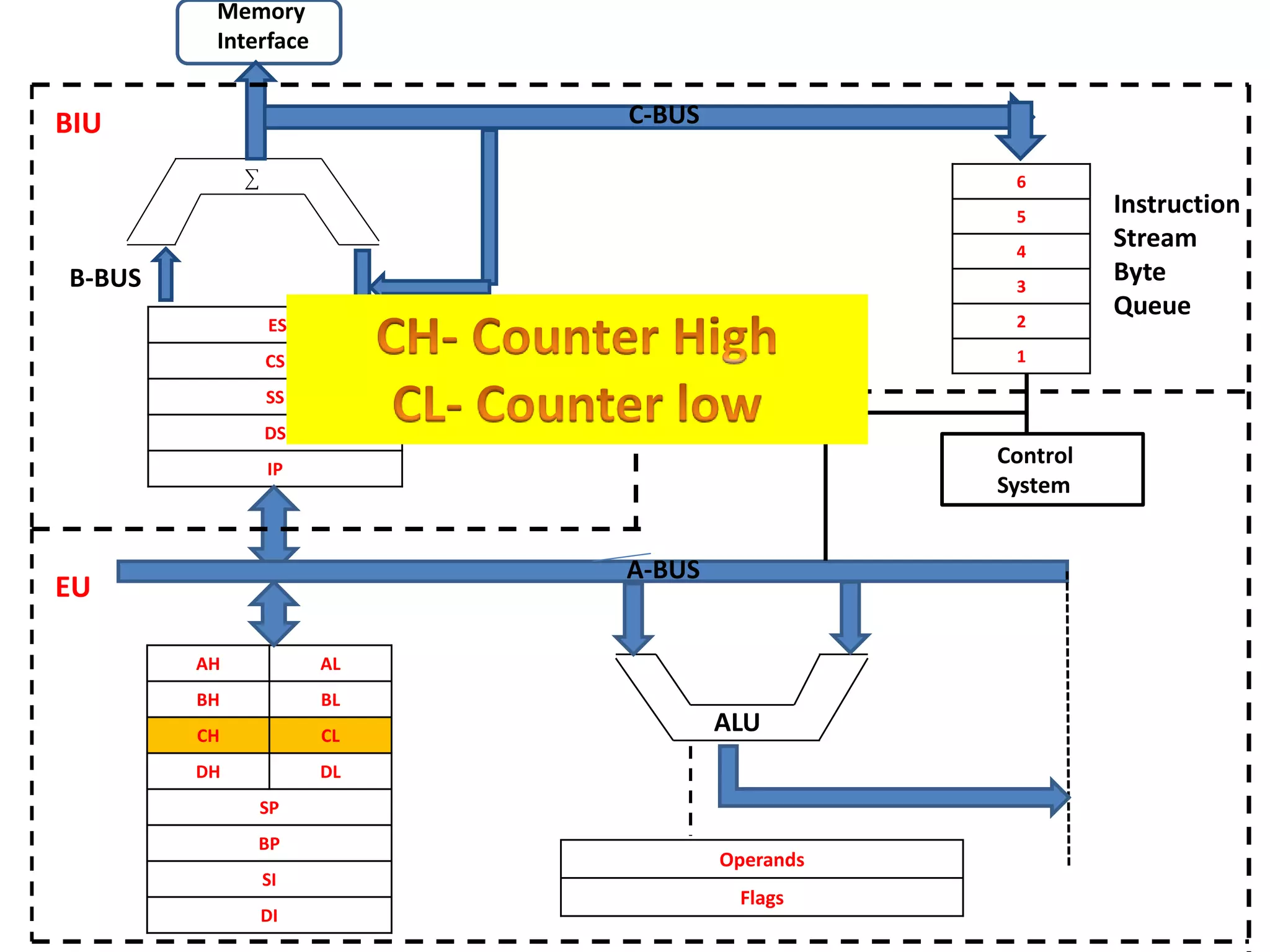
CH (8bit) CL (8bit)
DH (8bit) DL (8bit)
SP (16bit)
BP (16bit)
SI (16bit)
DI (16bit)
AX
BX
CX
DX
General Purpose
Register
ES
CS
SS
DS
IP
AH AL
BH BL
CH CL
DH DL
SP
BP
SI
DI
6
5
4
3
2
1
Operands
Flags
CCC
Control
System
Memory
Interface
B-BUS
C-BUS
Instruction
Stream
Byte
Queue
BIU
EU
ALU
A-BUS
ES
CS
SS
DS
IP
AH AL
BH BL
CH CL
DH DL
SP
BP
SI
DI
6
5
4
3
2
1
Operands
Flags
CCC
Control
System
Memory
Interface
B-BUS
C-BUS
Instruction
Stream
Byte
Queue
BIU
EU
ALU
A-BUS
ES
CS
SS
DS
IP
AH AL
BH BL
CH CL
DH DL
SP
BP
SI
DI
6
5
4
3
2
1
Operands
Flags
CCC
Control
System
Memory
Interface
B-BUS
C-BUS
Instruction
Stream
Byte
Queue
BIU
EU
ALU
A-BUS
ES
CS
SS
DS
IP
AH AL
BH BL
CH CL
DH DL
SP
BP
SI
DI
6
5
4
3
2
1
Operands
Flags
CCC
Control
System
Memory
Interface
B-BUS
C-BUS
Instruction
Stream
Byte
Queue
BIU
EU
ALU
A-BUS
ES
CS
SS
DS
IP
AH AL
BH BL
CH CL
DH DL
SP
BP
SI
DI
6
5
4
3
2
1
Operands
Flags
CCC
Control
System
Memory
Interface
B-BUS
C-BUS
Instruction
Stream
Byte
Queue
BIU
EU
ALU
A-BUS
ES
CS
SS
DS
IP
AH AL
BH BL
CH CL
DH DL
SP
BP
SI
DI
6
5
4
3
2
1
Operands
Flags
CCC
Control
System
Memory
Interface
B-BUS
C-BUS
Instruction
Stream
Byte
Queue
BIU
EU
ALU
A-BUS
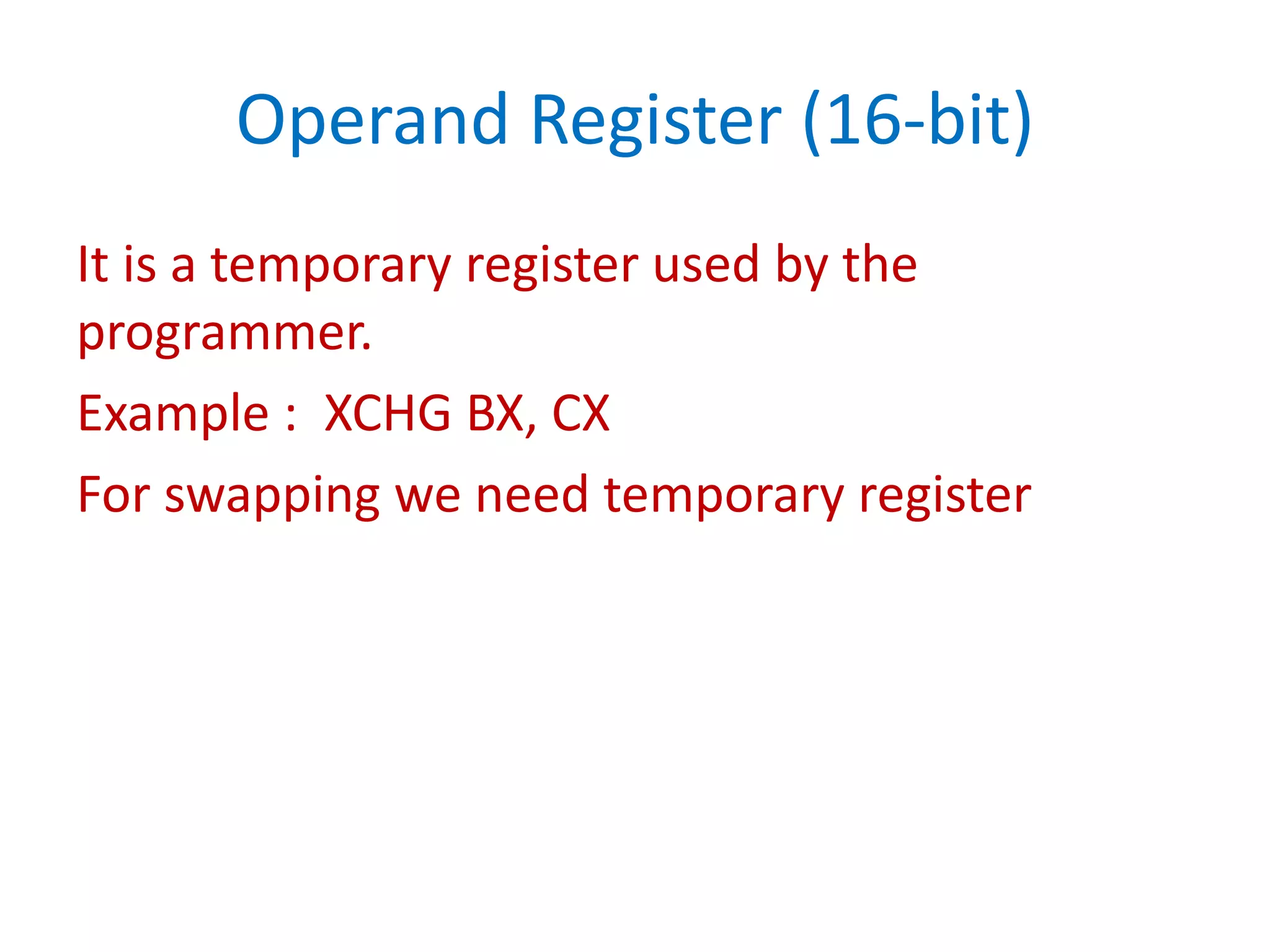
Operand Register (16-bit)
It is a temporary register used by the
programmer.
Example : XCHG BX, CX
For swapping we need temporary register
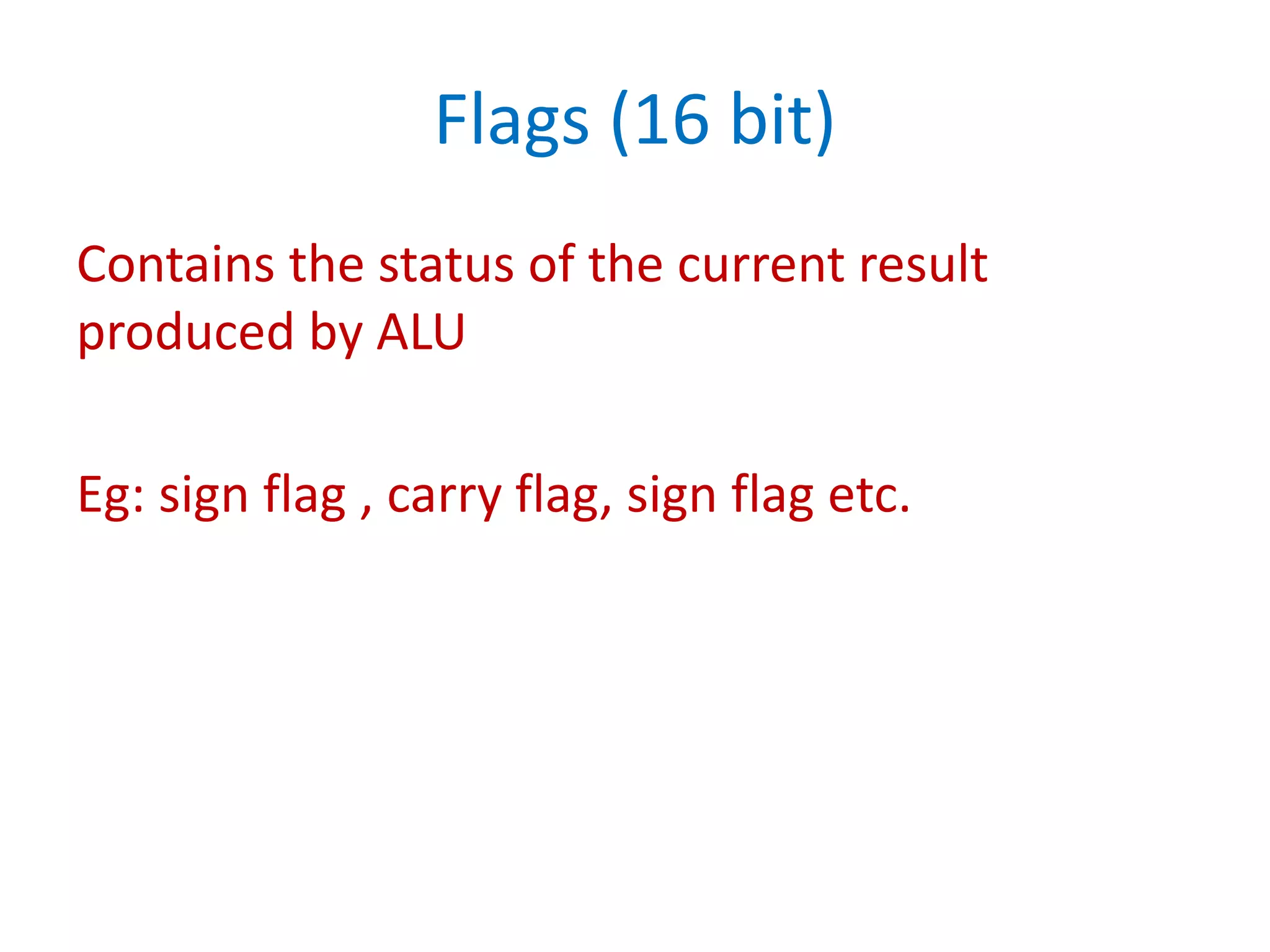
Flags (16 bit)
Contains the status of the current result
produced by ALU
Eg: sign flag , carry flag, sign flag etc.
Why is this required????
Execution Unit of a processor is much faster
than the peripheral devices like memory (ROM
or RAM). Earlier days, Memory was almost as
fast as Processor unit but when 8086 come in
picture, Processor became much faster than the
peripheral devices
Have a nice day

8086 architecture

  • 1.
    8086 Architecture Sridari Iyer St.Francis Inst. of Tech. Borivali (W), Mumbai.
  • 3.
    How many bitsdoes the Register of a Processor have?? 16-bit Processor (8086) • Has 16 data lines • All internal Registers are 16-bit long 32-bit Processor • All Internal Registers are 32-bit long • Has 32-bit data bus
  • 4.
    8086 architecture is16 – bit Processor means-- • It can transfer 16 bits of data at a time. • Its ALU is 16 bits, i.e. it can perform arithmetic and logical operations on 16- bit data at a time • All its registers are 16 bits
  • 5.
    • Suppose wehave 1 bit for addressing, we can access two (21) memory locations. • If we have 2 bits for addressing, we can access four (22) memory locations <----- 8 bits ----> <----- 8 bits ----> 0 1 <----- 8 bits ----> <----- 8 bits ----> 10 11 <----- 8 bits ----> <----- 8 bits ----> 00 01
  • 6.
    There are twosections in the architecture of a 8086 Processor. • Bus Interface Unit (BIU) • Execution Unit (EU)
  • 7.
    ES CS SS DS IP AH AL BH BL CHCL DH DL SP BP SI DI 6 5 4 3 2 1 Operands Flags CCCControl System Memory Interface B-BUS C-BUS Instruction Stream Byte Queue BIU EU ALU A-BUS
  • 8.
    Why two sections???? •Because data transfer rates are usually slower compared to execution rate. • Pipelining instructions will avoid processor being idle.
  • 9.
    • This 16-bit processor has a 20-bit address bus • Width of a memory locations is 8 bits. • The address of that memory location is 20 bit long 00000 . . . FFFFF 8 Bit 8 Bit 8 Bit 8 Bit 8 Bit 8 Bit 8 Bit
  • 10.
    • As aprogrammer or a user cannot remember the 20-bit address of everything stored in the memory, we use linguistic names. • So, Entire memory is renamed as 4 segments: CODE SEGMENT STACK SEGMENT DATA SEGMENT EXTRA SEGMENT
  • 11.
    CS SS DS ES Code Segment Stack Segment DataSegment Code Segment IP DI BP SI SP 00000 FFFFF
  • 15.
    You cannot rememberthe content of a book by the page number But You can remember by the chapter name and the sub headings
  • 16.
    How Processor knowsthe real address when we provide the segment name and the offset??? Physical Address = (Segment X 10) + Offset For example : CS = 1000H (16 bits) IP = 1036H (16 bits) PA= (1000 X10) + 1036 = 11036 (20 bits) SA X10 OFFSET
  • 17.
    If Segment Address= 2000H Offset Address = 4000H Then Calculate Physical Address?? Physical Address = (2000 X 10) + 4000H = 24000
  • 18.
    ES CS SS DS IP AH AL BH BL CHCL DH DL SP BP SI DI 6 5 4 3 2 1 Operands Flags CCC Control System Memory Interface B-BUS C-BUS Instruction Stream Byte Queue BIU EU ALU A-BUS
  • 19.
    ES CS SS DS IP AH AL BH BL CHCL DH DL SP BP SI DI 6 5 4 3 2 1 Operands Flags CCC Control System Memory Interface B-BUS C-BUS Instruction Stream Byte Queue BIU EU ALU A-BUS
  • 20.
    ES CS SS DS IP AH AL BH BL CHCL DH DL SP BP SI DI 6 5 4 3 2 1 Operands Flags CCC Control System Memory Interface B-BUS C-BUS Instruction Stream Byte Queue BIU EU ALU A-BUS
  • 21.
    ES CS SS DS IP AH AL BH BL CHCL DH DL SP BP SI DI 6 5 4 3 2 1 Operands Flags CCC Control System Memory Interface B-BUS C-BUS Instruction Stream Byte Queue BIU EU ALU A-BUS
  • 22.
    ES CS SS DS IP AH AL BH BL CHCL DH DL SP BP SI DI 6 5 4 3 2 1 Operands Flags CCC Control System Memory Interface B-BUS C-BUS Instruction Stream Byte Queue BIU EU ALU A-BUS
  • 23.
    • BIU notonly fetch the next instruction but it fetches 6 byte of the program and stores them in the queue. • All instruction are not of same size. 6 instruction != 6 byte
  • 24.
    Example Eg: MOV BL, CLOpcode 1 Byte Instruction Eg: MOV BL, 25H Opcode operand 2 byte Instruction (1byte) (1byte) MOV BX, 2000H (1byte) (2byte) 3byte Instruction “Every Instruction has unique Opcode”
  • 25.
    • All instructionare not of same size. • Instruction may vary 1 byte, 2 byte, 3 byte, maximum up to 6 bytes.
  • 26.
    When will BIUfill the instruction Queue???? 1. Wait for the whole queue to become empty. 2. If 1 byte is empty then refill the queue 3. If 2 byte is empty then refill the queue. Ans: If 2 byte is empty then refill the queue. Because 2byte= 16bit and 8086 is 16 bit procesor
  • 27.
    So, Architect of Processorbuilds a queue inside the processor, which permitted you to store in advance, specific instruction that would be executed in the future. Whole concept is called PIPELINING.
  • 28.
    Pipelining is atechnique wherein the Bus Interface Unit pre-fetches the instruction for the Execution Unit to use In case of 8086, up to six byte of instructions are fetched. Note: if there is any JUMP instruction PIPE has to refreshed.
  • 29.
    Bus Interface Unit •Handles all the data and the addresses on the buses for the execution unit. • Bus operations include instruction fetching, reading and writing operations for memory and calculating the addresses of the memory operands. • The instructions are transferred to the instruction queue
  • 30.
    CS SS DS ES IP AH AL BH BL CHCL DH DL SP BP SI DI 6 5 4 3 2 1 Operands Flags CCC Control System Memory Interface B-BUS C-BUS Instruction Stream Byte Queue BIU EU ALU A-BUS
  • 31.
    Execution Unit Control Sectiondecodes the instruction and releases the control signals to every object of an architecture Example: ADD BL, CL (00110101010010….)
  • 32.
    ES CS SS DS IP AH AL BH BL CHCL DH DL SP BP SI DI 6 5 4 3 2 1 Operands Flags CCC Control System Memory Interface B-BUS C-BUS Instruction Stream Byte Queue BIU EU ALU A-BUS
  • 33.
    ES CS SS DS IP AH AL BH BL CHCL DH DL SP BP SI DI 6 5 4 3 2 1 Operands Flags CCC Control System Memory Interface B-BUS C-BUS Instruction Stream Byte Queue BIU EU ALU A-BUS
  • 34.
    AH (8bit) AL(8bit) BH (8bit) BL (8bit) CH (8bit) CL (8bit) DH (8bit) DL (8bit) SP (16bit) BP (16bit) SI (16bit) DI (16bit) AX BX CX DX General Purpose Register
  • 35.
    ES CS SS DS IP AH AL BH BL CHCL DH DL SP BP SI DI 6 5 4 3 2 1 Operands Flags CCC Control System Memory Interface B-BUS C-BUS Instruction Stream Byte Queue BIU EU ALU A-BUS
  • 36.
    ES CS SS DS IP AH AL BH BL CHCL DH DL SP BP SI DI 6 5 4 3 2 1 Operands Flags CCC Control System Memory Interface B-BUS C-BUS Instruction Stream Byte Queue BIU EU ALU A-BUS
  • 37.
    ES CS SS DS IP AH AL BH BL CHCL DH DL SP BP SI DI 6 5 4 3 2 1 Operands Flags CCC Control System Memory Interface B-BUS C-BUS Instruction Stream Byte Queue BIU EU ALU A-BUS
  • 38.
    ES CS SS DS IP AH AL BH BL CHCL DH DL SP BP SI DI 6 5 4 3 2 1 Operands Flags CCC Control System Memory Interface B-BUS C-BUS Instruction Stream Byte Queue BIU EU ALU A-BUS
  • 39.
    ES CS SS DS IP AH AL BH BL CHCL DH DL SP BP SI DI 6 5 4 3 2 1 Operands Flags CCC Control System Memory Interface B-BUS C-BUS Instruction Stream Byte Queue BIU EU ALU A-BUS
  • 40.
    ES CS SS DS IP AH AL BH BL CHCL DH DL SP BP SI DI 6 5 4 3 2 1 Operands Flags CCC Control System Memory Interface B-BUS C-BUS Instruction Stream Byte Queue BIU EU ALU A-BUS
  • 41.
    Operand Register (16-bit) Itis a temporary register used by the programmer. Example : XCHG BX, CX For swapping we need temporary register
  • 42.
    Flags (16 bit) Containsthe status of the current result produced by ALU Eg: sign flag , carry flag, sign flag etc.
  • 44.
    Why is thisrequired???? Execution Unit of a processor is much faster than the peripheral devices like memory (ROM or RAM). Earlier days, Memory was almost as fast as Processor unit but when 8086 come in picture, Processor became much faster than the peripheral devices
  • 45.