8086 Microprocessor
Architecture of 8086
Memory segmentation,
Signal Description,
Addressing modes,
MODULE I
⚫Architecture of 8086
⚫Memory segmentation
⚫Signal description
⚫Addressing modes
MICROPROCESSOR
⚫ A single chip computer
⚫ Device which has data processing capability
⚫ Program controlled semiconductor device (IC)
which fetches (from memory), decodes and
executes instructions.
⚫ It is used as CPU (Central Processing Unit) in
computers.
⚫ Microcontroller???
◦ P + RAM + ROM + I/O ports + Timer
◦ Less bulkier than P
MODULE 1
hardware
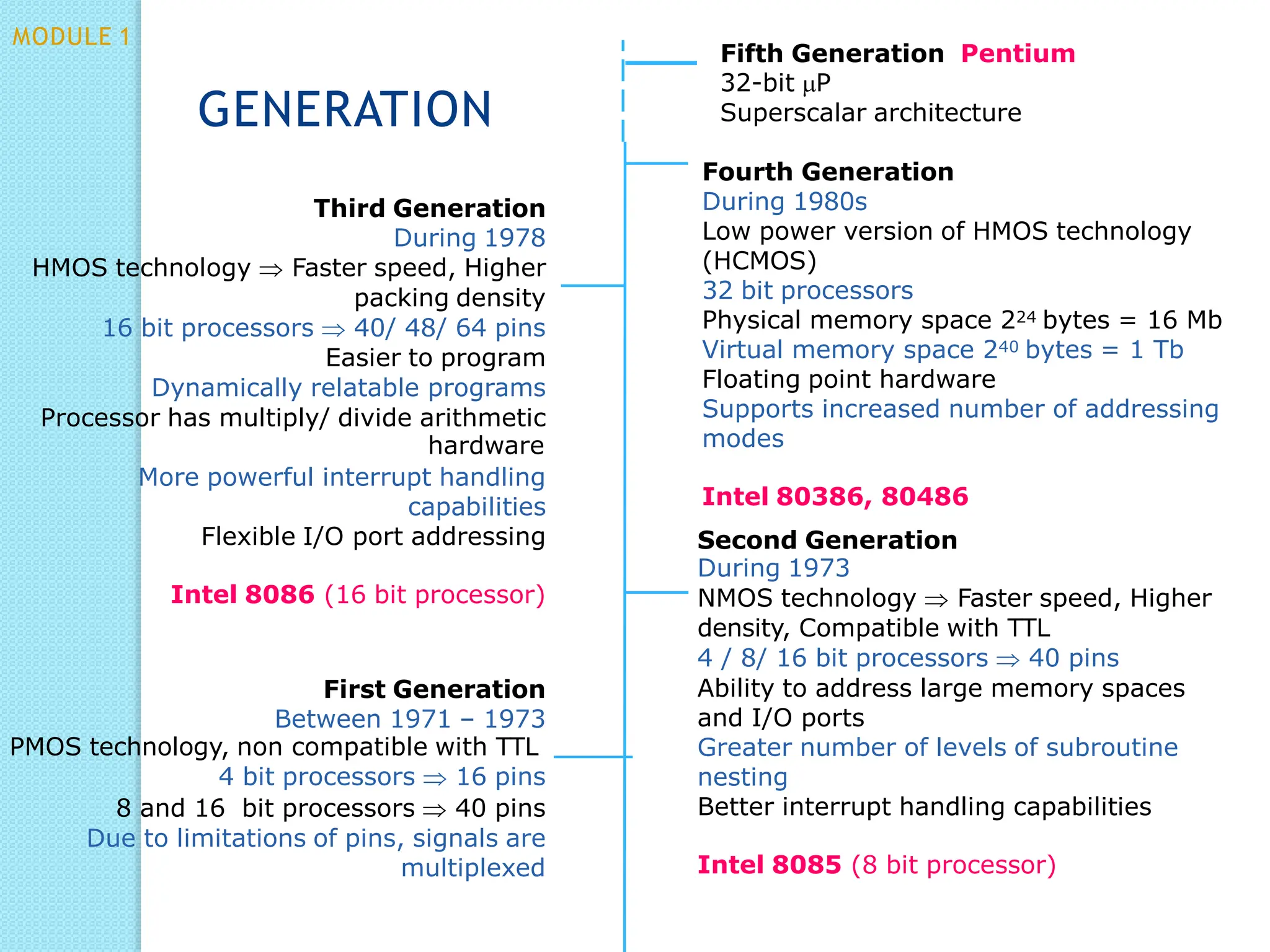
Third Generation
During 1978
HMOS technology  Faster speed, Higher
packing density
16 bit processors  40/ 48/ 64 pins
Easier to program
Dynamically relatable programs
Processor has multiply/ divide arithmetic
More powerful interrupt handling
capabilities
Flexible I/O port addressing
Intel 8086 (16 bit processor)
First Generation
Between 1971 – 1973
PMOS technology, non compatible with TTL
4 bit processors  16 pins
8 and 16 bit processors  40 pins
Due to limitations of pins, signals are
multiplexed
Fifth Generation Pentium
32-bit P
Superscalar architecture
Fourth Generation
During 1980s
Low power version of HMOS technology
(HCMOS)
32 bit processors
Physical memory space 224 bytes = 16 Mb
Virtual memory space 240 bytes = 1 Tb
Floating point hardware
Supports increased number of addressing
modes
Intel 80386, 80486
Second Generation
During 1973
NMOS technology  Faster speed, Higher
density, Compatible with TTL
4 / 8/ 16 bit processors  40 pins
Ability to address large memory spaces
and I/O ports
Greater number of levels of subroutine
nesting
Better interrupt handling capabilities
Intel 8085 (8 bit processor)
GENERATION
MODULE 1
8086- Overview
⚫First 16-bit processor released by INTEL
in 1978
⚫Powerful instruction set
⚫20-bit addressing capability
⚫Powerful set of registers- general purpose
and special purpose registers
MODULE 1
HOMEW ORK
⚫DRAW THE INTERNAL BLOCK
DIAGRAM OF 8086 (detailed)
◦ Refer Lyla B Das., TheX86 Microprocessors
Architecture,Programming and Interfacing
8086 ARCHITECTURE
MODULE 1
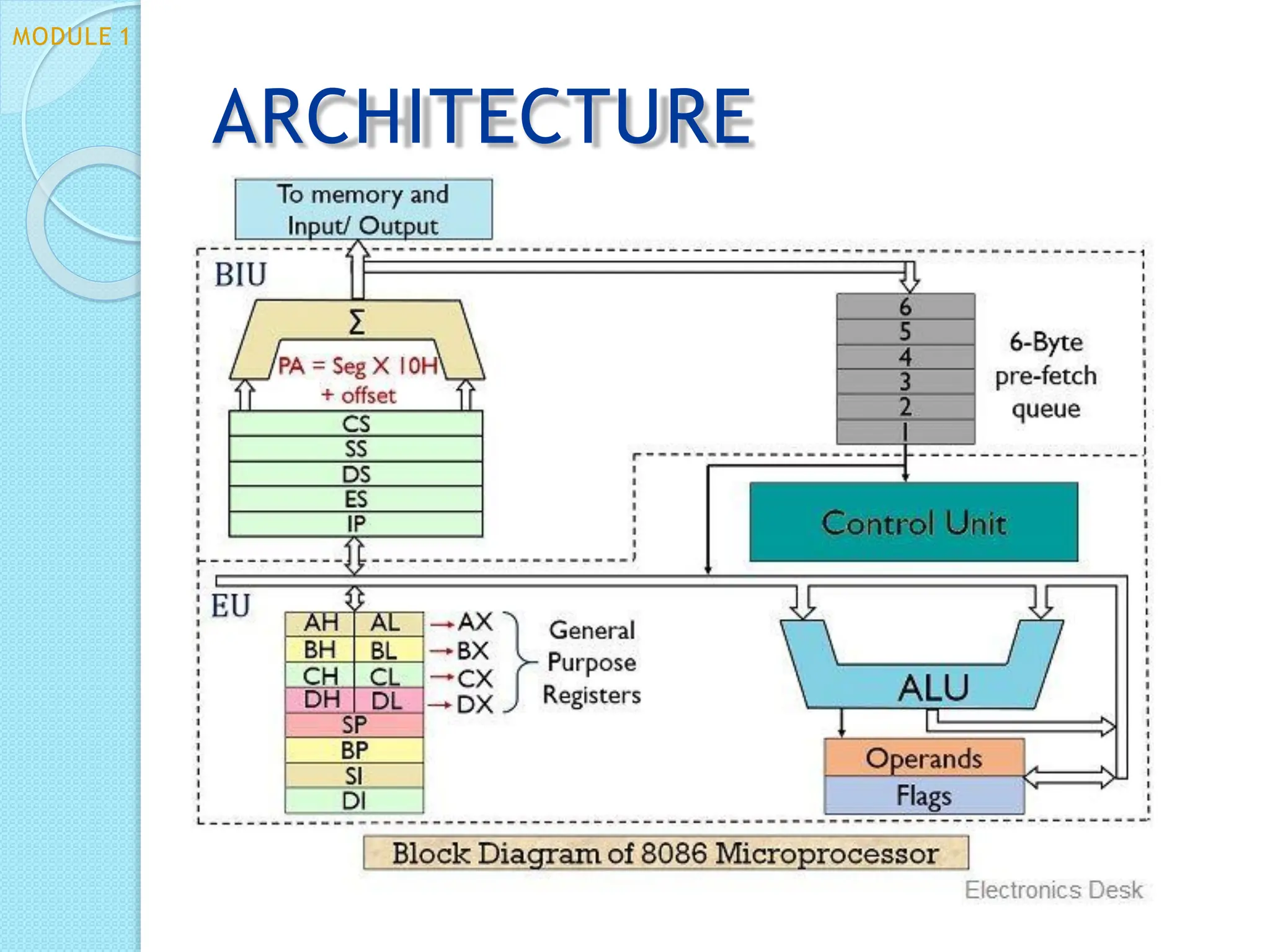
ARCHITECTURE
MODULE 1
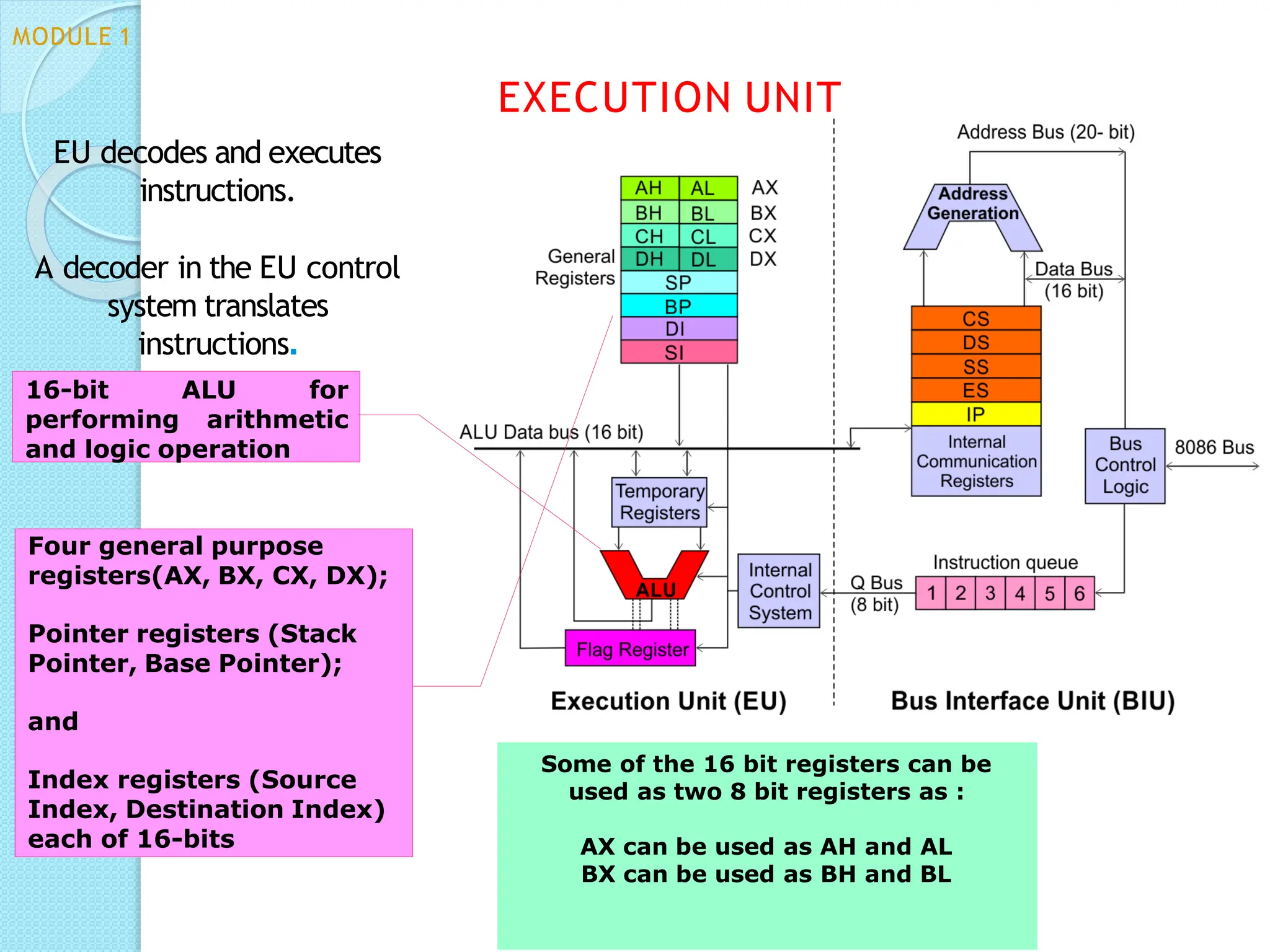
Some of the 16 bit registers can be
used as two 8 bit registers as :
AX can be used as AH and AL
BX can be used as BH and BL
EU decodes and executes
instructions.
A decoder in the EU control
system translates
instructions.
16-bit ALU for
performing arithmetic
and logic operation
Four general purpose
registers(AX, BX, CX, DX);
Pointer registers (Stack
Pointer, Base Pointer);
and
Index registers (Source
Index, Destination Index)
each of 16-bits
EXECUTION UNIT
MODULE 1
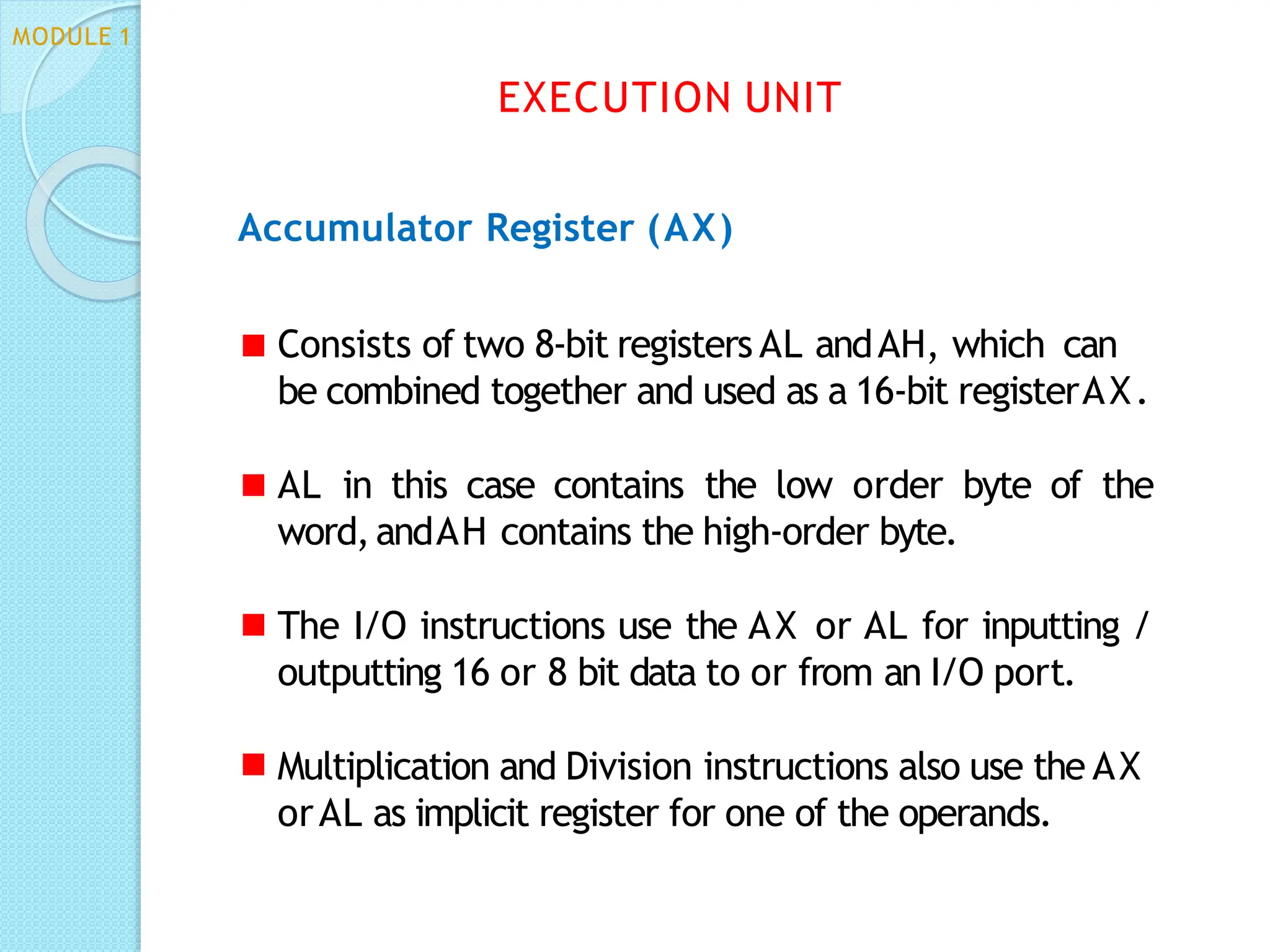
Accumulator Register (AX)
Consists of two 8-bit registers AL andAH, which can
be combined together and used as a 16-bit registerAX.
AL in this case contains the low order byte of the
word,andAH contains the high-order byte.
The I/O instructions use the AX or AL for inputting /
outputting 16 or 8 bit data to or from an I/O port.
Multiplication and Division instructions also use the AX
orAL as implicit register for one of the operands.
EXECUTION UNIT
MODULE 1
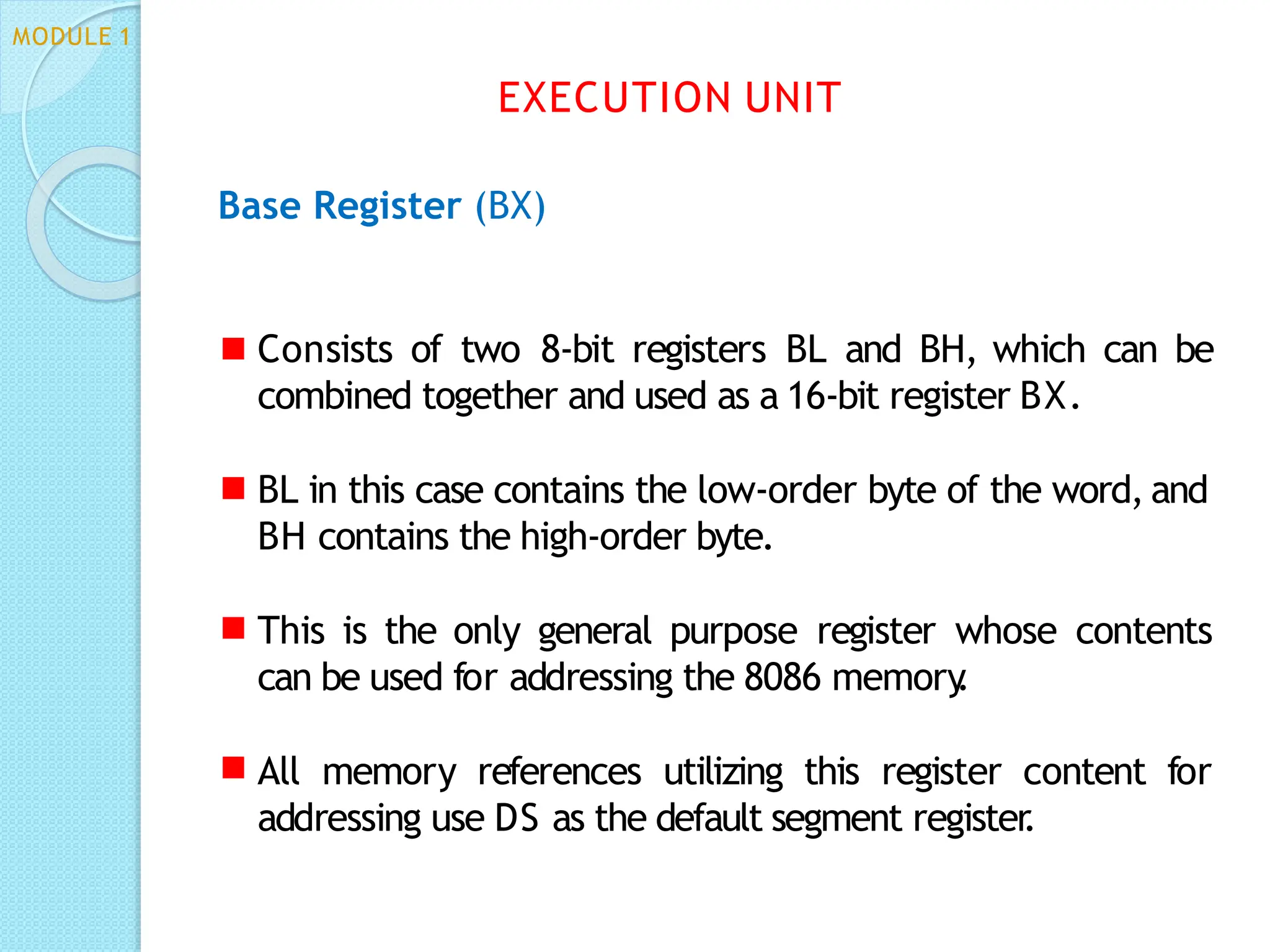
Base Register (BX)
Consists of two 8-bit registers BL and BH, which can be
combined together and used as a 16-bit register BX.
BL in this case contains the low-order byte of the word, and
BH contains the high-order byte.
This is the only general purpose register whose contents
can be used for addressing the 8086 memory
.
All memory references utilizing this register content for
addressing use DS as the default segment register
.
EXECUTION UNIT
MODULE 1
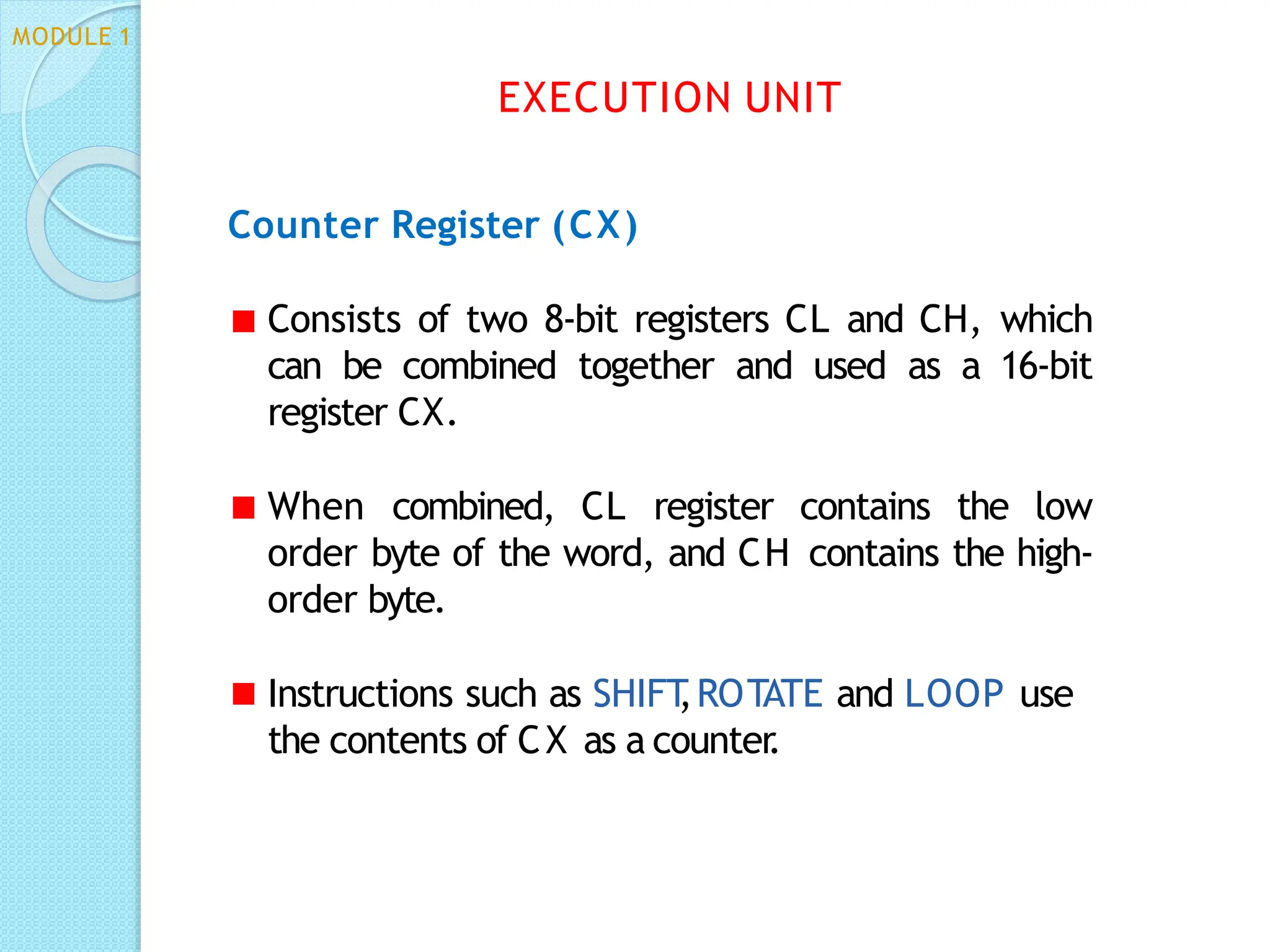
Counter Register (CX)
Consists of two 8-bit registers CL and CH, which
can be combined together and used as a 16-bit
register CX.
When combined, CL register contains the low
order byte of the word, and CH contains the high-
order byte.
Instructions such as SHIFT
,ROTATE and LOOP use
the contents of CX as a counter
.
EXECUTION UNIT
MODULE 1
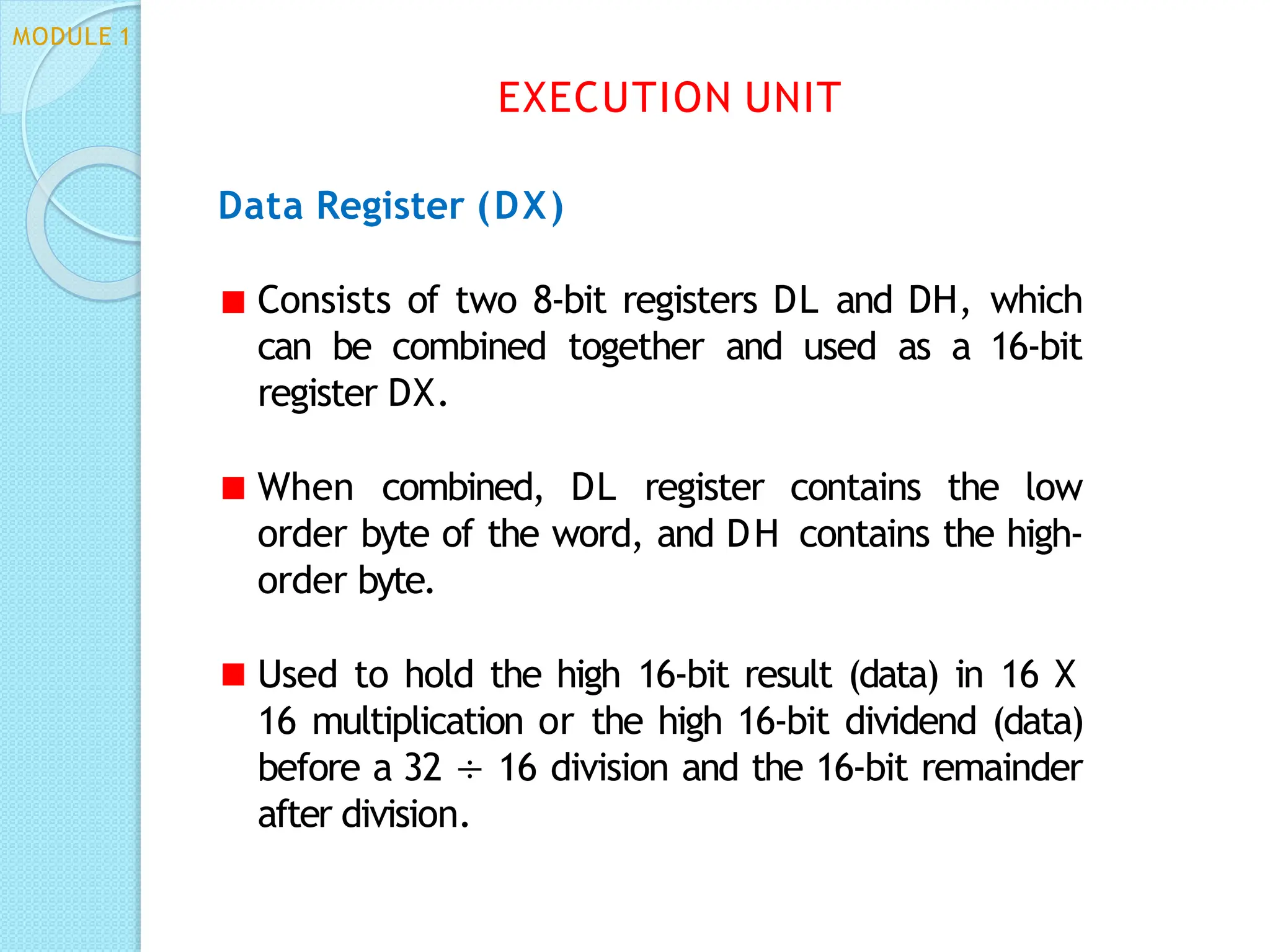
Data Register (DX)
Consists of two 8-bit registers DL and DH, which
can be combined together and used as a 16-bit
register DX.
When combined, DL register contains the low
order byte of the word, and DH contains the high-
order byte.
Used to hold the high 16-bit result (data) in 16 X
16 multiplication or the high 16-bit dividend (data)
before a 32 ÷ 16 division and the 16-bit remainder
after division.
EXECUTION UNIT
MODULE 1
Stack Pointer (SP) and Base Pointer (BP)
SP and BP are used to access data in the stack segment.
SP always points to the top of the stack
SP contents are automatically updated (incremented/
decremented) due to execution of a POP or PUSH
instruction.
BP can point to any location in the stack
EXECUTION UNIT
MODULE 1
Source Index (SI) and Destination Index (DI)
Used in indexed addressing.
Instructions that process data strings use the SI and DI
registers together with DS and ES respectively in
order to distinguish between the source and
destination addresses.
EXECUTION UNIT
MODULE 1
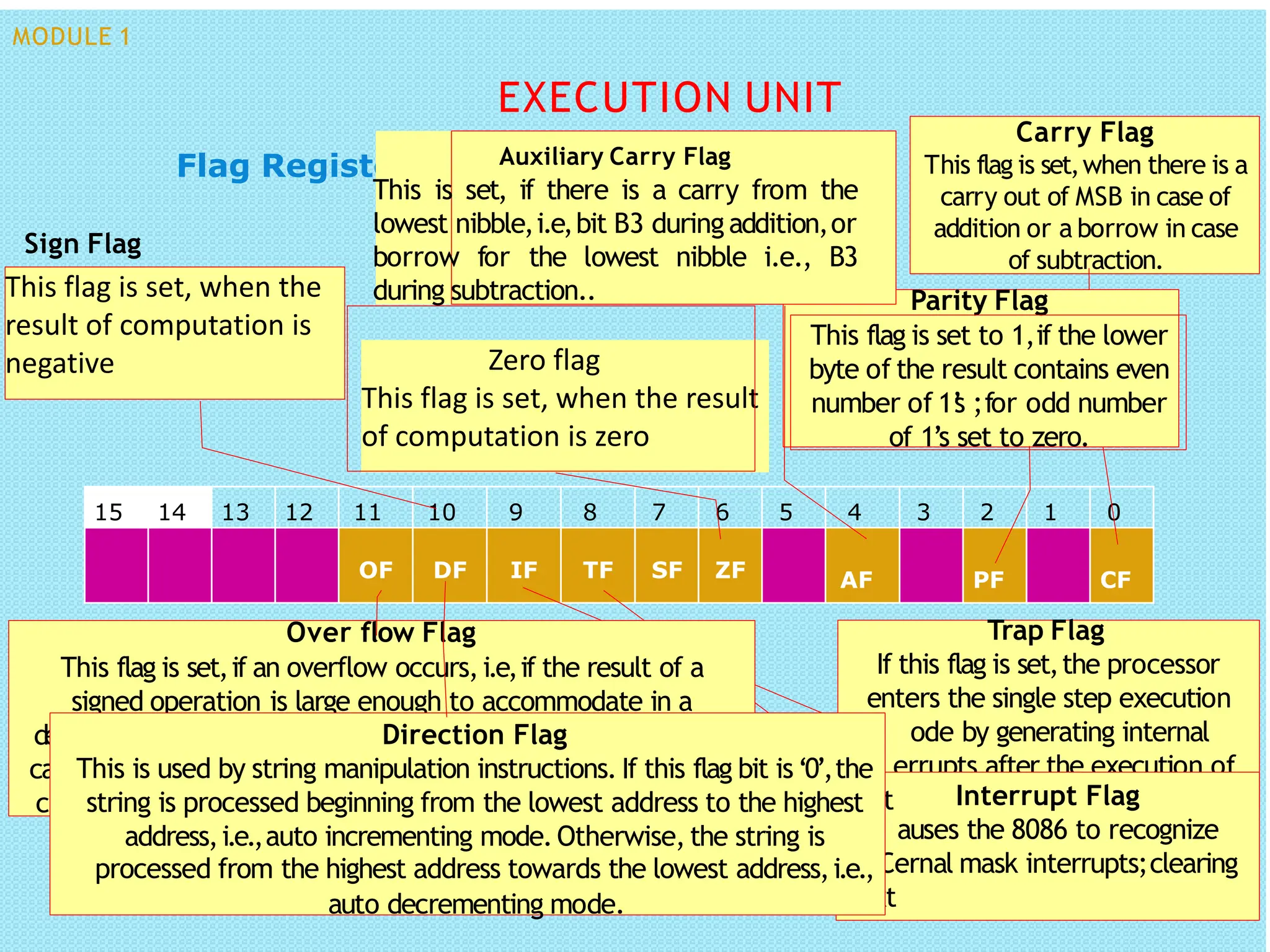
Flag Register
15 14 13 12 11 10 9 8 7 6 5 4 3 2 1 0
AF PF CF
Carry Flag
This flag is set,when there is a
carry out of MSB in case of
addition or a borrow in case
of subtraction.
Parity Flag
This flag is set to 1,if the lower
byte of the result contains even
number of 1’
s ;for odd number
of 1’s set to zero.
Auxiliary Carry Flag
This is set, if there is a carry from the
lowest nibble,i.e,bit B3 during addition,or
borrow for the lowest nibble i.e., B3
during subtraction..
Zero flag
This flag is set, when the result
of computation is zero
This flag is set, when the
result of computation is
negative
Sign Flag
Trap Flag
If this flag is set,the processor
enters the single step execution
ode by generating internal
errupts after the execution of
each instruction
Interrupt Flag
auses the 8086 to recognize
ernal mask interrupts;clearing
OF DF IF TF SF ZF
Over flow Flag
This flag is set,if an overflow occurs,i.e,if the result of a
signed operation is large enough to accommodate in a
d
ca
c
estination register
.The result is of more than 7-bits in size in
m
se of 8-bit signed operation and more than 15-bits in size in int
ase of 16-bit sign operations, then the overflow will be set.
C
ext
Direction Flag
auto decrementing mode.
This is used by string manipulation instructions. If this flag bit is‘0’,the
string is processed beginning from the lowest address to the highest
address,i.e.,auto incrementing mode.Otherwise,the string is
processed from the highest address towards the lowest address,i.e.,
EXECUTION UNIT
MODULE 1
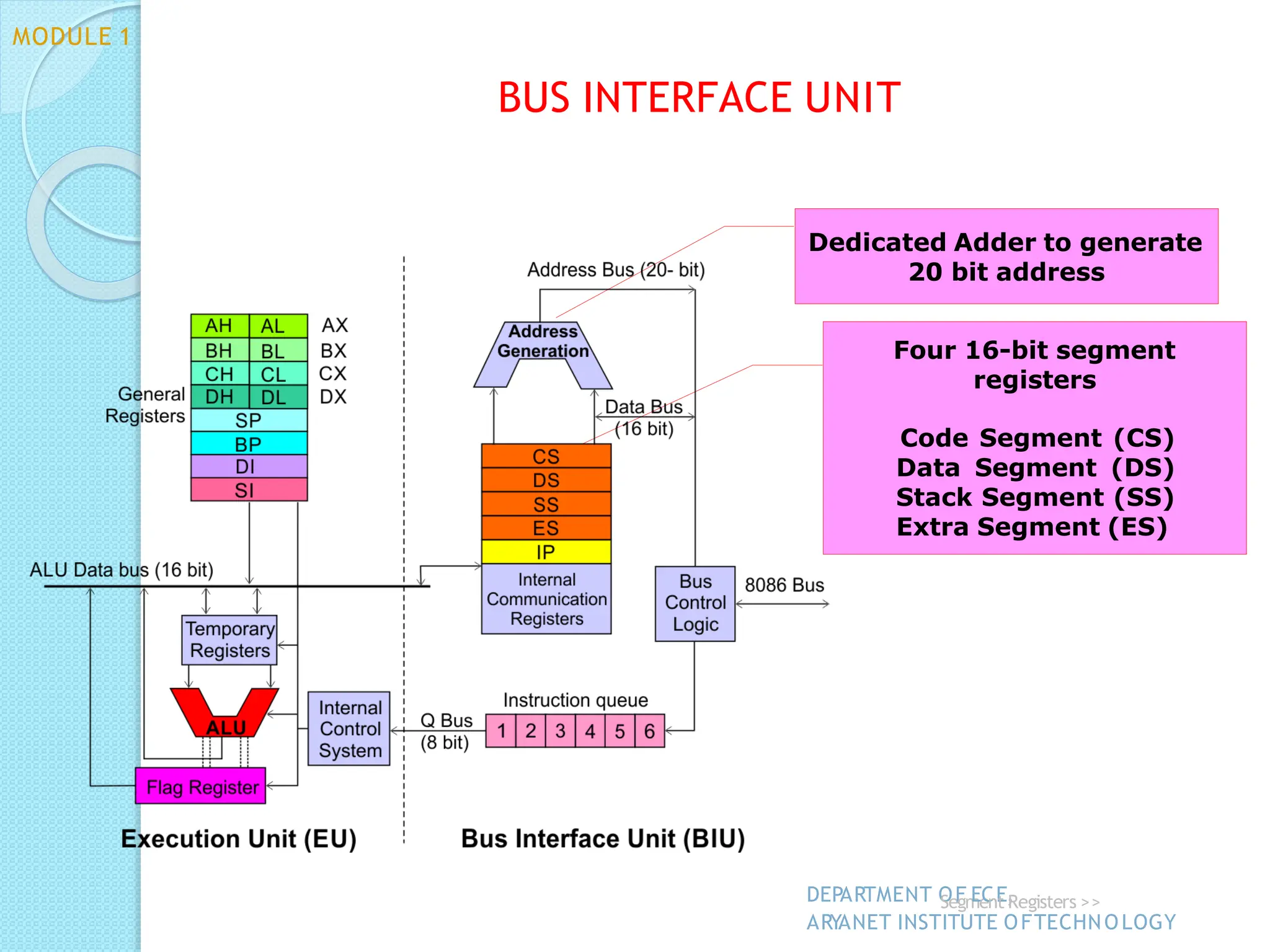
Dedicated Adder to generate
20 bit address
Four 16-bit segment
registers
Code Segment (CS)
Data Segment (DS)
Stack Segment (SS)
Extra Segment (ES)
BUS INTERFACE UNIT
DEPARTMENT O
SeF
gm
Ee
C
nE
t,
Registers >>
ARYANET INSTITUTE OFTECHNOLOGY
MODULE 1
ADDRESS GENERATION:
◦ 20-bit address of a byte is called its physical address
◦ It is specified as a logical address which is in the form of
two 16-bit numbers in the format base address:offset
◦ Segment register contains 16-bit base(segment) address
◦ Pointer register or index register contains offset address
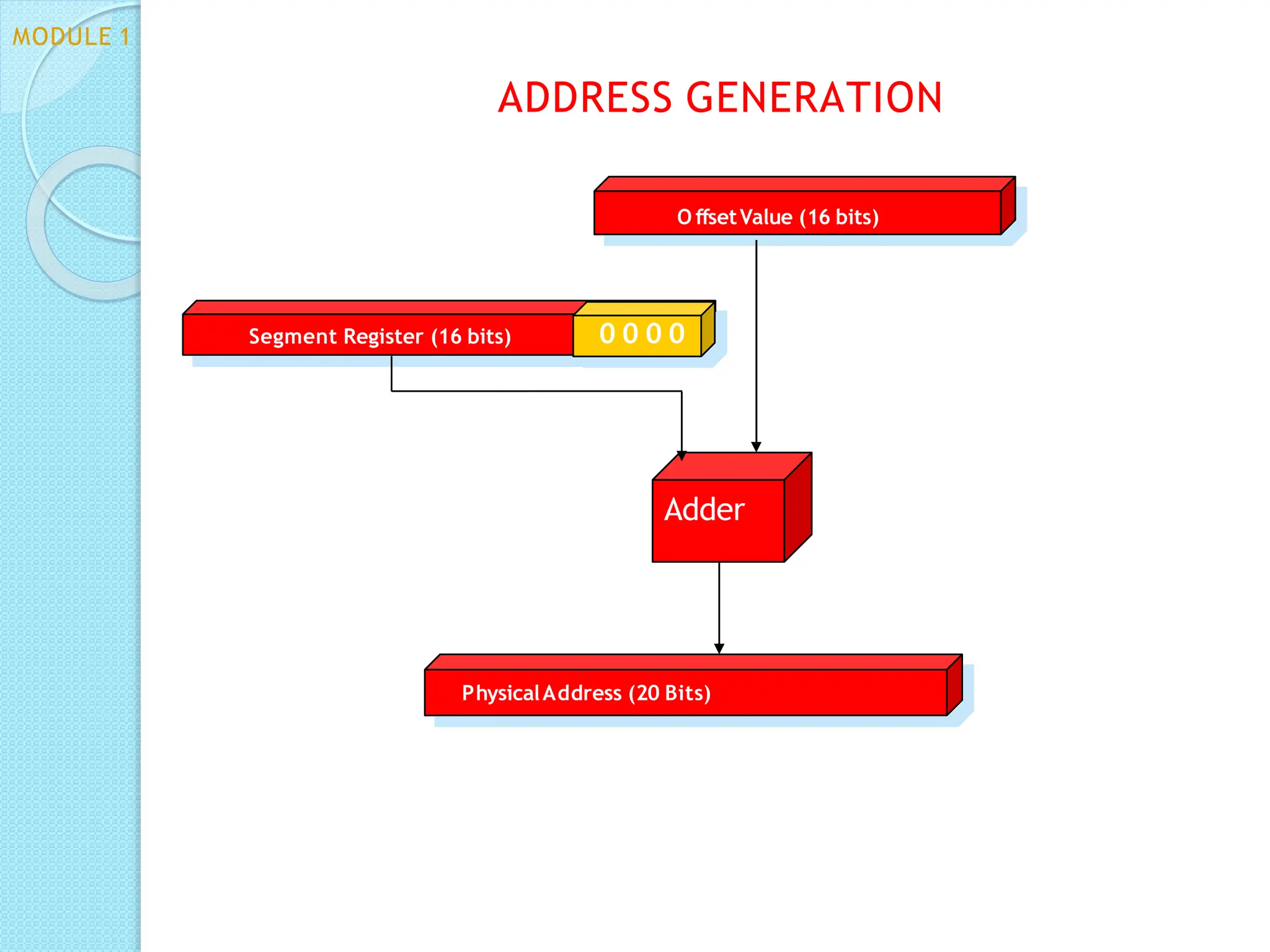
◦ Segment address left-shifted 4 times + offset address=
physical address
BUS INTERFACE UNIT
MODULE 1
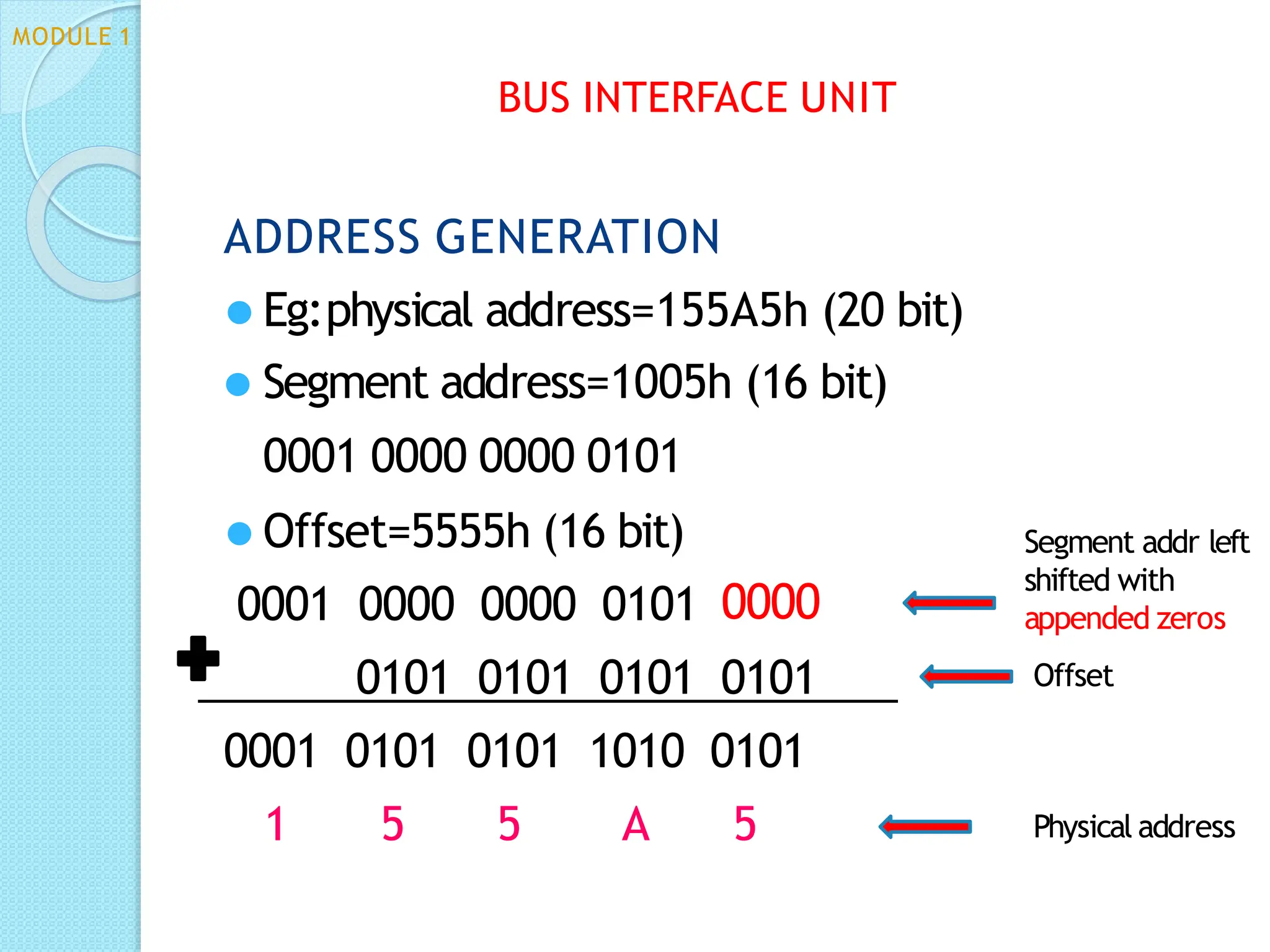
0101 0101 0101 0101
0001 0101 0101 1010 0101
1 5 5 A 5
BUS INTERFACE UNIT
Segment addr left
shifted with
appended zeros
Offset
Physical address
ADDRESS GENERATION
⚫ Eg:physical address=155A5h (20 bit)
⚫ Segment address=1005h (16 bit)
0001 0000 0000 0101
⚫ Offset=5555h (16 bit)
0001 0000 0000 0101 0000
MODULE 1
PhysicalAddress (20 Bits)
Adder
Segment Register (16 bits) 0 0 0 0
O ffsetValue (16 bits)
MODULE 1
ADDRESS GENERATION
MEMORY SEGMENTATION
⚫ 8086 has 20-bit address bus
⚫ Can access 220 address locations=1 MB
⚫ Physical memory address ranging from 00000h to FFFFFh
⚫ Total memory size divided into 16 segments of 64KB each-
segmentation
⚫ 4 types of segments- data,code,extra & stack segments
⚫ Data is stored in data segment
⚫ Program code in code segment
⚫ Extra segment is another type of data segment used in a
special way
⚫ Stack segment is an area of memory which functions and is
accessed differently from the other 3 segments
BUS INTERFACE UNIT
MODULE 1
MEMORY SEGMENTATION
⚫General concerns:
◦ Segment addresses are divisible by 16
◦ Segments can be overlapping- more than 1 logical address for the
same physical address
◦ There can be many segments with same base address but the offsets
within the segment will have to be taken care of to prevent
overwriting of data.
◦ A segment can have a maximum size of 64KB
◦ A program need not have all 4 segments, but it will have at least the
code segment
◦ The address used in instructions are called logical addresses and are
translated by the BIU to physical address
BUS INTERFACE UNIT
MODULE 1
MODULE 1
BUS INTERFACE UNIT
MEMORY SEGMENTATION
⚫Advantages
◦ It allows address registers to have the same size
as the data registers while allowing the use of 20-
bit physical address
◦ All addresses in memory are re-locatable
◦ Allows placing of code, data and stack portions of
the same program in different parts(segments) of
memory
, for data and code protection
Code Segment Register
16-bit
CS contains the base or start of the current code
segment; IP contains the distance or offset from this
address to the next instruction byte to be fetched.
BIU computes the 20-bit physical address by logically
shifting the contents of CS 4-bits to the left and then
adding the 16-bit contents of IP
.
This 20-bit address is then placed on the address bus and
the instruction byte is fetched.
Thus the logical address for an instruction byte is of the
form CS:IP
BUS INTERFACE UNIT
MODULE 1
Data Segment Register
16-bit
DS points to the current data segment; operands
for most instructions are fetched from this segment.
The 16-bit contents of the Source Index (SI) or
Destination Index (DI) or a 16-bit displacement are
used as offset for computing the 20-bit physical
address.
BUS INTERFACE UNIT
MODULE 1
Stack Segment Register
Stack in 8086 is LIFO stack
16-bit stack pointer(SP) points to the top of the
stack
Base address(16 bit) is available in stack segment
register(SS)
Logical address of a stack can be of the form SS:SP
or SS:BP
BIU computes the 20-bit physical address by
logically shifting the contents of SS 4-bits to the left
and then adding the 16-bit contents of SP
.
BUS INTERFACE UNIT
MODULE 1
Extra Segment Register
16-bit
Points to the extra segment in which data (in excess
of 64K pointed to by the DS) is stored.
String instructions use the ES and DI to determine
the 20-bit physical address for the destination.
BUS INTERFACE UNIT
MODULE 1
Instruction Pointer
16-bit
Always points to the next instruction
the currently executing
to be
code
executed within
segment.
So, this register contains the 16-bit offset address
pointing to the next instruction code within the
64Kb of the code segment area.
Its content is automatically incremented as the
execution of the next instruction takes place.
MODULE 1
BUS INTERFACE UNIT
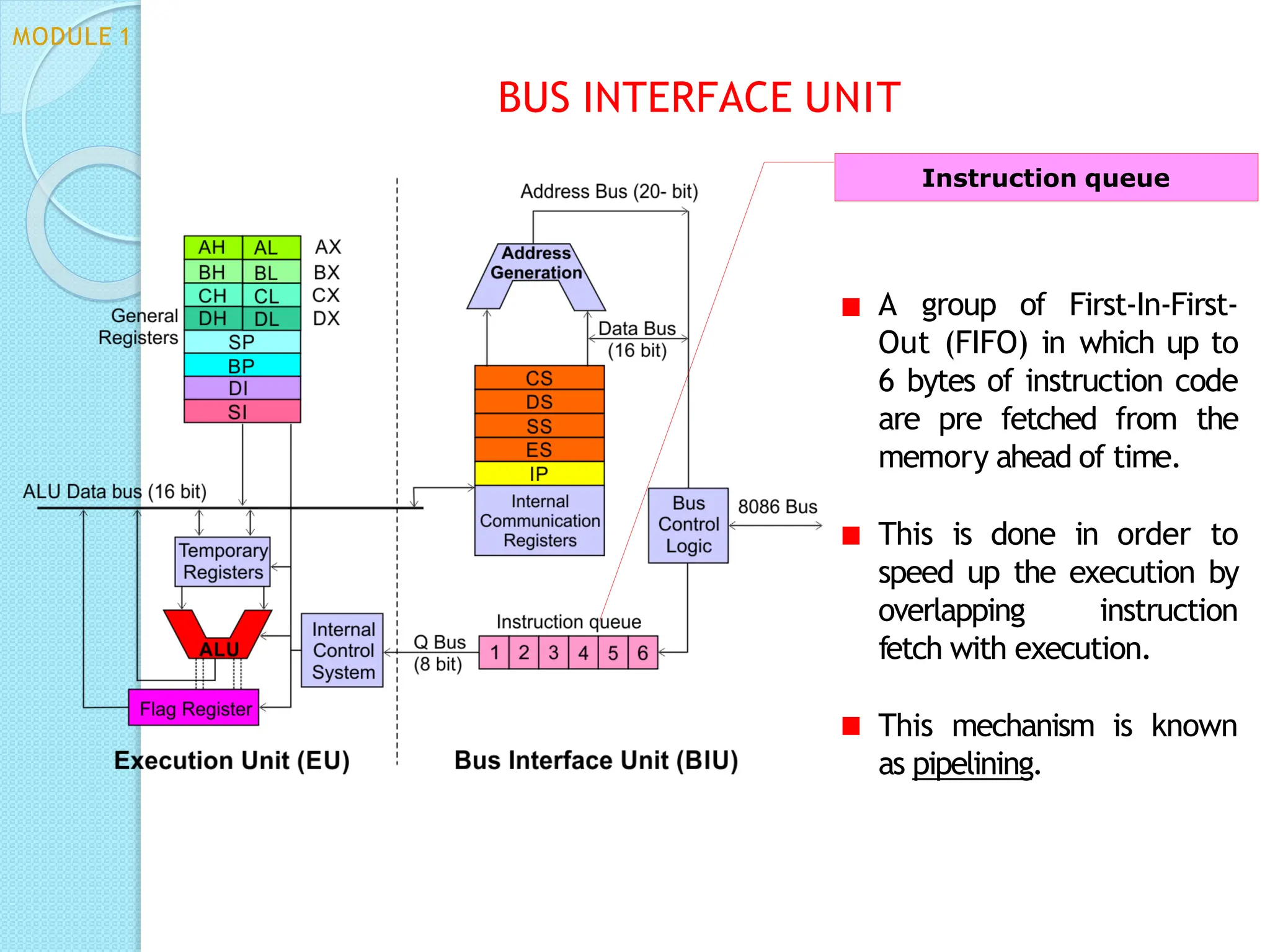
A group of First-In-First-
Out (FIFO) in which up to
6 bytes of instruction code
are pre fetched from the
memory ahead of time.
This is done in order to
speed up the execution by
overlapping instruction
fetch with execution.
This mechanism is known
as pipelining.
Instruction queue
BUS INTERFACE UNIT
MODULE 1
ASSIGNMENT 1
⚫INSTRUCTION SET OF 8086
◦ Data transfer instructions
◦ Branch instructions
◦ Arithmetic instructions
◦ Logical instructions
◦ Shift and rotate instructions
◦ String instructions
HOMEW ORK
⚫Draw the pin diagram of 8086
HARDWARE
SPECIFICATION
MODULE 1
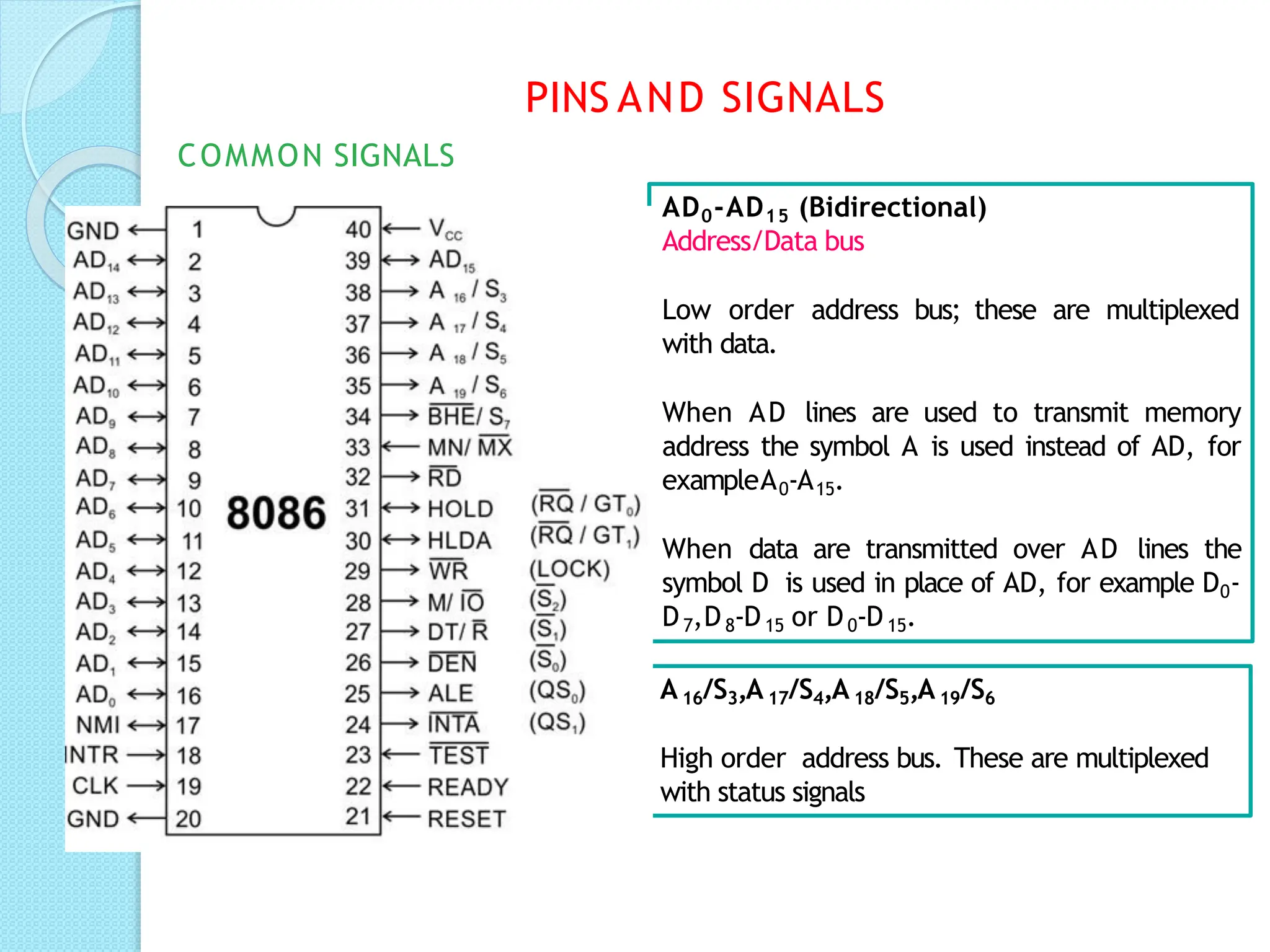
AD0-AD15 (Bidirectional)
Address/Data bus
Low order address bus; these are multiplexed
with data.
When AD lines are used to transmit memory
address the symbol A is used instead of AD, for
exampleA0-A15.
When data are transmitted over AD lines the
symbol D is used in place of AD, for example D0-
D7,D8-D15 or D0-D15.
A16/S3,A17/S4,A18/S5,A19/S6
High order address bus. These are multiplexed
with status signals
PINS AND SIGNALS
COMMON SIGNALS
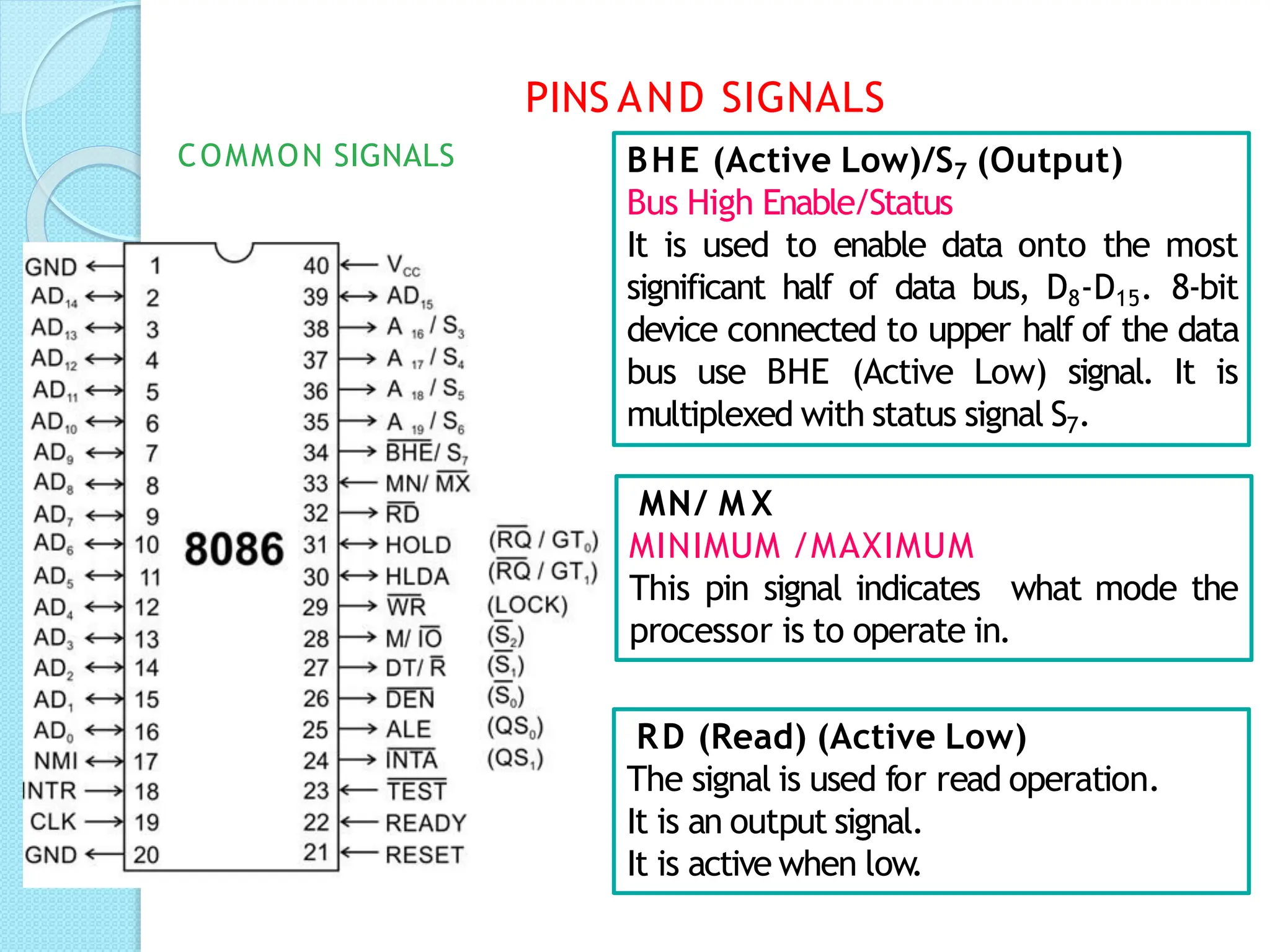
BHE (Active Low)/S7 (Output)
Bus High Enable/Status
It is used to enable data onto the most
significant half of data bus, D8-D15. 8-bit
device connected to upper half of the data
bus use BHE (Active Low) signal. It is
multiplexed with status signal S7.
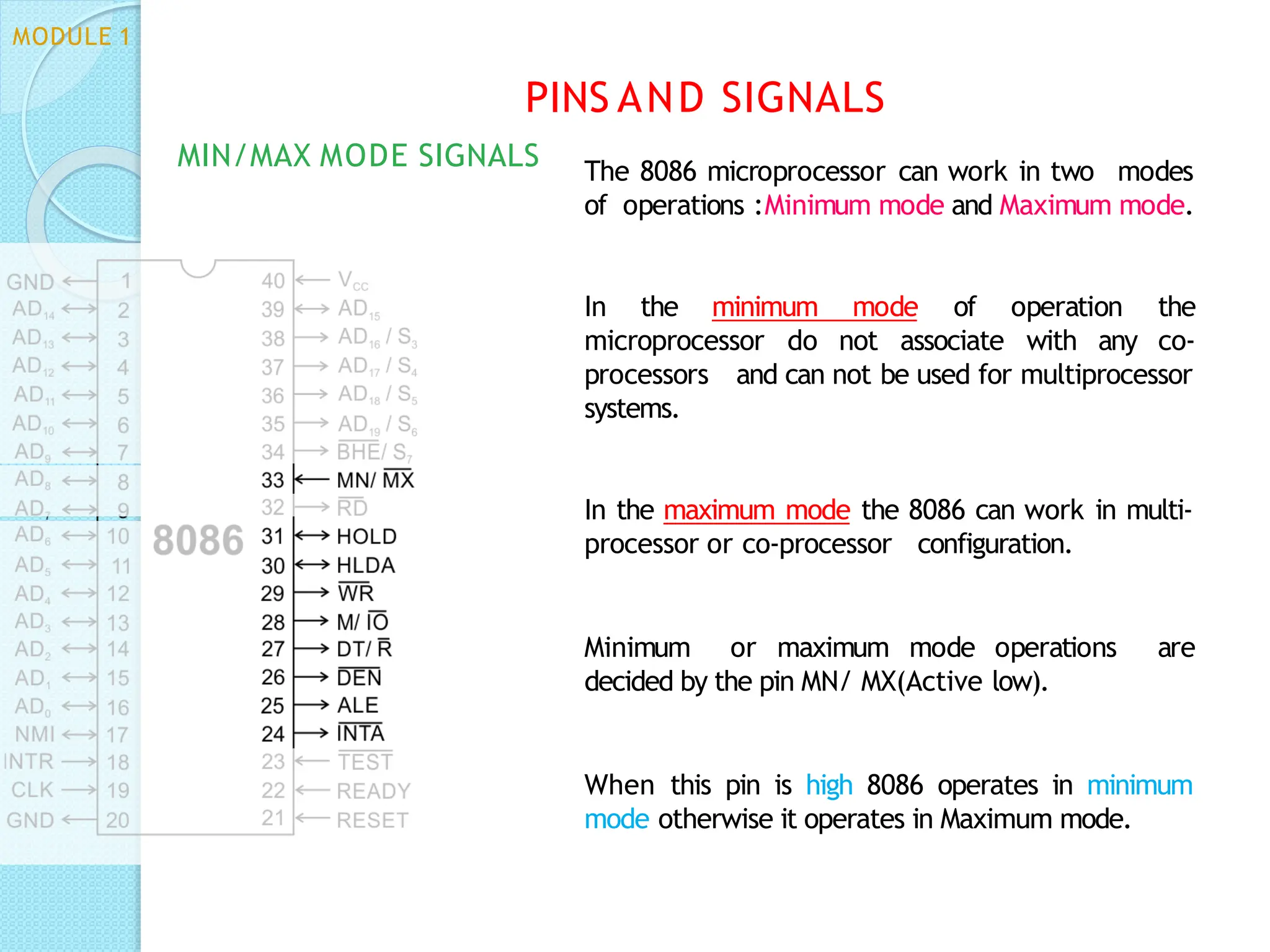
MN/ M X
MINIMUM /MAXIMUM
This pin signal indicates what mode the
processor is to operate in.
RD (Read) (Active Low)
The signal is used for read operation.
It is an output signal.
It is active when low.
PINS AND SIGNALS
COMMON SIGNALS
TEST
TEST Input is tested by the‘WAIT’instruction.
8086 will enter a wait state after execution of the
WAIT instruction and will resume execution only
when the TEST is made low by an active
hardware.
This is used to synchronize an external activity to
the processor internal operation.
READY
This is the acknowledgement from the slow
device or memory that they have completed the
data transfer
.
The signal made available by the devices is
synchronized by the 8284A clock generator to
provide ready input to the 8086.
The signal is active high.
PINS AND SIGNALS
COMMON SIGNALS
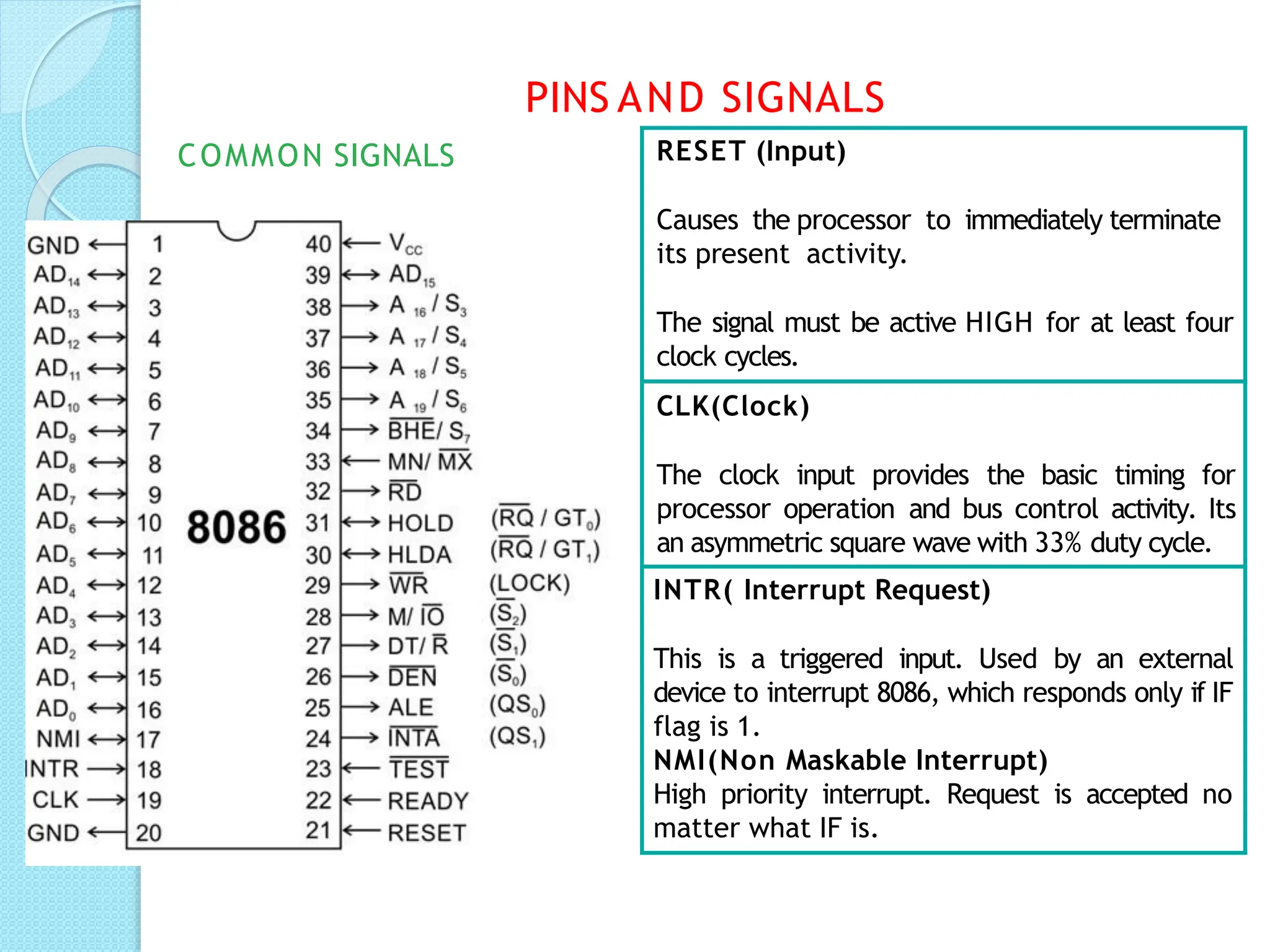
RESET (Input)
Causes the processor to immediately terminate
its present activity.
The signal must be active HIGH for at least four
clock cycles.
CLK(Clock)
The clock input provides the basic timing for
processor operation and bus control activity. Its
an asymmetric square wave with 33% duty cycle.
INTR( Interrupt Request)
This is a triggered input. Used by an external
device to interrupt 8086, which responds only if IF
flag is 1.
NMI(Non Maskable Interrupt)
High priority interrupt. Request is accepted no
matter what IF is.
PINS AND SIGNALS
COMMON SIGNALS
The 8086 microprocessor can work in two modes
of operations :Minimum mode and Maximum mode.
In the minimum mode
microprocessor do not associate
of operation the
with any co-
and can not be used for multiprocessor
processors
systems.
In the maximum mode the 8086 can work in multi-
processor or co-processor configuration.
Minimum or maximum mode operations are
decided by the pin MN/ MX(Active low).
When this pin is high 8086 operates in minimum
mode otherwise it operates in Maximum mode.
PINS AND SIGNALS
MODULE 1
MIN/MAX MODE SIGNALS
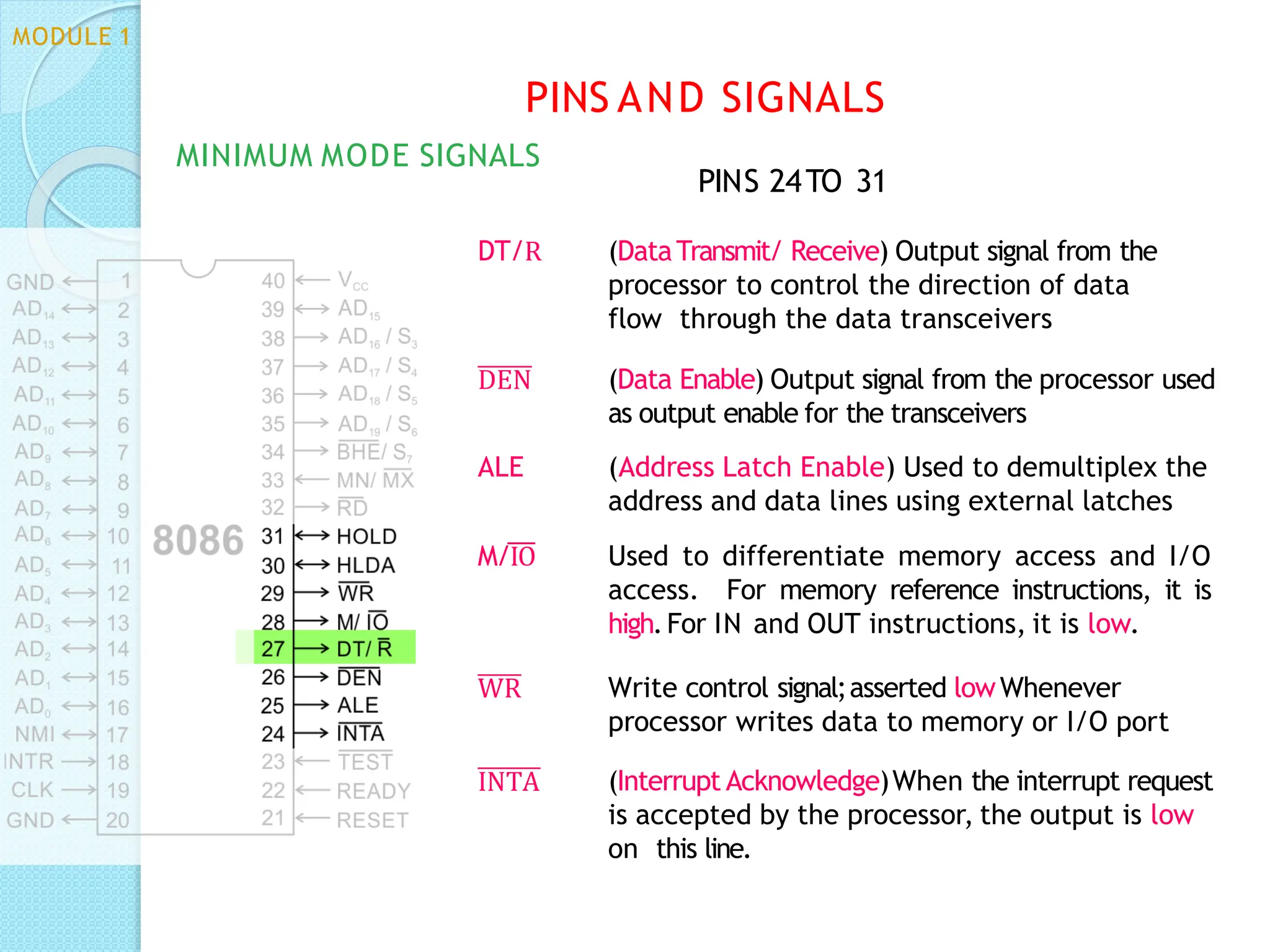
DT/R (DataTransmit/ Receive) Output signal from the
processor to control the direction of data
flow through the data transceivers
DEN (Data Enable) Output signal from the processor used
as output enable for the transceivers
ALE (Address Latch Enable) Used to demultiplex the
address and data lines using external latches
M/IO Used to differentiate memory access and I/O
access. For memory reference instructions, it is
high.For IN and OUT instructions, it is low.
WR Write control signal;asserted lowWhenever
processor writes data to memory or I/O port
INTA (Interrupt Acknowledge)When the interrupt request
is accepted by the processor, the output is low
on this line.
MODULE 1
PINS AND SIGNALS
MINIMUM MODE SIGNALS
PINS 24TO 31
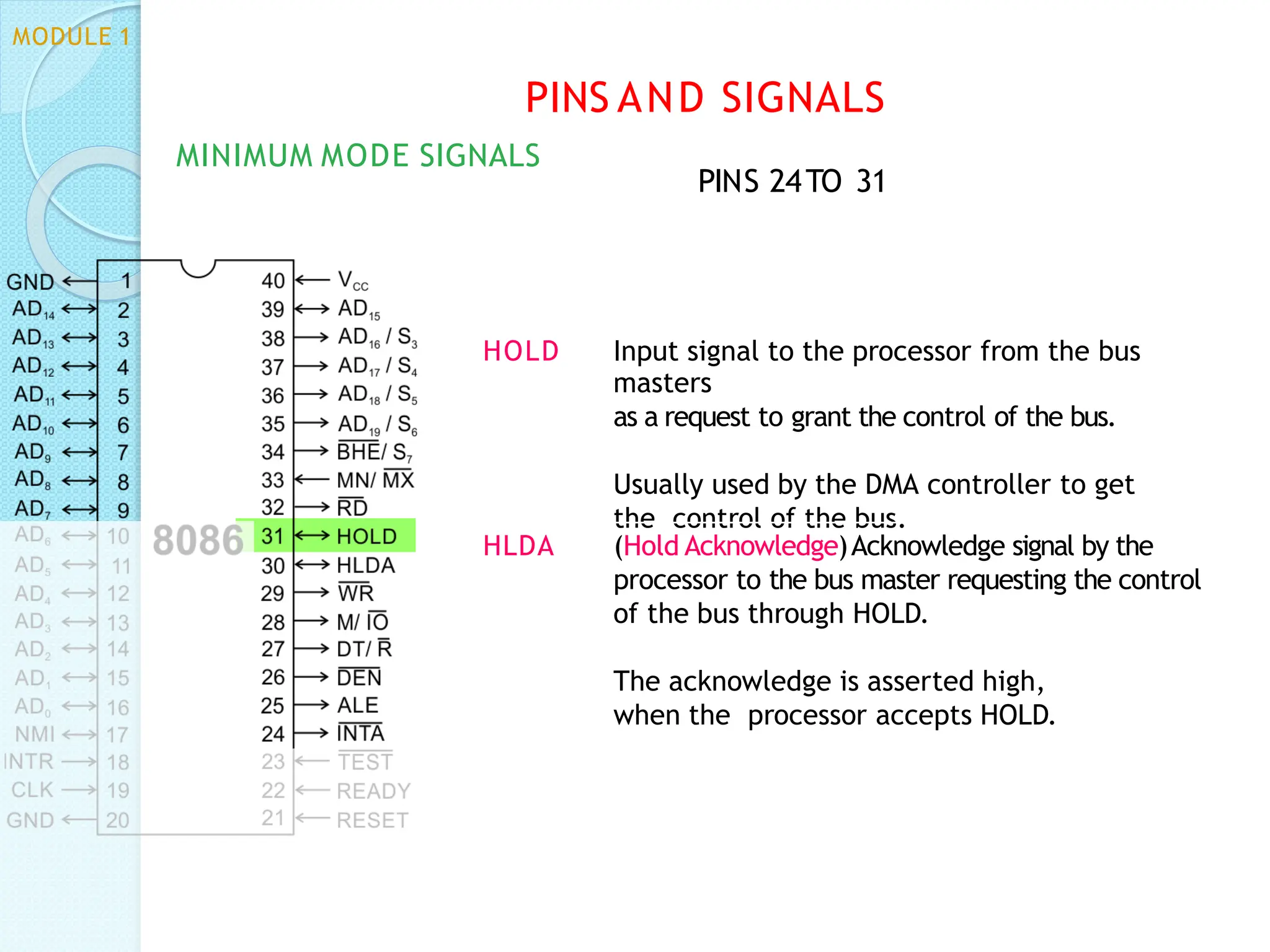
HOLD Input signal to the processor from the bus
masters
as a request to grant the control of the bus.
Usually used by the DMA controller to get
the control of the bus.
HLDA (Hold Acknowledge)Acknowledge signal by the
processor to the bus master requesting the control
of the bus through HOLD.
The acknowledge is asserted high,
when the processor accepts HOLD.
MODULE 1
PINS AND SIGNALS
MINIMUM MODE SIGNALS
PINS 24TO 31
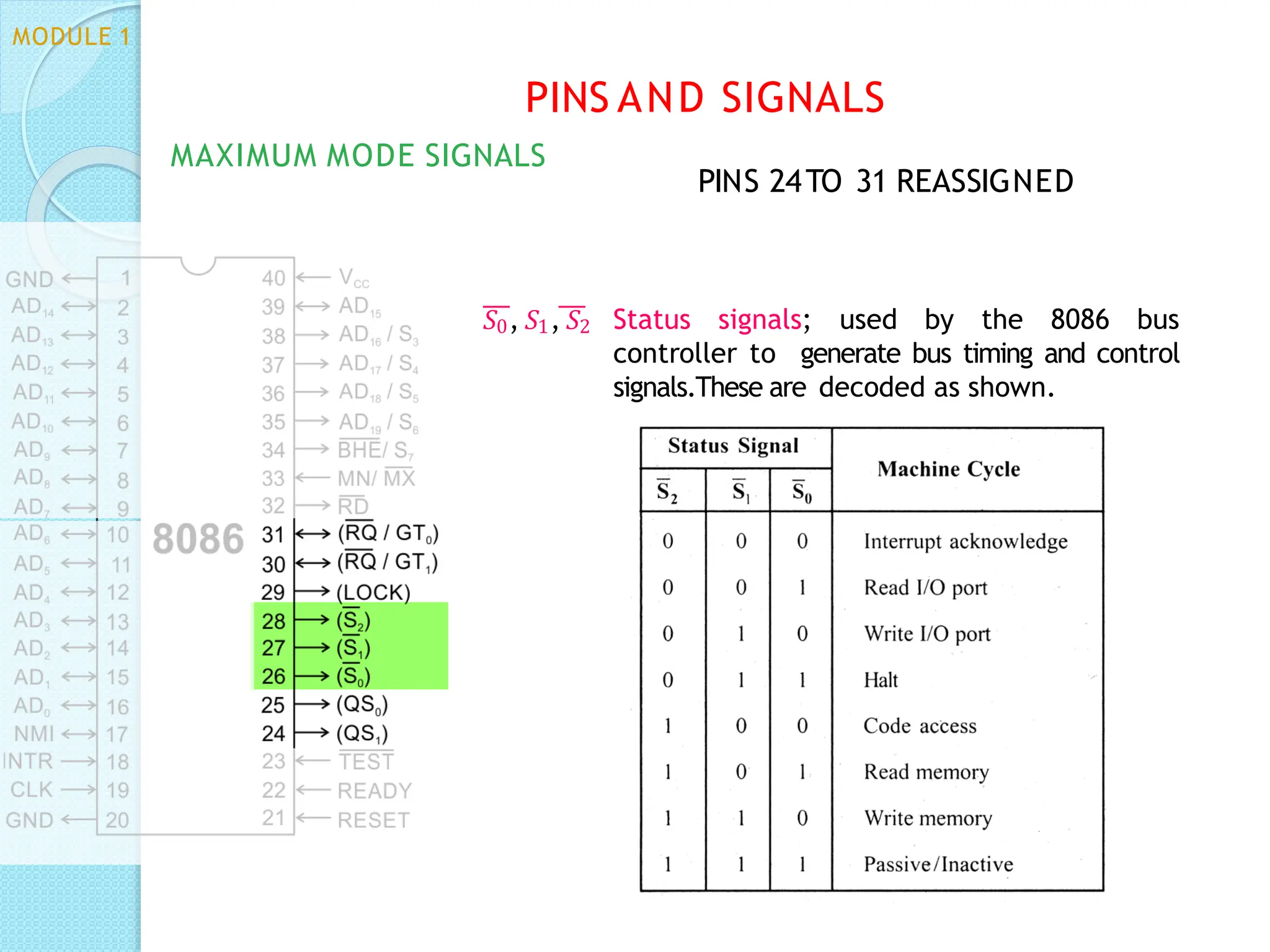
𝑆0, 𝑆1, 𝑆2 Status signals; used by the 8086 bus
controller to generate bus timing and control
signals.These are decoded as shown.
PINS AND SIGNALS
MAXIMUM MODE SIGNALS
MODULE 1
PINS 24TO 31 REASSIGNED
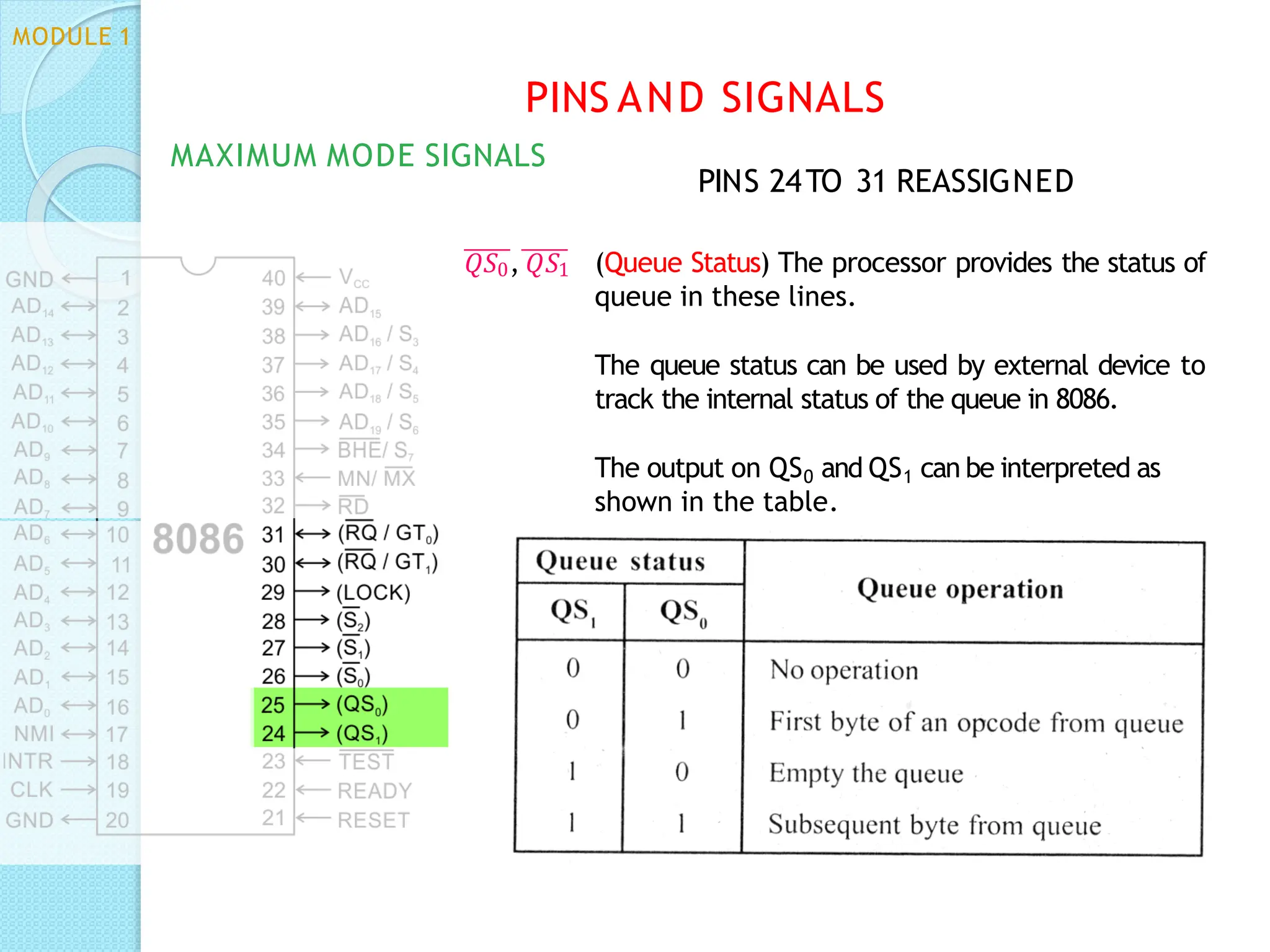
𝑄𝑆0, 𝑄𝑆1 (Queue Status) The processor provides the status of
queue in these lines.
The queue status can be used by external device to
track the internal status of the queue in 8086.
The output on QS0 and QS1 can be interpreted as
shown in the table.
MODULE 1
PINS AND SIGNALS
MAXIMUM MODE SIGNALS
PINS 24TO 31 REASSIGNED
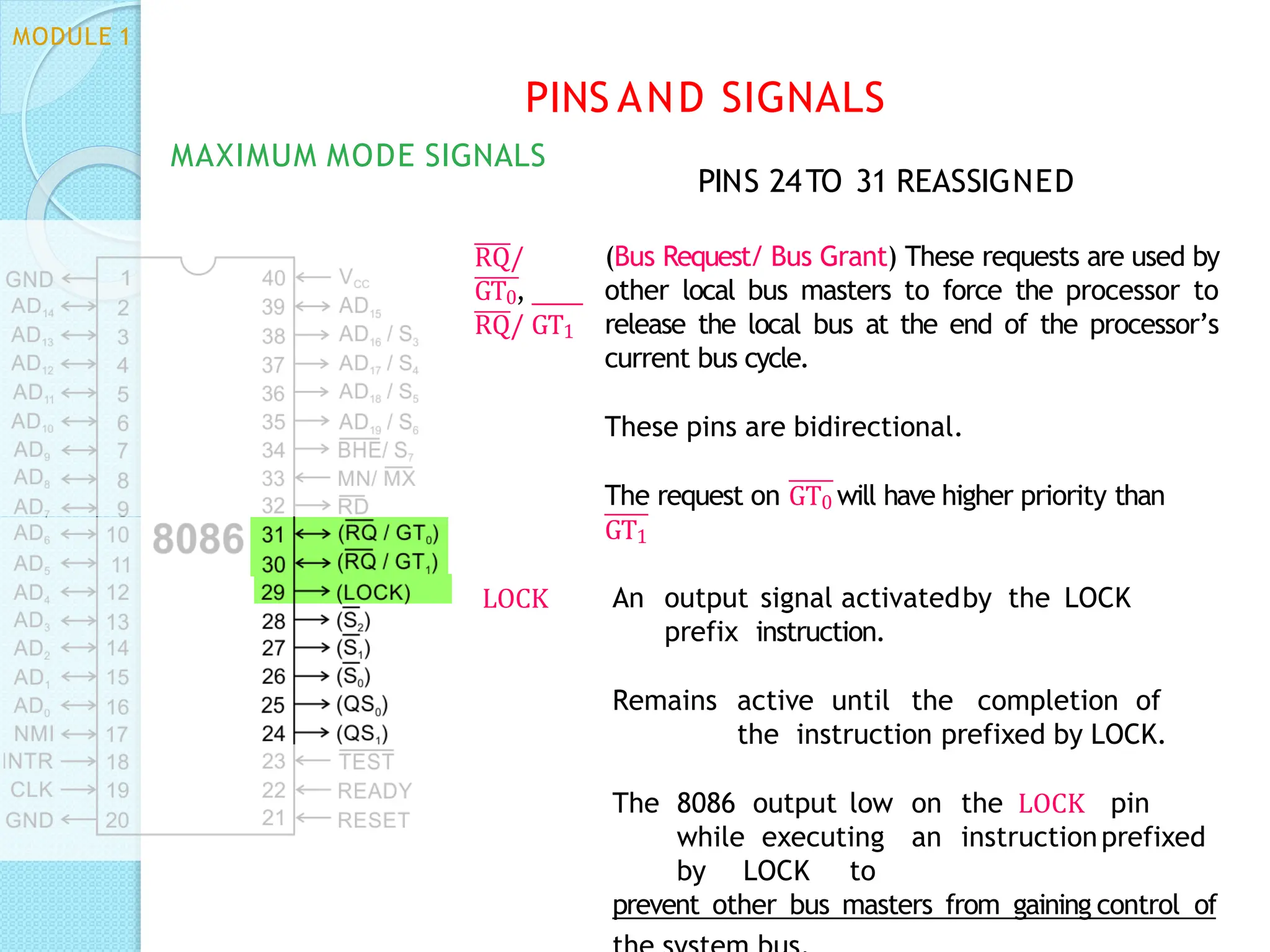
RQ/
GT0,
RQ/ GT1
(Bus Request/ Bus Grant) These requests are used by
other local bus masters to force the processor to
release the local bus at the end of the processor’s
current bus cycle.
These pins are bidirectional.
The request on GT0 will have higher priority than
GT1
MODULE 1
MAXIMUM MODE SIGNALS
PINS AND SIGNALS
PINS 24TO 31 REASSIGNED
LOCK An output signal activatedby the LOCK
prefix instruction.
Remains active until the completion of
the instruction prefixed by LOCK.
The 8086 output low on the LOCK pin
while executing an instructionprefixed
by LOCK to
prevent other bus masters from gaining control of
ADDRESSING MODES
MODULE 1
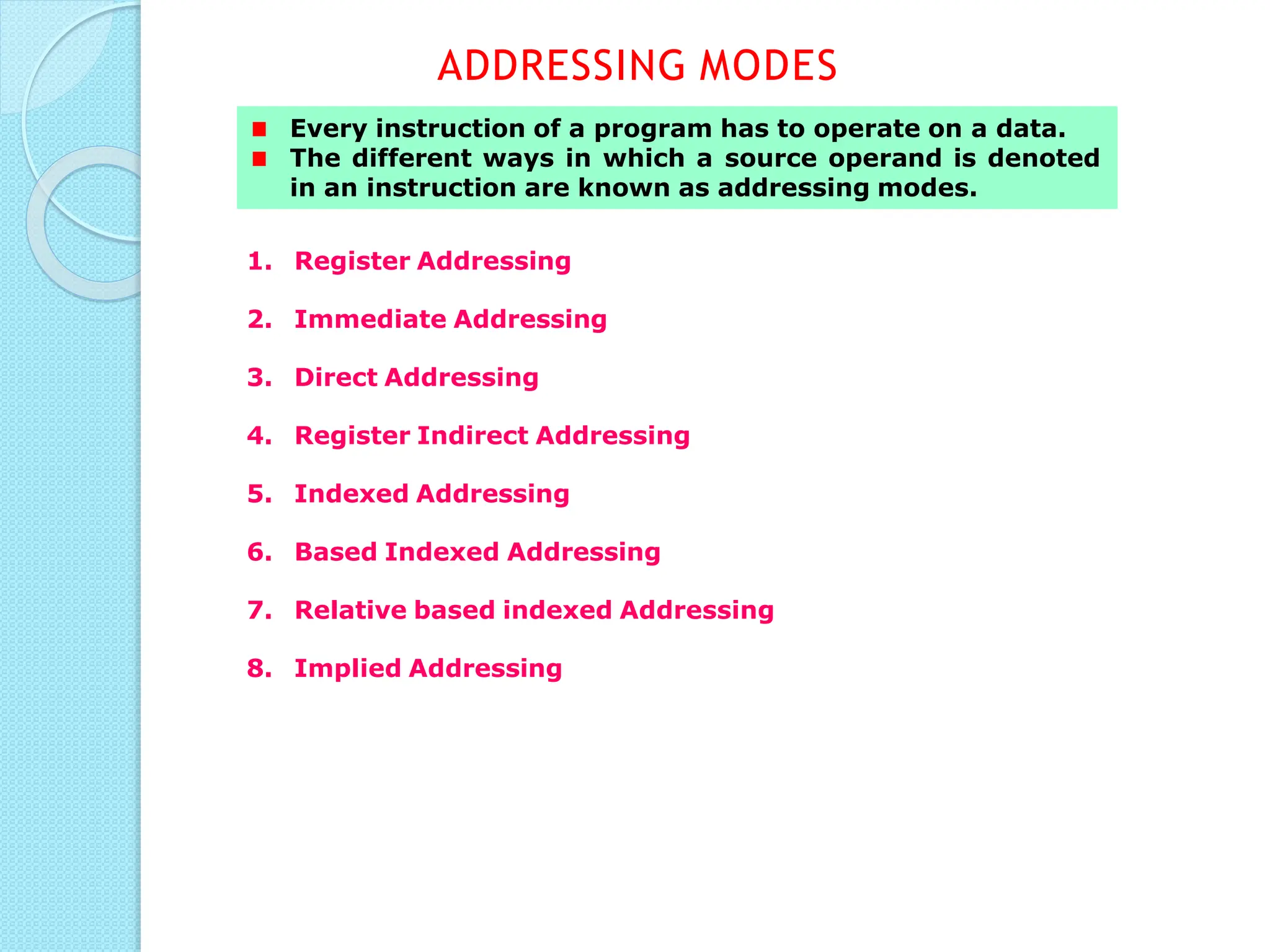
Every instruction of a program has to operate on a data.
The different ways in which a source operand is denoted
in an instruction are known as addressing modes.
1. Register Addressing
2. Immediate Addressing
3. Direct Addressing
4. Register Indirect Addressing
5. Indexed Addressing
6. Based Indexed Addressing
7. Relative based indexed Addressing
8. Implied Addressing
ADDRESSING MODES
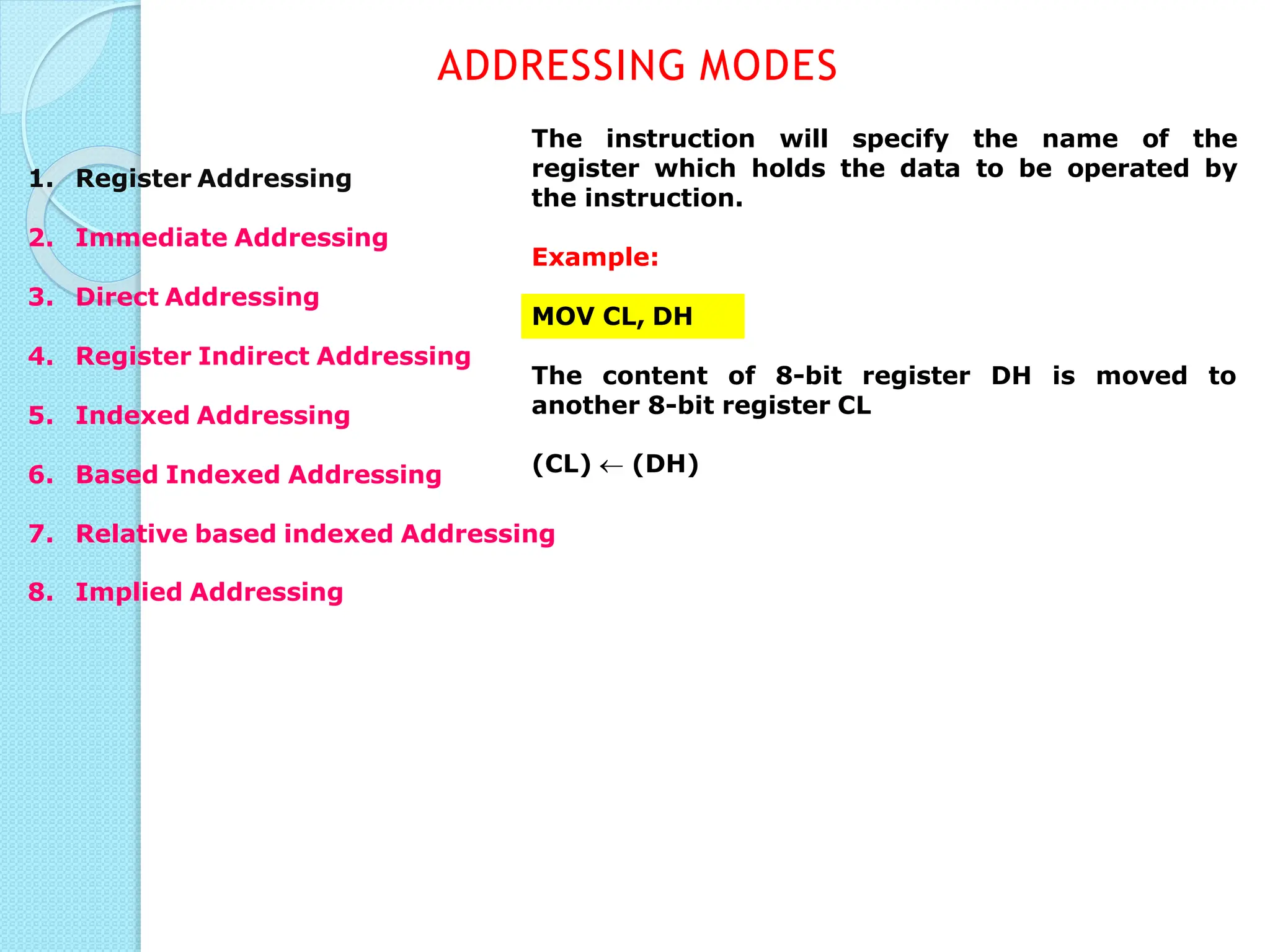
The instruction will specify the name of the
register which holds the data to be operated by
the instruction.
Example:
MOV CL, DH
The content of 8-bit register DH is moved to
another 8-bit register CL
(CL)  (DH)
ADDRESSING MODES
1. Register Addressing
2. Immediate Addressing
3. Direct Addressing
4. Register Indirect Addressing
5. Indexed Addressing
6. Based Indexed Addressing
7. Relative based indexed Addressing
8. Implied Addressing
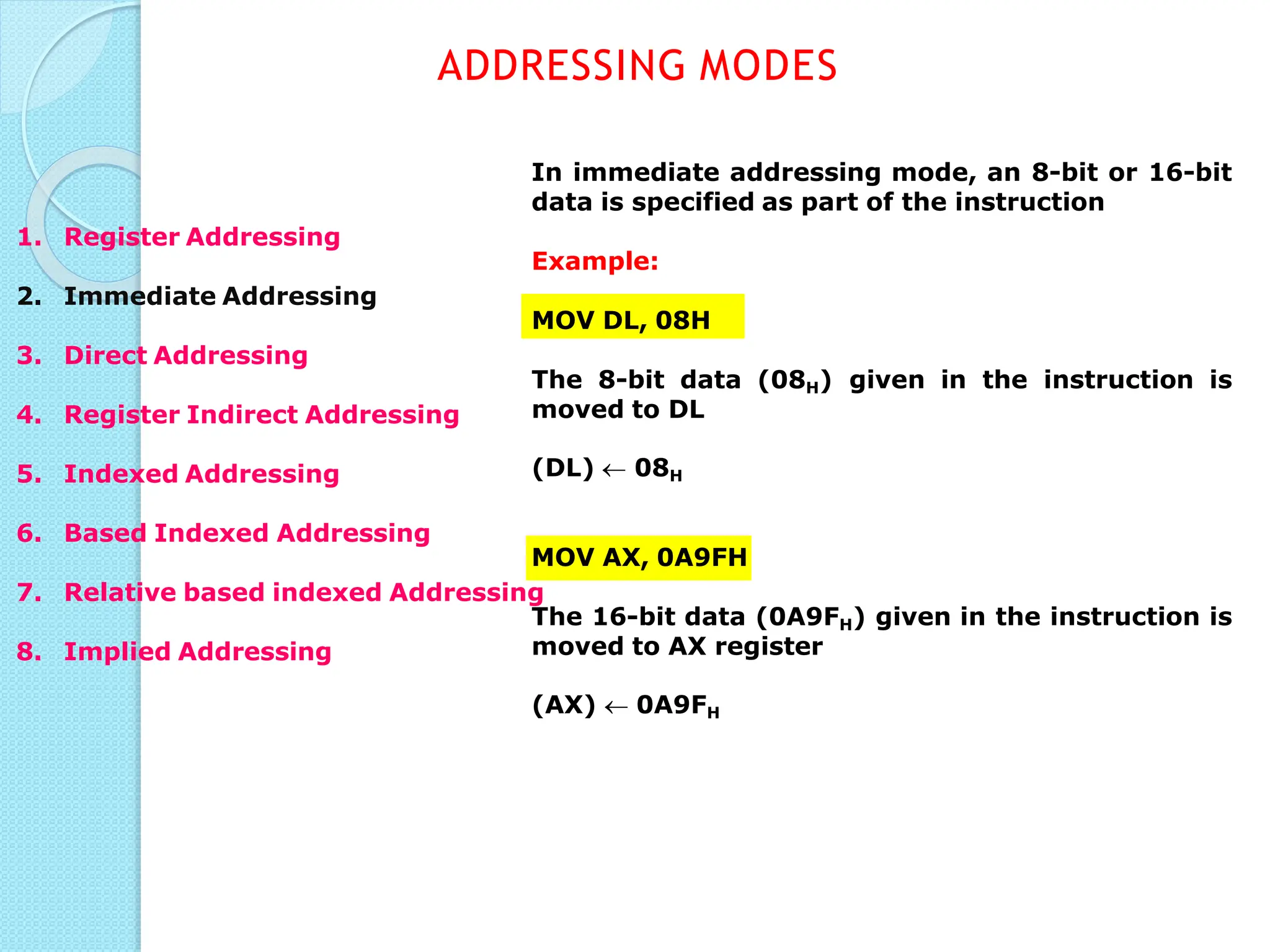
In immediate addressing mode, an 8-bit or 16-bit
data is specified as part of the instruction
Example:
MOV DL, 08H
The 8-bit data (08H) given in the instruction is
moved to DL
(DL)  08H
MOV AX, 0A9FH
The 16-bit data (0A9FH) given in the instruction is
moved to AX register
(AX)  0A9FH
ADDRESSING MODES
1. Register Addressing
2. Immediate Addressing
3. Direct Addressing
4. Register Indirect Addressing
5. Indexed Addressing
6. Based Indexed Addressing
7. Relative based indexed Addressing
8. Implied Addressing
Here, the effective address of the memory
location at which the data operand is stored is
given in the instruction.
The effective address is just a 16-bit number
written directly in the instruction.
Example:
MOV BX, [1354H]
MOV BL, [0400H]
square brackets around the 1354H denotes
The
the contents of the memory location. When
executed, this instruction will copy the contents of
the memory location into BX register.
This addressing mode is called direct because the
displacement of the operand from the segment
base is specified directly in the instruction.
ADDRESSING MODES
1. Register Addressing
2. Immediate Addressing
3. Direct Addressing
4. Register Indirect Addressing
5. Indexed Addressing
6. Based Indexed Addressing
7. Relative based indexed
Addressing
8. Implied Addressing
In Register indirect addressing, name of the
register which holds the effective address (EA)
will be specified in the instruction.
Registers used to hold EA are any of the following
registers:
BX, BP, DI and SI.
Content of the DS register is used for base
address calculation.
Example:
MOV CX, [BX]
Operations:
EA = (BX)
BA = (DS) x 1610
MA = BA + EA
(CX)  (MA) or,
(CL)  (MA)
(CH)  (MA +1)
Note : Register/ memory
enclosed in brackets refer to
content of register/ memory
ADDRESSING MODES
1. Register Addressing
2. Immediate Addressing
3. Direct Addressing
4. Register Indirect Addressing
5. Indexed Addressing
6. Based Indexed Addressing
7. Relative based indexed
Addressing
8. Implied Addressing
SI or DI register is used to hold an index value for
memory.
In case of 8-bit displacement, it is sign extended
to 16-bit before adding to the base value.
Example:
MOV CX, [SI]
Operations:
offset = (SI)
BA = (DS) x 1610
MA = BA + offset
(CX)  (MA) or,
(CL)  (MA)
(CH)  (MA + 1)
ADDRESSING MODES
1. Register Addressing
2. Immediate Addressing
3. Direct Addressing
4. Register Indirect Addressing
5. Indexed Addressing
6. Based Indexed Addressing
7. Relative based indexed Addressing
8. Implied Addressing
In Based Index Addressing, the effective address
is computed from the sum of a base register (BX
or BP) and an index register (SI or DI).
Example:
MOV DX, [BX + SI]
Operations:
000AH  0AH (Sign extended)
EA = (BX) + (SI)
BA = (DS) x 1610
MA = BA + EA
(DL)  (MA)
(DH)  (MA + 1)
ADDRESSING MODES
1. Register Addressing
2. Immediate Addressing
3. Direct Addressing
4. Register Indirect Addressing
5. Indexed Addressing
6. Based Indexed Addressing
7. Relative based indexed Addressing
(DX)  (MA) or,
8. Implied Addressing
ADDRESSING MODES
1. Register Addressing
2. Immediate Addressing
3. Direct Addressing
4. Register Indirect Addressing
5. Indexed Addressing
6. Based Indexed Addressing
7. Relative based indexed Addressing
8. Implied Addressing
In relative based Indexed Addressing, the
effective address is computed from the sum of a
base register (BX or BP), an index register (SI or
DI) and a displacement.
Example:
MOV DX, [BX + SI + 0AH]
Operations:
000AH  0AH (Sign extended)
EA = (BX) + (SI) + 000AH
BA = (DS) x 1610
MA = BA + EA
(DX)  (MA) or,
(DL)  (MA)
(DH)  (MA + 1)
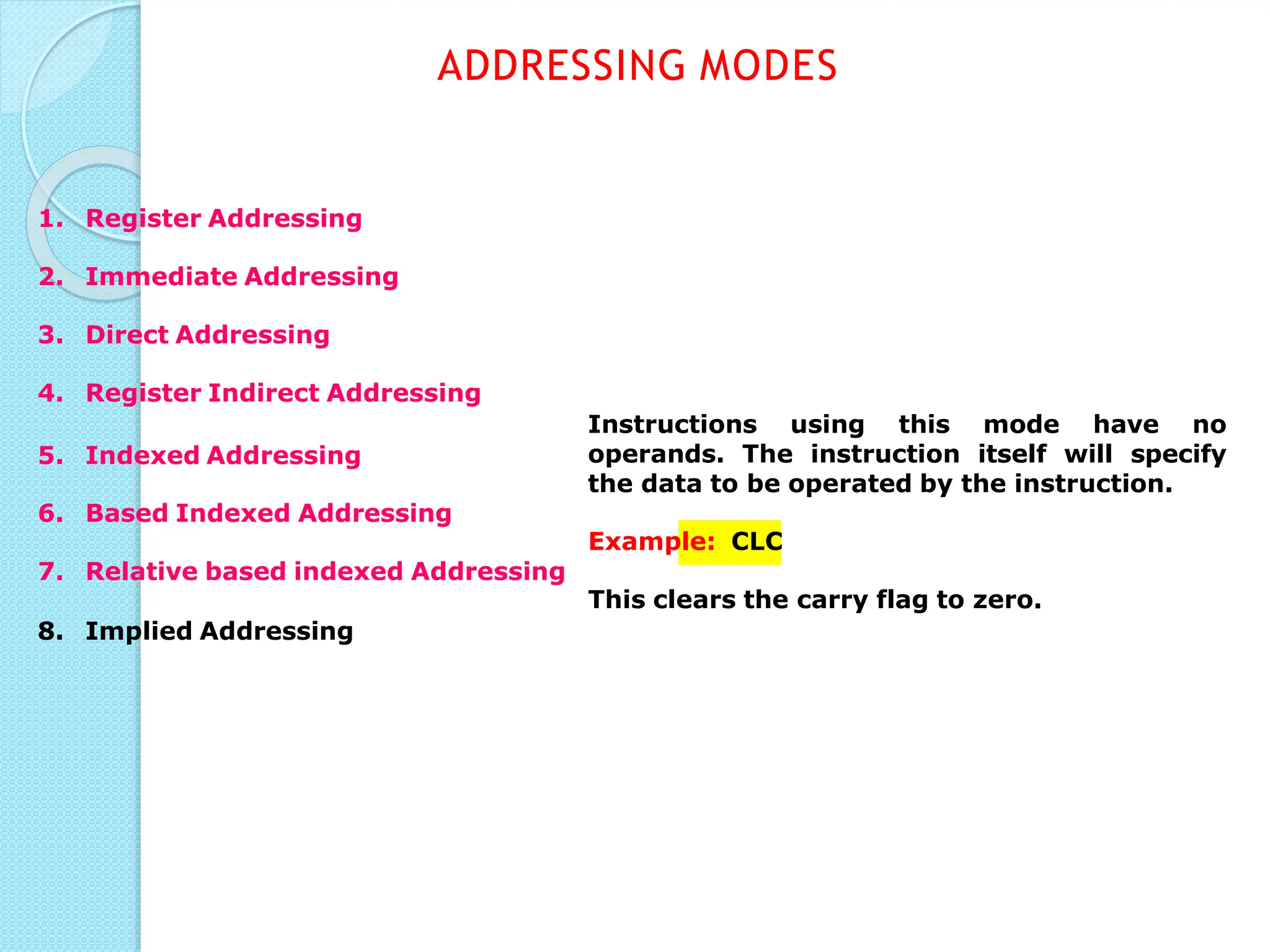
Instructions using this mode have no
operands. The instruction itself will specify
the data to be operated by the instruction.
ADDRESSING MODES
1. Register Addressing
2. Immediate Addressing
3. Direct Addressing
4. Register Indirect Addressing
5. Indexed Addressing
6. Based Indexed Addressing
Example: CLC
7. Relative based indexed Addressing
This clears the carry flag to zero.
8. Implied Addressing

8086 Architecture, Pin diagram, Addressing modes (3).pdf

  • 1.
    8086 Microprocessor Architecture of8086 Memory segmentation, Signal Description, Addressing modes,
  • 2.
    MODULE I ⚫Architecture of8086 ⚫Memory segmentation ⚫Signal description ⚫Addressing modes
  • 3.
    MICROPROCESSOR ⚫ A singlechip computer ⚫ Device which has data processing capability ⚫ Program controlled semiconductor device (IC) which fetches (from memory), decodes and executes instructions. ⚫ It is used as CPU (Central Processing Unit) in computers. ⚫ Microcontroller??? ◦ P + RAM + ROM + I/O ports + Timer ◦ Less bulkier than P MODULE 1
  • 4.
    hardware Third Generation During 1978 HMOStechnology  Faster speed, Higher packing density 16 bit processors  40/ 48/ 64 pins Easier to program Dynamically relatable programs Processor has multiply/ divide arithmetic More powerful interrupt handling capabilities Flexible I/O port addressing Intel 8086 (16 bit processor) First Generation Between 1971 – 1973 PMOS technology, non compatible with TTL 4 bit processors  16 pins 8 and 16 bit processors  40 pins Due to limitations of pins, signals are multiplexed Fifth Generation Pentium 32-bit P Superscalar architecture Fourth Generation During 1980s Low power version of HMOS technology (HCMOS) 32 bit processors Physical memory space 224 bytes = 16 Mb Virtual memory space 240 bytes = 1 Tb Floating point hardware Supports increased number of addressing modes Intel 80386, 80486 Second Generation During 1973 NMOS technology  Faster speed, Higher density, Compatible with TTL 4 / 8/ 16 bit processors  40 pins Ability to address large memory spaces and I/O ports Greater number of levels of subroutine nesting Better interrupt handling capabilities Intel 8085 (8 bit processor) GENERATION MODULE 1
  • 5.
    8086- Overview ⚫First 16-bitprocessor released by INTEL in 1978 ⚫Powerful instruction set ⚫20-bit addressing capability ⚫Powerful set of registers- general purpose and special purpose registers MODULE 1
  • 6.
    HOMEW ORK ⚫DRAW THEINTERNAL BLOCK DIAGRAM OF 8086 (detailed) ◦ Refer Lyla B Das., TheX86 Microprocessors Architecture,Programming and Interfacing
  • 7.
  • 8.
  • 9.
    Some of the16 bit registers can be used as two 8 bit registers as : AX can be used as AH and AL BX can be used as BH and BL EU decodes and executes instructions. A decoder in the EU control system translates instructions. 16-bit ALU for performing arithmetic and logic operation Four general purpose registers(AX, BX, CX, DX); Pointer registers (Stack Pointer, Base Pointer); and Index registers (Source Index, Destination Index) each of 16-bits EXECUTION UNIT MODULE 1
  • 10.
    Accumulator Register (AX) Consistsof two 8-bit registers AL andAH, which can be combined together and used as a 16-bit registerAX. AL in this case contains the low order byte of the word,andAH contains the high-order byte. The I/O instructions use the AX or AL for inputting / outputting 16 or 8 bit data to or from an I/O port. Multiplication and Division instructions also use the AX orAL as implicit register for one of the operands. EXECUTION UNIT MODULE 1
  • 11.
    Base Register (BX) Consistsof two 8-bit registers BL and BH, which can be combined together and used as a 16-bit register BX. BL in this case contains the low-order byte of the word, and BH contains the high-order byte. This is the only general purpose register whose contents can be used for addressing the 8086 memory . All memory references utilizing this register content for addressing use DS as the default segment register . EXECUTION UNIT MODULE 1
  • 12.
    Counter Register (CX) Consistsof two 8-bit registers CL and CH, which can be combined together and used as a 16-bit register CX. When combined, CL register contains the low order byte of the word, and CH contains the high- order byte. Instructions such as SHIFT ,ROTATE and LOOP use the contents of CX as a counter . EXECUTION UNIT MODULE 1
  • 13.
    Data Register (DX) Consistsof two 8-bit registers DL and DH, which can be combined together and used as a 16-bit register DX. When combined, DL register contains the low order byte of the word, and DH contains the high- order byte. Used to hold the high 16-bit result (data) in 16 X 16 multiplication or the high 16-bit dividend (data) before a 32 ÷ 16 division and the 16-bit remainder after division. EXECUTION UNIT MODULE 1
  • 14.
    Stack Pointer (SP)and Base Pointer (BP) SP and BP are used to access data in the stack segment. SP always points to the top of the stack SP contents are automatically updated (incremented/ decremented) due to execution of a POP or PUSH instruction. BP can point to any location in the stack EXECUTION UNIT MODULE 1
  • 15.
    Source Index (SI)and Destination Index (DI) Used in indexed addressing. Instructions that process data strings use the SI and DI registers together with DS and ES respectively in order to distinguish between the source and destination addresses. EXECUTION UNIT MODULE 1
  • 16.
    Flag Register 15 1413 12 11 10 9 8 7 6 5 4 3 2 1 0 AF PF CF Carry Flag This flag is set,when there is a carry out of MSB in case of addition or a borrow in case of subtraction. Parity Flag This flag is set to 1,if the lower byte of the result contains even number of 1’ s ;for odd number of 1’s set to zero. Auxiliary Carry Flag This is set, if there is a carry from the lowest nibble,i.e,bit B3 during addition,or borrow for the lowest nibble i.e., B3 during subtraction.. Zero flag This flag is set, when the result of computation is zero This flag is set, when the result of computation is negative Sign Flag Trap Flag If this flag is set,the processor enters the single step execution ode by generating internal errupts after the execution of each instruction Interrupt Flag auses the 8086 to recognize ernal mask interrupts;clearing OF DF IF TF SF ZF Over flow Flag This flag is set,if an overflow occurs,i.e,if the result of a signed operation is large enough to accommodate in a d ca c estination register .The result is of more than 7-bits in size in m se of 8-bit signed operation and more than 15-bits in size in int ase of 16-bit sign operations, then the overflow will be set. C ext Direction Flag auto decrementing mode. This is used by string manipulation instructions. If this flag bit is‘0’,the string is processed beginning from the lowest address to the highest address,i.e.,auto incrementing mode.Otherwise,the string is processed from the highest address towards the lowest address,i.e., EXECUTION UNIT MODULE 1
  • 17.
    Dedicated Adder togenerate 20 bit address Four 16-bit segment registers Code Segment (CS) Data Segment (DS) Stack Segment (SS) Extra Segment (ES) BUS INTERFACE UNIT DEPARTMENT O SeF gm Ee C nE t, Registers >> ARYANET INSTITUTE OFTECHNOLOGY MODULE 1
  • 18.
    ADDRESS GENERATION: ◦ 20-bitaddress of a byte is called its physical address ◦ It is specified as a logical address which is in the form of two 16-bit numbers in the format base address:offset ◦ Segment register contains 16-bit base(segment) address ◦ Pointer register or index register contains offset address ◦ Segment address left-shifted 4 times + offset address= physical address BUS INTERFACE UNIT MODULE 1
  • 19.
    0101 0101 01010101 0001 0101 0101 1010 0101 1 5 5 A 5 BUS INTERFACE UNIT Segment addr left shifted with appended zeros Offset Physical address ADDRESS GENERATION ⚫ Eg:physical address=155A5h (20 bit) ⚫ Segment address=1005h (16 bit) 0001 0000 0000 0101 ⚫ Offset=5555h (16 bit) 0001 0000 0000 0101 0000 MODULE 1
  • 20.
    PhysicalAddress (20 Bits) Adder SegmentRegister (16 bits) 0 0 0 0 O ffsetValue (16 bits) MODULE 1 ADDRESS GENERATION
  • 21.
    MEMORY SEGMENTATION ⚫ 8086has 20-bit address bus ⚫ Can access 220 address locations=1 MB ⚫ Physical memory address ranging from 00000h to FFFFFh ⚫ Total memory size divided into 16 segments of 64KB each- segmentation ⚫ 4 types of segments- data,code,extra & stack segments ⚫ Data is stored in data segment ⚫ Program code in code segment ⚫ Extra segment is another type of data segment used in a special way ⚫ Stack segment is an area of memory which functions and is accessed differently from the other 3 segments BUS INTERFACE UNIT MODULE 1
  • 22.
    MEMORY SEGMENTATION ⚫General concerns: ◦Segment addresses are divisible by 16 ◦ Segments can be overlapping- more than 1 logical address for the same physical address ◦ There can be many segments with same base address but the offsets within the segment will have to be taken care of to prevent overwriting of data. ◦ A segment can have a maximum size of 64KB ◦ A program need not have all 4 segments, but it will have at least the code segment ◦ The address used in instructions are called logical addresses and are translated by the BIU to physical address BUS INTERFACE UNIT MODULE 1
  • 23.
    MODULE 1 BUS INTERFACEUNIT MEMORY SEGMENTATION ⚫Advantages ◦ It allows address registers to have the same size as the data registers while allowing the use of 20- bit physical address ◦ All addresses in memory are re-locatable ◦ Allows placing of code, data and stack portions of the same program in different parts(segments) of memory , for data and code protection
  • 24.
    Code Segment Register 16-bit CScontains the base or start of the current code segment; IP contains the distance or offset from this address to the next instruction byte to be fetched. BIU computes the 20-bit physical address by logically shifting the contents of CS 4-bits to the left and then adding the 16-bit contents of IP . This 20-bit address is then placed on the address bus and the instruction byte is fetched. Thus the logical address for an instruction byte is of the form CS:IP BUS INTERFACE UNIT MODULE 1
  • 25.
    Data Segment Register 16-bit DSpoints to the current data segment; operands for most instructions are fetched from this segment. The 16-bit contents of the Source Index (SI) or Destination Index (DI) or a 16-bit displacement are used as offset for computing the 20-bit physical address. BUS INTERFACE UNIT MODULE 1
  • 26.
    Stack Segment Register Stackin 8086 is LIFO stack 16-bit stack pointer(SP) points to the top of the stack Base address(16 bit) is available in stack segment register(SS) Logical address of a stack can be of the form SS:SP or SS:BP BIU computes the 20-bit physical address by logically shifting the contents of SS 4-bits to the left and then adding the 16-bit contents of SP . BUS INTERFACE UNIT MODULE 1
  • 27.
    Extra Segment Register 16-bit Pointsto the extra segment in which data (in excess of 64K pointed to by the DS) is stored. String instructions use the ES and DI to determine the 20-bit physical address for the destination. BUS INTERFACE UNIT MODULE 1
  • 28.
    Instruction Pointer 16-bit Always pointsto the next instruction the currently executing to be code executed within segment. So, this register contains the 16-bit offset address pointing to the next instruction code within the 64Kb of the code segment area. Its content is automatically incremented as the execution of the next instruction takes place. MODULE 1 BUS INTERFACE UNIT
  • 29.
    A group ofFirst-In-First- Out (FIFO) in which up to 6 bytes of instruction code are pre fetched from the memory ahead of time. This is done in order to speed up the execution by overlapping instruction fetch with execution. This mechanism is known as pipelining. Instruction queue BUS INTERFACE UNIT MODULE 1
  • 30.
    ASSIGNMENT 1 ⚫INSTRUCTION SETOF 8086 ◦ Data transfer instructions ◦ Branch instructions ◦ Arithmetic instructions ◦ Logical instructions ◦ Shift and rotate instructions ◦ String instructions
  • 31.
    HOMEW ORK ⚫Draw thepin diagram of 8086
  • 32.
  • 33.
    AD0-AD15 (Bidirectional) Address/Data bus Loworder address bus; these are multiplexed with data. When AD lines are used to transmit memory address the symbol A is used instead of AD, for exampleA0-A15. When data are transmitted over AD lines the symbol D is used in place of AD, for example D0- D7,D8-D15 or D0-D15. A16/S3,A17/S4,A18/S5,A19/S6 High order address bus. These are multiplexed with status signals PINS AND SIGNALS COMMON SIGNALS
  • 34.
    BHE (Active Low)/S7(Output) Bus High Enable/Status It is used to enable data onto the most significant half of data bus, D8-D15. 8-bit device connected to upper half of the data bus use BHE (Active Low) signal. It is multiplexed with status signal S7. MN/ M X MINIMUM /MAXIMUM This pin signal indicates what mode the processor is to operate in. RD (Read) (Active Low) The signal is used for read operation. It is an output signal. It is active when low. PINS AND SIGNALS COMMON SIGNALS
  • 35.
    TEST TEST Input istested by the‘WAIT’instruction. 8086 will enter a wait state after execution of the WAIT instruction and will resume execution only when the TEST is made low by an active hardware. This is used to synchronize an external activity to the processor internal operation. READY This is the acknowledgement from the slow device or memory that they have completed the data transfer . The signal made available by the devices is synchronized by the 8284A clock generator to provide ready input to the 8086. The signal is active high. PINS AND SIGNALS COMMON SIGNALS
  • 36.
    RESET (Input) Causes theprocessor to immediately terminate its present activity. The signal must be active HIGH for at least four clock cycles. CLK(Clock) The clock input provides the basic timing for processor operation and bus control activity. Its an asymmetric square wave with 33% duty cycle. INTR( Interrupt Request) This is a triggered input. Used by an external device to interrupt 8086, which responds only if IF flag is 1. NMI(Non Maskable Interrupt) High priority interrupt. Request is accepted no matter what IF is. PINS AND SIGNALS COMMON SIGNALS
  • 37.
    The 8086 microprocessorcan work in two modes of operations :Minimum mode and Maximum mode. In the minimum mode microprocessor do not associate of operation the with any co- and can not be used for multiprocessor processors systems. In the maximum mode the 8086 can work in multi- processor or co-processor configuration. Minimum or maximum mode operations are decided by the pin MN/ MX(Active low). When this pin is high 8086 operates in minimum mode otherwise it operates in Maximum mode. PINS AND SIGNALS MODULE 1 MIN/MAX MODE SIGNALS
  • 38.
    DT/R (DataTransmit/ Receive)Output signal from the processor to control the direction of data flow through the data transceivers DEN (Data Enable) Output signal from the processor used as output enable for the transceivers ALE (Address Latch Enable) Used to demultiplex the address and data lines using external latches M/IO Used to differentiate memory access and I/O access. For memory reference instructions, it is high.For IN and OUT instructions, it is low. WR Write control signal;asserted lowWhenever processor writes data to memory or I/O port INTA (Interrupt Acknowledge)When the interrupt request is accepted by the processor, the output is low on this line. MODULE 1 PINS AND SIGNALS MINIMUM MODE SIGNALS PINS 24TO 31
  • 39.
    HOLD Input signalto the processor from the bus masters as a request to grant the control of the bus. Usually used by the DMA controller to get the control of the bus. HLDA (Hold Acknowledge)Acknowledge signal by the processor to the bus master requesting the control of the bus through HOLD. The acknowledge is asserted high, when the processor accepts HOLD. MODULE 1 PINS AND SIGNALS MINIMUM MODE SIGNALS PINS 24TO 31
  • 40.
    𝑆0, 𝑆1, 𝑆2Status signals; used by the 8086 bus controller to generate bus timing and control signals.These are decoded as shown. PINS AND SIGNALS MAXIMUM MODE SIGNALS MODULE 1 PINS 24TO 31 REASSIGNED
  • 41.
    𝑄𝑆0, 𝑄𝑆1 (QueueStatus) The processor provides the status of queue in these lines. The queue status can be used by external device to track the internal status of the queue in 8086. The output on QS0 and QS1 can be interpreted as shown in the table. MODULE 1 PINS AND SIGNALS MAXIMUM MODE SIGNALS PINS 24TO 31 REASSIGNED
  • 42.
    RQ/ GT0, RQ/ GT1 (Bus Request/Bus Grant) These requests are used by other local bus masters to force the processor to release the local bus at the end of the processor’s current bus cycle. These pins are bidirectional. The request on GT0 will have higher priority than GT1 MODULE 1 MAXIMUM MODE SIGNALS PINS AND SIGNALS PINS 24TO 31 REASSIGNED LOCK An output signal activatedby the LOCK prefix instruction. Remains active until the completion of the instruction prefixed by LOCK. The 8086 output low on the LOCK pin while executing an instructionprefixed by LOCK to prevent other bus masters from gaining control of
  • 43.
  • 44.
    Every instruction ofa program has to operate on a data. The different ways in which a source operand is denoted in an instruction are known as addressing modes. 1. Register Addressing 2. Immediate Addressing 3. Direct Addressing 4. Register Indirect Addressing 5. Indexed Addressing 6. Based Indexed Addressing 7. Relative based indexed Addressing 8. Implied Addressing ADDRESSING MODES
  • 45.
    The instruction willspecify the name of the register which holds the data to be operated by the instruction. Example: MOV CL, DH The content of 8-bit register DH is moved to another 8-bit register CL (CL)  (DH) ADDRESSING MODES 1. Register Addressing 2. Immediate Addressing 3. Direct Addressing 4. Register Indirect Addressing 5. Indexed Addressing 6. Based Indexed Addressing 7. Relative based indexed Addressing 8. Implied Addressing
  • 46.
    In immediate addressingmode, an 8-bit or 16-bit data is specified as part of the instruction Example: MOV DL, 08H The 8-bit data (08H) given in the instruction is moved to DL (DL)  08H MOV AX, 0A9FH The 16-bit data (0A9FH) given in the instruction is moved to AX register (AX)  0A9FH ADDRESSING MODES 1. Register Addressing 2. Immediate Addressing 3. Direct Addressing 4. Register Indirect Addressing 5. Indexed Addressing 6. Based Indexed Addressing 7. Relative based indexed Addressing 8. Implied Addressing
  • 47.
    Here, the effectiveaddress of the memory location at which the data operand is stored is given in the instruction. The effective address is just a 16-bit number written directly in the instruction. Example: MOV BX, [1354H] MOV BL, [0400H] square brackets around the 1354H denotes The the contents of the memory location. When executed, this instruction will copy the contents of the memory location into BX register. This addressing mode is called direct because the displacement of the operand from the segment base is specified directly in the instruction. ADDRESSING MODES 1. Register Addressing 2. Immediate Addressing 3. Direct Addressing 4. Register Indirect Addressing 5. Indexed Addressing 6. Based Indexed Addressing 7. Relative based indexed Addressing 8. Implied Addressing
  • 48.
    In Register indirectaddressing, name of the register which holds the effective address (EA) will be specified in the instruction. Registers used to hold EA are any of the following registers: BX, BP, DI and SI. Content of the DS register is used for base address calculation. Example: MOV CX, [BX] Operations: EA = (BX) BA = (DS) x 1610 MA = BA + EA (CX)  (MA) or, (CL)  (MA) (CH)  (MA +1) Note : Register/ memory enclosed in brackets refer to content of register/ memory ADDRESSING MODES 1. Register Addressing 2. Immediate Addressing 3. Direct Addressing 4. Register Indirect Addressing 5. Indexed Addressing 6. Based Indexed Addressing 7. Relative based indexed Addressing 8. Implied Addressing
  • 49.
    SI or DIregister is used to hold an index value for memory. In case of 8-bit displacement, it is sign extended to 16-bit before adding to the base value. Example: MOV CX, [SI] Operations: offset = (SI) BA = (DS) x 1610 MA = BA + offset (CX)  (MA) or, (CL)  (MA) (CH)  (MA + 1) ADDRESSING MODES 1. Register Addressing 2. Immediate Addressing 3. Direct Addressing 4. Register Indirect Addressing 5. Indexed Addressing 6. Based Indexed Addressing 7. Relative based indexed Addressing 8. Implied Addressing
  • 50.
    In Based IndexAddressing, the effective address is computed from the sum of a base register (BX or BP) and an index register (SI or DI). Example: MOV DX, [BX + SI] Operations: 000AH  0AH (Sign extended) EA = (BX) + (SI) BA = (DS) x 1610 MA = BA + EA (DL)  (MA) (DH)  (MA + 1) ADDRESSING MODES 1. Register Addressing 2. Immediate Addressing 3. Direct Addressing 4. Register Indirect Addressing 5. Indexed Addressing 6. Based Indexed Addressing 7. Relative based indexed Addressing (DX)  (MA) or, 8. Implied Addressing
  • 51.
    ADDRESSING MODES 1. RegisterAddressing 2. Immediate Addressing 3. Direct Addressing 4. Register Indirect Addressing 5. Indexed Addressing 6. Based Indexed Addressing 7. Relative based indexed Addressing 8. Implied Addressing In relative based Indexed Addressing, the effective address is computed from the sum of a base register (BX or BP), an index register (SI or DI) and a displacement. Example: MOV DX, [BX + SI + 0AH] Operations: 000AH  0AH (Sign extended) EA = (BX) + (SI) + 000AH BA = (DS) x 1610 MA = BA + EA (DX)  (MA) or, (DL)  (MA) (DH)  (MA + 1)
  • 52.
    Instructions using thismode have no operands. The instruction itself will specify the data to be operated by the instruction. ADDRESSING MODES 1. Register Addressing 2. Immediate Addressing 3. Direct Addressing 4. Register Indirect Addressing 5. Indexed Addressing 6. Based Indexed Addressing Example: CLC 7. Relative based indexed Addressing This clears the carry flag to zero. 8. Implied Addressing