UNIT 3 – Assembly
Language Programming
-By
Prof. K. U. Sharma
Shift Instructions
• This group of inst are used to left shift or right shift bit wise the contents of
the processor registers or memory location.
• In all these inst one “count” operand is used which indicates how many bits
to shift.
• The count value can be immediate value if only one bit is to be shifted and
can be specified in the CL register if multiple shifts are required.
4/1/2014
Prof. K. U. Sharma, PRMCEAM, Contact:
karthik8777@gmail.com, 9096996329
1. SHR (Shift Logical Right Byte or Word):
 Syntax: SHR Destination, Source
 This inst shifts all bits of the destination operand to right. The LSB is
shifted out and will be found in the Carry Flag.
 And ZERO is entered from the MSB side.
Example:
1. SHR AL, 1; if AL = 5F
2. SHR AL, 1; if AL = DF
4/1/2014
Prof. K. U. Sharma, PRMCEAM, Contact:
karthik8777@gmail.com, 9096996329
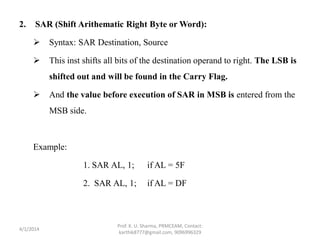
2. SAR (Shift Arithematic Right Byte or Word):
 Syntax: SAR Destination, Source
 This inst shifts all bits of the destination operand to right. The LSB is
shifted out and will be found in the Carry Flag.
 And the value before execution of SAR in MSB is entered from the
MSB side.
Example:
1. SAR AL, 1; if AL = 5F
2. SAR AL, 1; if AL = DF
4/1/2014
Prof. K. U. Sharma, PRMCEAM, Contact:
karthik8777@gmail.com, 9096996329
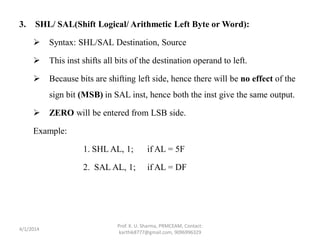
3. SHL/ SAL(Shift Logical/ Arithmetic Left Byte or Word):
 Syntax: SHL/SAL Destination, Source
 This inst shifts all bits of the destination operand to left.
 Because bits are shifting left side, hence there will be no effect of the
sign bit (MSB) in SAL inst, hence both the inst give the same output.
 ZERO will be entered from LSB side.
Example:
1. SHL AL, 1; if AL = 5F
2. SAL AL, 1; if AL = DF
4/1/2014
Prof. K. U. Sharma, PRMCEAM, Contact:
karthik8777@gmail.com, 9096996329
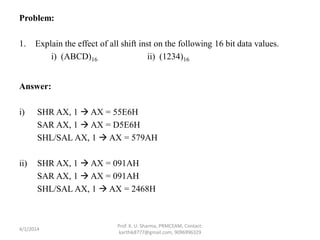
Problem:
1. Explain the effect of all shift inst on the following 16 bit data values.
i) (ABCD)16 ii) (1234)16
Answer:
i) SHR AX, 1  AX = 55E6H
SAR AX, 1  AX = D5E6H
SHL/SAL AX, 1  AX = 579AH
ii) SHR AX, 1  AX = 091AH
SAR AX, 1  AX = 091AH
SHL/SAL AX, 1  AX = 2468H
4/1/2014
Prof. K. U. Sharma, PRMCEAM, Contact:
karthik8777@gmail.com, 9096996329
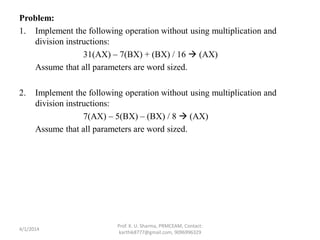
Problem:
1. Implement the following operation without using multiplication and
division instructions:
31(AX) – 7(BX) + (BX) / 16  (AX)
Assume that all parameters are word sized.
2. Implement the following operation without using multiplication and
division instructions:
7(AX) – 5(BX) – (BX) / 8  (AX)
Assume that all parameters are word sized.
4/1/2014
Prof. K. U. Sharma, PRMCEAM, Contact:
karthik8777@gmail.com, 9096996329
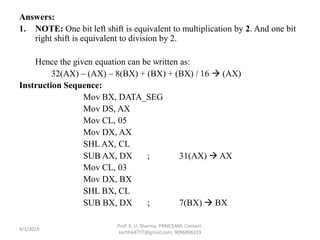
Answers:
1. NOTE: One bit left shift is equivalent to multiplication by 2. And one bit
right shift is equivalent to division by 2.
Hence the given equation can be written as:
32(AX) – (AX) – 8(BX) + (BX) + (BX) / 16  (AX)
Instruction Sequence:
Mov BX, DATA_SEG
Mov DS, AX
Mov CL, 05
Mov DX, AX
SHL AX, CL
SUB AX, DX ; 31(AX)  AX
Mov CL, 03
Mov DX, BX
SHL BX, CL
SUB BX, DX ; 7(BX)  BX
4/1/2014
Prof. K. U. Sharma, PRMCEAM, Contact:
karthik8777@gmail.com, 9096996329
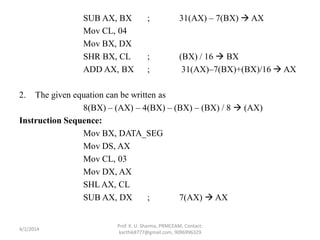
SUB AX, BX ; 31(AX) – 7(BX)  AX
Mov CL, 04
Mov BX, DX
SHR BX, CL ; (BX) / 16  BX
ADD AX, BX ; 31(AX)–7(BX)+(BX)/16  AX
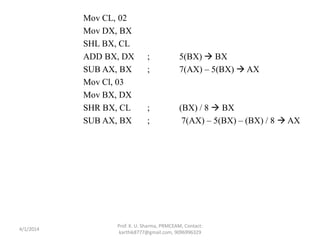
2. The given equation can be written as
8(BX) – (AX) – 4(BX) – (BX) – (BX) / 8  (AX)
Instruction Sequence:
Mov BX, DATA_SEG
Mov DS, AX
Mov CL, 03
Mov DX, AX
SHL AX, CL
SUB AX, DX ; 7(AX)  AX
4/1/2014
Prof. K. U. Sharma, PRMCEAM, Contact:
karthik8777@gmail.com, 9096996329
Mov CL, 02
Mov DX, BX
SHL BX, CL
ADD BX, DX ; 5(BX)  BX
SUB AX, BX ; 7(AX) – 5(BX)  AX
Mov Cl, 03
Mov BX, DX
SHR BX, CL ; (BX) / 8  BX
SUB AX, BX ; 7(AX) – 5(BX) – (BX) / 8  AX
4/1/2014
Prof. K. U. Sharma, PRMCEAM, Contact:
karthik8777@gmail.com, 9096996329
Rotate Instructions
• These inst are used to rotate left or right the contents of registers and
memory locations.
• In all these inst, one count operand is used which indicates the number of
bits are to be rotated.
• This count can be immediate value only if the contents are to be rotated by
one bit and can be specified in CL register if multiple rotate is required.
• Maximum possible value of count is 31.
4/1/2014
Prof. K. U. Sharma, PRMCEAM, Contact:
karthik8777@gmail.com, 9096996329
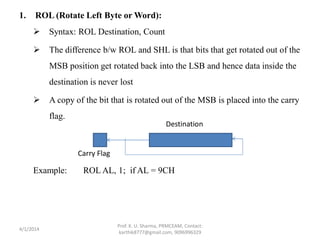
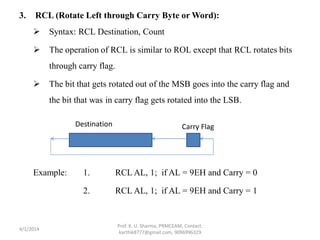
1. ROL (Rotate Left Byte or Word):
 Syntax: ROL Destination, Count
 The difference b/w ROL and SHL is that bits that get rotated out of the
MSB position get rotated back into the LSB and hence data inside the
destination is never lost
 A copy of the bit that is rotated out of the MSB is placed into the carry
flag.
Example: ROL AL, 1; if AL = 9CH
4/1/2014
Prof. K. U. Sharma, PRMCEAM, Contact:
karthik8777@gmail.com, 9096996329
Carry Flag
Destination
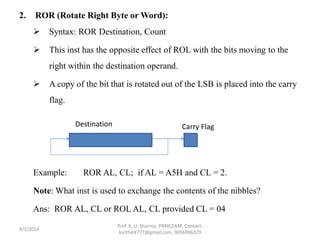
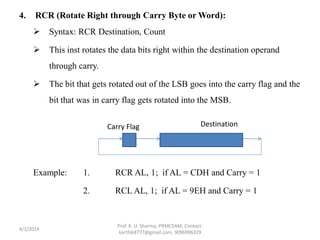
2. ROR (Rotate Right Byte or Word):
 Syntax: ROR Destination, Count
 This inst has the opposite effect of ROL with the bits moving to the
right within the destination operand.
 A copy of the bit that is rotated out of the LSB is placed into the carry
flag.
Example: ROR AL, CL; if AL = A5H and CL = 2.
Note: What inst is used to exchange the contents of the nibbles?
Ans: ROR AL, CL or ROL AL, CL provided CL = 04
4/1/2014
Prof. K. U. Sharma, PRMCEAM, Contact:
karthik8777@gmail.com, 9096996329
Carry FlagDestination
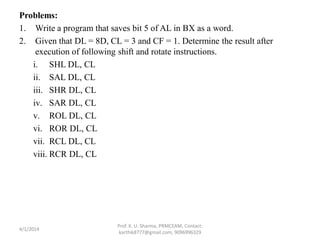
3. RCL (Rotate Left through Carry Byte or Word):
 Syntax: RCL Destination, Count
 The operation of RCL is similar to ROL except that RCL rotates bits
through carry flag.
 The bit that gets rotated out of the MSB goes into the carry flag and
the bit that was in carry flag gets rotated into the LSB.
Example: 1. RCL AL, 1; if AL = 9EH and Carry = 0
2. RCL AL, 1; if AL = 9EH and Carry = 1
4/1/2014
Prof. K. U. Sharma, PRMCEAM, Contact:
karthik8777@gmail.com, 9096996329
Carry FlagDestination
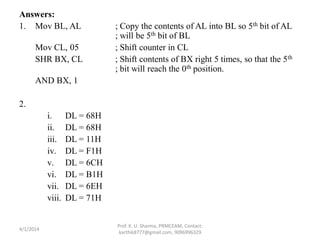
4. RCR (Rotate Right through Carry Byte or Word):
 Syntax: RCR Destination, Count
 This inst rotates the data bits right within the destination operand
through carry.
 The bit that gets rotated out of the LSB goes into the carry flag and the
bit that was in carry flag gets rotated into the MSB.
Example: 1. RCR AL, 1; if AL = CDH and Carry = 1
2. RCL AL, 1; if AL = 9EH and Carry = 1
4/1/2014
Prof. K. U. Sharma, PRMCEAM, Contact:
karthik8777@gmail.com, 9096996329
Carry Flag Destination
Problems:
1. Write a program that saves bit 5 of AL in BX as a word.
2. Given that DL = 8D, CL = 3 and CF = 1. Determine the result after
execution of following shift and rotate instructions.
i. SHL DL, CL
ii. SAL DL, CL
iii. SHR DL, CL
iv. SAR DL, CL
v. ROL DL, CL
vi. ROR DL, CL
vii. RCL DL, CL
viii. RCR DL, CL
4/1/2014
Prof. K. U. Sharma, PRMCEAM, Contact:
karthik8777@gmail.com, 9096996329
Answers:
1. Mov BL, AL ; Copy the contents of AL into BL so 5th bit of AL
; will be 5th bit of BL
Mov CL, 05 ; Shift counter in CL
SHR BX, CL ; Shift contents of BX right 5 times, so that the 5th
; bit will reach the 0th position.
AND BX, 1
2.
i. DL = 68H
ii. DL = 68H
iii. DL = 11H
iv. DL = F1H
v. DL = 6CH
vi. DL = B1H
vii. DL = 6EH
viii. DL = 71H
4/1/2014
Prof. K. U. Sharma, PRMCEAM, Contact:
karthik8777@gmail.com, 9096996329
Flag Control Instructions
• These group of inst are used to make changes to specified bits with in the
flag register.
1. LAHF (Load AH register from Flags):
 Syntax: LAHF
 This inst transfers the right most 8-bits of the flag register into the AH
register so that the individual bits within the register can be
manipulated or tested.
Example: if lower byte of flag register is 67H then after execution of
LAHF the AH register will contain 67H.
4/1/2014
Prof. K. U. Sharma, PRMCEAM, Contact:
karthik8777@gmail.com, 9096996329
2. SAHF (Store AH register into Flags):
 Syntax: SAHF
 This inst transfers the contents of AH register into rightmost 8-bits of the
flag register.
3. CLC (Clear Carry Flag):
 This inst clears the carry flag
4. STC (Set Carry Flag):
 This inst sets the carry flag
5. CMC (Complement Carry Flag):
 This inst inverts the carry flag.
NOTE: Inst 3,4,5 are useful when dealing with the rotate inst.
6. CLD (Clear Direction Flag):
 This inst clears the direction flag.
4/1/2014
Prof. K. U. Sharma, PRMCEAM, Contact:
karthik8777@gmail.com, 9096996329
7. STD (Set Direction Flag):
 This inst sets the direction flag.
NOTE: inst 6,7 are used in string manipulation inst.
8. CLI (Clear Interrupt Flag):
 This inst clears the interrupt flag.
9. STI (Set Interrupt Flag):
 This inst sets the interrupt flag.
NOTE: inst 8,9 are used to control the interrupt operations.
4/1/2014
Prof. K. U. Sharma, PRMCEAM, Contact:
karthik8777@gmail.com, 9096996329
Program:
1. Write a program such that the interrupts are not accepted ; save the
original contents of flags SF, ZF, AF, PF and CF at the address 0A00 and
then clear CF.
4/1/2014
Prof. K. U. Sharma, PRMCEAM, Contact:
karthik8777@gmail.com, 9096996329
Answer:
CLI ; Disable Interrupt
Mov AX, DATA_SEG ; Establish Data Seg.
Mov DS, AX ;
Mov BX, 0A00 ; Establish Destination
LAHF ; Get Flags
Mov [BX], AH ; and save at 00A0
CLC ; Clear CF
4/1/2014
Prof. K. U. Sharma, PRMCEAM, Contact:
karthik8777@gmail.com, 9096996329
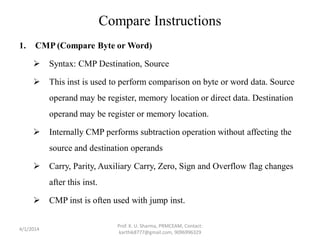
Compare Instructions
1. CMP (Compare Byte or Word)
 Syntax: CMP Destination, Source
 This inst is used to perform comparison on byte or word data. Source
operand may be register, memory location or direct data. Destination
operand may be register or memory location.
 Internally CMP performs subtraction operation without affecting the
source and destination operands
 Carry, Parity, Auxiliary Carry, Zero, Sign and Overflow flag changes
after this inst.
 CMP inst is often used with jump inst.
4/1/2014
Prof. K. U. Sharma, PRMCEAM, Contact:
karthik8777@gmail.com, 9096996329
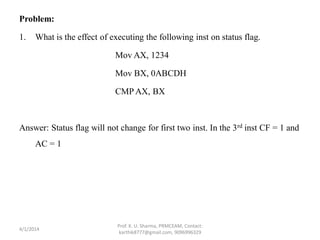
Problem:
1. What is the effect of executing the following inst on status flag.
Mov AX, 1234
Mov BX, 0ABCDH
CMP AX, BX
Answer: Status flag will not change for first two inst. In the 3rd inst CF = 1 and
AC = 1
4/1/2014
Prof. K. U. Sharma, PRMCEAM, Contact:
karthik8777@gmail.com, 9096996329
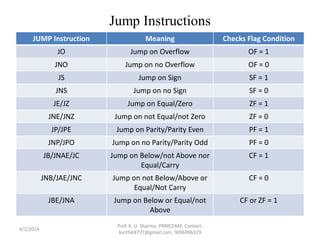
Jump Instructions
JUMP Instruction Meaning Checks Flag Condition
JO Jump on Overflow OF = 1
JNO Jump on no Overflow OF = 0
JS Jump on Sign SF = 1
JNS Jump on no Sign SF = 0
JE/JZ Jump on Equal/Zero ZF = 1
JNE/JNZ Jump on not Equal/not Zero ZF = 0
JP/JPE Jump on Parity/Parity Even PF = 1
JNP/JPO Jump on no Parity/Parity Odd PF = 0
JB/JNAE/JC Jump on Below/not Above nor
Equal/Carry
CF = 1
JNB/JAE/JNC Jump on not Below/Above or
Equal/Not Carry
CF = 0
JBE/JNA Jump on Below or Equal/not
Above
CF or ZF = 1
4/1/2014
Prof. K. U. Sharma, PRMCEAM, Contact:
karthik8777@gmail.com, 9096996329
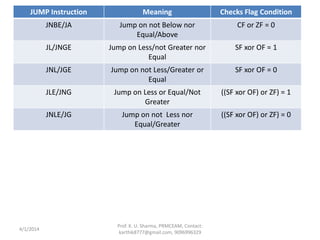
JUMP Instruction Meaning Checks Flag Condition
JNBE/JA Jump on not Below nor
Equal/Above
CF or ZF = 0
JL/JNGE Jump on Less/not Greater nor
Equal
SF xor OF = 1
JNL/JGE Jump on not Less/Greater or
Equal
SF xor OF = 0
JLE/JNG Jump on Less or Equal/Not
Greater
((SF xor OF) or ZF) = 1
JNLE/JG Jump on not Less nor
Equal/Greater
((SF xor OF) or ZF) = 0
4/1/2014
Prof. K. U. Sharma, PRMCEAM, Contact:
karthik8777@gmail.com, 9096996329
Programs:
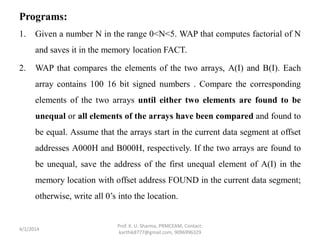
1. Given a number N in the range 0<N<5. WAP that computes factorial of N
and saves it in the memory location FACT.
2. WAP that compares the elements of the two arrays, A(I) and B(I). Each
array contains 100 16 bit signed numbers . Compare the corresponding
elements of the two arrays until either two elements are found to be
unequal or all elements of the arrays have been compared and found to
be equal. Assume that the arrays start in the current data segment at offset
addresses A000H and B000H, respectively. If the two arrays are found to
be unequal, save the address of the first unequal element of A(I) in the
memory location with offset address FOUND in the current data segment;
otherwise, write all 0’s into the location.
4/1/2014
Prof. K. U. Sharma, PRMCEAM, Contact:
karthik8777@gmail.com, 9096996329
Answers:
1. Mov Al, N ; load the number in Al
Mov Bl, Al ; copy the into Bl
LABEL: DEC Bl ; decrement Bl by 1
JZ ABC ;
MUL BL
JMP LABEL ;
ABC: Mov [FACT], Al ; Result stored in FACT
4/1/2014
Prof. K. U. Sharma, PRMCEAM, Contact:
karthik8777@gmail.com, 9096996329
2. Mov AX, Data_Seg ;
Mov DS, AX ; Setting the Segment
Mov CX, 64H ; Setting up the array counter
Mov SI, 0A000H ; Source Array Pointer
Mov DI, 0B000H ; Destination Array Pointer
A: Mov AX, [SI];
CMPAX, [DI] ; Compare the Array Pointers
JNE B ; jump if not equal
ADD SI, 2 ;
ADD DI, 2 ; Updating the pointers
DEC CX ;
JNZ A ; jump till CX = 0
Mov [FOUND], 0H ; if the arrays are equal
JMP C ;
B: Mov [FOUND], SI ; If unequal saving the address of first unequal
element in A(I)
C: Hlt
4/1/2014
Prof. K. U. Sharma, PRMCEAM, Contact:
karthik8777@gmail.com, 9096996329
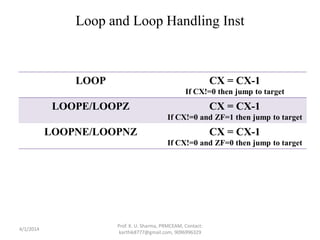
Loop and Loop Handling Inst
LOOP CX = CX-1
If CX!=0 then jump to target
LOOPE/LOOPZ CX = CX-1
If CX!=0 and ZF=1 then jump to target
LOOPNE/LOOPNZ CX = CX-1
If CX!=0 and ZF=0 then jump to target
4/1/2014
Prof. K. U. Sharma, PRMCEAM, Contact:
karthik8777@gmail.com, 9096996329
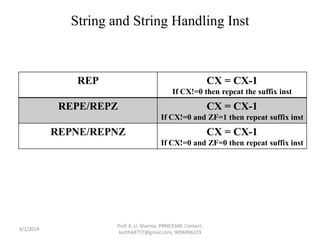
String and String Handling Inst
REP CX = CX-1
If CX!=0 then repeat the suffix inst
REPE/REPZ CX = CX-1
If CX!=0 and ZF=1 then repeat suffix inst
REPNE/REPNZ CX = CX-1
If CX!=0 and ZF=0 then repeat suffix inst
4/1/2014
Prof. K. U. Sharma, PRMCEAM, Contact:
karthik8777@gmail.com, 9096996329
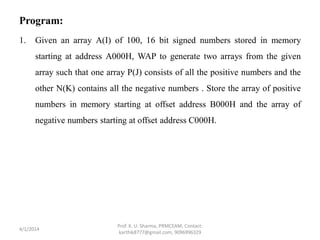
Program:
1. Given an array A(I) of 100, 16 bit signed numbers stored in memory
starting at address A000H, WAP to generate two arrays from the given
array such that one array P(J) consists of all the positive numbers and the
other N(K) contains all the negative numbers . Store the array of positive
numbers in memory starting at offset address B000H and the array of
negative numbers starting at offset address C000H.
4/1/2014
Prof. K. U. Sharma, PRMCEAM, Contact:
karthik8777@gmail.com, 9096996329
Answer:
Mov CX, 64H ; Setting up the counter
Mov AX, Data_Seg ;
Mov DS, AX ; Setting the data segment
Mov BX, 0A000H ; pointer to the given array
Mov SI, 0B000H ; pointer to positive array
Mov DI, 0C000H ; pointer to negative array
XYZ: Mov AX, [BX] ; getting the next source element
CMP AX, 0H ; skip if positive
JGE POS ;
NEG: Mov [DI], AX ; else placing it in negative array
ADD DI, 2 ;
JMP ABC ; skip
POS: Mov [SI], AX ; place in the positive array
ADD SI, 2
ABC: ADD BX, 2
LOOP XYZ ; repeating for all elements
Hlt
4/1/2014
Prof. K. U. Sharma, PRMCEAM, Contact:
karthik8777@gmail.com, 9096996329
Program:
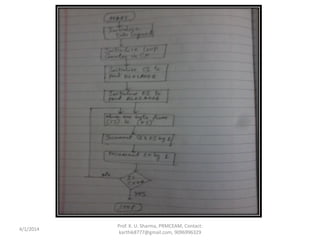
1. Draw a flow chart and wap to move a block of N consecutive bytes of
data starting at offset address BLK1ADDR in memory to another block of
memory locations starting at offset address BLK2ADDR. Assume both
the blocks are in the same data segment whose starting point is defined by
the data segment value DATASEGADDR. Write the above program using
branch and loop inst.
4/1/2014
Prof. K. U. Sharma, PRMCEAM, Contact:
karthik8777@gmail.com, 9096996329
4/1/2014
Prof. K. U. Sharma, PRMCEAM, Contact:
karthik8777@gmail.com, 9096996329
Mov AX, DATASEGADDR ; Setting Data segment
Mov DS, AX ;
Mov CX, N ; setting the counter
Mov SI, BLK1ADDR ; pointer to BLK1ADDR
Mov DI, BLK2ADDR ; pointer to BLK2ADDR
ABC: Mov AL, [SI] ; Loading data in AL
Mov [DI], AL ; mov data to BLK1ADDR
INC SI ; point to the next data
INC DI
LOOP ABC ; Looping for all data
HLT
4/1/2014
Prof. K. U. Sharma, PRMCEAM, Contact:
karthik8777@gmail.com, 9096996329
Program:
1. WAP to find the mean of 10 predefined numbers stored in memory
locations starting from 2100:0001. Store the result at 3100:0001.
2. WAP to find the biggest of 10 bytes stored in memory.
3. WAP to convert a packed BCD byte to two unpacked bytes.
4. WAP to add bytes from the first two arrays and the sum is to be saved in
third array.
4/1/2014
Prof. K. U. Sharma, PRMCEAM, Contact:
karthik8777@gmail.com, 9096996329
Answers:
1. Mov AX, 2100 ;
Mov DS, AX ; Setting the data segment
Mov SI, 0001 ; Initializing array address
Mov CX, 000A ; Setting up the counter
Mov AX, 0000 ; Initial Sum = 0
AGAIN: ADD AL, [SI]
JNC ABC
INC AH
ABC: INC SI
LOOP AGAIN
Mov BL, 0A ; Setting up the divisor
DIV BL
Mov DX, 3100 ;
Mov DS, DX ; Setting DS for result
Mov [0001], AL ; quotient of mean
Mov [0002], AH ; remainder of mean
Hlt
4/1/2014
Prof. K. U. Sharma, PRMCEAM, Contact:
karthik8777@gmail.com, 9096996329
Answers:
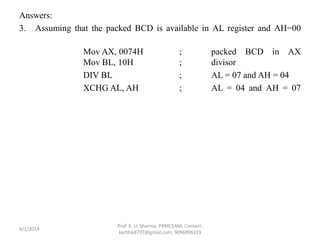
3. Assuming that the packed BCD is available in AL register and AH=00
Mov AX, 0074H ; packed BCD in AX
Mov BL, 10H ; divisor
DIV BL ; AL = 07 and AH = 04
XCHG AL, AH ; AL = 04 and AH = 07
4/1/2014
Prof. K. U. Sharma, PRMCEAM, Contact:
karthik8777@gmail.com, 9096996329
Answers:
4. Let the three arrays be ARRAY1, ARRAY2 and ARRAY3 and let there are N
elements in ARRAY1 and ARRAY2 .
Mov AX, DATA_SEG ;
Mov DS, AX ; Setting data segment
Mov CL, N ; setting counter
LEA SI, ARRAY1 ; offset of array1
LEA DI, ARRAY2 ; offset of array2
LEA BX, ARRAY3 ; offset of array3
ABC: Mov AL, [SI] ; load first byte
Mov BL, [DI] ; load second byte
ADD AL, BL
Mov [BX], AL ; result in array3
INC SI ;
INC BX ;
LOOP ABC ;
HLT
4/1/2014
Prof. K. U. Sharma, PRMCEAM, Contact:
karthik8777@gmail.com, 9096996329

Unit 3 – assembly language programming

  • 1.
    UNIT 3 –Assembly Language Programming -By Prof. K. U. Sharma
  • 2.
    Shift Instructions • Thisgroup of inst are used to left shift or right shift bit wise the contents of the processor registers or memory location. • In all these inst one “count” operand is used which indicates how many bits to shift. • The count value can be immediate value if only one bit is to be shifted and can be specified in the CL register if multiple shifts are required. 4/1/2014 Prof. K. U. Sharma, PRMCEAM, Contact: karthik8777@gmail.com, 9096996329
  • 3.
    1. SHR (ShiftLogical Right Byte or Word):  Syntax: SHR Destination, Source  This inst shifts all bits of the destination operand to right. The LSB is shifted out and will be found in the Carry Flag.  And ZERO is entered from the MSB side. Example: 1. SHR AL, 1; if AL = 5F 2. SHR AL, 1; if AL = DF 4/1/2014 Prof. K. U. Sharma, PRMCEAM, Contact: karthik8777@gmail.com, 9096996329
  • 4.
    2. SAR (ShiftArithematic Right Byte or Word):  Syntax: SAR Destination, Source  This inst shifts all bits of the destination operand to right. The LSB is shifted out and will be found in the Carry Flag.  And the value before execution of SAR in MSB is entered from the MSB side. Example: 1. SAR AL, 1; if AL = 5F 2. SAR AL, 1; if AL = DF 4/1/2014 Prof. K. U. Sharma, PRMCEAM, Contact: karthik8777@gmail.com, 9096996329
  • 5.
    3. SHL/ SAL(ShiftLogical/ Arithmetic Left Byte or Word):  Syntax: SHL/SAL Destination, Source  This inst shifts all bits of the destination operand to left.  Because bits are shifting left side, hence there will be no effect of the sign bit (MSB) in SAL inst, hence both the inst give the same output.  ZERO will be entered from LSB side. Example: 1. SHL AL, 1; if AL = 5F 2. SAL AL, 1; if AL = DF 4/1/2014 Prof. K. U. Sharma, PRMCEAM, Contact: karthik8777@gmail.com, 9096996329
  • 6.
    Problem: 1. Explain theeffect of all shift inst on the following 16 bit data values. i) (ABCD)16 ii) (1234)16 Answer: i) SHR AX, 1  AX = 55E6H SAR AX, 1  AX = D5E6H SHL/SAL AX, 1  AX = 579AH ii) SHR AX, 1  AX = 091AH SAR AX, 1  AX = 091AH SHL/SAL AX, 1  AX = 2468H 4/1/2014 Prof. K. U. Sharma, PRMCEAM, Contact: karthik8777@gmail.com, 9096996329
  • 7.
    Problem: 1. Implement thefollowing operation without using multiplication and division instructions: 31(AX) – 7(BX) + (BX) / 16  (AX) Assume that all parameters are word sized. 2. Implement the following operation without using multiplication and division instructions: 7(AX) – 5(BX) – (BX) / 8  (AX) Assume that all parameters are word sized. 4/1/2014 Prof. K. U. Sharma, PRMCEAM, Contact: karthik8777@gmail.com, 9096996329
  • 8.
    Answers: 1. NOTE: Onebit left shift is equivalent to multiplication by 2. And one bit right shift is equivalent to division by 2. Hence the given equation can be written as: 32(AX) – (AX) – 8(BX) + (BX) + (BX) / 16  (AX) Instruction Sequence: Mov BX, DATA_SEG Mov DS, AX Mov CL, 05 Mov DX, AX SHL AX, CL SUB AX, DX ; 31(AX)  AX Mov CL, 03 Mov DX, BX SHL BX, CL SUB BX, DX ; 7(BX)  BX 4/1/2014 Prof. K. U. Sharma, PRMCEAM, Contact: karthik8777@gmail.com, 9096996329
  • 9.
    SUB AX, BX; 31(AX) – 7(BX)  AX Mov CL, 04 Mov BX, DX SHR BX, CL ; (BX) / 16  BX ADD AX, BX ; 31(AX)–7(BX)+(BX)/16  AX 2. The given equation can be written as 8(BX) – (AX) – 4(BX) – (BX) – (BX) / 8  (AX) Instruction Sequence: Mov BX, DATA_SEG Mov DS, AX Mov CL, 03 Mov DX, AX SHL AX, CL SUB AX, DX ; 7(AX)  AX 4/1/2014 Prof. K. U. Sharma, PRMCEAM, Contact: karthik8777@gmail.com, 9096996329
  • 10.
    Mov CL, 02 MovDX, BX SHL BX, CL ADD BX, DX ; 5(BX)  BX SUB AX, BX ; 7(AX) – 5(BX)  AX Mov Cl, 03 Mov BX, DX SHR BX, CL ; (BX) / 8  BX SUB AX, BX ; 7(AX) – 5(BX) – (BX) / 8  AX 4/1/2014 Prof. K. U. Sharma, PRMCEAM, Contact: karthik8777@gmail.com, 9096996329
  • 11.
    Rotate Instructions • Theseinst are used to rotate left or right the contents of registers and memory locations. • In all these inst, one count operand is used which indicates the number of bits are to be rotated. • This count can be immediate value only if the contents are to be rotated by one bit and can be specified in CL register if multiple rotate is required. • Maximum possible value of count is 31. 4/1/2014 Prof. K. U. Sharma, PRMCEAM, Contact: karthik8777@gmail.com, 9096996329
  • 12.
    1. ROL (RotateLeft Byte or Word):  Syntax: ROL Destination, Count  The difference b/w ROL and SHL is that bits that get rotated out of the MSB position get rotated back into the LSB and hence data inside the destination is never lost  A copy of the bit that is rotated out of the MSB is placed into the carry flag. Example: ROL AL, 1; if AL = 9CH 4/1/2014 Prof. K. U. Sharma, PRMCEAM, Contact: karthik8777@gmail.com, 9096996329 Carry Flag Destination
  • 13.
    2. ROR (RotateRight Byte or Word):  Syntax: ROR Destination, Count  This inst has the opposite effect of ROL with the bits moving to the right within the destination operand.  A copy of the bit that is rotated out of the LSB is placed into the carry flag. Example: ROR AL, CL; if AL = A5H and CL = 2. Note: What inst is used to exchange the contents of the nibbles? Ans: ROR AL, CL or ROL AL, CL provided CL = 04 4/1/2014 Prof. K. U. Sharma, PRMCEAM, Contact: karthik8777@gmail.com, 9096996329 Carry FlagDestination
  • 14.
    3. RCL (RotateLeft through Carry Byte or Word):  Syntax: RCL Destination, Count  The operation of RCL is similar to ROL except that RCL rotates bits through carry flag.  The bit that gets rotated out of the MSB goes into the carry flag and the bit that was in carry flag gets rotated into the LSB. Example: 1. RCL AL, 1; if AL = 9EH and Carry = 0 2. RCL AL, 1; if AL = 9EH and Carry = 1 4/1/2014 Prof. K. U. Sharma, PRMCEAM, Contact: karthik8777@gmail.com, 9096996329 Carry FlagDestination
  • 15.
    4. RCR (RotateRight through Carry Byte or Word):  Syntax: RCR Destination, Count  This inst rotates the data bits right within the destination operand through carry.  The bit that gets rotated out of the LSB goes into the carry flag and the bit that was in carry flag gets rotated into the MSB. Example: 1. RCR AL, 1; if AL = CDH and Carry = 1 2. RCL AL, 1; if AL = 9EH and Carry = 1 4/1/2014 Prof. K. U. Sharma, PRMCEAM, Contact: karthik8777@gmail.com, 9096996329 Carry Flag Destination
  • 16.
    Problems: 1. Write aprogram that saves bit 5 of AL in BX as a word. 2. Given that DL = 8D, CL = 3 and CF = 1. Determine the result after execution of following shift and rotate instructions. i. SHL DL, CL ii. SAL DL, CL iii. SHR DL, CL iv. SAR DL, CL v. ROL DL, CL vi. ROR DL, CL vii. RCL DL, CL viii. RCR DL, CL 4/1/2014 Prof. K. U. Sharma, PRMCEAM, Contact: karthik8777@gmail.com, 9096996329
  • 17.
    Answers: 1. Mov BL,AL ; Copy the contents of AL into BL so 5th bit of AL ; will be 5th bit of BL Mov CL, 05 ; Shift counter in CL SHR BX, CL ; Shift contents of BX right 5 times, so that the 5th ; bit will reach the 0th position. AND BX, 1 2. i. DL = 68H ii. DL = 68H iii. DL = 11H iv. DL = F1H v. DL = 6CH vi. DL = B1H vii. DL = 6EH viii. DL = 71H 4/1/2014 Prof. K. U. Sharma, PRMCEAM, Contact: karthik8777@gmail.com, 9096996329
  • 18.
    Flag Control Instructions •These group of inst are used to make changes to specified bits with in the flag register. 1. LAHF (Load AH register from Flags):  Syntax: LAHF  This inst transfers the right most 8-bits of the flag register into the AH register so that the individual bits within the register can be manipulated or tested. Example: if lower byte of flag register is 67H then after execution of LAHF the AH register will contain 67H. 4/1/2014 Prof. K. U. Sharma, PRMCEAM, Contact: karthik8777@gmail.com, 9096996329
  • 19.
    2. SAHF (StoreAH register into Flags):  Syntax: SAHF  This inst transfers the contents of AH register into rightmost 8-bits of the flag register. 3. CLC (Clear Carry Flag):  This inst clears the carry flag 4. STC (Set Carry Flag):  This inst sets the carry flag 5. CMC (Complement Carry Flag):  This inst inverts the carry flag. NOTE: Inst 3,4,5 are useful when dealing with the rotate inst. 6. CLD (Clear Direction Flag):  This inst clears the direction flag. 4/1/2014 Prof. K. U. Sharma, PRMCEAM, Contact: karthik8777@gmail.com, 9096996329
  • 20.
    7. STD (SetDirection Flag):  This inst sets the direction flag. NOTE: inst 6,7 are used in string manipulation inst. 8. CLI (Clear Interrupt Flag):  This inst clears the interrupt flag. 9. STI (Set Interrupt Flag):  This inst sets the interrupt flag. NOTE: inst 8,9 are used to control the interrupt operations. 4/1/2014 Prof. K. U. Sharma, PRMCEAM, Contact: karthik8777@gmail.com, 9096996329
  • 21.
    Program: 1. Write aprogram such that the interrupts are not accepted ; save the original contents of flags SF, ZF, AF, PF and CF at the address 0A00 and then clear CF. 4/1/2014 Prof. K. U. Sharma, PRMCEAM, Contact: karthik8777@gmail.com, 9096996329
  • 22.
    Answer: CLI ; DisableInterrupt Mov AX, DATA_SEG ; Establish Data Seg. Mov DS, AX ; Mov BX, 0A00 ; Establish Destination LAHF ; Get Flags Mov [BX], AH ; and save at 00A0 CLC ; Clear CF 4/1/2014 Prof. K. U. Sharma, PRMCEAM, Contact: karthik8777@gmail.com, 9096996329
  • 23.
    Compare Instructions 1. CMP(Compare Byte or Word)  Syntax: CMP Destination, Source  This inst is used to perform comparison on byte or word data. Source operand may be register, memory location or direct data. Destination operand may be register or memory location.  Internally CMP performs subtraction operation without affecting the source and destination operands  Carry, Parity, Auxiliary Carry, Zero, Sign and Overflow flag changes after this inst.  CMP inst is often used with jump inst. 4/1/2014 Prof. K. U. Sharma, PRMCEAM, Contact: karthik8777@gmail.com, 9096996329
  • 24.
    Problem: 1. What isthe effect of executing the following inst on status flag. Mov AX, 1234 Mov BX, 0ABCDH CMP AX, BX Answer: Status flag will not change for first two inst. In the 3rd inst CF = 1 and AC = 1 4/1/2014 Prof. K. U. Sharma, PRMCEAM, Contact: karthik8777@gmail.com, 9096996329
  • 25.
    Jump Instructions JUMP InstructionMeaning Checks Flag Condition JO Jump on Overflow OF = 1 JNO Jump on no Overflow OF = 0 JS Jump on Sign SF = 1 JNS Jump on no Sign SF = 0 JE/JZ Jump on Equal/Zero ZF = 1 JNE/JNZ Jump on not Equal/not Zero ZF = 0 JP/JPE Jump on Parity/Parity Even PF = 1 JNP/JPO Jump on no Parity/Parity Odd PF = 0 JB/JNAE/JC Jump on Below/not Above nor Equal/Carry CF = 1 JNB/JAE/JNC Jump on not Below/Above or Equal/Not Carry CF = 0 JBE/JNA Jump on Below or Equal/not Above CF or ZF = 1 4/1/2014 Prof. K. U. Sharma, PRMCEAM, Contact: karthik8777@gmail.com, 9096996329
  • 26.
    JUMP Instruction MeaningChecks Flag Condition JNBE/JA Jump on not Below nor Equal/Above CF or ZF = 0 JL/JNGE Jump on Less/not Greater nor Equal SF xor OF = 1 JNL/JGE Jump on not Less/Greater or Equal SF xor OF = 0 JLE/JNG Jump on Less or Equal/Not Greater ((SF xor OF) or ZF) = 1 JNLE/JG Jump on not Less nor Equal/Greater ((SF xor OF) or ZF) = 0 4/1/2014 Prof. K. U. Sharma, PRMCEAM, Contact: karthik8777@gmail.com, 9096996329
  • 27.
    Programs: 1. Given anumber N in the range 0<N<5. WAP that computes factorial of N and saves it in the memory location FACT. 2. WAP that compares the elements of the two arrays, A(I) and B(I). Each array contains 100 16 bit signed numbers . Compare the corresponding elements of the two arrays until either two elements are found to be unequal or all elements of the arrays have been compared and found to be equal. Assume that the arrays start in the current data segment at offset addresses A000H and B000H, respectively. If the two arrays are found to be unequal, save the address of the first unequal element of A(I) in the memory location with offset address FOUND in the current data segment; otherwise, write all 0’s into the location. 4/1/2014 Prof. K. U. Sharma, PRMCEAM, Contact: karthik8777@gmail.com, 9096996329
  • 28.
    Answers: 1. Mov Al,N ; load the number in Al Mov Bl, Al ; copy the into Bl LABEL: DEC Bl ; decrement Bl by 1 JZ ABC ; MUL BL JMP LABEL ; ABC: Mov [FACT], Al ; Result stored in FACT 4/1/2014 Prof. K. U. Sharma, PRMCEAM, Contact: karthik8777@gmail.com, 9096996329
  • 29.
    2. Mov AX,Data_Seg ; Mov DS, AX ; Setting the Segment Mov CX, 64H ; Setting up the array counter Mov SI, 0A000H ; Source Array Pointer Mov DI, 0B000H ; Destination Array Pointer A: Mov AX, [SI]; CMPAX, [DI] ; Compare the Array Pointers JNE B ; jump if not equal ADD SI, 2 ; ADD DI, 2 ; Updating the pointers DEC CX ; JNZ A ; jump till CX = 0 Mov [FOUND], 0H ; if the arrays are equal JMP C ; B: Mov [FOUND], SI ; If unequal saving the address of first unequal element in A(I) C: Hlt 4/1/2014 Prof. K. U. Sharma, PRMCEAM, Contact: karthik8777@gmail.com, 9096996329
  • 30.
    Loop and LoopHandling Inst LOOP CX = CX-1 If CX!=0 then jump to target LOOPE/LOOPZ CX = CX-1 If CX!=0 and ZF=1 then jump to target LOOPNE/LOOPNZ CX = CX-1 If CX!=0 and ZF=0 then jump to target 4/1/2014 Prof. K. U. Sharma, PRMCEAM, Contact: karthik8777@gmail.com, 9096996329
  • 31.
    String and StringHandling Inst REP CX = CX-1 If CX!=0 then repeat the suffix inst REPE/REPZ CX = CX-1 If CX!=0 and ZF=1 then repeat suffix inst REPNE/REPNZ CX = CX-1 If CX!=0 and ZF=0 then repeat suffix inst 4/1/2014 Prof. K. U. Sharma, PRMCEAM, Contact: karthik8777@gmail.com, 9096996329
  • 32.
    Program: 1. Given anarray A(I) of 100, 16 bit signed numbers stored in memory starting at address A000H, WAP to generate two arrays from the given array such that one array P(J) consists of all the positive numbers and the other N(K) contains all the negative numbers . Store the array of positive numbers in memory starting at offset address B000H and the array of negative numbers starting at offset address C000H. 4/1/2014 Prof. K. U. Sharma, PRMCEAM, Contact: karthik8777@gmail.com, 9096996329
  • 33.
    Answer: Mov CX, 64H; Setting up the counter Mov AX, Data_Seg ; Mov DS, AX ; Setting the data segment Mov BX, 0A000H ; pointer to the given array Mov SI, 0B000H ; pointer to positive array Mov DI, 0C000H ; pointer to negative array XYZ: Mov AX, [BX] ; getting the next source element CMP AX, 0H ; skip if positive JGE POS ; NEG: Mov [DI], AX ; else placing it in negative array ADD DI, 2 ; JMP ABC ; skip POS: Mov [SI], AX ; place in the positive array ADD SI, 2 ABC: ADD BX, 2 LOOP XYZ ; repeating for all elements Hlt 4/1/2014 Prof. K. U. Sharma, PRMCEAM, Contact: karthik8777@gmail.com, 9096996329
  • 34.
    Program: 1. Draw aflow chart and wap to move a block of N consecutive bytes of data starting at offset address BLK1ADDR in memory to another block of memory locations starting at offset address BLK2ADDR. Assume both the blocks are in the same data segment whose starting point is defined by the data segment value DATASEGADDR. Write the above program using branch and loop inst. 4/1/2014 Prof. K. U. Sharma, PRMCEAM, Contact: karthik8777@gmail.com, 9096996329
  • 35.
    4/1/2014 Prof. K. U.Sharma, PRMCEAM, Contact: karthik8777@gmail.com, 9096996329
  • 36.
    Mov AX, DATASEGADDR; Setting Data segment Mov DS, AX ; Mov CX, N ; setting the counter Mov SI, BLK1ADDR ; pointer to BLK1ADDR Mov DI, BLK2ADDR ; pointer to BLK2ADDR ABC: Mov AL, [SI] ; Loading data in AL Mov [DI], AL ; mov data to BLK1ADDR INC SI ; point to the next data INC DI LOOP ABC ; Looping for all data HLT 4/1/2014 Prof. K. U. Sharma, PRMCEAM, Contact: karthik8777@gmail.com, 9096996329
  • 37.
    Program: 1. WAP tofind the mean of 10 predefined numbers stored in memory locations starting from 2100:0001. Store the result at 3100:0001. 2. WAP to find the biggest of 10 bytes stored in memory. 3. WAP to convert a packed BCD byte to two unpacked bytes. 4. WAP to add bytes from the first two arrays and the sum is to be saved in third array. 4/1/2014 Prof. K. U. Sharma, PRMCEAM, Contact: karthik8777@gmail.com, 9096996329
  • 38.
    Answers: 1. Mov AX,2100 ; Mov DS, AX ; Setting the data segment Mov SI, 0001 ; Initializing array address Mov CX, 000A ; Setting up the counter Mov AX, 0000 ; Initial Sum = 0 AGAIN: ADD AL, [SI] JNC ABC INC AH ABC: INC SI LOOP AGAIN Mov BL, 0A ; Setting up the divisor DIV BL Mov DX, 3100 ; Mov DS, DX ; Setting DS for result Mov [0001], AL ; quotient of mean Mov [0002], AH ; remainder of mean Hlt 4/1/2014 Prof. K. U. Sharma, PRMCEAM, Contact: karthik8777@gmail.com, 9096996329
  • 39.
    Answers: 3. Assuming thatthe packed BCD is available in AL register and AH=00 Mov AX, 0074H ; packed BCD in AX Mov BL, 10H ; divisor DIV BL ; AL = 07 and AH = 04 XCHG AL, AH ; AL = 04 and AH = 07 4/1/2014 Prof. K. U. Sharma, PRMCEAM, Contact: karthik8777@gmail.com, 9096996329
  • 40.
    Answers: 4. Let thethree arrays be ARRAY1, ARRAY2 and ARRAY3 and let there are N elements in ARRAY1 and ARRAY2 . Mov AX, DATA_SEG ; Mov DS, AX ; Setting data segment Mov CL, N ; setting counter LEA SI, ARRAY1 ; offset of array1 LEA DI, ARRAY2 ; offset of array2 LEA BX, ARRAY3 ; offset of array3 ABC: Mov AL, [SI] ; load first byte Mov BL, [DI] ; load second byte ADD AL, BL Mov [BX], AL ; result in array3 INC SI ; INC BX ; LOOP ABC ; HLT 4/1/2014 Prof. K. U. Sharma, PRMCEAM, Contact: karthik8777@gmail.com, 9096996329