Dr. C. Saritha 
1 
8051 data types and directives 
The 8051 microcontroller has only one data type. It is 8 bits, and the size of each 
register is also 8 bits. It is the job of the programmer to break down data larger than 8 
bits (00 to FFH, or 0 to 255 in decimal) to be processed by the CPU. The data types 
used by the 8051 can be positive or negative. 
DB (define byte) 
The DB directive is the most widely used data directive in the assembler. It is used to 
define the 8-bit data. When DB is used to define data, the numbers can be in decimal, 
binary, hex, or ASCII formats. For decimal, the “D” after the decimal number is optional, 
but using “B” (binary) and “H” (hexadecimal) for the others is required. Regardless of 
which is used, the assembler will convert the numbers into hex. To indicate ASCII, 
simply place the characters in quotation marks (‘like this’). The assembler will assign the 
ASCII code for the numbers or characters automatically. The DB directive is the only 
directive that can be used to define ASCII strings larger than two characters; therefore, 
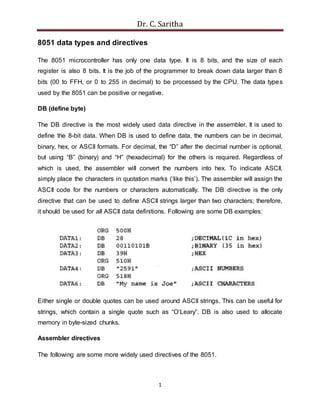
it should be used for all ASCII data definitions. Following are some DB examples: 
Either single or double quotes can be used around ASCII strings. This can be useful for 
strings, which contain a single quote such as “O’Leary”. DB is also used to allocate 
memory in byte-sized chunks. 
Assembler directives 
The following are some more widely used directives of the 8051.
Dr. C. Saritha 
2 
ORG (origin) 
The ORG directive is used to indicate the beginning of the address. The number that 
comes after ORG can be either in hex or in decimal. If the number is not followed by H, 
it is decimal and the assembler will convert it to hex. Some assemblers use “. ORG” 
(notice the dot) instead of “ORG” for the origin directive. 
EQU (equate) 
This is used to define a constant without occupying a memory location. The EQU 
directive does not set aside storage for a data item but associates a constant value with 
a data label so that when the label appears in the program, its constant value will be 
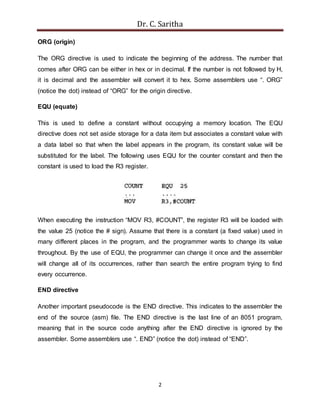
substituted for the label. The following uses EQU for the counter constant and then the 
constant is used to load the R3 register. 
When executing the instruction “MOV R3, #COUNT”, the register R3 will be loaded with 
the value 25 (notice the # sign). Assume that there is a constant (a fixed value) used in 
many different places in the program, and the programmer wants to change its value 
throughout. By the use of EQU, the programmer can change it once and the assembler 
will change all of its occurrences, rather than search the entire program trying to find 
every occurrence. 
END directive 
Another important pseudocode is the END directive. This indicates to the assembler the 
end of the source (asm) file. The END directive is the last line of an 8051 program, 
meaning that in the source code anything after the END directive is ignored by the 
assembler. Some assemblers use “. END” (notice the dot) instead of “END”.
Dr. C. Saritha 
I/O PROGRAMMING AND BIT MANIPULATION 
Different ways of accessing entire 8-bits of the I/O port 
In the following code the entire 8 bits of Port 1 are accessed. 
The above code toggles every bit of P1 continuously. Now we can rewrite the above 
code in a more efficient manner by accessing the port directly without going through the 
accumulator. 
We can write another variation the above code by using a technique called read-modify-write 
3 
feature. 
Read-Modify-Write feature : 
The ports in the 8051 can be accessed by the read-modify-write technique. This feature 
saves many lines of code by combining in a single instruction all three actions of 
(1) reading the port, (2) modifying its value, and (3) writing to the port. The following 
code first places 01010101 (binary) into port 1. Next, the instruction “XLR P1, #0FFH” 
performs an XOR logic operation on P1 with 1111 1111 (binary), and then writes the 
result back into P1.
Dr. C. Saritha 
4 
Single bit-addressability of I/O Ports 
Sometimes we need to access only 1 or 2 bits of the port instead of the entire 8 bits. A 
powerful feature of 8051 I/O ports is their capability to access individual bits of the port 
without altering the rest of the bits in that port. Of the four 8051 ports, we can access 
either the entire 8 bits or any single bit without altering the rest. When accessing a port 
in single-bit manner, we use the syntax “SETB X. Y” where X is the port number 0, 1, 2, 
or 3, and Y is the desired bit number from 0 to 7 for data bits D0 to D7. For example, 
“SETB P1. 5 sets high, bit 5 of port 1. Remember that D0 is the LSB and D7 is the MSB. 
For example, the following code toggles bit P1 .2 continuously. 
Notice that P1.2 is the third bit of P1, since the first bit is P1.0, the second bit is P1.1, 
and so on. Table 1 shows the bits of the 8051 I/O ports. This single-bit addressability of 
I/O ports is one of most powerful features of the 8051 microcontroller and is among the 
reasons that many designers choose the 8051 over other microcontrollers. 
Table 1: Single bit addressability of ports
Dr. C. Saritha 
5 
Checking an input bit 
The JNB (jump if no bit) and JB (jump if bit = 1) instructions are also widely used single-bit 
operations. They allow you to monitor a bit and make a decision depending on 
whether it is 0 or 1. Instructions JNB and JB can be used for any bits of I/O ports 0, 1,2, 
and 3, since all ports are bit-addressable. However, most of port 3 is used for interrupts 
and serial communication signals, and typically is not used for any I/O, either single-bit 
or byte-wise. 
Table 2 : Single bit instructions 
Instructions for reading an input port

8051 data type and directives

  • 1.
    Dr. C. Saritha 1 8051 data types and directives The 8051 microcontroller has only one data type. It is 8 bits, and the size of each register is also 8 bits. It is the job of the programmer to break down data larger than 8 bits (00 to FFH, or 0 to 255 in decimal) to be processed by the CPU. The data types used by the 8051 can be positive or negative. DB (define byte) The DB directive is the most widely used data directive in the assembler. It is used to define the 8-bit data. When DB is used to define data, the numbers can be in decimal, binary, hex, or ASCII formats. For decimal, the “D” after the decimal number is optional, but using “B” (binary) and “H” (hexadecimal) for the others is required. Regardless of which is used, the assembler will convert the numbers into hex. To indicate ASCII, simply place the characters in quotation marks (‘like this’). The assembler will assign the ASCII code for the numbers or characters automatically. The DB directive is the only directive that can be used to define ASCII strings larger than two characters; therefore, it should be used for all ASCII data definitions. Following are some DB examples: Either single or double quotes can be used around ASCII strings. This can be useful for strings, which contain a single quote such as “O’Leary”. DB is also used to allocate memory in byte-sized chunks. Assembler directives The following are some more widely used directives of the 8051.
  • 2.
    Dr. C. Saritha 2 ORG (origin) The ORG directive is used to indicate the beginning of the address. The number that comes after ORG can be either in hex or in decimal. If the number is not followed by H, it is decimal and the assembler will convert it to hex. Some assemblers use “. ORG” (notice the dot) instead of “ORG” for the origin directive. EQU (equate) This is used to define a constant without occupying a memory location. The EQU directive does not set aside storage for a data item but associates a constant value with a data label so that when the label appears in the program, its constant value will be substituted for the label. The following uses EQU for the counter constant and then the constant is used to load the R3 register. When executing the instruction “MOV R3, #COUNT”, the register R3 will be loaded with the value 25 (notice the # sign). Assume that there is a constant (a fixed value) used in many different places in the program, and the programmer wants to change its value throughout. By the use of EQU, the programmer can change it once and the assembler will change all of its occurrences, rather than search the entire program trying to find every occurrence. END directive Another important pseudocode is the END directive. This indicates to the assembler the end of the source (asm) file. The END directive is the last line of an 8051 program, meaning that in the source code anything after the END directive is ignored by the assembler. Some assemblers use “. END” (notice the dot) instead of “END”.
  • 3.
    Dr. C. Saritha I/O PROGRAMMING AND BIT MANIPULATION Different ways of accessing entire 8-bits of the I/O port In the following code the entire 8 bits of Port 1 are accessed. The above code toggles every bit of P1 continuously. Now we can rewrite the above code in a more efficient manner by accessing the port directly without going through the accumulator. We can write another variation the above code by using a technique called read-modify-write 3 feature. Read-Modify-Write feature : The ports in the 8051 can be accessed by the read-modify-write technique. This feature saves many lines of code by combining in a single instruction all three actions of (1) reading the port, (2) modifying its value, and (3) writing to the port. The following code first places 01010101 (binary) into port 1. Next, the instruction “XLR P1, #0FFH” performs an XOR logic operation on P1 with 1111 1111 (binary), and then writes the result back into P1.
  • 4.
    Dr. C. Saritha 4 Single bit-addressability of I/O Ports Sometimes we need to access only 1 or 2 bits of the port instead of the entire 8 bits. A powerful feature of 8051 I/O ports is their capability to access individual bits of the port without altering the rest of the bits in that port. Of the four 8051 ports, we can access either the entire 8 bits or any single bit without altering the rest. When accessing a port in single-bit manner, we use the syntax “SETB X. Y” where X is the port number 0, 1, 2, or 3, and Y is the desired bit number from 0 to 7 for data bits D0 to D7. For example, “SETB P1. 5 sets high, bit 5 of port 1. Remember that D0 is the LSB and D7 is the MSB. For example, the following code toggles bit P1 .2 continuously. Notice that P1.2 is the third bit of P1, since the first bit is P1.0, the second bit is P1.1, and so on. Table 1 shows the bits of the 8051 I/O ports. This single-bit addressability of I/O ports is one of most powerful features of the 8051 microcontroller and is among the reasons that many designers choose the 8051 over other microcontrollers. Table 1: Single bit addressability of ports
  • 5.
    Dr. C. Saritha 5 Checking an input bit The JNB (jump if no bit) and JB (jump if bit = 1) instructions are also widely used single-bit operations. They allow you to monitor a bit and make a decision depending on whether it is 0 or 1. Instructions JNB and JB can be used for any bits of I/O ports 0, 1,2, and 3, since all ports are bit-addressable. However, most of port 3 is used for interrupts and serial communication signals, and typically is not used for any I/O, either single-bit or byte-wise. Table 2 : Single bit instructions Instructions for reading an input port