Proprietary & Confidential
@GoCyberSec | January, 2020
Chapter 2
Understanding Identity & Access
Management
CompTIA Security +
Proprietary & Confidential
@GoCyberSec | January, 2020
Introduction
• Exploring authentication concepts
• Comparing authentication services
• Managing accounts
• Comparing access control models
Proprietary & Confidential
@GoCyberSec | January, 2020
Exploring Authentication Concepts
• Identification
–User professes an identity
• Authentication
–User proves identity
• Authorization
–Access to resources granted
based on proven identity
Proprietary & Confidential
@GoCyberSec | January, 2020
Exploring Authentication Concepts
• AAA (authentication, authorization, and accounting)
–Authentication
• Providing the identity
–Authorization
• Granting access to resources
–Accounting
• Tracking user activity and record activity in
logs
Proprietary & Confidential
@GoCyberSec | January, 2020
Factors of Authentication
• Something you know
–Such as username and password
• Something you have
–Such as a smart card
• Something you are
–Such as a fingerprint or other biometric identification
• Somewhere you are
–Such as your location obtained using geolocation
• Something you do
–Such as gestures on a touch screen
Proprietary & Confidential
@GoCyberSec | January, 2020
Something You Know
• Password complexity
–Uppercase, lowercase, numbers, special characters
• Password expiration
–Forces users to change password
• Password recovery
• Password history
–Prevents users from reusing same password
Proprietary & Confidential
@GoCyberSec | January, 2020
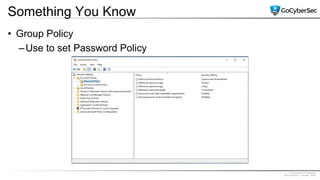
Something You Know
• Group Policy
–Use to set Password Policy
Proprietary & Confidential
@GoCyberSec | January, 2020
Something You Know
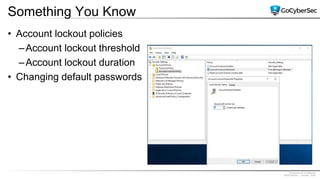
• Account lockout policies
–Account lockout threshold
–Account lockout duration
• Changing default passwords
Proprietary & Confidential
@GoCyberSec | January, 2020
Something You Have
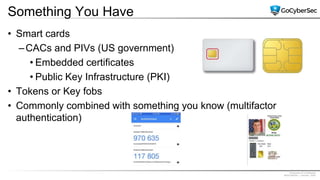
• Smart cards
–CACs and PIVs (US government)
• Embedded certificates
• Public Key Infrastructure (PKI)
• Tokens or Key fobs
• Commonly combined with something you know (multifactor
authentication)
Proprietary & Confidential
@GoCyberSec | January, 2020
Something You Have
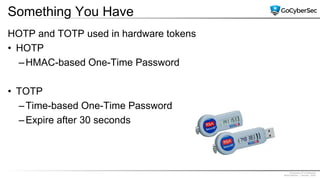
HOTP and TOTP used in hardware tokens
• HOTP
–HMAC-based One-Time Password
• TOTP
–Time-based One-Time Password
–Expire after 30 seconds
Proprietary & Confidential
@GoCyberSec | January, 2020
Something You Are
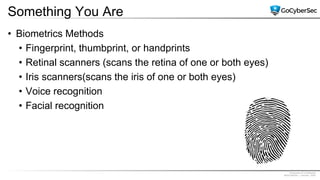
• Biometrics Methods
• Fingerprint, thumbprint, or handprints
• Retinal scanners (scans the retina of one or both eyes)
• Iris scanners(scans the iris of one or both eyes)
• Voice recognition
• Facial recognition
Proprietary & Confidential
@GoCyberSec | January, 2020
Something You Are
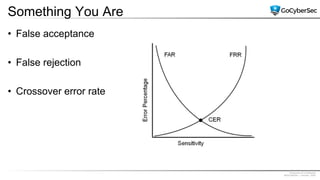
• False acceptance
• False rejection
• Crossover error rate
Proprietary & Confidential
@GoCyberSec | January, 2020
Somewhere You Are
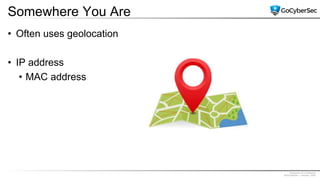
• Often uses geolocation
• IP address
• MAC address
Proprietary & Confidential
@GoCyberSec | January, 2020
Something You Do
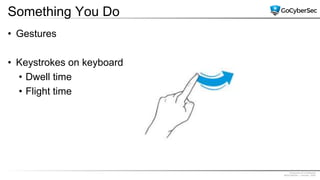
• Gestures
• Keystrokes on keyboard
• Dwell time
• Flight time
Proprietary & Confidential
@GoCyberSec | January, 2020
Dual-factor/Multifactor Authentication
• Multifactor authentication
–Combines authentication from two or more factors
• Examples:
–PIN and CAC
–PIV and password
–Fingerprint and smart card
Proprietary & Confidential
@GoCyberSec | January, 2020
Summarizing Identification Methods
• Usernames
–Names, email addresses
• Photo identification cards
–CACs, PIVs
• Biometrics
–Can be used for both identification and authentication
Proprietary & Confidential
@GoCyberSec | January, 2020
Authentication Issues
• Weak passwords
• Forgotten passwords
• Biometric errors
Proprietary & Confidential
@GoCyberSec | January, 2020
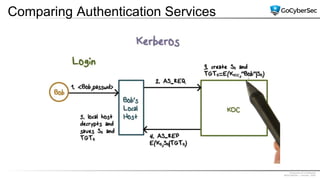
Comparing Authentication Services
• Kerberos
–Network authentication protocol
–Database of objects such as Active Directory
–Provides mutual authentication
–KDC issues ticket-granting tickets
–Time-stamped tickets that expire (10 Hours)
–Requires internal time synchronization
–Uses port 88.
Proprietary & Confidential
@GoCyberSec | January, 2020
Comparing Authentication Services
Proprietary & Confidential
@GoCyberSec | January, 2020
Comparing Authentication Services
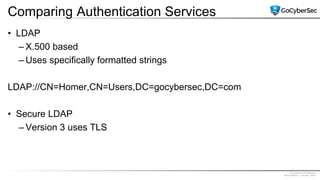
• LDAP
– X.500 based
– Uses specifically formatted strings
LDAP://CN=Homer,CN=Users,DC=gocybersec,DC=com
• Secure LDAP
– Version 3 uses TLS
Proprietary & Confidential
@GoCyberSec | January, 2020
Single Sign-on
• Users sign on once
• One set of credentials used throughout a user’s entire session
• Provides central authentication
Proprietary & Confidential
@GoCyberSec | January, 2020
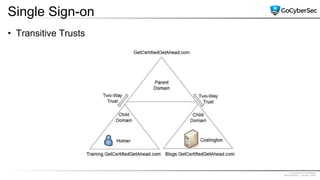
Single Sign-on
• Transitive Trusts
Proprietary & Confidential
@GoCyberSec | January, 2020
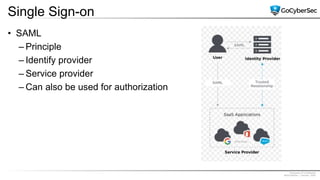
Single Sign-on
• SAML
– Principle
– Identify provider
– Service provider
– Can also be used for authorization
Proprietary & Confidential
@GoCyberSec | January, 2020
Single Sign-on
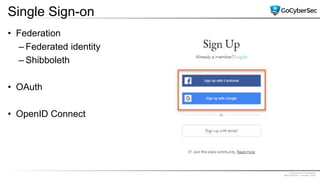
• Federation
– Federated identity
– Shibboleth
• OAuth
• OpenID Connect
Proprietary & Confidential
@GoCyberSec | January, 2020
Managing Accounts
• Principle of least privilege
– Operating systems enforce by giving only the file creator full access
to newly created files
– Administrators enforce it with group-based privileges
– Rights and permissions reviews discover violations
• Need to Know
Proprietary & Confidential
@GoCyberSec | January, 2020
Managing Accounts
• End user accounts
• Privileged accounts
• Guest accounts
• Service accounts
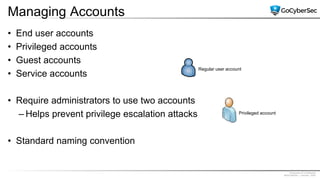
• Require administrators to use two accounts
– Helps prevent privilege escalation attacks
• Standard naming convention
Regular user account
Privileged account
Proprietary & Confidential
@GoCyberSec | January, 2020
Managing Accounts
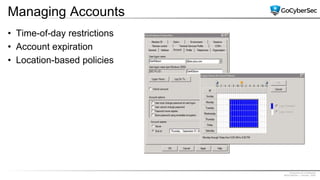
• Time-of-day restrictions
• Account expiration
• Location-based policies
Proprietary & Confidential
@GoCyberSec | January, 2020
Comparing Access Control Models
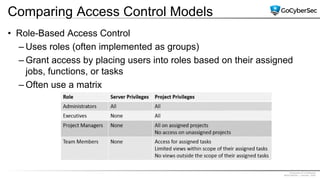
• Role-Based Access Control
– Uses roles (often implemented as groups)
– Grant access by placing users into roles based on their assigned
jobs, functions, or tasks
– Often use a matrix
Proprietary & Confidential
@GoCyberSec | January, 2020
Comparing Access Control Models
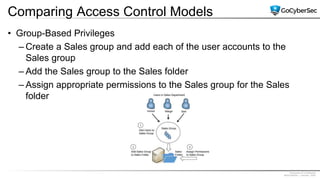
• Group-Based Privileges
– Create a Sales group and add each of the user accounts to the
Sales group
– Add the Sales group to the Sales folder
– Assign appropriate permissions to the Sales group for the Sales
folder
Proprietary & Confidential
@GoCyberSec | January, 2020
Comparing Access Control Models
• Rule-Based Access Control
– Rule-Based Access Control
– Based on a set of approved instructions, such as an access control
list
– Can use triggers to respond to an event
Proprietary & Confidential
@GoCyberSec | January, 2020
Comparing Access Control Models
• Discretionary Access Control
– Resources identified as objects
• Files, folders, shares
– Specifies that every object has an owner
– Owner has full, explicit control of the object
– Beware of Trojans
• Dual accounts for administrators
Proprietary & Confidential
@GoCyberSec | January, 2020
Comparing Access Control Models
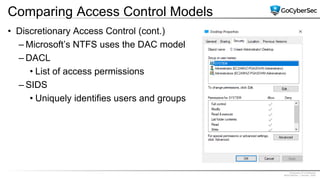
• Discretionary Access Control (cont.)
– Microsoft’s NTFS uses the DAC model
– DACL
• List of access permissions
– SIDS
• Uniquely identifies users and groups
Proprietary & Confidential
@GoCyberSec | January, 2020
Comparing Access Control Models
• Mandatory Access Control
– Uses labels to determine access
– Subjects and objects are assigned labels
– Permissions granted when the labels match
– SELinux (Security-Enhanced Linux)
• Uses MAC model
• Helps prevent malicious or suspicious code from executing
Proprietary & Confidential
@GoCyberSec | January, 2020
Comparing Access Control Models
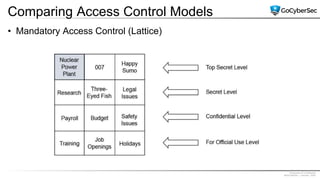
• Mandatory Access Control (Lattice)
Proprietary & Confidential
@GoCyberSec | January, 2020
Comparing Access Control Models
• Attribute-Based Access Control
–Commonly used in SDNs
–Evaluates attributes and grants permissions based on
attributes
–Often implemented with plain language policy statements
–Policy statements typically include four elements
• Subject
• Object
• Environment
• Action
Proprietary & Confidential
@GoCyberSec | January, 2020
Chapter 2 Summary
• Exploring authentication concepts
• Comparing authentication services
• Managing accounts
• Comparing access control models

501 ch 2 understanding iam

  • 1.
    Proprietary & Confidential @GoCyberSec| January, 2020 Chapter 2 Understanding Identity & Access Management CompTIA Security +
  • 2.
    Proprietary & Confidential @GoCyberSec| January, 2020 Introduction • Exploring authentication concepts • Comparing authentication services • Managing accounts • Comparing access control models
  • 3.
    Proprietary & Confidential @GoCyberSec| January, 2020 Exploring Authentication Concepts • Identification –User professes an identity • Authentication –User proves identity • Authorization –Access to resources granted based on proven identity
  • 4.
    Proprietary & Confidential @GoCyberSec| January, 2020 Exploring Authentication Concepts • AAA (authentication, authorization, and accounting) –Authentication • Providing the identity –Authorization • Granting access to resources –Accounting • Tracking user activity and record activity in logs
  • 5.
    Proprietary & Confidential @GoCyberSec| January, 2020 Factors of Authentication • Something you know –Such as username and password • Something you have –Such as a smart card • Something you are –Such as a fingerprint or other biometric identification • Somewhere you are –Such as your location obtained using geolocation • Something you do –Such as gestures on a touch screen
  • 6.
    Proprietary & Confidential @GoCyberSec| January, 2020 Something You Know • Password complexity –Uppercase, lowercase, numbers, special characters • Password expiration –Forces users to change password • Password recovery • Password history –Prevents users from reusing same password
  • 7.
    Proprietary & Confidential @GoCyberSec| January, 2020 Something You Know • Group Policy –Use to set Password Policy
  • 8.
    Proprietary & Confidential @GoCyberSec| January, 2020 Something You Know • Account lockout policies –Account lockout threshold –Account lockout duration • Changing default passwords
  • 9.
    Proprietary & Confidential @GoCyberSec| January, 2020 Something You Have • Smart cards –CACs and PIVs (US government) • Embedded certificates • Public Key Infrastructure (PKI) • Tokens or Key fobs • Commonly combined with something you know (multifactor authentication)
  • 10.
    Proprietary & Confidential @GoCyberSec| January, 2020 Something You Have HOTP and TOTP used in hardware tokens • HOTP –HMAC-based One-Time Password • TOTP –Time-based One-Time Password –Expire after 30 seconds
  • 11.
    Proprietary & Confidential @GoCyberSec| January, 2020 Something You Are • Biometrics Methods • Fingerprint, thumbprint, or handprints • Retinal scanners (scans the retina of one or both eyes) • Iris scanners(scans the iris of one or both eyes) • Voice recognition • Facial recognition
  • 12.
    Proprietary & Confidential @GoCyberSec| January, 2020 Something You Are • False acceptance • False rejection • Crossover error rate
  • 13.
    Proprietary & Confidential @GoCyberSec| January, 2020 Somewhere You Are • Often uses geolocation • IP address • MAC address
  • 14.
    Proprietary & Confidential @GoCyberSec| January, 2020 Something You Do • Gestures • Keystrokes on keyboard • Dwell time • Flight time
  • 15.
    Proprietary & Confidential @GoCyberSec| January, 2020 Dual-factor/Multifactor Authentication • Multifactor authentication –Combines authentication from two or more factors • Examples: –PIN and CAC –PIV and password –Fingerprint and smart card
  • 16.
    Proprietary & Confidential @GoCyberSec| January, 2020 Summarizing Identification Methods • Usernames –Names, email addresses • Photo identification cards –CACs, PIVs • Biometrics –Can be used for both identification and authentication
  • 17.
    Proprietary & Confidential @GoCyberSec| January, 2020 Authentication Issues • Weak passwords • Forgotten passwords • Biometric errors
  • 18.
    Proprietary & Confidential @GoCyberSec| January, 2020 Comparing Authentication Services • Kerberos –Network authentication protocol –Database of objects such as Active Directory –Provides mutual authentication –KDC issues ticket-granting tickets –Time-stamped tickets that expire (10 Hours) –Requires internal time synchronization –Uses port 88.
  • 19.
    Proprietary & Confidential @GoCyberSec| January, 2020 Comparing Authentication Services
  • 20.
    Proprietary & Confidential @GoCyberSec| January, 2020 Comparing Authentication Services • LDAP – X.500 based – Uses specifically formatted strings LDAP://CN=Homer,CN=Users,DC=gocybersec,DC=com • Secure LDAP – Version 3 uses TLS
  • 21.
    Proprietary & Confidential @GoCyberSec| January, 2020 Single Sign-on • Users sign on once • One set of credentials used throughout a user’s entire session • Provides central authentication
  • 22.
    Proprietary & Confidential @GoCyberSec| January, 2020 Single Sign-on • Transitive Trusts
  • 23.
    Proprietary & Confidential @GoCyberSec| January, 2020 Single Sign-on • SAML – Principle – Identify provider – Service provider – Can also be used for authorization
  • 24.
    Proprietary & Confidential @GoCyberSec| January, 2020 Single Sign-on • Federation – Federated identity – Shibboleth • OAuth • OpenID Connect
  • 25.
    Proprietary & Confidential @GoCyberSec| January, 2020 Managing Accounts • Principle of least privilege – Operating systems enforce by giving only the file creator full access to newly created files – Administrators enforce it with group-based privileges – Rights and permissions reviews discover violations • Need to Know
  • 26.
    Proprietary & Confidential @GoCyberSec| January, 2020 Managing Accounts • End user accounts • Privileged accounts • Guest accounts • Service accounts • Require administrators to use two accounts – Helps prevent privilege escalation attacks • Standard naming convention Regular user account Privileged account
  • 27.
    Proprietary & Confidential @GoCyberSec| January, 2020 Managing Accounts • Time-of-day restrictions • Account expiration • Location-based policies
  • 28.
    Proprietary & Confidential @GoCyberSec| January, 2020 Comparing Access Control Models • Role-Based Access Control – Uses roles (often implemented as groups) – Grant access by placing users into roles based on their assigned jobs, functions, or tasks – Often use a matrix
  • 29.
    Proprietary & Confidential @GoCyberSec| January, 2020 Comparing Access Control Models • Group-Based Privileges – Create a Sales group and add each of the user accounts to the Sales group – Add the Sales group to the Sales folder – Assign appropriate permissions to the Sales group for the Sales folder
  • 30.
    Proprietary & Confidential @GoCyberSec| January, 2020 Comparing Access Control Models • Rule-Based Access Control – Rule-Based Access Control – Based on a set of approved instructions, such as an access control list – Can use triggers to respond to an event
  • 31.
    Proprietary & Confidential @GoCyberSec| January, 2020 Comparing Access Control Models • Discretionary Access Control – Resources identified as objects • Files, folders, shares – Specifies that every object has an owner – Owner has full, explicit control of the object – Beware of Trojans • Dual accounts for administrators
  • 32.
    Proprietary & Confidential @GoCyberSec| January, 2020 Comparing Access Control Models • Discretionary Access Control (cont.) – Microsoft’s NTFS uses the DAC model – DACL • List of access permissions – SIDS • Uniquely identifies users and groups
  • 33.
    Proprietary & Confidential @GoCyberSec| January, 2020 Comparing Access Control Models • Mandatory Access Control – Uses labels to determine access – Subjects and objects are assigned labels – Permissions granted when the labels match – SELinux (Security-Enhanced Linux) • Uses MAC model • Helps prevent malicious or suspicious code from executing
  • 34.
    Proprietary & Confidential @GoCyberSec| January, 2020 Comparing Access Control Models • Mandatory Access Control (Lattice)
  • 35.
    Proprietary & Confidential @GoCyberSec| January, 2020 Comparing Access Control Models • Attribute-Based Access Control –Commonly used in SDNs –Evaluates attributes and grants permissions based on attributes –Often implemented with plain language policy statements –Policy statements typically include four elements • Subject • Object • Environment • Action
  • 36.
    Proprietary & Confidential @GoCyberSec| January, 2020 Chapter 2 Summary • Exploring authentication concepts • Comparing authentication services • Managing accounts • Comparing access control models