Hands-On Ethical Hacking and Network Defense Chapter 13 Protecting Networks with Security Devices Last modified 6-4-09
Objectives Describe network security devices Describe firewall technology Describe intrusion detection systems Describe honeypots
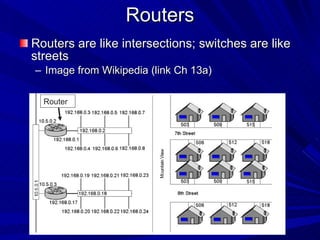
Routers Routers are like intersections; switches are like streets  Image from Wikipedia (link Ch 13a) Router
Understanding Routers Routers are hardware devices used on a network to send packets to different network segments Operate at the network layer of the OSI model
Routing Protocols Routers tell one another what paths are available with Routing Protocols Link-state routing protocol Each router has complete information about every network link Example: Open Shortest Path First (OSPF) Distance-vector routing protocol Routers only know which direction to send packets, and how far Example: Routing Information Protocol (RIP)
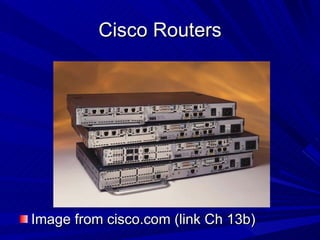
Cisco Routers Image from cisco.com (link Ch 13b)
Understanding Basic Hardware Routers Cisco routers are widely used in the networking community More than one million Cisco 2500 series routers are currently being used by companies around the world Vulnerabilities exist in Cisco as they do in any operating system See link Ch 13c
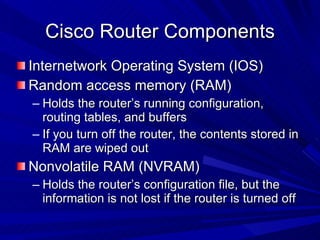
Cisco Router Components Internetwork Operating System (IOS) Random access memory (RAM) Holds the router’s running configuration, routing tables, and buffers If you turn off the router, the contents stored in RAM are wiped out Nonvolatile RAM (NVRAM) Holds the router’s configuration file, but the information is not lost if the router is turned off
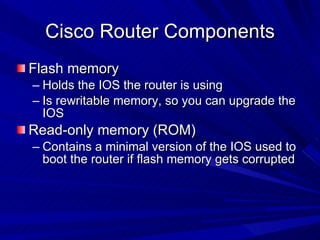
Cisco Router Components Flash memory Holds the IOS the router is using Is rewritable memory, so you can upgrade the IOS Read-only memory (ROM) Contains a minimal version of the IOS used to boot the router if flash memory gets corrupted
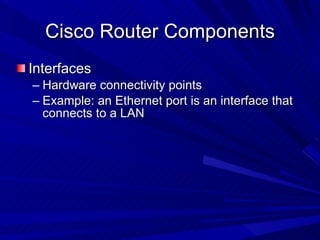
Cisco Router Components Interfaces Hardware connectivity points Example: an Ethernet port is an interface that connects to a LAN
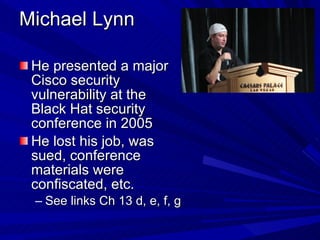
Michael Lynn He presented a major Cisco security vulnerability at the Black Hat security conference in 2005 He lost his job, was sued, conference materials were confiscated, etc. See links Ch 13 d, e, f, g
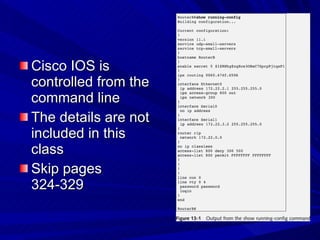
Cisco IOS is controlled from the command line The details are not included in this class Skip pages 324-329
Understanding Firewalls Firewalls are hardware devices or software installed on a system and have two purposes Controlling access to all traffic that enters an internal network Controlling all traffic that leaves an internal network
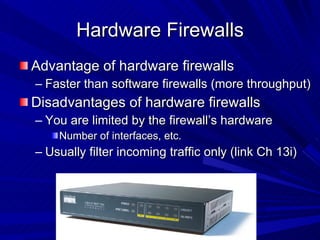
Hardware Firewalls Advantage of hardware firewalls Faster than software firewalls (more throughput) Disadvantages of hardware firewalls You are limited by the firewall’s hardware Number of interfaces, etc. Usually filter incoming traffic only (link Ch 13i)
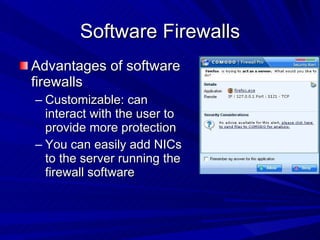
Software Firewalls Advantages of software firewalls Customizable: can interact with the user to provide more protection You can easily add NICs to the server running the firewall software
Software Firewalls Disadvantages of software firewalls You might have to worry about configuration problems They rely on the OS on which they are running
Firewall Technologies Network address translation (NAT) Access control lists (Packet filtering) Stateful packet inspection (SPI)
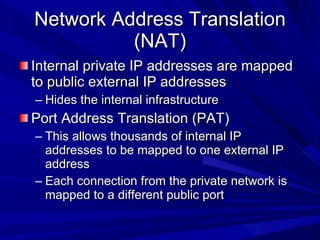
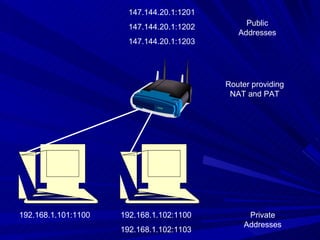
Network Address Translation (NAT) Internal private IP addresses are mapped to public external IP addresses Hides the internal infrastructure Port Address Translation (PAT) This allows thousands of internal IP addresses to be mapped to one external IP address Each connection from the private network is mapped to a different public port
192.168.1.101:1100 192.168.1.102:1100 192.168.1.102:1103 147.144.20.1:1201 147.144.20.1:1202 147.144.20.1:1203 Router providing NAT and PAT Public Addresses Private Addresses
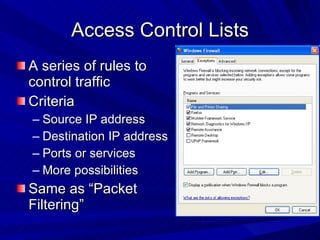
Access Control Lists A series of rules to control traffic Criteria Source IP address Destination IP address Ports or services More possibilities Same as “Packet Filtering”
Stateful Packet Inspection (SPI) Stateful packet filters examine the current state of the network If you have sent a request to a server, packets from that server may be allowed in Packets from the same server might be blocked if no request was sent first
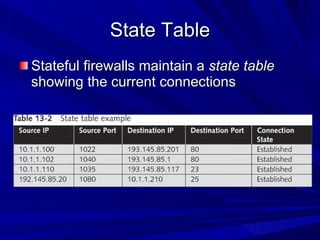
State Table Stateful firewalls maintain a  state table  showing the current connections
ACK Port scan Used to get information about a firewall Stateful firewalls track connection and block unsolicited ACK packets Stateless firewalls only block incoming SYN packets, so you get a RST response We covered this in chapter 5
Stateful Packet Inspection (SPI) Stateful packet filters recognize types of anomalies that most routers ignore Stateless packet filters handle each packet on an individual basis This makes them less effective against some attacks
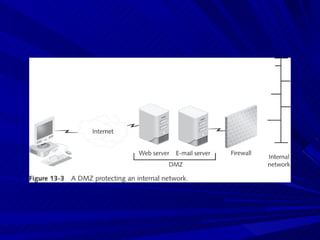
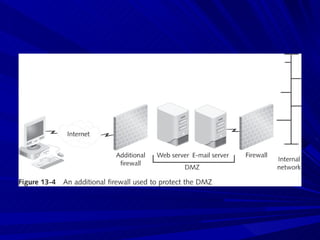
Implementing a Firewall Using only one firewall between a company’s internal network and the Internet is dangerous It leaves the company open to attack if a hacker compromises the firewall Use a demilitarized zone instead
Demilitarized Zone (DMZ) DMZ is a small network containing resources available to Internet users Helps maintain security on the company’s internal network Sits between the Internet and the internal network It is sometimes referred to as a “perimeter network”
 
 
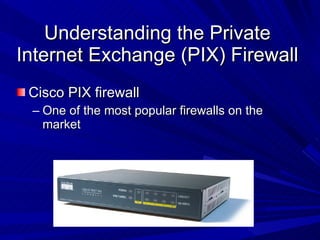
Understanding the Private Internet Exchange (PIX) Firewall Cisco PIX firewall One of the most popular firewalls on the market
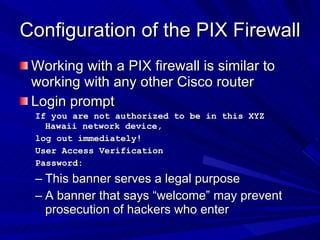
Configuration of the PIX Firewall Working with a PIX firewall is similar to working with any other Cisco router Login prompt If you are not authorized to be in this XYZ Hawaii network device, log out immediately! User Access Verification Password: This banner serves a legal purpose A banner that says “welcome” may prevent prosecution of hackers who enter
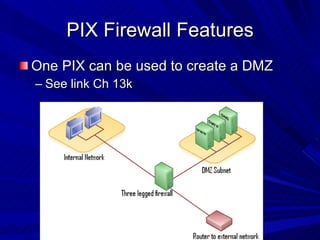
PIX Firewall Features One PIX can be used to create a DMZ See link Ch 13k
PIX Firewall Features Unicast Reverse Path Forwarding Also known as "reverse route lookup" Checks to see that packets have correct source IP addresses Flood Defender Prevents SYN Floods Only a limited number of "embryonic connections" are allowed
PIX Firewall Features FragGuard and Virtual Re-Assembly Re-assembles IP fragments to prevent some DoS attacks, like the Ping of Death and Teardrop Limits DNS Responses ActiveX controls Java applets I skipped pages 333-336
Microsoft ISA Internet Security and Acceleration (ISA) Microsoft’s software approach to firewalls Microsoft Internet Security and Acceleration (ISA) Server Software that runs on a Windows Server Functions as a software router, firewall, and IDS (Intrusion Detection System)
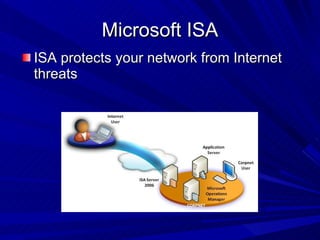
Microsoft ISA ISA protects your network from Internet threats
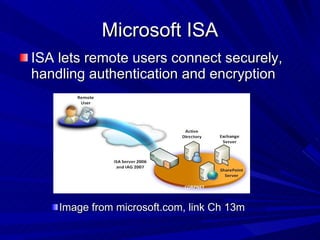
Microsoft ISA ISA lets remote users connect securely, handling authentication and encryption Image from microsoft.com, link Ch 13m
Microsoft ISA ISA has the same functionality as any hardware router Packet filtering to control incoming traffic Application filtering through the examination of protocols Intrusion detection filters Access policies to control outgoing traffic
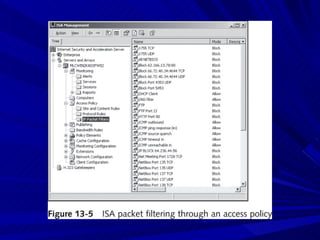
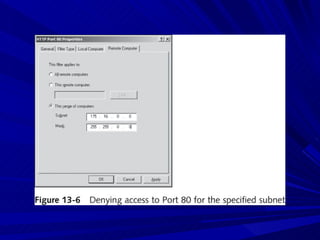
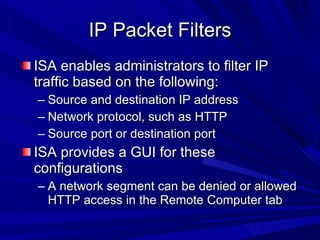
IP Packet Filters ISA enables administrators to filter IP traffic based on the following: Source and destination IP address Network protocol, such as HTTP Source port or destination port ISA provides a GUI for these configurations A network segment can be denied or allowed HTTP access in the Remote Computer tab
 
 
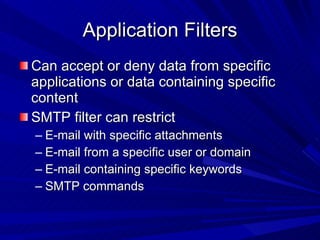
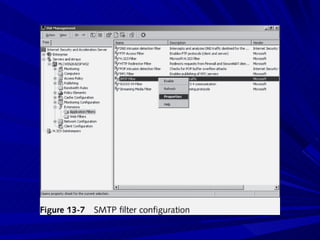
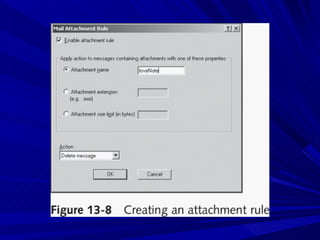
Application Filters Can accept or deny data from specific applications or data containing specific content SMTP filter can restrict E-mail with specific attachments E-mail from a specific user or domain E-mail containing specific keywords SMTP commands
 
 
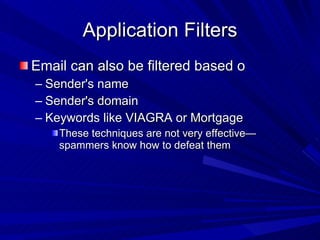
Application Filters Email can also be filtered based o Sender's name Sender's domain Keywords like VIAGRA or Mortgage These techniques are not very effective—spammers know how to defeat them
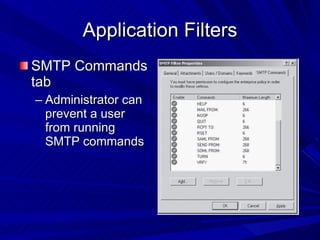
Application Filters SMTP Commands tab Administrator can prevent a user from running SMTP commands
Application Filters FTP Access filter H.323 filter real-time multimedia conferences See link Ch 13n
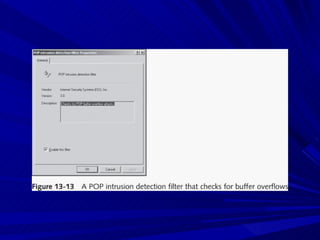
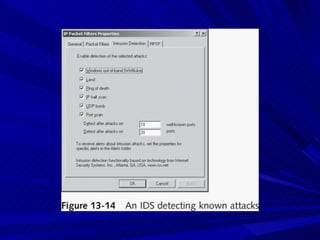
Intrusion Detection Filters Analyze all traffic for possible known intrusions DNS intrusion detection filter POP filter  RPC filter SMTP filter SOCKS filter Streaming Media filter Web Proxy filter
 
 
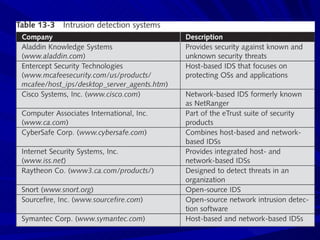
Intrusion Detection Systems (IDSs) Monitor network devices so that security administrators can identify attacks in progress and stop them An IDS looks at the traffic and compares it with known exploits Similar to virus software using a signature file to identify viruses Types Network-based IDSs Host-based IDSs
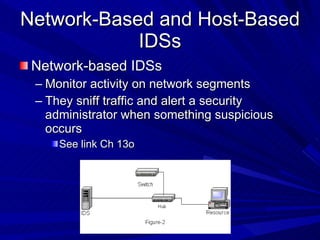
Network-Based and Host-Based IDSs Network-based IDSs Monitor activity on network segments They sniff traffic and alert a security administrator when something suspicious occurs See link Ch 13o
Network-Based and Host-Based IDSs Host-based IDSs The software is installed on the server you’re attempting to protect, like antivirus software Used to protect a critical network server or database server
Passive and Active IDSs IDSs are categorized by how they react when they detect suspicious behavior Passive systems Send out an alert and log the activity Don't try to stop it Active systems Log events and send out alerts Can also interoperate with routers and firewalls to block the activity automatically
 
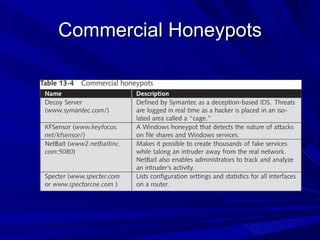
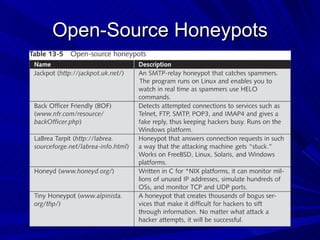
Understanding Honeypots Honeypot Computer placed on the perimeter of a network Contains information intended to lure and then trap hackers Computer is configured to have vulnerabilities Goal Keep hackers connected long enough so they can be traced back
How They Work A honeypot appears to have important data or sensitive information stored on it Could store fake financial data that tempts hackers to attempt browsing through the data Hackers will spend time attacking the honeypot And stop looking for real vulnerabilities in the company’s network Honeypots also enable security professionals to collect data on attackers
Commercial Honeypots
Open-Source Honeypots
How They Work (continued) Virtual honeypots Honeypots created using software solutions instead of hardware devices Example: Honeyd
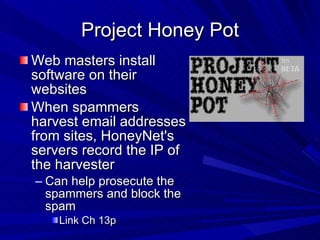
Project Honey Pot Web masters install software on their websites When spammers harvest email addresses from sites, HoneyNet's servers record the IP of the harvester Can help prosecute the spammers and block the spam Link Ch 13p
Uses a Capture Server and one or more Capture Clients The clients run in virtual machines Clients connect to suspect Web servers If the client detects an infection, it alerts the Capture Server and restores itself to a clean state The server gathers data about malicious websites See link Ch 13q

Ch13 Protecting Networks with Security Devices

  • 1.
    Hands-On Ethical Hackingand Network Defense Chapter 13 Protecting Networks with Security Devices Last modified 6-4-09
  • 2.
    Objectives Describe networksecurity devices Describe firewall technology Describe intrusion detection systems Describe honeypots
  • 3.
    Routers Routers arelike intersections; switches are like streets Image from Wikipedia (link Ch 13a) Router
  • 4.
    Understanding Routers Routersare hardware devices used on a network to send packets to different network segments Operate at the network layer of the OSI model
  • 5.
    Routing Protocols Routerstell one another what paths are available with Routing Protocols Link-state routing protocol Each router has complete information about every network link Example: Open Shortest Path First (OSPF) Distance-vector routing protocol Routers only know which direction to send packets, and how far Example: Routing Information Protocol (RIP)
  • 6.
    Cisco Routers Imagefrom cisco.com (link Ch 13b)
  • 7.
    Understanding Basic HardwareRouters Cisco routers are widely used in the networking community More than one million Cisco 2500 series routers are currently being used by companies around the world Vulnerabilities exist in Cisco as they do in any operating system See link Ch 13c
  • 8.
    Cisco Router ComponentsInternetwork Operating System (IOS) Random access memory (RAM) Holds the router’s running configuration, routing tables, and buffers If you turn off the router, the contents stored in RAM are wiped out Nonvolatile RAM (NVRAM) Holds the router’s configuration file, but the information is not lost if the router is turned off
  • 9.
    Cisco Router ComponentsFlash memory Holds the IOS the router is using Is rewritable memory, so you can upgrade the IOS Read-only memory (ROM) Contains a minimal version of the IOS used to boot the router if flash memory gets corrupted
  • 10.
    Cisco Router ComponentsInterfaces Hardware connectivity points Example: an Ethernet port is an interface that connects to a LAN
  • 11.
    Michael Lynn Hepresented a major Cisco security vulnerability at the Black Hat security conference in 2005 He lost his job, was sued, conference materials were confiscated, etc. See links Ch 13 d, e, f, g
  • 12.
    Cisco IOS iscontrolled from the command line The details are not included in this class Skip pages 324-329
  • 13.
    Understanding Firewalls Firewallsare hardware devices or software installed on a system and have two purposes Controlling access to all traffic that enters an internal network Controlling all traffic that leaves an internal network
  • 14.
    Hardware Firewalls Advantageof hardware firewalls Faster than software firewalls (more throughput) Disadvantages of hardware firewalls You are limited by the firewall’s hardware Number of interfaces, etc. Usually filter incoming traffic only (link Ch 13i)
  • 15.
    Software Firewalls Advantagesof software firewalls Customizable: can interact with the user to provide more protection You can easily add NICs to the server running the firewall software
  • 16.
    Software Firewalls Disadvantagesof software firewalls You might have to worry about configuration problems They rely on the OS on which they are running
  • 17.
    Firewall Technologies Networkaddress translation (NAT) Access control lists (Packet filtering) Stateful packet inspection (SPI)
  • 18.
    Network Address Translation(NAT) Internal private IP addresses are mapped to public external IP addresses Hides the internal infrastructure Port Address Translation (PAT) This allows thousands of internal IP addresses to be mapped to one external IP address Each connection from the private network is mapped to a different public port
  • 19.
    192.168.1.101:1100 192.168.1.102:1100 192.168.1.102:1103147.144.20.1:1201 147.144.20.1:1202 147.144.20.1:1203 Router providing NAT and PAT Public Addresses Private Addresses
  • 20.
    Access Control ListsA series of rules to control traffic Criteria Source IP address Destination IP address Ports or services More possibilities Same as “Packet Filtering”
  • 21.
    Stateful Packet Inspection(SPI) Stateful packet filters examine the current state of the network If you have sent a request to a server, packets from that server may be allowed in Packets from the same server might be blocked if no request was sent first
  • 22.
    State Table Statefulfirewalls maintain a state table showing the current connections
  • 23.
    ACK Port scanUsed to get information about a firewall Stateful firewalls track connection and block unsolicited ACK packets Stateless firewalls only block incoming SYN packets, so you get a RST response We covered this in chapter 5
  • 24.
    Stateful Packet Inspection(SPI) Stateful packet filters recognize types of anomalies that most routers ignore Stateless packet filters handle each packet on an individual basis This makes them less effective against some attacks
  • 25.
    Implementing a FirewallUsing only one firewall between a company’s internal network and the Internet is dangerous It leaves the company open to attack if a hacker compromises the firewall Use a demilitarized zone instead
  • 26.
    Demilitarized Zone (DMZ)DMZ is a small network containing resources available to Internet users Helps maintain security on the company’s internal network Sits between the Internet and the internal network It is sometimes referred to as a “perimeter network”
  • 27.
  • 28.
  • 29.
    Understanding the PrivateInternet Exchange (PIX) Firewall Cisco PIX firewall One of the most popular firewalls on the market
  • 30.
    Configuration of thePIX Firewall Working with a PIX firewall is similar to working with any other Cisco router Login prompt If you are not authorized to be in this XYZ Hawaii network device, log out immediately! User Access Verification Password: This banner serves a legal purpose A banner that says “welcome” may prevent prosecution of hackers who enter
  • 31.
    PIX Firewall FeaturesOne PIX can be used to create a DMZ See link Ch 13k
  • 32.
    PIX Firewall FeaturesUnicast Reverse Path Forwarding Also known as "reverse route lookup" Checks to see that packets have correct source IP addresses Flood Defender Prevents SYN Floods Only a limited number of "embryonic connections" are allowed
  • 33.
    PIX Firewall FeaturesFragGuard and Virtual Re-Assembly Re-assembles IP fragments to prevent some DoS attacks, like the Ping of Death and Teardrop Limits DNS Responses ActiveX controls Java applets I skipped pages 333-336
  • 34.
    Microsoft ISA InternetSecurity and Acceleration (ISA) Microsoft’s software approach to firewalls Microsoft Internet Security and Acceleration (ISA) Server Software that runs on a Windows Server Functions as a software router, firewall, and IDS (Intrusion Detection System)
  • 35.
    Microsoft ISA ISAprotects your network from Internet threats
  • 36.
    Microsoft ISA ISAlets remote users connect securely, handling authentication and encryption Image from microsoft.com, link Ch 13m
  • 37.
    Microsoft ISA ISAhas the same functionality as any hardware router Packet filtering to control incoming traffic Application filtering through the examination of protocols Intrusion detection filters Access policies to control outgoing traffic
  • 38.
    IP Packet FiltersISA enables administrators to filter IP traffic based on the following: Source and destination IP address Network protocol, such as HTTP Source port or destination port ISA provides a GUI for these configurations A network segment can be denied or allowed HTTP access in the Remote Computer tab
  • 39.
  • 40.
  • 41.
    Application Filters Canaccept or deny data from specific applications or data containing specific content SMTP filter can restrict E-mail with specific attachments E-mail from a specific user or domain E-mail containing specific keywords SMTP commands
  • 42.
  • 43.
  • 44.
    Application Filters Emailcan also be filtered based o Sender's name Sender's domain Keywords like VIAGRA or Mortgage These techniques are not very effective—spammers know how to defeat them
  • 45.
    Application Filters SMTPCommands tab Administrator can prevent a user from running SMTP commands
  • 46.
    Application Filters FTPAccess filter H.323 filter real-time multimedia conferences See link Ch 13n
  • 47.
    Intrusion Detection FiltersAnalyze all traffic for possible known intrusions DNS intrusion detection filter POP filter RPC filter SMTP filter SOCKS filter Streaming Media filter Web Proxy filter
  • 48.
  • 49.
  • 50.
    Intrusion Detection Systems(IDSs) Monitor network devices so that security administrators can identify attacks in progress and stop them An IDS looks at the traffic and compares it with known exploits Similar to virus software using a signature file to identify viruses Types Network-based IDSs Host-based IDSs
  • 51.
    Network-Based and Host-BasedIDSs Network-based IDSs Monitor activity on network segments They sniff traffic and alert a security administrator when something suspicious occurs See link Ch 13o
  • 52.
    Network-Based and Host-BasedIDSs Host-based IDSs The software is installed on the server you’re attempting to protect, like antivirus software Used to protect a critical network server or database server
  • 53.
    Passive and ActiveIDSs IDSs are categorized by how they react when they detect suspicious behavior Passive systems Send out an alert and log the activity Don't try to stop it Active systems Log events and send out alerts Can also interoperate with routers and firewalls to block the activity automatically
  • 54.
  • 55.
    Understanding Honeypots HoneypotComputer placed on the perimeter of a network Contains information intended to lure and then trap hackers Computer is configured to have vulnerabilities Goal Keep hackers connected long enough so they can be traced back
  • 56.
    How They WorkA honeypot appears to have important data or sensitive information stored on it Could store fake financial data that tempts hackers to attempt browsing through the data Hackers will spend time attacking the honeypot And stop looking for real vulnerabilities in the company’s network Honeypots also enable security professionals to collect data on attackers
  • 57.
  • 58.
  • 59.
    How They Work(continued) Virtual honeypots Honeypots created using software solutions instead of hardware devices Example: Honeyd
  • 60.
    Project Honey PotWeb masters install software on their websites When spammers harvest email addresses from sites, HoneyNet's servers record the IP of the harvester Can help prosecute the spammers and block the spam Link Ch 13p
  • 61.
    Uses a CaptureServer and one or more Capture Clients The clients run in virtual machines Clients connect to suspect Web servers If the client detects an infection, it alerts the Capture Server and restores itself to a clean state The server gathers data about malicious websites See link Ch 13q