Pre-Production
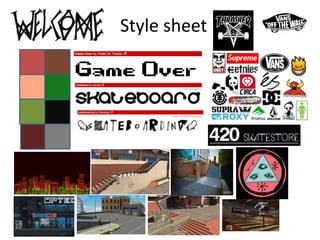
Style sheet
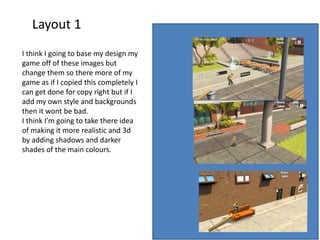
Layout 1
I think I going to base my design my
game off of these images but
change them so there more of my
game as if I copied this completely I
can get done for copy right but if I
add my own style and backgrounds
then it wont be bad.
I think I’m going to take there idea
of making it more realistic and 3d
by adding shadows and darker
shades of the main colours.
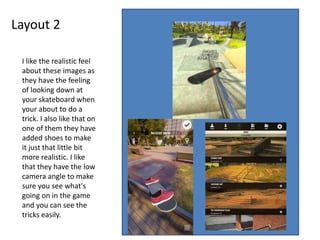
Layout 2
I like the realistic feel
about these images as
they have the feeling
of looking down at
your skateboard when
your about to do a
trick. I also like that on
one of them they have
added shoes to make
it just that little bit
more realistic. I like
that they have the low
camera angle to make
sure you see what's
going on in the game
and you can see the
tricks easily.
Props & Locations
software Resources
Photoshop computers
Premier pro
Contingency Planning
Potential Issue Solution
losing work saving it and backing it
soft ware crashing saving every few minuets
not keeping to deadline do it in own time to get it in
Work not looking like the plan make sure you check your pre production.
Health and Safety
Potential Issue How will the issue be
avoided?
eye strain take breaks away from the computer.
back ache from not sitting properly
headache take brakes from computer and drink water
electric shock make sure all equipment has been tested and
that there is no water near electrical
hand cramp sit in proper typing position
fire hazard make sure all equipment has been tested and
make sure fire exits are clear
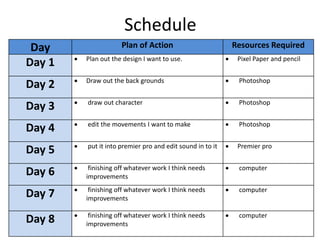
Schedule
Day Plan of Action Resources Required
Day 1  Plan out the design I want to use.  Pixel Paper and pencil
Day 2  Draw out the back grounds  Photoshop
Day 3  draw out character  Photoshop
Day 4  edit the movements I want to make  Photoshop
Day 5  put it into premier pro and edit sound in to it  Premier pro
Day 6  finishing off whatever work I think needs
improvements
 computer
Day 7  finishing off whatever work I think needs
improvements
 computer
Day 8  finishing off whatever work I think needs
improvements
 computer

5. pre production(2)

  • 1.
  • 2.
  • 3.
    Layout 1 I thinkI going to base my design my game off of these images but change them so there more of my game as if I copied this completely I can get done for copy right but if I add my own style and backgrounds then it wont be bad. I think I’m going to take there idea of making it more realistic and 3d by adding shadows and darker shades of the main colours.
  • 4.
    Layout 2 I likethe realistic feel about these images as they have the feeling of looking down at your skateboard when your about to do a trick. I also like that on one of them they have added shoes to make it just that little bit more realistic. I like that they have the low camera angle to make sure you see what's going on in the game and you can see the tricks easily.
  • 5.
    Props & Locations softwareResources Photoshop computers Premier pro
  • 6.
    Contingency Planning Potential IssueSolution losing work saving it and backing it soft ware crashing saving every few minuets not keeping to deadline do it in own time to get it in Work not looking like the plan make sure you check your pre production.
  • 7.
    Health and Safety PotentialIssue How will the issue be avoided? eye strain take breaks away from the computer. back ache from not sitting properly headache take brakes from computer and drink water electric shock make sure all equipment has been tested and that there is no water near electrical hand cramp sit in proper typing position fire hazard make sure all equipment has been tested and make sure fire exits are clear
  • 8.
    Schedule Day Plan ofAction Resources Required Day 1  Plan out the design I want to use.  Pixel Paper and pencil Day 2  Draw out the back grounds  Photoshop Day 3  draw out character  Photoshop Day 4  edit the movements I want to make  Photoshop Day 5  put it into premier pro and edit sound in to it  Premier pro Day 6  finishing off whatever work I think needs improvements  computer Day 7  finishing off whatever work I think needs improvements  computer Day 8  finishing off whatever work I think needs improvements  computer

Editor's Notes

  • #3 Explore colours, fonts and image styles similar to what you want to produce. Discuss all three elements in relation to why you chose them and where you may use them in your project. Go over as many pages as you need to
  • #4 Mock up of a potential design using the colours and fonts established in your style sheet and sourced images
  • #5 Mock up of a potential design using the colours and fonts established in your style sheet and sourced images