Pre-Production
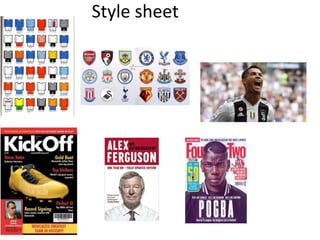
Style sheet
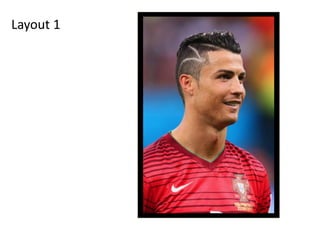
Layout 1
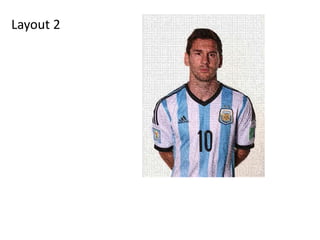
Layout 2
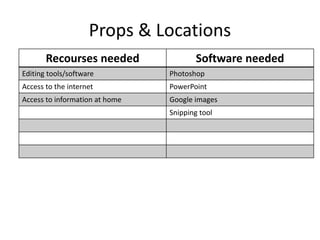
Props & Locations
Recourses needed Software needed
Editing tools/software Photoshop
Access to the internet PowerPoint
Access to information at home Google images
Snipping tool
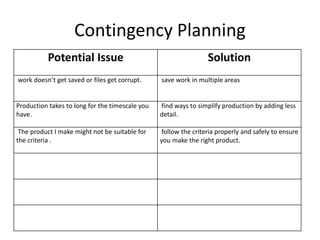
Contingency Planning
Potential Issue Solution
work doesn’t get saved or files get corrupt. save work in multiple areas
Production takes to long for the timescale you
have.
find ways to simplify production by adding less
detail.
The product I make might not be suitable for
the criteria .
follow the criteria properly and safely to ensure
you make the right product.
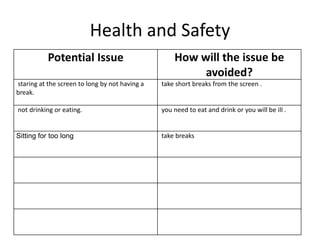
Health and Safety
Potential Issue How will the issue be
avoided?
staring at the screen to long by not having a
break.
take short breaks from the screen .
not drinking or eating. you need to eat and drink or you will be ill .
Sitting for too long take breaks
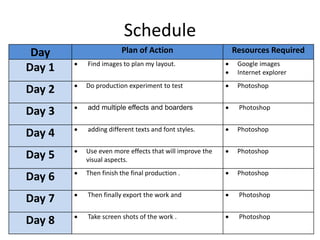
Schedule
Day Plan of Action Resources Required
Day 1 ď‚· Find images to plan my layout. ď‚· Google images
ď‚· Internet explorer
Day 2 ď‚· Do production experiment to test ď‚· Photoshop
Day 3 ď‚· add multiple effects and boarders ď‚· Photoshop
Day 4 ď‚· adding different texts and font styles. ď‚· Photoshop
Day 5 ď‚· Use even more effects that will improve the
visual aspects.
ď‚· Photoshop
Day 6 ď‚· Then finish the final production . ď‚· Photoshop
Day 7 ď‚· Then finally export the work and ď‚· Photoshop
Day 8 ď‚· Take screen shots of the work . ď‚· Photoshop

5. pre production(3) (1)

  • 1.
  • 2.
  • 3.
  • 4.
  • 5.
    Props & Locations Recoursesneeded Software needed Editing tools/software Photoshop Access to the internet PowerPoint Access to information at home Google images Snipping tool
  • 6.
    Contingency Planning Potential IssueSolution work doesn’t get saved or files get corrupt. save work in multiple areas Production takes to long for the timescale you have. find ways to simplify production by adding less detail. The product I make might not be suitable for the criteria . follow the criteria properly and safely to ensure you make the right product.
  • 7.
    Health and Safety PotentialIssue How will the issue be avoided? staring at the screen to long by not having a break. take short breaks from the screen . not drinking or eating. you need to eat and drink or you will be ill . Sitting for too long take breaks
  • 8.
    Schedule Day Plan ofAction Resources Required Day 1 ď‚· Find images to plan my layout. ď‚· Google images ď‚· Internet explorer Day 2 ď‚· Do production experiment to test ď‚· Photoshop Day 3 ď‚· add multiple effects and boarders ď‚· Photoshop Day 4 ď‚· adding different texts and font styles. ď‚· Photoshop Day 5 ď‚· Use even more effects that will improve the visual aspects. ď‚· Photoshop Day 6 ď‚· Then finish the final production . ď‚· Photoshop Day 7 ď‚· Then finally export the work and ď‚· Photoshop Day 8 ď‚· Take screen shots of the work . ď‚· Photoshop

Editor's Notes

  • #3 Explore colours, fonts and image styles similar to what you want to produce. Discuss all three elements in relation to why you chose them and where you may use them in your project. Go over as many pages as you need to
  • #4 Mock up of a potential design using the colours and fonts established in your style sheet and sourced images
  • #5 Mock up of a potential design using the colours and fonts established in your style sheet and sourced images