Pre-Production
Style sheet
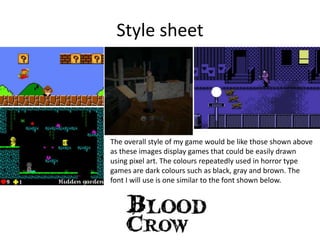
The overall style of my game would be like those shown above
as these images display games that could be easily drawn
using pixel art. The colours repeatedly used in horror type
games are dark colours such as black, gray and brown. The
font I will use is one similar to the font shown below.
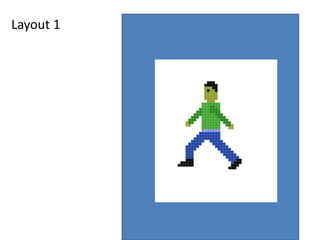
Layout 1
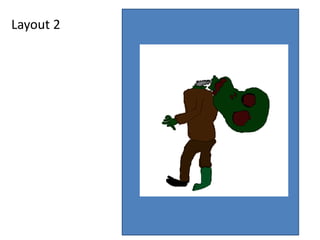
Layout 2
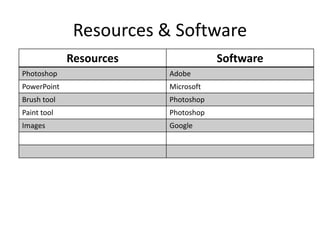
Resources & Software
Resources Software
Photoshop Adobe
PowerPoint Microsoft
Brush tool Photoshop
Paint tool Photoshop
Images Google
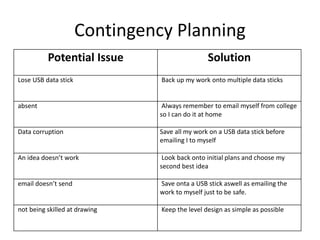
Contingency Planning
Potential Issue Solution
Lose USB data stick Back up my work onto multiple data sticks
absent Always remember to email myself from college
so I can do it at home
Data corruption Save all my work on a USB data stick before
emailing I to myself
An idea doesn’t work Look back onto initial plans and choose my
second best idea
email doesn’t send Save onta a USB stick aswell as emailing the
work to myself just to be safe.
not being skilled at drawing Keep the level design as simple as possible
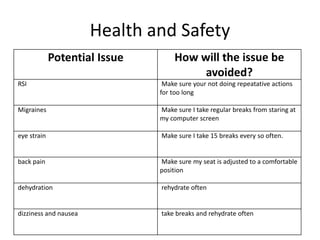
Health and Safety
Potential Issue How will the issue be
avoided?
RSI Make sure your not doing repeatative actions
for too long
Migraines Make sure I take regular breaks from staring at
my computer screen
eye strain Make sure I take 15 breaks every so often.
back pain Make sure my seat is adjusted to a comfortable
position
dehydration rehydrate often
dizziness and nausea take breaks and rehydrate often
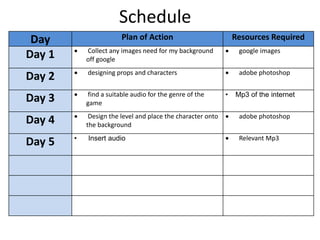
Schedule
Day Plan of Action Resources Required
Day 1  Collect any images need for my background
off google
 google images
Day 2  designing props and characters  adobe photoshop
Day 3  find a suitable audio for the genre of the
game
• Mp3 of the internet
Day 4  Design the level and place the character onto
the background
 adobe photoshop
Day 5 • Insert audio  Relevant Mp3

5. pre production interactive

  • 1.
  • 2.
    Style sheet The overallstyle of my game would be like those shown above as these images display games that could be easily drawn using pixel art. The colours repeatedly used in horror type games are dark colours such as black, gray and brown. The font I will use is one similar to the font shown below.
  • 3.
  • 4.
  • 5.
    Resources & Software ResourcesSoftware Photoshop Adobe PowerPoint Microsoft Brush tool Photoshop Paint tool Photoshop Images Google
  • 6.
    Contingency Planning Potential IssueSolution Lose USB data stick Back up my work onto multiple data sticks absent Always remember to email myself from college so I can do it at home Data corruption Save all my work on a USB data stick before emailing I to myself An idea doesn’t work Look back onto initial plans and choose my second best idea email doesn’t send Save onta a USB stick aswell as emailing the work to myself just to be safe. not being skilled at drawing Keep the level design as simple as possible
  • 7.
    Health and Safety PotentialIssue How will the issue be avoided? RSI Make sure your not doing repeatative actions for too long Migraines Make sure I take regular breaks from staring at my computer screen eye strain Make sure I take 15 breaks every so often. back pain Make sure my seat is adjusted to a comfortable position dehydration rehydrate often dizziness and nausea take breaks and rehydrate often
  • 8.
    Schedule Day Plan ofAction Resources Required Day 1  Collect any images need for my background off google  google images Day 2  designing props and characters  adobe photoshop Day 3  find a suitable audio for the genre of the game • Mp3 of the internet Day 4  Design the level and place the character onto the background  adobe photoshop Day 5 • Insert audio  Relevant Mp3

Editor's Notes

  • #3 Explore colours, fonts and image styles similar to what you want to produce. Discuss all three elements in relation to why you chose them and where you may use them in your project. Go over as many pages as you need to
  • #4 Mock up of a potential design using the colours and fonts established in your style sheet and sourced images
  • #5 Mock up of a potential design using the colours and fonts established in your style sheet and sourced images