Pre-Production
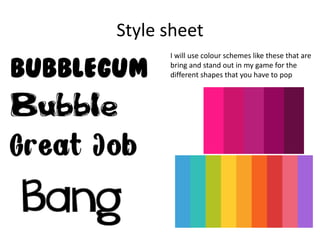
Style sheet
I will use colour schemes like these that are
bring and stand out in my game for the
different shapes that you have to pop
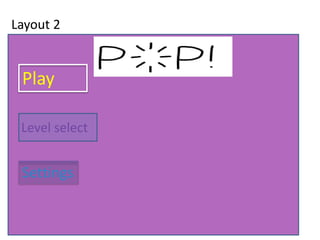
Layout 2
Play
Level select
Settings
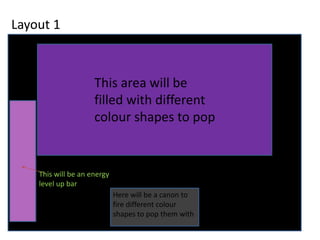
Layout 1
This area will be
filled with different
colour shapes to pop
Here will be a canon to
fire different colour
shapes to pop them with
This will be an energy
level up bar
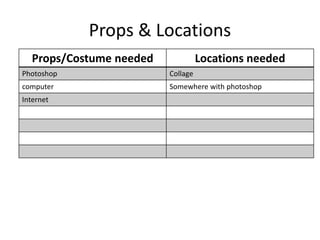
Props & Locations
Props/Costume needed Locations needed
Photoshop Collage
computer Somewhere with photoshop
Internet
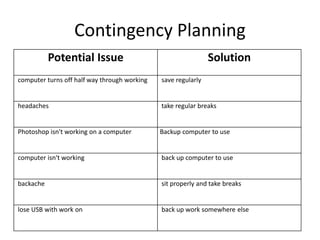
Contingency Planning
Potential Issue Solution
computer turns off half way through working save regularly
headaches take regular breaks
Photoshop isn't working on a computer Backup computer to use
computer isn't working back up computer to use
backache sit properly and take breaks
lose USB with work on back up work somewhere else
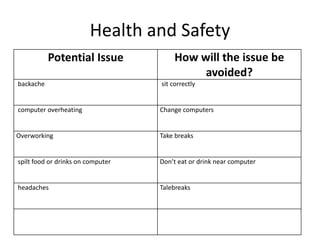
Health and Safety
Potential Issue How will the issue be
avoided?
backache sit correctly
computer overheating Change computers
Overworking Take breaks
spilt food or drinks on computer Don’t eat or drink near computer
headaches Talebreaks
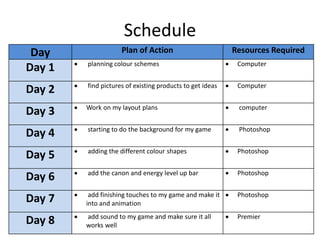
Schedule
Day Plan of Action Resources Required
Day 1  planning colour schemes  Computer
Day 2  find pictures of existing products to get ideas  Computer
Day 3  Work on my layout plans  computer
Day 4  starting to do the background for my game  Photoshop
Day 5  adding the different colour shapes  Photoshop
Day 6  add the canon and energy level up bar  Photoshop
Day 7  add finishing touches to my game and make it
into and animation
 Photoshop
Day 8  add sound to my game and make sure it all
works well
 Premier

5. pre production

  • 1.
  • 2.
    Style sheet I willuse colour schemes like these that are bring and stand out in my game for the different shapes that you have to pop
  • 3.
  • 4.
    Layout 1 This areawill be filled with different colour shapes to pop Here will be a canon to fire different colour shapes to pop them with This will be an energy level up bar
  • 5.
    Props & Locations Props/Costumeneeded Locations needed Photoshop Collage computer Somewhere with photoshop Internet
  • 6.
    Contingency Planning Potential IssueSolution computer turns off half way through working save regularly headaches take regular breaks Photoshop isn't working on a computer Backup computer to use computer isn't working back up computer to use backache sit properly and take breaks lose USB with work on back up work somewhere else
  • 7.
    Health and Safety PotentialIssue How will the issue be avoided? backache sit correctly computer overheating Change computers Overworking Take breaks spilt food or drinks on computer Don’t eat or drink near computer headaches Talebreaks
  • 8.
    Schedule Day Plan ofAction Resources Required Day 1  planning colour schemes  Computer Day 2  find pictures of existing products to get ideas  Computer Day 3  Work on my layout plans  computer Day 4  starting to do the background for my game  Photoshop Day 5  adding the different colour shapes  Photoshop Day 6  add the canon and energy level up bar  Photoshop Day 7  add finishing touches to my game and make it into and animation  Photoshop Day 8  add sound to my game and make sure it all works well  Premier

Editor's Notes

  • #3 Explore colours, fonts and image styles similar to what you want to produce. Discuss all three elements in relation to why you chose them and where you may use them in your project. Go over as many pages as you need to
  • #4 Mock up of a potential design using the colours and fonts established in your style sheet and sourced images
  • #5 Mock up of a potential design using the colours and fonts established in your style sheet and sourced images