Pre-Production
Louis Cooper
Style sheet
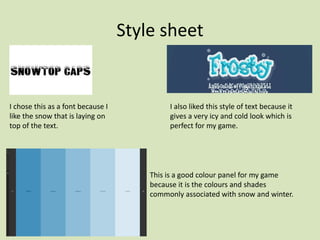
I chose this as a font because I
like the snow that is laying on
top of the text.
I also liked this style of text because it
gives a very icy and cold look which is
perfect for my game.
This is a good colour panel for my game
because it is the colours and shades
commonly associated with snow and winter.
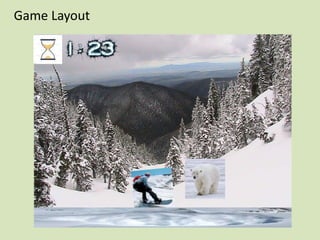
Game Layout
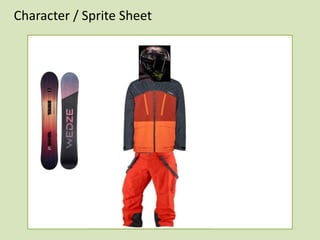
Character / Sprite Sheet
App Logo Design
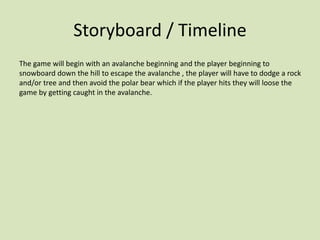
Storyboard / Timeline
The game will begin with an avalanche beginning and the player beginning to
snowboard down the hill to escape the avalanche , the player will have to dodge a rock
and/or tree and then avoid the polar bear which if the player hits they will loose the
game by getting caught in the avalanche.
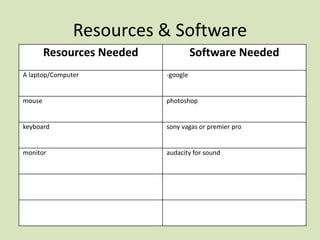
Resources & Software
Resources Needed Software Needed
A laptop/Computer -google
mouse photoshop
keyboard sony vagas or premier pro
monitor audacity for sound
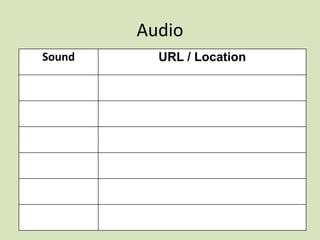
Audio
Sound URL / Location
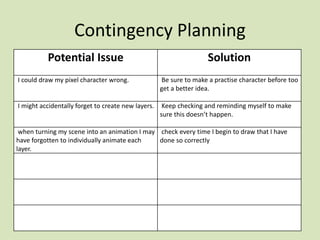
Contingency Planning
Potential Issue Solution
I could draw my pixel character wrong. Be sure to make a practise character before too
get a better idea.
I might accidentally forget to create new layers. Keep checking and reminding myself to make
sure this doesn’t happen.
when turning my scene into an animation I may
have forgotten to individually animate each
layer.
check every time I begin to draw that I have
done so correctly
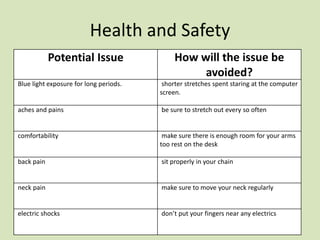
Health and Safety
Potential Issue How will the issue be
avoided?
Blue light exposure for long periods. shorter stretches spent staring at the computer
screen.
aches and pains be sure to stretch out every so often
comfortability make sure there is enough room for your arms
too rest on the desk
back pain sit properly in your chain
neck pain make sure to move your neck regularly
electric shocks don’t put your fingers near any electrics
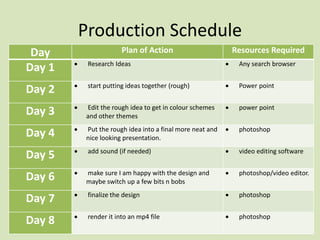
Production Schedule
Day Plan of Action Resources Required
Day 1 ď‚· Research Ideas ď‚· Any search browser
Day 2 ď‚· start putting ideas together (rough) ď‚· Power point
Day 3 ď‚· Edit the rough idea to get in colour schemes
and other themes
ď‚· power point
Day 4 ď‚· Put the rough idea into a final more neat and
nice looking presentation.
ď‚· photoshop
Day 5 ď‚· add sound (if needed) ď‚· video editing software
Day 6 ď‚· make sure I am happy with the design and
maybe switch up a few bits n bobs
ď‚· photoshop/video editor.
Day 7 ď‚· finalize the design ď‚· photoshop
Day 8 ď‚· render it into an mp4 file ď‚· photoshop

5. pre production (interactive)(1)

  • 1.
  • 2.
    Style sheet I chosethis as a font because I like the snow that is laying on top of the text. I also liked this style of text because it gives a very icy and cold look which is perfect for my game. This is a good colour panel for my game because it is the colours and shades commonly associated with snow and winter.
  • 3.
  • 4.
  • 5.
  • 6.
    Storyboard / Timeline Thegame will begin with an avalanche beginning and the player beginning to snowboard down the hill to escape the avalanche , the player will have to dodge a rock and/or tree and then avoid the polar bear which if the player hits they will loose the game by getting caught in the avalanche.
  • 7.
    Resources & Software ResourcesNeeded Software Needed A laptop/Computer -google mouse photoshop keyboard sony vagas or premier pro monitor audacity for sound
  • 8.
  • 9.
    Contingency Planning Potential IssueSolution I could draw my pixel character wrong. Be sure to make a practise character before too get a better idea. I might accidentally forget to create new layers. Keep checking and reminding myself to make sure this doesn’t happen. when turning my scene into an animation I may have forgotten to individually animate each layer. check every time I begin to draw that I have done so correctly
  • 10.
    Health and Safety PotentialIssue How will the issue be avoided? Blue light exposure for long periods. shorter stretches spent staring at the computer screen. aches and pains be sure to stretch out every so often comfortability make sure there is enough room for your arms too rest on the desk back pain sit properly in your chain neck pain make sure to move your neck regularly electric shocks don’t put your fingers near any electrics
  • 11.
    Production Schedule Day Planof Action Resources Required Day 1 ď‚· Research Ideas ď‚· Any search browser Day 2 ď‚· start putting ideas together (rough) ď‚· Power point Day 3 ď‚· Edit the rough idea to get in colour schemes and other themes ď‚· power point Day 4 ď‚· Put the rough idea into a final more neat and nice looking presentation. ď‚· photoshop Day 5 ď‚· add sound (if needed) ď‚· video editing software Day 6 ď‚· make sure I am happy with the design and maybe switch up a few bits n bobs ď‚· photoshop/video editor. Day 7 ď‚· finalize the design ď‚· photoshop Day 8 ď‚· render it into an mp4 file ď‚· photoshop

Editor's Notes

  • #3 Explore colours, fonts and image styles similar to what you want to produce. Discuss all three elements in relation to why you chose them and where you may use them in your project. Go over as many pages as you need to
  • #4 Mock up of a potential design using the colours and fonts established in your style sheet and sourced images
  • #5 Mock up of a potential design using the colours and fonts established in your style sheet and sourced images
  • #6 Mock up of a potential design using the colours and fonts established in your style sheet and sourced images
  • #7 From beginning to end show what happens in your game and when
  • #8 List all the kit, equipment, resources, people and hardware needed to make the practical part of your project
  • #9 What audio will you use and how will you get it? List the internet URL links or describe ho you will record the sound.
  • #10 What could possibly go wrong during your production? How could you prevent it from happening?
  • #11 What hazards might be around you during production and how could we avoid them?
  • #12 Break down a detailed schedule of tasks to do each day (this is for production only, no written work)