Pre-Production
Josh Palmer
Style sheet
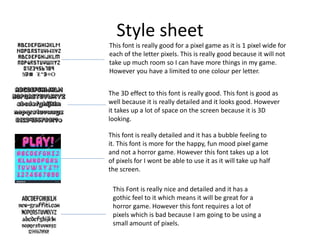
This font is really good for a pixel game as it is 1 pixel wide for
each of the letter pixels. This is really good because it will not
take up much room so I can have more things in my game.
However you have a limited to one colour per letter.
The 3D effect to this font is really good. This font is good as
well because it is really detailed and it looks good. However
it takes up a lot of space on the screen because it is 3D
looking.
This font is really detailed and it has a bubble feeling to
it. This font is more for the happy, fun mood pixel game
and not a horror game. However this font takes up a lot
of pixels for I wont be able to use it as it will take up half
the screen.
This Font is really nice and detailed and it has a
gothic feel to it which means it will be great for a
horror game. However this font requires a lot of
pixels which is bad because I am going to be using a
small amount of pixels.
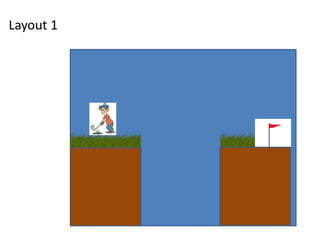
Layout 1
Layout 2
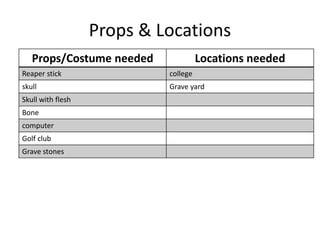
Props & Locations
Props/Costume needed Locations needed
Reaper stick college
skull Grave yard
Skull with flesh
Bone
computer
Golf club
Grave stones
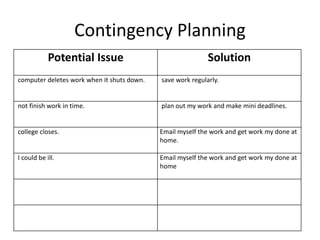
Contingency Planning
Potential Issue Solution
computer deletes work when it shuts down. save work regularly.
not finish work in time. plan out my work and make mini deadlines.
college closes. Email myself the work and get work my done at
home.
I could be ill. Email myself the work and get work my done at
home
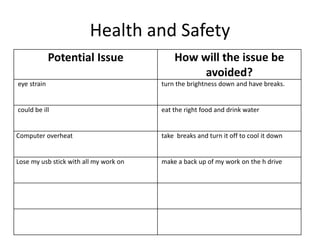
Health and Safety
Potential Issue How will the issue be
avoided?
eye strain turn the brightness down and have breaks.
could be ill eat the right food and drink water
Computer overheat take breaks and turn it off to cool it down
Lose my usb stick with all my work on make a back up of my work on the h drive
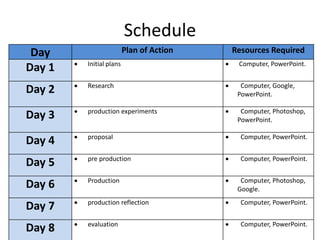
Schedule
Day Plan of Action Resources Required
Day 1  Initial plans  Computer, PowerPoint.
Day 2  Research  Computer, Google,
PowerPoint.
Day 3  production experiments  Computer, Photoshop,
PowerPoint.
Day 4  proposal  Computer, PowerPoint.
Day 5  pre production  Computer, PowerPoint.
Day 6  Production  Computer, Photoshop,
Google.
Day 7  production reflection  Computer, PowerPoint.
Day 8  evaluation  Computer, PowerPoint.

5. pre production

  • 1.
  • 2.
    Style sheet This fontis really good for a pixel game as it is 1 pixel wide for each of the letter pixels. This is really good because it will not take up much room so I can have more things in my game. However you have a limited to one colour per letter. The 3D effect to this font is really good. This font is good as well because it is really detailed and it looks good. However it takes up a lot of space on the screen because it is 3D looking. This font is really detailed and it has a bubble feeling to it. This font is more for the happy, fun mood pixel game and not a horror game. However this font takes up a lot of pixels for I wont be able to use it as it will take up half the screen. This Font is really nice and detailed and it has a gothic feel to it which means it will be great for a horror game. However this font requires a lot of pixels which is bad because I am going to be using a small amount of pixels.
  • 3.
  • 4.
  • 5.
    Props & Locations Props/Costumeneeded Locations needed Reaper stick college skull Grave yard Skull with flesh Bone computer Golf club Grave stones
  • 6.
    Contingency Planning Potential IssueSolution computer deletes work when it shuts down. save work regularly. not finish work in time. plan out my work and make mini deadlines. college closes. Email myself the work and get work my done at home. I could be ill. Email myself the work and get work my done at home
  • 7.
    Health and Safety PotentialIssue How will the issue be avoided? eye strain turn the brightness down and have breaks. could be ill eat the right food and drink water Computer overheat take breaks and turn it off to cool it down Lose my usb stick with all my work on make a back up of my work on the h drive
  • 8.
    Schedule Day Plan ofAction Resources Required Day 1  Initial plans  Computer, PowerPoint. Day 2  Research  Computer, Google, PowerPoint. Day 3  production experiments  Computer, Photoshop, PowerPoint. Day 4  proposal  Computer, PowerPoint. Day 5  pre production  Computer, PowerPoint. Day 6  Production  Computer, Photoshop, Google. Day 7  production reflection  Computer, PowerPoint. Day 8  evaluation  Computer, PowerPoint.

Editor's Notes

  • #3 Explore colours, fonts and image styles similar to what you want to produce. Discuss all three elements in relation to why you chose them and where you may use them in your project. Go over as many pages as you need to
  • #4 Mock up of a potential design using the colours and fonts established in your style sheet and sourced images
  • #5 Mock up of a potential design using the colours and fonts established in your style sheet and sourced images