Ayrton Starkey
 This template PowerPoint presentation includes all the relevant
elements you need to cover your film production.
 It is suggested you save this PP in a different name so you
always have a copy – some sections require you to delete the
information on the slide and replace with your own work
 Add more pages to each section where necessary [you should be
doing this!]
 Add visuals as you see necessary
 This document will be added to as you progress through the pre-
production phase.
 Remember, you need to give as much attention to your
sound planning as you do to your visual planning
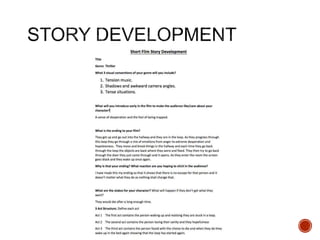
 Use the story development resource to help structure your short
film with more detail
 Not all the aspects have to be followed verbatim, use the
resource the plan out character, motivation, stakes and the arc of
your film, this will help to ensure that it works structurally
 Proforma is on bb
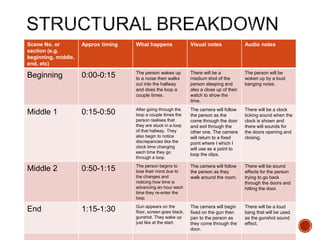
 Add a structural breakdown of each scene once you have done
this
 Breakdown your film into it’s basic sections [e.g. via scene
breakdown or similar] and apply broad visual ideas to each
section. You should list the shots required
 You can use this as the master template for your production, then
add more shots to each section when you develop your full visual
plan
 From this you could work on a conventional script if you want, but
using the scene breakdowns should be enough
Scene No. or
section (e.g.
beginning, middle,
end, etc)
Approx timing What happens Visual notes Audio notes
Beginning 0:00-0:15 The person wakes up
to a noise then walks
out into the hallway
and does the loop a
couple times.
There will be a
medium shot of the
person sleeping and
also a close up of their
watch to show the
time.
The person will be
woken up by a loud
banging noise.
Middle 1 0:15-0:50 After going through the
loop a couple times the
person realises that
they are stuck in a loop
of that hallway. They
also begin to notice
discrepancies like the
clock time changing
each time they go
through a loop.
The camera will follow
the person as the
come through the door
and exit through the
other one. The camera
will return to a fixed
point where I which I
will use as a point to
loop the clips.
There will be a clock
ticking sound when the
clock is shown and
there will sounds for
the doors opening and
closing.
Middle 2 0:50-1:15 The person begins to
lose their mind due to
the changes and
noticing how time is
advancing an hour each
time they re-enter the
loop.
The camera will follow
the person as they
walk around the room.
There will be sound
effects for the person
trying to go back
through the doors and
hitting the door.
End 1:15-1:30 Gun appears on the
floor, screen goes black,
gunshot. They wake up
just like at the start.
The camera will begin
fixed on the gun then
pan to the person as
they come through the
door.
There will be a loud
bang that will be used
as the gunshot sound
effect.
Visual Planning
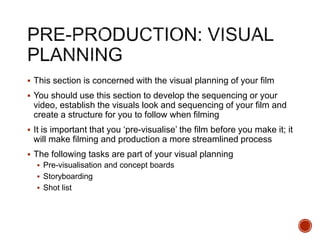
 This section is concerned with the visual planning of your film
 You should use this section to develop the sequencing or your
video, establish the visuals look and sequencing of your film and
create a structure for you to follow when filming
 It is important that you ‘pre-visualise’ the film before you make it; it
will make filming and production a more streamlined process
 The following tasks are part of your visual planning
 Pre-visualisation and concept boards
 Storyboarding
 Shot list
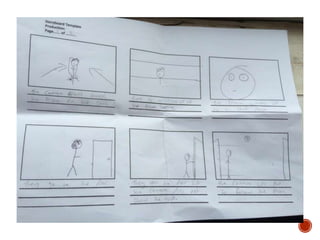
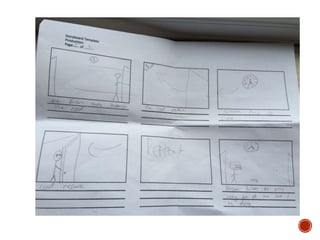
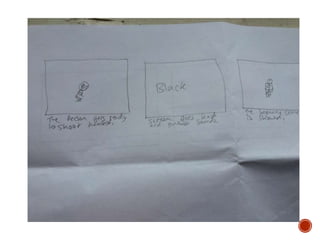
 Your storyboard should bring your idea to life
 Provide an idea of the sequencing of you film
 Provides a basis for production
 Suggested online storyboard creators are:
 https://www.storyboardthat.com
 http://www.pixton.com [very complicated]
 http://www.storyjumper.com [allows you to insert your own images]
 Alternatively, hand draw or photograph your storyboard and scan or
copy to insert it onto your slides
 There are lots of tips collected together on Blackboard!
 Your shot list should contain the sequential breakdown of what
you need to shoot for your film
 It should work in partnership with your storyboard
 It will be your working document when you film
 It should contain the shot number, scene number, shot
description, framing, cast/location info and action you will see
 It should also have information on performers in the scene and
other props, etc
 Shot list template is on Blackboard in the pre-production folder.
Organisational Planning
 Include names, contact info, and defined roles at difference
stages of production, using a table is suggested
Name Contact info Role
Alex Sullivan-Cree
Ayrton Starkey
07786986647
07545874442
Person
Camera
operator/Director
 Who is going to be in your film, how and why have they been
deemed your best choice? Do you have any backup options?
I am going to have Alex Sullivan-Cree in my film. This is because I believe that he
will be able to act well and take it seriously. I don’t currently have any backup
options but I could probably just get another friend to do the acting if Alex is unable
to do so.
 I will be using one of the small hallways which link the stairs to
the corridors. This is because of the short distance you have to
walk to get to the next set of doors. It will also give a
claustrophobic feel to the film. My backup location will be another
hallway in college.
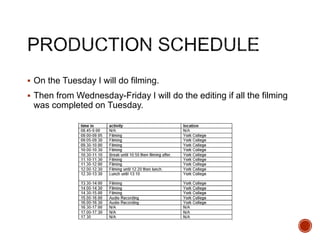
 On the Tuesday I will do filming.
 Then from Wednesday-Friday I will do the editing if all the filming
was completed on Tuesday.
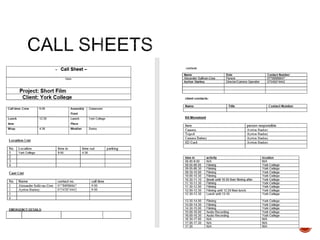
 Complete a call sheet for each production activity
 Forms are on Blackboard
 Insert into powerpoint here
 List, explain how you’ll acquire and provide an overview of
anything else you’ll need for your production – this is about
anything that isn’t cast, crew, technical equipment and
locations, but could be how those things will be moved to a
location, for example.
 I will only need two props, these being a watch and a fake gun. I
can use a friends watch and I can also borrow a fake gun from
another student who is also making a short film.
Soundtrack Planning
 These are sounds in the environment, part of the ‘world’ your character
experiences – these can be recorded on location, produced afterwards using
foley techniques, etc. Some use of royalty free sounds is permitted, but you
must list their sources and information
 I will need to get a door opening sound. This will be done by opening and
closing a door. I also need a walking sound. I will record somebody walking
to get this sound. There will be a clock sound but I will need to get that from
the internet. I will also need a gunshot sound which I could get by recording a
loud bang of some sort.
 Door sound - https://www.youtube.com/watch?v=k3v37Ac_CvI
 Walking Sound - https://www.youtube.com/watch?v=12FmPf0eWzc
 Clock sound - https://www.youtube.com/watch?v=Ch4wMNEpU08
 The gunshot sound was recorded by me.
 These are the sounds/audio that the audience experiences, but
are not part of the ‘world’ of the character[s], this could be music,
sound cues, etc
 There will be no non-diegetic sounds in my film as I wish to make
it use the bare minimum of sounds so that I can try to highlight the
isolation of the person in the loop.

4. pre production sf 2017

  • 1.
  • 2.
     This templatePowerPoint presentation includes all the relevant elements you need to cover your film production.  It is suggested you save this PP in a different name so you always have a copy – some sections require you to delete the information on the slide and replace with your own work  Add more pages to each section where necessary [you should be doing this!]  Add visuals as you see necessary  This document will be added to as you progress through the pre- production phase.  Remember, you need to give as much attention to your sound planning as you do to your visual planning
  • 4.
     Use thestory development resource to help structure your short film with more detail  Not all the aspects have to be followed verbatim, use the resource the plan out character, motivation, stakes and the arc of your film, this will help to ensure that it works structurally  Proforma is on bb  Add a structural breakdown of each scene once you have done this
  • 6.
     Breakdown yourfilm into it’s basic sections [e.g. via scene breakdown or similar] and apply broad visual ideas to each section. You should list the shots required  You can use this as the master template for your production, then add more shots to each section when you develop your full visual plan  From this you could work on a conventional script if you want, but using the scene breakdowns should be enough
  • 7.
    Scene No. or section(e.g. beginning, middle, end, etc) Approx timing What happens Visual notes Audio notes Beginning 0:00-0:15 The person wakes up to a noise then walks out into the hallway and does the loop a couple times. There will be a medium shot of the person sleeping and also a close up of their watch to show the time. The person will be woken up by a loud banging noise. Middle 1 0:15-0:50 After going through the loop a couple times the person realises that they are stuck in a loop of that hallway. They also begin to notice discrepancies like the clock time changing each time they go through a loop. The camera will follow the person as the come through the door and exit through the other one. The camera will return to a fixed point where I which I will use as a point to loop the clips. There will be a clock ticking sound when the clock is shown and there will sounds for the doors opening and closing. Middle 2 0:50-1:15 The person begins to lose their mind due to the changes and noticing how time is advancing an hour each time they re-enter the loop. The camera will follow the person as they walk around the room. There will be sound effects for the person trying to go back through the doors and hitting the door. End 1:15-1:30 Gun appears on the floor, screen goes black, gunshot. They wake up just like at the start. The camera will begin fixed on the gun then pan to the person as they come through the door. There will be a loud bang that will be used as the gunshot sound effect.
  • 8.
  • 9.
     This sectionis concerned with the visual planning of your film  You should use this section to develop the sequencing or your video, establish the visuals look and sequencing of your film and create a structure for you to follow when filming  It is important that you ‘pre-visualise’ the film before you make it; it will make filming and production a more streamlined process  The following tasks are part of your visual planning  Pre-visualisation and concept boards  Storyboarding  Shot list
  • 10.
     Your storyboardshould bring your idea to life  Provide an idea of the sequencing of you film  Provides a basis for production  Suggested online storyboard creators are:  https://www.storyboardthat.com  http://www.pixton.com [very complicated]  http://www.storyjumper.com [allows you to insert your own images]  Alternatively, hand draw or photograph your storyboard and scan or copy to insert it onto your slides  There are lots of tips collected together on Blackboard!
  • 14.
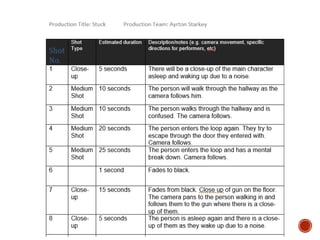
     Your shotlist should contain the sequential breakdown of what you need to shoot for your film  It should work in partnership with your storyboard  It will be your working document when you film  It should contain the shot number, scene number, shot description, framing, cast/location info and action you will see  It should also have information on performers in the scene and other props, etc  Shot list template is on Blackboard in the pre-production folder.
  • 16.
  • 17.
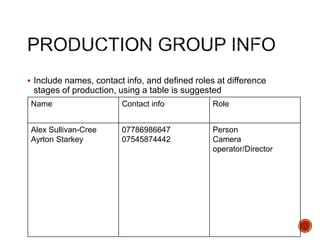
     Include names,contact info, and defined roles at difference stages of production, using a table is suggested Name Contact info Role Alex Sullivan-Cree Ayrton Starkey 07786986647 07545874442 Person Camera operator/Director
  • 18.
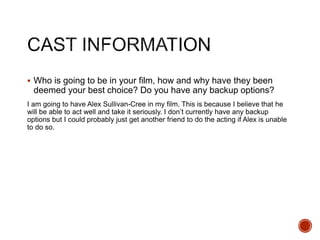
     Who isgoing to be in your film, how and why have they been deemed your best choice? Do you have any backup options? I am going to have Alex Sullivan-Cree in my film. This is because I believe that he will be able to act well and take it seriously. I don’t currently have any backup options but I could probably just get another friend to do the acting if Alex is unable to do so.
  • 19.
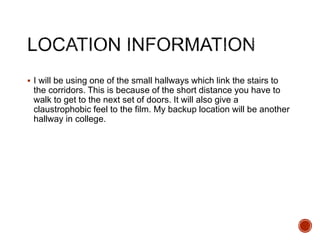
     I willbe using one of the small hallways which link the stairs to the corridors. This is because of the short distance you have to walk to get to the next set of doors. It will also give a claustrophobic feel to the film. My backup location will be another hallway in college.
  • 23.
     On theTuesday I will do filming.  Then from Wednesday-Friday I will do the editing if all the filming was completed on Tuesday.
  • 24.
     Complete acall sheet for each production activity  Forms are on Blackboard  Insert into powerpoint here
  • 25.
     List, explainhow you’ll acquire and provide an overview of anything else you’ll need for your production – this is about anything that isn’t cast, crew, technical equipment and locations, but could be how those things will be moved to a location, for example.  I will only need two props, these being a watch and a fake gun. I can use a friends watch and I can also borrow a fake gun from another student who is also making a short film.
  • 26.
  • 27.
     These aresounds in the environment, part of the ‘world’ your character experiences – these can be recorded on location, produced afterwards using foley techniques, etc. Some use of royalty free sounds is permitted, but you must list their sources and information  I will need to get a door opening sound. This will be done by opening and closing a door. I also need a walking sound. I will record somebody walking to get this sound. There will be a clock sound but I will need to get that from the internet. I will also need a gunshot sound which I could get by recording a loud bang of some sort.  Door sound - https://www.youtube.com/watch?v=k3v37Ac_CvI  Walking Sound - https://www.youtube.com/watch?v=12FmPf0eWzc  Clock sound - https://www.youtube.com/watch?v=Ch4wMNEpU08  The gunshot sound was recorded by me.
  • 28.
     These arethe sounds/audio that the audience experiences, but are not part of the ‘world’ of the character[s], this could be music, sound cues, etc  There will be no non-diegetic sounds in my film as I wish to make it use the bare minimum of sounds so that I can try to highlight the isolation of the person in the loop.