Leah Ellis
 This template PowerPoint presentation includes all the relevant
elements you need to cover your film production.
 It is suggested you save this PP in a different name so you
always have a copy – some sections require you to delete the
information on the slide and replace with your own work
 Add more pages to each section where necessary [you should be
doing this!]
 Add visuals as you see necessary
 This document will be added to as you progress through the pre-
production phase.
 Remember, you need to give as much attention to your
sound planning as you do to your visual planning
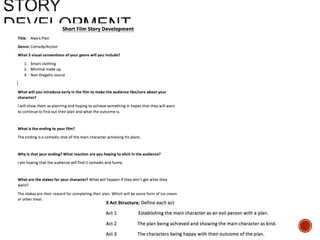
 Use the story development resource to help structure your short
film with more detail
 Not all the aspects have to be followed verbatim, use the
resource the plan out character, motivation, stakes and the arc of
your film, this will help to ensure that it works structurally
 Proforma is on bb
 Add a structural breakdown of each scene once you have done
this
 Put your form here
 Breakdown your film into it’s basic sections [e.g. via scene
breakdown or similar] and apply broad visual ideas to each
section. You should list the shots required
 You can use this as the master template for your production, then
add more shots to each section when you develop your full visual
plan
 From this you could work on a conventional script if you want, but
using the scene breakdowns should be enough
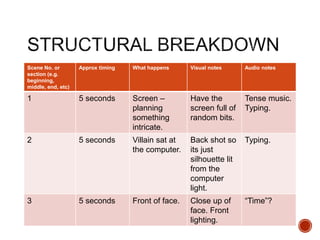
Scene No. or
section (e.g.
beginning,
middle, end, etc)
Approx timing What happens Visual notes Audio notes
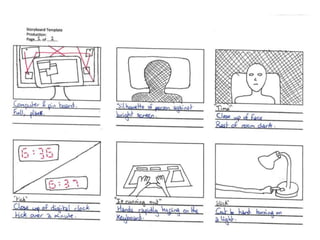
1 5 seconds Screen –
planning
something
intricate.
Have the
screen full of
random bits.
Tense music.
Typing.
2 5 seconds Villain sat at
the computer.
Back shot so
its just
silhouette lit
from the
computer
light.
Typing.
3 5 seconds Front of face. Close up of
face. Front
lighting.
“Time”?
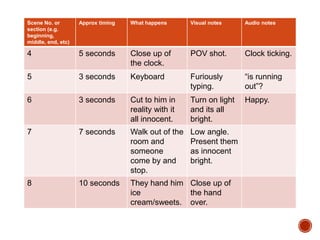
Scene No. or
section (e.g.
beginning,
middle, end, etc)
Approx timing What happens Visual notes Audio notes
4 5 seconds Close up of
the clock.
POV shot. Clock ticking.
5 3 seconds Keyboard Furiously
typing.
“is running
out”?
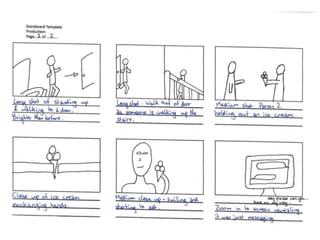
6 3 seconds Cut to him in
reality with it
all innocent.
Turn on light
and its all
bright.
Happy.
7 7 seconds Walk out of the
room and
someone
come by and
stop.
Low angle.
Present them
as innocent
bright.
8 10 seconds They hand him
ice
cream/sweets.
Close up of
the hand
over.
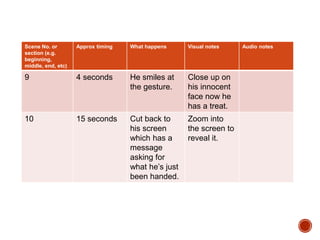
Scene No. or
section (e.g.
beginning,
middle, end, etc)
Approx timing What happens Visual notes Audio notes
9 4 seconds He smiles at
the gesture.
Close up on
his innocent
face now he
has a treat.
10 15 seconds Cut back to
his screen
which has a
message
asking for
what he’s just
been handed.
Zoom into
the screen to
reveal it.
Visual Planning
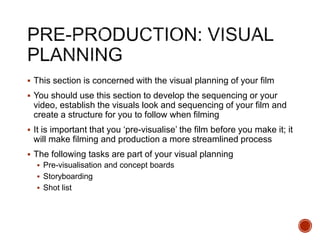
 This section is concerned with the visual planning of your film
 You should use this section to develop the sequencing or your
video, establish the visuals look and sequencing of your film and
create a structure for you to follow when filming
 It is important that you ‘pre-visualise’ the film before you make it; it
will make filming and production a more streamlined process
 The following tasks are part of your visual planning
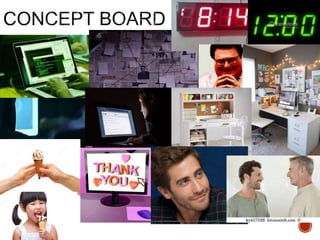
 Pre-visualisation and concept boards
 Storyboarding
 Shot list
 Your storyboard should bring your idea to life
 Provide an idea of the sequencing of you film
 Provides a basis for production
 Suggested online storyboard creators are:
 https://www.storyboardthat.com
 http://www.pixton.com [very complicated]
 http://www.storyjumper.com [allows you to insert your own images]
 Alternatively, hand draw or photograph your storyboard and scan or
copy to insert it onto your slides
 There are lots of tips collected together on Blackboard!
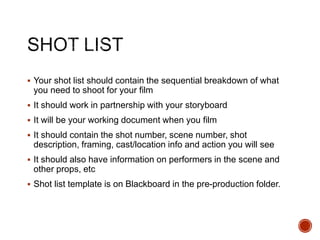
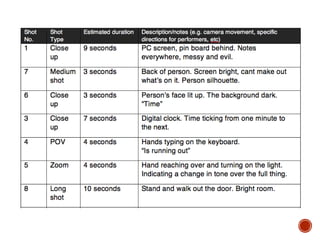
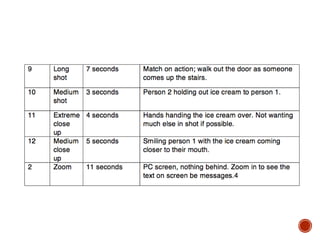
 Your shot list should contain the sequential breakdown of what
you need to shoot for your film
 It should work in partnership with your storyboard
 It will be your working document when you film
 It should contain the shot number, scene number, shot
description, framing, cast/location info and action you will see
 It should also have information on performers in the scene and
other props, etc
 Shot list template is on Blackboard in the pre-production folder.
Organisational Planning
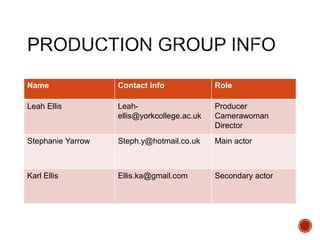
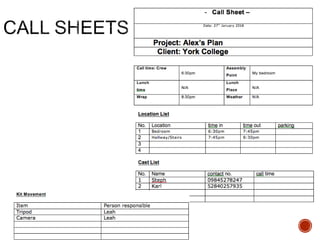
Name Contact info Role
Leah Ellis Leah-
ellis@yorkcollege.ac.uk
Producer
Camerawoman
Director
Stephanie Yarrow Steph.y@hotmail.co.uk Main actor
Karl Ellis Ellis.ka@gmail.com Secondary actor
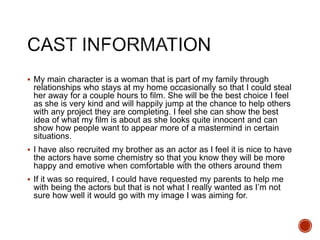
 My main character is a woman that is part of my family through
relationships who stays at my home occasionally so that I could steal
her away for a couple hours to film. She will be the best choice I feel
as she is very kind and will happily jump at the chance to help others
with any project they are completing. I feel she can show the best
idea of what my film is about as she looks quite innocent and can
show how people want to appear more of a mastermind in certain
situations.
 I have also recruited my brother as an actor as I feel it is nice to have
the actors have some chemistry so that you know they will be more
happy and emotive when comfortable with the others around them
 If it was so required, I could have requested my parents to help me
with being the actors but that is not what I really wanted as I’m not
sure how well it would go with my image I was aiming for.
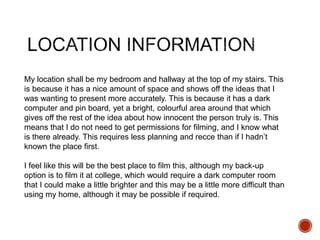
My location shall be my bedroom and hallway at the top of my stairs. This
is because it has a nice amount of space and shows off the ideas that I
was wanting to present more accurately. This is because it has a dark
computer and pin board, yet a bright, colourful area around that which
gives off the rest of the idea about how innocent the person truly is. This
means that I do not need to get permissions for filming, and I know what
is there already. This requires less planning and recce than if I hadn’t
known the place first.
I feel like this will be the best place to film this, although my back-up
option is to film it at college, which would require a dark computer room
that I could make a little brighter and this may be a little more difficult than
using my home, although it may be possible if required.
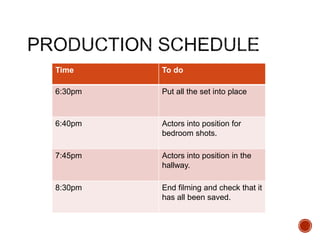
Time To do
6:30pm Put all the set into place
6:40pm Actors into position for
bedroom shots.
7:45pm Actors into position in the
hallway.
8:30pm End filming and check that it
has all been saved.
 I do not need to ask permissions to film in the location as it is my
own bedroom and home that I wish to record my project in.
 As I used my brother and his girlfriend as my actors, they did not
fill out a physical form, but we had a verbal contract between us
to allow me to use their image in my work as it is for college only.
 Some props that I will be using are a computer and desk lamp.
These will already be in location as the location is my bedroom,
where they are set up at all times.
 Another prop I will be using is a Cornetto ice cream. This will be
bought in a multi pack incase I require more than 1 in the time it
takes to film as they could break or melt.
 The final prop I require is a pinboard that has images and text
boxes with string connecting them as if it was a police
investigation or conspiracy theory. This will be created on set as it
is already set in there and can be just created by cutting up
newspaper sections.
 There will not be any specific costumes for any of the actors as I
wish to have more of a natural feel to it.
Soundtrack Planning
I will be using some royalty free sounds from online sources
including freesound.org and soundbible, these are 2 very reliable
websites that I have used for multiple projects.
These sounds that I have used are, for example, the typing and
clicking sounds that the props would be making in real life at the
time of filming but it is clearer if you have it in a second layer, that
was recorded specifically so that you can hear it.
The sound, when using specifically created sound effects, always
seems to be quite effective to let you know what is actually
happening at any point in the production. This is what makes quite
a lot of products seem much more effective.
There was some music found on the YouTube Audio Library that fit
the theme of my film.
These sounds are not to be suggested as that it is what the
characters would be hearing at the time, but they give the viewer a
more accurate sense of the atmosphere in the situation at the
moment shown. This is giving them background music which can
stop the audience from getting bored of just sitting in silence while
the image is moving. This also allows them to give more attention
to the film in progress and not wonder their mind to other things.

4. pre production sf 2017

  • 1.
  • 2.
     This templatePowerPoint presentation includes all the relevant elements you need to cover your film production.  It is suggested you save this PP in a different name so you always have a copy – some sections require you to delete the information on the slide and replace with your own work  Add more pages to each section where necessary [you should be doing this!]  Add visuals as you see necessary  This document will be added to as you progress through the pre- production phase.  Remember, you need to give as much attention to your sound planning as you do to your visual planning
  • 4.
     Use thestory development resource to help structure your short film with more detail  Not all the aspects have to be followed verbatim, use the resource the plan out character, motivation, stakes and the arc of your film, this will help to ensure that it works structurally  Proforma is on bb  Add a structural breakdown of each scene once you have done this
  • 5.
     Put yourform here
  • 6.
     Breakdown yourfilm into it’s basic sections [e.g. via scene breakdown or similar] and apply broad visual ideas to each section. You should list the shots required  You can use this as the master template for your production, then add more shots to each section when you develop your full visual plan  From this you could work on a conventional script if you want, but using the scene breakdowns should be enough
  • 7.
    Scene No. or section(e.g. beginning, middle, end, etc) Approx timing What happens Visual notes Audio notes 1 5 seconds Screen – planning something intricate. Have the screen full of random bits. Tense music. Typing. 2 5 seconds Villain sat at the computer. Back shot so its just silhouette lit from the computer light. Typing. 3 5 seconds Front of face. Close up of face. Front lighting. “Time”?
  • 8.
    Scene No. or section(e.g. beginning, middle, end, etc) Approx timing What happens Visual notes Audio notes 4 5 seconds Close up of the clock. POV shot. Clock ticking. 5 3 seconds Keyboard Furiously typing. “is running out”? 6 3 seconds Cut to him in reality with it all innocent. Turn on light and its all bright. Happy. 7 7 seconds Walk out of the room and someone come by and stop. Low angle. Present them as innocent bright. 8 10 seconds They hand him ice cream/sweets. Close up of the hand over.
  • 9.
    Scene No. or section(e.g. beginning, middle, end, etc) Approx timing What happens Visual notes Audio notes 9 4 seconds He smiles at the gesture. Close up on his innocent face now he has a treat. 10 15 seconds Cut back to his screen which has a message asking for what he’s just been handed. Zoom into the screen to reveal it.
  • 10.
  • 11.
     This sectionis concerned with the visual planning of your film  You should use this section to develop the sequencing or your video, establish the visuals look and sequencing of your film and create a structure for you to follow when filming  It is important that you ‘pre-visualise’ the film before you make it; it will make filming and production a more streamlined process  The following tasks are part of your visual planning  Pre-visualisation and concept boards  Storyboarding  Shot list
  • 13.
     Your storyboardshould bring your idea to life  Provide an idea of the sequencing of you film  Provides a basis for production  Suggested online storyboard creators are:  https://www.storyboardthat.com  http://www.pixton.com [very complicated]  http://www.storyjumper.com [allows you to insert your own images]  Alternatively, hand draw or photograph your storyboard and scan or copy to insert it onto your slides  There are lots of tips collected together on Blackboard!
  • 16.
     Your shotlist should contain the sequential breakdown of what you need to shoot for your film  It should work in partnership with your storyboard  It will be your working document when you film  It should contain the shot number, scene number, shot description, framing, cast/location info and action you will see  It should also have information on performers in the scene and other props, etc  Shot list template is on Blackboard in the pre-production folder.
  • 19.
  • 20.
    Name Contact infoRole Leah Ellis Leah- ellis@yorkcollege.ac.uk Producer Camerawoman Director Stephanie Yarrow Steph.y@hotmail.co.uk Main actor Karl Ellis Ellis.ka@gmail.com Secondary actor
  • 21.
     My maincharacter is a woman that is part of my family through relationships who stays at my home occasionally so that I could steal her away for a couple hours to film. She will be the best choice I feel as she is very kind and will happily jump at the chance to help others with any project they are completing. I feel she can show the best idea of what my film is about as she looks quite innocent and can show how people want to appear more of a mastermind in certain situations.  I have also recruited my brother as an actor as I feel it is nice to have the actors have some chemistry so that you know they will be more happy and emotive when comfortable with the others around them  If it was so required, I could have requested my parents to help me with being the actors but that is not what I really wanted as I’m not sure how well it would go with my image I was aiming for.
  • 22.
    My location shallbe my bedroom and hallway at the top of my stairs. This is because it has a nice amount of space and shows off the ideas that I was wanting to present more accurately. This is because it has a dark computer and pin board, yet a bright, colourful area around that which gives off the rest of the idea about how innocent the person truly is. This means that I do not need to get permissions for filming, and I know what is there already. This requires less planning and recce than if I hadn’t known the place first. I feel like this will be the best place to film this, although my back-up option is to film it at college, which would require a dark computer room that I could make a little brighter and this may be a little more difficult than using my home, although it may be possible if required.
  • 26.
    Time To do 6:30pmPut all the set into place 6:40pm Actors into position for bedroom shots. 7:45pm Actors into position in the hallway. 8:30pm End filming and check that it has all been saved.
  • 28.
     I donot need to ask permissions to film in the location as it is my own bedroom and home that I wish to record my project in.  As I used my brother and his girlfriend as my actors, they did not fill out a physical form, but we had a verbal contract between us to allow me to use their image in my work as it is for college only.
  • 29.
     Some propsthat I will be using are a computer and desk lamp. These will already be in location as the location is my bedroom, where they are set up at all times.  Another prop I will be using is a Cornetto ice cream. This will be bought in a multi pack incase I require more than 1 in the time it takes to film as they could break or melt.  The final prop I require is a pinboard that has images and text boxes with string connecting them as if it was a police investigation or conspiracy theory. This will be created on set as it is already set in there and can be just created by cutting up newspaper sections.  There will not be any specific costumes for any of the actors as I wish to have more of a natural feel to it.
  • 30.
  • 31.
    I will beusing some royalty free sounds from online sources including freesound.org and soundbible, these are 2 very reliable websites that I have used for multiple projects. These sounds that I have used are, for example, the typing and clicking sounds that the props would be making in real life at the time of filming but it is clearer if you have it in a second layer, that was recorded specifically so that you can hear it. The sound, when using specifically created sound effects, always seems to be quite effective to let you know what is actually happening at any point in the production. This is what makes quite a lot of products seem much more effective.
  • 32.
    There was somemusic found on the YouTube Audio Library that fit the theme of my film. These sounds are not to be suggested as that it is what the characters would be hearing at the time, but they give the viewer a more accurate sense of the atmosphere in the situation at the moment shown. This is giving them background music which can stop the audience from getting bored of just sitting in silence while the image is moving. This also allows them to give more attention to the film in progress and not wonder their mind to other things.