YOUR NAME HERE
 This template PowerPoint presentation includes all the relevant
elements you need to cover your film production.
 It is suggested you save this PP in a different name so you
always have a copy – some sections require you to delete the
information on the slide and replace with your own work
 Add more pages to each section where necessary [you should be
doing this!]
 Add visuals as you see necessary
 This document will be added to as you progress through the pre-
production phase.
 Remember, you need to give as much attention to your
sound planning as you do to your visual planning
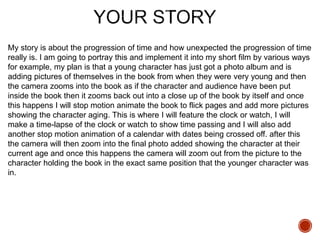
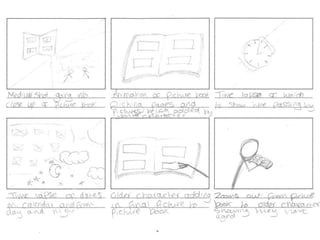
My story is about the progression of time and how unexpected the progression of time
really is. I am going to portray this and implement it into my short film by various ways
for example, my plan is that a young character has just got a photo album and is
adding pictures of themselves in the book from when they were very young and then
the camera zooms into the book as if the character and audience have been put
inside the book then it zooms back out into a close up of the book by itself and once
this happens I will stop motion animate the book to flick pages and add more pictures
showing the character aging. This is where I will feature the clock or watch, I will
make a time-lapse of the clock or watch to show time passing and I will also add
another stop motion animation of a calendar with dates being crossed off. after this
the camera will then zoom into the final photo added showing the character at their
current age and once this happens the camera will zoom out from the picture to the
character holding the book in the exact same position that the younger character was
in.
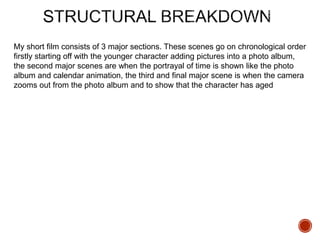
My short film consists of 3 major sections. These scenes go on chronological order
firstly starting off with the younger character adding pictures into a photo album,
the second major scenes are when the portrayal of time is shown like the photo
album and calendar animation, the third and final major scene is when the camera
zooms out from the photo album and to show that the character has aged
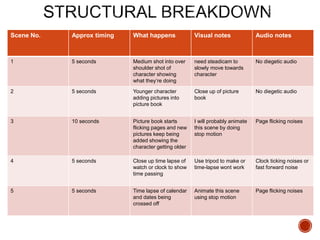
Scene No. Approx timing What happens Visual notes Audio notes
1 5 seconds Medium shot into over
shoulder shot of
character showing
what they’re doing
need steadicam to
slowly move towards
character
No diegetic audio
2 5 seconds Younger character
adding pictures into
picture book
Close up of picture
book
No diegetic audio
3 10 seconds Picture book starts
flicking pages and new
pictures keep being
added showing the
character getting older
I will probably animate
this scene by doing
stop motion
Page flicking noises
4 5 seconds Close up time lapse of
watch or clock to show
time passing
Use tripod to make or
time-lapse wont work
Clock ticking noises or
fast forward noise
5 5 seconds Time lapse of calendar
and dates being
crossed off
Animate this scene
using stop motion
Page flicking noises
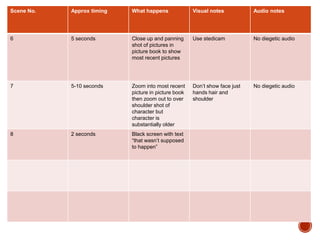
Scene No. Approx timing What happens Visual notes Audio notes
6 5 seconds Close up and panning
shot of pictures in
picture book to show
most recent pictures
Use stedicam No diegetic audio
7 5-10 seconds Zoom into most recent
picture in picture book
then zoom out to over
shoulder shot of
character but
character is
substantially older
Don’t show face just
hands hair and
shoulder
No diegetic audio
8 2 seconds Black screen with text
“that wasn’t supposed
to happen”
Visual Planning
 This section is concerned with the visual planning of your film
 You should use this section to develop the sequencing or your
video, establish the visuals look and sequencing of your film and
create a structure for you to follow when filming
 It is important that you ‘pre-visualise’ the film before you make it; it
will make filming and production a more streamlined process
 The following tasks are part of your visual planning
 Pre-visualisation and concept boards
 Storyboarding
 Shot list
 Tool for exploring the direction and visuals
 Provides inspiration and information for the “look & feel”
 Presents key moments in your video
 A means to sketch/plan ideas
 Information on colour/lighting
 Defining the “mise-en-scene”
 Include as much here as you like, but keep it relevant to the
production, the following slides have been left blank for you to
approach in your own way, add more as you need to
 Suggestion: include your edited short sequence of clips that have
inspired or influenced your video [similar to this:
http://io9.com/5941145/this-directors-video-pitch-for-hunger-games-
might-be-better-than-the-real-movie]
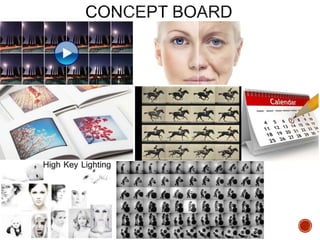
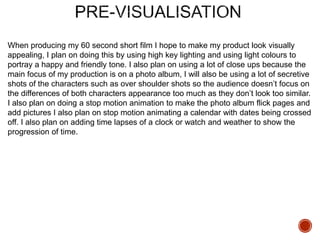
When producing my 60 second short film I hope to make my product look visually
appealing, I plan on doing this by using high key lighting and using light colours to
portray a happy and friendly tone. I also plan on using a lot of close ups because the
main focus of my production is on a photo album, I will also be using a lot of secretive
shots of the characters such as over shoulder shots so the audience doesn’t focus on
the differences of both characters appearance too much as they don’t look too similar.
I also plan on doing a stop motion animation to make the photo album flick pages and
add pictures I also plan on stop motion animating a calendar with dates being crossed
off. I also plan on adding time lapses of a clock or watch and weather to show the
progression of time.
 Your storyboard should bring your idea to life
 Provide an idea of the sequencing of you film
 Provides a basis for production
 Suggested online storyboard creators are:
 https://www.storyboardthat.com
 http://www.pixton.com [very complicated]
 http://www.storyjumper.com [allows you to insert your own images]
 Alternatively, hand draw or photograph your storyboard and scan
or copy to insert it onto your slides
 There are lots of tips collected together on Blackboard!
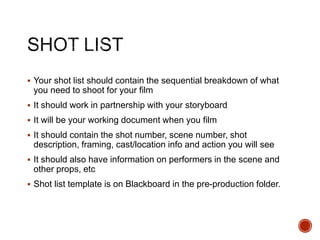
 Your shot list should contain the sequential breakdown of what
you need to shoot for your film
 It should work in partnership with your storyboard
 It will be your working document when you film
 It should contain the shot number, scene number, shot
description, framing, cast/location info and action you will see
 It should also have information on performers in the scene and
other props, etc
 Shot list template is on Blackboard in the pre-production folder.
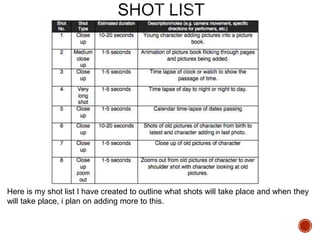
Here is my shot list I have created to outline what shots will take place and when they
will take place, i plan on adding more to this.
Organisational Planning
Name Role Contact
Angela Palmer-Robinson Older character at end of
production
07779 409899
Chloe Davison Younger Character at
beginning of production
07557 043813
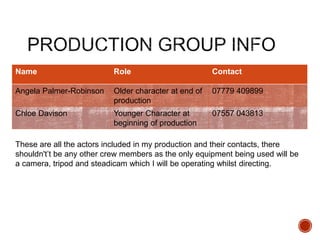
These are all the actors included in my production and their contacts, there
shouldn't’t be any other crew members as the only equipment being used will be
a camera, tripod and steadicam which I will be operating whilst directing.
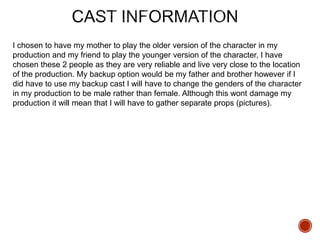
I chosen to have my mother to play the older version of the character in my
production and my friend to play the younger version of the character, I have
chosen these 2 people as they are very reliable and live very close to the location
of the production. My backup option would be my father and brother however if I
did have to use my backup cast I will have to change the genders of the character
in my production to be male rather than female. Although this wont damage my
production it will mean that I will have to gather separate props (pictures).
 Information and images of your location[s] for filming
 You should have address details, clearance/permissions for filming, recce
photos and floorplans [including camera, equipment and cast/crew layouts]
 Where possible, have a plan B fallback location option
 Assess each location for any issues and suggest solutions
My location for my production is at my house in Harrogate, I will be shooting within
just one room throughout all of my production.
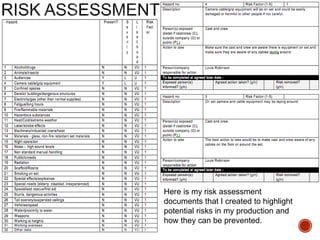
Here is my risk assessment
documents that I created to highlight
potential risks in my production and
how they can be prevented.
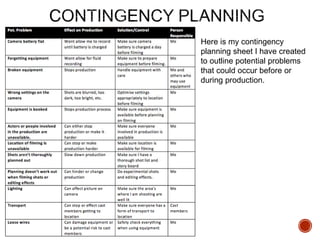
Here is my contingency
planning sheet I have created
to outline potential problems
that could occur before or
during production.
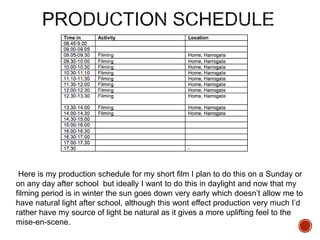
Here is my production schedule for my short film I plan to do this on a Sunday or
on any day after school but ideally I want to do this in daylight and now that my
filming period is in winter the sun goes down very early which doesn’t allow me to
have natural light after school, although this wont effect production very much I’d
rather have my source of light be natural as it gives a more uplifting feel to the
mise-en-scene.
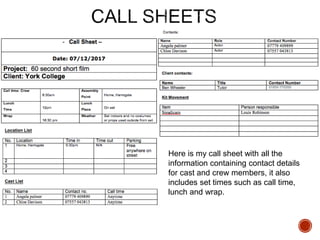
Here is my call sheet with all the
information containing contact details
for cast and crew members, it also
includes set times such as call time,
lunch and wrap.
 Any place you film and anyone you use in the filming of your
video must have a completed form
 Blank forms are on Blackboard for you to complete and insert
here
Props:
Photo album - I will acquire this by using a pre existing one which includes pictures of
my character. This picture book should be on location at all times as it is stored in the
location.
Watch or clock - this prop should be on location at all times as it is stored in the same
building.
Calendar – I will acquire this by buying a brand new calendar and using it for my
animation scene, this prop should be on set at all times as it stored in the building
where the production is taking place.
Costume: My characters will be wearing casual clothes however they must be
prepared to wear them again for potential reshoots.
Soundtrack Planning
I don’t plan on using much diegetic sound however I do still plan on using it in scenes
where necessary like when the photo album and calendar flick pages, this is to add
more emersion and authenticity to my production. I will also add diegetic sound to my
production where necessary, I will do this in post by using royalty free sounds but I
will also keep all audio files from my filming process just in case I need to use the
sounds to make my production more authentic. The guidelines for my production
don’t allow me to use any sort of dialogue throughout my production I am using this
to my advantage by creating a narrative focused around non dialogue needed
scenes.
I plan on using non diegetic sounds in my production such as music, however all the
music and sounds I use will have to come from a royalty free source, this restricts me
in many ways as I cant be as creative with my music and sound selection. I plan on
using a calm happy song to be playing in the background something that matches the
narrative an mise-en-scene, I am doing this so the audio and scenes match and seem
more authentic and appealing to the audience otherwise I could portray the wrong
tone. This will be done in post production when editing my final piece.
When getting royalty free sounds I will do this by looking online on official royalty free
sites which allow me to download sounds, however if I cant get a sound online I will
create the sound myself is simple enough using a mic.

4. pre production sf 2017

  • 1.
  • 2.
     This templatePowerPoint presentation includes all the relevant elements you need to cover your film production.  It is suggested you save this PP in a different name so you always have a copy – some sections require you to delete the information on the slide and replace with your own work  Add more pages to each section where necessary [you should be doing this!]  Add visuals as you see necessary  This document will be added to as you progress through the pre- production phase.  Remember, you need to give as much attention to your sound planning as you do to your visual planning
  • 4.
    My story isabout the progression of time and how unexpected the progression of time really is. I am going to portray this and implement it into my short film by various ways for example, my plan is that a young character has just got a photo album and is adding pictures of themselves in the book from when they were very young and then the camera zooms into the book as if the character and audience have been put inside the book then it zooms back out into a close up of the book by itself and once this happens I will stop motion animate the book to flick pages and add more pictures showing the character aging. This is where I will feature the clock or watch, I will make a time-lapse of the clock or watch to show time passing and I will also add another stop motion animation of a calendar with dates being crossed off. after this the camera will then zoom into the final photo added showing the character at their current age and once this happens the camera will zoom out from the picture to the character holding the book in the exact same position that the younger character was in.
  • 6.
    My short filmconsists of 3 major sections. These scenes go on chronological order firstly starting off with the younger character adding pictures into a photo album, the second major scenes are when the portrayal of time is shown like the photo album and calendar animation, the third and final major scene is when the camera zooms out from the photo album and to show that the character has aged
  • 7.
    Scene No. Approxtiming What happens Visual notes Audio notes 1 5 seconds Medium shot into over shoulder shot of character showing what they’re doing need steadicam to slowly move towards character No diegetic audio 2 5 seconds Younger character adding pictures into picture book Close up of picture book No diegetic audio 3 10 seconds Picture book starts flicking pages and new pictures keep being added showing the character getting older I will probably animate this scene by doing stop motion Page flicking noises 4 5 seconds Close up time lapse of watch or clock to show time passing Use tripod to make or time-lapse wont work Clock ticking noises or fast forward noise 5 5 seconds Time lapse of calendar and dates being crossed off Animate this scene using stop motion Page flicking noises
  • 8.
    Scene No. Approxtiming What happens Visual notes Audio notes 6 5 seconds Close up and panning shot of pictures in picture book to show most recent pictures Use stedicam No diegetic audio 7 5-10 seconds Zoom into most recent picture in picture book then zoom out to over shoulder shot of character but character is substantially older Don’t show face just hands hair and shoulder No diegetic audio 8 2 seconds Black screen with text “that wasn’t supposed to happen”
  • 9.
  • 10.
     This sectionis concerned with the visual planning of your film  You should use this section to develop the sequencing or your video, establish the visuals look and sequencing of your film and create a structure for you to follow when filming  It is important that you ‘pre-visualise’ the film before you make it; it will make filming and production a more streamlined process  The following tasks are part of your visual planning  Pre-visualisation and concept boards  Storyboarding  Shot list
  • 11.
     Tool forexploring the direction and visuals  Provides inspiration and information for the “look & feel”  Presents key moments in your video  A means to sketch/plan ideas  Information on colour/lighting  Defining the “mise-en-scene”  Include as much here as you like, but keep it relevant to the production, the following slides have been left blank for you to approach in your own way, add more as you need to  Suggestion: include your edited short sequence of clips that have inspired or influenced your video [similar to this: http://io9.com/5941145/this-directors-video-pitch-for-hunger-games- might-be-better-than-the-real-movie]
  • 13.
    When producing my60 second short film I hope to make my product look visually appealing, I plan on doing this by using high key lighting and using light colours to portray a happy and friendly tone. I also plan on using a lot of close ups because the main focus of my production is on a photo album, I will also be using a lot of secretive shots of the characters such as over shoulder shots so the audience doesn’t focus on the differences of both characters appearance too much as they don’t look too similar. I also plan on doing a stop motion animation to make the photo album flick pages and add pictures I also plan on stop motion animating a calendar with dates being crossed off. I also plan on adding time lapses of a clock or watch and weather to show the progression of time.
  • 15.
     Your storyboardshould bring your idea to life  Provide an idea of the sequencing of you film  Provides a basis for production  Suggested online storyboard creators are:  https://www.storyboardthat.com  http://www.pixton.com [very complicated]  http://www.storyjumper.com [allows you to insert your own images]  Alternatively, hand draw or photograph your storyboard and scan or copy to insert it onto your slides  There are lots of tips collected together on Blackboard!
  • 17.
     Your shotlist should contain the sequential breakdown of what you need to shoot for your film  It should work in partnership with your storyboard  It will be your working document when you film  It should contain the shot number, scene number, shot description, framing, cast/location info and action you will see  It should also have information on performers in the scene and other props, etc  Shot list template is on Blackboard in the pre-production folder.
  • 18.
    Here is myshot list I have created to outline what shots will take place and when they will take place, i plan on adding more to this.
  • 20.
  • 21.
    Name Role Contact AngelaPalmer-Robinson Older character at end of production 07779 409899 Chloe Davison Younger Character at beginning of production 07557 043813 These are all the actors included in my production and their contacts, there shouldn't’t be any other crew members as the only equipment being used will be a camera, tripod and steadicam which I will be operating whilst directing.
  • 22.
    I chosen tohave my mother to play the older version of the character in my production and my friend to play the younger version of the character, I have chosen these 2 people as they are very reliable and live very close to the location of the production. My backup option would be my father and brother however if I did have to use my backup cast I will have to change the genders of the character in my production to be male rather than female. Although this wont damage my production it will mean that I will have to gather separate props (pictures).
  • 23.
     Information andimages of your location[s] for filming  You should have address details, clearance/permissions for filming, recce photos and floorplans [including camera, equipment and cast/crew layouts]  Where possible, have a plan B fallback location option  Assess each location for any issues and suggest solutions My location for my production is at my house in Harrogate, I will be shooting within just one room throughout all of my production.
  • 24.
    Here is myrisk assessment documents that I created to highlight potential risks in my production and how they can be prevented.
  • 25.
    Here is mycontingency planning sheet I have created to outline potential problems that could occur before or during production.
  • 26.
    Here is myproduction schedule for my short film I plan to do this on a Sunday or on any day after school but ideally I want to do this in daylight and now that my filming period is in winter the sun goes down very early which doesn’t allow me to have natural light after school, although this wont effect production very much I’d rather have my source of light be natural as it gives a more uplifting feel to the mise-en-scene.
  • 27.
    Here is mycall sheet with all the information containing contact details for cast and crew members, it also includes set times such as call time, lunch and wrap.
  • 28.
     Any placeyou film and anyone you use in the filming of your video must have a completed form  Blank forms are on Blackboard for you to complete and insert here
  • 29.
    Props: Photo album -I will acquire this by using a pre existing one which includes pictures of my character. This picture book should be on location at all times as it is stored in the location. Watch or clock - this prop should be on location at all times as it is stored in the same building. Calendar – I will acquire this by buying a brand new calendar and using it for my animation scene, this prop should be on set at all times as it stored in the building where the production is taking place. Costume: My characters will be wearing casual clothes however they must be prepared to wear them again for potential reshoots.
  • 30.
  • 31.
    I don’t planon using much diegetic sound however I do still plan on using it in scenes where necessary like when the photo album and calendar flick pages, this is to add more emersion and authenticity to my production. I will also add diegetic sound to my production where necessary, I will do this in post by using royalty free sounds but I will also keep all audio files from my filming process just in case I need to use the sounds to make my production more authentic. The guidelines for my production don’t allow me to use any sort of dialogue throughout my production I am using this to my advantage by creating a narrative focused around non dialogue needed scenes.
  • 32.
    I plan onusing non diegetic sounds in my production such as music, however all the music and sounds I use will have to come from a royalty free source, this restricts me in many ways as I cant be as creative with my music and sound selection. I plan on using a calm happy song to be playing in the background something that matches the narrative an mise-en-scene, I am doing this so the audio and scenes match and seem more authentic and appealing to the audience otherwise I could portray the wrong tone. This will be done in post production when editing my final piece. When getting royalty free sounds I will do this by looking online on official royalty free sites which allow me to download sounds, however if I cant get a sound online I will create the sound myself is simple enough using a mic.