INCREASE EFFICIENCY AND EXPAND YOUR OPERATIONS WITH FORMING MATE SOLUTIONS TRAINING
AGENDA Why use forming? Forming basics Ways to use forming in your operation Summary
WHY USE FORMING? Increase  efficiency Expand  your capabilities Eliminate  of secondary operations Increase  machine time Reduce  tool wear
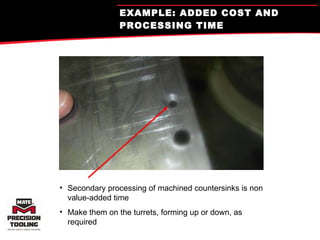
EXAMPLE: ADDED COST AND PROCESSING TIME Secondary processing of machined countersinks is non value-added time Make them on the turrets, forming up or down, as required
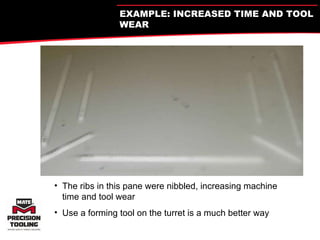
The ribs in this pane were nibbled, increasing machine time and tool wear Use a forming tool on the turret is a much better way EXAMPLE: INCREASED TIME AND TOOL WEAR
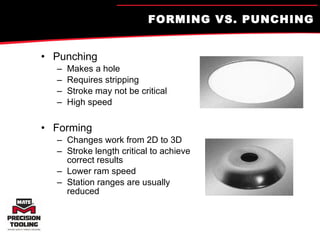
FORMING VS. PUNCHING Punching Makes a hole Requires stripping Stroke may not be critical High speed Forming Changes work from 2D to 3D Stroke length critical to achieve correct results Lower ram speed Station ranges are usually reduced
Definitions Special Assembly-  Any tool that transforms the material to 3D Any tool that requires multiple holes in a single hit. Any tool that requires multiple forms in a single hit. Any tool that punches a non-standard shape or size hole.
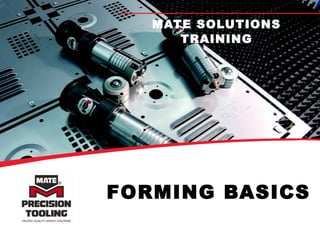
FORMING BASICS MATE SOLUTIONS TRAINING
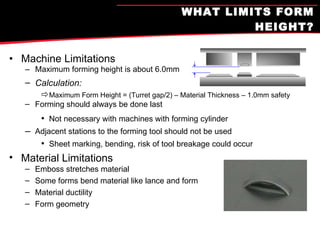
WHAT LIMITS FORM HEIGHT? Machine Limitations Maximum forming height is about 6.0mm Calculation: Maximum Form Height = (Turret gap/2) – Material Thickness – 1.0mm safety Forming should always be done last Not necessary with machines with forming cylinder Adjacent stations to the forming tool should not be used Sheet marking, bending, risk of tool breakage could occur Material Limitations Emboss stretches material Some forms bend material like lance and form Material ductility Form geometry
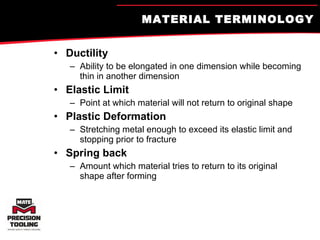
MATERIAL TERMINOLOGY Ductility Ability to be elongated in one dimension while becoming thin in another dimension Elastic Limit Point at which material will not return to original shape Plastic Deformation Stretching metal enough to exceed its elastic limit and stopping prior to fracture Spring back Amount which material tries to return to its original shape after forming
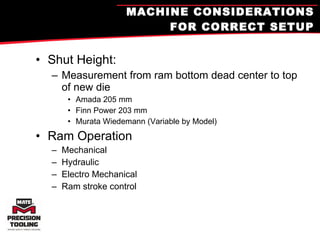
MACHINE CONSIDERATIONS FOR CORRECT SETUP Shut Height: Measurement from ram bottom dead center to top of new die Amada 205 mm Finn Power 203 mm Murata Wiedemann (Variable by Model) Ram Operation Mechanical Hydraulic Electro Mechanical Ram stroke control
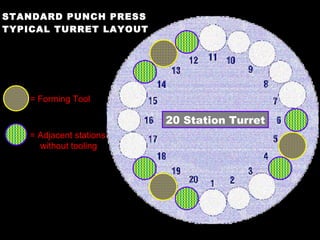
STANDARD PUNCH PRESS TYPICAL TURRET LAYOUT = Forming Tool = Adjacent stations without tooling 20 Station Turret
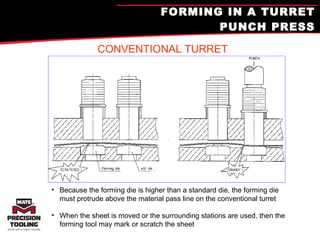
FORMING IN A TURRET PUNCH PRESS Because the forming die is higher than a standard die, the forming die must protrude above the material pass line on the conventional turret When the sheet is moved or the surrounding stations are used, then the forming tool may mark or scratch the sheet CONVENTIONAL TURRET
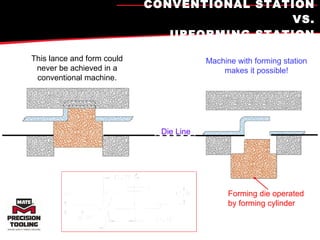
CONVENTIONAL STATION VS. UPFORMING STATION This lance and form could never be achieved in a conventional machine. Machine with forming station makes it possible! Forming die operated by forming cylinder Die Line
Standard vs. Upforming Standard Shorter form height capabilities due to forming die height Form can be up or down. Upforming Higher form height capabilities: Use the entire feedgap Conventional forming dies sit at or below die line Special forming dies(Amada P&F) Form can be up or down.
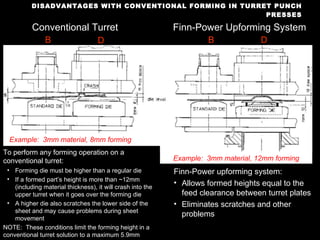
DISADVANTAGES WITH CONVENTIONAL FORMING IN TURRET PUNCH PRESSES Conventional Turret Finn-Power Upforming System To perform any forming operation on a conventional turret: Forming die must be higher than a regular die If a formed part’s height is more than ~12mm (including material thickness), it will crash into the upper turret when it goes over the forming die A higher die also scratches the lower side of the sheet and may cause problems during sheet movement NOTE:  These conditions limit the forming height in a conventional turret solution to a maximum 5.9mm Finn-Power upforming system: Allows formed heights equal to the feed clearance between turret plates Eliminates scratches and other problems B D B D Example:  3mm material, 8mm forming Example:  3mm material, 12mm forming
Finn-Power Upforming Optional in Series 10 and newer Finn-Power F, SG and LP model Consists of an upper and lower hydraulic cylinder (250 kN, e-machines only 200 kN) Forms as high as .590"(15mm) (higher with foot tool) Lower ram travel .472"(12mm) max Form tools manufactured for conventional stations will produce forms in the upforming station without any modifications, shims or spacers.  To achieve maximum form heights, the die assemblies must be manufactured to these forming requirements.  These tools should not be used in conventional stations.  Travel is limited by a mechanical stop at the bottom of the stroke.  Forming is typically done at mechanical bottom.
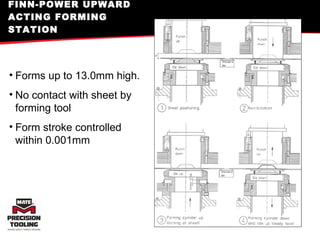
FINN-POWER UPWARD ACTING FORMING STATION Forms up to 13.0mm high. No contact with sheet by forming tool Form stroke controlled within 0.001mm
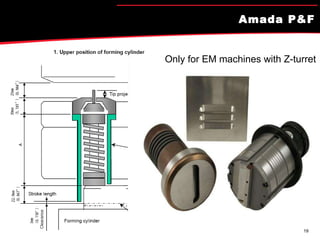
Amada P&F Only for EM machines with Z-turret
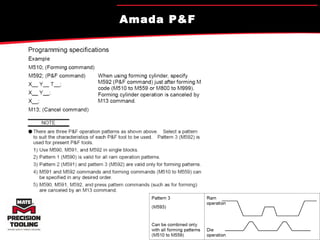
Amada P&F Amada P&F
‘ Retractable’ Forming Station Wiedemann and Euromac Forming Station Forming bar slides to activate forming The sheet is lifted since the lower activates first. Max form height same as standard Euromac = 6mm travel Wiedemann = …
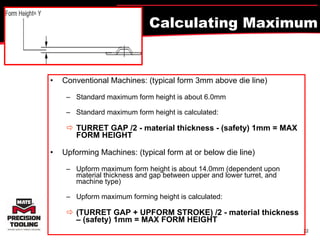
Calculating Maximum Form Height? Conventional Machines: (typical form 3mm above die line) Standard maximum form height is about 6.0mm  Standard maximum form height is calculated:   TURRET GAP /2 - material thickness - (safety) 1mm = MAX FORM HEIGHT Upforming Machines: (typical form at or below die line) Upform maximum form height is about 14.0mm (dependent upon material thickness and gap between upper and lower turret, and machine type) Upform maximum forming height is calculated:   (TURRET GAP + UPFORM STROKE) /2 - material thickness – (safety) 1mm = MAX FORM HEIGHT
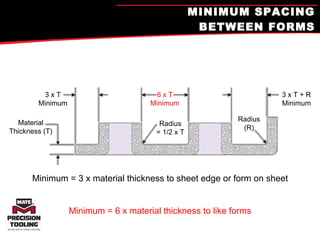
MINIMUM SPACING BETWEEN FORMS Minimum = 3 x material thickness to sheet edge or form on sheet Minimum = 6 x material thickness to like forms 3 x T Minimum Material Thickness (T) 6 x T Minimum 3 x T + R Minimum Radius (R) Radius = 1/2 x T
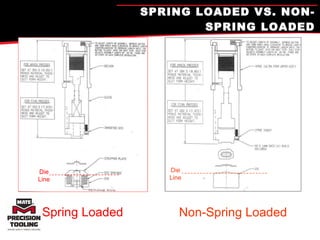
SPRING LOADED VS. NON-SPRING LOADED Non-Spring Loaded Die Line Spring Loaded Die Line
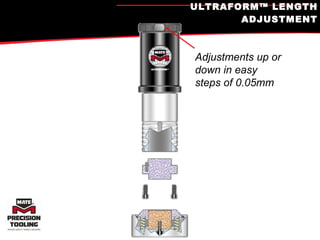
ULTRAFORM™ LENGTH ADJUSTMENT Adjustments up or down in easy steps of 0.05mm
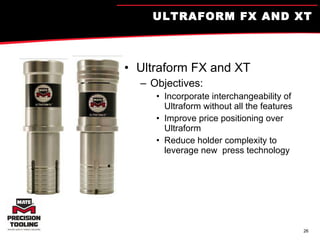
ULTRAFORM FX AND XT Ultraform FX and XT Objectives: Incorporate interchangeability of Ultraform without all the features Improve price positioning over Ultraform Reduce holder complexity to leverage new  press technology
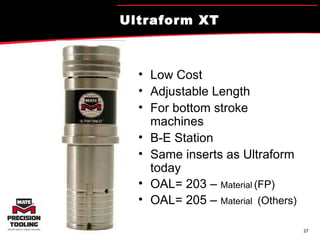
Ultraform XT Low Cost Adjustable Length For bottom stroke machines B-E Station Same inserts as Ultraform today OAL= 203 –  Material   (FP) OAL= 205 –  Material   (Others)
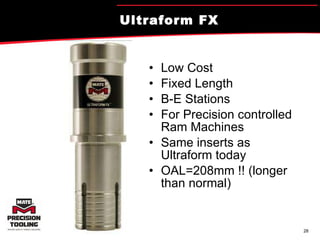
Ultraform FX Low Cost Fixed Length B-E Stations For Precision controlled Ram Machines Same inserts as Ultraform today OAL=208mm !! (longer than normal)
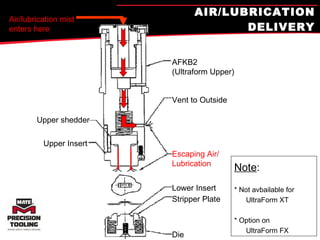
AIR/LUBRICATION DELIVERY Air/lubrication mist enters here Upper shedder Upper Insert AFKB2  (Ultraform Upper) Vent to Outside Escaping Air/ Lubrication Lower Insert Stripper Plate Die Note : * Not avbailable for   UltraForm XT * Option on    UltraForm FX
Forming Tool Recommendations Always form as far from the clamps as possible. Forming should be the last process on the sheet whenever possible. Additional Dwell Time may be necessary to allow tools to strip properly (Programming command)  Forming tools should be run at a slower punching speed to allow material to flow/form. Stations next to the forming tool should not be used. It is recommended to have a die in the die holder in these stations. Roller or brush dies are recommended for both sides of a forming station.  Lubricate the sheet and use machines lube system if available.
Forming Tool Recommendations Periodically remove the tool from the turret and check the sharpness of any cutting edges. Form down operations should be avoided because formed material can drop into dies, get caught and pull the work piece out of the work holders, or distort the form. If a form down operation is the only solution for a particular part, make it the last operation on the sheet. Machine stroke lengths are different from machine to machine. A tool that works in one machine may not work in another. Set up using the tools minimum length and adjust in 0.15mm steps to achieve a sharp form where the tool is properly bottomed. Keep a setup record sheet for all special tools to minimize setup time for each subsequent use of that tool.
SOME FORMING TOOLS IN DETAIL MATE SOLUTIONS TRAINING
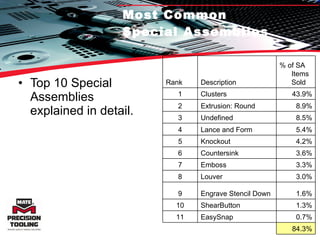
Most Common  Special Assemblies Top 10 Special Assemblies explained in detail. Rank Description % of SA Items Sold 1 Clusters 43.9% 2 Extrusion: Round 8.9% 3 Undefined 8.5% 4 Lance and Form 5.4% 5 Knockout 4.2% 6 Countersink 3.6% 7 Emboss 3.3% 8 Louver 3.0% 9 Engrave Stencil Down 1.6% 10 ShearButton 1.3% 11 EasySnap 0.7% 84.3%
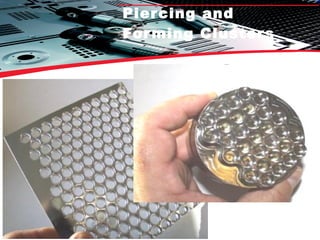
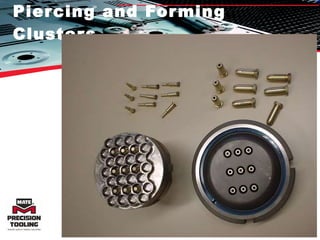
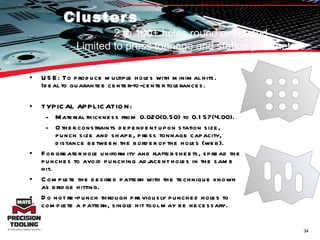
Clusters USE: To produce multiple holes with minimal hits. Ideal to guarantee center-to-center tolerances.  TYPICAL APPLICATION:  Material thickness from 0.020(0.50) to 0.157(4.00).  Other constraints dependent upon station size, punch size and shape, press tonnage capacity, distance between the border of the holes (web). For greater hole uniformity and flatter sheets, spread the punches to avoid punching adjacent holes in the same hit.  Complete the desired pattern with the technique known as bridge hitting.  Do not re-punch through previously punched holes to complete a pattern, single hit tool may be necessary.  2 to 100+ holes round or shaped Limited to press tonnage and station parameters
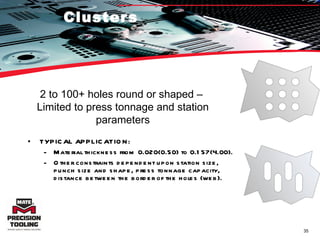
Clusters TYPICAL APPLICATION:  Material thickness from 0.020(0.50) to 0.157(4.00).  Other constraints dependent upon station size, punch size and shape, press tonnage capacity, distance between the border of the holes (web). 2 to 100+ holes round or shaped –  Limited to press tonnage and station parameters
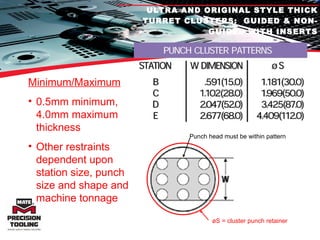
ULTRA AND ORIGINAL STYLE THICK TURRET CLUSTERS:  GUIDED & NON-GUIDED WITH INSERTS Minimum/Maximum 0.5mm minimum, 4.0mm maximum thickness  Other restraints dependent upon station size, punch size and shape and machine tonnage Punch head must be within pattern øS = cluster punch retainer
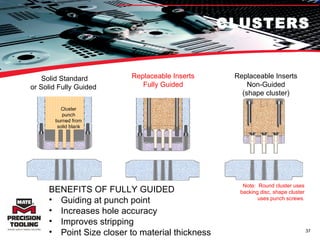
CLUSTERS Cluster punch burned from solid blank BENEFITS OF FULLY GUIDED Guiding at punch point Increases hole accuracy Improves stripping  Point Size closer to material thickness Replaceable Inserts Fully Guided Replaceable Inserts Non-Guided (shape cluster) Note:  Round cluster uses backing disc, shape cluster uses punch screws. Solid Standard or Solid Fully Guided
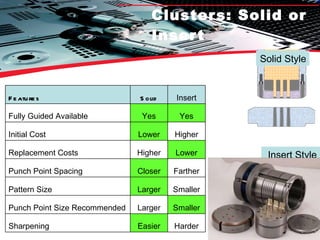
Clusters: Solid or Insert Insert Style Solid Style Features Solid Insert Fully Guided Available Yes Yes Initial Cost Lower Higher Replacement Costs Higher Lower Punch Point Spacing Closer Farther Pattern Size Larger Smaller Punch Point Size Recommended Larger Smaller Sharpening Easier Harder
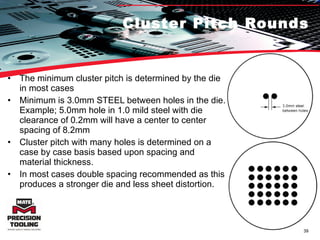
Cluster Pitch Rounds The minimum cluster pitch is determined by the die in most cases Minimum is 3.0mm STEEL between holes in the die. Example; 5.0mm hole in 1.0 mild steel with die clearance of 0.2mm will have a center to center spacing of 8.2mm Cluster pitch with many holes is determined on a case by case basis based upon spacing and material thickness. In most cases double spacing recommended as this produces a stronger die and less sheet distortion.
Cluster Pitch Shapes 12.0mm is the minimum pitch between punch points on a shape cluster. This limit is imposed by the upper assembly screws used to hold the inserts in place. For some special applications the pitch spacing can be reduced to 10.0mm but will require a full Mate engineering review based upon complete cluster pattern and material being processed.
Clusters: Tips for Success Tips for Success: (addressed in upcoming slides) Slug Pulling Sheet Flatness Tonnage or Noise Tool Life Tool Maintenance Press Maintenance
Clusters: Slug Pulling Sharpen tools Correct die clearance Proper die penetration Accurate station alignment- Furthest punch point distance from center is multiplied.
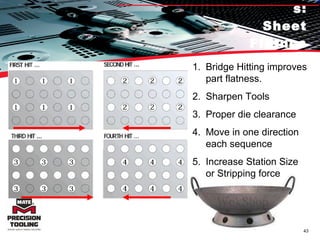
Clusters: Sheet Flatness Bridge Hitting improves part flatness. Sharpen Tools Proper die clearance Move in one direction each sequence Increase Station Size or Stripping force
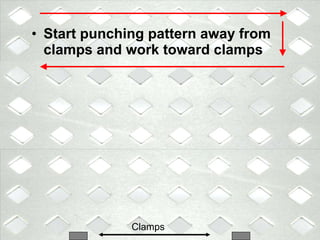
Start punching pattern away from clamps and work toward clamps Clamps
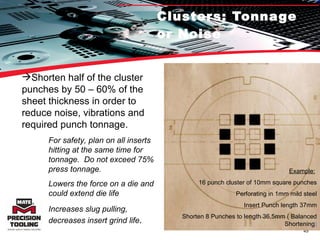
Clusters: Tonnage or Noise Shorten half of the cluster punches by 50 – 60% of the sheet thickness in order to reduce noise, vibrations and required punch tonnage. Example:   16 punch cluster of 10mm square punches Perforating in 1mm mild steel Insert Punch length 37mm Shorten 8 Punches to length 36,5mm ( Balanced Shortening ) For safety, plan on all inserts hitting at the same time for tonnage.  Do not exceed 75% press tonnage. Lowers the force on a die and could extend die life Increases slug pulling, decreases insert grind life .
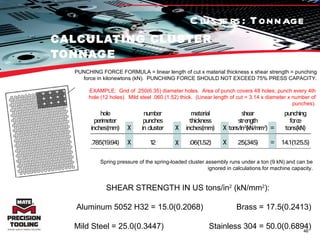
CALCULATING CLUSTER TONNAGE PUNCHING FORCE FORMULA = linear length of cut x material thickness x shear strength = punching force in kilonewtons (kN).  PUNCHING FORCE SHOULD NOT EXCEED 75% PRESS CAPACITY. EXAMPLE:  Grid of .250(6.35) diameter holes.  Area of punch covers 48 holes; punch every 4th hole (12 holes).  Mild steel .060 (1.52) thick.  (Linear length of cut = 3.14 x diameter x number of punches). Spring pressure of the spring-loaded cluster assembly runs under a ton (9 kN) and can be ignored in calculations for machine capacity. SHEAR STRENGTH IN US tons/in 2  (kN/mm 2 ): Aluminum 5052 H32 = 15.0(0.2068) Brass = 17.5(0.2413) Mild Steel = 25.0(0.3447)    Stainless 304 = 50.0(0.6894) Clusters: Tonnage
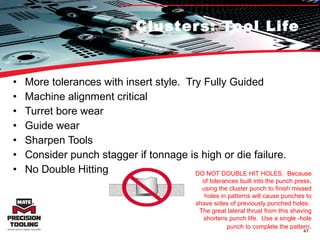
Clusters: Tool Life More tolerances with insert style.  Try Fully Guided Machine alignment critical Turret bore wear Guide wear Sharpen Tools Consider punch stagger if tonnage is high or die failure. No Double Hitting DO NOT DOUBLE HIT HOLES.  Because of tolerances built into the punch press, using the cluster punch to finish missed holes in patterns will cause punches to shave sides of previously punched holes.  The great lateral thrust from this shaving shortens punch life.  Use a single -hole punch to complete the pattern .
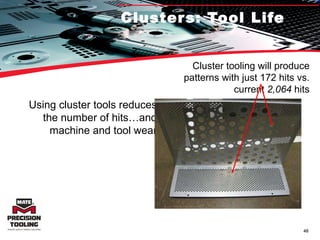
Clusters: Tool Life Using cluster tools reduces the number of hits…and machine and tool wear Cluster tooling will produce patterns with just 172 hits vs. current  2,064  hits
Clusters: Tool Maintenance Sharpen before the tool requires it Lubricate guide assembly  Remove galling from points in direction of punching.  Find root cause and eliminate! Sheet lube, maxima, alignment, clearance, guide, bore wear, double hitting,
Clusters: Press Maintenance Station Alignment Good condition bore.  Select the best one you have. Turret bore key in good condition Work Holder Condition Die holder and shim condition.
Alignment 0.1 degree is too much
Clusters: Review Several Types of Tools:  Fully Guided 1 PC & Inserts, Standard 1 PC & Inserts Tips for Success: Slug Pulling: Sharpen Tools, Proper Die Penetration, Alignment Sheet Flatness: Bridge Hit, Move in 1 direction, Spring Force Tonnage or Noise Limits: Stagger punch points Tool Life: Use FG, Sharpen Tools, Align Station, No double hitting. Tool Maintenance: Sharpen Often, Lubricate, Eliminate Galling Press Maintenance: Bores, Alignment, Workholders, Bore Keys
Piercing and Forming Clusters
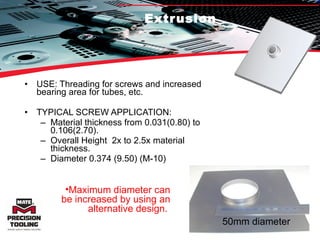
Extrusion USE: Threading for screws and increased bearing area for tubes, etc. TYPICAL SCREW APPLICATION:  Material thickness from 0.031(0.80) to 0.106(2.70).  Overall Height  2x to 2.5x material thickness.  Diameter 0.374 (9.50) (M-10) 50mm diameter Maximum diameter can be increased by using an alternative design.
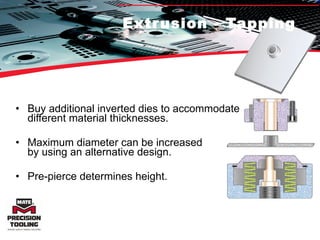
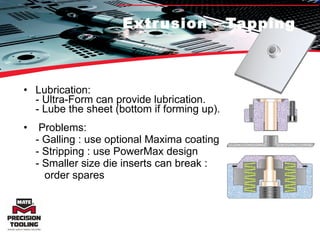
Extrusion - Tapping Buy additional inverted dies to accommodate  different material thicknesses. Maximum diameter can be increased  by using an alternative design.  Pre-pierce determines height.
Extrusion - Tapping Lubrication: - Ultra-Form can provide lubrication. - Lube the sheet (bottom if forming up). Problems: - Galling : use optional Maxima coating - Stripping : use PowerMax design - Smaller size die inserts can break :    order spares
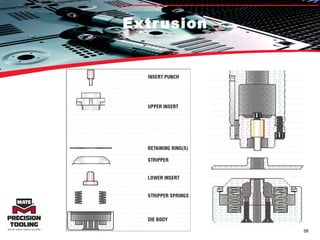
Extrusion
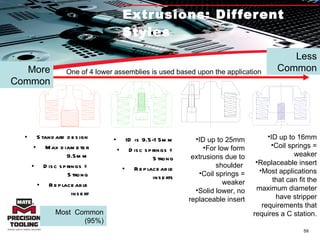
Extrusions: Different Styles One of 4 lower assemblies is used based upon the application Most  Common (95%) More Common Less Common Standard design Max diameter 9.5mm Disc springs = Strong Replaceable insert ID is 9.5-15mm Disc springs = Strong Replaceable inserts ID up to 25mm For low form extrusions due to shoulder  Coil springs = weaker Solid lower, no replaceable insert ID up to 16mm Coil springs = weaker Replaceable insert Most applications that can fit the maximum diameter have stripper requirements that requires a C station.
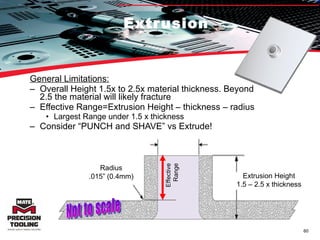
Extrusion General Limitations: Overall Height 1.5x to 2.5x material thickness. Beyond 2.5 the material will likely fracture Effective Range=Extrusion Height – thickness – radius Largest Range under 1.5 x thickness Consider “PUNCH and SHAVE” vs Extrude!  Effective Range Not to scale Extrusion Height 1.5 – 2.5 x thickness Radius .015” (0.4mm)
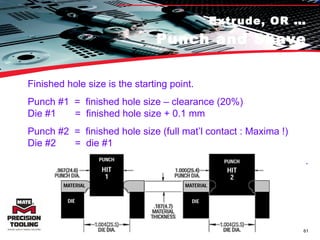
Extrude, OR  … Punch and Shave Finished hole size is the starting point.  Punch #1  =  finished hole size – clearance (20%) Die #1  =  finished hole size + 0.1 mm Punch #2  =  finished hole size (full mat’l contact : Maxima !) Die #2  =  die #1 .
Extrusion: Extrude or Punch When is a  tapping extrusion  not the best choice for achieving the highest number of tapped threads and punching and shaving is a better option?   Small diameter extrusions in thicker material would require an extremely small pre-pierce diameter to achieve a significant form height.  Using a pre-pierce that is appropriate for the material thickness may not leave enough material to achieve a significant form height.  For this reason, the largest number of useable threads may be available from punching and shaving the hole. This is more likely when the material thickness exceeds .078” (2,00mm) and the extrusion ID is less than .315” (8,00mm).
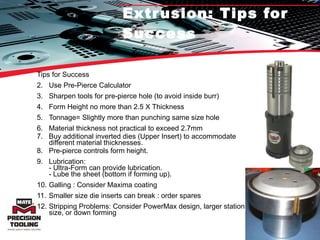
Extrusion: Tips for Success Tips for Success Use Pre-Pierce Calculator Sharpen tools for pre-pierce hole (to avoid inside burr) Form Height no more than 2.5 X Thickness Tonnage= Slightly more than punching same size hole Material thickness not practical to exceed 2.7mm  Buy additional inverted dies (Upper Insert) to accommodate different material thicknesses. Pre-pierce controls form height.  Lubrication: - Ultra-Form can provide lubrication. - Lube the sheet (bottom if forming up). Galling : Consider Maxima coating Smaller size die inserts can break : order spares  Stripping Problems: Consider PowerMax design, larger station size, or down forming
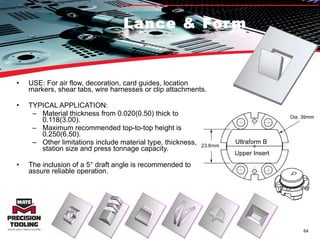
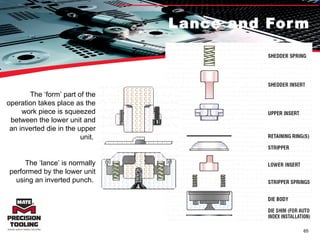
Lance & Form USE: For air flow, decoration, card guides, location markers, shear tabs, wire harnesses or clip attachments. TYPICAL APPLICATION:  Material thickness from 0.020(0.50) thick to 0.118(3.00).  Maximum recommended top-to-top height is 0.250(6.50).  Other limitations include material type, thickness, station size and press tonnage capacity.  The inclusion of a 5° draft angle is recommended to assure reliable operation.  Ultraform B  Upper Insert
Lance and Form The ‘form’ part of the operation takes place as the work piece is squeezed between the lower unit and an inverted die in the upper unit.  The ‘lance’ is normally performed by the lower unit using an inverted punch.
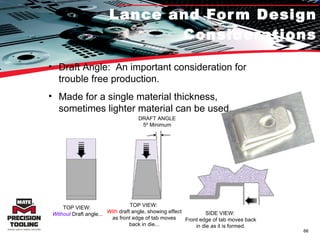
Lance and Form Design Considerations Draft Angle:  An important consideration for trouble free production. Made for a single material thickness, sometimes lighter material can be used. TOP VIEW:  Without  Draft angle... DRAFT ANGLE 5º Minimum TOP VIEW:  With  draft angle, showing effect as front edge of tab moves back in die... SIDE VIEW:  Front edge of tab moves back in die as it is formed.
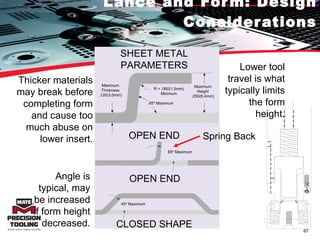
Lance and Form: Design Considerations Lower tool travel is what typically limits the form height. Spring Back Thicker materials may break before completing form and cause too much abuse on lower insert. Angle is typical, may be increased if form height decreased. SHEET METAL PARAMETERS Maximum Height .250(6.4mm) R = .060(1.5mm) Minimum 85º Maximum Maximum Thickness .120(3.0mm) OPEN END 85º Maximum 45º Maximum OPEN END CLOSED SHAPE
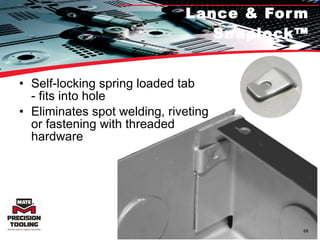
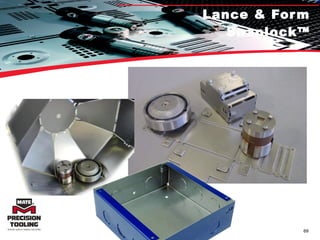
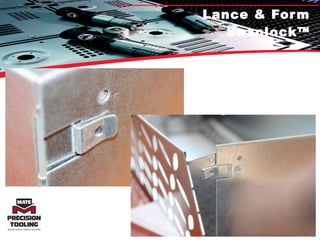
Lance & Form Snaplock™ Self-locking spring loaded tab - fits into hole  Eliminates spot welding, riveting or fastening with threaded hardware
Lance & Form Snaplock™
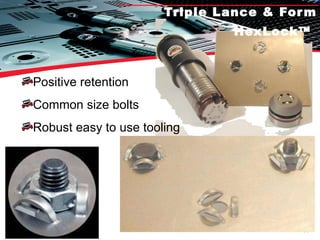
Triple Lance & Form HexLock™   Positive retention Common size bolts Robust easy to use tooling
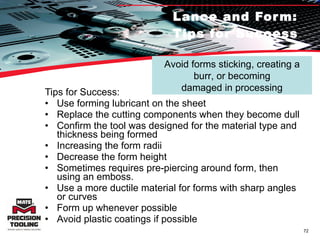
Lance and Form: Tips for Success Tips for Success: Use forming lubricant on the sheet Replace the cutting components when they become dull Confirm the tool was designed for the material type and thickness being formed Increasing the form radii Decrease the form height Sometimes requires pre-piercing around form, then using an emboss.  Use a more ductile material for forms with sharp angles or curves Form up whenever possible Avoid plastic coatings if possible Avoid forms sticking, creating a burr, or becoming damaged in processing
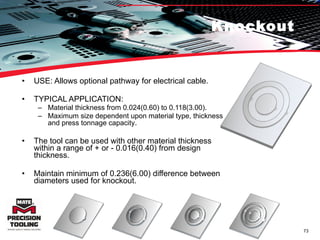
Knockout USE: Allows optional pathway for electrical cable. TYPICAL APPLICATION: Material thickness from 0.024(0.60) to 0.118(3.00).  Maximum size dependent upon material type, thickness and press tonnage capacity .  The tool can be used with other material thickness within a range of + or - 0.016(0.40) from design thickness.  Maintain minimum of 0.236(6.00) difference between diameters used for knockout.
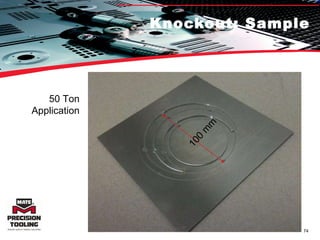
Knockout: Sample 50 Ton Application 100 mm
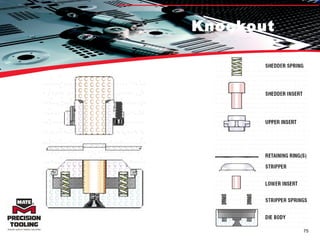
Knockout
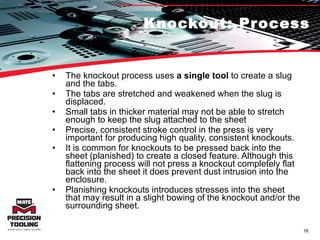
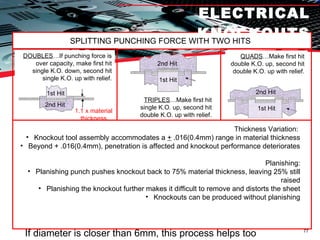
Knockout: Process The knockout process uses  a single tool  to create a slug and the tabs.  The tabs are stretched and weakened when the slug is displaced.  Small tabs in thicker material may not be able to stretch enough to keep the slug attached to the sheet Precise, consistent stroke control in the press is very important for producing high quality, consistent knockouts.  It is common for knockouts to be pressed back into the sheet (planished) to create a closed feature. Although this flattening process will not press a knockout completely flat back into the sheet it does prevent dust intrusion into the enclosure.  Planishing knockouts introduces stresses into the sheet that may result in a slight bowing of the knockout and/or the surrounding sheet.
ELECTRICAL KNOCKOUTS SPLITTING PUNCHING FORCE WITH TWO HITS DOUBLES …If punching force is over capacity, make first hit single K.O. down, second hit single K.O. up with relief. Thickness Variation:  Knockout tool assembly accommodates a  +  .016(0.4mm) range in material thickness Beyond + .016(0.4mm), penetration is affected and knockout performance deteriorates Planishing: Planishing punch pushes knockout back to 75% material thickness, leaving 25% still raised Planishing the knockout further makes it difficult to remove and distorts the sheet Knockouts can be produced without planishing QUADS …Make first hit double K.O. up, second hit double K.O. up with relief. If diameter is closer than 6mm, this process helps too 1.1 x material thickness 1st Hit 2nd Hit TRIPLES …Make first hit single K.O. up, second hit double K.O. up with relief. 1st Hit 2nd Hit 1st Hit 2nd Hit
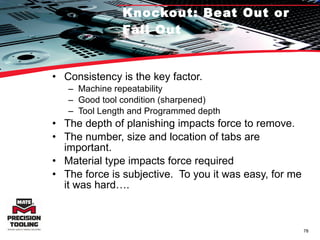
Knockout: Beat Out or Fall Out Consistency is the key factor.  Machine repeatability Good tool condition (sharpened) Tool Length and Programmed depth The depth of planishing impacts force to remove. The number, size and location of tabs are important. Material type impacts force required The force is subjective.  To you it was easy, for me it was hard….
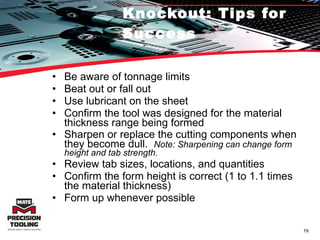
Knockout: Tips for Success Be aware of tonnage limits Beat out or fall out Use lubricant on the sheet Confirm the tool was designed for the material thickness range being formed Sharpen or replace the cutting components when they become dull.  Note: Sharpening can change form height and tab strength. Review tab sizes, locations, and quantities Confirm the form height is correct (1 to 1.1 times the material thickness) Form up whenever possible
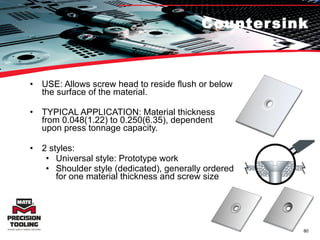
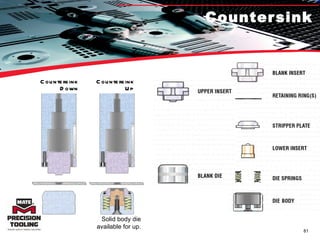
Countersink USE: Allows screw head to reside flush or below the surface of the material. TYPICAL APPLICATION: Material thickness from 0.048(1.22) to 0.250(6.35), dependent upon press tonnage capacity.  2 styles: Universal style: Prototype work Shoulder style (dedicated), generally ordered for one material thickness and screw size
Countersink Countersink Up Countersink Down Solid body die available for up.
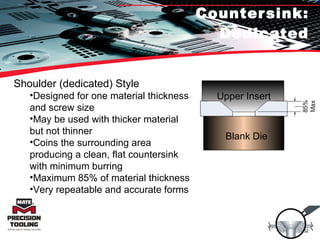
Countersink: Dedicated Shoulder (dedicated) Style Designed for one material thickness and screw size May be used with thicker material but not thinner Coins the surrounding area producing a clean, flat countersink with minimum burring Maximum 85% of material thickness Very repeatable and accurate forms Blank Die Upper Insert
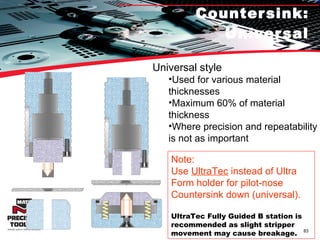
Countersink: Universal Note:  Use  UltraTec  instead of Ultra Form holder for pilot-nose Countersink down (universal).  UltraTec Fully Guided B station is recommended as slight stripper movement may cause breakage. Universal style Used for various material thicknesses Maximum 60% of material thickness Where precision and repeatability is not as important
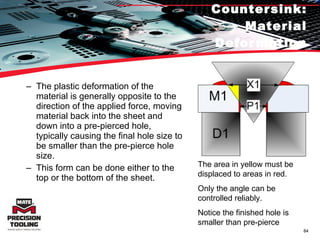
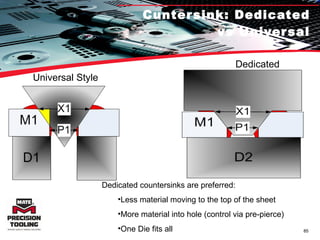
Countersink: Material Deformation The plastic deformation of the material is generally opposite to the direction of the applied force, moving material back into the sheet and down into a pre-pierced hole, typically causing the final hole size to be smaller than the pre-pierce hole size. This form can be done either to the top or the bottom of the sheet. The area in yellow must be displaced to areas in red. Only the angle can be controlled reliably. Notice the finished hole is smaller than pre-pierce
Cuntersink: Dedicated vs Universal Universal Style Dedicated Style Dedicated countersinks are preferred: Less material moving to the top of the sheet More material into hole (control via pre-pierce)  One Die fits all
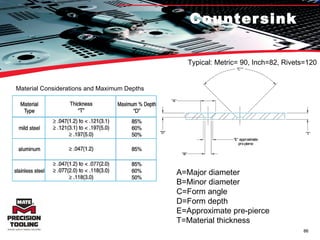
Countersink A=Major diameter B=Minor diameter C=Form angle D=Form depth E=Approximate pre-pierce T=Material thickness Typical: Metric= 90, Inch=82, Rivets=120 Material Considerations and Maximum Depths
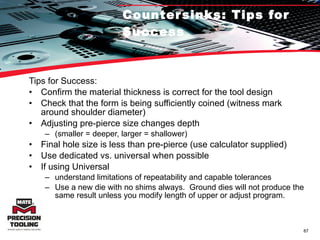
Countersinks: Tips for Success Tips for Success: Confirm the material thickness is correct for the tool design Check that the form is being sufficiently coined (witness mark around shoulder diameter) Adjusting pre-pierce size changes depth  (smaller = deeper, larger = shallower)  Final hole size is less than pre-pierce (use calculator supplied) Use dedicated vs. universal when possible If using Universal understand limitations of repeatability and capable tolerances Use a new die with no shims always.  Ground dies will not produce the same result unless you modify length of upper or adjust program.
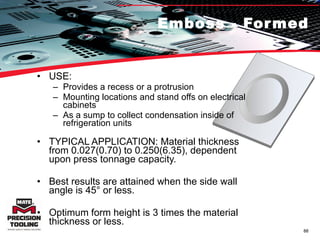
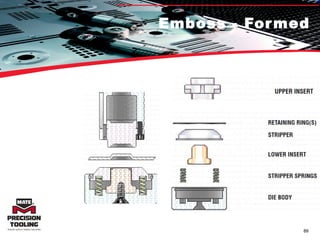
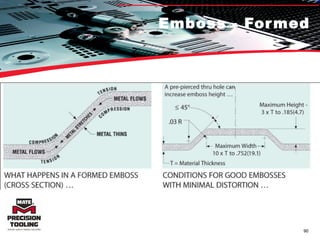
Emboss - Formed USE:  Provides a recess or a protrusion Mounting locations and stand offs on electrical cabinets As a sump to collect condensation inside of refrigeration units TYPICAL APPLICATION: Material thickness from 0.027(0.70) to 0.250(6.35), dependent upon press tonnage capacity.  Best results are attained when the side wall angle is 45° or less.  Optimum form height is 3 times the material thickness or less.
Emboss - Formed
Emboss - Formed
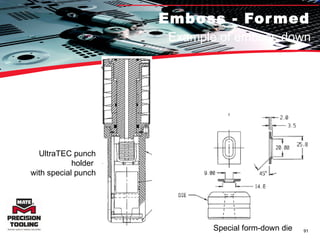
Emboss - Formed Example of emboss down UltraTEC punch holder  with special punch Special form-down die
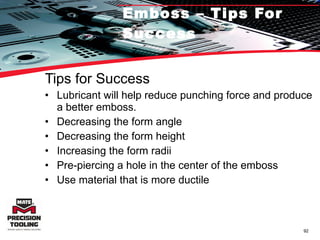
Emboss – Tips For Success Tips for Success Lubricant will help reduce punching force and produce a better emboss. Decreasing the form angle Decreasing the form height Increasing the form radii Pre-piercing a hole in the center of the emboss Use material that is more ductile
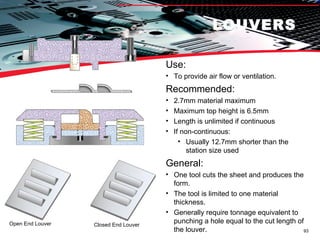
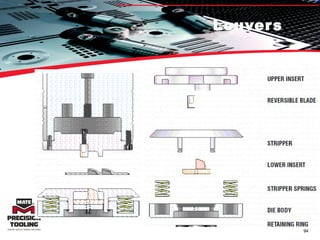
LOUVERS Use:  To provide air flow or ventilation. Recommended: 2.7mm material maximum Maximum top height is 6.5mm Length is unlimited if continuous If non-continuous: Usually 12.7mm shorter than the station size used General: One tool cuts the sheet and produces the form. The tool is limited to one material thickness. Generally require tonnage equivalent to punching a hole equal to the cut length of the louver. Open End Louver Closed End Louver
Louvers
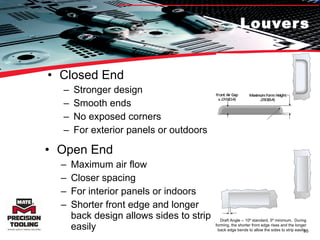
Louvers Closed End Stronger design Smooth ends No exposed corners For exterior panels or outdoors Open End Maximum air flow Closer spacing For interior panels or indoors Shorter front edge and longer back design allows sides to strip easily Draft Angle -- 10º standard, 5º minimum.  During forming, the shorter front edge rises and the longer back edge bends to allow the sides to strip easily.
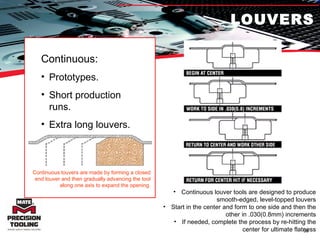
LOUVERS Continuous: Prototypes. Short production runs. Extra long louvers. Continuous louvers are made by forming a closed end louver and then gradually advancing the tool along one axis to expand the opening. Continuous louver tools are designed to produce smooth-edged, level-topped louvers Start in the center and form to one side and then the other in .030(0.8mm) increments If needed, complete the process by re-hitting the center for ultimate flatness
Louver Spacing
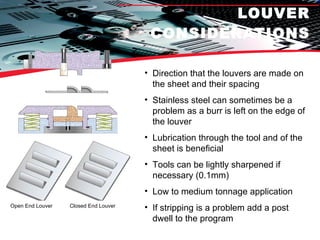
LOUVER CONSIDERATIONS Direction that the louvers are made on the sheet and their spacing Stainless steel can sometimes be a problem as a burr is left on the edge of the louver Lubrication through the tool and of the sheet is beneficial Tools can be lightly sharpened if necessary (0.1mm) Low to medium tonnage application If stripping is a problem add a post dwell to the program Open End Louver Closed End Louver
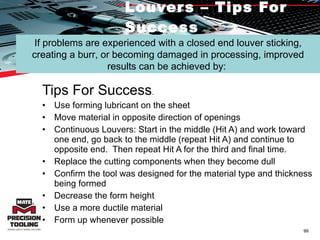
Louvers – Tips For Success Tips For Success .  Use forming lubricant on the sheet  Move material in opposite direction of openings Continuous Louvers: Start in the middle (Hit A) and work toward one end, go back to the middle (repeat Hit A) and continue to opposite end.  Then repeat Hit A for the third and final time. Replace the cutting components when they become dull  Confirm the tool was designed for the material type and thickness being formed  Decrease the form height  Use a more ductile material  Form up whenever possible If problems are experienced with a closed end louver sticking, creating a burr, or becoming damaged in processing, improved results can be achieved by:
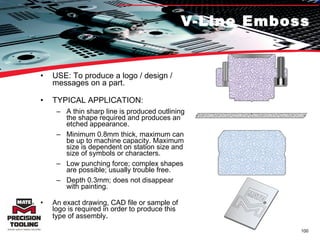
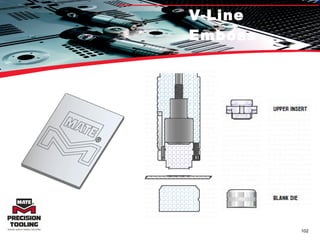
V-Line Emboss USE: To produce a logo / design / messages on a part.  TYPICAL APPLICATION: A thin sharp line is produced outlining the shape required and produces an etched appearance. Minimum 0.8mm thick, maximum can be up to machine capacity. Maximum size is dependent on station size and size of symbols or characters. Low punching force; complex shapes are possible; usually trouble free. Depth 0.3mm; does not disappear with painting. An exact drawing, CAD file or sample of logo is required in order to produce this type of assembly .
V-Line Emboss
V-Line Emboss
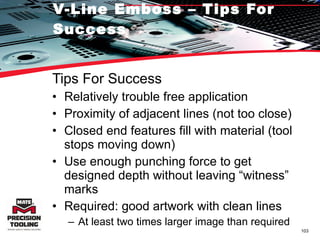
V-Line Emboss – Tips For Success Tips For Success Relatively trouble free application Proximity of adjacent lines (not too close) Closed end features fill with material (tool stops moving down) Use enough punching force to get designed depth without leaving “witness” marks Required: good artwork with clean lines At least two times larger image than required
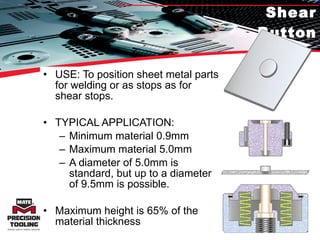
Shear Button USE: To position sheet metal parts for welding or as stops as for shear stops. TYPICAL APPLICATION:  Minimum material 0.9mm Maximum material 5.0mm A diameter of 5.0mm is standard, but up to a diameter of 9.5mm is possible. Maximum height is 65% of the material thickness
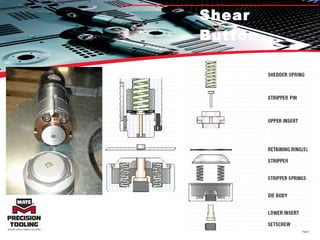
Shear Button
Shear Button One tool produces the form in each mating part. Using shear buttons to square large sheets... Conventional use of shear buttons... Shear buttons in lower plate fit into matching holes in  upper plate... Shear buttons used as weld projections for precision placement of plates to be welded together...
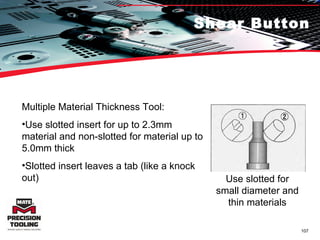
Shear Button Multiple Material Thickness Tool:  Use slotted insert for up to 2.3mm material and non-slotted for material up to 5.0mm thick Slotted insert leaves a tab (like a knock out) Use slotted for small diameter and thin materials
Shear Button Traditional wire style micro-joint. Sharp point needs to be removed, creating a secondary operation Material left may cause inaccurately formed parts Square Shear Button style micro-joint Adjustable in length when strength is required It can be snapped off easily, leaving a clean edge Square shape allows it to be used at both 0° and 90° without the need of an auto-index station
Shear Button – Tips For Success Tips For Success Low tonnage operation that’s relatively trouble free When using in Stainless Steel, the diameter should be twice the material thickness In thin material, a slotted tip insert may be used to help buttons stay in place Tools can and should be sharpened
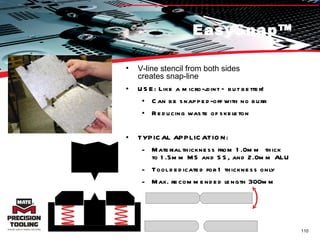
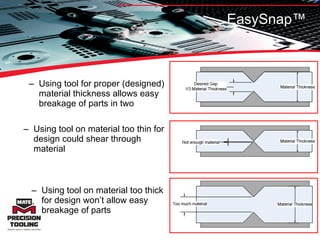
EasySnap™ V-line stencil from both sides  creates snap-line USE: Like a micro-joint – but better! Can be snapped-off with no burr Reducing waste of skeleton TYPICAL APPLICATION:  Material thickness from 1.0mm  thick  to 1.5mm MS and SS, and 2.0mm ALU Tool dedicated for 1 thickness only Max. recommended length 300mm
Using tool for proper (designed) material thickness allows easy breakage of parts in two Using tool on material too thin for design could shear through material Using tool on material too thick for design won’t allow easy breakage of parts EasySnap™
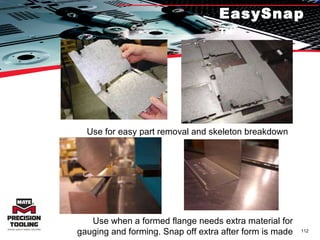
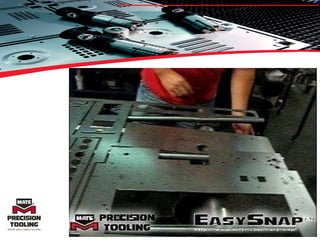
EasySnap™ Use for easy part removal and skeleton breakdown Use when a formed flange needs extra material for gauging and forming. Snap off extra after form is made
 
EasySnap™ - Tips For Success Tips For Success Designed for one thickness Punch depth should be about 33% into material, both top and bottom Run at a slower machine speed Use as last operation if possible
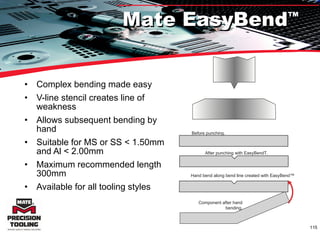
Complex bending made easy  V-line stencil creates line of weakness Allows subsequent bending by hand Suitable for MS or SS < 1.50mm and Al < 2.00mm Maximum recommended length 300mm Available for all tooling styles Hand bend along bend line created with EasyBend™ Mate EasyBend ™ Before punching. After punching with EasyBend T. Component after hand bending .
LIT 00002
LIT 00002
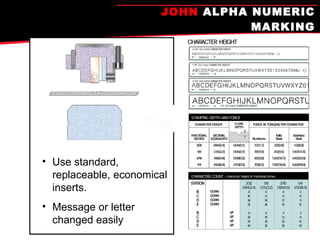
JOHN  ALPHA NUMERIC MARKING Use standard, replaceable, economical inserts. Message or letter changed easily
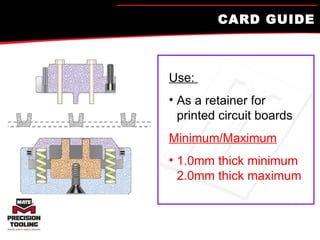
CARD GUIDE Use:  As a retainer for printed circuit boards Minimum/Maximum 1.0mm thick minimum  2.0mm thick maximum
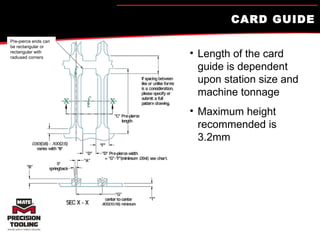
CARD GUIDE Length of the card guide is dependent upon station size and machine tonnage Maximum height recommended is 3.2mm Pre-pierce ends can be rectangular or rectangular with radiused corners
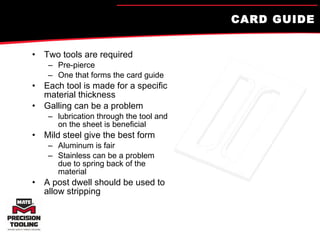
CARD GUIDE Two tools are required Pre-pierce  One that forms the card guide Each tool is made for a specific material thickness Galling can be a problem lubrication through the tool and on the sheet is beneficial Mild steel give the best form Aluminum is fair Stainless can be a problem due to spring back of the material A post dwell should be used to allow stripping
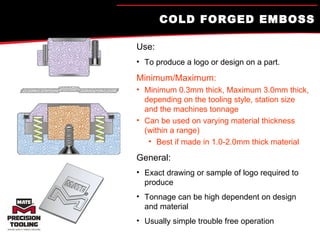
COLD FORGED EMBOSS Use:   To produce a logo or design on a part. Minimum/Maximum: Minimum 0.3mm thick, Maximum 3.0mm thick, depending on the tooling style, station size and the machines tonnage Can be used on varying material thickness (within a range) Best if made in 1.0-2.0mm thick material General: Exact drawing or sample of logo required to produce Tonnage can be high dependent on design and material Usually simple trouble free operation
COLD FORGED EMBOSS Width of characters should be minimum of one material thickness, more is better Space between characters or lines should also be one material thickness minimum Tools are not designed to be sharpened Can be dusted to sharpen the emboss after the tool is older UPPER INSERT MATERIAL LOWER INSERT .016(4.0mm) to .020(0.5mm) For clear definition and readability, raise characters at least .016(0.4mm) to .020(0.5mm) above the surface. This cut-away of the MATE logo shows how a complex form is rendered by the cold forged embossing process. MAXIMUM STATION PERIMETERS B Ø  .787(20.0mm) C Ø  1.575(40.0mm) D Ø  2.362(60.0mm) E Ø 3.346(85.0mm)
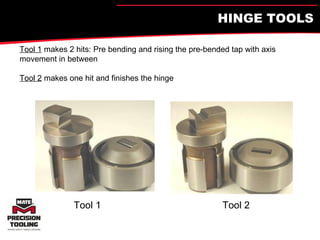
HINGE TOOLS Tool 1  makes 2 hits: Pre bending and rising the pre-bended tap with axis movement in between Tool 2  makes one hit and finishes the hinge Tool 1 Tool 2
HINGE TOOLS Tool 1 Tool 2
V-LINE CUSTOM INSCRIPTION Use:  Logos, messages or symbols Produces an etched appearance Minimum/Maximum: Minimum 0.8mm thick, maximum can be up to machine capacity Maximum size is dependent on station size and size of symbols or characters General: Thin, sharp line produced, outlining the shape required and Low to high tonnage, usually trouble free
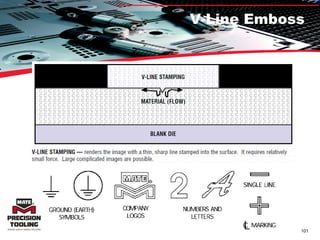
V-Line Stamping -- renders the image with a thin, sharp line stamped into the surface.  It requires relatively small force.  Large complicated images are possible. V-Line Stamping: Thin, sharp line reproduces the outline of the shape for an etched appearance.  Low punching force. Within press capability, figures may be any size up to station maximum When ordering, an accurate indication of each figure’s size, shape and depth below surface (0.30mm maximum) are required Typefaces may be specified or artwork may be furnished, depending on the requirements of the subject matter.
RAM CONTROL TOOLS Press must be capable of holding the ram down while the sheet is moved in the X and or Y direction .
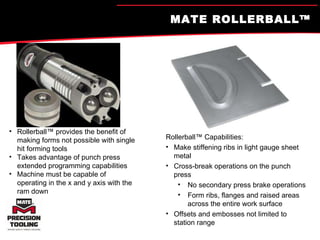
MATE ROLLERBALL™  Rollerball™ provides the benefit of making forms not possible with single hit forming tools Takes advantage of punch press extended programming capabilities Machine must be capable of operating in the x and y axis with the ram down  Rollerball™ Capabilities: Make stiffening ribs in light gauge sheet metal Cross-break operations on the punch press No secondary press brake operations  Form ribs, flanges and raised areas across the entire work surface Offsets and embosses not limited to station range
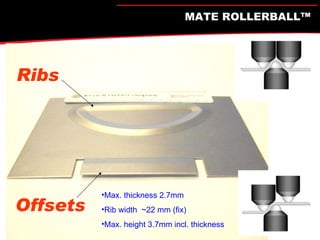
Max. thickness 2.7mm Rib width  ~22 mm (fix) Max. height 3.7mm incl. thickness Ribs Offsets MATE ROLLERBALL™
Rollerball Examples
Rollerball ®   Beading in 1mm mild steel Detail inside corner Roller Ball Beading
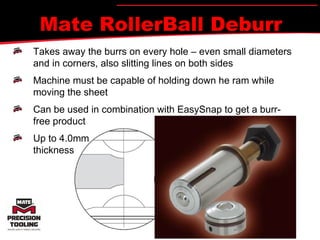
Mate RollerBall Deburr Takes away the burrs on every hole – even small diameters and in corners, also slitting lines on both sides Machine must be capable of holding down he ram while moving the sheet Can be used in combination with EasySnap to get a burr- free product Up to 4.0mm thickness
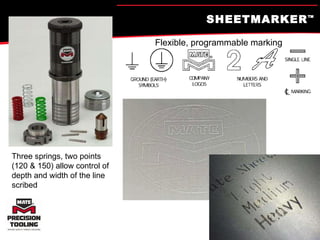
SHEETMARKER ™ Three springs, two points (120 & 150) allow control of depth and width of the line scribed Flexible, programmable marking
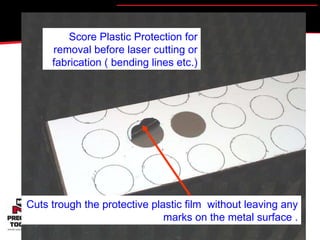
Score Plastic Protection for removal before laser cutting or fabrication ( bending lines etc.) Cuts trough the protective plastic film  without leaving any marks on the metal surface .
Mate EasyMark Springs: 3 Types to be used for diamond or Brass Inserts Spacer: Use for  dead  weight on top  of Ink Marker Punch: for installing  and removing  inserts Ink Marker pen Insert Holder 3 Inserts (2 diamond, 1  brass) Allen Wrench:  for installing and removing inserts Die: Used for SheetMarker  and InkMarker Spacer: Use with SheetMarker A-station Holder
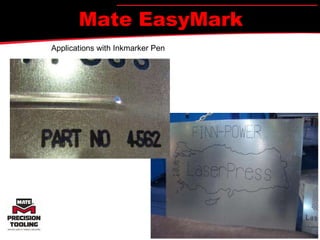
Mate EasyMark Applications with Inkmarker Pen
MATE SOLUTIONS TRAINING PROBLEM-SOLVING  CHECKLIST
PROBLEM-SOLVING CHECKLIST Is the material correct for the tool that was ordered? Is the tool length set correctly? Is the forming being done close to the clamps? Does the tool require sharpening? Is galling present on the tool? Was the correct pre-pierce used? Is there a delay in the program to allow stripping? Is the turret aligned properly? Is there any damage to the tool? Was lubrication used on the tool and sheet?
MATE SOLUTIONS TRAINING SUMMARY
SUMMARY Using forming in your operations will help you… Increase  efficiency Expand  your capabilities Eliminate  of secondary operations Increase  machine time Reduce  tool wear
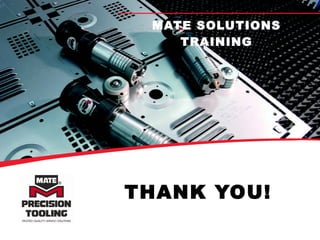
THANK YOU! MATE SOLUTIONS TRAINING

3 Forming Tool Concepts Pvp

  • 1.
    INCREASE EFFICIENCY ANDEXPAND YOUR OPERATIONS WITH FORMING MATE SOLUTIONS TRAINING
  • 2.
    AGENDA Why useforming? Forming basics Ways to use forming in your operation Summary
  • 3.
    WHY USE FORMING?Increase efficiency Expand your capabilities Eliminate of secondary operations Increase machine time Reduce tool wear
  • 4.
    EXAMPLE: ADDED COSTAND PROCESSING TIME Secondary processing of machined countersinks is non value-added time Make them on the turrets, forming up or down, as required
  • 5.
    The ribs inthis pane were nibbled, increasing machine time and tool wear Use a forming tool on the turret is a much better way EXAMPLE: INCREASED TIME AND TOOL WEAR
  • 6.
    FORMING VS. PUNCHINGPunching Makes a hole Requires stripping Stroke may not be critical High speed Forming Changes work from 2D to 3D Stroke length critical to achieve correct results Lower ram speed Station ranges are usually reduced
  • 7.
    Definitions Special Assembly- Any tool that transforms the material to 3D Any tool that requires multiple holes in a single hit. Any tool that requires multiple forms in a single hit. Any tool that punches a non-standard shape or size hole.
  • 8.
    FORMING BASICS MATESOLUTIONS TRAINING
  • 9.
    WHAT LIMITS FORMHEIGHT? Machine Limitations Maximum forming height is about 6.0mm Calculation: Maximum Form Height = (Turret gap/2) – Material Thickness – 1.0mm safety Forming should always be done last Not necessary with machines with forming cylinder Adjacent stations to the forming tool should not be used Sheet marking, bending, risk of tool breakage could occur Material Limitations Emboss stretches material Some forms bend material like lance and form Material ductility Form geometry
  • 10.
    MATERIAL TERMINOLOGY DuctilityAbility to be elongated in one dimension while becoming thin in another dimension Elastic Limit Point at which material will not return to original shape Plastic Deformation Stretching metal enough to exceed its elastic limit and stopping prior to fracture Spring back Amount which material tries to return to its original shape after forming
  • 11.
    MACHINE CONSIDERATIONS FORCORRECT SETUP Shut Height: Measurement from ram bottom dead center to top of new die Amada 205 mm Finn Power 203 mm Murata Wiedemann (Variable by Model) Ram Operation Mechanical Hydraulic Electro Mechanical Ram stroke control
  • 12.
    STANDARD PUNCH PRESSTYPICAL TURRET LAYOUT = Forming Tool = Adjacent stations without tooling 20 Station Turret
  • 13.
    FORMING IN ATURRET PUNCH PRESS Because the forming die is higher than a standard die, the forming die must protrude above the material pass line on the conventional turret When the sheet is moved or the surrounding stations are used, then the forming tool may mark or scratch the sheet CONVENTIONAL TURRET
  • 14.
    CONVENTIONAL STATION VS.UPFORMING STATION This lance and form could never be achieved in a conventional machine. Machine with forming station makes it possible! Forming die operated by forming cylinder Die Line
  • 15.
    Standard vs. UpformingStandard Shorter form height capabilities due to forming die height Form can be up or down. Upforming Higher form height capabilities: Use the entire feedgap Conventional forming dies sit at or below die line Special forming dies(Amada P&F) Form can be up or down.
  • 16.
    DISADVANTAGES WITH CONVENTIONALFORMING IN TURRET PUNCH PRESSES Conventional Turret Finn-Power Upforming System To perform any forming operation on a conventional turret: Forming die must be higher than a regular die If a formed part’s height is more than ~12mm (including material thickness), it will crash into the upper turret when it goes over the forming die A higher die also scratches the lower side of the sheet and may cause problems during sheet movement NOTE: These conditions limit the forming height in a conventional turret solution to a maximum 5.9mm Finn-Power upforming system: Allows formed heights equal to the feed clearance between turret plates Eliminates scratches and other problems B D B D Example: 3mm material, 8mm forming Example: 3mm material, 12mm forming
  • 17.
    Finn-Power Upforming Optionalin Series 10 and newer Finn-Power F, SG and LP model Consists of an upper and lower hydraulic cylinder (250 kN, e-machines only 200 kN) Forms as high as .590&quot;(15mm) (higher with foot tool) Lower ram travel .472&quot;(12mm) max Form tools manufactured for conventional stations will produce forms in the upforming station without any modifications, shims or spacers. To achieve maximum form heights, the die assemblies must be manufactured to these forming requirements. These tools should not be used in conventional stations. Travel is limited by a mechanical stop at the bottom of the stroke. Forming is typically done at mechanical bottom.
  • 18.
    FINN-POWER UPWARD ACTINGFORMING STATION Forms up to 13.0mm high. No contact with sheet by forming tool Form stroke controlled within 0.001mm
  • 19.
    Amada P&F Onlyfor EM machines with Z-turret
  • 20.
  • 21.
    ‘ Retractable’ FormingStation Wiedemann and Euromac Forming Station Forming bar slides to activate forming The sheet is lifted since the lower activates first. Max form height same as standard Euromac = 6mm travel Wiedemann = …
  • 22.
    Calculating Maximum FormHeight? Conventional Machines: (typical form 3mm above die line) Standard maximum form height is about 6.0mm Standard maximum form height is calculated: TURRET GAP /2 - material thickness - (safety) 1mm = MAX FORM HEIGHT Upforming Machines: (typical form at or below die line) Upform maximum form height is about 14.0mm (dependent upon material thickness and gap between upper and lower turret, and machine type) Upform maximum forming height is calculated: (TURRET GAP + UPFORM STROKE) /2 - material thickness – (safety) 1mm = MAX FORM HEIGHT
  • 23.
    MINIMUM SPACING BETWEENFORMS Minimum = 3 x material thickness to sheet edge or form on sheet Minimum = 6 x material thickness to like forms 3 x T Minimum Material Thickness (T) 6 x T Minimum 3 x T + R Minimum Radius (R) Radius = 1/2 x T
  • 24.
    SPRING LOADED VS.NON-SPRING LOADED Non-Spring Loaded Die Line Spring Loaded Die Line
  • 25.
    ULTRAFORM™ LENGTH ADJUSTMENTAdjustments up or down in easy steps of 0.05mm
  • 26.
    ULTRAFORM FX ANDXT Ultraform FX and XT Objectives: Incorporate interchangeability of Ultraform without all the features Improve price positioning over Ultraform Reduce holder complexity to leverage new press technology
  • 27.
    Ultraform XT LowCost Adjustable Length For bottom stroke machines B-E Station Same inserts as Ultraform today OAL= 203 – Material (FP) OAL= 205 – Material (Others)
  • 28.
    Ultraform FX LowCost Fixed Length B-E Stations For Precision controlled Ram Machines Same inserts as Ultraform today OAL=208mm !! (longer than normal)
  • 29.
    AIR/LUBRICATION DELIVERY Air/lubricationmist enters here Upper shedder Upper Insert AFKB2 (Ultraform Upper) Vent to Outside Escaping Air/ Lubrication Lower Insert Stripper Plate Die Note : * Not avbailable for UltraForm XT * Option on UltraForm FX
  • 30.
    Forming Tool RecommendationsAlways form as far from the clamps as possible. Forming should be the last process on the sheet whenever possible. Additional Dwell Time may be necessary to allow tools to strip properly (Programming command) Forming tools should be run at a slower punching speed to allow material to flow/form. Stations next to the forming tool should not be used. It is recommended to have a die in the die holder in these stations. Roller or brush dies are recommended for both sides of a forming station. Lubricate the sheet and use machines lube system if available.
  • 31.
    Forming Tool RecommendationsPeriodically remove the tool from the turret and check the sharpness of any cutting edges. Form down operations should be avoided because formed material can drop into dies, get caught and pull the work piece out of the work holders, or distort the form. If a form down operation is the only solution for a particular part, make it the last operation on the sheet. Machine stroke lengths are different from machine to machine. A tool that works in one machine may not work in another. Set up using the tools minimum length and adjust in 0.15mm steps to achieve a sharp form where the tool is properly bottomed. Keep a setup record sheet for all special tools to minimize setup time for each subsequent use of that tool.
  • 32.
    SOME FORMING TOOLSIN DETAIL MATE SOLUTIONS TRAINING
  • 33.
    Most Common Special Assemblies Top 10 Special Assemblies explained in detail. Rank Description % of SA Items Sold 1 Clusters 43.9% 2 Extrusion: Round 8.9% 3 Undefined 8.5% 4 Lance and Form 5.4% 5 Knockout 4.2% 6 Countersink 3.6% 7 Emboss 3.3% 8 Louver 3.0% 9 Engrave Stencil Down 1.6% 10 ShearButton 1.3% 11 EasySnap 0.7% 84.3%
  • 34.
    Clusters USE: Toproduce multiple holes with minimal hits. Ideal to guarantee center-to-center tolerances. TYPICAL APPLICATION: Material thickness from 0.020(0.50) to 0.157(4.00). Other constraints dependent upon station size, punch size and shape, press tonnage capacity, distance between the border of the holes (web). For greater hole uniformity and flatter sheets, spread the punches to avoid punching adjacent holes in the same hit. Complete the desired pattern with the technique known as bridge hitting. Do not re-punch through previously punched holes to complete a pattern, single hit tool may be necessary. 2 to 100+ holes round or shaped Limited to press tonnage and station parameters
  • 35.
    Clusters TYPICAL APPLICATION: Material thickness from 0.020(0.50) to 0.157(4.00). Other constraints dependent upon station size, punch size and shape, press tonnage capacity, distance between the border of the holes (web). 2 to 100+ holes round or shaped – Limited to press tonnage and station parameters
  • 36.
    ULTRA AND ORIGINALSTYLE THICK TURRET CLUSTERS: GUIDED & NON-GUIDED WITH INSERTS Minimum/Maximum 0.5mm minimum, 4.0mm maximum thickness Other restraints dependent upon station size, punch size and shape and machine tonnage Punch head must be within pattern øS = cluster punch retainer
  • 37.
    CLUSTERS Cluster punchburned from solid blank BENEFITS OF FULLY GUIDED Guiding at punch point Increases hole accuracy Improves stripping Point Size closer to material thickness Replaceable Inserts Fully Guided Replaceable Inserts Non-Guided (shape cluster) Note: Round cluster uses backing disc, shape cluster uses punch screws. Solid Standard or Solid Fully Guided
  • 38.
    Clusters: Solid orInsert Insert Style Solid Style Features Solid Insert Fully Guided Available Yes Yes Initial Cost Lower Higher Replacement Costs Higher Lower Punch Point Spacing Closer Farther Pattern Size Larger Smaller Punch Point Size Recommended Larger Smaller Sharpening Easier Harder
  • 39.
    Cluster Pitch RoundsThe minimum cluster pitch is determined by the die in most cases Minimum is 3.0mm STEEL between holes in the die. Example; 5.0mm hole in 1.0 mild steel with die clearance of 0.2mm will have a center to center spacing of 8.2mm Cluster pitch with many holes is determined on a case by case basis based upon spacing and material thickness. In most cases double spacing recommended as this produces a stronger die and less sheet distortion.
  • 40.
    Cluster Pitch Shapes12.0mm is the minimum pitch between punch points on a shape cluster. This limit is imposed by the upper assembly screws used to hold the inserts in place. For some special applications the pitch spacing can be reduced to 10.0mm but will require a full Mate engineering review based upon complete cluster pattern and material being processed.
  • 41.
    Clusters: Tips forSuccess Tips for Success: (addressed in upcoming slides) Slug Pulling Sheet Flatness Tonnage or Noise Tool Life Tool Maintenance Press Maintenance
  • 42.
    Clusters: Slug PullingSharpen tools Correct die clearance Proper die penetration Accurate station alignment- Furthest punch point distance from center is multiplied.
  • 43.
    Clusters: Sheet FlatnessBridge Hitting improves part flatness. Sharpen Tools Proper die clearance Move in one direction each sequence Increase Station Size or Stripping force
  • 44.
    Start punching patternaway from clamps and work toward clamps Clamps
  • 45.
    Clusters: Tonnage orNoise Shorten half of the cluster punches by 50 – 60% of the sheet thickness in order to reduce noise, vibrations and required punch tonnage. Example: 16 punch cluster of 10mm square punches Perforating in 1mm mild steel Insert Punch length 37mm Shorten 8 Punches to length 36,5mm ( Balanced Shortening ) For safety, plan on all inserts hitting at the same time for tonnage. Do not exceed 75% press tonnage. Lowers the force on a die and could extend die life Increases slug pulling, decreases insert grind life .
  • 46.
    CALCULATING CLUSTER TONNAGEPUNCHING FORCE FORMULA = linear length of cut x material thickness x shear strength = punching force in kilonewtons (kN). PUNCHING FORCE SHOULD NOT EXCEED 75% PRESS CAPACITY. EXAMPLE: Grid of .250(6.35) diameter holes. Area of punch covers 48 holes; punch every 4th hole (12 holes). Mild steel .060 (1.52) thick. (Linear length of cut = 3.14 x diameter x number of punches). Spring pressure of the spring-loaded cluster assembly runs under a ton (9 kN) and can be ignored in calculations for machine capacity. SHEAR STRENGTH IN US tons/in 2 (kN/mm 2 ): Aluminum 5052 H32 = 15.0(0.2068) Brass = 17.5(0.2413) Mild Steel = 25.0(0.3447) Stainless 304 = 50.0(0.6894) Clusters: Tonnage
  • 47.
    Clusters: Tool LifeMore tolerances with insert style. Try Fully Guided Machine alignment critical Turret bore wear Guide wear Sharpen Tools Consider punch stagger if tonnage is high or die failure. No Double Hitting DO NOT DOUBLE HIT HOLES. Because of tolerances built into the punch press, using the cluster punch to finish missed holes in patterns will cause punches to shave sides of previously punched holes. The great lateral thrust from this shaving shortens punch life. Use a single -hole punch to complete the pattern .
  • 48.
    Clusters: Tool LifeUsing cluster tools reduces the number of hits…and machine and tool wear Cluster tooling will produce patterns with just 172 hits vs. current 2,064 hits
  • 49.
    Clusters: Tool MaintenanceSharpen before the tool requires it Lubricate guide assembly Remove galling from points in direction of punching. Find root cause and eliminate! Sheet lube, maxima, alignment, clearance, guide, bore wear, double hitting,
  • 50.
    Clusters: Press MaintenanceStation Alignment Good condition bore. Select the best one you have. Turret bore key in good condition Work Holder Condition Die holder and shim condition.
  • 51.
  • 52.
    Clusters: Review SeveralTypes of Tools: Fully Guided 1 PC & Inserts, Standard 1 PC & Inserts Tips for Success: Slug Pulling: Sharpen Tools, Proper Die Penetration, Alignment Sheet Flatness: Bridge Hit, Move in 1 direction, Spring Force Tonnage or Noise Limits: Stagger punch points Tool Life: Use FG, Sharpen Tools, Align Station, No double hitting. Tool Maintenance: Sharpen Often, Lubricate, Eliminate Galling Press Maintenance: Bores, Alignment, Workholders, Bore Keys
  • 53.
  • 54.
  • 55.
    Extrusion USE: Threadingfor screws and increased bearing area for tubes, etc. TYPICAL SCREW APPLICATION: Material thickness from 0.031(0.80) to 0.106(2.70). Overall Height 2x to 2.5x material thickness. Diameter 0.374 (9.50) (M-10) 50mm diameter Maximum diameter can be increased by using an alternative design.
  • 56.
    Extrusion - TappingBuy additional inverted dies to accommodate different material thicknesses. Maximum diameter can be increased by using an alternative design. Pre-pierce determines height.
  • 57.
    Extrusion - TappingLubrication: - Ultra-Form can provide lubrication. - Lube the sheet (bottom if forming up). Problems: - Galling : use optional Maxima coating - Stripping : use PowerMax design - Smaller size die inserts can break : order spares
  • 58.
  • 59.
    Extrusions: Different StylesOne of 4 lower assemblies is used based upon the application Most Common (95%) More Common Less Common Standard design Max diameter 9.5mm Disc springs = Strong Replaceable insert ID is 9.5-15mm Disc springs = Strong Replaceable inserts ID up to 25mm For low form extrusions due to shoulder Coil springs = weaker Solid lower, no replaceable insert ID up to 16mm Coil springs = weaker Replaceable insert Most applications that can fit the maximum diameter have stripper requirements that requires a C station.
  • 60.
    Extrusion General Limitations:Overall Height 1.5x to 2.5x material thickness. Beyond 2.5 the material will likely fracture Effective Range=Extrusion Height – thickness – radius Largest Range under 1.5 x thickness Consider “PUNCH and SHAVE” vs Extrude! Effective Range Not to scale Extrusion Height 1.5 – 2.5 x thickness Radius .015” (0.4mm)
  • 61.
    Extrude, OR … Punch and Shave Finished hole size is the starting point. Punch #1 = finished hole size – clearance (20%) Die #1 = finished hole size + 0.1 mm Punch #2 = finished hole size (full mat’l contact : Maxima !) Die #2 = die #1 .
  • 62.
    Extrusion: Extrude orPunch When is a tapping extrusion not the best choice for achieving the highest number of tapped threads and punching and shaving is a better option? Small diameter extrusions in thicker material would require an extremely small pre-pierce diameter to achieve a significant form height. Using a pre-pierce that is appropriate for the material thickness may not leave enough material to achieve a significant form height. For this reason, the largest number of useable threads may be available from punching and shaving the hole. This is more likely when the material thickness exceeds .078” (2,00mm) and the extrusion ID is less than .315” (8,00mm).
  • 63.
    Extrusion: Tips forSuccess Tips for Success Use Pre-Pierce Calculator Sharpen tools for pre-pierce hole (to avoid inside burr) Form Height no more than 2.5 X Thickness Tonnage= Slightly more than punching same size hole Material thickness not practical to exceed 2.7mm Buy additional inverted dies (Upper Insert) to accommodate different material thicknesses. Pre-pierce controls form height. Lubrication: - Ultra-Form can provide lubrication. - Lube the sheet (bottom if forming up). Galling : Consider Maxima coating Smaller size die inserts can break : order spares Stripping Problems: Consider PowerMax design, larger station size, or down forming
  • 64.
    Lance & FormUSE: For air flow, decoration, card guides, location markers, shear tabs, wire harnesses or clip attachments. TYPICAL APPLICATION: Material thickness from 0.020(0.50) thick to 0.118(3.00). Maximum recommended top-to-top height is 0.250(6.50). Other limitations include material type, thickness, station size and press tonnage capacity. The inclusion of a 5° draft angle is recommended to assure reliable operation. Ultraform B Upper Insert
  • 65.
    Lance and FormThe ‘form’ part of the operation takes place as the work piece is squeezed between the lower unit and an inverted die in the upper unit. The ‘lance’ is normally performed by the lower unit using an inverted punch.
  • 66.
    Lance and FormDesign Considerations Draft Angle: An important consideration for trouble free production. Made for a single material thickness, sometimes lighter material can be used. TOP VIEW: Without Draft angle... DRAFT ANGLE 5º Minimum TOP VIEW: With draft angle, showing effect as front edge of tab moves back in die... SIDE VIEW: Front edge of tab moves back in die as it is formed.
  • 67.
    Lance and Form:Design Considerations Lower tool travel is what typically limits the form height. Spring Back Thicker materials may break before completing form and cause too much abuse on lower insert. Angle is typical, may be increased if form height decreased. SHEET METAL PARAMETERS Maximum Height .250(6.4mm) R = .060(1.5mm) Minimum 85º Maximum Maximum Thickness .120(3.0mm) OPEN END 85º Maximum 45º Maximum OPEN END CLOSED SHAPE
  • 68.
    Lance & FormSnaplock™ Self-locking spring loaded tab - fits into hole Eliminates spot welding, riveting or fastening with threaded hardware
  • 69.
    Lance & FormSnaplock™
  • 70.
    Lance & FormSnaplock™
  • 71.
    Triple Lance &Form HexLock™ Positive retention Common size bolts Robust easy to use tooling
  • 72.
    Lance and Form:Tips for Success Tips for Success: Use forming lubricant on the sheet Replace the cutting components when they become dull Confirm the tool was designed for the material type and thickness being formed Increasing the form radii Decrease the form height Sometimes requires pre-piercing around form, then using an emboss. Use a more ductile material for forms with sharp angles or curves Form up whenever possible Avoid plastic coatings if possible Avoid forms sticking, creating a burr, or becoming damaged in processing
  • 73.
    Knockout USE: Allowsoptional pathway for electrical cable. TYPICAL APPLICATION: Material thickness from 0.024(0.60) to 0.118(3.00). Maximum size dependent upon material type, thickness and press tonnage capacity . The tool can be used with other material thickness within a range of + or - 0.016(0.40) from design thickness. Maintain minimum of 0.236(6.00) difference between diameters used for knockout.
  • 74.
    Knockout: Sample 50Ton Application 100 mm
  • 75.
  • 76.
    Knockout: Process Theknockout process uses a single tool to create a slug and the tabs. The tabs are stretched and weakened when the slug is displaced. Small tabs in thicker material may not be able to stretch enough to keep the slug attached to the sheet Precise, consistent stroke control in the press is very important for producing high quality, consistent knockouts. It is common for knockouts to be pressed back into the sheet (planished) to create a closed feature. Although this flattening process will not press a knockout completely flat back into the sheet it does prevent dust intrusion into the enclosure. Planishing knockouts introduces stresses into the sheet that may result in a slight bowing of the knockout and/or the surrounding sheet.
  • 77.
    ELECTRICAL KNOCKOUTS SPLITTINGPUNCHING FORCE WITH TWO HITS DOUBLES …If punching force is over capacity, make first hit single K.O. down, second hit single K.O. up with relief. Thickness Variation: Knockout tool assembly accommodates a + .016(0.4mm) range in material thickness Beyond + .016(0.4mm), penetration is affected and knockout performance deteriorates Planishing: Planishing punch pushes knockout back to 75% material thickness, leaving 25% still raised Planishing the knockout further makes it difficult to remove and distorts the sheet Knockouts can be produced without planishing QUADS …Make first hit double K.O. up, second hit double K.O. up with relief. If diameter is closer than 6mm, this process helps too 1.1 x material thickness 1st Hit 2nd Hit TRIPLES …Make first hit single K.O. up, second hit double K.O. up with relief. 1st Hit 2nd Hit 1st Hit 2nd Hit
  • 78.
    Knockout: Beat Outor Fall Out Consistency is the key factor. Machine repeatability Good tool condition (sharpened) Tool Length and Programmed depth The depth of planishing impacts force to remove. The number, size and location of tabs are important. Material type impacts force required The force is subjective. To you it was easy, for me it was hard….
  • 79.
    Knockout: Tips forSuccess Be aware of tonnage limits Beat out or fall out Use lubricant on the sheet Confirm the tool was designed for the material thickness range being formed Sharpen or replace the cutting components when they become dull. Note: Sharpening can change form height and tab strength. Review tab sizes, locations, and quantities Confirm the form height is correct (1 to 1.1 times the material thickness) Form up whenever possible
  • 80.
    Countersink USE: Allowsscrew head to reside flush or below the surface of the material. TYPICAL APPLICATION: Material thickness from 0.048(1.22) to 0.250(6.35), dependent upon press tonnage capacity. 2 styles: Universal style: Prototype work Shoulder style (dedicated), generally ordered for one material thickness and screw size
  • 81.
    Countersink Countersink UpCountersink Down Solid body die available for up.
  • 82.
    Countersink: Dedicated Shoulder(dedicated) Style Designed for one material thickness and screw size May be used with thicker material but not thinner Coins the surrounding area producing a clean, flat countersink with minimum burring Maximum 85% of material thickness Very repeatable and accurate forms Blank Die Upper Insert
  • 83.
    Countersink: Universal Note: Use UltraTec instead of Ultra Form holder for pilot-nose Countersink down (universal). UltraTec Fully Guided B station is recommended as slight stripper movement may cause breakage. Universal style Used for various material thicknesses Maximum 60% of material thickness Where precision and repeatability is not as important
  • 84.
    Countersink: Material DeformationThe plastic deformation of the material is generally opposite to the direction of the applied force, moving material back into the sheet and down into a pre-pierced hole, typically causing the final hole size to be smaller than the pre-pierce hole size. This form can be done either to the top or the bottom of the sheet. The area in yellow must be displaced to areas in red. Only the angle can be controlled reliably. Notice the finished hole is smaller than pre-pierce
  • 85.
    Cuntersink: Dedicated vsUniversal Universal Style Dedicated Style Dedicated countersinks are preferred: Less material moving to the top of the sheet More material into hole (control via pre-pierce) One Die fits all
  • 86.
    Countersink A=Major diameterB=Minor diameter C=Form angle D=Form depth E=Approximate pre-pierce T=Material thickness Typical: Metric= 90, Inch=82, Rivets=120 Material Considerations and Maximum Depths
  • 87.
    Countersinks: Tips forSuccess Tips for Success: Confirm the material thickness is correct for the tool design Check that the form is being sufficiently coined (witness mark around shoulder diameter) Adjusting pre-pierce size changes depth (smaller = deeper, larger = shallower) Final hole size is less than pre-pierce (use calculator supplied) Use dedicated vs. universal when possible If using Universal understand limitations of repeatability and capable tolerances Use a new die with no shims always. Ground dies will not produce the same result unless you modify length of upper or adjust program.
  • 88.
    Emboss - FormedUSE: Provides a recess or a protrusion Mounting locations and stand offs on electrical cabinets As a sump to collect condensation inside of refrigeration units TYPICAL APPLICATION: Material thickness from 0.027(0.70) to 0.250(6.35), dependent upon press tonnage capacity. Best results are attained when the side wall angle is 45° or less. Optimum form height is 3 times the material thickness or less.
  • 89.
  • 90.
  • 91.
    Emboss - FormedExample of emboss down UltraTEC punch holder with special punch Special form-down die
  • 92.
    Emboss – TipsFor Success Tips for Success Lubricant will help reduce punching force and produce a better emboss. Decreasing the form angle Decreasing the form height Increasing the form radii Pre-piercing a hole in the center of the emboss Use material that is more ductile
  • 93.
    LOUVERS Use: To provide air flow or ventilation. Recommended: 2.7mm material maximum Maximum top height is 6.5mm Length is unlimited if continuous If non-continuous: Usually 12.7mm shorter than the station size used General: One tool cuts the sheet and produces the form. The tool is limited to one material thickness. Generally require tonnage equivalent to punching a hole equal to the cut length of the louver. Open End Louver Closed End Louver
  • 94.
  • 95.
    Louvers Closed EndStronger design Smooth ends No exposed corners For exterior panels or outdoors Open End Maximum air flow Closer spacing For interior panels or indoors Shorter front edge and longer back design allows sides to strip easily Draft Angle -- 10º standard, 5º minimum. During forming, the shorter front edge rises and the longer back edge bends to allow the sides to strip easily.
  • 96.
    LOUVERS Continuous: Prototypes.Short production runs. Extra long louvers. Continuous louvers are made by forming a closed end louver and then gradually advancing the tool along one axis to expand the opening. Continuous louver tools are designed to produce smooth-edged, level-topped louvers Start in the center and form to one side and then the other in .030(0.8mm) increments If needed, complete the process by re-hitting the center for ultimate flatness
  • 97.
  • 98.
    LOUVER CONSIDERATIONS Directionthat the louvers are made on the sheet and their spacing Stainless steel can sometimes be a problem as a burr is left on the edge of the louver Lubrication through the tool and of the sheet is beneficial Tools can be lightly sharpened if necessary (0.1mm) Low to medium tonnage application If stripping is a problem add a post dwell to the program Open End Louver Closed End Louver
  • 99.
    Louvers – TipsFor Success Tips For Success . Use forming lubricant on the sheet Move material in opposite direction of openings Continuous Louvers: Start in the middle (Hit A) and work toward one end, go back to the middle (repeat Hit A) and continue to opposite end. Then repeat Hit A for the third and final time. Replace the cutting components when they become dull Confirm the tool was designed for the material type and thickness being formed Decrease the form height Use a more ductile material Form up whenever possible If problems are experienced with a closed end louver sticking, creating a burr, or becoming damaged in processing, improved results can be achieved by:
  • 100.
    V-Line Emboss USE:To produce a logo / design / messages on a part. TYPICAL APPLICATION: A thin sharp line is produced outlining the shape required and produces an etched appearance. Minimum 0.8mm thick, maximum can be up to machine capacity. Maximum size is dependent on station size and size of symbols or characters. Low punching force; complex shapes are possible; usually trouble free. Depth 0.3mm; does not disappear with painting. An exact drawing, CAD file or sample of logo is required in order to produce this type of assembly .
  • 101.
  • 102.
  • 103.
    V-Line Emboss –Tips For Success Tips For Success Relatively trouble free application Proximity of adjacent lines (not too close) Closed end features fill with material (tool stops moving down) Use enough punching force to get designed depth without leaving “witness” marks Required: good artwork with clean lines At least two times larger image than required
  • 104.
    Shear Button USE:To position sheet metal parts for welding or as stops as for shear stops. TYPICAL APPLICATION: Minimum material 0.9mm Maximum material 5.0mm A diameter of 5.0mm is standard, but up to a diameter of 9.5mm is possible. Maximum height is 65% of the material thickness
  • 105.
  • 106.
    Shear Button Onetool produces the form in each mating part. Using shear buttons to square large sheets... Conventional use of shear buttons... Shear buttons in lower plate fit into matching holes in upper plate... Shear buttons used as weld projections for precision placement of plates to be welded together...
  • 107.
    Shear Button MultipleMaterial Thickness Tool: Use slotted insert for up to 2.3mm material and non-slotted for material up to 5.0mm thick Slotted insert leaves a tab (like a knock out) Use slotted for small diameter and thin materials
  • 108.
    Shear Button Traditionalwire style micro-joint. Sharp point needs to be removed, creating a secondary operation Material left may cause inaccurately formed parts Square Shear Button style micro-joint Adjustable in length when strength is required It can be snapped off easily, leaving a clean edge Square shape allows it to be used at both 0° and 90° without the need of an auto-index station
  • 109.
    Shear Button –Tips For Success Tips For Success Low tonnage operation that’s relatively trouble free When using in Stainless Steel, the diameter should be twice the material thickness In thin material, a slotted tip insert may be used to help buttons stay in place Tools can and should be sharpened
  • 110.
    EasySnap™ V-line stencilfrom both sides creates snap-line USE: Like a micro-joint – but better! Can be snapped-off with no burr Reducing waste of skeleton TYPICAL APPLICATION: Material thickness from 1.0mm thick to 1.5mm MS and SS, and 2.0mm ALU Tool dedicated for 1 thickness only Max. recommended length 300mm
  • 111.
    Using tool forproper (designed) material thickness allows easy breakage of parts in two Using tool on material too thin for design could shear through material Using tool on material too thick for design won’t allow easy breakage of parts EasySnap™
  • 112.
    EasySnap™ Use foreasy part removal and skeleton breakdown Use when a formed flange needs extra material for gauging and forming. Snap off extra after form is made
  • 113.
  • 114.
    EasySnap™ - TipsFor Success Tips For Success Designed for one thickness Punch depth should be about 33% into material, both top and bottom Run at a slower machine speed Use as last operation if possible
  • 115.
    Complex bending madeeasy V-line stencil creates line of weakness Allows subsequent bending by hand Suitable for MS or SS < 1.50mm and Al < 2.00mm Maximum recommended length 300mm Available for all tooling styles Hand bend along bend line created with EasyBend™ Mate EasyBend ™ Before punching. After punching with EasyBend T. Component after hand bending .
  • 116.
  • 117.
  • 118.
    JOHN ALPHANUMERIC MARKING Use standard, replaceable, economical inserts. Message or letter changed easily
  • 119.
    CARD GUIDE Use: As a retainer for printed circuit boards Minimum/Maximum 1.0mm thick minimum 2.0mm thick maximum
  • 120.
    CARD GUIDE Lengthof the card guide is dependent upon station size and machine tonnage Maximum height recommended is 3.2mm Pre-pierce ends can be rectangular or rectangular with radiused corners
  • 121.
    CARD GUIDE Twotools are required Pre-pierce One that forms the card guide Each tool is made for a specific material thickness Galling can be a problem lubrication through the tool and on the sheet is beneficial Mild steel give the best form Aluminum is fair Stainless can be a problem due to spring back of the material A post dwell should be used to allow stripping
  • 122.
    COLD FORGED EMBOSSUse: To produce a logo or design on a part. Minimum/Maximum: Minimum 0.3mm thick, Maximum 3.0mm thick, depending on the tooling style, station size and the machines tonnage Can be used on varying material thickness (within a range) Best if made in 1.0-2.0mm thick material General: Exact drawing or sample of logo required to produce Tonnage can be high dependent on design and material Usually simple trouble free operation
  • 123.
    COLD FORGED EMBOSSWidth of characters should be minimum of one material thickness, more is better Space between characters or lines should also be one material thickness minimum Tools are not designed to be sharpened Can be dusted to sharpen the emboss after the tool is older UPPER INSERT MATERIAL LOWER INSERT .016(4.0mm) to .020(0.5mm) For clear definition and readability, raise characters at least .016(0.4mm) to .020(0.5mm) above the surface. This cut-away of the MATE logo shows how a complex form is rendered by the cold forged embossing process. MAXIMUM STATION PERIMETERS B Ø .787(20.0mm) C Ø 1.575(40.0mm) D Ø 2.362(60.0mm) E Ø 3.346(85.0mm)
  • 124.
    HINGE TOOLS Tool1 makes 2 hits: Pre bending and rising the pre-bended tap with axis movement in between Tool 2 makes one hit and finishes the hinge Tool 1 Tool 2
  • 125.
  • 126.
    V-LINE CUSTOM INSCRIPTIONUse: Logos, messages or symbols Produces an etched appearance Minimum/Maximum: Minimum 0.8mm thick, maximum can be up to machine capacity Maximum size is dependent on station size and size of symbols or characters General: Thin, sharp line produced, outlining the shape required and Low to high tonnage, usually trouble free
  • 127.
    V-Line Stamping --renders the image with a thin, sharp line stamped into the surface. It requires relatively small force. Large complicated images are possible. V-Line Stamping: Thin, sharp line reproduces the outline of the shape for an etched appearance. Low punching force. Within press capability, figures may be any size up to station maximum When ordering, an accurate indication of each figure’s size, shape and depth below surface (0.30mm maximum) are required Typefaces may be specified or artwork may be furnished, depending on the requirements of the subject matter.
  • 128.
    RAM CONTROL TOOLSPress must be capable of holding the ram down while the sheet is moved in the X and or Y direction .
  • 129.
    MATE ROLLERBALL™ Rollerball™ provides the benefit of making forms not possible with single hit forming tools Takes advantage of punch press extended programming capabilities Machine must be capable of operating in the x and y axis with the ram down Rollerball™ Capabilities: Make stiffening ribs in light gauge sheet metal Cross-break operations on the punch press No secondary press brake operations Form ribs, flanges and raised areas across the entire work surface Offsets and embosses not limited to station range
  • 130.
    Max. thickness 2.7mmRib width ~22 mm (fix) Max. height 3.7mm incl. thickness Ribs Offsets MATE ROLLERBALL™
  • 131.
  • 132.
    Rollerball ® Beading in 1mm mild steel Detail inside corner Roller Ball Beading
  • 133.
    Mate RollerBall DeburrTakes away the burrs on every hole – even small diameters and in corners, also slitting lines on both sides Machine must be capable of holding down he ram while moving the sheet Can be used in combination with EasySnap to get a burr- free product Up to 4.0mm thickness
  • 134.
    SHEETMARKER ™ Threesprings, two points (120 & 150) allow control of depth and width of the line scribed Flexible, programmable marking
  • 135.
    Score Plastic Protectionfor removal before laser cutting or fabrication ( bending lines etc.) Cuts trough the protective plastic film without leaving any marks on the metal surface .
  • 136.
    Mate EasyMark Springs:3 Types to be used for diamond or Brass Inserts Spacer: Use for dead weight on top of Ink Marker Punch: for installing and removing inserts Ink Marker pen Insert Holder 3 Inserts (2 diamond, 1 brass) Allen Wrench: for installing and removing inserts Die: Used for SheetMarker and InkMarker Spacer: Use with SheetMarker A-station Holder
  • 137.
    Mate EasyMark Applicationswith Inkmarker Pen
  • 138.
    MATE SOLUTIONS TRAININGPROBLEM-SOLVING CHECKLIST
  • 139.
    PROBLEM-SOLVING CHECKLIST Isthe material correct for the tool that was ordered? Is the tool length set correctly? Is the forming being done close to the clamps? Does the tool require sharpening? Is galling present on the tool? Was the correct pre-pierce used? Is there a delay in the program to allow stripping? Is the turret aligned properly? Is there any damage to the tool? Was lubrication used on the tool and sheet?
  • 140.
  • 141.
    SUMMARY Using formingin your operations will help you… Increase efficiency Expand your capabilities Eliminate of secondary operations Increase machine time Reduce tool wear
  • 142.
    THANK YOU! MATESOLUTIONS TRAINING

Editor's Notes

  • #31 Post dwell is a programming command to allow the tool extra time to strip before advancing material to next coordinate, and may be required for certain applications.
  • #39 Use FG when you have small point size or close to material thickness…. Punch head drives proximity and range
  • #44 How do you make a wok? Answer: You bang on one side until it becomes a bowl shape……
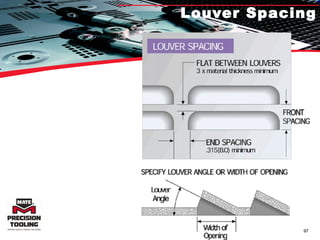
  • #61 Pre-pierce calculator Punch and shave
  • #82 Why does one use stripping in lower?