29.1
Chapter 29
Multimedia
Copyright © The McGraw-Hill Companies, Inc. Permission required for reproduction or display.
29.2
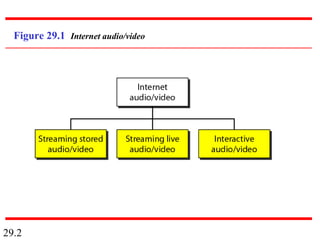
Figure 29.1 Internet audio/video
29.3
Streaming stored audio/video refers to
on-demand requests for compressed
audio/video files.
Note
29.4
Streaming live audio/video refers to the
broadcasting of radio and TV programs
through the Internet.
Note
29.5
Interactive audio/video refers to the use
of the Internet for interactive audio/video
applications.
Note
29.6
29-1 DIGITIZING AUDIO AND VIDEO29-1 DIGITIZING AUDIO AND VIDEO
Before audio or video signals can be sent on theBefore audio or video signals can be sent on the
Internet, they need to be digitized. We discuss audioInternet, they need to be digitized. We discuss audio
and video separately.and video separately.
Digitizing Audio
Digitizing Video
Topics discussed in this section:Topics discussed in this section:
29.7
Compression is needed to send video
over the Internet.
Note
29.8
29-2 AUDIO AND VIDEO COMPRESSION29-2 AUDIO AND VIDEO COMPRESSION
To send audio or video over the Internet requiresTo send audio or video over the Internet requires
compression. In this section, we discuss audiocompression. In this section, we discuss audio
compression first and then video compression.compression first and then video compression.
Audio Compression
Video Compression
Topics discussed in this section:Topics discussed in this section:
29.9
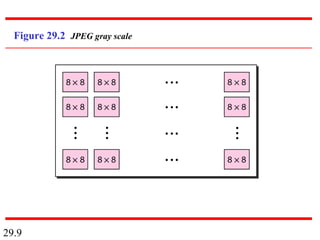
Figure 29.2 JPEG gray scale
29.10
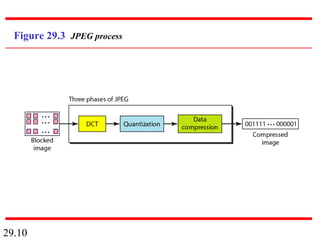
Figure 29.3 JPEG process
29.11
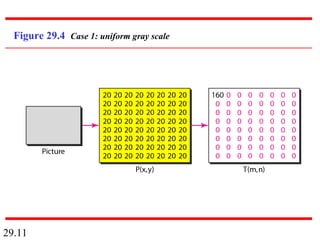
Figure 29.4 Case 1: uniform gray scale
29.12
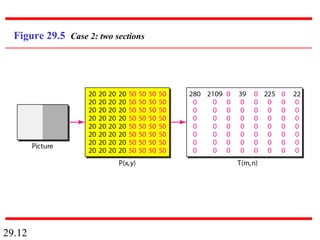
Figure 29.5 Case 2: two sections
29.13
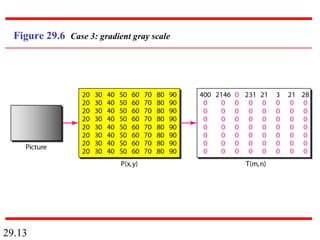
Figure 29.6 Case 3: gradient gray scale
29.14
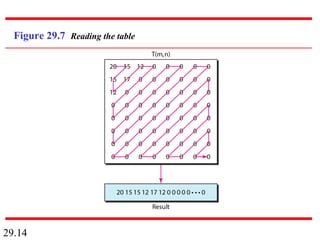
Figure 29.7 Reading the table
29.15
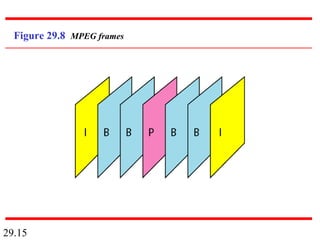
Figure 29.8 MPEG frames
29.16
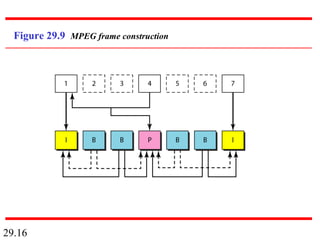
Figure 29.9 MPEG frame construction
29.17
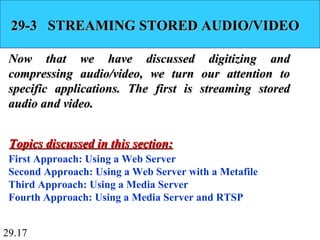
29-3 STREAMING STORED AUDIO/VIDEO29-3 STREAMING STORED AUDIO/VIDEO
Now that we have discussed digitizing andNow that we have discussed digitizing and
compressing audio/video, we turn our attention tocompressing audio/video, we turn our attention to
specific applications. The first is streaming storedspecific applications. The first is streaming stored
audio and video.audio and video.
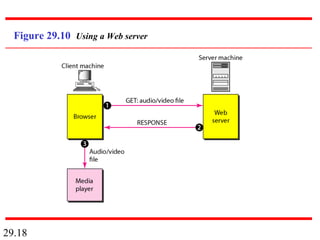
First Approach: Using a Web Server
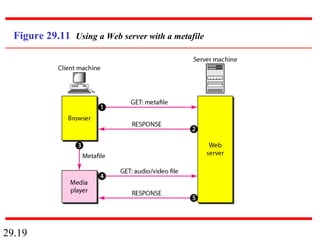
Second Approach: Using a Web Server with a Metafile
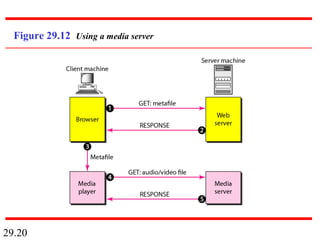
Third Approach: Using a Media Server
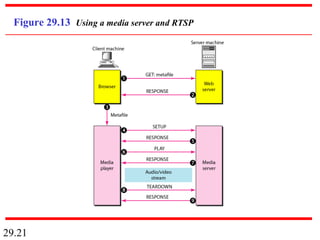
Fourth Approach: Using a Media Server and RTSP
Topics discussed in this section:Topics discussed in this section:
29.18
Figure 29.10 Using a Web server
29.19
Figure 29.11 Using a Web server with a metafile
29.20
Figure 29.12 Using a media server
29.21
Figure 29.13 Using a media server and RTSP
29.22
29-4 STREAMING LIVE AUDIO/VIDEO29-4 STREAMING LIVE AUDIO/VIDEO
Streaming live audio/video is similar to theStreaming live audio/video is similar to the
broadcasting of audio and video by radio and TVbroadcasting of audio and video by radio and TV
stations. Instead of broadcasting to the air, the stationsstations. Instead of broadcasting to the air, the stations
broadcast through the Internet. There are severalbroadcast through the Internet. There are several
similarities between streaming stored audio/video andsimilarities between streaming stored audio/video and
streaming live audio/video. They are both sensitive tostreaming live audio/video. They are both sensitive to
delay; neither can accept retransmission. However,delay; neither can accept retransmission. However,
there is a difference. In the first application, thethere is a difference. In the first application, the
communication is unicast and on-demand. In thecommunication is unicast and on-demand. In the
second, the communication is multicast and live.second, the communication is multicast and live.
29.23
29-5 REAL-TIME INTERACTIVE29-5 REAL-TIME INTERACTIVE
AUDIO/VIDEOAUDIO/VIDEO
In real-time interactive audio/video, peopleIn real-time interactive audio/video, people
communicate with one another in real time. Thecommunicate with one another in real time. The
Internet phone or voice over IP is an example of thisInternet phone or voice over IP is an example of this
type of application. Video conferencing is anothertype of application. Video conferencing is another
example that allows people to communicate visuallyexample that allows people to communicate visually
and orally.and orally.
Characteristics
Topics discussed in this section:Topics discussed in this section:
29.24
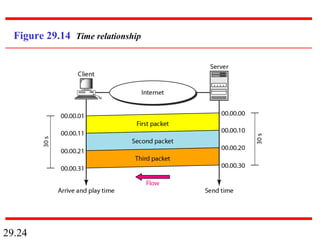
Figure 29.14 Time relationship
29.25
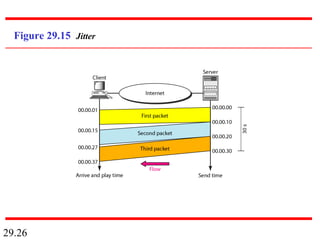
Jitter is introduced in real-time data by
the delay between packets.
Note
29.26
Figure 29.15 Jitter
29.27
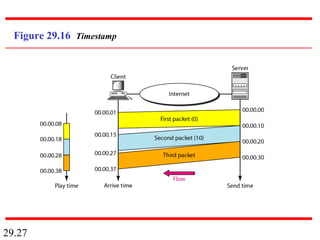
Figure 29.16 Timestamp
29.28
To prevent jitter, we can time-stamp the
packets and separate the arrival time
from the playback time.
Note
29.29
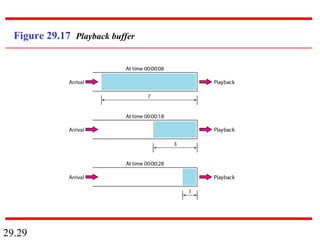
Figure 29.17 Playback buffer
29.30
A playback buffer is required for real-
time traffic.
Note
29.31
A sequence number on each packet is
required for real-time traffic.
Note
29.32
Real-time traffic needs the support of
multicasting.
Note
29.33
Translation means changing the
encoding of a payload to a lower
quality to match the bandwidth
of the receiving network.
Note
29.34
Mixing means combining several
streams of traffic into one stream.
Note
29.35
TCP, with all its sophistication, is not
suitable for interactive multimedia
traffic because we cannot allow
retransmission of packets.
Note
29.36
UDP is more suitable than TCP for
interactive traffic. However, we
need the services of RTP,
another transport layer
protocol, to make up
for the deficiencies
of UDP.
Note
29.37
29-6 RTP29-6 RTP
Real-time Transport Protocol (RTP) is the protocolReal-time Transport Protocol (RTP) is the protocol
designed to handle real-time traffic on the Internet.designed to handle real-time traffic on the Internet.
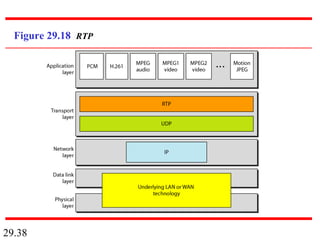
RTP does not have a delivery mechanism; it must beRTP does not have a delivery mechanism; it must be
used with UDP. RTP stands between UDP and theused with UDP. RTP stands between UDP and the
application program. The main contributions of RTPapplication program. The main contributions of RTP
are time-stamping, sequencing, and mixing facilities.are time-stamping, sequencing, and mixing facilities.
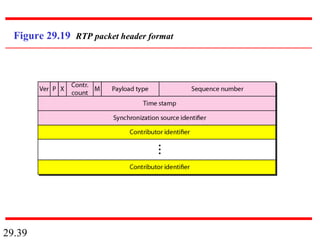
RTP Packet Format
UDP Port
Topics discussed in this section:Topics discussed in this section:
29.38
Figure 29.18 RTP
29.39
Figure 29.19 RTP packet header format
29.40
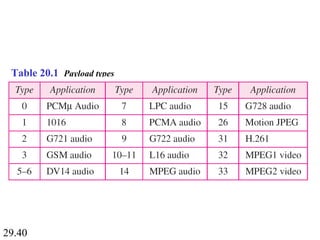
Table 20.1 Payload types
29.41
RTP uses a temporary even-numbered
UDP port.
Note
29.42
29-7 RTCP29-7 RTCP
RTP allows only one type of message, one that carriesRTP allows only one type of message, one that carries
data from the source to the destination. In many cases,data from the source to the destination. In many cases,
there is a need for other messages in a session. Thesethere is a need for other messages in a session. These
messages control the flow and quality of data andmessages control the flow and quality of data and
allow the recipient to send feedback to the sourceallow the recipient to send feedback to the source
or sources. Real-time Transport Control Protocolor sources. Real-time Transport Control Protocol
(RTCP) is a protocol designed for this purpose.(RTCP) is a protocol designed for this purpose.
Sender Report and Receiver Report
Messages
UDP Port
Topics discussed in this section:Topics discussed in this section:
29.43
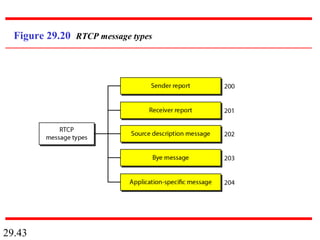
Figure 29.20 RTCP message types
29.44
RTCP uses an odd-numbered UDP port
number that follows the port number
selected for RTP.
Note
29.45
29-8 VOICE OVER IP29-8 VOICE OVER IP
Let us concentrate on one real-time interactiveLet us concentrate on one real-time interactive
audio/video application: voice over IP, or Internetaudio/video application: voice over IP, or Internet
telephony. The idea is to use the Internet as atelephony. The idea is to use the Internet as a
telephone network with some additional capabilities.telephone network with some additional capabilities.
Two protocols have been designed to handle this typeTwo protocols have been designed to handle this type
of communication: SIP and H.323.of communication: SIP and H.323.
SIP
H.323
Topics discussed in this section:Topics discussed in this section:
29.46
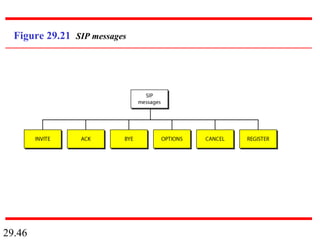
Figure 29.21 SIP messages
29.47
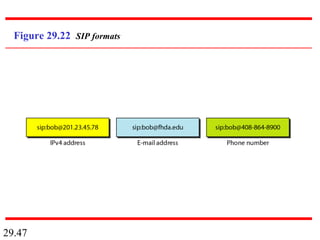
Figure 29.22 SIP formats
29.48
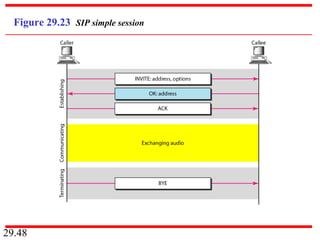
Figure 29.23 SIP simple session
29.49
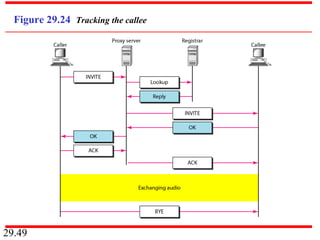
Figure 29.24 Tracking the callee
29.50
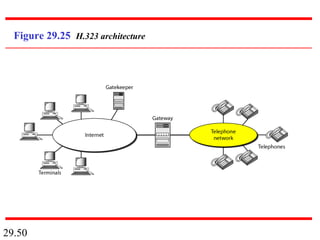
Figure 29.25 H.323 architecture
29.51
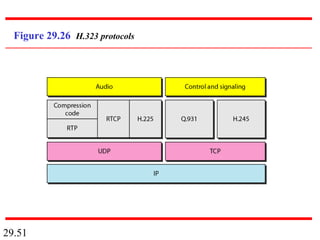
Figure 29.26 H.323 protocols
29.52
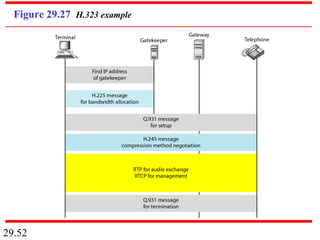
Figure 29.27 H.323 example

29 Multimedia

  • 1.
    29.1 Chapter 29 Multimedia Copyright ©The McGraw-Hill Companies, Inc. Permission required for reproduction or display.
  • 2.
  • 3.
    29.3 Streaming stored audio/videorefers to on-demand requests for compressed audio/video files. Note
  • 4.
    29.4 Streaming live audio/videorefers to the broadcasting of radio and TV programs through the Internet. Note
  • 5.
    29.5 Interactive audio/video refersto the use of the Internet for interactive audio/video applications. Note
  • 6.
    29.6 29-1 DIGITIZING AUDIOAND VIDEO29-1 DIGITIZING AUDIO AND VIDEO Before audio or video signals can be sent on theBefore audio or video signals can be sent on the Internet, they need to be digitized. We discuss audioInternet, they need to be digitized. We discuss audio and video separately.and video separately. Digitizing Audio Digitizing Video Topics discussed in this section:Topics discussed in this section:
  • 7.
    29.7 Compression is neededto send video over the Internet. Note
  • 8.
    29.8 29-2 AUDIO ANDVIDEO COMPRESSION29-2 AUDIO AND VIDEO COMPRESSION To send audio or video over the Internet requiresTo send audio or video over the Internet requires compression. In this section, we discuss audiocompression. In this section, we discuss audio compression first and then video compression.compression first and then video compression. Audio Compression Video Compression Topics discussed in this section:Topics discussed in this section:
  • 9.
  • 10.
  • 11.
    29.11 Figure 29.4 Case1: uniform gray scale
  • 12.
    29.12 Figure 29.5 Case2: two sections
  • 13.
    29.13 Figure 29.6 Case3: gradient gray scale
  • 14.
  • 15.
  • 16.
    29.16 Figure 29.9 MPEGframe construction
  • 17.
    29.17 29-3 STREAMING STOREDAUDIO/VIDEO29-3 STREAMING STORED AUDIO/VIDEO Now that we have discussed digitizing andNow that we have discussed digitizing and compressing audio/video, we turn our attention tocompressing audio/video, we turn our attention to specific applications. The first is streaming storedspecific applications. The first is streaming stored audio and video.audio and video. First Approach: Using a Web Server Second Approach: Using a Web Server with a Metafile Third Approach: Using a Media Server Fourth Approach: Using a Media Server and RTSP Topics discussed in this section:Topics discussed in this section:
  • 18.
  • 19.
    29.19 Figure 29.11 Usinga Web server with a metafile
  • 20.
  • 21.
    29.21 Figure 29.13 Usinga media server and RTSP
  • 22.
    29.22 29-4 STREAMING LIVEAUDIO/VIDEO29-4 STREAMING LIVE AUDIO/VIDEO Streaming live audio/video is similar to theStreaming live audio/video is similar to the broadcasting of audio and video by radio and TVbroadcasting of audio and video by radio and TV stations. Instead of broadcasting to the air, the stationsstations. Instead of broadcasting to the air, the stations broadcast through the Internet. There are severalbroadcast through the Internet. There are several similarities between streaming stored audio/video andsimilarities between streaming stored audio/video and streaming live audio/video. They are both sensitive tostreaming live audio/video. They are both sensitive to delay; neither can accept retransmission. However,delay; neither can accept retransmission. However, there is a difference. In the first application, thethere is a difference. In the first application, the communication is unicast and on-demand. In thecommunication is unicast and on-demand. In the second, the communication is multicast and live.second, the communication is multicast and live.
  • 23.
    29.23 29-5 REAL-TIME INTERACTIVE29-5REAL-TIME INTERACTIVE AUDIO/VIDEOAUDIO/VIDEO In real-time interactive audio/video, peopleIn real-time interactive audio/video, people communicate with one another in real time. Thecommunicate with one another in real time. The Internet phone or voice over IP is an example of thisInternet phone or voice over IP is an example of this type of application. Video conferencing is anothertype of application. Video conferencing is another example that allows people to communicate visuallyexample that allows people to communicate visually and orally.and orally. Characteristics Topics discussed in this section:Topics discussed in this section:
  • 24.
  • 25.
    29.25 Jitter is introducedin real-time data by the delay between packets. Note
  • 26.
  • 27.
  • 28.
    29.28 To prevent jitter,we can time-stamp the packets and separate the arrival time from the playback time. Note
  • 29.
  • 30.
    29.30 A playback bufferis required for real- time traffic. Note
  • 31.
    29.31 A sequence numberon each packet is required for real-time traffic. Note
  • 32.
    29.32 Real-time traffic needsthe support of multicasting. Note
  • 33.
    29.33 Translation means changingthe encoding of a payload to a lower quality to match the bandwidth of the receiving network. Note
  • 34.
    29.34 Mixing means combiningseveral streams of traffic into one stream. Note
  • 35.
    29.35 TCP, with allits sophistication, is not suitable for interactive multimedia traffic because we cannot allow retransmission of packets. Note
  • 36.
    29.36 UDP is moresuitable than TCP for interactive traffic. However, we need the services of RTP, another transport layer protocol, to make up for the deficiencies of UDP. Note
  • 37.
    29.37 29-6 RTP29-6 RTP Real-timeTransport Protocol (RTP) is the protocolReal-time Transport Protocol (RTP) is the protocol designed to handle real-time traffic on the Internet.designed to handle real-time traffic on the Internet. RTP does not have a delivery mechanism; it must beRTP does not have a delivery mechanism; it must be used with UDP. RTP stands between UDP and theused with UDP. RTP stands between UDP and the application program. The main contributions of RTPapplication program. The main contributions of RTP are time-stamping, sequencing, and mixing facilities.are time-stamping, sequencing, and mixing facilities. RTP Packet Format UDP Port Topics discussed in this section:Topics discussed in this section:
  • 38.
  • 39.
    29.39 Figure 29.19 RTPpacket header format
  • 40.
  • 41.
    29.41 RTP uses atemporary even-numbered UDP port. Note
  • 42.
    29.42 29-7 RTCP29-7 RTCP RTPallows only one type of message, one that carriesRTP allows only one type of message, one that carries data from the source to the destination. In many cases,data from the source to the destination. In many cases, there is a need for other messages in a session. Thesethere is a need for other messages in a session. These messages control the flow and quality of data andmessages control the flow and quality of data and allow the recipient to send feedback to the sourceallow the recipient to send feedback to the source or sources. Real-time Transport Control Protocolor sources. Real-time Transport Control Protocol (RTCP) is a protocol designed for this purpose.(RTCP) is a protocol designed for this purpose. Sender Report and Receiver Report Messages UDP Port Topics discussed in this section:Topics discussed in this section:
  • 43.
  • 44.
    29.44 RTCP uses anodd-numbered UDP port number that follows the port number selected for RTP. Note
  • 45.
    29.45 29-8 VOICE OVERIP29-8 VOICE OVER IP Let us concentrate on one real-time interactiveLet us concentrate on one real-time interactive audio/video application: voice over IP, or Internetaudio/video application: voice over IP, or Internet telephony. The idea is to use the Internet as atelephony. The idea is to use the Internet as a telephone network with some additional capabilities.telephone network with some additional capabilities. Two protocols have been designed to handle this typeTwo protocols have been designed to handle this type of communication: SIP and H.323.of communication: SIP and H.323. SIP H.323 Topics discussed in this section:Topics discussed in this section:
  • 46.
  • 47.
  • 48.
    29.48 Figure 29.23 SIPsimple session
  • 49.
  • 50.
  • 51.
  • 52.