
Authentication
OWASP Web App Top 10
by Secure Code Warrior Limited is licensed under CC BY-ND 4.0
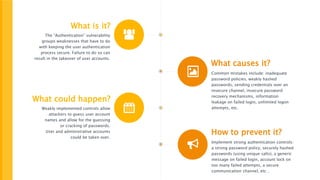
What is it?
The “Authentication” vulnerability
groups weaknesses that have to do
with keeping the user authentication
process secure. Failure to do so can
result in the takeover of user accounts.
What causes it?
Common mistakes include: inadequate
password policies, weakly hashed
passwords, sending credentials over an
insecure channel, insecure password
recovery mechanisms, information
leakage on failed login, unlimited logon
attempts, etc.
What could happen?
Weakly implemented controls allow
attackers to guess user account
names and allow for the guessing
or cracking of passwords.
User and administrative accounts
could be taken over.
How to prevent it?
Implement strong authentication controls:
a strong password policy, securely hashed
passwords (using unique salts), a generic
message on failed login, account lock on
too many failed attempts, a secure
communication channel, etc…
Authentication
Understanding the security vulnerability
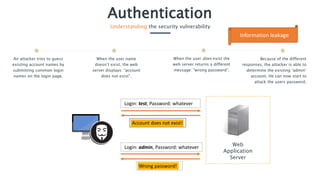
An attacker tries to guess
existing account names by
submitting common login
names on the login page.
When the user name
doesn’t exist, the web
server displays: “account
does not exist”.
Because of the different
responses, the attacker is able to
determine the existing ‘admin’
account. He can now start to
attack the users password.
When the user does exist the
web server returns a different
message: “wrong password”.
Web
Application
Server
Login: test, Password: whatever
Login: admin, Password: whatever
Account does not exist!
Wrong password!
Information leakage
Authentication
Understanding the security vulnerability
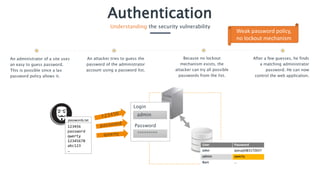
An administrator of a site uses
an easy to guess password.
This is possible since a lax
password policy allows it.
Because no lockout
mechanism exists, the
attacker can try all possible
passwords from the list.
After a few guesses, he finds
a matching administrator
password. He can now
control the web application.
An attacker tries to guess the
password of the administrator
account using a password list.
123456
password
qwerty
12345678
abc123
…
User Password
John qzeuy(è&5172657
admin qwerty
Bart …
passwords.txt
admin
*********
Password
Login
Weak password policy,
no lockout mechanism
Authentication
Realizing the impact
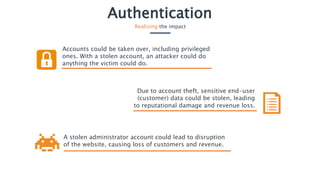
Accounts could be taken over, including privileged
ones. With a stolen account, an attacker could do
anything the victim could do.
A stolen administrator account could lead to disruption
of the website, causing loss of customers and revenue.
Due to account theft, sensitive end-user
(customer) data could be stolen, leading
to reputational damage and revenue loss.
Authentication
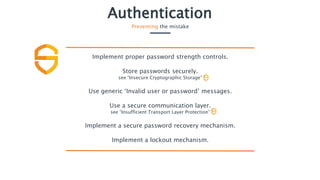
Preventing the mistake
Implement proper password strength controls.
Store passwords securely.
see “Insecure Cryptographic Storage”
Use generic ‘Invalid user or password’ messages.
Use a secure communication layer.
see “Insufficient Transport Layer Protection”
Implement a secure password recovery mechanism.
Implement a lockout mechanism.

Secure Code Warrior - Authentication

  • 1.
    Authentication OWASP Web AppTop 10 by Secure Code Warrior Limited is licensed under CC BY-ND 4.0
  • 2.
    What is it? The“Authentication” vulnerability groups weaknesses that have to do with keeping the user authentication process secure. Failure to do so can result in the takeover of user accounts. What causes it? Common mistakes include: inadequate password policies, weakly hashed passwords, sending credentials over an insecure channel, insecure password recovery mechanisms, information leakage on failed login, unlimited logon attempts, etc. What could happen? Weakly implemented controls allow attackers to guess user account names and allow for the guessing or cracking of passwords. User and administrative accounts could be taken over. How to prevent it? Implement strong authentication controls: a strong password policy, securely hashed passwords (using unique salts), a generic message on failed login, account lock on too many failed attempts, a secure communication channel, etc…
  • 3.
    Authentication Understanding the securityvulnerability An attacker tries to guess existing account names by submitting common login names on the login page. When the user name doesn’t exist, the web server displays: “account does not exist”. Because of the different responses, the attacker is able to determine the existing ‘admin’ account. He can now start to attack the users password. When the user does exist the web server returns a different message: “wrong password”. Web Application Server Login: test, Password: whatever Login: admin, Password: whatever Account does not exist! Wrong password! Information leakage
  • 4.
    Authentication Understanding the securityvulnerability An administrator of a site uses an easy to guess password. This is possible since a lax password policy allows it. Because no lockout mechanism exists, the attacker can try all possible passwords from the list. After a few guesses, he finds a matching administrator password. He can now control the web application. An attacker tries to guess the password of the administrator account using a password list. 123456 password qwerty 12345678 abc123 … User Password John qzeuy(è&5172657 admin qwerty Bart … passwords.txt admin ********* Password Login Weak password policy, no lockout mechanism
  • 5.
    Authentication Realizing the impact Accountscould be taken over, including privileged ones. With a stolen account, an attacker could do anything the victim could do. A stolen administrator account could lead to disruption of the website, causing loss of customers and revenue. Due to account theft, sensitive end-user (customer) data could be stolen, leading to reputational damage and revenue loss.
  • 6.
    Authentication Preventing the mistake Implementproper password strength controls. Store passwords securely. see “Insecure Cryptographic Storage” Use generic ‘Invalid user or password’ messages. Use a secure communication layer. see “Insufficient Transport Layer Protection” Implement a secure password recovery mechanism. Implement a lockout mechanism.