Data Opportunities with Azure 
Marco Parenzan – Microsoft Azure MVP
Prelude 
 You have: 
 An ASP.NET (MVC), three tier, app 
 A stateful app 
 A relational database 
 Publish ASP.NET (MVC) application in a 
Azure Web Site 
 The PaaS solution for 
 HTTP(s) based applications 
 Automatic (and pre-configured) scalability
Data Opportunities with Azure 
 From a developer point of view 
 A developer (you!) can have fear about 
#cloud 
 Talk about 
 Architecture… 
 Functionalities… 
 …content… 
 But… 
 …talk with sysadmin about “quality”, 
“performances”, “security”, … 
 Give them infrastructure responsibility (security, identity, 
backup and so on…) 
 How do you approach #cloud migration? 
 Many different scenarios
AgendaScenarios 
 You can handle #data and #cloud at 
different levels 
 Use these scenarios as a reference 
 Scenarios are not exaustive 
 Scenario #1: reuse your experience 
 Scenario #2: adapt your experience 
 Scenario #3: rewrite your experience 
 Scenario #4: enhance your experience
Scenario #1: 
reuse your 
experience
Scenario #1: reuse your experience 
 You don’t want to change the bits
Handle relational data with IaaS 
 You can create a VM with Linux or Windows 
Server 
 You can install any software you want 
 if you have your licence 
 If you need a licence 
 If it’s Open Source 
 In case you don’t have a licence, you have VM 
images ready with software and pay as you go 
(hour/minute basis) 
 Azure is establishing partnership with major 
players 
 In this case, Oracle, for example 
 You can scale in “minutes” 
 …or in “real” hours… 
 …but not weeks (or at least days!)
Handle relational data with IaaS 
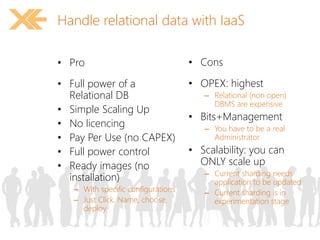
• Pro 
• Full power of a 
Relational DB 
• Simple Scaling Up 
• No licencing 
• Pay Per Use (no CAPEX) 
• Full power control 
• Ready images (no 
installation) 
– With specific configurations 
– Just Click, Name, choose, 
deploy 
• Cons 
• OPEX: highest 
– Relational (non open) 
DBMS are expensive 
• Bits+Management 
– You have to be a real 
Administrator 
• Scalability: you can 
ONLY scale up 
– Current sharding needs 
application to be updated 
– Current sharding is in 
experimentation stage
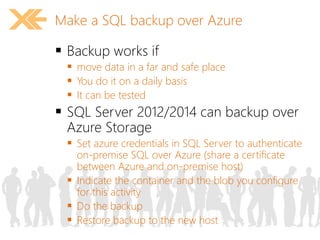
Make a SQL backup over Azure 
 Backup works if 
 move data in a far and safe place 
 You do it on a daily basis 
 It can be tested 
 SQL Server 2012/2014 can backup over 
Azure Storage 
 Set azure credentials in SQL Server to authenticate 
on-premise SQL over Azure (share a certificate 
between Azure and on-premise host) 
 Indicate the container and the blob you configure 
for this activity 
 Do the backup 
 Restore backup to the new host
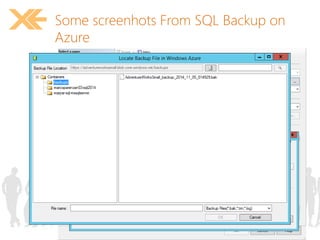
Some screenhots From SQL Backup on 
Azure
demo
Handle relational data with SaaS 
 You don’t want to handle management 
issues 
 You don’t want vertical scalability-related 
issues 
 You don’t need special infrastructural 
architecture
Handle relational data with SaaS 
• Pro 
• OPEX: lower than IaaS 
• Bits+Management 
• Full power of a Relational 
DB 
– Editions 
– Clustering 
– CPU+Memory 
• No licencing (No CAPEX) 
• Pay Per Use (OPEX) 
• No need for images 
• Cons 
• OPEX: lower, than IaaS, 
but more than other 
• Partial power of a 
Relational DB 
– … 
• Configure what is just 
available 
• Scalability: can ONLY 
scale up
Migrating your on-premise SQL to SQL 
Azure 
 Not all features of On-Premise SQL are 
availavable in SQL Azure 
 A “backup” is not enough to bring DB to the cloud 
 Exporting a script 
 Some tools are available, updated 
 Developer Way: Database Project, targeting SQL 
Azure 
 Operations Way: https://sqlazuremw.codeplex.com/ 
Fri Oct 10, 2014 at 9:00 AM
SQL Azure performance considerations 
 Microsoft is making huge investments 
 Compatibility with full t-sql will improve 
 DB per customer 
 Hundreds/thousands of databases
demo
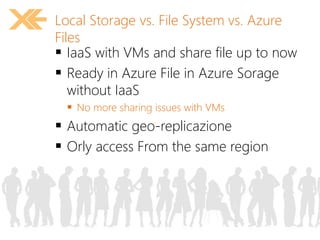
Local Storage vs. File System vs. Azure 
Files 
 IaaS with VMs and share file up to now 
 Ready in Azure File in Azure Sorage 
without IaaS 
 No more sharing issues with VMs 
 Automatic geo-replicazione 
 Orly access From the same region
demo
Scenario #2: 
adapt your 
experience
Scenario #2: adapt your experience 
 You are avaible to change some bits 
 But don’t change SQL!
New development challenges 
 None of the following is true: 
 “Network is reliable” 
 “Latency is near to zero or irrelevant” 
 “Bandwidth is unlimited” 
 “Network is secure” 
 “Topology doesn’t change” 
 “Transport cost is irrelevant” 
 “Network is homogeneous” 
From Mauro Servienti presentation 
http://www.slideshare.net/mauroservienti/in-the-brain-designing-distributed-scalable-and-reliable-systems
Latency and Retries 
 SQL Server 
 Long latencies and timeouts 
 Transient errors 
 Retry strategy
Azure Caching 
 Opportunity 
 Lower accesses to SQL Azure and cost less 
 Cache the page? 
 Cache the content of a Page
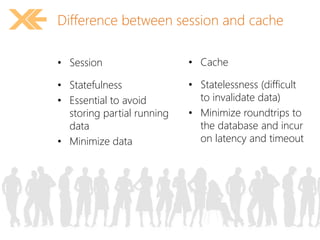
Difference between session and cache 
• Session 
• Statefulness 
• Essential to avoid 
storing partial running 
data 
• Minimize data 
• Cache 
• Statelessness (difficult 
to invalidate data) 
• Minimize roundtrips to 
the database and incur 
on latency and timeout
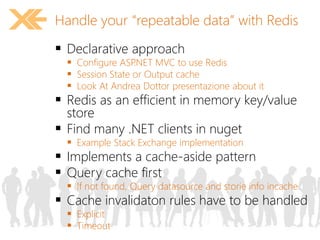
Handle your “repeatable data” with Redis 
 Declarative approach 
 Configure ASP.NET MVC to use Redis 
 Session State or Output cache 
 Look At Andrea Dottor presentazione about it 
 Redis as an efficient in memory key/value 
store 
 Find many .NET clients in nuget 
 Example Stack Exchange implementation 
 Implements a cache-aside pattern 
 Query cache first 
 If not found, Query datasource and storie info incache 
 Cache invalidaton rules have to be handled 
 Explicit 
 Timeout
demo
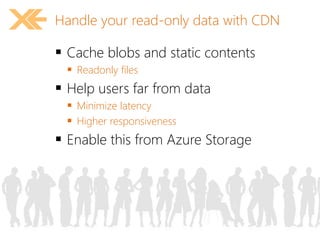
Handle your read-only data with CDN 
 Cache blobs and static contents 
 Readonly files 
 Help users far from data 
 Minimize latency 
 Higher responsiveness 
 Enable this from Azure Storage
demo
Scenario #3: 
Change your 
experience
Scenario #3: change your experience 
 You are avaible to change the bits and 
the relational database
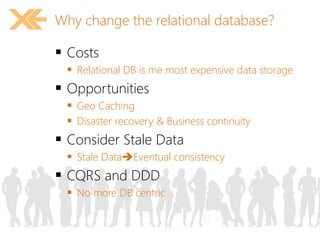
Why change the relational database? 
 Costs 
 Relational DB is me most expensive data storage 
 Opportunities 
 Geo Caching 
 Disaster recovery & Business continuity 
 Consider Stale Data 
 Stale DataEventual consistency 
 CQRS and DDD 
 No more DB centric
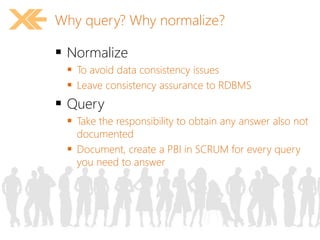
Why query? Why normalize? 
 Normalize 
 To avoid data consistency issues 
 Leave consistency assurance to RDBMS 
 Query 
 Take the responsibility to obtain any answer also not 
documented 
 Document, create a PBI in SCRUM for every query 
you need to answer
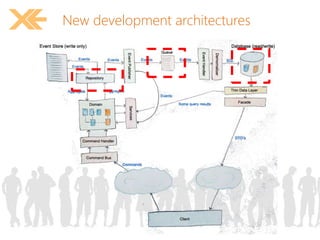
New development architectures
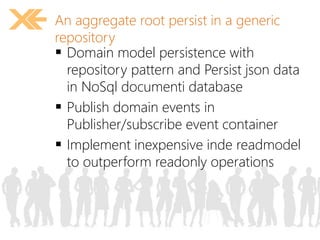
An aggregate root persist in a generic 
repository 
 Domain model persistence with 
repository pattern and Persist json data 
in NoSql documenti database 
 Publish domain events in 
Publisher/subscribe event container 
 Implement inexpensive inde readmodel 
to outperform readonly operations
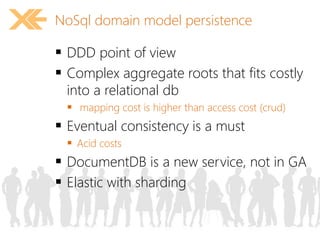
NoSql domain model persistence 
 DDD point of view 
 Complex aggregate roots that fits costly 
into a relational db 
 mapping cost is higher than access cost (crud) 
 Eventual consistency is a must 
 Acid costs 
 DocumentDB is a new service, not in GA 
 Elastic with sharding
demo
Advantages 
 CRUD scenarios 
 Don’t need normalization 
 Simplify persistence 
 Paging can be not an issue 
 Search is always an issue
Decoupling with “queue” or “bus” 
 Aggregate don’t have to know who 
needs to known that the entity has 
changed 
 Lower coupling 
 Turn responsibility 
 Handlers declare that are interested to 
an event 
 To Update a read model 
 To Update another aggregate/domain 
 To inform another app 
 To coordinate a workflow
demo
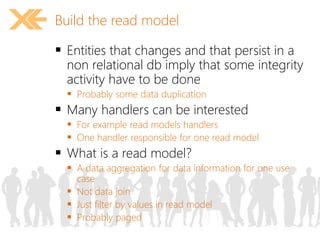
Build the read model 
 Entities that changes and that persist in a 
non relational db imply that some integrity 
activity have to be done 
 Probably some data duplication 
 Many handlers can be interested 
 For example read models handlers 
 One handler responsible for one read model 
 What is a read model? 
 A data aggregation for data information for one use 
case 
 Not data join 
 Just filter by values in read model 
 Probably paged
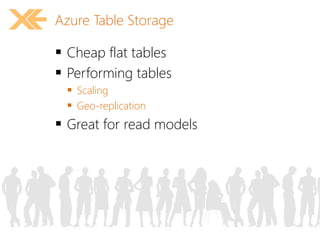
Azure Table Storage 
 Cheap flat tables 
 Performing tables 
 Scaling 
 Geo-replication 
 Great for read models
demo
Scenario #4: 
“Serve” your 
experience
Hybrid Cloud 
is one of the strategies 
for Global Cloud Adoption
Office 365 is in the center 
of the modern, agile, hybrid 
Company
Office 365 is a rich 
platform for extending 
and integrating with
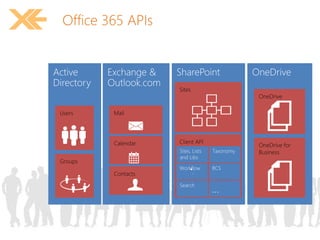
Office 365 APIs
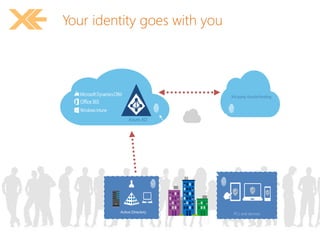
Your identity goes with you 
3rd party clouds/hosting 
Azure AD
ASP.NET Identity 2.1 Features 
 Login username/ password 
 Roles 
 Profile 
 Claims 
 User Management – Create, edit and 
delete Users 
 Role Management – Create, edit, delete 
Roles and manage Users. 
 External Logins – Social providers + Azure 
AD 
 Identity Storage Extensibility
demo
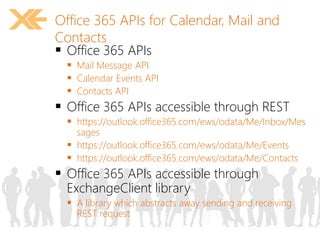
Office 365 APIs for Calendar, Mail and 
Contacts 
 Office 365 APIs 
 Mail Message API 
 Calendar Events API 
 Contacts API 
 Office 365 APIs accessible through REST 
 https://outlook.office365.com/ews/odata/Me/Inbox/Mes 
sages 
 https://outlook.office365.com/ews/odata/Me/Events 
 https://outlook.office365.com/ews/odata/Me/Contacts 
 Office 365 APIs accessible through 
ExchangeClient library 
 A library which abstracts away sending and receiving 
REST request
Office 365 APIs for Calendar, Mail and 
Contacts 
 Office 365 APIs 
 Mail Message API 
 Calendar Events API 
 Contacts API 
 Office 365 APIs accessible through REST 
 https://outlook.office365.com/ews/odata/Me/Inbox/Messages 
 https://outlook.office365.com/ews/odata/Me/Events 
 https://outlook.office365.com/ews/odata/Me/Contacts 
 Office 365 APIs accessible through 
ExchangeClient library 
 A library which abstracts away sending and 
receiving REST request
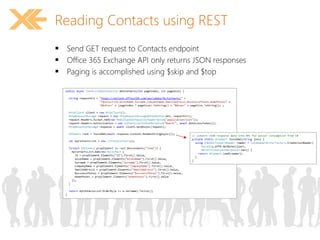
Reading Contacts using REST 
 Send GET request to Contacts endpoint 
 Office 365 Exchange API only returns JSON responses 
 Paging is accomplished using $skip and $top
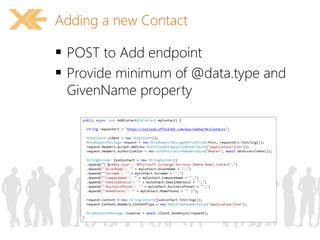
Adding a new Contact 
 POST to Add endpoint 
 Provide minimum of @data.type and 
GivenName property
demo
Conclusions
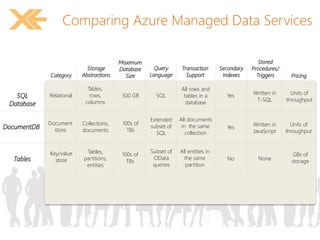
Comparing Azure Managed Data Services 
Pricing 
Transaction 
Support 
Secondary 
Indexes 
SQL 
Database 
Tables 
Storage 
Category Abstractions 
DocumentDB 
Relational 
Document 
store 
Key/value 
store 
Tables, 
rows, 
columns 
Collections, 
documents 
All rows and 
tables in a 
database 
Yes 
Yes 
No 
Units of 
throughput 
Units of 
throughput 
GBs of 
storage 
Tables, 
partitions, 
entities 
All documents 
in the same 
collection 
All entities in 
the same 
partition 
Stored 
Procedures/ 
Triggers 
Written in 
T-SQL 
Written in 
JavaScript 
None 
Query 
Language 
SQL 
Extended 
subset of 
SQL 
Subset of 
OData 
queries 
Maximum 
Database 
Size 
500 GB 
100s of 
TBs 
100s of 
TBs
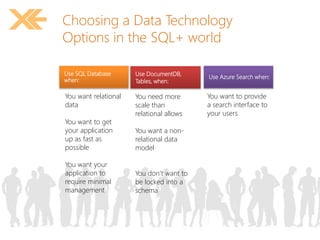
Choosing a Data Technology 
Options in the SQL+ world 
Use SQL Database 
when: 
You want relational 
data 
You want to get 
your application 
up as fast as 
possible 
You want your 
application to 
require minimal 
management 
Use DocumentDB, 
Tables, when: 
You need more 
scale than 
relational allows 
You want a non-relational 
data 
model 
You don’t want to 
be locked into a 
schema 
Use Azure Search when: 
You want to provide 
a search interface to 
your users
How much does it costs? 
 http://azure.microsoft.com/en-us/ 
pricing/calculator/ 
 Please distinguish between Fixed Costs 
and Current Costs!
feedback 
10 
• Email: marco.parenzan@live.it 
• Slideshare: http://www.slideshare.net/marcoparenzan 
• GitHub: https://www.gihtub.cob/marcoparenzan 
• Twitter: http://twitter.com/marco_parenzan 
Contatti

2014.11.14 Data Opportunities with Azure

  • 1.
    Data Opportunities withAzure Marco Parenzan – Microsoft Azure MVP
  • 2.
    Prelude  Youhave:  An ASP.NET (MVC), three tier, app  A stateful app  A relational database  Publish ASP.NET (MVC) application in a Azure Web Site  The PaaS solution for  HTTP(s) based applications  Automatic (and pre-configured) scalability
  • 3.
    Data Opportunities withAzure  From a developer point of view  A developer (you!) can have fear about #cloud  Talk about  Architecture…  Functionalities…  …content…  But…  …talk with sysadmin about “quality”, “performances”, “security”, …  Give them infrastructure responsibility (security, identity, backup and so on…)  How do you approach #cloud migration?  Many different scenarios
  • 4.
    AgendaScenarios  Youcan handle #data and #cloud at different levels  Use these scenarios as a reference  Scenarios are not exaustive  Scenario #1: reuse your experience  Scenario #2: adapt your experience  Scenario #3: rewrite your experience  Scenario #4: enhance your experience
  • 5.
    Scenario #1: reuseyour experience
  • 6.
    Scenario #1: reuseyour experience  You don’t want to change the bits
  • 7.
    Handle relational datawith IaaS  You can create a VM with Linux or Windows Server  You can install any software you want  if you have your licence  If you need a licence  If it’s Open Source  In case you don’t have a licence, you have VM images ready with software and pay as you go (hour/minute basis)  Azure is establishing partnership with major players  In this case, Oracle, for example  You can scale in “minutes”  …or in “real” hours…  …but not weeks (or at least days!)
  • 8.
    Handle relational datawith IaaS • Pro • Full power of a Relational DB • Simple Scaling Up • No licencing • Pay Per Use (no CAPEX) • Full power control • Ready images (no installation) – With specific configurations – Just Click, Name, choose, deploy • Cons • OPEX: highest – Relational (non open) DBMS are expensive • Bits+Management – You have to be a real Administrator • Scalability: you can ONLY scale up – Current sharding needs application to be updated – Current sharding is in experimentation stage
  • 9.
    Make a SQLbackup over Azure  Backup works if  move data in a far and safe place  You do it on a daily basis  It can be tested  SQL Server 2012/2014 can backup over Azure Storage  Set azure credentials in SQL Server to authenticate on-premise SQL over Azure (share a certificate between Azure and on-premise host)  Indicate the container and the blob you configure for this activity  Do the backup  Restore backup to the new host
  • 10.
    Some screenhots FromSQL Backup on Azure
  • 11.
  • 12.
    Handle relational datawith SaaS  You don’t want to handle management issues  You don’t want vertical scalability-related issues  You don’t need special infrastructural architecture
  • 13.
    Handle relational datawith SaaS • Pro • OPEX: lower than IaaS • Bits+Management • Full power of a Relational DB – Editions – Clustering – CPU+Memory • No licencing (No CAPEX) • Pay Per Use (OPEX) • No need for images • Cons • OPEX: lower, than IaaS, but more than other • Partial power of a Relational DB – … • Configure what is just available • Scalability: can ONLY scale up
  • 14.
    Migrating your on-premiseSQL to SQL Azure  Not all features of On-Premise SQL are availavable in SQL Azure  A “backup” is not enough to bring DB to the cloud  Exporting a script  Some tools are available, updated  Developer Way: Database Project, targeting SQL Azure  Operations Way: https://sqlazuremw.codeplex.com/ Fri Oct 10, 2014 at 9:00 AM
  • 15.
    SQL Azure performanceconsiderations  Microsoft is making huge investments  Compatibility with full t-sql will improve  DB per customer  Hundreds/thousands of databases
  • 16.
  • 17.
    Local Storage vs.File System vs. Azure Files  IaaS with VMs and share file up to now  Ready in Azure File in Azure Sorage without IaaS  No more sharing issues with VMs  Automatic geo-replicazione  Orly access From the same region
  • 18.
  • 19.
    Scenario #2: adaptyour experience
  • 20.
    Scenario #2: adaptyour experience  You are avaible to change some bits  But don’t change SQL!
  • 21.
    New development challenges  None of the following is true:  “Network is reliable”  “Latency is near to zero or irrelevant”  “Bandwidth is unlimited”  “Network is secure”  “Topology doesn’t change”  “Transport cost is irrelevant”  “Network is homogeneous” From Mauro Servienti presentation http://www.slideshare.net/mauroservienti/in-the-brain-designing-distributed-scalable-and-reliable-systems
  • 22.
    Latency and Retries  SQL Server  Long latencies and timeouts  Transient errors  Retry strategy
  • 23.
    Azure Caching Opportunity  Lower accesses to SQL Azure and cost less  Cache the page?  Cache the content of a Page
  • 24.
    Difference between sessionand cache • Session • Statefulness • Essential to avoid storing partial running data • Minimize data • Cache • Statelessness (difficult to invalidate data) • Minimize roundtrips to the database and incur on latency and timeout
  • 25.
    Handle your “repeatabledata” with Redis  Declarative approach  Configure ASP.NET MVC to use Redis  Session State or Output cache  Look At Andrea Dottor presentazione about it  Redis as an efficient in memory key/value store  Find many .NET clients in nuget  Example Stack Exchange implementation  Implements a cache-aside pattern  Query cache first  If not found, Query datasource and storie info incache  Cache invalidaton rules have to be handled  Explicit  Timeout
  • 26.
  • 27.
    Handle your read-onlydata with CDN  Cache blobs and static contents  Readonly files  Help users far from data  Minimize latency  Higher responsiveness  Enable this from Azure Storage
  • 28.
  • 29.
    Scenario #3: Changeyour experience
  • 30.
    Scenario #3: changeyour experience  You are avaible to change the bits and the relational database
  • 31.
    Why change therelational database?  Costs  Relational DB is me most expensive data storage  Opportunities  Geo Caching  Disaster recovery & Business continuity  Consider Stale Data  Stale DataEventual consistency  CQRS and DDD  No more DB centric
  • 32.
    Why query? Whynormalize?  Normalize  To avoid data consistency issues  Leave consistency assurance to RDBMS  Query  Take the responsibility to obtain any answer also not documented  Document, create a PBI in SCRUM for every query you need to answer
  • 33.
  • 34.
    An aggregate rootpersist in a generic repository  Domain model persistence with repository pattern and Persist json data in NoSql documenti database  Publish domain events in Publisher/subscribe event container  Implement inexpensive inde readmodel to outperform readonly operations
  • 35.
    NoSql domain modelpersistence  DDD point of view  Complex aggregate roots that fits costly into a relational db  mapping cost is higher than access cost (crud)  Eventual consistency is a must  Acid costs  DocumentDB is a new service, not in GA  Elastic with sharding
  • 36.
  • 37.
    Advantages  CRUDscenarios  Don’t need normalization  Simplify persistence  Paging can be not an issue  Search is always an issue
  • 38.
    Decoupling with “queue”or “bus”  Aggregate don’t have to know who needs to known that the entity has changed  Lower coupling  Turn responsibility  Handlers declare that are interested to an event  To Update a read model  To Update another aggregate/domain  To inform another app  To coordinate a workflow
  • 39.
  • 40.
    Build the readmodel  Entities that changes and that persist in a non relational db imply that some integrity activity have to be done  Probably some data duplication  Many handlers can be interested  For example read models handlers  One handler responsible for one read model  What is a read model?  A data aggregation for data information for one use case  Not data join  Just filter by values in read model  Probably paged
  • 41.
    Azure Table Storage  Cheap flat tables  Performing tables  Scaling  Geo-replication  Great for read models
  • 42.
  • 43.
    Scenario #4: “Serve”your experience
  • 44.
    Hybrid Cloud isone of the strategies for Global Cloud Adoption
  • 45.
    Office 365 isin the center of the modern, agile, hybrid Company
  • 46.
    Office 365 isa rich platform for extending and integrating with
  • 47.
  • 48.
    Your identity goeswith you 3rd party clouds/hosting Azure AD
  • 49.
    ASP.NET Identity 2.1Features  Login username/ password  Roles  Profile  Claims  User Management – Create, edit and delete Users  Role Management – Create, edit, delete Roles and manage Users.  External Logins – Social providers + Azure AD  Identity Storage Extensibility
  • 50.
  • 51.
    Office 365 APIsfor Calendar, Mail and Contacts  Office 365 APIs  Mail Message API  Calendar Events API  Contacts API  Office 365 APIs accessible through REST  https://outlook.office365.com/ews/odata/Me/Inbox/Mes sages  https://outlook.office365.com/ews/odata/Me/Events  https://outlook.office365.com/ews/odata/Me/Contacts  Office 365 APIs accessible through ExchangeClient library  A library which abstracts away sending and receiving REST request
  • 52.
    Office 365 APIsfor Calendar, Mail and Contacts  Office 365 APIs  Mail Message API  Calendar Events API  Contacts API  Office 365 APIs accessible through REST  https://outlook.office365.com/ews/odata/Me/Inbox/Messages  https://outlook.office365.com/ews/odata/Me/Events  https://outlook.office365.com/ews/odata/Me/Contacts  Office 365 APIs accessible through ExchangeClient library  A library which abstracts away sending and receiving REST request
  • 53.
    Reading Contacts usingREST  Send GET request to Contacts endpoint  Office 365 Exchange API only returns JSON responses  Paging is accomplished using $skip and $top
  • 54.
    Adding a newContact  POST to Add endpoint  Provide minimum of @data.type and GivenName property
  • 55.
  • 56.
  • 57.
    Comparing Azure ManagedData Services Pricing Transaction Support Secondary Indexes SQL Database Tables Storage Category Abstractions DocumentDB Relational Document store Key/value store Tables, rows, columns Collections, documents All rows and tables in a database Yes Yes No Units of throughput Units of throughput GBs of storage Tables, partitions, entities All documents in the same collection All entities in the same partition Stored Procedures/ Triggers Written in T-SQL Written in JavaScript None Query Language SQL Extended subset of SQL Subset of OData queries Maximum Database Size 500 GB 100s of TBs 100s of TBs
  • 58.
    Choosing a DataTechnology Options in the SQL+ world Use SQL Database when: You want relational data You want to get your application up as fast as possible You want your application to require minimal management Use DocumentDB, Tables, when: You need more scale than relational allows You want a non-relational data model You don’t want to be locked into a schema Use Azure Search when: You want to provide a search interface to your users
  • 59.
    How much doesit costs?  http://azure.microsoft.com/en-us/ pricing/calculator/  Please distinguish between Fixed Costs and Current Costs!
  • 60.
    feedback 10 •Email: marco.parenzan@live.it • Slideshare: http://www.slideshare.net/marcoparenzan • GitHub: https://www.gihtub.cob/marcoparenzan • Twitter: http://twitter.com/marco_parenzan Contatti

Editor's Notes

  • #54 No support for $skip and $orderby so paging is post-query