
Azure Cosmos DB
NoSQL Migration
Speaker Name
Date
© Microsoft Corporation
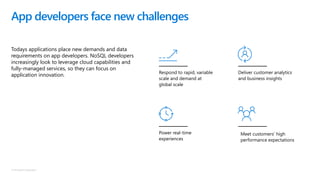
App developers face new challenges
Todays applications place new demands and data
requirements on app developers. NoSQL developers
increasingly look to leverage cloud capabilities and
fully-managed services, so they can focus on
application innovation. Deliver customer analytics
and business insights
Meet customers’ high
performance expectations
Respond to rapid, variable
scale and demand at
global scale
Power real-time
experiences
© Microsoft Corporation
!
!
!
!
!
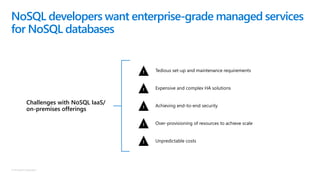
Challenges with NoSQL IaaS/
on-premises offerings
Tedious set-up and maintenance requirements
Expensive and complex HA solutions
Achieving end-to-end security
Over-provisioning of resources to achieve scale
Unpredictable costs
NoSQL developers want enterprise-grade managed services
for NoSQL databases
© Microsoft Corporation
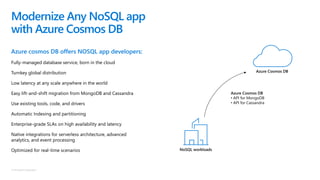
Modernize Any NoSQL app
with Azure Cosmos DB
Azure cosmos DB offers NOSQL app developers:
Fully-managed database service, born in the cloud
Turnkey global distribution
Low latency at any scale anywhere in the world
Easy lift-and-shift migration from MongoDB and Cassandra
Use existing tools, code, and drivers
Automatic Indexing and partitioning
Enterprise-grade SLAs on high availability and latency
Native integrations for serverless architecture, advanced
analytics, and event processing
Optimized for real-time scenarios
Azure Cosmos DB
• API for MongoDB
• API for Cassandra
NoSQL workloads
Azure Cosmos DB
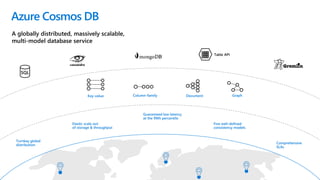
Turnkey global
distribution
Elastic scale out
of storage & throughput
Guaranteed low latency
at the 99th percentile
Comprehensive
SLAs
Five well-defined
consistency models
Table API
Azure Cosmos DB
Column-family DocumentKey-value Graph
A globally distributed, massively scalable,
multi-model database service
SQL
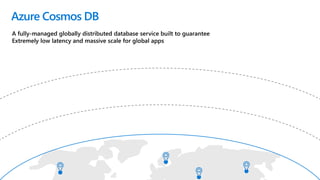
Azure Cosmos DB
A fully-managed globally distributed database service built to guarantee
Extremely low latency and massive scale for global apps
© Microsoft Corporation
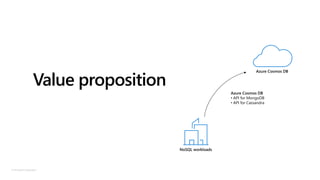
Value proposition
Azure Cosmos DB
• API for MongoDB
• API for Cassandra
NoSQL workloads
Azure Cosmos DB
© Microsoft Corporation
Turnkey global distribution
Put your data where your users are in minutes
Automatically replicate all your data around the world, and
across more regions than Amazon and Google combined.
Available in all Azure regions
Manual and automatic failover
Automatic & synchronous
multi-region replication
© Microsoft Corporation
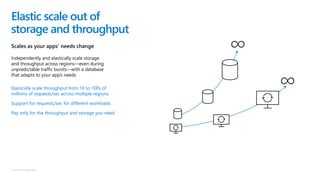
Elastic scale out of
storage and throughput
Scales as your apps’ needs change
Independently and elastically scale storage
and throughput across regions—even during
unpredictable traffic bursts—with a database
that adapts to your app’s needs
Elastically scale throughput from 10 to 100s of
millions of requests/sec across multiple regions
Support for requests/sec for different workloads
Pay only for the throughput and storage you need
© Microsoft Corporation
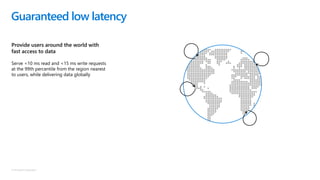
Guaranteed low latency
Provide users around the world with
fast access to data
Serve <10 ms read and <15 ms write requests
at the 99th percentile from the region nearest
to users, while delivering data globally
© Microsoft Corporation
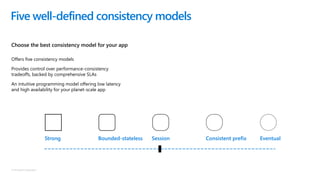
Strong Bounded-stateless Session Consistent prefix Eventual
Five well-defined consistency models
Choose the best consistency model for your app
Offers five consistency models
Provides control over performance-consistency
tradeoffs, backed by comprehensive SLAs
An intuitive programming model offering low latency
and high availability for your planet-scale app
© Microsoft Corporation
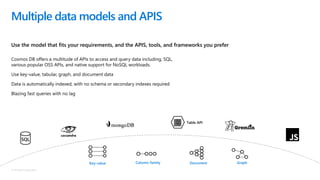
Use the model that fits your requirements, and the APIS, tools, and frameworks you prefer
Multiple data models and APIS
Cosmos DB offers a multitude of APIs to access and query data including, SQL,
various popular OSS APIs, and native support for NoSQL workloads.
Use key-value, tabular, graph, and document data
Data is automatically indexed, with no schema or secondary indexes required
Blazing fast queries with no lag
Table API
Column-family DocumentKey-value Graph
SQL
© Microsoft Corporation
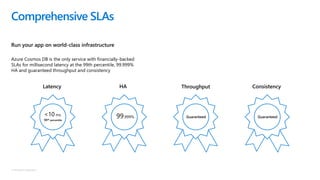
Run your app on world-class infrastructure
Comprehensive SLAs
Latency
<10 ms
99th percentile
HA
99.999%
Throughput
Guaranteed
Consistency
Guaranteed
Azure Cosmos DB is the only service with financially-backed
SLAs for millisecond latency at the 99th percentile, 99.999%
HA and guaranteed throughput and consistency
© Microsoft Corporation
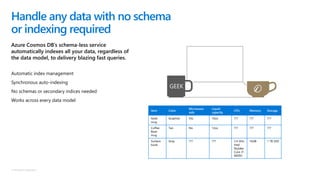
Azure Cosmos DB’s schema-less service
automatically indexes all your data, regardless of
the data model, to delivery blazing fast queries.
Handle any data with no schema
or indexing required
Item Color
Microwave
safe
Liquid
capacity
CPU Memory Storage
Geek
mug
Graphite Yes 16ox ??? ??? ???
Coffee
Bean
mug
Tan No 12oz ??? ??? ???
Surface
book
Gray ??? ??? 3.4 GHz
Intel
Skylake
Core i7-
6600U
16GB 1 TB SSD
Automatic index management
Synchronous auto-indexing
No schemas or secondary indices needed
Works across every data model
GEEK
© Microsoft Corporation
Azure is the world’s most trusted cloud, with more
certifications than any other cloud provider.
Trust your data to industry-leading
Security & Compliance
Enterprise grade security
Encryption at Rest
Encryption is enabled automatically by default
Comprehensive Azure compliance certification
© Microsoft Corporation
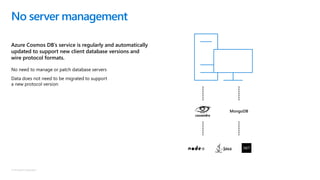
Azure Cosmos DB’s service is regularly and automatically
updated to support new client database versions and
wire protocol formats.
No server management
No need to manage or patch database servers
Data does not need to be migrated to support
a new protocol version
MongoDB
© Microsoft Corporation
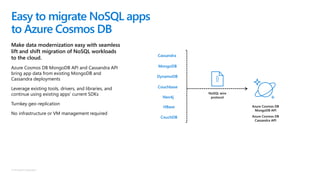
Make data modernization easy with seamless
lift and shift migration of NoSQL workloads
to the cloud.
Azure Cosmos DB MongoDB API and Cassandra API
bring app data from existing MongoDB and
Cassandra deployments
Leverage existing tools, drivers, and libraries, and
continue using existing apps’ current SDKs
Turnkey geo-replication
No infrastructure or VM management required
Easy to migrate NoSQL apps
to Azure Cosmos DB
DynamoDB
MongoDB
Couchbase
CouchDB
Neo4j
HBase
Cassandra
Azure Cosmos DB
MongoDB API
Azure Cosmos DB
Cassandra API
NoSQL wire
protocol
© Microsoft Corporation
Azure cosmos DB offers multiple API options for migrating app data:
Data migration to Azure Cosmos DB
1. SQL API
An end-to-end data migration experience across client and server, with
performance tuning and advanced functionality. The Azure Cosmos DB:
SQL API is great for applications running on: MongoDB, Cassandra,
Hbase, DynamoDB, Couchbase, and CouchDB.
2. MongoDB API
Azure Cosmos DB: API for MongoDB is ideal for applications requiring
minimal code re-writes.
3. Cassandra API
Azure Cosmos DB: API for Cassandra is ideal for applications requiring
minimal code re-writes.
© Microsoft Corporation
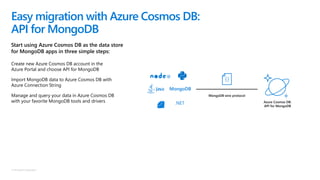
Start using Azure Cosmos DB as the data store
for MongoDB apps in three simple steps:
Easy migration with Azure Cosmos DB:
API for MongoDB
Azure Cosmos DB:
API for MongoDB
MongoDB wire protocol
.NET
Create new Azure Cosmos DB account in the
Azure Portal and choose API for MongoDB
Import MongoDB data to Azure Cosmos DB with
Azure Connection String
Manage and query your data in Azure Cosmos DB
with your favorite MongoDB tools and drivers
MongoDB
© Microsoft Corporation
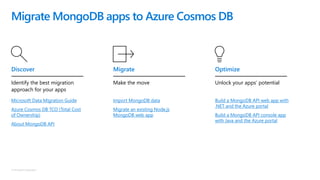
Migrate MongoDB apps to Azure Cosmos DB
Microsoft Data Migration Guide
Azure Cosmos DB TCO (Total Cost
of Ownership)
About MongoDB API
Identify the best migration
approach for your apps
Discover
Make the move
Import MongoDB data
Migrate an existing Node.js
MongoDB web app
Migrate
Unlock your apps’ potential
Build a MongoDB API web app with
.NET and the Azure portal
Build a MongoDB API console app
with Java and the Azure portal
Optimize
© Microsoft Corporation
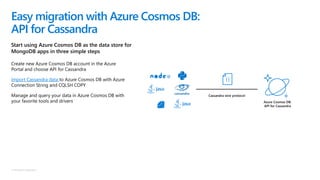
Start using Azure Cosmos DB as the data store for
MongoDB apps in three simple steps
Easy migration with Azure Cosmos DB:
API for Cassandra
Create new Azure Cosmos DB account in the Azure
Portal and choose API for Cassandra
Import Cassandra data to Azure Cosmos DB with Azure
Connection String and CQLSH COPY
Manage and query your data in Azure Cosmos DB with
your favorite tools and drivers Azure Cosmos DB:
API for Cassandra
Cassandra wire protocol
© Microsoft Corporation
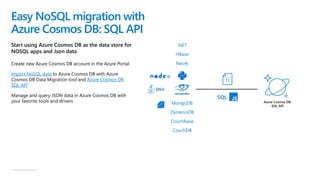
Start using Azure Cosmos DB as the data store for
NOSQL apps and Json data
Easy NoSQL migration with
Azure Cosmos DB: SQL API
.NET
Create new Azure Cosmos DB account in the Azure Portal
Import NoSQL data to Azure Cosmos DB with Azure
Cosmos DB Data Migration tool and Azure Cosmos DB
SQL API
Manage and query JSON data in Azure Cosmos DB with
your favorite tools and drivers
DynamoDB
Couchbase
HBase
Neo4j
CouchDB
MongoDB Azure Cosmos DB:
SQL API
SQL
© Microsoft Corporation
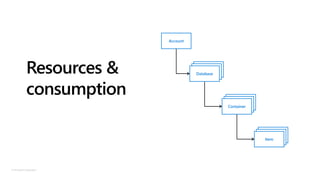
Resources &
consumption
Account
Database
Database
Database
Database
Database
Container
Database
Database
Item
© Microsoft Corporation
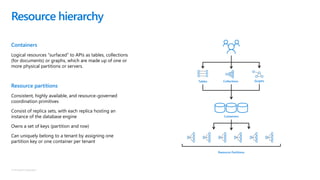
Containers
Logical resources “surfaced” to APIs as tables, collections
(for documents) or graphs, which are made up of one or
more physical partitions or servers.
Resource partitions
Consistent, highly available, and resource-governed
coordination primitives
Consist of replica sets, with each replica hosting an
instance of the database engine
Owns a set of keys (partition and row)
Can uniquely belong to a tenant by assigning one
partition key or one container per tenant
Resource hierarchy
Containers
Resource Partitions
CollectionsTables Graphs
© Microsoft Corporation
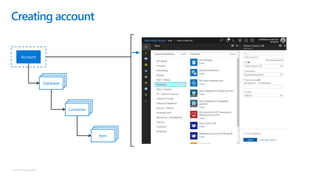
Creating account
Account
DatabaseDatabaseDatabase
DatabaseDatabaseContainer
DatabaseDatabaseItem
© Microsoft Corporation
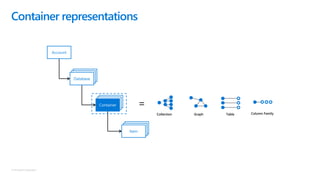
Container representations
=
Collection Graph Table Column Family
Account
DatabaseDatabaseDatabase
DatabaseDatabaseContainer
DatabaseDatabaseItem
© Microsoft Corporation
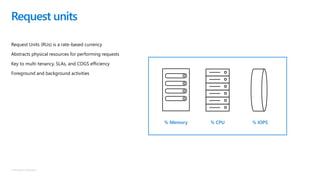
Request Units (RUs) is a rate-based currency
Abstracts physical resources for performing requests
Key to multi-tenancy, SLAs, and COGS efficiency
Foreground and background activities
Request units
% IOPS% CPU% Memory
© Microsoft Corporation
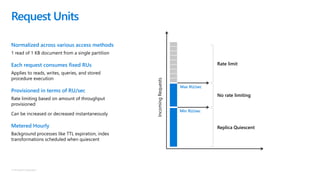
Normalized across various access methods
1 read of 1 KB document from a single partition
Each request consumes fixed RUs
Applies to reads, writes, queries, and stored
procedure execution
Provisioned in terms of RU/sec
Rate limiting based on amount of throughput
provisioned
Can be increased or decreased instantaneously
Metered Hourly
Background processes like TTL expiration, index
transformations scheduled when quiescent
Request Units
Min RU/sec
Max RU/sec
IncomingRequests
Replica Quiescent
Rate limit
No rate limiting
© Microsoft Corporation
Request unit pricing example
Storage cost
Avg record size (KB) 1
Number of records 100,000
Throughput cost
Operation type Number of requests per second Avg RU's per request RU’s needed
Create 100 5 500
Read 400 1 400
Total RU/sec 900
Monthly cost per 100 RU/sec $6.00
Total Monthly cost
[Total Monthly Cost] = [Monthly Cost for Storage] + [Monthly Cost for Throughput]
= $25 + $54
= $79 per month
Total storage (GB) 100
Monthly cost per GB $0.25
Expected monthly cost for storage $25.00
Expected monthly cost for throughput $54.00
© Microsoft Corporation
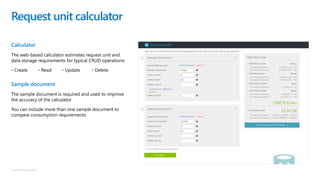
Calculator
The web-based calculator estimates request unit and
data storage requirements for typical CRUD operations:
• Create • Read • Update • Delete
Sample document
The sample document is required and used to improve
the accuracy of the calculator
You can include more than one sample document to
compare consumption requirements
Request unit calculator
© Microsoft Corporation
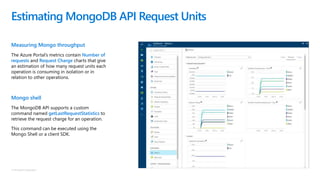
Measuring Mongo throughput
The Azure Portal’s metrics contain Number of
requests and Request Charge charts that give
an estimation of how many request units each
operation is consuming in isolation or in
relation to other operations.
Mongo shell
The MongoDB API supports a custom
command named getLastRequestStatistics to
retrieve the request charge for an operation.
This command can be executed using the
Mongo Shell or a client SDK.
Estimating MongoDB API Request Units
© Microsoft Corporation
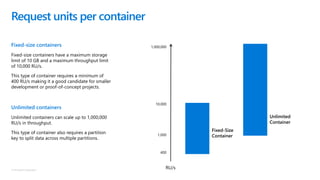
Fixed-size containers
Fixed-size containers have a maximum storage
limit of 10 GB and a maximum throughput limit
of 10,000 RU/s.
This type of container requires a minimum of
400 RU/s making it a good candidate for smaller
development or proof-of-concept projects.
Unlimited containers
Unlimited containers can scale up to 1,000,000
RU/s in throughput.
This type of container also requires a partition
key to split data across multiple partitions.
Request units per container
1,000,000
10,000
1,000
400
Unlimited
Container
Fixed-Size
Container
RU/s
© Microsoft Corporation
Compatibility NoSQL wire protocol
Azure Cosmos DB
Cassandra API
© Microsoft Corporation
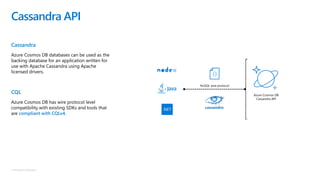
Cassandra
Azure Cosmos DB databases can be used as the
backing database for an application written for
use with Apache Cassandra using Apache
licensed drivers.
CQL
Azure Cosmos DB has wire protocol level
compatibility with existing SDKs and tools that
are compliant with CQLv4.
Cassandra API
NoSQL wire protocol
Azure Cosmos DB
Cassandra API
© Microsoft Corporation
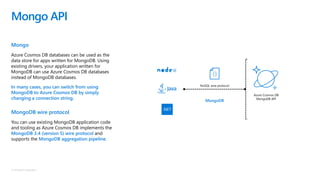
Mongo
Azure Cosmos DB databases can be used as the
data store for apps written for MongoDB. Using
existing drivers, your application written for
MongoDB can use Azure Cosmos DB databases
instead of MongoDB databases.
In many cases, you can switch from using
MongoDB to Azure Cosmos DB by simply
changing a connection string.
MongoDB wire protocol
You can use existing MongoDB application code
and tooling as Azure Cosmos DB implements the
MongoDB 3.4 (version 5) wire protocol and
supports the MongoDB aggregation pipeline.
Mongo API
NoSQL wire protocol
Azure Cosmos DB
MongoDB API
MongoDB
© Microsoft Corporation
Aggregation
The pipeline combines multiple aggregation “stages” together
enabling more sophisticated queries over data sets.
Example
Mongo API – aggregation pipeline
output$sort
input $match
$group
db.flights.aggregate([
{
$match: { origin: "SEA" }
},
{
$group: { _id: "$destination", total: { $sum: 1 } }
},
{
$sort: { total: -1 }
}
]);
© Microsoft Corporation
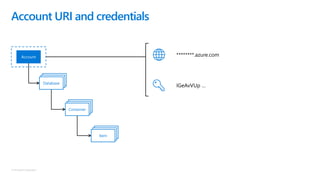
Account URI and credentials
Account
DatabaseDatabaseDatabase
DatabaseDatabaseContainer
DatabaseDatabaseItem
********.azure.com
IGeAvVUp …
© Microsoft Corporation
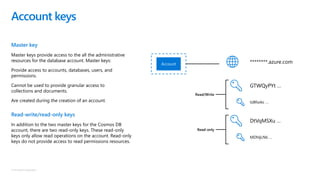
Master key
Master keys provide access to the all the administrative
resources for the database account. Master keys:
Provide access to accounts, databases, users, and
permissions.
Cannot be used to provide granular access to
collections and documents.
Are created during the creation of an account.
Read-write/read-only keys
In addition to the two master keys for the Cosmos DB
account, there are two read-only keys. These read-only
keys only allow read operations on the account. Read-only
keys do not provide access to read permissions resources.
Account keys
Account ********.azure.com
GTWQyPYt …
tzBfsokc …
DtVqMSXu …
MDhIjLNb …
Read/Write
Read-only
© Microsoft Corporation
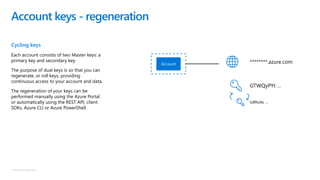
Cycling keys
Each account consists of two Master keys: a
primary key and secondary key.
The purpose of dual keys is so that you can
regenerate, or roll keys, providing
continuous access to your account and data.
The regeneration of your keys can be
performed manually using the Azure Portal
or automatically using the REST API, client
SDKs, Azure CLI or Azure PowerShell.
Account keys - regeneration
Account ********.azure.com
GTWQyPYt …
tzBfsokc …
© Microsoft Corporation
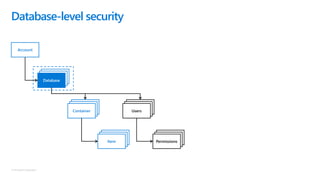
Database-level security
Account
DatabaseDatabaseDatabase
DatabaseDatabaseContainer
DatabaseDatabaseItem
DatabaseDatabaseUsers
DatabaseDatabasePermissions
© Microsoft Corporation
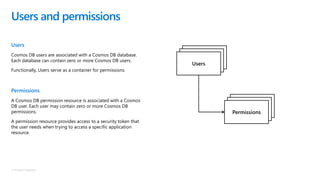
Users
Cosmos DB users are associated with a Cosmos DB database.
Each database can contain zero or more Cosmos DB users.
Functionally, Users serve as a container for permissions.
Permissions
A Cosmos DB permission resource is associated with a Cosmos
DB user. Each user may contain zero or more Cosmos DB
permissions.
A permission resource provides access to a security token that
the user needs when trying to access a specific application
resource.
Users and permissions
Database
Database
Users
Database
Database
Permissions
© Microsoft Corporation
Resource token & permissions
Resource tokens capture the relationship between the
user of a database and the permission the user has
for a specific Cosmos DB resource, such as a
collection or a document.
Azure Cosmos DB resource tokens provide a safe
mechanism for allowing clients to read, write, and
delete specific resources in an Azure Cosmos DB
account according to the granted permissions.
Resource tokens
1. Client device/application authenticates with the middle-tier service
2. The middle-tier service will request a resource token using a specific
database-level permission
3. The database service generates a temporary-use resource token
4. The middle-tier service will return the resource token to the client
5. The client will access the resource[s] directly from Azure Cosmos DB
using the resource token
1 2
4 3
5
© Microsoft Corporation
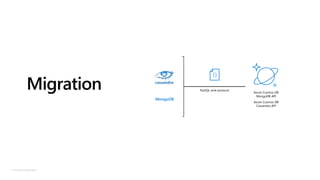
Migration NoSQL wire protocol
Azure Cosmos DB
MongoDB API
Azure Cosmos DB
Cassandra API
MongoDB
© Microsoft Corporation
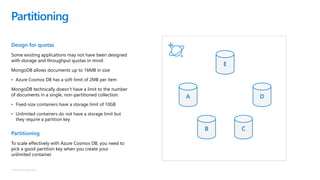
Design for quotas
Some existing applications may not have been designed
with storage and throughput quotas in mind:
MongoDB allows documents up to 16MB in size
• Azure Cosmos DB has a soft-limit of 2MB per item
MongoDB technically doesn’t have a limit to the number
of documents in a single, non-partitioned collection.
• Fixed-size containers have a storage limit of 10GB
• Unlimited containers do not have a storage limit but
they require a partition key
Partitioning
To scale effectively with Azure Cosmos DB, you need to
pick a good partition key when you create your
unlimited container.
Partitioning
A
B C
D
E
© Microsoft Corporation
Best practices: design goals for choosing
a good partition key
Distribute the overall request + storage volume
Avoid “hot” partition keys
Partition Key is scope for [efficient] queries and
transactions
Queries can be intelligently routed via partition key
Omitting partition key on query requires fan-out
Steps for success
Ballpark scale needs (size/throughput)
Understand the workload
Partition keys
Steps for success
# of reads/sec vs writes per sec
Use 80/20 rule to help optimize bulk of workload
For reads – understand top queries (look for common filters)
For writes – understand transactional needs and ratio of
inserts vs updates
General tips
Don’t be afraid of having too many partition keys
Partitions keys are logical
More partition keys more scalability
© Microsoft Corporation
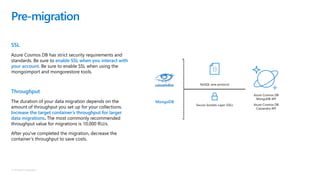
SSL
Azure Cosmos DB has strict security requirements and
standards. Be sure to enable SSL when you interact with
your account. Be sure to enable SSL when using the
mongoimport and mongorestore tools.
Throughput
The duration of your data migration depends on the
amount of throughput you set up for your collections.
Increase the target container’s throughput for larger
data migrations. The most commonly recommended
throughput value for migrations is 10,000 RU/s.
After you've completed the migration, decrease the
container’s throughput to save costs.
Pre-migration
Secure Sockets Layer (SSL)
NoSQL wire protocol
Azure Cosmos DB
MongoDB API
Azure Cosmos DB
Cassandra API
MongoDB
© Microsoft Corporation
Pre-create collections
Collections that are created using defaults (either via an import tool
or an SDK) are provisioned as:
Fixed-size collection (no partition key)
1,000 RU/s1
Before you start your migration, pre-create collections and specify
the appropriate settings for each collection.
Configure partition key
If you need more than 10GB worth of storage, you must configure a
partition key as part of provisioning an unlimited container.
Pre-migration | collections
© Microsoft Corporation
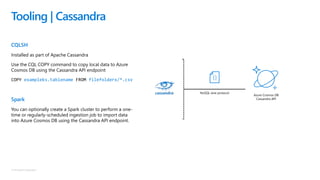
CQLSH
Installed as part of Apache Cassandra
Use the CQL COPY command to copy local data to Azure
Cosmos DB using the Cassandra API endpoint
COPY exampleks.tablename FROM filefolderx/*.csv
Spark
You can optionally create a Spark cluster to perform a one-
time or regularly-scheduled ingestion job to import data
into Azure Cosmos DB using the Cassandra API endpoint.
Tooling | Cassandra
NoSQL wire protocol
Azure Cosmos DB
Cassandra API
© Microsoft Corporation
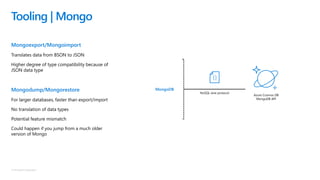
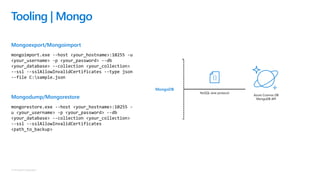
Mongoexport/Mongoimport
Translates data from BSON to JSON
Higher degree of type compatibility because of
JSON data type
Mongodump/Mongorestore
For larger databases, faster than export/import
No translation of data types
Potential feature mismatch
Could happen if you jump from a much older
version of Mongo
Tooling | Mongo
NoSQL wire protocol
Azure Cosmos DB
MongoDB API
MongoDB
© Microsoft Corporation
Mongoexport/Mongoimport
mongoimport.exe --host <your_hostname>:10255 -u
<your_username> -p <your_password> --db
<your_database> --collection <your_collection>
--ssl --sslAllowInvalidCertificates --type json
--file C:sample.json
Mongodump/Mongorestore
mongorestore.exe --host <your_hostname>:10255 -
u <your_username> -p <your_password> --db
<your_database> --collection <your_collection>
--ssl --sslAllowInvalidCertificates
<path_to_backup>
Tooling | Mongo
NoSQL wire protocol
Azure Cosmos DB
MongoDB API
MongoDB
© Microsoft Corporation
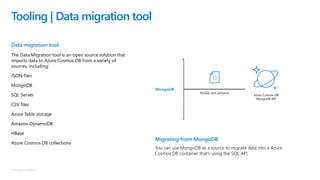
Data migration tool
The Data Migration tool is an open source solution that
imports data to Azure Cosmos DB from a variety of
sources, including:
JSON files
MongoDB
SQL Server
CSV files
Azure Table storage
Amazon DynamoDB
HBase
Azure Cosmos DB collections
Tooling | Data migration tool
Migrating from MongoDB
You can use MongoDB as a source to migrate data into a Azure
Cosmos DB container that’s using the SQL API.
NoSQL wire protocol
Azure Cosmos DB
MongoDB API
MongoDB
© Microsoft Corporation
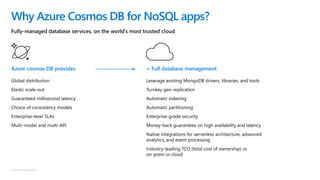
+ Full database management
Leverage existing MongoDB drivers, libraries, and tools
Turnkey geo-replication
Automatic indexing
Automatic partitioning
Enterprise-grade security
Money-back guarantees on high availability and latency
Native integrations for serverless architecture, advanced
analytics, and event processing
Industry-leading TCO (total cost of ownership) vs
on-prem or cloud
Fully-managed database services, on the world’s most trusted cloud
Why Azure Cosmos DB for NoSQL apps?
Azure cosmos DB provides
Global distribution
Elastic scale-out
Guaranteed millisecond latency
Choice of consistency models
Enterprise-level SLAs
Multi-model and multi-API
© Microsoft Corporation
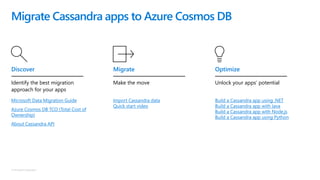
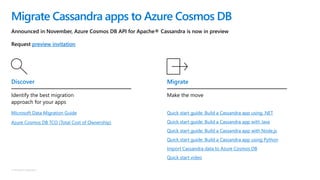
Migrate Cassandra apps to Azure Cosmos DB
Microsoft Data Migration Guide
Azure Cosmos DB TCO (Total Cost of
Ownership)
About Cassandra API
Discover
Identify the best migration
approach for your apps
Import Cassandra data
Quick start video
Migrate
Make the move
Build a Cassandra app using .NET
Build a Cassandra app with Java
Build a Cassandra app with Node.js
Build a Cassandra app using Python
Optimize
Unlock your apps’ potential
© Microsoft Corporation
Migrate Cassandra apps to Azure Cosmos DB
Announced in November, Azure Cosmos DB API for Apache® Cassandra is now in preview
Request preview invitation
Discover
Microsoft Data Migration Guide
Azure Cosmos DB TCO (Total Cost of Ownership)
Identify the best migration
approach for your apps
Quick start guide: Build a Cassandra app using .NET
Quick start guide: Build a Cassandra app with Java
Quick start guide: Build a Cassandra app with Node.js
Quick start guide: Build a Cassandra app using Python
Import Cassandra data to Azure Cosmos DB
Quick start video
Make the move
Migrate
© Microsoft Corporation
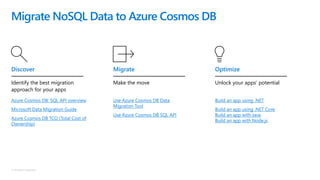
Migrate NoSQL Data to Azure Cosmos DB
Azure Cosmos DB: SQL API overview
Microsoft Data Migration Guide
Azure Cosmos DB TCO (Total Cost of
Ownership)
Identify the best migration
approach for your apps
Discover
Use Azure Cosmos DB Data
Migration Tool
Use Azure Cosmos DB SQL API
Make the move
Migrate
Build an app using .NET
Build an app using .NET Core
Build an app with Java
Build an app with Node.js
Unlock your apps’ potential
Optimize
© Copyright Microsoft Corporation. All rights reserved.

NoSQL Migration Technical Pitch Deck

  • 1.
    Azure Cosmos DB NoSQLMigration Speaker Name Date
  • 2.
    © Microsoft Corporation Appdevelopers face new challenges Todays applications place new demands and data requirements on app developers. NoSQL developers increasingly look to leverage cloud capabilities and fully-managed services, so they can focus on application innovation. Deliver customer analytics and business insights Meet customers’ high performance expectations Respond to rapid, variable scale and demand at global scale Power real-time experiences
  • 3.
    © Microsoft Corporation ! ! ! ! ! Challengeswith NoSQL IaaS/ on-premises offerings Tedious set-up and maintenance requirements Expensive and complex HA solutions Achieving end-to-end security Over-provisioning of resources to achieve scale Unpredictable costs NoSQL developers want enterprise-grade managed services for NoSQL databases
  • 4.
    © Microsoft Corporation ModernizeAny NoSQL app with Azure Cosmos DB Azure cosmos DB offers NOSQL app developers: Fully-managed database service, born in the cloud Turnkey global distribution Low latency at any scale anywhere in the world Easy lift-and-shift migration from MongoDB and Cassandra Use existing tools, code, and drivers Automatic Indexing and partitioning Enterprise-grade SLAs on high availability and latency Native integrations for serverless architecture, advanced analytics, and event processing Optimized for real-time scenarios Azure Cosmos DB • API for MongoDB • API for Cassandra NoSQL workloads Azure Cosmos DB
  • 5.
    Turnkey global distribution Elastic scaleout of storage & throughput Guaranteed low latency at the 99th percentile Comprehensive SLAs Five well-defined consistency models Table API Azure Cosmos DB Column-family DocumentKey-value Graph A globally distributed, massively scalable, multi-model database service SQL
  • 6.
    Azure Cosmos DB Afully-managed globally distributed database service built to guarantee Extremely low latency and massive scale for global apps
  • 7.
    © Microsoft Corporation Valueproposition Azure Cosmos DB • API for MongoDB • API for Cassandra NoSQL workloads Azure Cosmos DB
  • 8.
    © Microsoft Corporation Turnkeyglobal distribution Put your data where your users are in minutes Automatically replicate all your data around the world, and across more regions than Amazon and Google combined. Available in all Azure regions Manual and automatic failover Automatic & synchronous multi-region replication
  • 9.
    © Microsoft Corporation Elasticscale out of storage and throughput Scales as your apps’ needs change Independently and elastically scale storage and throughput across regions—even during unpredictable traffic bursts—with a database that adapts to your app’s needs Elastically scale throughput from 10 to 100s of millions of requests/sec across multiple regions Support for requests/sec for different workloads Pay only for the throughput and storage you need
  • 10.
    © Microsoft Corporation Guaranteedlow latency Provide users around the world with fast access to data Serve <10 ms read and <15 ms write requests at the 99th percentile from the region nearest to users, while delivering data globally
  • 11.
    © Microsoft Corporation StrongBounded-stateless Session Consistent prefix Eventual Five well-defined consistency models Choose the best consistency model for your app Offers five consistency models Provides control over performance-consistency tradeoffs, backed by comprehensive SLAs An intuitive programming model offering low latency and high availability for your planet-scale app
  • 12.
    © Microsoft Corporation Usethe model that fits your requirements, and the APIS, tools, and frameworks you prefer Multiple data models and APIS Cosmos DB offers a multitude of APIs to access and query data including, SQL, various popular OSS APIs, and native support for NoSQL workloads. Use key-value, tabular, graph, and document data Data is automatically indexed, with no schema or secondary indexes required Blazing fast queries with no lag Table API Column-family DocumentKey-value Graph SQL
  • 13.
    © Microsoft Corporation Runyour app on world-class infrastructure Comprehensive SLAs Latency <10 ms 99th percentile HA 99.999% Throughput Guaranteed Consistency Guaranteed Azure Cosmos DB is the only service with financially-backed SLAs for millisecond latency at the 99th percentile, 99.999% HA and guaranteed throughput and consistency
  • 14.
    © Microsoft Corporation AzureCosmos DB’s schema-less service automatically indexes all your data, regardless of the data model, to delivery blazing fast queries. Handle any data with no schema or indexing required Item Color Microwave safe Liquid capacity CPU Memory Storage Geek mug Graphite Yes 16ox ??? ??? ??? Coffee Bean mug Tan No 12oz ??? ??? ??? Surface book Gray ??? ??? 3.4 GHz Intel Skylake Core i7- 6600U 16GB 1 TB SSD Automatic index management Synchronous auto-indexing No schemas or secondary indices needed Works across every data model GEEK
  • 15.
    © Microsoft Corporation Azureis the world’s most trusted cloud, with more certifications than any other cloud provider. Trust your data to industry-leading Security & Compliance Enterprise grade security Encryption at Rest Encryption is enabled automatically by default Comprehensive Azure compliance certification
  • 16.
    © Microsoft Corporation AzureCosmos DB’s service is regularly and automatically updated to support new client database versions and wire protocol formats. No server management No need to manage or patch database servers Data does not need to be migrated to support a new protocol version MongoDB
  • 17.
    © Microsoft Corporation Makedata modernization easy with seamless lift and shift migration of NoSQL workloads to the cloud. Azure Cosmos DB MongoDB API and Cassandra API bring app data from existing MongoDB and Cassandra deployments Leverage existing tools, drivers, and libraries, and continue using existing apps’ current SDKs Turnkey geo-replication No infrastructure or VM management required Easy to migrate NoSQL apps to Azure Cosmos DB DynamoDB MongoDB Couchbase CouchDB Neo4j HBase Cassandra Azure Cosmos DB MongoDB API Azure Cosmos DB Cassandra API NoSQL wire protocol
  • 18.
    © Microsoft Corporation Azurecosmos DB offers multiple API options for migrating app data: Data migration to Azure Cosmos DB 1. SQL API An end-to-end data migration experience across client and server, with performance tuning and advanced functionality. The Azure Cosmos DB: SQL API is great for applications running on: MongoDB, Cassandra, Hbase, DynamoDB, Couchbase, and CouchDB. 2. MongoDB API Azure Cosmos DB: API for MongoDB is ideal for applications requiring minimal code re-writes. 3. Cassandra API Azure Cosmos DB: API for Cassandra is ideal for applications requiring minimal code re-writes.
  • 19.
    © Microsoft Corporation Startusing Azure Cosmos DB as the data store for MongoDB apps in three simple steps: Easy migration with Azure Cosmos DB: API for MongoDB Azure Cosmos DB: API for MongoDB MongoDB wire protocol .NET Create new Azure Cosmos DB account in the Azure Portal and choose API for MongoDB Import MongoDB data to Azure Cosmos DB with Azure Connection String Manage and query your data in Azure Cosmos DB with your favorite MongoDB tools and drivers MongoDB
  • 20.
    © Microsoft Corporation MigrateMongoDB apps to Azure Cosmos DB Microsoft Data Migration Guide Azure Cosmos DB TCO (Total Cost of Ownership) About MongoDB API Identify the best migration approach for your apps Discover Make the move Import MongoDB data Migrate an existing Node.js MongoDB web app Migrate Unlock your apps’ potential Build a MongoDB API web app with .NET and the Azure portal Build a MongoDB API console app with Java and the Azure portal Optimize
  • 21.
    © Microsoft Corporation Startusing Azure Cosmos DB as the data store for MongoDB apps in three simple steps Easy migration with Azure Cosmos DB: API for Cassandra Create new Azure Cosmos DB account in the Azure Portal and choose API for Cassandra Import Cassandra data to Azure Cosmos DB with Azure Connection String and CQLSH COPY Manage and query your data in Azure Cosmos DB with your favorite tools and drivers Azure Cosmos DB: API for Cassandra Cassandra wire protocol
  • 22.
    © Microsoft Corporation Startusing Azure Cosmos DB as the data store for NOSQL apps and Json data Easy NoSQL migration with Azure Cosmos DB: SQL API .NET Create new Azure Cosmos DB account in the Azure Portal Import NoSQL data to Azure Cosmos DB with Azure Cosmos DB Data Migration tool and Azure Cosmos DB SQL API Manage and query JSON data in Azure Cosmos DB with your favorite tools and drivers DynamoDB Couchbase HBase Neo4j CouchDB MongoDB Azure Cosmos DB: SQL API SQL
  • 23.
    © Microsoft Corporation Resources& consumption Account Database Database Database Database Database Container Database Database Item
  • 24.
    © Microsoft Corporation Containers Logicalresources “surfaced” to APIs as tables, collections (for documents) or graphs, which are made up of one or more physical partitions or servers. Resource partitions Consistent, highly available, and resource-governed coordination primitives Consist of replica sets, with each replica hosting an instance of the database engine Owns a set of keys (partition and row) Can uniquely belong to a tenant by assigning one partition key or one container per tenant Resource hierarchy Containers Resource Partitions CollectionsTables Graphs
  • 25.
    © Microsoft Corporation Creatingaccount Account DatabaseDatabaseDatabase DatabaseDatabaseContainer DatabaseDatabaseItem
  • 26.
    © Microsoft Corporation Containerrepresentations = Collection Graph Table Column Family Account DatabaseDatabaseDatabase DatabaseDatabaseContainer DatabaseDatabaseItem
  • 27.
    © Microsoft Corporation RequestUnits (RUs) is a rate-based currency Abstracts physical resources for performing requests Key to multi-tenancy, SLAs, and COGS efficiency Foreground and background activities Request units % IOPS% CPU% Memory
  • 28.
    © Microsoft Corporation Normalizedacross various access methods 1 read of 1 KB document from a single partition Each request consumes fixed RUs Applies to reads, writes, queries, and stored procedure execution Provisioned in terms of RU/sec Rate limiting based on amount of throughput provisioned Can be increased or decreased instantaneously Metered Hourly Background processes like TTL expiration, index transformations scheduled when quiescent Request Units Min RU/sec Max RU/sec IncomingRequests Replica Quiescent Rate limit No rate limiting
  • 29.
    © Microsoft Corporation Requestunit pricing example Storage cost Avg record size (KB) 1 Number of records 100,000 Throughput cost Operation type Number of requests per second Avg RU's per request RU’s needed Create 100 5 500 Read 400 1 400 Total RU/sec 900 Monthly cost per 100 RU/sec $6.00 Total Monthly cost [Total Monthly Cost] = [Monthly Cost for Storage] + [Monthly Cost for Throughput] = $25 + $54 = $79 per month Total storage (GB) 100 Monthly cost per GB $0.25 Expected monthly cost for storage $25.00 Expected monthly cost for throughput $54.00
  • 30.
    © Microsoft Corporation Calculator Theweb-based calculator estimates request unit and data storage requirements for typical CRUD operations: • Create • Read • Update • Delete Sample document The sample document is required and used to improve the accuracy of the calculator You can include more than one sample document to compare consumption requirements Request unit calculator
  • 31.
    © Microsoft Corporation MeasuringMongo throughput The Azure Portal’s metrics contain Number of requests and Request Charge charts that give an estimation of how many request units each operation is consuming in isolation or in relation to other operations. Mongo shell The MongoDB API supports a custom command named getLastRequestStatistics to retrieve the request charge for an operation. This command can be executed using the Mongo Shell or a client SDK. Estimating MongoDB API Request Units
  • 32.
    © Microsoft Corporation Fixed-sizecontainers Fixed-size containers have a maximum storage limit of 10 GB and a maximum throughput limit of 10,000 RU/s. This type of container requires a minimum of 400 RU/s making it a good candidate for smaller development or proof-of-concept projects. Unlimited containers Unlimited containers can scale up to 1,000,000 RU/s in throughput. This type of container also requires a partition key to split data across multiple partitions. Request units per container 1,000,000 10,000 1,000 400 Unlimited Container Fixed-Size Container RU/s
  • 33.
    © Microsoft Corporation CompatibilityNoSQL wire protocol Azure Cosmos DB Cassandra API
  • 34.
    © Microsoft Corporation Cassandra AzureCosmos DB databases can be used as the backing database for an application written for use with Apache Cassandra using Apache licensed drivers. CQL Azure Cosmos DB has wire protocol level compatibility with existing SDKs and tools that are compliant with CQLv4. Cassandra API NoSQL wire protocol Azure Cosmos DB Cassandra API
  • 35.
    © Microsoft Corporation Mongo AzureCosmos DB databases can be used as the data store for apps written for MongoDB. Using existing drivers, your application written for MongoDB can use Azure Cosmos DB databases instead of MongoDB databases. In many cases, you can switch from using MongoDB to Azure Cosmos DB by simply changing a connection string. MongoDB wire protocol You can use existing MongoDB application code and tooling as Azure Cosmos DB implements the MongoDB 3.4 (version 5) wire protocol and supports the MongoDB aggregation pipeline. Mongo API NoSQL wire protocol Azure Cosmos DB MongoDB API MongoDB
  • 36.
    © Microsoft Corporation Aggregation Thepipeline combines multiple aggregation “stages” together enabling more sophisticated queries over data sets. Example Mongo API – aggregation pipeline output$sort input $match $group db.flights.aggregate([ { $match: { origin: "SEA" } }, { $group: { _id: "$destination", total: { $sum: 1 } } }, { $sort: { total: -1 } } ]);
  • 37.
    © Microsoft Corporation AccountURI and credentials Account DatabaseDatabaseDatabase DatabaseDatabaseContainer DatabaseDatabaseItem ********.azure.com IGeAvVUp …
  • 38.
    © Microsoft Corporation Masterkey Master keys provide access to the all the administrative resources for the database account. Master keys: Provide access to accounts, databases, users, and permissions. Cannot be used to provide granular access to collections and documents. Are created during the creation of an account. Read-write/read-only keys In addition to the two master keys for the Cosmos DB account, there are two read-only keys. These read-only keys only allow read operations on the account. Read-only keys do not provide access to read permissions resources. Account keys Account ********.azure.com GTWQyPYt … tzBfsokc … DtVqMSXu … MDhIjLNb … Read/Write Read-only
  • 39.
    © Microsoft Corporation Cyclingkeys Each account consists of two Master keys: a primary key and secondary key. The purpose of dual keys is so that you can regenerate, or roll keys, providing continuous access to your account and data. The regeneration of your keys can be performed manually using the Azure Portal or automatically using the REST API, client SDKs, Azure CLI or Azure PowerShell. Account keys - regeneration Account ********.azure.com GTWQyPYt … tzBfsokc …
  • 40.
    © Microsoft Corporation Database-levelsecurity Account DatabaseDatabaseDatabase DatabaseDatabaseContainer DatabaseDatabaseItem DatabaseDatabaseUsers DatabaseDatabasePermissions
  • 41.
    © Microsoft Corporation Users CosmosDB users are associated with a Cosmos DB database. Each database can contain zero or more Cosmos DB users. Functionally, Users serve as a container for permissions. Permissions A Cosmos DB permission resource is associated with a Cosmos DB user. Each user may contain zero or more Cosmos DB permissions. A permission resource provides access to a security token that the user needs when trying to access a specific application resource. Users and permissions Database Database Users Database Database Permissions
  • 42.
    © Microsoft Corporation Resourcetoken & permissions Resource tokens capture the relationship between the user of a database and the permission the user has for a specific Cosmos DB resource, such as a collection or a document. Azure Cosmos DB resource tokens provide a safe mechanism for allowing clients to read, write, and delete specific resources in an Azure Cosmos DB account according to the granted permissions. Resource tokens 1. Client device/application authenticates with the middle-tier service 2. The middle-tier service will request a resource token using a specific database-level permission 3. The database service generates a temporary-use resource token 4. The middle-tier service will return the resource token to the client 5. The client will access the resource[s] directly from Azure Cosmos DB using the resource token 1 2 4 3 5
  • 43.
    © Microsoft Corporation MigrationNoSQL wire protocol Azure Cosmos DB MongoDB API Azure Cosmos DB Cassandra API MongoDB
  • 44.
    © Microsoft Corporation Designfor quotas Some existing applications may not have been designed with storage and throughput quotas in mind: MongoDB allows documents up to 16MB in size • Azure Cosmos DB has a soft-limit of 2MB per item MongoDB technically doesn’t have a limit to the number of documents in a single, non-partitioned collection. • Fixed-size containers have a storage limit of 10GB • Unlimited containers do not have a storage limit but they require a partition key Partitioning To scale effectively with Azure Cosmos DB, you need to pick a good partition key when you create your unlimited container. Partitioning A B C D E
  • 45.
    © Microsoft Corporation Bestpractices: design goals for choosing a good partition key Distribute the overall request + storage volume Avoid “hot” partition keys Partition Key is scope for [efficient] queries and transactions Queries can be intelligently routed via partition key Omitting partition key on query requires fan-out Steps for success Ballpark scale needs (size/throughput) Understand the workload Partition keys Steps for success # of reads/sec vs writes per sec Use 80/20 rule to help optimize bulk of workload For reads – understand top queries (look for common filters) For writes – understand transactional needs and ratio of inserts vs updates General tips Don’t be afraid of having too many partition keys Partitions keys are logical More partition keys more scalability
  • 46.
    © Microsoft Corporation SSL AzureCosmos DB has strict security requirements and standards. Be sure to enable SSL when you interact with your account. Be sure to enable SSL when using the mongoimport and mongorestore tools. Throughput The duration of your data migration depends on the amount of throughput you set up for your collections. Increase the target container’s throughput for larger data migrations. The most commonly recommended throughput value for migrations is 10,000 RU/s. After you've completed the migration, decrease the container’s throughput to save costs. Pre-migration Secure Sockets Layer (SSL) NoSQL wire protocol Azure Cosmos DB MongoDB API Azure Cosmos DB Cassandra API MongoDB
  • 47.
    © Microsoft Corporation Pre-createcollections Collections that are created using defaults (either via an import tool or an SDK) are provisioned as: Fixed-size collection (no partition key) 1,000 RU/s1 Before you start your migration, pre-create collections and specify the appropriate settings for each collection. Configure partition key If you need more than 10GB worth of storage, you must configure a partition key as part of provisioning an unlimited container. Pre-migration | collections
  • 48.
    © Microsoft Corporation CQLSH Installedas part of Apache Cassandra Use the CQL COPY command to copy local data to Azure Cosmos DB using the Cassandra API endpoint COPY exampleks.tablename FROM filefolderx/*.csv Spark You can optionally create a Spark cluster to perform a one- time or regularly-scheduled ingestion job to import data into Azure Cosmos DB using the Cassandra API endpoint. Tooling | Cassandra NoSQL wire protocol Azure Cosmos DB Cassandra API
  • 49.
    © Microsoft Corporation Mongoexport/Mongoimport Translatesdata from BSON to JSON Higher degree of type compatibility because of JSON data type Mongodump/Mongorestore For larger databases, faster than export/import No translation of data types Potential feature mismatch Could happen if you jump from a much older version of Mongo Tooling | Mongo NoSQL wire protocol Azure Cosmos DB MongoDB API MongoDB
  • 50.
    © Microsoft Corporation Mongoexport/Mongoimport mongoimport.exe--host <your_hostname>:10255 -u <your_username> -p <your_password> --db <your_database> --collection <your_collection> --ssl --sslAllowInvalidCertificates --type json --file C:sample.json Mongodump/Mongorestore mongorestore.exe --host <your_hostname>:10255 - u <your_username> -p <your_password> --db <your_database> --collection <your_collection> --ssl --sslAllowInvalidCertificates <path_to_backup> Tooling | Mongo NoSQL wire protocol Azure Cosmos DB MongoDB API MongoDB
  • 51.
    © Microsoft Corporation Datamigration tool The Data Migration tool is an open source solution that imports data to Azure Cosmos DB from a variety of sources, including: JSON files MongoDB SQL Server CSV files Azure Table storage Amazon DynamoDB HBase Azure Cosmos DB collections Tooling | Data migration tool Migrating from MongoDB You can use MongoDB as a source to migrate data into a Azure Cosmos DB container that’s using the SQL API. NoSQL wire protocol Azure Cosmos DB MongoDB API MongoDB
  • 52.
    © Microsoft Corporation +Full database management Leverage existing MongoDB drivers, libraries, and tools Turnkey geo-replication Automatic indexing Automatic partitioning Enterprise-grade security Money-back guarantees on high availability and latency Native integrations for serverless architecture, advanced analytics, and event processing Industry-leading TCO (total cost of ownership) vs on-prem or cloud Fully-managed database services, on the world’s most trusted cloud Why Azure Cosmos DB for NoSQL apps? Azure cosmos DB provides Global distribution Elastic scale-out Guaranteed millisecond latency Choice of consistency models Enterprise-level SLAs Multi-model and multi-API
  • 53.
    © Microsoft Corporation MigrateCassandra apps to Azure Cosmos DB Microsoft Data Migration Guide Azure Cosmos DB TCO (Total Cost of Ownership) About Cassandra API Discover Identify the best migration approach for your apps Import Cassandra data Quick start video Migrate Make the move Build a Cassandra app using .NET Build a Cassandra app with Java Build a Cassandra app with Node.js Build a Cassandra app using Python Optimize Unlock your apps’ potential
  • 54.
    © Microsoft Corporation MigrateCassandra apps to Azure Cosmos DB Announced in November, Azure Cosmos DB API for Apache® Cassandra is now in preview Request preview invitation Discover Microsoft Data Migration Guide Azure Cosmos DB TCO (Total Cost of Ownership) Identify the best migration approach for your apps Quick start guide: Build a Cassandra app using .NET Quick start guide: Build a Cassandra app with Java Quick start guide: Build a Cassandra app with Node.js Quick start guide: Build a Cassandra app using Python Import Cassandra data to Azure Cosmos DB Quick start video Make the move Migrate
  • 55.
    © Microsoft Corporation MigrateNoSQL Data to Azure Cosmos DB Azure Cosmos DB: SQL API overview Microsoft Data Migration Guide Azure Cosmos DB TCO (Total Cost of Ownership) Identify the best migration approach for your apps Discover Use Azure Cosmos DB Data Migration Tool Use Azure Cosmos DB SQL API Make the move Migrate Build an app using .NET Build an app using .NET Core Build an app with Java Build an app with Node.js Unlock your apps’ potential Optimize
  • 56.
    © Copyright MicrosoftCorporation. All rights reserved.