
Bill Wilder – brief bio Bill Wilder has been a professional software developer for more than 20 years. Last year he founded the  Boston Azure User Group , an in-person cloud computing community which gets together monthly to learn about Windows Azure through prepared talks and hands-on coding. Bill is especially excited about the  Boston Azure Project , a collaborative Windows Azure coding project just starting up in the Boston Azure community. Bill is an active community speaker, blogger ( blog.codingoutloud.com ), and tweeter ( @codingoutloud ) on technology matters and soft skills for technologists, and is also a member of Boston West Toastmasters. Separately, Bill has a day job as an enterprise architect focusing on .NET.
Cloud-Native Azure Vermont Code Camp 2 11-September-2010 Copyright (c) 2010, Bill Wilder Boston Azure User Group http://bostonazure.org @bostonazure Bill Wilder http://blog.codingoutloud.com @codingoutloud Boston West Toastmasters   http://bwtoastmasters.com Not here with my day job Only Bill’s personal views Building Cloud-Native applications using Windows Azure
Agenda What is the Cloud What is Azure How Cloud-Native Azure is different Roles and queues Tables and SQL Overview of Tables, Blobs, Queues, Drives Capabilities Geographic distribution Pay As You Go billing model Azure Table Storage vs. Relational SQL Azure Scenarios for combining capabilities Focus is on CONCEPTS moreso than details
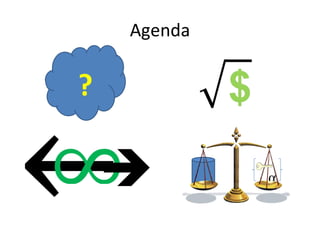
Agenda ? 
What is “the cloud”? ?
The Cloud Opportunity Replace “your” infrastructure with “their” infrastructure Save money, shift risk, shorten time-to-market
The Cloud Provides… Efficient Scalability Elasticity on Demand Complexity Reduction through Abstraction A few new challenges
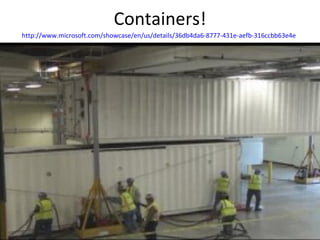
Containers! http://www.microsoft.com/showcase/en/us/details/36db4da6-8777-431e-aefb-316ccbb63e4e
Global investment in Data Centers Vendors build out – so you don’t have to (increasingly…) “Containers” packed with Fast, multi-core processors Cheap, commodity hardware (memory, disk) Google’s famously bare-bones hardware Locations selected for efficiency considering Cheap cooling, Cheap electricity Geographical coverage Competitive bidding  optimizes for Containers Delivery “ready to plug-in” & “ready to unplug”
 
Most $$$ part of Software System?
Massive Automation, Efficiency Cross-Data Center Monitoring Software and Hardware Virtualization Automated Deployment (across Data Centers) HUGE win for customers lowering real costs Operational efficiency – you    them 100:1    10,000:1
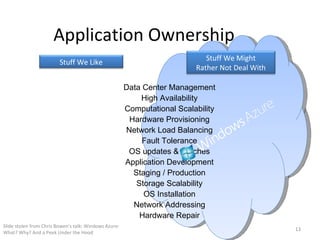
Application Ownership Slide stolen from Chris Bowen’s talk: Windows Azure: What? Why? And a Peek Under the Hood Application Development Network Addressing Network Load Balancing Hardware Repair OS updates & Patches OS Installation Computational Scalability Storage Scalability Hardware Provisioning Staging / Production High Availability Fault Tolerance Data Center Management Stuff We Might Rather Not Deal With Stuff We Like
Utility Computing http://commons.wikimedia.org/wiki/File:Thai_plug.jpg
Business Model Innovation DIFFERENTIATOR is  business model  that permits  bursting system capacity  up and down  on demand without penalty Just like electricity (without the brownouts?) Avoids need for  Elasticity of Customer’s Work Force No such thing as hire/fire at Internet speed
Req - Business Partners, Customers Requirements Dev - similar Ops – square root Arch - Architecture in the middle We know the cost of storing a byte And we don’t have “max * 1 ½ “ style constraints Fuzzy business requirements
Cloud-Native Applications Effort focuses on business functionality Development is highly productive Time-to-market is short Modification is straight-forward Infrastructure is not a limiting factor Cost structure is a good fit Downtime is not necessary Scale is efficient Innovation / experimentation is enabled
Azure Cloud Platform The rise of focused, specialized services Really good at one thing True of other Cloud Platforms “ Scalable” Persistent Storage abstractions Set of Services Illusion of  infinite  scale out Same performance with x clients as with 10x as with 100x as with 1000x as with … Billing model: pay only for what you use Friction-free access to add’l  or less   storage
Azure Storage Services in Concert
Scaling Out 
Web Roles vs. Worker Roles Web Role Worker Role Runs in IIS 7 (always listening) Built using ASP.NET, MVC Good to handle interactive users Addressable over Internet Good for hosting Web API (WCF) Runs Continuously Maps to VM
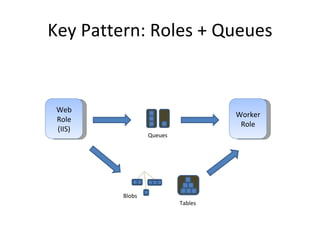
Azure Services – Examples Web Roles Worker Roles Queues Combining Roles and Queues Asynchronous Work Queue Pattern Scale Out Resilient to failure
Key Pattern: Roles + Queues Web Role (IIS) Worker Role Queues Blobs Tables
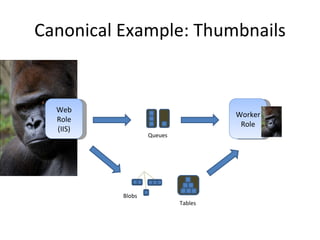
Canonical Example: Thumbnails Web Role (IIS) Worker Role Queues Blobs Tables
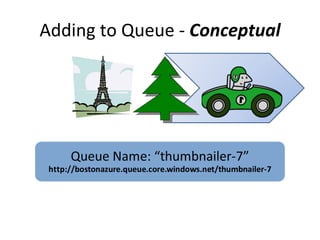
Adding to Queue -  Conceptual
Adding to Queue -  Actual Azure Blob Storage
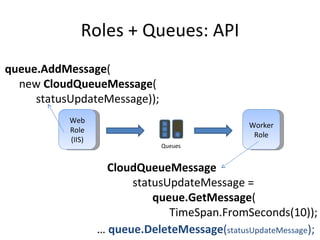
Roles + Queues: API Web Role (IIS) Worker Role Queues queue.AddMessage ( new  CloudQueueMessage ( statusUpdateMessage)); CloudQueueMessage     statusUpdateMessage = queue.GetMessage ( TimeSpan.FromSeconds(10)); …  queue.DeleteMessage ( statusUpdateMessage );
Azure Queue Storage Service for RELIABLE message delivery 7 days = default TTL for item to stay in queue 30 seconds = default “invisibility window” 8 KB = max size of a queued item 500 = approx number of transactions a queue can handle per second Beware of “spinning” – may get throttled, disabled N = number of queues you can have (N >> 1)
 
Persistent Storage Services –  Options Type of Data Traditional Azure Way Relational SQL Server SQL Azure Blob File System, or SQL Server Azure Blobs File File System Azure Drives, or Azure Blobs Reliable Queue MSMQ (maybe) Azure Queues Non-Relational Azure Tables
Azure Storage Services Family of specialized, complementary storage services Abstractions High level services Blobs + Queues + Tables + Drives Many features in common Plus each with its own differentiating features
Azure Storage – Common Features RESTful API (http + XML + “resources”) http://bostonazure.table.core.windows.net/ TableFoo?comp=list Operations - REST/http verb support C reate = PUT  R ead = GET U pdate = POST  D elete = DELETE Language agnostic Client library provided for .NET by Microsoft Many other client libraries available
Authentication Requirements PUT, POST, DELETE are always Authenticated GET is usually Authenticated Exception possible for Blobs  Blob GET access can be public if Blob Container allows for Unauthenticated GET requests Sign http header using Access Key from Portal Don’t need to code this (use Microsoft-provided .NET client library) Key lives in an Azure xml config file
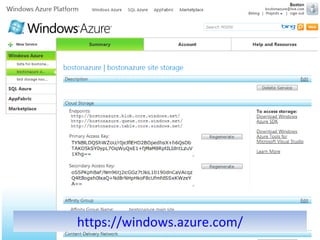
Developer Portal for Keys https://windows.azure.com/
Storage Keys for Authentication
Azure Storage – Common Features Tables, Blobs, Queues, Drives all share the following features / characteristics Are all created under your  Azure Storage Account Storage Account is usually created through the Developer Portal Or API
Azure Storage – Common Features Support for metadata (8k, unstructured) Replicated so there are (at least) 3 copies Within in a single data center Strongly consistent programming model Easy, fast to dynamically add new containers No limit to number of instances of blobs, tables, table rows, or queues Pay As You Go billing model
Azure Blob Storage The place to put ANY LARGE OBJECT Private or Public Public blobs can be anonymously accessed Images, videos, CSS files Need not be binary Public blobs can be cached in Azure CDN 20 locations around the world Different locations than data centers Time-limited signed-access available “ You have until tomorrow to download this video”
Azure Blob Storage Two types of Azure Blobs “ Block Blob” Parallel upload scenarios Resume download scenarios Up to  200 GB “ Page Blob” Random access scenarios Azure Drives Up to  1000 GB
Azure Drive Storage Disk Drive simulation in cloud Façade over an Azure Blob Specifically, Page Blob type Legacy-focused, not “cloud native” Limits same as Page Blob limits 1000 GB = 1 TB
Azure Table Storage Best place for granular, semi-structured data No rigid database schema Fast and easy to instantiate Strongly Consistent No performance lag Programming model is WCF Data Services All data access and data updates LINQ
Azure Table Storage Storage Account Table  [*] Entity  [*, 1 MB data]  PartitionKey + RowKey Property  [255x] Name/Value/Type Up to 64k
Azure Table Storage Partition Key Along a “logical grouping” – a “shard” PartitionKey value of up to 64 KB Row Key Identify specific row within a partition RowKey value is String of up to 64 KB Table access requires Partition Key + Row Key Not to mention (cryptographic)  Access Key  (for the digital signing of the http header)
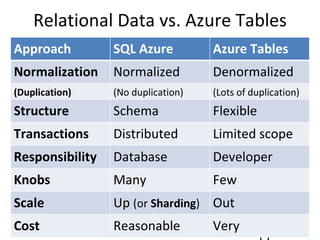
Relational Data vs. Azure Tables Approach SQL Azure Azure Tables Normalization Normalized Denormalized (Duplication) (No duplication) (Lots of duplication) Structure Schema Flexible Transactions Distributed Limited scope Responsibility Database Developer Knobs Many Few Scale Up  (or  Sharding ) Out Cost Reasonable Very reasonable
Replication
All Azure Storage is Replicated Resilient in case of failure “ All data replicated multiple times” – Sriram Krishnan,  Programming Windows Azure , p130+ Supports scale-out Replicate specific data if it gets too hot to keep up Geographic distribution of replication Currently up to you
Replicated != Backed up SQL Azure and Azure Storage data have 3 copies Within a data center (?) But not equivalent to “all data is backed up” History Software bug Compliance
 
Pay As You Go – Data Transfer SQL Azure and Azure Storage Data in motion… North America and Europe regions $0.10 per GB in $0.15 per GB out (different costs in Asia) No charge for transfer within a data center
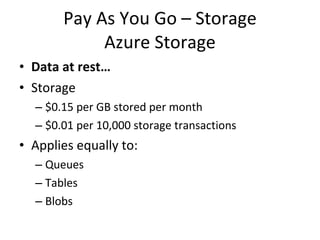
Pay As You Go – Storage Azure Storage Data at rest… Storage $0.15 per GB stored per month $0.01 per 10,000 storage transactions Applies equally to: Queues Tables Blobs
SQL Azure Pricing Data at rest… 1 GB relational database = $10 / month 10 GB relational database = $100 / month 50 GB version coming
SQL Azure vs. Azure Storage Review and Simple Analysis… 1 GB storage per month: $10 = SQL Azure  $0.15 = Azure Storage 10/0.15 =  66.67x Are the features worth the cost?
Pay As You Go – CDN Content Delivery Network (CDN) $0.15 per GB for data transfers from European and North American locations $0.20 per GB for data transfers from other locations $0.01 per 10,000 transactions Same or less expensive than straight-to-blob costs
Geography
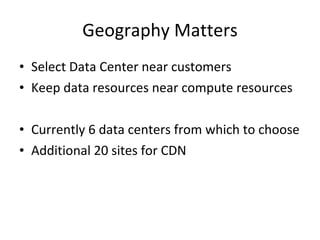
Geography Matters Select Data Center near customers Keep data resources near compute resources Currently 6 data centers from which to choose Additional 20 sites for CDN
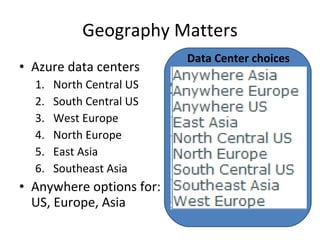
Geography Matters Azure data centers North Central US South Central US West Europe North Europe East Asia Southeast Asia Anywhere options for: US, Europe, Asia Data Center choices
Not new, but…
Accessible to mere mortals Less complex, more cost-effective     competitive pressure … Your competitors are going to be doing it
Questions? ?
BostonAzure.org Boston Azure cloud user group Focused on Microsoft’s cloud solution Next meeting: 6-8 PM Thurs Sept 23 nd  2010 Hacking on “Boston Azure Project” Intro to Cloud Computing on Windows Azure Meetings  usually  4 th  Thursday of month No cost; food; great topics; growing community; wifi Join email list:  http://bostonazure.org Follow on Twitter:  @bostonazure
Slides available from Bill’s blog http://blog.codingoutloud.com   hmbl.me  is URL shortener running on Azure: http://hmbl.me/2FPW3L   http://blog.codingoutloud.com/2010/07/14/key-architectural-design-pattern-for-cloud-native-azure-apps
Bill Wilder @codingoutloud http://blog.codingoutloud.com

Building Cloud-Native Applications with Microsoft Windows Azure

  • 1.
    Bill Wilder –brief bio Bill Wilder has been a professional software developer for more than 20 years. Last year he founded the Boston Azure User Group , an in-person cloud computing community which gets together monthly to learn about Windows Azure through prepared talks and hands-on coding. Bill is especially excited about the Boston Azure Project , a collaborative Windows Azure coding project just starting up in the Boston Azure community. Bill is an active community speaker, blogger ( blog.codingoutloud.com ), and tweeter ( @codingoutloud ) on technology matters and soft skills for technologists, and is also a member of Boston West Toastmasters. Separately, Bill has a day job as an enterprise architect focusing on .NET.
  • 2.
    Cloud-Native Azure VermontCode Camp 2 11-September-2010 Copyright (c) 2010, Bill Wilder Boston Azure User Group http://bostonazure.org @bostonazure Bill Wilder http://blog.codingoutloud.com @codingoutloud Boston West Toastmasters http://bwtoastmasters.com Not here with my day job Only Bill’s personal views Building Cloud-Native applications using Windows Azure
  • 3.
    Agenda What isthe Cloud What is Azure How Cloud-Native Azure is different Roles and queues Tables and SQL Overview of Tables, Blobs, Queues, Drives Capabilities Geographic distribution Pay As You Go billing model Azure Table Storage vs. Relational SQL Azure Scenarios for combining capabilities Focus is on CONCEPTS moreso than details
  • 4.
  • 5.
    What is “thecloud”? ?
  • 6.
    The Cloud OpportunityReplace “your” infrastructure with “their” infrastructure Save money, shift risk, shorten time-to-market
  • 7.
    The Cloud Provides…Efficient Scalability Elasticity on Demand Complexity Reduction through Abstraction A few new challenges
  • 8.
  • 9.
    Global investment inData Centers Vendors build out – so you don’t have to (increasingly…) “Containers” packed with Fast, multi-core processors Cheap, commodity hardware (memory, disk) Google’s famously bare-bones hardware Locations selected for efficiency considering Cheap cooling, Cheap electricity Geographical coverage Competitive bidding optimizes for Containers Delivery “ready to plug-in” & “ready to unplug”
  • 10.
  • 11.
    Most $$$ partof Software System?
  • 12.
    Massive Automation, EfficiencyCross-Data Center Monitoring Software and Hardware Virtualization Automated Deployment (across Data Centers) HUGE win for customers lowering real costs Operational efficiency – you  them 100:1  10,000:1
  • 13.
    Application Ownership Slidestolen from Chris Bowen’s talk: Windows Azure: What? Why? And a Peek Under the Hood Application Development Network Addressing Network Load Balancing Hardware Repair OS updates & Patches OS Installation Computational Scalability Storage Scalability Hardware Provisioning Staging / Production High Availability Fault Tolerance Data Center Management Stuff We Might Rather Not Deal With Stuff We Like
  • 14.
  • 15.
    Business Model InnovationDIFFERENTIATOR is business model that permits bursting system capacity up and down on demand without penalty Just like electricity (without the brownouts?) Avoids need for Elasticity of Customer’s Work Force No such thing as hire/fire at Internet speed
  • 16.
    Req - BusinessPartners, Customers Requirements Dev - similar Ops – square root Arch - Architecture in the middle We know the cost of storing a byte And we don’t have “max * 1 ½ “ style constraints Fuzzy business requirements
  • 17.
    Cloud-Native Applications Effortfocuses on business functionality Development is highly productive Time-to-market is short Modification is straight-forward Infrastructure is not a limiting factor Cost structure is a good fit Downtime is not necessary Scale is efficient Innovation / experimentation is enabled
  • 18.
    Azure Cloud PlatformThe rise of focused, specialized services Really good at one thing True of other Cloud Platforms “ Scalable” Persistent Storage abstractions Set of Services Illusion of infinite scale out Same performance with x clients as with 10x as with 100x as with 1000x as with … Billing model: pay only for what you use Friction-free access to add’l or less storage
  • 19.
  • 20.
  • 21.
    Web Roles vs.Worker Roles Web Role Worker Role Runs in IIS 7 (always listening) Built using ASP.NET, MVC Good to handle interactive users Addressable over Internet Good for hosting Web API (WCF) Runs Continuously Maps to VM
  • 22.
    Azure Services –Examples Web Roles Worker Roles Queues Combining Roles and Queues Asynchronous Work Queue Pattern Scale Out Resilient to failure
  • 23.
    Key Pattern: Roles+ Queues Web Role (IIS) Worker Role Queues Blobs Tables
  • 24.
    Canonical Example: ThumbnailsWeb Role (IIS) Worker Role Queues Blobs Tables
  • 25.
    Adding to Queue- Conceptual
  • 26.
    Adding to Queue- Actual Azure Blob Storage
  • 27.
    Roles + Queues:API Web Role (IIS) Worker Role Queues queue.AddMessage ( new CloudQueueMessage ( statusUpdateMessage)); CloudQueueMessage statusUpdateMessage = queue.GetMessage ( TimeSpan.FromSeconds(10)); … queue.DeleteMessage ( statusUpdateMessage );
  • 28.
    Azure Queue StorageService for RELIABLE message delivery 7 days = default TTL for item to stay in queue 30 seconds = default “invisibility window” 8 KB = max size of a queued item 500 = approx number of transactions a queue can handle per second Beware of “spinning” – may get throttled, disabled N = number of queues you can have (N >> 1)
  • 29.
  • 30.
    Persistent Storage Services– Options Type of Data Traditional Azure Way Relational SQL Server SQL Azure Blob File System, or SQL Server Azure Blobs File File System Azure Drives, or Azure Blobs Reliable Queue MSMQ (maybe) Azure Queues Non-Relational Azure Tables
  • 31.
    Azure Storage ServicesFamily of specialized, complementary storage services Abstractions High level services Blobs + Queues + Tables + Drives Many features in common Plus each with its own differentiating features
  • 32.
    Azure Storage –Common Features RESTful API (http + XML + “resources”) http://bostonazure.table.core.windows.net/ TableFoo?comp=list Operations - REST/http verb support C reate = PUT R ead = GET U pdate = POST D elete = DELETE Language agnostic Client library provided for .NET by Microsoft Many other client libraries available
  • 33.
    Authentication Requirements PUT,POST, DELETE are always Authenticated GET is usually Authenticated Exception possible for Blobs Blob GET access can be public if Blob Container allows for Unauthenticated GET requests Sign http header using Access Key from Portal Don’t need to code this (use Microsoft-provided .NET client library) Key lives in an Azure xml config file
  • 34.
    Developer Portal forKeys https://windows.azure.com/
  • 35.
    Storage Keys forAuthentication
  • 36.
    Azure Storage –Common Features Tables, Blobs, Queues, Drives all share the following features / characteristics Are all created under your Azure Storage Account Storage Account is usually created through the Developer Portal Or API
  • 37.
    Azure Storage –Common Features Support for metadata (8k, unstructured) Replicated so there are (at least) 3 copies Within in a single data center Strongly consistent programming model Easy, fast to dynamically add new containers No limit to number of instances of blobs, tables, table rows, or queues Pay As You Go billing model
  • 38.
    Azure Blob StorageThe place to put ANY LARGE OBJECT Private or Public Public blobs can be anonymously accessed Images, videos, CSS files Need not be binary Public blobs can be cached in Azure CDN 20 locations around the world Different locations than data centers Time-limited signed-access available “ You have until tomorrow to download this video”
  • 39.
    Azure Blob StorageTwo types of Azure Blobs “ Block Blob” Parallel upload scenarios Resume download scenarios Up to 200 GB “ Page Blob” Random access scenarios Azure Drives Up to 1000 GB
  • 40.
    Azure Drive StorageDisk Drive simulation in cloud Façade over an Azure Blob Specifically, Page Blob type Legacy-focused, not “cloud native” Limits same as Page Blob limits 1000 GB = 1 TB
  • 41.
    Azure Table StorageBest place for granular, semi-structured data No rigid database schema Fast and easy to instantiate Strongly Consistent No performance lag Programming model is WCF Data Services All data access and data updates LINQ
  • 42.
    Azure Table StorageStorage Account Table [*] Entity [*, 1 MB data] PartitionKey + RowKey Property [255x] Name/Value/Type Up to 64k
  • 43.
    Azure Table StoragePartition Key Along a “logical grouping” – a “shard” PartitionKey value of up to 64 KB Row Key Identify specific row within a partition RowKey value is String of up to 64 KB Table access requires Partition Key + Row Key Not to mention (cryptographic) Access Key (for the digital signing of the http header)
  • 44.
    Relational Data vs.Azure Tables Approach SQL Azure Azure Tables Normalization Normalized Denormalized (Duplication) (No duplication) (Lots of duplication) Structure Schema Flexible Transactions Distributed Limited scope Responsibility Database Developer Knobs Many Few Scale Up (or Sharding ) Out Cost Reasonable Very reasonable
  • 45.
  • 46.
    All Azure Storageis Replicated Resilient in case of failure “ All data replicated multiple times” – Sriram Krishnan, Programming Windows Azure , p130+ Supports scale-out Replicate specific data if it gets too hot to keep up Geographic distribution of replication Currently up to you
  • 47.
    Replicated != Backedup SQL Azure and Azure Storage data have 3 copies Within a data center (?) But not equivalent to “all data is backed up” History Software bug Compliance
  • 48.
  • 49.
    Pay As YouGo – Data Transfer SQL Azure and Azure Storage Data in motion… North America and Europe regions $0.10 per GB in $0.15 per GB out (different costs in Asia) No charge for transfer within a data center
  • 50.
    Pay As YouGo – Storage Azure Storage Data at rest… Storage $0.15 per GB stored per month $0.01 per 10,000 storage transactions Applies equally to: Queues Tables Blobs
  • 51.
    SQL Azure PricingData at rest… 1 GB relational database = $10 / month 10 GB relational database = $100 / month 50 GB version coming
  • 52.
    SQL Azure vs.Azure Storage Review and Simple Analysis… 1 GB storage per month: $10 = SQL Azure $0.15 = Azure Storage 10/0.15 = 66.67x Are the features worth the cost?
  • 53.
    Pay As YouGo – CDN Content Delivery Network (CDN) $0.15 per GB for data transfers from European and North American locations $0.20 per GB for data transfers from other locations $0.01 per 10,000 transactions Same or less expensive than straight-to-blob costs
  • 54.
  • 55.
    Geography Matters SelectData Center near customers Keep data resources near compute resources Currently 6 data centers from which to choose Additional 20 sites for CDN
  • 56.
    Geography Matters Azuredata centers North Central US South Central US West Europe North Europe East Asia Southeast Asia Anywhere options for: US, Europe, Asia Data Center choices
  • 57.
  • 58.
    Accessible to meremortals Less complex, more cost-effective  competitive pressure … Your competitors are going to be doing it
  • 59.
  • 60.
    BostonAzure.org Boston Azurecloud user group Focused on Microsoft’s cloud solution Next meeting: 6-8 PM Thurs Sept 23 nd 2010 Hacking on “Boston Azure Project” Intro to Cloud Computing on Windows Azure Meetings usually 4 th Thursday of month No cost; food; great topics; growing community; wifi Join email list: http://bostonazure.org Follow on Twitter: @bostonazure
  • 61.
    Slides available fromBill’s blog http://blog.codingoutloud.com hmbl.me is URL shortener running on Azure: http://hmbl.me/2FPW3L http://blog.codingoutloud.com/2010/07/14/key-architectural-design-pattern-for-cloud-native-azure-apps
  • 62.
    Bill Wilder @codingoutloudhttp://blog.codingoutloud.com

Editor's Notes

  • #2 Bill Wilder has been a professional software developer for more than 20 years. Last year he founded the <a href="http://bostonazure.org/">Boston Azure User Group</a>, an in-person cloud computing community which gets together monthly to learn about Windows Azure through prepared talks and hands-on coding. Bill is especially excited about the <a href="http://blog.codingoutloud.com/2010/06/02/introducing-the-boston-azure-project/">Boston Azure Project</a>, a collaborative Windows Azure coding project just starting up in the Boston Azure community. Bill is an active community speaker, blogger (<a href="http://blog.codingoutloud.com">blog.codingoutloud.com</a>), and tweeter (<a href="http://twitter.com/codingoutloud">@codingoutloud</a>) on technology matters and soft skills for technologists, and is also a member of Boston West Toastmasters. Separately, Bill has a day job as an enterprise architect focusing on .NET.
  • #3 Not representing my day job Several slides stolen borrowed (with permission) from http://www.meetup.com/Boston-cloud-services/files/ (http://files.meetup.com/1460349/azure.ppt – Jim O’Neil’s Windows Azure presentation from March 17, 2010 meetup) + from Chris Bowen’s “roadshow” talk (March 2010)
  • #5 Scales of Justice: http://commons.wikimedia.org/wiki/File:Scale_of_justice_gold.png Key: http://commons.wikimedia.org/wiki/File:Crypto_key.svg
  • #15 http://commons.wikimedia.org/wiki/File:Thai_plug.jpg (Thai) http://www.flickr.com/photos/terralance/204793738/ (American, English and continental European plugs all in one! – CC Some rights reserved ) http://commons.wikimedia.org/wiki/File:American_outdoor_electrical_outlet.jpg http://www.flickr.com/photos/onetreehillstudios/2958752337/ (Elecrical plug – CC Some rights reserved )
  • #20 http://commons.wikimedia.org/wiki/File:Boston_Pops_Esplanade_Orchestra_2005-07-04.jpg
  • #22 Smarx “The only difference between a web role and a worker role is that in the web role, IIS (actually Hosted Web Core) gets started and pointed at your app data directory. You can still put code in WebRole.cs that does exactly the same thing as you would do in your worker role, so the decision should really be "Do you want IIS?" If so, use a web role. If not, use a worker role.” One is always running, one is always listening
  • #24 AJAX – orthogonal concern Worker Role not related to HTML 5 concept of Web Worker
  • #25 AJAX – orthogonal concern Worker Role not related to HTML 5 concept of Web Worker
  • #27 3.14159 265358 979323 846264 338327 950288 419716 939937 510582 097494 459230
  • #28 AJAX – orthogonal concern Worker Role not related to HTML 5 concept of Web Worker
  • #39 http://msdn.microsoft.com/en-us/library/ff919703.aspx – Windows Azure CDN http://blogs.msdn.com/b/windowsazure/archive/2010/08/09/20-nodes-available-globally-for-the-windows-azure-cdn.aspx – 20 CDN nodes available across the world
  • #40 http://msdn.microsoft.com/en-us/library/ff919703.aspx – Windows Azure CDN http://blogs.msdn.com/b/windowsazure/archive/2010/08/09/20-nodes-available-globally-for-the-windows-azure-cdn.aspx – 20 CDN nodes available across the world
  • #45 http://en.wikipedia.org/wiki/NoSQL
  • #46 http://commons.wikimedia.org/wiki/File:Stormtrooper_2.jpg
  • #49 http://www.freefoto.com/preview/04-28-6?ffid=04-28-6&k=Pile+of+Money
  • #50 http://www.microsoft.com/windowsazure/pricing/
  • #51 http://www.microsoft.com/windowsazure/pricing/
  • #54 http://www.microsoft.com/windowsazure/pricing/
  • #55 From NASA: http://svs.gsfc.nasa.gov/vis/a000000/a002600/a002680/apollo17_earth_web.jpg Apollo 17
  • #58 http://blogs.westword.com/latestword/2009/10/denver_is_smarter_than_every_o.php http://www.google.com/imgres?imgurl=http://www.watchmoviestreaming.com/pictures/dumbanddumber1.jpg&imgrefurl=http://www.watchmoviestreaming.com/%3Fp%3D424&usg=__UZ1BrJ79mCMa7yueDsmtXOADCHw=&h=267&w=500&sz=24&hl=en&start=7&sig2=IbDrZVdkObZkrsySJqTm-Q&itbs=1&tbnid=Q_EZDCwRAgp15M:&tbnh=69&tbnw=130&prev=/images%3Fq%3Ddumb%2Band%2Bdumber%26hl%3Den%26as_st%3Dy%26tbs%3Disch:1&ei=j-zkS63ZHcO78gaC4qy4Bw
  • #59 http://blogs.westword.com/latestword/2009/10/denver_is_smarter_than_every_o.php http://www.google.com/imgres?imgurl=http://www.watchmoviestreaming.com/pictures/dumbanddumber1.jpg&imgrefurl=http://www.watchmoviestreaming.com/%3Fp%3D424&usg=__UZ1BrJ79mCMa7yueDsmtXOADCHw=&h=267&w=500&sz=24&hl=en&start=7&sig2=IbDrZVdkObZkrsySJqTm-Q&itbs=1&tbnid=Q_EZDCwRAgp15M:&tbnh=69&tbnw=130&prev=/images%3Fq%3Ddumb%2Band%2Bdumber%26hl%3Den%26as_st%3Dy%26tbs%3Disch:1&ei=j-zkS63ZHcO78gaC4qy4Bw