Azure SQL Managed Instance
Deep dive
Jovan Popovic
Program Manager, Azure Data
Introduction
Why Managed Instance?
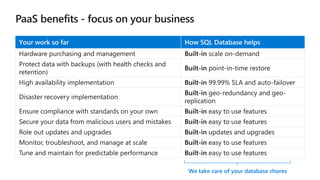
We take care of your database chores
Your work so far How SQL Database helps
Hardware purchasing and management Built-in scale on-demand
Protect data with backups (with health checks and
retention)
Built-in point-in-time restore
High availability implementation Built-in 99.99% SLA and auto-failover
Disaster recovery implementation
Built-in geo-redundancy and geo-
replication
Ensure compliance with standards on your own Built-in easy to use features
Secure your data from malicious users and mistakes Built-in easy to use features
Role out updates and upgrades Built-in updates and upgrades
Monitor, troubleshoot, and manage at scale Built-in easy to use features
Tune and maintain for predictable performance Built-in easy to use features
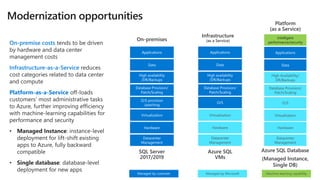
Managed by MicrosoftManaged by customer
On-premises
Datacenter
Management
Hardware
O/S provision
/patching
Database Provision/
Patch/Scaling
Virtualization
Data
Applications
High availability
/DR/Backups
SQL Server
2017/2019
Infrastructure
(as a Service)
Datacenter
Management
Hardware
Virtualization
O/S
Database Provision/
Patch/Scaling
Data
Applications
High availability
/DR/Backups
Azure SQL
VMs
Platform
(as a Service)
Data
Applications
Datacenter
Management
Hardware
Virtualization
O/S
Database Provision/
Patch/Scaling
High Availability/
DR/Backups
Azure SQL Database
(Managed Instance,
Single DB)
On-premise costs tends to be driven
by hardware and data center
management costs
Infrastructure-as-a-Service reduces
cost categories related to data center
and compute
Platform-as-a-Service off-loads
customers’ most administrative tasks
to Azure, further improving efficiency
with machine-learning capabilities for
performance and security
• Managed Instance: instance-level
deployment for lift-shift existing
apps to Azure, fully backward
compatible
• Single database: database-level
deployment for new apps
Intelligent
performance/security
Machine-learning capability
•
•
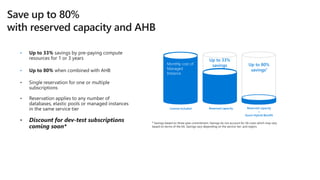
License included Reserved capacity
Up to 33%
savingsMonthly cost of
Managed
Instance
Reserved capacity
+
Azure Hybrid Benefit
Up to 80%
savings1
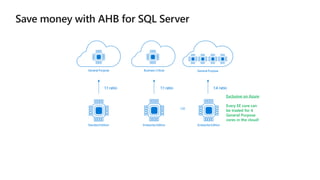
OR
General Purpose
Enterprise Edition
1:4 ratio
Business Critical
Enterprise Edition
1:1 ratio
General Purpose
Standard Edition
1:1 ratio
Exclusive on Azure
Every EE core can
be traded for 4
General Purpose
cores in the cloud!
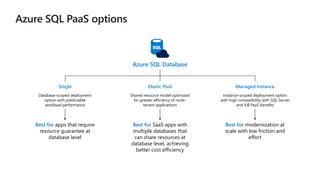
Azure SQL Database
Database-scoped deployment
option with predictable
workload performance
Shared resource model optimized
for greater efficiency of multi-
tenant applications
Best for apps that require
resource guarantee at
database level
Best for SaaS apps with
multiple databases that
can share resources at
database level, achieving
better cost efficiency
Best for modernization at
scale with low friction and
effort
Elastic PoolSingle Managed Instance
Instance-scoped deployment option
with high compatibility with SQL Server
and full PaaS benefits
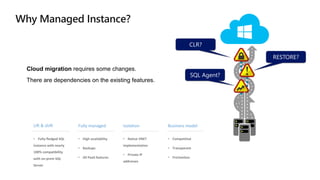
Cloud migration requires some changes.
There are dependencies on the existing features.
SQL Agent?
RESTORE?
CLR?
• Fully-fledged SQL
instance with nearly
100% compatibility
with on-prem SQL
Server
• High availability
• Backups
• All PaaS features
• Native VNET
implementation
• Private IP
addresses
• Competitive
• Transparent
• Frictionless
Lift & shift Fully managed Isolation Business model
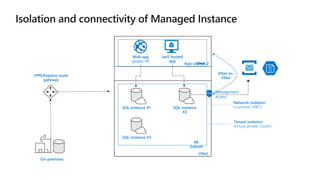
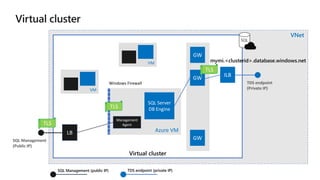
Virtual cluster
VNet
Azure VM
TDS endpoint
(Private IP)
SQL Server
DB Engine
Management
Agent
LB
ILB
GW
GW
GW
mymi.<clusterid>.database.windows.net
TLS
TLS
TLS
Windows Firewall
SQL Management
(Public IP)
VM
VM
SQL Management (public IP) TDS endpoint (private IP)
SQL
Instance configuration
Demo
Service tiers
General Purpose
Business Critical
HyperScale (future)
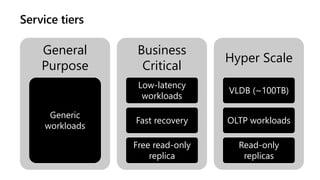
General
Purpose
Generic
workloads
Business
Critical
Low-latency
workloads
Fast recovery
Free read-only
replica
Hyper Scale
VLDB (~100TB)
OLTP workloads
Read-only
replicas
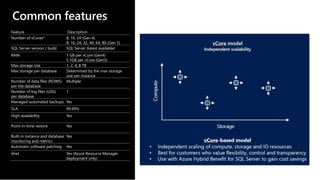
Common features
Feature Description
Number of vCores* 8, 16, 24 (Gen 4)
8, 16, 24, 32, 40, 64, 80 (Gen 5)
SQL Server version / build SQL Server (latest available)
RAM 7 GB per vCore (Gen4)
5.1GB per vCore (Gen5)
Max storage size 1, 2, 4, 8 TB
Max storage per database Determined by the max storage
size per instance
Number of data files (ROWS)
per the database
Multiple
Number of log files (LOG)
per database
1
Managed automated backups Yes
SLA 99.99%
High-availability Yes
Point-in-time restore Yes
Built-in instance and database
monitoring and metrics
Yes
Automatic software patching Yes
Vnet Yes (Azure Resource Manager
deployment only)
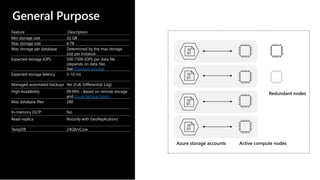
General Purpose
Feature Description
Min storage size 32 GB
Max storage size 8 TB
Max storage per database Determined by the max storage
size per instance
Expected storage IOPS 500-7500 IOPS per data file
(depends on data file).
See Premium Storage
Expected storage latency 5-10 ms
Managed automated backups Yes (Full, Differential, Log)
High Availability 99.99% - Based on remote storage
and Azure Service Fabric
Max database files 280
In-memory OLTP No
Read-replica No(only with GeoReplication)
TempDB 24GB/vCore
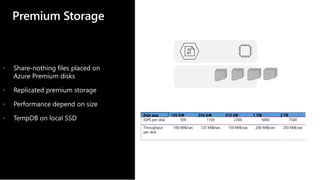
Premium Storage
Disk size 128 GiB 256 GiB 512 GB 1 TiB 2 TB
IOPS per disk 500 1100 2300 5000 7500
Throughput
per disk
100 MiB/sec 125 MiB/sec 150 MiB/sec 200 MiB/sec 250 MiB/sec
 Share-nothing files placed on
Azure Premium disks
 Replicated premium storage
 Performance depend on size
 TempDB on local SSD
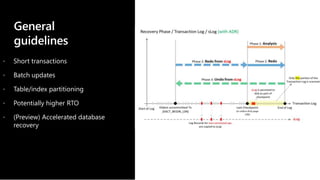
General
guidelines
 Short transactions
 Batch updates
 Table/index partitioning
 Potentially higher RTO
 (Preview) Accelerated database
recovery
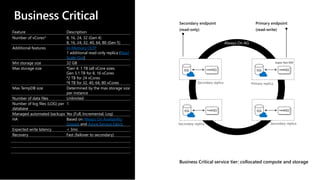
Business Critical
Feature Description
Number of vCores* 8, 16, 24, 32 (Gen 4)
8, 16, 24, 32, 40, 64, 80 (Gen 5)
Additional features In-Memory OLTP
1 additional read-only replica (Read
Scale-Out)
Min storage size 32 GB
Max storage size •Gen 4: 1 TB (all vCore sizes
Gen 5:1 TB for 8, 16 vCores
•2 TB for 24 vCores
•4 TB for 32, 40, 64, 80 vCores
Max TempDB size Determined by the max storage size
per instance
Number of data files Unlimited
Number of log files (LOG) per
database
1
Managed automated backups Yes (Full, Incremental, Log)
HA Based on Always On Availability
Groups and Azure Service Fabric
Expected write latency < 3ms
Recovery Fast (failover to secondary)
Business Critical service tier: collocated compute and storage
Always On AG
SQL
SQL
SQL
SQL
Super-fast SSD
Secondary replica Primary replica
Secondary replicaSecondary replica
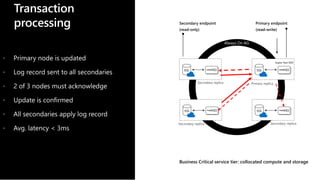
Transaction
processing
Business Critical service tier: collocated compute and storage
Always On AG
SQL
SQL
SQL
SQL
Super-fast SSD
Secondary replica Primary replica
Secondary replicaSecondary replica
 Primary node is updated
 Log record sent to all secondaries
 2 of 3 nodes must acknowledge
 Update is confirmed
 All secondaries apply log record
 Avg. latency < 3ms
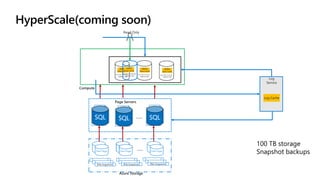
Data PagesData Pages
File Snapshots File Snapshots File Snapshots
Log Cache
Log
Service
Data PagesData Pages
SQL SQL SQL
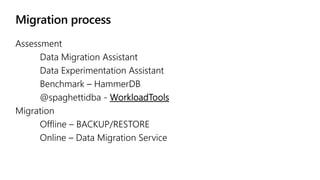
Migration to
Managed Instance
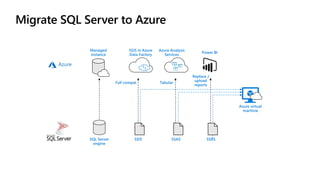
DMA, RESTORE, DMS
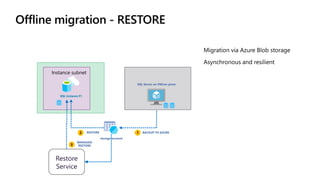
Instance subnet
SQL Instance #1
storage account
RESTORE 12 BACKUP TO AZURE
SQL Server on VM/on-prem
Restore
Service
3
MANAGED
RESTORE
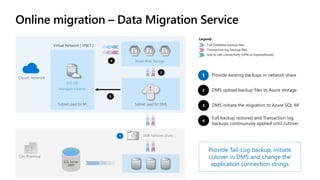
Subnet used for MI Subnet used for DMS
On-Premise
Cloud network
SQL DB
Managed Instance
Azure Blob Storage
SMB Network Share
Provide Tail-Log backup, initiate
cutover in DMS and change the
application connection strings
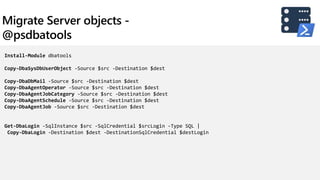
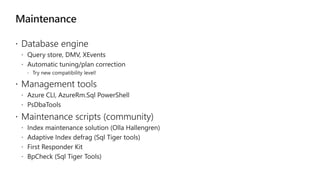
Install-Module dbatools
Copy-DbaSysDbUserObject -Source $src -Destination $dest
Copy-DbaDbMail -Source $src -Destination $dest
Copy-DbaAgentOperator -Source $src -Destination $dest
Copy-DbaAgentJobCategory -Source $src -Destination $dest
Copy-DbaAgentSchedule -Source $src -Destination $dest
Copy-DbaAgentJob -Source $src -Destination $dest
Get-DbaLogin -SqlInstance $src -SqlCredential $srcLogin -Type SQL |
Copy-DbaLogin -Destination $dest -DestinationSqlCredential $destLogin
Migration to
Managed Instance
Demo
Maintenance and monitoring
What to do after migration?
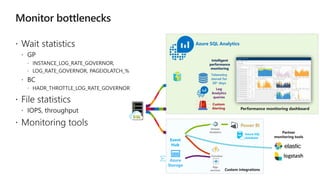
Azure SQL Analytics
Performance monitoring dashboard
Telemetry
stored for
30* days
Custom
Alerting
Azure
Storage
Event
Hub
Azure SQL
database
Stream
Analytics
Function
s
App
services Custom integrations
Intelligent
performance
monitoring
Partner
monitoring tools
Log
Analytics
queries
Monitoring
Demo
Data Never Rests.
Neither do you.
Time to learn.
aka.ms/DataAccessGuide

Azure SQL Managed Instance - SqlBits 2019

  • 1.
    Azure SQL ManagedInstance Deep dive Jovan Popovic Program Manager, Azure Data
  • 3.
  • 4.
    We take careof your database chores Your work so far How SQL Database helps Hardware purchasing and management Built-in scale on-demand Protect data with backups (with health checks and retention) Built-in point-in-time restore High availability implementation Built-in 99.99% SLA and auto-failover Disaster recovery implementation Built-in geo-redundancy and geo- replication Ensure compliance with standards on your own Built-in easy to use features Secure your data from malicious users and mistakes Built-in easy to use features Role out updates and upgrades Built-in updates and upgrades Monitor, troubleshoot, and manage at scale Built-in easy to use features Tune and maintain for predictable performance Built-in easy to use features
  • 5.
    Managed by MicrosoftManagedby customer On-premises Datacenter Management Hardware O/S provision /patching Database Provision/ Patch/Scaling Virtualization Data Applications High availability /DR/Backups SQL Server 2017/2019 Infrastructure (as a Service) Datacenter Management Hardware Virtualization O/S Database Provision/ Patch/Scaling Data Applications High availability /DR/Backups Azure SQL VMs Platform (as a Service) Data Applications Datacenter Management Hardware Virtualization O/S Database Provision/ Patch/Scaling High Availability/ DR/Backups Azure SQL Database (Managed Instance, Single DB) On-premise costs tends to be driven by hardware and data center management costs Infrastructure-as-a-Service reduces cost categories related to data center and compute Platform-as-a-Service off-loads customers’ most administrative tasks to Azure, further improving efficiency with machine-learning capabilities for performance and security • Managed Instance: instance-level deployment for lift-shift existing apps to Azure, fully backward compatible • Single database: database-level deployment for new apps Intelligent performance/security Machine-learning capability
  • 6.
    • • License included Reservedcapacity Up to 33% savingsMonthly cost of Managed Instance Reserved capacity + Azure Hybrid Benefit Up to 80% savings1
  • 7.
    OR General Purpose Enterprise Edition 1:4ratio Business Critical Enterprise Edition 1:1 ratio General Purpose Standard Edition 1:1 ratio Exclusive on Azure Every EE core can be traded for 4 General Purpose cores in the cloud!
  • 8.
    Azure SQL Database Database-scopeddeployment option with predictable workload performance Shared resource model optimized for greater efficiency of multi- tenant applications Best for apps that require resource guarantee at database level Best for SaaS apps with multiple databases that can share resources at database level, achieving better cost efficiency Best for modernization at scale with low friction and effort Elastic PoolSingle Managed Instance Instance-scoped deployment option with high compatibility with SQL Server and full PaaS benefits
  • 9.
    Cloud migration requiressome changes. There are dependencies on the existing features. SQL Agent? RESTORE? CLR? • Fully-fledged SQL instance with nearly 100% compatibility with on-prem SQL Server • High availability • Backups • All PaaS features • Native VNET implementation • Private IP addresses • Competitive • Transparent • Frictionless Lift & shift Fully managed Isolation Business model
  • 12.
    Virtual cluster VNet Azure VM TDSendpoint (Private IP) SQL Server DB Engine Management Agent LB ILB GW GW GW mymi.<clusterid>.database.windows.net TLS TLS TLS Windows Firewall SQL Management (Public IP) VM VM SQL Management (public IP) TDS endpoint (private IP) SQL
  • 17.
  • 18.
    Service tiers General Purpose BusinessCritical HyperScale (future)
  • 19.
  • 20.
    Common features Feature Description Numberof vCores* 8, 16, 24 (Gen 4) 8, 16, 24, 32, 40, 64, 80 (Gen 5) SQL Server version / build SQL Server (latest available) RAM 7 GB per vCore (Gen4) 5.1GB per vCore (Gen5) Max storage size 1, 2, 4, 8 TB Max storage per database Determined by the max storage size per instance Number of data files (ROWS) per the database Multiple Number of log files (LOG) per database 1 Managed automated backups Yes SLA 99.99% High-availability Yes Point-in-time restore Yes Built-in instance and database monitoring and metrics Yes Automatic software patching Yes Vnet Yes (Azure Resource Manager deployment only)
  • 21.
    General Purpose Feature Description Minstorage size 32 GB Max storage size 8 TB Max storage per database Determined by the max storage size per instance Expected storage IOPS 500-7500 IOPS per data file (depends on data file). See Premium Storage Expected storage latency 5-10 ms Managed automated backups Yes (Full, Differential, Log) High Availability 99.99% - Based on remote storage and Azure Service Fabric Max database files 280 In-memory OLTP No Read-replica No(only with GeoReplication) TempDB 24GB/vCore
  • 22.
    Premium Storage Disk size128 GiB 256 GiB 512 GB 1 TiB 2 TB IOPS per disk 500 1100 2300 5000 7500 Throughput per disk 100 MiB/sec 125 MiB/sec 150 MiB/sec 200 MiB/sec 250 MiB/sec  Share-nothing files placed on Azure Premium disks  Replicated premium storage  Performance depend on size  TempDB on local SSD
  • 23.
    General guidelines  Short transactions Batch updates  Table/index partitioning  Potentially higher RTO  (Preview) Accelerated database recovery
  • 24.
    Business Critical Feature Description Numberof vCores* 8, 16, 24, 32 (Gen 4) 8, 16, 24, 32, 40, 64, 80 (Gen 5) Additional features In-Memory OLTP 1 additional read-only replica (Read Scale-Out) Min storage size 32 GB Max storage size •Gen 4: 1 TB (all vCore sizes Gen 5:1 TB for 8, 16 vCores •2 TB for 24 vCores •4 TB for 32, 40, 64, 80 vCores Max TempDB size Determined by the max storage size per instance Number of data files Unlimited Number of log files (LOG) per database 1 Managed automated backups Yes (Full, Incremental, Log) HA Based on Always On Availability Groups and Azure Service Fabric Expected write latency < 3ms Recovery Fast (failover to secondary) Business Critical service tier: collocated compute and storage Always On AG SQL SQL SQL SQL Super-fast SSD Secondary replica Primary replica Secondary replicaSecondary replica
  • 25.
    Transaction processing Business Critical servicetier: collocated compute and storage Always On AG SQL SQL SQL SQL Super-fast SSD Secondary replica Primary replica Secondary replicaSecondary replica  Primary node is updated  Log record sent to all secondaries  2 of 3 nodes must acknowledge  Update is confirmed  All secondaries apply log record  Avg. latency < 3ms
  • 26.
    Data PagesData Pages FileSnapshots File Snapshots File Snapshots Log Cache Log Service Data PagesData Pages SQL SQL SQL
  • 27.
  • 29.
    Instance subnet SQL Instance#1 storage account RESTORE 12 BACKUP TO AZURE SQL Server on VM/on-prem Restore Service 3 MANAGED RESTORE
  • 30.
    Subnet used forMI Subnet used for DMS On-Premise Cloud network SQL DB Managed Instance Azure Blob Storage SMB Network Share Provide Tail-Log backup, initiate cutover in DMS and change the application connection strings
  • 31.
    Install-Module dbatools Copy-DbaSysDbUserObject -Source$src -Destination $dest Copy-DbaDbMail -Source $src -Destination $dest Copy-DbaAgentOperator -Source $src -Destination $dest Copy-DbaAgentJobCategory -Source $src -Destination $dest Copy-DbaAgentSchedule -Source $src -Destination $dest Copy-DbaAgentJob -Source $src -Destination $dest Get-DbaLogin -SqlInstance $src -SqlCredential $srcLogin -Type SQL | Copy-DbaLogin -Destination $dest -DestinationSqlCredential $destLogin
  • 33.
  • 34.
    Maintenance and monitoring Whatto do after migration?
  • 36.
    Azure SQL Analytics Performancemonitoring dashboard Telemetry stored for 30* days Custom Alerting Azure Storage Event Hub Azure SQL database Stream Analytics Function s App services Custom integrations Intelligent performance monitoring Partner monitoring tools Log Analytics queries
  • 37.
  • 38.
    Data Never Rests. Neitherdo you. Time to learn. aka.ms/DataAccessGuide

Editor's Notes

  • #2  https://teams.microsoft.com/_#/pptx/viewer/teams/https%3A~2F~2Fmicrosoft.sharepoint.com~2Fteams~2FSQLServerAdoption~2FShared%20Documents~2FEvents~2FSQL%20BITS%202019~2FSQL%20BITS%20Keynote.pptx?threadId=19%3A9a2925e61e144e02b7b9cb8b4fc7573a%40thread.skype&baseUrl=https%3A~2F~2Fmicrosoft.sharepoint.com~2Fteams~2FSQLServerAdoption&fileId=B3A4C6C5-7319-452C-BFB5-AC116827EE2A&ctx=files&viewerAction=view Keynote – The Future of the Data Professional Introduction – use new team as overview (Buck) - New SQL Server Features – Bob (Demo SQL Linux, etc) - Hybrid Data Platform - Alaine (Demo MI) Big Data – Buck (Demo BDC/Spark) ML and AI with new Languages - Anna (Demo Java, Python or R) - BI - [guys]^3 (Demo PBI and BI improvements ) - Close out and send-off to specific sessions (Bob)
  • #4 Keynote – What's Next for the Data Professional - Introduction – use new team as overview (Buck) - New SQL Server Features – Bob (Demo SQL Linux, etc) - Hybrid Data Platform - Alaine (Demo MI) - ML and AI with new Languages - Anna (Demo Java, Python or R) - Big Data – Buck (Demo BDC/Spark) - BI - [guys]^3 (Demo PBI and BI improvements - The Azure Data Platform all-up (Buck, Alaine) - Close out and send-off to specific sessions (Bob)
  • #5 In addition to the built-in intelligence, Azure SQL Database is a fully-managed service, which means Microsoft operates SQL Server for customers and ensures availability and performance. Features that come with SQL Database include, but are not limited to: provisioning and resizing (w/ Azure Portal experience), built-in auto HA (99.99%), automatic backup, point-in-time-restore (database-level), and active geo-replication. Because Microsoft assumes much of the daily maintenance, administration and infrastructure costs, your customer’s IT organization can quickly realize cost and operational benefits that they may not have otherwise experienced with their on-premises or hosted solution. In fact, Microsoft commissioned a study with Forrester Consulting that found that organizations who modernized their databases from SQL Server to SQL Database Managed Instance realized up to a 212% ROI over three years.1 1The Total Economic Impact of Microsoft Azure SQL Database Managed Instance, Forrester Consulting, September 2018
  • #9 Introducing Azure SQL Database Managed Instance SQL Database Managed Instance is an expansion of the existing SQL Database service designed to enable database migration to a fully-managed database service, without re-designing the application. It’s important to note that Managed Instance isn’t a new service – it is a third resource type within Azure SQL Database, sitting alongside single databases and elastic pools. As part of Azure SQL Database, Microsoft’s fully managed cloud database service, it inherits all its built-in features. Each standalone database is assigned a certain amount of resources via performance tiers: Basic, Standard, and Premium. The emphasis of this offering focuses on a simplified database-scoped programming model and applications with a predictable pattern and relatively stable workload. An elastic database pool is a shared resource model that enables higher resource utilization efficiency, and all the databases within an elastic pool share predefined resources within the same pool. The emphasis of this offering is on a simplified database-scoped programming model for multi-tenant SaaS apps. The workload pattern is well-defined and is highly cost-effective in multi-tenant scenarios. For ISVs with SaaS apps, the savings can be significant, in the hundreds of thousands of dollars or more. A SQL Database Managed Instance offers a simplified instance-scoped programming model that is like an on-premises SQL Server instance. The databases in a SQL Database Managed Instance share the resources allocated to the Managed Instance, and the Managed Instance also represents the management grouping for these databases. The emphasis of this offering is on high compatibility with the programming model of an on-premises SQL Server and out-of-box support for a large majority of SQL Server features and accompanying tools/services.
  • #11 See https://docs.microsoft.com/en-gb/azure/sql-database/sql-database-managed-instance-connectivity-architecture Key points: Enable full isolation from other tenants without resource sharing Promote secure communication over private IP addresses with native VNET integration Enable your on-premise identities on cloud instances, through integration with Azure Active Directory and AD Connect To two levels of isolation are provided: Cluster (tenant ring) level: Managed Instances for a tenant are fully isolated from other tenants. No connectivity or resource sharing is possible between different tenants. Networking level: joining instances to a subnet in a VNET and restricting access to private IP addresses only provides full isolation from public Internet. SQL Database Managed Instance provides complete workload isolation of your workloads through native VNET support. We use virtual data clusters to describe the degree of isolation that customer workloads will experience with SQL Database Managed Instance. During service provisioning (on Azure Portal or through REST API), you can choose the virtual network (VNET) and the subnet to achieve full networking isolation for your Managed Instances. Once created, instances in the VNET can be reached using Azure networking mechanisms (VPN and Express Route gateways).
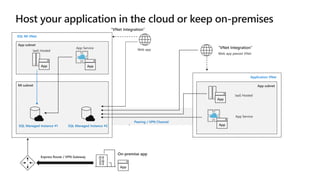
  • #12 Key point(s) You may choose to host application in the cloud either by using Azure App Service or some of Azure's virtual network (VNet) integrated options like Azure App Service Environment, Virtual Machine, Virtual Machine Scale Set. You could also take hybrid cloud approach and keep your applications on-premises. https://docs.microsoft.com/en-us/azure/sql-database/sql-database-managed-instance-connect-app Azure resources can communicate privately with each other through an Azure Virtual Network (VNet). A VNet is a logical isolation of the Azure cloud dedicated to your subscription. You can implement multiple VNets within each Azure subscription and Azure region. Each VNet is isolated from other VNets. You can connect Vnets to each other, enabling resources connected to either Vnet to communicate with each other across VNets https://docs.microsoft.com/en-us/azure/virtual-network/virtual-networks-overview?toc=%2fazure%2fnetworking%2ftoc.json Peering Enables resources connected to different Azure Vnets within the same region to communicate with each other https://docs.microsoft.com/en-us/azure/virtual-network/virtual-network-peering-overview?toc=%2fazure%2fnetworking%2ftoc.json VPN Gateway Enables resources connected to different Azure Vnets within different Azure region to communicate with each other https://docs.microsoft.com/en-us/azure/vpn-gateway/vpn-gateway-howto-vnet-vnet-resource-manager-portal?toc=%2fazure%2fnetworking%2ftoc.json
  • #18 Show how easy it is to provision Hyperscale. Just like any other Azure services Show point in time restore of 50TB
  • #19 Keynote – What's Next for the Data Professional - Introduction – use new team as overview (Buck) - New SQL Server Features – Bob (Demo SQL Linux, etc) - Hybrid Data Platform - Alaine (Demo MI) - ML and AI with new Languages - Anna (Demo Java, Python or R) - Big Data – Buck (Demo BDC/Spark) - BI - [guys]^3 (Demo PBI and BI improvements - The Azure Data Platform all-up (Buck, Alaine) - Close out and send-off to specific sessions (Bob)
  • #38 Keynote – What's Next for the Data Professional - Introduction – use new team as overview (Buck) - New SQL Server Features – Bob (Demo SQL Linux, etc) - Hybrid Data Platform - Alaine (Demo MI) - ML and AI with new Languages - Anna (Demo Java, Python or R) - Big Data – Buck (Demo BDC/Spark) - BI - [guys]^3 (Demo PBI and BI improvements - The Azure Data Platform all-up (Buck, Alaine) - Close out and send-off to specific sessions (Bob)
  • #39 Keynote – What's Next for the Data Professional  - Introduction – use new team as overview (Buck)   - New SQL Server Features – Bob (Demo SQL Linux, etc)   - Hybrid Data Platform - Alaine (Demo MI)   - ML and AI with new Languages - Anna (Demo Java, Python or R)   - Big Data – Buck (Demo BDC/Spark)   - BI - [guys]^3 (Demo PBI and BI improvements   - Close out and send-off to specific sessions (Bob)