Developing Azure Solution
In Developer Prespectives
Riza Oktavian
Client Development Specialist | Microsoft Innovation Center
Yogyakarta, Indonesia
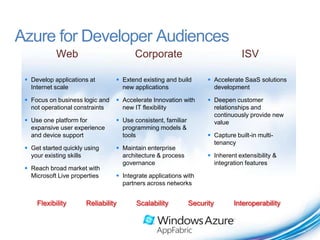
Azure for Developer Audiences
            Web                        Corporate                                ISV

  Develop applications at        Extend existing and build         Accelerate SaaS solutions
   Internet scale                  new applications                   development

  Focus on business logic and    Accelerate Innovation with        Deepen customer
   not operational constraints     new IT flexibility                 relationships and
                                                                      continuously provide new
  Use one platform for           Use consistent, familiar           value
   expansive user experience       programming models &
   and device support              tools                             Capture built-in multi-
                                                                      tenancy
  Get started quickly using      Maintain enterprise
   your existing skills            architecture & process            Inherent extensibility &
                                   governance                         integration features
  Reach broad market with
   Microsoft Live properties      Integrate applications with
                                   partners across networks


     Flexibility       Reliability      Scalability           Security       Interoperability
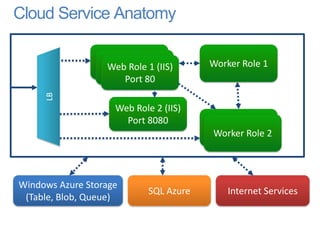
Cloud Service Anatomy

                  Web Role
                  Web Role 1 (IIS)      Worker Role 1
                   Web Role
                     Port 80
     LB


                    Web Role 2 (IIS)
                      Port 8080
                                        Worker Role 2
                                        Worker Role 2


Windows Azure Storage
                            SQL Azure       Internet Services
 (Table, Blob, Queue)
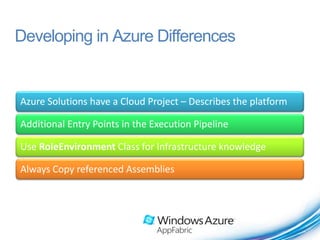
Developing in Azure Differences


Azure Solutions have a Cloud Project – Describes the platform

Additional Entry Points in the Execution Pipeline

Use RoleEnvironment Class for Infrastructure knowledge

Always Copy referenced Assemblies
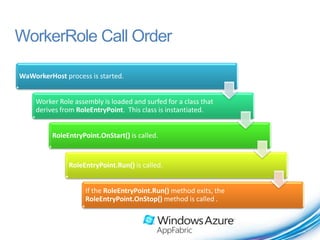
WorkerRole Call Order

WaWorkerHost process is started.


     Worker Role assembly is loaded and surfed for a class that
     derives from RoleEntryPoint. This class is instantiated.


          RoleEntryPoint.OnStart() is called.


               RoleEntryPoint.Run() is called.


                     If the RoleEntryPoint.Run() method exits, the
                     RoleEntryPoint.OnStop() method is called .
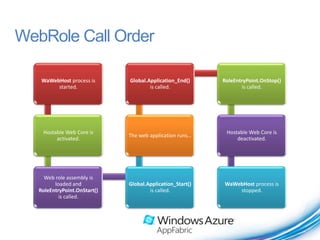
WebRole Call Order

    WaWebHost process is      Global.Application_End()     RoleEntryPoint.OnStop()
         started.                     is called.                  is called.


    Hostable Web Core is                                    Hostable Web Core is
                              The web application runs…
         activated.                                             deactivated.


     Web role assembly is
         loaded and           Global.Application_Start()   WaWebHost process is
   RoleEntryPoint.OnStart()           is called.               stopped.
           is called.
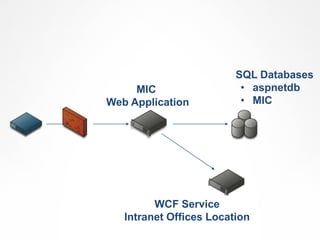
SQL Databases
     MIC                  • aspnetdb
Web Application           • MIC


         WCF Service
   Intranet Offices Location
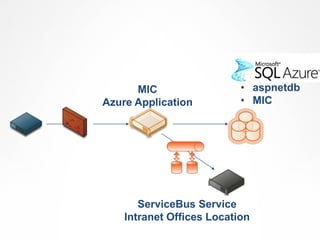
SQL Databases
      MIC                  • aspnetdb
Azure Application          • MIC


       ServiceBus Service
    Intranet Offices Location
Demo
         Porting the Web into Azure Application


PAGE 9
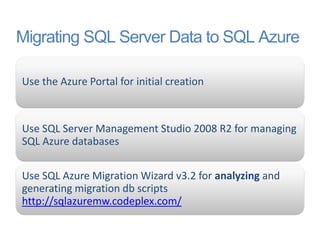
Migrating SQL Server Data to SQL Azure

Use the Azure Portal for initial creation


Use SQL Server Management Studio 2008 R2 for managing
SQL Azure databases

Use SQL Azure Migration Wizard v3.2 for analyzing and
generating migration db scripts
http://sqlazuremw.codeplex.com/
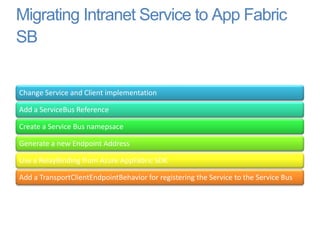
Migrating Intranet Service to App Fabric
SB


Change Service and Client implementation

Add a ServiceBus Reference

Create a Service Bus namepsace

Generate a new Endpoint Address

Use a RelayBinding from Azure AppFabric SDK

Add a TransportClientEndpointBehavior for registering the Service to the Service Bus
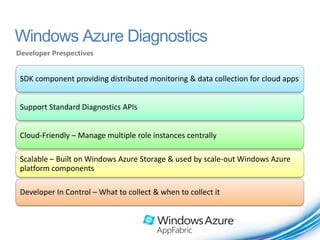
Windows Azure Diagnostics
Developer Prespectives


 SDK component providing distributed monitoring & data collection for cloud apps


 Support Standard Diagnostics APIs


 Cloud-Friendly – Manage multiple role instances centrally

 Scalable – Built on Windows Azure Storage & used by scale-out Windows Azure
 platform components

 Developer In Control – What to collect & when to collect it
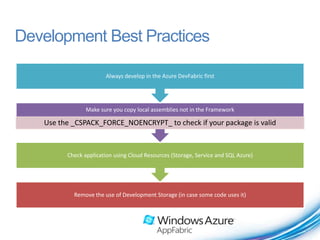
Development Best Practices

                       Always develop in the Azure DevFabric first


                Make sure you copy local assemblies not in the Framework

   Use the _CSPACK_FORCE_NOENCRYPT_ to check if your package is valid


         Check application using Cloud Resources (Storage, Service and SQL Azure)


           Remove the use of Development Storage (in case some code uses it)
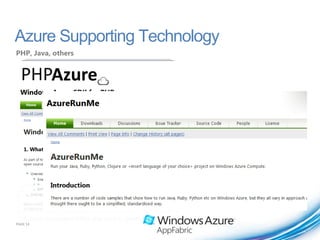
Azure Supporting Technology
PHP, Java, others


PAGE 14
Conclusion
Azure gives us fexibility in development
•   Specific Development API in Azure
•   Casual Development Scenario
•   Development Best Practices
•   Technology Supports in Azure
Thank you.


  © 2010 Microsoft Corporation. All rights reserved. Microsoft, Windows, Internet Explorer and other product names are or may be registered trademarks and/or trademarks in the U.S. and/or other countries.
  The information herein is for informational purposes only and represents the current view of Microsoft Corporation as of the date of this presentation. Because Microsoft must respond to changing market
       conditions, it should not be interpreted to be a commitment on the part of Microsoft, and Microsoft cannot guarantee the accuracy of any information provided after the date of this presentation.
                                           MICROSOFT MAKES NO WARRANTIES, EXPRESS, IMPLIED OR STATUTORY, AS TO THE INFORMATION IN THIS PRESENTATION.

Azure in Developer Perspective

  • 1.
    Developing Azure Solution InDeveloper Prespectives Riza Oktavian Client Development Specialist | Microsoft Innovation Center Yogyakarta, Indonesia
  • 2.
    Azure for DeveloperAudiences Web Corporate ISV  Develop applications at  Extend existing and build  Accelerate SaaS solutions Internet scale new applications development  Focus on business logic and  Accelerate Innovation with  Deepen customer not operational constraints new IT flexibility relationships and continuously provide new  Use one platform for  Use consistent, familiar value expansive user experience programming models & and device support tools  Capture built-in multi- tenancy  Get started quickly using  Maintain enterprise your existing skills architecture & process  Inherent extensibility & governance integration features  Reach broad market with Microsoft Live properties  Integrate applications with partners across networks Flexibility Reliability Scalability Security Interoperability
  • 3.
    Cloud Service Anatomy Web Role Web Role 1 (IIS) Worker Role 1 Web Role Port 80 LB Web Role 2 (IIS) Port 8080 Worker Role 2 Worker Role 2 Windows Azure Storage SQL Azure Internet Services (Table, Blob, Queue)
  • 4.
    Developing in AzureDifferences Azure Solutions have a Cloud Project – Describes the platform Additional Entry Points in the Execution Pipeline Use RoleEnvironment Class for Infrastructure knowledge Always Copy referenced Assemblies
  • 5.
    WorkerRole Call Order WaWorkerHostprocess is started. Worker Role assembly is loaded and surfed for a class that derives from RoleEntryPoint. This class is instantiated. RoleEntryPoint.OnStart() is called. RoleEntryPoint.Run() is called. If the RoleEntryPoint.Run() method exits, the RoleEntryPoint.OnStop() method is called .
  • 6.
    WebRole Call Order WaWebHost process is Global.Application_End() RoleEntryPoint.OnStop() started. is called. is called. Hostable Web Core is Hostable Web Core is The web application runs… activated. deactivated. Web role assembly is loaded and Global.Application_Start() WaWebHost process is RoleEntryPoint.OnStart() is called. stopped. is called.
  • 7.
    SQL Databases MIC • aspnetdb Web Application • MIC WCF Service Intranet Offices Location
  • 8.
    SQL Databases MIC • aspnetdb Azure Application • MIC ServiceBus Service Intranet Offices Location
  • 9.
    Demo Porting the Web into Azure Application PAGE 9
  • 10.
    Migrating SQL ServerData to SQL Azure Use the Azure Portal for initial creation Use SQL Server Management Studio 2008 R2 for managing SQL Azure databases Use SQL Azure Migration Wizard v3.2 for analyzing and generating migration db scripts http://sqlazuremw.codeplex.com/
  • 11.
    Migrating Intranet Serviceto App Fabric SB Change Service and Client implementation Add a ServiceBus Reference Create a Service Bus namepsace Generate a new Endpoint Address Use a RelayBinding from Azure AppFabric SDK Add a TransportClientEndpointBehavior for registering the Service to the Service Bus
  • 12.
    Windows Azure Diagnostics DeveloperPrespectives SDK component providing distributed monitoring & data collection for cloud apps Support Standard Diagnostics APIs Cloud-Friendly – Manage multiple role instances centrally Scalable – Built on Windows Azure Storage & used by scale-out Windows Azure platform components Developer In Control – What to collect & when to collect it
  • 13.
    Development Best Practices Always develop in the Azure DevFabric first Make sure you copy local assemblies not in the Framework Use the _CSPACK_FORCE_NOENCRYPT_ to check if your package is valid Check application using Cloud Resources (Storage, Service and SQL Azure) Remove the use of Development Storage (in case some code uses it)
  • 14.
  • 15.
    Conclusion Azure gives usfexibility in development • Specific Development API in Azure • Casual Development Scenario • Development Best Practices • Technology Supports in Azure
  • 16.
    Thank you. © 2010 Microsoft Corporation. All rights reserved. Microsoft, Windows, Internet Explorer and other product names are or may be registered trademarks and/or trademarks in the U.S. and/or other countries. The information herein is for informational purposes only and represents the current view of Microsoft Corporation as of the date of this presentation. Because Microsoft must respond to changing market conditions, it should not be interpreted to be a commitment on the part of Microsoft, and Microsoft cannot guarantee the accuracy of any information provided after the date of this presentation. MICROSOFT MAKES NO WARRANTIES, EXPRESS, IMPLIED OR STATUTORY, AS TO THE INFORMATION IN THIS PRESENTATION.