How toWinWhen
Migrating toAzure
Migrating with Success
Kellyn Gorman, SME Engineer for Oracle on
Azure
Microsoft
Kellyn Gorman
 Engineer in Customer Success, SME for Oracle onAzure
 23 years Oracle and SQL Server experience
 Instructor on Linux and DevOps
 Previous president of both Rocky Mtn Oracle User Group and
Denver SQL Server User Group
 Author of several books on Oracle and Microsoft technology, plus
a couple on diversity and inclusion
 Presenter on database, optimization and automation at various
conferences in the world.
 Meetup owner over Girl Geek Dinners Denver and Several STEM
groups
Thank you-
 Thank you for the being here today!
 Thank you to the PASS DatabaseVirtual Chapter
 Please ask questions throughout the session and I’ll try to answer
them, may hold them to the end, if it makes sense.
 My contact info will be provided at the end.
 The slides will be uploaded and available- there’s A LOT of links
for deeper information on all the content I will be covering.
WhyMigrate to the
Cloud
 Get rid of the datacenter
 Scalability
 Pay for what’s used
 Easier access to resources
 More agile infrastructure
 Going to the cloud will not
grant you massive savings.
Azure Data
Platform
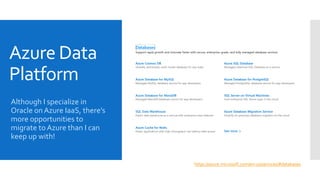
Although I specialize in
Oracle on Azure IaaS, there’s
more opportunities to
migrate to Azure than I can
keep up with!
https://azure.microsoft.com/en-us/services/#databases
Azure
Database 101
 What is Azure Infrastructure as a Service, (IaaS)?
 What is Azure Platform as a Service, (PaaS)?
 What Azure SQL Database ServiceTiers are there?
 How do I find the main information about Azure Databases?
 UnderstandingAzure Single Databases and Elastic Pools.
 What is an Azure SQL Managed Instance?
 Main How-to Guides for Azure Databases.
 Where do I find the Azure Roadmap for the future of Databases?
Oracle on
Azure
 Oracle to PostgreSQL- 10%
 Oracle Cloud Infrastructure, (OCI) and Azure
Interconnect- 10%
 Oracle to Azure IaaS- 80%
 Yeah, I’m the last one, btw
Oracle
Workloads to
Azure
Lift and Shift theWorkload, not the hardware
Use the Oracle sizing tool withAutomaticWorkload
Repository, (AWR) reports to ensure sizing is correct.
Don’t combine upgrades with migrations and
architect for the cloud.
Separate sizing from optimizing
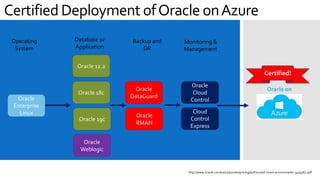
Certified Deployment ofOracle onAzure
Oracle
Enterprise
Linux
Oracle 12.2
Oracle
DataGuard
Oracle
RMAN
Oracle
Weblogic
Oracle
Cloud
Control
Operating
System
Database or
Application
Monitoring &
Management
Backup and
DR
Oracle 18c
Oracle 19c
Cloud
Control
Express
Oracle on
http://www.oracle.com/us/corporate/pricing/authorized-cloud-environments-3493562.pdf
Certified!
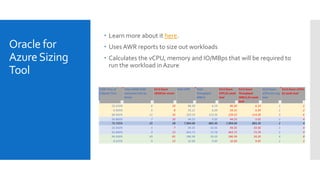
Oracle for
AzureSizing
Tool
 Learn more about it here.
 Uses AWR reports to size out workloads
 Calculates the vCPU, memory and IO/MBps that will be required to
run the workload in Azure
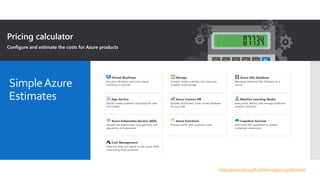
SimpleAzure
Estimates
https://azure.microsoft.com/en-us/pricing/calculator/
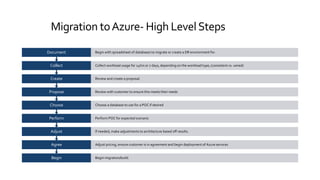
Migration toAzure- High LevelSteps
Begin Begin migration/build.
Agree Adjust pricing, ensure customer is in agreement and begin deployment of Azure services
Adjust If needed, make adjustments to architecture based off results.
Perform Perform POC for expected scenario
Choose Choose a database to use for a POC if desired
Propose Review with customer to ensure this meets their needs
Create Review and create a proposal.
Collect Collect workload usage for 24hrs or 7 days, depending on the workload type, (consistent vs. varied)
Document Begin with spreadsheet of databases to migrate or create a DR environment for.
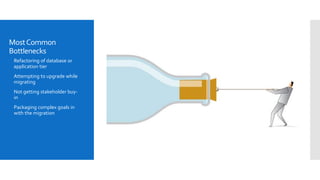
MostCommon
Bottlenecks
 Refactoring of database or
application tier
 Attempting to upgrade while
migrating
 Not getting stakeholder buy-
in
 Packaging complex goals in
with the migration
GlobalTip #1
Don’t architect cloud solutions like you architected for on-prem
 Cloud infrastructure is different than an on-prem data center.
 May result in extra redundancy and/or gaps.
 Educate on the infrastructure and security already in the cloud
 Take egress into consideration with how processing occurs
between systems.
 Identify, Inventory, Document and Diagram all. Involve all
stakeholders.
 Choose your battles and create battle plans on what will be
addressed first.
 Use tools available from the cloud provider
Azure PlanningTools
 SQL DTUCalculator is a translator and calculator that sizes out theAzure environment you will require vs. the current
on-premises environments you have.
A DTU, (DatabaseThroughput Units) is a form of cloud measure of the average CPU, IO and Memory to come up
with minimum service level and tier of Azure service needed for migration:
 Processor - % ProcessorTime
 Logical Disk - Disk Reads/sec
 Logical Disk - DiskWrites/sec
 Database - Log Bytes Flushed/sec
 Azure Instances Information will provide the information you need to understand the wide variety of configurations
and service levels/tiers that are available.
Database
Archival and
BlobStorage
 Azure Stretch Database is a way to move read only databases to
low cost storage and have them automatically move from warm,
(queried) to cold, (unused) storage that’s very cost effective.
 Azure Archive Storage is a way to store years of data at a lower
cost, similar to stretch, but less RDBMS focused, automatic
movement from warm to cold storage.
 Azure Blob Storage is an excellent choice for unstructured data,
backup files, etc. Again, possesses automation to move files from
hot, to warm, to cold storage.
 This goes for IaaS, too.
 Azure Site Recovery snapshots and backups can take advantage of
this.
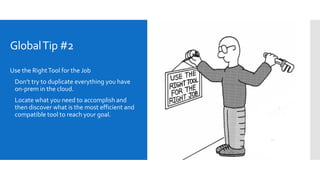
GlobalTip #2
Use the RightTool for the Job
 Don’t try to duplicate everything you have
on-prem in the cloud.
 Locate what you need to accomplish and
then discover what is the most efficient and
compatible tool to reach your goal.
Tools to Help
With Migration
 Azure Cloud Assessment reviews your entire A-to-Z
environment and discovers what needs to be migrated,
helps select a migration strategy, assists in the
migration and helps optimize, post migration.
 Building a High AvailabilityArchitecture in Azure for
SQL DB, for Oracle use this and Oracle DataGuard.
 Azure Database Migration Assistant is available to ease
the migration steps if performed one-off.
 Database Platform Migration Assistant- no matter the
data source, there is a migration path to Azure.
 Azure Site Recovery allows for backups to Azure and
then path to migrate environments to Azure.
 Azure Data Sync is a free service that allows for data to
be sync’d from on-premises to Azure environments.
 Azure Migrate is actually aVM migration tool for Azure.
GlobalTip #3
Don’t boil the ocean
 Break the project into achievable, bite size
pieces.
 Don’t allow others to distract with
unimportant issues or insignificant challenges.
 Ensure everyone signs off on what is agreed
to.
 Perform a POC if it makes sense, but choose a
viable workload to test.
Tip #4
Consider Services to Scale
 Most common failure point are those that try to LITERALLY lift
and shift what they have on-prem into the cloud instead of taking
the workload, the features and move those to the cloud.
 Consider:
 Cloud backup solutions likeVeeam, Commvault, ANF, ASR, etc.
 Data movement and transformation products likeADF, AAS, etc.
 Cloud analytics that are simpler to refactor than a database or
application platform.
 Automate as part of your migration usingAzure DevOps, Github,
etc.
 Use thin and thick clones over archaic data refresh technology
Templates,
Libraries, etc.
Use a scripting/automation factory to perform the work in an
automated fashion.
 ARMTemplates
 Image Libraries
 Data MigrationGithub Solutions
 Modern DataWarehouse
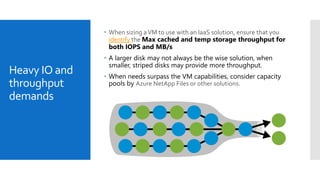
Heavy IO and
throughput
demands
 When sizing aVM to use with an IaaS solution, ensure that you
identify the Max cached and temp storage throughput for
both IOPS and MB/s
 A larger disk may not always be the wise solution, when
smaller, striped disks may provide more throughput.
 When needs surpass the VM capabilities, consider capacity
pools by Azure NetApp Files or other solutions.
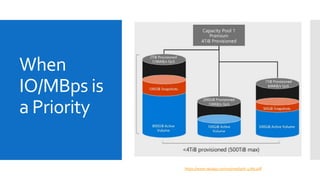
When
IO/MBps is
a Priority
https://www.netapp.com/us/media/tr-4780.pdf
Azure Partners
/Products that
can HelpWith
Performance
 Pure Storage
 Azure NetApp Files
 Flashgrid
 CloudSimple
 Pacemaker Cluster
Monitoring
 Azure Insights, part of Monitor
 Azure Data Studio
 Solarwinds Database Performance Analyzer,
(DPA), (multi-platform)
 Oracle Enterprise Manager,
(Cloud Control)
Evolve
 Think about how you’ve done work on-
prem-
 Will it perform and satisfy the requirements
in the cloud?
 Are there services that can perform the task
simpler and for less?
 What archaic can you leave behind?
 Can new projects be implemented on
newer technology/platforms
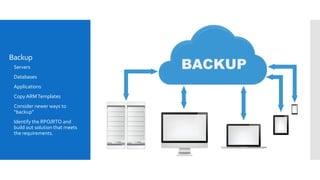
Backup
 Servers
 Databases
 Applications
 Copy ARMTemplates
 Consider newer ways to
“backup”
 Identify the RPO/RTO and
build out solution that meets
the requirements.
Security
 Encrypt data at the right layer, both at rest and in motion.
 Use best practice when securing database server as you would on-
prem, but additional security with cloud environments.
 Identify overhead of security products and build out suite of
solutions that meet requirements and SLAs
 ConsiderAzure Security Center
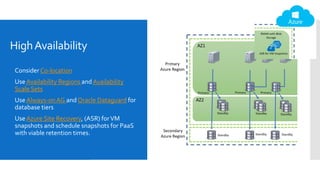
HighAvailability
 Consider Co-location
 UseAvailability Regions and Availability
Scale Sets
 Use Always-onAG and Oracle Dataguard for
database tiers
 UseAzure Site Recovery, (ASR) forVM
snapshots and schedule snapshots for PaaS
with viable retention times.
Education
Resources
 MicrosoftVirtual Academy: https://mva.microsoft.com/product-
training/microsoft-azure
 EdX offers a number of free classes that offer accreditation for a
small cost, (free for the learning):
https://www.edx.org/course?search_query=azure
 Azure Readiness Kits onGithub: https://github.com/Azure-
Readiness
There are others you can find at the following link:
https://www.businessnewsdaily.com/10711-free-microsoft-azure-
online-training.html
Oracle Dataguard on Azure:
 https://docs.microsoft.com/en-us/azure/virtual-machines/workloads/oracle/configure-oracle-dataguard
Oracle Dataguard Far Sync:
 https://docs.oracle.com/database/121/SBYDB/create_fs.htm#SBYDB5416
Oracle DataGuard standby from RAC to single instance:
 https://docs.oracle.com/en/database/oracle/oracle-database/19/sbydb/configuring-data-guard-standby-databases-in-oracle-
RAC.html#GUID-3140A293-DDD8-4559-8493-B6C21646E90F
Azure VM Sizing:
 Generation 1: https://docs.microsoft.com/en-us/azure/virtual-machines/linux/sizes
 Generation 2: https://docs.microsoft.com/en-us/azure/virtual-machines/linux/generation-2
Isolated Bare Metal:
 https://docs.microsoft.com/en-us/azure/virtual-machines/linux/isolation
Express Route Documentation:
 https://docs.microsoft.com/en-us/azure/expressroute/
Ultradisks for Azure Linux VMs:
 https://docs.microsoft.com/en-us/azure/virtual-machines/linux/disks-enable-ultra-ssd
References
Questions?
Contact:
KellynGorman
Email:dbakevlar@gmail.com
https:dbakevlar.com

How to Win When Migrating to Azure

  • 1.
    How toWinWhen Migrating toAzure Migratingwith Success Kellyn Gorman, SME Engineer for Oracle on Azure Microsoft
  • 2.
    Kellyn Gorman  Engineerin Customer Success, SME for Oracle onAzure  23 years Oracle and SQL Server experience  Instructor on Linux and DevOps  Previous president of both Rocky Mtn Oracle User Group and Denver SQL Server User Group  Author of several books on Oracle and Microsoft technology, plus a couple on diversity and inclusion  Presenter on database, optimization and automation at various conferences in the world.  Meetup owner over Girl Geek Dinners Denver and Several STEM groups
  • 4.
    Thank you-  Thankyou for the being here today!  Thank you to the PASS DatabaseVirtual Chapter  Please ask questions throughout the session and I’ll try to answer them, may hold them to the end, if it makes sense.  My contact info will be provided at the end.  The slides will be uploaded and available- there’s A LOT of links for deeper information on all the content I will be covering.
  • 5.
    WhyMigrate to the Cloud Get rid of the datacenter  Scalability  Pay for what’s used  Easier access to resources  More agile infrastructure  Going to the cloud will not grant you massive savings.
  • 6.
    Azure Data Platform Although Ispecialize in Oracle on Azure IaaS, there’s more opportunities to migrate to Azure than I can keep up with! https://azure.microsoft.com/en-us/services/#databases
  • 7.
    Azure Database 101  Whatis Azure Infrastructure as a Service, (IaaS)?  What is Azure Platform as a Service, (PaaS)?  What Azure SQL Database ServiceTiers are there?  How do I find the main information about Azure Databases?  UnderstandingAzure Single Databases and Elastic Pools.  What is an Azure SQL Managed Instance?  Main How-to Guides for Azure Databases.  Where do I find the Azure Roadmap for the future of Databases?
  • 8.
    Oracle on Azure  Oracleto PostgreSQL- 10%  Oracle Cloud Infrastructure, (OCI) and Azure Interconnect- 10%  Oracle to Azure IaaS- 80%  Yeah, I’m the last one, btw
  • 9.
    Oracle Workloads to Azure Lift andShift theWorkload, not the hardware Use the Oracle sizing tool withAutomaticWorkload Repository, (AWR) reports to ensure sizing is correct. Don’t combine upgrades with migrations and architect for the cloud. Separate sizing from optimizing
  • 10.
    Certified Deployment ofOracleonAzure Oracle Enterprise Linux Oracle 12.2 Oracle DataGuard Oracle RMAN Oracle Weblogic Oracle Cloud Control Operating System Database or Application Monitoring & Management Backup and DR Oracle 18c Oracle 19c Cloud Control Express Oracle on http://www.oracle.com/us/corporate/pricing/authorized-cloud-environments-3493562.pdf Certified!
  • 11.
    Oracle for AzureSizing Tool  Learnmore about it here.  Uses AWR reports to size out workloads  Calculates the vCPU, memory and IO/MBps that will be required to run the workload in Azure
  • 12.
  • 13.
    Migration toAzure- HighLevelSteps Begin Begin migration/build. Agree Adjust pricing, ensure customer is in agreement and begin deployment of Azure services Adjust If needed, make adjustments to architecture based off results. Perform Perform POC for expected scenario Choose Choose a database to use for a POC if desired Propose Review with customer to ensure this meets their needs Create Review and create a proposal. Collect Collect workload usage for 24hrs or 7 days, depending on the workload type, (consistent vs. varied) Document Begin with spreadsheet of databases to migrate or create a DR environment for.
  • 14.
    MostCommon Bottlenecks  Refactoring ofdatabase or application tier  Attempting to upgrade while migrating  Not getting stakeholder buy- in  Packaging complex goals in with the migration
  • 15.
    GlobalTip #1 Don’t architectcloud solutions like you architected for on-prem  Cloud infrastructure is different than an on-prem data center.  May result in extra redundancy and/or gaps.  Educate on the infrastructure and security already in the cloud  Take egress into consideration with how processing occurs between systems.  Identify, Inventory, Document and Diagram all. Involve all stakeholders.  Choose your battles and create battle plans on what will be addressed first.  Use tools available from the cloud provider
  • 16.
    Azure PlanningTools  SQLDTUCalculator is a translator and calculator that sizes out theAzure environment you will require vs. the current on-premises environments you have. A DTU, (DatabaseThroughput Units) is a form of cloud measure of the average CPU, IO and Memory to come up with minimum service level and tier of Azure service needed for migration:  Processor - % ProcessorTime  Logical Disk - Disk Reads/sec  Logical Disk - DiskWrites/sec  Database - Log Bytes Flushed/sec  Azure Instances Information will provide the information you need to understand the wide variety of configurations and service levels/tiers that are available.
  • 17.
    Database Archival and BlobStorage  AzureStretch Database is a way to move read only databases to low cost storage and have them automatically move from warm, (queried) to cold, (unused) storage that’s very cost effective.  Azure Archive Storage is a way to store years of data at a lower cost, similar to stretch, but less RDBMS focused, automatic movement from warm to cold storage.  Azure Blob Storage is an excellent choice for unstructured data, backup files, etc. Again, possesses automation to move files from hot, to warm, to cold storage.  This goes for IaaS, too.  Azure Site Recovery snapshots and backups can take advantage of this.
  • 18.
    GlobalTip #2 Use theRightTool for the Job  Don’t try to duplicate everything you have on-prem in the cloud.  Locate what you need to accomplish and then discover what is the most efficient and compatible tool to reach your goal.
  • 19.
    Tools to Help WithMigration  Azure Cloud Assessment reviews your entire A-to-Z environment and discovers what needs to be migrated, helps select a migration strategy, assists in the migration and helps optimize, post migration.  Building a High AvailabilityArchitecture in Azure for SQL DB, for Oracle use this and Oracle DataGuard.  Azure Database Migration Assistant is available to ease the migration steps if performed one-off.  Database Platform Migration Assistant- no matter the data source, there is a migration path to Azure.  Azure Site Recovery allows for backups to Azure and then path to migrate environments to Azure.  Azure Data Sync is a free service that allows for data to be sync’d from on-premises to Azure environments.  Azure Migrate is actually aVM migration tool for Azure.
  • 20.
    GlobalTip #3 Don’t boilthe ocean  Break the project into achievable, bite size pieces.  Don’t allow others to distract with unimportant issues or insignificant challenges.  Ensure everyone signs off on what is agreed to.  Perform a POC if it makes sense, but choose a viable workload to test.
  • 21.
    Tip #4 Consider Servicesto Scale  Most common failure point are those that try to LITERALLY lift and shift what they have on-prem into the cloud instead of taking the workload, the features and move those to the cloud.  Consider:  Cloud backup solutions likeVeeam, Commvault, ANF, ASR, etc.  Data movement and transformation products likeADF, AAS, etc.  Cloud analytics that are simpler to refactor than a database or application platform.  Automate as part of your migration usingAzure DevOps, Github, etc.  Use thin and thick clones over archaic data refresh technology
  • 22.
    Templates, Libraries, etc. Use ascripting/automation factory to perform the work in an automated fashion.  ARMTemplates  Image Libraries  Data MigrationGithub Solutions  Modern DataWarehouse
  • 23.
    Heavy IO and throughput demands When sizing aVM to use with an IaaS solution, ensure that you identify the Max cached and temp storage throughput for both IOPS and MB/s  A larger disk may not always be the wise solution, when smaller, striped disks may provide more throughput.  When needs surpass the VM capabilities, consider capacity pools by Azure NetApp Files or other solutions.
  • 24.
  • 25.
    Azure Partners /Products that canHelpWith Performance  Pure Storage  Azure NetApp Files  Flashgrid  CloudSimple  Pacemaker Cluster
  • 26.
    Monitoring  Azure Insights,part of Monitor  Azure Data Studio  Solarwinds Database Performance Analyzer, (DPA), (multi-platform)  Oracle Enterprise Manager, (Cloud Control)
  • 27.
    Evolve  Think abouthow you’ve done work on- prem-  Will it perform and satisfy the requirements in the cloud?  Are there services that can perform the task simpler and for less?  What archaic can you leave behind?  Can new projects be implemented on newer technology/platforms
  • 28.
    Backup  Servers  Databases Applications  Copy ARMTemplates  Consider newer ways to “backup”  Identify the RPO/RTO and build out solution that meets the requirements.
  • 29.
    Security  Encrypt dataat the right layer, both at rest and in motion.  Use best practice when securing database server as you would on- prem, but additional security with cloud environments.  Identify overhead of security products and build out suite of solutions that meet requirements and SLAs  ConsiderAzure Security Center
  • 30.
    HighAvailability  Consider Co-location UseAvailability Regions and Availability Scale Sets  Use Always-onAG and Oracle Dataguard for database tiers  UseAzure Site Recovery, (ASR) forVM snapshots and schedule snapshots for PaaS with viable retention times.
  • 31.
    Education Resources  MicrosoftVirtual Academy:https://mva.microsoft.com/product- training/microsoft-azure  EdX offers a number of free classes that offer accreditation for a small cost, (free for the learning): https://www.edx.org/course?search_query=azure  Azure Readiness Kits onGithub: https://github.com/Azure- Readiness There are others you can find at the following link: https://www.businessnewsdaily.com/10711-free-microsoft-azure- online-training.html
  • 32.
    Oracle Dataguard onAzure:  https://docs.microsoft.com/en-us/azure/virtual-machines/workloads/oracle/configure-oracle-dataguard Oracle Dataguard Far Sync:  https://docs.oracle.com/database/121/SBYDB/create_fs.htm#SBYDB5416 Oracle DataGuard standby from RAC to single instance:  https://docs.oracle.com/en/database/oracle/oracle-database/19/sbydb/configuring-data-guard-standby-databases-in-oracle- RAC.html#GUID-3140A293-DDD8-4559-8493-B6C21646E90F Azure VM Sizing:  Generation 1: https://docs.microsoft.com/en-us/azure/virtual-machines/linux/sizes  Generation 2: https://docs.microsoft.com/en-us/azure/virtual-machines/linux/generation-2 Isolated Bare Metal:  https://docs.microsoft.com/en-us/azure/virtual-machines/linux/isolation Express Route Documentation:  https://docs.microsoft.com/en-us/azure/expressroute/ Ultradisks for Azure Linux VMs:  https://docs.microsoft.com/en-us/azure/virtual-machines/linux/disks-enable-ultra-ssd References
  • 33.