Oracle
Architecture
Oracle RDBMS basics
about me

with Oracle since 2000
DBA @H3G since 2003
my private (most technical related) thoughts:
                     http://berxblog.blogspot.com
@martinberx
martin.a.berger@gmail.com
no official presentations / trainings so far

                   "it depends"
roadmap

● Database                 ●   Instance
  ○ spfile                 ●   Processes
  ○ controlfile            ●   Session
  ○ datafile               ●   Statement
  ○ redo-logs / archives   ●   Transaction
                           ●   Cluster
● Cluster                  ●   Listener

                           + Cluster failover
                           + Data Dictionary
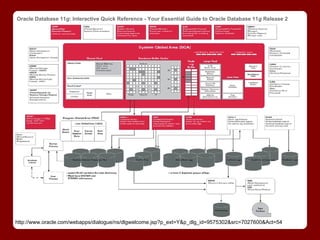
Oracle Database 11g: Interactive Quick Reference - Your Essential Guide to Oracle Database 11g Release 2


http://www.oracle.com/webapps/dialogue/ns/dlgwelcome.jsp?p_ext=Y&p_dlg_id=9575302&src=7027600&Act=54
Database
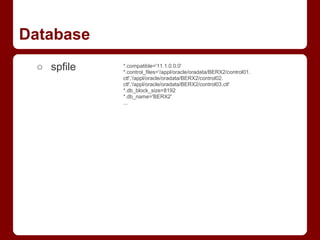
 ○ spfile   *.compatible='11.1.0.0.0'
            *.control_files='/appl/oracle/oradata/BERX2/control01.
            ctl','/appl/oracle/oradata/BERX2/control02.
            ctl','/appl/oracle/oradata/BERX2/control03.ctl'
            *.db_block_size=8192
            *.db_name='BERX2'
            ...
Database
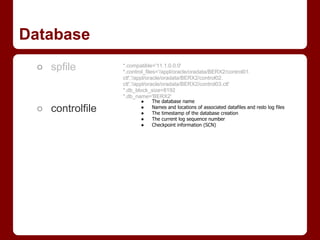
 ○ spfile        *.compatible='11.1.0.0.0'
                 *.control_files='/appl/oracle/oradata/BERX2/control01.
                 ctl','/appl/oracle/oradata/BERX2/control02.
                 ctl','/appl/oracle/oradata/BERX2/control03.ctl'
                 *.db_block_size=8192
                 *.db_name='BERX2'
                        ●    The database name
 ○ controlfile          ●
                        ●
                             Names and locations of associated datafiles and redo log files
                             The timestamp of the database creation
                        ●    The current log sequence number
                        ●    Checkpoint information (SCN)
Database
 ○ spfile          *.compatible='11.1.0.0.0'
                   *.control_files='/appl/oracle/oradata/BERX2/control01.
                   ctl','/appl/oracle/oradata/BERX2/control02.
                   ctl','/appl/oracle/oradata/BERX2/control03.ctl'
                   *.db_block_size=8192
                   *.db_name='BERX2'
                          ●    The database name
 ○ controlfile            ●
                          ●
                               Names and locations of associated datafiles and redo log files
                               The timestamp of the database creation
                          ●    The current log sequence number
                          ●    Checkpoint information (SCN)

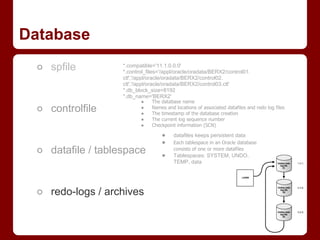
                                   ●    datafiles keeps persistent data
                                   ●    Each tablespace in an Oracle database
 ○ datafile / tablespace           ●
                                        consists of one or more datafiles
                                        Tablespaces: SYSTEM, UNDO,
                                        TEMP, data
Database
 ○ spfile          *.compatible='11.1.0.0.0'
                   *.control_files='/appl/oracle/oradata/BERX2/control01.
                   ctl','/appl/oracle/oradata/BERX2/control02.
                   ctl','/appl/oracle/oradata/BERX2/control03.ctl'
                   *.db_block_size=8192
                   *.db_name='BERX2'
                          ●    The database name
 ○ controlfile            ●
                          ●
                               Names and locations of associated datafiles and redo log files
                               The timestamp of the database creation
                          ●    The current log sequence number
                          ●    Checkpoint information (SCN)

                                   ●     datafiles keeps persistent data
                                   ●     Each tablespace in an Oracle database
 ○ datafile / tablespace           ●
                                         consists of one or more datafiles
                                         Tablespaces: SYSTEM, UNDO,
                                         TEMP, data


 ○ redo-logs / archives
Cluster
Instance
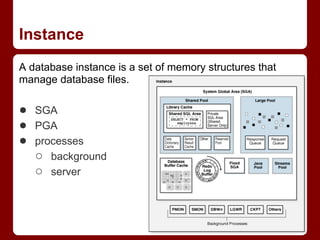
A database instance is a set of memory structures that
manage database files.

● SGA
● PGA
● processes
  ○ background
  ○ server
Processes

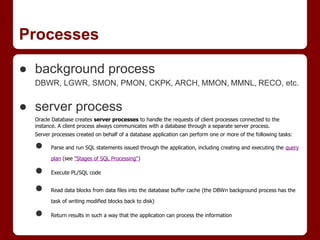
● background process
  DBWR, LGWR, SMON, PMON, CKPK, ARCH, MMON, MMNL, RECO, etc.


● server process
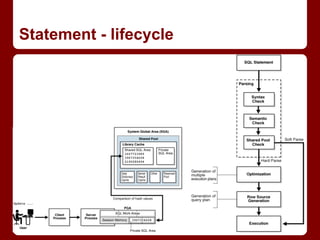
  Oracle Database creates server processes to handle the requests of client processes connected to the
  instance. A client process always communicates with a database through a separate server process.
  Server processes created on behalf of a database application can perform one or more of the following tasks:

  ●     Parse and run SQL statements issued through the application, including creating and executing the query

        plan (see "Stages of SQL Processing")

  ●     Execute PL/SQL code


  ●     Read data blocks from data files into the database buffer cache (the DBWn background process has the

        task of writing modified blocks back to disk)

  ●     Return results in such a way that the application can process the information
Session
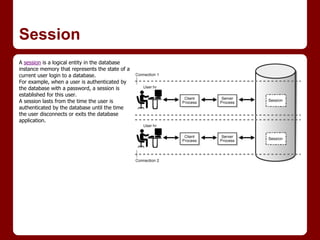
A session is a logical entity in the database
instance memory that represents the state of a
current user login to a database.
For example, when a user is authenticated by
the database with a password, a session is
established for this user.
A session lasts from the time the user is
authenticated by the database until the time
the user disconnects or exits the database
application.
Statement
● DDL
  CREATE, ALTER, DROP, TRUNCATE, GRANT, AUDIT, COMMENT
  implicit commit


● DML
  SELECT, INSERT, UPDATE, MERGE, DELETE, EXPLAIN PLAN, LOCK TABLE


● Transaction Control
  SET TRANSACTION, SAVEPOINT, COMMIT, ROLLBACK


● ALTER (session, system)

● embedded (into procedural program)
Statement - lifecycle
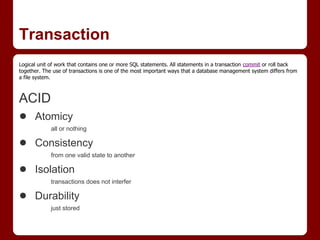
Transaction
Logical unit of work that contains one or more SQL statements. All statements in a transaction commit or roll back
together. The use of transactions is one of the most important ways that a database management system differs from
a file system.


ACID
● Atomicy
             all or nothing

● Consistency
             from one valid state to another

● Isolation
             transactions does not interfer

● Durability
             just stored
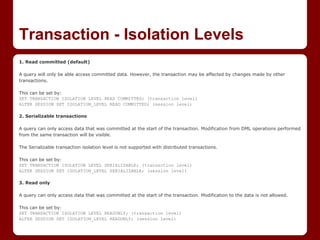
Transaction - Isolation Levels
1. Read committed (default)

A query will only be able access committed data. However, the transaction may be affected by changes made by other
transactions.

This can be set by:
SET TRANSACTION ISOLATION LEVEL READ COMMITTED; (transaction level)
ALTER SESSION SET ISOLATION_LEVEL READ COMMITTED; (session level)

2. Serializable transactions

A query can only access data that was committed at the start of the transaction. Modification from DML operations performed
from the same transaction will be visible.

The Serializable transaction isolation level is not supported with distributed transactions.

This can be set by:
SET TRANSACTION ISOLATION LEVEL SERIALIZABLE; (transaction level)
ALTER SESSION SET ISOLATION_LEVEL SERIALIZABLE; (session level)

3. Read only

A query can only access data that was committed at the start of the transaction. Modification to the data is not allowed.

This can be set by:
SET TRANSACTION ISOLATION LEVEL READONLY; (transaction level)
ALTER SESSION SET ISOLATION_LEVEL READONLY; (session level)
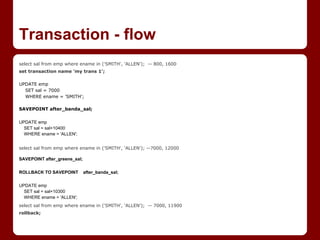
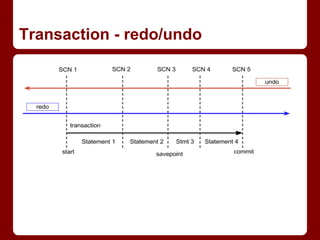
Transaction - flow
select sal from emp where ename in ('SMITH', 'ALLEN'); -- 800, 1600
set transaction name 'my trans 1';

UPDATE emp
  SET sal = 7000
  WHERE ename = 'SMITH';

SAVEPOINT after_banda_sal;

UPDATE emp
  SET sal = sal+10400
  WHERE ename = 'ALLEN';


select sal from emp where ename in ('SMITH', 'ALLEN'); --7000, 12000

SAVEPOINT after_greene_sal;

ROLLBACK TO SAVEPOINT         after_banda_sal;

UPDATE emp
  SET sal = sal+10300
  WHERE ename = 'ALLEN';
select sal from emp where ename in ('SMITH', 'ALLEN'); -- 7000, 11900
rollback;
Transaction - redo/undo
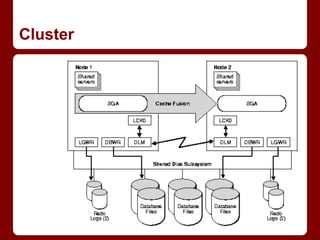
Cluster
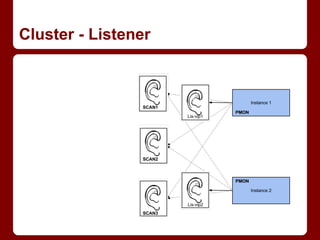
Cluster - Listener
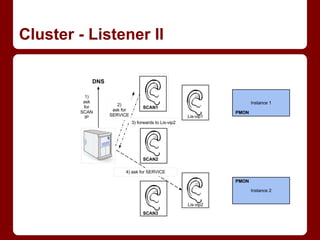
Cluster - Listener II
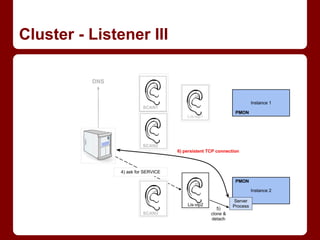
Cluster - Listener III
Failover

Transparent Application Failover
if one instance dies, the client restarts the whole listener-connection-sequence,
cursors are re-opened, statement re-run

limitations:

 ●   The effect of any ALTER SESSION statements will be lost.
 ●   Global temporary tables will be lost.
 ●   Any PL/SQL package states will be lost.
 ●   Transactions involving INSERT, UPDATE, or DELETE statements cannot be handled
     automatically by TAF.


If there is a failure you will most likely see an ORA-25402 error. Applications should be prepared to
handle errors in the 25400-25425 range and rollback appropriately.
TAF - errors
ORA-25400: must replay fetch                                                            ORA-25406: could not generate a connect address
Cause: A failure occured since the last fetch on this statement. Failover was able to   Cause: Failover was unable to generate an address for a backup instance.
bring the statement to its original state to allow continued fetches.
                                                                                        Action: Contact Oracle customer support.
Action: This is an internally used error message and should not be seen by the
                                                                                        ORA-25407: connection terminated
user.
                                                                                        Cause: The connection was lost while doing a fetch.
ORA-25401: can not continue fetches
                                                                                        Action: This is an internally used error message and should not be seen by the
Cause: A failure occured since the last fetch on this statement. Failover was unable
                                                                                        user.
to bring the statement to its original state to allow continued fetches.
                                                                                        ORA-25408: can not safely replay call
Action: Reexecute the statement and start fetching from the beginning
                                                                                        Cause: The connection was lost while doing this call. It may not be safe to replay it
ORA-25402: transaction must roll back
                                                                                        after failover.
Cause: A failure occured while a transaction was active on this connection.
                                                                                        Action: Check to see if the results of the call have taken place, and then replay it if
Action: The client must roll back.                                                      desired.
ORA-25403: could not reconnect                                                          ORA-25409: failover happened during the network operation,cannot continue
Cause: The connection to the database has been lost, and attempts to reconnect          Cause: The connection was lost when fetching a LOB column.
have failed.
                                                                                        Action: Failover happened when fetching LOB data directly or indirectly. Please
Action: Manually reconnect.                                                             replay the top level statement.
ORA-25404: lost instance                                                                ORA-25425: connection lost during rollback
Cause: The primary instance has died.                                                   Cause: The connection was lost while issuing a rollback and the application failed
                                                                                        over.
Action: This is an internally used error message and should not be seen by the
user.                                                                                   Action: The connection was lost and failover happened during rollback. If the
                                                                                        transaction is not externally coordinated, then Oracle implicitly rolled back, so no
ORA-25405: transaction status unknown
                                                                                        action is required. Otherwise examine pending_trans$ to determine if "rollback
Cause: A failure occured while a transaction was attempting to commit. Failover         force" is required.
could not automatically determine instance status.
                                                                                        ORA-25426: remote instance does not support shared dblinks
Action: The user must determine the transaction's status manually.
                                                                                        Cause: A shared dblink is being used to connect to a remote instance that does not
                                                                                        support this feature because it is an older version.
                                                                                        Action: Use a normal dblink if you need to connect to this instance.
Data Dictionary

● Informations about the database
  ○ Meta-info about all objects, schemata, user,
    privileges, audit
  ○ DBA_*


● Informations about the instances
  ○ many informations about structures in memory
  ○ v$* / gv$*


● Nearly everything Oracle knows you can
  select
further informations

Oracle Documentation - Concepts Guide
               http://docs.oracle.com/cd/E11882_01/server.112/e25789/toc.htm

ask
●   Ops.Oracle team
●   forums.oracle.com
●   http://www.freelists.org/list/oracle-l


read
credits

Arup Nanda - discussions about listener
Aman Sharma - review of connect-flow
Surachart Opun - general review
Martin Schretzmeier - infrastructure infos
Ops.Oracle team - review
Next Presentations


● Physical structures & (SQL) tuning

● Capacity planning basics

● anything else?

Oracle RDBMS architecture

  • 1.
  • 2.
    about me with Oraclesince 2000 DBA @H3G since 2003 my private (most technical related) thoughts: http://berxblog.blogspot.com @martinberx martin.a.berger@gmail.com no official presentations / trainings so far "it depends"
  • 3.
    roadmap ● Database ● Instance ○ spfile ● Processes ○ controlfile ● Session ○ datafile ● Statement ○ redo-logs / archives ● Transaction ● Cluster ● Cluster ● Listener + Cluster failover + Data Dictionary
  • 4.
    Oracle Database 11g:Interactive Quick Reference - Your Essential Guide to Oracle Database 11g Release 2 http://www.oracle.com/webapps/dialogue/ns/dlgwelcome.jsp?p_ext=Y&p_dlg_id=9575302&src=7027600&Act=54
  • 5.
    Database ○ spfile *.compatible='11.1.0.0.0' *.control_files='/appl/oracle/oradata/BERX2/control01. ctl','/appl/oracle/oradata/BERX2/control02. ctl','/appl/oracle/oradata/BERX2/control03.ctl' *.db_block_size=8192 *.db_name='BERX2' ...
  • 6.
    Database ○ spfile *.compatible='11.1.0.0.0' *.control_files='/appl/oracle/oradata/BERX2/control01. ctl','/appl/oracle/oradata/BERX2/control02. ctl','/appl/oracle/oradata/BERX2/control03.ctl' *.db_block_size=8192 *.db_name='BERX2' ● The database name ○ controlfile ● ● Names and locations of associated datafiles and redo log files The timestamp of the database creation ● The current log sequence number ● Checkpoint information (SCN)
  • 7.
    Database ○ spfile *.compatible='11.1.0.0.0' *.control_files='/appl/oracle/oradata/BERX2/control01. ctl','/appl/oracle/oradata/BERX2/control02. ctl','/appl/oracle/oradata/BERX2/control03.ctl' *.db_block_size=8192 *.db_name='BERX2' ● The database name ○ controlfile ● ● Names and locations of associated datafiles and redo log files The timestamp of the database creation ● The current log sequence number ● Checkpoint information (SCN) ● datafiles keeps persistent data ● Each tablespace in an Oracle database ○ datafile / tablespace ● consists of one or more datafiles Tablespaces: SYSTEM, UNDO, TEMP, data
  • 8.
    Database ○ spfile *.compatible='11.1.0.0.0' *.control_files='/appl/oracle/oradata/BERX2/control01. ctl','/appl/oracle/oradata/BERX2/control02. ctl','/appl/oracle/oradata/BERX2/control03.ctl' *.db_block_size=8192 *.db_name='BERX2' ● The database name ○ controlfile ● ● Names and locations of associated datafiles and redo log files The timestamp of the database creation ● The current log sequence number ● Checkpoint information (SCN) ● datafiles keeps persistent data ● Each tablespace in an Oracle database ○ datafile / tablespace ● consists of one or more datafiles Tablespaces: SYSTEM, UNDO, TEMP, data ○ redo-logs / archives
  • 9.
  • 10.
    Instance A database instanceis a set of memory structures that manage database files. ● SGA ● PGA ● processes ○ background ○ server
  • 11.
    Processes ● background process DBWR, LGWR, SMON, PMON, CKPK, ARCH, MMON, MMNL, RECO, etc. ● server process Oracle Database creates server processes to handle the requests of client processes connected to the instance. A client process always communicates with a database through a separate server process. Server processes created on behalf of a database application can perform one or more of the following tasks: ● Parse and run SQL statements issued through the application, including creating and executing the query plan (see "Stages of SQL Processing") ● Execute PL/SQL code ● Read data blocks from data files into the database buffer cache (the DBWn background process has the task of writing modified blocks back to disk) ● Return results in such a way that the application can process the information
  • 12.
    Session A session isa logical entity in the database instance memory that represents the state of a current user login to a database. For example, when a user is authenticated by the database with a password, a session is established for this user. A session lasts from the time the user is authenticated by the database until the time the user disconnects or exits the database application.
  • 13.
    Statement ● DDL CREATE, ALTER, DROP, TRUNCATE, GRANT, AUDIT, COMMENT implicit commit ● DML SELECT, INSERT, UPDATE, MERGE, DELETE, EXPLAIN PLAN, LOCK TABLE ● Transaction Control SET TRANSACTION, SAVEPOINT, COMMIT, ROLLBACK ● ALTER (session, system) ● embedded (into procedural program)
  • 14.
  • 15.
    Transaction Logical unit ofwork that contains one or more SQL statements. All statements in a transaction commit or roll back together. The use of transactions is one of the most important ways that a database management system differs from a file system. ACID ● Atomicy all or nothing ● Consistency from one valid state to another ● Isolation transactions does not interfer ● Durability just stored
  • 16.
    Transaction - IsolationLevels 1. Read committed (default) A query will only be able access committed data. However, the transaction may be affected by changes made by other transactions. This can be set by: SET TRANSACTION ISOLATION LEVEL READ COMMITTED; (transaction level) ALTER SESSION SET ISOLATION_LEVEL READ COMMITTED; (session level) 2. Serializable transactions A query can only access data that was committed at the start of the transaction. Modification from DML operations performed from the same transaction will be visible. The Serializable transaction isolation level is not supported with distributed transactions. This can be set by: SET TRANSACTION ISOLATION LEVEL SERIALIZABLE; (transaction level) ALTER SESSION SET ISOLATION_LEVEL SERIALIZABLE; (session level) 3. Read only A query can only access data that was committed at the start of the transaction. Modification to the data is not allowed. This can be set by: SET TRANSACTION ISOLATION LEVEL READONLY; (transaction level) ALTER SESSION SET ISOLATION_LEVEL READONLY; (session level)
  • 17.
    Transaction - flow selectsal from emp where ename in ('SMITH', 'ALLEN'); -- 800, 1600 set transaction name 'my trans 1'; UPDATE emp SET sal = 7000 WHERE ename = 'SMITH'; SAVEPOINT after_banda_sal; UPDATE emp SET sal = sal+10400 WHERE ename = 'ALLEN'; select sal from emp where ename in ('SMITH', 'ALLEN'); --7000, 12000 SAVEPOINT after_greene_sal; ROLLBACK TO SAVEPOINT after_banda_sal; UPDATE emp SET sal = sal+10300 WHERE ename = 'ALLEN'; select sal from emp where ename in ('SMITH', 'ALLEN'); -- 7000, 11900 rollback;
  • 18.
  • 19.
  • 20.
  • 21.
  • 22.
  • 23.
    Failover Transparent Application Failover ifone instance dies, the client restarts the whole listener-connection-sequence, cursors are re-opened, statement re-run limitations: ● The effect of any ALTER SESSION statements will be lost. ● Global temporary tables will be lost. ● Any PL/SQL package states will be lost. ● Transactions involving INSERT, UPDATE, or DELETE statements cannot be handled automatically by TAF. If there is a failure you will most likely see an ORA-25402 error. Applications should be prepared to handle errors in the 25400-25425 range and rollback appropriately.
  • 24.
    TAF - errors ORA-25400:must replay fetch ORA-25406: could not generate a connect address Cause: A failure occured since the last fetch on this statement. Failover was able to Cause: Failover was unable to generate an address for a backup instance. bring the statement to its original state to allow continued fetches. Action: Contact Oracle customer support. Action: This is an internally used error message and should not be seen by the ORA-25407: connection terminated user. Cause: The connection was lost while doing a fetch. ORA-25401: can not continue fetches Action: This is an internally used error message and should not be seen by the Cause: A failure occured since the last fetch on this statement. Failover was unable user. to bring the statement to its original state to allow continued fetches. ORA-25408: can not safely replay call Action: Reexecute the statement and start fetching from the beginning Cause: The connection was lost while doing this call. It may not be safe to replay it ORA-25402: transaction must roll back after failover. Cause: A failure occured while a transaction was active on this connection. Action: Check to see if the results of the call have taken place, and then replay it if Action: The client must roll back. desired. ORA-25403: could not reconnect ORA-25409: failover happened during the network operation,cannot continue Cause: The connection to the database has been lost, and attempts to reconnect Cause: The connection was lost when fetching a LOB column. have failed. Action: Failover happened when fetching LOB data directly or indirectly. Please Action: Manually reconnect. replay the top level statement. ORA-25404: lost instance ORA-25425: connection lost during rollback Cause: The primary instance has died. Cause: The connection was lost while issuing a rollback and the application failed over. Action: This is an internally used error message and should not be seen by the user. Action: The connection was lost and failover happened during rollback. If the transaction is not externally coordinated, then Oracle implicitly rolled back, so no ORA-25405: transaction status unknown action is required. Otherwise examine pending_trans$ to determine if "rollback Cause: A failure occured while a transaction was attempting to commit. Failover force" is required. could not automatically determine instance status. ORA-25426: remote instance does not support shared dblinks Action: The user must determine the transaction's status manually. Cause: A shared dblink is being used to connect to a remote instance that does not support this feature because it is an older version. Action: Use a normal dblink if you need to connect to this instance.
  • 25.
    Data Dictionary ● Informationsabout the database ○ Meta-info about all objects, schemata, user, privileges, audit ○ DBA_* ● Informations about the instances ○ many informations about structures in memory ○ v$* / gv$* ● Nearly everything Oracle knows you can select
  • 26.
    further informations Oracle Documentation- Concepts Guide http://docs.oracle.com/cd/E11882_01/server.112/e25789/toc.htm ask ● Ops.Oracle team ● forums.oracle.com ● http://www.freelists.org/list/oracle-l read
  • 27.
    credits Arup Nanda -discussions about listener Aman Sharma - review of connect-flow Surachart Opun - general review Martin Schretzmeier - infrastructure infos Ops.Oracle team - review
  • 28.
    Next Presentations ● Physicalstructures & (SQL) tuning ● Capacity planning basics ● anything else?