©2015 Extreme Networks, Inc. All rights reserved
VXLAN Solutions
©2015 Extreme Networks, Inc. All rights reserved
VXLAN
Encapsulation
 VXLAN is a new
encapsulation
– VXLAN header
with a 24bits ID
– Further
encapsulated in
UDP/IP
– Transit nodes
only see IP
2
©2015 Extreme Networks, Inc. All rights reserved
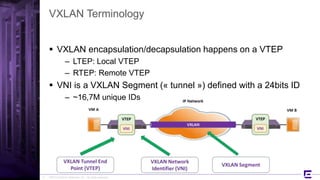
VXLAN Terminology
 VXLAN encapsulation/decapsulation happens on a VTEP
– LTEP: Local VTEP
– RTEP: Remote VTEP
 VNI is a VXLAN Segment (« tunnel ») defined with a 24bits ID
– ~16,7M unique IDs
3
©2015 Extreme Networks, Inc. All rights reserved
Introduction to Extreme Controller-less VXLAN
 EXOS VXLAN requires specific HW
– X670G2
– X770
– X670G2 & X770 stacks
 No additional license is needed to use VXLAN (Adv Edge)
– But Core License might be needed for IGP
 VXLAN is defined in RFC7348
– EXOS will not support IP Multicast flooding & learning
 Provides alternatives for handling BUM traffic and VNI learning
– Current HW cannot support L3 Gateway VTEP
 BUM traffic is flooded in HW with EXOS
– Using ingress replication
4
©2015 Extreme Networks, Inc. All rights reserved
VXLAN Scalability Limits
Features Limits (per Switch)
Virtual Networks (VNI) Up to 4000
LTEP IP addresses 1
RTEP IP addresses 512
MAC-to-IP bindings 64K
ECMP Paths EXOS Limits
5
These are EXOS 21.1.1 limits.
Future releases will increase scalability.
Network VNI limit is 16,7M, as long as no Switch has more than 4000 VNI.
©2015 Extreme Networks, Inc. All rights reserved
Typical Design: Spine-Leaf
6
x770 x770 x770x770
x670G2 x670G2
L3
©2015 Extreme Networks, Inc. All rights reserved
L3 Protocol of Choice
 Any L3 protocol is eligible
– OSPF, BGP, IS-IS…
– Manual configuration of VXLAN is required except with OSPF
 EXOS recommendation is to use OSPF
– Proprietary Opaque LSA used for dynamic learning VTEP/VNI
pair
– Opaque LSA Type 11 used (multiple areas possible)
– EOS 8.62 is compatible
– 3rd party IP Router supporting Opaque LSA should be transparent
7
©2015 Extreme Networks, Inc. All rights reserved
Design Value-Added
 MLAG with VTEP is supported
8
x770 x770 x770x770
x670G2 x670G2x670G2x670G2
©2015 Extreme Networks, Inc. All rights reserved
MLAG Considerations
 Alternate IP for MLAG is NOT recommended with VXLAN
 Multiple MLAG Peers feature (2 ISC per switch)
– A single ISC failure can cause data loss
 The ISC link must carry a routed VLAN
– Steady state traffic can traverse the ISC
– Depending on the topology a higher metric may be necessary for
that link
9
©2015 Extreme Networks, Inc. All rights reserved
Who’s the VTEP?
10
x770 x770
x670G2x670G2 x670G2
VTEPVTEP
x670V
VTEP
©2015 Extreme Networks, Inc. All rights reserved
VTEP @Spine Considerations
 VTEP role @Spine not mandatory
– No VXLAN knowledge required
– Allows any existing IP router
 BDX8, BD8K, X670V, etc.
 Inbound traffic in the VXLAN fabric is L2
– Current HW doesn’t support L3 Gateway VTEP
– External connectivity and L3 connected at the Edge
11
©2015 Extreme Networks, Inc. All rights reserved
Who’s the VTEP?
12
x770 x770
x670G2x670G2 x670G2
VTEPVTEP
x670V
VTEP
VTEPVTEP
©2015 Extreme Networks, Inc. All rights reserved
VTEP @Spine Considerations
 VTEP also @Spine
– Inbound traffic is L2
 Correct VTEP looked-up and forwarded to
– Spine must be VXLAN-capable
– Scale can become an issue
 VNI limit to be considered
13
©2015 Extreme Networks, Inc. All rights reserved
L3 and External Connectivity
14
VTEPVTEPVTEP
VXLAN Fabric
VTEP VTEPVTEP
@
VRRP Active/Active
VRRP Active/Active
©2015 Extreme Networks, Inc. All rights reserved
x670G2
What about 1G servers?
15
x770 x770
x670G2 x670G2 x670G2 x670G2
x460G2 x460G2 x460G2
VTEP VTEP
x460G2
VTEP
1G servers can be directly connected to x670G2
©2015 Extreme Networks, Inc. All rights reserved16
How-To
Legacy Approach:
Manual Configuration
©2015 Extreme Networks, Inc. All rights reserved
VXLAN Configuration Steps
 1- Underlay
– IGP
– VXLAN Extensions
 2- LTEP
– MLAG or not?
 3- VLAN to VNI Mapping
– Manual life cycle of VLANs/VNIs
17
©2015 Extreme Networks, Inc. All rights reserved
1- Underlay: one-time configuration
18
x770 x770
x670G2 x670G2
create vlan lo0
create vlan v10 tag 10
create vlan v20 tag 20
enable jumbo-frame ports all
config ip-mtu 9194 v10
config ip-mtu 9194 v20
enable loopback-mode lo0
config v10 add port 49 tagged
config v20 add port 53 tagged
config lo0 ipaddress 192.168.1.1/32
config v10 ipaddress 10.0.0.0/31
config v20 ipaddress 10.0.0.2/31
enable ipforwarding
config ospf routerid 192.168.1.1
config ospf add lo0 area 0.0.0.0 passive
config ospf add v10 area 0.0.0.0 link-type point-to-point
config ospf add v20 area 0.0.0.0 link-type point-to-point
enable ospf vxlan-extensions
enable ospf
x670G2
©2015 Extreme Networks, Inc. All rights reserved
x670G2
1- Underlay: MLAG specific case
19
x670G2
x770 x770
x670G2
create vlan lo0
create vlan ISC tag 4000
create vlan routed-isc tag 11
enable sharing 47 grouping 47,48 algorithm address-based L3_L4 lacp
enable jumbo-frame ports all
config ip-mtu 9194 routed-isc
enable loopback-mode lo0
config ISC add port 47 tagged
config routed-isc add port 47 tagged
config lo0 ipaddress 192.168.1.2/32
config routed-isc ipaddress 10.0.0.15/31
enable ipforwarding
config ISC ipaddress 1.1.1.2/31
config ospf routerid 192.168.1.2
config ospf add lo0 area 0.0.0.0 passive
config ospf add routed-isc area 0.0.0.0 link-type point-to-point
enable ospf vxlan-extensions
enable ospf
p2p L3 vlans to Spine are omitted for clarity
©2015 Extreme Networks, Inc. All rights reserved
2- LTEP: single ToR
20
x770 x770
x670G2 x670G2 x670G2
create vlan tenant1 tag 100
disable igmp snooping tenant1
config virtual-network local-endpoint ipaddress 192.168.1.1
create virtual-network vnet1
config virtual-network vnet1 vxlan vni 13370
config virtual-network vnet1 monitor on
config virtual-network vnet1 add vlan tenant1
There’s a 1-on-1 mapping VLAN – VNI
LTEP can be in a user-created VR
VTEP/VNI knowledge is flooded via OSPF
=> No need to manually configure remote VTEP
vMAN is working as a DEMO feature
©2015 Extreme Networks, Inc. All rights reserved
x670G2
2- LTEP: MLAG ToR
21
x770 x770
x670G2 x670G2
create vlan vltep
create vlan tenant1 tag 100
config tenant1 add port 47 tagged
disable igmp snooping tenant1
enable loopback-mode vltep
config vltep ipaddress 172.16.0.1/32
enable ipforwarding vltep
config ospf add vltep area 0.0.0.0 passive
config virtual-network local-endpoint ipaddress 172.16.0.1
create virtual-network vnet1
config virtual-network vnet1 vxlan vni 13370
config virtual-network vnet1 monitor on
config virtual-network vnet1 add vlan tenant1
Note that both MLAG Peer have the same Virtual LTEP IP Address
©2015 Extreme Networks, Inc. All rights reserved
3- VLAN to VNI Mapping and Learning
 With the use of enable ospf vxlan-extensions remote
VTEP learning is dynamic
– Manual configuration doesn’t require that burden
– Easier to configure and manage
 Adding and removal of VNI needs to be done by CLI on local
VTEP
22
©2015 Extreme Networks, Inc. All rights reserved
Static case
23
x770 x770
x670G2 x670G2 x670G2
create virtual-network remote-endpoint vxlan ipaddress 172.16.0.1
config virtual-network vnet1 add remote-endpoint vxlan ipaddress 172.16.0.1
 If vxlan-extensions turned off
– Need to configure on each VTEP every necessary Remote
VTEP/VNI pairs
– Static mapping
– Allows saving of remote VTEP in the config
©2015 Extreme Networks, Inc. All rights reserved24
How-To
Modern Approach:
Dynamic Configuration
©2015 Extreme Networks, Inc. All rights reserved
Full Automation
 Problem statement
– vxlan-extensions allows for dynamic learning of VTEP/VNI pairs
throughout the network
– Users still have to configure
 Underlay
 MLAG if necessary
 LTEP
 VNI and VLAN mapping
 Full automation is about answering these pain points
25
©2015 Extreme Networks, Inc. All rights reserved
Components
 To achieve that, several features need to be in place
– Vm-tracking for MAC and VLAN snooping
– DCM and ExtremeIAC for VM authentication
– ezvxlan.py script interface started
1) DCM authenticates a new VM
2) vm-tracking triggers automated VLAN creation (if necessary) for
that new VM
3) ezvxlan.py configures vxlan-extensions and VXLAN (if necessary)
and maps VLAN ID to VNI
4) vxlan-extensions floods that knowledge to all OSPF routers
26
©2015 Extreme Networks, Inc. All rights reserved
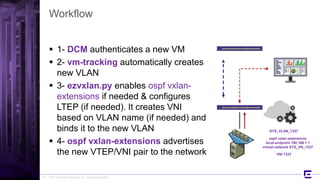
Workflow
 1- DCM authenticates a new VM
 2- vm-tracking automatically creates
new VLAN
 3- ezvxlan.py enables ospf vxlan-
extensions if needed & configures
LTEP (if needed). It creates VNI
based on VLAN name (if needed) and
binds it to the new VLAN
 4- ospf vxlan-extensions advertises
the new VTEP/VNI pair to the network
27
SYS_VLAN_1337
ospf vxlan-extensions
local-endpoint 192.168.1.1
virtual-network SYS_VN_1337
VNI 1337
©2015 Extreme Networks, Inc. All rights reserved
Limitations
 ezvxlan.py cannot configure LTEP IP if MLAG is present
– Manual configuration is required
 ezvxlan.py is not started by default
– Requirement to manually enable it once
– Will run along with EXOS including restart after switch reboot
 ezvxlan.py doesn’t work (yet) with Stacking
– xmod upgrade will be required
 Demo feature in EXOS 21.1.1
– Targeted for GA in 21.1.2
28
run script ezvxlan.py start
show process ezvxlan
©2015 Extreme Networks, Inc. All rights reserved
WWW.EXTREMENETWORKS.COM
Thank You

10.) vxlan

  • 1.
    ©2015 Extreme Networks,Inc. All rights reserved VXLAN Solutions
  • 2.
    ©2015 Extreme Networks,Inc. All rights reserved VXLAN Encapsulation  VXLAN is a new encapsulation – VXLAN header with a 24bits ID – Further encapsulated in UDP/IP – Transit nodes only see IP 2
  • 3.
    ©2015 Extreme Networks,Inc. All rights reserved VXLAN Terminology  VXLAN encapsulation/decapsulation happens on a VTEP – LTEP: Local VTEP – RTEP: Remote VTEP  VNI is a VXLAN Segment (« tunnel ») defined with a 24bits ID – ~16,7M unique IDs 3
  • 4.
    ©2015 Extreme Networks,Inc. All rights reserved Introduction to Extreme Controller-less VXLAN  EXOS VXLAN requires specific HW – X670G2 – X770 – X670G2 & X770 stacks  No additional license is needed to use VXLAN (Adv Edge) – But Core License might be needed for IGP  VXLAN is defined in RFC7348 – EXOS will not support IP Multicast flooding & learning  Provides alternatives for handling BUM traffic and VNI learning – Current HW cannot support L3 Gateway VTEP  BUM traffic is flooded in HW with EXOS – Using ingress replication 4
  • 5.
    ©2015 Extreme Networks,Inc. All rights reserved VXLAN Scalability Limits Features Limits (per Switch) Virtual Networks (VNI) Up to 4000 LTEP IP addresses 1 RTEP IP addresses 512 MAC-to-IP bindings 64K ECMP Paths EXOS Limits 5 These are EXOS 21.1.1 limits. Future releases will increase scalability. Network VNI limit is 16,7M, as long as no Switch has more than 4000 VNI.
  • 6.
    ©2015 Extreme Networks,Inc. All rights reserved Typical Design: Spine-Leaf 6 x770 x770 x770x770 x670G2 x670G2 L3
  • 7.
    ©2015 Extreme Networks,Inc. All rights reserved L3 Protocol of Choice  Any L3 protocol is eligible – OSPF, BGP, IS-IS… – Manual configuration of VXLAN is required except with OSPF  EXOS recommendation is to use OSPF – Proprietary Opaque LSA used for dynamic learning VTEP/VNI pair – Opaque LSA Type 11 used (multiple areas possible) – EOS 8.62 is compatible – 3rd party IP Router supporting Opaque LSA should be transparent 7
  • 8.
    ©2015 Extreme Networks,Inc. All rights reserved Design Value-Added  MLAG with VTEP is supported 8 x770 x770 x770x770 x670G2 x670G2x670G2x670G2
  • 9.
    ©2015 Extreme Networks,Inc. All rights reserved MLAG Considerations  Alternate IP for MLAG is NOT recommended with VXLAN  Multiple MLAG Peers feature (2 ISC per switch) – A single ISC failure can cause data loss  The ISC link must carry a routed VLAN – Steady state traffic can traverse the ISC – Depending on the topology a higher metric may be necessary for that link 9
  • 10.
    ©2015 Extreme Networks,Inc. All rights reserved Who’s the VTEP? 10 x770 x770 x670G2x670G2 x670G2 VTEPVTEP x670V VTEP
  • 11.
    ©2015 Extreme Networks,Inc. All rights reserved VTEP @Spine Considerations  VTEP role @Spine not mandatory – No VXLAN knowledge required – Allows any existing IP router  BDX8, BD8K, X670V, etc.  Inbound traffic in the VXLAN fabric is L2 – Current HW doesn’t support L3 Gateway VTEP – External connectivity and L3 connected at the Edge 11
  • 12.
    ©2015 Extreme Networks,Inc. All rights reserved Who’s the VTEP? 12 x770 x770 x670G2x670G2 x670G2 VTEPVTEP x670V VTEP VTEPVTEP
  • 13.
    ©2015 Extreme Networks,Inc. All rights reserved VTEP @Spine Considerations  VTEP also @Spine – Inbound traffic is L2  Correct VTEP looked-up and forwarded to – Spine must be VXLAN-capable – Scale can become an issue  VNI limit to be considered 13
  • 14.
    ©2015 Extreme Networks,Inc. All rights reserved L3 and External Connectivity 14 VTEPVTEPVTEP VXLAN Fabric VTEP VTEPVTEP @ VRRP Active/Active VRRP Active/Active
  • 15.
    ©2015 Extreme Networks,Inc. All rights reserved x670G2 What about 1G servers? 15 x770 x770 x670G2 x670G2 x670G2 x670G2 x460G2 x460G2 x460G2 VTEP VTEP x460G2 VTEP 1G servers can be directly connected to x670G2
  • 16.
    ©2015 Extreme Networks,Inc. All rights reserved16 How-To Legacy Approach: Manual Configuration
  • 17.
    ©2015 Extreme Networks,Inc. All rights reserved VXLAN Configuration Steps  1- Underlay – IGP – VXLAN Extensions  2- LTEP – MLAG or not?  3- VLAN to VNI Mapping – Manual life cycle of VLANs/VNIs 17
  • 18.
    ©2015 Extreme Networks,Inc. All rights reserved 1- Underlay: one-time configuration 18 x770 x770 x670G2 x670G2 create vlan lo0 create vlan v10 tag 10 create vlan v20 tag 20 enable jumbo-frame ports all config ip-mtu 9194 v10 config ip-mtu 9194 v20 enable loopback-mode lo0 config v10 add port 49 tagged config v20 add port 53 tagged config lo0 ipaddress 192.168.1.1/32 config v10 ipaddress 10.0.0.0/31 config v20 ipaddress 10.0.0.2/31 enable ipforwarding config ospf routerid 192.168.1.1 config ospf add lo0 area 0.0.0.0 passive config ospf add v10 area 0.0.0.0 link-type point-to-point config ospf add v20 area 0.0.0.0 link-type point-to-point enable ospf vxlan-extensions enable ospf x670G2
  • 19.
    ©2015 Extreme Networks,Inc. All rights reserved x670G2 1- Underlay: MLAG specific case 19 x670G2 x770 x770 x670G2 create vlan lo0 create vlan ISC tag 4000 create vlan routed-isc tag 11 enable sharing 47 grouping 47,48 algorithm address-based L3_L4 lacp enable jumbo-frame ports all config ip-mtu 9194 routed-isc enable loopback-mode lo0 config ISC add port 47 tagged config routed-isc add port 47 tagged config lo0 ipaddress 192.168.1.2/32 config routed-isc ipaddress 10.0.0.15/31 enable ipforwarding config ISC ipaddress 1.1.1.2/31 config ospf routerid 192.168.1.2 config ospf add lo0 area 0.0.0.0 passive config ospf add routed-isc area 0.0.0.0 link-type point-to-point enable ospf vxlan-extensions enable ospf p2p L3 vlans to Spine are omitted for clarity
  • 20.
    ©2015 Extreme Networks,Inc. All rights reserved 2- LTEP: single ToR 20 x770 x770 x670G2 x670G2 x670G2 create vlan tenant1 tag 100 disable igmp snooping tenant1 config virtual-network local-endpoint ipaddress 192.168.1.1 create virtual-network vnet1 config virtual-network vnet1 vxlan vni 13370 config virtual-network vnet1 monitor on config virtual-network vnet1 add vlan tenant1 There’s a 1-on-1 mapping VLAN – VNI LTEP can be in a user-created VR VTEP/VNI knowledge is flooded via OSPF => No need to manually configure remote VTEP vMAN is working as a DEMO feature
  • 21.
    ©2015 Extreme Networks,Inc. All rights reserved x670G2 2- LTEP: MLAG ToR 21 x770 x770 x670G2 x670G2 create vlan vltep create vlan tenant1 tag 100 config tenant1 add port 47 tagged disable igmp snooping tenant1 enable loopback-mode vltep config vltep ipaddress 172.16.0.1/32 enable ipforwarding vltep config ospf add vltep area 0.0.0.0 passive config virtual-network local-endpoint ipaddress 172.16.0.1 create virtual-network vnet1 config virtual-network vnet1 vxlan vni 13370 config virtual-network vnet1 monitor on config virtual-network vnet1 add vlan tenant1 Note that both MLAG Peer have the same Virtual LTEP IP Address
  • 22.
    ©2015 Extreme Networks,Inc. All rights reserved 3- VLAN to VNI Mapping and Learning  With the use of enable ospf vxlan-extensions remote VTEP learning is dynamic – Manual configuration doesn’t require that burden – Easier to configure and manage  Adding and removal of VNI needs to be done by CLI on local VTEP 22
  • 23.
    ©2015 Extreme Networks,Inc. All rights reserved Static case 23 x770 x770 x670G2 x670G2 x670G2 create virtual-network remote-endpoint vxlan ipaddress 172.16.0.1 config virtual-network vnet1 add remote-endpoint vxlan ipaddress 172.16.0.1  If vxlan-extensions turned off – Need to configure on each VTEP every necessary Remote VTEP/VNI pairs – Static mapping – Allows saving of remote VTEP in the config
  • 24.
    ©2015 Extreme Networks,Inc. All rights reserved24 How-To Modern Approach: Dynamic Configuration
  • 25.
    ©2015 Extreme Networks,Inc. All rights reserved Full Automation  Problem statement – vxlan-extensions allows for dynamic learning of VTEP/VNI pairs throughout the network – Users still have to configure  Underlay  MLAG if necessary  LTEP  VNI and VLAN mapping  Full automation is about answering these pain points 25
  • 26.
    ©2015 Extreme Networks,Inc. All rights reserved Components  To achieve that, several features need to be in place – Vm-tracking for MAC and VLAN snooping – DCM and ExtremeIAC for VM authentication – ezvxlan.py script interface started 1) DCM authenticates a new VM 2) vm-tracking triggers automated VLAN creation (if necessary) for that new VM 3) ezvxlan.py configures vxlan-extensions and VXLAN (if necessary) and maps VLAN ID to VNI 4) vxlan-extensions floods that knowledge to all OSPF routers 26
  • 27.
    ©2015 Extreme Networks,Inc. All rights reserved Workflow  1- DCM authenticates a new VM  2- vm-tracking automatically creates new VLAN  3- ezvxlan.py enables ospf vxlan- extensions if needed & configures LTEP (if needed). It creates VNI based on VLAN name (if needed) and binds it to the new VLAN  4- ospf vxlan-extensions advertises the new VTEP/VNI pair to the network 27 SYS_VLAN_1337 ospf vxlan-extensions local-endpoint 192.168.1.1 virtual-network SYS_VN_1337 VNI 1337
  • 28.
    ©2015 Extreme Networks,Inc. All rights reserved Limitations  ezvxlan.py cannot configure LTEP IP if MLAG is present – Manual configuration is required  ezvxlan.py is not started by default – Requirement to manually enable it once – Will run along with EXOS including restart after switch reboot  ezvxlan.py doesn’t work (yet) with Stacking – xmod upgrade will be required  Demo feature in EXOS 21.1.1 – Targeted for GA in 21.1.2 28 run script ezvxlan.py start show process ezvxlan
  • 29.
    ©2015 Extreme Networks,Inc. All rights reserved WWW.EXTREMENETWORKS.COM Thank You