10 Things I Like in
SharePoint 2013 Search
AGNES MOLNAR
SENIOR SEARCH SOLUTIONS CONSULTANT, BA INSIGHT


SHAREPOINT AND PROJECT CONFERENCE ADRIATICS
ZAGREB, 11/28/2012
sponsors
Introduction
        • Senior Search Solutions Consultant
        • SharePoint Server MVP

        • Speaker, Blogger, Community Lead
               http://aghy.hu
               http://www.DoMoreWithSearch.com


               Agnes.Molnar@BAInsight.com
               @molnaragnes
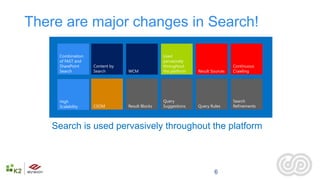
There are major changes in Search!

     Combination                                Used
     of FAST and                                pervasively
     SharePoint    Content by                   throughout                      Continuous
     Search        Search       WCM             the platform   Result Sources   Crawling


     High                                       Query                           Search
     Scalability   CSOM         Result Blocks   Suggestions    Query Rules      Refinements


   Search is used pervasively throughout the platform


                                                                       6
USER EXPERIENCE
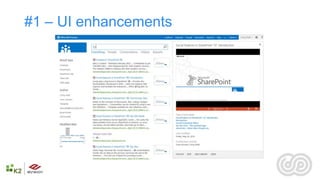
#1 – UI enhancements
ARCHITECTURE AND
ADMINISTRATION
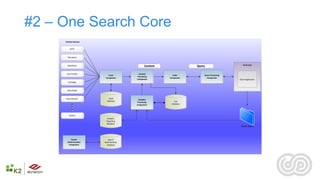
#2 – One Search Core
     Content Sources


         HTTP


       File shares


                                                                                                Front-end
       SharePoint                               Content               Query

      User Profiles                       Content
                           Crawl                            Index         Query Processing
                                         Processing
                         Component                        Component         Component
                                         Component                                           Client Application
       Exchange


      Lotus Notes


     Documentum            Crawl
                                          Analytics
                          Database                           Link
                                         Processing
                                         Component         Database


        Custom
                          Analytics
                          Reporting
                          Database
                                                                                              Event Store


          Search           Search
       Administration   Administration
        Component         Database
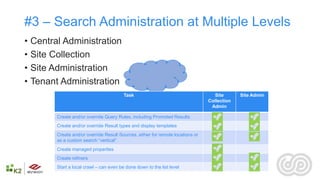
#3 – Search Administration at Multiple Levels
• Central Administration
• Site Collection
• Site Administration
• Tenant Administration
                                         Task                                      Site      Site Admin
                                                                                Collection
                                                                                 Admin

        Create and/or override Query Rules, including Promoted Results
        Create and/or override Result types and display templates
        Create and/or override Result Sources, either for remote locations or
        as a custom search “vertical”
        Create managed properties
        Create refiners
        Start a local crawl – can even be done down to the list level
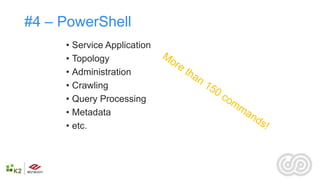
#4 – PowerShell
     • Service Application
     • Topology
     • Administration
     • Crawling
     • Query Processing
     • Metadata
     • etc.
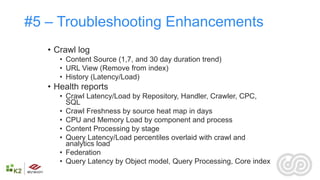
#5 – Troubleshooting Enhancements
   • Crawl log
      • Content Source (1,7, and 30 day duration trend)
      • URL View (Remove from index)
      • History (Latency/Load)
   • Health reports
      • Crawl Latency/Load by Repository, Handler, Crawler, CPC,
        SQL
      • Crawl Freshness by source heat map in days
      • CPU and Memory Load by component and process
      • Content Processing by stage
      • Query Latency/Load percentiles overlaid with crawl and
        analytics load
      • Federation
      • Query Latency by Object model, Query Processing, Core index
CRAWL
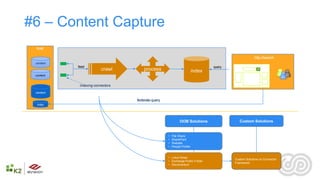
#6 – Content Capture
 host

                                                                                                   http://search
 content
           feed                                                               query

 content


            indexing connectors

 content

                                  federate query
  index


                                                             OOB Solutions               Custom Solutions


                                                   •   File Share
                                                   •   SharePoint
                                                   •   Website
                                                   •   People Profile


                                                   • Lotus Notes
                                                                                      Custom Solutions on Connector
                                                   • Exchange Public Folder
                                                                                      Framework
                                                   • Documentum
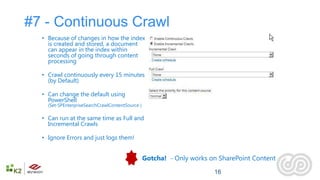
#7 - Continuous Crawl
  • Because of changes in how the index
    is created and stored, a document
    can appear in the index within
    seconds of going through content
    processing

  • Crawl continuously every 15 minutes
    (by Default)

  • Can change the default using
    PowerShell
    (Set-SPEnterpriseSearchCrawlContentSource )

  • Can run at the same time as Full and
    Incremental Crawls

  • Ignore Errors and just logs them!


                                                  Gotcha! - Only works on SharePoint Content

                                                                        16
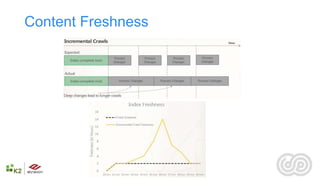
Content Freshness
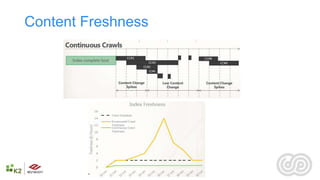
Content Freshness
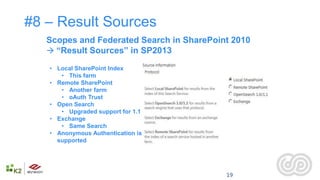
#8 – Result Sources
   Scopes and Federated Search in SharePoint 2010
    “Result Sources” in SP2013

   • Local SharePoint Index
      • This farm
   • Remote SharePoint
      • Another farm
      • oAuth Trust
   • Open Search
      • Upgraded support for 1.1
   • Exchange
      • Same Search
   • Anonymous Authentication is
     supported


                                           19
QUERY PROCESSING
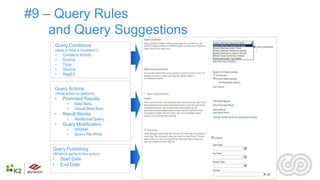
#9 – Query Rules
    and Query Suggestions
        Query Conditions
        (does it meet a condition?)
        •    Contains Words
        •    Source
        •    Type
        •    Source
        •    RegEX


        Query Actions
        (What action to perform)
        •    Promoted Results
               •    Best Bets
               •    Visual Best Bets
        •    Result Blocks
               •    Additional Query
        •    Query Modification
               •    XRANK
               •    Query Re-Write


    Query Publishing
    (When to perform this action)
    •       Start Date
    •       End Date

                                       22
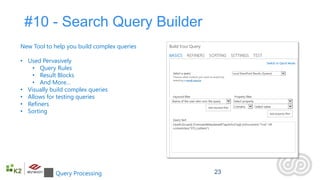
#10 - Search Query Builder
New Tool to help you build complex queries

• Used Pervasively
    • Query Rules
    • Result Blocks
    • And More…
• Visually build complex queries
• Allows for testing queries
• Refiners
• Sorting


            Query Processing                 23
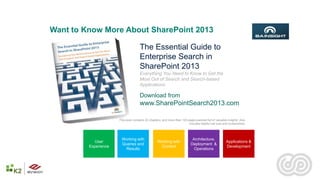
Want to Know More About SharePoint 2013
Search?
                     The Essential Guide to
                     Enterprise Search in
                     SharePoint 2013
                                     Everything You Need to Know to Get the
                                     Most Out of Search and Search-based
                                     Applications

                                     Download from
                                     www.SharePointSearch2013.com

                      This book contains 20 chapters, and more than 100 pages packed full of valuable insights. Also
                                                                         includes helpful call outs and screenshots.


                        Working with                                        Architecture,
            User                                  Working with                                       Applications &
                        Queries and                                        Deployment &
         Experience                                Content                                           Development
                         Results                                             Operations
questions?
HTTP://AGHY.HU
HTTP://WWW.DOMOREWITHSEARCH.CO
M
@MOLNARAGNES
thank you.

SHAREPOINT AND PROJECT CONFERENCE ADRIATICS
ZAGREB, 11/28/2012

10 Things I Like in SharePoint 2013 Search

  • 1.
    10 Things ILike in SharePoint 2013 Search AGNES MOLNAR SENIOR SEARCH SOLUTIONS CONSULTANT, BA INSIGHT SHAREPOINT AND PROJECT CONFERENCE ADRIATICS ZAGREB, 11/28/2012
  • 2.
  • 3.
    Introduction • Senior Search Solutions Consultant • SharePoint Server MVP • Speaker, Blogger, Community Lead http://aghy.hu http://www.DoMoreWithSearch.com Agnes.Molnar@BAInsight.com @molnaragnes
  • 4.
    There are majorchanges in Search! Combination Used of FAST and pervasively SharePoint Content by throughout Continuous Search Search WCM the platform Result Sources Crawling High Query Search Scalability CSOM Result Blocks Suggestions Query Rules Refinements Search is used pervasively throughout the platform 6
  • 5.
  • 6.
    #1 – UIenhancements
  • 7.
  • 8.
    #2 – OneSearch Core Content Sources HTTP File shares Front-end SharePoint Content Query User Profiles Content Crawl Index Query Processing Processing Component Component Component Component Client Application Exchange Lotus Notes Documentum Crawl Analytics Database Link Processing Component Database Custom Analytics Reporting Database Event Store Search Search Administration Administration Component Database
  • 9.
    #3 – SearchAdministration at Multiple Levels • Central Administration • Site Collection • Site Administration • Tenant Administration Task Site Site Admin Collection Admin Create and/or override Query Rules, including Promoted Results Create and/or override Result types and display templates Create and/or override Result Sources, either for remote locations or as a custom search “vertical” Create managed properties Create refiners Start a local crawl – can even be done down to the list level
  • 10.
    #4 – PowerShell • Service Application • Topology • Administration • Crawling • Query Processing • Metadata • etc.
  • 11.
    #5 – TroubleshootingEnhancements • Crawl log • Content Source (1,7, and 30 day duration trend) • URL View (Remove from index) • History (Latency/Load) • Health reports • Crawl Latency/Load by Repository, Handler, Crawler, CPC, SQL • Crawl Freshness by source heat map in days • CPU and Memory Load by component and process • Content Processing by stage • Query Latency/Load percentiles overlaid with crawl and analytics load • Federation • Query Latency by Object model, Query Processing, Core index
  • 12.
  • 13.
    #6 – ContentCapture host http://search content feed query content indexing connectors content federate query index OOB Solutions Custom Solutions • File Share • SharePoint • Website • People Profile • Lotus Notes Custom Solutions on Connector • Exchange Public Folder Framework • Documentum
  • 14.
    #7 - ContinuousCrawl • Because of changes in how the index is created and stored, a document can appear in the index within seconds of going through content processing • Crawl continuously every 15 minutes (by Default) • Can change the default using PowerShell (Set-SPEnterpriseSearchCrawlContentSource ) • Can run at the same time as Full and Incremental Crawls • Ignore Errors and just logs them! Gotcha! - Only works on SharePoint Content 16
  • 15.
  • 16.
  • 17.
    #8 – ResultSources Scopes and Federated Search in SharePoint 2010  “Result Sources” in SP2013 • Local SharePoint Index • This farm • Remote SharePoint • Another farm • oAuth Trust • Open Search • Upgraded support for 1.1 • Exchange • Same Search • Anonymous Authentication is supported 19
  • 18.
  • 19.
    #9 – QueryRules and Query Suggestions Query Conditions (does it meet a condition?) • Contains Words • Source • Type • Source • RegEX Query Actions (What action to perform) • Promoted Results • Best Bets • Visual Best Bets • Result Blocks • Additional Query • Query Modification • XRANK • Query Re-Write Query Publishing (When to perform this action) • Start Date • End Date 22
  • 20.
    #10 - SearchQuery Builder New Tool to help you build complex queries • Used Pervasively • Query Rules • Result Blocks • And More… • Visually build complex queries • Allows for testing queries • Refiners • Sorting Query Processing 23
  • 21.
    Want to KnowMore About SharePoint 2013 Search? The Essential Guide to Enterprise Search in SharePoint 2013 Everything You Need to Know to Get the Most Out of Search and Search-based Applications Download from www.SharePointSearch2013.com This book contains 20 chapters, and more than 100 pages packed full of valuable insights. Also includes helpful call outs and screenshots. Working with Architecture, User Working with Applications & Queries and Deployment & Experience Content Development Results Operations
  • 22.
  • 23.
    thank you. SHAREPOINT ANDPROJECT CONFERENCE ADRIATICS ZAGREB, 11/28/2012