

© 2010 WinWire TechnologiesWinWire Technologies, Inc. Confidential
SharePoint 2013 Search – What You
Need to Know!
@WinWire
Wired2Win Webinar Series
© 2010 WinWire TechnologiesWinWire Technologies, Inc. Confidential
WinWire Technologies is an
IT Services Company that
helps business and
technology leaders harness
the power of Collaboration
and Analytics across the
enterprise leveraging
technology trends such as
cloud, mobility, and
enterprise social
Who We Are
© 2010 WinWire TechnologiesWinWire Technologies, Inc. Confidential
Agenda
• Overview of Search in SharePoint 2010
• Key Improvements of Search in SharePoint 2013
• SharePoint 2013 Search Architecture
• SharePoint 2013 Search Components
• Enterprise Search Functionalities
• SP2010 Search Vs. SP2013 Search
• Deprecated Features in FAST Search Server 2010
© 2010 WinWire TechnologiesWinWire Technologies, Inc. Confidential 5
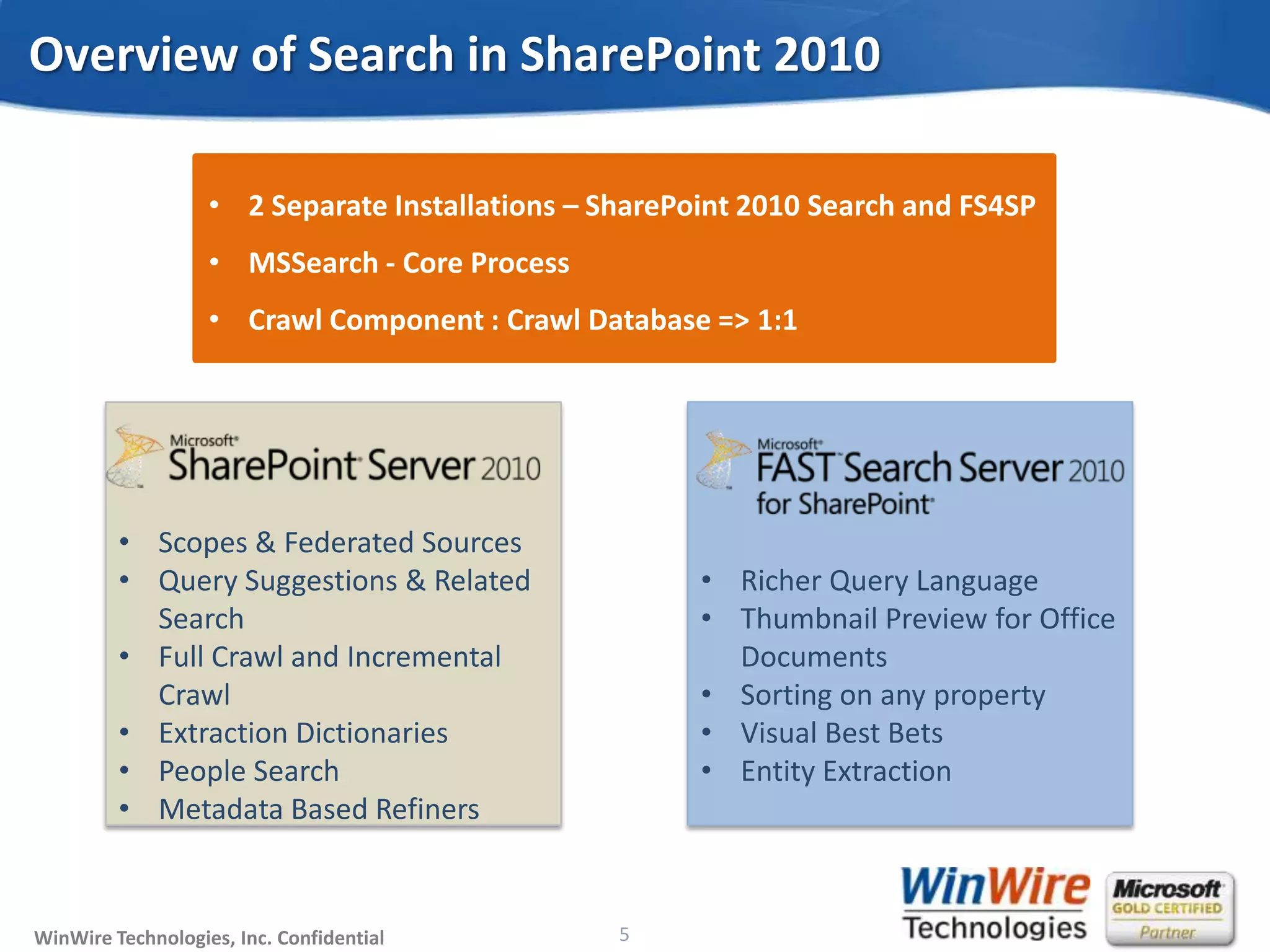
Overview of Search in SharePoint 2010
• Scopes & Federated Sources
• Query Suggestions & Related
Search
• Full Crawl and Incremental
Crawl
• Extraction Dictionaries
• People Search
• Metadata Based Refiners
• Richer Query Language
• Thumbnail Preview for Office
Documents
• Sorting on any property
• Visual Best Bets
• Entity Extraction
• 2 Separate Installations – SharePoint 2010 Search and FS4SP
• MSSearch - Core Process
• Crawl Component : Crawl Database => 1:1
© 2010 WinWire TechnologiesWinWire Technologies, Inc. Confidential 6
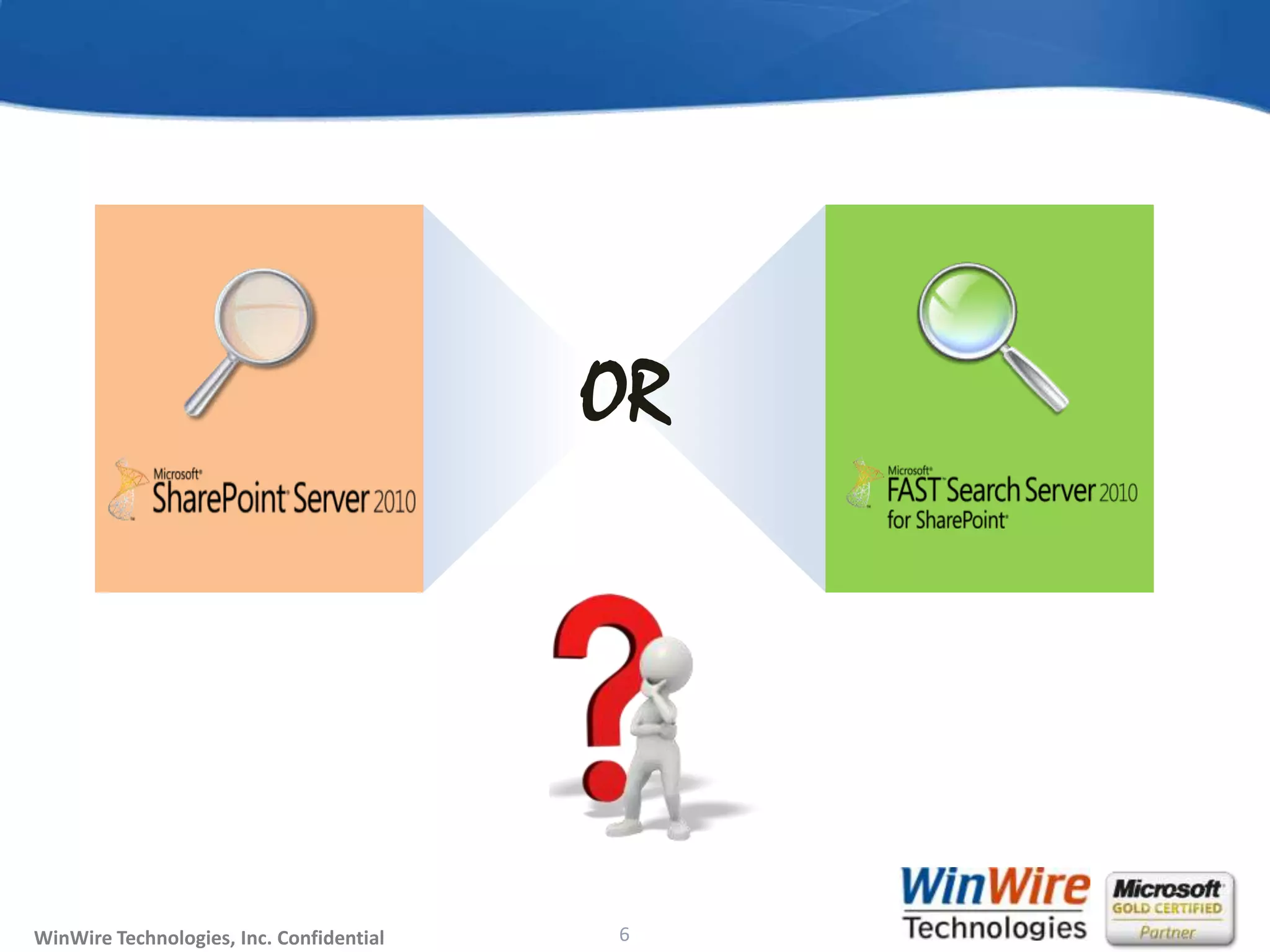
OR
© 2010 WinWire TechnologiesWinWire Technologies, Inc. Confidential 7
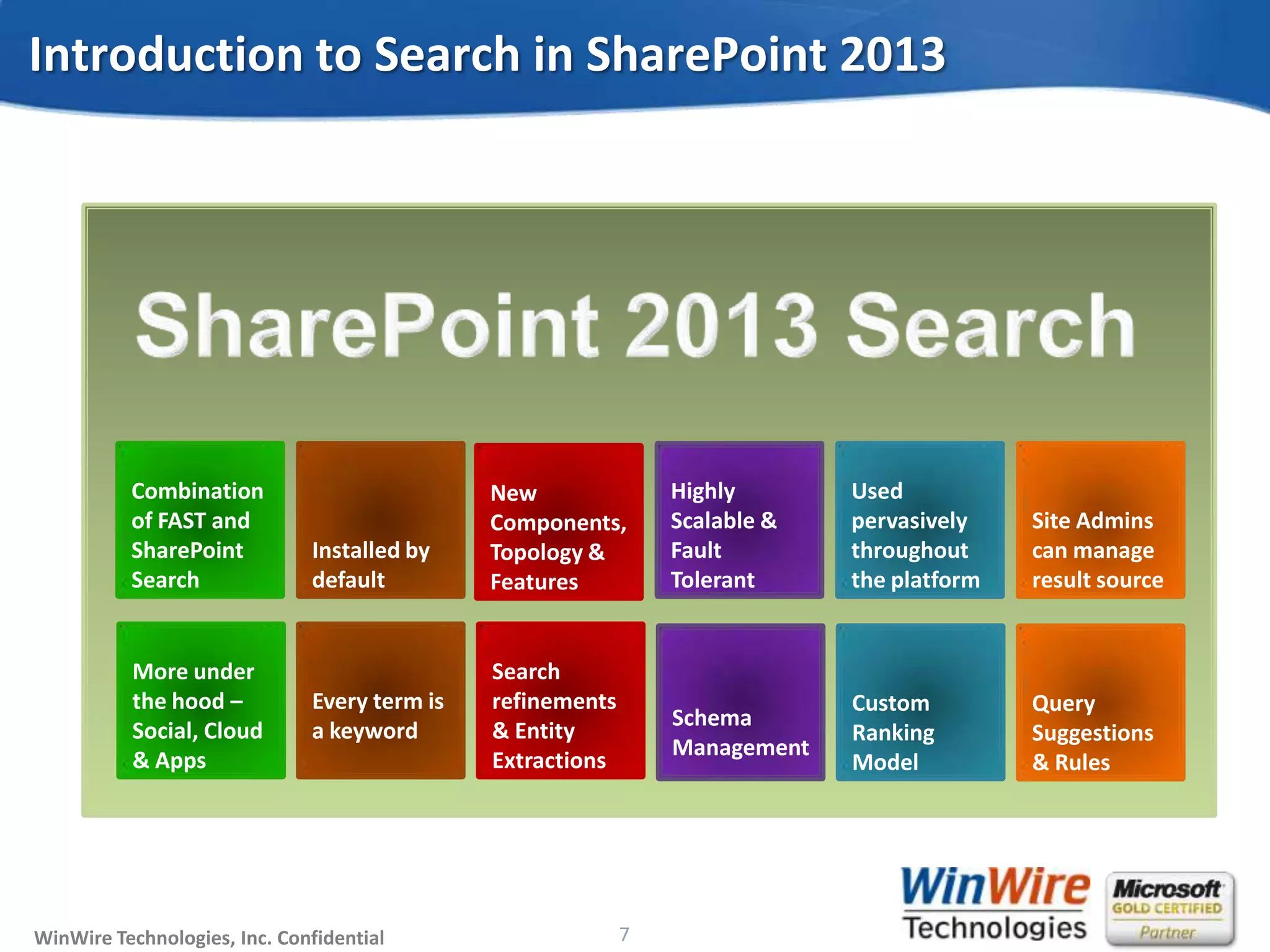
Introduction to Search in SharePoint 2013
Combination
of FAST and
SharePoint
Search
Installed by
default
New
Components,
Topology &
Features
Highly
Scalable &
Fault
Tolerant
Used
pervasively
throughout
the platform
Site Admins
can manage
result source
More under
the hood –
Social, Cloud
& Apps
Every term is
a keyword
Search
refinements
& Entity
Extractions
Schema
Management
Custom
Ranking
Model
Query
Suggestions
& Rules
© 2010 WinWire TechnologiesWinWire Technologies, Inc. Confidential
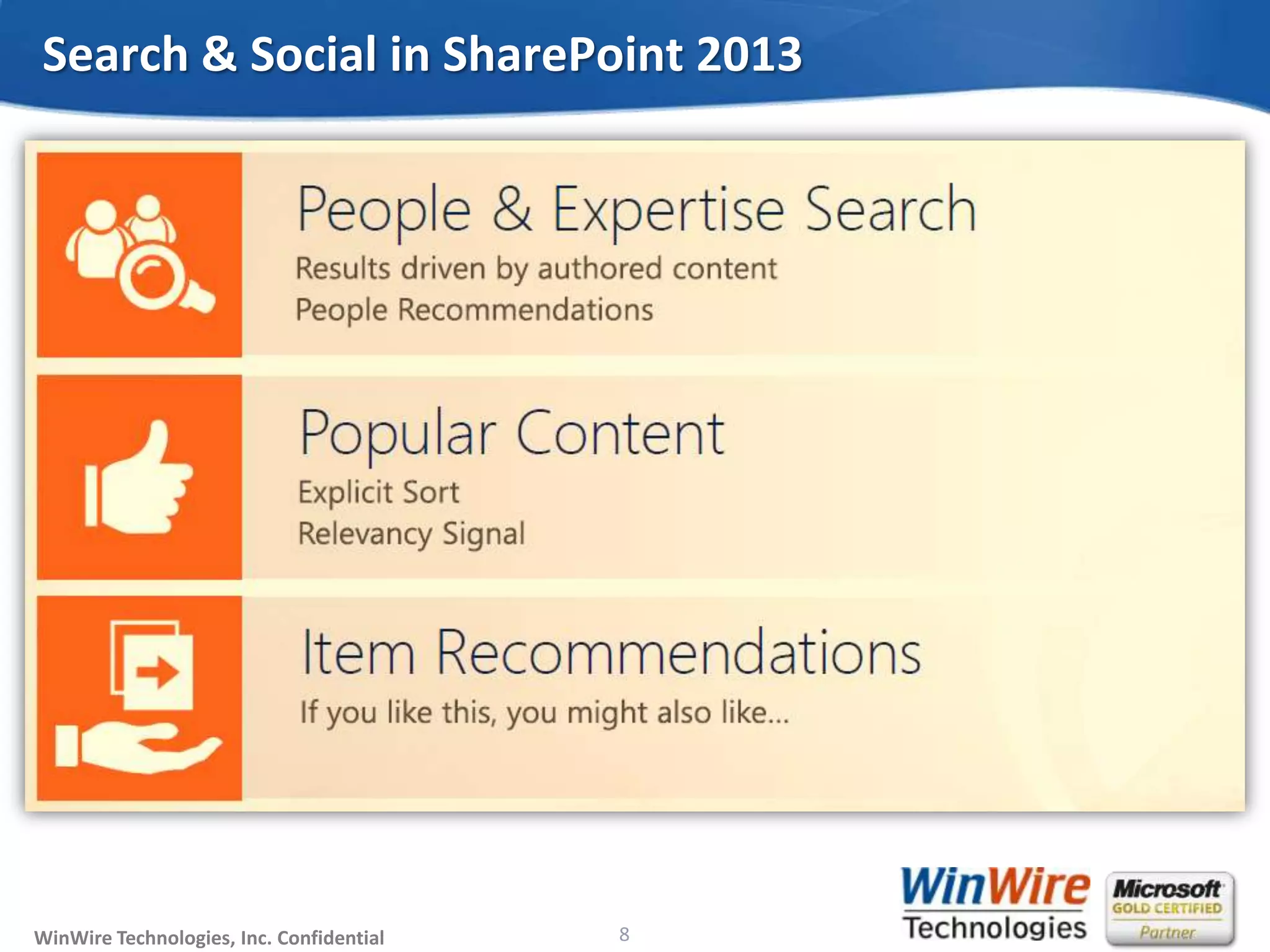
Search & Social in SharePoint 2013
8
© 2010 WinWire TechnologiesWinWire Technologies, Inc. Confidential 9
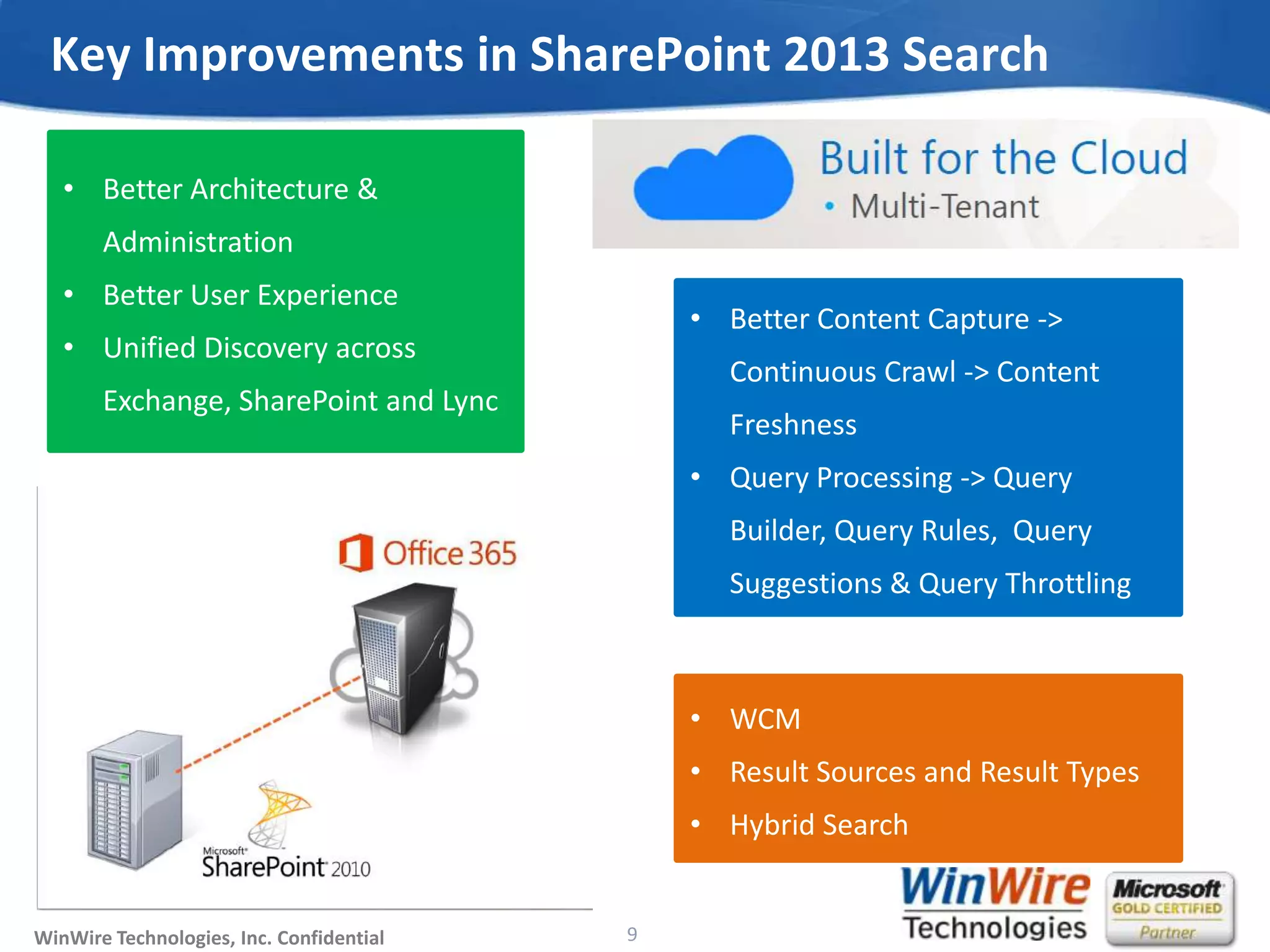
Key Improvements in SharePoint 2013 Search
• Better Architecture &
Administration
• Better User Experience
• Unified Discovery across
Exchange, SharePoint and Lync
• Better Content Capture ->
Continuous Crawl -> Content
Freshness
• Query Processing -> Query
Builder, Query Rules, Query
Suggestions & Query Throttling
• WCM
• Result Sources and Result Types
• Hybrid Search
© 2010 WinWire TechnologiesWinWire Technologies, Inc. Confidential
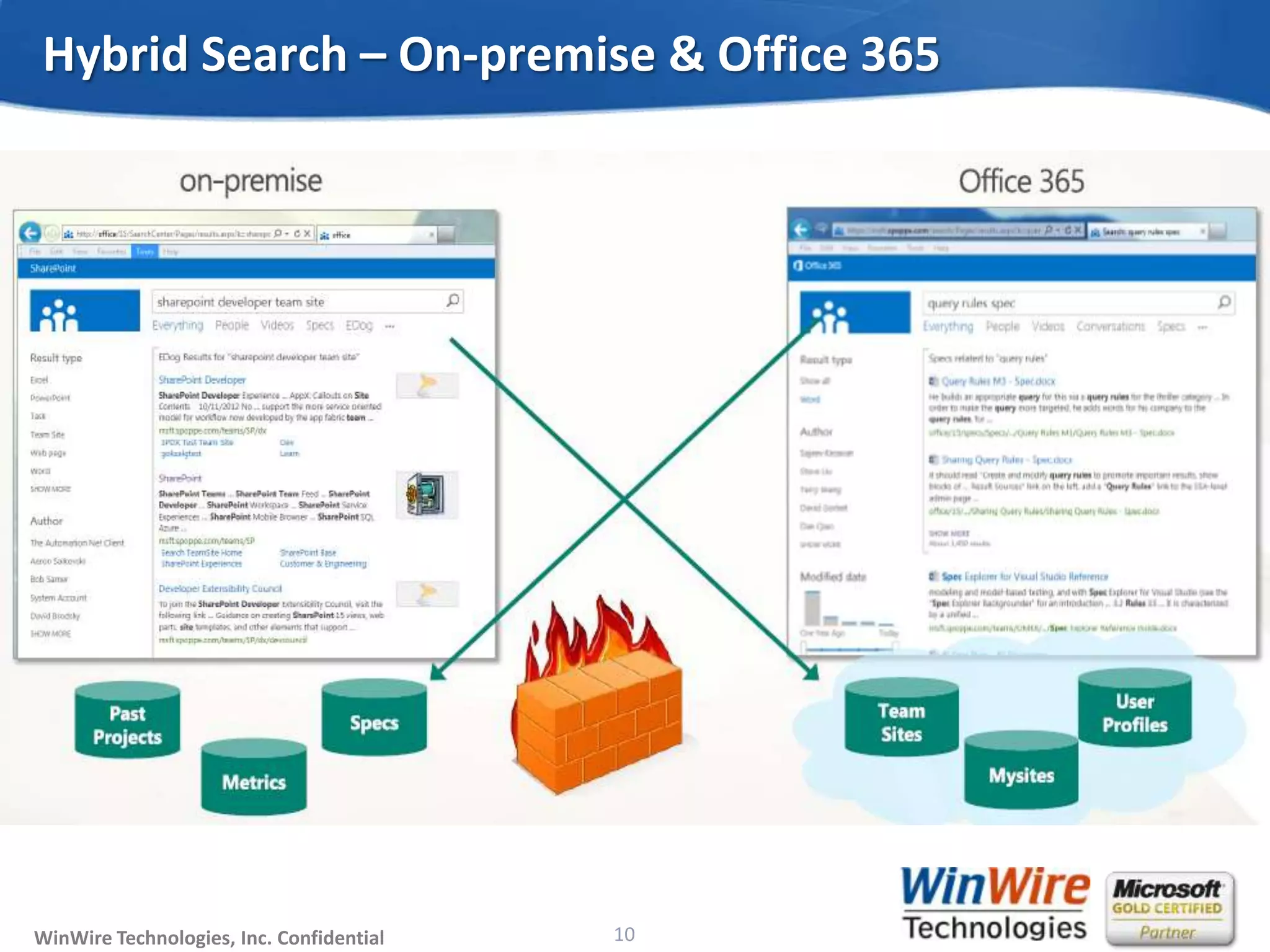
Hybrid Search – On-premise & Office 365
10
© 2010 WinWire TechnologiesWinWire Technologies, Inc. Confidential
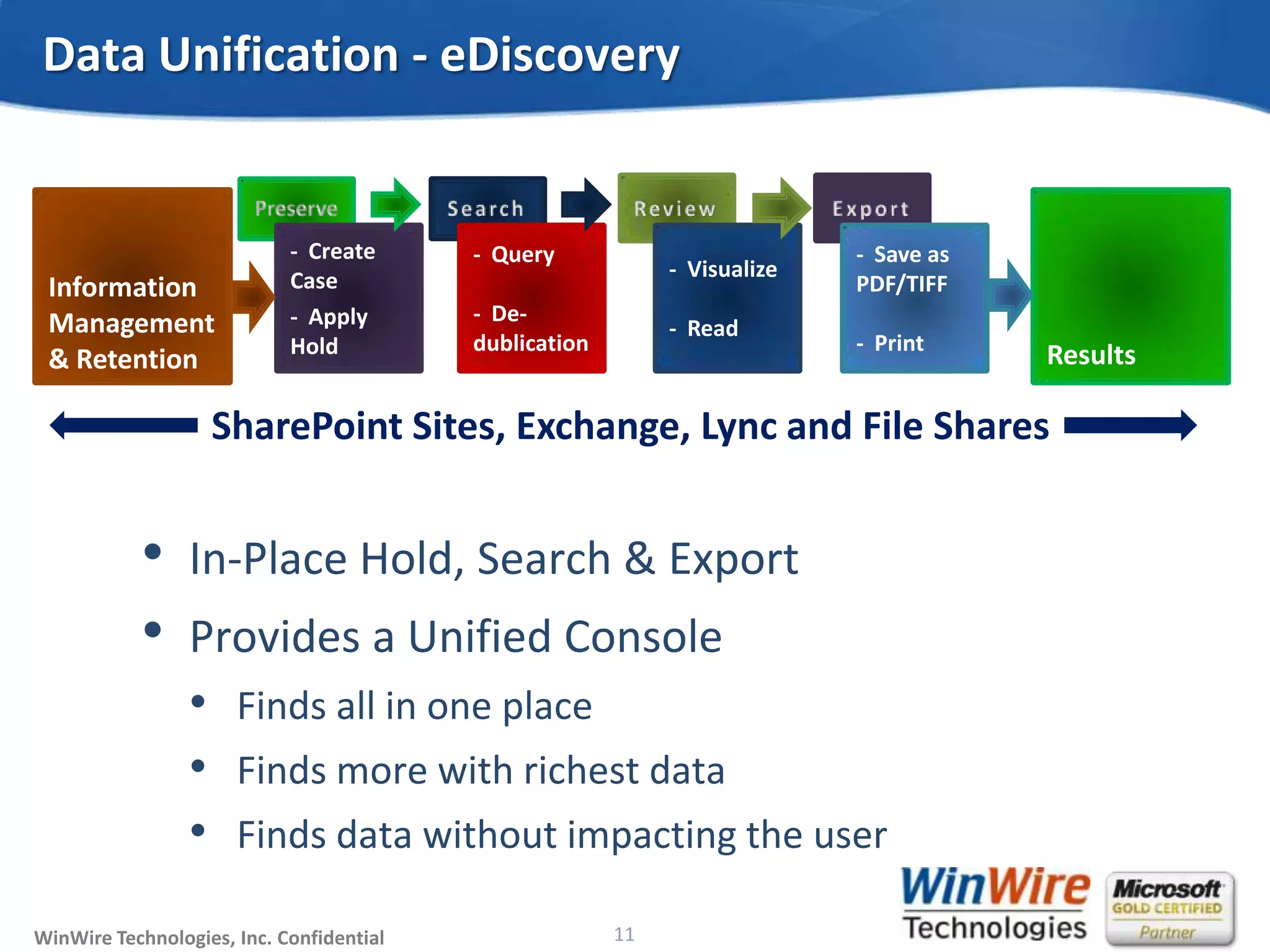
• In-Place Hold, Search & Export
• Provides a Unified Console
• Finds all in one place
• Finds more with richest data
• Finds data without impacting the user
Data Unification - eDiscovery
11
Information
Management
& Retention
- Create
Case
- Apply
Hold Results
- Query
- De-
dublication
- Visualize
- Read
- Save as
PDF/TIFF
- Print
SharePoint Sites, Exchange, Lync and File Shares
© 2010 WinWire TechnologiesWinWire Technologies, Inc. Confidential 12
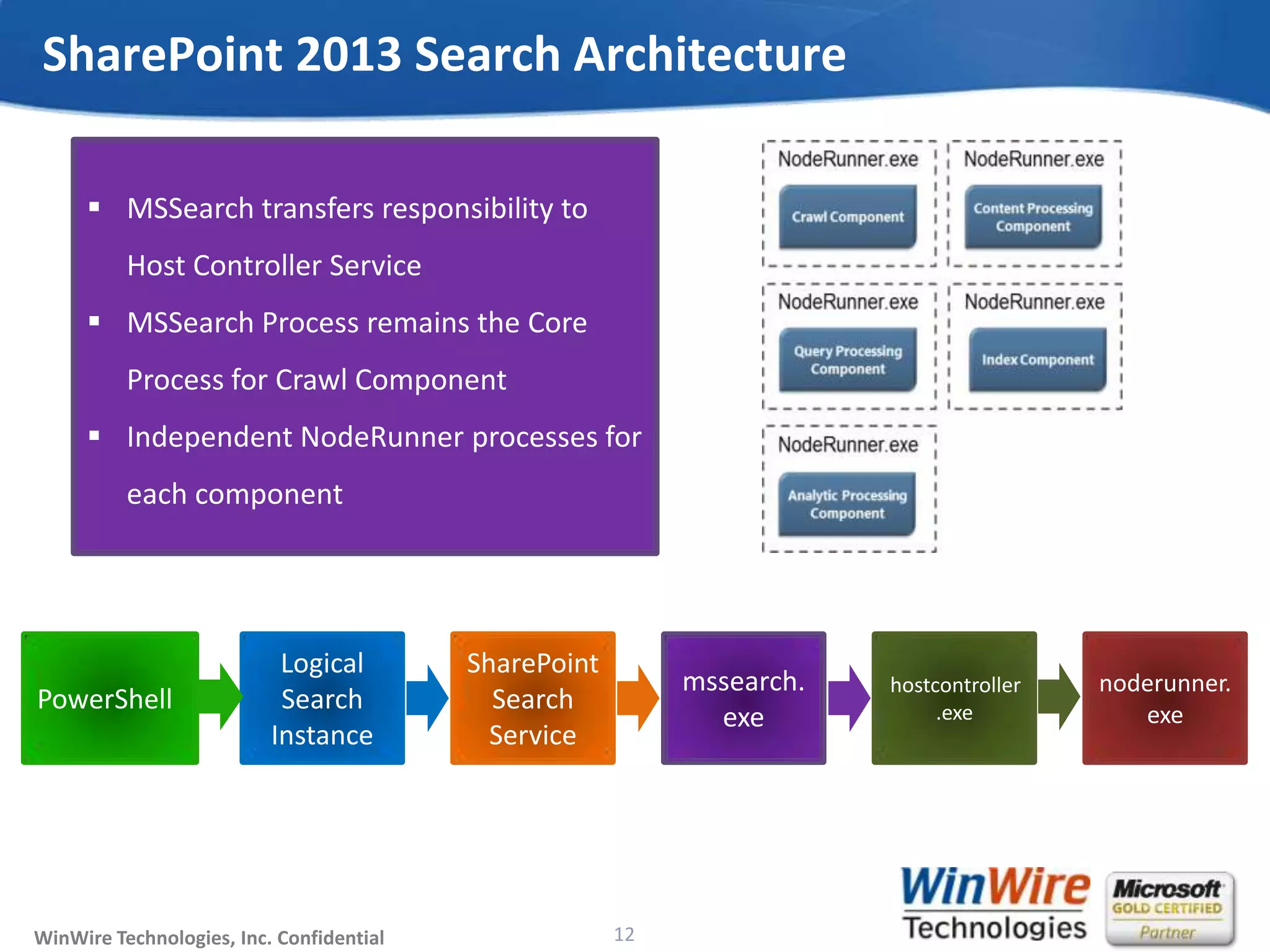
SharePoint 2013 Search Architecture
 MSSearch transfers responsibility to
Host Controller Service
 MSSearch Process remains the Core
Process for Crawl Component
 Independent NodeRunner processes for
each component
PowerShell
Logical
Search
Instance
SharePoint
Search
Service
mssearch.
exe
hostcontroller
.exe
noderunner.
exe
© 2010 WinWire TechnologiesWinWire Technologies, Inc. Confidential
• Admin Component
• Crawl Component
• Content Process Component
• Analytics Processing Component
• Index Component
• Query Processing Component
SharePoint 2013 Search Components
13
© 2010 WinWire TechnologiesWinWire Technologies, Inc. Confidential
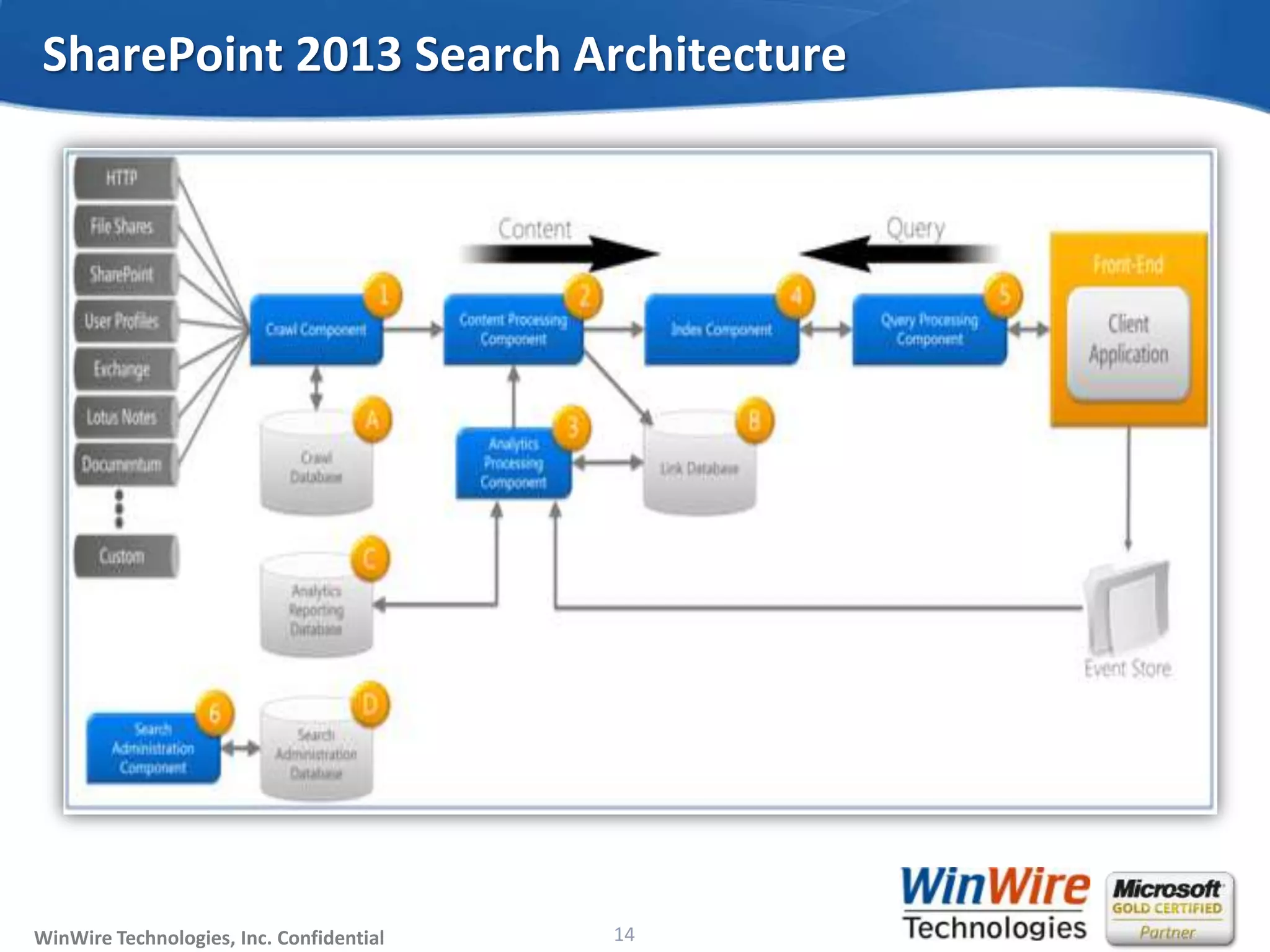
SharePoint 2013 Search Architecture
14
© 2010 WinWire TechnologiesWinWire Technologies, Inc. Confidential
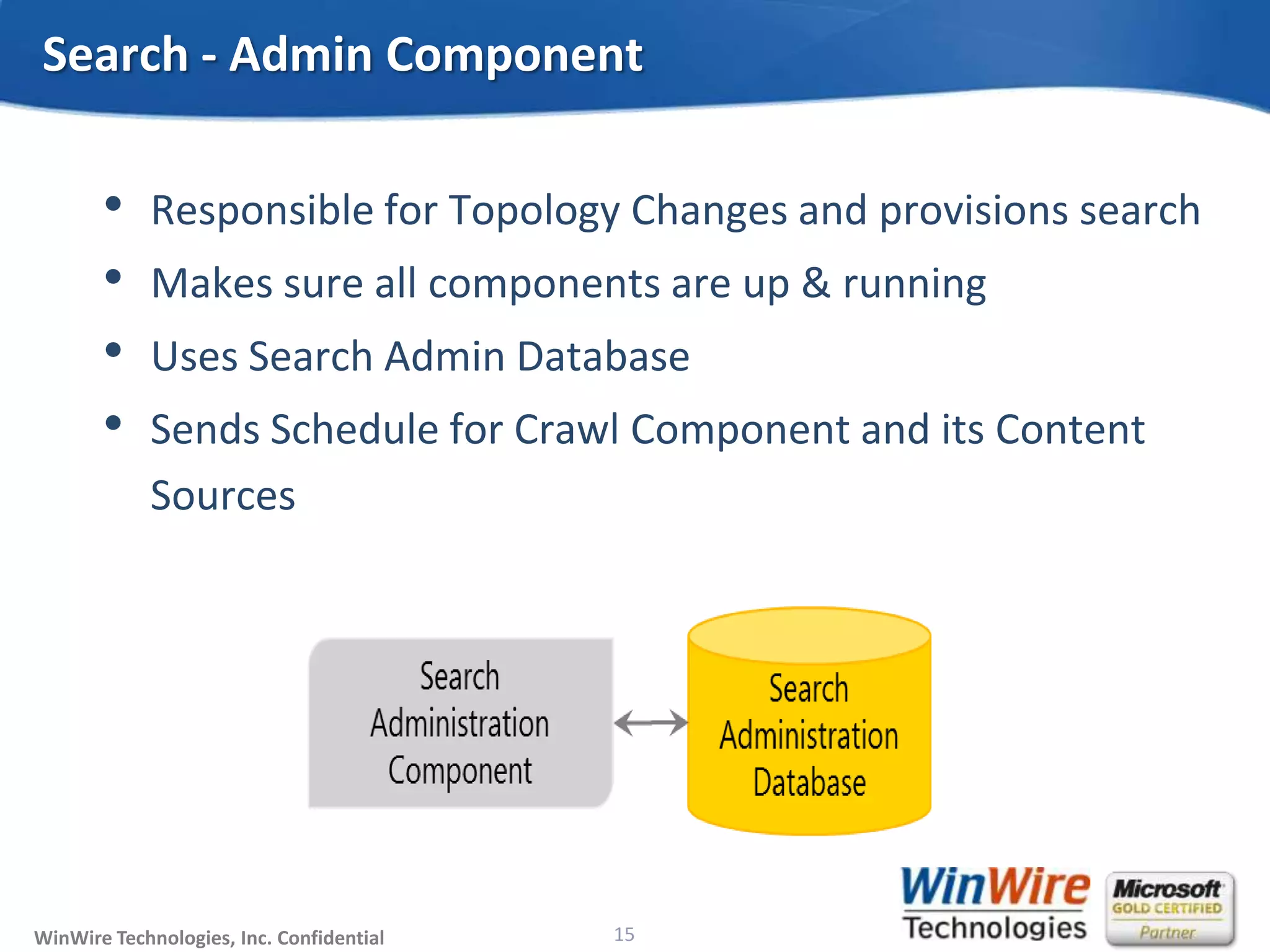
• Responsible for Topology Changes and provisions search
• Makes sure all components are up & running
• Uses Search Admin Database
• Sends Schedule for Crawl Component and its Content
Sources
Search - Admin Component
15
© 2010 WinWire TechnologiesWinWire Technologies, Inc. Confidential
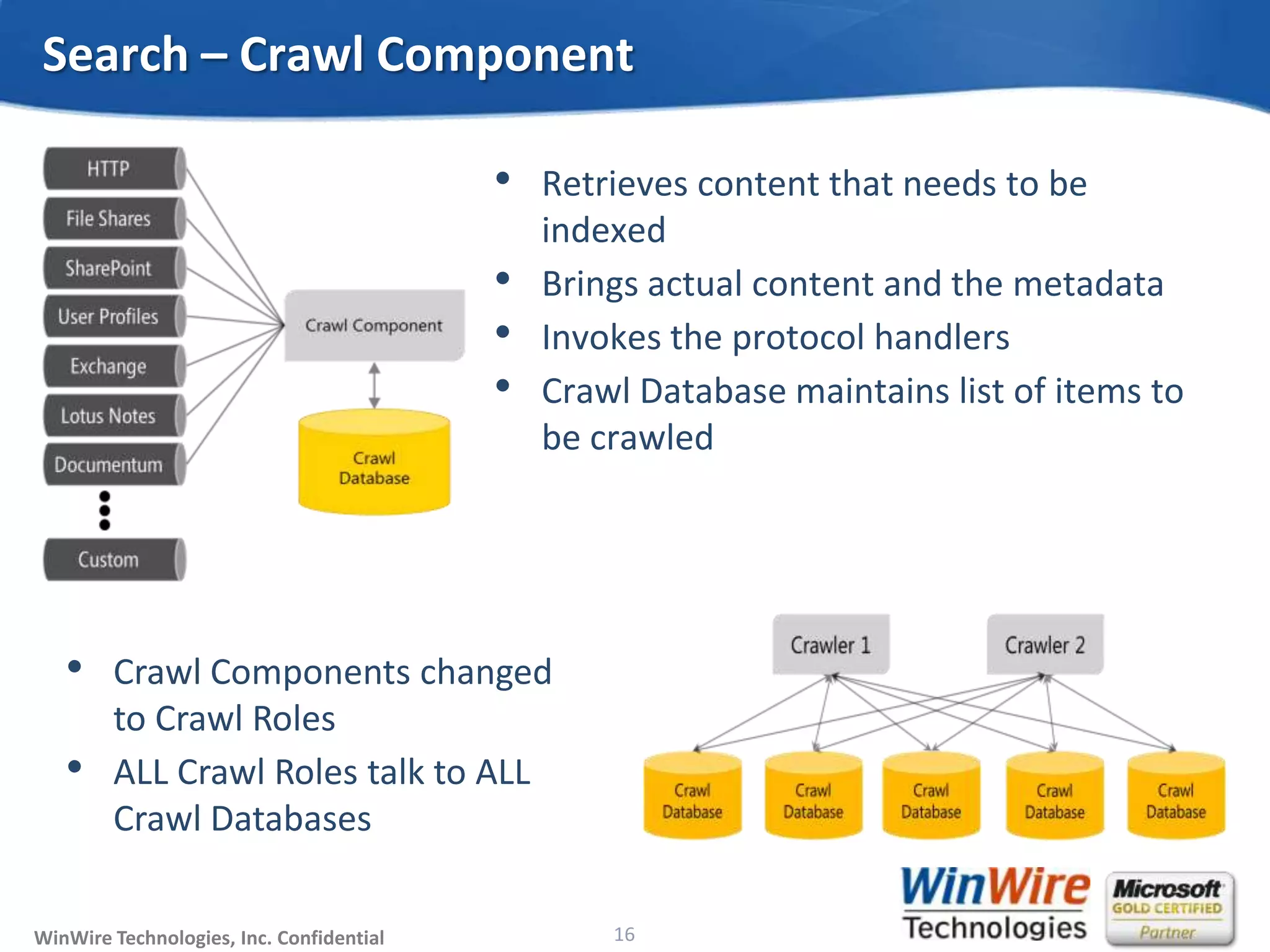
• Retrieves content that needs to be
indexed
• Brings actual content and the metadata
• Invokes the protocol handlers
• Crawl Database maintains list of items to
be crawled
Search – Crawl Component
16
• Crawl Components changed
to Crawl Roles
• ALL Crawl Roles talk to ALL
Crawl Databases
© 2010 WinWire TechnologiesWinWire Technologies, Inc. Confidential
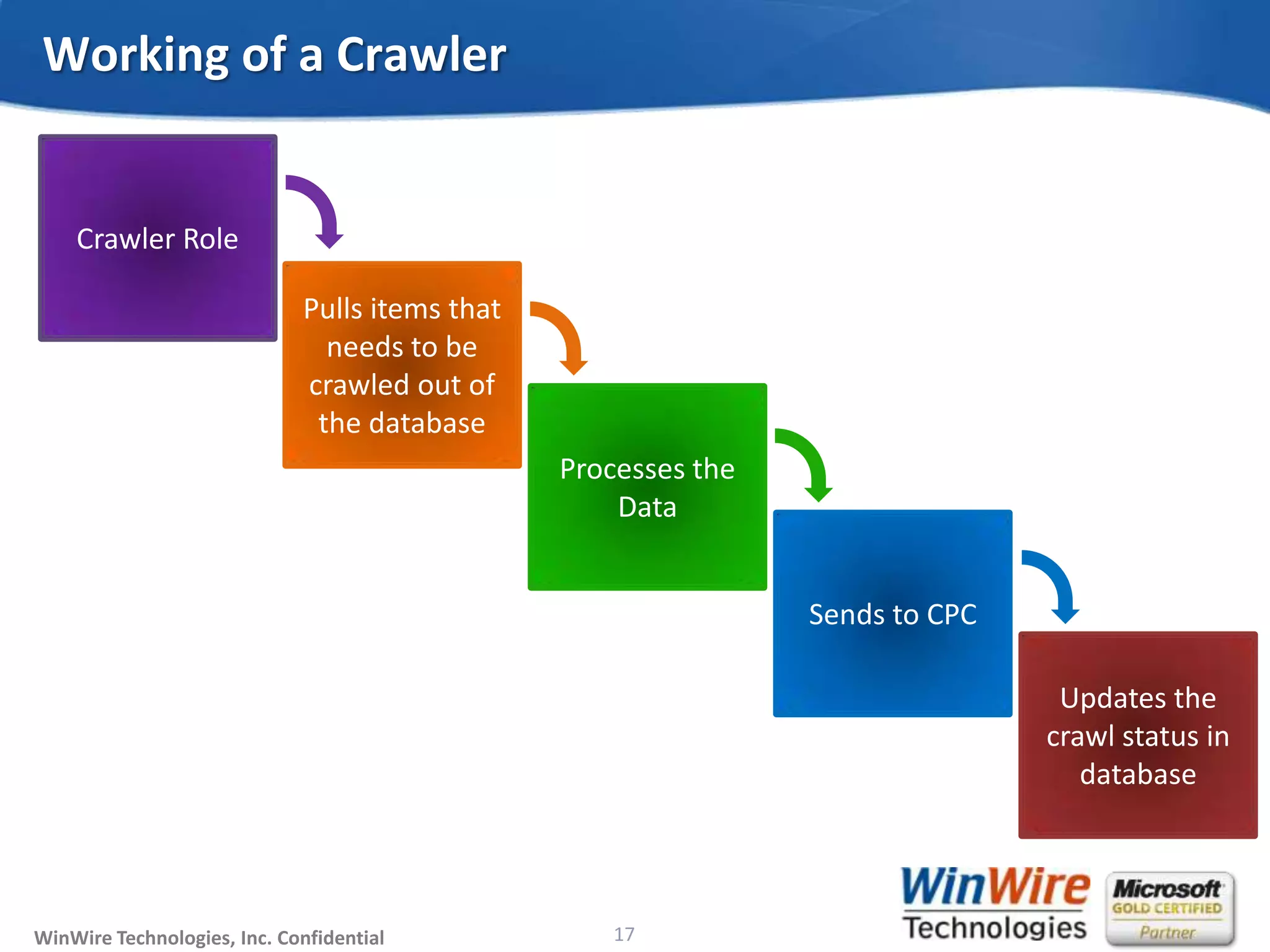
Working of a Crawler
17
Crawler Role
Pulls items that
needs to be
crawled out of
the database
Processes the
Data
Sends to CPC
Updates the
crawl status in
database
© 2010 WinWire TechnologiesWinWire Technologies, Inc. Confidential
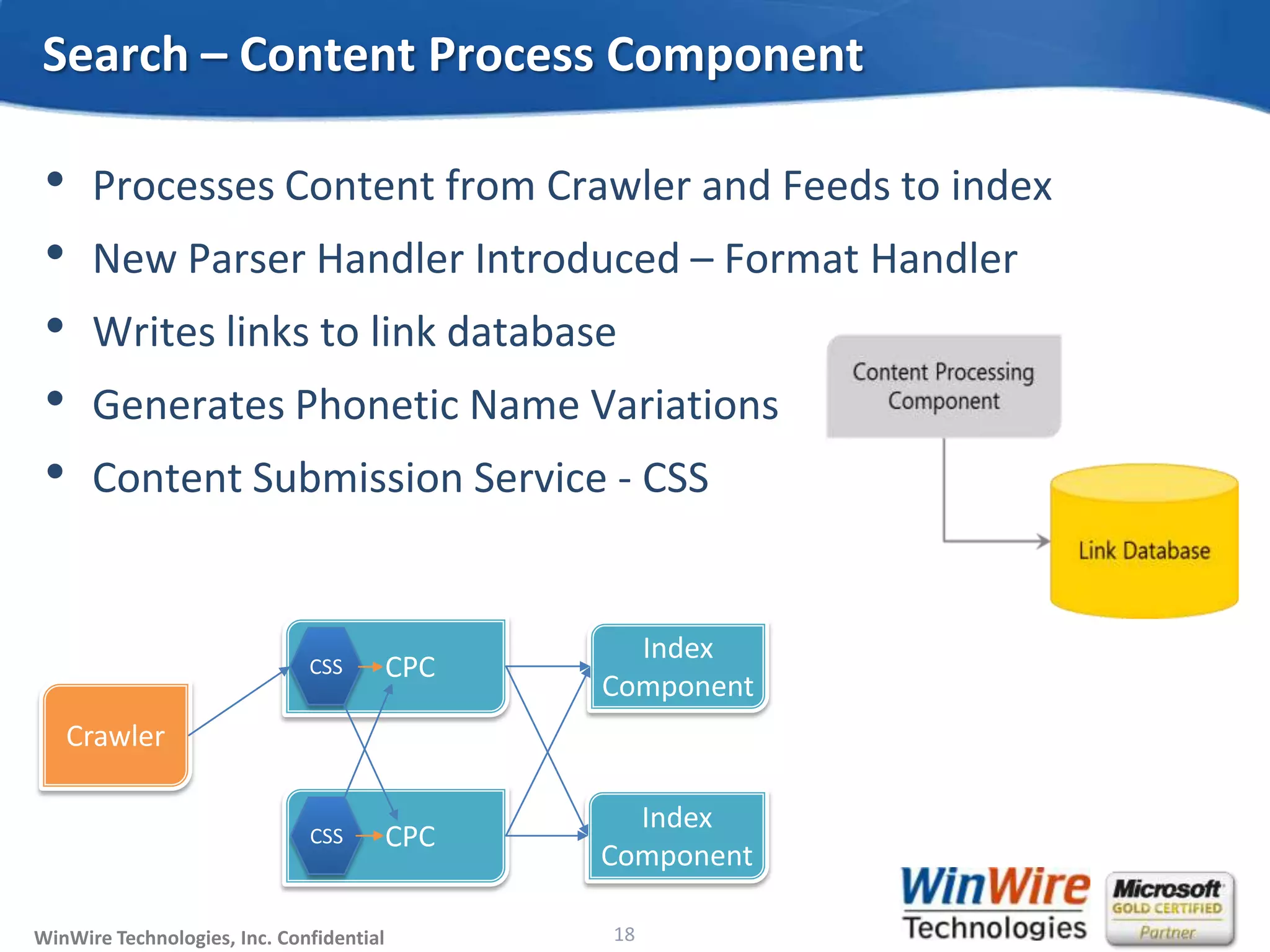
• Processes Content from Crawler and Feeds to index
• New Parser Handler Introduced – Format Handler
• Writes links to link database
• Generates Phonetic Name Variations
• Content Submission Service - CSS
Search – Content Process Component
18
© 2010 WinWire TechnologiesWinWire Technologies, Inc. Confidential
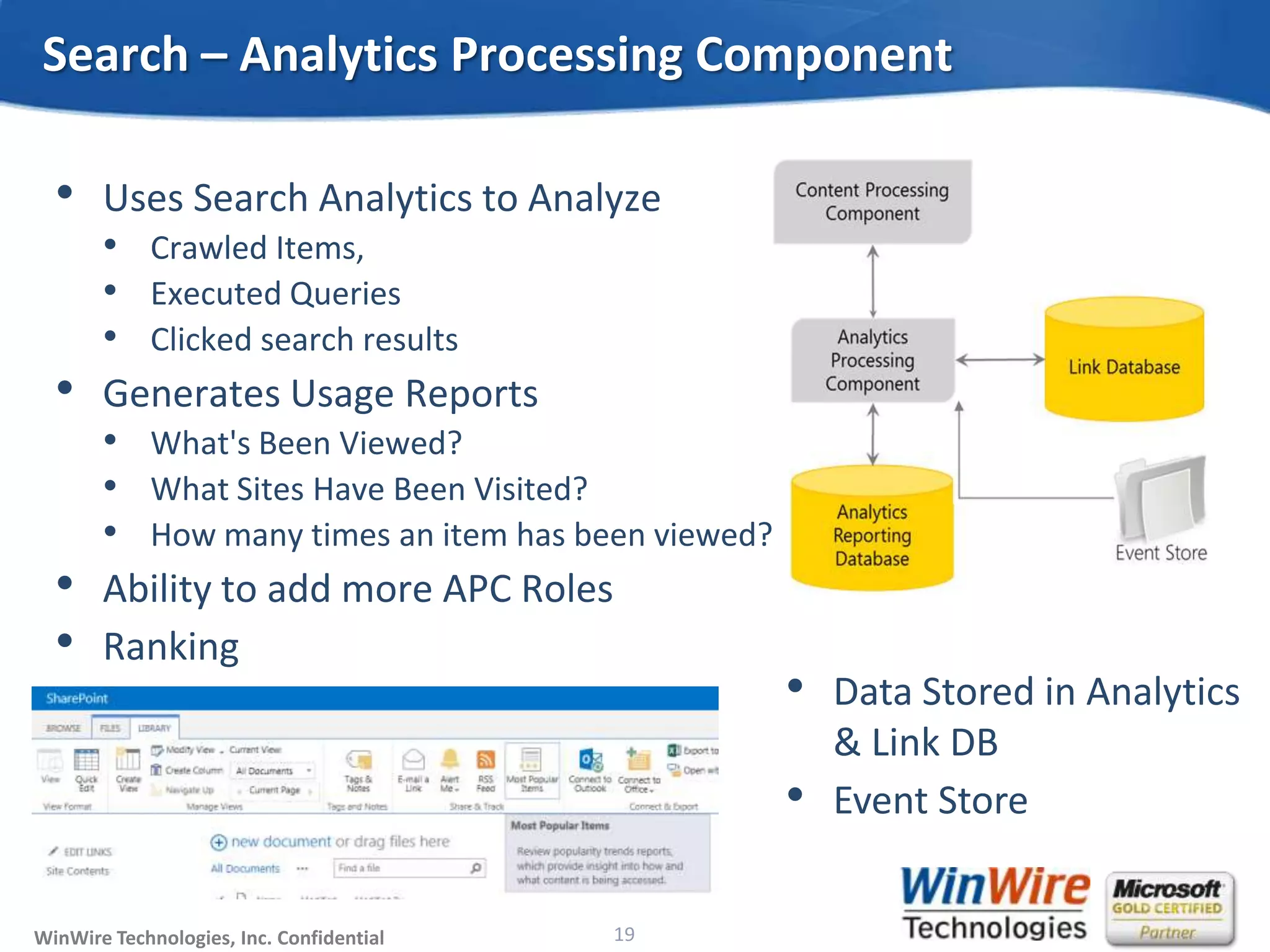
• Uses Search Analytics to Analyze
• Crawled Items,
• Executed Queries
• Clicked search results
• Generates Usage Reports
• What's Been Viewed?
• What Sites Have Been Visited?
• How many times an item has been viewed?
• Ability to add more APC Roles
• Ranking
Search – Analytics Processing Component
19
• Data Stored in Analytics
& Link DB
• Event Store
© 2010 WinWire TechnologiesWinWire Technologies, Inc. Confidential
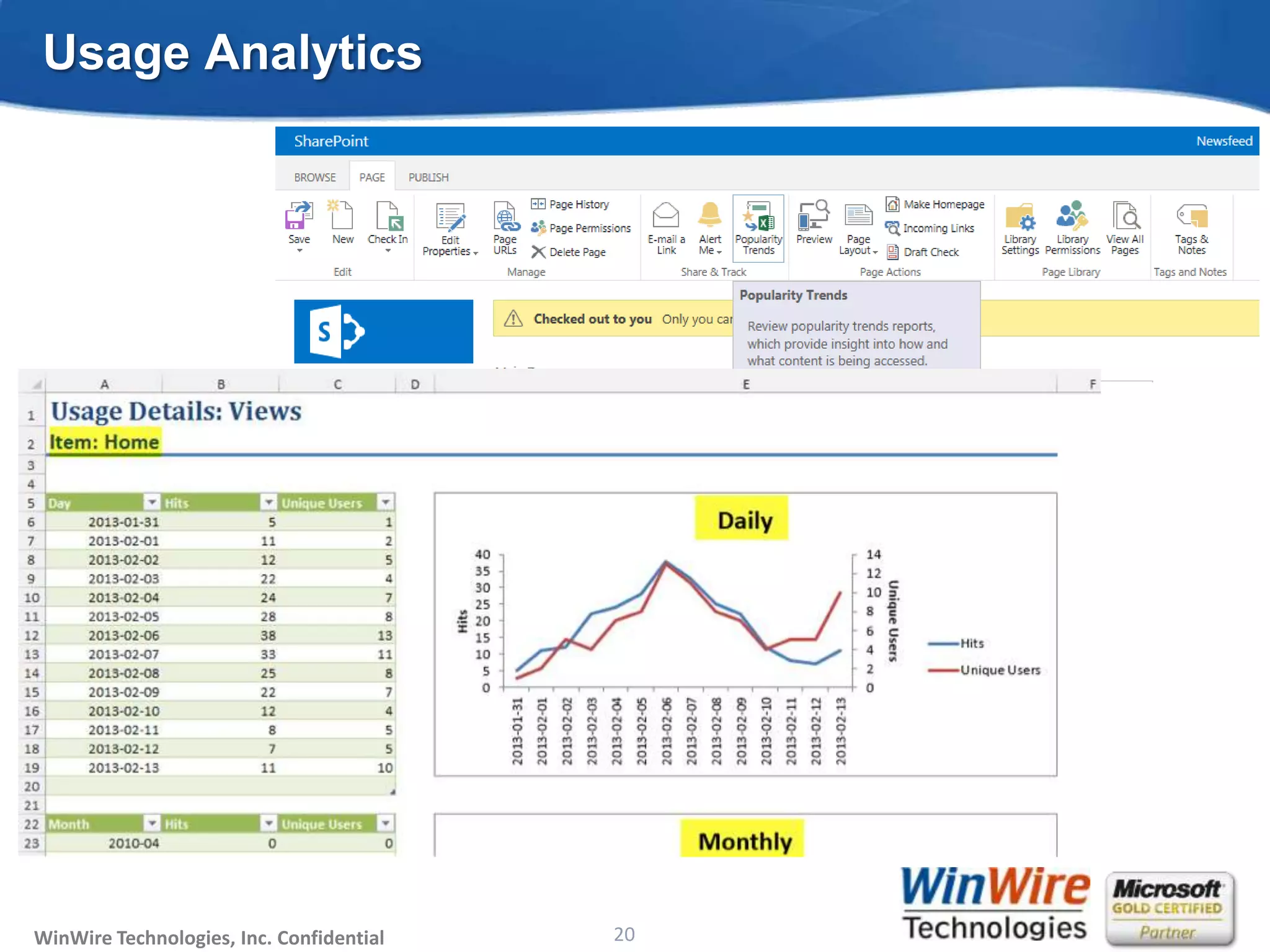
Usage Analytics
20
© 2010 WinWire TechnologiesWinWire Technologies, Inc. Confidential
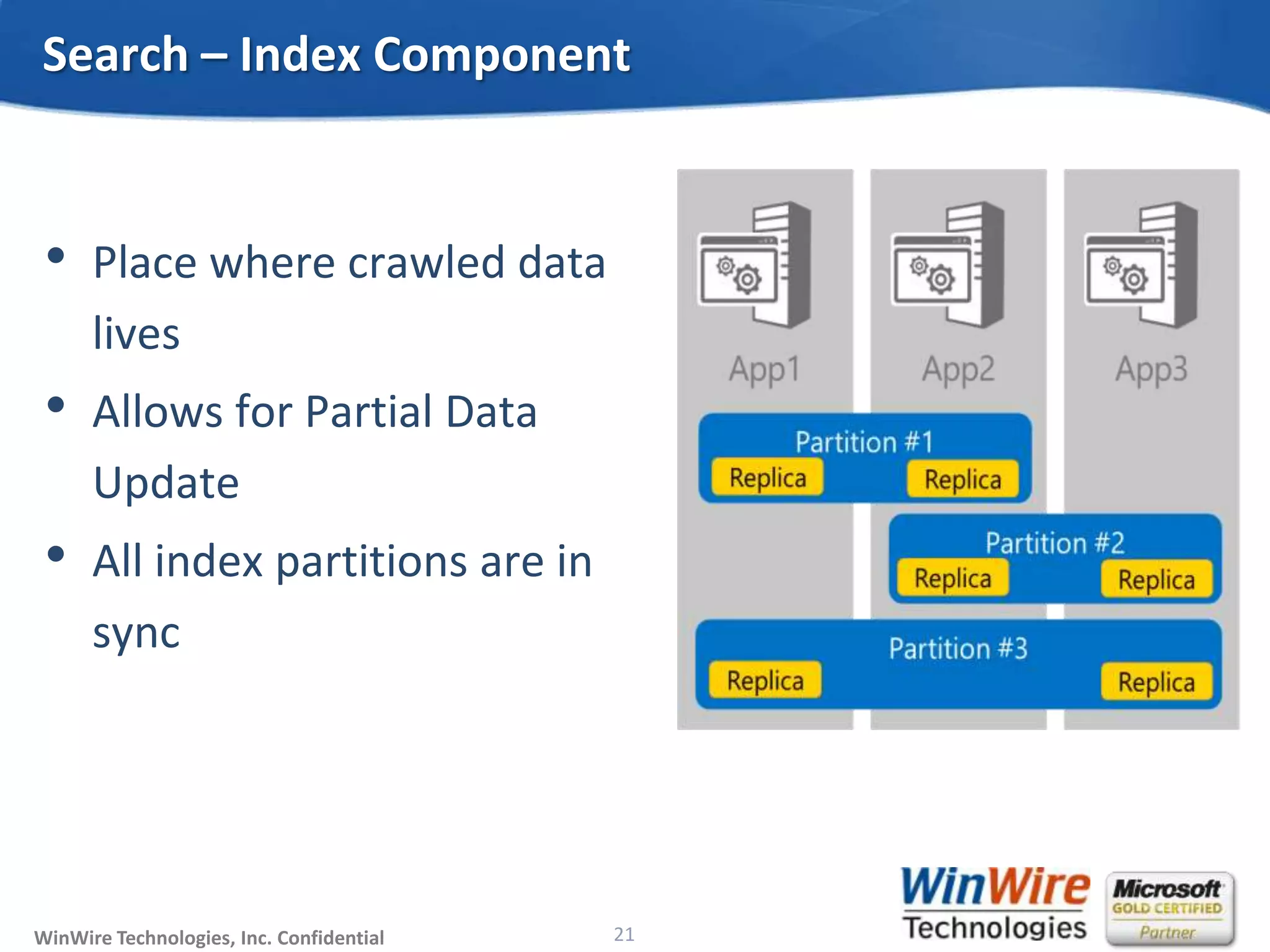
• Place where crawled data
lives
• Allows for Partial Data
Update
• All index partitions are in
sync
Search – Index Component
21
© 2010 WinWire TechnologiesWinWire Technologies, Inc. Confidential
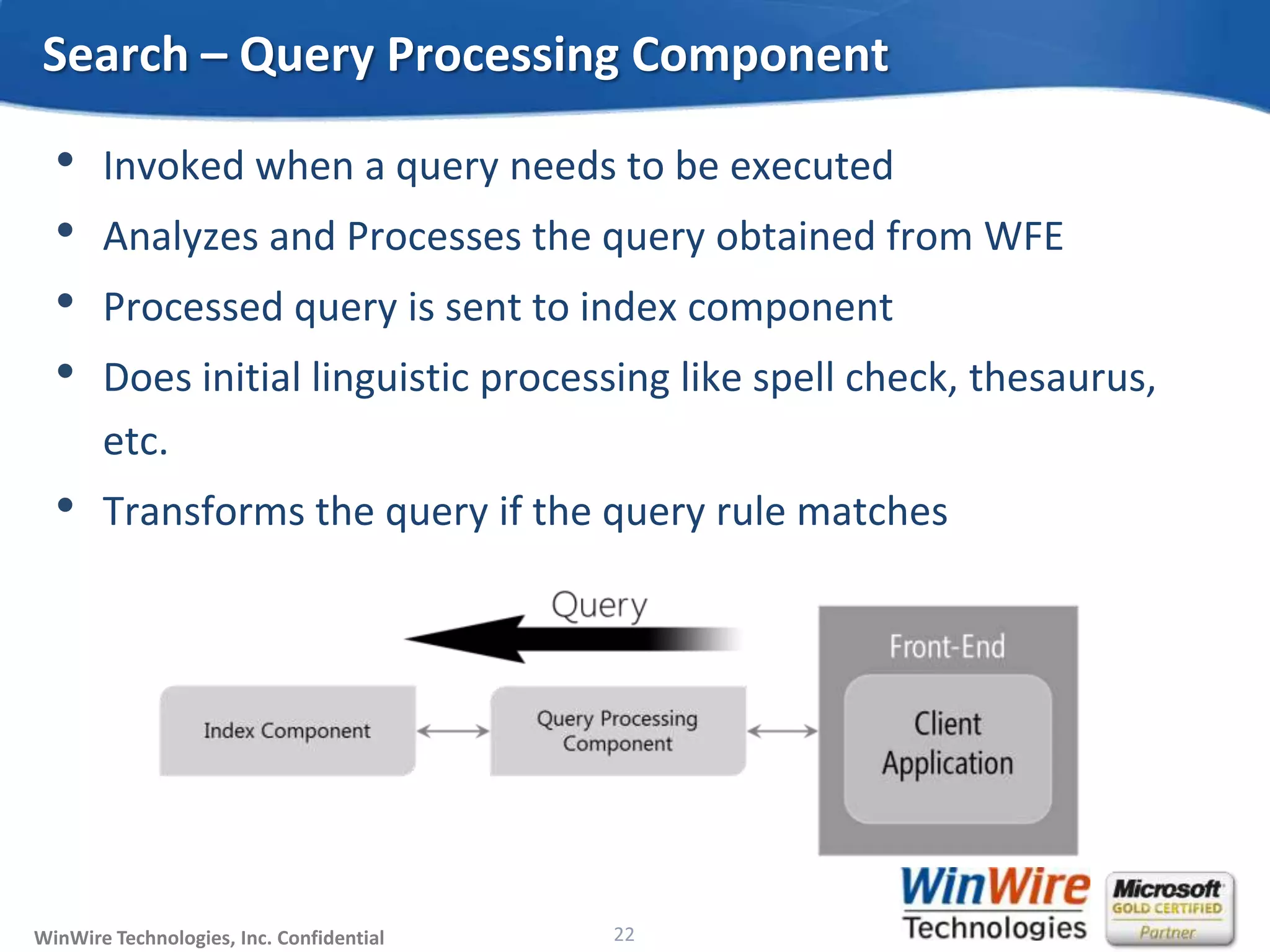
• Invoked when a query needs to be executed
• Analyzes and Processes the query obtained from WFE
• Processed query is sent to index component
• Does initial linguistic processing like spell check, thesaurus,
etc.
• Transforms the query if the query rule matches
Search – Query Processing Component
22
© 2010 WinWire TechnologiesWinWire Technologies, Inc. Confidential
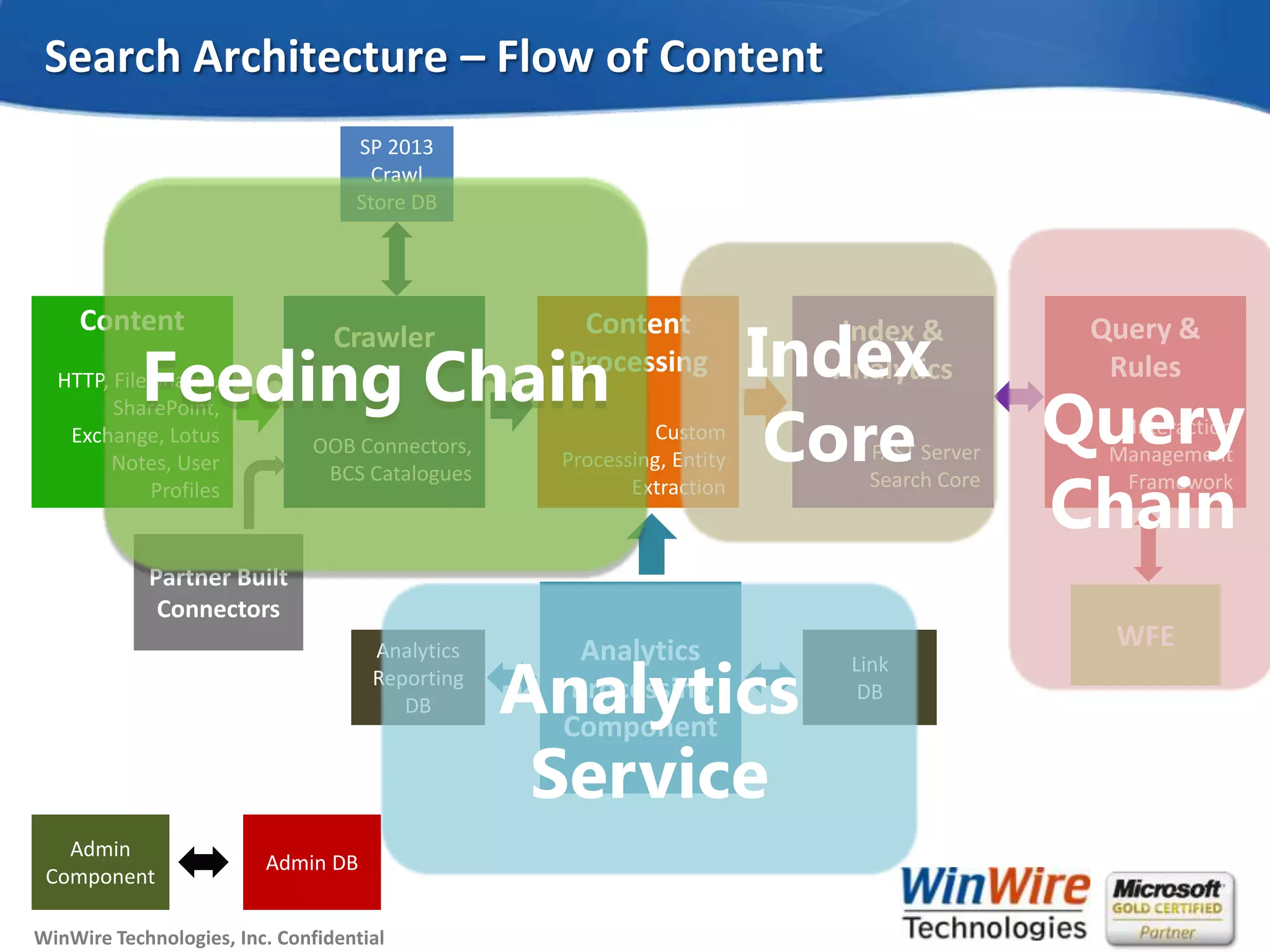
Search Architecture – Flow of Content
Content
HTTP, File Shares,
SharePoint,
Exchange, Lotus
Notes, User
Profiles
Crawler
OOB Connectors,
BCS Catalogues
Content
Processing
Custom
Processing, Entity
Extraction
Index &
Analytics
FAST Server
Search Core
Query &
Rules
Interaction
Management
Framework
WFEAnalytics
Processing
Component
Partner Built
Connectors
SP 2013
Crawl
Store DB
Analytics
Reporting
DB
Link
DB
Admin
Component
Admin DB
Feeding Chain Index
Core Query
Chain
Analytics
Service
© 2010 WinWire TechnologiesWinWire Technologies, Inc. Confidential
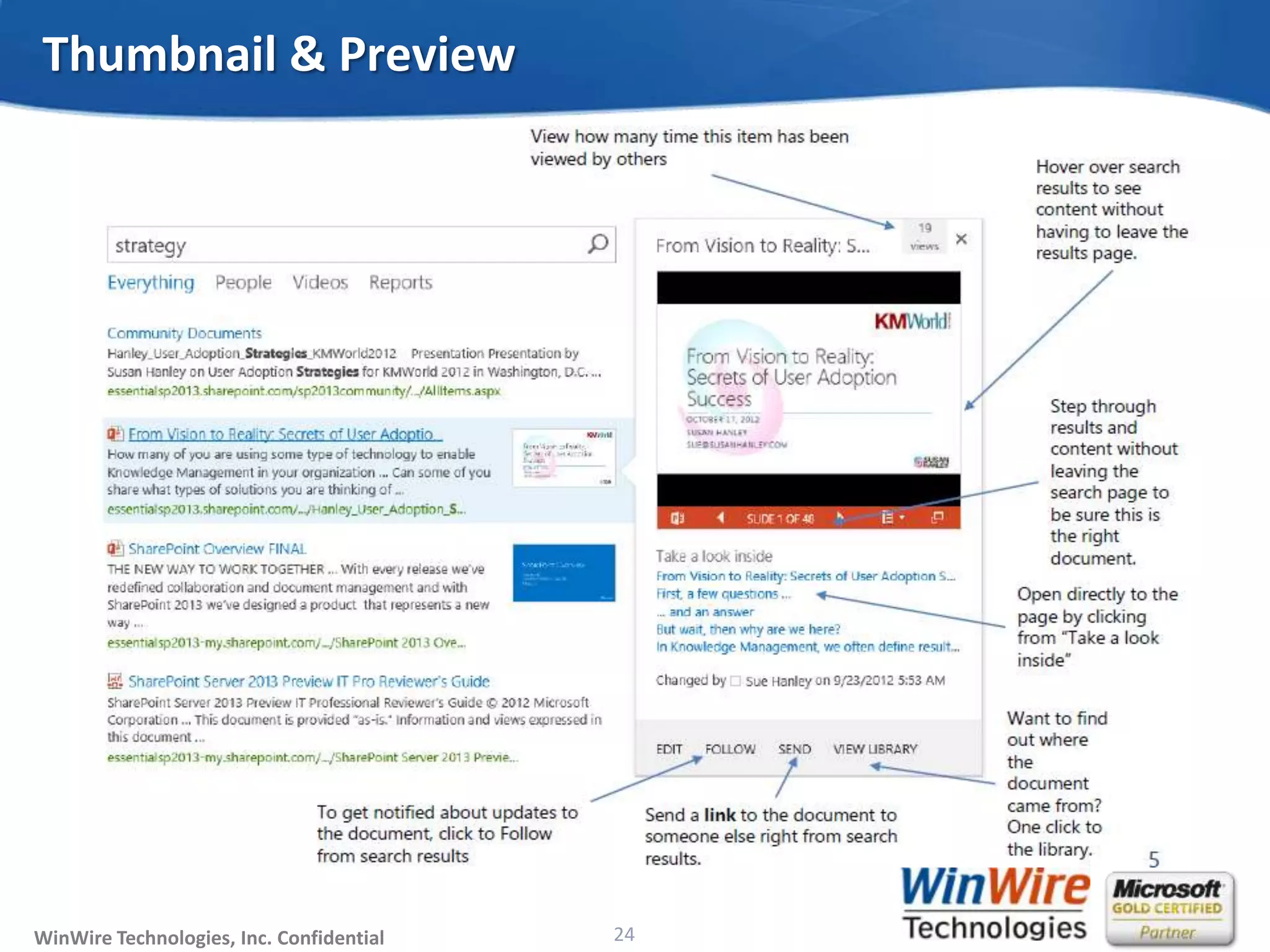
Thumbnail & Preview
24
© 2010 WinWire TechnologiesWinWire Technologies, Inc. Confidential
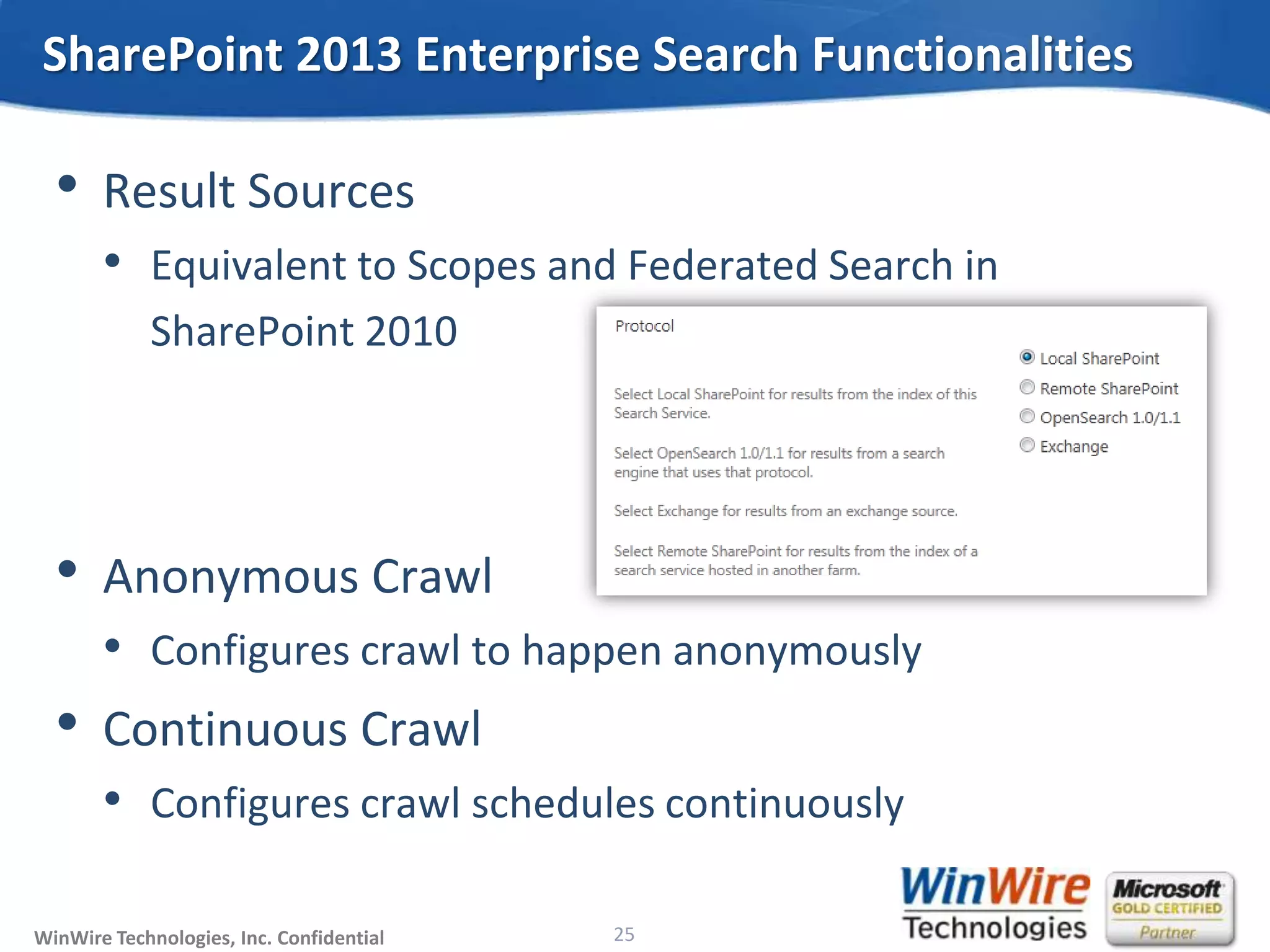
• Result Sources
• Equivalent to Scopes and Federated Search in
SharePoint 2010
• Anonymous Crawl
• Configures crawl to happen anonymously
• Continuous Crawl
• Configures crawl schedules continuously
SharePoint 2013 Enterprise Search Functionalities
25
© 2010 WinWire TechnologiesWinWire Technologies, Inc. Confidential
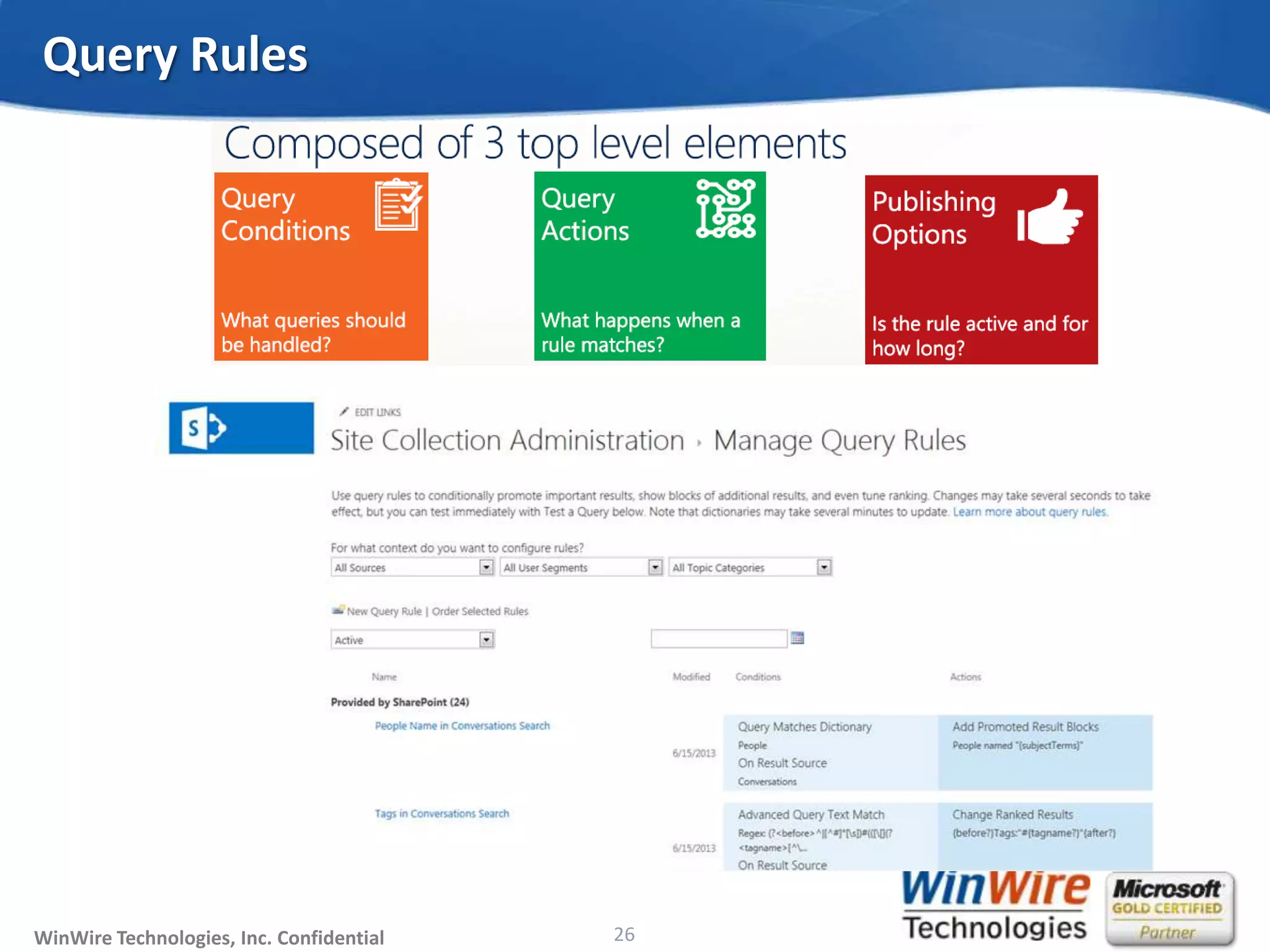
Query Rules
26
© 2010 WinWire TechnologiesWinWire Technologies, Inc. Confidential
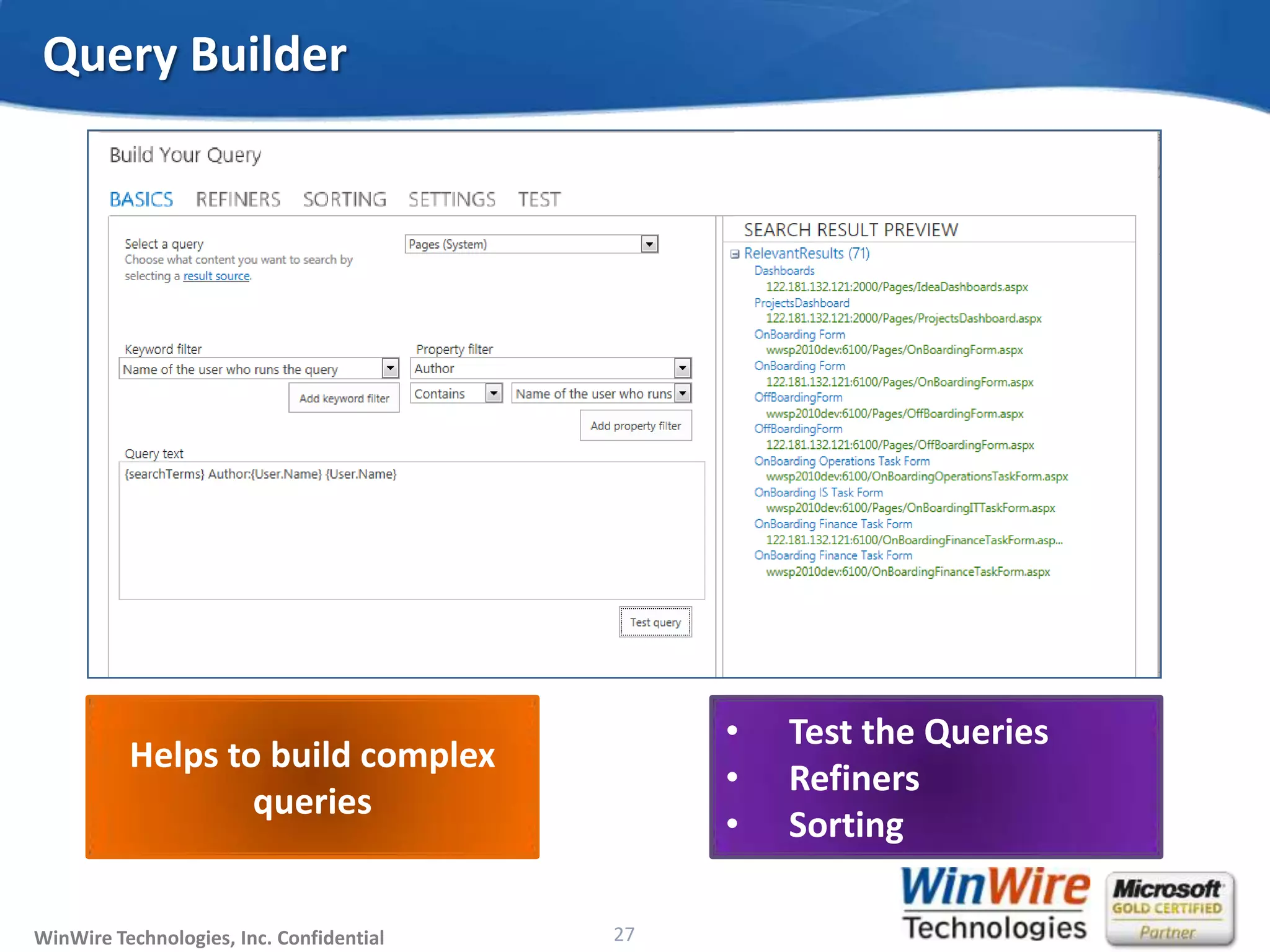
Query Builder
27
Helps to build complex
queries
• Test the Queries
• Refiners
• Sorting
© 2010 WinWire TechnologiesWinWire Technologies, Inc. Confidential
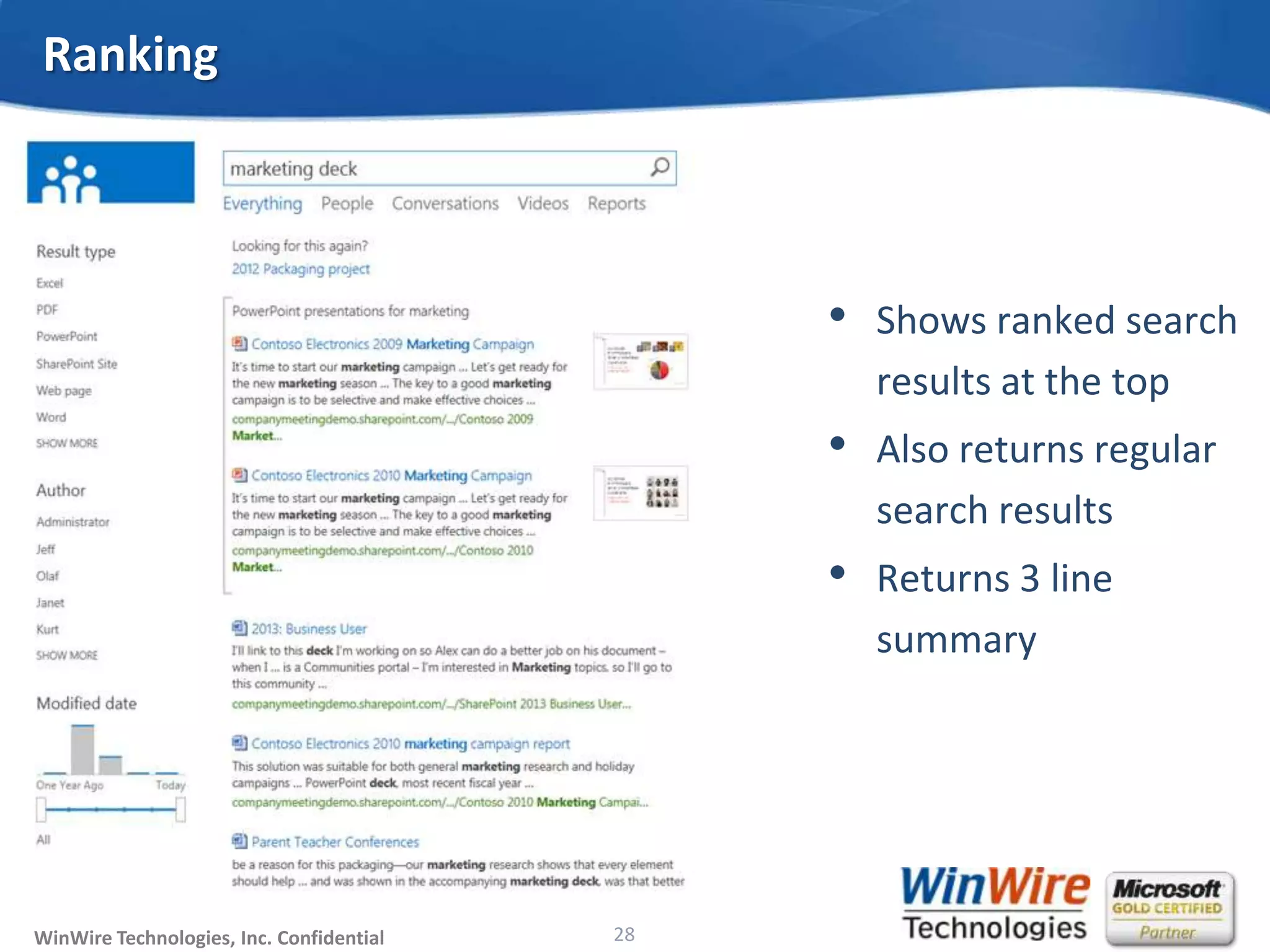
Ranking
• Shows ranked search
results at the top
• Also returns regular
search results
• Returns 3 line
summary
28
© 2010 WinWire TechnologiesWinWire Technologies, Inc. Confidential
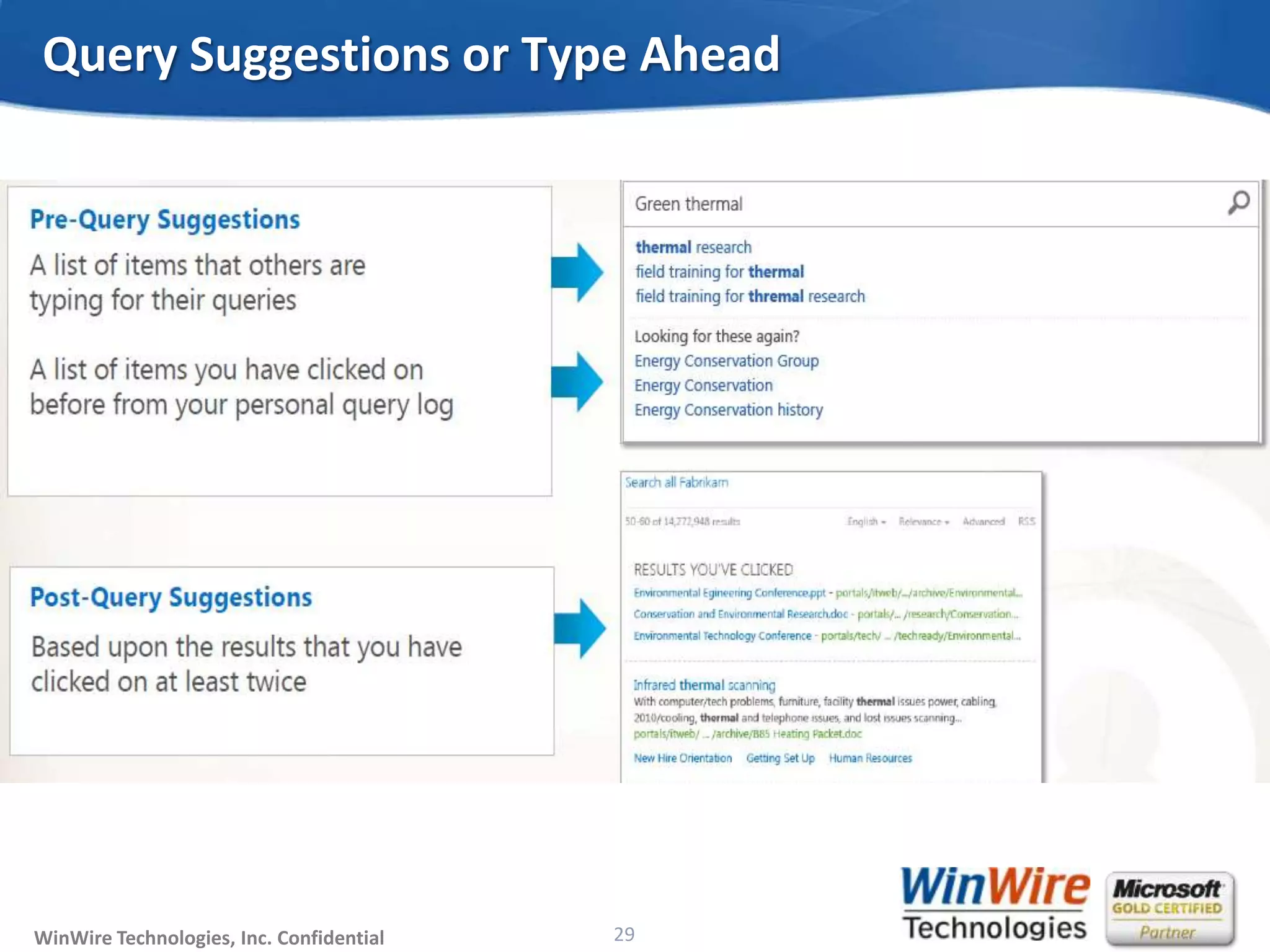
Query Suggestions or Type Ahead
29
© 2010 WinWire TechnologiesWinWire Technologies, Inc. Confidential
• Query Throttling
• Assigns priority to queries based on the client application whether High,
Medium or Low
• Entity Extraction
• Uses inclusion and exclusion dictionaries from the term store of Managed
Metadata Service
• WCM
• Powered using Content By Search web parts, Recommendations,
Refinements, Metadata Navigation
• Display Templates
• Customizable look and feel for Result Blocks
SharePoint 2013 Enterprise Search Functionalities
30
© 2010 WinWire TechnologiesWinWire Technologies, Inc. Confidential
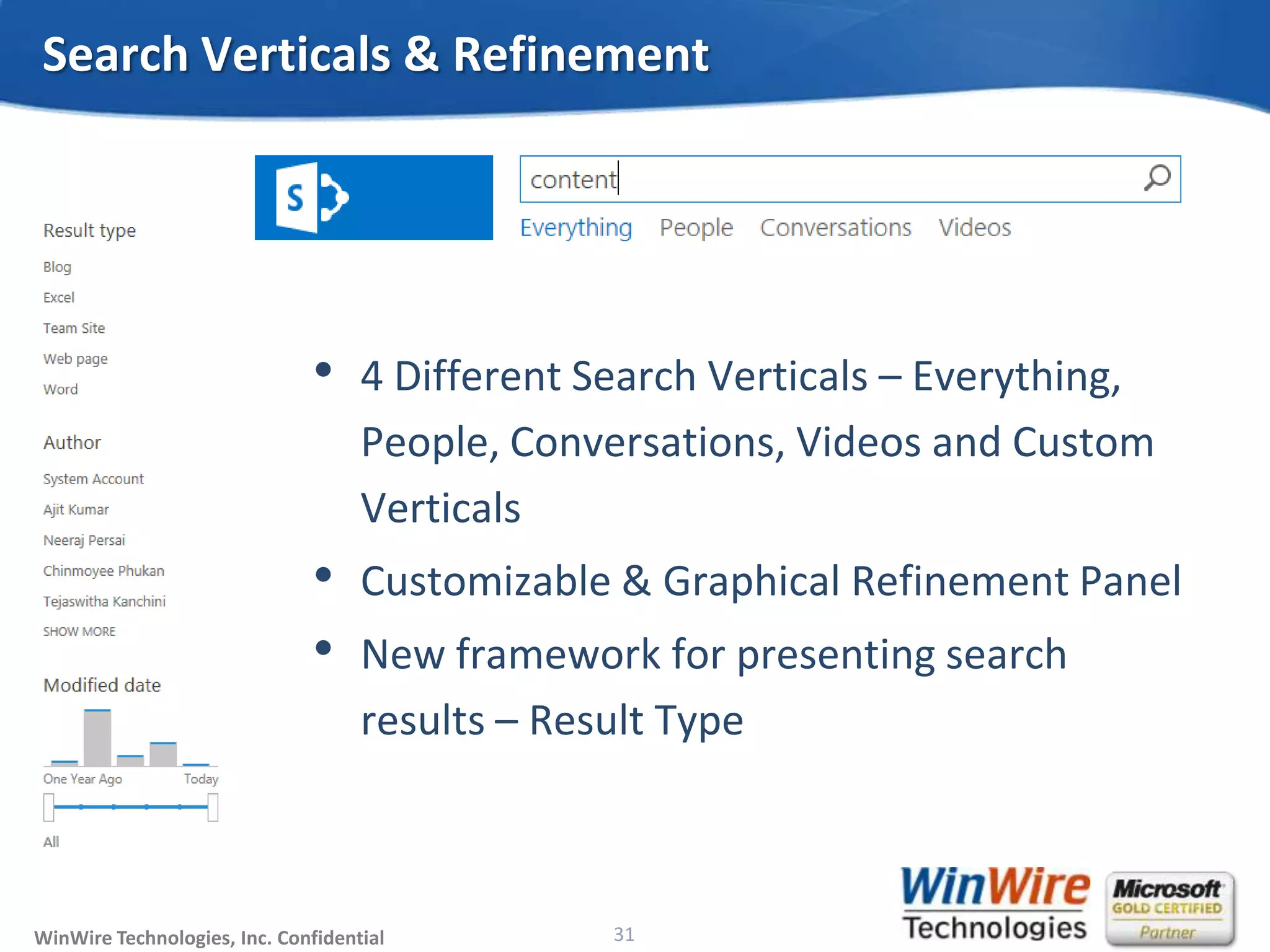
• 4 Different Search Verticals – Everything,
People, Conversations, Videos and Custom
Verticals
• Customizable & Graphical Refinement Panel
• New framework for presenting search
results – Result Type
Search Verticals & Refinement
31
© 2010 WinWire TechnologiesWinWire Technologies, Inc. Confidential
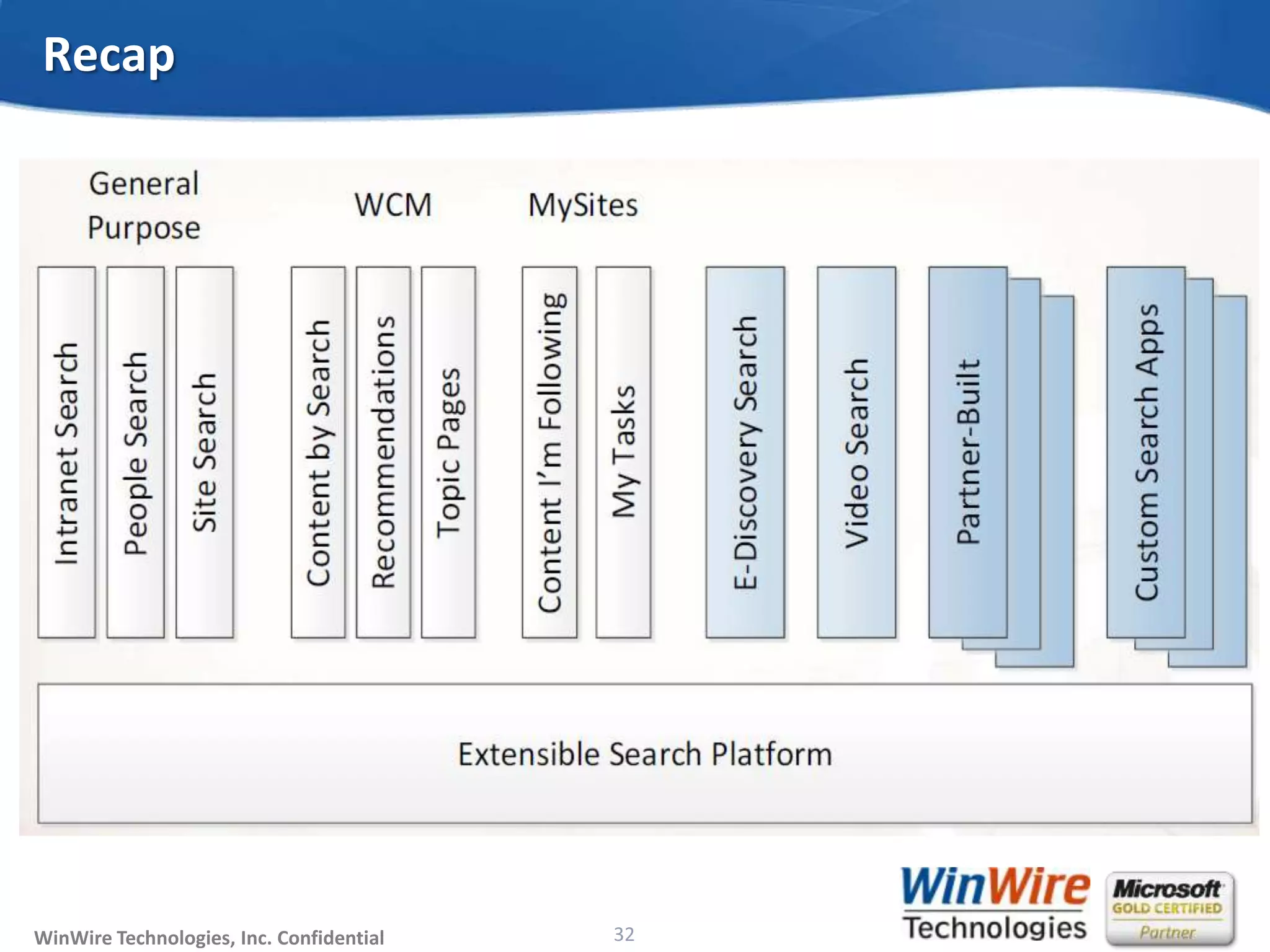
Recap
32
© 2010 WinWire TechnologiesWinWire Technologies, Inc. Confidential
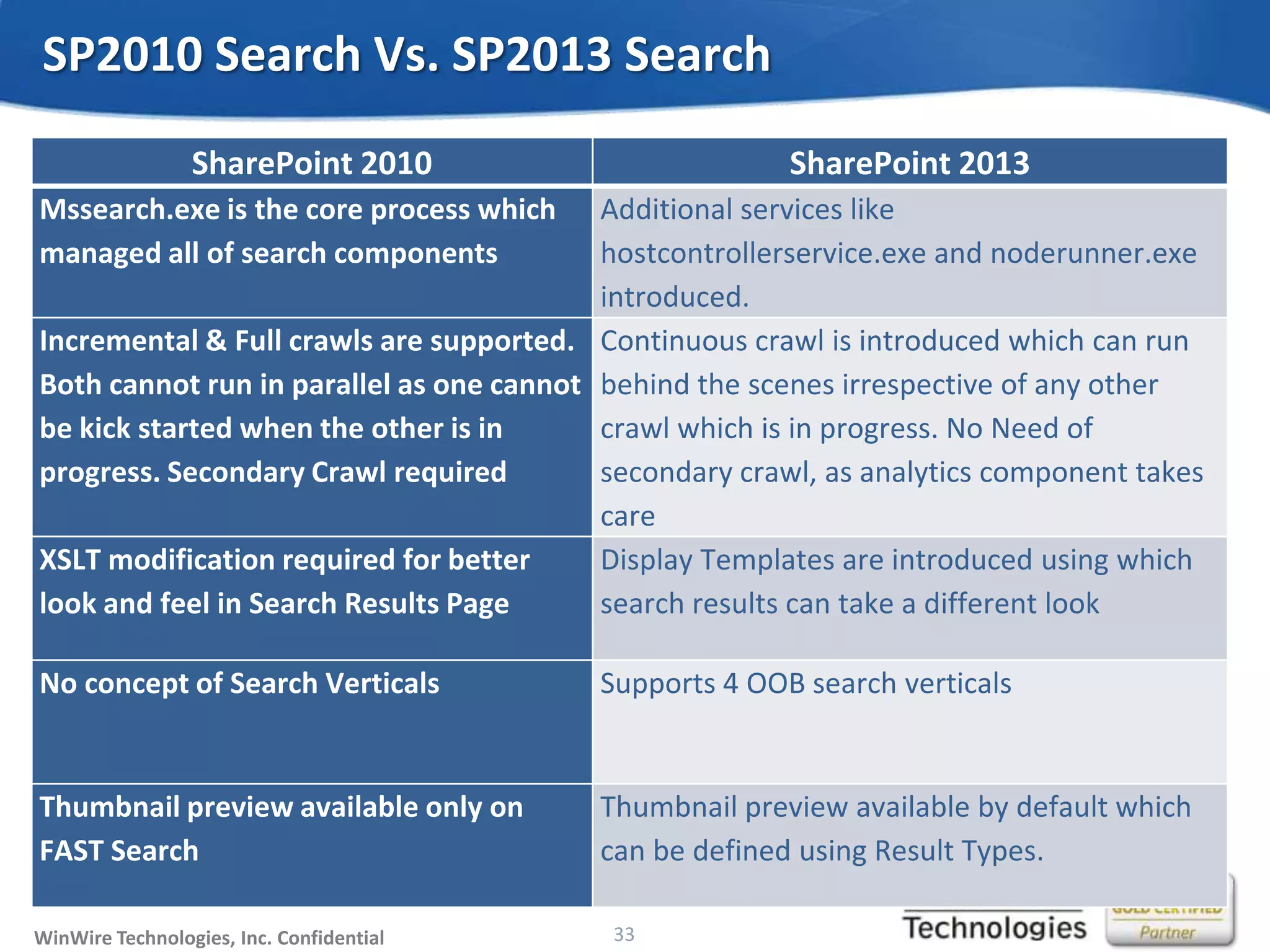
SP2010 Search Vs. SP2013 Search
33
SharePoint 2010 SharePoint 2013
Mssearch.exe is the core process which
managed all of search components
Additional services like
hostcontrollerservice.exe and noderunner.exe
introduced.
Incremental & Full crawls are supported.
Both cannot run in parallel as one cannot
be kick started when the other is in
progress. Secondary Crawl required
Continuous crawl is introduced which can run
behind the scenes irrespective of any other
crawl which is in progress. No Need of
secondary crawl, as analytics component takes
care
XSLT modification required for better
look and feel in Search Results Page
Display Templates are introduced using which
search results can take a different look
No concept of Search Verticals Supports 4 OOB search verticals
Thumbnail preview available only on
FAST Search
Thumbnail preview available by default which
can be defined using Result Types.
© 2010 WinWire TechnologiesWinWire Technologies, Inc. Confidential
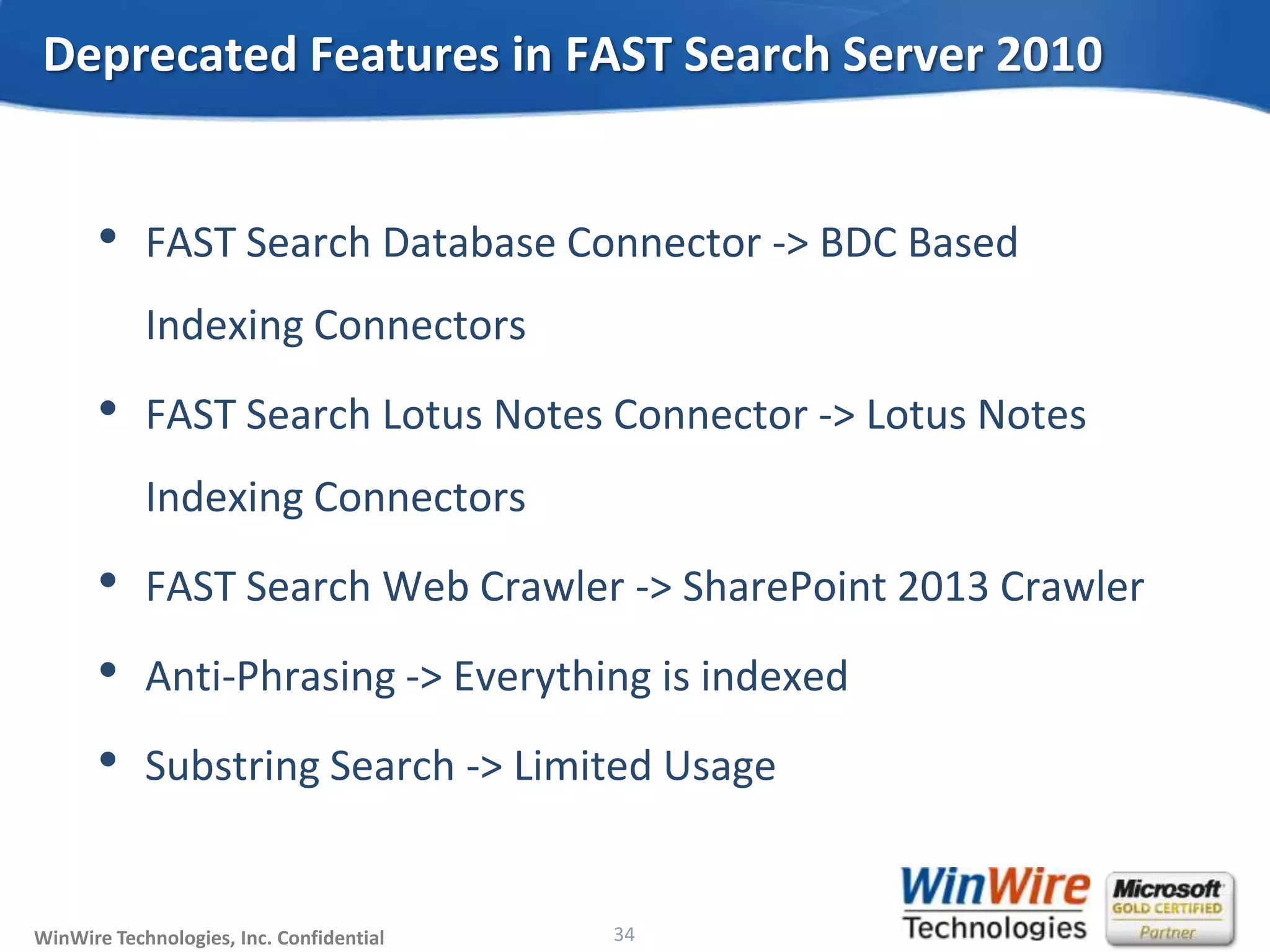
• FAST Search Database Connector -> BDC Based
Indexing Connectors
• FAST Search Lotus Notes Connector -> Lotus Notes
Indexing Connectors
• FAST Search Web Crawler -> SharePoint 2013 Crawler
• Anti-Phrasing -> Everything is indexed
• Substring Search -> Limited Usage
Deprecated Features in FAST Search Server 2010
34
© 2010 WinWire TechnologiesWinWire Technologies, Inc. Confidential
WinWire Technologies, Inc. Confidential
Join us for our Next Webinar on Wired2Win Webinar Series!
“What & How to Choose: SharePoint 2013 vs. Office 365”
Date: 17 October, 2013
Time: 8 am PT
Q & A
© 2010 WinWire TechnologiesWinWire Technologies, Inc. Confidential
WinWire Technologies, Inc. Confidential
Reach out to us at marketing@winwire.com
Visit us: www.winwire.com
http://www.winwire.com/winwire-blog/
www.twitter.com/winwire
Thank You

SharePoint 2013 'Search': What you need to Know!

  • 1.
    © 2010 WinWireTechnologiesWinWire Technologies, Inc. Confidential SharePoint 2013 Search – What You Need to Know! @WinWire Wired2Win Webinar Series
  • 2.
    © 2010 WinWireTechnologiesWinWire Technologies, Inc. Confidential
  • 3.
    © 2010 WinWireTechnologiesWinWire Technologies, Inc. Confidential WinWire Technologies is an IT Services Company that helps business and technology leaders harness the power of Collaboration and Analytics across the enterprise leveraging technology trends such as cloud, mobility, and enterprise social Who We Are
  • 4.
    © 2010 WinWireTechnologiesWinWire Technologies, Inc. Confidential Agenda • Overview of Search in SharePoint 2010 • Key Improvements of Search in SharePoint 2013 • SharePoint 2013 Search Architecture • SharePoint 2013 Search Components • Enterprise Search Functionalities • SP2010 Search Vs. SP2013 Search • Deprecated Features in FAST Search Server 2010
  • 5.
    © 2010 WinWireTechnologiesWinWire Technologies, Inc. Confidential 5 Overview of Search in SharePoint 2010 • Scopes & Federated Sources • Query Suggestions & Related Search • Full Crawl and Incremental Crawl • Extraction Dictionaries • People Search • Metadata Based Refiners • Richer Query Language • Thumbnail Preview for Office Documents • Sorting on any property • Visual Best Bets • Entity Extraction • 2 Separate Installations – SharePoint 2010 Search and FS4SP • MSSearch - Core Process • Crawl Component : Crawl Database => 1:1
  • 6.
    © 2010 WinWireTechnologiesWinWire Technologies, Inc. Confidential 6 OR
  • 7.
    © 2010 WinWireTechnologiesWinWire Technologies, Inc. Confidential 7 Introduction to Search in SharePoint 2013 Combination of FAST and SharePoint Search Installed by default New Components, Topology & Features Highly Scalable & Fault Tolerant Used pervasively throughout the platform Site Admins can manage result source More under the hood – Social, Cloud & Apps Every term is a keyword Search refinements & Entity Extractions Schema Management Custom Ranking Model Query Suggestions & Rules
  • 8.
    © 2010 WinWireTechnologiesWinWire Technologies, Inc. Confidential Search & Social in SharePoint 2013 8
  • 9.
    © 2010 WinWireTechnologiesWinWire Technologies, Inc. Confidential 9 Key Improvements in SharePoint 2013 Search • Better Architecture & Administration • Better User Experience • Unified Discovery across Exchange, SharePoint and Lync • Better Content Capture -> Continuous Crawl -> Content Freshness • Query Processing -> Query Builder, Query Rules, Query Suggestions & Query Throttling • WCM • Result Sources and Result Types • Hybrid Search
  • 10.
    © 2010 WinWireTechnologiesWinWire Technologies, Inc. Confidential Hybrid Search – On-premise & Office 365 10
  • 11.
    © 2010 WinWireTechnologiesWinWire Technologies, Inc. Confidential • In-Place Hold, Search & Export • Provides a Unified Console • Finds all in one place • Finds more with richest data • Finds data without impacting the user Data Unification - eDiscovery 11 Information Management & Retention - Create Case - Apply Hold Results - Query - De- dublication - Visualize - Read - Save as PDF/TIFF - Print SharePoint Sites, Exchange, Lync and File Shares
  • 12.
    © 2010 WinWireTechnologiesWinWire Technologies, Inc. Confidential 12 SharePoint 2013 Search Architecture  MSSearch transfers responsibility to Host Controller Service  MSSearch Process remains the Core Process for Crawl Component  Independent NodeRunner processes for each component PowerShell Logical Search Instance SharePoint Search Service mssearch. exe hostcontroller .exe noderunner. exe
  • 13.
    © 2010 WinWireTechnologiesWinWire Technologies, Inc. Confidential • Admin Component • Crawl Component • Content Process Component • Analytics Processing Component • Index Component • Query Processing Component SharePoint 2013 Search Components 13
  • 14.
    © 2010 WinWireTechnologiesWinWire Technologies, Inc. Confidential SharePoint 2013 Search Architecture 14
  • 15.
    © 2010 WinWireTechnologiesWinWire Technologies, Inc. Confidential • Responsible for Topology Changes and provisions search • Makes sure all components are up & running • Uses Search Admin Database • Sends Schedule for Crawl Component and its Content Sources Search - Admin Component 15
  • 16.
    © 2010 WinWireTechnologiesWinWire Technologies, Inc. Confidential • Retrieves content that needs to be indexed • Brings actual content and the metadata • Invokes the protocol handlers • Crawl Database maintains list of items to be crawled Search – Crawl Component 16 • Crawl Components changed to Crawl Roles • ALL Crawl Roles talk to ALL Crawl Databases
  • 17.
    © 2010 WinWireTechnologiesWinWire Technologies, Inc. Confidential Working of a Crawler 17 Crawler Role Pulls items that needs to be crawled out of the database Processes the Data Sends to CPC Updates the crawl status in database
  • 18.
    © 2010 WinWireTechnologiesWinWire Technologies, Inc. Confidential • Processes Content from Crawler and Feeds to index • New Parser Handler Introduced – Format Handler • Writes links to link database • Generates Phonetic Name Variations • Content Submission Service - CSS Search – Content Process Component 18
  • 19.
    © 2010 WinWireTechnologiesWinWire Technologies, Inc. Confidential • Uses Search Analytics to Analyze • Crawled Items, • Executed Queries • Clicked search results • Generates Usage Reports • What's Been Viewed? • What Sites Have Been Visited? • How many times an item has been viewed? • Ability to add more APC Roles • Ranking Search – Analytics Processing Component 19 • Data Stored in Analytics & Link DB • Event Store
  • 20.
    © 2010 WinWireTechnologiesWinWire Technologies, Inc. Confidential Usage Analytics 20
  • 21.
    © 2010 WinWireTechnologiesWinWire Technologies, Inc. Confidential • Place where crawled data lives • Allows for Partial Data Update • All index partitions are in sync Search – Index Component 21
  • 22.
    © 2010 WinWireTechnologiesWinWire Technologies, Inc. Confidential • Invoked when a query needs to be executed • Analyzes and Processes the query obtained from WFE • Processed query is sent to index component • Does initial linguistic processing like spell check, thesaurus, etc. • Transforms the query if the query rule matches Search – Query Processing Component 22
  • 23.
    © 2010 WinWireTechnologiesWinWire Technologies, Inc. Confidential Search Architecture – Flow of Content Content HTTP, File Shares, SharePoint, Exchange, Lotus Notes, User Profiles Crawler OOB Connectors, BCS Catalogues Content Processing Custom Processing, Entity Extraction Index & Analytics FAST Server Search Core Query & Rules Interaction Management Framework WFEAnalytics Processing Component Partner Built Connectors SP 2013 Crawl Store DB Analytics Reporting DB Link DB Admin Component Admin DB Feeding Chain Index Core Query Chain Analytics Service
  • 24.
    © 2010 WinWireTechnologiesWinWire Technologies, Inc. Confidential Thumbnail & Preview 24
  • 25.
    © 2010 WinWireTechnologiesWinWire Technologies, Inc. Confidential • Result Sources • Equivalent to Scopes and Federated Search in SharePoint 2010 • Anonymous Crawl • Configures crawl to happen anonymously • Continuous Crawl • Configures crawl schedules continuously SharePoint 2013 Enterprise Search Functionalities 25
  • 26.
    © 2010 WinWireTechnologiesWinWire Technologies, Inc. Confidential Query Rules 26
  • 27.
    © 2010 WinWireTechnologiesWinWire Technologies, Inc. Confidential Query Builder 27 Helps to build complex queries • Test the Queries • Refiners • Sorting
  • 28.
    © 2010 WinWireTechnologiesWinWire Technologies, Inc. Confidential Ranking • Shows ranked search results at the top • Also returns regular search results • Returns 3 line summary 28
  • 29.
    © 2010 WinWireTechnologiesWinWire Technologies, Inc. Confidential Query Suggestions or Type Ahead 29
  • 30.
    © 2010 WinWireTechnologiesWinWire Technologies, Inc. Confidential • Query Throttling • Assigns priority to queries based on the client application whether High, Medium or Low • Entity Extraction • Uses inclusion and exclusion dictionaries from the term store of Managed Metadata Service • WCM • Powered using Content By Search web parts, Recommendations, Refinements, Metadata Navigation • Display Templates • Customizable look and feel for Result Blocks SharePoint 2013 Enterprise Search Functionalities 30
  • 31.
    © 2010 WinWireTechnologiesWinWire Technologies, Inc. Confidential • 4 Different Search Verticals – Everything, People, Conversations, Videos and Custom Verticals • Customizable & Graphical Refinement Panel • New framework for presenting search results – Result Type Search Verticals & Refinement 31
  • 32.
    © 2010 WinWireTechnologiesWinWire Technologies, Inc. Confidential Recap 32
  • 33.
    © 2010 WinWireTechnologiesWinWire Technologies, Inc. Confidential SP2010 Search Vs. SP2013 Search 33 SharePoint 2010 SharePoint 2013 Mssearch.exe is the core process which managed all of search components Additional services like hostcontrollerservice.exe and noderunner.exe introduced. Incremental & Full crawls are supported. Both cannot run in parallel as one cannot be kick started when the other is in progress. Secondary Crawl required Continuous crawl is introduced which can run behind the scenes irrespective of any other crawl which is in progress. No Need of secondary crawl, as analytics component takes care XSLT modification required for better look and feel in Search Results Page Display Templates are introduced using which search results can take a different look No concept of Search Verticals Supports 4 OOB search verticals Thumbnail preview available only on FAST Search Thumbnail preview available by default which can be defined using Result Types.
  • 34.
    © 2010 WinWireTechnologiesWinWire Technologies, Inc. Confidential • FAST Search Database Connector -> BDC Based Indexing Connectors • FAST Search Lotus Notes Connector -> Lotus Notes Indexing Connectors • FAST Search Web Crawler -> SharePoint 2013 Crawler • Anti-Phrasing -> Everything is indexed • Substring Search -> Limited Usage Deprecated Features in FAST Search Server 2010 34
  • 35.
    © 2010 WinWireTechnologiesWinWire Technologies, Inc. Confidential WinWire Technologies, Inc. Confidential Join us for our Next Webinar on Wired2Win Webinar Series! “What & How to Choose: SharePoint 2013 vs. Office 365” Date: 17 October, 2013 Time: 8 am PT Q & A
  • 36.
    © 2010 WinWireTechnologiesWinWire Technologies, Inc. Confidential WinWire Technologies, Inc. Confidential Reach out to us at marketing@winwire.com Visit us: www.winwire.com http://www.winwire.com/winwire-blog/ www.twitter.com/winwire Thank You