

Agnes Molnar
INFORMATION ARCHITECTURE
   AND ENTERPRISE SEARCH –
          BETTER TOGETHER
ABOUT AGNES MOLNAR
• SharePoint Server MVP
• Senior Solutions Consultant, BA Insight
• Blogger, frequent speaker, writer


• Web: http://www.bainsight.com
• Blog: http://aghy.hu
• Email: aghy@aghy.hu
• Twitter: @molnaragnes
AGENDA
• What is the „Information Architecture”?
• What is the „Search”?
• SP2010 Document Management Capabilities
• SP2010 Search Capabilities
• Better Together – Best Practices
WHY? WHY? WHY?
• Information overload
   Data is doubling every 18 months (Gartner)


• Time spent by searching for something:
   8 hours / week / information worker (Gartner)


• Searching without finding:
       3.5 hours / week / information worker (Gartner)


                                                    COMPLETELY WASTED!
WHAT IS
„INFORMATION ARCHITECTURE”?

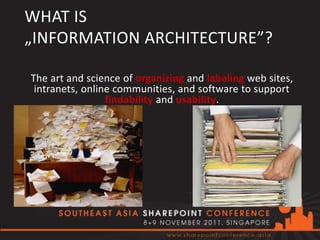
The art and science of organizing and labeling web sites,
 intranets, online communities, and software to support
                 findability and usability.


                                         Wikipedia, IAI
ORGANIZING THE CONTENT IN SP2010
•   Document Libraries & Folders
•   Content Types
•   Document Sets
•   Managed Metadata
•   Document ID
•   Workflows
•   Content Organizer Rules


•   Office 2010 Integration
•   Office Web Apps
•   SharePoint Workspace 2010
FOLDERS VS. DOCUMENT SETS
• Document Sets:


 Components, similar to folders, that
 enable users to collaborate on related
 documents without having to create a
 new document library or site.
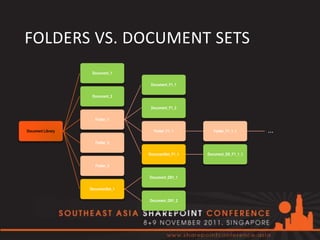
FOLDERS VS. DOCUMENT SETS
                    Document_1

                                    Document_F1_1

                    Document_2

                                    Document_F1_2

                     Folder_1

Document Library                     Folder_F1_1         Folder_F1_1_1     ...
                     Folder_2

                                   DocumentSet_F1_1   Document_DS_F1_1_1

                     Folder_3

                                   Document_DS1_1

                   DocumentSet_1

                                   Document_DS1_2
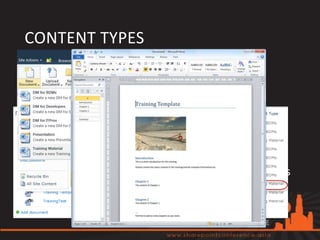
CONTENT TYPES
• Content Type:
  • Properties & Metadata
  • Workflows
  • Document Template


• One Content Type – Multiple Document Libraries
• One Document Library – Multiple Content Types
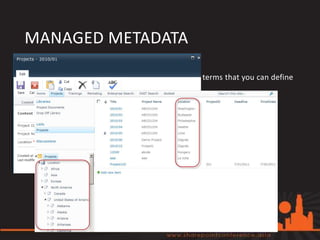
MANAGED METADATA
• Managed Metadata:
   A hierarchical collection of centrally managed terms that you can define
   and then use as attributes for items.


• Benefits:
   • Consistent and global use of terminology
   • Managed out of context
   • Managed by owners
   • Better search results
   • Dynamic
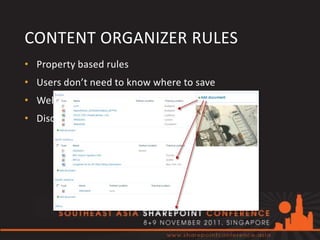
CONTENT ORGANIZER RULES
• Property based rules
• Users don’t need to know where to save
• Well organized content
• Discover, search and find
WHAT IS „SEARCH”?
• „I know what I’m searching for and know how to do
  that”

• „I know what I’m searching for but I don’t know how
  to do that”

• „I don’t know what I’m searching for”

• „Am I Searching?...”
ENTERPRISE SEARCH
• Enterprise – is no longer within the
  firewall
• Relevance is critical
• Search within the organization
• „Transparent” Search
• Search Driven Applications
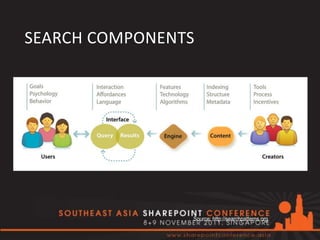
SEARCH COMPONENTS


                Source: http://searchpatterns.org
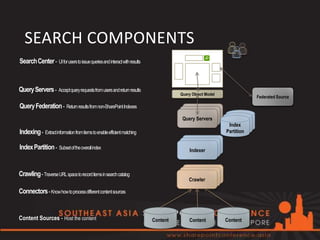
SEARCH COMPONENTS
Search Center - UI for users to issue queries and interact with results


Query Servers - Accept query requests from users and return results
                                                                                    Query Object Model
                                                                                                                     Federated Source

Query Federation - Return results from non-SharePoint Indexes
                                                                                     Query Servers
                                                                                                          Index
Indexing - Extract information from items to enable efficient matching                                   Partition


Index Partition - Subset of the overall index                                           Indexer


Crawling - Traverse URL space to record items in searchcatalog
                                                                                        Crawler

Connectors - Know how to processdifferent content sources


Content Sources - Host the content                                        Content       Content          Content
SHAREPOINT 2010 SEARCH
•   Enterprise scale-out (100M docs)
•   Powershell support
•   Boolean query syntax
•   Prefix matching


•   New, rich User Interface
•   Faceted Navigation (Refinement Panel)
•   Suggestion while typing
•   Improved People Search with phonetic matching
•   Social Tagging and Search
•   Enhanced Relevance
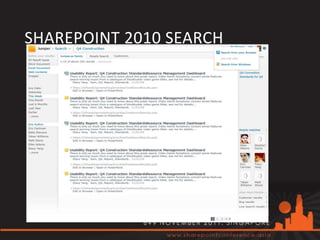
SHAREPOINT 2010 SEARCH
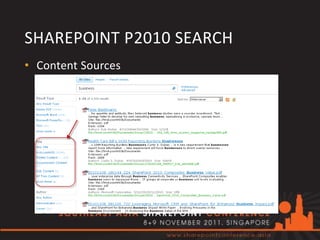
SHAREPOINT P2010 SEARCH
• Content Sources
  • SharePoint content
  • File Shares
  • Web sites
  • Exchange Public Folders
  • Business Data
  • Custom Connections
FAST SEARCH FOR SHAREPOINT
2010
• Unlimited scale
• Enhanced User Interface
     • Deep refinement with counts
     • Thumbnails + Document Previews
     • Visual Best Bets
•   User Context
•   Sorting on any Property
•   Similar Search
•   Content Processing Pipeline with Entity Extraction

• „Easy” install and configuration
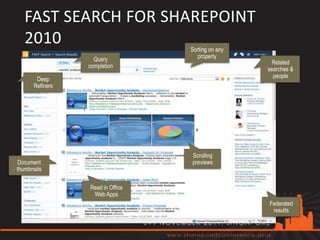
FAST SEARCH FOR SHAREPOINT
   2010                           Sorting on any
                   Query             property
                                                     Related
                 completion
                                                   searches &
                                                     people
       Deep
      Refiners


                                  Scrolling
Document                          previews
thumbnails

                 Read in Office
                  Web Apps
                                                   Federated
                                                    results
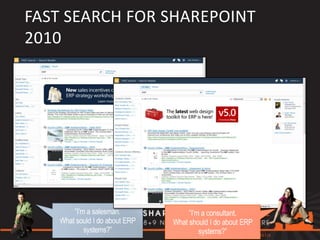
FAST SEARCH FOR SHAREPOINT
2010
• User Context
SEARCH FEDERATION
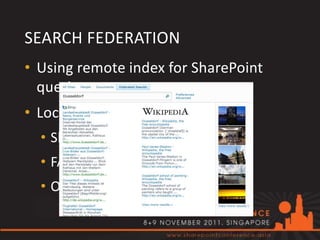
• Using remote index for SharePoint
  queries
• Location type:
  • SharePoint Search index
  • FAST index
  • OpenSearch 1.0/1.1
SEARCH FEDERATION
•   Benefits:
     •     No resources needed for indexing
     •     Custom Credentials
     •     Usage restrictions
     •     Prefix / Pattern match
     •     Query Template
             •   {searchTerms} scope:Documents
             •   {searchTerms} type:.doc type:.docx type:.docm


•   BUT:
     •     Live Internet connection is required
     •     Bandwith
     •     No control over results (order, relevance, etc.)
     •     Separated Web Parts
CRAWLED/MANAGED PROPERTIES
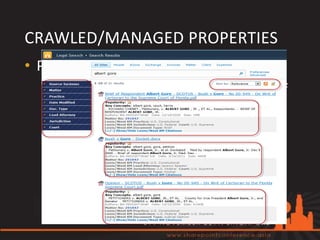
• Crawled property: metadata extracted
  from the documents/items during the
  crawl.

• Managed property: can appear in
  refined searches and helps users
  perform more successful queries
CRAWLED/MANAGED PROPERTIES
• Property mapping
  • Map to the same managed property if
    reasonable (Title, Subject, Location,
    etc.)
  • Don’t create managed property if you
    don’t really need (index size!)
  • Full Crawl!
BETTER TOGETHER
•   Improve the content
     •   Organize
     •   Consistent Properties & Metadata
     •   Content Types
     •   Discover, Search, Find
     •   Navigation


•   Improve the search
     •   Content Sources - „Transparent” Search
     •   Scopes – Filtering
     •   Customized UI
     •   Iterations!
BETTER TOGETHER
THANK YOU!

 AGHY@AGHY.HU
@MOLNARAGNES
SESSION EVALUATIONS
• Your feedback is important to us. Please fill in the
  session evaluation on the Conference Agenda.


• Ratings                        • Please rate the
   • 1 Below Expectations           • Content
   • 2 Met Expectations             • Speaker
   • 3 Exceeded Expectations        • Demo
Gold Sponsors


Silver Sponsors


Bronze Sponsors

#SEASPC: Information Architecture and Enterprise Search - Better Together

  • 1.
    Agnes Molnar INFORMATION ARCHITECTURE AND ENTERPRISE SEARCH – BETTER TOGETHER
  • 2.
    ABOUT AGNES MOLNAR •SharePoint Server MVP • Senior Solutions Consultant, BA Insight • Blogger, frequent speaker, writer • Web: http://www.bainsight.com • Blog: http://aghy.hu • Email: aghy@aghy.hu • Twitter: @molnaragnes
  • 3.
    AGENDA • What isthe „Information Architecture”? • What is the „Search”? • SP2010 Document Management Capabilities • SP2010 Search Capabilities • Better Together – Best Practices
  • 4.
    WHY? WHY? WHY? •Information overload Data is doubling every 18 months (Gartner) • Time spent by searching for something: 8 hours / week / information worker (Gartner) • Searching without finding: 3.5 hours / week / information worker (Gartner) COMPLETELY WASTED!
  • 5.
    WHAT IS „INFORMATION ARCHITECTURE”? Theart and science of organizing and labeling web sites, intranets, online communities, and software to support findability and usability. Wikipedia, IAI
  • 6.
    ORGANIZING THE CONTENTIN SP2010 • Document Libraries & Folders • Content Types • Document Sets • Managed Metadata • Document ID • Workflows • Content Organizer Rules • Office 2010 Integration • Office Web Apps • SharePoint Workspace 2010
  • 7.
    FOLDERS VS. DOCUMENTSETS • Document Sets: Components, similar to folders, that enable users to collaborate on related documents without having to create a new document library or site.
  • 8.
    FOLDERS VS. DOCUMENTSETS Document_1 Document_F1_1 Document_2 Document_F1_2 Folder_1 Document Library Folder_F1_1 Folder_F1_1_1 ... Folder_2 DocumentSet_F1_1 Document_DS_F1_1_1 Folder_3 Document_DS1_1 DocumentSet_1 Document_DS1_2
  • 9.
    CONTENT TYPES • ContentType: • Properties & Metadata • Workflows • Document Template • One Content Type – Multiple Document Libraries • One Document Library – Multiple Content Types
  • 10.
    MANAGED METADATA • ManagedMetadata: A hierarchical collection of centrally managed terms that you can define and then use as attributes for items. • Benefits: • Consistent and global use of terminology • Managed out of context • Managed by owners • Better search results • Dynamic
  • 11.
    CONTENT ORGANIZER RULES •Property based rules • Users don’t need to know where to save • Well organized content • Discover, search and find
  • 12.
    WHAT IS „SEARCH”? •„I know what I’m searching for and know how to do that” • „I know what I’m searching for but I don’t know how to do that” • „I don’t know what I’m searching for” • „Am I Searching?...”
  • 13.
    ENTERPRISE SEARCH • Enterprise– is no longer within the firewall • Relevance is critical • Search within the organization • „Transparent” Search • Search Driven Applications
  • 14.
    SEARCH COMPONENTS Source: http://searchpatterns.org
  • 15.
    SEARCH COMPONENTS Search Center- UI for users to issue queries and interact with results Query Servers - Accept query requests from users and return results Query Object Model Federated Source Query Federation - Return results from non-SharePoint Indexes Query Servers Index Indexing - Extract information from items to enable efficient matching Partition Index Partition - Subset of the overall index Indexer Crawling - Traverse URL space to record items in searchcatalog Crawler Connectors - Know how to processdifferent content sources Content Sources - Host the content Content Content Content
  • 16.
    SHAREPOINT 2010 SEARCH • Enterprise scale-out (100M docs) • Powershell support • Boolean query syntax • Prefix matching • New, rich User Interface • Faceted Navigation (Refinement Panel) • Suggestion while typing • Improved People Search with phonetic matching • Social Tagging and Search • Enhanced Relevance
  • 17.
  • 18.
    SHAREPOINT P2010 SEARCH •Content Sources • SharePoint content • File Shares • Web sites • Exchange Public Folders • Business Data • Custom Connections
  • 19.
    FAST SEARCH FORSHAREPOINT 2010 • Unlimited scale • Enhanced User Interface • Deep refinement with counts • Thumbnails + Document Previews • Visual Best Bets • User Context • Sorting on any Property • Similar Search • Content Processing Pipeline with Entity Extraction • „Easy” install and configuration
  • 20.
    FAST SEARCH FORSHAREPOINT 2010 Sorting on any Query property Related completion searches & people Deep Refiners Scrolling Document previews thumbnails Read in Office Web Apps Federated results
  • 21.
    FAST SEARCH FORSHAREPOINT 2010 • User Context
  • 22.
    SEARCH FEDERATION • Usingremote index for SharePoint queries • Location type: • SharePoint Search index • FAST index • OpenSearch 1.0/1.1
  • 23.
    SEARCH FEDERATION • Benefits: • No resources needed for indexing • Custom Credentials • Usage restrictions • Prefix / Pattern match • Query Template • {searchTerms} scope:Documents • {searchTerms} type:.doc type:.docx type:.docm • BUT: • Live Internet connection is required • Bandwith • No control over results (order, relevance, etc.) • Separated Web Parts
  • 24.
    CRAWLED/MANAGED PROPERTIES • Crawledproperty: metadata extracted from the documents/items during the crawl. • Managed property: can appear in refined searches and helps users perform more successful queries
  • 25.
    CRAWLED/MANAGED PROPERTIES • Propertymapping • Map to the same managed property if reasonable (Title, Subject, Location, etc.) • Don’t create managed property if you don’t really need (index size!) • Full Crawl!
  • 26.
    BETTER TOGETHER • Improve the content • Organize • Consistent Properties & Metadata • Content Types • Discover, Search, Find • Navigation • Improve the search • Content Sources - „Transparent” Search • Scopes – Filtering • Customized UI • Iterations!
  • 27.
  • 28.
  • 29.
    SESSION EVALUATIONS • Yourfeedback is important to us. Please fill in the session evaluation on the Conference Agenda. • Ratings • Please rate the • 1 Below Expectations • Content • 2 Met Expectations • Speaker • 3 Exceeded Expectations • Demo
  • 30.

Editor's Notes

  • #2 Opening slide please include
  • #21 Thumbnails and preview produced by WAC on the flyPeople search federated by SP People search Important elements for ranking:Click throughLink cardinality (page rank)Field authority