1
Computer Organization
and
Architecture
By
Dr. Ramesh Babu DR
Professor
Dept. of Computer Science & Engineering
PES Institute of Technology
2
References
1. “Computer Organization”,Carl Hamacher,
Zvonko Vranesic and Safwat Zaky, Fifth
Edition, McGrawHill
2. “Computer Organization and Design”, Davis A
Patterson & John L Hennessy, Third Edition,
Elsevier
3. “Computer Architecture: A Quantitative
Approach”, John L Hennessy & Davis A
Patterson
3
Contents
Today’s Lecture will cover:
- Introduction to Computers
- Various Application of Computers
- Generation of computers
- Classes of Computing Applications
- Understanding Program Performance
- Below your Program
- High-Level Language to the Language of
Hardware
4
Contents
- Inside the Computer
- Communication with Other Computers
- Technologies for Building Processors and
Memories
- Real Stuff : Manufacturing Pentium 4
Chips
- Basic Operational Concepts
5
Definition of a Computer
What is it?
A Computer is a machine capable of
manipulating data in complex,
programmable ways.
wikipedia
6
Generations
• First generation Computer, 1940-1956, defined
by Vacuum tubes.
• Second generation Computer, 1956-1963,
defined by Transistors
• Third generation Computer, 1964-1971, defined
by Integrated Circuits (IC)
• Fourth generation computer, 1971-today, defined
by Microprocessors
• Fifth generation computer, Present and Beyond,
defined by Artificial Intelligence (AI)
7
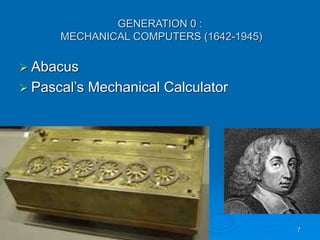
GENERATION 0 :
MECHANICAL COMPUTERS (1642-1945)
 Abacus
 Pascal’s Mechanical Calculator
8
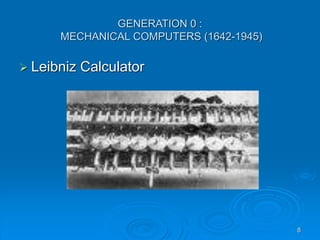
GENERATION 0 :
MECHANICAL COMPUTERS (1642-1945)
 Leibniz Calculator
9
GENERATION 0 :
MECHANICAL COMPUTERS (1642-1945)
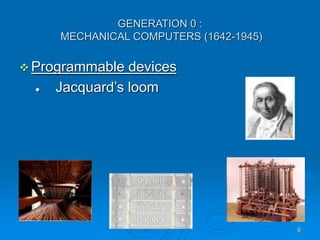
 Programmable devices
 Jacquard’s loom
10
GENERATION 0 :
MECHANICAL COMPUTERS (1642-1945)
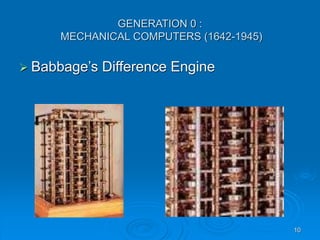
 Babbage’s Difference Engine
11
First Generation(1940-1956)
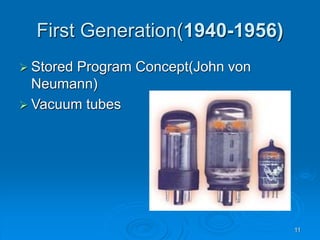
 Stored Program Concept(John von
Neumann)
 Vacuum tubes
12
Second Generation(1956-1963)
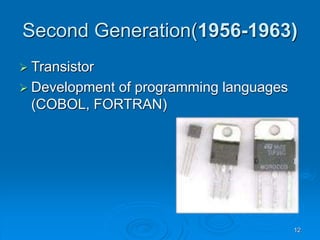
 Transistor
 Development of programming languages
(COBOL, FORTRAN)
13
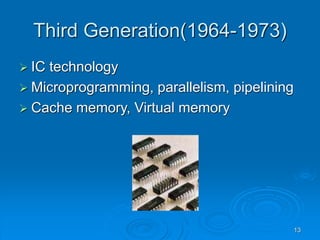
Third Generation(1964-1973)
 IC technology
 Microprogramming, parallelism, pipelining
 Cache memory, Virtual memory
14
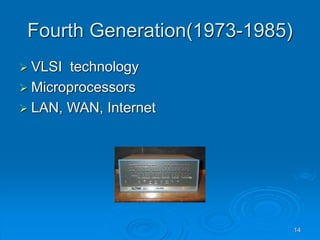
Fourth Generation(1973-1985)
 VLSI technology
 Microprocessors
 LAN, WAN, Internet
15
Beyond the Fourth
Generation(1985-??)
 AI
 Parallel processing
 Networking
16
Classes of Computing Applications
• Desktop Computers
 Workstations
 Mainframes
 Supercomputers
 Minicomputers
• Servers
• Embedded computers
17
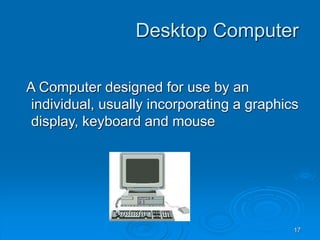
Desktop Computer
A Computer designed for use by an
individual, usually incorporating a graphics
display, keyboard and mouse
18
Servers
A computer used for running larger
programs for multiple users often
simultaneously and typically accessed
only via network
19
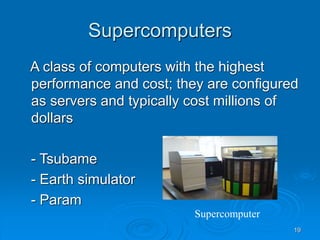
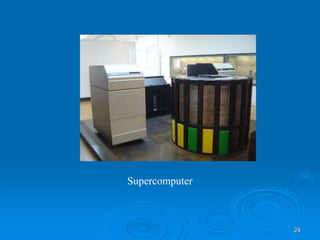
Supercomputers
A class of computers with the highest
performance and cost; they are configured
as servers and typically cost millions of
dollars
- Tsubame
- Earth simulator
- Param
Supercomputer
20
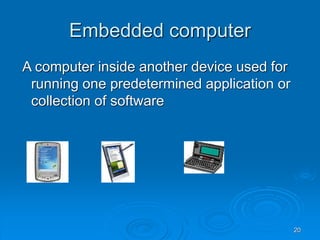
Embedded computer
A computer inside another device used for
running one predetermined application or
collection of software
21
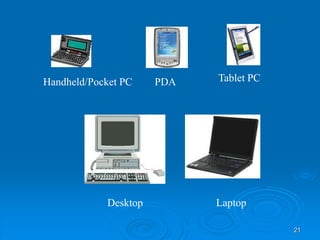
Handheld/Pocket PC PDA Tablet PC
Desktop Laptop
22
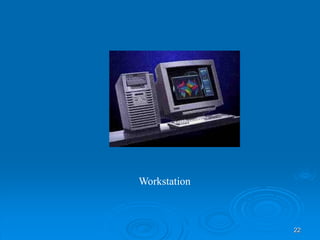
Workstation
23
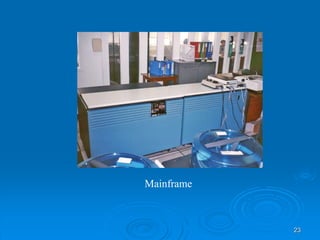
Mainframe
24
Supercomputer
25
Understanding Program
Performance
The performance of a program depends on
a combination of the effectiveness of the
algorithms used in the program, the
software systems used to create and
translate the program into machine
instructions, and the effectiveness of the
computer in executing those instructions
26
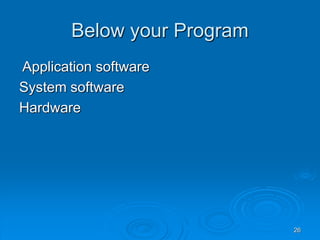
Below your Program
Application software
System software
Hardware
27
System Software
Software that provides services that are
commonly useful, including operating
system, compilers and assemblers
28
Operating System
Supervising program that manages the
resources of a computer for the benefit of
the programs that run on that machine
29
Complier
A Program that translates high-level
language statements into assembly
language statements
30
High-Level Language to the
Language of Hardware
Assembler – A program that translates a
symbolic version of instructions into the
binary version
Assembly language A symbolic
representation of machine instruction
31
High-Level Language to the
Language of Hardware
A portable language such as C, Fortran, or
Java composed of words and algebraic
notation that can be translated by a
complier into assembly language
32
Under the covers
Five Classic components of computer
- Input
- Output
- Memory
- Datapath
- Control Processor
33
Input
A mechanism through which the computer
is fed information, such as the keyboard,
mouse, scanners, etc…
34
Output Device
A Mechanism that conveys the result of a
computation to a user or another computer
35
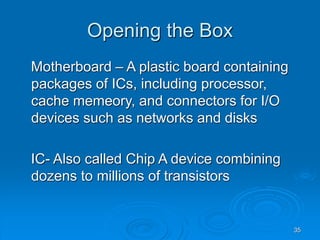
Opening the Box
Motherboard – A plastic board containing
packages of ICs, including processor,
cache memeory, and connectors for I/O
devices such as networks and disks
IC- Also called Chip A device combining
dozens to millions of transistors
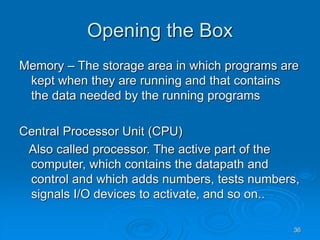
36
Opening the Box
Memory – The storage area in which programs are
kept when they are running and that contains
the data needed by the running programs
Central Processor Unit (CPU)
Also called processor. The active part of the
computer, which contains the datapath and
control and which adds numbers, tests numbers,
signals I/O devices to activate, and so on..
37
Datapath – The component of the processor
that performs arithmetic operations
Control – The component of the processor
that commands the datapath, memory, and
I/O devices according to the instructions of
the program
38
DRAM – Memory built as an integrated
circuit, it provides random access to any
location
Cache Memory – A small, fast memory that
acts as a buffer for a slower, larger
memory
39
Last week question
 What is liquid Crystal in LCD display.
 Liquid crystal – substance that has
properties between those of a
conventional liquid and a solid
40
 Liquid crystal flow like a liquid, but have the
molecules in the liquid arranged and oriented in
a crystal-like way.
 LCD Display is a thin, flat display device made
up of any number of color or monochrome pixels
arrayed in front of a light source or reflector.
Each pixel consists of a layer of liquid crystal
molecules suspended between two transparent
electrodes and two polarizing filters, the axes of
polarity of which are perpendicular to each .
41
A safe place for data
Memory – The storage area in which
programs are kept when they are running
and that contains the data needed by the
running programs
Volatile Memory – Storage, such as DRAM,
that only retains only if it is receiving
power
42
Nonvolatile memory – A form of memory
that retains data even in the absence of a
power source and that is used to store
programs between runs. Magnetic disk is
nonvolatile and DRAM is not.
43
 Primary Memory : Also called main
memory. Volatile memory used to hold
programs while they are running; typically
consists of DRAM in today’s computers
 Secondary Memory : Nonvolatile memory
used to store programs and data between
runs; typically consists of magnetic disks
in today's computers
44
Magnetic disk ( Also called Hard disk )
A form of nonvolatile secondary memory
composed of rotating platters coated with
a magnetic recording material
45
Communicating with other
computers
Network
LAN
WAN
Advantages
-Communication
- Resource Sharing
- Nonlocal access
46
Technologies for Building
processors and Memories
Silicon – A natural element which is a
semiconductor
Semiconductor – A substance that does not
conduct electricity well
47
Real Stuff: Manufacturing Pentium 4 Chips
 Silicon ingot
 Slicer
 Blank wafers
 Patterned wafers
 Wafer tester
 Dicer
 Tested dies
48
49
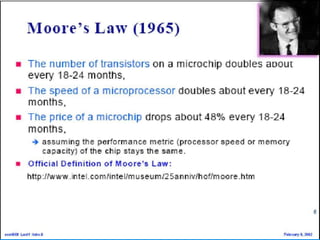
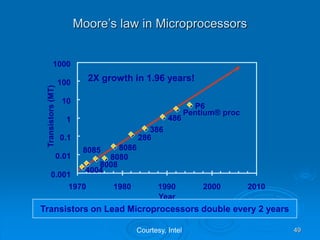
Moore’s law in Microprocessors
4004
8008
8080
8085 8086
286
386
486
Pentium® proc
P6
0.001
0.01
0.1
1
10
100
1000
1970 1980 1990 2000 2010
Year
Transistors
(MT)
2X growth in 1.96 years!
Transistors on Lead Microprocessors double every 2 years
Courtesy, Intel
50
Metrics to evaluate a Computer
Metrics
 Speed – delay, frequency
 Power Dissipation
 Energy to perform a function
 Cost
 Scalability
 Reliability
51
Basic Operational Concepts
To perform a given task, an appropriate
program consisting of a list of instruction is
stored in the memory. Individual
instructions are brought from the memory
into the processor, which executes the
specified operation.
52
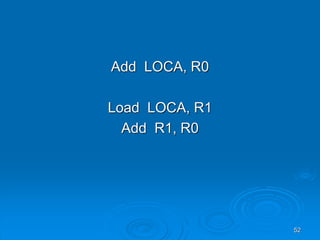
Add LOCA, R0
Load LOCA, R1
Add R1, R0
53
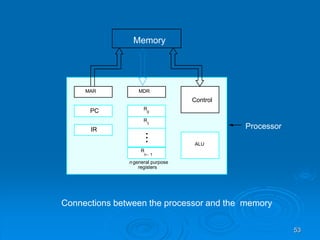
Connections between the processor and the memory
Processor
Memory
PC
IR
MDR
Control
ALU
R
n 1
-
R
1
R
0
MAR
n general purpose
registers
54
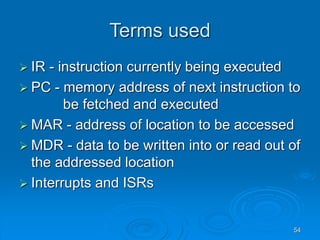
Terms used
 IR - instruction currently being executed
 PC - memory address of next instruction to
be fetched and executed
 MAR - address of location to be accessed
 MDR - data to be written into or read out of
the addressed location
 Interrupts and ISRs
55
Functions…
 Instruction Register : contains the
instruction that is being executed. Its
output is available to the control circuits,
that generates the timing signals for
control of the actual processing circuits
needed to execute the instruction.
56
 Program Counter : is a register, that
contains the memory address of the
instruction currently being executed.
During the execution of the current
instruction, the contents of program
counter is updated to correspond to the
address of the next instruction.
57
Memory Address Register (MAR) : holds
the address of the memory location to or
from which data is to be transferred.
Memory Data Register (MDR): contains
the data to be written into or read-out of
the addressed memory location.
58
General- purpose Registers : are used
for holding data, intermediate results of
operations. They are also known as
scratch-pad registers.
59
Steps involving instruction fetch
and execution
INSTRUCTION FETCH
 Execution of a program starts by setting
the PC to point to the first instruction of the
program.
 The contents of PC are transferred to the
MAR and a Read control signal is sent to
the memory
60
 The addressed word (here it is the first
instruction of the program) is read out of
memory and loaded into the MDR
 The contents of MDR are transferred to
the IR for instruction decoding
61
INSTRUCTION EXECUTION
The operation field of the instruction in IR is
examined to determine the type of
operation to be performed by the ALU
The specified operation is performed by
obtaining the operand(s) from the memory
locations or from GP registers.
62
 Fetching the operands from the memory
requires sending the memory location address
to the MAR and initiating a Read cycle.
 The operand is read from the memory into the
MDR and then from MDR to the ALU.
 The ALU performs the desired operation on one
or more operands fetched in this manner and
sends the result either to memory location or to
a GP register.
63
 The result is sent to MDR and the address of
the location where the result is to be stored is
sent to MAR and Write cycle is initiated.
 Thus, the execute cycle ends for the current
instruction and the PC is incremented to point to
the next instruction for a new fetch cycle.
64
Bus Structures
 BUS – Group of lines (wires) that serves
as a connecting path for several devices
Single-bus structure
65
Data Bus : It is used for transmission of
data. The number of data lines
correspond to the number of bits in a word.
Address Bus: it carries the address of the
main memory location from where
the data can be accessed.
Control Bus: it is used to indicate the
direction of data transfer and to coordinate
the timing of events during the transfer
66
Bus Structures
Single-bus structure
Two-bus structure
67
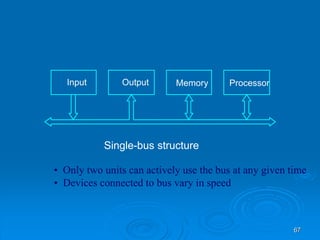
Single-bus structure
Memory
Input Output Processor
• Only two units can actively use the bus at any given time
• Devices connected to bus vary in speed
68
Advantages of Single-Bus
Structure
 Low Cost
 Flexibility for attaching peripheral devices
Draw Back
low operating speed
Found in small computers such as
minicomputers and microcomputers.
69
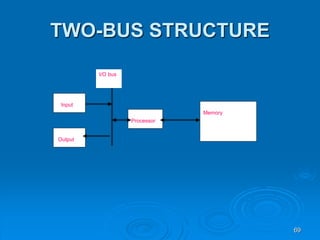
TWO-BUS STRUCTURE
Input
Output
Processor
Memory
I/O bus
70
The bus is said to perform two distinct
functions by connecting the I/O units with
memory and processor unit with memory.
The processor interacts with the memory
through a memory bus and handles
input/output functions over I/O bus.
The main advantage of this structure is good
operating speed but on account of more
cost.
71
Performance
 Performance - measure of how quickly
the computer can execute programs
 Speed – Design of Hardware and its
machine Language
 Best Performance – Design of compiler,
Machine instruction set, and the hardware
in a coordinated way
72
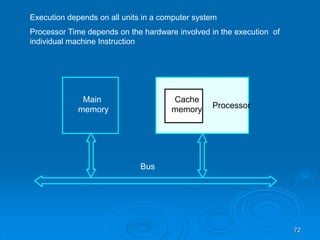
Main
memory Processor
Bus
Cache
memory
Execution depends on all units in a computer system
Processor Time depends on the hardware involved in the execution of
individual machine Instruction
73
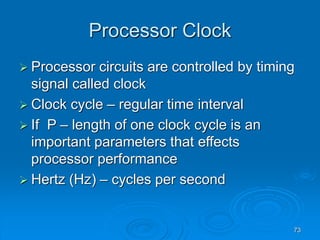
Processor Clock
 Processor circuits are controlled by timing
signal called clock
 Clock cycle – regular time interval
 If P – length of one clock cycle is an
important parameters that effects
processor performance
 Hertz (Hz) – cycles per second
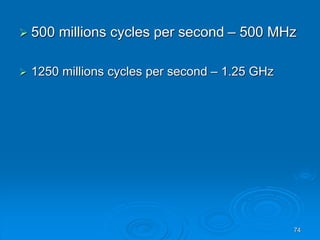
74
 500 millions cycles per second – 500 MHz
 1250 millions cycles per second – 1.25 GHz
75
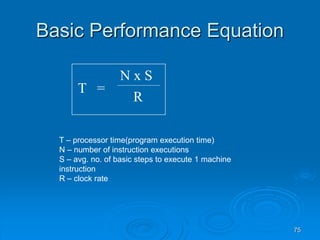
Basic Performance Equation
T =
N x S
R
T – processor time(program execution time)
N – number of instruction executions
S – avg. no. of basic steps to execute 1 machine
instruction
R – clock rate
76
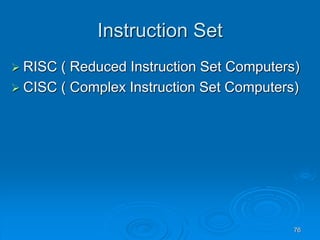
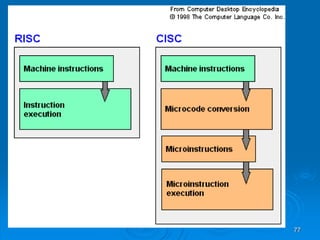
Instruction Set
 RISC ( Reduced Instruction Set Computers)
 CISC ( Complex Instruction Set Computers)
77
78
Multiprocessors and
Multicomputers
 Shared-memory multiprocessor systems
 Message-passing multicomputers

ComputerOrganization .ppt

  • 1.
    1 Computer Organization and Architecture By Dr. RameshBabu DR Professor Dept. of Computer Science & Engineering PES Institute of Technology
  • 2.
    2 References 1. “Computer Organization”,CarlHamacher, Zvonko Vranesic and Safwat Zaky, Fifth Edition, McGrawHill 2. “Computer Organization and Design”, Davis A Patterson & John L Hennessy, Third Edition, Elsevier 3. “Computer Architecture: A Quantitative Approach”, John L Hennessy & Davis A Patterson
  • 3.
    3 Contents Today’s Lecture willcover: - Introduction to Computers - Various Application of Computers - Generation of computers - Classes of Computing Applications - Understanding Program Performance - Below your Program - High-Level Language to the Language of Hardware
  • 4.
    4 Contents - Inside theComputer - Communication with Other Computers - Technologies for Building Processors and Memories - Real Stuff : Manufacturing Pentium 4 Chips - Basic Operational Concepts
  • 5.
    5 Definition of aComputer What is it? A Computer is a machine capable of manipulating data in complex, programmable ways. wikipedia
  • 6.
    6 Generations • First generationComputer, 1940-1956, defined by Vacuum tubes. • Second generation Computer, 1956-1963, defined by Transistors • Third generation Computer, 1964-1971, defined by Integrated Circuits (IC) • Fourth generation computer, 1971-today, defined by Microprocessors • Fifth generation computer, Present and Beyond, defined by Artificial Intelligence (AI)
  • 7.
    7 GENERATION 0 : MECHANICALCOMPUTERS (1642-1945)  Abacus  Pascal’s Mechanical Calculator
  • 8.
    8 GENERATION 0 : MECHANICALCOMPUTERS (1642-1945)  Leibniz Calculator
  • 9.
    9 GENERATION 0 : MECHANICALCOMPUTERS (1642-1945)  Programmable devices  Jacquard’s loom
  • 10.
    10 GENERATION 0 : MECHANICALCOMPUTERS (1642-1945)  Babbage’s Difference Engine
  • 11.
    11 First Generation(1940-1956)  StoredProgram Concept(John von Neumann)  Vacuum tubes
  • 12.
    12 Second Generation(1956-1963)  Transistor Development of programming languages (COBOL, FORTRAN)
  • 13.
    13 Third Generation(1964-1973)  ICtechnology  Microprogramming, parallelism, pipelining  Cache memory, Virtual memory
  • 14.
    14 Fourth Generation(1973-1985)  VLSItechnology  Microprocessors  LAN, WAN, Internet
  • 15.
    15 Beyond the Fourth Generation(1985-??) AI  Parallel processing  Networking
  • 16.
    16 Classes of ComputingApplications • Desktop Computers  Workstations  Mainframes  Supercomputers  Minicomputers • Servers • Embedded computers
  • 17.
    17 Desktop Computer A Computerdesigned for use by an individual, usually incorporating a graphics display, keyboard and mouse
  • 18.
    18 Servers A computer usedfor running larger programs for multiple users often simultaneously and typically accessed only via network
  • 19.
    19 Supercomputers A class ofcomputers with the highest performance and cost; they are configured as servers and typically cost millions of dollars - Tsubame - Earth simulator - Param Supercomputer
  • 20.
    20 Embedded computer A computerinside another device used for running one predetermined application or collection of software
  • 21.
    21 Handheld/Pocket PC PDATablet PC Desktop Laptop
  • 22.
  • 23.
  • 24.
  • 25.
    25 Understanding Program Performance The performanceof a program depends on a combination of the effectiveness of the algorithms used in the program, the software systems used to create and translate the program into machine instructions, and the effectiveness of the computer in executing those instructions
  • 26.
    26 Below your Program Applicationsoftware System software Hardware
  • 27.
    27 System Software Software thatprovides services that are commonly useful, including operating system, compilers and assemblers
  • 28.
    28 Operating System Supervising programthat manages the resources of a computer for the benefit of the programs that run on that machine
  • 29.
    29 Complier A Program thattranslates high-level language statements into assembly language statements
  • 30.
    30 High-Level Language tothe Language of Hardware Assembler – A program that translates a symbolic version of instructions into the binary version Assembly language A symbolic representation of machine instruction
  • 31.
    31 High-Level Language tothe Language of Hardware A portable language such as C, Fortran, or Java composed of words and algebraic notation that can be translated by a complier into assembly language
  • 32.
    32 Under the covers FiveClassic components of computer - Input - Output - Memory - Datapath - Control Processor
  • 33.
    33 Input A mechanism throughwhich the computer is fed information, such as the keyboard, mouse, scanners, etc…
  • 34.
    34 Output Device A Mechanismthat conveys the result of a computation to a user or another computer
  • 35.
    35 Opening the Box Motherboard– A plastic board containing packages of ICs, including processor, cache memeory, and connectors for I/O devices such as networks and disks IC- Also called Chip A device combining dozens to millions of transistors
  • 36.
    36 Opening the Box Memory– The storage area in which programs are kept when they are running and that contains the data needed by the running programs Central Processor Unit (CPU) Also called processor. The active part of the computer, which contains the datapath and control and which adds numbers, tests numbers, signals I/O devices to activate, and so on..
  • 37.
    37 Datapath – Thecomponent of the processor that performs arithmetic operations Control – The component of the processor that commands the datapath, memory, and I/O devices according to the instructions of the program
  • 38.
    38 DRAM – Memorybuilt as an integrated circuit, it provides random access to any location Cache Memory – A small, fast memory that acts as a buffer for a slower, larger memory
  • 39.
    39 Last week question What is liquid Crystal in LCD display.  Liquid crystal – substance that has properties between those of a conventional liquid and a solid
  • 40.
    40  Liquid crystalflow like a liquid, but have the molecules in the liquid arranged and oriented in a crystal-like way.  LCD Display is a thin, flat display device made up of any number of color or monochrome pixels arrayed in front of a light source or reflector. Each pixel consists of a layer of liquid crystal molecules suspended between two transparent electrodes and two polarizing filters, the axes of polarity of which are perpendicular to each .
  • 41.
    41 A safe placefor data Memory – The storage area in which programs are kept when they are running and that contains the data needed by the running programs Volatile Memory – Storage, such as DRAM, that only retains only if it is receiving power
  • 42.
    42 Nonvolatile memory –A form of memory that retains data even in the absence of a power source and that is used to store programs between runs. Magnetic disk is nonvolatile and DRAM is not.
  • 43.
    43  Primary Memory: Also called main memory. Volatile memory used to hold programs while they are running; typically consists of DRAM in today’s computers  Secondary Memory : Nonvolatile memory used to store programs and data between runs; typically consists of magnetic disks in today's computers
  • 44.
    44 Magnetic disk (Also called Hard disk ) A form of nonvolatile secondary memory composed of rotating platters coated with a magnetic recording material
  • 45.
  • 46.
    46 Technologies for Building processorsand Memories Silicon – A natural element which is a semiconductor Semiconductor – A substance that does not conduct electricity well
  • 47.
    47 Real Stuff: ManufacturingPentium 4 Chips  Silicon ingot  Slicer  Blank wafers  Patterned wafers  Wafer tester  Dicer  Tested dies
  • 48.
  • 49.
    49 Moore’s law inMicroprocessors 4004 8008 8080 8085 8086 286 386 486 Pentium® proc P6 0.001 0.01 0.1 1 10 100 1000 1970 1980 1990 2000 2010 Year Transistors (MT) 2X growth in 1.96 years! Transistors on Lead Microprocessors double every 2 years Courtesy, Intel
  • 50.
    50 Metrics to evaluatea Computer Metrics  Speed – delay, frequency  Power Dissipation  Energy to perform a function  Cost  Scalability  Reliability
  • 51.
    51 Basic Operational Concepts Toperform a given task, an appropriate program consisting of a list of instruction is stored in the memory. Individual instructions are brought from the memory into the processor, which executes the specified operation.
  • 52.
    52 Add LOCA, R0 LoadLOCA, R1 Add R1, R0
  • 53.
    53 Connections between theprocessor and the memory Processor Memory PC IR MDR Control ALU R n 1 - R 1 R 0 MAR n general purpose registers
  • 54.
    54 Terms used  IR- instruction currently being executed  PC - memory address of next instruction to be fetched and executed  MAR - address of location to be accessed  MDR - data to be written into or read out of the addressed location  Interrupts and ISRs
  • 55.
    55 Functions…  Instruction Register: contains the instruction that is being executed. Its output is available to the control circuits, that generates the timing signals for control of the actual processing circuits needed to execute the instruction.
  • 56.
    56  Program Counter: is a register, that contains the memory address of the instruction currently being executed. During the execution of the current instruction, the contents of program counter is updated to correspond to the address of the next instruction.
  • 57.
    57 Memory Address Register(MAR) : holds the address of the memory location to or from which data is to be transferred. Memory Data Register (MDR): contains the data to be written into or read-out of the addressed memory location.
  • 58.
    58 General- purpose Registers: are used for holding data, intermediate results of operations. They are also known as scratch-pad registers.
  • 59.
    59 Steps involving instructionfetch and execution INSTRUCTION FETCH  Execution of a program starts by setting the PC to point to the first instruction of the program.  The contents of PC are transferred to the MAR and a Read control signal is sent to the memory
  • 60.
    60  The addressedword (here it is the first instruction of the program) is read out of memory and loaded into the MDR  The contents of MDR are transferred to the IR for instruction decoding
  • 61.
    61 INSTRUCTION EXECUTION The operationfield of the instruction in IR is examined to determine the type of operation to be performed by the ALU The specified operation is performed by obtaining the operand(s) from the memory locations or from GP registers.
  • 62.
    62  Fetching theoperands from the memory requires sending the memory location address to the MAR and initiating a Read cycle.  The operand is read from the memory into the MDR and then from MDR to the ALU.  The ALU performs the desired operation on one or more operands fetched in this manner and sends the result either to memory location or to a GP register.
  • 63.
    63  The resultis sent to MDR and the address of the location where the result is to be stored is sent to MAR and Write cycle is initiated.  Thus, the execute cycle ends for the current instruction and the PC is incremented to point to the next instruction for a new fetch cycle.
  • 64.
    64 Bus Structures  BUS– Group of lines (wires) that serves as a connecting path for several devices Single-bus structure
  • 65.
    65 Data Bus :It is used for transmission of data. The number of data lines correspond to the number of bits in a word. Address Bus: it carries the address of the main memory location from where the data can be accessed. Control Bus: it is used to indicate the direction of data transfer and to coordinate the timing of events during the transfer
  • 66.
  • 67.
    67 Single-bus structure Memory Input OutputProcessor • Only two units can actively use the bus at any given time • Devices connected to bus vary in speed
  • 68.
    68 Advantages of Single-Bus Structure Low Cost  Flexibility for attaching peripheral devices Draw Back low operating speed Found in small computers such as minicomputers and microcomputers.
  • 69.
  • 70.
    70 The bus issaid to perform two distinct functions by connecting the I/O units with memory and processor unit with memory. The processor interacts with the memory through a memory bus and handles input/output functions over I/O bus. The main advantage of this structure is good operating speed but on account of more cost.
  • 71.
    71 Performance  Performance -measure of how quickly the computer can execute programs  Speed – Design of Hardware and its machine Language  Best Performance – Design of compiler, Machine instruction set, and the hardware in a coordinated way
  • 72.
    72 Main memory Processor Bus Cache memory Execution dependson all units in a computer system Processor Time depends on the hardware involved in the execution of individual machine Instruction
  • 73.
    73 Processor Clock  Processorcircuits are controlled by timing signal called clock  Clock cycle – regular time interval  If P – length of one clock cycle is an important parameters that effects processor performance  Hertz (Hz) – cycles per second
  • 74.
    74  500 millionscycles per second – 500 MHz  1250 millions cycles per second – 1.25 GHz
  • 75.
    75 Basic Performance Equation T= N x S R T – processor time(program execution time) N – number of instruction executions S – avg. no. of basic steps to execute 1 machine instruction R – clock rate
  • 76.
    76 Instruction Set  RISC( Reduced Instruction Set Computers)  CISC ( Complex Instruction Set Computers)
  • 77.
  • 78.
    78 Multiprocessors and Multicomputers  Shared-memorymultiprocessor systems  Message-passing multicomputers