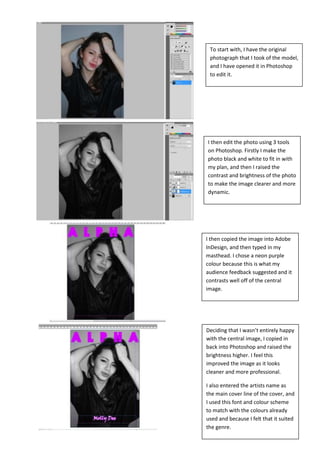
The document describes the process of designing a magazine cover in Photoshop and InDesign. Key steps include:
1) Editing the central photograph by increasing brightness to make it look cleaner.
2) Adding the artist's name and using font colors consistent with the photo.
3) Further editing the photo in Photoshop by making it black and white and increasing contrast and brightness.
4) Importing the image into InDesign and adding additional design elements like the masthead and cover lines.
5) Repeatedly testing and adjusting various design elements like font sizes, colors, and placements to create an eye-catching and polished cover design.


![Screen shots of front cover]](https://cdn.slidesharecdn.com/ss_thumbnails/screenshotsoffrontcover-130307044929-phpapp01-thumbnail.jpg?width=640&height=640&fit=bounds)


