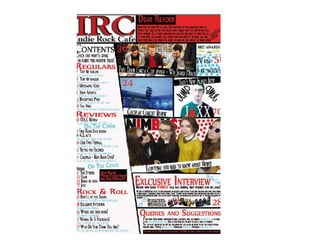
Progress on Contents
Progress
• I started off with just my masthead in the
corner, similar to the front cover to keep the
brand obvious, I then set out black lines across
the page that are pretty much how I drew
them in my layouts. After that was when I
started inserting to content to my contents
e.g. pictures, page numbers and article titles.
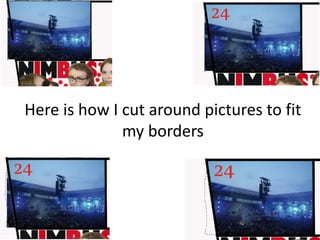
Here is how I cut around pictures to fit
my borders
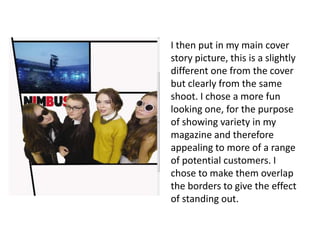
I then put in my main cover
story picture, this is a slightly
different one from the cover
but clearly from the same
shoot. I chose a more fun
looking one, for the purpose
of showing variety in my
magazine and therefore
appealing to more of a range
of potential customers. I
chose to make them overlap
the borders to give the effect
of standing out.
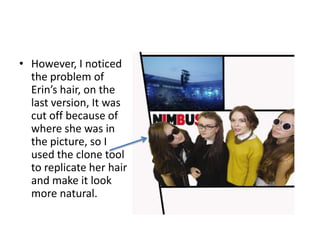
• However, I noticed
the problem of
Erin’s hair, on the
last version, It was
cut off because of
where she was in
the picture, so I
used the clone tool
to replicate her hair
and make it look
more natural.
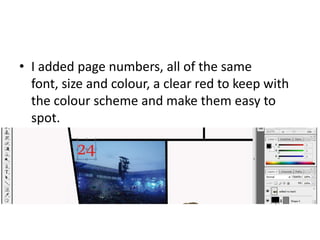
• I added page numbers, all of the same
font, size and colour, a clear red to keep with
the colour scheme and make them easy to
spot.
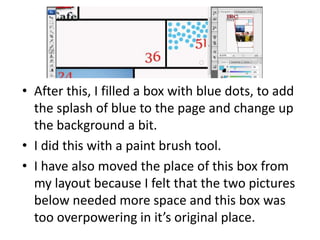
• After this, I filled a box with blue dots, to add
the splash of blue to the page and change up
the background a bit.
• I did this with a paint brush tool.
• I have also moved the place of this box from
my layout because I felt that the two pictures
below needed more space and this box was
too overpowering in it’s original place.
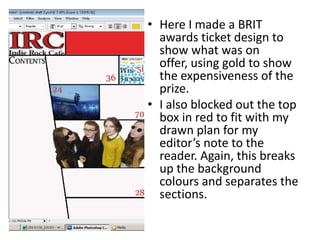
• Here I made a BRIT
awards ticket design to
show what was on
offer, using gold to show
the expensiveness of the
prize.
• I also blocked out the top
box in red to fit with my
drawn plan for my
editor’s note to the
reader. Again, this breaks
up the background
colours and separates the
sections.
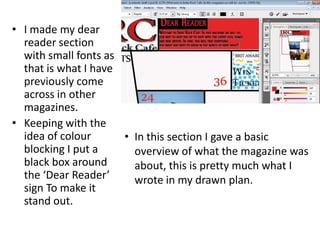
• I made my dear
reader section
with small fonts as
that is what I have
previously come
across in other
magazines.
• Keeping with the
idea of colour
blocking I put a
black box around
the ‘Dear Reader’
sign To make it
stand out.
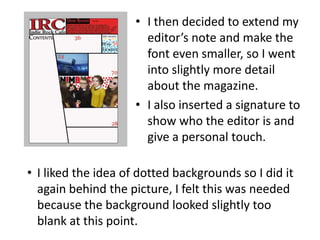
• In this section I gave a basic
overview of what the magazine was
about, this is pretty much what I
wrote in my drawn plan.
• I then decided to extend my
editor’s note and make the
font even smaller, so I went
into slightly more detail
about the magazine.
• I also inserted a signature to
show who the editor is and
give a personal touch.
• I liked the idea of dotted backgrounds so I did it
again behind the picture, I felt this was needed
because the background looked slightly too
blank at this point.
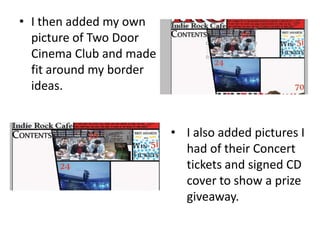
• I then added my own
picture of Two Door
Cinema Club and made it
fit around my border
ideas.
• I also added pictures I
had of their Concert
tickets and signed CD
cover to show a prize
giveaway.
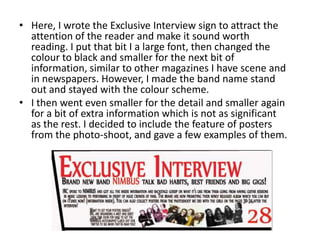
• Here, I wrote the Exclusive Interview sign to attract the
attention of the reader and make it sound worth
reading. I put that bit I a large font, then changed the
colour to black and smaller for the next bit of
information, similar to other magazines I have scene and
in newspapers. However, I made the band name stand
out and stayed with the colour scheme.
• I then went even smaller for the detail and smaller again
for a bit of extra information which is not as significant
as the rest. I decided to include the feature of posters
from the photo-shoot, and gave a few examples of them.
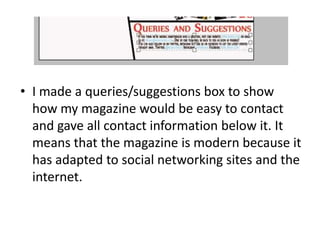
• I made a queries/suggestions box to show
how my magazine would be easy to contact
and gave all contact information below it. It
means that the magazine is modern because it
has adapted to social networking sites and the
internet.
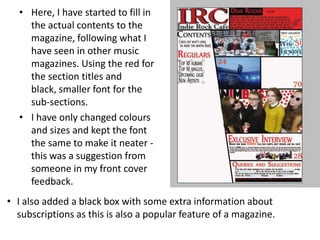
• Here, I have started to fill in
the actual contents to the
magazine, following what I
have seen in other music
magazines. Using the red for
the section titles and
black, smaller font for the
sub-sections.
• I have only changed colours
and sizes and kept the font
the same to make it neater -
this was a suggestion from
someone in my front cover
feedback.
• I also added a black box with some extra information about
subscriptions as this is also a popular feature of a magazine.
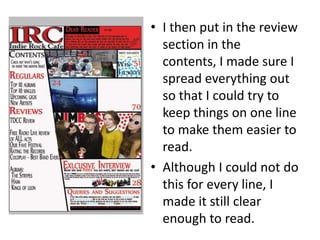
• I then put in the review
section in the
contents, I made sure I
spread everything out
so that I could try to
keep things on one line
to make them easier to
read.
• Although I could not do
this for every line, I
made it still clear
enough to read.
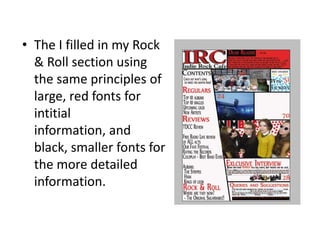
• The I filled in my Rock
& Roll section using
the same principles of
large, red fonts for
intitial
information, and
black, smaller fonts for
the more detailed
information.
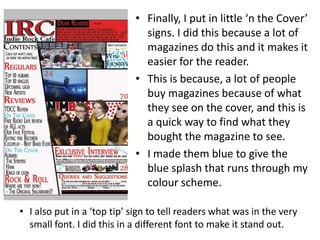
• Finally, I put in little ‘n the Cover’
signs. I did this because a lot of
magazines do this and it makes it
easier for the reader.
• This is because, a lot of people
buy magazines because of what
they see on the cover, and this is
a quick way to find what they
bought the magazine to see.
• I made them blue to give the
blue splash that runs through my
colour scheme.
• I also put in a ‘top tip’ sign to tell readers what was in the very
small font. I did this in a different font to make it stand out.
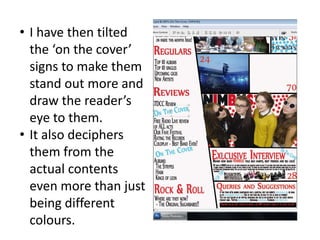
• I have then tilted
the ‘on the cover’
signs to make them
stand out more and
draw the reader’s
eye to them.
• It also deciphers
them from the
actual contents
even more than just
being different
colours.
Final task
• I had planned to put an album cover in my
contents page of a band that I created.
• Here is how I created this album cover from 4
models.
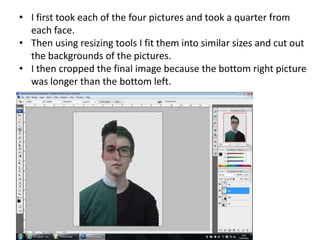
• I first took each of the four pictures and took a quarter from
each face.
• Then using resizing tools I fit them into similar sizes and cut out
the backgrounds of the pictures.
• I then cropped the final image because the bottom right picture
was longer than the bottom left.
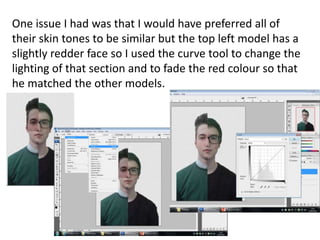
One issue I had was that I would have preferred all of
their skin tones to be similar but the top left model has a
slightly redder face so I used the curve tool to change the
lighting of that section and to fade the red colour so that
he matched the other models.
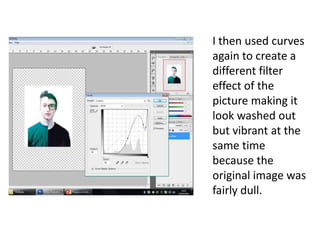
I then used curves
again to create a
different filter
effect of the
picture making it
look washed out
but vibrant at the
same time
because the
original image was
fairly dull.
Feedback
• I made the text slightly smaller on my
contents because I got audience feedback that
said that it was too big.
• The feedback also said that the pictures
maybe needed captions to show which picture
matched which story.
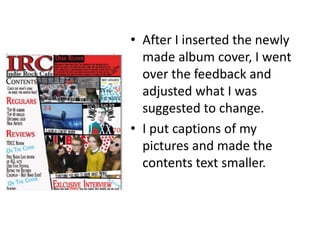
• After I inserted the newly
made album cover, I went
over the feedback and
adjusted what I was
suggested to change.
• I put captions of my
pictures and made the
contents text smaller.
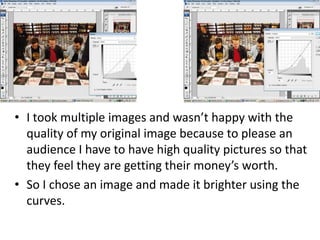
• I took multiple images and wasn’t happy with the
quality of my original image because to please an
audience I have to have high quality pictures so that
they feel they are getting their money’s worth.
• So I chose an image and made it brighter using the
curves.
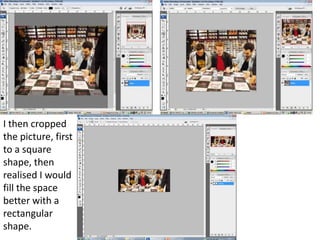
I then cropped
the picture, first
to a square
shape, then
realised I would
fill the space
better with a
rectangular
shape.
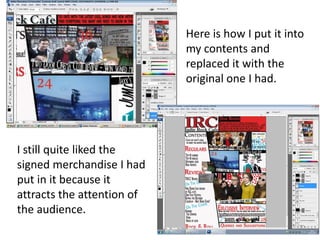
Here is how I put it into
my contents and
replaced it with the
original one I had.
I still quite liked the
signed merchandise I had
put in it because it
attracts the attention of
the audience.
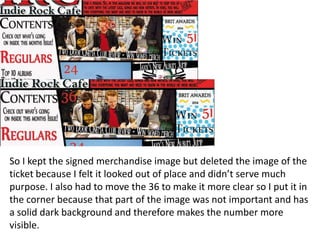
So I kept the signed merchandise image but deleted the image of the
ticket because I felt it looked out of place and didn’t serve much
purpose. I also had to move the 36 to make it more clear so I put it in
the corner because that part of the image was not important and has
a solid dark background and therefore makes the number more
visible.
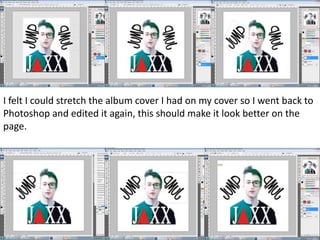
I felt I could stretch the album cover I had on my cover so I went back to
Photoshop and edited it again, this should make it look better on the
page.
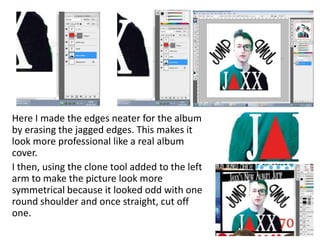
Here I made the edges neater for the album
by erasing the jagged edges. This makes it
look more professional like a real album
cover.
I then, using the clone tool added to the left
arm to make the picture look more
symmetrical because it looked odd with one
round shoulder and once straight, cut off
one.
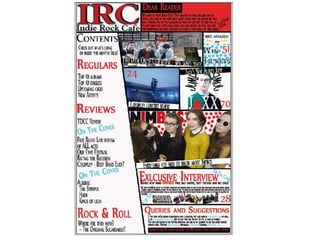
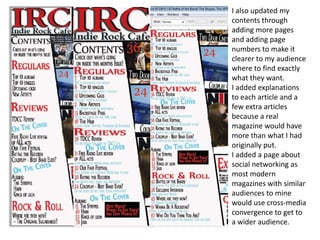
I also updated my
contents through
adding more pages
and adding page
numbers to make it
clearer to my audience
where to find exactly
what they want.
I added explanations
to each article and a
few extra articles
because a real
magazine would have
more than what I had
originally put.
I added a page about
social networking as
most modern
magazines with similar
audiences to mine
would use cross-media
convergence to get to
a wider audience.
Progress on contents

Progress on contents

  • 1.
  • 2.
    Progress • I startedoff with just my masthead in the corner, similar to the front cover to keep the brand obvious, I then set out black lines across the page that are pretty much how I drew them in my layouts. After that was when I started inserting to content to my contents e.g. pictures, page numbers and article titles.
  • 3.
    Here is howI cut around pictures to fit my borders
  • 4.
    I then putin my main cover story picture, this is a slightly different one from the cover but clearly from the same shoot. I chose a more fun looking one, for the purpose of showing variety in my magazine and therefore appealing to more of a range of potential customers. I chose to make them overlap the borders to give the effect of standing out.
  • 5.
    • However, Inoticed the problem of Erin’s hair, on the last version, It was cut off because of where she was in the picture, so I used the clone tool to replicate her hair and make it look more natural.
  • 6.
    • I addedpage numbers, all of the same font, size and colour, a clear red to keep with the colour scheme and make them easy to spot.
  • 7.
    • After this,I filled a box with blue dots, to add the splash of blue to the page and change up the background a bit. • I did this with a paint brush tool. • I have also moved the place of this box from my layout because I felt that the two pictures below needed more space and this box was too overpowering in it’s original place.
  • 8.
    • Here Imade a BRIT awards ticket design to show what was on offer, using gold to show the expensiveness of the prize. • I also blocked out the top box in red to fit with my drawn plan for my editor’s note to the reader. Again, this breaks up the background colours and separates the sections.
  • 9.
    • I mademy dear reader section with small fonts as that is what I have previously come across in other magazines. • Keeping with the idea of colour blocking I put a black box around the ‘Dear Reader’ sign To make it stand out. • In this section I gave a basic overview of what the magazine was about, this is pretty much what I wrote in my drawn plan.
  • 10.
    • I thendecided to extend my editor’s note and make the font even smaller, so I went into slightly more detail about the magazine. • I also inserted a signature to show who the editor is and give a personal touch. • I liked the idea of dotted backgrounds so I did it again behind the picture, I felt this was needed because the background looked slightly too blank at this point.
  • 11.
    • I thenadded my own picture of Two Door Cinema Club and made it fit around my border ideas. • I also added pictures I had of their Concert tickets and signed CD cover to show a prize giveaway.
  • 12.
    • Here, Iwrote the Exclusive Interview sign to attract the attention of the reader and make it sound worth reading. I put that bit I a large font, then changed the colour to black and smaller for the next bit of information, similar to other magazines I have scene and in newspapers. However, I made the band name stand out and stayed with the colour scheme. • I then went even smaller for the detail and smaller again for a bit of extra information which is not as significant as the rest. I decided to include the feature of posters from the photo-shoot, and gave a few examples of them.
  • 13.
    • I madea queries/suggestions box to show how my magazine would be easy to contact and gave all contact information below it. It means that the magazine is modern because it has adapted to social networking sites and the internet.
  • 14.
    • Here, Ihave started to fill in the actual contents to the magazine, following what I have seen in other music magazines. Using the red for the section titles and black, smaller font for the sub-sections. • I have only changed colours and sizes and kept the font the same to make it neater - this was a suggestion from someone in my front cover feedback. • I also added a black box with some extra information about subscriptions as this is also a popular feature of a magazine.
  • 15.
    • I thenput in the review section in the contents, I made sure I spread everything out so that I could try to keep things on one line to make them easier to read. • Although I could not do this for every line, I made it still clear enough to read.
  • 16.
    • The Ifilled in my Rock & Roll section using the same principles of large, red fonts for intitial information, and black, smaller fonts for the more detailed information.
  • 17.
    • Finally, Iput in little ‘n the Cover’ signs. I did this because a lot of magazines do this and it makes it easier for the reader. • This is because, a lot of people buy magazines because of what they see on the cover, and this is a quick way to find what they bought the magazine to see. • I made them blue to give the blue splash that runs through my colour scheme. • I also put in a ‘top tip’ sign to tell readers what was in the very small font. I did this in a different font to make it stand out.
  • 18.
    • I havethen tilted the ‘on the cover’ signs to make them stand out more and draw the reader’s eye to them. • It also deciphers them from the actual contents even more than just being different colours.
  • 19.
    Final task • Ihad planned to put an album cover in my contents page of a band that I created. • Here is how I created this album cover from 4 models.
  • 20.
    • I firsttook each of the four pictures and took a quarter from each face. • Then using resizing tools I fit them into similar sizes and cut out the backgrounds of the pictures. • I then cropped the final image because the bottom right picture was longer than the bottom left.
  • 21.
    One issue Ihad was that I would have preferred all of their skin tones to be similar but the top left model has a slightly redder face so I used the curve tool to change the lighting of that section and to fade the red colour so that he matched the other models.
  • 22.
    I then usedcurves again to create a different filter effect of the picture making it look washed out but vibrant at the same time because the original image was fairly dull.
  • 23.
    Feedback • I madethe text slightly smaller on my contents because I got audience feedback that said that it was too big. • The feedback also said that the pictures maybe needed captions to show which picture matched which story.
  • 24.
    • After Iinserted the newly made album cover, I went over the feedback and adjusted what I was suggested to change. • I put captions of my pictures and made the contents text smaller.
  • 26.
    • I tookmultiple images and wasn’t happy with the quality of my original image because to please an audience I have to have high quality pictures so that they feel they are getting their money’s worth. • So I chose an image and made it brighter using the curves.
  • 27.
    I then cropped thepicture, first to a square shape, then realised I would fill the space better with a rectangular shape.
  • 28.
    Here is howI put it into my contents and replaced it with the original one I had. I still quite liked the signed merchandise I had put in it because it attracts the attention of the audience.
  • 29.
    So I keptthe signed merchandise image but deleted the image of the ticket because I felt it looked out of place and didn’t serve much purpose. I also had to move the 36 to make it more clear so I put it in the corner because that part of the image was not important and has a solid dark background and therefore makes the number more visible.
  • 30.
    I felt Icould stretch the album cover I had on my cover so I went back to Photoshop and edited it again, this should make it look better on the page.
  • 31.
    Here I madethe edges neater for the album by erasing the jagged edges. This makes it look more professional like a real album cover. I then, using the clone tool added to the left arm to make the picture look more symmetrical because it looked odd with one round shoulder and once straight, cut off one.
  • 32.
    I also updatedmy contents through adding more pages and adding page numbers to make it clearer to my audience where to find exactly what they want. I added explanations to each article and a few extra articles because a real magazine would have more than what I had originally put. I added a page about social networking as most modern magazines with similar audiences to mine would use cross-media convergence to get to a wider audience.