QUESTION 6
W H A T H A V E Y O U L E A R N T A B O U T T E C H N O L O G I E S F R O M
T H E P R O C E S S O F C O N S T R U C T I N G T H I S P R O J E C T ?
CONSTRUCTION OF THE MAGAZINE
P H O T O S H O P
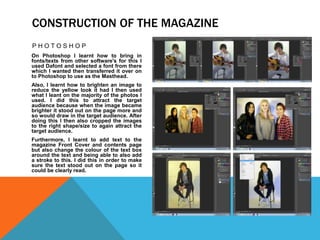
On Photoshop I learnt how to bring in
fonts/texts from other software's for this I
used Dafont and selected a font from there
which I wanted then transferred it over on
to Photoshop to use as the Masthead.
Also, I learnt how to brighten an image to
reduce the yellow look it had I then used
what I leant on the majority of the photos I
used. I did this to attract the target
audience because when the image became
brighter it stood out on the page more and
so would draw in the target audience. After
doing this I then also cropped the images
to the right shape/size to again attract the
target audience.
Furthermore, I learnt to add text to the
magazine Front Cover and contents page
but also change the colour of the text box
around the text and being able to also add
a stroke to this. I did this in order to make
sure the text stood out on the page so it
could be clearly read.
CONSTRUCTION OF THE MAGAZINE
I N D E S I G N
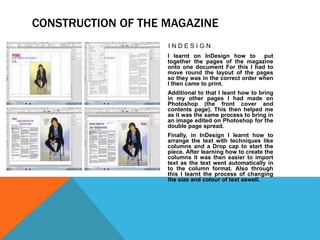
I learnt on InDesign how to put
together the pages of the magazine
onto one document For this I had to
move round the layout of the pages
so they was in the correct order when
I then came to print.
Additional to that I leant how to bring
in my other pages I had made on
Photoshop (the front cover and
contents page). This then helped me
as it was the same process to bring in
an image edited on Photoshop for the
double page spread.
Finally, in InDesign I learnt how to
arrange the text with techniques like
columns and a Drop cap to start the
piece. After learning how to create the
columns it was then easier to import
text as the text went automatically in
to the column format. Also through
this I learnt the process of changing
the size and colour of text aswell.
ONLINE PRESENTATION SOFTWARES – PREZI,
GOCONQR, POWTOON, RAWSHORTS & WIDEO
Prezi – Is an online presentation software similar to PowerPoint apart from it has
ready made templates for you to produce presentation. Whilst using this
application I learnt how to present my work but in a different way which is
more interesting for the viewer. I also learnt while on the application how to
add text and images as its set up is different to what I am usually used to in
powerpoint.
GoConqr – Is an online mindmap software which allows you to create complex
mindmaps but that are easy to view. I learnt when using this software how to
add extra text from off the main point. This software then helped me to
expand my ideas on each magazine name idea to make my final choice more
simple.
Powtoon, Rawshorts & Wideo – Are all online Presentation software's that make
the presentation into a video which is then easier to view. I learnt alot about
how to use these software's as I had never came across anything like them
before so within this I learnt how to add text, new slides & how to change the
layout and colour of these slides. However I found through this process that I
preferred the more PowerPoint style software's rather that the ones where it
was more video based due to the amount of information I was adding and the
timings for this information not always being long enough.
P O W E R P O I N T
I used PowerPoint for all the
other presentations I did as it’s a
clear way to get across the
information that I needed. While
using this I found that I could
add different layouts/designs to
make the look of the
presentation more exciting that
just text.
I also learnt how to arrange
images and text boxes quickly by
using the arrange tool that I had
previously never used. This
meant that the work I did was
laid out better.
Also, I learnt how to use the
spacing options in order to
change the gap in between lines
of my work which helped to keep
work together or to move it apart
when nessasery.
W O R D
While using word to write out the
Q+A for the double page spread
of my magazine I learnt how to
change the line spacing in
between the lines of text in order
to make it clear and easy to read
I then used this skill in other
work to either make the gap
smaller between the lines to
compact the information or
bigger to make it clearer when
needed.
I also learnt on word how to
change the margin sizes to
change the layout of the work.
For example to fit more on the
page I made them narrower and
when I had less on the page I
made them wider to spread the
information out. This was useful
in making the work I produced
look more tidy.
MOVIE EDITING - IMOVIE
I used iMovie in order to edit the video clips I recorded when I conducted a
focus group in the research stages.
When I was using this editing application I learnt how to put together the
video clips I had in the correct order and also how to add transitions
between each clip however I kept the transitions quite simple as I didn’t
want them to effect the clips by loosing the viewers attention.
To get the right part of each clip I also leant how to crop them down so that
only the information need for a certain point was used.
Also, I learnt how to keep it so you could only hear the audio from the clip
however while learning to do this I also found how to add music or a voice
over to the clip/video but didn’t need to use this for the particular video I
was creating but for the future I now know how to do this.
UPLOADING/SHARING SOFTWARE'S -
I used various softwares in order to upload individual parts of the process to my
blog on blogger…
Blogger – Is an online blog that I used to upload all my work onto. I learnt the
basics of this software when creating my preliminary magazine. However, I
leant how to change the time/date of something in blogger in order to put my
work in the correct order.
Slideshare – I used slideshare to make the PowerPoint and word documents I
created suitable to embed onto my blog. In this process I have learnt how to
upload on to slideshare and how to get the embed code from the upload so
that I can put this on my blog.
Sound Cloud – I used sound cloud to get an embed code so that I could put
audio focus groups on to my blog. I leant while using sound cloud how to
create a sound cloud account and then how to upload on to the account I
made then after doing this I also learnt how to get the embed code to put
onto my blog.
YouTube – I used YouTube to upload my video focus group so I could then post it
to my blog. While doing this I learnt how to upload onto YouTube and then
how to embed once I had uploaded.

Question 6 - Nicole Hickman

  • 1.
    QUESTION 6 W HA T H A V E Y O U L E A R N T A B O U T T E C H N O L O G I E S F R O M T H E P R O C E S S O F C O N S T R U C T I N G T H I S P R O J E C T ?
  • 2.
    CONSTRUCTION OF THEMAGAZINE P H O T O S H O P On Photoshop I learnt how to bring in fonts/texts from other software's for this I used Dafont and selected a font from there which I wanted then transferred it over on to Photoshop to use as the Masthead. Also, I learnt how to brighten an image to reduce the yellow look it had I then used what I leant on the majority of the photos I used. I did this to attract the target audience because when the image became brighter it stood out on the page more and so would draw in the target audience. After doing this I then also cropped the images to the right shape/size to again attract the target audience. Furthermore, I learnt to add text to the magazine Front Cover and contents page but also change the colour of the text box around the text and being able to also add a stroke to this. I did this in order to make sure the text stood out on the page so it could be clearly read.
  • 3.
    CONSTRUCTION OF THEMAGAZINE I N D E S I G N I learnt on InDesign how to put together the pages of the magazine onto one document For this I had to move round the layout of the pages so they was in the correct order when I then came to print. Additional to that I leant how to bring in my other pages I had made on Photoshop (the front cover and contents page). This then helped me as it was the same process to bring in an image edited on Photoshop for the double page spread. Finally, in InDesign I learnt how to arrange the text with techniques like columns and a Drop cap to start the piece. After learning how to create the columns it was then easier to import text as the text went automatically in to the column format. Also through this I learnt the process of changing the size and colour of text aswell.
  • 4.
    ONLINE PRESENTATION SOFTWARES– PREZI, GOCONQR, POWTOON, RAWSHORTS & WIDEO Prezi – Is an online presentation software similar to PowerPoint apart from it has ready made templates for you to produce presentation. Whilst using this application I learnt how to present my work but in a different way which is more interesting for the viewer. I also learnt while on the application how to add text and images as its set up is different to what I am usually used to in powerpoint. GoConqr – Is an online mindmap software which allows you to create complex mindmaps but that are easy to view. I learnt when using this software how to add extra text from off the main point. This software then helped me to expand my ideas on each magazine name idea to make my final choice more simple. Powtoon, Rawshorts & Wideo – Are all online Presentation software's that make the presentation into a video which is then easier to view. I learnt alot about how to use these software's as I had never came across anything like them before so within this I learnt how to add text, new slides & how to change the layout and colour of these slides. However I found through this process that I preferred the more PowerPoint style software's rather that the ones where it was more video based due to the amount of information I was adding and the timings for this information not always being long enough.
  • 5.
    P O WE R P O I N T I used PowerPoint for all the other presentations I did as it’s a clear way to get across the information that I needed. While using this I found that I could add different layouts/designs to make the look of the presentation more exciting that just text. I also learnt how to arrange images and text boxes quickly by using the arrange tool that I had previously never used. This meant that the work I did was laid out better. Also, I learnt how to use the spacing options in order to change the gap in between lines of my work which helped to keep work together or to move it apart when nessasery. W O R D While using word to write out the Q+A for the double page spread of my magazine I learnt how to change the line spacing in between the lines of text in order to make it clear and easy to read I then used this skill in other work to either make the gap smaller between the lines to compact the information or bigger to make it clearer when needed. I also learnt on word how to change the margin sizes to change the layout of the work. For example to fit more on the page I made them narrower and when I had less on the page I made them wider to spread the information out. This was useful in making the work I produced look more tidy.
  • 6.
    MOVIE EDITING -IMOVIE I used iMovie in order to edit the video clips I recorded when I conducted a focus group in the research stages. When I was using this editing application I learnt how to put together the video clips I had in the correct order and also how to add transitions between each clip however I kept the transitions quite simple as I didn’t want them to effect the clips by loosing the viewers attention. To get the right part of each clip I also leant how to crop them down so that only the information need for a certain point was used. Also, I learnt how to keep it so you could only hear the audio from the clip however while learning to do this I also found how to add music or a voice over to the clip/video but didn’t need to use this for the particular video I was creating but for the future I now know how to do this.
  • 7.
    UPLOADING/SHARING SOFTWARE'S - Iused various softwares in order to upload individual parts of the process to my blog on blogger… Blogger – Is an online blog that I used to upload all my work onto. I learnt the basics of this software when creating my preliminary magazine. However, I leant how to change the time/date of something in blogger in order to put my work in the correct order. Slideshare – I used slideshare to make the PowerPoint and word documents I created suitable to embed onto my blog. In this process I have learnt how to upload on to slideshare and how to get the embed code from the upload so that I can put this on my blog. Sound Cloud – I used sound cloud to get an embed code so that I could put audio focus groups on to my blog. I leant while using sound cloud how to create a sound cloud account and then how to upload on to the account I made then after doing this I also learnt how to get the embed code to put onto my blog. YouTube – I used YouTube to upload my video focus group so I could then post it to my blog. While doing this I learnt how to upload onto YouTube and then how to embed once I had uploaded.