Network Programming
with
Qt
Manohar Kuse
mpkuse@ust.hk
http://ihome.ust.hk/~mpkuse
What is Qt
● C++ Library
○ Gives extra functions to C++
● Object Oriented
● Cross Platform
○ Windows, Linux, Mac, Android
● Developed by Nokia (now by Qt-project.org)
Official Site : http://qt-project.org/
What can I do with Qt ?
● Build GUIs (Graphical User Interfaces)
● Network Programming
● Handling Databases (like MySQL,Oracle etc)
● Multi-threaded programming
● Graphics for computer games (OpenGL)
Which Software use Qt Libraries ?
http://en.wikipedia.org/wiki/Category:Software_that_uses_Qt
Learning Qt
My Tutorial
● http://kusemanohar.wordpress.com/2012/08/19/qt-beginners-tutorial/
Books
The famous ones
● http://catalog.ust.hk/catalog/archives/734729
● http://catalog.ust.hk/catalog/archives/645062
Other Books
● http://catalog.ust.hk/catalog/search/Qt
Youtube
● http://www.youtube.com/playlist?list=PL2D1942A4688E9D63
Other useful guides
● http://qt-project.org/resources/getting_started
● http://qt-project.org/wiki/developer-guides
My suggestion
1. Install Qt Creator on your PC/Mac/Linux
2. Understand today’s toy project
3. Go through my tutorial.
http://kusemanohar.wordpress.com/2012/08/19/qt-beginners-tutorial/
If you still want to learn more follow a book from
library
Installation
● I also have a section on Qt Installation in my tutorial
● In case you are installing on windows make sure you
have C/C++ compiler installed.
○ Either of Visual Studio or MinGW
● Download Qt from : http://qt-project.org/downloads
Today’s Toy Project
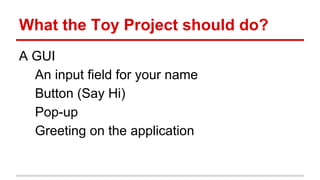
What the Toy Project should do?
A GUI
An input field for your name
Button (Say Hi)
Pop-up
Greeting on the application
Demonstration
I have put this demonstration on youtube
http://www.youtube.com/watch?v=dcjgzlezwE0
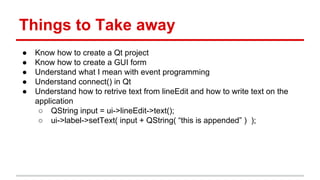
Things to Take away
● Know how to create a Qt project
● Know how to create a GUI form
● Understand what I mean with event programming
● Understand connect() in Qt
● Understand how to retrive text from lineEdit and how to write text on the
application
○ QString input = ui->lineEdit->text();
○ ui->label->setText( input + QString( “this is appended” ) );
Network Programming with Qt
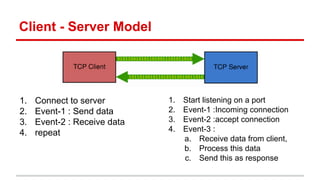
Client - Server Model
1. Connect to server
2. Event-1 : Send data
3. Event-2 : Receive data
4. repeat
1. Start listening on a port
2. Event-1 :Incoming connection
3. Event-2 :accept connection
4. Event-3 :
a. Receive data from client,
b. Process this data
c. Send this as response
Toy Network Project
Aim : Client sends some text to the server.
Server converts this to upper case and
responds the same
Lets call
KClient
KServer
Demonstration of Toy Network Project
I have put this demonstration on youtube
http://www.youtube.com/watch?v=EzQICMXvaxY
You can download the source code from
https://dl.dropboxusercontent.com/u/28068989/Qt_Network.zip

Network programming with Qt (C++)

  • 1.
  • 2.
    What is Qt ●C++ Library ○ Gives extra functions to C++ ● Object Oriented ● Cross Platform ○ Windows, Linux, Mac, Android ● Developed by Nokia (now by Qt-project.org) Official Site : http://qt-project.org/
  • 3.
    What can Ido with Qt ? ● Build GUIs (Graphical User Interfaces) ● Network Programming ● Handling Databases (like MySQL,Oracle etc) ● Multi-threaded programming ● Graphics for computer games (OpenGL)
  • 4.
    Which Software useQt Libraries ? http://en.wikipedia.org/wiki/Category:Software_that_uses_Qt
  • 5.
    Learning Qt My Tutorial ●http://kusemanohar.wordpress.com/2012/08/19/qt-beginners-tutorial/ Books The famous ones ● http://catalog.ust.hk/catalog/archives/734729 ● http://catalog.ust.hk/catalog/archives/645062 Other Books ● http://catalog.ust.hk/catalog/search/Qt Youtube ● http://www.youtube.com/playlist?list=PL2D1942A4688E9D63 Other useful guides ● http://qt-project.org/resources/getting_started ● http://qt-project.org/wiki/developer-guides
  • 6.
    My suggestion 1. InstallQt Creator on your PC/Mac/Linux 2. Understand today’s toy project 3. Go through my tutorial. http://kusemanohar.wordpress.com/2012/08/19/qt-beginners-tutorial/ If you still want to learn more follow a book from library
  • 7.
    Installation ● I alsohave a section on Qt Installation in my tutorial ● In case you are installing on windows make sure you have C/C++ compiler installed. ○ Either of Visual Studio or MinGW ● Download Qt from : http://qt-project.org/downloads
  • 8.
  • 9.
    What the ToyProject should do? A GUI An input field for your name Button (Say Hi) Pop-up Greeting on the application
  • 10.
    Demonstration I have putthis demonstration on youtube http://www.youtube.com/watch?v=dcjgzlezwE0
  • 11.
    Things to Takeaway ● Know how to create a Qt project ● Know how to create a GUI form ● Understand what I mean with event programming ● Understand connect() in Qt ● Understand how to retrive text from lineEdit and how to write text on the application ○ QString input = ui->lineEdit->text(); ○ ui->label->setText( input + QString( “this is appended” ) );
  • 12.
  • 13.
    Client - ServerModel 1. Connect to server 2. Event-1 : Send data 3. Event-2 : Receive data 4. repeat 1. Start listening on a port 2. Event-1 :Incoming connection 3. Event-2 :accept connection 4. Event-3 : a. Receive data from client, b. Process this data c. Send this as response
  • 14.
    Toy Network Project Aim: Client sends some text to the server. Server converts this to upper case and responds the same Lets call KClient KServer
  • 15.
    Demonstration of ToyNetwork Project I have put this demonstration on youtube http://www.youtube.com/watch?v=EzQICMXvaxY You can download the source code from https://dl.dropboxusercontent.com/u/28068989/Qt_Network.zip