Downloaded 268 times
![How to Configuring a Cisco 2901 Router?
Here we’ve put together the configuration process for the new CISCO 2901 router.
This the most common router supplied by the fibre internet providers in Australia
when you ask for connectivity without PPPoE.
Step1. Make sure that your PC is powered up and connected as described in
the ”Checklist for Power Up” section
Step2. Move the power switch to the ON position.
The SYS LED on the front of the chassis begins blinking green.
•The fans begin operating.
•Startup messages appear in your Console window. When the startup messages
finish, the SYS LED appears solid green.
Step3. Use any of the following tools to perform the initial configuration.
Cisco Configuration Professional Express
Cisco Setup Command Facility
Cisco Command Line Interface
Cisco Setup Command Facility
Cisco Setup Command Facility lets you configure the initial router settings through a
configuration dialog. If you see the following messages, the router has booted and is
ready for initial configuration using the setup command facility.
— System Configuration Dialog —
At any point you may enter a question mark ‘?’ for help.
Use ctrl-c to abort configuration dialog at any prompt.
Default settings are in square brackets ‘[]‘.
Would you like to enter the initial configuration dialog? [yes/no]:
Cisco Configuration Professional Express
Use the Cisco Configuration Professional Express web-based application to configure
the initial router settings. See the Cisco Configuration Professional Express User
Guide document on Cisco.com for detailed instructions:
http://www.cisco.com/en/US/docs/net_mgmt/cisco_configuration_professional_exp
ress/version1_1/online_help/CCPE11.pdf
Cisco Command Line Interface
Cisco Command Line Interface (CLI) lets you configure the initial router settings
manually. If you see the following messages, the router has booted and is ready for
initial configuration using the CLI.
For how to use the CLI to configure the router, see the “Using Cisco IOS CLI—Manual
Configuration” section.
Using Cisco Setup Command Facility
Step1. Enter the setup command facility by using one of the following methods:](https://image.slidesharecdn.com/configuringacisco2901router-131205012342-phpapp01/75/Configuring-a-cisco-2901-router-1-2048.jpg)
![•From the Cisco IOS CLI, enter the setup command in privileged EXEC mode:
Router> enable
Password: <password>
Router# setup
— System Configuration Dialog —
Continue with configuration dialog? [yes/no]:
You are now in the Setup Configuration Utility.
The prompts in the setup command facility vary; depending on your router model,
on the installed interface modules, and on the software image. The following steps
and the user entries (in bold) are shown as examples only.
Step2. To proceed using the setup command facility, enter yes.
Continue with configuration dialog? [yes/no]:
At any point you may enter a question mark ‘?’ for help.
Use ctrl-c to abort configuration dialog at any prompt.
Default settings are in square brackets ‘*+’.
Step3. Basic management setup configures only enough connectivity
Would you like to enter basic management setup? [yes/no]: yes
Step4. Enter a hostname for the router (this example uses myrouter):
Configuring global parameters:
Enter host name [Router]: myrouter
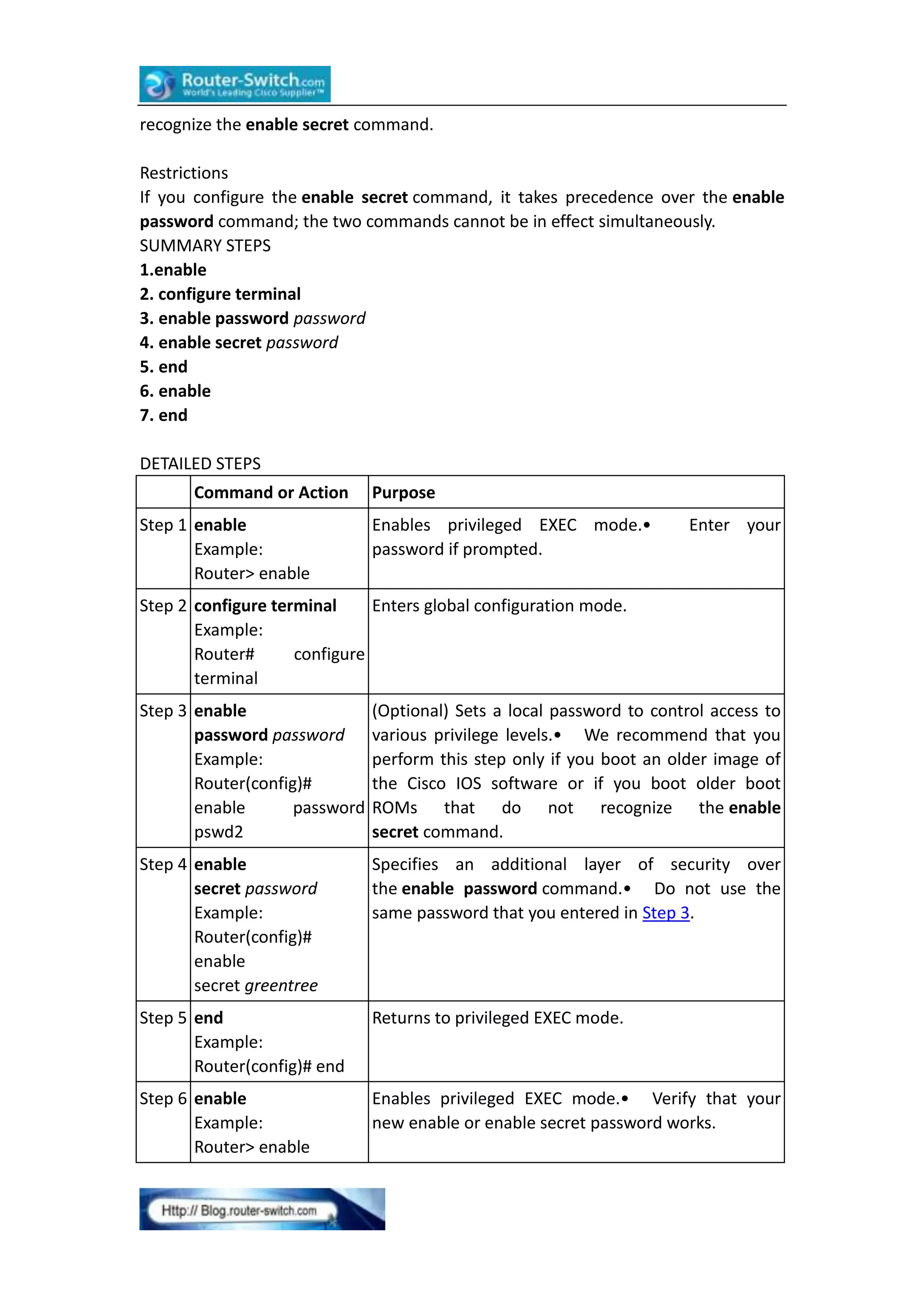
Step5. Enter an enable secret password. This password is encrypted (for more
security) and cannot be seen when viewing the configuration.
The enable secret is a password used to protect access toprivileged EXEC and
configurationmodes. This password, afterentered, becomes encrypted in the
configuration.Enter enable secret: cisco
Step6. Enter an enable password that is different from the enable secret password.
This password is not encrypted (and is less secure) and can be seen when viewing the
configuration.
The enable password is used when you do not specify anenable secret password,
with someolder software versions, andsome boot images.
Enter enable password: cisco123
Step7. Enter the virtual terminal password, which prevents unauthenticated access
to the router through ports other than the console port:
The virtual terminal password is used to protectaccess to the router over a network
interface.
Enter virtual terminal password: cisco](https://image.slidesharecdn.com/configuringacisco2901router-131205012342-phpapp01/75/Configuring-a-cisco-2901-router-2-2048.jpg)
![Step8. Respond to the following prompts as appropriate for your network:
Configure SNMP Network Management? [no]: yes
Community string [public]:
A summary of the available interfaces is displayed.
Current interface summary
Interface IP-Address OK? Method Status Protocol
GigabitEthernet0/0 unassigned YES NVRAM administratively down down
GigabitEthernet0/1 10.10.10.12 YES DHCP up up
GigabitEthernet0/2 unassigned YES NVRAM administratively down down
SSLVPN-VIF0 unassigned NO unset up
Any interface listed with OK? value “NO” does not have a valid configuration
Step9. Select one of the available interfaces for connecting the router to the
management network:
Enter interface name used to connect to themanagement network from the above
interface summary: gigabitethernet0/1
Step10. Respond to the following prompts as appropriate for your network:
Configuring interface GigabitEthernet0/1:
Configure IP on this interface? [yes]: yes
IP address for this interface [10.10.10.12]:
Subnet mask for this interface [255.0.0.0] : 255.255.255.0
Class A network is 10.0.0.0, 24 subnet bits; mask is /24
The following configuration command script was created:
hostnamemyrouter
enable secret 5 $1$t/Dj$yAeGKviLLZNOBX0b9eifO0 enable password cisco123 line vty
04
password cisco snmp-server community public !
noip routing
!
interface GigabitEthernet0/0
shutdown
no ip address
!
interface GigabitEthernet0/1
no shutdown
ip address 10.10.10.12 255.255.255.0
!
interface GigabitEthernet0/2
shutdown
no ip address
!
end](https://image.slidesharecdn.com/configuringacisco2901router-131205012342-phpapp01/75/Configuring-a-cisco-2901-router-3-2048.jpg)
![Step11. Respond to the following prompts. Select [2] to save the initial
configuration:
[0] Go to the IOS command prompt without saving this config.
[1] Return back to the setup without saving this config.
[2] Save this configuration to nvram and exit.
Enter your selection [2]: 2
Building configuration…
Use the enabled mode ‘configure’ command to modify this configuration.
Press RETURN to get started! RETURN
The user prompt is displayed:
myrouter>
Completing the Configuration
When using the Cisco Setup, and after you have provided all the information
requested by the facility, the final configuration appears. To complete your router
configuration, follow these steps:
Step1. The facility prompts you to save the configuration.
•If you answer no, the configuration information you entered is not saved, and you
return to the router enable prompt (Router#). Enter setup to return to the System
Configuration Dialog.
•If you answer yes, the configuration is saved, and you are returned to the user EXEC
prompt (Router>).
Use this configuration? {Yes/no}: yes
Building configuration…
Use the enabled mode ‘configure’ command to modify this configuration. Press
RETURN to get started! %LINK-3-UPDOWN: Interface Ethernet0/0, changed state to
up %LINK-3-UPDOWN: Interface Ethernet0/1, changed state to up %LINK-3-UPDOWN:
Interface Serial0/0/0, changed state to up %LINK-3-UPDOWN: Interface Serial0/0/1,
changed state to down %LINK-3-UPDOWN: Interface Serial0/2, changed state to
down %LINK-3-UPDOWN: Interface Serial1/0, changed state to up %LINK-3-UPDOWN:
Interface Serial1/1, changed state to down %LINK-3-UPDOWN: Interface Serial1/2,
changed state to down
Step2. When the messages stop appearing on your screen, press Return to get the
Router> prompt.
Note If you see the next message, it means that no other routers were found on the
network attached to the port.
%AT-6-ONLYROUTER: Ethernet0/0: AppleTalk port enabled; no neighbors found
Step3. The Router> prompt indicates that you are now at the command-line interface
(CLI) and you have just completed an initial router configuration. Nevertheless, this is
not a complete configuration. At this point, you have two choices:
•Run the setup command facility again, and create another configuration.
Router> enable](https://image.slidesharecdn.com/configuringacisco2901router-131205012342-phpapp01/75/Configuring-a-cisco-2901-router-4-2048.jpg)
![Password: password
Router# setup
•Modify the existing configuration or configure additional features by using the CLI:
Router> enable
Password: password
Router# configure terminal
Router(config)#
Using Cisco IOS CLI—Manual Configuration
Step1. Enter the following answer when the system message appears on the router.
— System Configuration Dialog —
At any point you may enter a question mark ‘?’ for help.
Use ctrl-c to abort configuration dialog at any prompt.
Default settings are in square brackets ‘[]‘.
Would you like to enter the initial configuration dialog? [yes/no]: no
Step2. Press Return to terminate autoinstall and continue with manual configuration:
Would you like to terminate autoinstall? [yes] Return
Several messages are displayed, ending with a line similar to the following:
…
Copyright (c) 1986-2004 by cisco Systems, Inc.
Compiled by
Step3. Press Return to bring up the Router> prompt.
…
flashfs[4]: Initialization complete.
Router>
Step4. Types enable to enter privileged EXEC mode:
Router> enable
Router#
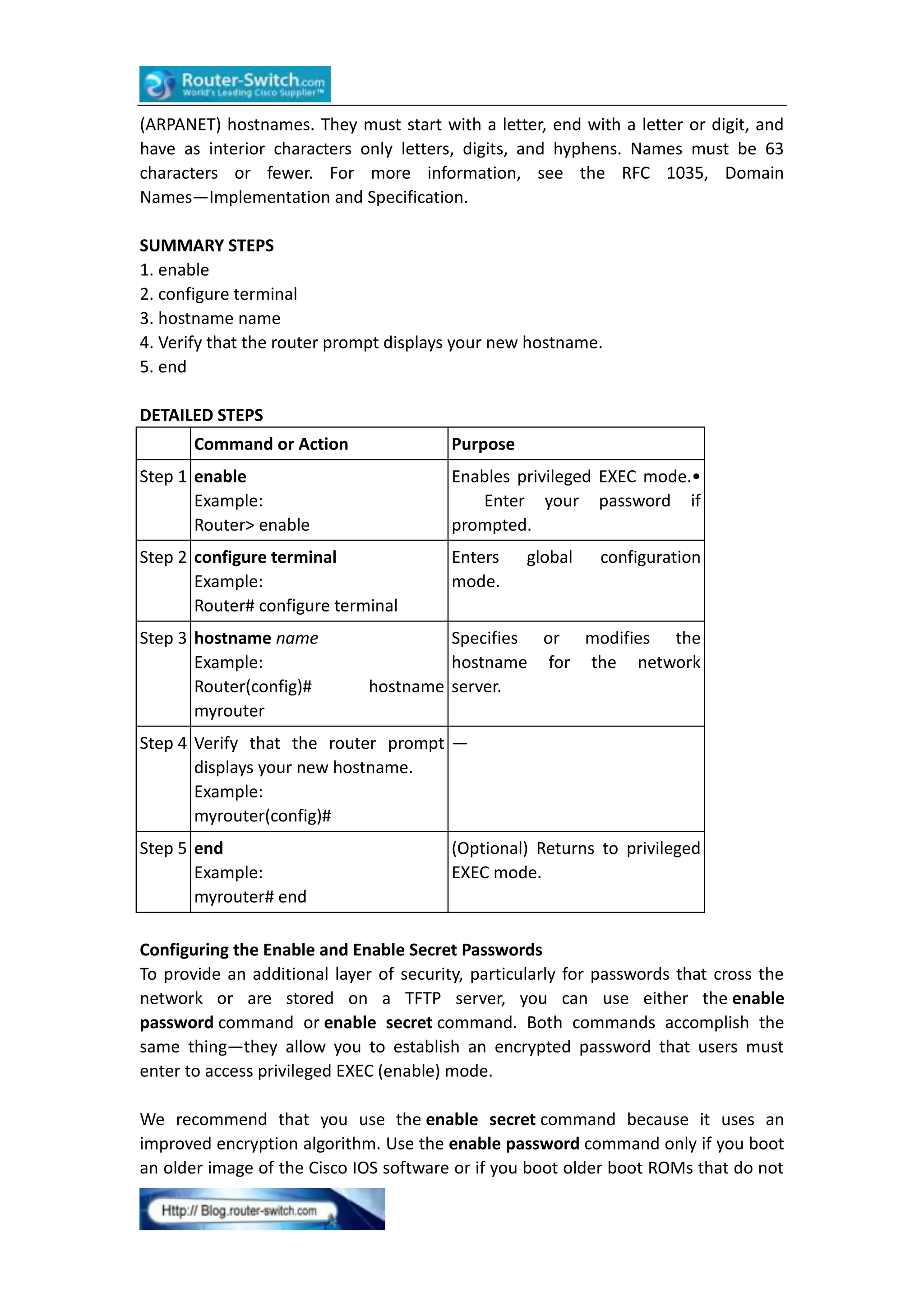
Configuring the Router Hostname
The hostname is used in CLI prompts and default configuration filenames. If you do
not configure the router hostname, the router uses the factory-assigned default
hostname “Router.”
Do not expect capitalization and lower casing to be preserved in the hostname.
Uppercase and lowercase characters are treated as identical by many Internet
software applications. It may seem appropriate to capitalize a name as you would
ordinarily do, but conventions dictate that computer names appear in all lowercase
characters. For more information, see the RFC 1178, Choosing a Name for Your
Computer.
The name must also follow the rules for Advanced Research Projects Agency Network](https://image.slidesharecdn.com/configuringacisco2901router-131205012342-phpapp01/75/Configuring-a-cisco-2901-router-5-2048.jpg)
![Step 7 end
Example:
Router(config)# end
(Optional) Returns to privileged EXEC mode.
Configuring the Console Idle Privileged EXEC Timeout
This section describes how to configure the console line’s idle privileged EXEC
timeout. By default, the privileged EXEC command interpreter waits 10 minutes to
detect user input before timing out.
When you configure the console line, you can also set communication parameters,
specify autobaud connections, and configure terminal operating parameters for the
terminal that you are using. For more information on configuring the console line,
see the Cisco IOS Configuration Fundamentals and Network Management
Configuration Guide. In particular, see the “Configuring Operating Characteristics for
Terminals” and “Troubleshooting and Fault Management” chapters.
SUMMARY STEPS
1. enable
2. configure terminal
3. line console 0
4. exec-timeout minutes [seconds]
5. end
6. show running-config
DETAILED STEPS
Command or Action
Purpose
Step 1 enable
Example:
Router> enable
Enables privileged EXEC mode.•
your password if prompted.
Enter
Step 2 configure terminal
Example:
Router# configure terminal
Enters global configuration mode.
Step 3 line console 0
Example:
Router(config)# line console 0
Configures the console line and starts the
line configuration command collection
mode.](https://image.slidesharecdn.com/configuringacisco2901router-131205012342-phpapp01/75/Configuring-a-cisco-2901-router-8-2048.jpg)
![Step 4 exec-timeoutminutes [seconds]
Example:
Router(config-line)#
exec-timeout 0 0
Sets the idle privileged EXEC timeout, which
is the interval that the privileged EXEC
command interpreter waits until user input
is detected.• The example shows how to
specify no timeout. Setting the exec-timeout
value to 0 will cause the router to never log
out once logged in. This could have security
implications if you leave the console without
manually logging out using the disable
command.
Step 5 end
Example:
Router(config)# end
Returns to privileged EXEC mode.
Step 6 show running-config
Example:
Router(config)#
running-config
Displays the running configuration file.•
Verify that you properly configured the idle
show privileged EXEC timeout.
Examples
The following example shows how to set the console idle privileged EXEC timeout to
2 minutes 30 seconds:
line console
exec-timeout 2 30
The following example shows how to set the console idle privileged EXEC timeout to
10 seconds:
line console
exec-timeout 0 10
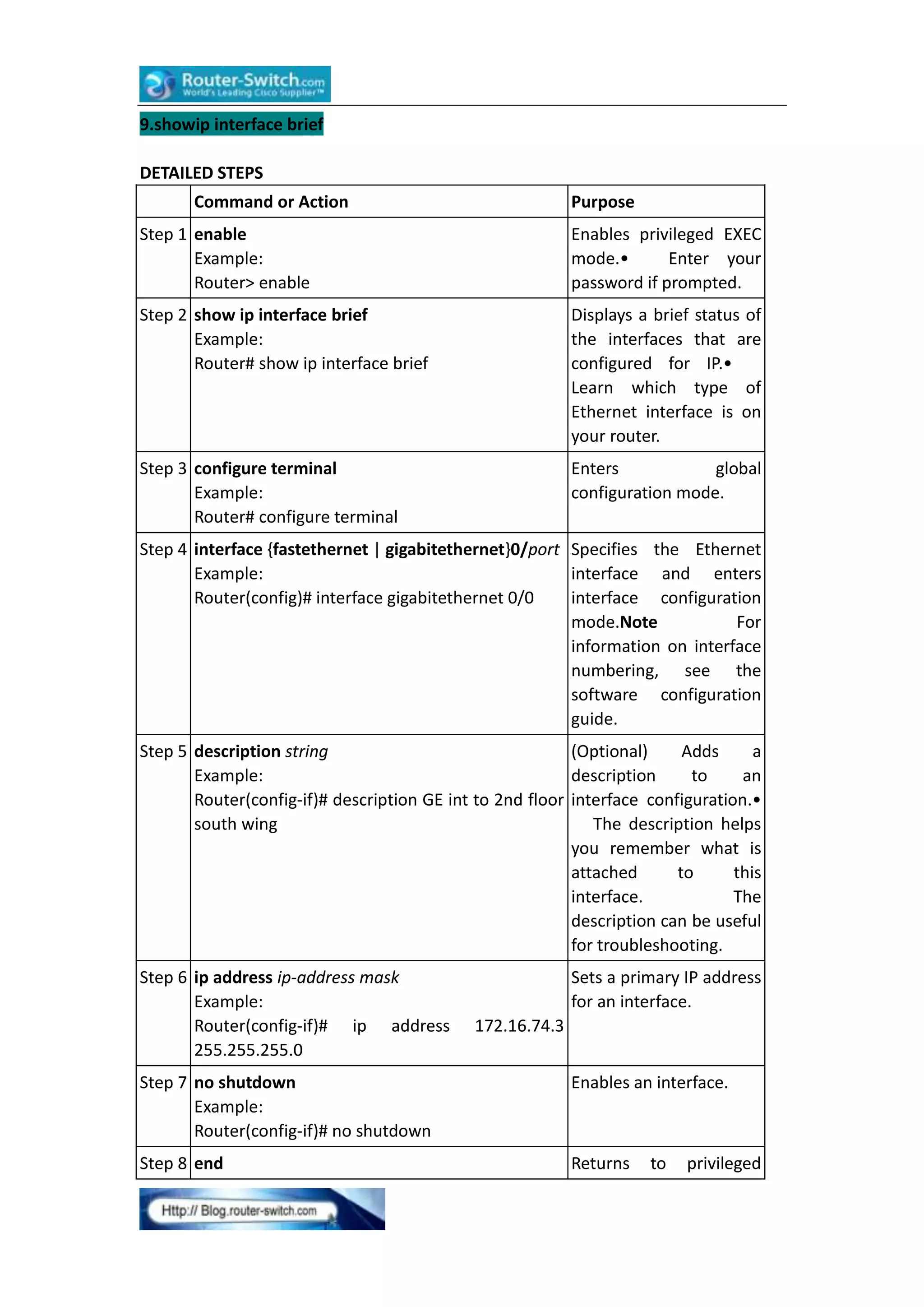
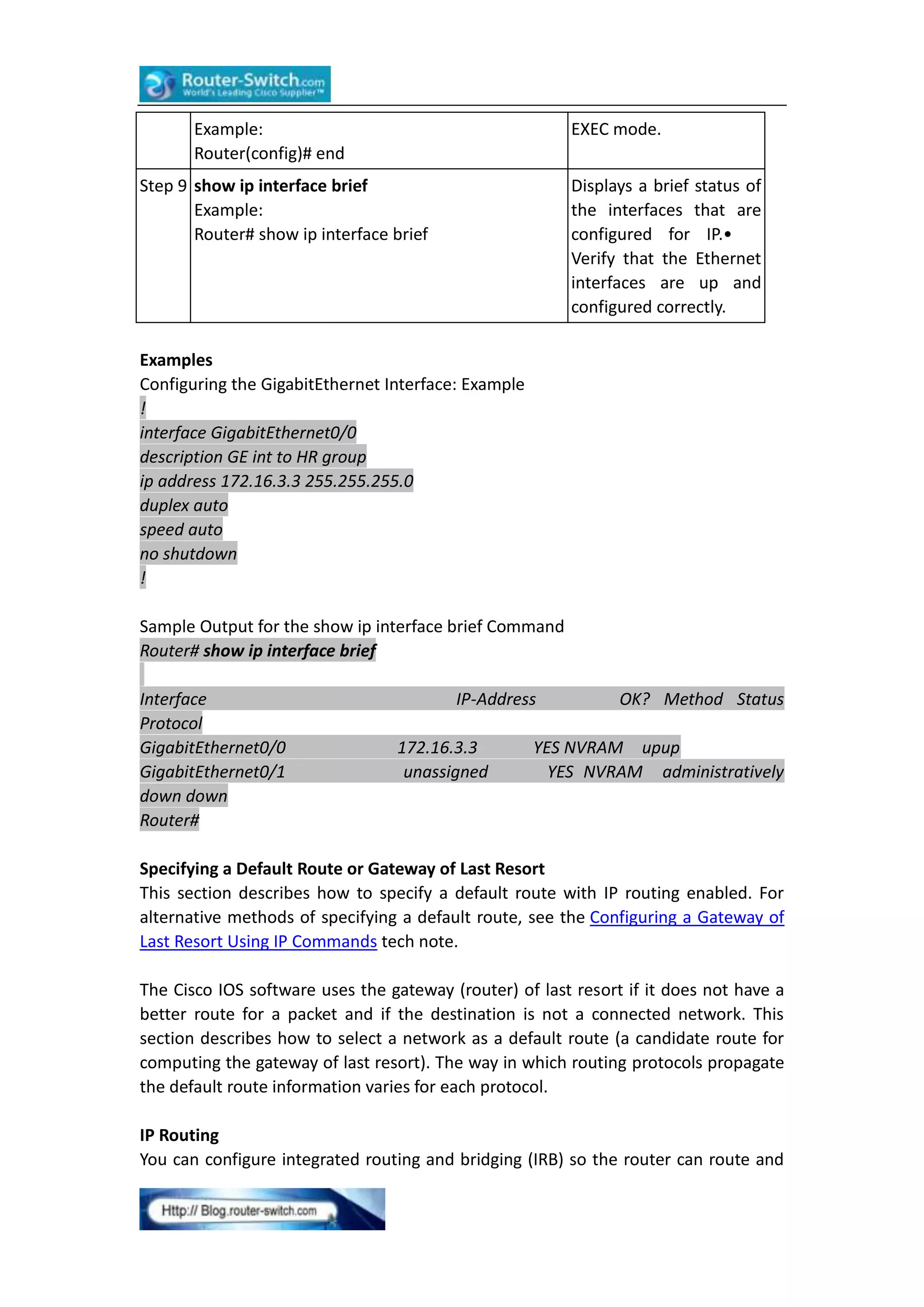
Configuring Gigabit Ethernet Interfaces
This section shows how to assign an IP address and interface description to an
Ethernet interface on your router.
SUMMARY STEPS
1. enable
2. showip interface brief
3. configure terminal
4. interface {fastethernet | gigabitethernet} 0/port
5. description string
6.ip address ip-address mask
7. no shutdown
8. end](https://image.slidesharecdn.com/configuringacisco2901router-131205012342-phpapp01/75/Configuring-a-cisco-2901-router-9-2048.jpg)
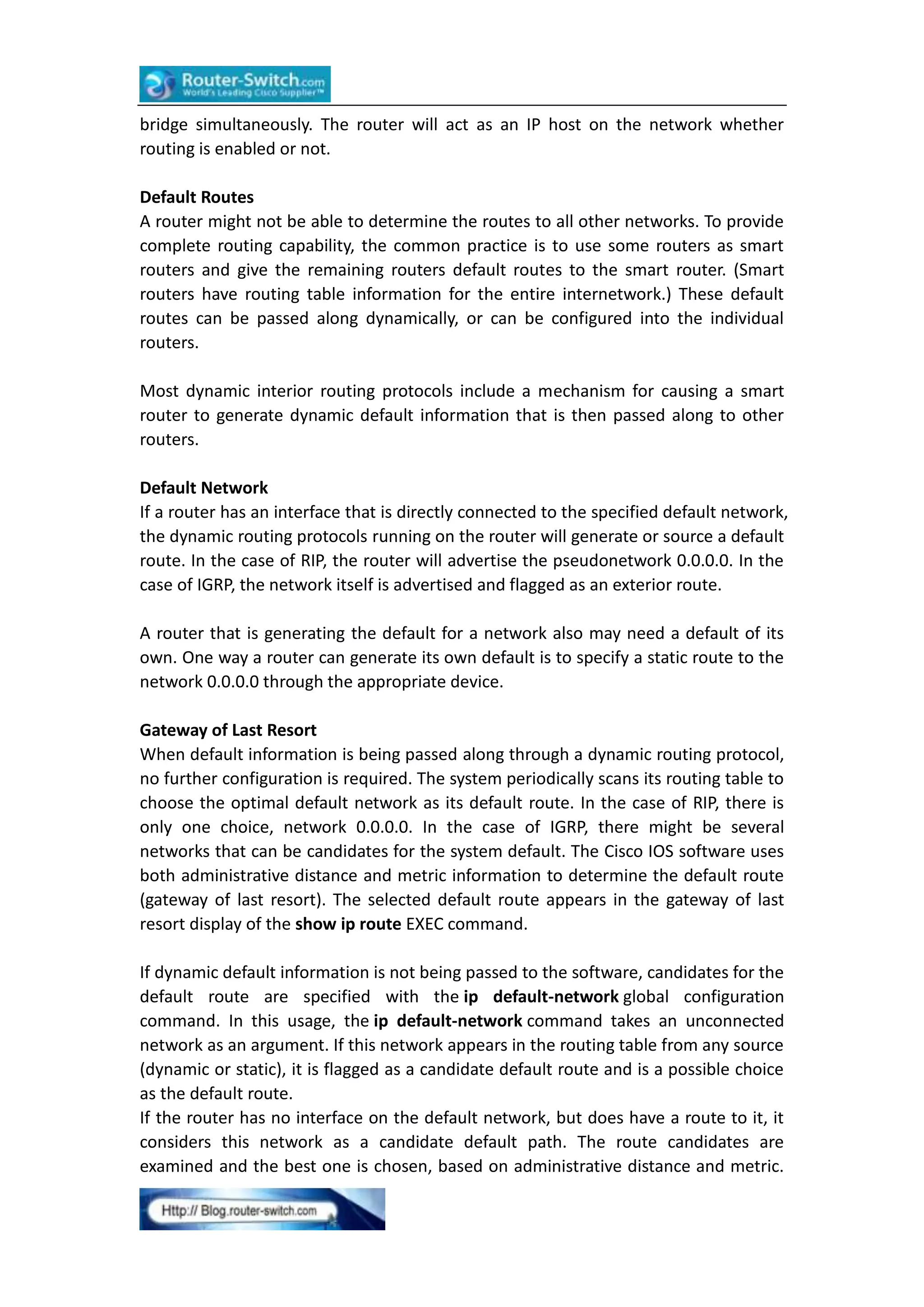
![The gateway to the best default path becomes the gateway of last resort.
SUMMARY STEPS
1. enable
2. configure terminal
3. ip routing
4. ip route dest-prefix mask next-hop-ip-address [admin-distance] [permanent]
5. ip default-network network-number
or
ip route dest-prefix mask next-hop-ip-address
6. end
7. showip route
DETAILED STEPS
Command or Action
Purpose
Step 1 enable
Example:
Router> enable
Enables privileged EXEC
mode.•
Enter your
password if prompted.
Step 2 configure terminal
Example:
Router# configure terminal
Enters
global
configuration mode.
Step 3 ip routing
Example:
Router(config)# ip routing
Enables IP routing.
Step 4 ip
route dest-prefix Establishes a static route.
mask next-hop-ip-address [admin-distance]
[permanent]
Example:
Router(config)# ip route 192.168.24.0
255.255.255.0 172.28.99.2
Step 5 ip
default-network network-numberorip
route dest-prefix mask next-hop-ip-address
Example:
Router(config)#
ip
default-network
192.168.24.0
Example:
Router(config)# ip route 0.0.0.0 0.0.0.0
172.28.99.1
Selects a network as a
candidate
route
for
computing the gateway of
last resort.Creates a static
route to network 0.0.0.0
0.0.0.0 for computing the
gateway of last resort.
Step 6 end
Example:
Router(config)# end
Returns to privileged EXEC
mode.](https://image.slidesharecdn.com/configuringacisco2901router-131205012342-phpapp01/75/Configuring-a-cisco-2901-router-13-2048.jpg)
![Step 7 show ip route
Example:
Router# show ip route
Displays
the
current
routing
table
information.•
Verify
that the gateway of last
resort is set.
Examples
Specifying a Default Route: Example
!
ip routing
!
ip route 192.168.24.0 255.255.255.0 172.28.99.2
!
ip default-network 192.168.24.0
!
Sample Output for the show ip route Command
Router# show ip route
Codes: C - connected, S - static, I - IGRP, R - RIP, M - mobile, B - BGP
D - EIGRP, EX - EIGRP external, O - OSPF, IA - OSPF inter area
E1 - OSPF external type 1, E2 - OSPF external type 2, E - EGP
i - IS-IS, L1 - IS-IS level-1, L2 - IS-IS level-2, * - candidate default
Gateway of last resort is 172.28.99.2 to network 192.168.24.0
172.24.0.0 255.255.255.0 is subnetted, 1 subnets
172.24.192.0 is directly connected, FastEthernet0
172.24.0.0 255.255.0.0 [1/0] via 172.28.99.0
192.168.24.0 [1/0] via 172.28.99.2
172.16.0.0 255.255.255.0 is subnetted, 1 subnets
C
172.16.99.0 is directly connected, FastEthernet1
Router#
C
S
S*
Configuring Virtual Terminal Lines for Remote Console Access
Virtual terminal (vty) lines are used to allow remote access to the router. This section
shows you how to configure the virtual terminal lines with a password, so that only
authorized users can remotely access the router.
The router has five virtual terminal lines by default.
SUMMARY STEPS
1. enable
2. configure terminal
3. line vty line-number [ending-line-number]
4. password password](https://image.slidesharecdn.com/configuringacisco2901router-131205012342-phpapp01/75/Configuring-a-cisco-2901-router-14-2048.jpg)
![5. login
6. end
7. show running-config
8. From another network device, attempt to open a Telnet session to the router.
DETAILED STEPS
Command or Action
Purpose
Step 1 enable
Example:
Router> enable
Enables
privileged
mode.•
Enter
password if prompted.
EXEC
your
Step 2 configure terminal
Example:
Router# configure terminal
Enters global configuration
mode.
Step 3 line vty line-number [ending-line-number]
Example:
Router(config)# line vty 0 4
Starts the line configuration
command collection mode for
the virtual terminal lines (vty)
for remote console access.•
Make sure that you
configure all vty lines on your
router.Note To verify the
number of vty lines on your
router,
use
the line
vty ? command.
Step 4 password password
Example:
Router(config-line)# password guessagain
Specifies a password on a line.
Step 5 login
Example:
Router(config-line)# login
Enables password checking at
login.
Step 6 end
Example:
Router(config-line)# end
Returns to privileged EXEC
mode.
Step 7 show running-config
Example:
Router# show running-config
Displays
the
running
configuration file.•
Verify
that you properly configured
the virtual terminal lines for
remote access.](https://image.slidesharecdn.com/configuringacisco2901router-131205012342-phpapp01/75/Configuring-a-cisco-2901-router-15-2048.jpg)
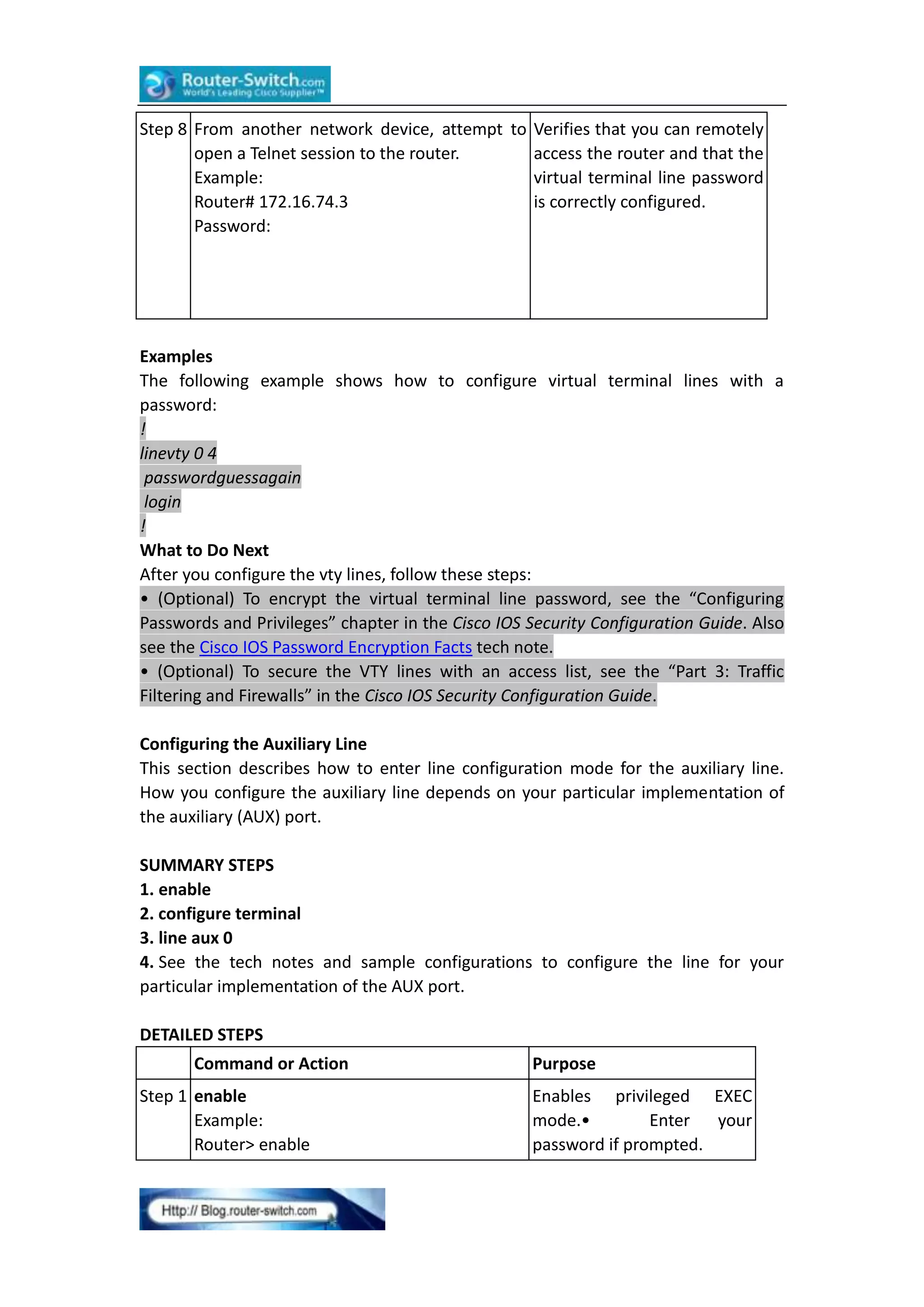
![Step 2 configure terminal
Example:
Router# configure terminal
Enters global configuration
mode.
Step 3 line aux 0
Example:
Router(config)# line aux 0
Starts the line configuration
command collection mode
for the auxiliary line.
Step 4 See the tech notes and sample —
configurations to configure the line for your
particular implementation of the AUX port.
Verifying Network Connectivity
This section describes how to verify network connectivity for your router.
Prerequisites
•Complete all previous configuration tasks in this document.
•The router must be connected to a properly configured network host.
SUMMARY STEPS
1. enable
2. ping [ip-address | hostname]
3. telnet {ip-address | hostname}
DETAILED STEPS
Command or Action
Step 1 enable
Example:
Router> enable
Purpose
Enables privileged EXEC mode.•
your password if prompted.
Enter
Step 2 ping [ip-address | hostname] Diagnoses initial network connectivity.•
Example:
To verify connectivity, ping the next hop
Router# ping 172.16.74.5
router or connected host for each
configured interface to.
Step 3 telnet {ip-address |hostname} Logs in to a host that supports Telnet.•
Example:
If you want to test the vty line password,
Router# telnet 10.20.30.40
perform this step from a different network
device, and use your router’s IP address.
Examples
The following display shows sample output for the ping command when you ping the
IP address 192.168.7.27:
Router# ping
Protocol [ip]:](https://image.slidesharecdn.com/configuringacisco2901router-131205012342-phpapp01/75/Configuring-a-cisco-2901-router-17-2048.jpg)
![Target IP address: 192.168.7.27
Repeat count [5]:
Datagram size [100]:
Timeout in seconds [2]:
Extended commands [n]:
Sweep range of sizes [n]:
Type escape sequence to abort.
Sending 5, 100-byte ICMP Echos to 192.168.7.27, timeout is 2 seconds:
!!!!!
Success rate is 100 percent, round-trip min/avg/max = 1/2/4 ms
The following display shows sample output for the ping command when you ping the
IP hostname donald:
Router# ping donald
Type escape sequence to abort.
Sending 5, 100-byte ICMP Echos to 192.168.7.27, timeout is 2 seconds:
!!!!!
Success rate is 100 percent, round-trip min/avg/max = 1/3/4 ms
Saving Your Router Configuration
This section describes how to avoid losing your configuration at the next system
reload or power cycle by saving the running configuration to the startup
configuration in NVRAM. The NVRAM provides 256KB of storage on the router.
SUMMARY STEPS
1. enable
2. copy running-config startup-config
DETAILED STEPS
Command or Action
Step 1 enable
Example:
Router> enable
Purpose
Enables
privileged
EXEC mode.•
Enter
your
password
if
prompted.
Step 2 copy running-config startup-config Saves the running
Example:
configuration to the
Router#
copy
running-config startup configuration.
startup-config
Saving Backup Copies of Configuration and System Image
To aid file recovery and minimize downtime in case of file corruption, we recommend
that you save backup copies of the startup configuration file and the Cisco IOS](https://image.slidesharecdn.com/configuringacisco2901router-131205012342-phpapp01/75/Configuring-a-cisco-2901-router-18-2048.jpg)
![software system image file on a server.
SUMMARY STEPS
1. enable
2. copy nvram:startup-config {ftp: | rcp: | tftp:}
3. show {flash0|flash1}:
4. copy {flash0|flash1}: {ftp: | rcp: | tftp:}
DETAILED STEPS
Command or Action
Step 1 enable
Example:
Router> enable
Purpose
Enables privileged EXEC
mode.•
Enter
your
password if prompted.
Step 2 copy nvram:startup-config {ftp: | rcp: | tftp:} Copies
the
startup
Example:
configuration file to a
Router# copy nvram:startup-config ftp:
server.• The configuration
file copy can serve as a
backup copy.• Enter the
destination
URL
when
prompted.
Step 3 show {flash0|flash1}:
Example:
Router# show {flash0|flash1}:
Displays the layout and
contents of a flash memory
file system.•
Learn the
name of the system image
file.
Step 4 copy {flash0|flash1}: {ftp: | rcp: | tftp:}
Example:
Router# copy {flash0|flash1}: ftp:
Copies a file from flash
memory to a server.• Copy
the system image file to a
server to serve as a backup
copy.• Enter the filename
and destination URL when
prompted.
Examples
Copying the Startup Configuration to a TFTP Server: Example
The following example shows the startup configuration being copied to a TFTP
server:
Router# copy nvram:startup-configtftp:
Remote host[]? 172.16.101.101
Name of configuration file to write [rtr2-confg]? <cr>](https://image.slidesharecdn.com/configuringacisco2901router-131205012342-phpapp01/75/Configuring-a-cisco-2901-router-19-2048.jpg)
![Write file rtr2-confg on host 172.16.101.101?[confirm] <cr>
![OK]
Copying from Flash Memory to a TFTP Server: Example
The following example shows the use of the show {flash0|flash1}: command in
privileged EXEC to learn the name of the system image file and the use of the copy
{flash0|flash1}: tftp: privileged EXEC command to copy the system image
(c3900-2is-mz) to a TFTP server. The router uses the default username and password.
Router# show {flash0|flash1}:
System flash directory:
File Length Name/status
1 4137888 c3900-c2is-mz
[4137952 bytes used, 12639264 available, 16777216 total]
16384K bytes of processor board System flash (Read/Write)
Router# copy {flash0|flash1}: tftp:
IP address of remote host [255.255.255.255]?172.16.13.110
filename to write on tftp host? c3900-c2is-mz
writing c3900-c2is-mz !!!!...
successful ftp write.
Verifying the Initial Configuration
Enter the following commands in the Cisco IOS to verify the initial configuration on
the router:
•show version—Displays the system hardware version; the installed software version;
the names and sources of configuration files; the boot images; and the amount of
installed DRAM, NVRAM, and flash memory.
•show diag—Lists and displays diagnostic information about the installed controllers,
interface processors, and port adapters.
•show interfaces— Shows interfaces are operating correctly and that the interfaces
and line protocol are in the correct state—up or down
•show ip interface brief— Displays a summary status of the interfaces configured for
IP protocol.
•show configuration— Verify that you have configured the correct hostname and
password.
When you have completed and verified the initial configuration, the specific features
and functions are ready to be configured.
More Related Cisco Router Topics:
How to Recover Password on the Cisco 2900 Integrated Services Router?
How to Reset a Cisco 3900 Router?](https://image.slidesharecdn.com/configuringacisco2901router-131205012342-phpapp01/75/Configuring-a-cisco-2901-router-20-2048.jpg)


The document provides instructions for configuring a Cisco 2901 router through the Cisco Setup Command Facility. It involves 11 steps: 1) Powering on the router and accessing the Setup Command Facility 2) Choosing to use the Setup Command Facility for initial configuration 3) Configuring basic settings like hostname, passwords, and SNMP settings 4) Selecting an interface (GigabitEthernet0/1) and configuring IP address and subnet mask 5) Viewing and confirming the generated configuration script 6) Saving the configuration to complete initial setup 7) Additional options like modifying the existing configuration through CLI


