Data Management
Scale-up 
•To understand the popularity of distributed systems (scale-out) vis-à-vis huge monolithic servers (scale-up), consider the price performance of current I/O technology. 
•A high-end machine with four I/O channels each having a throughput of 100 MB/sec will require three hours to read a 4 TB data set! 
•With Hadoop, this same data set will be divided into smaller (typically 64 MB) blocks that are spread among many machines in the cluster via the HadoopDistributed File System (HDFS ). 
•With a modest degree of replication, the cluster machines can read the data set in parallel and provide a much higher throughput. 
•And such a cluster of commodity machines turns out to be cheaper than one high-end server!
Hadoopfocuses on moving code to data 
•The clients send only the MapReduce programs to be executed, and these programs are usually small (often in kilobytes). 
•More importantly, the move-code-to-data philosophy applies within the Hadoop cluster itself. 
•Data is broken up and distributed across the cluster, and as much as possible, computation on a piece of data takes place on the same machine where that piece of data resides. 
•The programs to run (“code”) are orders of magnitude smaller than the data and are easier to move around. 
•Also, it takes more time to move data across a network than to apply the computation to it.
HDFS 
•HDFS is the file system component of Hadoop. 
•Interface to HDFS is patterned after the UNIX file system 
•Faithfulness to standards was sacrificed in favor of improved performance for the applications at hand 
•HDFS stores file system metadata and application data separately 
•“HDFS is a file-system designed for storing very large files with streaming data access patterns, running on clusters of commodity hardware”1 
1 “The Hadoop Distributed File System” by Konstantin Shvachko, HairongKuang, Sanjay Radia, and Robert Chansler(Proceedings of MSST2010, May 2010, http:// storageconference.org/2010/Papers/MSST/Shvachko.pdf)
Key properties of HDFS 
•Very Large 
–“Very large” in this context means files that are hundreds of megabytes, gigabytes, or terabytes in size. 
–There are Hadoop clusters running today that store petabytes of data. 
•Streaming data 
–write-once, read-many-times pattern 
–the time to read the whole dataset is more important than the latency in reading the first record 
•Commodity hardware 
–HDFS is designed to carry on working without a noticeable interruption to the user in the face of such failure
Not a good fit for 
•Low-latency data access 
–HDFS is optimized for delivering a high throughput of data, and this may be at the expense of latency. 
–Hbaseis currently a better choice for low-latency access. 
•Lots of small files 
–Since the namenode holds filesystemmetadata in memory, the limit to the number of files in a filesystemis governed by the amount of memory on the namenode. 
–As a rule of thumb, each file, directory, and block takes about 150 bytes. 
–While storing millions of files is feasible, billions is beyond the capability of current hardware. 
•Multiple writers, arbitrary file modifications 
–Files in HDFS may be written to by a single writer. Writes are always made at the end of the file. 
–There is no support for multiple writers, or for modifications at arbitrary offsets in the file.
Namenode and Datanode 
Master/slave architecture 
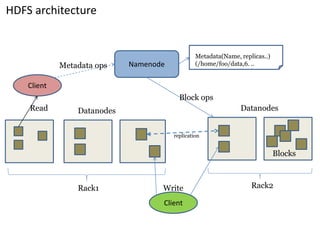
HDFS cluster consists of a single Namenode, a master server that manages the file system namespace and regulates access to files by clients. 
There are a number of DataNodesusually one per node in a cluster. 
The DataNodesmanage storage attached to the nodes that they run on. 
HDFS exposes a file system namespace and allows user data to be stored in files. 
A file is split into one or more blocks and set of blocks are stored in DataNodes. 
DataNodes: serves read, write requests, performs block creation, deletion, and replication upon instruction from Namenode.
Web Interface 
•NameNodeand DataNodeeach run an internal web server in order to display basic information about the current status of the cluster. 
• 
•With the default configuration, the NameNodefront page is athttp://namenode-name:50070/. 
•It lists the DataNodesin the cluster and basic statistics of the cluster. 
•The web interface can also be used to browse the file system (using "Browse the file system" link on the NameNodefront page).
HDFS architecture 
Namenode 
B 
replication 
Rack1 
Rack2 
Client 
Blocks 
Datanodes 
Datanodes 
Client 
Write 
Read 
Metadata ops 
Metadata(Name, replicas..) 
(/home/foo/data,6. .. 
Block ops
Namenode 
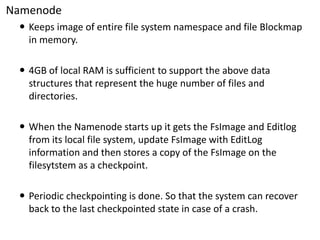
Keeps image of entire file system namespace and file Blockmapin memory. 
4GB of local RAM is sufficient to support the above data structures that represent the huge number of files and directories. 
When the Namenode starts up it gets the FsImageand Editlogfrom its local file system, update FsImagewith EditLoginformation and then stores a copy of the FsImageon the filesytstemas a checkpoint. 
Periodic checkpointingis done. So that the system can recover back to the last checkpointedstate in case of a crash.
Datanode 
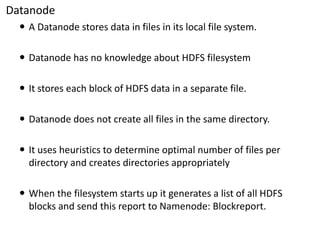
A Datanodestores data in files in its local file system. 
Datanodehas no knowledge about HDFS filesystem 
It stores each block of HDFS data in a separate file. 
Datanodedoes not create all files in the same directory. 
It uses heuristics to determine optimal number of files per directory and creates directories appropriately 
When the filesystemstarts up it generates a list of all HDFS blocks and send this report to Namenode: Blockreport.
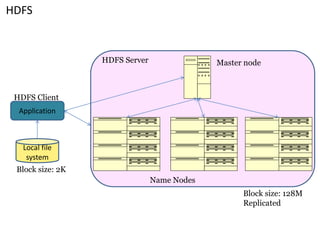
HDFS 
Application 
Local file system 
Master node 
Name Nodes 
HDFS Client 
HDFS Server 
Block size: 2K 
Block size: 128M 
Replicated
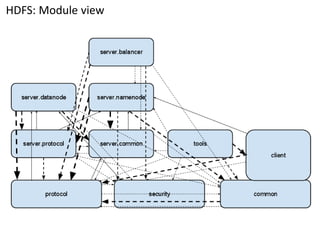
HDFS: Module view
HDFS: Modules 
•Protocol: The protocol package is used in communication between the client and the namenode and datanode. It describes the messages used between these servers. 
•Security: security is used in authenticating access to the files. The security is based on token-based authentication, where the namenode server controls the distribution of access tokens. 
•server.protocol: server.protocoldefines the communication between namenode and datanode, and between namenode and balancer. 
•server.common: server.commoncontains utilities that are used by the namenode, datanodeand balancer. Examples are classes containing server-wide constants, utilities, and other logic that is shared among the servers. 
•Client: The client contains the logic to access the file system from a user’s computer. It interfaces with the datanodeand namenode servers using the protocol module. In the diagram this module spans two layers. This is because the client module also contains some logic that is shared system wide. 
•Datanode: The datanodeis responsible for storing the actual blocks of filesystemdata. It receives instructions on which blocks to store from the namenode. It also services the client directly to stream file block contents. 
•Namenode: The namenode is responsible for authorizing the user, storing a mapping from filenames to data blocks, and it knows which blocks of data are stored where. 
•Balancer: The balancer is a separate server that tells the namenode to move data blocks between datanodeswhen the load is not evenly balanced among datanodes. 
•Tools: The tools package can be used to administer the filesystem, and also contains debugging code.
File system 
•Hierarchical file system with directories and files 
•Create, remove, move, rename etc. 
•Namenode maintains the file system 
•Any meta information changes to the file system recorded by the Namenode. 
•An application can specify the number of replicas of the file needed: replication factor of the file. 
•This information is stored in the Namenode.
Metadata 
•The HDFS namespace is stored by Namenode. 
•Namenode uses a transaction log called the EditLogto record every change that occurs to the filesystemmeta data. 
–For example, creating a new file. 
–Change replication factor of a file 
–EditLogis stored in the Namenode’slocal filesystem 
•Entire filesystemnamespace including mapping of blocks to files and file system properties is stored in a file FsImage. 
•Stored in Namenode’slocal filesystem.
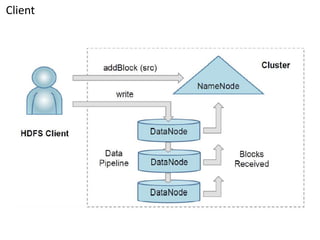
Applicationcode<-> Client 
•HDFS provides aJava APIfor applications to use. 
•Fundamentally, the application uses the standard java.io interface. 
•A C language wrapper for this Java API is also available. 
•The client and the application code are bound into the same address space.
Client
Java Interface 
•One of the simplest ways to read a file from a Hadoop filesystemis by using a java.net.URLobject to open a stream to read the data from. 
•The general idiom is: 
InputStreamin = null; 
try { 
in = new URL("hdfs://host/path").openStream(); 
// process in 
} finally { 
IOUtils.closeStream(in); 
} 
•There’s a little bit more work required to make Java recognize Hadoop’shdfsURL scheme. 
•This is achieved by calling the setURLStreamHandlerFactorymethod on URL with an instance of FsUrlStreamHandlerFactory.
Example : Displaying files from a Hadoop filesystemon standard output 
public class URLCat{ 
static { 
URL.setURLStreamHandlerFactory(new FsUrlStreamHandlerFactory()); 
} 
public static void main(String[] args) throws Exception { 
InputStreamin = null; 
try { 
in = new URL(args[0]).openStream(); 
IOUtils.copyBytes(in, System.out, 4096, false); 
} finally { 
IOUtils.closeStream(in); 
} 
} 
}
Reading Data Using the FileSystemAPI 
•A file in a Hadoop filesystemis represented by a Hadoop Path object (and not a java.io.Fileobject. 
•There are several static factory methods for getting a FileSysteminstance: 
–public static FileSystemget(Configuration conf) throws IOException 
–public static FileSystemget(URI uri, Configuration conf) throws IOException 
–public static FileSystemget(URI uri, Configuration conf, String user) throws IOException 
•A Configuration object encapsulates a client or server’s configuration, which is set using configuration files read from the classpath, such as conf/core- site.xml. 
•With a FileSysteminstance in hand, we invoke an open() method to get the input stream for a file: 
–public FSDataInputStreamopen(Path f) throws IOException 
–public abstract FSDataInputStreamopen(Path f, intbufferSize) throws IOException
Example : Displaying files with FileSystemAPI 
public class FileSystemCat{ 
public static void main(String[] args) throws Exception { 
String uri= args[0]; 
Configuration conf = new Configuration(); 
FileSystemfs= FileSystem.get(URI.create(uri), conf); 
InputStreamin = null; 
try { 
in = fs.open(new Path(uri)); 
IOUtils.copyBytes(in, System.out, 4096, false); 
} finally { 
IOUtils.closeStream(in); 
} 
} 
}
FSDataInputStream 
•The open() method on FileSystemactually returns a FSDataInputStreamrather than a standard java.io class. 
•This class is a specialization of java.io.DataInputStreamwith support for random access, so you can read from any part of the stream. 
package org.apache.hadoop.fs; 
public class FSDataInputStreamextends DataInputStream 
implements Seekable, PositionedReadable{ 
// implementation 
} 
public interface Seekable{ 
void seek(long pos) throws IOException; 
long getPos() throws IOException; 
} 
public interface PositionedReadable{ 
public intread(long position, byte[] buffer, intoffset, intlength) throws IOException; 
public void readFully(long position, byte[] buffer, intoffset, intlength) throws IOException; 
public void readFully(long position, byte[] buffer) throws IOException; 
}
FSDataOutputStream 
public FSDataOutputStreamcreate(Path f) throws IOException 
package org.apache.hadoop.util; 
public interface Progressable{ 
public void progress(); 
} 
public FSDataOutputStreamappend(Path f) throws IOException
Example: Copying a local file to a Hadoop filesystem 
public class FileCopyWithProgress{ 
public static void main(String[] args) throws Exception { 
String localSrc= args[0]; 
String dst= args[1]; 
InputStreamin = new BufferedInputStream(new FileInputStream(localSrc)); 
Configuration conf = new Configuration(); 
FileSystemfs= FileSystem.get(URI.create(dst), conf); 
OutputStreamout = fs.create(new Path(dst), new Progressable() { 
public void progress() { 
System.out.print("."); 
} 
}); 
IOUtils.copyBytes(in, out, 4096, true); 
} 
}
File-Based Data Structures 
•For some applications, you need a specialized data structure to hold your data. 
•For doing MapReduce-based processing, putting each blob of binary data into its own file doesn’t scale, so Hadoop developed a number of higher- level containers for these situations. 
•Imagine a logfile, where each log record is a new line of text. 
•If you want to log binary types, plain text isn’t a suitable format. 
•Hadoop’sSequenceFileclass fits the bill in this situation, providing a persistent data structure for binary key-value pairs.
SequenceFile 
•SequenceFileis a flat file consisting of binary key/value pairs. 
•It is extensively used inMapReduceas input/output formats. 
•Internally, the temporary outputs of maps are stored using SequenceFile. 
•The SequenceFileprovides a Writer, Reader and Sorter classes for writing, reading and sorting respectively. 
•There are 3 different SequenceFileformats: 
–Uncompressed key/value records. 
–Record compressed key/value records -only 'values' are compressed here. 
–Block compressed key/value records -both keys and values are collected in 'blocks' separately and compressed. The size of the 'block' is configurable. 
•TheSequenceFile.Readeracts as a bridge and can read any of the above SequenceFileformats.
Using SequenceFile 
•To use it as a logfileformat, you would choose a key, such as timestamp represented by a LongWritable, and the value is a Writable that represents the quantity being logged. 
•To create a SequenceFile, use one of its createWriter() static methods, which returns a SequenceFile.Writerinstance. 
•Once you have a SequenceFile.Writer, you then write key-value pairs, using the append() method. 
•Then when you’ve finished, you call the close() method. 
•Reading sequence files from beginning to end is a matter of creating an instance of SequenceFile.Readerand iterating over records by repeatedly invoking one of the next() methods.
Internals of A sequence file 
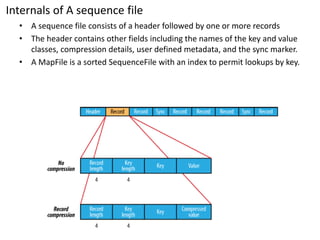
•A sequence file consists of a header followed by one or more records 
•The header contains other fields including the names of the key and value classes, compression details, user defined metadata, and the sync marker. 
•A MapFileis a sorted SequenceFilewith an index to permit lookups by key.
Compression 
•Hadoop allows users to compress output data, intermediate data, or both. 
•Hadoop checks whether input data is in a compressed format and decompresses the data as needed. 
•Compression codec: 
–two lossless codecs. 
–The default codec is gzip, a combination of the Lempel-Ziv 1977 (LZ77) algorithm and Huffmanencoding. 
–The other codec implements the Lempel-ZivOberhumer(LZO) algorithm, a variant of LZ77 optimized for decompression speed. 
•Compression unit: 
–Hadoop allows both per-record and per-block compression. 
–Thus, the record or block size affects the compressibility of the data.
When to use compression? 
•Compression adds a read-time-penalty, why would one enable any compression? 
•There are a few reasons why the advantages of compression can outweigh the disadvantages: 
–Compression reduces the number of bytes written to/read from HDFS 
–Compression effectively improves the efficiency of network bandwidth and disk space 
–Compression reduces the size of data needed to be read when issuing a read 
•To be as low friction as necessary, a real-time compression library is preferred. 
•To achieve maximal performance and benefit, you must enable LZO. 
•What about parallelism?
compression and Hadoop 
•Storing compressed data in HDFS allows your hardware allocation to go further since compressed data is often 25% of the size of the original data. 
•Furthermore, since MapReduce jobs are nearly always IO- bound, storing compressed data means there is less overall IO to do, meaning jobs run faster. 
•There are two caveats to this, however: 
–some compression formats cannot be split for parallel processing, and 
–others are slow enough at decompression that jobs become CPU-bound, eliminating your gains on IO.
gzipcompression on Hadoop 
•The gzipcompression format illustrates the first caveat, and to understand why we need to go back to how Hadoop’sinput splits work. 
•Imagine you have a 1.1 GB gzipfile, and your cluster has a 128 MB block size. 
•This file will be split into 9 chunks of size approximately 128 MB. 
•In order to process these in parallel in a MapReduce job, a different mapperwill be responsible for each chunk. 
•But this means that the second mapperwill start on an arbitrary byte about 128MB into the file. 
•The contextfuldictionary that gzipuses to decompress input will be empty at this point, which means the gzipdecompressorwill not be able to correctly interpret the bytes. 
•The upshot is that large gzipfiles in Hadoop need to be processed by a single mapper, which defeats the purpose of parallelism.
Bzip2 compression on Hadoop 
•For an example of the second caveat in which jobs become CPU-bound, we can look to the bzip2 compression format. 
•Bzip2 files compress well and are even splittable, but the decompression algorithm is slow and cannot keep up with the streaming disk reads that are common in Hadoop jobs. 
•While Bzip2 compression has some upside because it conserves storage space, running jobs now spend their time waiting on the CPU to finish decompressing data. 
•Which slows them down and offsets the other gains.
LZO and ElephantBird 
•How can we split large compressed data and run them in parallel on Hadoop? 
•One of the biggest drawbacks from compression algorithms like Gzipis that you can’t split them into multiple mappers. 
•This is where LZO comes in 
•Using LZO compression in Hadoop allows for 
–reduced data size and 
–shorter disk read times 
•LZO’s block-based structure allows it to be split into chunks for parallel processing in Hadoop. 
•Taken together, these characteristics make LZO an excellent compression format to use in your cluster. 
•Elephant Bird is Twitter's open source library ofLZO,Thrift, and/orProtocol Buffer-relatedHadoopInputFormats, OutputFormats, Writables,PigLoadFuncs,HiveSerDe,HBasemiscellanea, etc. 
•More: 
•https://github.com/twitter/hadoop-lzo 
•https://github.com/kevinweil/elephant-bird 
•http://code.google.com/p/protobuf/(IDL)
End of session 
Day –1: Data Management

Hadoop data management

  • 1.
  • 2.
    Scale-up •To understandthe popularity of distributed systems (scale-out) vis-à-vis huge monolithic servers (scale-up), consider the price performance of current I/O technology. •A high-end machine with four I/O channels each having a throughput of 100 MB/sec will require three hours to read a 4 TB data set! •With Hadoop, this same data set will be divided into smaller (typically 64 MB) blocks that are spread among many machines in the cluster via the HadoopDistributed File System (HDFS ). •With a modest degree of replication, the cluster machines can read the data set in parallel and provide a much higher throughput. •And such a cluster of commodity machines turns out to be cheaper than one high-end server!
  • 3.
    Hadoopfocuses on movingcode to data •The clients send only the MapReduce programs to be executed, and these programs are usually small (often in kilobytes). •More importantly, the move-code-to-data philosophy applies within the Hadoop cluster itself. •Data is broken up and distributed across the cluster, and as much as possible, computation on a piece of data takes place on the same machine where that piece of data resides. •The programs to run (“code”) are orders of magnitude smaller than the data and are easier to move around. •Also, it takes more time to move data across a network than to apply the computation to it.
  • 4.
    HDFS •HDFS isthe file system component of Hadoop. •Interface to HDFS is patterned after the UNIX file system •Faithfulness to standards was sacrificed in favor of improved performance for the applications at hand •HDFS stores file system metadata and application data separately •“HDFS is a file-system designed for storing very large files with streaming data access patterns, running on clusters of commodity hardware”1 1 “The Hadoop Distributed File System” by Konstantin Shvachko, HairongKuang, Sanjay Radia, and Robert Chansler(Proceedings of MSST2010, May 2010, http:// storageconference.org/2010/Papers/MSST/Shvachko.pdf)
  • 5.
    Key properties ofHDFS •Very Large –“Very large” in this context means files that are hundreds of megabytes, gigabytes, or terabytes in size. –There are Hadoop clusters running today that store petabytes of data. •Streaming data –write-once, read-many-times pattern –the time to read the whole dataset is more important than the latency in reading the first record •Commodity hardware –HDFS is designed to carry on working without a noticeable interruption to the user in the face of such failure
  • 6.
    Not a goodfit for •Low-latency data access –HDFS is optimized for delivering a high throughput of data, and this may be at the expense of latency. –Hbaseis currently a better choice for low-latency access. •Lots of small files –Since the namenode holds filesystemmetadata in memory, the limit to the number of files in a filesystemis governed by the amount of memory on the namenode. –As a rule of thumb, each file, directory, and block takes about 150 bytes. –While storing millions of files is feasible, billions is beyond the capability of current hardware. •Multiple writers, arbitrary file modifications –Files in HDFS may be written to by a single writer. Writes are always made at the end of the file. –There is no support for multiple writers, or for modifications at arbitrary offsets in the file.
  • 7.
    Namenode and Datanode Master/slave architecture HDFS cluster consists of a single Namenode, a master server that manages the file system namespace and regulates access to files by clients. There are a number of DataNodesusually one per node in a cluster. The DataNodesmanage storage attached to the nodes that they run on. HDFS exposes a file system namespace and allows user data to be stored in files. A file is split into one or more blocks and set of blocks are stored in DataNodes. DataNodes: serves read, write requests, performs block creation, deletion, and replication upon instruction from Namenode.
  • 8.
    Web Interface •NameNodeandDataNodeeach run an internal web server in order to display basic information about the current status of the cluster. • •With the default configuration, the NameNodefront page is athttp://namenode-name:50070/. •It lists the DataNodesin the cluster and basic statistics of the cluster. •The web interface can also be used to browse the file system (using "Browse the file system" link on the NameNodefront page).
  • 9.
    HDFS architecture Namenode B replication Rack1 Rack2 Client Blocks Datanodes Datanodes Client Write Read Metadata ops Metadata(Name, replicas..) (/home/foo/data,6. .. Block ops
  • 10.
    Namenode Keeps imageof entire file system namespace and file Blockmapin memory. 4GB of local RAM is sufficient to support the above data structures that represent the huge number of files and directories. When the Namenode starts up it gets the FsImageand Editlogfrom its local file system, update FsImagewith EditLoginformation and then stores a copy of the FsImageon the filesytstemas a checkpoint. Periodic checkpointingis done. So that the system can recover back to the last checkpointedstate in case of a crash.
  • 11.
    Datanode A Datanodestoresdata in files in its local file system. Datanodehas no knowledge about HDFS filesystem It stores each block of HDFS data in a separate file. Datanodedoes not create all files in the same directory. It uses heuristics to determine optimal number of files per directory and creates directories appropriately When the filesystemstarts up it generates a list of all HDFS blocks and send this report to Namenode: Blockreport.
  • 12.
    HDFS Application Localfile system Master node Name Nodes HDFS Client HDFS Server Block size: 2K Block size: 128M Replicated
  • 13.
  • 14.
    HDFS: Modules •Protocol:The protocol package is used in communication between the client and the namenode and datanode. It describes the messages used between these servers. •Security: security is used in authenticating access to the files. The security is based on token-based authentication, where the namenode server controls the distribution of access tokens. •server.protocol: server.protocoldefines the communication between namenode and datanode, and between namenode and balancer. •server.common: server.commoncontains utilities that are used by the namenode, datanodeand balancer. Examples are classes containing server-wide constants, utilities, and other logic that is shared among the servers. •Client: The client contains the logic to access the file system from a user’s computer. It interfaces with the datanodeand namenode servers using the protocol module. In the diagram this module spans two layers. This is because the client module also contains some logic that is shared system wide. •Datanode: The datanodeis responsible for storing the actual blocks of filesystemdata. It receives instructions on which blocks to store from the namenode. It also services the client directly to stream file block contents. •Namenode: The namenode is responsible for authorizing the user, storing a mapping from filenames to data blocks, and it knows which blocks of data are stored where. •Balancer: The balancer is a separate server that tells the namenode to move data blocks between datanodeswhen the load is not evenly balanced among datanodes. •Tools: The tools package can be used to administer the filesystem, and also contains debugging code.
  • 15.
    File system •Hierarchicalfile system with directories and files •Create, remove, move, rename etc. •Namenode maintains the file system •Any meta information changes to the file system recorded by the Namenode. •An application can specify the number of replicas of the file needed: replication factor of the file. •This information is stored in the Namenode.
  • 16.
    Metadata •The HDFSnamespace is stored by Namenode. •Namenode uses a transaction log called the EditLogto record every change that occurs to the filesystemmeta data. –For example, creating a new file. –Change replication factor of a file –EditLogis stored in the Namenode’slocal filesystem •Entire filesystemnamespace including mapping of blocks to files and file system properties is stored in a file FsImage. •Stored in Namenode’slocal filesystem.
  • 17.
    Applicationcode<-> Client •HDFSprovides aJava APIfor applications to use. •Fundamentally, the application uses the standard java.io interface. •A C language wrapper for this Java API is also available. •The client and the application code are bound into the same address space.
  • 18.
  • 19.
    Java Interface •Oneof the simplest ways to read a file from a Hadoop filesystemis by using a java.net.URLobject to open a stream to read the data from. •The general idiom is: InputStreamin = null; try { in = new URL("hdfs://host/path").openStream(); // process in } finally { IOUtils.closeStream(in); } •There’s a little bit more work required to make Java recognize Hadoop’shdfsURL scheme. •This is achieved by calling the setURLStreamHandlerFactorymethod on URL with an instance of FsUrlStreamHandlerFactory.
  • 20.
    Example : Displayingfiles from a Hadoop filesystemon standard output public class URLCat{ static { URL.setURLStreamHandlerFactory(new FsUrlStreamHandlerFactory()); } public static void main(String[] args) throws Exception { InputStreamin = null; try { in = new URL(args[0]).openStream(); IOUtils.copyBytes(in, System.out, 4096, false); } finally { IOUtils.closeStream(in); } } }
  • 21.
    Reading Data Usingthe FileSystemAPI •A file in a Hadoop filesystemis represented by a Hadoop Path object (and not a java.io.Fileobject. •There are several static factory methods for getting a FileSysteminstance: –public static FileSystemget(Configuration conf) throws IOException –public static FileSystemget(URI uri, Configuration conf) throws IOException –public static FileSystemget(URI uri, Configuration conf, String user) throws IOException •A Configuration object encapsulates a client or server’s configuration, which is set using configuration files read from the classpath, such as conf/core- site.xml. •With a FileSysteminstance in hand, we invoke an open() method to get the input stream for a file: –public FSDataInputStreamopen(Path f) throws IOException –public abstract FSDataInputStreamopen(Path f, intbufferSize) throws IOException
  • 22.
    Example : Displayingfiles with FileSystemAPI public class FileSystemCat{ public static void main(String[] args) throws Exception { String uri= args[0]; Configuration conf = new Configuration(); FileSystemfs= FileSystem.get(URI.create(uri), conf); InputStreamin = null; try { in = fs.open(new Path(uri)); IOUtils.copyBytes(in, System.out, 4096, false); } finally { IOUtils.closeStream(in); } } }
  • 23.
    FSDataInputStream •The open()method on FileSystemactually returns a FSDataInputStreamrather than a standard java.io class. •This class is a specialization of java.io.DataInputStreamwith support for random access, so you can read from any part of the stream. package org.apache.hadoop.fs; public class FSDataInputStreamextends DataInputStream implements Seekable, PositionedReadable{ // implementation } public interface Seekable{ void seek(long pos) throws IOException; long getPos() throws IOException; } public interface PositionedReadable{ public intread(long position, byte[] buffer, intoffset, intlength) throws IOException; public void readFully(long position, byte[] buffer, intoffset, intlength) throws IOException; public void readFully(long position, byte[] buffer) throws IOException; }
  • 24.
    FSDataOutputStream public FSDataOutputStreamcreate(Pathf) throws IOException package org.apache.hadoop.util; public interface Progressable{ public void progress(); } public FSDataOutputStreamappend(Path f) throws IOException
  • 25.
    Example: Copying alocal file to a Hadoop filesystem public class FileCopyWithProgress{ public static void main(String[] args) throws Exception { String localSrc= args[0]; String dst= args[1]; InputStreamin = new BufferedInputStream(new FileInputStream(localSrc)); Configuration conf = new Configuration(); FileSystemfs= FileSystem.get(URI.create(dst), conf); OutputStreamout = fs.create(new Path(dst), new Progressable() { public void progress() { System.out.print("."); } }); IOUtils.copyBytes(in, out, 4096, true); } }
  • 26.
    File-Based Data Structures •For some applications, you need a specialized data structure to hold your data. •For doing MapReduce-based processing, putting each blob of binary data into its own file doesn’t scale, so Hadoop developed a number of higher- level containers for these situations. •Imagine a logfile, where each log record is a new line of text. •If you want to log binary types, plain text isn’t a suitable format. •Hadoop’sSequenceFileclass fits the bill in this situation, providing a persistent data structure for binary key-value pairs.
  • 27.
    SequenceFile •SequenceFileis aflat file consisting of binary key/value pairs. •It is extensively used inMapReduceas input/output formats. •Internally, the temporary outputs of maps are stored using SequenceFile. •The SequenceFileprovides a Writer, Reader and Sorter classes for writing, reading and sorting respectively. •There are 3 different SequenceFileformats: –Uncompressed key/value records. –Record compressed key/value records -only 'values' are compressed here. –Block compressed key/value records -both keys and values are collected in 'blocks' separately and compressed. The size of the 'block' is configurable. •TheSequenceFile.Readeracts as a bridge and can read any of the above SequenceFileformats.
  • 28.
    Using SequenceFile •Touse it as a logfileformat, you would choose a key, such as timestamp represented by a LongWritable, and the value is a Writable that represents the quantity being logged. •To create a SequenceFile, use one of its createWriter() static methods, which returns a SequenceFile.Writerinstance. •Once you have a SequenceFile.Writer, you then write key-value pairs, using the append() method. •Then when you’ve finished, you call the close() method. •Reading sequence files from beginning to end is a matter of creating an instance of SequenceFile.Readerand iterating over records by repeatedly invoking one of the next() methods.
  • 29.
    Internals of Asequence file •A sequence file consists of a header followed by one or more records •The header contains other fields including the names of the key and value classes, compression details, user defined metadata, and the sync marker. •A MapFileis a sorted SequenceFilewith an index to permit lookups by key.
  • 30.
    Compression •Hadoop allowsusers to compress output data, intermediate data, or both. •Hadoop checks whether input data is in a compressed format and decompresses the data as needed. •Compression codec: –two lossless codecs. –The default codec is gzip, a combination of the Lempel-Ziv 1977 (LZ77) algorithm and Huffmanencoding. –The other codec implements the Lempel-ZivOberhumer(LZO) algorithm, a variant of LZ77 optimized for decompression speed. •Compression unit: –Hadoop allows both per-record and per-block compression. –Thus, the record or block size affects the compressibility of the data.
  • 31.
    When to usecompression? •Compression adds a read-time-penalty, why would one enable any compression? •There are a few reasons why the advantages of compression can outweigh the disadvantages: –Compression reduces the number of bytes written to/read from HDFS –Compression effectively improves the efficiency of network bandwidth and disk space –Compression reduces the size of data needed to be read when issuing a read •To be as low friction as necessary, a real-time compression library is preferred. •To achieve maximal performance and benefit, you must enable LZO. •What about parallelism?
  • 32.
    compression and Hadoop •Storing compressed data in HDFS allows your hardware allocation to go further since compressed data is often 25% of the size of the original data. •Furthermore, since MapReduce jobs are nearly always IO- bound, storing compressed data means there is less overall IO to do, meaning jobs run faster. •There are two caveats to this, however: –some compression formats cannot be split for parallel processing, and –others are slow enough at decompression that jobs become CPU-bound, eliminating your gains on IO.
  • 33.
    gzipcompression on Hadoop •The gzipcompression format illustrates the first caveat, and to understand why we need to go back to how Hadoop’sinput splits work. •Imagine you have a 1.1 GB gzipfile, and your cluster has a 128 MB block size. •This file will be split into 9 chunks of size approximately 128 MB. •In order to process these in parallel in a MapReduce job, a different mapperwill be responsible for each chunk. •But this means that the second mapperwill start on an arbitrary byte about 128MB into the file. •The contextfuldictionary that gzipuses to decompress input will be empty at this point, which means the gzipdecompressorwill not be able to correctly interpret the bytes. •The upshot is that large gzipfiles in Hadoop need to be processed by a single mapper, which defeats the purpose of parallelism.
  • 34.
    Bzip2 compression onHadoop •For an example of the second caveat in which jobs become CPU-bound, we can look to the bzip2 compression format. •Bzip2 files compress well and are even splittable, but the decompression algorithm is slow and cannot keep up with the streaming disk reads that are common in Hadoop jobs. •While Bzip2 compression has some upside because it conserves storage space, running jobs now spend their time waiting on the CPU to finish decompressing data. •Which slows them down and offsets the other gains.
  • 35.
    LZO and ElephantBird •How can we split large compressed data and run them in parallel on Hadoop? •One of the biggest drawbacks from compression algorithms like Gzipis that you can’t split them into multiple mappers. •This is where LZO comes in •Using LZO compression in Hadoop allows for –reduced data size and –shorter disk read times •LZO’s block-based structure allows it to be split into chunks for parallel processing in Hadoop. •Taken together, these characteristics make LZO an excellent compression format to use in your cluster. •Elephant Bird is Twitter's open source library ofLZO,Thrift, and/orProtocol Buffer-relatedHadoopInputFormats, OutputFormats, Writables,PigLoadFuncs,HiveSerDe,HBasemiscellanea, etc. •More: •https://github.com/twitter/hadoop-lzo •https://github.com/kevinweil/elephant-bird •http://code.google.com/p/protobuf/(IDL)
  • 36.
    End of session Day –1: Data Management