













What’s in it for you?
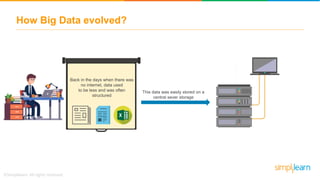
Back in the days when there was
no internet, data used
to be less and was often
structured
This data was easily stored on a
central sever storage
How Big Data evolved?
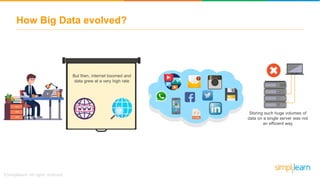
But then, internet boomed and
data grew at a very high rate
A lot of semi-structured and
unstructured data was being
generated
How Big Data evolved?
But then, internet boomed and
data grew at a very high rate
Storing such huge volumes of
data on a single server was not
an efficient way
How Big Data evolved?
But then, internet boomed and
data grew at a very high rate
There was a need for distributed
storage machines where data
could be stored and processed
parallelly
How Big Data evolved?
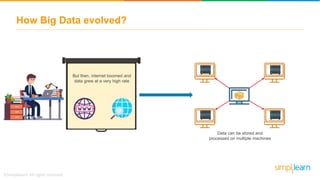
But then, internet boomed and
data grew at a very high rate
Data can be stored and
processed on multiple machines
How Big Data evolved?
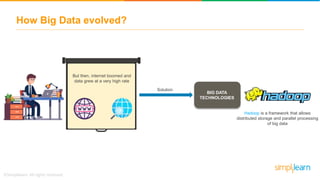
But then, internet boomed and
data grew at a very high rate
Hadoop is a framework that allows
distributed storage and parallel processing
of big data
BIG DATA
TECHNOLOGIES
How Big Data evolved?
Solution
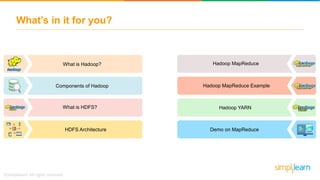
What’s in it for you?
HDFS Architecture
Components of Hadoop
Demo on MapReduce
What is Hadoop?
What is HDFS?
Hadoop MapReduce
Hadoop MapReduce Example
Hadoop YARN
What is Hadoop?
What is Hadoop?
What is Hadoop?
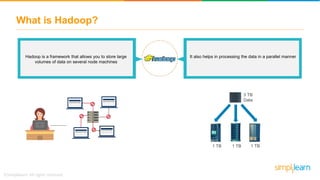
Hadoop is a framework that allows you to store large
volumes of data on several node machines
It also helps in processing the data in a parallel manner
1 TB
3 TB
Data
1 TB 1 TB
What is Hadoop?
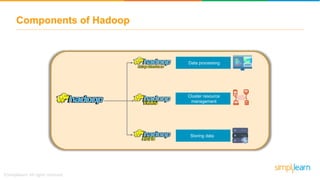
Components of Hadoop
Storing data
Cluster resource
management
Data processing
What is Hadoop?
What is HDFS?
What is HDFS?
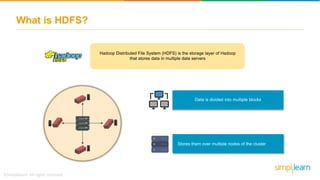
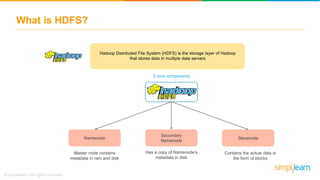
Hadoop Distributed File System (HDFS) is the storage layer of Hadoop
that stores data in multiple data servers
Data is divided into multiple blocks
Stores them over multiple nodes of the cluster
What is HDFS?
Hadoop Distributed File System (HDFS) is the storage layer of Hadoop
that stores data in multiple data servers
Namenode
Secondary
Namenode
Slavenode
Master node contains
metadata in ram and disk
Has a copy of Namenode’s
metadata in disk
Contains the actual data in
the form of blocks
3 core components
What is Hadoop?
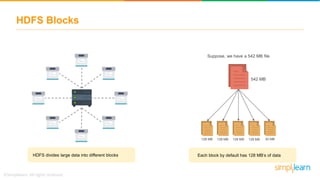
HDFS Blocks
HDFS Blocks
128 MB 128 MB 128 MB 128 MB 30 MB
542 MB
HDFS divides large data into different blocks Each block by default has 128 MB’s of data
Suppose, we have a 542 MB file
What is Hadoop?
Data Replication
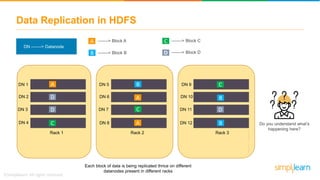
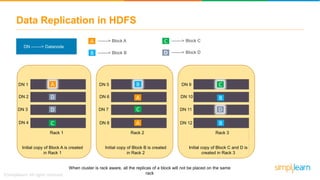
Data Replication in HDFS
C
DN -------> Datanode
-------> Block AA
B -------> Block B
-------> Block C
-------> Block DD
DN 9
DN 10
DN 11
DN 12
Rack 1
Rack 3
C
B
B
D
DN 5
DN 6
DN 7
DN 8
Rack 1
Rack 2
A
B
A
C
DN 1
DN 2
DN 3
DN 4
Rack 1
Rack 1
A
C
D
D
Do you understand what’s
happening here?
Each block of data is being replicated thrice on different
datanodes present in different racks
Data Replication in HDFS
C
DN -------> Datanode
-------> Block AA
B -------> Block B
-------> Block C
-------> Block DD
DN 1
DN 2
DN 3
DN 4
Rack 1
Rack 1
A
C
D
D
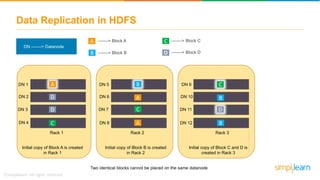
Initial copy of Block A is created
in Rack 1
DN 5
DN 6
DN 7
DN 8
Rack 1
Rack 2
A
B
A
C
Initial copy of Block B is created
in Rack 2
DN 9
DN 10
DN 11
DN 12
Rack 1
Rack 3
C
B
B
D
Initial copy of Block C and D is
created in Rack 3
Two identical blocks cannot be placed on the same datanode
Data Replication in HDFS
C
DN -------> Datanode
-------> Block AA
B -------> Block B
-------> Block C
-------> Block DD
DN 1
DN 2
DN 3
DN 4
Rack 1
Rack 1
A
C
D
D
Initial copy of Block A is created
in Rack 1
DN 5
DN 6
DN 7
DN 8
Rack 1
Rack 2
A
B
A
C
Initial copy of Block B is created
in Rack 2
DN 9
DN 10
DN 11
DN 12
Rack 1
Rack 3
C
B
B
D
Initial copy of Block C and D is
created in Rack 3
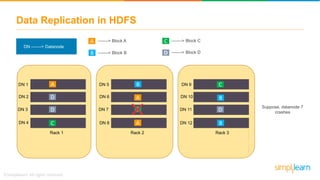
When cluster is rack aware, all the replicas of a block will not be placed on the same
rack
Data Replication in HDFS
C
DN -------> Datanode
-------> Block AA
B -------> Block B
-------> Block C
-------> Block DD
DN 9
DN 10
DN 11
DN 12
Rack 1
DN 5
DN 6
DN 7
DN 8
Rack 1
Rack 2 Rack 3
CDN 1
DN 2
DN 3
DN 4
Rack 1
Rack 1
A
A
B
B
B
A
DC
C
D
D
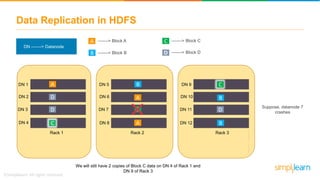
Suppose, datanode 7
crashes
Data Replication in HDFS
C
DN -------> Datanode
-------> Block AA
B -------> Block B
-------> Block C
-------> Block DD
DN 9
DN 10
DN 11
DN 12
Rack 1
DN 5
DN 6
DN 7
DN 8
Rack 1
Rack 2 Rack 3
CDN 1
DN 2
DN 3
DN 4
Rack 1
Rack 1
A
A
B
B
B
A
DC
C
D
D
We will still have 2 copies of Block C data on DN 4 of Rack 1 and
DN 9 of Rack 3
Suppose, datanode 7
crashes
What is Hadoop?
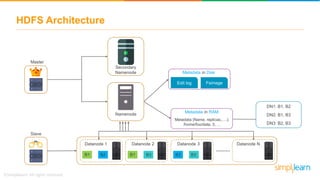
HDFS Architecture
HDFS Architecture
Secondary
Namenode
Namenode
Datanode 1
B1 B2
Datanode 2
B1 B3
Datanode 3
B2 B3
Datanode N
……….
Master
Slave
Metadata in Disk
Edit log Fsimage
Metadata in RAM
Metadata (Name, replicas,….):
/home/foo/data, 3, …
DN1: B1, B2
DN2: B1, B3
DN3: B2, B3
HDFS - Namenode
Namenode
Datanode 1
B1 B2
Datanode 2
B1 B3
Datanode 3
B2 B3
Datanode N
……….
File.txt
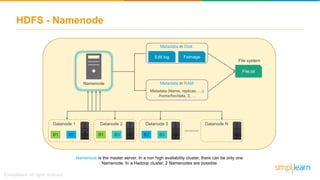
Namenode is the master server. In a non high availability cluster, there can be only one
Namenode. In a Hadoop cluster, 2 Namenodes are possible
File system
Metadata in Disk
Edit log Fsimage
Metadata in RAM
Metadata (Name, replicas,….):
/home/foo/data, 3, …
HDFS - Namenode
Namenode
Datanode 1
B1 B2
Datanode 2
B1 B3
Datanode 3
B2 B3
Datanode N
……….
File.txt
File system
Metadata in Disk
Edit log Fsimage
Metadata in RAM
Metadata (Name, replicas,….):
/home/foo/data, 3, …
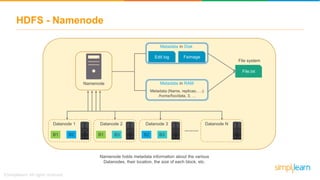
Namenode holds metadata information about the various
Datanodes, their location, the size of each block, etc.
HDFS - Namenode
Namenode
Datanode 1
B1 B2
Datanode 2
B1 B3
Datanode 3
B2 B3
Datanode N
……….
File.txt
File system
Metadata in Disk
Edit log Fsimage
Metadata in RAM
Metadata (Name, replicas,….):
/home/foo/data, 3, …
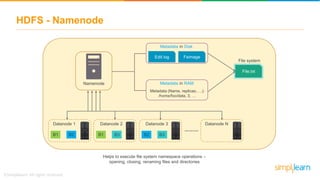
Helps to execute file system namespace operations –
opening, closing, renaming files and directories
HDFS - Namenode
Namenode
Datanode 1
B1 B2
Datanode 2
B1 B3
Datanode 3
B2 B3
Datanode N
……….
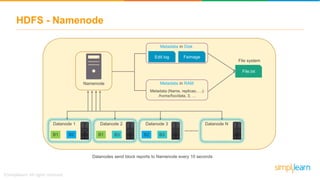
Datanodes send block reports to Namenode every 10 seconds
File.txt
File system
Metadata in Disk
Edit log Fsimage
Metadata in RAM
Metadata (Name, replicas,….):
/home/foo/data, 3, …
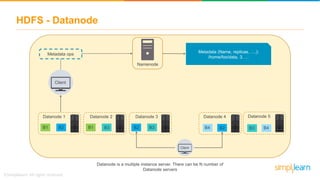
HDFS - Datanode
Namenode
Datanode is a multiple instance server. There can be N number of
Datanode servers
Client
Metadata ops
Metadata (Name, replicas, ….):
/home/foo/data, 3, …
Datanode 1
B1 B2
Datanode 2
B1 B3
Datanode 3
B2 B3
Datanode 4 Datanode 5
B4 B2 B4B3
Client
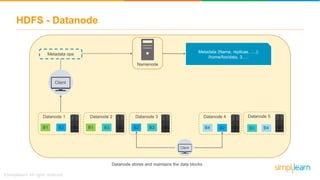
HDFS - Datanode
Namenode
Datanode stores and maintains the data blocks
Client
Metadata ops
Metadata (Name, replicas, ….):
/home/foo/data, 3, …
Datanode 1
B1 B2
Datanode 2
B1 B3
Datanode 3
B2 B3
Datanode 4 Datanode 5
B4 B2 B4B3
Client
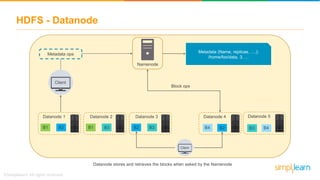
HDFS - Datanode
Namenode
Datanode stores and retrieves the blocks when asked by the Namenode
Client
Metadata ops
Metadata (Name, replicas, ….):
/home/foo/data, 3, …
Block ops
Datanode 1
B1 B2
Datanode 2
B1 B3
Datanode 3
B2 B3
Datanode 4 Datanode 5
B4 B2 B4B3
Client
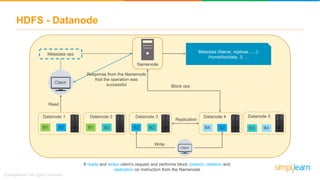
HDFS - Datanode
Namenode
Datanode 1
B1 B2
Datanode 2
B1 B3
Datanode 3
B2 B3
It reads and writes client’s request and performs block creation, deletion and
replication on instruction from the Namenode
Datanode 4 Datanode 5
B4 B2 B4B3
Client
Metadata ops
Metadata (Name, replicas, ….):
/home/foo/data, 3, …
Client
Block ops
Read
Write
Replication
Response from the Namenode
that the operation was
successful
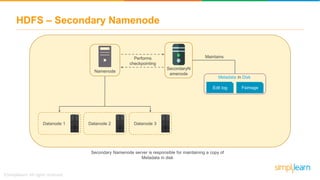
HDFS – Secondary Namenode
Namenode
Datanode 1 Datanode 2 Datanode 3
Secondary Namenode server is responsible for maintaining a copy of
Metadata in disk
SecondaryN
amenode
Maintains
Metadata in Disk
Edit log Fsimage
Performs
checkpointing
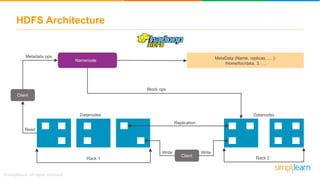
HDFS Architecture
Namenode
MetaData (Name, replicas, ….):
/home/foo/data, 3, ….
Block ops
DatanodesDatanodes
Metadata ops
Client
Read
Rack 1 Rack 2
Replication
Client
Write Write
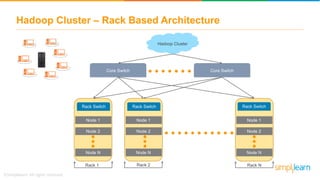
Hadoop Cluster – Rack Based Architecture
Hadoop Cluster
Core Switch Core Switch
Rack Switch
Node 1
Node 2
Node N
Rack Switch
Node 1
Node 2
Node N
Rack Switch
Node 1
Node 2
Node N
Rack 1 Rack NRack 2
What is Hadoop?
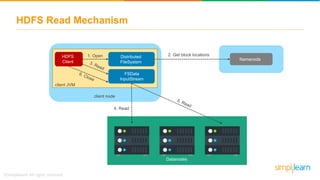
HDFS Read Mechanism
HDFS Read Mechanism
Namenode
4. Read
Datanodes
2. Get block locationsHDFS
Client
1. Open Distributed
FileSystem
FSData
InputStream
client JVM
client node
HDFS Read Mechanism
client JVM
client node
HDFS Client
Namenode
DN
1
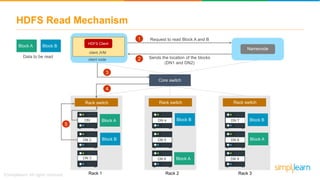
DN 2
DN 3
DN 4
DN 5
DN 6
DN 7
DN 8
DN 9
Block A
Block A
Block ABlock B
Block B Block B
Request to read Block A and B
Sends the location of the blocks
(DN1 and DN2)
Block A Block B
Data to be read
Rack switch Rack switch Rack switch
Core switch
Rack 1 Rack 2 Rack 3
1
2
3
5
4
HDFS Read Mechanism
client JVM
client node
HDFS Client
Namenode
DN
1
DN 2
DN 3
DN 4
DN 5
DN 6
DN 7
DN 8
DN 9
Block A
Block A
Block ABlock B
Block B Block B
Request to read Block A and B
Sends the location of the blocks
(DN1 and DN2)
Block A Block B
Data to be read
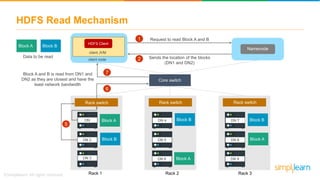
Block A and B is read from DN1 and
DN2 as they are closest and have the
least network bandwidth
Rack switch Rack switch Rack switch
Core switch
Rack 1 Rack 2 Rack 3
1
2
5
7
6
What is Hadoop?
HDFS Write Mechanism
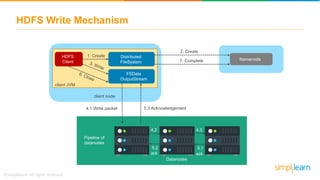
Namenode
4.1 Write packet
Datanodes
2. Create
1. CreateHDFS
Client
Distributed
FileSystem
FSData
OutputStream
client JVM
Pipeline of
datanodes
5.3 Acknowledgement
7. Complete
4.2
5.2
4.3
5.1
ack ack
client node
HDFS Write Mechanism
client JVM
client node
HDFS Client
Namenode
Rack switch
DN
1
DN 2
DN 3
Rack switch
DN 4
DN 5
DN 6
Rack switch
DN 7
DN 8
DN 9
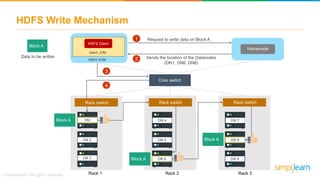
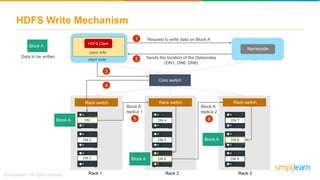
Request to write data on Block A
Sends the location of the Datanodes
(DN1, DN6, DN8)
Block A
Data to be written
Core switch
Block A
Block A
Block A
Rack 1 Rack 2 Rack 3
1
2
3
4
HDFS Write Mechanism
client JVM
client node
HDFS Client
Namenode
Rack switch
DN
1
DN 2
DN 3
Rack switch
DN 4
DN 5
DN 6
Rack switch
DN 7
DN 8
DN 9
Request to write data on Block A
Sends the location of the Datanodes
(DN1, DN6, DN8)
Block A
Data to be written
Block A
replica 1
Block A
replica 2
Core switch
Block A
Block A
Block A
Rack 1 Rack 2 Rack 3
5 6
1
2
3
4
HDFS Write Mechanism
client JVM
client node
HDFS Client
Namenode
DN
1
DN 2
DN 3
Rack switch
DN 4
DN 5
DN 6
Rack switch
DN 7
DN 8
DN 9
Block A
Data to be written
Core switch
Ack
DN 1, DN 6, DN 8
Ack
DN 1
Ack
DN 8
Ack
DN 6
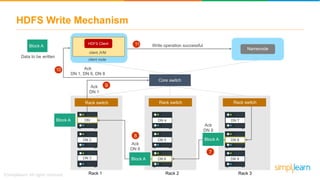
Write operation successful
Block A
Block A
Block A
Rack 1 Rack 2 Rack 3
7
8
9
10
11
Rack switch
What is Hadoop?
Hadoop MapReduce
Hadoop MapReduce
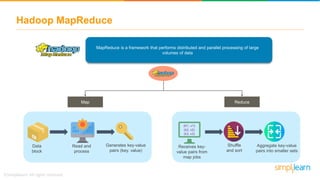
MapReduce is a framework that performs distributed and parallel processing of large
volumes of data
Map Reduce
Data
block
Read and
process
Generates key-value
pairs (key, value)
Shuffle
and sort
(K1, v1)
(k2, v2)
(k3, v3)
Receives key-
value pairs from
map jobs
Aggregate key-value
pairs into smaller sets
Hadoop MapReduce
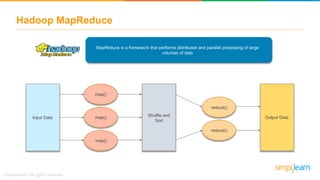
MapReduce is a framework that performs distributed and parallel processing of large
volumes of data
Input Data Output Data
map()
map()
map()
Shuffle and
Sort
reduce()
reduce()
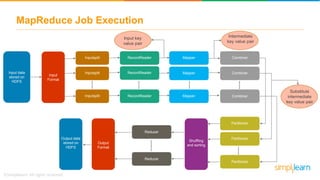
MapReduce Job Execution
Input data
stored on
HDFS
Input
Format
Shuffling
and sorting
Output
Format
Inputsplit
Inputsplit
Inputsplit
……
RecordReader
RecordReader
RecordReader
……
Combiner
Combiner
Combiner
……
Partitioner
Partitioner
Partitioner
……
Reducer
Reducer
……..
Mapper
Mapper
Mapper
……
Output data
stored on
HDFS
Input key
value pair
Intermediate
key value pair
Substitute
intermediate
key value pair
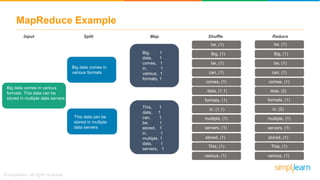
MapReduce Example
Big data comes in various
formats. This data can be
stored in multiple data servers
Big data comes in
various formats
This data can be
stored in multiple
data servers
Big, 1
data, 1
comes, 1
in, 1
various, 1
formats, 1
This, 1
data, 1
can, 1
be, 1
stored, 1
in, 1
multiple, 1
data, 1
servers, 1
Input Split Map
be, (1)
Big, (1)
be, (1)
can, (1)
data, (1,1)
comes, (1)
formats, (1)
in, (1,1)
multiple, (1)
servers, (1)
stored, (1)
This, (1)
various, (1)
Shuffle
be, (1)
Big, (1)
be, (1)
can, (1)
comes, (1)
data, (2)
formats, (1)
in, (2)
multiple, (1)
servers, (1)
stored, (1)
This, (1)
various, (1)
Reduce
What is Hadoop?
Hadoop YARN
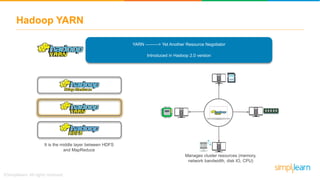
Hadoop YARN
YARN ---------> Yet Another Resource Negotiator
Introduced in Hadoop 2.0 version
It is the middle layer between HDFS
and MapReduce
Manages cluster resources (memory,
network bandwidth, disk IO, CPU)
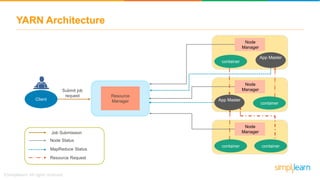
YARN Architecture
Resource
ManagerClient
Node
Manager
container
App Master
App Master
container
Node
Manager
Node
Manager
container container
Job Submission
Node Status
MapReduce Status
Resource Request
Submit job
request
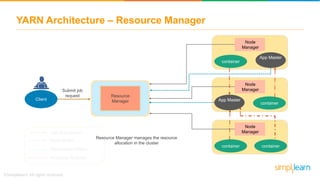
YARN Architecture – Resource Manager
Resource
ManagerClient
Node
Manager
container
App Master
App Master
container
Node
Manager
Node
Manager
container container
Job Submission
Node Status
MapReduce Status
Resource Request
Submit job
request
Resource Manager manages the resource
allocation in the cluster
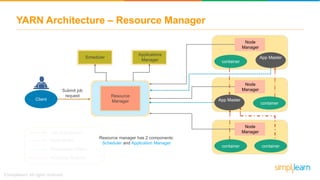
YARN Architecture – Resource Manager
Resource
ManagerClient
Node
Manager
container
App Master
App Master
container
Node
Manager
Node
Manager
container container
Job Submission
Node Status
MapReduce Status
Resource Request
Submit job
request
Resource manager has 2 components:
Scheduler and Application Manager
Scheduler
Applications
Manager
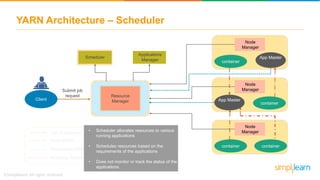
YARN Architecture – Scheduler
Resource
ManagerClient
Node
Manager
container
App Master
App Master
container
Node
Manager
Node
Manager
container container
Job Submission
Node Status
MapReduce Status
Resource Request
Submit job
request
Scheduler
• Scheduler allocates resources to various
running applications
• Schedules resources based on the
requirements of the applications
• Does not monitor or track the status of the
applications
Applications
Manager
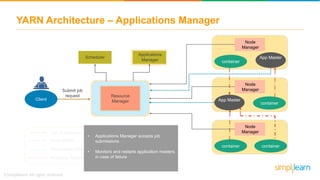
YARN Architecture – Applications Manager
Resource
ManagerClient
Node
Manager
container
App Master
App Master
container
Node
Manager
Node
Manager
container container
Job Submission
Node Status
MapReduce Status
Resource Request
Submit job
request
Scheduler
Applications
Manager
• Applications Manager accepts job
submissions
• Monitors and restarts application masters
in case of failure
YARN Architecture – Node Manager
Resource
ManagerClient
container
App Master
App Master
container
container container
Job Submission
Node Status
MapReduce Status
Resource Request
Submit job
request
Node
Manager
Node
Manager
Node
Manager
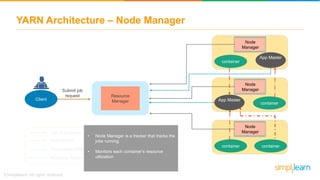
• Node Manager is a tracker that tracks the
jobs running
• Monitors each container’s resource
utilization
YARN Architecture – App Master
Resource
ManagerClient
container
App Master
App Master
container
container container
Job Submission
Node Status
MapReduce Status
Resource Request
Submit job
request
Node
Manager
Node
Manager
Node
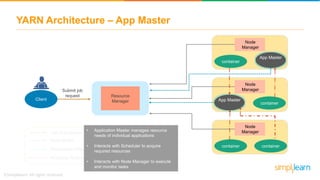
Manager• Application Master manages resource
needs of individual applications
• Interacts with Scheduler to acquire
required resources
• Interacts with Node Manager to execute
and monitor tasks
YARN Architecture - Container
Resource
ManagerClient
container
App Master
App Master
container
container container
Job Submission
Node Status
MapReduce Status
Resource Request
Submit job
request
Node
Manager
Node
Manager
Node
Manager
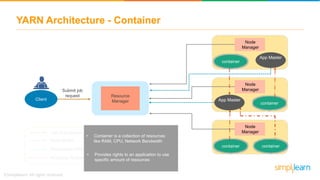
• Container is a collection of resources
like RAM, CPU, Network Bandwidth
• Provides rights to an application to use
specific amount of resources
What is Hadoop?
Use case – Word Count
using MapReduce
Hadoop Architecture | HDFS Architecture | Hadoop Architecture Tutorial | HDFS Tutorial | Simplilearn

Hadoop Architecture | HDFS Architecture | Hadoop Architecture Tutorial | HDFS Tutorial | Simplilearn

  • 1.
  • 2.
    Back in thedays when there was no internet, data used to be less and was often structured This data was easily stored on a central sever storage How Big Data evolved?
  • 3.
    But then, internetboomed and data grew at a very high rate A lot of semi-structured and unstructured data was being generated How Big Data evolved?
  • 4.
    But then, internetboomed and data grew at a very high rate Storing such huge volumes of data on a single server was not an efficient way How Big Data evolved?
  • 5.
    But then, internetboomed and data grew at a very high rate There was a need for distributed storage machines where data could be stored and processed parallelly How Big Data evolved?
  • 6.
    But then, internetboomed and data grew at a very high rate Data can be stored and processed on multiple machines How Big Data evolved?
  • 7.
    But then, internetboomed and data grew at a very high rate Hadoop is a framework that allows distributed storage and parallel processing of big data BIG DATA TECHNOLOGIES How Big Data evolved? Solution
  • 8.
    What’s in itfor you? HDFS Architecture Components of Hadoop Demo on MapReduce What is Hadoop? What is HDFS? Hadoop MapReduce Hadoop MapReduce Example Hadoop YARN
  • 9.
  • 10.
    What is Hadoop? Hadoopis a framework that allows you to store large volumes of data on several node machines It also helps in processing the data in a parallel manner 1 TB 3 TB Data 1 TB 1 TB
  • 11.
  • 12.
    Components of Hadoop Storingdata Cluster resource management Data processing
  • 13.
  • 14.
    What is HDFS? HadoopDistributed File System (HDFS) is the storage layer of Hadoop that stores data in multiple data servers Data is divided into multiple blocks Stores them over multiple nodes of the cluster
  • 15.
    What is HDFS? HadoopDistributed File System (HDFS) is the storage layer of Hadoop that stores data in multiple data servers Namenode Secondary Namenode Slavenode Master node contains metadata in ram and disk Has a copy of Namenode’s metadata in disk Contains the actual data in the form of blocks 3 core components
  • 16.
  • 17.
    HDFS Blocks 128 MB128 MB 128 MB 128 MB 30 MB 542 MB HDFS divides large data into different blocks Each block by default has 128 MB’s of data Suppose, we have a 542 MB file
  • 18.
  • 19.
    Data Replication inHDFS C DN -------> Datanode -------> Block AA B -------> Block B -------> Block C -------> Block DD DN 9 DN 10 DN 11 DN 12 Rack 1 Rack 3 C B B D DN 5 DN 6 DN 7 DN 8 Rack 1 Rack 2 A B A C DN 1 DN 2 DN 3 DN 4 Rack 1 Rack 1 A C D D Do you understand what’s happening here? Each block of data is being replicated thrice on different datanodes present in different racks
  • 20.
    Data Replication inHDFS C DN -------> Datanode -------> Block AA B -------> Block B -------> Block C -------> Block DD DN 1 DN 2 DN 3 DN 4 Rack 1 Rack 1 A C D D Initial copy of Block A is created in Rack 1 DN 5 DN 6 DN 7 DN 8 Rack 1 Rack 2 A B A C Initial copy of Block B is created in Rack 2 DN 9 DN 10 DN 11 DN 12 Rack 1 Rack 3 C B B D Initial copy of Block C and D is created in Rack 3 Two identical blocks cannot be placed on the same datanode
  • 21.
    Data Replication inHDFS C DN -------> Datanode -------> Block AA B -------> Block B -------> Block C -------> Block DD DN 1 DN 2 DN 3 DN 4 Rack 1 Rack 1 A C D D Initial copy of Block A is created in Rack 1 DN 5 DN 6 DN 7 DN 8 Rack 1 Rack 2 A B A C Initial copy of Block B is created in Rack 2 DN 9 DN 10 DN 11 DN 12 Rack 1 Rack 3 C B B D Initial copy of Block C and D is created in Rack 3 When cluster is rack aware, all the replicas of a block will not be placed on the same rack
  • 22.
    Data Replication inHDFS C DN -------> Datanode -------> Block AA B -------> Block B -------> Block C -------> Block DD DN 9 DN 10 DN 11 DN 12 Rack 1 DN 5 DN 6 DN 7 DN 8 Rack 1 Rack 2 Rack 3 CDN 1 DN 2 DN 3 DN 4 Rack 1 Rack 1 A A B B B A DC C D D Suppose, datanode 7 crashes
  • 23.
    Data Replication inHDFS C DN -------> Datanode -------> Block AA B -------> Block B -------> Block C -------> Block DD DN 9 DN 10 DN 11 DN 12 Rack 1 DN 5 DN 6 DN 7 DN 8 Rack 1 Rack 2 Rack 3 CDN 1 DN 2 DN 3 DN 4 Rack 1 Rack 1 A A B B B A DC C D D We will still have 2 copies of Block C data on DN 4 of Rack 1 and DN 9 of Rack 3 Suppose, datanode 7 crashes
  • 24.
  • 25.
    HDFS Architecture Secondary Namenode Namenode Datanode 1 B1B2 Datanode 2 B1 B3 Datanode 3 B2 B3 Datanode N ………. Master Slave Metadata in Disk Edit log Fsimage Metadata in RAM Metadata (Name, replicas,….): /home/foo/data, 3, … DN1: B1, B2 DN2: B1, B3 DN3: B2, B3
  • 26.
    HDFS - Namenode Namenode Datanode1 B1 B2 Datanode 2 B1 B3 Datanode 3 B2 B3 Datanode N ………. File.txt Namenode is the master server. In a non high availability cluster, there can be only one Namenode. In a Hadoop cluster, 2 Namenodes are possible File system Metadata in Disk Edit log Fsimage Metadata in RAM Metadata (Name, replicas,….): /home/foo/data, 3, …
  • 27.
    HDFS - Namenode Namenode Datanode1 B1 B2 Datanode 2 B1 B3 Datanode 3 B2 B3 Datanode N ………. File.txt File system Metadata in Disk Edit log Fsimage Metadata in RAM Metadata (Name, replicas,….): /home/foo/data, 3, … Namenode holds metadata information about the various Datanodes, their location, the size of each block, etc.
  • 28.
    HDFS - Namenode Namenode Datanode1 B1 B2 Datanode 2 B1 B3 Datanode 3 B2 B3 Datanode N ………. File.txt File system Metadata in Disk Edit log Fsimage Metadata in RAM Metadata (Name, replicas,….): /home/foo/data, 3, … Helps to execute file system namespace operations – opening, closing, renaming files and directories
  • 29.
    HDFS - Namenode Namenode Datanode1 B1 B2 Datanode 2 B1 B3 Datanode 3 B2 B3 Datanode N ………. Datanodes send block reports to Namenode every 10 seconds File.txt File system Metadata in Disk Edit log Fsimage Metadata in RAM Metadata (Name, replicas,….): /home/foo/data, 3, …
  • 30.
    HDFS - Datanode Namenode Datanodeis a multiple instance server. There can be N number of Datanode servers Client Metadata ops Metadata (Name, replicas, ….): /home/foo/data, 3, … Datanode 1 B1 B2 Datanode 2 B1 B3 Datanode 3 B2 B3 Datanode 4 Datanode 5 B4 B2 B4B3 Client
  • 31.
    HDFS - Datanode Namenode Datanodestores and maintains the data blocks Client Metadata ops Metadata (Name, replicas, ….): /home/foo/data, 3, … Datanode 1 B1 B2 Datanode 2 B1 B3 Datanode 3 B2 B3 Datanode 4 Datanode 5 B4 B2 B4B3 Client
  • 32.
    HDFS - Datanode Namenode Datanodestores and retrieves the blocks when asked by the Namenode Client Metadata ops Metadata (Name, replicas, ….): /home/foo/data, 3, … Block ops Datanode 1 B1 B2 Datanode 2 B1 B3 Datanode 3 B2 B3 Datanode 4 Datanode 5 B4 B2 B4B3 Client
  • 33.
    HDFS - Datanode Namenode Datanode1 B1 B2 Datanode 2 B1 B3 Datanode 3 B2 B3 It reads and writes client’s request and performs block creation, deletion and replication on instruction from the Namenode Datanode 4 Datanode 5 B4 B2 B4B3 Client Metadata ops Metadata (Name, replicas, ….): /home/foo/data, 3, … Client Block ops Read Write Replication Response from the Namenode that the operation was successful
  • 34.
    HDFS – SecondaryNamenode Namenode Datanode 1 Datanode 2 Datanode 3 Secondary Namenode server is responsible for maintaining a copy of Metadata in disk SecondaryN amenode Maintains Metadata in Disk Edit log Fsimage Performs checkpointing
  • 35.
    HDFS Architecture Namenode MetaData (Name,replicas, ….): /home/foo/data, 3, …. Block ops DatanodesDatanodes Metadata ops Client Read Rack 1 Rack 2 Replication Client Write Write
  • 36.
    Hadoop Cluster –Rack Based Architecture Hadoop Cluster Core Switch Core Switch Rack Switch Node 1 Node 2 Node N Rack Switch Node 1 Node 2 Node N Rack Switch Node 1 Node 2 Node N Rack 1 Rack NRack 2
  • 37.
    What is Hadoop? HDFSRead Mechanism
  • 38.
    HDFS Read Mechanism Namenode 4.Read Datanodes 2. Get block locationsHDFS Client 1. Open Distributed FileSystem FSData InputStream client JVM client node
  • 39.
    HDFS Read Mechanism clientJVM client node HDFS Client Namenode DN 1 DN 2 DN 3 DN 4 DN 5 DN 6 DN 7 DN 8 DN 9 Block A Block A Block ABlock B Block B Block B Request to read Block A and B Sends the location of the blocks (DN1 and DN2) Block A Block B Data to be read Rack switch Rack switch Rack switch Core switch Rack 1 Rack 2 Rack 3 1 2 3 5 4
  • 40.
    HDFS Read Mechanism clientJVM client node HDFS Client Namenode DN 1 DN 2 DN 3 DN 4 DN 5 DN 6 DN 7 DN 8 DN 9 Block A Block A Block ABlock B Block B Block B Request to read Block A and B Sends the location of the blocks (DN1 and DN2) Block A Block B Data to be read Block A and B is read from DN1 and DN2 as they are closest and have the least network bandwidth Rack switch Rack switch Rack switch Core switch Rack 1 Rack 2 Rack 3 1 2 5 7 6
  • 41.
    What is Hadoop? HDFSWrite Mechanism
  • 42.
    HDFS Write Mechanism Namenode 4.1Write packet Datanodes 2. Create 1. CreateHDFS Client Distributed FileSystem FSData OutputStream client JVM Pipeline of datanodes 5.3 Acknowledgement 7. Complete 4.2 5.2 4.3 5.1 ack ack client node
  • 43.
    HDFS Write Mechanism clientJVM client node HDFS Client Namenode Rack switch DN 1 DN 2 DN 3 Rack switch DN 4 DN 5 DN 6 Rack switch DN 7 DN 8 DN 9 Request to write data on Block A Sends the location of the Datanodes (DN1, DN6, DN8) Block A Data to be written Core switch Block A Block A Block A Rack 1 Rack 2 Rack 3 1 2 3 4
  • 44.
    HDFS Write Mechanism clientJVM client node HDFS Client Namenode Rack switch DN 1 DN 2 DN 3 Rack switch DN 4 DN 5 DN 6 Rack switch DN 7 DN 8 DN 9 Request to write data on Block A Sends the location of the Datanodes (DN1, DN6, DN8) Block A Data to be written Block A replica 1 Block A replica 2 Core switch Block A Block A Block A Rack 1 Rack 2 Rack 3 5 6 1 2 3 4
  • 45.
    HDFS Write Mechanism clientJVM client node HDFS Client Namenode DN 1 DN 2 DN 3 Rack switch DN 4 DN 5 DN 6 Rack switch DN 7 DN 8 DN 9 Block A Data to be written Core switch Ack DN 1, DN 6, DN 8 Ack DN 1 Ack DN 8 Ack DN 6 Write operation successful Block A Block A Block A Rack 1 Rack 2 Rack 3 7 8 9 10 11 Rack switch
  • 46.
  • 47.
    Hadoop MapReduce MapReduce isa framework that performs distributed and parallel processing of large volumes of data Map Reduce Data block Read and process Generates key-value pairs (key, value) Shuffle and sort (K1, v1) (k2, v2) (k3, v3) Receives key- value pairs from map jobs Aggregate key-value pairs into smaller sets
  • 48.
    Hadoop MapReduce MapReduce isa framework that performs distributed and parallel processing of large volumes of data Input Data Output Data map() map() map() Shuffle and Sort reduce() reduce()
  • 49.
    MapReduce Job Execution Inputdata stored on HDFS Input Format Shuffling and sorting Output Format Inputsplit Inputsplit Inputsplit …… RecordReader RecordReader RecordReader …… Combiner Combiner Combiner …… Partitioner Partitioner Partitioner …… Reducer Reducer …….. Mapper Mapper Mapper …… Output data stored on HDFS Input key value pair Intermediate key value pair Substitute intermediate key value pair
  • 50.
    MapReduce Example Big datacomes in various formats. This data can be stored in multiple data servers Big data comes in various formats This data can be stored in multiple data servers Big, 1 data, 1 comes, 1 in, 1 various, 1 formats, 1 This, 1 data, 1 can, 1 be, 1 stored, 1 in, 1 multiple, 1 data, 1 servers, 1 Input Split Map be, (1) Big, (1) be, (1) can, (1) data, (1,1) comes, (1) formats, (1) in, (1,1) multiple, (1) servers, (1) stored, (1) This, (1) various, (1) Shuffle be, (1) Big, (1) be, (1) can, (1) comes, (1) data, (2) formats, (1) in, (2) multiple, (1) servers, (1) stored, (1) This, (1) various, (1) Reduce
  • 51.
  • 52.
    Hadoop YARN YARN --------->Yet Another Resource Negotiator Introduced in Hadoop 2.0 version It is the middle layer between HDFS and MapReduce Manages cluster resources (memory, network bandwidth, disk IO, CPU)
  • 53.
    YARN Architecture Resource ManagerClient Node Manager container App Master AppMaster container Node Manager Node Manager container container Job Submission Node Status MapReduce Status Resource Request Submit job request
  • 54.
    YARN Architecture –Resource Manager Resource ManagerClient Node Manager container App Master App Master container Node Manager Node Manager container container Job Submission Node Status MapReduce Status Resource Request Submit job request Resource Manager manages the resource allocation in the cluster
  • 55.
    YARN Architecture –Resource Manager Resource ManagerClient Node Manager container App Master App Master container Node Manager Node Manager container container Job Submission Node Status MapReduce Status Resource Request Submit job request Resource manager has 2 components: Scheduler and Application Manager Scheduler Applications Manager
  • 56.
    YARN Architecture –Scheduler Resource ManagerClient Node Manager container App Master App Master container Node Manager Node Manager container container Job Submission Node Status MapReduce Status Resource Request Submit job request Scheduler • Scheduler allocates resources to various running applications • Schedules resources based on the requirements of the applications • Does not monitor or track the status of the applications Applications Manager
  • 57.
    YARN Architecture –Applications Manager Resource ManagerClient Node Manager container App Master App Master container Node Manager Node Manager container container Job Submission Node Status MapReduce Status Resource Request Submit job request Scheduler Applications Manager • Applications Manager accepts job submissions • Monitors and restarts application masters in case of failure
  • 58.
    YARN Architecture –Node Manager Resource ManagerClient container App Master App Master container container container Job Submission Node Status MapReduce Status Resource Request Submit job request Node Manager Node Manager Node Manager • Node Manager is a tracker that tracks the jobs running • Monitors each container’s resource utilization
  • 59.
    YARN Architecture –App Master Resource ManagerClient container App Master App Master container container container Job Submission Node Status MapReduce Status Resource Request Submit job request Node Manager Node Manager Node Manager• Application Master manages resource needs of individual applications • Interacts with Scheduler to acquire required resources • Interacts with Node Manager to execute and monitor tasks
  • 60.
    YARN Architecture -Container Resource ManagerClient container App Master App Master container container container Job Submission Node Status MapReduce Status Resource Request Submit job request Node Manager Node Manager Node Manager • Container is a collection of resources like RAM, CPU, Network Bandwidth • Provides rights to an application to use specific amount of resources
  • 61.
    What is Hadoop? Usecase – Word Count using MapReduce

Editor's Notes