Exchange Server 2013
Architecture Deep Dive, Part 1
Scott Schnoll
Principal Technical Writer
Microsoft Corporation
Agenda

Exchange Server Evolution
Architecture Changes
Client Access Server Role
Exchange: Past, Present and Future

                                                                L7 LB
                                   CA
     Ex         Ex                 S
                                             HT
                                                         C C C        H H H


                                   MBX      MBX
     Ex         Ex

          SAN

 •   Role differentiation   •   Separate roles for   •    Separate HA solution per
     through manual             deployment &              role
     configuration              segmentation         •    Introduction of the DAG
 •   Backups and hardware   •   Support cheaper      •    Support for Hybrid
     solutions for              storage                   deployments
     “reliability”
          2000/2003                  2007                        2010
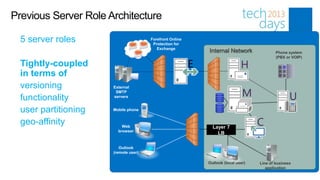
Previous Server Role Architecture

  5 server roles                      Forefront Online
                                       Protection for
                                         Exchange
                                                             Internal Network               Phone system
                                                                                            (PBX or VOIP)
  Tightly-coupled                                        E
  in terms of
  versioning          External
                       SMTP
  functionality       servers


  user partitioning   Mobile phone


  geo-affinity            Web                                  Layer 7
                        browser
                                                                 LB

                         Outlook
                      (remote user)

                                                             Outlook (local user)   Line of business
                                                                                       application
Challenges with Legacy Model

Exchange deployments can be complicated
Load balancing is difficult and can require expensive solutions
When dedicated server roles are deployed, hardware can go unutilized or
under-utilized
Too many namespaces required
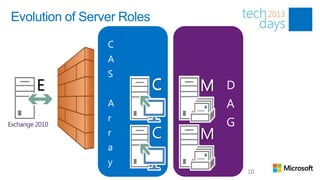
Evolution of Server Roles


    E                C C    H   U   M
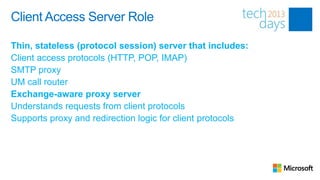
Client Access Server Role

Thin, stateless (protocol session) server that includes:
Client access protocols (HTTP, POP, IMAP)
SMTP proxy
UM call router
Exchange-aware proxy server
Understands requests from client protocols
Supports proxy and redirection logic for client protocols
Mailbox Server Role

Server that processes, renders and stores Exchange data
Includes components previously found in separate roles (CAS, Hub, UM)
Connectivity to user’s mailbox is always provided by the protocol stack on
the Mailbox server hosting the active database copy
Evolution of Server Roles


    E                       C   M

                            C   M
Exchange 2013 Architectural Theme

Use Building Blocks to facilitate deployments at all scales – from self-
hosted, small organizations to Office 365
• Server role evolution
• Network layer improvements
• Versioning and inter-op principles
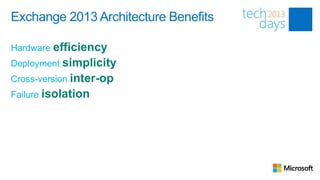
Exchange 2013 Architecture Benefits

Hardware efficiency
Deployment simplicity
Cross-version inter-op
Failure isolation
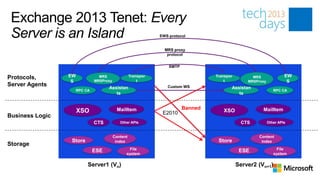
Exchange 2013 Tenet: Every
 Server is an Island                                           EWS protocol


                                                                 MRS proxy
                                                                  protocol


                                                                   SMTP

Protocols,       EW              MRS                Transpor                       Transpor         MRS               EW
                  S            MRSProxy                 t                              t          MRSProxy             S
Server Agents                                                     Custom WS
                                     Assistan                                             Assistan
                      RPC CA                                                                                    RPC CA
                                        ts                                                   ts


                                            MailItem                      Banned                        MailItem
                      XSO                                       E2010                 XSO
Business Logic
                               CTS           Other APIs                                        CTS           Other APIs


                                          Content                                                     Content
                 Store                     index                                    Store              index
Storage
                               ESE                File                                         ESE                File
                                                system                                                          system

                           Server1 (Vn)                                                       Server2 (Vn+1)
Functional Differences
                   Exchange 2010        Exchange 2013
                    Architecture         Architecture

                                            L4 LB
                     L7 LB             AuthN, Proxy,        Client Access
                                         Re-direct
                   AuthN, Proxy,
  Client Access      Re-direct
 Hub Transport, Protocols, API,
Unified Messaging  Biz-logic          Protocols, Assista
                                      nts, API, Biz-logic

      Mailbox    Assistants, Store,                         Mailbox
                                           Store, CI
                        CI
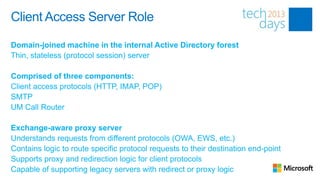
Client Access Server Role

Domain-joined machine in the internal Active Directory forest
Thin, stateless (protocol session) server

Comprised of three components:
Client access protocols (HTTP, IMAP, POP)
SMTP
UM Call Router

Exchange-aware proxy server
Understands requests from different protocols (OWA, EWS, etc.)
Contains logic to route specific protocol requests to their destination end-point
Supports proxy and redirection logic for client protocols
Capable of supporting legacy servers with redirect or proxy logic
Client Access Array

A group of CAS organized in a load-balanced configuration

Designed to work with TCP affinity (aka, layer 4 LB)
Does not require application-level session affinity (aka, layer 7 LB)

Provides a unified namespace and authentication
Similar to Exchange 2010 in terms of providing a unified endpoint for
client connectivity and authentication
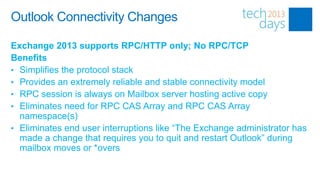
Outlook Connectivity Changes

Exchange 2013 supports RPC/HTTP only; No RPC/TCP
Benefits
• Simplifies the protocol stack
• Provides an extremely reliable and stable connectivity model
• RPC session is always on Mailbox server hosting active copy
• Eliminates need for RPC CAS Array and RPC CAS Array
  namespace(s)
• Eliminates end user interruptions like “The Exchange administrator has
  made a change that requires you to quit and restart Outlook” during
  mailbox moves or *overs
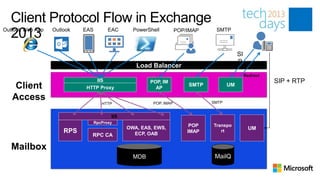
Client Protocol Flow in Exchange
  2013
Outlook Web App   Outlook   EAS         EAC      PowerShell         POP/IMAP    SMTP


                                                                                           SI
                                                                                           P
                                                  Load Balancer
                                                                                                Redirect
                                IIS                    POP, IM                                             SIP + RTP
    Client                   HTTP Proxy                  AP
                                                                        SMTP          UM

   Access                                               POP, IMAP              SMTP
                                     HTTP


                                         IIS
                                  RpcProxy
                                               OWA, EAS, EWS,            POP   Transpo
                                                                                                  UM
                      RPS                        ECP, OAB               IMAP      rt
                               RPC CA

   Mailbox
                                                 MDB                            MailQ
Namespace Simplification

No longer requires multiple namespaces for site resilient solutions
or site-specific scenarios
Easy to setup a single, worldwide client access namespace
Can be used in coexistence with Exchange 2010
Single Common Namespace

            Sue                                                                                 Sue
 (somewhere in NA)                              mail.contoso.co                                 (traveling
                                                                                                 in APAC)
                              DNS Resolution           m          DNS Resolution via Geo-DNS
                          Round-Robin between # of VIPs     Round-Robin between # of VIPs

                     VIP #1                      VIP #2                  VIP #3                VIP #4


 DAG                                                      DAG
Split DNS

Outlook supports only a single RPC Proxy endpoint
If Outlook Anywhere is allowed on the Internet, this may have internal
Outlook clients connect to the external firewall for connectivity

Use split DNS to ensure that internal Outlook clients follow internal
pathway
Forces internal clients to use internal IP
Forces external clients to use external IP
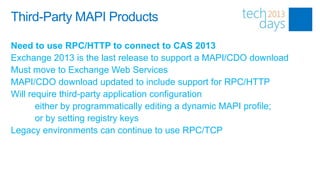
Third-Party MAPI Products

Need to use RPC/HTTP to connect to CAS 2013
Exchange 2013 is the last release to support a MAPI/CDO download
Must move to Exchange Web Services
MAPI/CDO download updated to include support for RPC/HTTP
Will require third-party application configuration
       either by programmatically editing a dynamic MAPI profile;
       or by setting registry keys
Legacy environments can continue to use RPC/TCP
Front End Transport Service

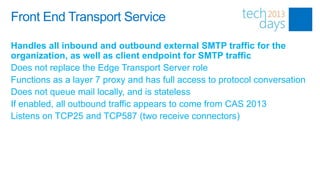
Handles all inbound and outbound external SMTP traffic for the
organization, as well as client endpoint for SMTP traffic
Does not replace the Edge Transport Server role
Functions as a layer 7 proxy and has full access to protocol conversation
Does not queue mail locally, and is stateless
If enabled, all outbound traffic appears to come from CAS 2013
Listens on TCP25 and TCP587 (two receive connectors)
Front End Transport Service

Network protection – centralized, load-balanced egress/ingress point
for the organization

Mailbox locator – avoids unnecessary hops by determining the best
MBX 2013 to deliver the message
Front End Transport Service

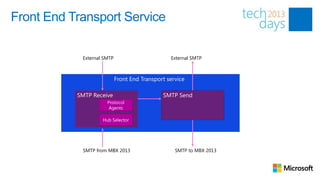
            External SMTP                        External SMTP


                            Front End Transport service

           SMTP Receive                       SMTP Send
                      Protocol
                       Agents

                    Hub Selector


            SMTP from MBX 2013                     SMTP to MBX 2013
Inbound | Outbound Mail Flow

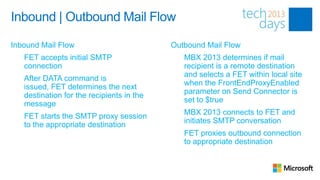
Inbound Mail Flow                            Outbound Mail Flow
1.   FET accepts initial SMTP                1.   MBX 2013 determines if mail
     connection                                   recipient is a remote destination
                                                  and selects a FET within local site
2.   After DATA command is
                                                  when the FrontEndProxyEnabled
     issued, FET determines the next
                                                  parameter on Send Connector is
     destination for the recipients in the
                                                  set to $true
     message
                                             2.   MBX 2013 connects to FET and
3.   FET starts the SMTP proxy session
                                                  initiates SMTP conversation
     to the appropriate destination
                                             3.   FET proxies outbound connection
                                                  to appropriate destination
Entry Point Routing

FET uses delivery groups: DAG, mailbox, AD site
Bifurcation does not occur on FET, so only one DAG or Mailbox server is
selected, regardless of the number of recipients in a message
Server selection within the delivery group is based on recipient type
• If message only has a single mailbox recipient, select MBX server
  within delivery group based on proximity of AD site
• If multiple mailbox recipients, select MBX server in closest delivery
  group, factoring in site proximity
• If there are no mailbox recipients (DG, MEUs, etc.), select a random
  MBX 2013, giving preference to local AD site
Summary

New CAS architecture
• Simplifies the network layer
• Removes need for RPC CAS Array and RPC CAS Array Namespace
• Provides deployment flexibility

New Front End Transport Service
• Provides centralized, load-balanced egress/ingress point for the
  organization and for client/application SMTP submissions
• Avoids unnecessary hops by determining the best place to deliver the
  message
Questions?

Scott Schnoll
Principal Technical Writer
scott.schnoll@microsoft.com
http://aka.ms/schnoll

   schnoll

Exchange Server 2013 Architecture Deep Dive, Part 1

  • 1.
    Exchange Server 2013 ArchitectureDeep Dive, Part 1 Scott Schnoll Principal Technical Writer Microsoft Corporation
  • 2.
    Agenda Exchange Server Evolution ArchitectureChanges Client Access Server Role
  • 3.
    Exchange: Past, Presentand Future L7 LB CA Ex Ex S HT C C C H H H MBX MBX Ex Ex SAN • Role differentiation • Separate roles for • Separate HA solution per through manual deployment & role configuration segmentation • Introduction of the DAG • Backups and hardware • Support cheaper • Support for Hybrid solutions for storage deployments “reliability” 2000/2003 2007 2010
  • 4.
    Previous Server RoleArchitecture 5 server roles Forefront Online Protection for Exchange Internal Network Phone system (PBX or VOIP) Tightly-coupled E in terms of versioning External SMTP functionality servers user partitioning Mobile phone geo-affinity Web Layer 7 browser LB Outlook (remote user) Outlook (local user) Line of business application
  • 5.
    Challenges with LegacyModel Exchange deployments can be complicated Load balancing is difficult and can require expensive solutions When dedicated server roles are deployed, hardware can go unutilized or under-utilized Too many namespaces required
  • 7.
    Evolution of ServerRoles E C C H U M
  • 8.
    Client Access ServerRole Thin, stateless (protocol session) server that includes: Client access protocols (HTTP, POP, IMAP) SMTP proxy UM call router Exchange-aware proxy server Understands requests from client protocols Supports proxy and redirection logic for client protocols
  • 9.
    Mailbox Server Role Serverthat processes, renders and stores Exchange data Includes components previously found in separate roles (CAS, Hub, UM) Connectivity to user’s mailbox is always provided by the protocol stack on the Mailbox server hosting the active database copy
  • 10.
    Evolution of ServerRoles E C M C M
  • 12.
    Exchange 2013 ArchitecturalTheme Use Building Blocks to facilitate deployments at all scales – from self- hosted, small organizations to Office 365 • Server role evolution • Network layer improvements • Versioning and inter-op principles
  • 13.
    Exchange 2013 ArchitectureBenefits Hardware efficiency Deployment simplicity Cross-version inter-op Failure isolation
  • 14.
    Exchange 2013 Tenet:Every Server is an Island EWS protocol MRS proxy protocol SMTP Protocols, EW MRS Transpor Transpor MRS EW S MRSProxy t t MRSProxy S Server Agents Custom WS Assistan Assistan RPC CA RPC CA ts ts MailItem Banned MailItem XSO E2010 XSO Business Logic CTS Other APIs CTS Other APIs Content Content Store index Store index Storage ESE File ESE File system system Server1 (Vn) Server2 (Vn+1)
  • 15.
    Functional Differences Exchange 2010 Exchange 2013 Architecture Architecture L4 LB L7 LB AuthN, Proxy, Client Access Re-direct AuthN, Proxy, Client Access Re-direct Hub Transport, Protocols, API, Unified Messaging Biz-logic Protocols, Assista nts, API, Biz-logic Mailbox Assistants, Store, Mailbox Store, CI CI
  • 17.
    Client Access ServerRole Domain-joined machine in the internal Active Directory forest Thin, stateless (protocol session) server Comprised of three components: Client access protocols (HTTP, IMAP, POP) SMTP UM Call Router Exchange-aware proxy server Understands requests from different protocols (OWA, EWS, etc.) Contains logic to route specific protocol requests to their destination end-point Supports proxy and redirection logic for client protocols Capable of supporting legacy servers with redirect or proxy logic
  • 18.
    Client Access Array Agroup of CAS organized in a load-balanced configuration Designed to work with TCP affinity (aka, layer 4 LB) Does not require application-level session affinity (aka, layer 7 LB) Provides a unified namespace and authentication Similar to Exchange 2010 in terms of providing a unified endpoint for client connectivity and authentication
  • 19.
    Outlook Connectivity Changes Exchange2013 supports RPC/HTTP only; No RPC/TCP Benefits • Simplifies the protocol stack • Provides an extremely reliable and stable connectivity model • RPC session is always on Mailbox server hosting active copy • Eliminates need for RPC CAS Array and RPC CAS Array namespace(s) • Eliminates end user interruptions like “The Exchange administrator has made a change that requires you to quit and restart Outlook” during mailbox moves or *overs
  • 20.
    Client Protocol Flowin Exchange 2013 Outlook Web App Outlook EAS EAC PowerShell POP/IMAP SMTP SI P Load Balancer Redirect IIS POP, IM SIP + RTP Client HTTP Proxy AP SMTP UM Access POP, IMAP SMTP HTTP IIS RpcProxy OWA, EAS, EWS, POP Transpo UM RPS ECP, OAB IMAP rt RPC CA Mailbox MDB MailQ
  • 21.
    Namespace Simplification No longerrequires multiple namespaces for site resilient solutions or site-specific scenarios Easy to setup a single, worldwide client access namespace Can be used in coexistence with Exchange 2010
  • 22.
    Single Common Namespace Sue Sue (somewhere in NA) mail.contoso.co (traveling in APAC) DNS Resolution m DNS Resolution via Geo-DNS Round-Robin between # of VIPs Round-Robin between # of VIPs VIP #1 VIP #2 VIP #3 VIP #4 DAG DAG
  • 23.
    Split DNS Outlook supportsonly a single RPC Proxy endpoint If Outlook Anywhere is allowed on the Internet, this may have internal Outlook clients connect to the external firewall for connectivity Use split DNS to ensure that internal Outlook clients follow internal pathway Forces internal clients to use internal IP Forces external clients to use external IP
  • 24.
    Third-Party MAPI Products Needto use RPC/HTTP to connect to CAS 2013 Exchange 2013 is the last release to support a MAPI/CDO download Must move to Exchange Web Services MAPI/CDO download updated to include support for RPC/HTTP Will require third-party application configuration either by programmatically editing a dynamic MAPI profile; or by setting registry keys Legacy environments can continue to use RPC/TCP
  • 26.
    Front End TransportService Handles all inbound and outbound external SMTP traffic for the organization, as well as client endpoint for SMTP traffic Does not replace the Edge Transport Server role Functions as a layer 7 proxy and has full access to protocol conversation Does not queue mail locally, and is stateless If enabled, all outbound traffic appears to come from CAS 2013 Listens on TCP25 and TCP587 (two receive connectors)
  • 27.
    Front End TransportService Network protection – centralized, load-balanced egress/ingress point for the organization Mailbox locator – avoids unnecessary hops by determining the best MBX 2013 to deliver the message
  • 28.
    Front End TransportService External SMTP External SMTP Front End Transport service SMTP Receive SMTP Send Protocol Agents Hub Selector SMTP from MBX 2013 SMTP to MBX 2013
  • 29.
    Inbound | OutboundMail Flow Inbound Mail Flow Outbound Mail Flow 1. FET accepts initial SMTP 1. MBX 2013 determines if mail connection recipient is a remote destination and selects a FET within local site 2. After DATA command is when the FrontEndProxyEnabled issued, FET determines the next parameter on Send Connector is destination for the recipients in the set to $true message 2. MBX 2013 connects to FET and 3. FET starts the SMTP proxy session initiates SMTP conversation to the appropriate destination 3. FET proxies outbound connection to appropriate destination
  • 30.
    Entry Point Routing FETuses delivery groups: DAG, mailbox, AD site Bifurcation does not occur on FET, so only one DAG or Mailbox server is selected, regardless of the number of recipients in a message Server selection within the delivery group is based on recipient type • If message only has a single mailbox recipient, select MBX server within delivery group based on proximity of AD site • If multiple mailbox recipients, select MBX server in closest delivery group, factoring in site proximity • If there are no mailbox recipients (DG, MEUs, etc.), select a random MBX 2013, giving preference to local AD site
  • 31.
    Summary New CAS architecture •Simplifies the network layer • Removes need for RPC CAS Array and RPC CAS Array Namespace • Provides deployment flexibility New Front End Transport Service • Provides centralized, load-balanced egress/ingress point for the organization and for client/application SMTP submissions • Avoids unnecessary hops by determining the best place to deliver the message
  • 32.
    Questions? Scott Schnoll Principal TechnicalWriter scott.schnoll@microsoft.com http://aka.ms/schnoll schnoll

Editor's Notes

  • #8 Server roles were first introduced in Exchange 2007. Prior to the introduction of server roles, Exchange was a monolithic application. For example, in Exchange 2003, the administrator ran Setup, installed Exchange, and only after manual configuration did the installed Exchange server become configured with a messaging role in the organization, such as a front-end server, a back-end server, a bridgehead server, etc.And as with all software, our design and internal architecture will be built based on available technology. At the time we were designing Exchange 2007, a big constraint was CPU performance. Obviously back then multicore processors didn’t exist, and so we were largely CPU bound when multiple workloads were run on the same server. To achieve scalability given this constraint, these workloads were broken out into multiple logical units of function called server roles.As you can see, and as most of you probably know, there are 5 server roles. Inside the corporate network are the Client Access, Hub Transport, Unified Messaging and Mailbox server roles. And outside the corporate network in a perimeter network, we have the Edge Transport server role. In Exchange 2007, these roles were run on separate servers. In Exchange 2010, many of the constraints around CPU performance were gone with the advent of faster processors and multicore processors, and so multi-role became the preferred configuration for the server roles, that is, running Client Access, Hub Transport and Mailbox on the same server.With the CPU constraints gone, our primary design goals for Exchange 2013 became simplicity of scale, hardware optimization and efficiency, and failure isolation.The new design takes the components previously found in the Unified Messaging, Hub Transport, and Client Access server roles, and moves that functionality into the Mailbox server role. And a new Client Access server was developed to act as the connection target for clients and to proxy or redirect those connection requests to the appropriate destination. And so in Exchange 2013, we have just two server roles: Client Access and Mailbox.As there is no Edge Transport server role in Exchange 2013 RTM, outside the corporate network, you can still use an Exchange 2010 Edge Transport server (or Exchange 2007, if you are running that version), and that version of Edge can receive and submit messages to the transport components on an Exchange 2013 Mailbox server.
  • #11 You can take these two new server roles and group them together for high availability purposes. You can add multiple Mailbox servers to a database availability group, and you can add multiple Client Access servers to a CAS Array.The DAG is very similar to what we have in Exchange 2010. It is a collection of Mailbox servers that form a unit of high availability. As with Exchange 2010, the DAG is the boundary for replication and for switchovers and failovers, and of course, DAG members can be in different sites for site resilience. And like Exchange 2010, each DAG can have a maximum of 16 Mailbox servers. This might be a surprise to some of you, since Exchange 2013 is supported on Windows Server 2012, and Windows Server 2012 failover clustering supports much larger clusters. We intentionally decided to keep DAGs limited to 16 members in Exchange 2013. That’s a fair number of servers to manage in a single group. If you have a business case where you believe you need a DAG with more than 16 members, please feel free to email the information to me, and I’ll get it in front of the HA team for consideration.The CAS Array in Exchange 2013 is different from the CAS Array in Exchange 2010. In Exchange 2010, it was an RPC Client Access Server Array, which was a load-balanced endpoint for internal domain-joined Outlook clients that connected via RPC/TCP. In Exchange 2013, RPC/TCP connectivity is not allowed for Outlook clients. Only RPC/HTTP, or Outlook Anywhere, is allowed. Thus, there is no RPC Client Access Server Array in Exchange 2013, and the namespace that went with that array is also gone.Instead, in Exchange 2013, we have what we simply call the Client Access Server Array, or CAS Array for short. The CAS array is a group of CAS organized in a load-balanced configuration. Layer 7 load balancing is still supported, but since the clients no longer need session affinity at the CAS layer, again because the session for access to a user’s Mailbox exists only on the Mailbox server hosting the active copy of their mailbox, layer 7 load balancing (aka application-level session affinity) is not required. Layer 4 load balancing can be used, as well.So, in Exchange 2013, the CAS array is there to provide a unified namespace and authentication. This is similar to Exchange 2010 in terms of providing a unified endpoint for client connectivity and authentication, but it is much less complex than Exchange 2010 from an administration perspective.
  • #23 Geographical DNS Solution