
QLogic Solutions
                Microsoft Exchange Server


Microsoft Exchange environments can host more mailboxes with
       faster access times when using QLogic adapters
MSFT Exchange Collateral


•   All files are located at: http://www.qlogic.com/info/exchange
    •   PPT Slides
    •   Solution Sheet
    •   White Paper
    •   Competitive Brief
    •   Video


2                                  QLogic Corporation               2/27/2012
Agenda

•   Email requirements within the datacenter
•   Understanding Microsoft Exchange─I/O Perspective
    • Variances within versions of Exchange
    • Topology & Storage Designs
    • Planning and Validation Tools
•   QLogic Adapter capabilities and MS Exchange Performance
•   I/O Best Practices for MS Exchange
    • SAN
    • Convergence
•   Conclusion


3                                    QLogic Corporation       2/27/2012
Business Runs on Email


     •   Email growth is accelerating
     •   Email represents a significant portion of an organization’s total data
     •   Email is a consolidated method for communication in a wired world
          • Email through Corporate
          • Internet access, Web Browsers
          • Instant Messaging, Integrated Voicemail & Web Conferencing
     •   Many organizations retain email records indefinitely
     •   Service level agreements getting tougher
     •   Access and performance is crucial to conducting business
     •   Corporate compliance and regulatory laws require timely─and
         secure─access to email records
                                                Exchange environments must be
                                                 Predictable  Scalable  Flexible
 4                                       QLogic Corporation                          2/27/2012
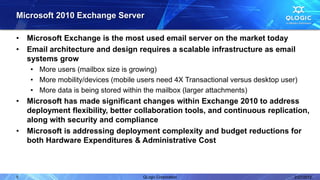
Microsoft 2010 Exchange Server

•   Microsoft Exchange is the most used email server on the market today
•   Email architecture and design requires a scalable infrastructure as email
    systems grow
     • More users (mailbox size is growing)
     • More mobility/devices (mobile users need 4X Transactional versus desktop user)
     • More data is being stored within the mailbox (larger attachments)
•   Microsoft has made significant changes within Exchange 2010 to address
    deployment flexibility, better collaboration tools, and continuous replication,
    along with security and compliance
•   Microsoft is addressing deployment complexity and budget reductions for
    both Hardware Expenditures & Administrative Cost


5                                     QLogic Corporation                            2/27/2012
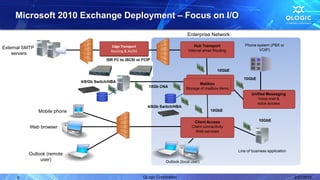
Microsoft 2010 Exchange Deployment – Focus on I/O

                                                                                       Enterprise Network

                                             Edge Transport                                 Hub Transport            Phone system (PBX or
External SMTP                                                                                                               VOIP)
                                             Routing & AV/AS                            Internal email Routing
    servers
                                           ISR FC to iSCSI or FCIP

                                                                                                         10GbE

                                                                                                                     10GbE
                               4/8/Gb Switch/HBA
                                                                                              Mailbox
                                                                  10Gb CNA             Storage of mailbox items
                                                                                                                         Unified Messaging
                                                                                                                            Voice mail &
                                                                                                                            voice access
                                                                 4/8Gb Switch/HBA
                Mobile phone                                                                         10GbE

                                                                                           Client Access                      10GbE
           Web browser                                                                    Client connectivity
                                                                                            Web services


                                                                                                                  Line of business application
          Outlook (remote
               user)                                                       Outlook (local user)


      6                                                        QLogic Corporation                                                                2/27/2012
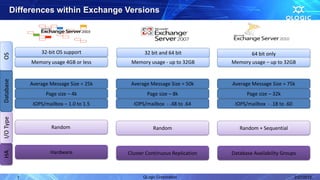
Differences within Exchange Versions


                   32-bit OS support               32 bit and 64 bit                64 bit only
OS


               Memory usage 4GB or less      Memory usage - up to 32GB       Memory usage – up to 32GB
Database


               Average Message Size = 25k    Average Message Size = 50k      Average Message Size = 75k
                     Page size – 4k                 Page size – 8k                 Page size – 32k
                IOPS/mailbox – 1.0 to 1.5     IOPS/mailbox - .48 to .64       IOPS/mailbox - .18 to .60
I/O Type


                        Random                         Random                   Random + Sequential


                       Hardware
HA


                                            Cluster Continuous Replication   Database Availability Groups


           7                                      QLogic Corporation                                      2/27/2012
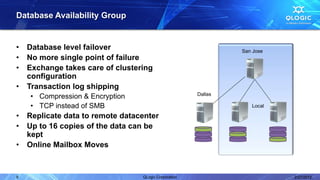
Database Availability Group


•   Database level failover                                     San Jose
•   No more single point of failure
•   Exchange takes care of clustering
    configuration
•   Transaction log shipping
    • Compression & Encryption                         Dallas

    • TCP instead of SMB                                           Local

•   Replicate data to remote datacenter
•   Up to 16 copies of the data can be
    kept
•   Online Mailbox Moves


8                                 QLogic Corporation                       2/27/2012
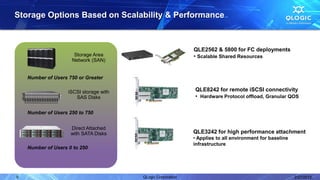
Storage Options Based on Scalability & Performance


                                                              QLE2562 & 5800 for FC deployments
                      Storage Area                            • Scalable Shared Resources
                     Network (SAN)


    Number of Users 750 or Greater

                    iSCSI storage with                        QLE8242 for remote iSCSI connectivity
                       SAS Disks                              • Hardware Protocol offload, Granular QOS

    Number of Users 250 to 750


                     Direct Attached
                     with SATA Disks                          QLE3242 for high performance attachment
                                                              • Applies to all environment for baseline
                                                              infrastructure
    Number of Users 0 to 250


9                                        QLogic Corporation                                               2/27/2012
Exchange Implementation Challenges

• Fibre Channel SANs
     • Increased email size and number of users require more I/O flowing through
       Exchange
     • Background Database Maintenance and Indexing tasks
     • Transactional I/O from mobility users, Collaboration software and process
       workflow applications
• Converged Networks
     • Maintaining traffic flow for optimal performance
         • Difficult to maintain and manage segmented traffic types and QoS consistently
         • VMs may be accessing different storage subsystems, Fibre Channel/iSCSI
           SANs require separate IO paths
     • Exchange requires high CPU Utilization
         • Running in a virtualized environment increases this further
     • Performance and SLA requirements need be met


10                                      QLogic Corporation                           2/27/2012
I/O Best Practices for Microsoft Exchange


• QLogic 4Gb/s and 8Gb/s Fibre Channel Adapters
     • Implementation of failover and multipathing within a SAN still provides the
       best redundant access to mailbox databases
     • Better Capex/Opex ROI based on the following criteria
         • When storage is shared among other applications such as CRM and ERP
         • Organizations above 750 clients
         • Share multiple Distributed Access Groups within the SAN
     • Seamless Growth─Grow the number of mailboxes and mailbox size –
       demands flexible provisioning capabilities of the SAN
     • N-Port Virtualization to support QoS based on priority or bandwidth controls
     • Central point of backups and faster backup/restore technologies
     • Single point of management and troubleshooting


11                                     QLogic Corporation                            2/27/2012
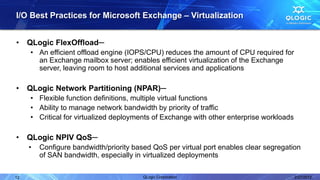
I/O Best Practices for Microsoft Exchange – Virtualization


•    QLogic FlexOffload─
     • An efficient offload engine (IOPS/CPU) reduces the amount of CPU required for
       an Exchange mailbox server; enables efficient virtualization of the Exchange
       server, leaving room to host additional services and applications

•    QLogic Network Partitioning (NPAR)─
     • Flexible function definitions, multiple virtual functions
     • Ability to manage network bandwidth by priority of traffic
     • Critical for virtualized deployments of Exchange with other enterprise workloads

•    QLogic NPIV QoS─
     •   Configure bandwidth/priority based QoS per virtual port enables clear segregation
         of SAN bandwidth, especially in virtualized deployments

12                                       QLogic Corporation                               2/27/2012
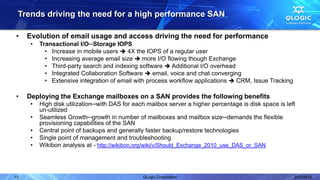
Trends driving the need for a high performance SAN

•    Evolution of email usage and access driving the need for performance
      •   Transactional I/O─Storage IOPS
            • Increase in mobile users  4X the IOPS of a regular user
            • Increasing average email size  more I/O flowing though Exchange
            • Third-party search and indexing software  Additional I/O overhead
            • Integrated Collaboration Software  email, voice and chat converging
            • Extensive integration of email with process workflow applications  CRM, Issue Tracking

•    Deploying the Exchange mailboxes on a SAN provides the following benefits
      •   High disk utilization─with DAS for each mailbox server a higher percentage is disk space is left
          un-utilized
      •   Seamless Growth─growth in number of mailboxes and mailbox size─demands the flexible
          provisioning capabilities of the SAN
      •   Central point of backups and generally faster backup/restore technologies
      •   Single point of management and troubleshooting
      •   Wikibon analysis at - http://wikibon.org/wiki/v/Should_Exchange_2010_use_DAS_or_SAN


13                                              QLogic Corporation                                       2/27/2012
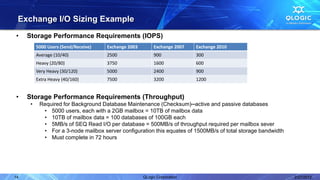
Exchange I/O Sizing Example
•    Storage Performance Requirements (IOPS)
          5000 Users (Send/Receive)   Exchange 2003        Exchange 2007   Exchange 2010
          Average (10/40)             2500                 900             300
          Heavy (20/80)               3750                 1600            600
          Very Heavy (30/120)         5000                 2400            900
          Extra Heavy (40/160)        7500                 3200            1200


•    Storage Performance Requirements (Throughput)
      •    Required for Background Database Maintenance (Checksum)─active and passive databases
            • 5000 users, each with a 2GB mailbox = 10TB of mailbox data
            • 10TB of mailbox data = 100 databases of 100GB each
            • 5MB/s of SEQ Read I/O per database = 500MB/s of throughput required per mailbox sever
            • For a 3-node mailbox server configuration this equates of 1500MB/s of total storage bandwidth
            • Must complete in 72 hours


14                                                    QLogic Corporation                                      2/27/2012
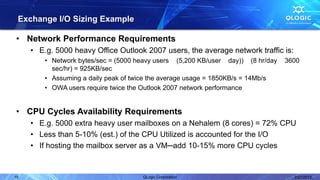
Exchange I/O Sizing Example

• Network Performance Requirements
     • E.g. 5000 heavy Office Outlook 2007 users, the average network traffic is:
         • Network bytes/sec = (5000 heavy users (5,200 KB/user day)) (8 hr/day   3600
           sec/hr) = 925KB/sec
         • Assuming a daily peak of twice the average usage = 1850KB/s = 14Mb/s
         • OWA users require twice the Outlook 2007 network performance


• CPU Cycles Availability Requirements
     • E.g. 5000 extra heavy user mailboxes on a Nehalem (8 cores) = 72% CPU
     • Less than 5-10% (est.) of the CPU Utilized is accounted for the I/O
     • If hosting the mailbox server as a VM─add 10-15% more CPU cycles


15                                    QLogic Corporation                            2/27/2012
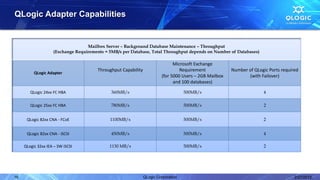
QLogic Adapter Capabilities


                                   Mailbox Server – Background Database Maintenance – Throughput
                    (Exchange Requirements = 5MB/s per Database, Total Throughput depends on Number of Databases)

                                                                               Microsoft Exchange
                                        Throughput Capability                     Requirement            Number of QLogic Ports required
          QLogic Adapter
                                                                         (for 5000 Users – 2GB Mailbox          (with Failover)
                                                                               and 100 databases)

        QLogic 24xx FC HBA                    360MB/s                                500MB/s                            4

        QLogic 25xx FC HBA                    780MB/s                                500MB/s                            2


      QLogic 82xx CNA - FCoE                 1100MB/s                                500MB/s                            2


      QLogic 82xx CNA - iSCSI                 450MB/s                                500MB/s                            4

     QLogic 32xx IEA – SW iSCSI              1130 MB/s                               500MB/s                            2


16                                                              QLogic Corporation                                                    2/27/2012
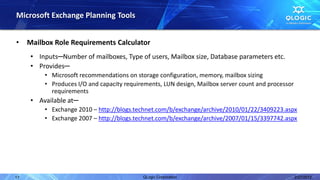
Microsoft Exchange Planning Tools


•    Mailbox Role Requirements Calculator
      • Inputs─Number of mailboxes, Type of users, Mailbox size, Database parameters etc.
      • Provides─
          • Microsoft recommendations on storage configuration, memory, mailbox sizing
          • Produces I/O and capacity requirements, LUN design, Mailbox server count and processor
            requirements
      • Available at─
          • Exchange 2010 – http://blogs.technet.com/b/exchange/archive/2010/01/22/3409223.aspx
          • Exchange 2007 – http://blogs.technet.com/b/exchange/archive/2007/01/15/3397742.aspx


17                                          QLogic Corporation                                       2/27/2012
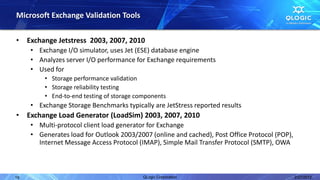
Microsoft Exchange Validation Tools

•    Exchange Jetstress 2003, 2007, 2010
      • Exchange I/O simulator, uses Jet (ESE) database engine
      • Analyzes server I/O performance for Exchange requirements
      • Used for
          • Storage performance validation
          • Storage reliability testing
          • End-to-end testing of storage components
      • Exchange Storage Benchmarks typically are JetStress reported results
•    Exchange Load Generator (LoadSim) 2003, 2007, 2010
      • Multi-protocol client load generator for Exchange
      • Generates load for Outlook 2003/2007 (online and cached), Post Office Protocol (POP),
        Internet Message Access Protocol (IMAP), Simple Mail Transfer Protocol (SMTP), OWA


18                                          QLogic Corporation                                  2/27/2012
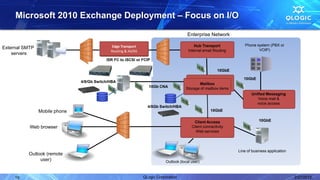
Microsoft 2010 Exchange Deployment – Focus on I/O

                                                                                       Enterprise Network

                                             Edge Transport                                 Hub Transport            Phone system (PBX or
External SMTP                                                                                                               VOIP)
                                             Routing & AV/AS                            Internal email Routing
    servers
                                           ISR FC to iSCSI or FCIP

                                                                                                         10GbE

                                                                                                                     10GbE
                               4/8/Gb Switch/HBA
                                                                                              Mailbox
                                                                  10Gb CNA             Storage of mailbox items
                                                                                                                         Unified Messaging
                                                                                                                            Voice mail &
                                                                                                                            voice access
                                                                 4/8Gb Switch/HBA
                Mobile phone                                                                         10GbE

                                                                                           Client Access                      10GbE
           Web browser                                                                    Client connectivity
                                                                                            Web services


                                                                                                                  Line of business application
          Outlook (remote
               user)                                                       Outlook (local user)


     19                                                        QLogic Corporation                                                                2/27/2012
Key Takeaways


• QLogic has solutions for all Exchange environments
• Mobility is driving the need for higher backend performance
• Storage Area Networks provide the customer with better asset
  utilization and availability
• IOPs is not a driving factor in Exchange 2010
     • Performance & Bandwidth
     • Hardware offload to increase CPU efficiency
     • Nic Partitioning for better QOC
• Understand differences and where we fit to drive incremental
  revenue opportunities


20                                  QLogic Corporation           2/27/2012
Contact Us


           For more information, contact solutions@qlogic.com


                    Follow us


© 2012 QLogic Corporation. Specifications are subject to change without notice. All rights reserved worldwide. QLogic, the QLogic logo, VMflex, ConvergeFlex, and FlexOffload are registered
trademarks of QLogic Corporation. Brocade is a registered trademark of Brocade Communications Systems, Inc. Emulex is a registered trademark of Emulex Corporation. Microsoft and Microsoft
Exchange are registered trademarks of Microsoft Corporation. VMware and vMotion are registered trademarks of VMware, Inc. All other brand and product names are trademarks or registered
trademarks of their respective owners. Information supplied by QLogic Corporation is believed to be accurate and reliable. QLogic Corporation assumes no responsibility for any errors in this
presentation. QLogic Corporation reserves the right, without notice, to make changes in product design or specifications.


21                                                                                 QLogic Corporation                                                                                  2/27/2012
22   QLogic Corporation   2/27/2012

QLogic Solutions - Microsoft Exchange Server

  • 1.
    QLogic Solutions Microsoft Exchange Server Microsoft Exchange environments can host more mailboxes with faster access times when using QLogic adapters
  • 2.
    MSFT Exchange Collateral • All files are located at: http://www.qlogic.com/info/exchange • PPT Slides • Solution Sheet • White Paper • Competitive Brief • Video 2 QLogic Corporation 2/27/2012
  • 3.
    Agenda • Email requirements within the datacenter • Understanding Microsoft Exchange─I/O Perspective • Variances within versions of Exchange • Topology & Storage Designs • Planning and Validation Tools • QLogic Adapter capabilities and MS Exchange Performance • I/O Best Practices for MS Exchange • SAN • Convergence • Conclusion 3 QLogic Corporation 2/27/2012
  • 4.
    Business Runs onEmail • Email growth is accelerating • Email represents a significant portion of an organization’s total data • Email is a consolidated method for communication in a wired world • Email through Corporate • Internet access, Web Browsers • Instant Messaging, Integrated Voicemail & Web Conferencing • Many organizations retain email records indefinitely • Service level agreements getting tougher • Access and performance is crucial to conducting business • Corporate compliance and regulatory laws require timely─and secure─access to email records Exchange environments must be Predictable  Scalable  Flexible 4 QLogic Corporation 2/27/2012
  • 5.
    Microsoft 2010 ExchangeServer • Microsoft Exchange is the most used email server on the market today • Email architecture and design requires a scalable infrastructure as email systems grow • More users (mailbox size is growing) • More mobility/devices (mobile users need 4X Transactional versus desktop user) • More data is being stored within the mailbox (larger attachments) • Microsoft has made significant changes within Exchange 2010 to address deployment flexibility, better collaboration tools, and continuous replication, along with security and compliance • Microsoft is addressing deployment complexity and budget reductions for both Hardware Expenditures & Administrative Cost 5 QLogic Corporation 2/27/2012
  • 6.
    Microsoft 2010 ExchangeDeployment – Focus on I/O Enterprise Network Edge Transport Hub Transport Phone system (PBX or External SMTP VOIP) Routing & AV/AS Internal email Routing servers ISR FC to iSCSI or FCIP 10GbE 10GbE 4/8/Gb Switch/HBA Mailbox 10Gb CNA Storage of mailbox items Unified Messaging Voice mail & voice access 4/8Gb Switch/HBA Mobile phone 10GbE Client Access 10GbE Web browser Client connectivity Web services Line of business application Outlook (remote user) Outlook (local user) 6 QLogic Corporation 2/27/2012
  • 7.
    Differences within ExchangeVersions 32-bit OS support 32 bit and 64 bit 64 bit only OS Memory usage 4GB or less Memory usage - up to 32GB Memory usage – up to 32GB Database Average Message Size = 25k Average Message Size = 50k Average Message Size = 75k Page size – 4k Page size – 8k Page size – 32k IOPS/mailbox – 1.0 to 1.5 IOPS/mailbox - .48 to .64 IOPS/mailbox - .18 to .60 I/O Type Random Random Random + Sequential Hardware HA Cluster Continuous Replication Database Availability Groups 7 QLogic Corporation 2/27/2012
  • 8.
    Database Availability Group • Database level failover San Jose • No more single point of failure • Exchange takes care of clustering configuration • Transaction log shipping • Compression & Encryption Dallas • TCP instead of SMB Local • Replicate data to remote datacenter • Up to 16 copies of the data can be kept • Online Mailbox Moves 8 QLogic Corporation 2/27/2012
  • 9.
    Storage Options Basedon Scalability & Performance QLE2562 & 5800 for FC deployments Storage Area • Scalable Shared Resources Network (SAN) Number of Users 750 or Greater iSCSI storage with QLE8242 for remote iSCSI connectivity SAS Disks • Hardware Protocol offload, Granular QOS Number of Users 250 to 750 Direct Attached with SATA Disks QLE3242 for high performance attachment • Applies to all environment for baseline infrastructure Number of Users 0 to 250 9 QLogic Corporation 2/27/2012
  • 10.
    Exchange Implementation Challenges •Fibre Channel SANs • Increased email size and number of users require more I/O flowing through Exchange • Background Database Maintenance and Indexing tasks • Transactional I/O from mobility users, Collaboration software and process workflow applications • Converged Networks • Maintaining traffic flow for optimal performance • Difficult to maintain and manage segmented traffic types and QoS consistently • VMs may be accessing different storage subsystems, Fibre Channel/iSCSI SANs require separate IO paths • Exchange requires high CPU Utilization • Running in a virtualized environment increases this further • Performance and SLA requirements need be met 10 QLogic Corporation 2/27/2012
  • 11.
    I/O Best Practicesfor Microsoft Exchange • QLogic 4Gb/s and 8Gb/s Fibre Channel Adapters • Implementation of failover and multipathing within a SAN still provides the best redundant access to mailbox databases • Better Capex/Opex ROI based on the following criteria • When storage is shared among other applications such as CRM and ERP • Organizations above 750 clients • Share multiple Distributed Access Groups within the SAN • Seamless Growth─Grow the number of mailboxes and mailbox size – demands flexible provisioning capabilities of the SAN • N-Port Virtualization to support QoS based on priority or bandwidth controls • Central point of backups and faster backup/restore technologies • Single point of management and troubleshooting 11 QLogic Corporation 2/27/2012
  • 12.
    I/O Best Practicesfor Microsoft Exchange – Virtualization • QLogic FlexOffload─ • An efficient offload engine (IOPS/CPU) reduces the amount of CPU required for an Exchange mailbox server; enables efficient virtualization of the Exchange server, leaving room to host additional services and applications • QLogic Network Partitioning (NPAR)─ • Flexible function definitions, multiple virtual functions • Ability to manage network bandwidth by priority of traffic • Critical for virtualized deployments of Exchange with other enterprise workloads • QLogic NPIV QoS─ • Configure bandwidth/priority based QoS per virtual port enables clear segregation of SAN bandwidth, especially in virtualized deployments 12 QLogic Corporation 2/27/2012
  • 13.
    Trends driving theneed for a high performance SAN • Evolution of email usage and access driving the need for performance • Transactional I/O─Storage IOPS • Increase in mobile users  4X the IOPS of a regular user • Increasing average email size  more I/O flowing though Exchange • Third-party search and indexing software  Additional I/O overhead • Integrated Collaboration Software  email, voice and chat converging • Extensive integration of email with process workflow applications  CRM, Issue Tracking • Deploying the Exchange mailboxes on a SAN provides the following benefits • High disk utilization─with DAS for each mailbox server a higher percentage is disk space is left un-utilized • Seamless Growth─growth in number of mailboxes and mailbox size─demands the flexible provisioning capabilities of the SAN • Central point of backups and generally faster backup/restore technologies • Single point of management and troubleshooting • Wikibon analysis at - http://wikibon.org/wiki/v/Should_Exchange_2010_use_DAS_or_SAN 13 QLogic Corporation 2/27/2012
  • 14.
    Exchange I/O SizingExample • Storage Performance Requirements (IOPS) 5000 Users (Send/Receive) Exchange 2003 Exchange 2007 Exchange 2010 Average (10/40) 2500 900 300 Heavy (20/80) 3750 1600 600 Very Heavy (30/120) 5000 2400 900 Extra Heavy (40/160) 7500 3200 1200 • Storage Performance Requirements (Throughput) • Required for Background Database Maintenance (Checksum)─active and passive databases • 5000 users, each with a 2GB mailbox = 10TB of mailbox data • 10TB of mailbox data = 100 databases of 100GB each • 5MB/s of SEQ Read I/O per database = 500MB/s of throughput required per mailbox sever • For a 3-node mailbox server configuration this equates of 1500MB/s of total storage bandwidth • Must complete in 72 hours 14 QLogic Corporation 2/27/2012
  • 15.
    Exchange I/O SizingExample • Network Performance Requirements • E.g. 5000 heavy Office Outlook 2007 users, the average network traffic is: • Network bytes/sec = (5000 heavy users (5,200 KB/user day)) (8 hr/day 3600 sec/hr) = 925KB/sec • Assuming a daily peak of twice the average usage = 1850KB/s = 14Mb/s • OWA users require twice the Outlook 2007 network performance • CPU Cycles Availability Requirements • E.g. 5000 extra heavy user mailboxes on a Nehalem (8 cores) = 72% CPU • Less than 5-10% (est.) of the CPU Utilized is accounted for the I/O • If hosting the mailbox server as a VM─add 10-15% more CPU cycles 15 QLogic Corporation 2/27/2012
  • 16.
    QLogic Adapter Capabilities Mailbox Server – Background Database Maintenance – Throughput (Exchange Requirements = 5MB/s per Database, Total Throughput depends on Number of Databases) Microsoft Exchange Throughput Capability Requirement Number of QLogic Ports required QLogic Adapter (for 5000 Users – 2GB Mailbox (with Failover) and 100 databases) QLogic 24xx FC HBA 360MB/s 500MB/s 4 QLogic 25xx FC HBA 780MB/s 500MB/s 2 QLogic 82xx CNA - FCoE 1100MB/s 500MB/s 2 QLogic 82xx CNA - iSCSI 450MB/s 500MB/s 4 QLogic 32xx IEA – SW iSCSI 1130 MB/s 500MB/s 2 16 QLogic Corporation 2/27/2012
  • 17.
    Microsoft Exchange PlanningTools • Mailbox Role Requirements Calculator • Inputs─Number of mailboxes, Type of users, Mailbox size, Database parameters etc. • Provides─ • Microsoft recommendations on storage configuration, memory, mailbox sizing • Produces I/O and capacity requirements, LUN design, Mailbox server count and processor requirements • Available at─ • Exchange 2010 – http://blogs.technet.com/b/exchange/archive/2010/01/22/3409223.aspx • Exchange 2007 – http://blogs.technet.com/b/exchange/archive/2007/01/15/3397742.aspx 17 QLogic Corporation 2/27/2012
  • 18.
    Microsoft Exchange ValidationTools • Exchange Jetstress 2003, 2007, 2010 • Exchange I/O simulator, uses Jet (ESE) database engine • Analyzes server I/O performance for Exchange requirements • Used for • Storage performance validation • Storage reliability testing • End-to-end testing of storage components • Exchange Storage Benchmarks typically are JetStress reported results • Exchange Load Generator (LoadSim) 2003, 2007, 2010 • Multi-protocol client load generator for Exchange • Generates load for Outlook 2003/2007 (online and cached), Post Office Protocol (POP), Internet Message Access Protocol (IMAP), Simple Mail Transfer Protocol (SMTP), OWA 18 QLogic Corporation 2/27/2012
  • 19.
    Microsoft 2010 ExchangeDeployment – Focus on I/O Enterprise Network Edge Transport Hub Transport Phone system (PBX or External SMTP VOIP) Routing & AV/AS Internal email Routing servers ISR FC to iSCSI or FCIP 10GbE 10GbE 4/8/Gb Switch/HBA Mailbox 10Gb CNA Storage of mailbox items Unified Messaging Voice mail & voice access 4/8Gb Switch/HBA Mobile phone 10GbE Client Access 10GbE Web browser Client connectivity Web services Line of business application Outlook (remote user) Outlook (local user) 19 QLogic Corporation 2/27/2012
  • 20.
    Key Takeaways • QLogichas solutions for all Exchange environments • Mobility is driving the need for higher backend performance • Storage Area Networks provide the customer with better asset utilization and availability • IOPs is not a driving factor in Exchange 2010 • Performance & Bandwidth • Hardware offload to increase CPU efficiency • Nic Partitioning for better QOC • Understand differences and where we fit to drive incremental revenue opportunities 20 QLogic Corporation 2/27/2012
  • 21.
    Contact Us For more information, contact solutions@qlogic.com Follow us © 2012 QLogic Corporation. Specifications are subject to change without notice. All rights reserved worldwide. QLogic, the QLogic logo, VMflex, ConvergeFlex, and FlexOffload are registered trademarks of QLogic Corporation. Brocade is a registered trademark of Brocade Communications Systems, Inc. Emulex is a registered trademark of Emulex Corporation. Microsoft and Microsoft Exchange are registered trademarks of Microsoft Corporation. VMware and vMotion are registered trademarks of VMware, Inc. All other brand and product names are trademarks or registered trademarks of their respective owners. Information supplied by QLogic Corporation is believed to be accurate and reliable. QLogic Corporation assumes no responsibility for any errors in this presentation. QLogic Corporation reserves the right, without notice, to make changes in product design or specifications. 21 QLogic Corporation 2/27/2012
  • 22.
    22 QLogic Corporation 2/27/2012

Editor's Notes

  • #9 Database Availability Group in the single most important thing Microsoft had done to allow Exchange to run on Commodity Hardware. This example would typically run on a SAN but for smaller implementations, this use of a dual or quad core processor for the main mail server along with additional servers for storing the replicated data. Microsoft also supports remote replication which used to require additional hardware to manage the replication process for disaster recovery
  • #15 http://flippingbits.typepad.com/blog/2011/11/background-database-maintenance-in-exchange-2010.html
  • #17 Number are mailboxes are calculated based on IOPS capability of the QLogic adapters at the block sizes that the various Exchange versions operate at.