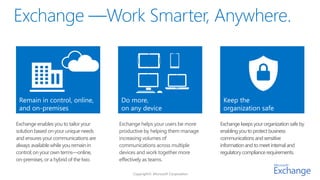
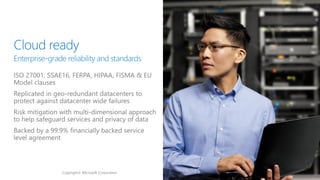

Remain in control, online,            Do more,                             Keep the
 and on-premises                       on any device                        organization safe

Exchange enables you to tailor your    Exchange helps your users be more   Exchange keeps your organization safe by
solution based on your unique needs    productive by helping them manage   enabling you to protect business
and ensures your communications are    increasing volumes of               communications and sensitive
always available while you remain in   communications across multiple      information and to meet internal and
control; on your own terms—online,     devices and work together more      regulatory compliance requirements.
on-premises, or a hybrid of the two.   effectively as teams.
Copyright© Microsoft Corporation
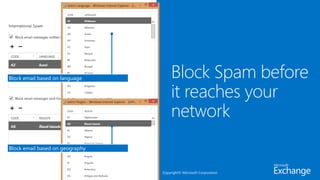
Block email based on language


Block email based on geography


                                 Copyright© Microsoft Corporation
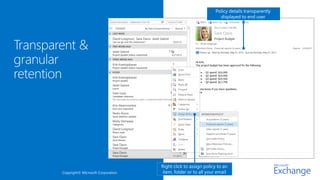
Policy details transparently
                                                                displayed to end user


                                   Right click to assign policy to an
Copyright© Microsoft Corporation   item, folder or to all your email
Copyright© Microsoft Corporation
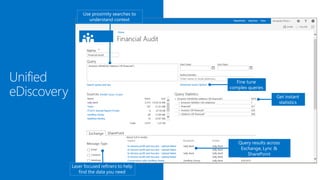
Use proximity searches to
       understand context


                                    Fine tune
                                 complex queries
                                                      Get instant
                                                       statistics


                                    Query results across
                                     Exchange, Lync &
                                        SharePoint

Laser focused refiners to help
   find the data you need
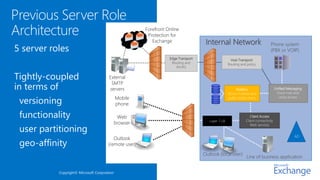
Previous Server Role
Architecture                                            Forefront Online
                                                         Protection for
                                                           Exchange                  Internal Network                            Phone system
5 server roles                                                                                                                   (PBX or VOIP)
                                                                   Edge Transport                     Hub Transport
                                                                    Routing and                     Routing and policy
                                                                      AV/AS


Tightly-coupled                         External
                                         SMTP
in terms of                             servers                                                          Mailbox                      Unified Messaging
                                                                                                                                       Voice mail and
                                                                                                    Stores mailbox and

 versioning                                   Mobile                                                public folder items                 voice access

                                              phone

 functionality                                 Web
                                                                                       Layer 7 LB
                                                                                                                   Client Access
                                                                                                                Client connectivity
                                              browser
 user partitioning
                                                                                                                   Web services


                                                                                                                                                  AD
                                          Outlook
 geo-affinity                          (remote user)

                                                                                    Outlook (local user)
                                                                                                                Line of business application


           Copyright© Microsoft Corporation
Copyright© Microsoft Corporation
Layer 4 load balancer
                                                      Edge


Mailbox Server hosts all                                                                           CAS    MBX
components to process, render
and store data


                                    Remote clients & devices    Local clients                       PBX

                                Internet                       Enterprise network
Forefront

 Two building
                                      Online
                                   Protection for
                                     Exchange                    Enterprise Network
 blocks                                       Edge Transport
                                                                                                                    AD


                                                Routing and                           CAS                   DAG
                                                  AV/AS                               Array
                                                                                       CAS                  MBX
                   External SMTP
                       servers                                                          CAS                 MBX


                                                                         Layer 4 LB
                                                                                        CAS                 MBX
                   Mobile
                   phone                                                                CAS                 MBX


 Loosely coupled    Web                                                                 CAS                 MBX
                   browser

                   Outlook
                   (remote
                     user)
                                                                                         Line of Business     Phone System
                                                                 Outlook (local user)       Application       (PBX or VOIP)


14                            Copyright© Microsoft Corporation
OWA   Outlook     EAS         EAC          PowerShell           IMAP           SMTP                    SBC, AP


                                                                                                    SIP

                                                     Layer 4 LB
                                                                                                Redirect
                           IIS
 CAS 2013               HTTP Proxy
                                                       POP, IMAP             SMTP          UM


                                 HTTP                     POP, IMAP                 SMTP                   SIP + RTP


                                         IIS
                              RpcProxy
                                               OWA, EAS, EWS,             POP
                                                                                    Transport    UM
                  RPS                                                    IMAP
                              RPC CA             ECP, OAB

     MBX 2013
                                                                                     Mail
                                               MDB
                                                                                      Q
15
16   Copyright© Microsoft Corporation
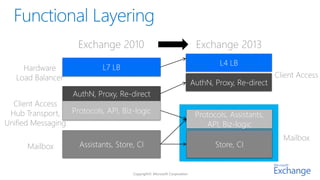
Exchange 2010             Exchange 2013
                                                     L4 LB
     Hardware              L7 LB
   Load Balancer                                                       Client Access
                                             AuthN, Proxy, Re-direct
                   AuthN, Proxy, Re-direct
  Client Access
 Hub Transport, Protocols, API, Biz-logic     Protocols, Assistants,
Unified Messaging                                API, Biz-logic
                                                                         Mailbox
      Mailbox       Assistants, Store, CI           Store, CI
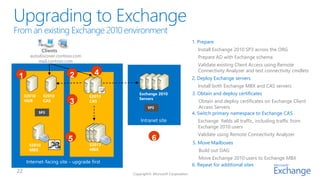
1. Prepare
              Clients                                        Install Exchange 2010 SP3 across the ORG
      autodiscover.contoso.com                               Prepare AD with Exchange schema
          mail.contoso.com
                                                             Validate existing Client Access using Remote
                                                             Connectivity Analyzer and test connectivity cmdlets
1                        2           4
                                                           2. Deploy Exchange servers
                                                             Install both Exchange MBX and CAS servers
    E2010     E2010
                                           Exchange 2010   3. Obtain and deploy certificates
                                  E2013
                                           Servers
    HUB       CAS        3        CAS                          Obtain and deploy certificates on Exchange Client
                                              SP3              Access Servers
            SP3                                            4. Switch primary namespace to Exchange CAS
                                           Intranet site     Exchange fields all traffic, including traffic from
                                                             Exchange 2010 users
                                                             Validate using Remote Connectivity Analyzer
                        5                       6          5. Move Mailboxes
      E2010                       E2013
      MBX                         MBX                         Build out DAG
                                                               Move Exchange 2010 users to Exchange MBX
    Internet-facing site – upgrade first
                                                           6. Repeat for additional sites
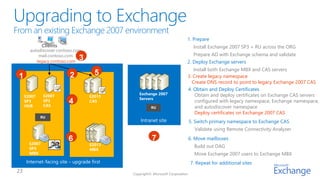
1. Prepare
              Clients                                        Install Exchange 2007 SP3 + RU across the ORG
      autodiscover.contoso.com
          mail.contoso.com                                   Prepare AD with Exchange schema and validate
         legacy.contoso.com
                             3                             2. Deploy Exchange servers
                                                              Install both Exchange MBX and CAS servers
1                        2           5                     3. Create legacy namespace
                                                             Create DNS record to point to legacy Exchange 2007 CAS
                                                           4. Obtain and Deploy Certificates
                                           Exchange 2007       Obtain and deploy certificates on Exchange CAS servers
    E2007     E2007               E2013
                                           Servers
    SP3       SP3       4         CAS                          configured with legacy namespace, Exchange namespace,
    HUB       CAS                               RU
                                               RU              and autodiscover namespace
                                                               Deploy certificates on Exchange 2007 CAS
            RU
            RU
                                           Intranet site   5. Switch primary namespace to Exchange CAS
                                                              Validate using Remote Connectivity Analyzer

                        6                       7          6. Move mailboxes
      E2007                       E2013
      SP3                                                     Build out DAG
                                  MBX
      MBX                                                     Move Exchange 2007 users to Exchange MBX
    Internet-facing site – upgrade first                    7. Repeat for additional sites
1
                                                                                             2


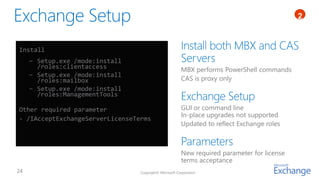
Install
  − Setup.exe /mode:install
    /roles:clientaccess                                 MBX performs PowerShell commands
  − Setup.exe /mode:install
    /roles:mailbox                                      CAS is proxy only
  − Setup.exe /mode:install
    /roles:ManagementTools

Other required parameter                                GUI or command line
                                                        In-place upgrades not supported
- /IAcceptExchangeServerLicenseTerms
                                                        Updated to reflect Exchange roles


                                                        New required parameter for license
                                                        terms acceptance
                                 Copyright© Microsoft Corporation
1
                                                                              4


First notification shown 30 days prior to expiration
Subsequent notifications provided daily


                                           Copyright© Microsoft Corporation
Certificates   1
                                                                                            4


Minimize the number of certificates
Minimize number of host names
Use split DNS for Exchange host names
mail.contoso.com for Exchange connectivity on intranet and Internet
mail.contoso.com has different IP addresses in intranet/Internet DNS

Don’t list machine host names in certificate host name list
Use load-balanced (LB) arrays for intranet and Internet access to servers

Use “Subject Alternative Name” (SAN) certificate

                                          Copyright© Microsoft Corporation
28   Copyright© Microsoft Corporation
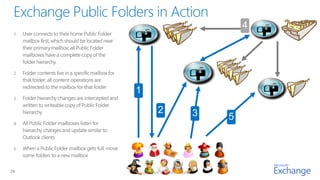
29   Copyright© Microsoft Corporation
Work Smarter, Anywhere.

Viestintäaamupäivä exchange 2013

  • 3.
    Remain in control,online, Do more, Keep the and on-premises on any device organization safe Exchange enables you to tailor your Exchange helps your users be more Exchange keeps your organization safe by solution based on your unique needs productive by helping them manage enabling you to protect business and ensures your communications are increasing volumes of communications and sensitive always available while you remain in communications across multiple information and to meet internal and control; on your own terms—online, devices and work together more regulatory compliance requirements. on-premises, or a hybrid of the two. effectively as teams.
  • 4.
  • 5.
  • 6.
    Block email basedon language Block email based on geography Copyright© Microsoft Corporation
  • 7.
    Policy details transparently displayed to end user Right click to assign policy to an Copyright© Microsoft Corporation item, folder or to all your email
  • 8.
  • 9.
    Use proximity searchesto understand context Fine tune complex queries Get instant statistics Query results across Exchange, Lync & SharePoint Laser focused refiners to help find the data you need
  • 10.
    Previous Server Role Architecture Forefront Online Protection for Exchange Internal Network Phone system 5 server roles (PBX or VOIP) Edge Transport Hub Transport Routing and Routing and policy AV/AS Tightly-coupled External SMTP in terms of servers Mailbox Unified Messaging Voice mail and Stores mailbox and versioning Mobile public folder items voice access phone functionality Web Layer 7 LB Client Access Client connectivity browser user partitioning Web services AD Outlook geo-affinity (remote user) Outlook (local user) Line of business application Copyright© Microsoft Corporation
  • 11.
  • 12.
  • 13.
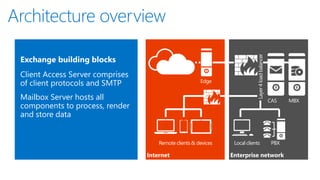
    Layer 4 loadbalancer Edge Mailbox Server hosts all CAS MBX components to process, render and store data Remote clients & devices Local clients PBX Internet Enterprise network
  • 14.
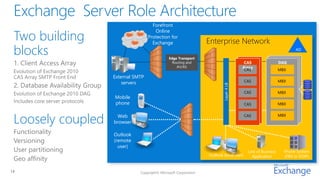
    Forefront Two building Online Protection for Exchange Enterprise Network blocks Edge Transport AD Routing and CAS DAG AV/AS Array CAS MBX External SMTP servers CAS MBX Layer 4 LB CAS MBX Mobile phone CAS MBX Loosely coupled Web CAS MBX browser Outlook (remote user) Line of Business Phone System Outlook (local user) Application (PBX or VOIP) 14 Copyright© Microsoft Corporation
  • 15.
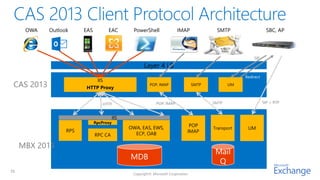
    OWA Outlook EAS EAC PowerShell IMAP SMTP SBC, AP SIP Layer 4 LB Redirect IIS CAS 2013 HTTP Proxy POP, IMAP SMTP UM HTTP POP, IMAP SMTP SIP + RTP IIS RpcProxy OWA, EAS, EWS, POP Transport UM RPS IMAP RPC CA ECP, OAB MBX 2013 Mail MDB Q 15
  • 16.
    16 Copyright© Microsoft Corporation
  • 17.
    Exchange 2010 Exchange 2013 L4 LB Hardware L7 LB Load Balancer Client Access AuthN, Proxy, Re-direct AuthN, Proxy, Re-direct Client Access Hub Transport, Protocols, API, Biz-logic Protocols, Assistants, Unified Messaging API, Biz-logic Mailbox Mailbox Assistants, Store, CI Store, CI
  • 22.
    1. Prepare Clients Install Exchange 2010 SP3 across the ORG autodiscover.contoso.com Prepare AD with Exchange schema mail.contoso.com Validate existing Client Access using Remote Connectivity Analyzer and test connectivity cmdlets 1 2 4 2. Deploy Exchange servers Install both Exchange MBX and CAS servers E2010 E2010 Exchange 2010 3. Obtain and deploy certificates E2013 Servers HUB CAS 3 CAS Obtain and deploy certificates on Exchange Client SP3 Access Servers SP3 4. Switch primary namespace to Exchange CAS Intranet site Exchange fields all traffic, including traffic from Exchange 2010 users Validate using Remote Connectivity Analyzer 5 6 5. Move Mailboxes E2010 E2013 MBX MBX Build out DAG Move Exchange 2010 users to Exchange MBX Internet-facing site – upgrade first 6. Repeat for additional sites
  • 23.
    1. Prepare Clients Install Exchange 2007 SP3 + RU across the ORG autodiscover.contoso.com mail.contoso.com Prepare AD with Exchange schema and validate legacy.contoso.com 3 2. Deploy Exchange servers Install both Exchange MBX and CAS servers 1 2 5 3. Create legacy namespace Create DNS record to point to legacy Exchange 2007 CAS 4. Obtain and Deploy Certificates Exchange 2007 Obtain and deploy certificates on Exchange CAS servers E2007 E2007 E2013 Servers SP3 SP3 4 CAS configured with legacy namespace, Exchange namespace, HUB CAS RU RU and autodiscover namespace Deploy certificates on Exchange 2007 CAS RU RU Intranet site 5. Switch primary namespace to Exchange CAS Validate using Remote Connectivity Analyzer 6 7 6. Move mailboxes E2007 E2013 SP3 Build out DAG MBX MBX Move Exchange 2007 users to Exchange MBX Internet-facing site – upgrade first 7. Repeat for additional sites
  • 24.
    1 2 Install − Setup.exe /mode:install /roles:clientaccess MBX performs PowerShell commands − Setup.exe /mode:install /roles:mailbox CAS is proxy only − Setup.exe /mode:install /roles:ManagementTools Other required parameter GUI or command line In-place upgrades not supported - /IAcceptExchangeServerLicenseTerms Updated to reflect Exchange roles New required parameter for license terms acceptance Copyright© Microsoft Corporation
  • 25.
    1 4 First notification shown 30 days prior to expiration Subsequent notifications provided daily Copyright© Microsoft Corporation
  • 26.
    Certificates 1 4 Minimize the number of certificates Minimize number of host names Use split DNS for Exchange host names mail.contoso.com for Exchange connectivity on intranet and Internet mail.contoso.com has different IP addresses in intranet/Internet DNS Don’t list machine host names in certificate host name list Use load-balanced (LB) arrays for intranet and Internet access to servers Use “Subject Alternative Name” (SAN) certificate Copyright© Microsoft Corporation
  • 28.
    28 Copyright© Microsoft Corporation
  • 29.
    29 Copyright© Microsoft Corporation
  • 30.