GANDHINAGAR INSTITUTE OF
TECHNOLOGY
Department of Computer Engineering
Register Transfer and Micro operation
Student Name(Enroll No): Jay Panchal(130120107055)
Kajal Panchal(130120107056)
Nikhil Pandit(130120107057)
Name of Faculty: Prof Raxit Jani
Computer Organization(2140707)
Register Transfer and Micro operations
• Arithmetic Micro-operations
• Logic Micro-operations
• Shift Micro-operations
• Arithmetic Logic Shift Unit
• Register Transfer Language
• Register Transfer
• Bus and Memory Transfers
Gandhinagar Institute of technology
Micro-operations
• Simple digital systems are frequently characterized in terms of
– the registers they contain, and
– the operations that they perform.
• The operations on the data in registers are called micro-
operations.
• The functions built into registers are examples of micro-
operations
– Shift
– Load
– Clear
– Increment ...etc.
Gandhinagar Institute of technology
Micro-operations
Gandhinagar Institute of technology
• Computer system micro-operations are of four types:
- Arithmetic micro-operations
- Logic micro-operations
- Shift micro-operations
- Register transfer micro-operations
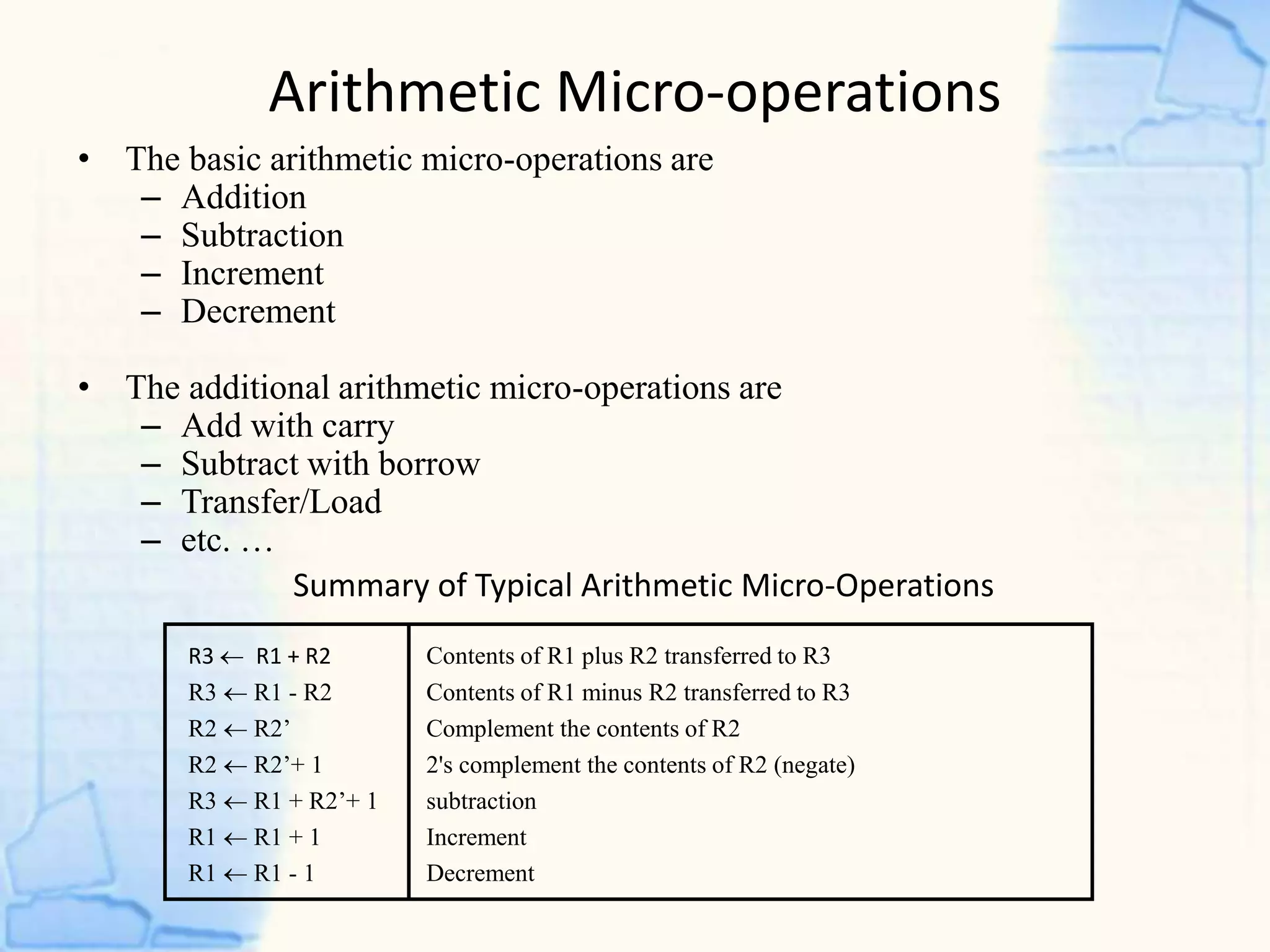
Summary of Typical Arithmetic Micro-Operations
R3  R1 + R2 Contents of R1 plus R2 transferred to R3
R3  R1 - R2 Contents of R1 minus R2 transferred to R3
R2  R2’ Complement the contents of R2
R2  R2’+ 1 2's complement the contents of R2 (negate)
R3  R1 + R2’+ 1 subtraction
R1  R1 + 1 Increment
R1  R1 - 1 Decrement
• The basic arithmetic micro-operations are
– Addition
– Subtraction
– Increment
– Decrement
• The additional arithmetic micro-operations are
– Add with carry
– Subtract with borrow
– Transfer/Load
– etc. …
Arithmetic Micro-operations
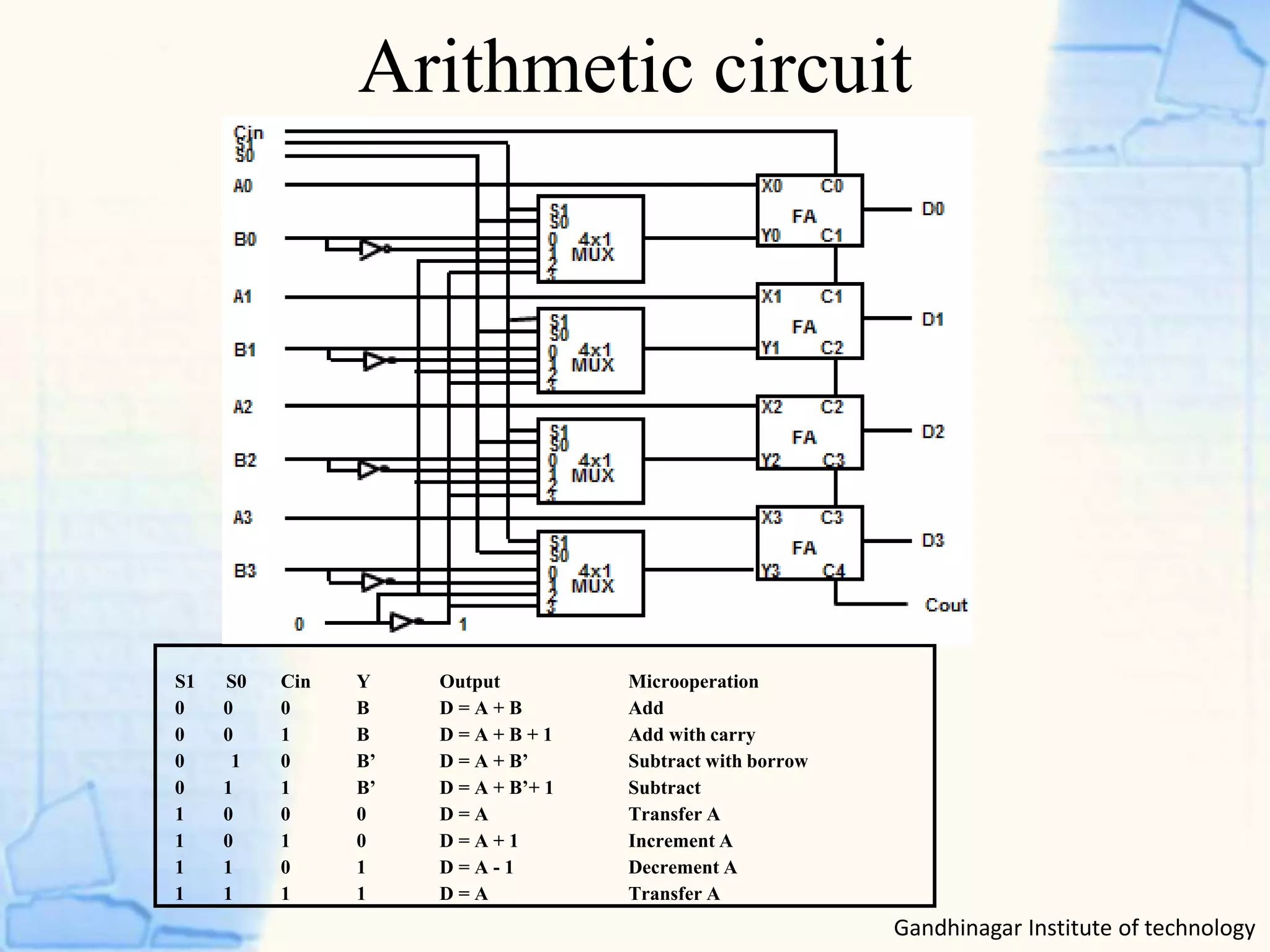
Arithmetic circuit
S1 S0 Cin Y Output Microoperation
0 0 0 B D = A + B Add
0 0 1 B D = A + B + 1 Add with carry
0 1 0 B’ D = A + B’ Subtract with borrow
0 1 1 B’ D = A + B’+ 1 Subtract
1 0 0 0 D = A Transfer A
1 0 1 0 D = A + 1 Increment A
1 1 0 1 D = A - 1 Decrement A
1 1 1 1 D = A Transfer A
Gandhinagar Institute of technology
Logical micro-operations
Gandhinagar Institute of technology
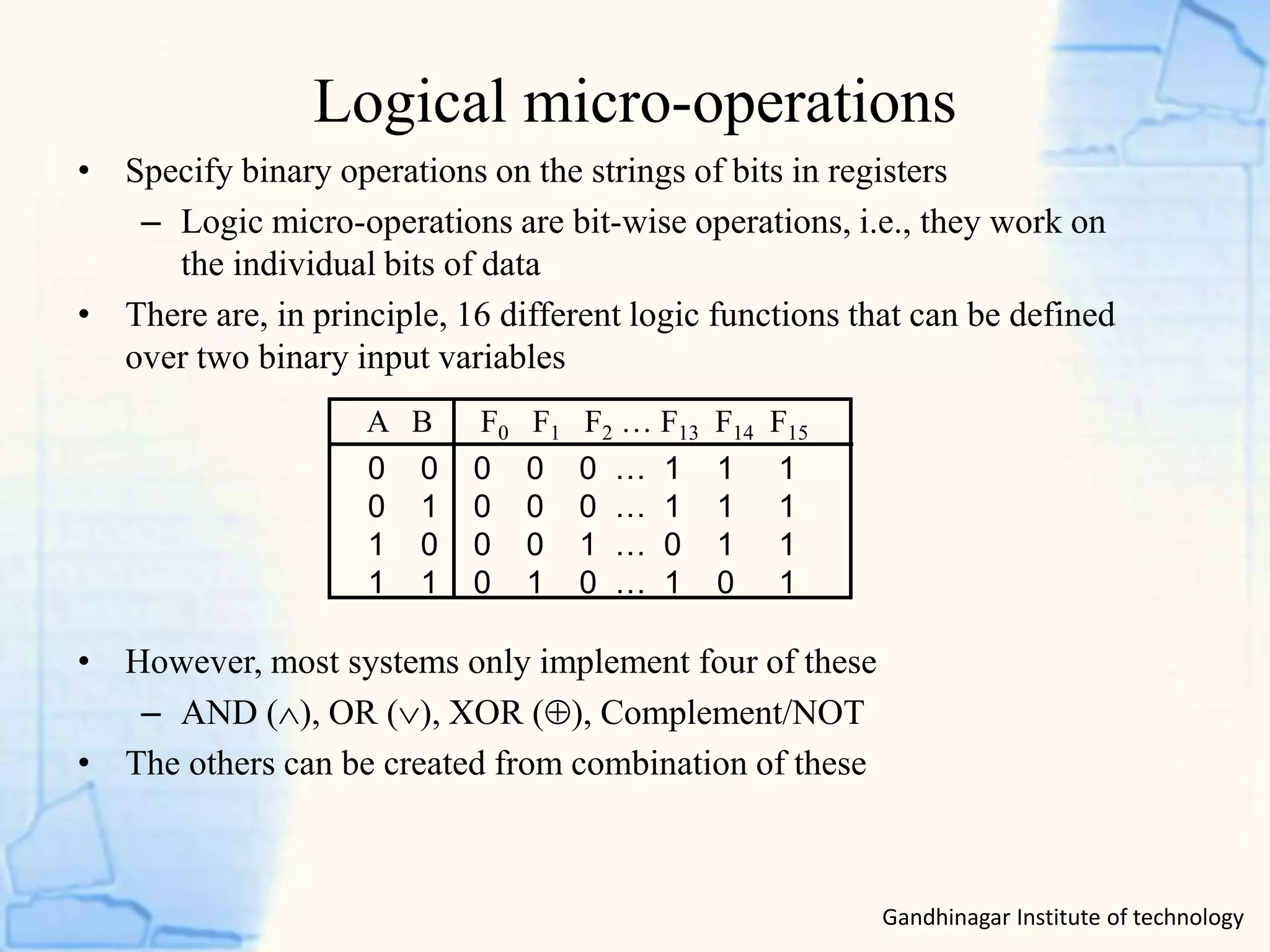
• Specify binary operations on the strings of bits in registers
– Logic micro-operations are bit-wise operations, i.e., they work on
the individual bits of data
• There are, in principle, 16 different logic functions that can be defined
over two binary input variables
• However, most systems only implement four of these
– AND (), OR (), XOR (), Complement/NOT
• The others can be created from combination of these
0 0 0 0 0 … 1 1 1
0 1 0 0 0 … 1 1 1
1 0 0 0 1 … 0 1 1
1 1 0 1 0 … 1 0 1
A B F0 F1 F2 … F13 F14 F15
Logical Micro-operation
Gandhinagar Institute of technology
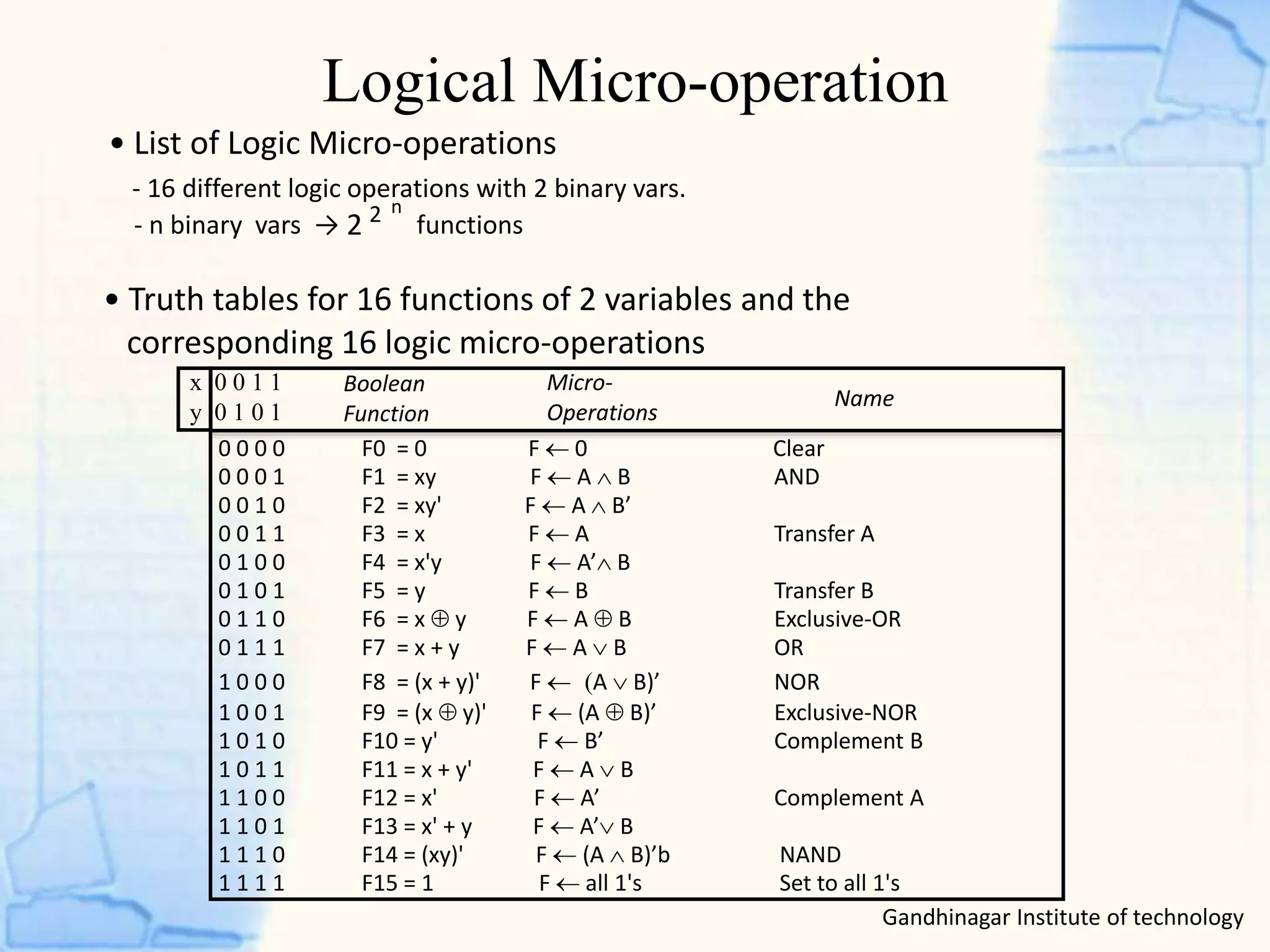
• List of Logic Micro-operations
- 16 different logic operations with 2 binary vars.
- n binary vars → functions
• Truth tables for 16 functions of 2 variables and the
corresponding 16 logic micro-operations
Boolean
Function
Micro-
Operations
Name
x 0 0 1 1
y 0 1 0 1
0 0 0 0 F0 = 0 F  0 Clear
0 0 0 1 F1 = xy F  A  B AND
0 0 1 0 F2 = xy' F  A  B’
0 0 1 1 F3 = x F  A Transfer A
0 1 0 0 F4 = x'y F  A’ B
0 1 0 1 F5 = y F  B Transfer B
0 1 1 0 F6 = x  y F  A  B Exclusive-OR
0 1 1 1 F7 = x + y F  A  B OR
1 0 0 0 F8 = (x + y)' F  A  B)’ NOR
1 0 0 1 F9 = (x  y)' F  (A  B)’ Exclusive-NOR
1 0 1 0 F10 = y' F  B’ Complement B
1 0 1 1 F11 = x + y' F  A  B
1 1 0 0 F12 = x' F  A’ Complement A
1 1 0 1 F13 = x' + y F  A’ B
1 1 1 0 F14 = (xy)' F  (A  B)’b NAND
1 1 1 1 F15 = 1 F  all 1's Set to all 1's
2
n2
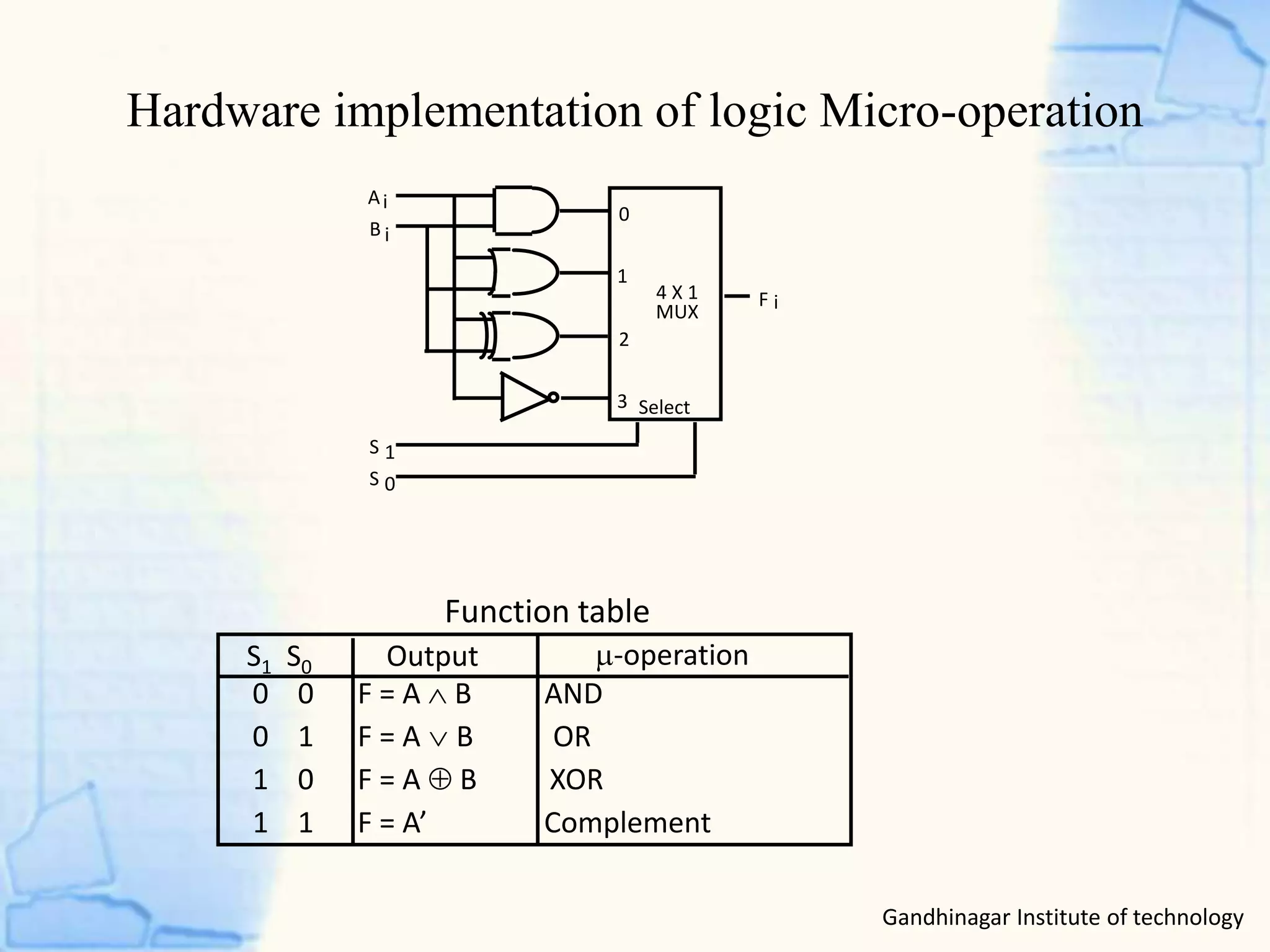
Hardware implementation of logic Micro-operation
Gandhinagar Institute of technology
0 0 F = A  B AND
0 1 F = AB OR
1 0 F = A  B XOR
1 1 F = A’ Complement
S1 S0 Output -operation
Function table
B
A
S
S
F
1
0
i
i
i
0
1
2
3
4 X 1
MUX
Select
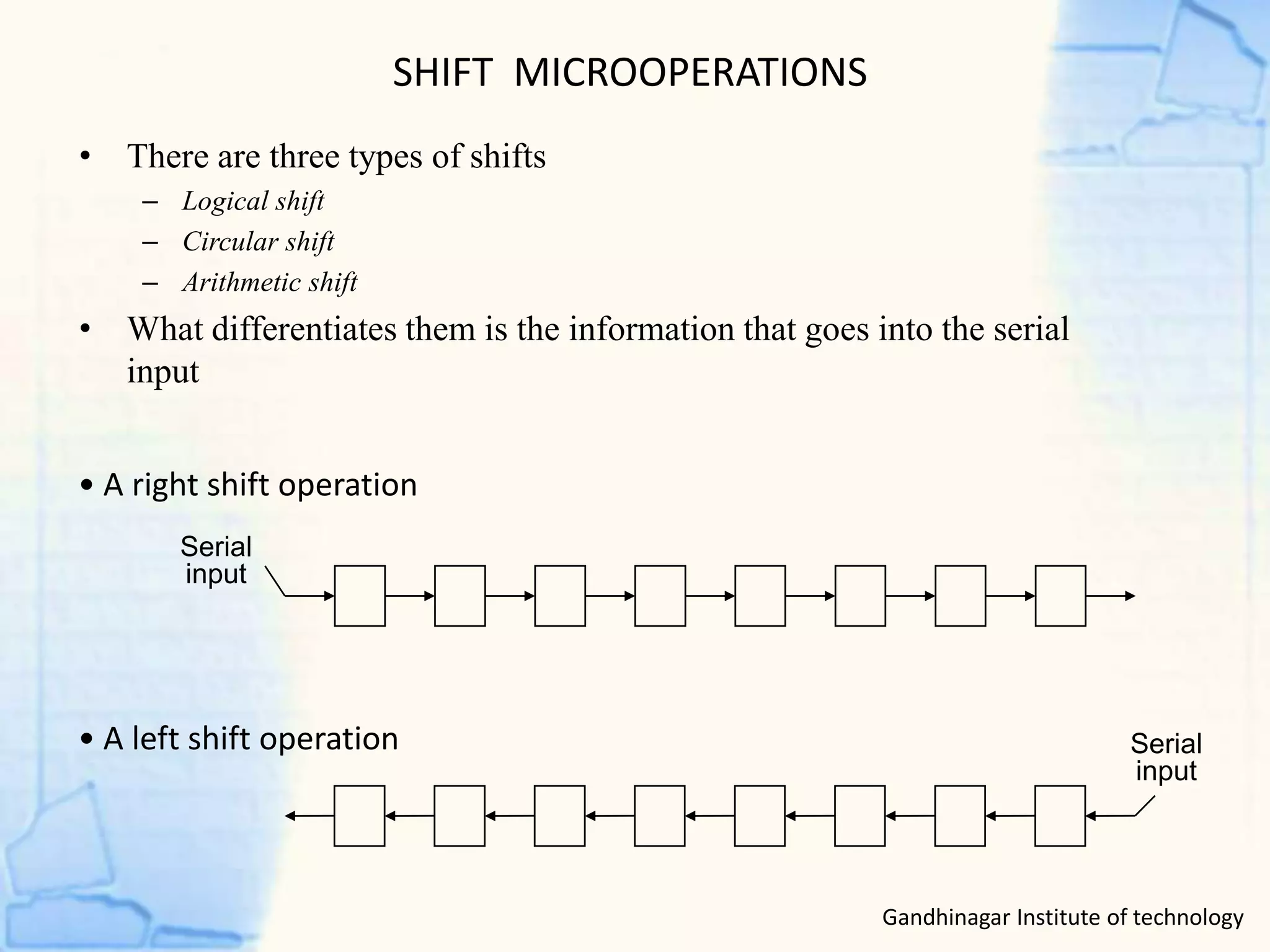
SHIFT MICROOPERATIONS
• There are three types of shifts
– Logical shift
– Circular shift
– Arithmetic shift
• What differentiates them is the information that goes into the serial
input
Serial
input
• A right shift operation
• A left shift operation Serial
input
Gandhinagar Institute of technology
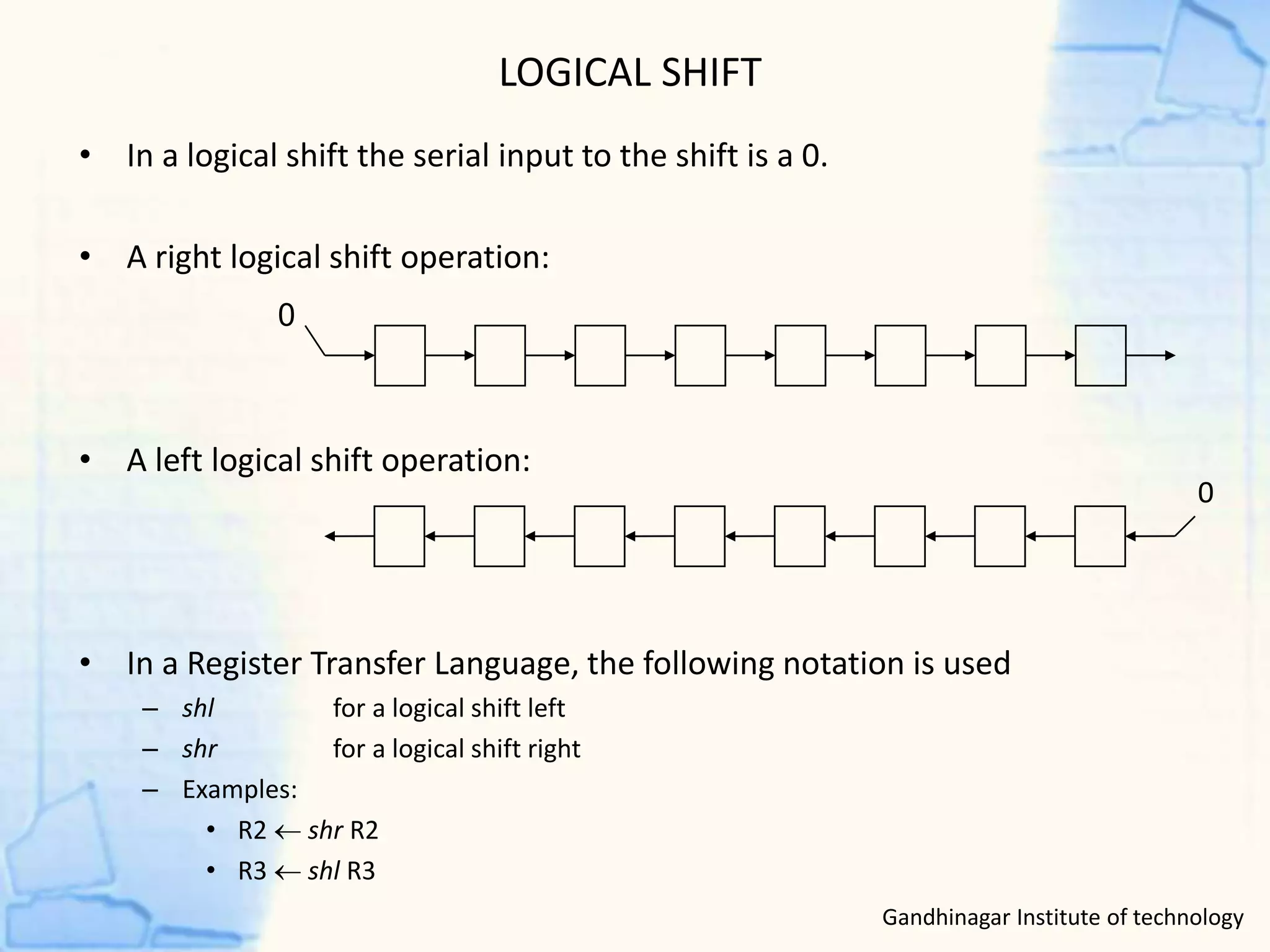
LOGICAL SHIFT
• In a logical shift the serial input to the shift is a 0.
• A right logical shift operation:
• A left logical shift operation:
• In a Register Transfer Language, the following notation is used
– shl for a logical shift left
– shr for a logical shift right
– Examples:
• R2  shr R2
• R3  shl R3
0
0
Gandhinagar Institute of technology
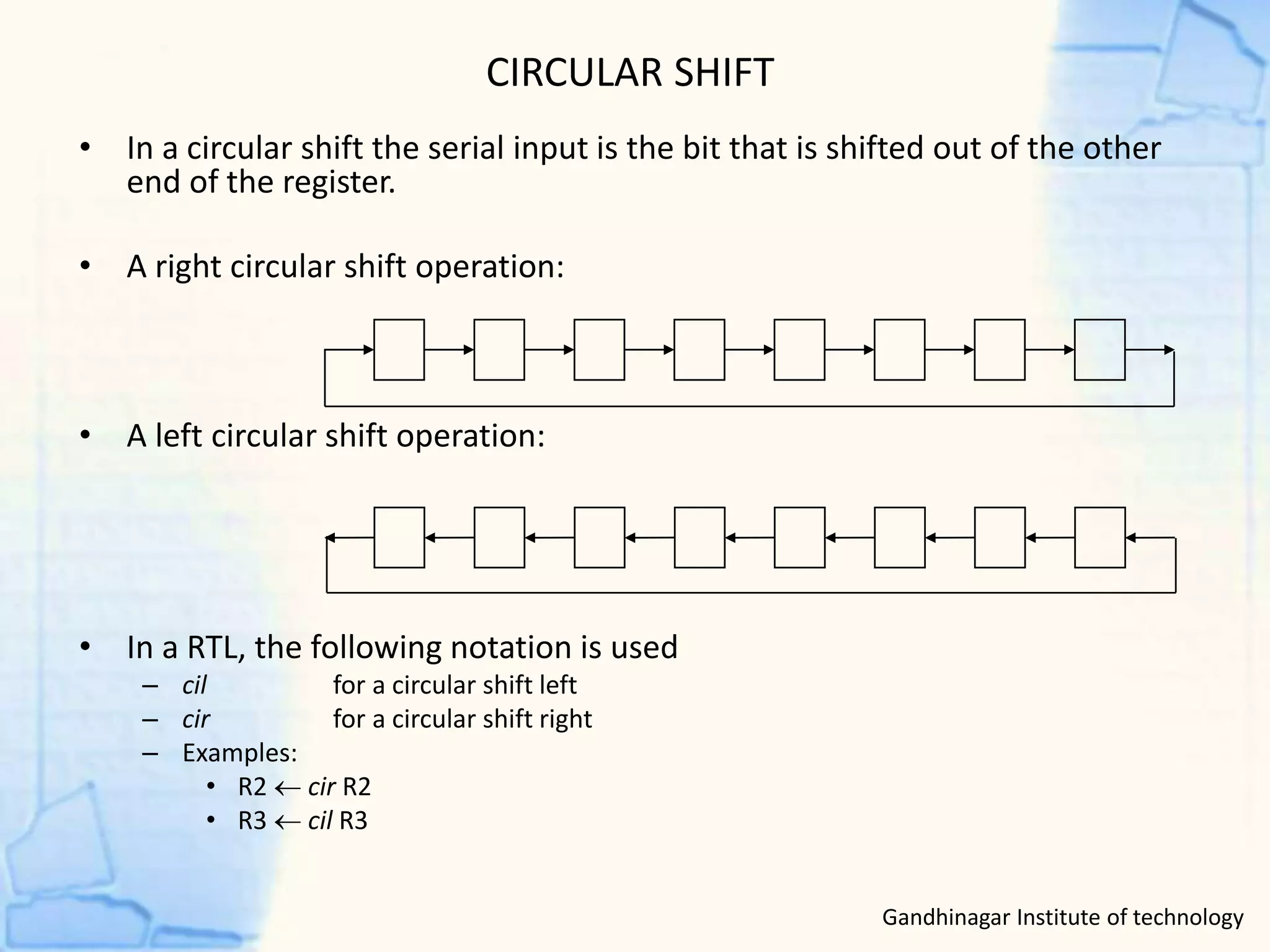
CIRCULAR SHIFT
• In a circular shift the serial input is the bit that is shifted out of the other
end of the register.
• A right circular shift operation:
• A left circular shift operation:
• In a RTL, the following notation is used
– cil for a circular shift left
– cir for a circular shift right
– Examples:
• R2  cir R2
• R3  cil R3
Gandhinagar Institute of technology
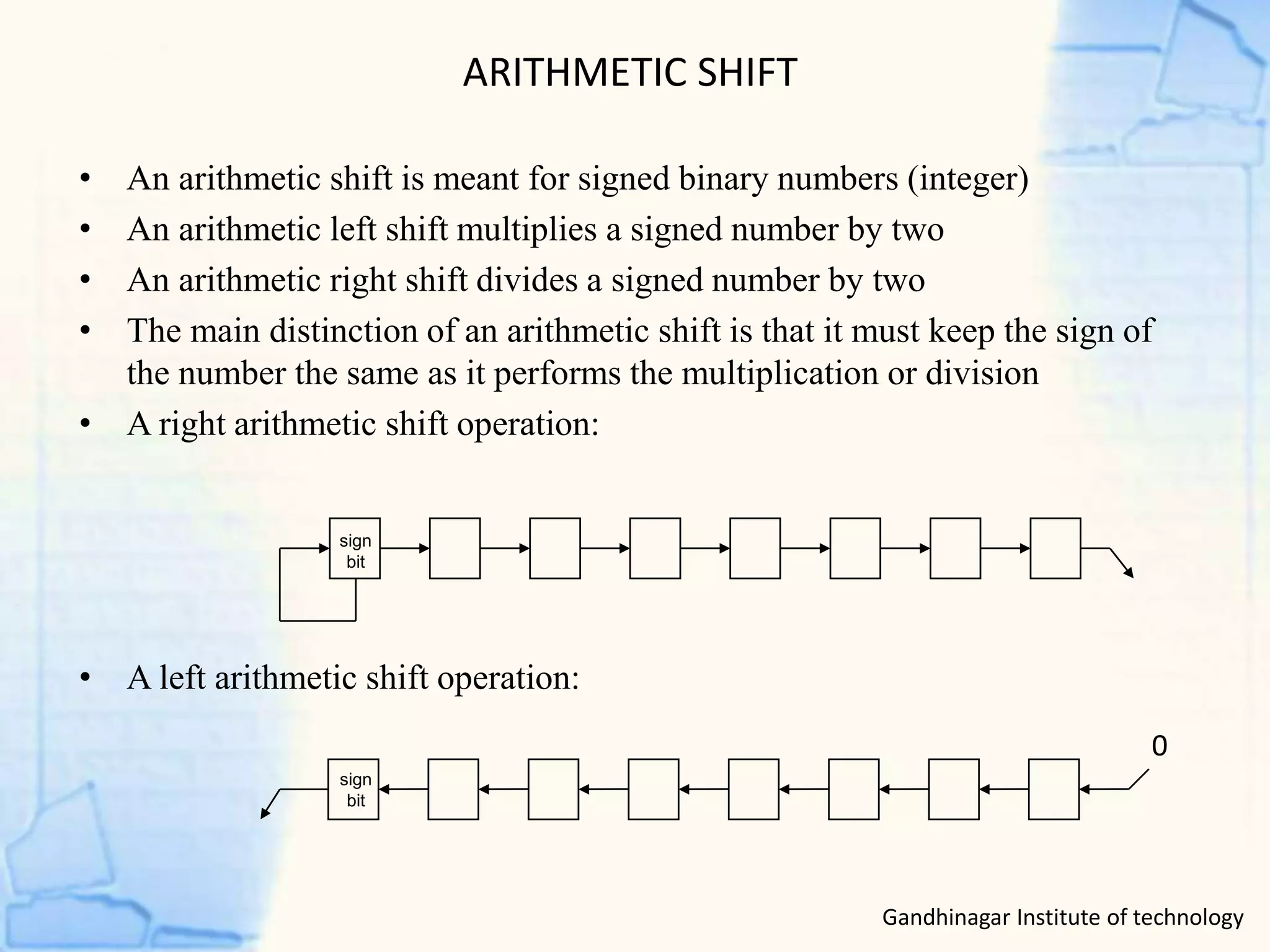
ARITHMETIC SHIFT
• An arithmetic shift is meant for signed binary numbers (integer)
• An arithmetic left shift multiplies a signed number by two
• An arithmetic right shift divides a signed number by two
• The main distinction of an arithmetic shift is that it must keep the sign of
the number the same as it performs the multiplication or division
• A right arithmetic shift operation:
• A left arithmetic shift operation:
0
sign
bit
sign
bit
Gandhinagar Institute of technology
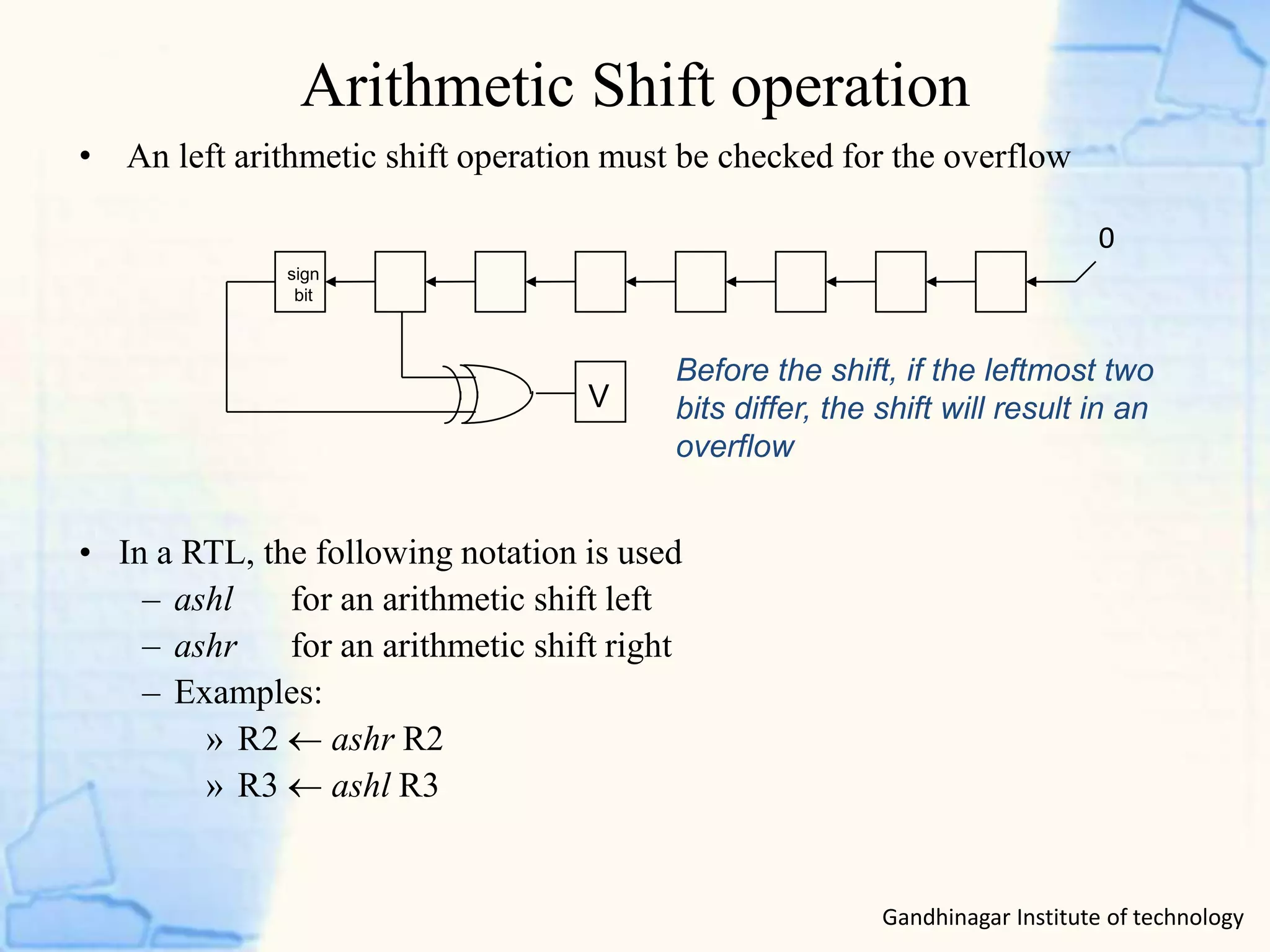
Arithmetic Shift operation
Gandhinagar Institute of technology
• An left arithmetic shift operation must be checked for the overflow
0
V
Before the shift, if the leftmost two
bits differ, the shift will result in an
overflow
• In a RTL, the following notation is used
– ashl for an arithmetic shift left
– ashr for an arithmetic shift right
– Examples:
» R2  ashr R2
» R3  ashl R3
sign
bit
Register transfer language
• A specific notation used to specify the digital system is called
register transfer language.
• For any function of the computer, the register transfer
language can be used to describe the (sequence of)
micro-operations
• Register transfer language
– A symbolic language
– A convenient tool for describing the internal organization of digital
computers
– Can also be used to facilitate the design process of digital systems
Gandhinagar Institute of technology
Register Transfer
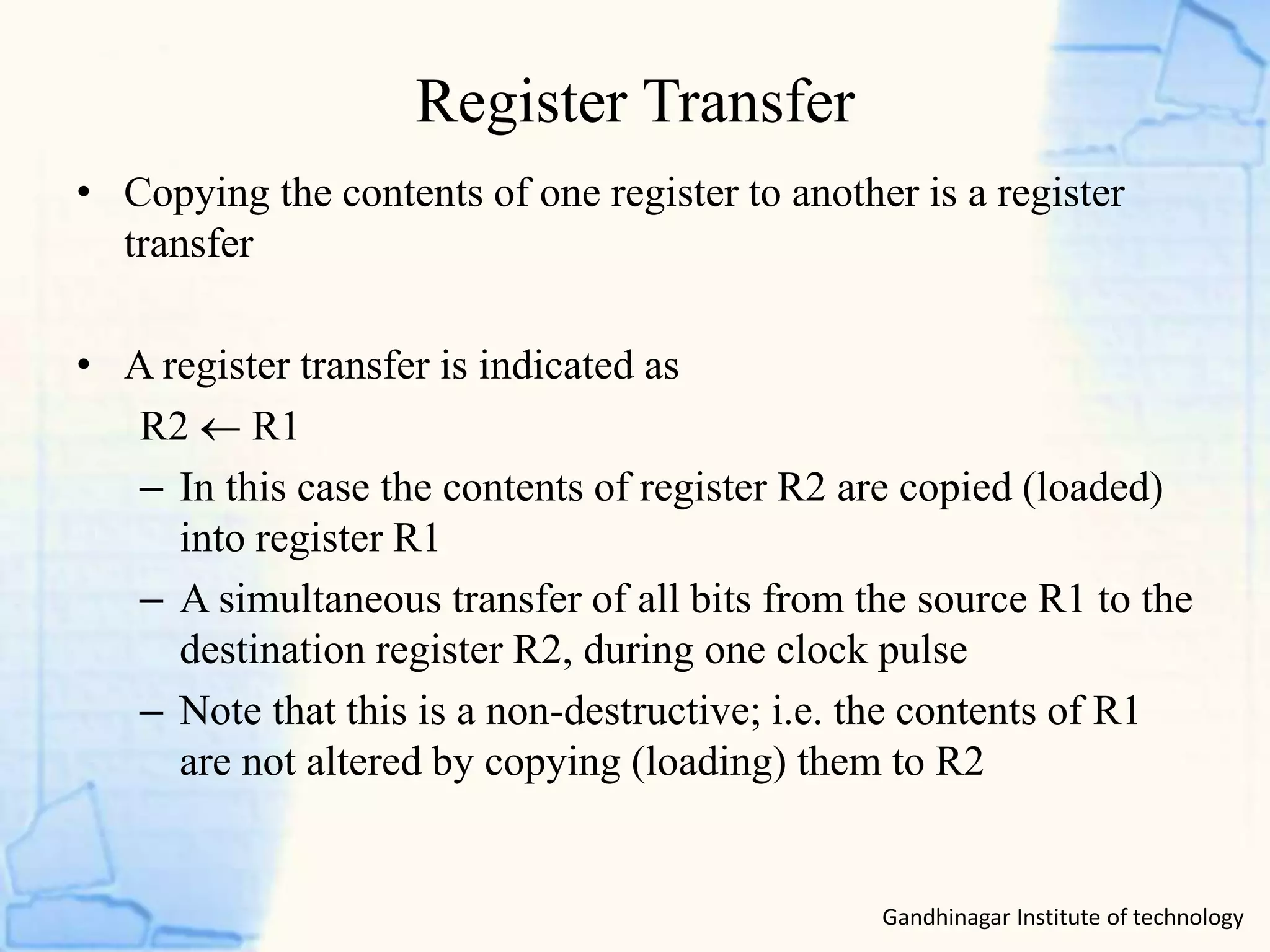
• Copying the contents of one register to another is a register
transfer
• A register transfer is indicated as
R2  R1
– In this case the contents of register R2 are copied (loaded)
into register R1
– A simultaneous transfer of all bits from the source R1 to the
destination register R2, during one clock pulse
– Note that this is a non-destructive; i.e. the contents of R1
are not altered by copying (loading) them to R2
Gandhinagar Institute of technology
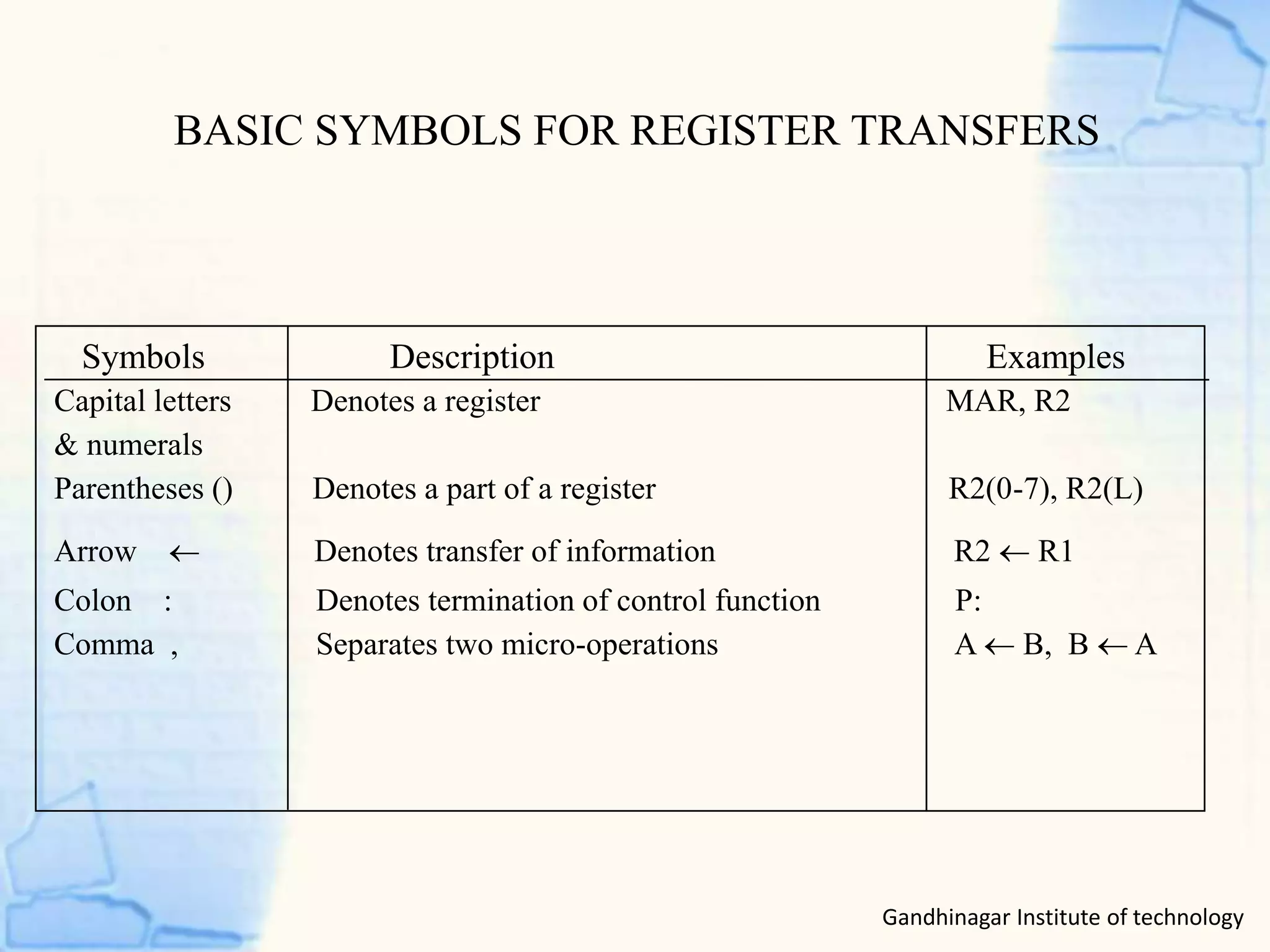
BASIC SYMBOLS FOR REGISTER TRANSFERS
Capital letters Denotes a register MAR, R2
& numerals
Parentheses () Denotes a part of a register R2(0-7), R2(L)
Arrow  Denotes transfer of information R2  R1
Colon : Denotes termination of control function P:
Comma , Separates two micro-operations A  B, B  A
Symbols Description Examples
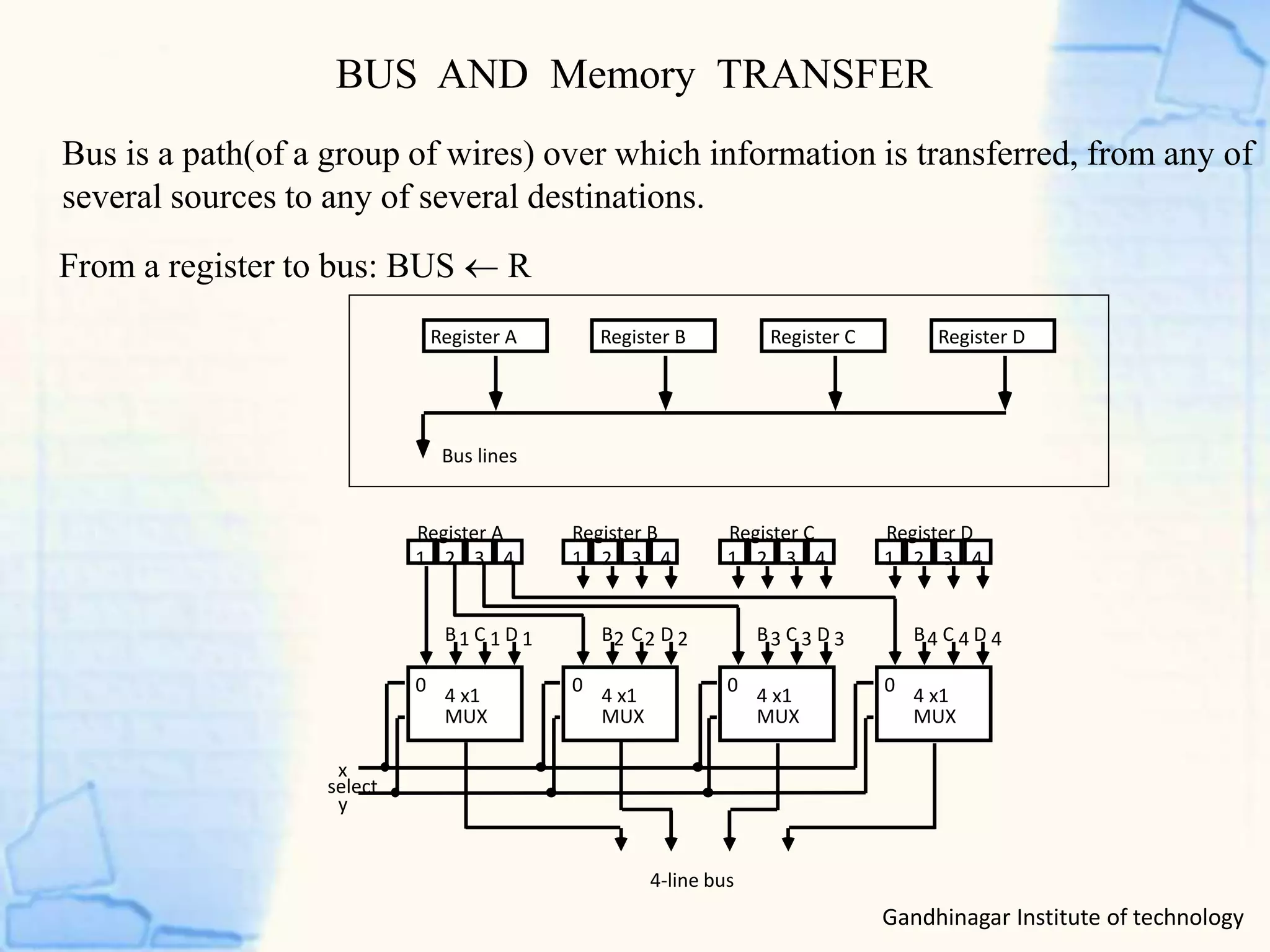
BUS AND Memory TRANSFER
Bus is a path(of a group of wires) over which information is transferred, from any of
several sources to any of several destinations.
From a register to bus: BUS  R
1 2 3 4 1 2 3 4 1 2 3 4 1 2 3 4
Register A Register B Register C Register D
B C D1 1 1
4 x1
MUX
B C D2 2 2
4 x1
MUX
B C D3 3 3
4 x1
MUX
B C D4 4 4
4 x1
MUX
4-line bus
x
y
select
0 0 0 0
Register A Register B Register C Register D
Bus lines
Gandhinagar Institute of technology
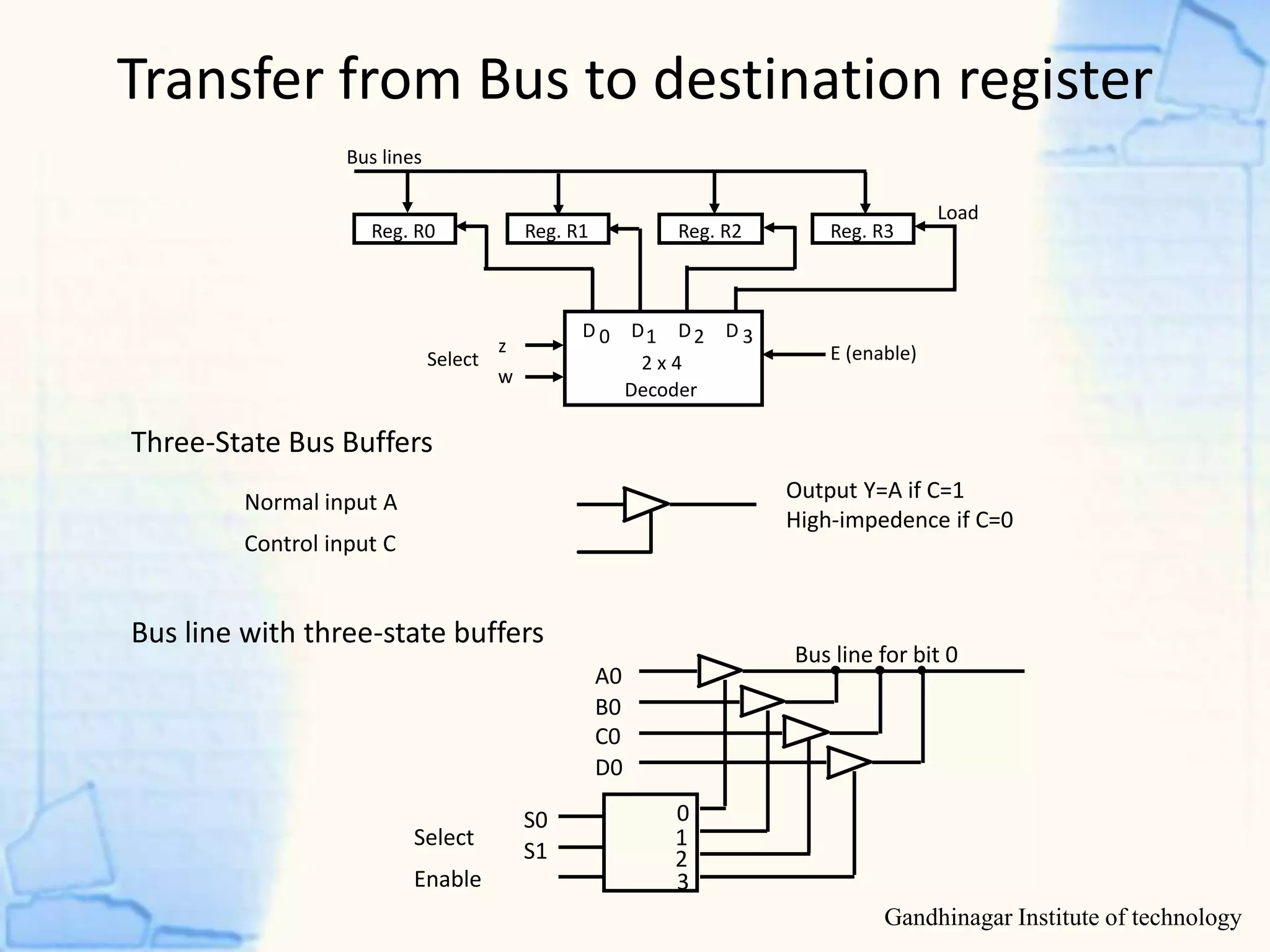
Transfer from Bus to destination register
Gandhinagar Institute of technology
Three-State Bus Buffers
Bus line with three-state buffers
Reg. R0 Reg. R1 Reg. R2 Reg. R3
Bus lines
2 x 4
Decoder
Load
D 0 D1 D2 D 3z
w
Select E (enable)
Output Y=A if C=1
High-impedence if C=0
Normal input A
Control input C
Select
Enable
0
1
2
3
S0
S1
A0
B0
C0
D0
Bus line for bit 0
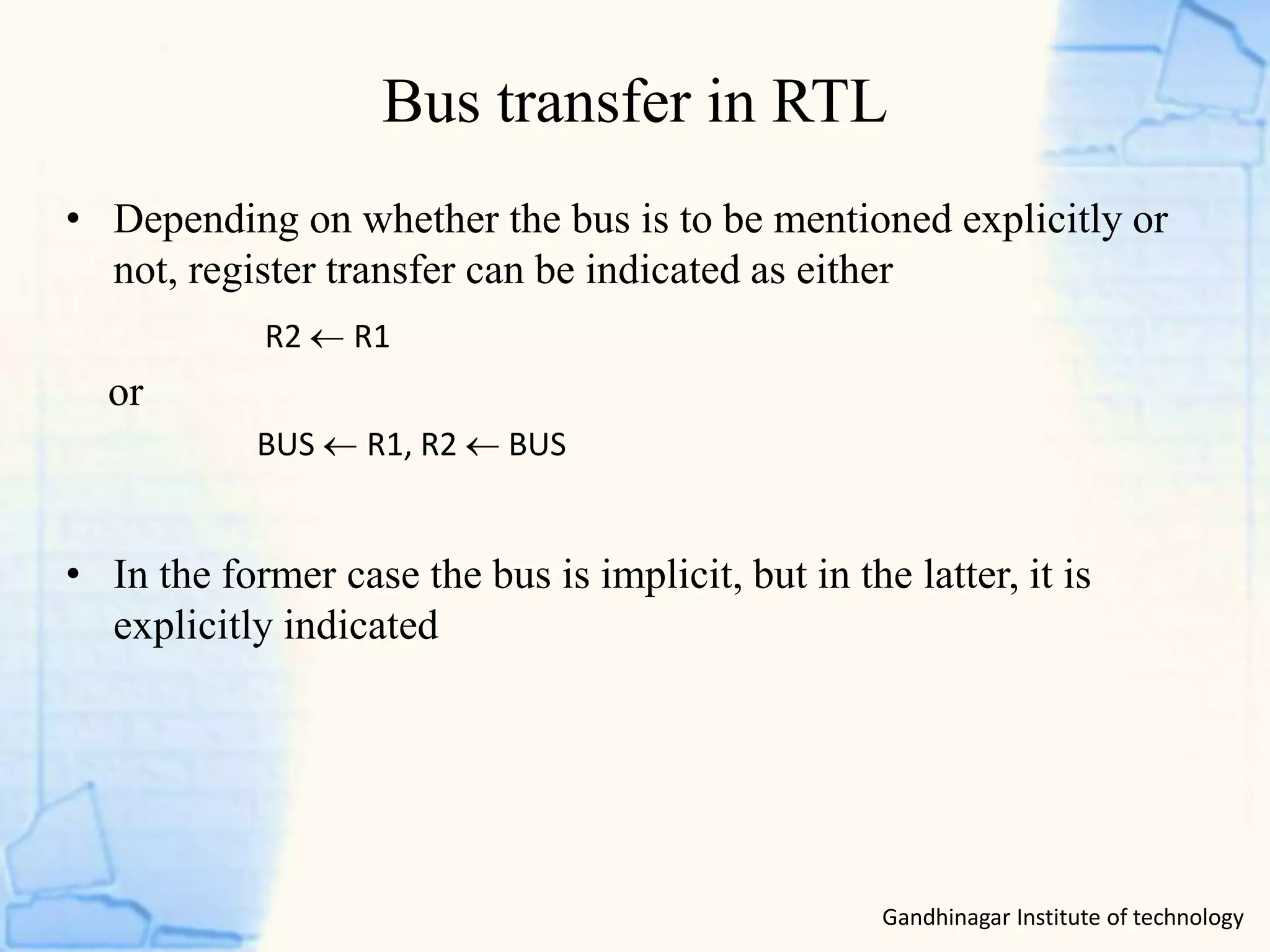
Bus transfer in RTL
Gandhinagar Institute of technology
• Depending on whether the bus is to be mentioned explicitly or
not, register transfer can be indicated as either
or
• In the former case the bus is implicit, but in the latter, it is
explicitly indicated
R2 R1
BUS R1, R2  BUS
Memory Transfer
Gandhinagar Institute of technology
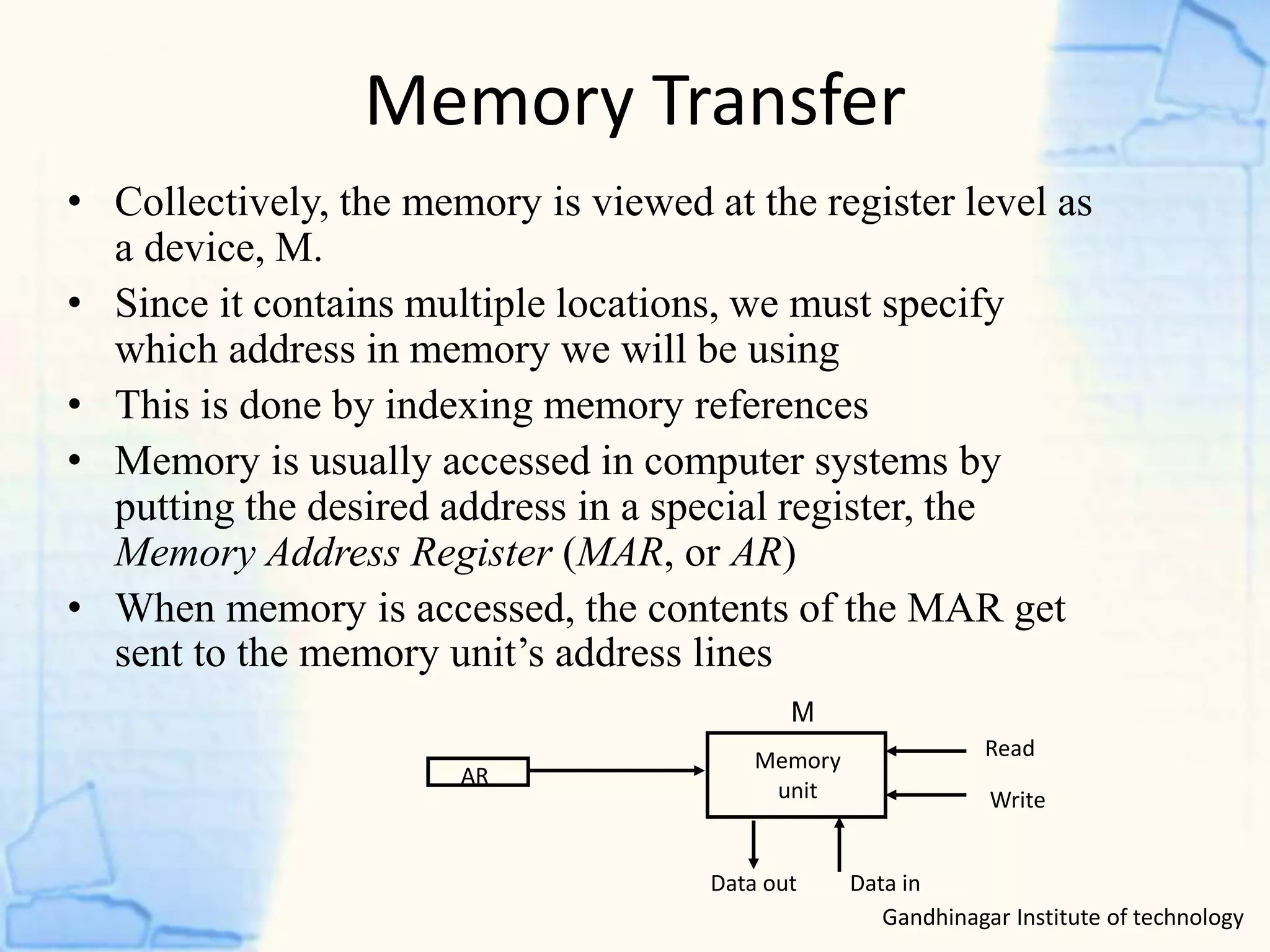
• Collectively, the memory is viewed at the register level as
a device, M.
• Since it contains multiple locations, we must specify
which address in memory we will be using
• This is done by indexing memory references
• Memory is usually accessed in computer systems by
putting the desired address in a special register, the
Memory Address Register (MAR, or AR)
• When memory is accessed, the contents of the MAR get
sent to the memory unit’s address lines
AR
Memory
unit
Read
Write
Data inData out
M
Register transfer and micro-operation

Register transfer and micro-operation

  • 1.
    GANDHINAGAR INSTITUTE OF TECHNOLOGY Departmentof Computer Engineering Register Transfer and Micro operation Student Name(Enroll No): Jay Panchal(130120107055) Kajal Panchal(130120107056) Nikhil Pandit(130120107057) Name of Faculty: Prof Raxit Jani Computer Organization(2140707)
  • 2.
    Register Transfer andMicro operations • Arithmetic Micro-operations • Logic Micro-operations • Shift Micro-operations • Arithmetic Logic Shift Unit • Register Transfer Language • Register Transfer • Bus and Memory Transfers Gandhinagar Institute of technology
  • 3.
    Micro-operations • Simple digitalsystems are frequently characterized in terms of – the registers they contain, and – the operations that they perform. • The operations on the data in registers are called micro- operations. • The functions built into registers are examples of micro- operations – Shift – Load – Clear – Increment ...etc. Gandhinagar Institute of technology
  • 4.
    Micro-operations Gandhinagar Institute oftechnology • Computer system micro-operations are of four types: - Arithmetic micro-operations - Logic micro-operations - Shift micro-operations - Register transfer micro-operations
  • 5.
    Summary of TypicalArithmetic Micro-Operations R3  R1 + R2 Contents of R1 plus R2 transferred to R3 R3  R1 - R2 Contents of R1 minus R2 transferred to R3 R2  R2’ Complement the contents of R2 R2  R2’+ 1 2's complement the contents of R2 (negate) R3  R1 + R2’+ 1 subtraction R1  R1 + 1 Increment R1  R1 - 1 Decrement • The basic arithmetic micro-operations are – Addition – Subtraction – Increment – Decrement • The additional arithmetic micro-operations are – Add with carry – Subtract with borrow – Transfer/Load – etc. … Arithmetic Micro-operations
  • 6.
    Arithmetic circuit S1 S0Cin Y Output Microoperation 0 0 0 B D = A + B Add 0 0 1 B D = A + B + 1 Add with carry 0 1 0 B’ D = A + B’ Subtract with borrow 0 1 1 B’ D = A + B’+ 1 Subtract 1 0 0 0 D = A Transfer A 1 0 1 0 D = A + 1 Increment A 1 1 0 1 D = A - 1 Decrement A 1 1 1 1 D = A Transfer A Gandhinagar Institute of technology
  • 7.
    Logical micro-operations Gandhinagar Instituteof technology • Specify binary operations on the strings of bits in registers – Logic micro-operations are bit-wise operations, i.e., they work on the individual bits of data • There are, in principle, 16 different logic functions that can be defined over two binary input variables • However, most systems only implement four of these – AND (), OR (), XOR (), Complement/NOT • The others can be created from combination of these 0 0 0 0 0 … 1 1 1 0 1 0 0 0 … 1 1 1 1 0 0 0 1 … 0 1 1 1 1 0 1 0 … 1 0 1 A B F0 F1 F2 … F13 F14 F15
  • 8.
    Logical Micro-operation Gandhinagar Instituteof technology • List of Logic Micro-operations - 16 different logic operations with 2 binary vars. - n binary vars → functions • Truth tables for 16 functions of 2 variables and the corresponding 16 logic micro-operations Boolean Function Micro- Operations Name x 0 0 1 1 y 0 1 0 1 0 0 0 0 F0 = 0 F  0 Clear 0 0 0 1 F1 = xy F  A  B AND 0 0 1 0 F2 = xy' F  A  B’ 0 0 1 1 F3 = x F  A Transfer A 0 1 0 0 F4 = x'y F  A’ B 0 1 0 1 F5 = y F  B Transfer B 0 1 1 0 F6 = x  y F  A  B Exclusive-OR 0 1 1 1 F7 = x + y F  A  B OR 1 0 0 0 F8 = (x + y)' F  A  B)’ NOR 1 0 0 1 F9 = (x  y)' F  (A  B)’ Exclusive-NOR 1 0 1 0 F10 = y' F  B’ Complement B 1 0 1 1 F11 = x + y' F  A  B 1 1 0 0 F12 = x' F  A’ Complement A 1 1 0 1 F13 = x' + y F  A’ B 1 1 1 0 F14 = (xy)' F  (A  B)’b NAND 1 1 1 1 F15 = 1 F  all 1's Set to all 1's 2 n2
  • 9.
    Hardware implementation oflogic Micro-operation Gandhinagar Institute of technology 0 0 F = A  B AND 0 1 F = AB OR 1 0 F = A  B XOR 1 1 F = A’ Complement S1 S0 Output -operation Function table B A S S F 1 0 i i i 0 1 2 3 4 X 1 MUX Select
  • 10.
    SHIFT MICROOPERATIONS • Thereare three types of shifts – Logical shift – Circular shift – Arithmetic shift • What differentiates them is the information that goes into the serial input Serial input • A right shift operation • A left shift operation Serial input Gandhinagar Institute of technology
  • 11.
    LOGICAL SHIFT • Ina logical shift the serial input to the shift is a 0. • A right logical shift operation: • A left logical shift operation: • In a Register Transfer Language, the following notation is used – shl for a logical shift left – shr for a logical shift right – Examples: • R2  shr R2 • R3  shl R3 0 0 Gandhinagar Institute of technology
  • 12.
    CIRCULAR SHIFT • Ina circular shift the serial input is the bit that is shifted out of the other end of the register. • A right circular shift operation: • A left circular shift operation: • In a RTL, the following notation is used – cil for a circular shift left – cir for a circular shift right – Examples: • R2  cir R2 • R3  cil R3 Gandhinagar Institute of technology
  • 13.
    ARITHMETIC SHIFT • Anarithmetic shift is meant for signed binary numbers (integer) • An arithmetic left shift multiplies a signed number by two • An arithmetic right shift divides a signed number by two • The main distinction of an arithmetic shift is that it must keep the sign of the number the same as it performs the multiplication or division • A right arithmetic shift operation: • A left arithmetic shift operation: 0 sign bit sign bit Gandhinagar Institute of technology
  • 14.
    Arithmetic Shift operation GandhinagarInstitute of technology • An left arithmetic shift operation must be checked for the overflow 0 V Before the shift, if the leftmost two bits differ, the shift will result in an overflow • In a RTL, the following notation is used – ashl for an arithmetic shift left – ashr for an arithmetic shift right – Examples: » R2  ashr R2 » R3  ashl R3 sign bit
  • 15.
    Register transfer language •A specific notation used to specify the digital system is called register transfer language. • For any function of the computer, the register transfer language can be used to describe the (sequence of) micro-operations • Register transfer language – A symbolic language – A convenient tool for describing the internal organization of digital computers – Can also be used to facilitate the design process of digital systems Gandhinagar Institute of technology
  • 16.
    Register Transfer • Copyingthe contents of one register to another is a register transfer • A register transfer is indicated as R2  R1 – In this case the contents of register R2 are copied (loaded) into register R1 – A simultaneous transfer of all bits from the source R1 to the destination register R2, during one clock pulse – Note that this is a non-destructive; i.e. the contents of R1 are not altered by copying (loading) them to R2 Gandhinagar Institute of technology
  • 17.
    Gandhinagar Institute oftechnology BASIC SYMBOLS FOR REGISTER TRANSFERS Capital letters Denotes a register MAR, R2 & numerals Parentheses () Denotes a part of a register R2(0-7), R2(L) Arrow  Denotes transfer of information R2  R1 Colon : Denotes termination of control function P: Comma , Separates two micro-operations A  B, B  A Symbols Description Examples
  • 18.
    BUS AND MemoryTRANSFER Bus is a path(of a group of wires) over which information is transferred, from any of several sources to any of several destinations. From a register to bus: BUS  R 1 2 3 4 1 2 3 4 1 2 3 4 1 2 3 4 Register A Register B Register C Register D B C D1 1 1 4 x1 MUX B C D2 2 2 4 x1 MUX B C D3 3 3 4 x1 MUX B C D4 4 4 4 x1 MUX 4-line bus x y select 0 0 0 0 Register A Register B Register C Register D Bus lines Gandhinagar Institute of technology
  • 19.
    Transfer from Busto destination register Gandhinagar Institute of technology Three-State Bus Buffers Bus line with three-state buffers Reg. R0 Reg. R1 Reg. R2 Reg. R3 Bus lines 2 x 4 Decoder Load D 0 D1 D2 D 3z w Select E (enable) Output Y=A if C=1 High-impedence if C=0 Normal input A Control input C Select Enable 0 1 2 3 S0 S1 A0 B0 C0 D0 Bus line for bit 0
  • 20.
    Bus transfer inRTL Gandhinagar Institute of technology • Depending on whether the bus is to be mentioned explicitly or not, register transfer can be indicated as either or • In the former case the bus is implicit, but in the latter, it is explicitly indicated R2 R1 BUS R1, R2  BUS
  • 21.
    Memory Transfer Gandhinagar Instituteof technology • Collectively, the memory is viewed at the register level as a device, M. • Since it contains multiple locations, we must specify which address in memory we will be using • This is done by indexing memory references • Memory is usually accessed in computer systems by putting the desired address in a special register, the Memory Address Register (MAR, or AR) • When memory is accessed, the contents of the MAR get sent to the memory unit’s address lines AR Memory unit Read Write Data inData out M