CSE 211: Computer Organization 1
Register Transfer and Microoperations
Chapter 4:
9/7/2020
CSE 211: Computer Organization 2
contents
• Register Transfer Language
• Register Transfer
• Bus and Memory Transfers
• Arithmetic Microoperations
• Logic Microoperations
• Shift Microoperations
• Arithmetic Logic Shift Unit
9/7/2020
CSE 211: Computer Organization 3
4-1 Register Transfer Language
(RTL)
• Digital System: An interconnection of hardware
modules that do a certain task on the
information.
• Registers + Operations performed on the data
stored in them = Digital Module
• Modules are interconnected with common data
and control paths to form a digital computer
system
9/7/2020
CSE 211: Computer Organization 4
4-1 Register Transfer Language
cont.
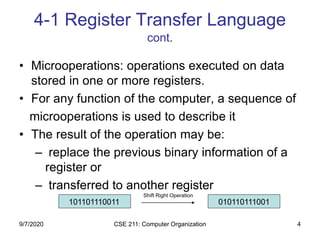
• Microoperations: operations executed on data
stored in one or more registers.
• For any function of the computer, a sequence of
microoperations is used to describe it
• The result of the operation may be:
– replace the previous binary information of a
register or
– transferred to another register
101101110011 010110111001
Shift Right Operation
9/7/2020
CSE 211: Computer Organization 5
4-1 Register Transfer Language
cont.
• The internal hardware organization of a
digital computer is defined by specifying:
• The set of registers it contains and their function
• The sequence of microoperations performed on
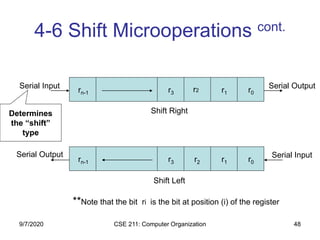
the binary information stored in the registers
• The control that initiates the sequence of
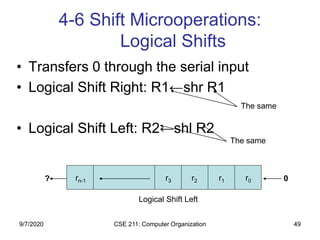
microoperations
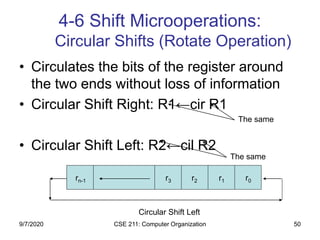
• Registers + Microoperations Hardware + Control
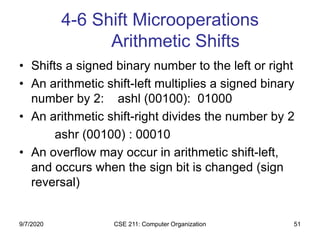
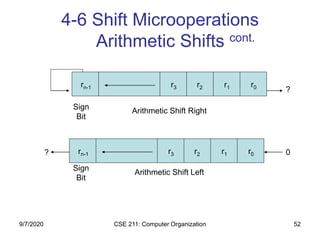
Functions = Digital Computer
9/7/2020
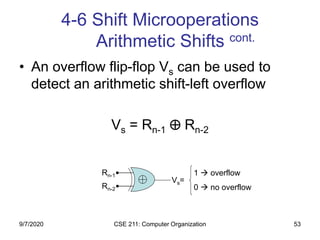
CSE 211: Computer Organization 6
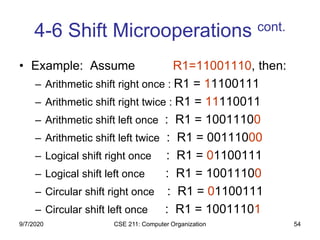
4-1 Register Transfer Language
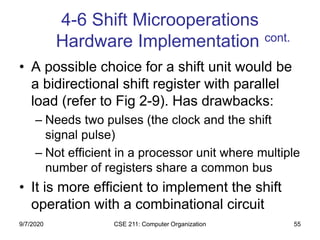
cont.
• Register Transfer Language (RTL) : a
symbolic notation to describe the microoperation
transfers among registers
Next steps:
– Define symbols for various types of microoperations,
– Describe the hardware that implements these
microoperations
9/7/2020
CSE 211: Computer Organization 7
4-2 Register Transfer (our first
microoperation)
• Computer registers are designated by
capital letters (sometimes followed by
numerals) to denote the function of the
register
• R1: processor register
• MAR: Memory Address Register (holds an address
for a memory unit)
• PC: Program Counter
• IR: Instruction Register
• SR: Status Register
9/7/2020
CSE 211: Computer Organization 8
4-2 Register Transfer cont.
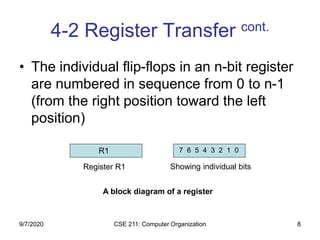
• The individual flip-flops in an n-bit register
are numbered in sequence from 0 to n-1
(from the right position toward the left
position)
R1 7 6 5 4 3 2 1 0
A block diagram of a register
Register R1 Showing individual bits
9/7/2020
CSE 211: Computer Organization 9
4-2 Register Transfer cont.
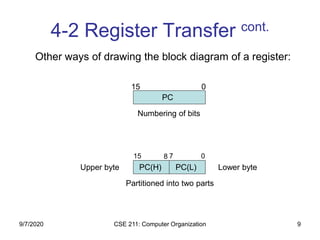
PC
Numbering of bits
Partitioned into two parts
15 0
PC(H) PC(L)
07815
Lower byteUpper byte
Other ways of drawing the block diagram of a register:
9/7/2020
CSE 211: Computer Organization 10
4-2 Register Transfer cont.
• Information transfer from one register to another is
described by a replacement operator: R2 ← R1
• This statement denotes a transfer of the content of
register R1 into register R2
• The transfer happens in one clock cycle
• The content of the R1 (source) does not change
• The content of the R2 (destination) will be lost and
replaced by the new data transferred from R1
• We are assuming that the circuits are available from the
outputs of the source register to the inputs of the
destination register, and that the destination register has
a parallel load capability
9/7/2020
CSE 211: Computer Organization 11
4-2 Register Transfer cont.
• Conditional transfer occurs only under a
control condition
• Representation of a (conditional) transfer
P: R2 ← R1
• A binary condition (P equals to 0 or 1)
determines when the transfer occurs
• The content of R1 is transferred into R2
only if P is 1
9/7/2020
CSE 211: Computer Organization 12
4-2 Register Transfer cont.
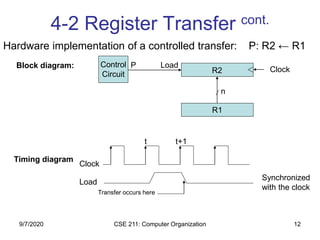
n
Clock
R1
R2
Control
Circuit
Load
t t+1
Clock
Load
Transfer occurs here
Synchronized
with the clock
P
Hardware implementation of a controlled transfer: P: R2 ← R1
Block diagram:
Timing diagram
9/7/2020
CSE 211: Computer Organization 13
4-2 Register Transfer cont.
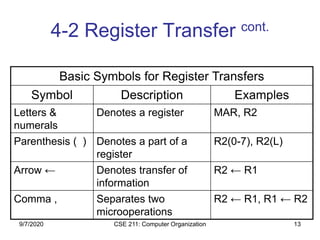
Basic Symbols for Register Transfers
Symbol Description Examples
Letters &
numerals
Denotes a register MAR, R2
Parenthesis ( ) Denotes a part of a
register
R2(0-7), R2(L)
Arrow ← Denotes transfer of
information
R2 ← R1
Comma , Separates two
microoperations
R2 ← R1, R1 ← R2
9/7/2020
CSE 211: Computer Organization 14
4-3 Bus and Memory Transfers
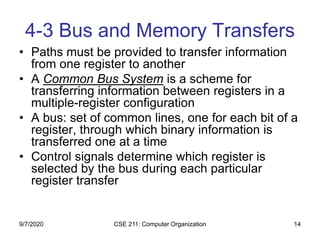
• Paths must be provided to transfer information
from one register to another
• A Common Bus System is a scheme for
transferring information between registers in a
multiple-register configuration
• A bus: set of common lines, one for each bit of a
register, through which binary information is
transferred one at a time
• Control signals determine which register is
selected by the bus during each particular
register transfer
9/7/2020
CSE 211: Computer Organization 15
4-3 Bus and Memory Transfers
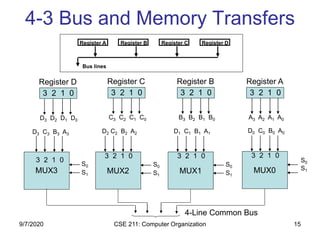
3 2 1 0
Register D
D3 D2 D1 D0
3 2 1 0
Register C
C3 C2 C1 C0
3 2 1 0
Register B
B3 B2 B1 B0
3 2 1 0
Register A
A3 A2 A1 A0
D3 C3 B3 A3
S0
S1
MUX3
3 2 1 0
D2 C2 B2 A2
S0
S1
MUX2
3 2 1 0
D1 C1 B1 A1
S0
S1
MUX1
3 2 1 0
D0 C0 B0 A0
S0
S1MUX0
3 2 1 0
4-Line Common Bus
Register A Register B Register C Register D
Bus lines
9/7/2020
CSE 211: Computer Organization 16
4-3 Bus and Memory Transfers
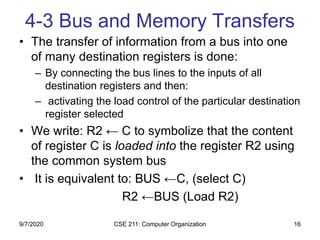
• The transfer of information from a bus into one
of many destination registers is done:
– By connecting the bus lines to the inputs of all
destination registers and then:
– activating the load control of the particular destination
register selected
• We write: R2 ← C to symbolize that the content
of register C is loaded into the register R2 using
the common system bus
• It is equivalent to: BUS ←C, (select C)
R2 ←BUS (Load R2)
9/7/2020
CSE 211: Computer Organization 17
4-3 Bus and Memory Transfers:
Three-State Bus Buffers
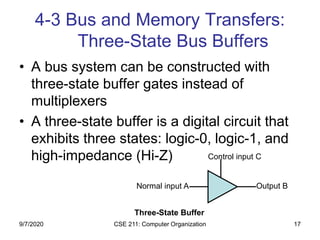
• A bus system can be constructed with
three-state buffer gates instead of
multiplexers
• A three-state buffer is a digital circuit that
exhibits three states: logic-0, logic-1, and
high-impedance (Hi-Z)
Normal input A
Control input C
Three-State Buffer
Output B
9/7/2020
CSE 211: Computer Organization 18
4-3 Bus and Memory Transfers:
Three-State Bus Buffers cont.
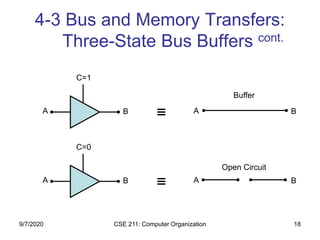
A
C=1
B A B
A
C=0
B A B
Buffer
Open Circuit
9/7/2020
CSE 211: Computer Organization 19
4-3 Bus and Memory Transfers:
Three-State Bus Buffers cont.
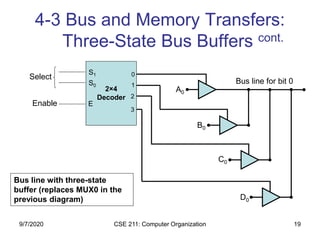
2×4
Decoder
Select
Enable
0
1
2
3
S1
S0
E
Bus line for bit 0
A0
B0
C0
D0
Bus line with three-state
buffer (replaces MUX0 in the
previous diagram)
9/7/2020
CSE 211: Computer Organization 20
4-3 Bus and Memory Transfers:
Memory Transfer
• Memory read : Transfer from memory
• Memory write : Transfer to memory
• Data being read or wrote is called a memory
word (called M)
• It is necessary to specify the address of M when
writing /reading memory
• This is done by enclosing the address in square
brackets following the letter M
• Example: M[0016] : the memory contents at
address 0x0016
9/7/2020
CSE 211: Computer Organization 21
4-3 Bus and Memory Transfers:
Memory Transfer cont.
• Assume that the address of a memory unit
is stored in a register called the Address
Register AR
• Lets represent a Data Register with DR,
then:
• Read: DR ← M[AR]
• Write: M[AR] ← DR
9/7/2020
CSE 211: Computer Organization 22
4-3 Bus and Memory Transfers:
Memory Transfer cont.
AR
x12
x0C
x0E
x10
x12
x14
x16
x18
19
34
45
66
0
13
22R1←M[AR]
R1
100
R1
66
RAM
R1
100
9/7/2020
CSE 211: Computer Organization 23
4-4 Arithmetic Microoperations
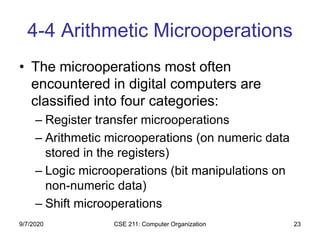
• The microoperations most often
encountered in digital computers are
classified into four categories:
– Register transfer microoperations
– Arithmetic microoperations (on numeric data
stored in the registers)
– Logic microoperations (bit manipulations on
non-numeric data)
– Shift microoperations
9/7/2020
CSE 211: Computer Organization 24
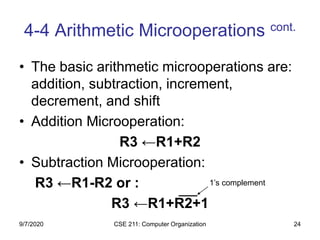
• The basic arithmetic microoperations are:
addition, subtraction, increment,
decrement, and shift
• Addition Microoperation:
R3 ←R1+R2
• Subtraction Microoperation:
R3 ←R1-R2 or :
R3 ←R1+R2+1
4-4 Arithmetic Microoperations cont.
1’s complement
9/7/2020
CSE 211: Computer Organization 25
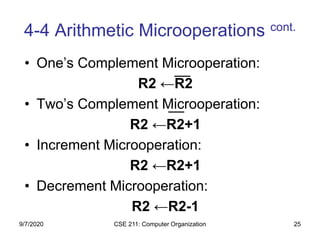
• One’s Complement Microoperation:
R2 ←R2
• Two’s Complement Microoperation:
R2 ←R2+1
• Increment Microoperation:
R2 ←R2+1
• Decrement Microoperation:
R2 ←R2-1
4-4 Arithmetic Microoperations cont.
9/7/2020
CSE 211: Computer Organization 26
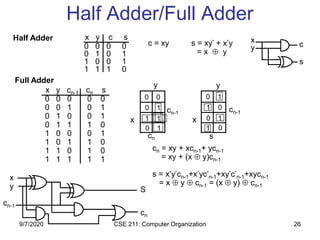
Half Adder/Full Adder
Half Adder
0 0 0 0 0
0 0 1 0 1
0 1 0 0 1
0 1 1 1 0
1 0 0 0 1
1 0 1 1 0
1 1 0 1 0
1 1 1 1 1
cn = xy + xcn-1+ ycn-1
= xy + (x  y)cn-1
s = x’y’cn-1+x’yc’n-1+xy’c’n-1+xycn-1
= x  y  cn-1 = (x  y)  cn-1
x
y
cn-1
x
y
cn-1
cn s
c = xy s = xy’ + x’y
= x  y
x
y c
s
x
y
cn-1
S
cn
Full Adder
0 0 0 0
0 1 0 1
1 0 0 1
1 1 1 0
x y c s
x y cn-1 cn s
0
0
1
0
0
1
1
1
0
1
0
1
1
0
1
0
9/7/2020
CSE 211: Computer Organization 27
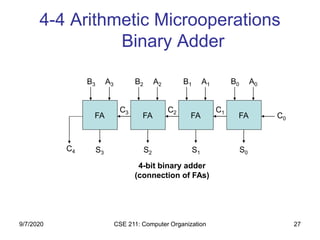
4-4 Arithmetic Microoperations
Binary Adder
FAFAFAFA C0
A0B0
S0
A1B1
S1
A2B2
S2
A3B3
S3
C1C2C3
C4
4-bit binary adder
(connection of FAs)
9/7/2020
CSE 211: Computer Organization 28
4-4 Arithmetic Microoperations
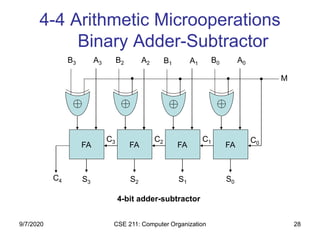
Binary Adder-Subtractor
FAFAFAFA
C0
A0B0
S0
A1B1
S1
A2B2
S2
A3B3
S3
C1C2C3
C4
4-bit adder-subtractor
M
9/7/2020
CSE 211: Computer Organization 29
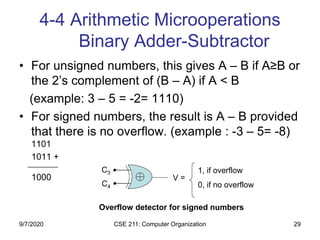
• For unsigned numbers, this gives A – B if A≥B or
the 2’s complement of (B – A) if A < B
(example: 3 – 5 = -2= 1110)
• For signed numbers, the result is A – B provided
that there is no overflow. (example : -3 – 5= -8)
1101
1011 +
‫ـــــــــــــــــــــــــــ‬
1000
4-4 Arithmetic Microoperations
Binary Adder-Subtractor
C3
C4
V =
1, if overflow
0, if no overflow
Overflow detector for signed numbers
9/7/2020
CSE 211: Computer Organization 30
4-4 Arithmetic Microoperations
Binary Adder-Subtractor cont.
• What is the range of unsigned numbers
that can be represented in 4 bits?
• What is the range of signed numbers that
can be represented in 4 bits?
• Repeat for n-bit?!
9/7/2020
CSE 211: Computer Organization 31
4-4 Arithmetic Microoperations
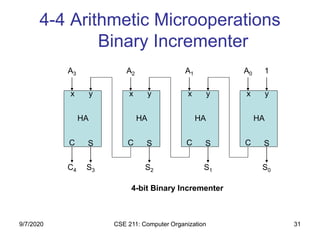
Binary Incrementer
C S
x y
HA
C S
x y
HA
C S
x y
HA
C S
x y
HA
S0S1S2S3C4
1A0A1A2A3
4-bit Binary Incrementer
9/7/2020
CSE 211: Computer Organization 32
4-4 Arithmetic Microoperations
Binary Incrementer
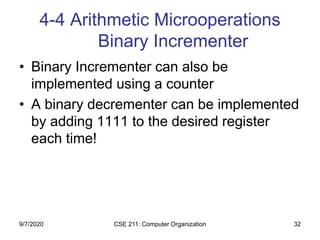
• Binary Incrementer can also be
implemented using a counter
• A binary decrementer can be implemented
by adding 1111 to the desired register
each time!
9/7/2020
CSE 211: Computer Organization 33
4-4 Arithmetic Microoperations
Arithmetic Circuit
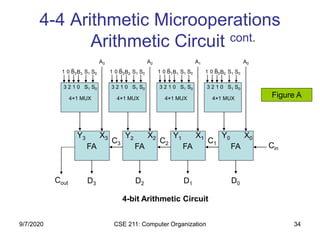
• This circuit performs seven distinct
arithmetic operations and the basic
component of it is the parallel adder
• The output of the binary adder is
calculated from the following arithmetic
sum:
• D = A + Y + Cin
9/7/2020
CSE 211: Computer Organization 34
B0
4-4 Arithmetic Microoperations
Arithmetic Circuit cont.
3 2 1 0 S1 S0
4×1 MUX
FAFAFAFA Cin
D0D1D2D3
C1C2C3
Cout
B01 0 S1 S0B1
3 2 1 0 S1 S0
4×1 MUX
B11 0 S1 S0B2
3 2 1 0 S1 S0
4×1 MUX
B21 0 S1 S0B3
3 2 1 0 S1 S0
4×1 MUX
B31 0 S1 S0
A0A1A2A3
4-bit Arithmetic Circuit
X0Y0X1Y1X2Y2X3Y3
Figure A
9/7/2020
CSE 211: Computer Organization 35
4-5 Logic Microoperations
The four basic microoperations
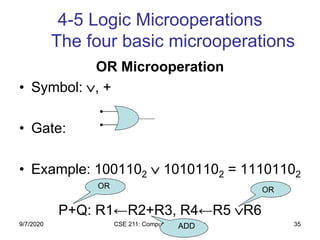
OR Microoperation
• Symbol: , +
• Gate:
• Example: 1001102  10101102 = 11101102
P+Q: R1←R2+R3, R4←R5 R6
OR OR
ADD9/7/2020
CSE 211: Computer Organization 36
4-5 Logic Microoperations
The four basic microoperations
cont.
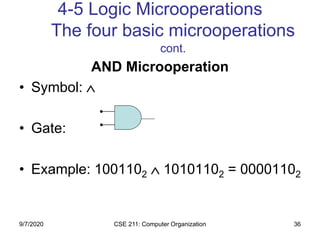
AND Microoperation
• Symbol: 
• Gate:
• Example: 1001102  10101102 = 00001102
9/7/2020
CSE 211: Computer Organization 37
4-5 Logic Microoperations
The four basic microoperations
cont.
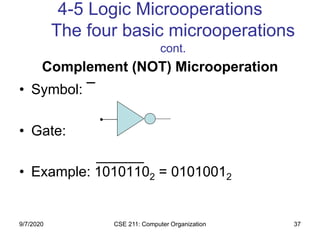
Complement (NOT) Microoperation
• Symbol:

• Gate:
• Example: 10101102 = 01010012
9/7/2020
CSE 211: Computer Organization 38
4-5 Logic Microoperations
The four basic microoperations
cont.
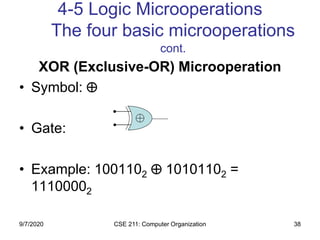
XOR (Exclusive-OR) Microoperation
• Symbol: 
• Gate:
• Example: 1001102  10101102 =
11100002
9/7/2020
CSE 211: Computer Organization 39
4-5 Logic Microoperations
Other Logic Microoperations
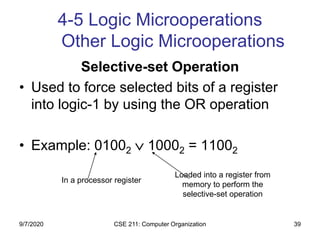
Selective-set Operation
• Used to force selected bits of a register
into logic-1 by using the OR operation
• Example: 01002  10002 = 11002
In a processor register
Loaded into a register from
memory to perform the
selective-set operation
9/7/2020
CSE 211: Computer Organization 40
4-5 Logic Microoperations
Other Logic Microoperations cont.
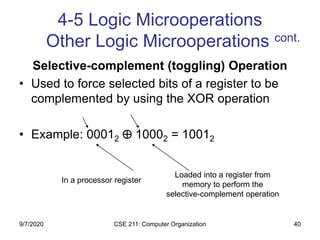
Selective-complement (toggling) Operation
• Used to force selected bits of a register to be
complemented by using the XOR operation
• Example: 00012  10002 = 10012
In a processor register
Loaded into a register from
memory to perform the
selective-complement operation
9/7/2020
CSE 211: Computer Organization 41
4-5 Logic Microoperations
Other Logic Microoperations cont.
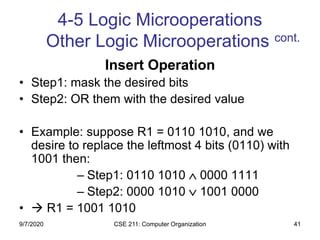
Insert Operation
• Step1: mask the desired bits
• Step2: OR them with the desired value
• Example: suppose R1 = 0110 1010, and we
desire to replace the leftmost 4 bits (0110) with
1001 then:
– Step1: 0110 1010  0000 1111
– Step2: 0000 1010  1001 0000
•  R1 = 1001 1010
9/7/2020
CSE 211: Computer Organization 42
4-5 Logic Microoperations
Other Logic Microoperations
cont.
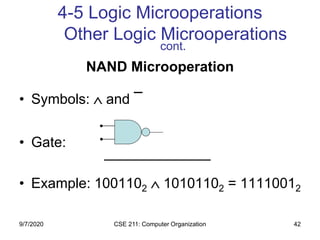
NAND Microoperation
• Symbols:  and

• Gate:
• Example: 1001102  10101102 = 11110012
9/7/2020
CSE 211: Computer Organization 43
4-5 Logic Microoperations
Other Logic Microoperations
cont.
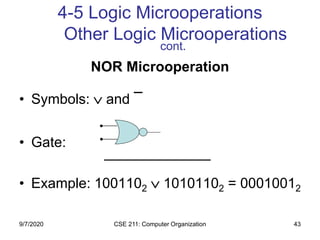
NOR Microoperation
• Symbols:  and

• Gate:
• Example: 1001102  10101102 = 00010012
9/7/2020
CSE 211: Computer Organization 44
4-5 Logic Microoperations
Other Logic Microoperations
cont.
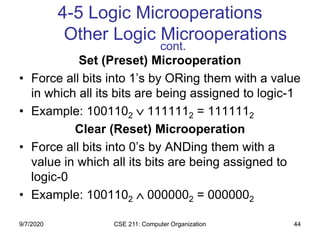
Set (Preset) Microoperation
• Force all bits into 1’s by ORing them with a value
in which all its bits are being assigned to logic-1
• Example: 1001102  1111112 = 1111112
Clear (Reset) Microoperation
• Force all bits into 0’s by ANDing them with a
value in which all its bits are being assigned to
logic-0
• Example: 1001102  0000002 = 0000002
9/7/2020
CSE 211: Computer Organization 45
4-5 Logic Microoperations
Hardware Implementation
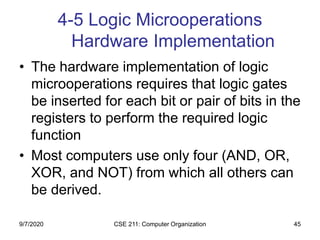
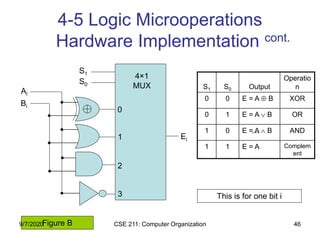
• The hardware implementation of logic
microoperations requires that logic gates
be inserted for each bit or pair of bits in the
registers to perform the required logic
function
• Most computers use only four (AND, OR,
XOR, and NOT) from which all others can
be derived.
9/7/2020
CSE 211: Computer Organization 46
4-5 Logic Microoperations
Hardware Implementation cont.
S1
S0
0
1
2
3
4×1
MUX
Ei
Ai
Bi
S1 S0 Output
Operatio
n
0 0 E = A  B XOR
0 1 E = A  B OR
1 0 E = A  B AND
1 1 E = A Complem
ent
This is for one bit i
Figure B9/7/2020
CSE 211: Computer Organization 47
4-6 Shift Microoperations
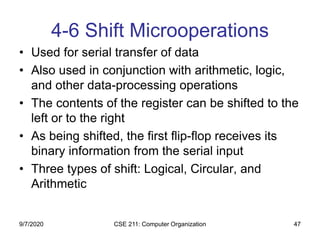
• Used for serial transfer of data
• Also used in conjunction with arithmetic, logic,
and other data-processing operations
• The contents of the register can be shifted to the
left or to the right
• As being shifted, the first flip-flop receives its
binary information from the serial input
• Three types of shift: Logical, Circular, and
Arithmetic
9/7/2020
CSE 211: Computer Organization 48
4-6 Shift Microoperations cont.
r0r1r3rn-1
r0r1r2r3rn-1
Shift Right
Shift Left
Serial Input Serial Output
Serial Output Serial Input
Determines
the “shift”
type
r2
**Note that the bit ri is the bit at position (i) of the register
9/7/2020
CSE 211: Computer Organization 49
4-6 Shift Microoperations:
Logical Shifts
• Transfers 0 through the serial input
• Logical Shift Right: R1←shr R1
• Logical Shift Left: R2←shl R2
The same
The same
Logical Shift Left
? 0r0r1r2r3rn-1
9/7/2020
CSE 211: Computer Organization 50
4-6 Shift Microoperations:
Circular Shifts (Rotate Operation)
• Circulates the bits of the register around
the two ends without loss of information
• Circular Shift Right: R1←cir R1
• Circular Shift Left: R2←cil R2
The same
The same
Circular Shift Left
r0r1r2r3rn-1
9/7/2020
CSE 211: Computer Organization 51
4-6 Shift Microoperations
Arithmetic Shifts
• Shifts a signed binary number to the left or right
• An arithmetic shift-left multiplies a signed binary
number by 2: ashl (00100): 01000
• An arithmetic shift-right divides the number by 2
ashr (00100) : 00010
• An overflow may occur in arithmetic shift-left,
and occurs when the sign bit is changed (sign
reversal)
9/7/2020
CSE 211: Computer Organization 52
4-6 Shift Microoperations
Arithmetic Shifts cont.
Arithmetic Shift RightSign
Bit
Arithmetic Shift Left
Sign
Bit
?
0?
r0r1r2r3rn-1
r0r1r2r3rn-1
9/7/2020
CSE 211: Computer Organization 53
4-6 Shift Microoperations
Arithmetic Shifts cont.
• An overflow flip-flop Vs can be used to
detect an arithmetic shift-left overflow
Vs = Rn-1  Rn-2
Rn-2
Vs=
Rn-1 1  overflow
0  no overflow
9/7/2020
CSE 211: Computer Organization 54
4-6 Shift Microoperations cont.
• Example: Assume R1=11001110, then:
– Arithmetic shift right once : R1 = 11100111
– Arithmetic shift right twice : R1 = 11110011
– Arithmetic shift left once : R1 = 10011100
– Arithmetic shift left twice : R1 = 00111000
– Logical shift right once : R1 = 01100111
– Logical shift left once : R1 = 10011100
– Circular shift right once : R1 = 01100111
– Circular shift left once : R1 = 10011101
9/7/2020
CSE 211: Computer Organization 55
4-6 Shift Microoperations
Hardware Implementation cont.
• A possible choice for a shift unit would be
a bidirectional shift register with parallel
load (refer to Fig 2-9). Has drawbacks:
– Needs two pulses (the clock and the shift
signal pulse)
– Not efficient in a processor unit where multiple
number of registers share a common bus
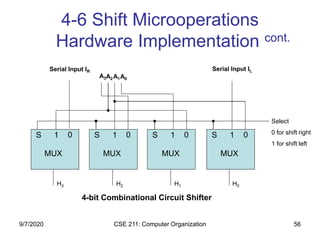
• It is more efficient to implement the shift
operation with a combinational circuit
9/7/2020
CSE 211: Computer Organization 56
4-6 Shift Microoperations
Hardware Implementation cont.
S 1 0 S 1 0 S 1 0 S 1 0
A3A2A1A0
Serial Input IR Serial Input IL
Select
0 for shift right
1 for shift left
H3 H2 H1 H0
MUX MUX MUX MUX
4-bit Combinational Circuit Shifter
9/7/2020
CSE 211: Computer Organization 57
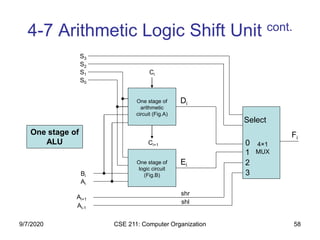
4-7 Arithmetic Logic Shift Unit
• Instead of having individual registers
performing the microoperations directly,
computer systems employ a number of
storage registers connected to a common
operational unit called an Arithmetic Logic
Unit (ALU)
9/7/2020
CSE 211: Computer Organization 58
4-7 Arithmetic Logic Shift Unit cont.
0
1
2
3
S3
S2
S1
S0
Bi
Ai
Ai+1
Ai-1
Select
4×1
MUX
Ci
Ci+1
One stage of
arithmetic
circuit (Fig.A)
One stage of
logic circuit
(Fig.B)
Di
Ei
Fi
shr
shl
One stage of
ALU
9/7/2020

Register transfer and microoperations

  • 1.
    CSE 211: ComputerOrganization 1 Register Transfer and Microoperations Chapter 4: 9/7/2020
  • 2.
    CSE 211: ComputerOrganization 2 contents • Register Transfer Language • Register Transfer • Bus and Memory Transfers • Arithmetic Microoperations • Logic Microoperations • Shift Microoperations • Arithmetic Logic Shift Unit 9/7/2020
  • 3.
    CSE 211: ComputerOrganization 3 4-1 Register Transfer Language (RTL) • Digital System: An interconnection of hardware modules that do a certain task on the information. • Registers + Operations performed on the data stored in them = Digital Module • Modules are interconnected with common data and control paths to form a digital computer system 9/7/2020
  • 4.
    CSE 211: ComputerOrganization 4 4-1 Register Transfer Language cont. • Microoperations: operations executed on data stored in one or more registers. • For any function of the computer, a sequence of microoperations is used to describe it • The result of the operation may be: – replace the previous binary information of a register or – transferred to another register 101101110011 010110111001 Shift Right Operation 9/7/2020
  • 5.
    CSE 211: ComputerOrganization 5 4-1 Register Transfer Language cont. • The internal hardware organization of a digital computer is defined by specifying: • The set of registers it contains and their function • The sequence of microoperations performed on the binary information stored in the registers • The control that initiates the sequence of microoperations • Registers + Microoperations Hardware + Control Functions = Digital Computer 9/7/2020
  • 6.
    CSE 211: ComputerOrganization 6 4-1 Register Transfer Language cont. • Register Transfer Language (RTL) : a symbolic notation to describe the microoperation transfers among registers Next steps: – Define symbols for various types of microoperations, – Describe the hardware that implements these microoperations 9/7/2020
  • 7.
    CSE 211: ComputerOrganization 7 4-2 Register Transfer (our first microoperation) • Computer registers are designated by capital letters (sometimes followed by numerals) to denote the function of the register • R1: processor register • MAR: Memory Address Register (holds an address for a memory unit) • PC: Program Counter • IR: Instruction Register • SR: Status Register 9/7/2020
  • 8.
    CSE 211: ComputerOrganization 8 4-2 Register Transfer cont. • The individual flip-flops in an n-bit register are numbered in sequence from 0 to n-1 (from the right position toward the left position) R1 7 6 5 4 3 2 1 0 A block diagram of a register Register R1 Showing individual bits 9/7/2020
  • 9.
    CSE 211: ComputerOrganization 9 4-2 Register Transfer cont. PC Numbering of bits Partitioned into two parts 15 0 PC(H) PC(L) 07815 Lower byteUpper byte Other ways of drawing the block diagram of a register: 9/7/2020
  • 10.
    CSE 211: ComputerOrganization 10 4-2 Register Transfer cont. • Information transfer from one register to another is described by a replacement operator: R2 ← R1 • This statement denotes a transfer of the content of register R1 into register R2 • The transfer happens in one clock cycle • The content of the R1 (source) does not change • The content of the R2 (destination) will be lost and replaced by the new data transferred from R1 • We are assuming that the circuits are available from the outputs of the source register to the inputs of the destination register, and that the destination register has a parallel load capability 9/7/2020
  • 11.
    CSE 211: ComputerOrganization 11 4-2 Register Transfer cont. • Conditional transfer occurs only under a control condition • Representation of a (conditional) transfer P: R2 ← R1 • A binary condition (P equals to 0 or 1) determines when the transfer occurs • The content of R1 is transferred into R2 only if P is 1 9/7/2020
  • 12.
    CSE 211: ComputerOrganization 12 4-2 Register Transfer cont. n Clock R1 R2 Control Circuit Load t t+1 Clock Load Transfer occurs here Synchronized with the clock P Hardware implementation of a controlled transfer: P: R2 ← R1 Block diagram: Timing diagram 9/7/2020
  • 13.
    CSE 211: ComputerOrganization 13 4-2 Register Transfer cont. Basic Symbols for Register Transfers Symbol Description Examples Letters & numerals Denotes a register MAR, R2 Parenthesis ( ) Denotes a part of a register R2(0-7), R2(L) Arrow ← Denotes transfer of information R2 ← R1 Comma , Separates two microoperations R2 ← R1, R1 ← R2 9/7/2020
  • 14.
    CSE 211: ComputerOrganization 14 4-3 Bus and Memory Transfers • Paths must be provided to transfer information from one register to another • A Common Bus System is a scheme for transferring information between registers in a multiple-register configuration • A bus: set of common lines, one for each bit of a register, through which binary information is transferred one at a time • Control signals determine which register is selected by the bus during each particular register transfer 9/7/2020
  • 15.
    CSE 211: ComputerOrganization 15 4-3 Bus and Memory Transfers 3 2 1 0 Register D D3 D2 D1 D0 3 2 1 0 Register C C3 C2 C1 C0 3 2 1 0 Register B B3 B2 B1 B0 3 2 1 0 Register A A3 A2 A1 A0 D3 C3 B3 A3 S0 S1 MUX3 3 2 1 0 D2 C2 B2 A2 S0 S1 MUX2 3 2 1 0 D1 C1 B1 A1 S0 S1 MUX1 3 2 1 0 D0 C0 B0 A0 S0 S1MUX0 3 2 1 0 4-Line Common Bus Register A Register B Register C Register D Bus lines 9/7/2020
  • 16.
    CSE 211: ComputerOrganization 16 4-3 Bus and Memory Transfers • The transfer of information from a bus into one of many destination registers is done: – By connecting the bus lines to the inputs of all destination registers and then: – activating the load control of the particular destination register selected • We write: R2 ← C to symbolize that the content of register C is loaded into the register R2 using the common system bus • It is equivalent to: BUS ←C, (select C) R2 ←BUS (Load R2) 9/7/2020
  • 17.
    CSE 211: ComputerOrganization 17 4-3 Bus and Memory Transfers: Three-State Bus Buffers • A bus system can be constructed with three-state buffer gates instead of multiplexers • A three-state buffer is a digital circuit that exhibits three states: logic-0, logic-1, and high-impedance (Hi-Z) Normal input A Control input C Three-State Buffer Output B 9/7/2020
  • 18.
    CSE 211: ComputerOrganization 18 4-3 Bus and Memory Transfers: Three-State Bus Buffers cont. A C=1 B A B A C=0 B A B Buffer Open Circuit 9/7/2020
  • 19.
    CSE 211: ComputerOrganization 19 4-3 Bus and Memory Transfers: Three-State Bus Buffers cont. 2×4 Decoder Select Enable 0 1 2 3 S1 S0 E Bus line for bit 0 A0 B0 C0 D0 Bus line with three-state buffer (replaces MUX0 in the previous diagram) 9/7/2020
  • 20.
    CSE 211: ComputerOrganization 20 4-3 Bus and Memory Transfers: Memory Transfer • Memory read : Transfer from memory • Memory write : Transfer to memory • Data being read or wrote is called a memory word (called M) • It is necessary to specify the address of M when writing /reading memory • This is done by enclosing the address in square brackets following the letter M • Example: M[0016] : the memory contents at address 0x0016 9/7/2020
  • 21.
    CSE 211: ComputerOrganization 21 4-3 Bus and Memory Transfers: Memory Transfer cont. • Assume that the address of a memory unit is stored in a register called the Address Register AR • Lets represent a Data Register with DR, then: • Read: DR ← M[AR] • Write: M[AR] ← DR 9/7/2020
  • 22.
    CSE 211: ComputerOrganization 22 4-3 Bus and Memory Transfers: Memory Transfer cont. AR x12 x0C x0E x10 x12 x14 x16 x18 19 34 45 66 0 13 22R1←M[AR] R1 100 R1 66 RAM R1 100 9/7/2020
  • 23.
    CSE 211: ComputerOrganization 23 4-4 Arithmetic Microoperations • The microoperations most often encountered in digital computers are classified into four categories: – Register transfer microoperations – Arithmetic microoperations (on numeric data stored in the registers) – Logic microoperations (bit manipulations on non-numeric data) – Shift microoperations 9/7/2020
  • 24.
    CSE 211: ComputerOrganization 24 • The basic arithmetic microoperations are: addition, subtraction, increment, decrement, and shift • Addition Microoperation: R3 ←R1+R2 • Subtraction Microoperation: R3 ←R1-R2 or : R3 ←R1+R2+1 4-4 Arithmetic Microoperations cont. 1’s complement 9/7/2020
  • 25.
    CSE 211: ComputerOrganization 25 • One’s Complement Microoperation: R2 ←R2 • Two’s Complement Microoperation: R2 ←R2+1 • Increment Microoperation: R2 ←R2+1 • Decrement Microoperation: R2 ←R2-1 4-4 Arithmetic Microoperations cont. 9/7/2020
  • 26.
    CSE 211: ComputerOrganization 26 Half Adder/Full Adder Half Adder 0 0 0 0 0 0 0 1 0 1 0 1 0 0 1 0 1 1 1 0 1 0 0 0 1 1 0 1 1 0 1 1 0 1 0 1 1 1 1 1 cn = xy + xcn-1+ ycn-1 = xy + (x  y)cn-1 s = x’y’cn-1+x’yc’n-1+xy’c’n-1+xycn-1 = x  y  cn-1 = (x  y)  cn-1 x y cn-1 x y cn-1 cn s c = xy s = xy’ + x’y = x  y x y c s x y cn-1 S cn Full Adder 0 0 0 0 0 1 0 1 1 0 0 1 1 1 1 0 x y c s x y cn-1 cn s 0 0 1 0 0 1 1 1 0 1 0 1 1 0 1 0 9/7/2020
  • 27.
    CSE 211: ComputerOrganization 27 4-4 Arithmetic Microoperations Binary Adder FAFAFAFA C0 A0B0 S0 A1B1 S1 A2B2 S2 A3B3 S3 C1C2C3 C4 4-bit binary adder (connection of FAs) 9/7/2020
  • 28.
    CSE 211: ComputerOrganization 28 4-4 Arithmetic Microoperations Binary Adder-Subtractor FAFAFAFA C0 A0B0 S0 A1B1 S1 A2B2 S2 A3B3 S3 C1C2C3 C4 4-bit adder-subtractor M 9/7/2020
  • 29.
    CSE 211: ComputerOrganization 29 • For unsigned numbers, this gives A – B if A≥B or the 2’s complement of (B – A) if A < B (example: 3 – 5 = -2= 1110) • For signed numbers, the result is A – B provided that there is no overflow. (example : -3 – 5= -8) 1101 1011 + ‫ـــــــــــــــــــــــــــ‬ 1000 4-4 Arithmetic Microoperations Binary Adder-Subtractor C3 C4 V = 1, if overflow 0, if no overflow Overflow detector for signed numbers 9/7/2020
  • 30.
    CSE 211: ComputerOrganization 30 4-4 Arithmetic Microoperations Binary Adder-Subtractor cont. • What is the range of unsigned numbers that can be represented in 4 bits? • What is the range of signed numbers that can be represented in 4 bits? • Repeat for n-bit?! 9/7/2020
  • 31.
    CSE 211: ComputerOrganization 31 4-4 Arithmetic Microoperations Binary Incrementer C S x y HA C S x y HA C S x y HA C S x y HA S0S1S2S3C4 1A0A1A2A3 4-bit Binary Incrementer 9/7/2020
  • 32.
    CSE 211: ComputerOrganization 32 4-4 Arithmetic Microoperations Binary Incrementer • Binary Incrementer can also be implemented using a counter • A binary decrementer can be implemented by adding 1111 to the desired register each time! 9/7/2020
  • 33.
    CSE 211: ComputerOrganization 33 4-4 Arithmetic Microoperations Arithmetic Circuit • This circuit performs seven distinct arithmetic operations and the basic component of it is the parallel adder • The output of the binary adder is calculated from the following arithmetic sum: • D = A + Y + Cin 9/7/2020
  • 34.
    CSE 211: ComputerOrganization 34 B0 4-4 Arithmetic Microoperations Arithmetic Circuit cont. 3 2 1 0 S1 S0 4×1 MUX FAFAFAFA Cin D0D1D2D3 C1C2C3 Cout B01 0 S1 S0B1 3 2 1 0 S1 S0 4×1 MUX B11 0 S1 S0B2 3 2 1 0 S1 S0 4×1 MUX B21 0 S1 S0B3 3 2 1 0 S1 S0 4×1 MUX B31 0 S1 S0 A0A1A2A3 4-bit Arithmetic Circuit X0Y0X1Y1X2Y2X3Y3 Figure A 9/7/2020
  • 35.
    CSE 211: ComputerOrganization 35 4-5 Logic Microoperations The four basic microoperations OR Microoperation • Symbol: , + • Gate: • Example: 1001102  10101102 = 11101102 P+Q: R1←R2+R3, R4←R5 R6 OR OR ADD9/7/2020
  • 36.
    CSE 211: ComputerOrganization 36 4-5 Logic Microoperations The four basic microoperations cont. AND Microoperation • Symbol:  • Gate: • Example: 1001102  10101102 = 00001102 9/7/2020
  • 37.
    CSE 211: ComputerOrganization 37 4-5 Logic Microoperations The four basic microoperations cont. Complement (NOT) Microoperation • Symbol:  • Gate: • Example: 10101102 = 01010012 9/7/2020
  • 38.
    CSE 211: ComputerOrganization 38 4-5 Logic Microoperations The four basic microoperations cont. XOR (Exclusive-OR) Microoperation • Symbol:  • Gate: • Example: 1001102  10101102 = 11100002 9/7/2020
  • 39.
    CSE 211: ComputerOrganization 39 4-5 Logic Microoperations Other Logic Microoperations Selective-set Operation • Used to force selected bits of a register into logic-1 by using the OR operation • Example: 01002  10002 = 11002 In a processor register Loaded into a register from memory to perform the selective-set operation 9/7/2020
  • 40.
    CSE 211: ComputerOrganization 40 4-5 Logic Microoperations Other Logic Microoperations cont. Selective-complement (toggling) Operation • Used to force selected bits of a register to be complemented by using the XOR operation • Example: 00012  10002 = 10012 In a processor register Loaded into a register from memory to perform the selective-complement operation 9/7/2020
  • 41.
    CSE 211: ComputerOrganization 41 4-5 Logic Microoperations Other Logic Microoperations cont. Insert Operation • Step1: mask the desired bits • Step2: OR them with the desired value • Example: suppose R1 = 0110 1010, and we desire to replace the leftmost 4 bits (0110) with 1001 then: – Step1: 0110 1010  0000 1111 – Step2: 0000 1010  1001 0000 •  R1 = 1001 1010 9/7/2020
  • 42.
    CSE 211: ComputerOrganization 42 4-5 Logic Microoperations Other Logic Microoperations cont. NAND Microoperation • Symbols:  and  • Gate: • Example: 1001102  10101102 = 11110012 9/7/2020
  • 43.
    CSE 211: ComputerOrganization 43 4-5 Logic Microoperations Other Logic Microoperations cont. NOR Microoperation • Symbols:  and  • Gate: • Example: 1001102  10101102 = 00010012 9/7/2020
  • 44.
    CSE 211: ComputerOrganization 44 4-5 Logic Microoperations Other Logic Microoperations cont. Set (Preset) Microoperation • Force all bits into 1’s by ORing them with a value in which all its bits are being assigned to logic-1 • Example: 1001102  1111112 = 1111112 Clear (Reset) Microoperation • Force all bits into 0’s by ANDing them with a value in which all its bits are being assigned to logic-0 • Example: 1001102  0000002 = 0000002 9/7/2020
  • 45.
    CSE 211: ComputerOrganization 45 4-5 Logic Microoperations Hardware Implementation • The hardware implementation of logic microoperations requires that logic gates be inserted for each bit or pair of bits in the registers to perform the required logic function • Most computers use only four (AND, OR, XOR, and NOT) from which all others can be derived. 9/7/2020
  • 46.
    CSE 211: ComputerOrganization 46 4-5 Logic Microoperations Hardware Implementation cont. S1 S0 0 1 2 3 4×1 MUX Ei Ai Bi S1 S0 Output Operatio n 0 0 E = A  B XOR 0 1 E = A  B OR 1 0 E = A  B AND 1 1 E = A Complem ent This is for one bit i Figure B9/7/2020
  • 47.
    CSE 211: ComputerOrganization 47 4-6 Shift Microoperations • Used for serial transfer of data • Also used in conjunction with arithmetic, logic, and other data-processing operations • The contents of the register can be shifted to the left or to the right • As being shifted, the first flip-flop receives its binary information from the serial input • Three types of shift: Logical, Circular, and Arithmetic 9/7/2020
  • 48.
    CSE 211: ComputerOrganization 48 4-6 Shift Microoperations cont. r0r1r3rn-1 r0r1r2r3rn-1 Shift Right Shift Left Serial Input Serial Output Serial Output Serial Input Determines the “shift” type r2 **Note that the bit ri is the bit at position (i) of the register 9/7/2020
  • 49.
    CSE 211: ComputerOrganization 49 4-6 Shift Microoperations: Logical Shifts • Transfers 0 through the serial input • Logical Shift Right: R1←shr R1 • Logical Shift Left: R2←shl R2 The same The same Logical Shift Left ? 0r0r1r2r3rn-1 9/7/2020
  • 50.
    CSE 211: ComputerOrganization 50 4-6 Shift Microoperations: Circular Shifts (Rotate Operation) • Circulates the bits of the register around the two ends without loss of information • Circular Shift Right: R1←cir R1 • Circular Shift Left: R2←cil R2 The same The same Circular Shift Left r0r1r2r3rn-1 9/7/2020
  • 51.
    CSE 211: ComputerOrganization 51 4-6 Shift Microoperations Arithmetic Shifts • Shifts a signed binary number to the left or right • An arithmetic shift-left multiplies a signed binary number by 2: ashl (00100): 01000 • An arithmetic shift-right divides the number by 2 ashr (00100) : 00010 • An overflow may occur in arithmetic shift-left, and occurs when the sign bit is changed (sign reversal) 9/7/2020
  • 52.
    CSE 211: ComputerOrganization 52 4-6 Shift Microoperations Arithmetic Shifts cont. Arithmetic Shift RightSign Bit Arithmetic Shift Left Sign Bit ? 0? r0r1r2r3rn-1 r0r1r2r3rn-1 9/7/2020
  • 53.
    CSE 211: ComputerOrganization 53 4-6 Shift Microoperations Arithmetic Shifts cont. • An overflow flip-flop Vs can be used to detect an arithmetic shift-left overflow Vs = Rn-1  Rn-2 Rn-2 Vs= Rn-1 1  overflow 0  no overflow 9/7/2020
  • 54.
    CSE 211: ComputerOrganization 54 4-6 Shift Microoperations cont. • Example: Assume R1=11001110, then: – Arithmetic shift right once : R1 = 11100111 – Arithmetic shift right twice : R1 = 11110011 – Arithmetic shift left once : R1 = 10011100 – Arithmetic shift left twice : R1 = 00111000 – Logical shift right once : R1 = 01100111 – Logical shift left once : R1 = 10011100 – Circular shift right once : R1 = 01100111 – Circular shift left once : R1 = 10011101 9/7/2020
  • 55.
    CSE 211: ComputerOrganization 55 4-6 Shift Microoperations Hardware Implementation cont. • A possible choice for a shift unit would be a bidirectional shift register with parallel load (refer to Fig 2-9). Has drawbacks: – Needs two pulses (the clock and the shift signal pulse) – Not efficient in a processor unit where multiple number of registers share a common bus • It is more efficient to implement the shift operation with a combinational circuit 9/7/2020
  • 56.
    CSE 211: ComputerOrganization 56 4-6 Shift Microoperations Hardware Implementation cont. S 1 0 S 1 0 S 1 0 S 1 0 A3A2A1A0 Serial Input IR Serial Input IL Select 0 for shift right 1 for shift left H3 H2 H1 H0 MUX MUX MUX MUX 4-bit Combinational Circuit Shifter 9/7/2020
  • 57.
    CSE 211: ComputerOrganization 57 4-7 Arithmetic Logic Shift Unit • Instead of having individual registers performing the microoperations directly, computer systems employ a number of storage registers connected to a common operational unit called an Arithmetic Logic Unit (ALU) 9/7/2020
  • 58.
    CSE 211: ComputerOrganization 58 4-7 Arithmetic Logic Shift Unit cont. 0 1 2 3 S3 S2 S1 S0 Bi Ai Ai+1 Ai-1 Select 4×1 MUX Ci Ci+1 One stage of arithmetic circuit (Fig.A) One stage of logic circuit (Fig.B) Di Ei Fi shr shl One stage of ALU 9/7/2020