Register Transfer and Micro-operations 1
Lecture 6
CSE 211, Computer Organization and Architecture Gagandeep Singh,
Overview
 Register Transfer Language
 Register Transfer
 Bus and Memory Transfers
 Arithmetic Micro-operations
 Logic Micro-operations
 Shift Micro-operations
 Arithmetic Logic Shift Unit
Register Transfer and Micro-operations 2
Lecture 6
Register Transfer Language
 Combinational and sequential circuits (learned in Lecture
1 and 2) can be used to create simple digital systems.
 These are the low-level building blocks of a digital
computer.
 Simple digital systems are frequently characterized in
terms of
 the registers they contain, and
 the operations that they perform.
 The operations on the data in registers are called micro-
operations
CSE 211, Computer Organization and Architecture Gagandeep Singh,
Register Transfer and Micro-operations 3
Lecture 6
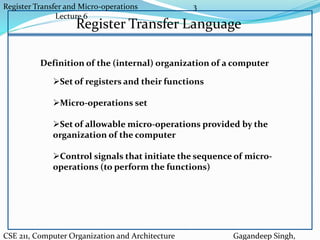
Register Transfer Language
Set of registers and their functions
Micro-operations set
Set of allowable micro-operations provided by the
organization of the computer
Control signals that initiate the sequence of micro-
operations (to perform the functions)
Definition of the (internal) organization of a computer
CSE 211, Computer Organization and Architecture Gagandeep Singh,
Register Transfer and Micro-operations 4
Lecture 6
Register Transfer Language
 Rather than specifying a digital system in words, a specific
notation is used, Register Transfer Language
 For any function of the computer, the register transfer language
can be used to describe the (sequence of) micro-operations
 Register transfer language
 A symbolic language
 A convenient tool for describing the internal
organization of digital computers
 Can also be used to facilitate the design process of
digital systems.
CSE 211, Computer Organization and Architecture Gagandeep Singh,
Register Transfer and Micro-operations 5
Lecture 6
Register Transfer Language
 Registers are designated by capital letters, sometimes followed
by numbers (e.g., A, R13, IR)
 Often the names indicate function:
 MAR - memory address register
 PC - program counter
 IR - instruction register
 Registers and their contents can be viewed and represented in
various ways
 A register can be viewed as a single entity:
 Registers may also be represented showing the bits of data
they contain
MAR
CSE 211, Computer Organization and Architecture Gagandeep Singh,
Register Transfer and Micro-operations 6
Lecture 6
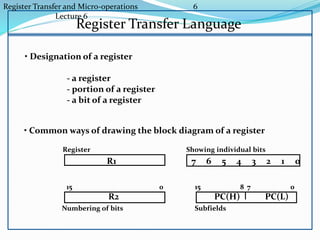
Register Transfer Language
R1
Register
Numbering of bits
Showing individual bits
Subfields
PC(H) PC(L)
15 8 7 0
- a register
- portion of a register
- a bit of a register
• Common ways of drawing the block diagram of a register
7 6 5 4 3 2 1 0
R2
15 0
• Designation of a register
Register Transfer and Micro-operations 7
Lecture 6
Register Transfer Language
• Copying the contents of one register to another is a register
transfer
• A register transfer is indicated as
R2  R1
 In this case the contents of register R1 are copied (loaded)
into register R2
 A simultaneous transfer of all bits from the source R1 to the
destination register R2, during one clock pulse
 Note that this is a non-destructive; i.e. the contents of R1 are
not altered by copying (loading) them to R2
Register Transfer and Micro-operations 8
Lecture 6
Register Transfer Language
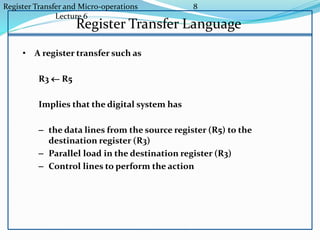
• A register transfer such as
R3  R5
Implies that the digital system has
– the data lines from the source register (R5) to the
destination register (R3)
– Parallel load in the destination register (R3)
– Control lines to perform the action
Register Transfer and Micro-operations 9
Lecture 6
Control Functions
 Often actions need to only occur if a certain condition is true
 This is similar to an “if” statement in a programming language
 In digital systems, this is often done via a control signal, called
a control function
 If the signal is 1, the action takes place
 This is represented as:
P: R2  R1
Which means “if P = 1, then load the contents of register R1
into register R2”, i.e., if (P = 1) then (R2  R1)
CSE 211, Computer Organization and Architecture Gagandeep Singh,
Register Transfer and Micro-operations 10
Lecture 6
Hardware Implementation of Controlled
TransfersImplementation of controlled transfer
P: R2 R1
Block diagram
Timing diagram
Clock
Transfer occurs here
R2
R1
Control
Circuit
LoadP
n
Clock
Load
t t+1
 The same clock controls the circuits that generate the control
function and the destination register
 Registers are assumed to use positive-edge-triggered flip-flops
CSE 211, Computer Organization and Architecture Gagandeep Singh,
Register Transfer and Micro-operations 11
Lecture 6
Basic Symbols in Register Transfer
Capital letters Denotes a register MAR, R2
& numerals
Parentheses () Denotes a part of a register R2(0-7), R2(L)
Arrow  Denotes transfer of information R2  R1
Colon : Denotes termination of control function P:
Comma , Separates two micro-operations A  B, B  A
Symbols Description Examples
CSE 211, Computer Organization and Architecture Gagandeep Singh,
Register Transfer and Micro-operations 12
Lecture 7
Overview
 Register Transfer Language
 Register Transfer
 Bus and Memory Transfers
 Arithmetic Micro-operations
 Logic Micro-operations
 Shift Micro-operations
 Arithmetic Logic Shift Unit
Register Transfer and Micro-operations 13
L
Connecting Registers - Bus Transfer
 In a digital system with many registers, it is impractical to
have data and control lines to directly allow each register to
be loaded with the contents of every possible other
registers
 To completely connect n registers  n(n-1) lines
 This is not a realistic approach to use in a large digital
system
 Instead, take a different approach
 Have one centralized set of circuits for data transfer – the
bus
 Have control circuits to select which register is the source,
and which is the destination
Register Transfer and Micro-operations 14
Le
Connecting Registers - Bus Transfer
From a register to bus: BUS  R
1 2 3 4 1 2 3 4 1 2 3 4 1 2 3 4
Register A Register B Register C Register D
B C D1 1 1
4 x1
MUX
B C D2 2 2
4 x1
MUX
B C D3 3 3
4 x1
MUX
B C D4 4 4
4 x1
MUX
4-line bus
x
y
select
0 0 0 0
Register A Register B Register C Register D
Bus lines
Register Transfer and Micro-operations 15
Le
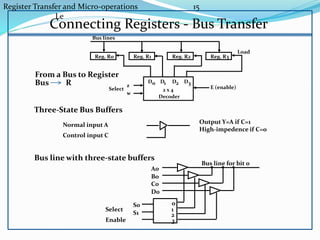
Connecting Registers - Bus Transfer
Three-State Bus Buffers
Bus line with three-state buffers
Reg. R0 Reg. R1 Reg. R2 Reg. R3
Bus lines
2 x 4
Decoder
Load
D0 D1 D2 D3z
w
Select E (enable)
Output Y=A if C=1
High-impedence if C=0
Normal input A
Control input C
Select
Enable
0
1
2
3
S0
S1
A0
B0
C0
D0
Bus line for bit 0
From a Bus to Register
Bus R
Register Transfer and Micro-operations 16
Memory - RAM
 Memory (RAM) can be thought as a sequential circuits
containing some number of registers
 These registers hold the words of memory
 Each of the registers is indicated by an address
 These addresses range from 0 to r-1
 Each register (word) can hold n bits of data
 Assume the RAM contains r = 2k words. It needs the
following
1. n data input lines
2. n data output lines
3. k address lines
4. A Read control line
5. A Write control line
data input lines
data output lines
n
n
k
address lines
Read
Write
RAM
unit
Register Transfer and Micro-operations 17
Lecture 7
Memory Transfer
Memory is usually accessed in computer systems by putting the
desired address in a special register, the Memory Address Register
(MAR, or AR)
AR
Memory
unit
Read
Write
Data inData out
M
Read : DR  M[AR]
Register Transfer and Micro-operations 18
Lecture 7
Memory Read
 To read a value from a location in memory and load it into a
register, the register transfer language notation looks like
this:
 This causes the following to occur
1. The contents of the MAR get sent to the memory
address lines
2. A Read (= 1) gets sent to the memory unit
3. The contents of the specified address are put on the
memory’s output data lines
4. These get sent over the bus to be loaded into register
R1
R1  M[MAR]
Register Transfer and Micro-operations 19
Memory Write
 To write a value from a register to a location in memory
looks like this in register transfer language:
 This causes the following to occur
1. The contents of the MAR get sent to the memory
address lines
2. A Write (= 1) gets sent to the memory unit
3. The values in register R1 get sent over the bus to the
data input lines of the memory
4. The values get loaded into the specified address in the
memory
M[MAR]  R1
Register Transfer and Micro-operations 20
A  B 1.Transfer content of reg. B into reg. A
AR  DR(AD) 2.Transfer content of AD portion of reg. DR into reg.
AR
A  constant 3.Transfer a binary constant into reg. A
ABUS  R1, R2 ← ABUS 4.Transfer content of R1 into bus A and, at the same
time,
transfer content of bus A into R2
AR 5.Address register
DR 6.Data register
M[R] 7.Memory word specified by reg. R
M 8.Equivalent to M[AR]
DR  M 9.Memory read operation: transfers content of
memory word specified by AR into DR
M  DR 10.Memory write operation: transfers content of
DR into memory word specified by AR
SUMMARY OF R. TRANSFER MICROOPERATIONS
Register Transfer and Micro-operations 21
Computer system microoperations are of four types:
 Register transfer microoperations
 Arithmetic microoperations
 Logic microoperations
 Shift microoperations
MICROOPERATIONS
Register Transfer and Micro-operations 22
Arithmetic MICROOPERATIONS
Summary of Typical Arithmetic Micro-Operations
R3  R1 + R2 Contents of R1 plus R2 transferred to R3
R3  R1 - R2 Contents of R1 minus R2 transferred to R3
R2  R2’ Complement the contents of R2
R2  R2’+ 1 2's complement the contents of R2 (negate)
R3  R1 + R2’+ 1 subtraction
R1  R1 + 1Increment
R1  R1 - 1 Decrement
• The basic arithmetic microoperations are
– Addition
– Subtraction
– Increment
– Decrement
• The additional arithmetic microoperations are
– Add with carry
– Subtract with borrow
– Transfer/Load
– etc. …
Register Transfer and Micro-operations 23
Overview
 Register Transfer Language
 Register Transfer
 Bus and Memory Transfers
 Arithmetic Micro-operations
 Logic Micro-operations
 Shift Micro-operations
 Arithmetic Logic Shift Unit
CSE 211, Computer Organization and Architecture Gagandeep Singh
Register Transfer and Micro-operations 24
Binary Adder
FA
B0 A0
S0
C0FA
B1 A1
S1
C1FA
B2 A2
S2
C2FA
B3 A3
S3
C3
C4
Binary Adder
CSE 211, Computer Organization and Architecture Gagandeep Singh
Register Transfer and Micro-operations 25
Binary Adder-Subtractor
FA
B0 A0
S0
C0C1FA
B1 A1
S1
C2FA
B2 A2
S2
C3FA
B3 A3
S3C4
M
CSE 211, Computer Organization and Architecture Gagandeep Singh
Register Transfer and Micro-operations 26
Binary Incrementer
Binary Incrementer
HA
x y
C S
A0 1
S0
HA
x y
C S
A1
S1
HA
x y
C S
A2
S2
HA
x y
C S
A3
S3C4
CSE 211, Computer Organization and Architecture Gagandeep Singh
Register Transfer and Micro-operations 28
CSE 211, Computer Organization and Architecture Gagandeep Singh
S1
S0
0
1
2
3
4x1
MUX
X0
Y0
C0
C1
D0
FA
S1
S0
0
1
2
3
4x1
MUX
X1
Y1
C1
C2
D1
FA
S1
S0
0
1
2
3
4x1
MUX
X2
Y2
C2
C3
D2
FA
S1
S0
0
1
2
3
4x1
MUX
X3
Y3
C3
C4
D3
FA
Cout
A0
B0
A1
B1
A2
B2
A3
B3
0 1
S0
S1
Arithmetic Circuits
Register Transfer and Micro-operations 29
Hardware Implementation
0 0 F = A  B AND
0 1 F = AB OR
1 0 F = A  B XOR
1 1 F = A’ Complement
S1 S0 Output -operation
Function table
B
A
S
S
F
1
0
i
i
i
0
1
2
3
4 X 1
MUX
Select
Register Transfer and Micro-operations 30
Applications of Logic Microoperations
 Logic microoperations can be used to manipulate individual
bits or a portions of a word in a register
 Consider the data in a register A. In another register, B, is bit
data that will be used to modify the contents of A
 Selective-set A  A + B
 Selective-complement A  A  B
 Selective-clear A  A • B’
 Mask (Delete) A  A • B
 Clear A  A  B
 Insert A  (A • B) + C
 Compare A  A  B
Register Transfer and Micro-operations 31
Applications of Logic Microoperations
1. In a selective set operation, the bit pattern in B is used to set certain
bits in A
1 1 0 0 At
1 0 1 0 B
1 1 1 0 At+1 (A  A + B)
If a bit in B is set to 1, that same position in A gets set to 1, otherwise
that bit in A keeps its previous value
2. In a selective complement operation, the bit pattern in B is used to
complement certain bits in A
1 1 0 0 At
1 0 1 0 B
0 1 1 0 At+1 (A  A  B)
If a bit in B is set to 1, that same position in A gets complemented
from its original value, otherwise it is unchanged
Register Transfer and Micro-operations 32
Applications of Logic Microoperations
3. In a selective clear operation, the bit pattern in B is used to clear
certain bits in A
1 1 0 0 At
1 0 1 0 B
0 1 0 0 At+1 (A  A  B’)
If a bit in B is set to 1, that same position in A gets set to 0, otherwise
it is unchanged
4. In a mask operation, the bit pattern in B is used to clear certain bits
in A 1 1 0 0 At
1 0 1 0 B
1 0 0 0 At+1 (A  A  B)
If a bit in B is set to 0, that same position in A gets set to 0,
otherwise it is unchanged
Register Transfer and Micro-operations 33
Applications of Logic Microoperations
5. In a clear operation, if the bits in the same position in A and B are
the same, they are cleared in A, otherwise they are set in A
1 1 0 0 At
1 0 1 0 B
0 1 1 0 At+1 (A  A  B)
Register Transfer and Micro-operations 34
Applications of Logic Microoperations
6. An insert operation is used to introduce a specific bit pattern into A
register, leaving the other bit positions unchanged
This is done as
– A mask operation to clear the desired bit positions, followed by
– An OR operation to introduce the new bits into the desired positions
– Example
• Suppose you wanted to introduce 1010 into the low order four bits of
A:
• 1101 1000 1011 0001 A (Original)
1101 1000 1011 1010 A (Desired)
• 1101 1000 1011 0001 A (Original)
1111 1111 1111 0000 Mask
1101 1000 1011 0000 A (Intermediate)
0000 0000 0000 1010 Added bits
1101 1000 1011 1010 A (Desired)
Register Transfer and Micro-operations 35
Shift Microoperations
• There are three types of shifts
– Logical shift
– Circular shift
– Arithmetic shift
• What differentiates them is the information that goes into the
serial input
Serial
input
• A right shift operation
• A left shift operation
Serial
input
Register Transfer and Micro-operations 36
Logical Shift
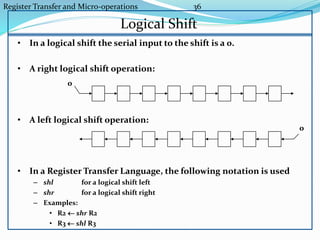
• In a logical shift the serial input to the shift is a 0.
• A right logical shift operation:
• A left logical shift operation:
• In a Register Transfer Language, the following notation is used
– shl for a logical shift left
– shr for a logical shift right
– Examples:
• R2  shr R2
• R3  shl R3
0
0
Register Transfer and Micro-operations 37
Circular Shift
• In a circular shift the serial input is the bit that is shifted out of
the other end of the register.
• A right circular shift operation:
• A left circular shift operation:
• In a RTL, the following notation is used
– cil for a circular shift left
– cir for a circular shift right
– Examples:
• R2  cir R2
• R3  cil R3
Register Transfer and Micro-operations 38
Arithmetic Shift
• An arithmetic shift is meant for signed binary numbers (integer)
• An arithmetic left shift multiplies a signed number by two
• An arithmetic right shift divides a signed number by two
• The main distinction of an arithmetic shift is that it must keep the
sign of the number the same as it performs the multiplication or
division
• A right arithmetic shift operation:
• A left arithmetic shift operation: 0
sign
bit
sign
bit
Register Transfer and Micro-operations 39
Arithmetic Shift
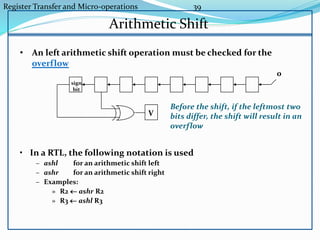
• An left arithmetic shift operation must be checked for the
overflow
0
V
Before the shift, if the leftmost two
bits differ, the shift will result in an
overflow
• In a RTL, the following notation is used
– ashl for an arithmetic shift left
– ashr for an arithmetic shift right
– Examples:
» R2  ashr R2
» R3  ashl R3
sign
bit
Register Transfer and Micro-operations 40
Hardware Implementation of Shift Microoperation
S
0
1
H0MUX
S
0
1
H1MUX
S
0
1
H2MUX
S
0
1
H3MUX
Select
0 for shift right (down)
1 for shift left (up)
Serial
input (IR)
A0
A1
A2
A3
Serial
input (IL)
Register Transfer and Micro-operations 41
Arithmetic Logic and Shift Unit
Arithmetic
Circuit
Logic
Circuit
C
C
4 x 1
MUX
Select
0
1
2
3
F
S3
S2
S1
S0
B
A
i
A
D
A
E
shr
shl
i+1 i
i
i
i+1
i-1
i
i
S3 S2 S1 S0 Cin Operation
0 0 0 0 0 F = A
0 0 0 0 1 F = A + 1
0 0 0 1 0 F = A + B
0 0 0 1 1 F = A + B + 1
0 0 1 0 0 F = A + B’
0 0 1 0 1 F = A + B’+ 1
0 0 1 1 0 F = A - 1
0 0 1 1 1 F = A
0 1 0 0 X F = A  B
0 1 0 1 X F = A B
0 1 1 0 X F = A  B
0 1 1 1 X F = A’
1 0 X X X F = shr A
1 1 X X X F = shl A

Chapter 4

  • 1.
    Register Transfer andMicro-operations 1 Lecture 6 CSE 211, Computer Organization and Architecture Gagandeep Singh, Overview  Register Transfer Language  Register Transfer  Bus and Memory Transfers  Arithmetic Micro-operations  Logic Micro-operations  Shift Micro-operations  Arithmetic Logic Shift Unit
  • 2.
    Register Transfer andMicro-operations 2 Lecture 6 Register Transfer Language  Combinational and sequential circuits (learned in Lecture 1 and 2) can be used to create simple digital systems.  These are the low-level building blocks of a digital computer.  Simple digital systems are frequently characterized in terms of  the registers they contain, and  the operations that they perform.  The operations on the data in registers are called micro- operations CSE 211, Computer Organization and Architecture Gagandeep Singh,
  • 3.
    Register Transfer andMicro-operations 3 Lecture 6 Register Transfer Language Set of registers and their functions Micro-operations set Set of allowable micro-operations provided by the organization of the computer Control signals that initiate the sequence of micro- operations (to perform the functions) Definition of the (internal) organization of a computer CSE 211, Computer Organization and Architecture Gagandeep Singh,
  • 4.
    Register Transfer andMicro-operations 4 Lecture 6 Register Transfer Language  Rather than specifying a digital system in words, a specific notation is used, Register Transfer Language  For any function of the computer, the register transfer language can be used to describe the (sequence of) micro-operations  Register transfer language  A symbolic language  A convenient tool for describing the internal organization of digital computers  Can also be used to facilitate the design process of digital systems. CSE 211, Computer Organization and Architecture Gagandeep Singh,
  • 5.
    Register Transfer andMicro-operations 5 Lecture 6 Register Transfer Language  Registers are designated by capital letters, sometimes followed by numbers (e.g., A, R13, IR)  Often the names indicate function:  MAR - memory address register  PC - program counter  IR - instruction register  Registers and their contents can be viewed and represented in various ways  A register can be viewed as a single entity:  Registers may also be represented showing the bits of data they contain MAR CSE 211, Computer Organization and Architecture Gagandeep Singh,
  • 6.
    Register Transfer andMicro-operations 6 Lecture 6 Register Transfer Language R1 Register Numbering of bits Showing individual bits Subfields PC(H) PC(L) 15 8 7 0 - a register - portion of a register - a bit of a register • Common ways of drawing the block diagram of a register 7 6 5 4 3 2 1 0 R2 15 0 • Designation of a register
  • 7.
    Register Transfer andMicro-operations 7 Lecture 6 Register Transfer Language • Copying the contents of one register to another is a register transfer • A register transfer is indicated as R2  R1  In this case the contents of register R1 are copied (loaded) into register R2  A simultaneous transfer of all bits from the source R1 to the destination register R2, during one clock pulse  Note that this is a non-destructive; i.e. the contents of R1 are not altered by copying (loading) them to R2
  • 8.
    Register Transfer andMicro-operations 8 Lecture 6 Register Transfer Language • A register transfer such as R3  R5 Implies that the digital system has – the data lines from the source register (R5) to the destination register (R3) – Parallel load in the destination register (R3) – Control lines to perform the action
  • 9.
    Register Transfer andMicro-operations 9 Lecture 6 Control Functions  Often actions need to only occur if a certain condition is true  This is similar to an “if” statement in a programming language  In digital systems, this is often done via a control signal, called a control function  If the signal is 1, the action takes place  This is represented as: P: R2  R1 Which means “if P = 1, then load the contents of register R1 into register R2”, i.e., if (P = 1) then (R2  R1) CSE 211, Computer Organization and Architecture Gagandeep Singh,
  • 10.
    Register Transfer andMicro-operations 10 Lecture 6 Hardware Implementation of Controlled TransfersImplementation of controlled transfer P: R2 R1 Block diagram Timing diagram Clock Transfer occurs here R2 R1 Control Circuit LoadP n Clock Load t t+1  The same clock controls the circuits that generate the control function and the destination register  Registers are assumed to use positive-edge-triggered flip-flops CSE 211, Computer Organization and Architecture Gagandeep Singh,
  • 11.
    Register Transfer andMicro-operations 11 Lecture 6 Basic Symbols in Register Transfer Capital letters Denotes a register MAR, R2 & numerals Parentheses () Denotes a part of a register R2(0-7), R2(L) Arrow  Denotes transfer of information R2  R1 Colon : Denotes termination of control function P: Comma , Separates two micro-operations A  B, B  A Symbols Description Examples CSE 211, Computer Organization and Architecture Gagandeep Singh,
  • 12.
    Register Transfer andMicro-operations 12 Lecture 7 Overview  Register Transfer Language  Register Transfer  Bus and Memory Transfers  Arithmetic Micro-operations  Logic Micro-operations  Shift Micro-operations  Arithmetic Logic Shift Unit
  • 13.
    Register Transfer andMicro-operations 13 L Connecting Registers - Bus Transfer  In a digital system with many registers, it is impractical to have data and control lines to directly allow each register to be loaded with the contents of every possible other registers  To completely connect n registers  n(n-1) lines  This is not a realistic approach to use in a large digital system  Instead, take a different approach  Have one centralized set of circuits for data transfer – the bus  Have control circuits to select which register is the source, and which is the destination
  • 14.
    Register Transfer andMicro-operations 14 Le Connecting Registers - Bus Transfer From a register to bus: BUS  R 1 2 3 4 1 2 3 4 1 2 3 4 1 2 3 4 Register A Register B Register C Register D B C D1 1 1 4 x1 MUX B C D2 2 2 4 x1 MUX B C D3 3 3 4 x1 MUX B C D4 4 4 4 x1 MUX 4-line bus x y select 0 0 0 0 Register A Register B Register C Register D Bus lines
  • 15.
    Register Transfer andMicro-operations 15 Le Connecting Registers - Bus Transfer Three-State Bus Buffers Bus line with three-state buffers Reg. R0 Reg. R1 Reg. R2 Reg. R3 Bus lines 2 x 4 Decoder Load D0 D1 D2 D3z w Select E (enable) Output Y=A if C=1 High-impedence if C=0 Normal input A Control input C Select Enable 0 1 2 3 S0 S1 A0 B0 C0 D0 Bus line for bit 0 From a Bus to Register Bus R
  • 16.
    Register Transfer andMicro-operations 16 Memory - RAM  Memory (RAM) can be thought as a sequential circuits containing some number of registers  These registers hold the words of memory  Each of the registers is indicated by an address  These addresses range from 0 to r-1  Each register (word) can hold n bits of data  Assume the RAM contains r = 2k words. It needs the following 1. n data input lines 2. n data output lines 3. k address lines 4. A Read control line 5. A Write control line data input lines data output lines n n k address lines Read Write RAM unit
  • 17.
    Register Transfer andMicro-operations 17 Lecture 7 Memory Transfer Memory is usually accessed in computer systems by putting the desired address in a special register, the Memory Address Register (MAR, or AR) AR Memory unit Read Write Data inData out M Read : DR  M[AR]
  • 18.
    Register Transfer andMicro-operations 18 Lecture 7 Memory Read  To read a value from a location in memory and load it into a register, the register transfer language notation looks like this:  This causes the following to occur 1. The contents of the MAR get sent to the memory address lines 2. A Read (= 1) gets sent to the memory unit 3. The contents of the specified address are put on the memory’s output data lines 4. These get sent over the bus to be loaded into register R1 R1  M[MAR]
  • 19.
    Register Transfer andMicro-operations 19 Memory Write  To write a value from a register to a location in memory looks like this in register transfer language:  This causes the following to occur 1. The contents of the MAR get sent to the memory address lines 2. A Write (= 1) gets sent to the memory unit 3. The values in register R1 get sent over the bus to the data input lines of the memory 4. The values get loaded into the specified address in the memory M[MAR]  R1
  • 20.
    Register Transfer andMicro-operations 20 A  B 1.Transfer content of reg. B into reg. A AR  DR(AD) 2.Transfer content of AD portion of reg. DR into reg. AR A  constant 3.Transfer a binary constant into reg. A ABUS  R1, R2 ← ABUS 4.Transfer content of R1 into bus A and, at the same time, transfer content of bus A into R2 AR 5.Address register DR 6.Data register M[R] 7.Memory word specified by reg. R M 8.Equivalent to M[AR] DR  M 9.Memory read operation: transfers content of memory word specified by AR into DR M  DR 10.Memory write operation: transfers content of DR into memory word specified by AR SUMMARY OF R. TRANSFER MICROOPERATIONS
  • 21.
    Register Transfer andMicro-operations 21 Computer system microoperations are of four types:  Register transfer microoperations  Arithmetic microoperations  Logic microoperations  Shift microoperations MICROOPERATIONS
  • 22.
    Register Transfer andMicro-operations 22 Arithmetic MICROOPERATIONS Summary of Typical Arithmetic Micro-Operations R3  R1 + R2 Contents of R1 plus R2 transferred to R3 R3  R1 - R2 Contents of R1 minus R2 transferred to R3 R2  R2’ Complement the contents of R2 R2  R2’+ 1 2's complement the contents of R2 (negate) R3  R1 + R2’+ 1 subtraction R1  R1 + 1Increment R1  R1 - 1 Decrement • The basic arithmetic microoperations are – Addition – Subtraction – Increment – Decrement • The additional arithmetic microoperations are – Add with carry – Subtract with borrow – Transfer/Load – etc. …
  • 23.
    Register Transfer andMicro-operations 23 Overview  Register Transfer Language  Register Transfer  Bus and Memory Transfers  Arithmetic Micro-operations  Logic Micro-operations  Shift Micro-operations  Arithmetic Logic Shift Unit CSE 211, Computer Organization and Architecture Gagandeep Singh
  • 24.
    Register Transfer andMicro-operations 24 Binary Adder FA B0 A0 S0 C0FA B1 A1 S1 C1FA B2 A2 S2 C2FA B3 A3 S3 C3 C4 Binary Adder CSE 211, Computer Organization and Architecture Gagandeep Singh
  • 25.
    Register Transfer andMicro-operations 25 Binary Adder-Subtractor Binary Adder-Subtractor FA B0 A0 S0 C0C1FA B1 A1 S1 C2FA B2 A2 S2 C3FA B3 A3 S3C4 M CSE 211, Computer Organization and Architecture Gagandeep Singh
  • 26.
    Register Transfer andMicro-operations 26 Binary Incrementer Binary Incrementer HA x y C S A0 1 S0 HA x y C S A1 S1 HA x y C S A2 S2 HA x y C S A3 S3C4 CSE 211, Computer Organization and Architecture Gagandeep Singh
  • 28.
    Register Transfer andMicro-operations 28 CSE 211, Computer Organization and Architecture Gagandeep Singh S1 S0 0 1 2 3 4x1 MUX X0 Y0 C0 C1 D0 FA S1 S0 0 1 2 3 4x1 MUX X1 Y1 C1 C2 D1 FA S1 S0 0 1 2 3 4x1 MUX X2 Y2 C2 C3 D2 FA S1 S0 0 1 2 3 4x1 MUX X3 Y3 C3 C4 D3 FA Cout A0 B0 A1 B1 A2 B2 A3 B3 0 1 S0 S1 Arithmetic Circuits
  • 29.
    Register Transfer andMicro-operations 29 Hardware Implementation 0 0 F = A  B AND 0 1 F = AB OR 1 0 F = A  B XOR 1 1 F = A’ Complement S1 S0 Output -operation Function table B A S S F 1 0 i i i 0 1 2 3 4 X 1 MUX Select
  • 30.
    Register Transfer andMicro-operations 30 Applications of Logic Microoperations  Logic microoperations can be used to manipulate individual bits or a portions of a word in a register  Consider the data in a register A. In another register, B, is bit data that will be used to modify the contents of A  Selective-set A  A + B  Selective-complement A  A  B  Selective-clear A  A • B’  Mask (Delete) A  A • B  Clear A  A  B  Insert A  (A • B) + C  Compare A  A  B
  • 31.
    Register Transfer andMicro-operations 31 Applications of Logic Microoperations 1. In a selective set operation, the bit pattern in B is used to set certain bits in A 1 1 0 0 At 1 0 1 0 B 1 1 1 0 At+1 (A  A + B) If a bit in B is set to 1, that same position in A gets set to 1, otherwise that bit in A keeps its previous value 2. In a selective complement operation, the bit pattern in B is used to complement certain bits in A 1 1 0 0 At 1 0 1 0 B 0 1 1 0 At+1 (A  A  B) If a bit in B is set to 1, that same position in A gets complemented from its original value, otherwise it is unchanged
  • 32.
    Register Transfer andMicro-operations 32 Applications of Logic Microoperations 3. In a selective clear operation, the bit pattern in B is used to clear certain bits in A 1 1 0 0 At 1 0 1 0 B 0 1 0 0 At+1 (A  A  B’) If a bit in B is set to 1, that same position in A gets set to 0, otherwise it is unchanged 4. In a mask operation, the bit pattern in B is used to clear certain bits in A 1 1 0 0 At 1 0 1 0 B 1 0 0 0 At+1 (A  A  B) If a bit in B is set to 0, that same position in A gets set to 0, otherwise it is unchanged
  • 33.
    Register Transfer andMicro-operations 33 Applications of Logic Microoperations 5. In a clear operation, if the bits in the same position in A and B are the same, they are cleared in A, otherwise they are set in A 1 1 0 0 At 1 0 1 0 B 0 1 1 0 At+1 (A  A  B)
  • 34.
    Register Transfer andMicro-operations 34 Applications of Logic Microoperations 6. An insert operation is used to introduce a specific bit pattern into A register, leaving the other bit positions unchanged This is done as – A mask operation to clear the desired bit positions, followed by – An OR operation to introduce the new bits into the desired positions – Example • Suppose you wanted to introduce 1010 into the low order four bits of A: • 1101 1000 1011 0001 A (Original) 1101 1000 1011 1010 A (Desired) • 1101 1000 1011 0001 A (Original) 1111 1111 1111 0000 Mask 1101 1000 1011 0000 A (Intermediate) 0000 0000 0000 1010 Added bits 1101 1000 1011 1010 A (Desired)
  • 35.
    Register Transfer andMicro-operations 35 Shift Microoperations • There are three types of shifts – Logical shift – Circular shift – Arithmetic shift • What differentiates them is the information that goes into the serial input Serial input • A right shift operation • A left shift operation Serial input
  • 36.
    Register Transfer andMicro-operations 36 Logical Shift • In a logical shift the serial input to the shift is a 0. • A right logical shift operation: • A left logical shift operation: • In a Register Transfer Language, the following notation is used – shl for a logical shift left – shr for a logical shift right – Examples: • R2  shr R2 • R3  shl R3 0 0
  • 37.
    Register Transfer andMicro-operations 37 Circular Shift • In a circular shift the serial input is the bit that is shifted out of the other end of the register. • A right circular shift operation: • A left circular shift operation: • In a RTL, the following notation is used – cil for a circular shift left – cir for a circular shift right – Examples: • R2  cir R2 • R3  cil R3
  • 38.
    Register Transfer andMicro-operations 38 Arithmetic Shift • An arithmetic shift is meant for signed binary numbers (integer) • An arithmetic left shift multiplies a signed number by two • An arithmetic right shift divides a signed number by two • The main distinction of an arithmetic shift is that it must keep the sign of the number the same as it performs the multiplication or division • A right arithmetic shift operation: • A left arithmetic shift operation: 0 sign bit sign bit
  • 39.
    Register Transfer andMicro-operations 39 Arithmetic Shift • An left arithmetic shift operation must be checked for the overflow 0 V Before the shift, if the leftmost two bits differ, the shift will result in an overflow • In a RTL, the following notation is used – ashl for an arithmetic shift left – ashr for an arithmetic shift right – Examples: » R2  ashr R2 » R3  ashl R3 sign bit
  • 40.
    Register Transfer andMicro-operations 40 Hardware Implementation of Shift Microoperation S 0 1 H0MUX S 0 1 H1MUX S 0 1 H2MUX S 0 1 H3MUX Select 0 for shift right (down) 1 for shift left (up) Serial input (IR) A0 A1 A2 A3 Serial input (IL)
  • 41.
    Register Transfer andMicro-operations 41 Arithmetic Logic and Shift Unit Arithmetic Circuit Logic Circuit C C 4 x 1 MUX Select 0 1 2 3 F S3 S2 S1 S0 B A i A D A E shr shl i+1 i i i i+1 i-1 i i S3 S2 S1 S0 Cin Operation 0 0 0 0 0 F = A 0 0 0 0 1 F = A + 1 0 0 0 1 0 F = A + B 0 0 0 1 1 F = A + B + 1 0 0 1 0 0 F = A + B’ 0 0 1 0 1 F = A + B’+ 1 0 0 1 1 0 F = A - 1 0 0 1 1 1 F = A 0 1 0 0 X F = A  B 0 1 0 1 X F = A B 0 1 1 0 X F = A  B 0 1 1 1 X F = A’ 1 0 X X X F = shr A 1 1 X X X F = shl A