Using Search Analytics to  Diagnose What’s Ailing your  Information Architecture ASIS&T IA Summit Las Vegas, Nevada March 24, 2007 Rich Wiggins & Lou Rosenfeld www.rosenfeldmedia.com/books/searchanalytics
Trying to Fit into the IA Summit 2007 Theme… Rich Information Rich Interaction Rich Relationships Rich Wiggins
Thesis By analyzing search logs, you engage in a  conversation with your customers At best, it’s a two way conversation: Your users tell you what they seek You tune your search engine (and your site) to give them what they seek the most If you’re not analyzing your search logs, then you aren’t listening to your customers Search is too important to leave in the hands of robots
The Wonderful Things Search Engines Do Help harness massive amounts of content Thousands, millions, billions of URLs Cut across barriers Document structure Topical structure Institutional structure, silos
The Horrible Things that  Search Engines Do Confuse low-value content with vital content And point to obsolete content And draft, internal, duplicative content Rank leaf pages ahead of starting points Rank popular or personal pages ahead of official content
MSU Keywords: Accidental Thesaurus Circa 1999 MSU’s local AltaVista stopped scaling Search for “human resources” and you get resume for a student in the HR program We  had  to do something We asked AltaVista for a way to goose the real HR site to the top of the hit list They didn’t deliver So we rolled our own Best Bets service, called it MSU Keywords And it worked!
Methodology Study the most popular unique searches Map each to appropriate URL “human resources” -> hr.msu.edu “campus map” ->  www.msu.edu/maps Watch the results: User complaints go down So do content provider complaints Continue to watch, learn, and act
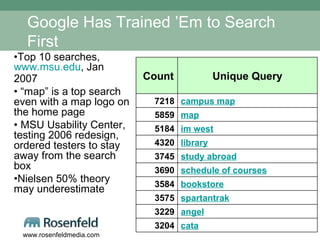
Google Has Trained ’Em to Search First Top 10 searches,  www.msu.edu , Jan 2007 “ map” is a top search even with a map logo on the home page MSU Usability Center, testing 2006 redesign, ordered testers to stay away from the search box  Nielsen 50% theory may underestimate cata 3204 angel 3229 spartantrak 3575 bookstore 3584 schedule of courses 3690 study abroad 3745 library 4320 im west 5184 map 5859 campus map 7218 Unique Query Count
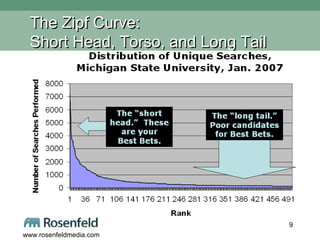
The Zipf Curve:  Short Head, Torso, and Long Tail
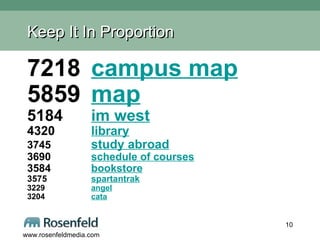
Keep It In Proportion 7218 campus map 5859 map 5184 im west 4320 library 3745 study abroad 3690 schedule of courses 3584 bookstore 3575 spartantrak 3229 angel 3204 cata
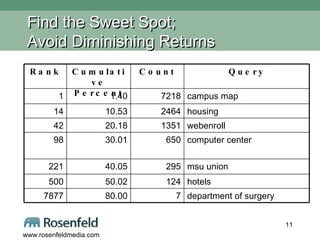
Find the Sweet Spot;  Avoid Diminishing Returns department of surgery 7 80.00 7877 hotels 124 50.02 500 msu union 295 40.05 221 computer center 650 30.01 98 webenroll 1351 20.18 42 housing 2464 10.53 14 campus map  7218 1.40 1 Query Count Cumulative Percent Rank
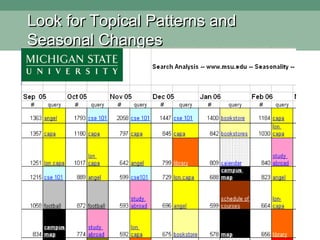
Look for Topical Patterns and  Seasonal Changes
Does Best Bets Apply to Everyone? Walter Underwood, former chief architect of Ultraseek: Instead of Best Bets, Get a Better Search Engine Best Bets requires human labor Commitment of time and attention … so do good search engine implementations
We Didn’t Start the Fire; credit to: Vilfredo Pareto, circa 1890 – “the law of the vital few” (simplified as “80-20 rule”) George Kingsley Zipf, Harvard, circa 1932 – counting the words used in Joyce’s  Ulysses   “ the” is more common than “no” or “Dublin” Bradford’s Law of Scattering, circa 1934 – a small number of journals accounts for a large percent of all important papers Cited, most importantly, by the pricing model of Elsevier for leading scientific journals Many  other best bet pioneers:  Microsoft, Raytheon, BBC, ESPN, AOL
Where will you Capture Search Queries The search logs that your search engine naturally captures and maintains as searches take place Search keywords or phrases that your users execute, that you capture into your own local database Search keywords or phrases that your commercial search solution captures, records, and reports on (Mondosoft, Web Side Story, Ultraseek, Google Appliance, etc.)
Anatomy of a Search Log (from Google Search Appliance) Critical elements in bold:  IP address ,  time/date stamp ,  query , and  # of results: XXX.XXX.X.104  - - [ 10/Jul/2006:10:25:46  -0800] "GET /search?access=p&entqr=0&output=xml_no_dtd&sort=date%3AD%3AL%3Ad1&ud=1&site=AllSites&ie=UTF-8&client=www&oe=UTF-8&proxystylesheet=www&q= lincense+plate &ip=XXX.XXX.X.104 HTTP/1.1" 200 971  0  0.02 XXX.XXX.X.104  - - [ 10/Jul/2006:10:25:48  -0800] "GET /search?access=p&entqr=0&output=xml_no_dtd&sort=date%3AD%3AL%3Ad1&ie=UTF-8&client=www&q= license+plate &ud=1&site=AllSites&spell=1&oe=UTF-8&proxystylesheet=www&ip=XXX.XXX.X.104 HTTP/1.1" 200 8283  146  0.16 XXX.XXX.XX.130  - - [ 10/Jul/2006:10:24:38  -0800] "GET /search?access=p&entqr=0&output=xml_no_dtd&sort=date%3AD%3AL%3Ad1&ud=1&site=AllSites&ie=UTF-8&client=www&oe=UTF-8&proxystylesheet=www&q= regional+transportation+governance+commission &ip=XXX.XXX.X.130 HTTP/1.1" 200 9718  62  0.17 Full legend and more examples available from book site
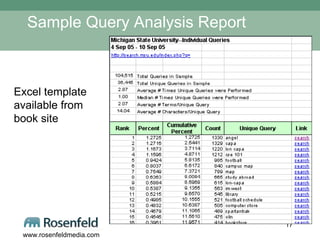
Sample Query Analysis Report Excel template available from book site
Querying your Queries:  Some basic questions   1/2 What are the most common unique queries? Do any interesting patterns emerge from analyzing these common queries? When common queries are searched, are the results the ones your users  should  be seeing? Which common queries retrieve zero results?  Which common queries retrieve a large number of results, say 100 or more?
Querying your Queries:  Some basic questions   2/2 Which common queries retrieve results that don’t get clicked through?  What page is the top source (referrer) per common query? What is the number of click-throughs per common query?  Which result is most frequently clicked-through per common query? What’s the average query length (number of terms, number of characters)? Which URLs are users searching for?
Tune your Questions: Broad to specific Netflix asks: Which movies most frequently searched? Which of them most frequently clicked through? Which of them  least  frequently added to queue (and why)?  Examples:  “ OO7” versus “007” Porn-related (not carried by Netflix) “ yoga”:  not stocking enough?  or not indexing enough record content?
SA as Diagnostic Tool:  What can you fix or improve? User Research Interface Design:  search entry interface, search results Retrieval Algorithm Modification Navigation Design Metadata Development Content Development
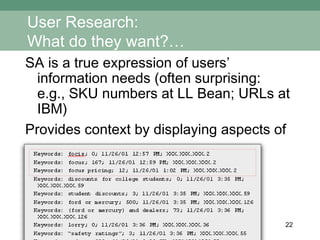
User Research: What do they want?… SA is a true expression of users’ information needs (often surprising:  e.g., SKU numbers at LL Bean; URLs at IBM) Provides context by displaying aspects of single search sessions
User Research: …who wants it?… What can you learn from knowing these things? What specific segments want; determined by: Security clearance IP address Job function Account information Which pages they initiate searches from
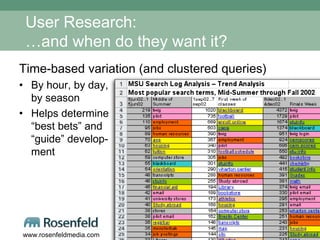
User Research: …and when do they want it? Time-based variation (and clustered queries) By hour, by day, by season Helps determine “best bets” and “guide” develop- ment
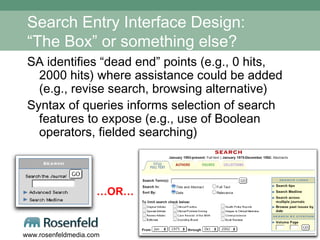
Search Entry Interface Design: “The Box” or something else? SA identifies “dead end” points (e.g., 0 hits, 2000 hits) where assistance could be added (e.g., revise search, browsing alternative)  Syntax of queries informs selection of search features to expose (e.g., use of Boolean operators, fielded searching) … OR…
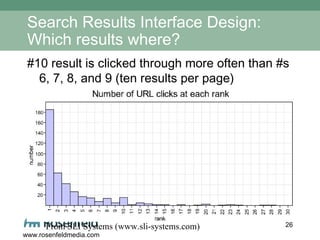
Search Results Interface Design: Which results where? #10 result is clicked through more often than #s 6, 7, 8, and 9 (ten results per page) From SLI Systems (www.sli-systems.com)
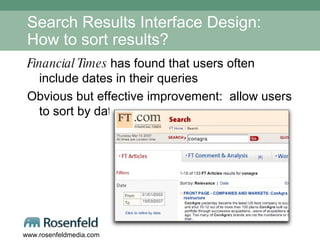
Search Results Interface Design: How to sort results? Financial Times  has found that users often include dates in their queries Obvious but effective improvement:  allow users to sort by date
Search System: What to change? Identify new functionality:  Financial Times  added spell checking Retrieval algorithm modifications: Deloitte, Barnes & Noble use SA to demonstrate that basic improvements (e.g., Best Bets) are insufficient Financial Times  weights company names higher
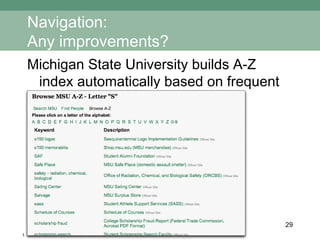
Navigation: Any improvements? Michigan State University builds A-Z index automatically based on frequent queries
Navigation: Where does it fail? Track and study pages (excluding main page) where search is initiated Are there obvious issues that would cause a “dead end”?  Are there user studies that could test/validate problems on these pages? Sandia Labs analyzes most requested documents to test content independent of site structure; results used to improve structure
Metadata Development: How do users express their needs? SA provides a sense of  tone:  how users’ needs are expressed  Jargon (e.g., “cancer” vs. “oncology,” “lorry” vs. “truck,” acronyms) Length (e.g., number of terms/query) Syntax (e.g., Boolean, natural language, keyword)
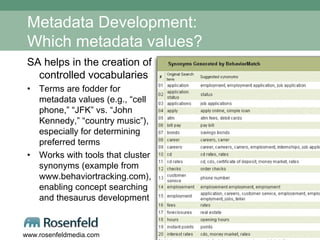
Metadata Development: Which metadata values? SA helps in the creation of controlled vocabularies Terms are fodder for metadata values (e.g., “cell phone,” “JFK” vs. “John Kennedy,” “country music”), especially for determining preferred terms Works with tools that cluster synonyms (example from www.behaviortracking.com), enabling concept searching and thesaurus development
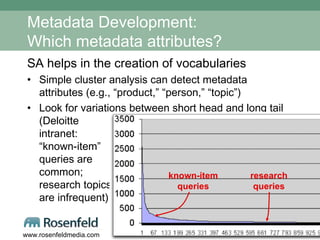
Metadata Development: Which metadata attributes? SA helps in the creation of vocabularies Simple cluster analysis can detect metadata attributes (e.g., “product,” “person,” “topic”) Look for variations between short head and long tail (Deloitte intranet:  “known-item”  queries are  common;  research topics  are infrequent) known-item queries research queries
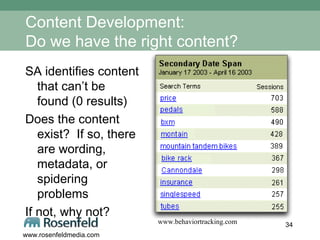
Content Development: Do we have the right content? SA identifies content that can’t be found (0 results) Does the content exist?  If so, there are wording, metadata, or spidering problems If not, why not? www.behaviortracking.com
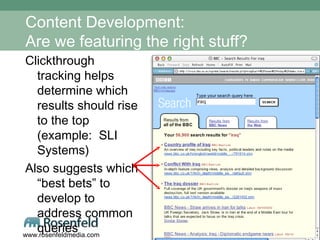
Content Development: Are we featuring the right stuff? Clickthrough tracking helps determine which results should rise to the top (example:  SLI Systems) Also suggests which “best bets” to develop to address common queries
Organizational Impact: Educational opportunities SA is a way to “reverse engineer” how your site performs in order to: Sensitize organization to analytics, specifically related to findability Sensitize content owners/authors to benefits of good practices around content titling, tagging, and navigational placement
Organizational Impact: Rethinking how you do things Financial Times  learns about breaking stories from their logs by monitoring spikes in company names and individuals’ names and comparing with their current coverage Discrepancy = possible breaking story; reporter is assigned to follow up Next step?  Assign reporters to “beats” that emerge from SA
SA as User Research Method:  Sleeper, but no panacea Benefits Non-intrusive Inexpensive and (usually) accessible Large volume of “real” data Represents actual usage patterns Drawbacks Provides an incomplete picture of usage:  was user satisfied at session’s end? Difficult to analyze:  where are the commercial tools? Ultimately an excellent  complement  to qualitative methods (e.g., task analysis, field studies)
SA Headaches: What gets in the way? Lack of time Few useful tools for parsing logs, generating reports Tension between those who want to perform SA and those who “own” the data (chiefly IT) Ignorance of the method Hard work and/or boredom of doing analysis  From summer 2006 survey (134 responses), available at book site.
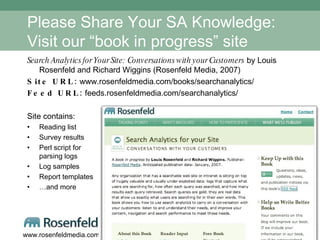
Please Share Your SA Knowledge: Visit our “book in progress” site Search Analytics for Your Site:  Conversations with your Customers  by Louis Rosenfeld and Richard Wiggins (Rosenfeld Media, 2007) Site URL:  www.rosenfeldmedia.com/books/searchanalytics/ Feed URL:  feeds.rosenfeldmedia.com/searchanalytics/ Site contains: Reading list Survey results Perl script for  parsing logs Log samples Report templates … and more
Contact Information Rich Wiggins [email_address] Louis Rosenfeld  [email_address] http://rosenfeldmedia.com/books/searchanalytics

Using Search Analytics to Diagnose What’s Ailing your Information Architecture

  • 1.
    Using Search Analyticsto Diagnose What’s Ailing your Information Architecture ASIS&T IA Summit Las Vegas, Nevada March 24, 2007 Rich Wiggins & Lou Rosenfeld www.rosenfeldmedia.com/books/searchanalytics
  • 2.
    Trying to Fitinto the IA Summit 2007 Theme… Rich Information Rich Interaction Rich Relationships Rich Wiggins
  • 3.
    Thesis By analyzingsearch logs, you engage in a conversation with your customers At best, it’s a two way conversation: Your users tell you what they seek You tune your search engine (and your site) to give them what they seek the most If you’re not analyzing your search logs, then you aren’t listening to your customers Search is too important to leave in the hands of robots
  • 4.
    The Wonderful ThingsSearch Engines Do Help harness massive amounts of content Thousands, millions, billions of URLs Cut across barriers Document structure Topical structure Institutional structure, silos
  • 5.
    The Horrible Thingsthat Search Engines Do Confuse low-value content with vital content And point to obsolete content And draft, internal, duplicative content Rank leaf pages ahead of starting points Rank popular or personal pages ahead of official content
  • 6.
    MSU Keywords: AccidentalThesaurus Circa 1999 MSU’s local AltaVista stopped scaling Search for “human resources” and you get resume for a student in the HR program We had to do something We asked AltaVista for a way to goose the real HR site to the top of the hit list They didn’t deliver So we rolled our own Best Bets service, called it MSU Keywords And it worked!
  • 7.
    Methodology Study themost popular unique searches Map each to appropriate URL “human resources” -> hr.msu.edu “campus map” -> www.msu.edu/maps Watch the results: User complaints go down So do content provider complaints Continue to watch, learn, and act
  • 8.
    Google Has Trained’Em to Search First Top 10 searches, www.msu.edu , Jan 2007 “ map” is a top search even with a map logo on the home page MSU Usability Center, testing 2006 redesign, ordered testers to stay away from the search box Nielsen 50% theory may underestimate cata 3204 angel 3229 spartantrak 3575 bookstore 3584 schedule of courses 3690 study abroad 3745 library 4320 im west 5184 map 5859 campus map 7218 Unique Query Count
  • 9.
    The Zipf Curve: Short Head, Torso, and Long Tail
  • 10.
    Keep It InProportion 7218 campus map 5859 map 5184 im west 4320 library 3745 study abroad 3690 schedule of courses 3584 bookstore 3575 spartantrak 3229 angel 3204 cata
  • 11.
    Find the SweetSpot; Avoid Diminishing Returns department of surgery 7 80.00 7877 hotels 124 50.02 500 msu union 295 40.05 221 computer center 650 30.01 98 webenroll 1351 20.18 42 housing 2464 10.53 14 campus map 7218 1.40 1 Query Count Cumulative Percent Rank
  • 12.
    Look for TopicalPatterns and Seasonal Changes
  • 13.
    Does Best BetsApply to Everyone? Walter Underwood, former chief architect of Ultraseek: Instead of Best Bets, Get a Better Search Engine Best Bets requires human labor Commitment of time and attention … so do good search engine implementations
  • 14.
    We Didn’t Startthe Fire; credit to: Vilfredo Pareto, circa 1890 – “the law of the vital few” (simplified as “80-20 rule”) George Kingsley Zipf, Harvard, circa 1932 – counting the words used in Joyce’s Ulysses “ the” is more common than “no” or “Dublin” Bradford’s Law of Scattering, circa 1934 – a small number of journals accounts for a large percent of all important papers Cited, most importantly, by the pricing model of Elsevier for leading scientific journals Many other best bet pioneers: Microsoft, Raytheon, BBC, ESPN, AOL
  • 15.
    Where will youCapture Search Queries The search logs that your search engine naturally captures and maintains as searches take place Search keywords or phrases that your users execute, that you capture into your own local database Search keywords or phrases that your commercial search solution captures, records, and reports on (Mondosoft, Web Side Story, Ultraseek, Google Appliance, etc.)
  • 16.
    Anatomy of aSearch Log (from Google Search Appliance) Critical elements in bold: IP address , time/date stamp , query , and # of results: XXX.XXX.X.104 - - [ 10/Jul/2006:10:25:46 -0800] "GET /search?access=p&entqr=0&output=xml_no_dtd&sort=date%3AD%3AL%3Ad1&ud=1&site=AllSites&ie=UTF-8&client=www&oe=UTF-8&proxystylesheet=www&q= lincense+plate &ip=XXX.XXX.X.104 HTTP/1.1" 200 971 0 0.02 XXX.XXX.X.104 - - [ 10/Jul/2006:10:25:48 -0800] "GET /search?access=p&entqr=0&output=xml_no_dtd&sort=date%3AD%3AL%3Ad1&ie=UTF-8&client=www&q= license+plate &ud=1&site=AllSites&spell=1&oe=UTF-8&proxystylesheet=www&ip=XXX.XXX.X.104 HTTP/1.1" 200 8283 146 0.16 XXX.XXX.XX.130 - - [ 10/Jul/2006:10:24:38 -0800] "GET /search?access=p&entqr=0&output=xml_no_dtd&sort=date%3AD%3AL%3Ad1&ud=1&site=AllSites&ie=UTF-8&client=www&oe=UTF-8&proxystylesheet=www&q= regional+transportation+governance+commission &ip=XXX.XXX.X.130 HTTP/1.1" 200 9718 62 0.17 Full legend and more examples available from book site
  • 17.
    Sample Query AnalysisReport Excel template available from book site
  • 18.
    Querying your Queries: Some basic questions 1/2 What are the most common unique queries? Do any interesting patterns emerge from analyzing these common queries? When common queries are searched, are the results the ones your users should be seeing? Which common queries retrieve zero results? Which common queries retrieve a large number of results, say 100 or more?
  • 19.
    Querying your Queries: Some basic questions 2/2 Which common queries retrieve results that don’t get clicked through? What page is the top source (referrer) per common query? What is the number of click-throughs per common query? Which result is most frequently clicked-through per common query? What’s the average query length (number of terms, number of characters)? Which URLs are users searching for?
  • 20.
    Tune your Questions:Broad to specific Netflix asks: Which movies most frequently searched? Which of them most frequently clicked through? Which of them least frequently added to queue (and why)? Examples: “ OO7” versus “007” Porn-related (not carried by Netflix) “ yoga”: not stocking enough? or not indexing enough record content?
  • 21.
    SA as DiagnosticTool: What can you fix or improve? User Research Interface Design: search entry interface, search results Retrieval Algorithm Modification Navigation Design Metadata Development Content Development
  • 22.
    User Research: Whatdo they want?… SA is a true expression of users’ information needs (often surprising: e.g., SKU numbers at LL Bean; URLs at IBM) Provides context by displaying aspects of single search sessions
  • 23.
    User Research: …whowants it?… What can you learn from knowing these things? What specific segments want; determined by: Security clearance IP address Job function Account information Which pages they initiate searches from
  • 24.
    User Research: …andwhen do they want it? Time-based variation (and clustered queries) By hour, by day, by season Helps determine “best bets” and “guide” develop- ment
  • 25.
    Search Entry InterfaceDesign: “The Box” or something else? SA identifies “dead end” points (e.g., 0 hits, 2000 hits) where assistance could be added (e.g., revise search, browsing alternative) Syntax of queries informs selection of search features to expose (e.g., use of Boolean operators, fielded searching) … OR…
  • 26.
    Search Results InterfaceDesign: Which results where? #10 result is clicked through more often than #s 6, 7, 8, and 9 (ten results per page) From SLI Systems (www.sli-systems.com)
  • 27.
    Search Results InterfaceDesign: How to sort results? Financial Times has found that users often include dates in their queries Obvious but effective improvement: allow users to sort by date
  • 28.
    Search System: Whatto change? Identify new functionality: Financial Times added spell checking Retrieval algorithm modifications: Deloitte, Barnes & Noble use SA to demonstrate that basic improvements (e.g., Best Bets) are insufficient Financial Times weights company names higher
  • 29.
    Navigation: Any improvements?Michigan State University builds A-Z index automatically based on frequent queries
  • 30.
    Navigation: Where doesit fail? Track and study pages (excluding main page) where search is initiated Are there obvious issues that would cause a “dead end”? Are there user studies that could test/validate problems on these pages? Sandia Labs analyzes most requested documents to test content independent of site structure; results used to improve structure
  • 31.
    Metadata Development: Howdo users express their needs? SA provides a sense of tone: how users’ needs are expressed Jargon (e.g., “cancer” vs. “oncology,” “lorry” vs. “truck,” acronyms) Length (e.g., number of terms/query) Syntax (e.g., Boolean, natural language, keyword)
  • 32.
    Metadata Development: Whichmetadata values? SA helps in the creation of controlled vocabularies Terms are fodder for metadata values (e.g., “cell phone,” “JFK” vs. “John Kennedy,” “country music”), especially for determining preferred terms Works with tools that cluster synonyms (example from www.behaviortracking.com), enabling concept searching and thesaurus development
  • 33.
    Metadata Development: Whichmetadata attributes? SA helps in the creation of vocabularies Simple cluster analysis can detect metadata attributes (e.g., “product,” “person,” “topic”) Look for variations between short head and long tail (Deloitte intranet: “known-item” queries are common; research topics are infrequent) known-item queries research queries
  • 34.
    Content Development: Dowe have the right content? SA identifies content that can’t be found (0 results) Does the content exist? If so, there are wording, metadata, or spidering problems If not, why not? www.behaviortracking.com
  • 35.
    Content Development: Arewe featuring the right stuff? Clickthrough tracking helps determine which results should rise to the top (example: SLI Systems) Also suggests which “best bets” to develop to address common queries
  • 36.
    Organizational Impact: Educationalopportunities SA is a way to “reverse engineer” how your site performs in order to: Sensitize organization to analytics, specifically related to findability Sensitize content owners/authors to benefits of good practices around content titling, tagging, and navigational placement
  • 37.
    Organizational Impact: Rethinkinghow you do things Financial Times learns about breaking stories from their logs by monitoring spikes in company names and individuals’ names and comparing with their current coverage Discrepancy = possible breaking story; reporter is assigned to follow up Next step? Assign reporters to “beats” that emerge from SA
  • 38.
    SA as UserResearch Method: Sleeper, but no panacea Benefits Non-intrusive Inexpensive and (usually) accessible Large volume of “real” data Represents actual usage patterns Drawbacks Provides an incomplete picture of usage: was user satisfied at session’s end? Difficult to analyze: where are the commercial tools? Ultimately an excellent complement to qualitative methods (e.g., task analysis, field studies)
  • 39.
    SA Headaches: Whatgets in the way? Lack of time Few useful tools for parsing logs, generating reports Tension between those who want to perform SA and those who “own” the data (chiefly IT) Ignorance of the method Hard work and/or boredom of doing analysis From summer 2006 survey (134 responses), available at book site.
  • 40.
    Please Share YourSA Knowledge: Visit our “book in progress” site Search Analytics for Your Site: Conversations with your Customers by Louis Rosenfeld and Richard Wiggins (Rosenfeld Media, 2007) Site URL: www.rosenfeldmedia.com/books/searchanalytics/ Feed URL: feeds.rosenfeldmedia.com/searchanalytics/ Site contains: Reading list Survey results Perl script for parsing logs Log samples Report templates … and more
  • 41.
    Contact Information RichWiggins [email_address] Louis Rosenfeld [email_address] http://rosenfeldmedia.com/books/searchanalytics